
Need A VPN
Table of Contents
Why do we need a VPN?
A VPN (Virtual Private Network) is needed to create a secure and encrypted connection over the internet. It protects sensitive data, enables secure remote access to private networks, and keeps communications confidential while using public or untrusted networks.
A VPN allows employees to securely access office resources such as file servers, ERP applications, databases, printers, IP cameras, and Remote Desktop services from anywhere in the world. After connecting to the VPN, users can work as if they were physically connected to the office network.
A VPN encrypts all network traffic between the user’s device and the VPN server. Even if someone intercepts the data while it is traveling across the internet, they cannot easily read or modify the information because it is encrypted.
A VPN also reduces the need to expose internal services directly to the internet. Instead of opening ports for services such as RDP, file sharing, or CCTV, users first authenticate to the VPN and then securely access those resources through the encrypted tunnel.
Real Example:
A company has:
- File Server: 192.168.1.10
- ERP Server: 192.168.1.20
- CCTV NVR: 192.168.1.30
An employee is working from home. The employee connects to the company’s VPN server using a laptop. After successful authentication, the VPN assigns a secure IP address (for example, 10.10.10.2). The employee can now securely access the file server, ERP system, and CCTV exactly as if they were in the office, while all communication is encrypted and protected from interception.
Why Do Hackers Use VPNs?
Hackers may use VPNs to hide their real IP address, making it more difficult for websites and online services to identify the original source of their connection. Instead of seeing the attacker’s actual IP address, the destination sees the VPN server’s IP address.
Some attackers use VPNs to make it harder to trace their activities. However, a VPN does not make someone anonymous or immune from investigation. Investigators can often combine evidence from multiple sources, and some VPN providers keep logs that may be available through legal processes.
Hackers may also use VPNs to change their apparent geographic location or obtain a different IP address if one has been blocked by a website or service. This can help them avoid simple IP-based restrictions, though it does not bypass other security controls.
Problems Without a VPN?
Without a VPN, data travels over the internet without the additional encrypted tunnel that a VPN provides. Although many websites already use HTTPS encryption, a VPN adds another layer of protection and securely connects you to private networks.
Without a VPN, remote employees cannot securely access private office resources such as file servers, ERP systems, databases, printers, and CCTV unless those services are exposed to the internet or another secure remote-access method is used. Exposing internal services directly to the internet increases security risks.
Without a VPN, users on public Wi-Fi networks have less protection. A VPN encrypts all traffic between the device and the VPN server, helping protect against certain network-based attacks and reducing the risk of others on the same network observing unprotected traffic.
Without a VPN, your public IP address is visible to the websites and services you connect to. This can reveal your approximate location and network provider, though it does not reveal your exact physical address.
Real Example:
A company has an internal file server at 192.168.1.10.
Without a VPN:
- An employee working from home cannot directly access 192.168.1.10 because it is a private IP address.
- If the company exposes services like Remote Desktop (RDP) directly to the internet instead of using a VPN, attackers may attempt password guessing or exploit software vulnerabilities if the system is not properly secured.
With a VPN:
- The employee first connects to the company’s VPN.
- After authentication, they receive a VPN IP (for example, 10.10.10.2).
- They can securely access 192.168.1.10 through the encrypted VPN tunnel without exposing the internal server directly to the internet.
There are two primary reasons why organizations need to utilize Virtual Private Network (VPN) technology. Let’s examine each one.
Security:
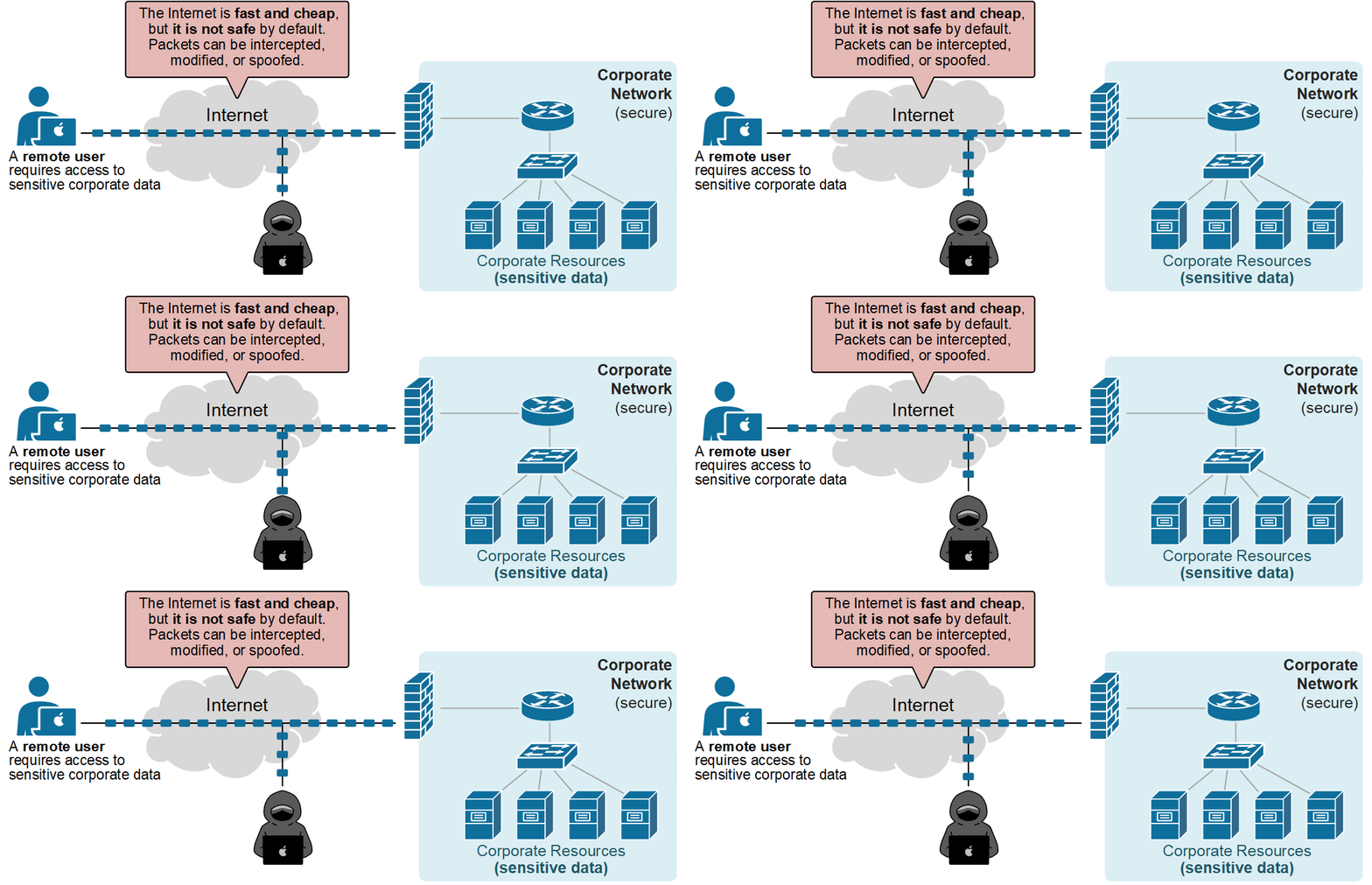
Modern networks rely heavily on the public Internet. Employees work from home over the Internet, partners connect to internal apps over the Internet, and branches access the DC over the Internet. Why, you may wonder? Because the Internet is everywhere now. It is fast, cheap, and reliable.
However, there is one problem – the Internet is not safe by default. Packets travel over the public network. They can be intercepted, modified, or spoofed, as shown in the diagram below. Attackers can watch unencrypted traffic and learn usernames, cookies, and database queries
At this point, you may ask – well, what if we use HTTPS? Even if an application uses HTTPS, small gaps remain: metadata still leaks, certificates are exposed, and there is another problem…
Routing and Private Addressing:
- Another reason organizations need a VPN is that private IPs are not routable across the Internet. Corporate networks usually use private address spaces, such as 10.0.0.0/8, 172.16.0.0/12, or 192.168.0.0/16. These ranges are filtered by Internet providers.
- Let’s see the following example. Suppose a remote user connected to the Internet wants to access a corporate printer with the IP address 10.0.7.5. The user sends the packets with the source IP set to its own IP address and the destination IP set to 10.0.7.5 (the address of the printer). What do you think will happen? Of course, the remote user cannot reach any internal resource with a private IP address, because RFC1918 addresses are not routable over the Internet, as shown in the diagram below.
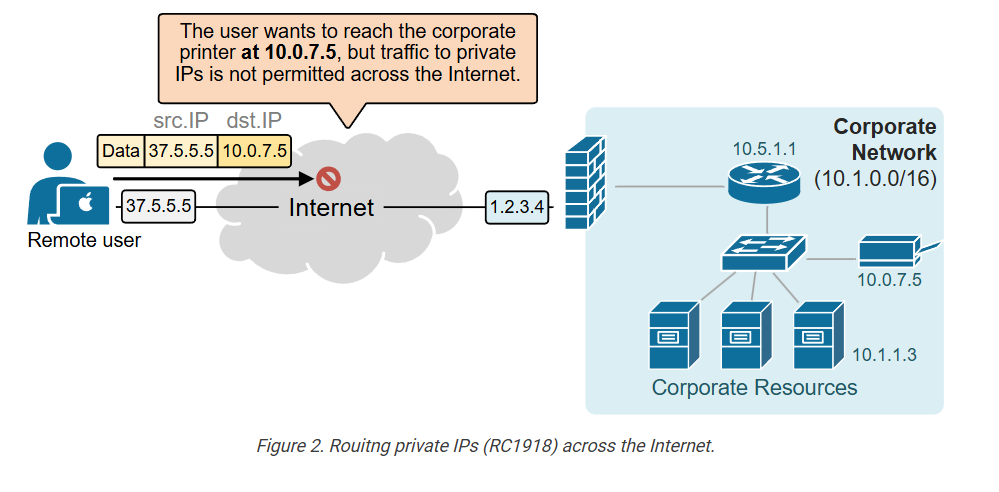
- Devices with private IP addresses are invisible outside the organization’s network. Someone may say, ‘Don’t we have NAT for this case?‘ Can’t we translate the printer’s address to a public IP address and access it over the Internet?
- Techniallly, we can, but NAT is not meant to be used to translate EVERY corporate IP to a public one. It is typically used for internal web servers and other applications that are publicly exposed. If remote users need to access every corporate internal IP from the outside, you cannot NAT the entire organization’s internal IP space…
What is a VPN?
- A Virtual Private Network (VPN) solves these two problems that we saw above. It lets you build a private, encrypted path across an untrusted network, typically the Internet.
- With a VPN, two endpoints act as if they are directly connected. The tunnel uses cryptographic mathematical algorithms that protect confidentiality, integrity, and authenticity.
- There are two primary types of VPNs: Remote access VPN (also called SSL VPN) and Site-to-site VPN. Let’s see each one in more detail.
Remote Access VPN:
When a remote user connects with a remote-access VPN, their device becomes an extension of the corporate network. The VPN tunnel acts like a secure virtual cable between the user and the office, as shown in the diagram below.
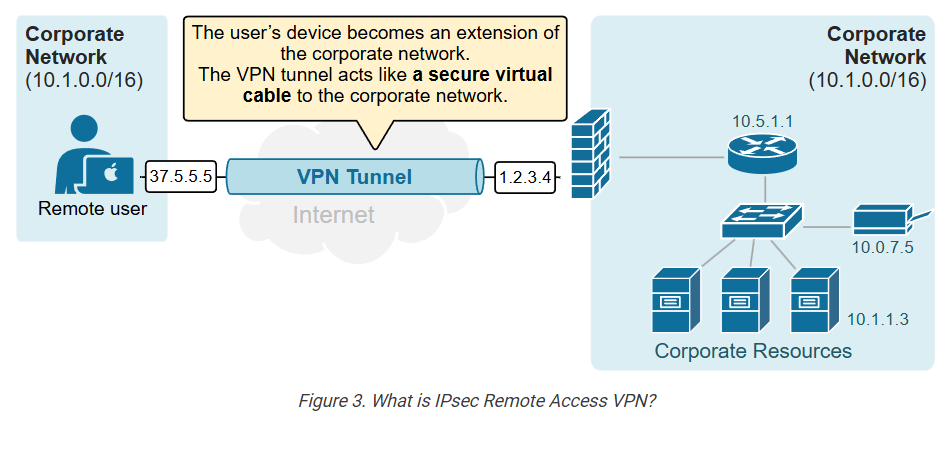
The user’s device receives an IP address from the company’s internal range. This makes the device appear as if it is inside the LAN. As a result, the user can access private corporate subnets, servers, and applications that would normally be unreachable from the internet.
Site-to-Site VPN:
- A site-to-site VPN links two distant networks so they act like one private network. It is often used to connect branch offices to a headquarters.
- Each site has a VPN device, usually a router or firewall. These devices build an encrypted tunnel over the internet. Inside that tunnel, they exchange traffic between the two LANs. Users on one side can reach servers and hosts on the other side as if they were on the same internal network.
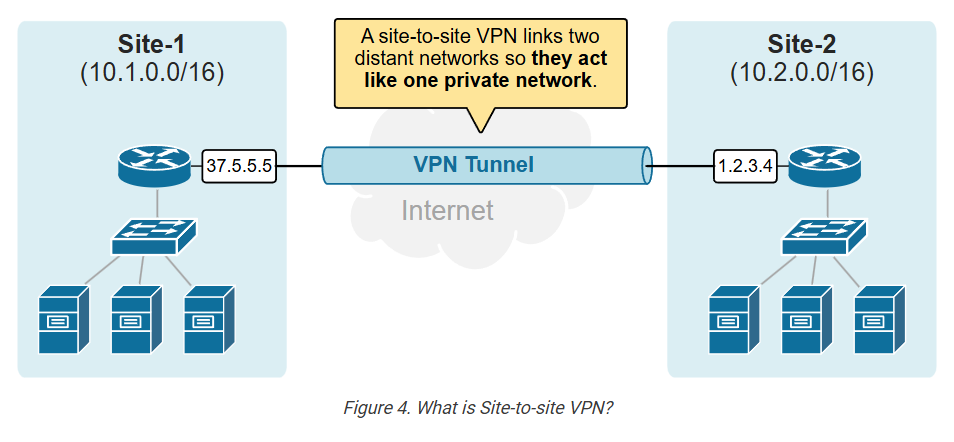
The key point is that the connection is always between networks, not individual users. Once the tunnel is up, the two sites stay connected automatically.
How does a Remote Access VPN work
Now, let’s see a high-level overview of how a remote access VPN works. Let’s use the same example as above. Suppose a remote user wants to access a corporate printer with IP address 10.0.7.5 over the Internet. To do so, the user establishes a remote access VPN, such as Cisco AnyConnect, to connect to the corporate network. Behind the scenes, we can break down the process into five simplified steps, as shown in the diagram below.
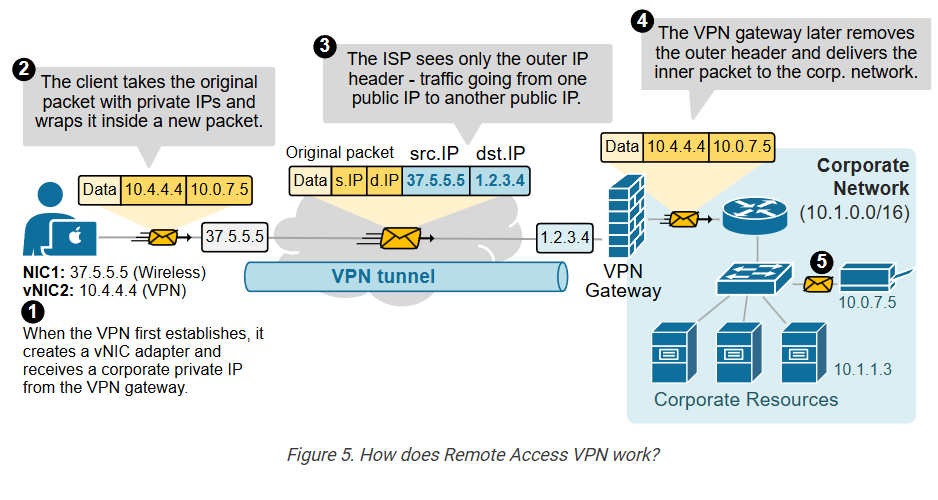
Step 1: When the VPN connects for the first time, it creates a virtual NIC on the client device. The device gets a private corporate IP address 10.4.4.4 and routing rules for the corporate networks – 10.1.0.0/16 via 10.4.4.4.
Step 2: When the client sends traffic to corporate IPs (for example, to the corporate printer at 10.0.7.5), the traffic matches the VPN route. The client builds a packet with its private IP 10.4.4.4 as the source and the printer IP 10.0.7.5 as the destination, then wraps it in an outer header.
Step 3: The ISP sees only the outer header (in blue), showing traffic from the user device’s public IP address (37.5.5.5) to the VPN gateway’s public IP address (1.2.3.4).
Step 4: The VPN gateway removes the outer header (in blue) and forwards the inner packet (in yellow) into the corporate network.
Step 5: The destination host (the printer) receives the packet from the client’s assigned private IP, just like any other internal device.
Ultimately, from a logical perspective, it appears that the remote user is directly connected to the corporate network, as illustrated in the diagram below.
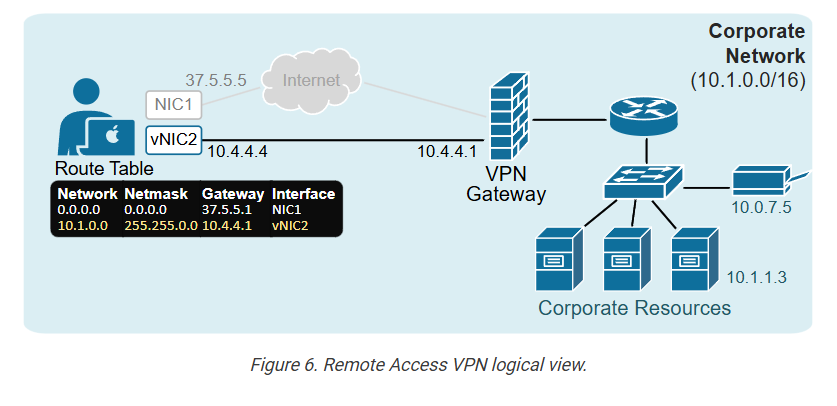
Of course, the example is overly simplified, but it highlights the main idea of Virtual Private Networks (VPNs).
Key Takeaways:
- VPN protects data across untrusted networks.
- Main needs: security and routing private IPs.
- The Internet is not safe; traffic can be intercepted, malformed, or spoofed.
- Private IPs (RFC1918) are not routable on the Internet.
- VPN creates encrypted tunnels for confidentiality and integrity.
- Two main types: Remote-access and Site-to-site VPN.
- Remote access extends the user device into the LAN.
- Site-to-site links two networks over the Internet.
- Remote-access workflow: virtual NIC, corporate IP, routes, encrypted tunnel.
How Does a Site To Site VPN work
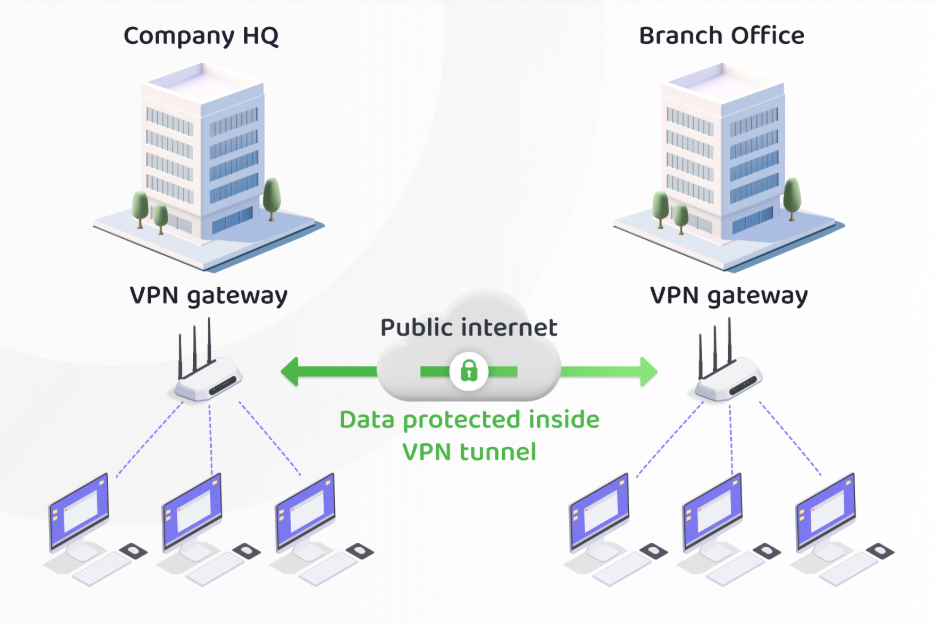
A Site-to-Site VPN is a secure networking solution that connects two or more geographically separated local area networks (LANs) over the public Internet. Instead of connecting individual users, it connects entire office networks, allowing devices at different locations to communicate as if they were on the same private network.
Each office has a VPN gateway, such as a router or firewall, with its own public IP address and local private network. These VPN gateways establish a secure, encrypted tunnel between them using VPN technologies such as IPsec. Once the tunnel is created, all authorized traffic between the two networks passes through this encrypted connection.
When a user at the branch office sends data to a server located at the head office, the data first reaches the branch office VPN gateway. The gateway encrypts the packets before sending them across the Internet. Even though the data travels over a public network, it remains protected from unauthorized access because it is fully encrypted.
After the encrypted traffic reaches the head office VPN gateway, the gateway decrypts the packets and forwards them to the destination device on the local network. The destination server processes the request and sends the response back through the same encrypted VPN tunnel, ensuring secure two-way communication.
From the users’ perspective, the entire process is seamless. Employees at the branch office can access shared resources such as file servers, databases, printers, ERP systems, CCTV systems, VoIP servers, and other internal applications exactly as if they were connected to the head office network.
A Site-to-Site VPN offers several advantages. It provides secure communication over the Internet without requiring expensive dedicated leased lines. It protects sensitive business data through strong encryption, reduces networking costs, enables centralized management of resources, and allows organizations to securely connect multiple branches, warehouses, factories, or remote offices.
A common real-world example is a company with a head office in one city and branch offices in other cities. The database server is located at the head office, while employees in the branch offices access the same database through the Site-to-Site VPN. All communication between the offices is encrypted, allowing staff to work securely while using shared applications and resources across different locations.
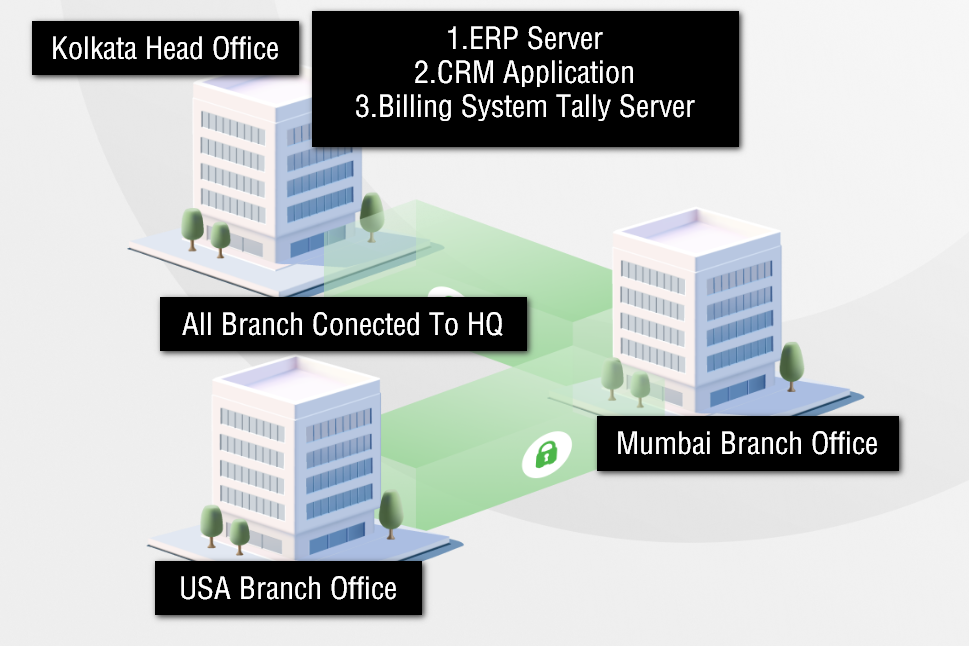
A company has its Head Office in Kolkata and a Branch Office in Delhi. The head office hosts all the important IT resources, including the ERP server, file server, CCTV NVR, and database server. Employees in the Delhi branch need to access these resources every day.
The head office has a firewall with a public IP address and a local network of 192.168.1.0/24. The Delhi branch also has a firewall with its own public IP address and a local network of 192.168.2.0/24. An IPsec Site-to-Site VPN is configured between the two firewalls.
When an employee in the Delhi office opens the ERP application, the request is sent to the local firewall. Instead of sending the data over the Internet in plain text, the firewall encrypts the traffic and sends it through the secure VPN tunnel. The head office firewall receives the encrypted traffic, decrypts it, and forwards it to the ERP server. The server processes the request and sends the response back through the same encrypted tunnel.
Similarly, if the branch office wants to view the CCTV cameras or NVR installed at the head office, the CCTV traffic also passes through the VPN tunnel. Employees can monitor live video securely without exposing the CCTV system directly to the Internet.
The same VPN connection also allows the branch office to access shared folders, print to network printers at the head office, use the central database, connect to the PBX/VoIP server, and communicate with other office systems securely.
Because of the Site-to-Site VPN, employees at both locations work as if they are connected to the same office network, even though the offices are hundreds or thousands of kilometers apart. All communication is encrypted, protecting sensitive business data while reducing the need for expensive dedicated leased lines.
Different Between Site-to-Site VPN and Remote Access VPN
A Site-to-Site VPN and a Remote Access VPN are both used to create secure connections over the internet, but they serve different purposes and operate in different ways.
A Site-to-Site VPN connects entire networks, such as a head office and branch offices. It is a network-to-network connection, where routers or firewalls at both locations create a secure tunnel using protocols like IPsec. This connection is usually always active, and employees do not need to log in manually. It is mainly used by organizations with multiple office locations to share resources and maintain centralized systems.
On the other hand, a Remote Access VPN is used to connect individual users to a company network. It is a user-to-network connection, where employees use VPN client software on their laptops or mobile devices to log in securely. It commonly uses protocols like SSL or IPsec. This type of VPN is typically used for work-from-home employees or users who are traveling.
Another key difference is how the connection is established. In a Site-to-Site VPN, the connection is automatic and always ON between the networks. In contrast, Remote Access VPN requires users to manually start the connection and authenticate themselves using usernames, passwords, or multi-factor authentication.
In terms of usage, Site-to-Site VPN is ideal for office-to-office communication, enabling seamless data sharing between locations. Remote Access VPN is ideal for individual remote connectivity, allowing employees to access company resources from anywhere.
In summary, a Site-to-Site VPN connects networks and works automatically in the background, while a Remote Access VPN connects individual users and requires manual login through a VPN client.
Site-to-Site VPN and Remote Access VPN Chart Table
| Feature | Site-to-Site VPN | Remote Access VPN |
|---|---|---|
| Definition | Connects entire networks (office to office) | Connects individual users to a network |
| Connection Type | Network-to-Network | User-to-Network |
| User Involvement | No manual login required | User must log in using VPN client |
| Devices Used | Routers / Firewalls at both sites | User devices (laptop, mobile) with VPN software |
| Common Protocol | IPsec | SSL / IPsec |
| Connection Status | Always ON (permanent tunnel) | On-demand (connect when needed) |
| Use Case | Head Office ↔ Branch Office | Work From Home / Remote employees |
| Example | Office in one city connected to branch in another | Employee connecting from home to office network |
| Scalability | Add new branches by configuring tunnels | Add new users by installing VPN client |
| Management | Managed centrally by network admins | Managed per user/device |
| Security Level | High (fixed endpoints, controlled devices) | High but depends on user device security |
| Feature | Site-to-Site VPN | Remote Access VPN |
|---|---|---|
| Definition | Connects two or more office networks securely over the internet | Connects individual users to a company network remotely |
| Connection Type | Network-to-Network | User-to-Network |
| User Requirement | No user login required (automatic connection) | User must log in using VPN client software |
| Devices Used | Routers / Firewalls at each site | Laptop, mobile, or PC with VPN client |
| Protocols Used | Mainly IPsec | SSL and IPsec |
| Connection Status | Always ON (permanent tunnel) | On-demand (connect when needed) |
| Usage Scenario | Head Office ↔ Branch Office connection | Work From Home / traveling employees |
| Access Scope | Full network access between sites | Limited access based on user permissions |
| Management | Centrally managed by IT/network team | Managed per user/device |
| Example | Office in one city connected to another office | Employee connecting from home to office network |