Switching Technology

What is Network Switch

switch is a networking device used to connect multiple devices (such as Computers, Printers,Servers, etc.) within a local area network (LAN). It operates at Layer 2 (Data Link Layer) of the OSI model, although some switches can also operate at Layer 3 (Network Layer) if they include routing capabilities.

Key Functions of a Switch:

  1. Forwarding Data: A switch forwards data packets between devices on the same network based on their MAC (Media Access Control) addresses. Unlike a hub, which broadcasts data to all connected devices, a switch only sends data to the specific device that needs it, improving efficiency.

  2. Learning MAC AddressesWhen a switch first receives a data frame, it doesn’t know which device (MAC address) the frame is meant for. However, as devices communicate, the switch “learns” the MAC address of each device and stores this information in a MAC address table (also called a forwarding table). The switch uses this table to make more efficient forwarding decisions in the future.

  3. Segmentation and Collision DomainsEach port on a switch creates a separate collision domain, meaning that devices connected to different ports won’t interfere with each other’s transmissions, unlike hubs where all connected devices share a single collision domain. This leads to better network performance and less congestion.

  4. VLAN Support: Switches can be configured to support Virtual LANs (VLANs), which allow network administrators to segment a single physical network into multiple logical networks, enhancing security, performance, and organization.

  5. Full-Duplex Communication: Modern switches support full-duplex communication, which means devices can send and receive data simultaneously over each port, unlike half-duplex communication used in older networking devices like hubs.

Type of Network Switch

Network switches come in various types, each designed to fulfill specific roles and provide different capabilities based on the needs of the network. Below are the main types of network switches, each with unique features and functions:

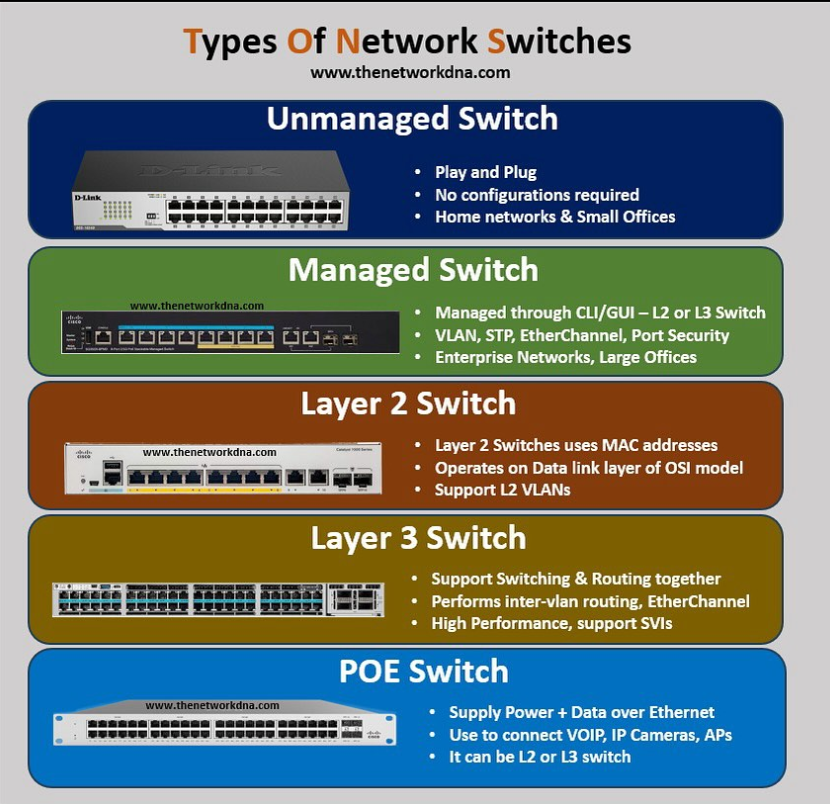
1. Unmanaged Switch

  • Description: An unmanaged switch is a basic plug-and-play device with no configuration options. It’s suitable for simple networks where minimal configuration and control are needed

Features:

  • No setup or configuration required.
  • Operates out of the box as soon as it’s connected.
  • Limited functionality (does not support VLANs, security features, or network monitoring).
  • Generally used in small offices, home offices, or networks where simplicity and low cost are key priorities.

Use Case: Small home or office networks, or temporary setups where ease of use is important.

Example: A simple 5-port or 8-port switch in a home network.

2. Managed Switch

  • Description: A managed switch provides more control over the network, allowing for customization, security, and performance management. It can be configured and monitored, typically through a web interface, CLI, or SNMP.

Features:

  • VLAN Support: Enables network segmentation and security.
  • Traffic Monitoring: Can track traffic flows and usage patterns.
  • QoS (Quality of Service): Prioritizes certain types of traffic (e.g., voice, video).
  • Port Mirroring: Helps with network diagnostics and monitoring.
  • Access Control Lists (ACLs): Improves security by controlling which devices can access certain parts of the network.
  • Redundancy Features: Supports features like Spanning Tree Protocol (STP) for preventing network loops.

Use Case: Enterprises or networks that require fine-grained control, monitoring, security, and network optimization.

Example: A Cisco Catalyst switch, or HP Aruba switch.

3. Layer 3 Switch (Multilayer Switch)

  • Description: A Layer 3 switch performs both Layer 2 switching and Layer 3 routing functions, making it a hybrid device. It can route traffic between different VLANs (Inter-VLAN Routing) and offer high-speed switching at Layer 2.

Features:

  • Supports IP Routing: Routes traffic between different subnets or VLANs.
  • Advanced Routing Protocols: Supports protocols like OSPF, RIP, or BGP (for larger networks).
  • Offers the high-speed switching advantages of Layer 2 with routing capabilities to direct traffic between multiple VLANs.

Use Case: Large enterprise networks that need to route traffic between VLANs but don’t want to use a separate router.

Example: Cisco Catalyst 3850, Juniper EX Series.

4. PoE Switch (Power over Ethernet Switch)

  • Description: A PoE switch supplies electrical power to connected devices (like IP cameras, phones, or wireless access points) over the same Ethernet cable used for data transmission. This eliminates the need for separate power supplies for these devices.

Features:

  • Delivers power to devices such as IP phones, security cameras, wireless access points, and sensors.
  • Simplifies installation by reducing the need for additional power outlets or adapters.
  • Often supports IEEE 802.3af (PoE) or IEEE 802.3at (PoE+) standards for power delivery.

Use Case: Environments that require power to devices like VoIP phones, security cameras, and access points, where providing separate power lines would be inconvenient.

Example: Cisco Catalyst PoE switches, Ubiquiti UniFi PoE switches.

5. Stackable Switch

  • Description: A stackable switch allows multiple switches to be physically connected and managed as a single unit. The switches can be stacked via special cables or ports and act as a single logical switch to improve scalability and fault tolerance.

Features:

  • Multiple physical switches are connected together and can be managed as one entity.
  • Increases port density without needing to manage each switch individually.
  • Often used to create a scalable network where additional ports are needed.
  • Supports stacking protocols for failover and redundancy.
  • Use Case: Medium to large networks that need high availability and easy scalability.

Example: Cisco StackWise, HPE Aruba 5400R.

6. Industrial Switch

  • Description: An industrial switch is designed for use in harsh or challenging environments where high durability, extended temperature ranges, and ruggedness are required.

Features:

  • Designed to operate in extreme temperatures, high humidity, or environments with dust, vibration, and other challenging conditions.
  • Often used in manufacturing plants, oil rigs, transportation systems, or other industrial settings.
  • May have IP ratings (Ingress Protection) for dust and water resistance.
  • Use Case: Manufacturing plants, warehouses, outdoor installations, or any environment requiring rugged, reliable networking hardware.

Example: Cisco Industrial Ethernet 3000 Series, Siemens Scalance.

7. Core Switch

  • Description: A core switch is a high-performance switch used in the central part of a network (the “core” layer) to aggregate traffic from multiple distribution switches and route it across the network. Core switches are designed to provide fast, high-capacity data forwarding.

Features:

  • Extremely high throughput and low latency.
  • Supports high redundancy and fault tolerance to ensure network reliability.
  • Often integrates with high-speed routing and switching capabilities.
  • Use Case: Large enterprise or data center networks where high-speed, high-capacity backbone switching is needed.

Example: Cisco Nexus 9000 series, Arista 7000 series.

8. Edge Switch

  • Description: An edge switch is typically located at the network’s edge, connecting end-user devices like computers, printers, or servers to the network. It serves as a point of access for the devices in the local area network (LAN).

Features:

  • Connects user devices to the network.
  • May support lower throughput and fewer features compared to core switches.
  • Can provide Power over Ethernet (PoE) for devices like phones and access points.
  • Use Case: Smaller offices or departments where devices connect to the network but do not require high-speed backhaul.

Example: A small office switch that connects workstations and printers.

9. Virtual Switch (vSwitch)

  • Description: A virtual switch is used in virtualized environments (like VMware, Hyper-V, or KVM) to allow virtual machines (VMs) to communicate with each other and with external networks. It functions as a software-based switch within a virtualized infrastructure.

Features:

  • Operates in virtual environments and can be managed using hypervisor interfaces.
  • Provides network connectivity between VMs and physical networks.
  • Can implement features like VLANs, security, and traffic management.
  • Use Case: Data centers, cloud computing environments, or virtualized environments where VMs need to communicate with each other and with physical networks.

Example: VMware vSwitch, Microsoft Hyper-V Virtual Switch.

Why Need Manage Switch Company or Large Network Environment

In a company or large network environment, a managed switch is needed because it gives full control, security, and visibility over how network traffic flows between computers, servers, and devices. A managed switch allows administrators to create VLANs to separate departments like HR, Finance, and IT, which improves security and reduces unnecessary broadcast traffic. It also supports advanced features such as QoS (Quality of Service) to prioritize important traffic like VoIP and video conferencing, port security to block unauthorized devices, and SNMP monitoring to check network performance and detect faults early. In large networks, managed switches make it easier to troubleshoot problems, control bandwidth usage, and ensure stable and reliable connectivity for hundreds or thousands of users.

Without a managed switch, a company must rely on unmanaged switches, which cannot be configured or controlled. This creates many problems in large networks. All devices stay in the same broadcast domain, which leads to heavy broadcast traffic and network congestion, causing slow internet and frequent disconnections. There is no way to restrict access, so any unauthorized device can connect to the network, increasing the risk of data theft, malware, and internal attacks. Administrators cannot monitor traffic or identify which port or user is causing problems, making troubleshooting very difficult. There is also no support for VLANs, QoS, or security policies, so critical applications like servers, IP phones, and CCTV systems may suffer from poor performance. Overall, without a managed switch, a large company network becomes insecure, slow, and hard to manage, which can directly affect business productivity and reliability.

What Problem Company Deploys Unmanaged Switches

If a company deploys unmanaged switches in its network, especially in a medium or large organization, it can face many serious problems related to security, performance, and management. An unmanaged switch works on plug-and-play principle and provides no control or configuration, which is risky for business networks.

First, there is no security control. Any user can connect any device (laptop, mobile hotspot, or infected system) to the network, and the switch cannot block or restrict it. There is no feature like port security, VLAN, or access control, so confidential company data can be easily exposed and the risk of malware and internal attacks increases.

Second, there is broadcast traffic and network congestion. All devices remain in one broadcast domain, so ARP and broadcast packets increase as the number of users grows. This causes slow network speed, packet loss, and frequent network downtime, especially when many systems are active at the same time.

Third, there is no monitoring and troubleshooting. Unmanaged switches do not support SNMP, logs, or traffic statistics, so the IT team cannot see which port or device is creating problems. If the network becomes slow or goes down, it is very difficult to identify the root cause, which increases downtime.

Fourth, there is no traffic priority (QoS). Important services like VoIP phones, video meetings, servers, and ERP applications cannot be prioritized. Because of this, voice calls may break, video may lag, and business applications may perform poorly.

Finally, there is no scalability and poor reliability. As the company grows, unmanaged switches cannot support advanced features like VLAN segmentation, link aggregation, or redundancy (STP). This makes the network unstable and unsuitable for large or critical business environments.

In short, using unmanaged switches in a company network leads to security risks, slow performance, difficult troubleshooting, lack of control, and poor scalability, which can seriously affect business operations and productivity.

Managed Switch Benefits in Company Network

Deploying a managed switch in a company network provides many important benefits related to security, performance, control, and reliability. It is essential for medium and large organizations where many users, servers, and applications share the same network.

First, managed switches offer better security. Administrators can create VLANs to separate departments such as HR, Finance, and IT, which prevents unauthorized access between networks. Features like port security, MAC filtering, and access control lists (ACLs) help block unknown or unauthorized devices from connecting to the company network. This greatly reduces the risk of data leakage and internal attacks.

Second, managed switches improve network performance and traffic control. With QoS (Quality of Service), important traffic like VoIP calls, video conferencing, and business-critical applications can be given higher priority than normal user traffic. This ensures smooth communication and stable performance even during heavy network usage.

Third, managed switches provide monitoring and troubleshooting capabilities. Using tools like SNMP, logs, and port statistics, network administrators can easily identify faulty devices, heavy traffic users, or loop problems. This reduces downtime and helps fix network issues quickly.

Fourth, managed switches support scalability and future growth. As the company expands, new users and departments can be added easily using VLANs without changing the entire network. Features like link aggregation (LACP) and redundancy protocols (STP/RSTP) improve reliability and allow the network to grow without performance loss.

Finally, managed switches enable centralized management and policy control. Network settings can be configured and updated from one place, ensuring consistency across the company network. This makes the network more organized, secure, and easier to manage.

In summary, the main benefits of managed switch deployment in a company are strong security, higher performance, easy monitoring, better reliability, scalability, and full network control, which together create a stable and professional business network environment.

ummary of Switch Types:

Switch TypeDescriptionPrimary Use Case
Unmanaged SwitchBasic, plug-and-play switch with no configuration.Small offices, home networks.
Managed SwitchSwitch with advanced configuration options (VLANs, QoS, etc.)Enterprise networks requiring control, security, and monitoring.
Layer 3 SwitchSwitch with routing capabilities (Inter-VLAN routing).Large networks needing both switching and routing in one device.
PoE SwitchSwitch that provides power over Ethernet to devices.Environments with devices like IP cameras, phones, and APs.
Stackable SwitchMultiple switches connected and managed as a single unit.Networks that require scalability and redundancy.
Industrial SwitchRugged switch for use in harsh environments.Manufacturing plants, outdoor or industrial environments.
Core SwitchHigh-performance switch used in the core of a network.Large enterprise or data center backbone.
Edge SwitchSwitch used to connect end-user devices to the network.Small to medium office networks, access layer.
Virtual Switch (vSwitch)Software-based switch in virtualized environments.Data centers and cloud environments.

Each type of switch is designed to meet different network needs, from simple home setups to complex enterprise networks with specific performance, security, and redundancy requirements.

Cisco Nexus 9800 Series Switches 36-port 400G Line Card

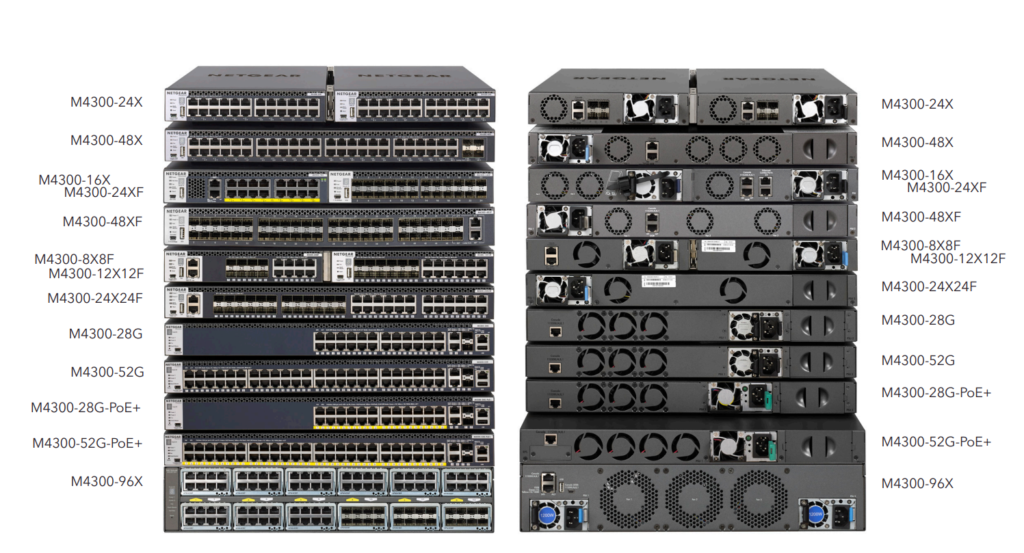
Netgear M4300 Stackable Managed Switch with 48x10G