Control Plane & Data Plane
Control Plane & Data Plane Overview
🔵 Control Plane
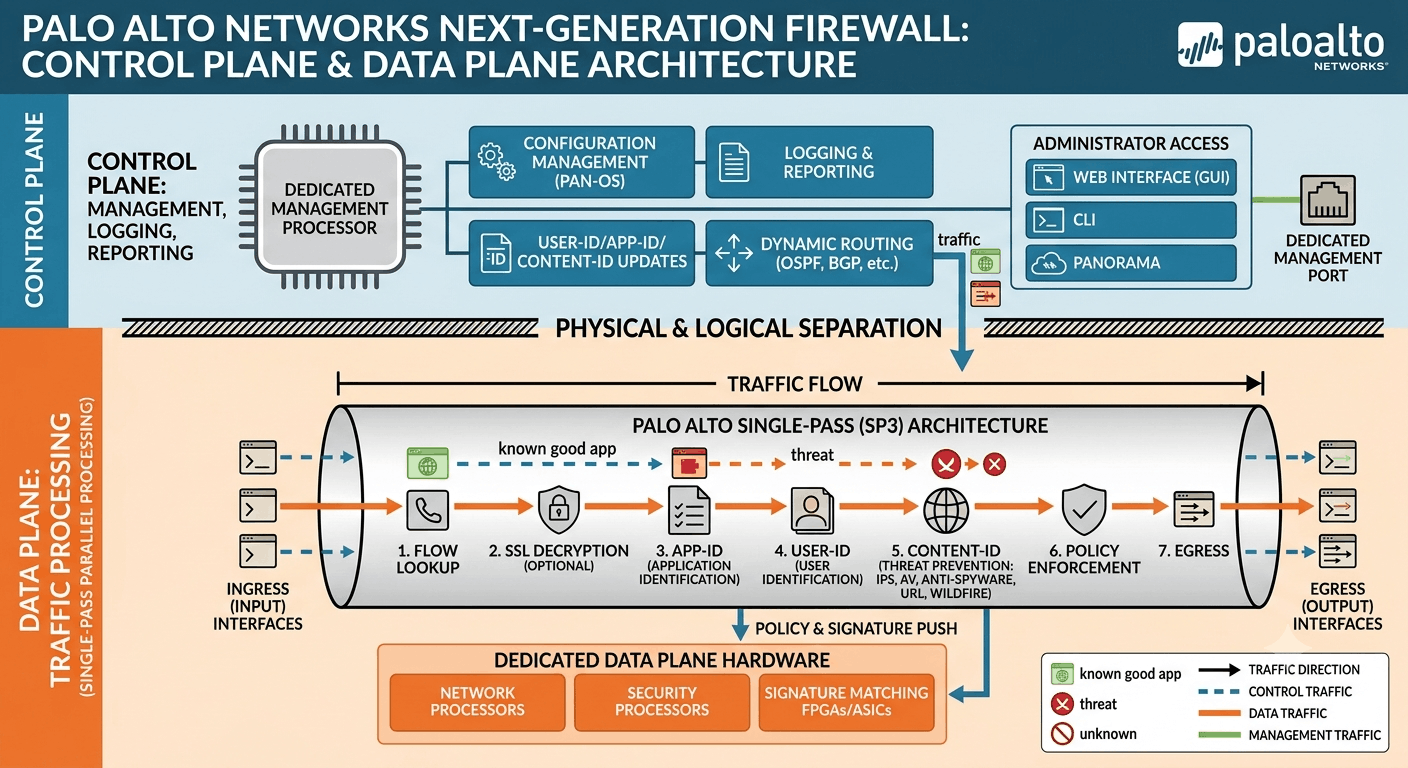
The Control Plane is the part of a network device or firewall that manages configuration, routing information, and control decisions. It determines how the device should handle network traffic.
Example: An administrator creates a security policy such as LAN → WAN → Allow. The Control Plane manages this configuration.
- Management: Firewall configuration and administration are handled through the Control Plane.
- Configuration: Manages interfaces, zones, security policies, NAT, VPN, and other firewall settings.
- Routing: Manages routing information and routing protocols such as OSPF and BGP.
- Policy Management: Maintains the security and NAT policy information configured by the administrator.
- System Management: Handles system-level operations and device management.
- Decision Making: Provides the control information required to determine how network traffic should be handled.
- Administrator Interaction: The administrator mainly works with the Control Plane when configuring the firewall.
🟢 Data Plane
The Data Plane is the part that processes the actual network traffic. It checks packets against security policies, performs NAT and security inspection, and forwards or blocks traffic.
Example: A user accesses Google. The Data Plane receives the packet, checks the policy, performs NAT if required, and forwards the traffic to the Internet.
- Packet Processing: Processes the actual network packets passing through the firewall.
- Security Policy Enforcement: Checks traffic against configured security policies and allows or blocks it.
- NAT: Performs Source NAT and Destination NAT on applicable traffic.
- App-ID: Identifies applications and allows policies to be applied based on applications.
- Security Inspection: Performs configured security checks such as Antivirus, Anti-Spyware, and URL Filtering.
- Traffic Forwarding: Forwards permitted packets toward their destination.
- Session Processing: Maintains and processes active network sessions.
- High-Speed Processing: Designed to handle large volumes of network traffic efficiently.
What is a Palo Alto Control Plane
Management
The Control Plane handles the management of the Palo Alto firewall. Administrators use the management interface to configure security policies, interfaces, zones, routing, NAT, VPN, and other firewall settings.
Configuration Management
When an administrator makes a configuration change, such as creating a new security policy, the Control Plane processes and manages that configuration. After the configuration is committed, the required information is made available to the Data Plane.
Routing Management
The Control Plane manages routing information and routing protocols such as OSPF, BGP, and RIP. It determines the available routes and maintains the routing table used for forwarding traffic.
Policy Management
Security policies, NAT policies, QoS policies, and other rules are configured and managed through the Control Plane. These policies are then used by the Data Plane when processing traffic.
System Management
The Control Plane manages various system-level functions, including device configuration, software management, administrator access, and overall firewall operations.
Logging and Monitoring
The Control Plane manages system and management-related information and provides monitoring functions. It also works with logging mechanisms to provide administrators with information about firewall activity.
What is a Palo Alto Data Plane
Packet Processing
The Data Plane is responsible for processing the actual network traffic passing through the firewall. It receives packets from interfaces and examines them according to the configured security policies.
Security Policy Enforcement
The Data Plane checks each traffic session against the configured security policy. It can allow, deny, or otherwise control traffic based on source, destination, application, user, service, and other criteria.
NAT Processing
The Data Plane performs Source NAT and Destination NAT. For example, private LAN IP addresses can be translated into a public IP address when users access the Internet.
App-ID
Palo Alto’s App-ID technology identifies applications in network traffic. For example, it can identify applications such as HTTPS, SSH, DNS, YouTube, Facebook, or other applications even when they use common ports.
Content-ID
The Data Plane performs security inspection using Content-ID technologies. Depending on the licensed and configured features, this can include Antivirus, Anti-Spyware, URL Filtering, and File Blocking.
Traffic Forwarding
After processing the packet and applying the required security checks, the Data Plane forwards permitted traffic toward the destination. If traffic is not permitted, it is dropped according to the security policy.
High-Speed Traffic Processing
The Data Plane is optimized for handling large volumes of network traffic at high speed. This allows the firewall to perform security inspection while continuing to forward network traffic efficiently.
Simple Way
Palo Alto Control Plane manages the firewall and its decision-making information, while the Data Plane processes, inspects, allows/blocks,
Control Plane = Brain 🧠
→ Makes decisions, manages configuration, and maintains routing/policy information.
Data Plane = Worker/Hands ✋
→ Processes the actual packets and forwards or blocks traffic.
Real Example Palo Alto Control Plane & Data Plane
Imagine a company with 500 employees. The company has a Palo Alto Networks firewall between its internal network and the Internet. Employees use their computers to access websites, email, cloud applications, Microsoft Teams, and other Internet services.
The network looks like this:
User PC → Access Switch → Core Switch → Palo Alto Firewall → ISP Router → Internet
For example:
					User PC IP: 192.168.10.50
LAN subnet: 192.168.10.0/24
Palo Alto LAN IP: 192.168.10.1
Palo Alto WAN/Public IP: 203.0.113.10
ISP Gateway: 203.0.113.1
Destination: www.google.com
Application: HTTPS
Port: TCP 443
1. Control Plane Administrator Configures the Firewall
First, the network administrator logs into the Palo Alto firewall and configures the device. The administrator creates interfaces, assigns IP addresses, creates security zones, configures routing, creates NAT rules, and creates security policies.
For example, the administrator creates two zones:
- LAN Zone – Internal users
- WAN Zone – Internet
The administrator then configures a security policy that says:
LAN users are allowed to access the Internet.
For example:
					Source Zone: LAN

Destination Zone: WAN

Source: 192.168.10.0/24

Destination: Any

Application: web-browsing, ssl

Action: Allow
The Control Plane Manages this Configuration. The administrator’s configuration is not itself the user’s traffic. It is the information that the firewall uses to process traffic.
2. Control Plane Routing Information
The Control Plane also manages routing information.
For example, the Palo Alto firewall may have a default route:
0.0.0.0/0 → 203.0.113.1
This means:
If the firewall does not have a more specific route for a destination, send the traffic to the ISP gateway
203.0.113.1
The Control Plane can learn routes through static routes or routing protocols such as OSPF or BGP, depending on the network design.
The important point is that the Control Plane manages the routing information that is required for traffic forwarding.
3. Administrator Configures NAT
The company uses private IP addresses internally.
For example, the user’s PC has:
192.168.10.50
This is a private IP address. The company wants users to access the public Internet through the Palo Alto firewall’s public IP.
Therefore, the administrator creates a Source NAT rule.
For example:
192.168.10.0/24 → 203.0.113.10
This means that when an internal user accesses the Internet, the private source IP can be translated to the public IP.
The Control Plane manages this NAT configuration.
Now the Real Traffic Starts
4. User Opens Google
Now an employee sitting at the office opens a browser and enters:
https://www.google.com
The employee’s computer has IP address:
192.168.10.50
The computer sends traffic toward its default gateway:
192.168.10.50 → 192.168.10.1
The packet reaches the Palo Alto firewall.
At this point, we are dealing with Actual Network Traffic, so the Data Plane becomes responsible for processing the packet.
5. Data Plane Receives the Packet
The Data Plane receives the packet from the LAN interface.
The packet contains information such as:
					Source IP
Destination IP
Source port
Destination port
Protocol
Session information
For example:
					Source IP: 192.168.10.50

Destination: Google

Protocol: TCP

Destination Port: 443
The Data Plane processes this traffic using the configuration and policy information that has been made available to it.
6. Firewall Identifies the Source Zone
The Palo Alto firewall knows that the packet arrived through the interface associated with the LAN Zone.
Therefore:
Source Zone = LAN
The firewall also determines that the destination is reachable through the Internet-facing interface.
Therefore:
Destination Zone = WAN
Now the firewall needs to find a security policy that matches:
LAN → WAN
7. Security Policy Matching
The Data Plane checks the packet/session against the configured security rules.
Suppose the firewall has the following policy:
Rule 1 – Allow Internet
					LAN → WAN

Source: LAN users

Application: web-browsing, ssl

Action: Allow
The user’s traffic matches this rule.
Therefore, the firewall allows the session to continue.
If no appropriate rule allowed the traffic, the firewall could deny it according to the security policy configuration.
8. App-ID Identifies the Application
One of the important Palo Alto technologies is App-ID.
App-ID helps the firewall identify what application is actually being used.
For example, the firewall may identify traffic associated with:
- Web browsing
- SSL
- DNS
- Microsoft Teams
- YouTube
- SSH
- RDP
- Other applications
This allows the administrator to create policies based on applications instead of relying only on TCP/UDP port numbers.
For example, the administrator can create a rule saying:
Allow normal web browsing but block a particular application.
The Data Plane performs the actual traffic processing required to enforce this policy.
9. Security Inspection
Depending on the firewall configuration and licensed security services, Palo Alto can perform additional security inspection.
For example, the firewall may use security capabilities such as:
- Antivirus
- Anti-Spyware
- Vulnerability Protection
- URL Filtering
- File Blocking
- WildFire
- DNS Security
The Data Plane is responsible for processing the actual traffic through these security mechanisms according to the configured policies.
For example, if a user attempts to access a malicious website, the firewall can use the configured security controls to block or otherwise handle the traffic.
10. Source NAT Happens
The Internet therefore sees the public IP of the firewall rather than the user’s private IP.
The Data Plane performs the actual NAT processing.
11. Firewall Checks the Routing Table
After the firewall determines that the traffic should be forwarded, it needs to determine where to send the packet.
The destination is on the Internet, so the firewall uses its default route.
For example:
0.0.0.0/0 → 203.0.113.1
Therefore, the firewall sends the packet toward the ISP gateway.
					192.168.10.50

↓

Palo Alto Firewall

↓

Source NAT: 203.0.113.10

↓

ISP Gateway: 203.0.113.1

↓

Internet

↓

Google
Return Traffic
12. Google Sends a Response
Google sends response traffic back toward the public IP:
203.0.113.10
The packet reaches the Palo Alto firewall through the WAN interface.
The Data Plane receives the packet and checks the existing session information.
The firewall knows that this traffic belongs to the session that was originally created by:
192.168.10.50
Therefore, the firewall performs the necessary reverse NAT/session processing and sends the response toward the internal user.
13. Response Goes Back to the User
The firewall sends the response to:
192.168.10.50
Where Does the Control Plane Come In?
The Control Plane is not sitting there processing every Google packet individually.
Instead, think of it as the management and decision-information side of the firewall.
Main Benefits of Control Plane & Data Plane
- Better Performance – The Data Plane can focus on high-speed packet processing, while the Control Plane handles management and control tasks.
- Traffic Processing Efficiency – Actual network traffic is processed efficiently without requiring management functions to handle every packet.
- Better Stability – Heavy traffic processing has less impact on firewall management and configuration functions.
- High-Speed Security – The Data Plane can quickly perform security policy checks, NAT, App-ID, and traffic forwarding.
- Scalability – Separation of functions helps the firewall handle a large number of users, sessions, and network traffic.
- Easy Management – Administrators can configure policies, routing, and system settings through the Control Plane while the Data Plane handles user traffic.
- Fault Isolation – Separating functions can help prevent a problem in one processing area from unnecessarily affecting the other.
“Separating these functions allows the firewall to manage the device while efficiently processing large amounts of network traffic.”
This means the firewall divides its work into two major functions: the Control Plane handles management and decision-related tasks, while the Data Plane handles the actual network traffic.
1. Control Plane Handles Management
The Control Plane manages tasks such as:
- Firewall configuration
- Security policy configuration
- Routing information
- Routing protocols
- System management
- Administrator access
- Configuration changes
2. Data Plane Handles Traffic
The Data Plane handles the actual packets generated by users.
For example, 500 users may simultaneously access:
- YouTube
- Microsoft 365
- Websites
- Cloud applications
- VPN services
The Data Plane processes these sessions and performs:
Packet Processing → Policy Check → App-ID → Security Inspection → NAT → Forwarding
3. Why Separation Is Important
If the same processing function had to handle both firewall management and millions of network packets, management operations could potentially be affected during heavy traffic.
4. Real Example
Suppose an office has 1,000 users generating heavy Internet traffic.
At the same time, the administrator logs into the firewall and changes a security policy.
The Control Plane handles the administrator’s configuration activity, while the Data Plane continues processing user traffic.
Control Plane manages the firewall; Data Plane handles the traffic. Separating these functions allows the firewall to perform management tasks while continuing to process large amounts of network traffic efficiently.
Do other firewall vendors also use Control Plane and Data Plane?
Yes. Most enterprise firewalls use the concepts of Control Plane and Data Plane, although the terminology and architecture can differ between vendors.
Firewall Examples
- Palo Alto → Control Plane + Data Plane
- Fortinet FortiGate → Control/management functions + packet-processing functions
- Cisco ASA / Firepower → Control Plane + Data Plane concepts
- Check Point → Management/control functions + traffic-processing functions
- Sophos Firewall → Control/management functions + traffic-processing functions
- Juniper SRX → Control Plane + Data Plane
- SonicWall → Control/management functions + packet-processing functions
Simple Understanding
Control Plane:
👉 Configuration, routing, policies, management, decision information
Data Plane:
👉 Actual packet processing, security inspection, NAT, allow/block, forwarding
Important Point
Not every firewall will have exactly the same hardware architecture or terminology as Palo Alto.
For example, Palo Alto explicitly refers to Control Plane and Data Plane, while other vendors may use terms such as management plane, control plane, forwarding plane, packet-processing engine, etc.
So, the concept is common across enterprise firewalls, but the implementation and names can be different.
Does Control Plane and Data Plane use different CPUs?
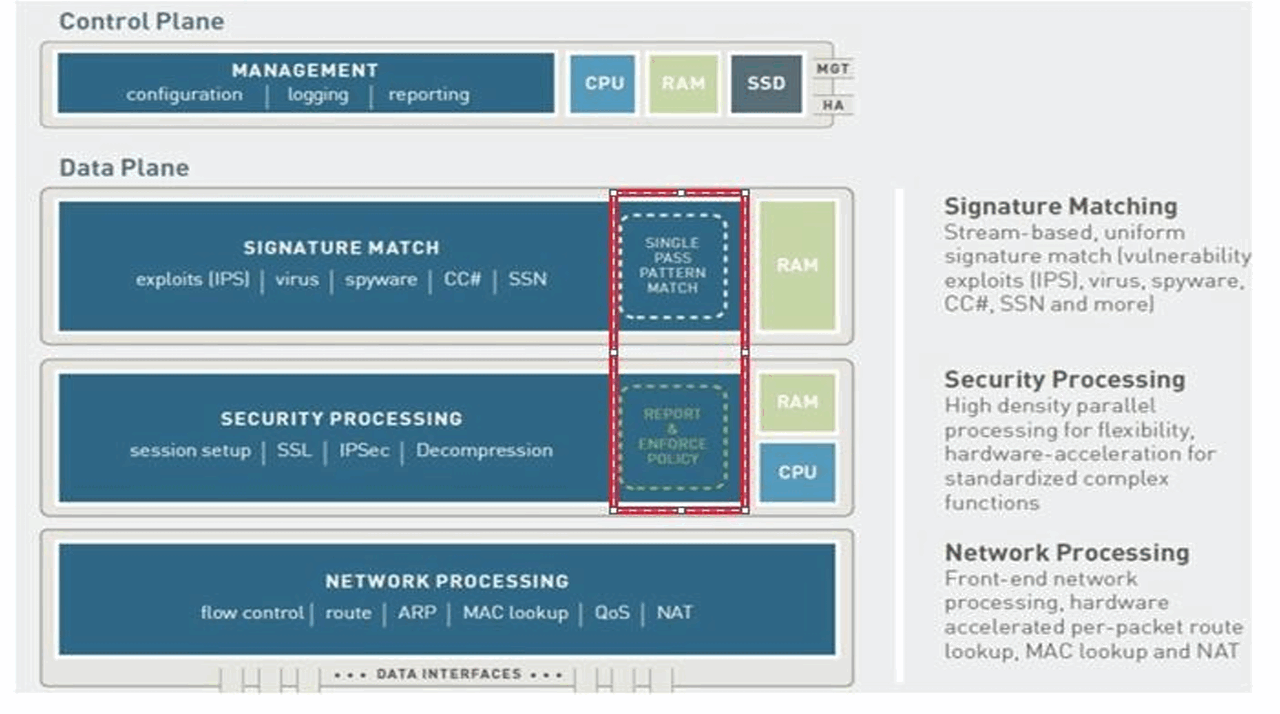
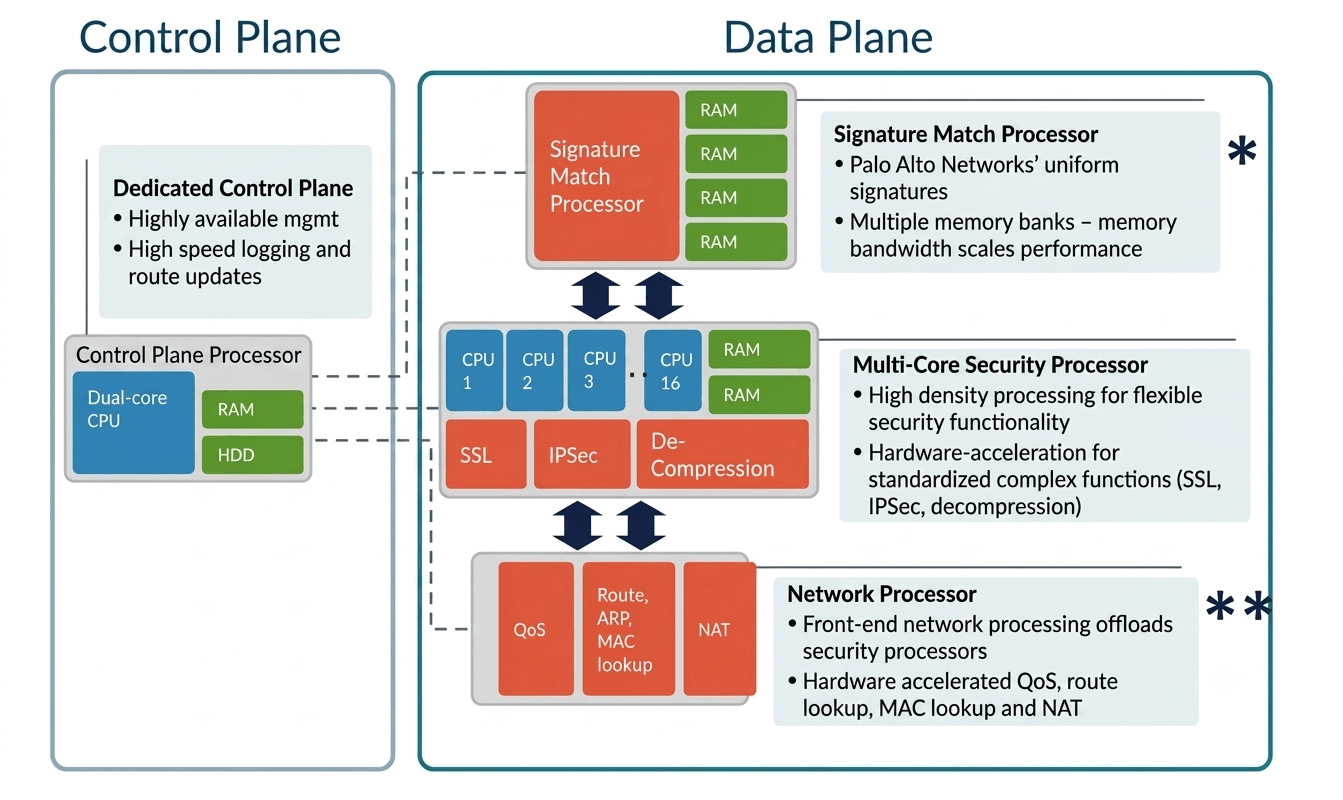
Yes. In some firewall models, Control Plane and Data Plane use different CPU resources, but it depends on the firewall architecture.
Palo Alto Example
- Control Plane CPU → Handles management, configuration, routing, logging/control functions.
- Data Plane CPU → Handles actual packet processing, security inspection, NAT, App-ID, and forwarding.
- They are designed to keep management tasks separate from high-speed traffic processing.
Simple Example
Suppose a Palo Alto firewall is processing heavy Internet traffic.
Control Plane CPU:Admin login → Configuration → Routing → Management
Data Plane CPU:User traffic → Security Policy → App-ID → NAT → Forward
So, yes, the Control Plane and Data Plane can use separate processing resources, allowing heavy network traffic processing to have less impact on management functions.
Control Plane & Data Plane Slide