NAT & PAT Technology
Table of Contents
History of NAT (Network Address Translation)
History of NAT (Network Address Translation)
Network Address Translation (NAT) was introduced as a practical solution to the rapid exhaustion of IPv4 addresses. In the early days of the internet (1980s–early 1990s), every device connected to the network required a unique public IP address. As the internet grew quickly, it became clear that the available IPv4 address space (about 4.3 billion addresses) would not be sufficient for future expansion.
1. Early Internet and the Problem (1980s–1990s)
Initially, organizations were freely assigned public IP addresses without strict conservation policies. As more universities, companies, and users connected to the internet, the demand for IP addresses increased rapidly. This led to concerns about address depletion, which became a major issue in networking design.
2. Introduction of NAT (Mid-1990s)
To address this problem, NAT was formally introduced in 1994 through RFC 1631 titled “The IP Network Address Translator (NAT)”. This document described how private IP addresses could be translated into public IP addresses, allowing multiple devices to share a single public IP. NAT quickly became a key technology to extend the life of IPv4.
3. Growth and Adoption (Late 1990s–2000s)
As internet usage exploded with the rise of home networks, ISPs, and businesses, NAT became widely adopted. Routers and firewalls started integrating NAT as a standard feature. Technologies like PAT (Port Address Translation) allowed thousands of devices to share one public IP, making NAT essential for both enterprise and home networks.
4. NAT and Private IP Addressing
Along with NAT, private IP address ranges were defined in RFC 1918 (1996). These ranges (like 192.168.x.x, 10.x.x.x) are not routable on the internet and are used inside local networks. NAT works together with these private IPs to enable communication with external networks.
5. NAT vs IPv6 (2000s–Present)
NAT was always considered a temporary solution until the adoption of IPv6, which provides a much larger address space. However, IPv6 adoption has been slow, so NAT is still widely used today. While IPv6 eliminates the need for NAT, many networks still rely on it due to compatibility and infrastructure reasons.
6. Modern Use of NAT
Today, NAT is a standard feature in almost all routers, firewalls, and cloud environments. It is used not only for conserving IP addresses but also for basic security and network design. Variants like Carrier-Grade NAT (CGNAT) are used by ISPs to serve large numbers of customers with limited public IPs.
7. Summary
NAT emerged as a critical solution to the IPv4 address shortage in the 1990s and has remained a fundamental part of networking ever since. Even though IPv6 aims to replace the need for NAT, it continues to play a major role in modern networks due to its practicality and widespread deployment.
NAT Overview
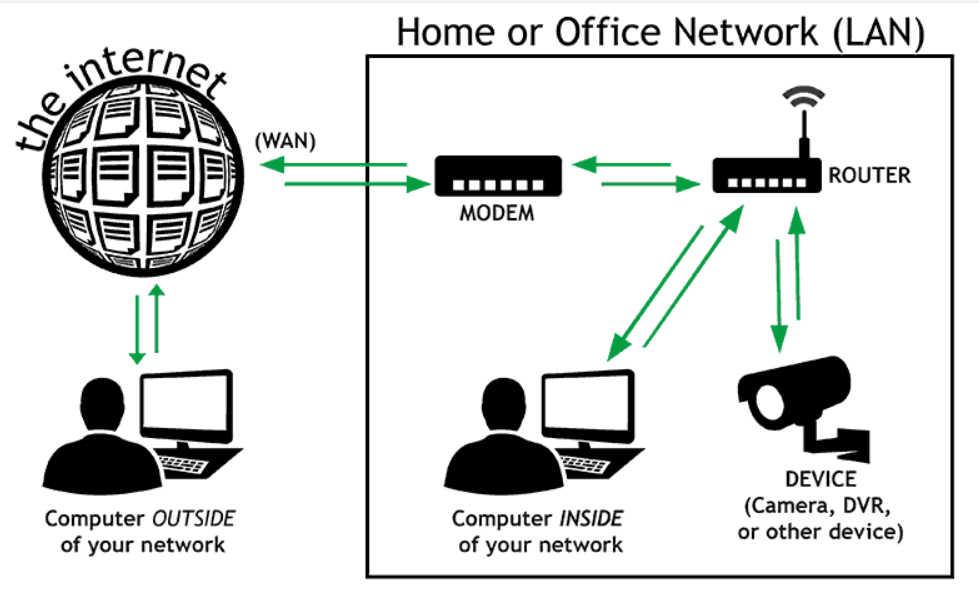
NAT (Network Address Translation) is a Firewall/Router function that Translates one IP Address into another IP Address when traffic passes through the device.
Why Do We Need NAT?
- Private IPs Cannot Normally be Routed Directly Over the Public Internet. NAT allows internal private devices to communicate with Internet services.
- Saves Public IPv4 Addresses. Hundreds of internal users can share one or a few public IP addresses using PAT.
- Allows Internet Access for internal Users. For example,
192.168.1.10can access Google or other Internet websites through the firewall’s public IP. - Allows internal Servers to be Published. DNAT Port Forwarding can translate a public IP/port to an internal server, such as
203.0.113.10:443 → 192.168.1.100:443. - Hides internal addressing from external networks. Internet users normally see the translated public IP rather than the internal private IP.
In simple words:
👉 NAT is needed to translate private and public IP addresses so internal networks can communicate with external networks while efficiently using public IPv4 addresses.
NAT Types?
1. Source NAT (SNAT)
- Source NAT Changes the Source IP Address of outgoing traffic before it leaves the firewall.
- It is mainly used when Private/internal Users need to Access the Internet using a public IP address.
- The firewall keeps track of the translation so that return traffic can be sent back to the correct internal device.
- Example:
192.168.1.10 → Palo Alto → 203.0.113.10 → Internet
2. Destination NAT (DNAT)
- Destination NAT changes the destination IP address of incoming traffic.
- It is commonly used when an organization wants to make an internal server accessible from the Internet.
- The public IP received by the firewall is translated to the private IP of the internal server.
- Example:
Internet → 203.0.113.10:443 → Palo Alto → 192.168.1.100:443
3. Static NAT
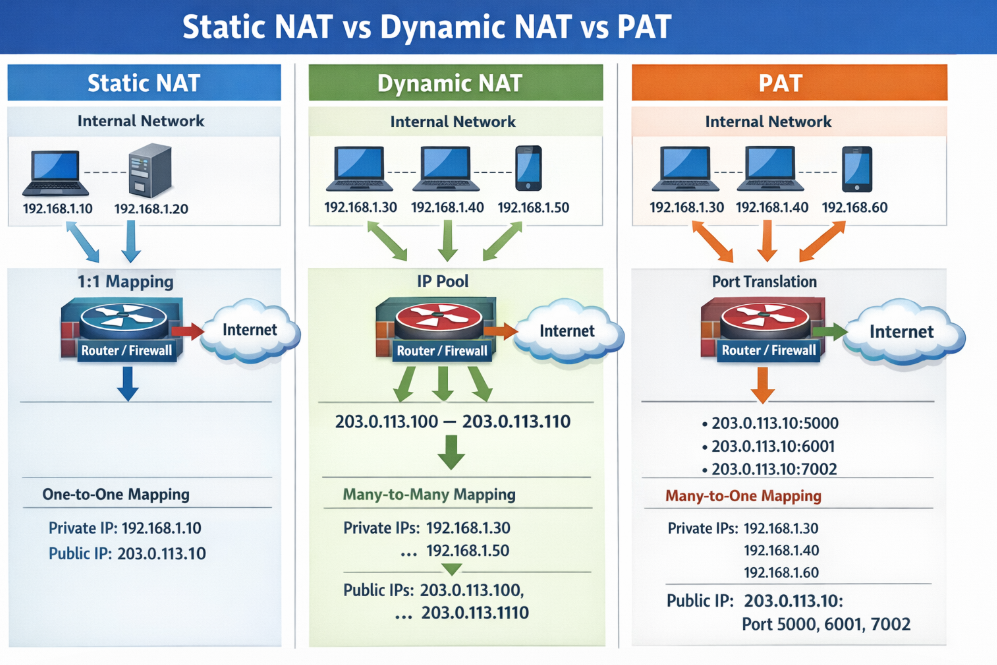
- Static NAT provides a fixed one-to-one mapping between a private IP address and a public IP address.
- The same public IP is always translated to the same internal IP.
- It is useful for servers or devices that require a consistent public IP address.
- Example:
192.168.1.100 ↔ 203.0.113.100
4. Dynamic NAT
- Dynamic NAT Translates Private IP Addresses using a Pool of available Public IP Addresses.
- The firewall dynamically selects a public IP from the configured pool when internal traffic starts.
- The mapping is generally temporary and can change when a new session is created.
- Example:
192.168.1.10 → 203.0.113.10or203.0.113.11
5. PAT / NAPT
- PAT Allows Multiple Private devices to Share a Single Public IP Address by translating the source port numbers.
- This is one of the most common forms of NAT used for normal Internet access.
- The firewall uses different port numbers to identify and maintain separate sessions for different users.
- Example:
192.168.1.10:5000 → 203.0.113.10:30001192.168.1.11:5000 → 203.0.113.10:30002
Main Benefits of NAT
- Conserves public IPv4 addresses by allowing many private devices to use fewer public IPs.
- Enables private networks to communicate with the Internet without assigning a public IP to every device.
- Allows internal servers to be published using DNAT/port forwarding.
- Provides controlled IP translation at the firewall or router.
- Maintains session information so return traffic reaches the correct internal device.
How many private IP users can use the Internet through ONE public IP?
There is no Fixed Limit on the number of Private Users.
For example:
192.168.1.10→ Public IP1.1.1.1192.168.1.11→ Public IP1.1.1.1192.168.1.12→ Public IP1.1.1.1192.168.2.254→ Public IP1.1.1.1
All these users can access the Internet using One Public IP, through PAT/NAPT.
Simple Answer: One public IP can serve Hundreds or Thousands of Private Users, Depending on the Firewall’s NAT/Session Capacity and Traffic.
One public IPv4 address has about 65,535 TCP/UDP Port numbers per Protocol, but some ports are reserved and practical limits depend on the firewall and traffic patterns.
					Private Users                  Router              Internet

192.168.1.10 ─┐
192.168.1.11 ─┤
192.168.1.12 ─┤
192.168.1.13 ─┤──> NAT/PAT ──> 203.0.113.10 ──> Internet
192.168.1.14 ─┤
192.168.1.15 ─┘
Public IP Free or Paid?
1. Public IP from ISP
A Public IP Address is Normally Provided by your Internet Service Provider (ISP) like Jio,Airtel,BSNL when you take an Internet connection. You usually do not purchase the IP address separately for a normal broadband connection; it may be included as part of your Internet service.
2. Dynamic Public IP
A Dynamic Public IP can change periodically. The ISP assigns an available public IP to your connection, and the address may change after reconnecting or when the ISP changes its allocation.
- Usually included with the Internet plan.
- The IP can change.
- Suitable for normal Internet browsing.
- Not ideal when you need to access your network using a fixed IP.
Example:
Today: 103.200.201.10
Later: 103.200.201.25
3. Static Public IP
A Static Public IP remains fixed and is normally offered by the ISP as an additional service or with a business Internet plan.
It is useful when you need to consistently reach your firewall, VPN, server, or other services from the Internet.
Example:
Internet → 103.200.100.50 → Firewall → Internal Network
The public IP 103.200.100.50 remains assigned to your connection.
4. Why Pay for a Static Public IP?
A static public IP is useful for services that require a fixed Internet address.
For example:
- Site-to-site VPN
- Remote-access VPN
- Server publishing
- Port forwarding
- Remote management
- CCTV remote access
- Hosting Services
- Business applications
If your public IP changes frequently, these services may require DDNS or another method to locate your network.
5. Why Does an ISP Charge for a Static Public IP?
A static public IP is usually charged separately because the ISP has to reserve a specific public IPv4 address for your connection instead of assigning an address dynamically from a shared pool.
6. Public IPv4 addresses are limited
IPv4 has a limited number of public addresses. ISPs have to manage these addresses carefully. When an ISP gives you a Dedicated Static IP, that address is reserved for your connection and cannot normally be freely reassigned to another customer.
The ISP is not charging because a static IP is technically difficult to create. The charge is mainly for Dedicated/Reserved Address Allocation and the Associated Service/Support. Pricing varies by ISP and plan.
Why Are Public IPv4 Addresses Limited?
- IPv4 uses 32-bit addresses, which provides a maximum of about 4.3 billion (2³²) addresses.
- This may sound like a large number, but these addresses are used by ISPs, companies, data centers, websites, cloud services, mobile networks, and other devices worldwide.
- Not all 4.3 billion addresses are available for normal public Internet use. Some address ranges are reserved for Private Networks, Multicast, Loopback, Special Purposes, and other functions.
- The Internet grew much faster than originally expected, so the available IPv4 address space became heavily utilized.
- Because public IPv4 addresses are scarce, ISPs often use NAT/PAT so that hundreds or thousands of private users can share a smaller number of public IPv4 addresses.
- Example: A company may have
500internal users using private IPs such as192.168.x.x, while all users access the Internet through only one public IPv4 address. - IPv6 was developed to solve this address shortage. IPv6 uses 128-bit addresses, providing an enormously larger address space.
1. IPv4 uses a 32-bit address system:
IPv4 is based on a 32-bit addressing system, which provides approximately 4.3 billion possible IP addresses. When IPv4 was originally designed, the number of Internet-connected devices was very small compared with today. At that time, 4.3 billion addresses appeared to be more than enough. However, the rapid growth of the Internet has made this address space insufficient for the modern world.
2. The number of Internet-connected devices has grown enormously:
Today, billions of devices connect to the Internet, including Computers, Smart Phones, Servers, CCTV Systems, IoT Devices, Routers, Cloud Servers, Smart TVs, and other Network Equipment. Businesses and service providers also require public IP addresses for websites, VPNs, servers, and other services. Because the number of devices and services continues to increase, the demand for public IPv4 addresses has become much greater than originally expected.
3. Not all IPv4 addresses are available for public Internet use:
Although IPv4 theoretically provides around 4.3 billion addresses, not all of these addresses can be assigned to normal Internet-connected devices. Some address ranges are reserved for specific purposes, such as private networks, multicast, loopback, documentation, and other special functions. For example, addresses such as 192.168.1.0/24 are private addresses and cannot be directly used as public Internet addresses.
4. Public IPv4 addresses are therefore a limited resource:
Because the total IPv4 address space is finite and the number of Internet users and services has grown significantly, public IPv4 addresses have become scarce. ISPs and organizations must carefully manage the public addresses they receive. An ISP cannot simply create a new IPv4 address whenever it needs one because the IPv4 address space itself is limited.
5. NAT/PAT helps reduce the requirement for public IPv4 addresses:
One of the most important techniques used to handle IPv4 limitations is NAT (Network Address Translation), especially PAT (Port Address Translation). NAT allows many devices inside a private network to use private IP addresses such as 192.168.1.10, 192.168.1.11, and 192.168.1.12, while sharing a single public IP address when accessing the Internet. This greatly reduces the number of public IPv4 addresses required.
6. Example of public IP sharing:
Suppose a company has 500 employees. The company can use private IP addresses for its internal users, such as 192.168.1.0/24, instead of assigning a public IP to every computer. The firewall can perform PAT and allow hundreds of users to access the Internet through one or several public IP addresses. Therefore, the company does not need 500 public IPv4 addresses just for Internet access.
7. Static public IP addresses are more valuable:
A static public IP is reserved for a particular customer or service and remains fixed. Because public IPv4 addresses are limited, ISPs need to manage their available address space carefully. A business customer may pay for a static public IP because the ISP is reserving that address for the customer’s connection. Static IPs are commonly used for VPNs, servers, remote access, firewall connections, CCTV, and other services that require a consistent public address.
8. IPv6 was developed to solve the IPv4 address shortage:
IPv6 uses a 128-bit addressing system, compared with IPv4’s 32-bit system. This provides an extremely large number of possible addresses. IPv6 was designed to provide enough addresses for the continued growth of the Internet and connected devices. Although IPv6 adoption is increasing, IPv4 and IPv6 continue to coexist, and NAT/PAT remains widely used in IPv4 networks.
In simple words
IPv4 has a limited number of public addresses, while the number of Internet-connected devices has grown enormously. Because of this shortage, ISPs and organizations use NAT/PAT so that many private users can share a small number of public IPv4 addresses. IPv6 provides a much larger address space for the future.
Home ISP Connection Procedure
ISP Internet Connection – The ISP connects its network to the global Internet through upstream providers or Internet exchanges.
ISP Core Network – The ISP’s core routers receive and route Internet traffic toward different areas and customers.
OLT Installation – For FTTH, the ISP uses an OLT (Optical Line Terminal) at its POP/data center to provide fiber connectivity to customers.
Fiber Distribution – Fiber cables are distributed from the ISP’s OLT toward different locations and customer areas.
Fiber Splitter – A passive optical splitter can divide one fiber signal into multiple customer connections, depending on the ISP’s FTTH design.
Fiber to Customer Home – The ISP installs a fiber drop cable from the local distribution point to the customer’s home.
ONT/ONU Installation – An ONT/ONU is installed at the customer’s premises. It converts the optical fiber connection into an Ethernet connection.
Router Connection – The ONT/ONU connects to the customer’s router or Wi-Fi router, which provides network access to computers, phones, TVs, and other devices.
Customer Authentication – The ISP authenticates the customer using methods such as PPPoE username/password, DHCP, or other ISP-specific authentication.
Public IP Assignment – After successful authentication, the ISP provides an IP address to the customer’s connection. It can be dynamic or static, depending on the service plan.
NAT/PAT – The home router normally uses private IP addresses such as 192.168.1.0/24 and performs NAT/PAT so multiple devices can share the Internet connection.
Internet Access – Finally, all authorized devices in the home can access the Internet through the ISP’s network.
ISP → OLT → Fiber → Splitter → Customer Fiber → ONT/ONU → Router → Home Users → Internet
What is NAT in Details
The Problem with IPv4 addresses
An IP address is used as an endpoint identifier in IP-based communications. It is just like a telephone number. When you want to call another person over your mobile, you dial his telephone number. The call is established between phone numbers.
In the same way, when a device wants to communicate using IP communication, it sends the data to the remote end’s IP address. The communication is established between IP addresses. Every mobile phone has a telephone number. In the same way, every device needs an IP address to send and receive data over an IP network.
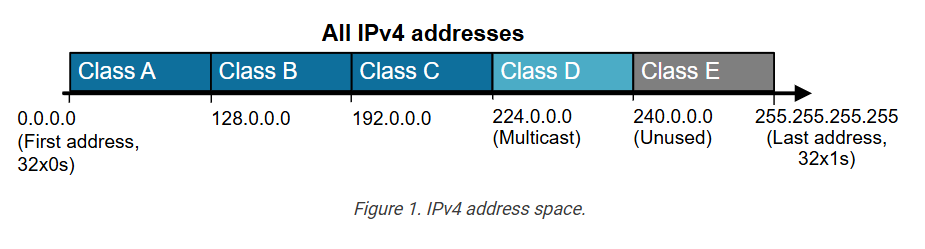
IPv4 addresses are limited number. A key point here is that, by standard, an IPv4 address is 32 bits long, meaning there are only 4,294,967,296 possible unique IP addresses (and they were officially exhausted in April 2017). That’s it; new addresses could never be produced. The IPv4 address space is a finite resource.
The original idea when the Internet protocol was first introduced was that every organization would ask for and be given an IP address range, and IP addresses would be unique and not reused. People thought we had so many IPv4 addresses (4 billion) that everybody would have a unique IP that nobody else uses anywhere on the planet.
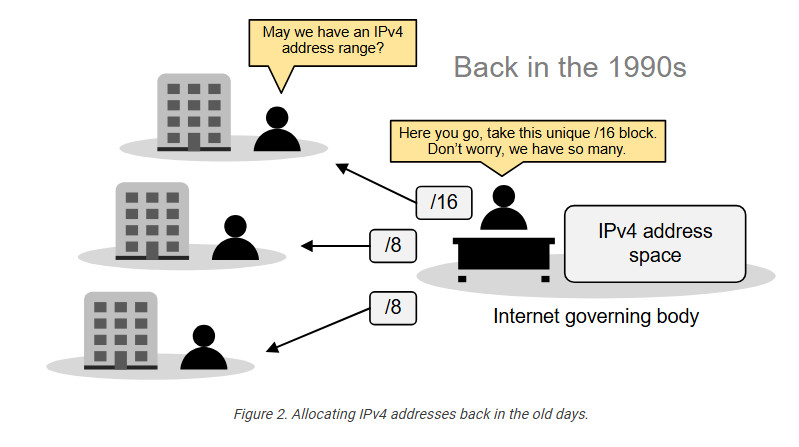
So, the Internet governing body was giving big, classful blocks of IP addresses (/8, /16, or /24) to every organization that asked for it. This model worked for a while. However, in the mid-1990s, it became extremely evident that the Internet was growing so fast that we would run out of addresses in a few years.
Then, people realized we needed a new IP protocol that supported more addresses, so IPv6 was introduced. This protocol uses 128-bit addresses instead of 32-bit, allowing for 2128 addresses. However, most organizations had already invested a lot of money in the adoption of IPv4. They were unwilling to reinvest time and money to migrate to IPv6, so they were looking for another solution.
The solution came through combining two network standards that worked together to save IPv4 address space: Private IPv4 addresses (RFC1918) and Network Address Translation (NAT).
The Private IPv4 Space (RFC1918)
If we combine the following two statements:
- Every device must have an IP address to communicate over the Internet.
- IPv4 addresses are finite (4 billion overall, but significantly less usable).
It is evident that, at some point, there will not be enough IPv4 addresses for every device on the planet. To overcome this problem, people came up with a brilliant idea:
- Can’t we reuse some portion of the IPv4 address space wherever required?
And that’s how the private IPv4 address space was born. A small portion of each class of usable IPv4 addresses was dedicated to addressing inside private networks (highlighted in yellow in the diagram below). These addresses were called private IP addresses and can be used anywhere by anyone without permission. They are not subject to IANA allocation.
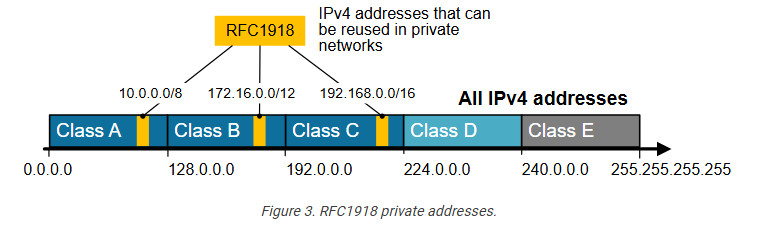
IPv4 private addresses are not routable on the public Internet. These addresses are typically used within internal networks (e.g., home, office, or enterprise environments), and devices with private IP addresses can communicate within that network. However, they must pass through a device like a router performing Network Address Translation (NAT) to access the Internet.
Every home network in the diagram below uses the same private network 192.168.1.0/24. For example, every device inside Home-1 has a private IPv4 address. However, when a device communicates with a host on the Internet, its address is translated into a public address assigned to the Internet router (37.3.45.100). All devices in Home-1 share this public IPv4 address when talking to the Internet.
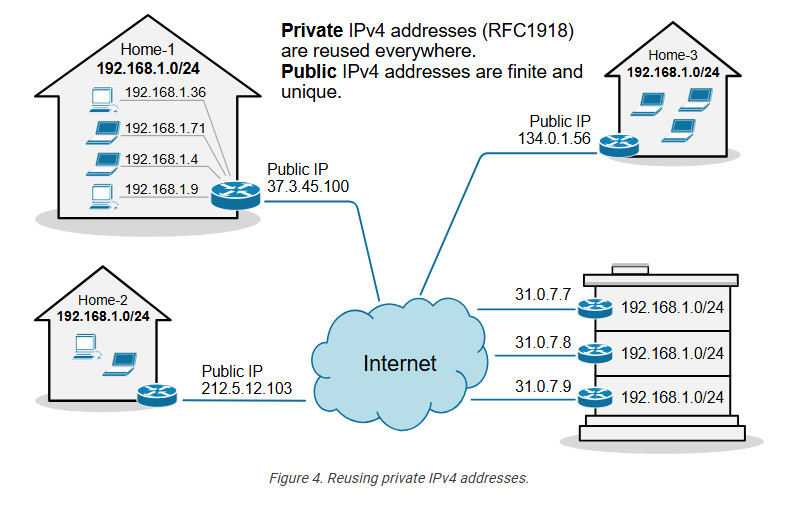
The idea is that anyone can use these addresses or re-use them for as many hosts as they like on their internal network. NAT can then translate the multitude of hosts using Private addresses into a much smaller set of Public addresses – thereby curbing the rate at which IPv4 addresses are being utilized.
What is NAT?
Network Address Translation (NAT) is a network capability that allows a device (typically a router or a firewall) to modify the IP address information in the IP packet headers while in transit. For example, let’s look at the diagram shown below. PC2 is configured with the private IPv4 address 192.168.1.5. This address is not routable on the Internet. However, PC2 can access the Internet because the router does Network Address Translation (NAT). When PC2’s packets reach the router, the router changes the source IP address in the IP header from 192.168.1.5 to 37.3.45.7, as shown in the diagram. Hence, all devices on the Internet see PC2’s traffic as coming from the public IP address 37.3.45.7.
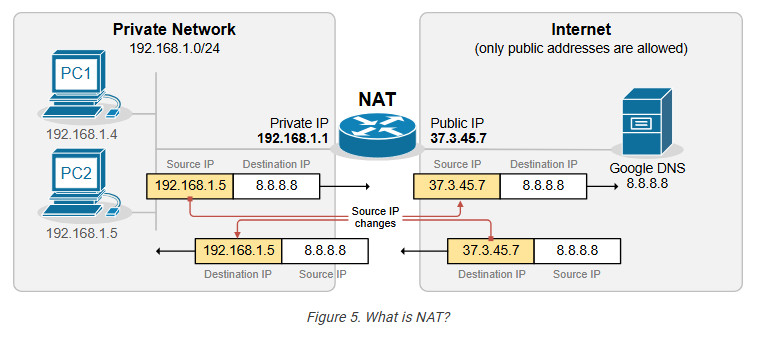
NAT is most commonly used to enable multiple devices on a private network to access the internet using a Single Public IP Address, which helps conserve the limited number of IPv4 addresses available. For example, all devices inside Home-1, as shown in the diagram below, use private IPv4 addresses from subnet 192.168.1.0/24. The router translates all internal IP addresses to the public IPv4 address assigned to the interface that connects to the Internet. Devices on the Internet see all traffic from Home-1 as coming from the public IP address 37.3.45.100.
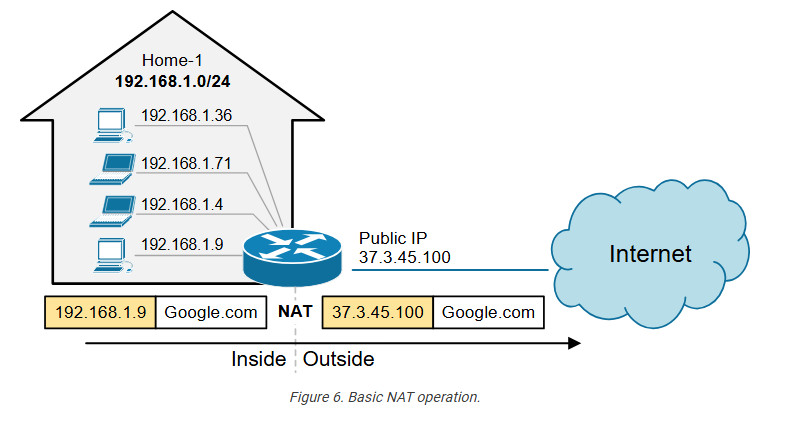
You can see that NAT and private IPv4 addresses work together to conserve IPv4 address space by allowing many devices in a local network to share a single public IPv4 address. Without NAT and private IPv4 addresses, every device inside Home-1 would have required a unique public IP address. This would have depleted the available IPv4 addresses would long ago due to the rapid growth of devices connected to the internet.
Static NAT
A device, such as a router or firewall, can change the IP address information in the packets’ headers while packets pass through. This network function is called Network Address Translation (NAT) and is shown in the diagram below.
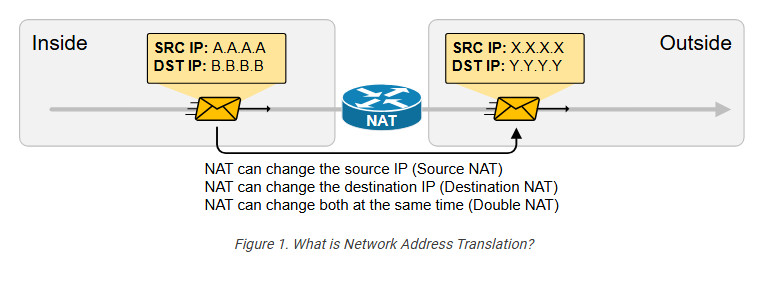
We have a packet with source IP “A.A.A.A” and destination IP “B.B.B.B” that goes through address translation. After the packet passes through the router, it has source IP “X.X.X.X” and destination IP “Y.Y.Y.Y.”
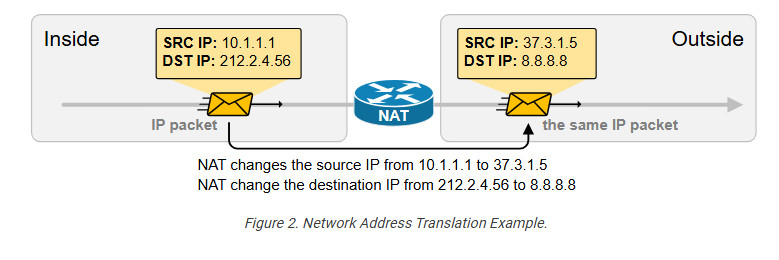
The following diagram shows an example of NAT with real IPv4 addresses. Notice something fundamental. Typically, organizations use NAT to translate private IPv4 addresses into public IPv4 addresses. However, from NAT’s perspective, it doesn’t matter whether the IPs are public or private. NAT can translate any IPv4 address to any other IPv4 address, whether private or public. In the example below, the NAT router translates the source IPv4 10.1.1.1 to 37.3.1.5 (private to public) and the destination IPv4 address 212.2.4.56 to 8.8.8.8 (public to public).
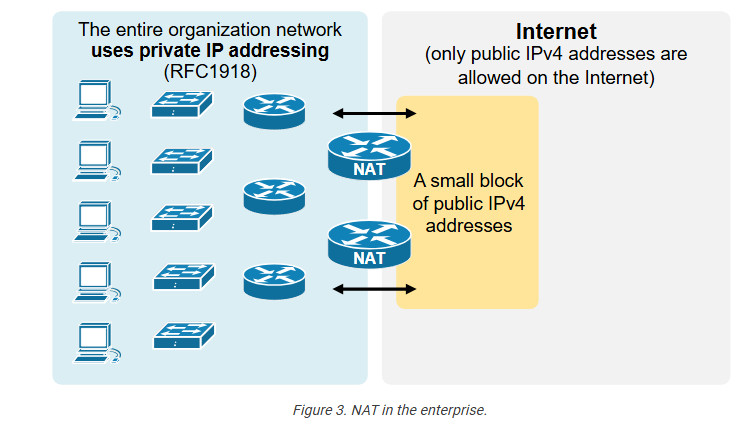
NAT is so ubiquitous and well-accepted that organizations primarily use private IPv4 addresses inside the entire network. Then, they use a small number of public IPv4 addresses on the internet-facing devices and use NAT to translate between the two, as shown in the diagram below.
NAT can change a packet’s source, destination, or both source and destination IP addresses while it passes through a router or a firewall. In 99% of implementations, NAT changes only the packet’s source address, which is typically private, with a public IPv4 address. This process is referred to as source NAT because only the source IP address is being changed (the destination IP address in the packet is left untouched).
Static Source NAT
Static NAT is the most straightforward type of network address translation. An IPv4 address on the inside is always mapped to the same IPv4 address on the outside via a configuration command. For example, the IP address 10.1.1.1 is always replaced with 37.3.1.1 when a packet goes through the NAT router, as shown in the diagram below.
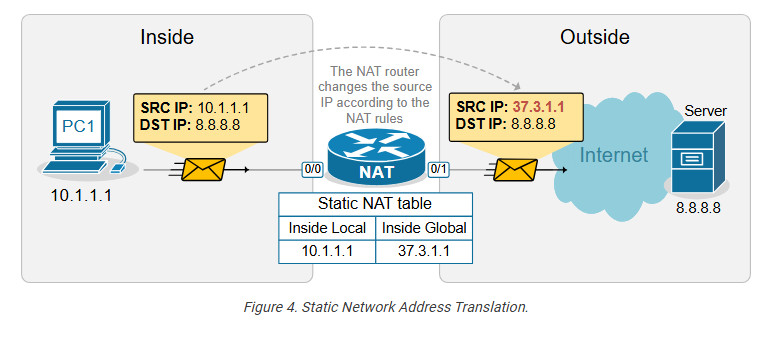
This static NAT rule allows PC1 to access the Internet because Internet hosts see PC1’s traffic as coming from public IP address 37.3.1.1. However, if a second PC must access the Internet, we need a second public IPv4 address and a second static NAT rule.
For example, if we have three PCs, as shown in the diagram below, we need three public IPv4 addresses and three static NAT rules. However, notice that the public IPv4 subnet assigned on the outside interface of the router is /26, which means we can only have 64 addresses. If we have 100 hosts on the inside, we cannot configure a static one-to-one mapping for all of them because we only have 64 public IPv4 addresses on the router’s outside interface.
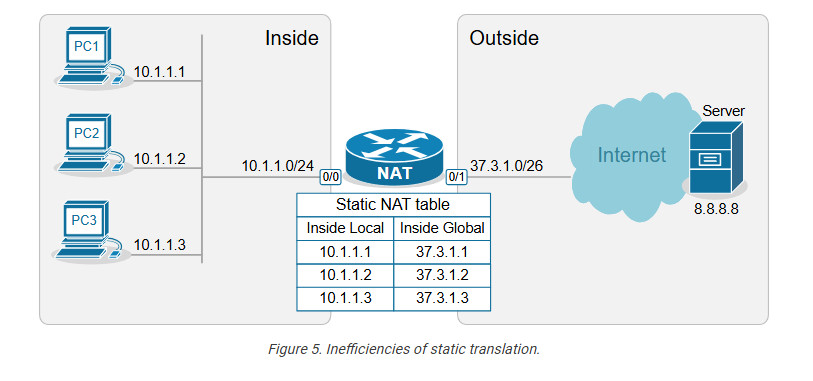
This example outlines the following essential aspects of Static NAT.
- It is a static mapping between an Inside Local and Inside Global address, as shown in the diagram above (more on these terms later on).
- It does not conserve IPv4 addresses.
- It does not scale.
You may be wondering why this network translation technique even exists if it doesn’t conserve IP addresses. The truth is that static NAT is typically not an organization’s primary network translation technique. For most hosts with private IPv4 addresses, the organization most likely uses Dynamic NAT with Overload (more on it in the following lessons). Static NAT is typically used only for some particular IP addresses assigned to special hosts. Here are some reasons why:
- It is a predictable, consistent one-to-one mapping.
- It allows hosts on the outside to initiate connections to the inside. This one is key.
With static NAT, a specific internal private IP is always mapped to a specific public IP, making the translation predictable. This is useful for services that need to be consistently reachable from the outside, such as Web Servers, Mail Servers, and VPN Gateways. For example, we have a Web Server inside the organization that has a private IPv4 address, 10.1.1.3, as shown in the diagram below.
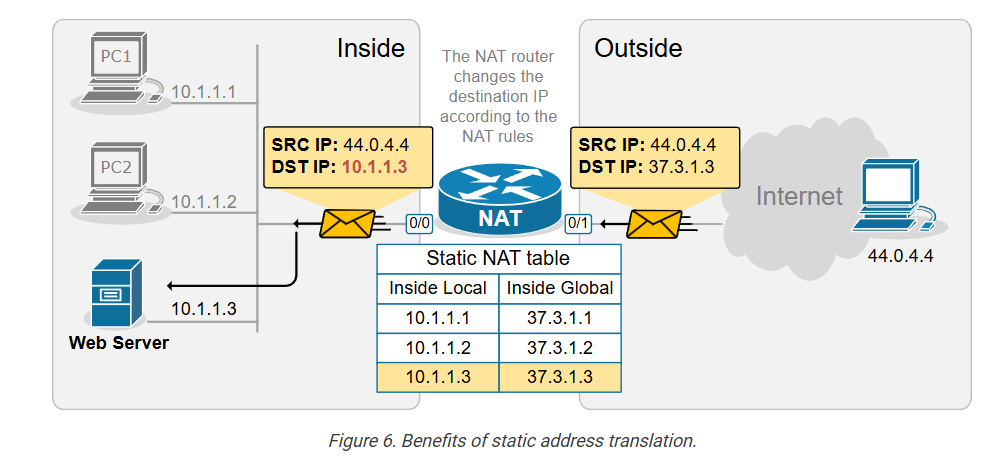
The NAT router has a static One-To-One Mapping between 10.1.1.3 and 37.3.1.3. This allows hosts on the outside to send traffic to 37.3.1.3, and the static NAT rule ensures that incoming traffic is always forwarded to the internal web server 10.1.1.3, as shown in the diagram above.
Configuring Static NAT
Let’s now see how to configure a router to perform static source network address translation. We will use a very basic topology, which you can download from the section at the end of the lesson and practice yourself.
The configuration process can be broken down into two main steps that are independent of one another:
Step 1. Defining Inside and Outside from the point of view of the local router.
Step 2. Configuring the NAT rules.
Step 1. Defining Inside and Outside
The first step in configuring network address translation is the same for every type of NAT – the router must identify which interfaces connect to the Inside which to the Outside.
A router cannot independently determine which interfaces connect to the organization’s network and which connect to an external network such as the Internet. For the router, every interface is the same—a layer 3 port with an IP address.
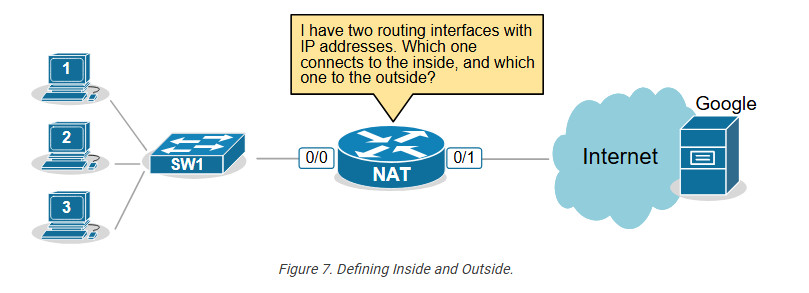
That’s why we must explicitly define the NAT zones on the router as follows:
- We must explicitly tell the router which interfaces connect to the Inside. The inside is typically our organization, an enterprise, a small office, or a home. This is our network, where we use private IPv4 addresses.
- We must explicitly tell the router which interfaces connect to the Outside. The outside is typically the Internet, but it can also be another external network. This is the network where typically only public IPv4 addresses are allowed.
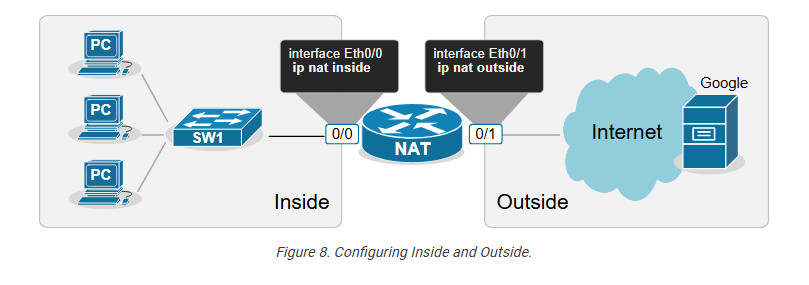
For example, we explicitly tell the router shown in the diagram above that its interface Ethernet0/0 connects to the Inside and Eth0/1 connects to the Outside by applying the configuration shown in the output below.
					..Cisco Router Commnds..
interface range Ethernet0/0
ip address 10.1.1.254 255.255.255.0
ip nat inside
!
interface Ethernet0/1
ip address 37.3.1.254 255.255.255.0
ip nat outside
!
Notice that a router may have multiple interfaces connecting to the Inside and multiple interfaces connecting to the Outside.
Step 2. Configuring NAT rules.
The second step in the configuration process is to define the network address translation rules. The following diagram shows the rules we need to configure.
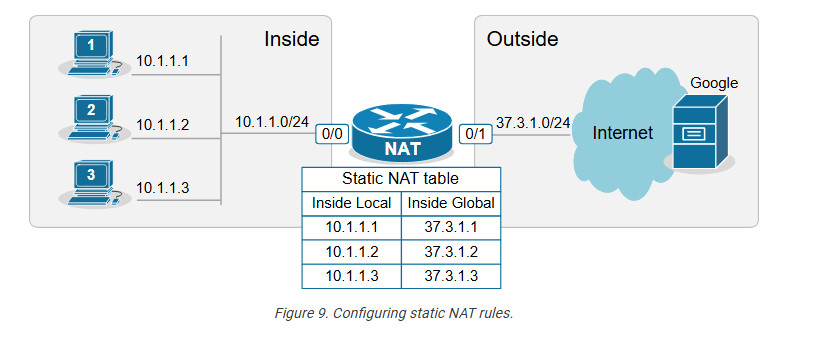
We apply one configuration command in global configuration mode for every one-to-one mapping, as shown in the output below.
					ip nat inside source static 10.1.1.1 37.3.1.1
ip nat inside source static 10.1.1.2 37.3.1.2
ip nat inside source static 10.1.1.3 37.3.1.3
Let’s decode the IP nat command that we use.
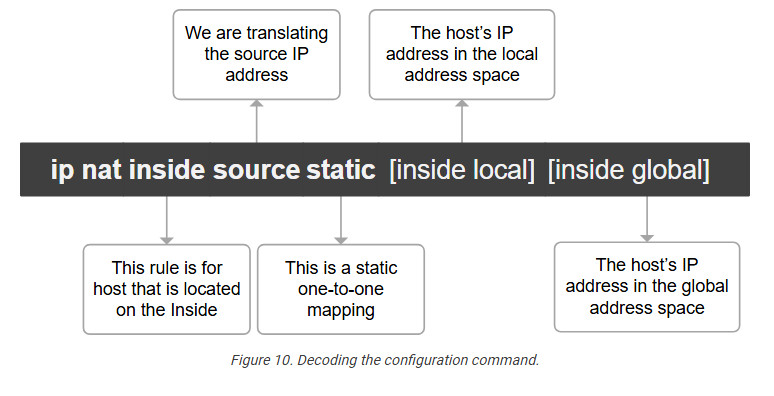
We have configured static network address translation for each local host in the topology. Now, let’s verify that the hosts can reach the Google server.
Verifying the network address translation
We use the following command to verify that the network address translation is working. Notice the terms “Inside local,” “Inside global,” “Outside local,” and “Outside global.”
					NAT# sh ip nat translations

Pro Inside global Inside local Outside local Outside global
icmp 37.3.1.1:3 10.1.1.1:3 8.8.8.8:3 8.8.8.8:3
--- 37.3.1.1 10.1.1.1 ---
It is essential to understand what each of those terms means, so let’s zoom in.
Decoding the NAT table
One of the most important goals of this lesson is to ensure you understand the four main NAT table terms:
- inside Local
- Inside Global
- Outside Local
- Outside Global
Let’s use the diagram below to introduce the key terms. Notice that we have a static one-to-one mapping that allows the host 10.1.1.1 on the inside to reach the host 8.8.8.8 on the Internet.
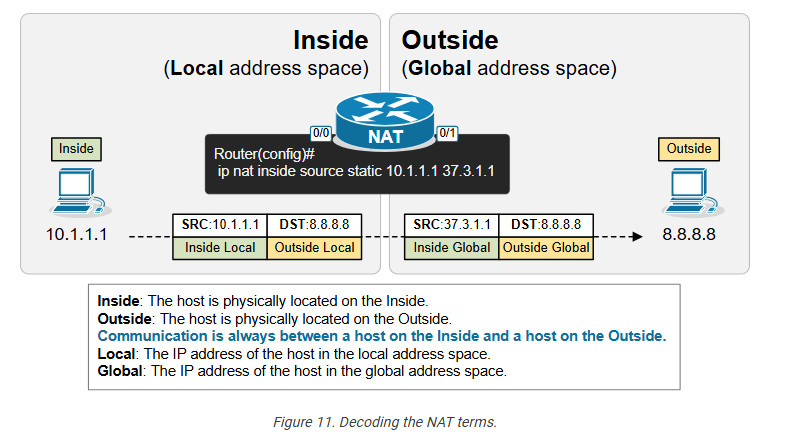
First, remember that from the perspective of the NAT router, every communication is between a host on the Inside and a host on the Outside. (Having in mind that Inside and Outside are already defined using the ip nat inside/outside command). One host is referenced as Inside and the other as Outside, as shown in the diagram below.
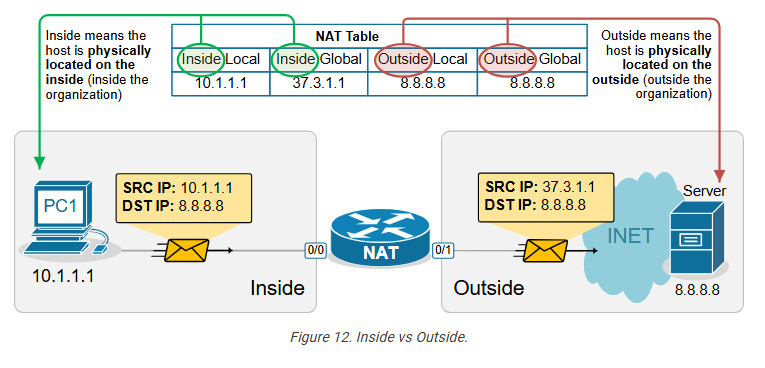
- In that context, the term “Inside Local” refers to the host’s IP address in the local address space. Typically, this is a private IPv4 address of a host inside the organization. For example, PC1 is seen with IP address 10.1.1.1 inside the local network.
- The term “Inside Global” refers to the host’s IP address in the global address space. Typically, this is the public IPv4 address representing the host outside the organization. For example, PC1 is seen with IP address 37.3.1.1 on the Internet.
The following diagram visualizes the difference between the Local and Global terms.
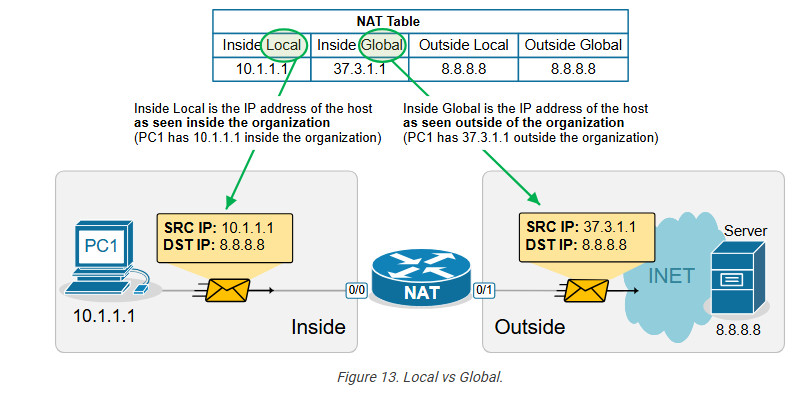
Static address translation can be configured in the opposite direction for the host on the outside. The Outside host with Outside Global address 8.8.8.8 can be represented with an Outside Local address 10.1.1.8 on the inside, depending on the network requirements.
Another useful NAT verification tool is the show ip nat statistics command. It clearly shows the inside and outside interfaces and the type of NAT rules that are configured.
Key takeaways
- One-to-One Mapping: Static NAT creates a permanent, one-to-one mapping between a local (private) IP address and a global (public) IP address.
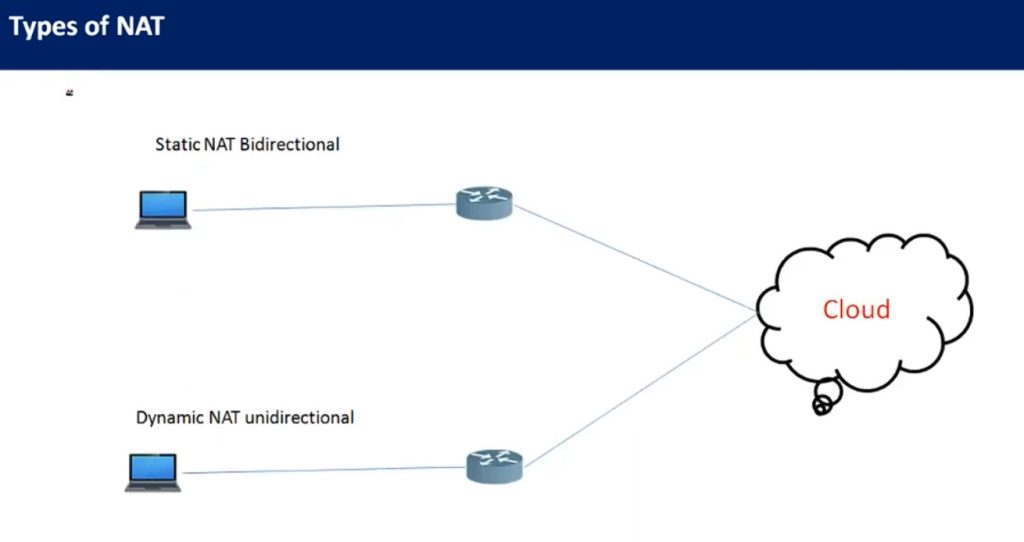
- Bidirectional Communication: It allows both inbound and outbound traffic, meaning external hosts can reach internal devices using the global IP, and internal devices can access external networks using the same IP mapping.
- Static Configuration: The NAT translation is manually configured and remains static until removed, which is ideal for servers requiring consistent public IP addresses.
- Use Cases: Often used for scenarios where certain internal resources (e.g., web servers) need to be consistently accessible from the internet.
- No Port Translation: Static NAT does not modify ports; it only translates IP addresses. This contrasts with PAT (Port Address Translation), which maps multiple private IPs to a single public IP using different ports.
Dynamic NAT
This lesson continues our discussion on Network Address Translation by examining Dynamic NAT. At the end of the lesson, you can download the EVE-NG virtual machine and practice the configurations on your own.
What is Dynamic NAT?
Dynamic NAT is basically a static one-to-one mapping between an inside local and inside global that happens automatically. We have seen in the previous lesson that with Static NAT, a network administrator manually configures every one-to-one mapping on the router. For example, to map the inside local address 10.1.1.1 to inside global 37.3.1.1, a network admin must configure the following configuration line on the rou
Router(config)# ip nat inside source static 10.1.1.1 37.3.1.1
Suppose there are many inside local and inside global addresses. In that case, the network admin must configure many configuration lines on the router and statically pair each inside local and global addresses.
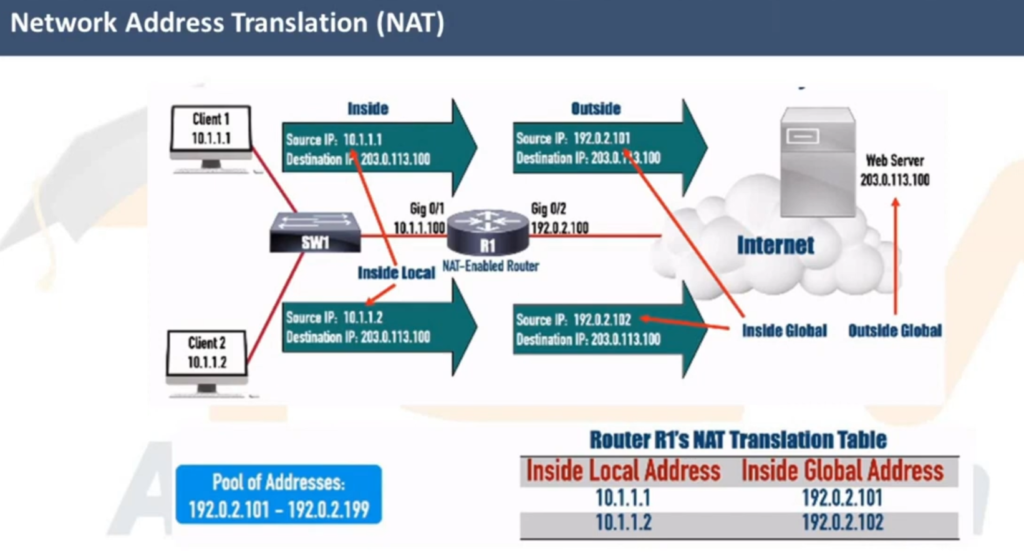
Dynamic NAT is a method of dynamically mapping inside local addresses (typically private ones) to inside global IP addresses (typically public ones) from a predefined Pool of Global IPs. Unlike Static NAT, where there’s a fixed one-to-one mapping between local and global addresses, Dynamic NAT maps local to global addresses on a first-come, first-served basis.
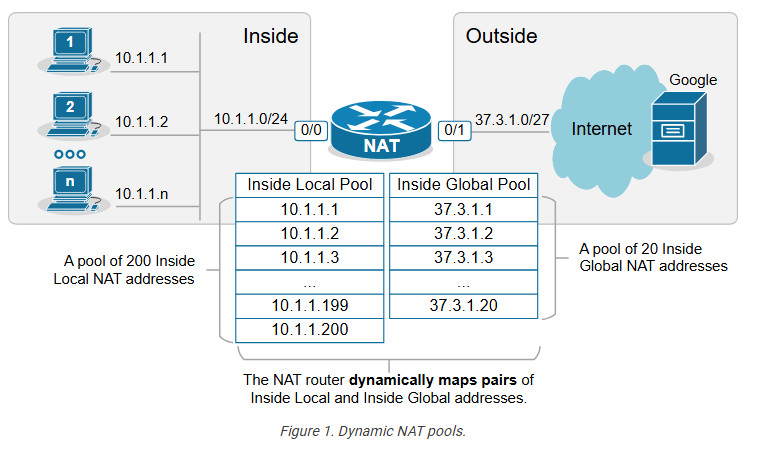
Let’s see how Dynamic NAT works in a few steps, as visualized in the diagram below:
- Step 1. A host on the inside, PC2(10.1.1.2), sends traffic destined for the Internet (8.8.8.8).
- Step 2. The router receives the packet on its NAT-Inside interface, meaning it must translate the source address according to the configured NAT rules. The source IP matches the Inside Local criteria (it is part of subnet 10.1.1.0/24).
- Step 3. Since the router is configured to translate the source address from 10.1.1.0/24 to the configured NAT pool, the router maps the host’s private IP address (Inside Local) to the first available public IP address from the NAT pool (Inside Global). The router creates a one-to-one mapping between PC2’s private address (10.1.1.2) and the first available public IP address from the NAT pool (37.3.1.1), as shown in the diagram below.
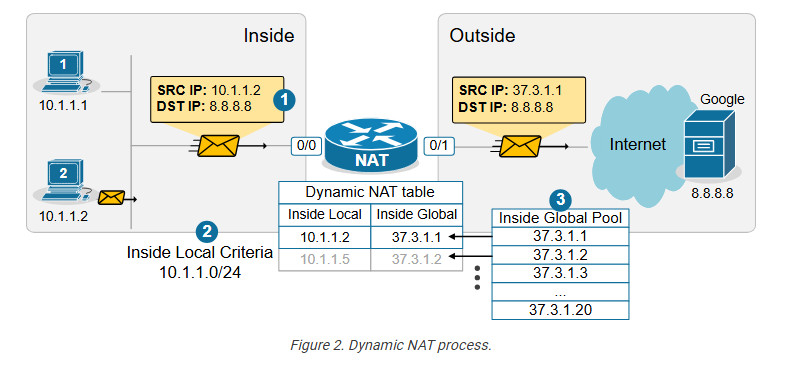
When step 3 is complete, the router adds a dynamic entry in its NAT table for the pair (10.1.1.2, 37.3.1.1) and keeps the entry until traffic flows between the PC2 and the host on the Internet. As long as the entry exists in the table, only host 10.1.1.2 can use the public address 37.3.1.1. The default timeout for the dynamic entry is 24 hours. IIf no traffic is seen in 24 hours, the entry is deleted from the table, and the public IP address is returned to the NAT pool.
Suppose another host, PC5 (10.1.1.5), sends packets destined for the Internet at the same time. The NAT router performs the same steps and dynamically maps the PC5’s private address, 10.1.1.5, to the next available public address from the pool – 37.3.1.2, as shown in the diagram above. The router keeps mapping Inside Local addresses to the next available Inside Global address until all addresses in the NAT pool are allocated. Then, if a packet arrives and there are no available public IPv4 addresses in the pool, the router discards the incoming packet. The size of the pool defines the maximum number of inside hosts that can access the Internet at the same time.
Notice the following key aspects of Dynamic NAT:
- Many-to-Many Mapping: Private IP addresses are mapped to public IPs dynamically from a pool, meaning there is no fixed assignment.
- Temporary Mapping (24 hours by default): The public IP is assigned to a private IP only when traffic is sent out and released when the session ends.
Configuring Dynamic NAT
For this example, we are going to use the topology shown in the diagram below. There are three hosts inside the organization, which must be able to access the Google server and the Internet. The organization has purchased the following public IPv4 address from the ISP: 37.3.1.1 – 37.3.1.20.
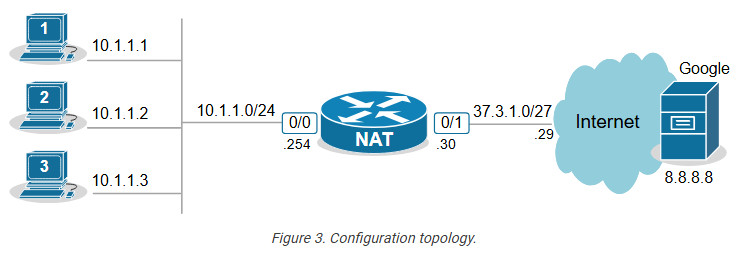
Configuring any network address translation starts with identifying the Inside and Outside interfaces of the router. In this example, we configure the Eth0/0 interface as Inside and the Eth0/1 interface as outside, as shown in the output below.
					interface Ethernet0/0
ip address 10.1.1.254 255.255.255.0
ip nat inside
!
interface Ethernet0/1
ip address 37.3.1.30 255.255.255.224
ip nat outside
!
The next step is configuring an access list defining the Inside Local criteria. Basically, when a packet enters the router on the NAT-inside interface, the router will check whether the source IP address is from the configured subnet. In our example, we will translate the source addresses from subnet 10.1.1.0/24 so the ACL looks ike this:
					ip access-list standard INSIDE_LOCAL
10 permit 10.1.1.0 0.0.0.255
!
Then, we need to define the pool of Inside Global addresses. In our case, we are given the range of addresses 37.3.1.1-37.3.1.20, so we configure the pool as follows:
ip nat pool INSIDE_GLOBAL 37.3.1.1 37.3.1.20 prefix-length 27
Lastly, we configure the NAT rule. Notice that the command references the access list and the pool that we have just configured.
ip nat inside source list INSIDE_LOCAL pool INSIDE_GLOBAL
The command basically tells the router – “When a packet arrives on your inside interface, and the packet’s source address matches the Inside Local criteria (10.1.1.0/24), map it to the next available public IPv4 address from the Inside Global pool.”
Verifying Dynamic NAT
Immediately after the router has been configured, its NAT table is empty. We must first initiate some traffic from Inside to Outside in order to trigger the dynamic translation. Let’s ping from the hosts to the Google server.
					PC1> ping 8.8.8.8
Type escape sequence to abort.
Sending 5, 100-byte ICMP Echos to 8.8.8.8, timeout is 2 seconds:
.!!!!

Success rate is 80 percent (4/5), round-trip min/avg/max = 1/2/6 ms
PC2> ping 8.8.8.8
Type escape sequence to abort.
Sending 5, 100-byte ICMP Echos to 8.8.8.8, timeout is 2 seconds:
.!!!!

Success rate is 80 percent (4/5), round-trip min/avg/max = 1/4/7 ms
PC3> ping 8.8.8.8
Type escape sequence to abort.
Sending 5, 100-byte ICMP Echos to 8.8.8.8, timeout is 2 seconds:
.!!!!

Success rate is 80 percent (4/5), round-trip min/avg/max = 1/3/8 ms
Now if we check the network translation table using the following command, we can see the dynamic one-to-one mappings.
					NAT# sh ip nat translations

Pro Inside global      Inside local       Outside local      Outside global
icmp 37.3.1.1:14       10.1.1.1:14        8.8.8.8:14         8.8.8.8:14
--- 37.3.1.1           10.1.1.1           ---                ---
icmp 37.3.1.3:2        10.1.1.2:2         8.8.8.8:2          8.8.8.8:2
--- 37.3.1.3           10.1.1.2           ---                ---
icmp 37.3.1.2:1        10.1.1.3:1         8.8.8.8:1          8.8.8.8:1
--- 37.3.1.2           10.1.1.3
The following command is useful to check which router interfaces are configured as Inside and Outside. Also, you can see the pool of public addresses and what percentage of the addresses have been allocated.
					NAT# sh ip nat statistics
Total active translations: 5 (0 static, 5 dynamic; 3 extended)
Outside interfaces:
  Ethernet0/1
Inside interfaces:
  Ethernet0/0
Hits: 32  Misses: 0
CEF Translated packets: 25, CEF Punted packets: 7
 Reserved port setting disabled provisioned no
Expired translations: 4
Dynamic mappings:
-- Inside Source
[Id: 1] access-list INSIDE_LOCAL pool INSIDE_GLOBAL refcount 5
 pool INSIDE_GLOBAL: id 1, netmask 255.255.255.224
        start 37.3.1.1 end 37.3.1.20
        type generic, total addresses 20, allocated 2 (10%), misses 0
nat-limit statistics:
 max entry: max allowed 0, used 0, missed 0
Notice the Hits and Misses counters. The Hits counter shows how many packets arrived on the router’s inside interface and required address translation. Those packets were able to be translated. However, the Miss counter is more important. It shows how many packets arrived, and the router could not translate them to an Inside Global address because there were no available IPv4 addresses in the Inside Global pool. The counter is zero in our example because we have only three internal hosts but 20 available Inside Global addresses. However, you must keep track of this counter in a real-world implementation.
Key Takeaways
Dynamic NAT is a method of dynamically mapping private IP addresses to public IP addresses from a predefined pool of public IPs. Unlike Static NAT, which uses a fixed one-to-one mapping between private and public addresses, Dynamic NAT maps private addresses to public ones as needed on a first-come, first-served basis. When the pool of public IPs runs out, additional private hosts cannot access the Internet until a public IP becomes available.
Compared to Static NAT:
- Static NAT requires one public IP for each internal device at all times, even if the device isn’t currently communicating. Dynamic NAT allocates public IPs only when needed, which can be more efficient when public IPs are limited.
- Dynamic NAT scales better than Static NAT when many internal devices need internet access, but not all at once. It reduces the number of required public IP addresses by assigning them dynamically rather than having a static one-to-one mapping.
Compared to PAT (Port Address Translation):
- Some applications (like VoIP or certain security protocols) may require consistent port usage without translation, which is problematic with PAT. Dynamic NAT avoids this by mapping only the IP addresses, leaving the ports unchanged.
- Since Dynamic NAT assigns a unique public IP from the pool, it’s easier to track which internal device is using which public IP at a given time. PAT’s port-based mappings can make tracing connections back to a specific internal device harder.
NAT Overload (PAT)
Port Address Translation (PAT), also known as NAT overload, is a type of Network Address Translation (NAT) that allows multiple devices on a local network (with private IP addresses) to share a Single Public IP address to access external networks, such as the internet.
However, to really understand how PAT works, you must know how TCP/UDP connections are established in the context of IP addresses and ports. Let’s quickly refresh our knowledge of sockets and TCP sessions.
What is a Socket, and what is a TCP session
In networking, a socket is an endpoint for sending and receiving data between devices over a network. It provides a mechanism for communication between two hosts, typically a client and a server, enabling applications to exchange data over protocols like TCP or UDP.
A socket is a pairing between an IP address and a port, as shown below:
IP_Address:Port_Number
When two applications communicate, they each create a socket. A connection between them is established by pairing the client socket with the server socket, forming a TCP or UDP session.
A TCP session is always between two sockets. For example, on Windows, you can see the established sessions between the host and remote hosts using the netstat command, as shown in the output below.
					netstat -a -n | find /I "ESTABLISHED"
TCP 10.1.1.1:43000 65.3.2.1:443 ESTABLISHED
TCP 10.1.1.1:43001 65.3.2.1:443 ESTABLISHED
TCP 10.1.1.1:43002 65.3.2.1:443 ESTABLISHED
Notice that a pair of one local and one remote socket uniquely describes a TCP/UDP connection. For example, one unique TCP session is (10.1.1.1:43000-65.3.2.1:443). If host 10.1.1.1 wants to establish a new TCP connection to the same server, it must use another TCP port like this: (10.1.1.1:43001-65.3.2.1:443). The logic is visualized in the diagram below. Notice that PC has established three TCP sessions with the same server. Pay attention to the IP addresses and ports (sockets).
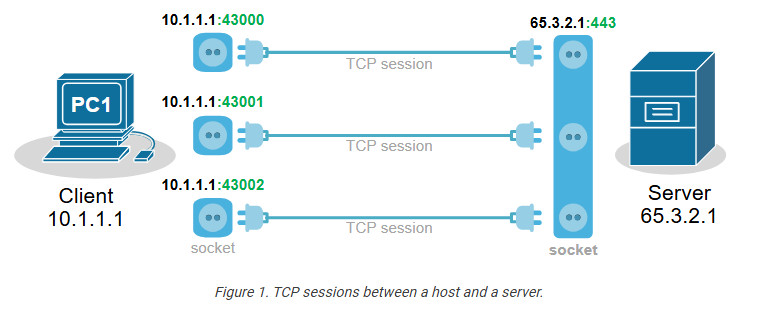
Notice another important aspect. In client-server communications, the server socket is always the same. The server’s web hosting service always listens on the same socket (IP:Port), typically on port 80(http) or 443(https). Therefore, the client-side socket distinguishes the different TCP connections to the server.
Every TCP session is between a pair of sockets. The combination of local and remote sockets is unique because the host uses a different TCP port for each connection. Let’s see a slightly different example – three different hosts establishing a single connection to the same server.
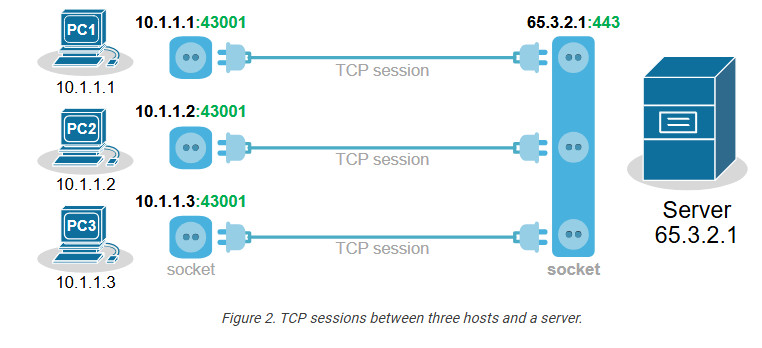
Notice that each host uses the same TCP port. So, how does the server differentiate between the three sessions? Each host’s IP address is different, which makes the three TCP sessions unique from the server’s point of view.
Now, let’s compare the two scenarios from the webserver’s perspective. Do you see any difference in the context of sockets and TCP sessions?
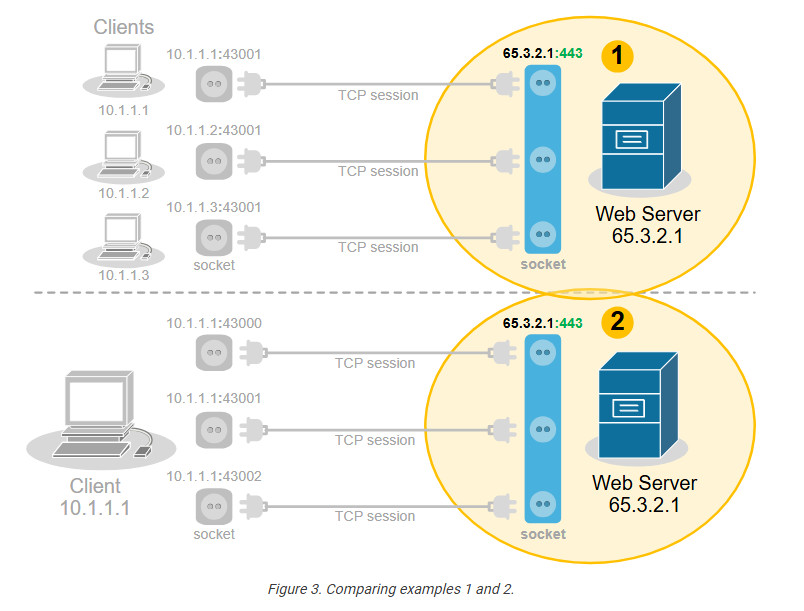
No, from the server’s point of view, there is no difference. In client-server communications, the clients choose a random port and initiate the connection. The server always listens for connection on the same socket. The server does not differentiate between three TCP sessions to one host and three TCP sessions to three different hosts. For the server, these are just three TCP sessions.
What is Port Address Translation (PAT)
People soon realize they can use this to their advantage and translate multiple clients’ private IP addresses to one public IPv4 address by changing the entire socket (IP:port), not only the IP address. For example, we can change the sockets (IP:port) of the three hosts with different sockets with the same public IPv4 address but different ports. This wouldn’t change anything on the server side
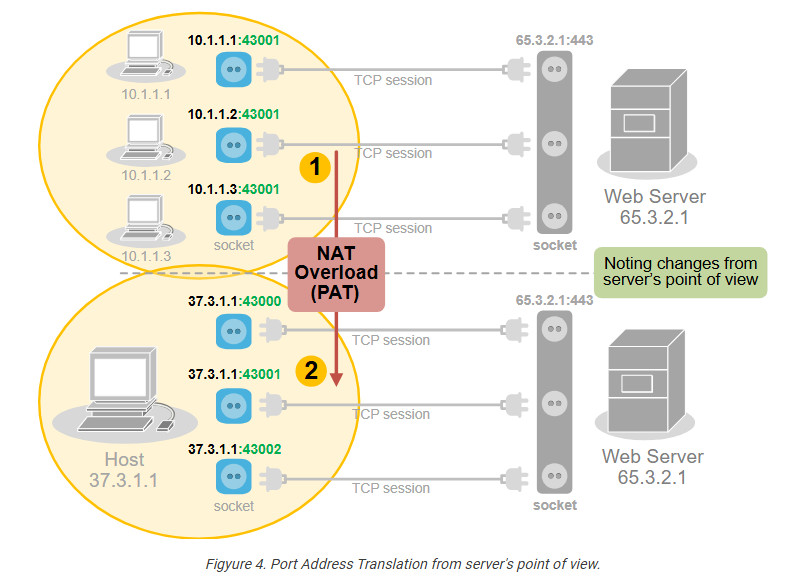
PAT uses exactly this logic to translate many private IPv4 addresses on the inside with one public IPv4 address on the outside. It takes advantage of the fact that 99% of internet communications are client-server and that the server socket is permanent. In client-server communications, the client initiates the connection and chooses a random port number. The server’s port number is well-known and permanent.
How does PAT work?
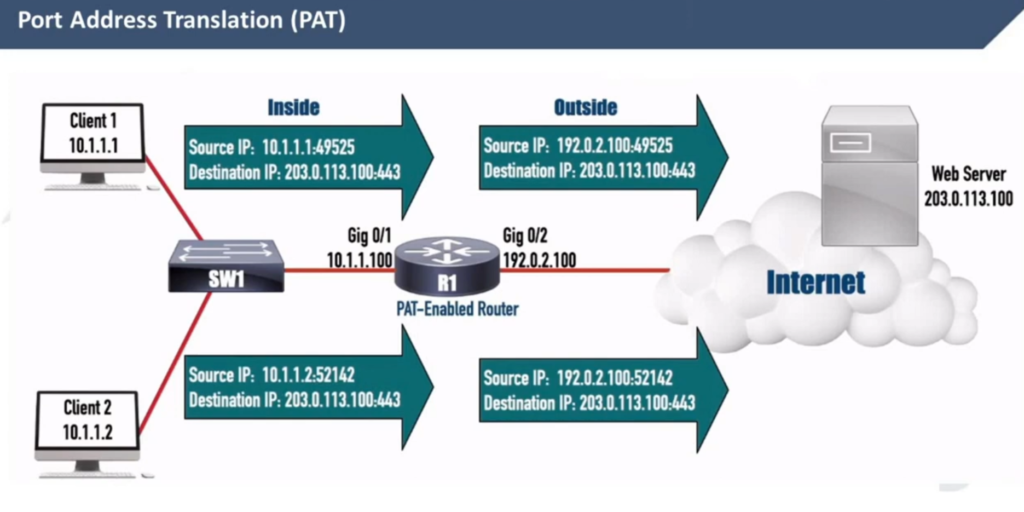
Port Address Translation (PAT), also known as NAT Overload, translates many client private addresses to one public IP address, making many TCP sessions from different clients look like many TCP sessions from one client. This does not affect the server side. However, it only works for clients in client-server communications.
For example, the three TCP sessions from PC1, PC2, and PC3 look like three TCP sessions coming from the same host, 37.3.1.1, at the server end, as shown in the diagram below.
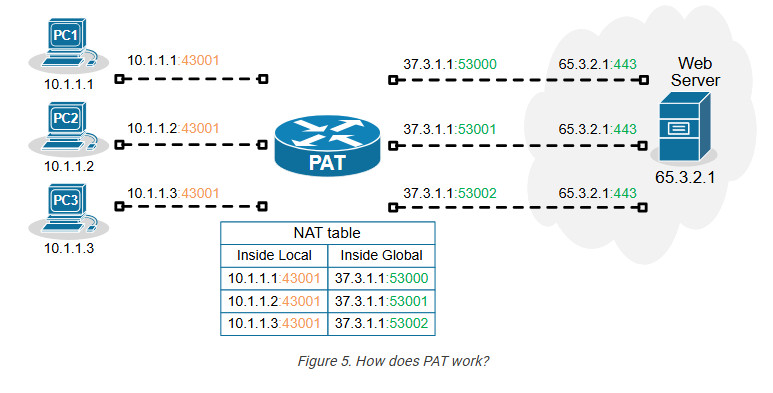
Of all Network Address Translation types, PAT is by far the most popular and widely adopted one. Every home WiFi router and every small, medium, and large enterprise uses PAT. It can translate up to 65000 private IPv4 addresses to a single public IPv4 address. It reduces the need for multiple public IP addresses, which can be costly for organizations with many devices.
On the other hand, PAT has some disadvantages as well. It only works for clients in client-server communication (which accounts for 99% of the Internet traffic). It complicates the inbound traffic from outside to inside. For example, generally, with PAT, you cannot have a server on the inside that must be reachable by clients on the outside. In such scenarios, organizations use static one-to-one NAT for the server address, which allows clients on the outside to initiate a connection to the server inside.
Configuring PAT (NAT Overload)
Next, let’s move on to the configuration example. We will use the topology shown in the diagram below. There are three clients that must be able to access the Internet. However, the organization has only one public IPv4 address assigned to the router’s Eth0/1 interface.
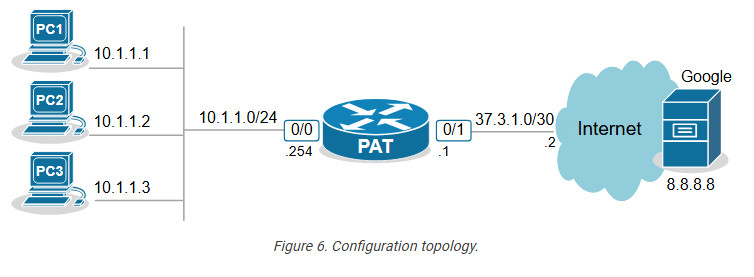
The only way to allow all hosts on the inside to communicate with the outside using one public IP is by using PAT (also called NAT Overload).
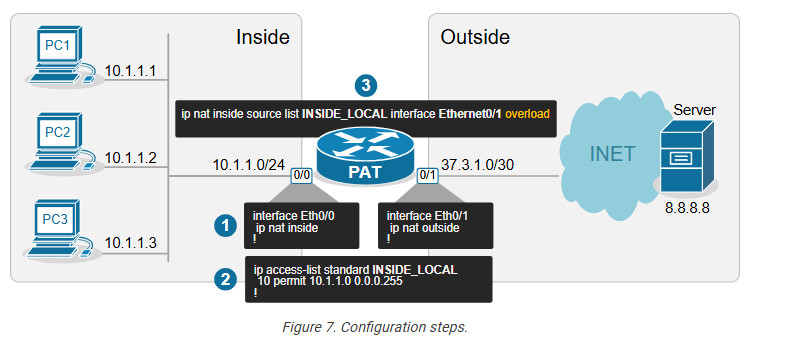
Step 1. Define Inside and Outside
The first step is always the same for every network translation type. We must tell the router which interfaces connect to the inside and which to the outside.
					interface Ethernet0/0
ip address 10.1.1.254 255.255.255.0
ip nat inside
!
interface Ethernet0/1
ip address 37.3.1.1 255.255.255.252
ip nat outside
!
We configure interface Eth0/0 as Inside and Eth0/1 as Outside.
Step 2. Define Inside Local criteria
Next, we must configure the Inside Local criteria. Basically, this tells the router which IPv4 addresses it must translate and which not. In our example, we have only one internal subnet and we configure it into an access list named INSIDE_LOCAL.
ip access-list standard INSIDE_LOCAL 10 permit 10.1.1.0 0.0.0.255
However, in real-world examples, an organization may have many inside networks, some of which must be able to pass through the router untranslated and others translated. That’s why this step exists in the process: network admins want to have complete control over which networks the router translates.
Step 3. Configure NAT rules
Lastly, we configure the PAT rule. You can see that the command has several parameters and is a bit long.
ip nat inside source list INSIDE_LOCAL interface Ethernet0/1 overload
Let’s break down and explain each parameter in the command:
- ip nat inside – The translation is for hosts physically located on the inside. Clients’ traffic will be coming to the router’s internal interface.
- source – The translation affects the source IP addresses of packets.
- list INSIDE_LOCAL – An access that contains the range of IP addresses on the inside that will be matched and translated according to the PAT rule.
- interface Ethernet0/1 – specifies the interface connected to the Outside, which IP address will be used as the public IP address for NAT translation.
- overload – This enables Port Address Translation (PAT), also known as NAT overload. When enabled, it allows multiple clients on the inside network to use a single public IPv4 address by differentiating traffic using unique port numbers for each
- connection.
Verifying PAT (NAT Overload)
Now, if we initiate some traffic from the clients to the server on the outside, we can see the active translations on the PAT router. Notice the ports used by the clients (in green) and the ports after the translation (in blue). The route has changed the entire socket (IP:port).
					NAT# sh ip nat translations
Pro Inside global Inside local Outside local Outside global
tcp 37.3.1.1:4096 10.1.1.1:40591 8.8.8.8:23 8.8.8.8:23
tcp 37.3.1.1:4097 10.1.1.2:49399 8.8.8.8:23 8.8.8.8:23
tcp 37.3.1.1:4098 10.1.1.3:61278 8.8.8.8:23 8.8.8.8:23
We can also gather some useful information using the command below.
					NAT# sh ip nat statistics
Total active translations: 3 (0 static, 3 dynamic; 3 extended)
Outside interfaces:
Ethernet0/1
Inside interfaces:
Ethernet0/0

Hits: 140 Misses: 0

CEF Translated packets: 140, CEF Punted packets: 0
Reserved port setting disabled provisioned no
Expired translations: 3
Dynamic mappings:
-- Inside Source

[Id: 1] access-list INSIDE_LOCAL interface Ethernet0/1 refcount 3
nat-limit statistics:
max entry: max allowed 0, used 0, missed 0
Pay attention to the Hits and Misses counters. They indicate how many packets were translated and how many packets weren’t translated because no sockets were available (public IP:available port). This can happen if there are hundreds of clients and only one public IPv4 address on the outside. Recall that there are only 216 port numbers (65536).
Key Takeaways
Port Address Translation (PAT), also known as NAT Overload, is the most widely adopted NAT method in the networking world. It is used in almost every network – home, SOHO, small, medium, or large enterprise. It is the most critical NAT topic that network engineers must understand.
Advantages of PAT (NAT Overload)
- It allows many internal clients (inside local) to share a single public IP address (inside global), conserving IPv4 addresses.
- It replaces the client’s socket (inside local IP and port) on the client side with a new socket made of an Inside Global IP and a new port number.
- Up to 65536 internal clients can share the same public IPv4 address. (There are 216 available port numbers).
- It provides an additional level of network security because hosts on the outside cannot initiate connections to hosts on the inside.
Disadvantages of PAT (NAT Overload)
- It only works for clients in client-server communications, which is not a problem for 99% of Internet communications. However, it cannot be used to host servers on the inside that must be reachable by clients on the outside. In such scenarios, it must be combined with one-to-one mapping (static NAT).
- Some protocols and applications, such as VoIP, VPNs, and Gaming, do not tolerate change in the client port in transit and may require additional configuration.
- In high-demand networks with multiple hosts and numerous simultaneous sessions, clients may experience port exhaustion – meaning the NAT router does not have more available ports to do translation with the public IPv4 address. The problem is easily solvable by adding more Inside Global addresses, but it adds expense. (public IPs cost money)
NAT Slide
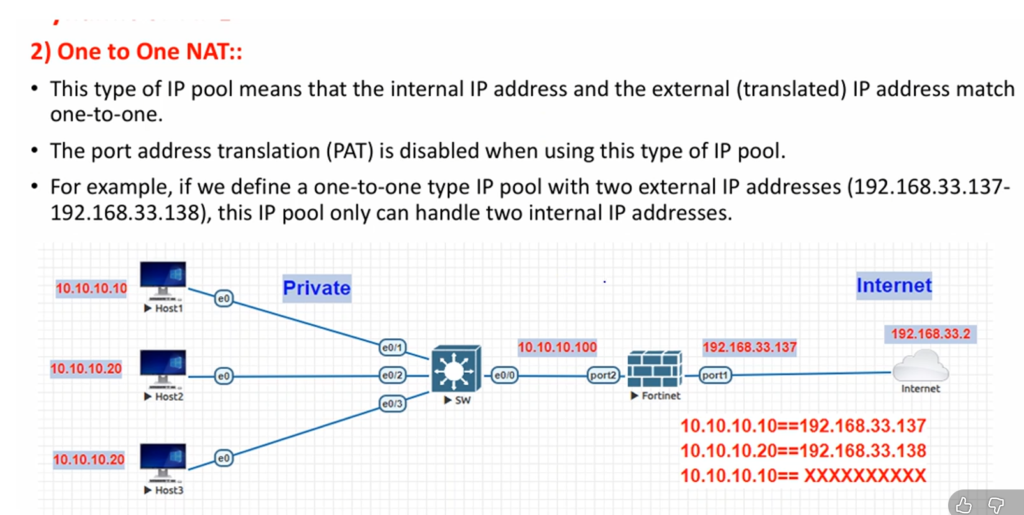
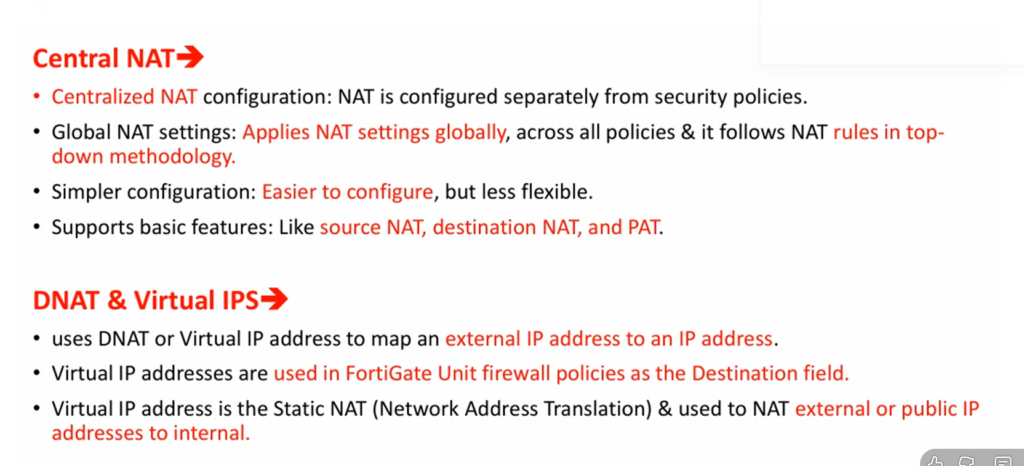
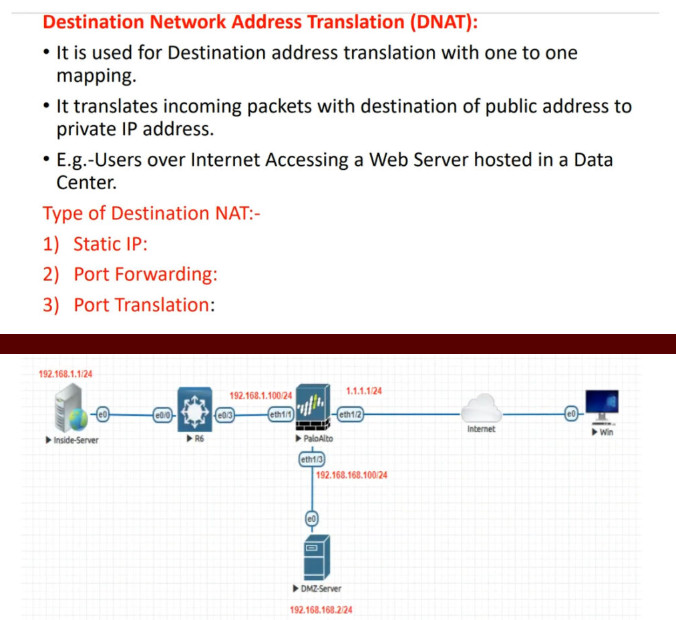
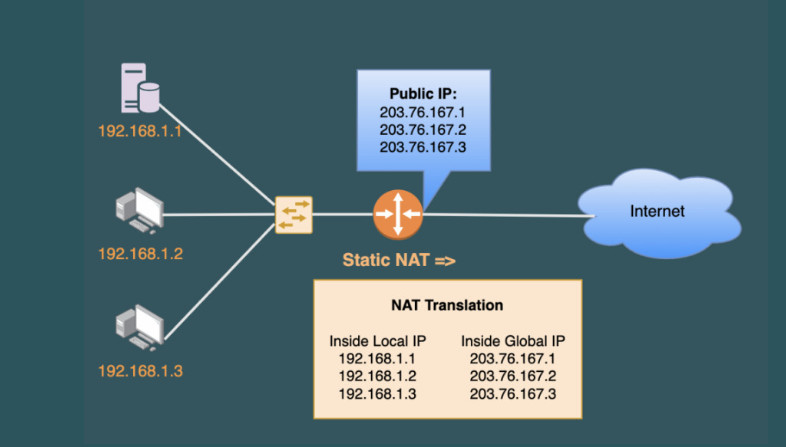
What is NAT (Network Address Translation)
NAT (Network Address Translation)
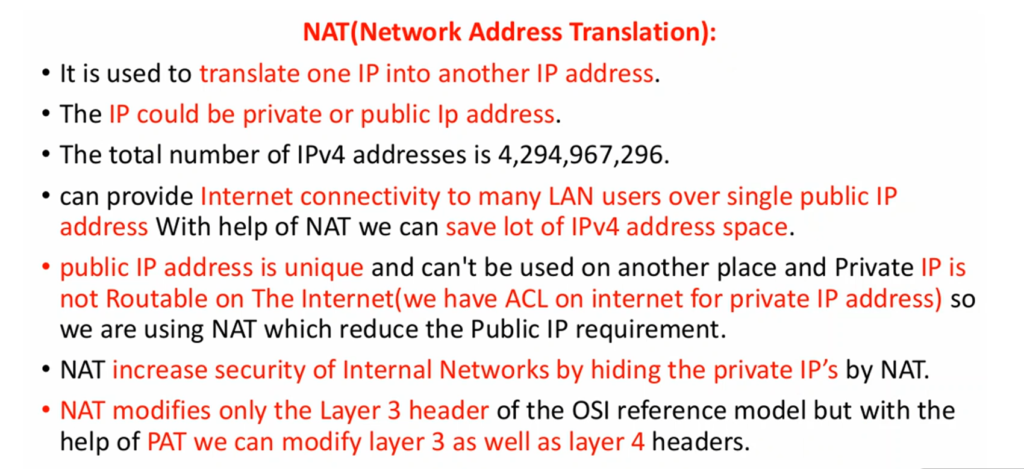
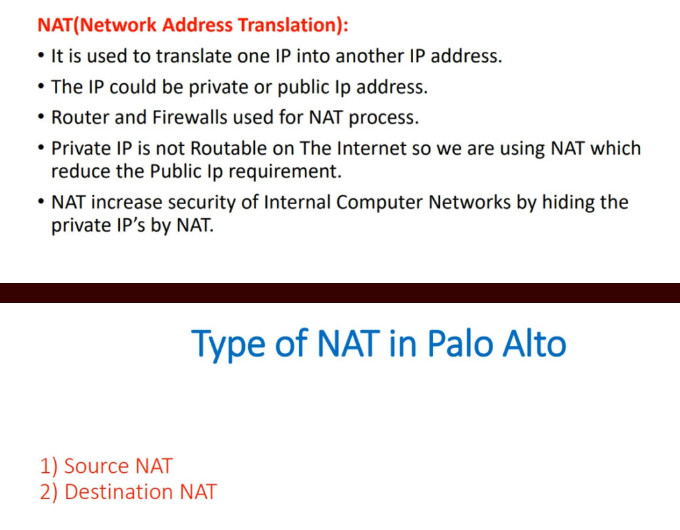
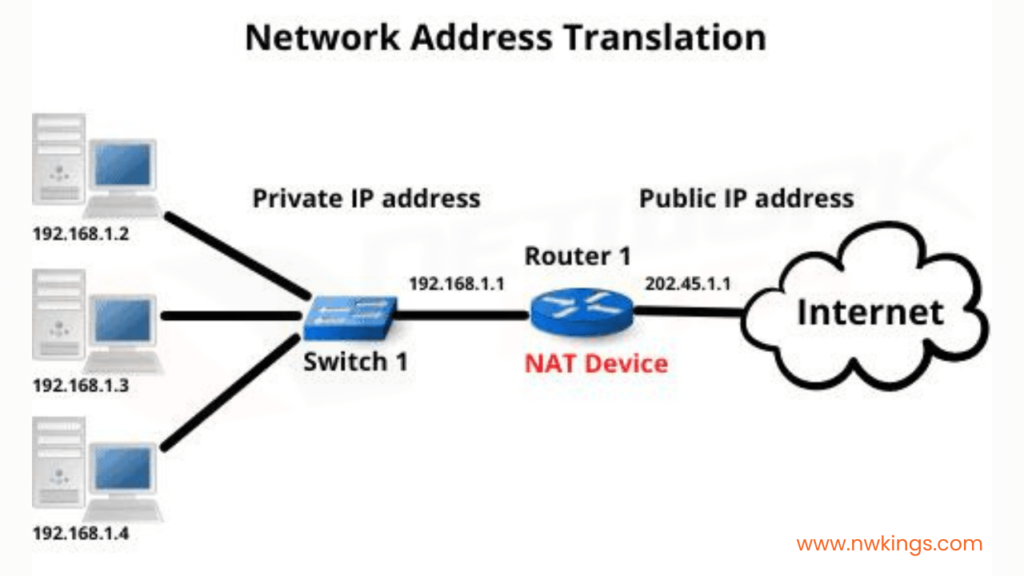
NAT (Network Address Translation) is a networking process where a firewall or router Changes one IP address into another IP address while data is passing through it. Most commonly, NAT converts private internal IP addresses (used inside a home, school, or company network) into a public IP address so devices can communicate on the Internet.
Private IP addresses such as 192.168.1.10, 10.10.10.1, or 172.16.1.1 are used only inside private networks and are not routable on the public Internet. Because of this, devices using private IP addresses cannot directly access Internet services. NAT solves this problem by translating private IP addresses into a public IP address that is valid on the Internet.
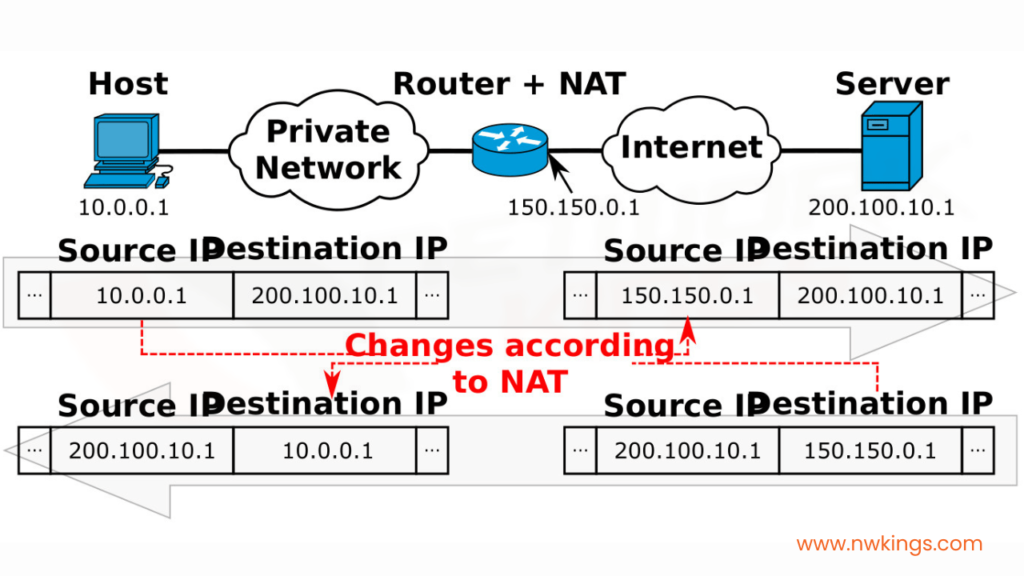
When a user sends traffic to the Internet, the firewall changes the Source Private IP into its Public IP before sending the packet outside. When the response comes back, the firewall translates the public IP back into the correct private IP and delivers it to the original device. To outside websites, it appears that all traffic is coming from the firewall’s public IP, not from individual internal devices.
Example of NAT
Suppose a college has 100 computers in its campus network. Each computer uses a Private IP Address such as 192.168.1.10. These private IP addresses work inside the college network, but they cannot directly communicate on the Internet because private IPs are not publicly routable.
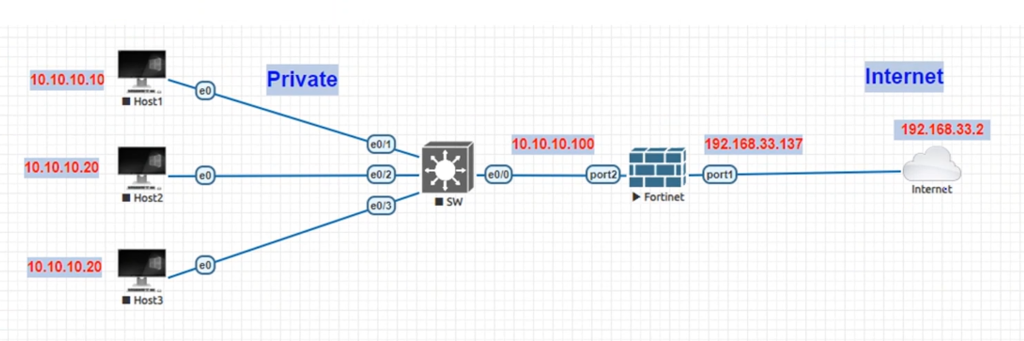
The college connects its network to the Internet through a FortiGate firewall. The firewall has:
- LAN IP = 192.168.1.1
- WAN Public IP = 203.110.50.10
Now suppose a student computer with IP 192.168.1.25 opens Google.
First, the request goes from the student PC to the firewall:
192.168.1.25 → Firewall
The firewall performs NAT, changing the private source IP (192.168.1.25) into its public IP (203.110.50.10). Then it sends the request to the Internet:
203.110.50.10 → Google
To Google, it looks like the request came from 203.110.50.10, not from 192.168.1.25.
When Google sends the response back, it returns traffic to:
Google → 203.110.50.10
The firewall receives the reply, checks its NAT table, and sees that this session belongs to 192.168.1.25. It then converts the destination back to the private IP and forwards it:
Firewall → 192.168.1.25
The student receives the website response normally.
At the Same Time:
- Teacher PC = 192.168.1.40 → also uses 203.110.50.10
- Library PC = 192.168.1.60 → also uses 203.110.50.10
Many internal devices share one public IP through NAT.
In short:
NAT acts like a translator, changing internal private IP addresses into a public IP for Internet communication, then translating responses back to the correct internal device.
					Inside Local IP	Inside Global IP
192.168.1.10:5000	203.0.113.5:5000
WithoutThis table helps the router track multiple sessions and correctly route return traffic.
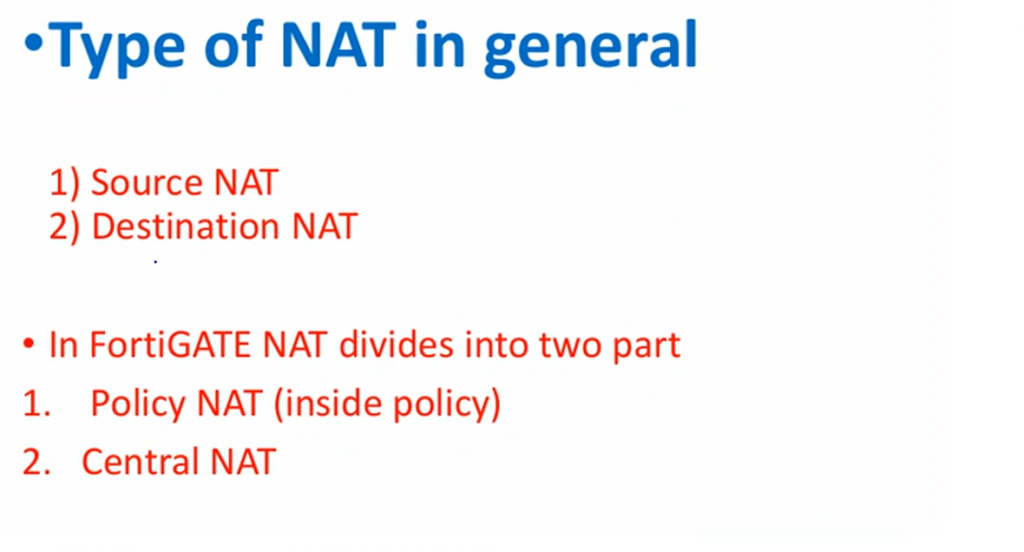
Types of NAT Operation:
- Source NAT (SNAT): Changes the source IP (used when going out to internet)
- Destination NAT (DNAT): Changes the destination IP (used for incoming traffic like port forwarding)
Example of DNAT:
Public IP (203.0.113.5:80) → Private Server (192.168.1.100:80)
Example of NAT
Suppose a college has a computer lab, teacher offices, and administrative departments, all connected to one internal network. Each device inside the college uses a private IP address, such as 192.168.1.10, 192.168.1.20, or 192.168.1.50. These private IP addresses work only inside the college network and cannot directly communicate on the public Internet.private IP addresses work inside the college network, but they cannot directly communicate on the Internet because private IPs are not publicly routable.
To connect the college network to the Internet, the college uses a FortiGate firewall. The firewall has two main interfaces: a LAN interface connected to the internal college network and a WAN interface connected to the Internet. The LAN interface uses a private IP, while the WAN interface has a public IP address provided by the Internet Service Provider, such as 203.110.50.10.
Now suppose a student computer with private IP 192.168.1.25 wants to visit Google. The request first reaches the firewall. Before sending the request to the Internet, the firewall performs Network Address Translation (NAT). It changes the source IP address from 192.168.1.25 to its public IP address 203.110.50.10. Then it forwards the request to Google.
When Google receives the request, it sees the public IP address 203.110.50.10 and sends the response back to that address. The firewall receives the reply, checks its NAT session table, and identifies that the original request came from 192.168.1.25. It then translates the destination back to the student’s private IP and forwards the response to the correct computer.
At the same time, many other devices inside the college—such as teacher computers, library systems, and office desktops—can also use the same public IP address for Internet access. The firewall keeps track of each session and correctly sends responses back to the right internal device. This allows hundreds of internal devices to share one or a few public IP addresses.
In this way, NAT works like a translator between private networks and the public Internet, allowing internal devices to communicate externally while hiding their private IP addresses from outside networks.
How Works Network Address Translation (NAT)
Network Address Translation (NAT) works in a router or firewall as a translator between the internal private network and the public internet. Devices inside a school, college, or office use private IP addresses such as 192.168.1.10, 10.0.0.25, or 172.16.5.100. These private IP addresses cannot be used directly on the internet, so NAT converts them into a public IP address, such as 103.25.50.10, when traffic leaves the network.
When a computer sends a request to access a website, the router or firewall receives that traffic first. For example, a computer with private IP 192.168.1.10 sends a request to visit 142.250.183.14 (a public web server). NAT changes the source IP address from 192.168.1.10 to the company’s public IP address 103.25.50.10. This allows the request to travel across the internet using a valid public IP while keeping the internal address hidden.
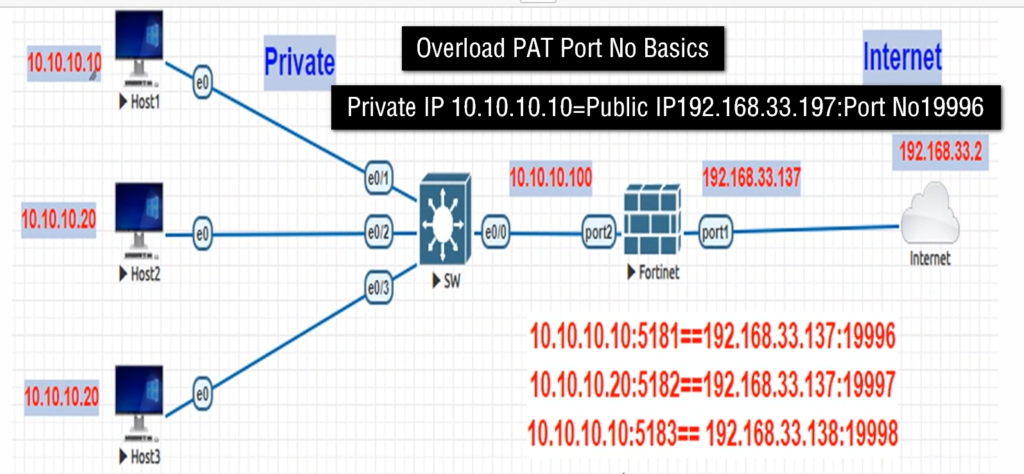
The router or firewall maintains a NAT table that records which internal device started each connection. For example, 192.168.1.10:5000 may be translated to 103.25.50.10:10001, while 192.168.1.20:5001 may be translated to 103.25.50.10:10002. This mapping allows many computers to share the same public IP address at the same time, with different port numbers used to identify each connection.
When the website sends data back, the response reaches 103.25.50.10 on the translated port number. The router checks its NAT table, finds that port 10001 belongs to 192.168.1.10:5000, changes the destination IP back to 192.168.1.10, and forwards the packet to that computer. This ensures the correct device receives the reply.
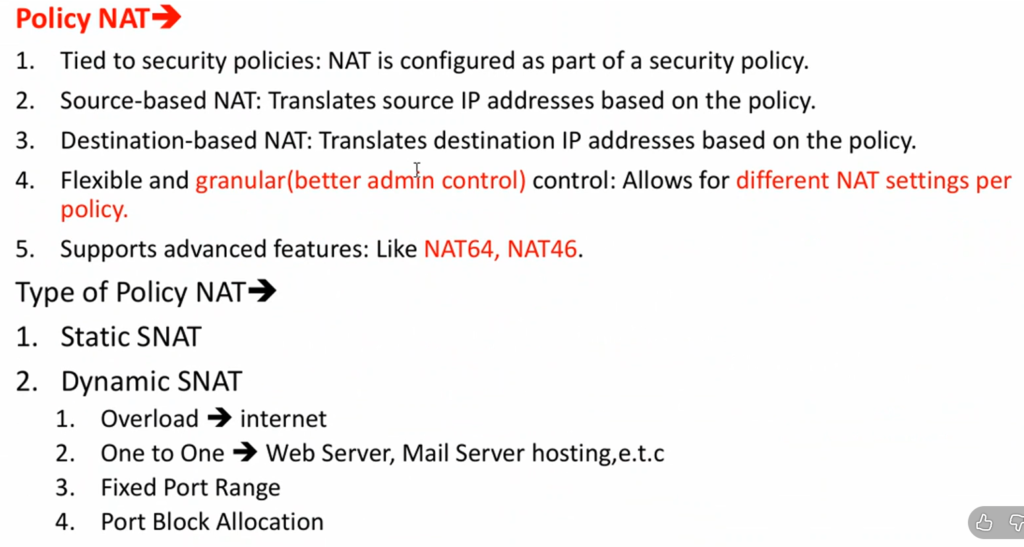
In a firewall, NAT also works together with security policies. The firewall can allow safe traffic, block unwanted access, inspect data packets, and use port forwarding to send incoming traffic to internal servers such as 192.168.1.50 (web server) or 192.168.1.60 (remote desktop server). In this way, NAT helps save public IP addresses, hides internal devices, and improves overall network security.
Without Network Address Translation (NAT), Problem
Without NAT Problem School,Offices,Colleges
Without Network Address Translation (NAT), schools, colleges, and offices would face several serious networking problems.
First, every computer would need its own public IP address to connect to the internet. In a school computer lab with 100 computers, all 100 systems would need separate public IP addresses. This would be costly and difficult to manage. NAT solves this by allowing many computers to share one public IP address.
Second, there would be a shortage of public IP addresses. Public IPv4 addresses are limited in number. Large colleges and offices may have hundreds or even thousands of devices, including computers, printers, CCTV cameras, and Wi-Fi users. Without NAT, each device would require its own public IP, which is not practical.
Third, security risks would increase. If every office or school computer had a direct public IP address, hackers on the internet could directly scan and attack those devices. This could lead to malware infections, unauthorized access, or data theft. NAT hides internal private IP addresses, adding an extra layer of protection.
Fourth, internet costs would be much higher. Internet Service Providers usually charge for public static IP addresses. If an office with 300 computers needed 300 public IP addresses, the monthly cost would be very expensive. With NAT, the company can use private IP addresses internally and only one or a few public IP addresses for internet access, reducing costs.
Finally, network management would become more difficult. IT teams in schools, colleges, and offices would need to manage many public IP addresses, configure routing for each device, and apply security rules individually. NAT simplifies network design by allowing internal devices to use private IP addresses while sharing public internet access through one gateway.
With Network Address Translation (NAT)
With Network Address Translation (NAT), schools, colleges, and offices can use the internet in a simple, secure, and cost-effective way.
First, NAT allows many computers to share one public IP address. Inside a school or office, all computers use private IP addresses such as 192.168.x.x or 10.x.x.x. When these devices access the internet, NAT converts their private IP addresses into one public IP. This saves public IP addresses and makes internet connectivity easier.
Second, NAT reduces internet cost. Organizations do not need to buy a separate public IP for every computer, printer, or device. A college with 500 computers can connect all systems to the internet using one or a few public IP addresses. This greatly lowers monthly ISP costs.
Third, NAT improves security. Internal devices use private IP addresses that are hidden from the public internet. External users cannot directly see or access those private addresses. This reduces direct hacking attempts, port scanning, and unwanted connections from the internet.
Fourth, NAT makes network management easier. IT administrators can freely use private IP ranges inside the organization and organize networks department-wise, such as separate IP ranges for labs, office staff, CCTV, and Wi-Fi users. This makes configuration, troubleshooting, and expansion much simpler.
Finally, NAT supports services like port forwarding, where one public IP can provide access to multiple internal servers using different ports. For example, a school can host a web server, CCTV monitoring system, and remote desktop access behind one public IP while NAT forwards traffic to the correct internal device.
Why Need NAT (Network Address Translation)
Why Need NAT
NAT (Network Address Translation) is needed because devices inside a private network usually use private IP addresses, and these private IP addresses cannot directly communicate on the public Internet. To allow internal devices such as computers, laptops, mobile phones, servers, and printers to access external networks, the firewall or router must convert private IP addresses into a valid public IP address. NAT performs this translation and makes Internet communication possible.
One major reason NAT is needed is public IP address saving. Public IPv4 addresses are limited in number and are expensive or difficult to obtain in large quantities. If every device in a school, college, or company needed its own public IP address, organizations would quickly run out of addresses. NAT solves this by allowing many internal devices to share one public IP address or a small group of public IPs, greatly reducing the need for public address allocation.
NAT is also important for security and privacy. Internal private IP addresses are hidden from the outside world because Internet servers see only the firewall’s public IP address, not the actual internal device addresses. This makes it harder for attackers to directly identify and target internal devices. NAT adds a layer of network hiding, which improves privacy and basic security.
Another reason NAT is needed is easy network management. Organizations can freely use private IP ranges such as 192.168.3.1, 10.10.10.2, or 172.16.20.1 inside their networks without needing globally unique public addresses for each device. The firewall handles the translation automatically, making internal network design simpler and more flexible.
NAT is also required for publishing internal services using port forwarding or destination NAT. For example, a college may host a website or email server inside its private network. NAT can map a public IP and port to that internal server, allowing outside users to access it securely through the firewall.
For example, in a college network using a FortiGate firewall, hundreds of student and staff computers may use private IP addresses like 192.168.1.10, but all of them can access the Internet using one public IP address such as 203.110.50.10. The firewall performs NAT for each connection and keeps track of which response belongs to which internal device.
In short:
NAT is needed to connect private networks to the Internet, save public IP addresses, hide internal IPs for security, simplify network management, and support public access to internal services when required.
Benefits of NAT (Network Address Translation)
Benefits of NAT
NAT (Network Address Translation) provides several important benefits in networking, especially for organizations such as schools, colleges, offices, and large companies. It helps devices in a private network communicate with the Internet while improving efficiency, privacy, and security.
1) Saves Public IP Addresses
One of the biggest benefits of NAT is that it reduces the need for public IP addresses. Hundreds or even thousands of internal devices can share one public IP address or a small pool of public IPs. This is very useful because public IPv4 addresses are limited and expensive. NAT helps organizations use private IP addresses internally while sharing Internet access efficiently.
2) Improves Security
NAT hides the real internal private IP addresses from the public Internet. Outside servers and attackers usually see only the firewall’s public IP address, not the IP addresses of internal devices. This makes it harder for attackers to directly discover and target internal systems, adding a basic layer of protection.
3) Provides Privacy
Because internal addresses remain hidden, NAT increases privacy. External websites and services cannot easily identify the internal network structure, number of devices, or private addressing scheme being used inside the organization.
4) Easy Internal Network Design
Organizations can freely use private IP ranges like:
- 192.168.10.2
- 10.10.10.30
- 172.16.10.10 – 172.31.11.10
These addresses do not need to be globally unique. NAT converts them to public IP addresses when Internet communication is needed. This makes network planning and expansion easier.
5) Supports Many Devices on One Connection
A single Internet connection with one public IP can serve many users. For example, a college may have hundreds of student computers, teacher laptops, lab systems, printers, and servers—all sharing one public IP through NAT.
6) Flexible Address Management
If an organization changes its internal IP addressing scheme, Internet connectivity usually continues normally because NAT handles the translation. Internal IP changes do not need to be visible to outside networks.
7) Supports Port Forwarding
NAT can map public IP addresses and ports to internal private servers. This allows organizations to host:
- Websites
- Mail servers
- VPN gateways
- Application servers
Example: Public IP → Internal Web Server.
8) Reduces Direct Exposure
Since private IP addresses are not directly reachable from the Internet, internal devices are less exposed. Unauthorized direct inbound access is usually blocked unless specific NAT/Firewall rules are created.
Example
A college uses a FortiGate firewall with:
- 500 internal devices
- Private IP range: 192.168.1.0/24
- One public IP: 203.110.50.10
All 500 devices can browse the Internet through that one public IP using NAT.
In short:
Benefits of NAT include public IP saving, better privacy, improved basic security, easy network design, support for many devices, flexible management, and secure publishing of internal services.
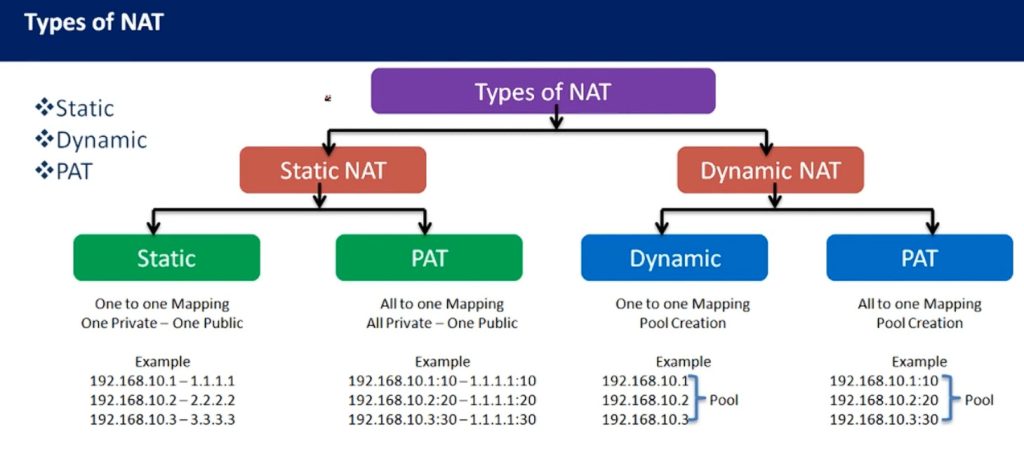
Types of NAT (Network Address Translation)
Static NAT:
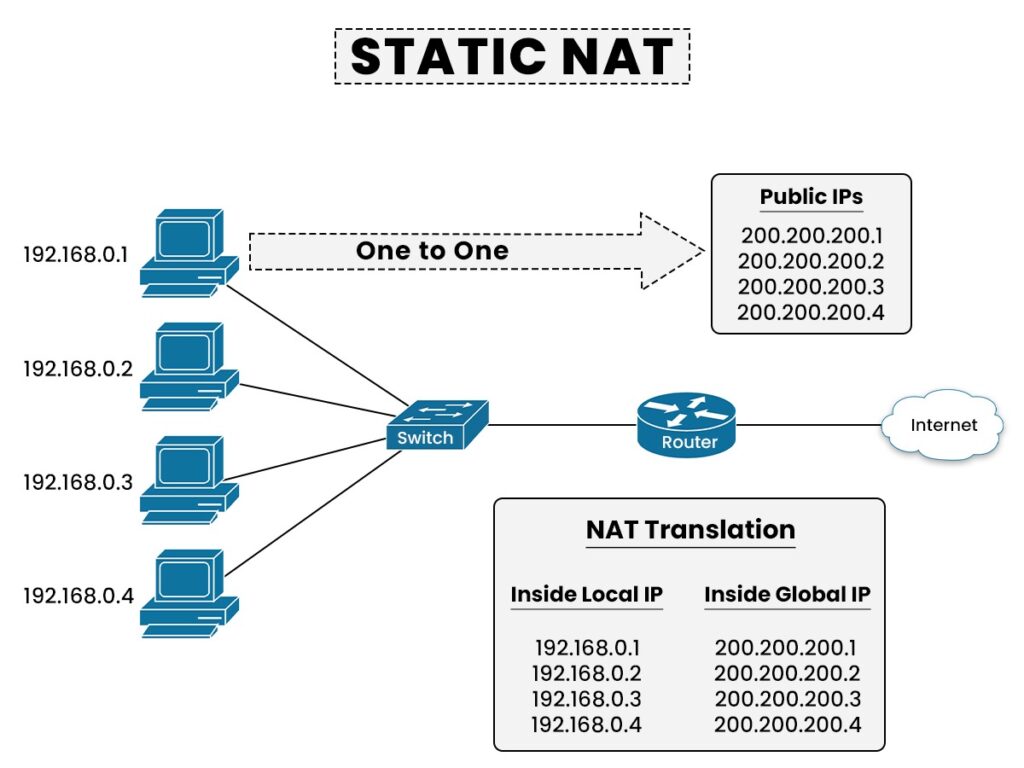
Static NAT is a type of Network Address Translation where one Private IP Address is Permanently Mapped to one Public IP Address. This mapping does not change. Whenever that internal device communicates with the Internet, it always uses the same public IP address. Static NAT is mainly used for servers such as web servers, mail servers, or VPN gateways that need a fixed public address so external users can reliably reach them. It provides consistent addressing but uses one public IP for each internal device.
Dynamic NAT:
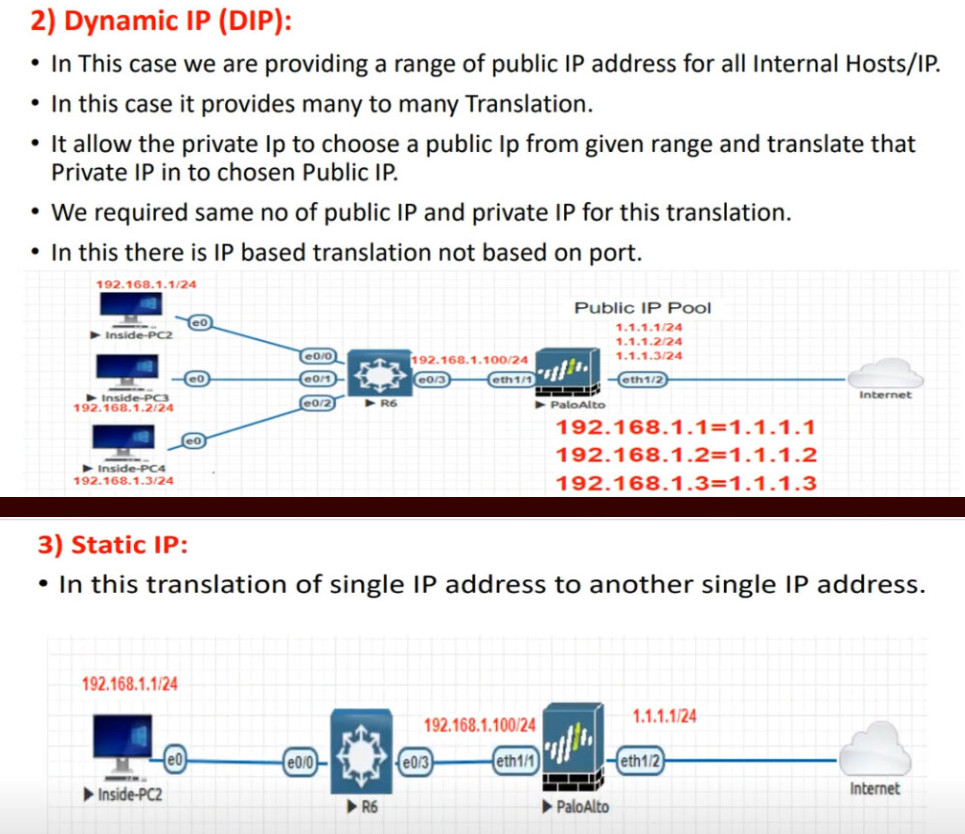
Dynamic NAT is a type of NAT where Private IP Addresses are translated to Public IP Addresses from a Pool of available public addresses. When an internal device needs Internet access, the firewall temporarily assigns one public IP from the pool. After the session ends, that public IP becomes available for another device. This method uses public IP addresses more efficiently than Static NAT, but it still requires a pool of public addresses. It is useful in medium-sized networks where multiple devices need public access but not necessarily a permanent public IP.
PAT:
PAT (Port Address Translation), also called NAT Overload, is the most commonly used type of NAT. In PAT, Many Private IP Addresses Share one Public IP Address. The firewall keeps track of each connection by assigning different port numbers, allowing multiple devices to communicate through the same public IP at the same time. This method is highly efficient and is widely used in homes, schools, colleges, and companies because it saves public IP addresses while supporting many users.
Source NAT:
Source NAT (SNAT) is used when the firewall changes the source IP address of outgoing traffic. When a private device inside the network sends traffic to the Internet, the firewall replaces the private source IP with a public IP before forwarding the packet. This allows internal private devices to communicate externally. SNAT is commonly used for normal outbound Internet access and is often part of PAT or Dynamic NAT configurations.
Destination NAT:
Destination NAT (DNAT) works in the opposite direction. It changes the destination IP address of incoming traffic. When someone from the Internet tries to access a public IP address, the firewall translates that public destination IP into the private IP address of an internal server. This allows outside users to reach services hosted inside a private network, such as websites, email servers, or application servers, while keeping the internal server on a private address.
Port Forwarding NAT:
Port Forwarding NAT is a special form of Destination NAT where the firewall forwards traffic arriving on a specific public IP and port number to a particular private IP and port inside the network. For example, traffic arriving on public IP port 443 may be forwarded to an internal web server’s HTTPS port. This is commonly used for hosting websites, remote desktop access, VPN gateways, or application services.
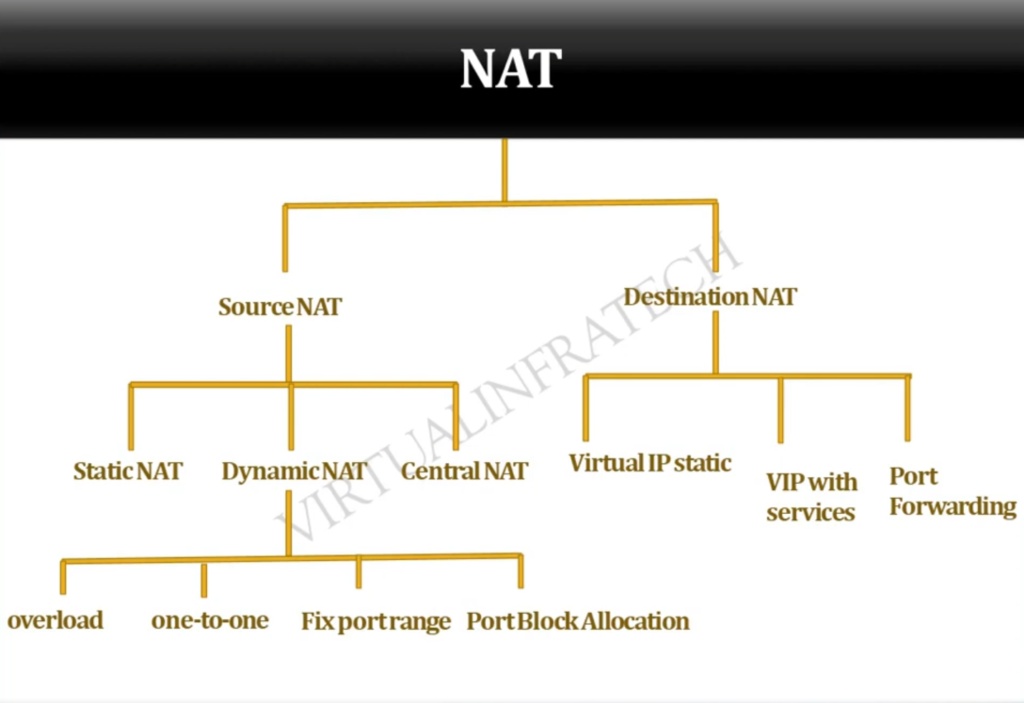
In short: The main types of NAT are Static NAT, Dynamic NAT, PAT (NAT Overload), Source NAT, Destination NAT, and Port Forwarding NAT, each used for different address translation and connectivity purposes in a network.
Static NAT Example
Static NAT Example
Suppose a college has its own website server inside the campus network. The web server uses a private IP address because it is inside the internal network. For example, the server IP is 192.168.1.100. Private IP addresses are not directly reachable from the Internet, so outside users cannot access the website using this private IP.
To make the website available publicly, the college uses Static NAT on its FortiGate firewall. The firewall creates a permanent one-to-one mapping between the private server IP and a public IP address.
Example mapping:
Private IP: 192.168.1.100
⬇
Public IP: 203.110.50.10
Now when someone on the Internet opens the college website using 203.110.50.10, the firewall receives that request and automatically translates the public IP into the internal private IP 192.168.1.100. The request is then forwarded to the web server inside the college network.
When the web server sends a reply, the firewall again performs NAT, changing the source private IP 192.168.1.100 into the public IP 203.110.50.10 before sending it back to the Internet user. To outside users, it appears that the server is directly using the public IP.
The important point is that this mapping is fixed and permanent:
- 192.168.1.100 will always use 203.110.50.10
- It never changes
- The same public IP is always reserved for that server
Static NAT is commonly used for:
- Web servers
- Mail servers
- VPN gateways
- DNS servers
- Application servers
In short:
Static NAT is a permanent one private IP ↔ one public IP mapping, mainly used when an internal server needs a fixed public IP so outside users can always reach it.
Dynamic NAT Example
Dynamic NAT Example
Suppose a company has 50 employee computers inside its network. Each computer uses a private IP address, such as 192.168.1.x. These private IP addresses cannot directly communicate on the Internet, so the company uses Dynamic NAT on its FortiGate firewall.
The company has a pool of public IP addresses provided by the Internet Service Provider:
- 203.110.50.10
- 203.110.50.11
- 203.110.50.12
- 203.110.50.13
- 203.110.50.14
These public IPs are kept in a NAT pool.
Now suppose three employee computers connect to the Internet:
- PC 1 → 192.168.1.10
- PC 2 → 192.168.1.20
- PC 3 → 192.168.1.30
When they start browsing:
- 192.168.1.10 → temporarily translated to 203.110.50.10
- 192.168.1.20 → temporarily translated to 203.110.50.11
- 192.168.1.30 → temporarily translated to 203.110.50.12
The firewall dynamically assigns available public IP addresses from the pool.
After PC 1 finishes its Internet session, 203.110.50.10 becomes free again. Later, another employee computer (192.168.1.40) connects to the Internet, and the firewall may assign that same public IP:
192.168.1.40 → 203.110.50.10
So the public IP is reused dynamically based on availability.
The important point is:
- Mapping is temporary
- Public IP comes from a pool
- Same private IP may get a different public IP later
- Same public IP can be reused by another device after session ends
Dynamic NAT is useful when:
- Multiple devices need Internet access
- There is a limited pool of public IPs
- Permanent one-to-one mapping is not needed
In short:
Dynamic NAT temporarily translates private IP addresses to available public IP addresses from a pool, and those public IPs are reused when sessions end.
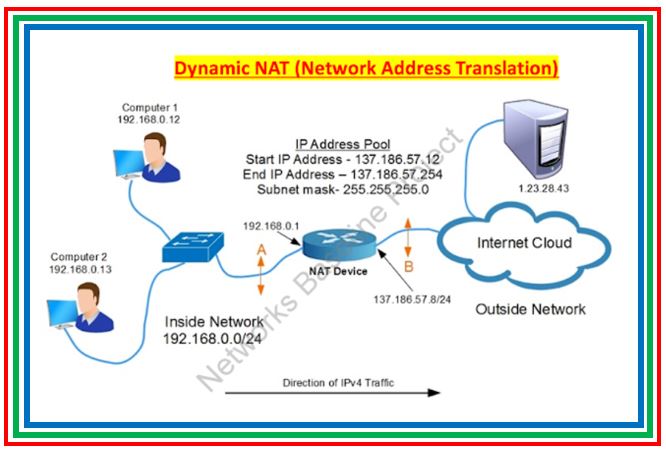
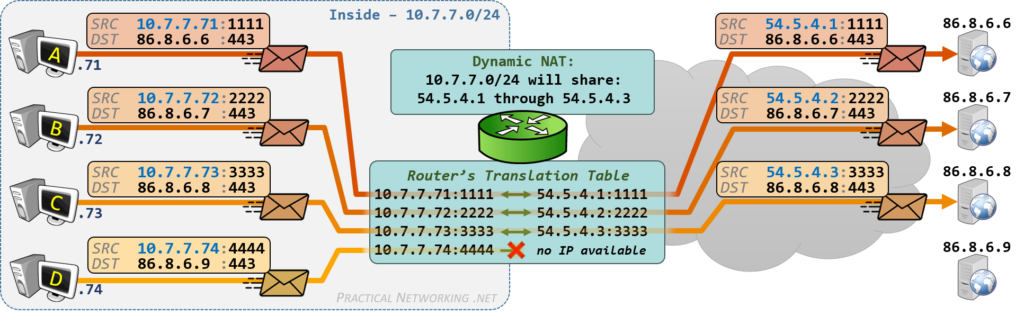
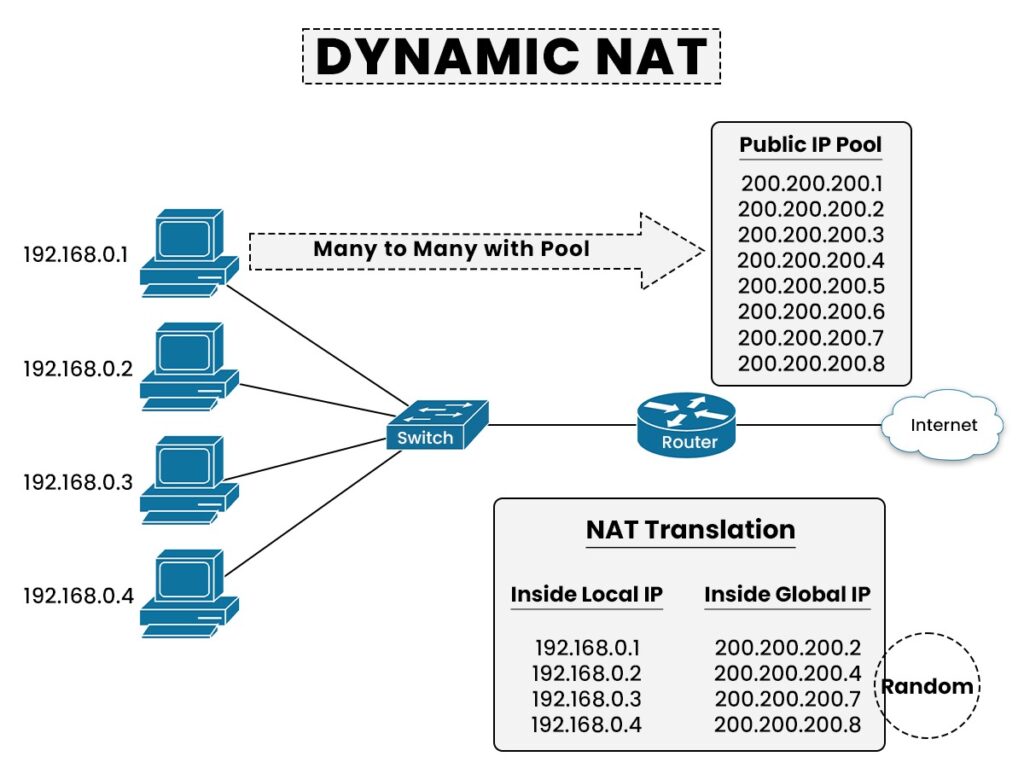
PAT (Port Address Translation) Example
PAT (Port Address Translation)
Suppose a college has 500 computers connected to its internal network. Each computer has a private IP address, such as 192.168.1.x. These computers need Internet access for browsing websites, online classes, email, and research. However, the college has only one public IP address, provided by the Internet Service Provider.
To allow all 500 computers to access the Internet using one public IP, the college uses PAT (Port Address Translation) on its FortiGate firewall. PAT translates many private IP addresses into one public IP address, but assigns a different port number to each connection so the firewall can identify which response belongs to which internal device.
For example, three computers connect to the Internet:
- Student PC 1 → Private IP: 192.168.1.10
- Student PC 2 → Private IP: 192.168.1.20
- Teacher PC → Private IP: 192.168.1.30
Firewall Public IP = 203.110.50.10
When they access the Internet, the firewall performs PAT:
- 192.168.1.10:1050 → 203.110.50.10:5001
- 192.168.1.20:1060 → 203.110.50.10:5002
- 192.168.1.30:1070 → 203.110.50.10:5003
Notice:
- Same public IP = 203.110.50.10
- Different translated port numbers = 5001, 5002, 5003
Now suppose:
- PC 1 opens Google
- PC 2 opens YouTube
- Teacher opens Microsoft Microsoft Teams
All traffic goes to the Internet using one public IP, but with different ports.
When replies come back:
- Reply to 203.110.50.10:5001 → Firewall sends to 192.168.1.10
- Reply to 203.110.50.10:5002 → Firewall sends to 192.168.1.20
- Reply to 203.110.50.10:5003 → Firewall sends to 192.168.1.30
The firewall checks its PAT table and delivers each response to the correct device.
In short:
PAT allows many private devices to share one public IP address by using different port numbers for each connection. This saves public IP addresses and supports many users at the same time.
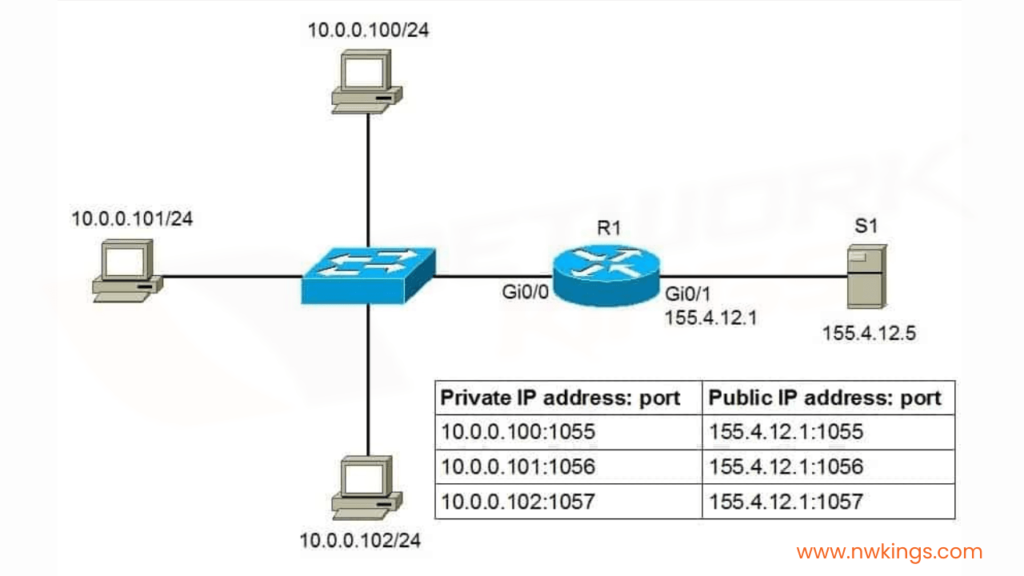
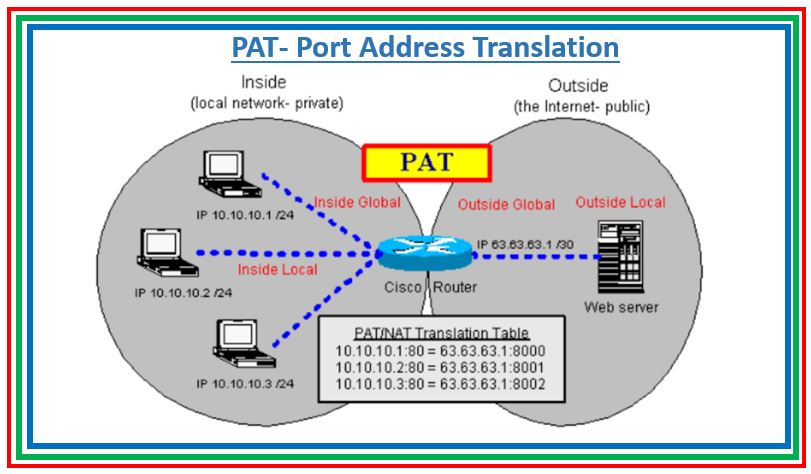
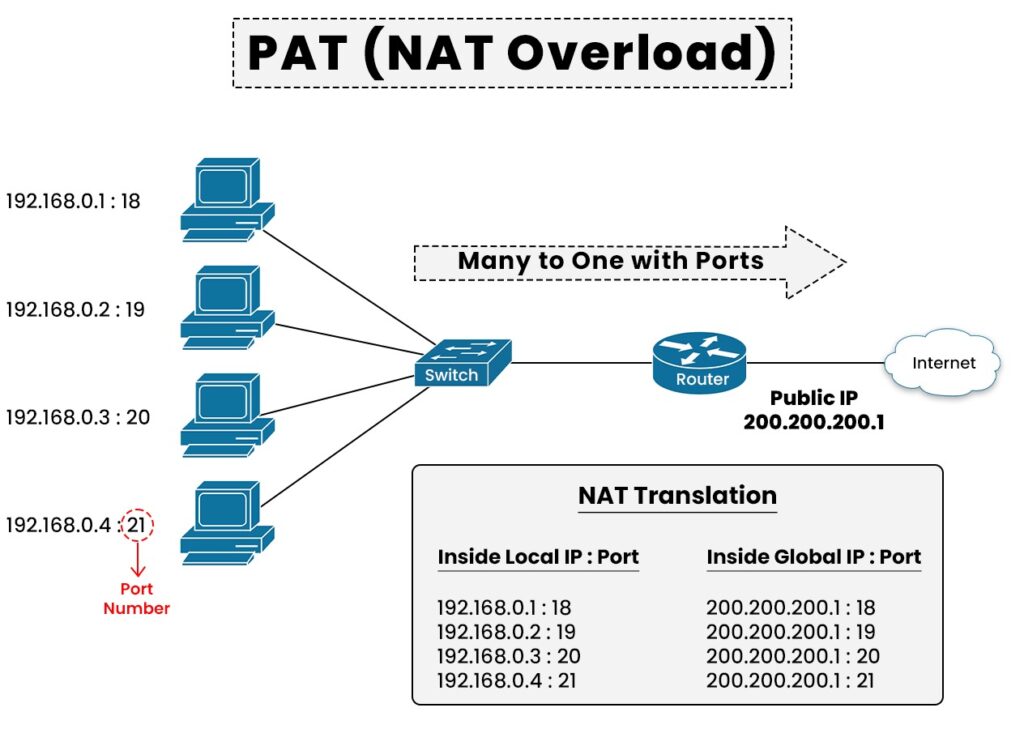
Destination NAT (DNAT) Example
Destination NAT (DNAT)
Suppose a college has a Web Server inside its internal network. The server’s private IP address is 192.168.1.100. Students and staff inside the college can access it using the private IP, but people on the Internet cannot directly reach this server because private IP addresses are not publicly accessible.
To make the website available to outside users, the college uses Destination NAT (DNAT) on its FortiGate firewall. The firewall is configured with a Public IP Address such as 203.110.50.10.
When an Internet user types the website address in a browser, the request goes to:
203.110.50.10
The firewall receives this request and performs Destination NAT, changing the Destination IP from the Public IP 203.110.50.10 to the internal private IP 192.168.1.100. The request is then forwarded to the internal web server.
Flow:
Internet User → 203.110.50.10 → Firewall → DNAT → 192.168.1.100 (Web Server)
The web server processes the request and sends a reply back to the firewall. The firewall then sends the response back to the Internet user.
To the outside user, it appears that the website is hosted on 203.110.50.10, but in reality the server is safely inside the private network at 192.168.1.100.
Another Example:
A company Mail Server internal IP = 192.168.1.200
Public IP = 203.110.50.20
Incoming mail traffic:
203.110.50.20 → Firewall → DNAT → 192.168.1.200
The firewall changes the Destination address so the traffic reaches the correct internal server.
DNAT is Commonly Used for:
- Web Servers
- Mail Servers
- VPN Gateways
- Remote Desktop Servers
- Application Servers
In short:
Destination NAT (DNAT) changes the Destination Public IP of incoming traffic into an Internal Private IP, allowing Internet users to access servers inside a private network securely.
NAT Chart Table
Here is an all NAT Chart for Network Address Translation (NAT)
| NAT Type | How it Works | Example | Use Case |
|---|---|---|---|
| Static NAT | One private IP maps to one fixed public IP | 192.168.1.10 → 103.25.50.10 | Web server, Mail server |
| Dynamic NAT | One private IP maps to any available public IP from a pool | 192.168.1.10 → 103.25.50.10 192.168.1.20 → 103.25.50.11 | Small office networks |
| PAT / NAT Overload | Many private IPs share one public IP using different port numbers | 192.168.1.10:5000 → 103.25.50.10:10001 192.168.1.20:5001 → 103.25.50.10:10002 | Schools, colleges, offices |
| SNAT (Source NAT) | Changes source private IP to public IP | 192.168.1.10 → 103.25.50.10 | Outgoing internet access |
| DNAT (Destination NAT) | Changes destination public IP to private IP | 103.25.50.10 → 192.168.1.50 | Incoming server access |
| Port Forwarding | Forwards specific public port to internal device | 103.25.50.10:8080 → 192.168.1.50:80 | Website, CCTV, RDP |
| 1:1 NAT | One private IP fully mapped to one public IP | 192.168.1.50 ↔ 103.25.50.50 | Dedicated server access |
| Many-to-One NAT | Many private IPs use one public IP | 200 PCs → 103.25.50.10 | Common business internet |
| Many-to-Many NAT | Many private IPs use a pool of public IPs | 300 PCs → 10 Public IPs | Large enterprise |
					Private Network
192.168.1.10
192.168.1.20
192.168.1.30
192.168.1.40
      │
      │
Router / Firewall (NAT)
      │
      │
Public IP
103.25.50.10
      │
   Internet
					PC Request
192.168.1.10:5000
      ↓
Firewall NAT
103.25.50.10:10001
      ↓
Internet Server
142.250.183.14
      ↓
Reply Back
103.25.50.10:10001
      ↓
Firewall checks NAT table
      ↓
192.168.1.10:5000
What is Port Forwarding DNAT
Port Forwarding is a network technique used in firewalls and routers to allow users from the Internet to access a specific service inside a private network. It works by mapping a Public IP Address and Port Number to an internal Private IP Address and Port Number. In simple words, it tells the firewall where to send incoming traffic that comes from outside.
When a request comes from the Internet to a public IP address, the firewall checks the Port Number mentioned in the request. Based on the configured rule, it forwards that traffic to a specific internal device. This process is commonly used in Destination NAT (DNAT).
For example, a company uses a FortiGate firewall with a public IP address 203.110.50.10. Inside the network, there is a Web Server with Private IP 192.168.1.100 running on port 80 (HTTP). The firewall is configured to forward all incoming traffic on port 80 to this internal server.
Now, when an external user opens a browser and enters http://203.110.50.10, the request reaches the firewall. The firewall checks the rule for port 80 and forwards the request to 192.168.1.100:80. The internal server processes the request and sends the response back through the firewall to the user.
Port Forwarding can also be used for multiple services on the same Public IP. For example, port 443 (HTTPS) can be forwarded to a secure web server, and port 3389 (RDP) can be forwarded to a remote desktop system. Each service uses a different port number, so the firewall knows exactly where to send the traffic.
This technique is widely used to host services like websites, email servers, VPN servers, CCTV systems, and remote access tools. It allows organizations to use one Public IP Address for many internal services while still keeping the internal network private.
In short:
Port forwarding is a firewall feature that directs incoming Internet traffic from a specific public IP and port to the correct internal server and service inside a private network.
Port Forwarding Example
Example of Port Forwarding
Suppose a college has only One Public IP Address: 203.110.50.10, and it wants to allow access to internal systems like a web Server and a few PCs for Remote Desktop (RDP). Inside the network, all devices use private IP addresses.
A firewall such as FortiGate is used to configure port forwarding rules.
Internal Devices
- Web Server → 192.168.1.100 (HTTP/HTTPS)
- PC1 → 192.168.1.10 (RDP)
- PC2 → 192.168.1.20 (RDP)
Port Forwarding Rules (Example)
- 203.110.50.10:80 → 192.168.1.100:80 (Web Server)
- 203.110.50.10:443 → 192.168.1.100:443 (Secure Website)
- 203.110.50.10:5001 → 192.168.1.10:3389 (PC1 Remote Desktop)
- 203.110.50.10:5002 → 192.168.1.20:3389 (PC2 Remote Desktop)
How it Works
When an external user opens a browser and enters http://203.110.50.10, the request reaches the firewall. The firewall sees port 80 and forwards the request to the internal web server at 192.168.1.100:80. The web server processes the request and sends the response back through the firewall.
If a user wants to access PC1 remotely, they connect using Remote Desktop to 203.110.50.10:5001. The firewall checks the port number 5001, matches the rule, and forwards the connection to 192.168.1.10:3389.
Similarly:
- Port 5002 connects to PC2
- Port 443 connects to secure website
- Port 80 connects to web server
The firewall uses the port number to decide which internal device should receive the traffic.
In short
Port forwarding is a method where a Single Public IP is used to access Multiple internal Devices by mapping different external ports to different Private IP Addresses and Services.
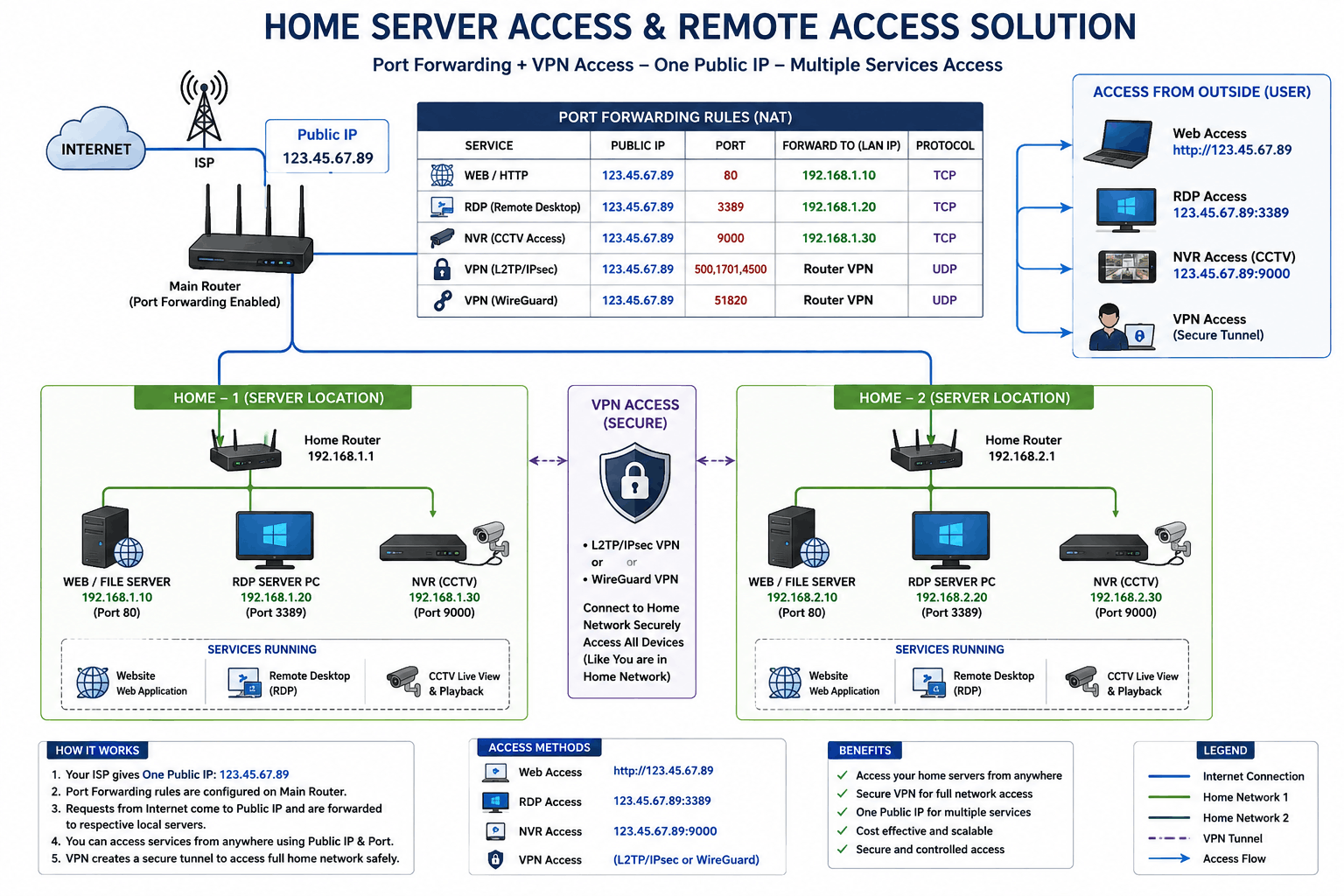
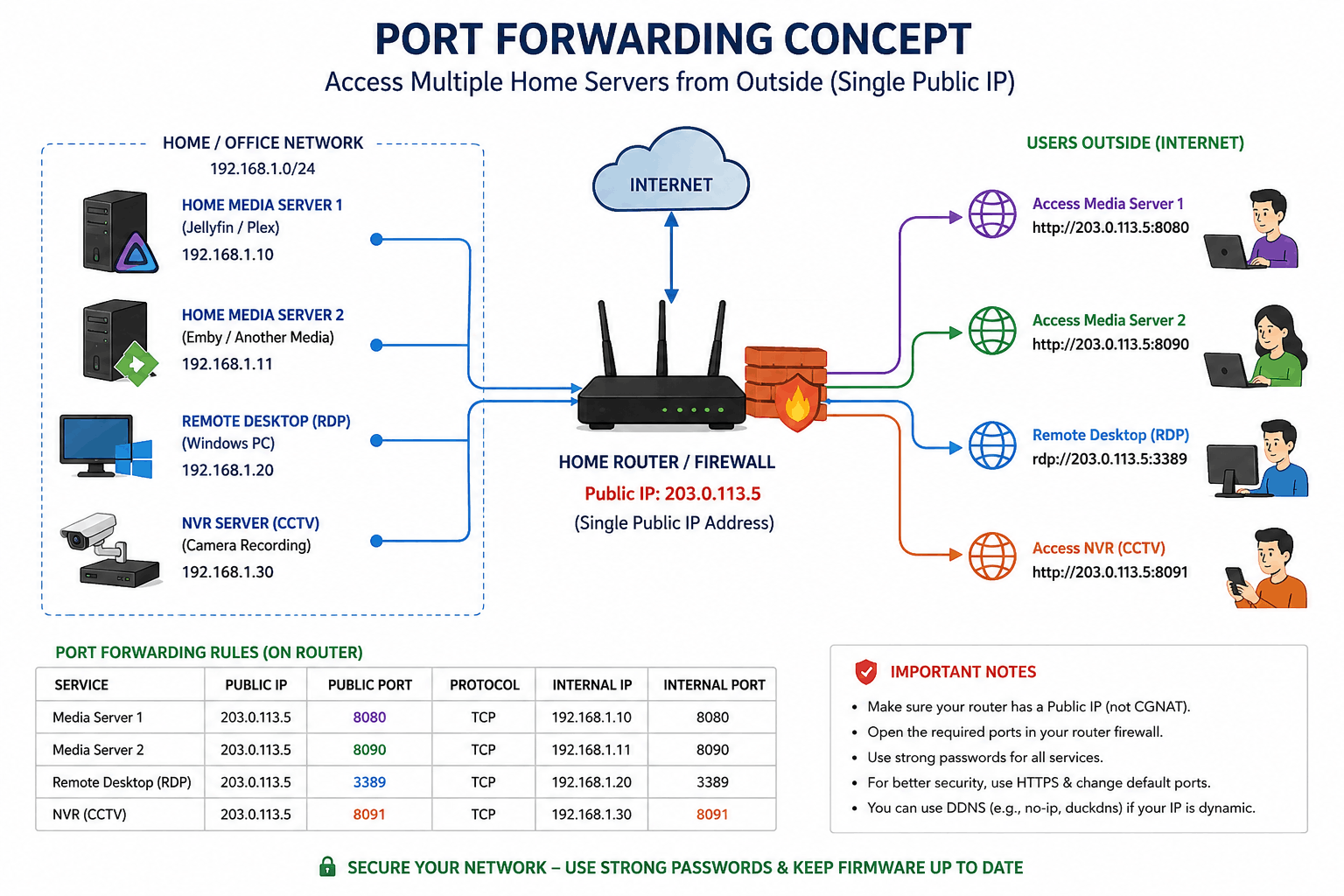
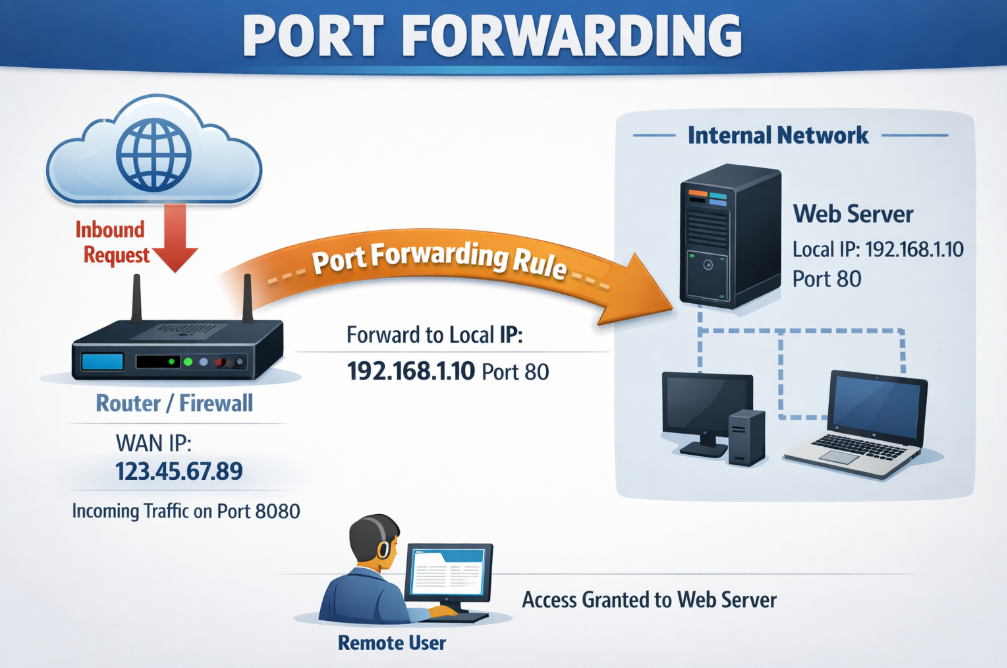
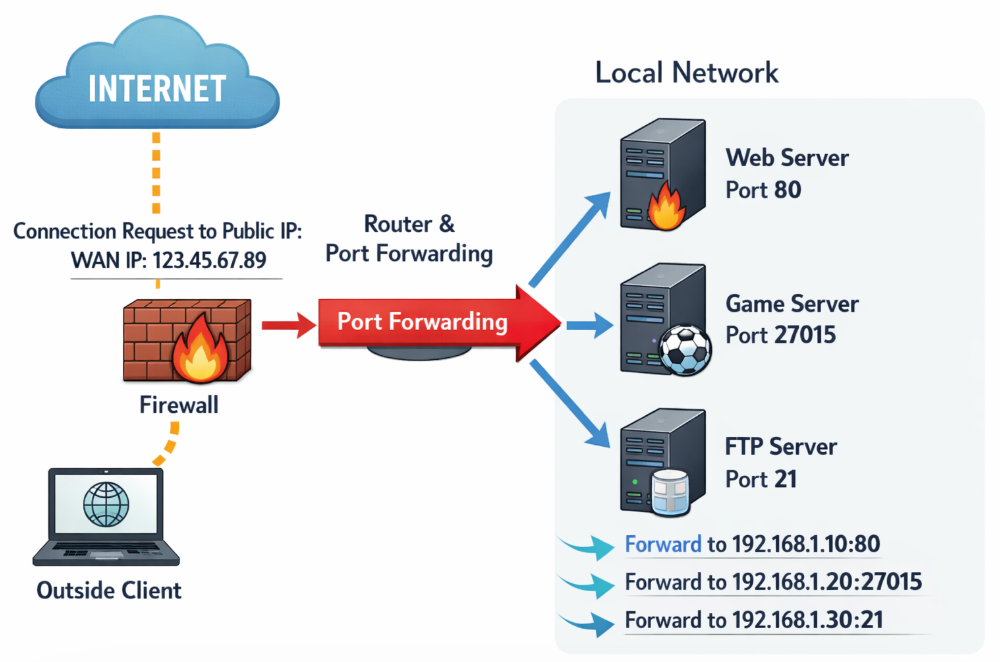
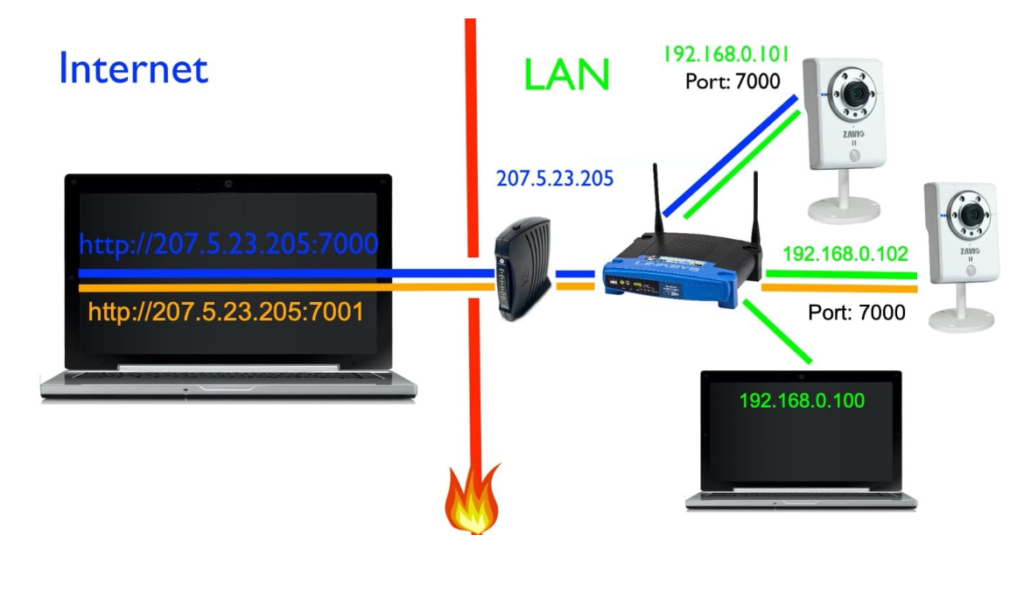
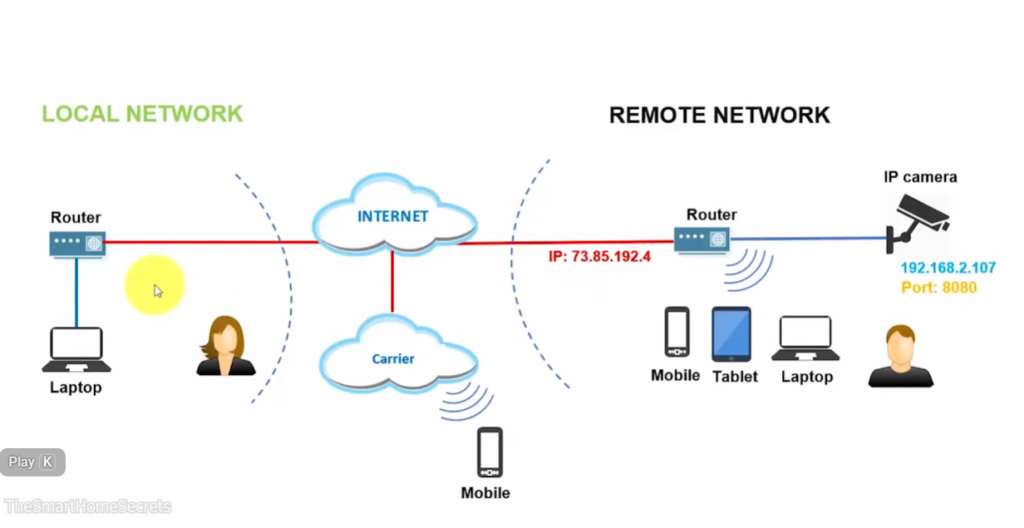
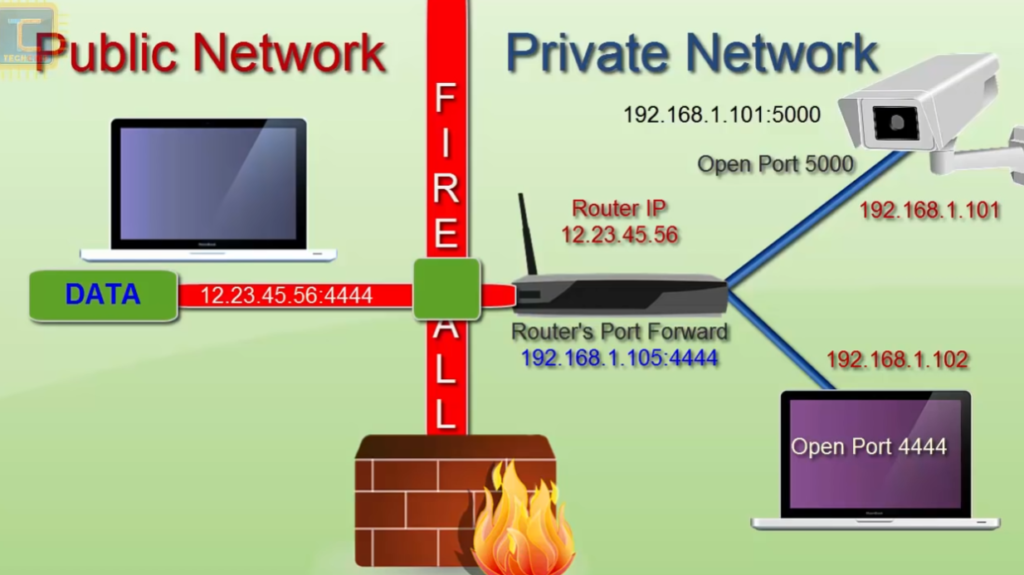
Tp-Link Router Port Forwarding Example
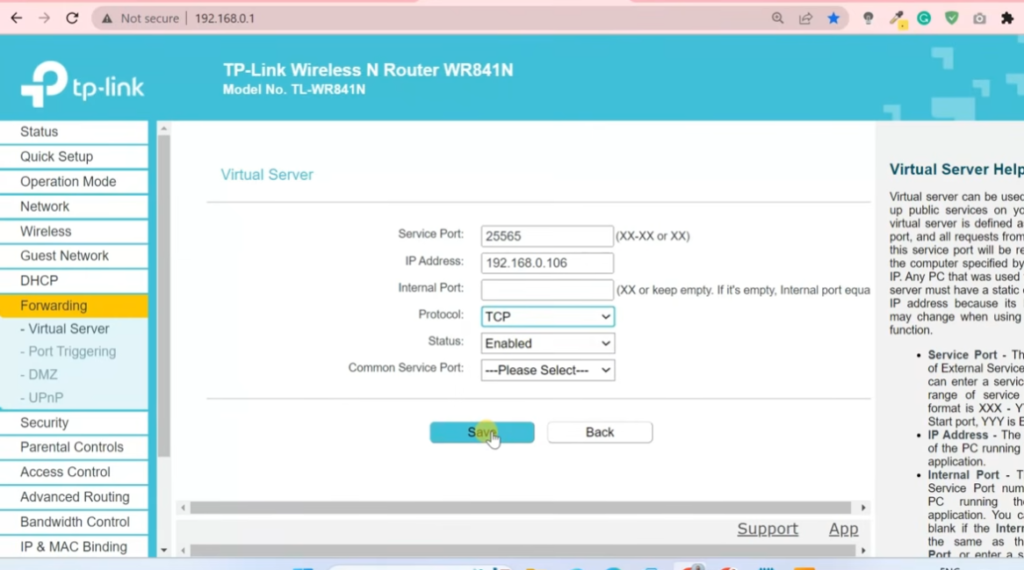
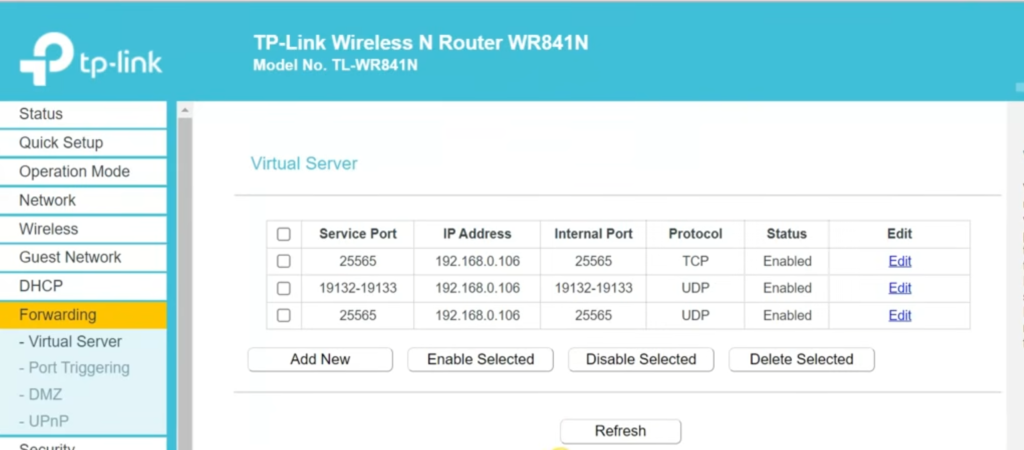
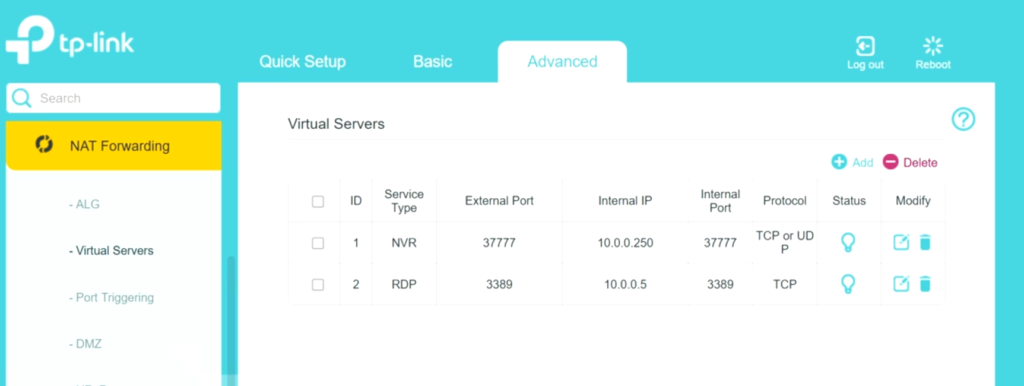
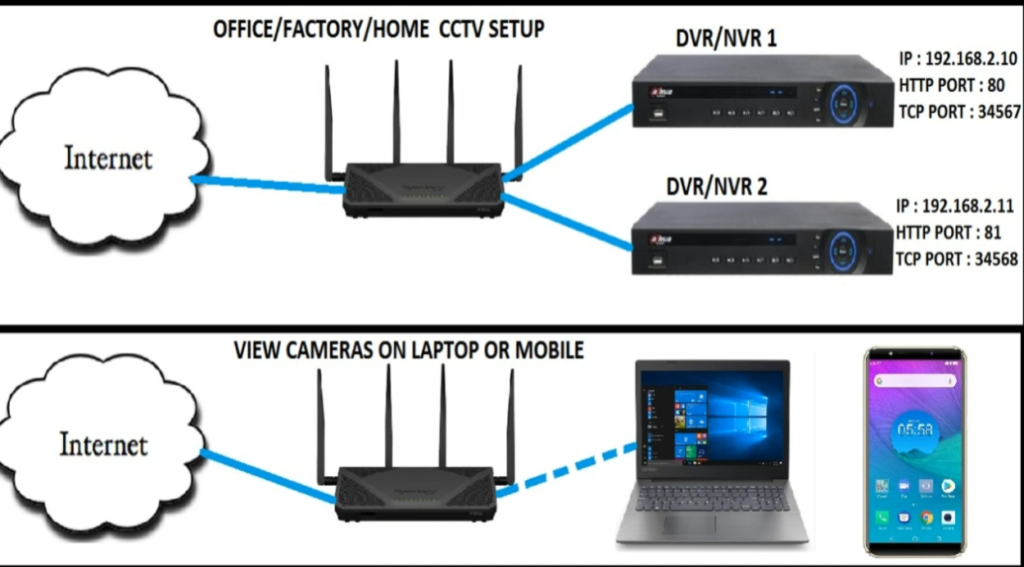
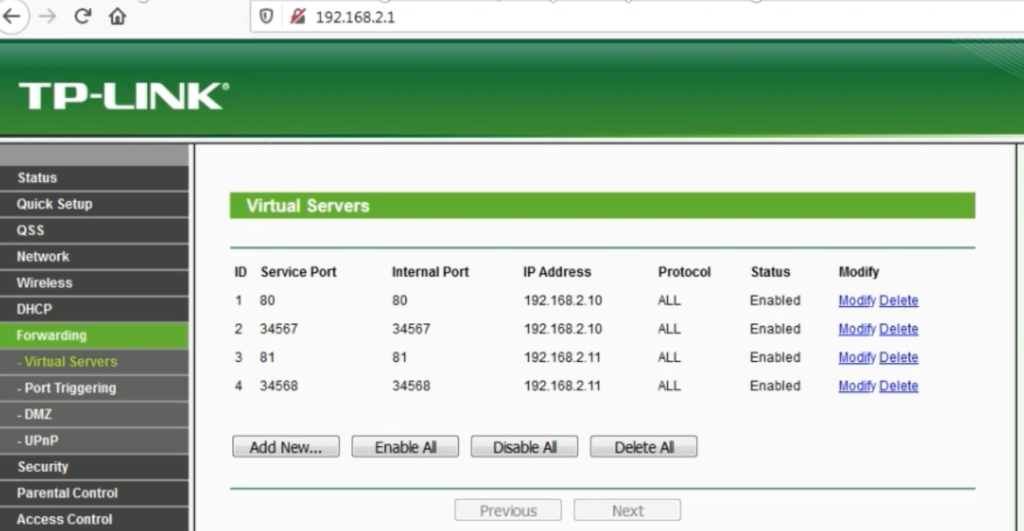
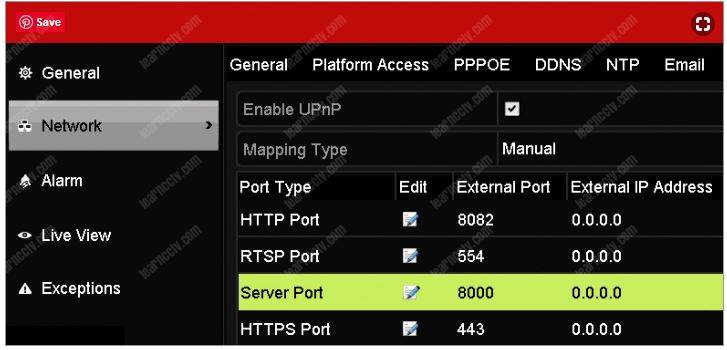
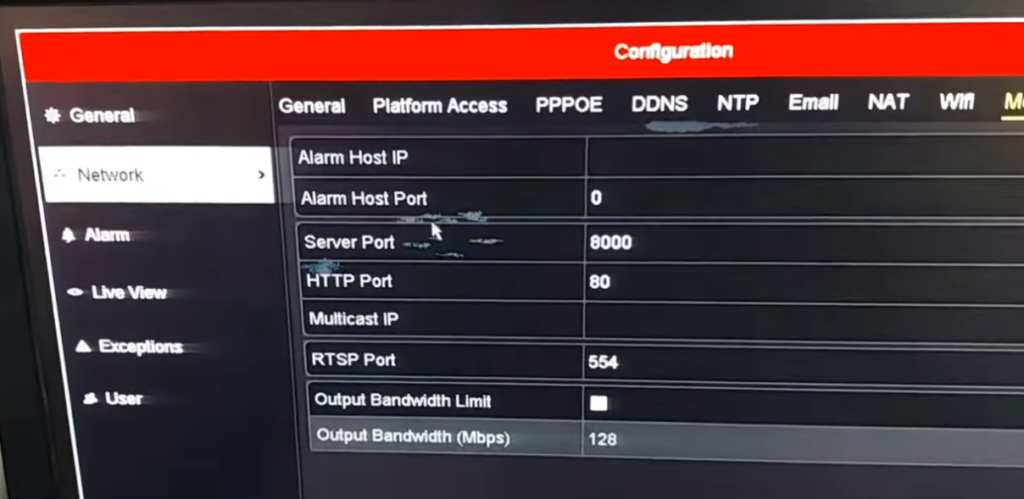
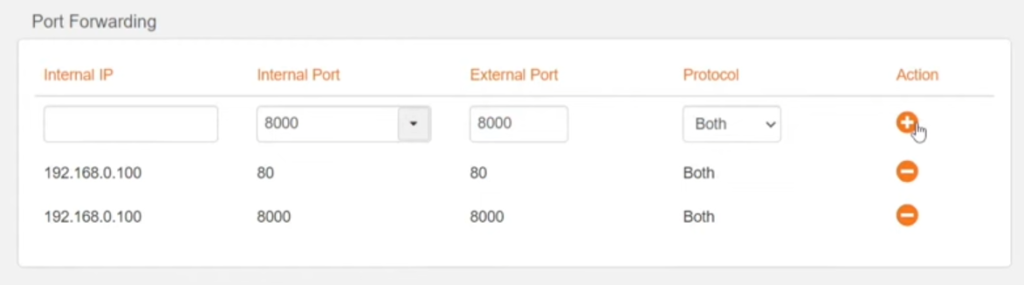
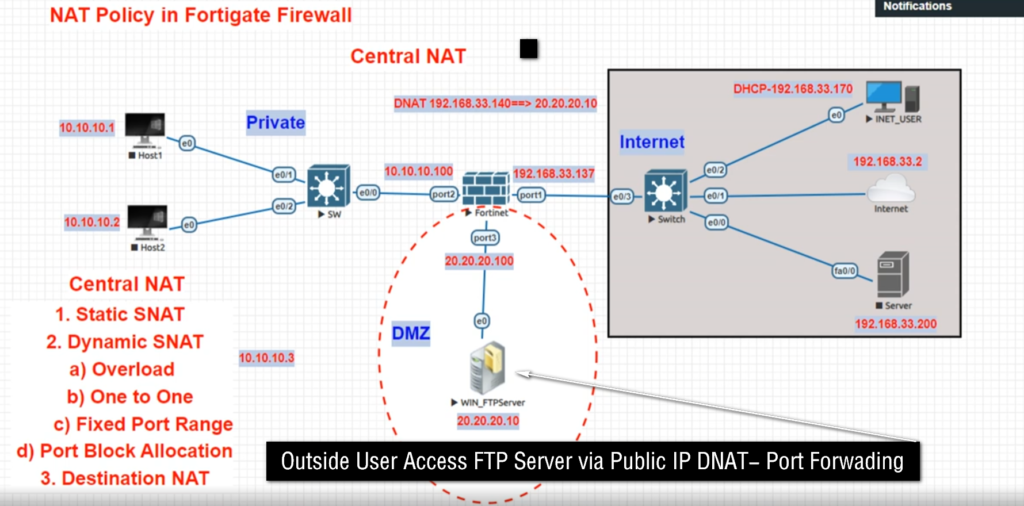
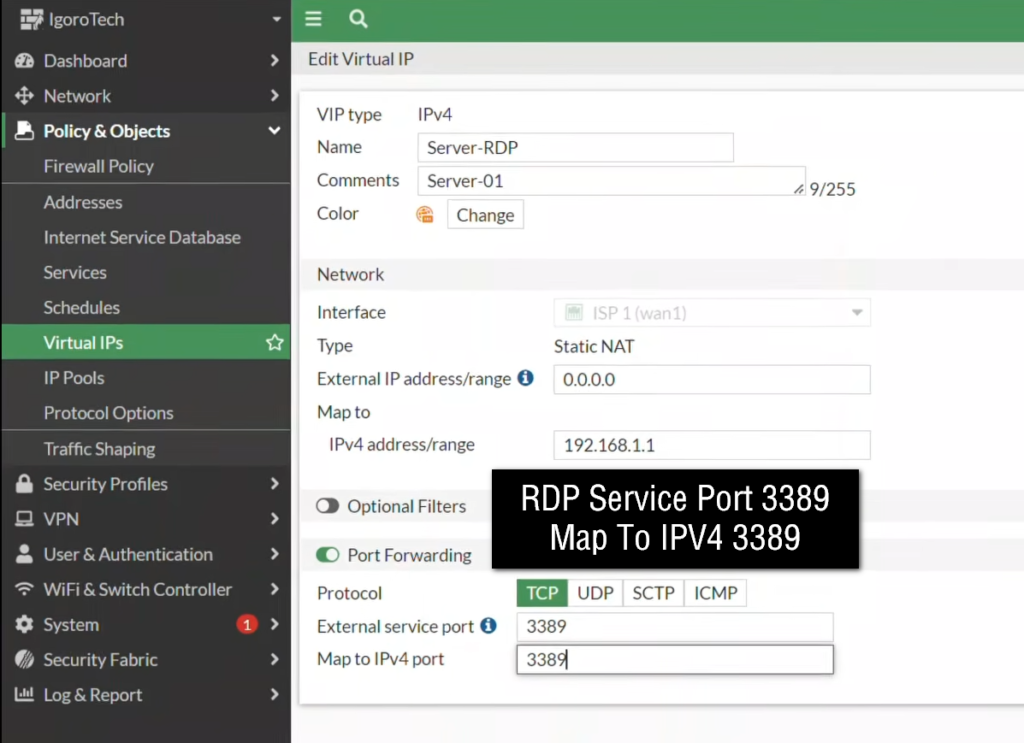
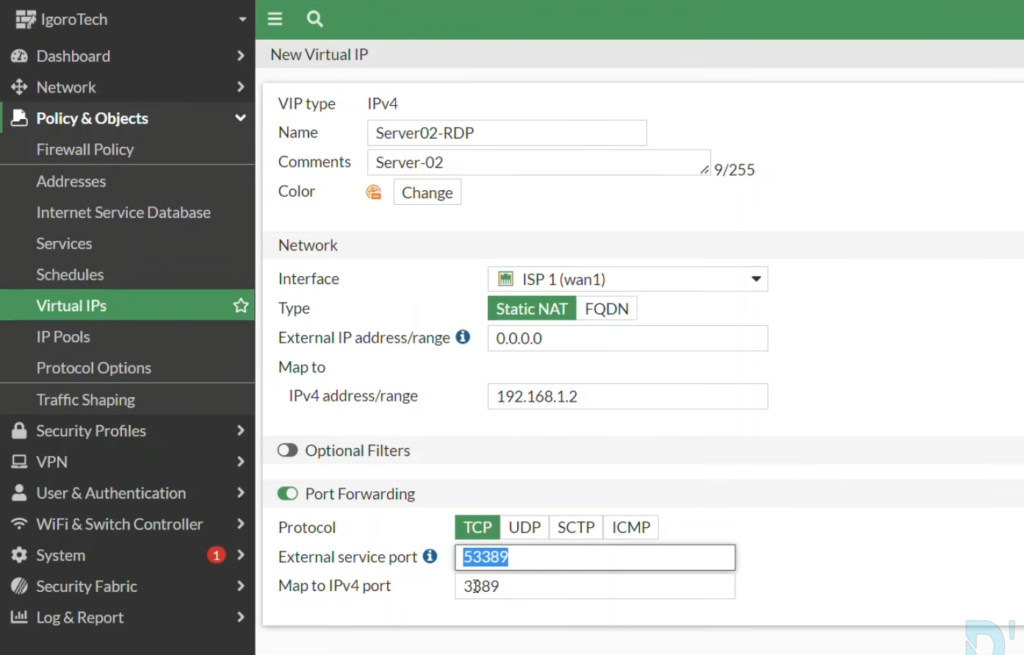
What is Static IP
Static IP (Static Internet Protocol Address)
A Static IP address is an IP address that is fixed and does not change over time. It is manually assigned to a device and remains the same every time the device connects to the network. Unlike dynamic IP addresses, which can change automatically, a static IP stays permanent unless it is manually changed by an administrator.
A static IP can be assigned to devices such as servers, printers, routers, firewalls, or any system that needs a consistent and reliable network identity. Because the address never changes, other devices or users can always find and connect to it easily.
For example, in a company using a FortiGate firewall, a web server may be assigned a static IP like 192.168.1.100 inside the network and a public static IP like 203.110.50.10 for Internet access. This ensures that users can always reach the server using the same address.
In short
A Static IP address is a permanent IP address assigned to a device that does not change, making it reliable for servers, network devices, and remote access services.
A Static Public IP is usually not free. Internet Service Providers (ISP) charge extra because it gives you a fixed public IP address that never changes. It is mostly used for servers, CCTV, VPN, remote access, and port forwarding.
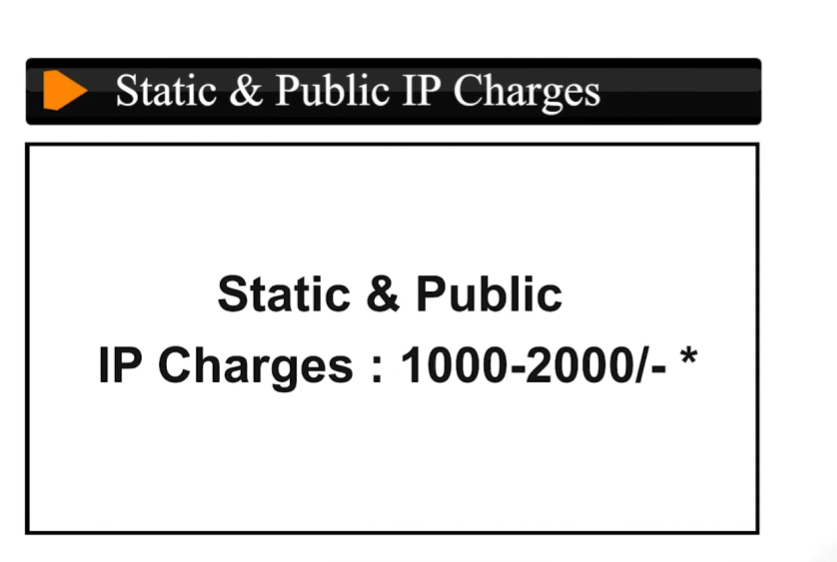
Why Need Static Public IP offices
A Static Public IP is often needed in offices because it gives a fixed internet address that does not change. This makes business services stable, secure, and easier to manage.
First, offices need a static public IP for remote access. Employees may connect from home using Virtual Private Network (VPN) or Remote Desktop Protocol (RDP) to office computers or servers. If the public IP changes frequently, users must keep updating connection settings. A static public IP remains the same, so employees can always connect using one fixed address.
Second, offices use static public IPs for hosting servers. For example, an office may have:
- Web Server → 192.168.1.50
- Mail Server → 192.168.1.60
- CCTV Server → 192.168.1.70
Using Port Forwarding, the firewall maps the fixed public IP to these internal servers. Because the public IP never changes, clients can reliably access office services at any time.
Third, static public IP improves security policies. Firewalls often create rules based on IP addresses. For example, a company branch office may allow VPN access only from public IP 103.25.50.10. If that IP keeps changing, security rules break. A static IP keeps firewall rules consistent.
Fourth, static public IP is important for DNS records. If a company website or email domain points to a public IP, changing IP addresses can break access until DNS is updated. With a static public IP, DNS records remain fixed and services stay online.
Finally, static public IP helps with business reliability. Offices need stable connectivity for ERP systems, cloud integrations, payment gateways, and branch-to-branch links. A fixed public IP makes troubleshooting easier and provides dependable communication.
In short, offices use static public IPs because they provide stable remote access, reliable server hosting, better security control, and consistent business connectivity.
Here is the difference between Static IP and Dynamic IP.
Feature | Static IP | Dynamic IP |
Meaning | Fixed IP address that does not change | IP address changes automatically |
Assignment | Manually assigned by ISP or network admin | Automatically assigned by Dynamic Host Configuration Protocol (DHCP) |
Change | Remains same for long time | Can change daily / weekly / reconnect |
Cost | More expensive | Usually cheaper |
Stability | Very stable | Less stable |
Remote Access | Easy because IP is fixed | Difficult because IP changes |
Server Hosting | Best for web, mail, VPN servers | Not ideal for servers |
DNS | Easy to connect domain name | Needs Dynamic DNS (DDNS) |
Security Rules | Easy firewall whitelist | Hard because IP changes |
Common Use | Offices, companies, servers | Homes, normal internet users |
What is DDNS (Dynamic DNS)
Dynamic DNS (DDNS) is a service that automatically updates a domain name whenever your public IP address changes.
Normally, internet providers give many homes, schools, and small offices a dynamic public IP, meaning the public IP can change at any time. For example, today your router may have public IP 49.37.120.15, and tomorrow it may change to 49.37.145.88 after reconnecting to the internet. If you use that IP address for remote access, CCTV viewing, or hosting a server, users will not know the new IP address after it changes.
Dynamic DNS (DDNS) solves this problem by linking your changing public IP to a fixed domain name, such as schooloffice.ddns.net. When the public IP changes, the router, firewall, or DDNS client automatically informs the DDNS provider and updates the DNS record with the new IP address. Users continue using the same domain name, and it always points to the current public IP.
For example, a school has a CCTV server at internal IP 192.168.1.50 and uses port forwarding on the firewall. The school’s public IP today is 49.37.120.15, so schooloffice.ddns.net points there. Tomorrow the ISP changes the public IP to 49.37.145.88. DDNS automatically updates the record, and schooloffice.ddns.net now points to the new IP. Teachers or administrators can still access CCTV remotely using the same name without changing settings.
DDNS is commonly used for:
- Remote Desktop access
- CCTV / DVR remote viewing
- Home servers
- Office VPN access
- Web servers on dynamic internet connections
In short, DDNS gives a fixed name to a changing public IP address, making remote access simple and reliable.