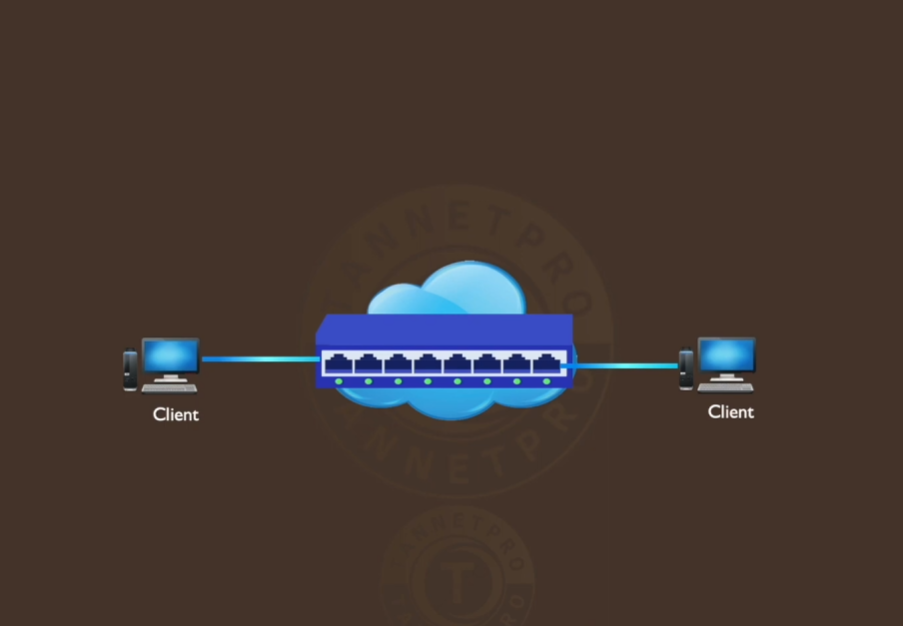
MPLS Technology
History of MPLS
The history of MPLS (Multiprotocol Label Switching) explains how modern high-speed and efficient network routing evolved from older technologies.
Early Networking Problems (Before MPLS)
In the early days of networking, routers used traditional IP routing, where each router examined the destination IP address of every packet. This process was slow and inefficient for large networks. At the same time, technologies like ATM (Asynchronous Transfer Mode) and Frame Relay were used for faster switching, but they were complex and expensive.
Birth of MPLS (1990s)
In the mid-1990s, engineers looked for a solution that combined the speed of switching with the flexibility of IP routing. This led to the development of MPLS. The idea was to assign a short label to packets instead of repeatedly checking long IP addresses. This made forwarding much faster.
Development by Companies
Several companies contributed to MPLS development:
- Cisco Systems introduced Tag Switching
- IBM worked on ARIS (Aggregate Route-Based IP Switching)
- Toshiba developed Cell Switching Router (CSR)
These similar technologies were later combined into a standard called MPLS.
Standardization (Late 1990s – Early 2000s)
The Internet Engineering Task Force (IETF) standardized MPLS to ensure compatibility across vendors. MPLS became widely accepted as a solution for efficient packet forwarding and traffic engineering.
Growth and Adoption
In the early 2000s, MPLS was widely adopted by ISPs and enterprises because it:
- Improved speed and performance
- Enabled traffic engineering (better path control)
- Supported VPN services (MPLS VPN)
- Reduced network congestion
MPLS in Modern Networks
Today, MPLS is still used in many service provider networks for:
- Reliable data transmission
- Enterprise WAN connectivity
- QoS (Quality of Service) support
However, newer technologies like SD-WAN and cloud networking are gradually complementing or replacing MPLS in some cases.
Summary
- Traditional routing was slow
- MPLS introduced label-based fast forwarding
- Developed in the 1990s by multiple companies
- Standardized by IETF
- Became a backbone technology for ISPs
👉 In short, MPLS evolved to make networks faster, more efficient, and more controllable, especially for large-scale internet and enterprise environments.
MPLS (Multiprotocol Label Switching)
MPLS (Multiprotocol Label Switching) is an advanced data-forwarding technology used in modern networks to improve speed, efficiency, and control of traffic flow. It operates between Layer 2 (Data Link Layer) and Layer 3 (Network Layer) of the OSI model, which is why it is often called a “Layer 2.5” technology. MPLS is widely used by Internet Service Providers (ISPs) and large enterprises to deliver reliable and high-performance networking services.
Concept of MPLS
In traditional IP routing, every router examines the destination IP address of a packet and makes a routing decision independently. This process can be slow and resource-intensive in large networks. MPLS solves this problem by attaching a short, fixed-length label to each packet. Instead of checking the full IP address at every hop, routers simply read the label and forward the packet accordingly. This reduces processing time and increases forwarding speed.
What is MPLS?
MPLS is a method where a short label (number) is attached to each data packet. Routers (called Label Switch Routers – LSRs) use this label to decide where to send the packet, without repeatedly checking the full IP address. This makes the process faster and more efficient.
How MPLS Works
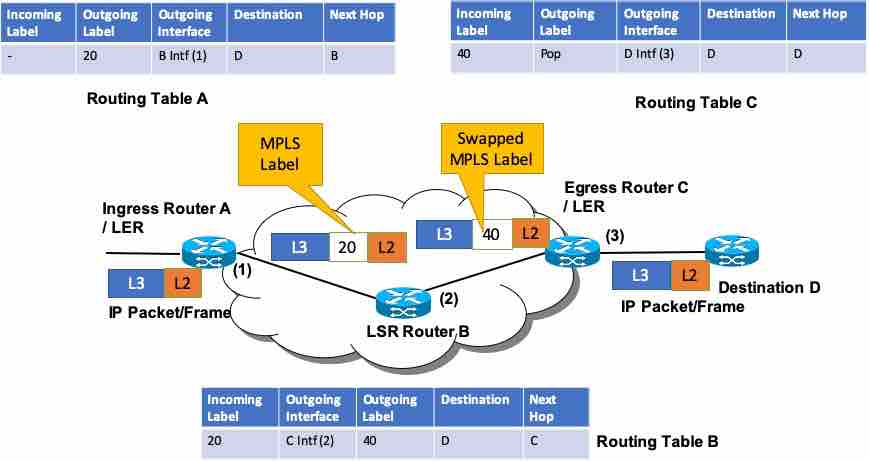
Step 1: Label Assignment
When a packet enters the MPLS network, the first router (called the Label Edge Router – LER) assigns a label to the packet.
Step 2: Label Switching
Inside the MPLS network, routers forward the packet based only on the label. They may swap the label at each step.
Step 3: Label Removal
At the destination edge, the label is removed, and the packet is delivered normally using IP routing.
MPLS (Multiprotocol Label Switching)
MPLS (Multiprotocol Label Switching) works by forwarding data packets using labels instead of IP addresses, which makes routing faster and more efficient. Below is a detailed, step-by-step explanation of how MPLS operates inside a network.
1. Packet Enters the MPLS Network (Ingress LER)
When a data packet enters the MPLS network, it reaches the first router called the Ingress Label Edge Router (LER).
- This router examines the destination IP address
- It classifies the packet into a Forwarding Equivalence Class (FEC)
- Then it assigns a label to the packet
👉 This process is called Label Imposition (Push)
2. Label Creation and Forwarding Decision
The assigned label represents a predefined path called a Label Switched Path (LSP).
- This path is already calculated using routing protocols (like OSPF, BGP)
- The router decides the next hop based on the label
👉 Now the packet no longer depends on IP lookup
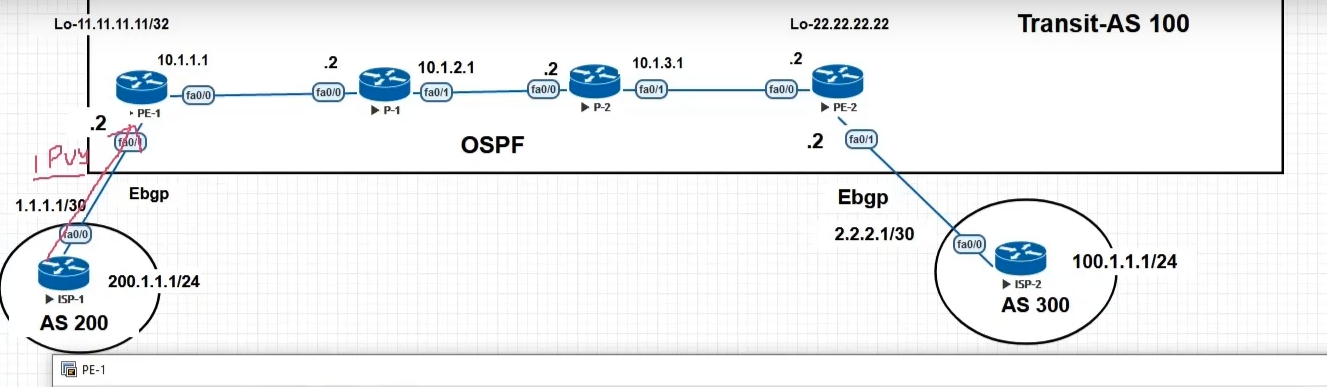
3. Packet Travels Through MPLS Core (LSR)
Inside the MPLS network, the packet moves through routers called Label Switch Routers (LSRs).
At each LSR:
- The router reads the incoming label
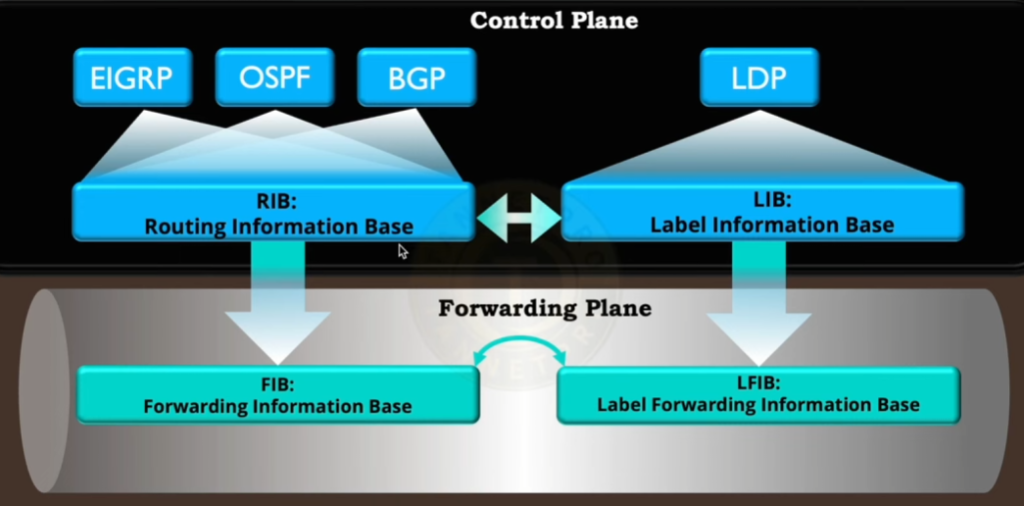
- Looks it up in its Label Forwarding Table (LFIB)
- Replaces it with a new label (Label Swapping)
- Forwards the packet to the next router
👉 No IP address checking → faster processing
4. Traffic Engineering (Optional but Important)
MPLS allows Traffic Engineering (TE):
- Network admins can define specific paths for packets
- Avoid congested routes
- Ensure critical data (voice, banking, video) gets priority
👉 This improves performance and reliability
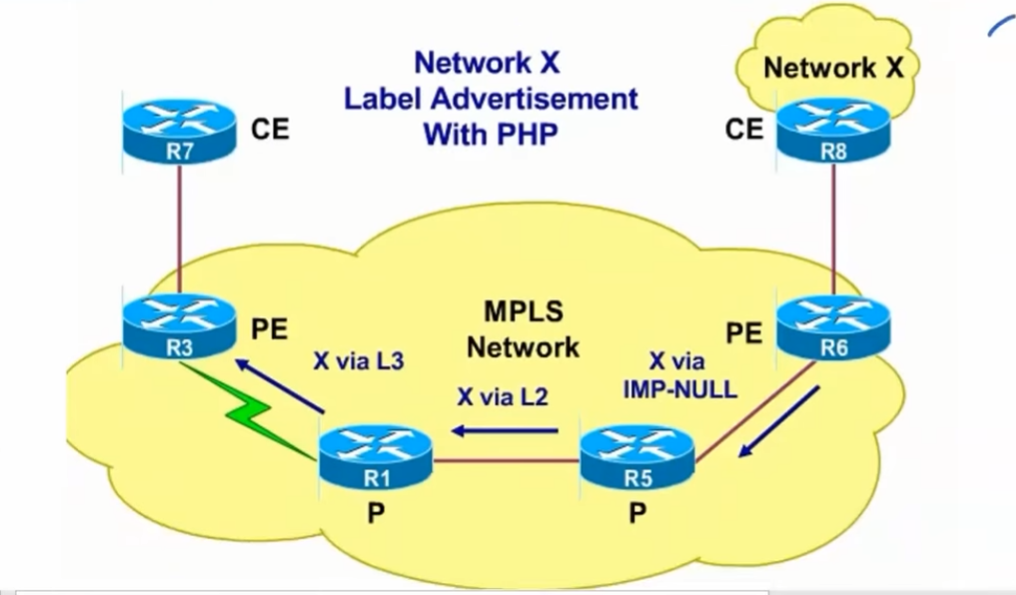
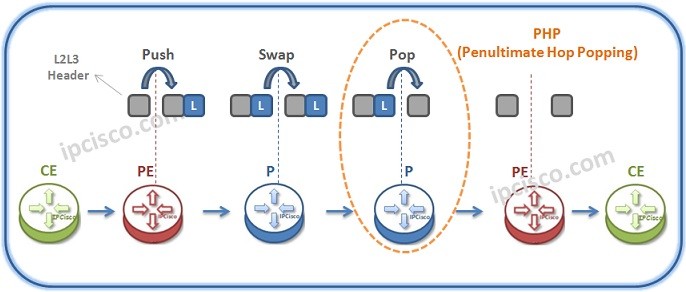
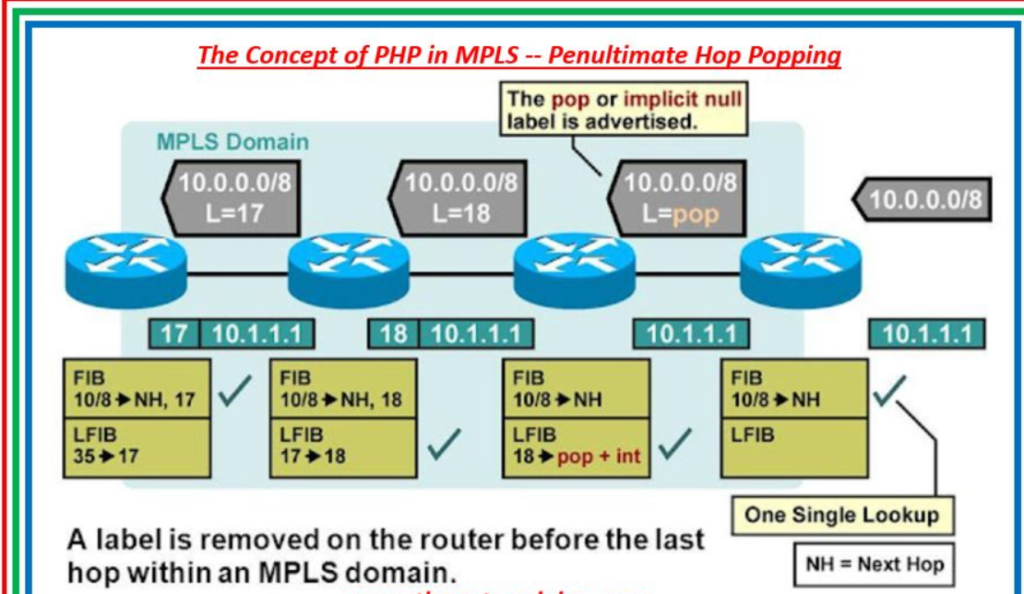
5. Penultimate Hop Popping (PHP)
Before reaching the final router, the second-last router may remove the label.
- This is called Penultimate Hop Popping (PHP)
- It reduces processing work for the last router
6. Packet Leaves MPLS Network (Egress LER)
At the final router (Egress LER):
- The label is removed (Pop operation)
- The packet is forwarded using normal IP routing to the destination
7. Label Distribution Mechanism
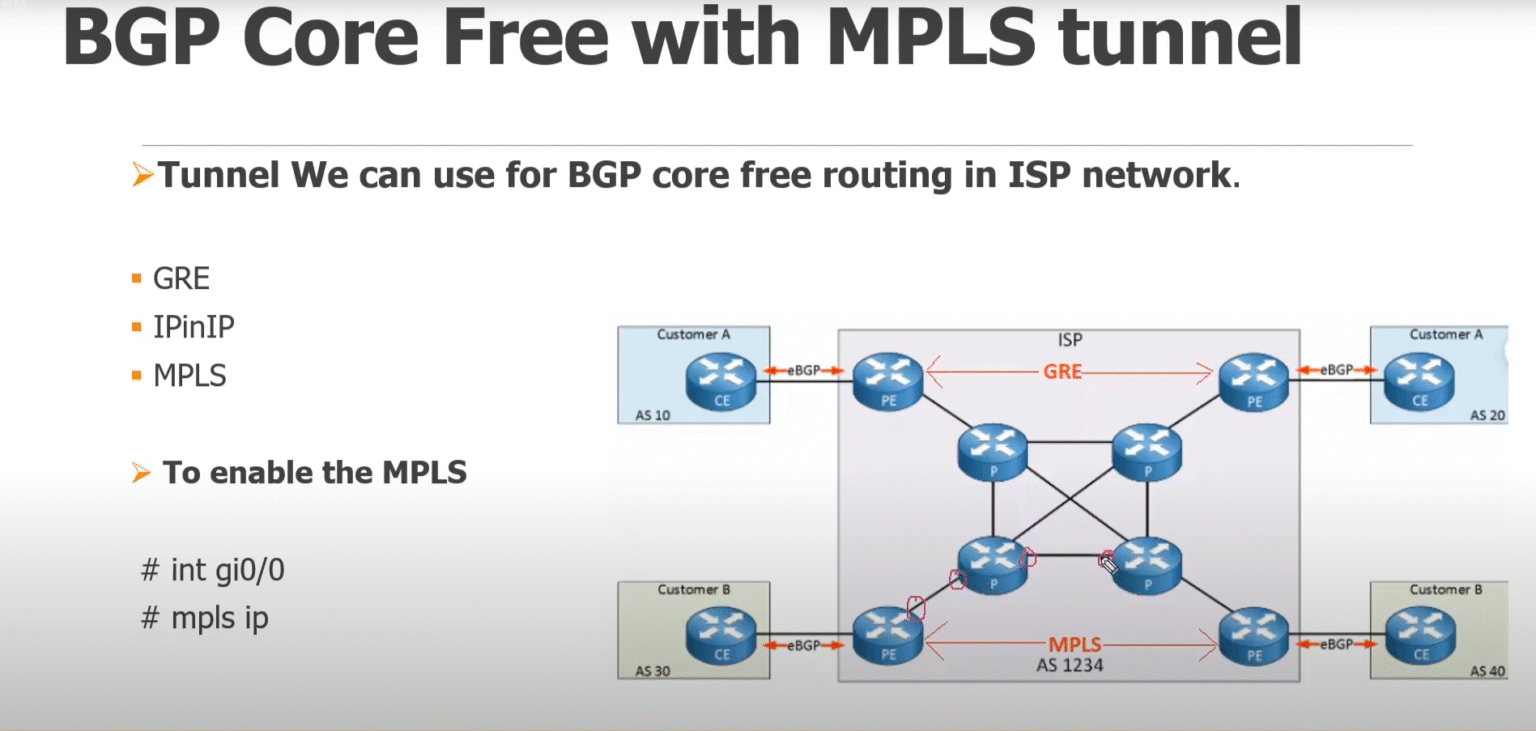
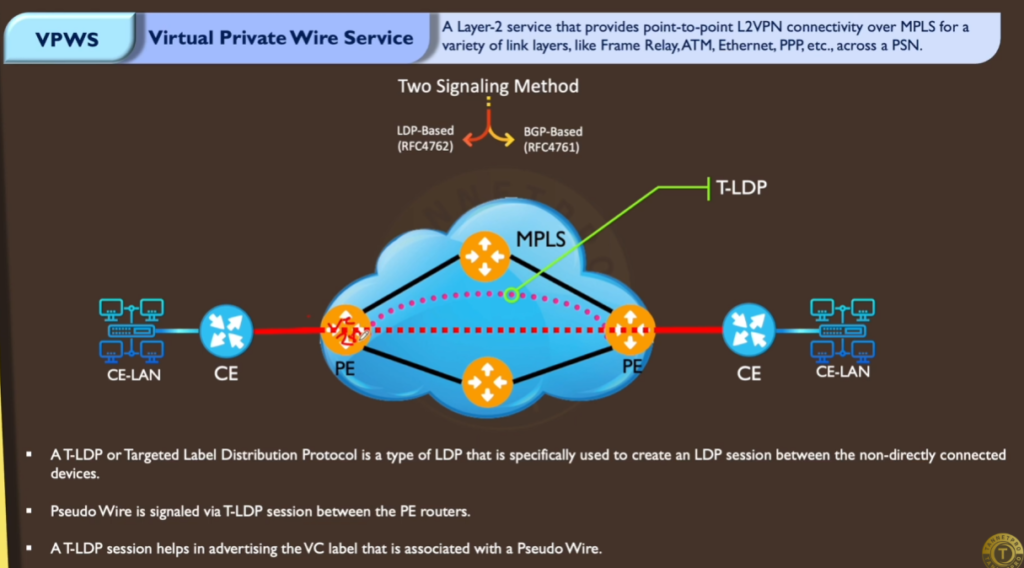
Labels are distributed between routers using protocols like:
- LDP (Label Distribution Protocol)
- RSVP-TE (for traffic engineering)
- BGP (for MPLS VPNs)
👉 These protocols ensure all routers agree on label paths
Example (Real-Life Flow)
Suppose a company sends data from Kolkata to Delhi:
- Packet enters MPLS network → label added
- Travels through multiple ISP routers using labels
- Each router swaps label and forwards quickly
- Last router removes label
- Packet reaches destination
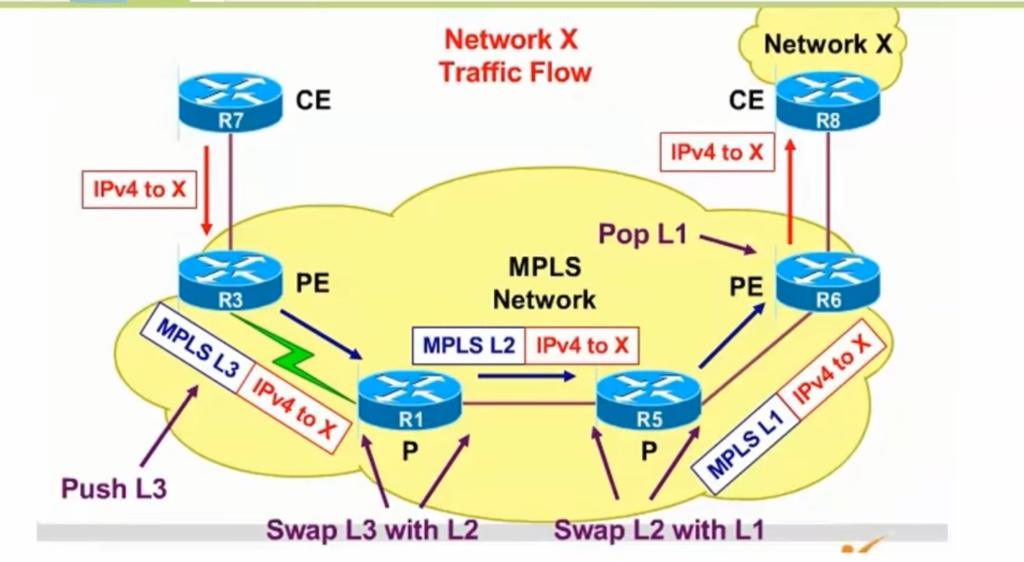
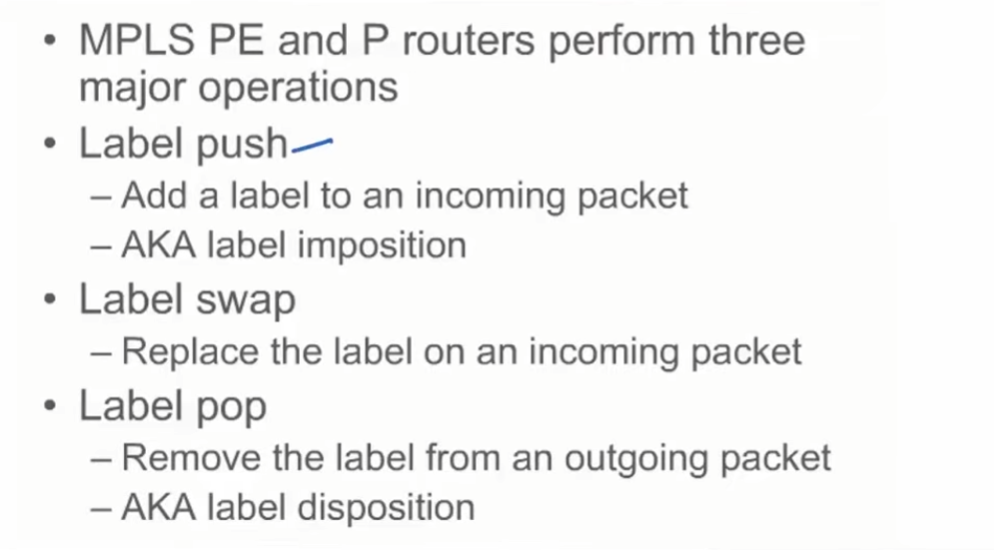
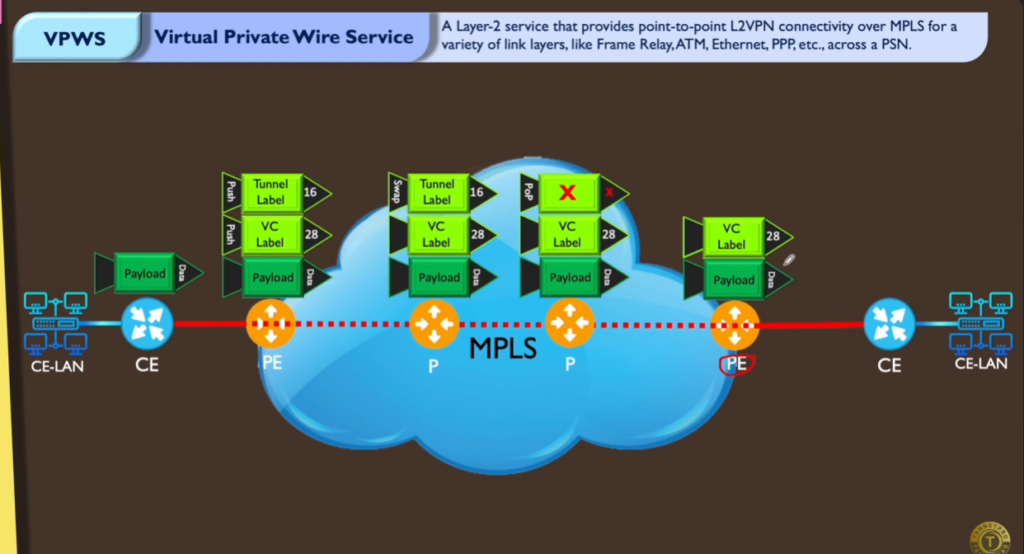
Push, Swap, and Pop
In MPLS (Multiprotocol Label Switching), the terms Push, Swap, and Pop are the three main operations used to handle labels as packets travel through the network. These operations control how packets move from source to destination efficiently.
1. Push (Label Imposition)
Push means adding a label to a packet.
- Happens at the Ingress Router (LER)
- When a packet enters the MPLS network, the router assigns a label
- This label defines the path (LSP) the packet will follow
👉 The packet changes from a normal IP packet to an MPLS packet
Example:
A packet enters the MPLS network → Router adds label 100
Now packet = [Label: 100 | Data]
2. Swap (Label Switching)
Swap means replacing one label with another label.
- Happens inside the MPLS network at LSR (core routers)
- Each router reads the incoming label and replaces it with a new one
- Then forwards the packet to the next router
👉 No need to check IP address → faster forwarding
Example:
Incoming: Label 100 → Router changes to Label 200
Outgoing: [Label: 200 | Data]
3. Pop (Label Removal)
Pop means removing the label from the packet.
- Happens at the Egress Router (LER) or sometimes one router before (PHP)
- After removing the label, the packet becomes a normal IP packet again
👉 Now normal routing is used to reach the final destination
Example:
Incoming: [Label: 200 | Data]
Router removes label → [IP Packet Only]
Simple Flow Example
- Push → Label added (100)
- Swap → Label changed (100 → 200 → 300)
- Pop → Label removed
Summary Table
| Operation | Meaning | Where Used |
|---|---|---|
| Push | Add label | Ingress Router |
| Swap | Change label | Core Routers |
| Pop | Remove label | Egress Router |
MPLS is needed in a company (enterprise) environment
MPLS (Multiprotocol Label Switching) is needed in a company environment to ensure fast, secure, and reliable communication between different office locations. In modern businesses, data must travel quickly and without interruption, and MPLS provides a structured and efficient way to manage this communication.
Connecting Multiple Branches
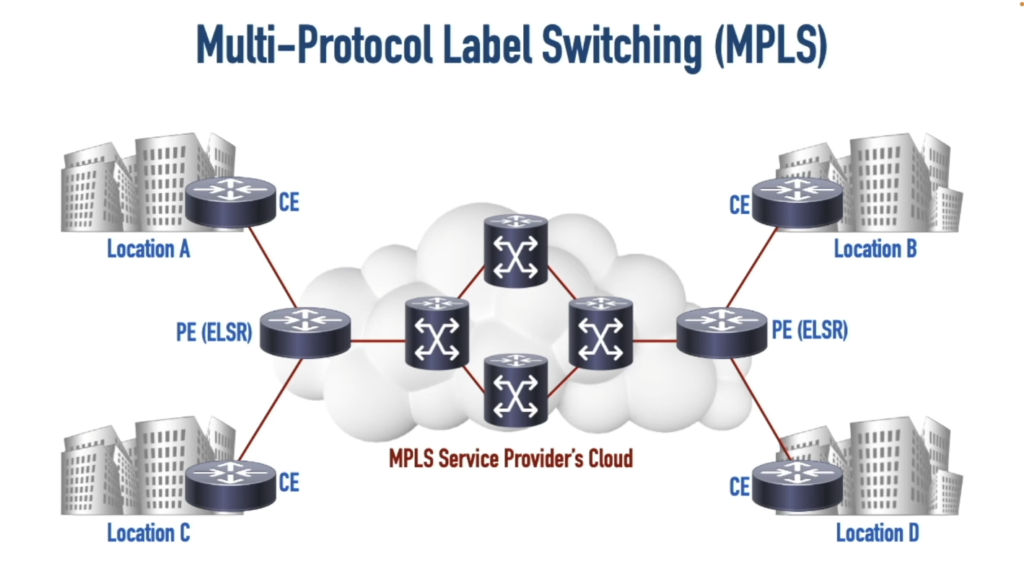
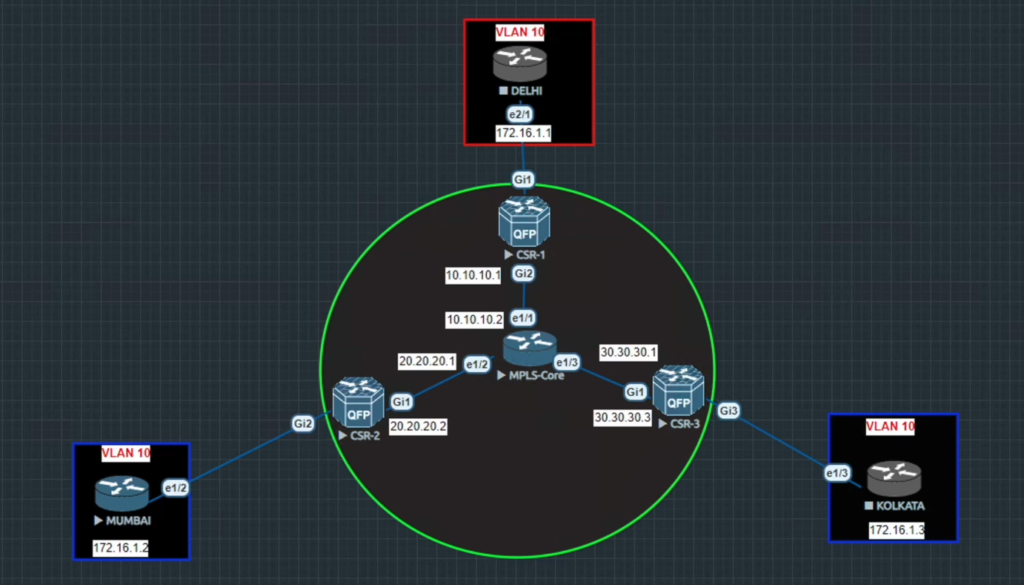
In a company with offices in different cities, communication between branches is very important. Without MPLS, data would travel over the public internet, which can be slow and unpredictable. MPLS creates a private WAN network that connects all branches together. For example, if a company has offices in Kolkata, Delhi, and Mumbai, MPLS allows employees in Kolkata to access files stored in the Delhi office as if they were on the same local network.
Faster and Efficient Data Transfer
Traditional IP routing checks the destination address at every router, which can cause delays. MPLS uses labels, so packets follow a predefined path, making the process faster. For example, when an employee opens a cloud-based application, MPLS ensures the data takes the shortest and fastest route, reducing loading time and improving productivity.
Priority for Important Applications (QoS)
In a company, not all data is equally important. Applications like video conferencing and voice calls need real-time performance. MPLS supports Quality of Service (QoS), which prioritizes critical traffic. For example, during an online meeting, MPLS ensures smooth audio and video, while less important tasks like file downloads use lower priority bandwidth.
High Reliability and Uptime
Business operations depend on network availability. MPLS networks are designed with predefined paths and backup routes, ensuring minimal downtime. For example, if one network link fails, MPLS automatically reroutes traffic through another path, so employees continue working without interruption.
Secure Communication
Security is very important for companies, especially when handling sensitive data. MPLS provides a private and isolated network, unlike the public internet. For example, a bank using MPLS can securely transfer customer data between branches without exposing it to external threats.
Traffic Control and Optimization
MPLS allows network administrators to control how data flows through the network. They can avoid congested paths and optimize bandwidth usage. For example, if one route is overloaded, MPLS can redirect traffic to a less busy path, ensuring consistent performance.
Scalability for Growing Businesses
As companies grow, their network requirements increase. MPLS makes it easy to add new branches and users without major changes. For example, if a company opens a new office in Bangalore, it can be quickly integrated into the existing MPLS network.
Final Summary
MPLS is essential in a company because it provides fast performance, secure communication, reliability, and control over network traffic. It helps businesses operate smoothly by ensuring that all branches stay connected efficiently.
Without MPLS (Multiprotocol Label Switching), Companies Problem
Without MPLS (Multiprotocol Label Switching), companies face several network problems because data depends only on normal internet routing, which is less controlled and less reliable. Below is a detailed paragraph-wise explanation:
Unpredictable Network Performance
Without MPLS, data travels over the public internet, where routing decisions are made dynamically at each router. This can cause delays and inconsistent performance. For example, a company using cloud applications may experience slow loading times during peak internet usage hours.
No Traffic Prioritization (QoS Issue)
In a normal network without MPLS, all types of traffic are treated equally. There is no proper Quality of Service (QoS). For example, video calls, voice calls, and file downloads share the same bandwidth, which can result in poor call quality, lag, and interruptions during meetings.
Higher Latency and Packet Loss
Since there is no predefined path, packets may take longer or congested routes. This increases latency (delay) and may cause packet loss. For example, online meetings may freeze or voice may break due to unstable network paths.
Security Risks
Without MPLS, data is transmitted over the public internet, making it more vulnerable to attacks. Companies must rely heavily on additional security measures like VPNs. For example, sensitive company data could be exposed if proper security is not implemented.
No Traffic Engineering
MPLS allows control over how traffic flows, but without it, companies cannot manage routes effectively. For example, if one network path is congested, the system cannot automatically choose a better path, leading to poor performance.
Lower Reliability and Downtime
Public internet connections do not guarantee uptime. Without MPLS, there are fewer mechanisms for automatic failover. For example, if a link fails, communication between branches may stop until the issue is fixed.
Difficulty in Managing Large Networks
As companies grow, managing networks without MPLS becomes complex. There is no centralized control over routing behavior. For example, adding new branches or ensuring consistent performance across locations becomes difficult.
Real-Life Example
A company connects its branches using only the internet:
- Video meetings lag or disconnect
- File transfers are slow
- Network performance changes frequently
- Security risks increase
Final Summary
Without MPLS, companies face:
- Slow and unstable performance
- No traffic priority
- Higher delay and packet loss
- Security concerns
- Limited control over network traffic
👉 In short, without MPLS, a company network becomes unpredictable, less secure, and inefficient, affecting overall business operations.
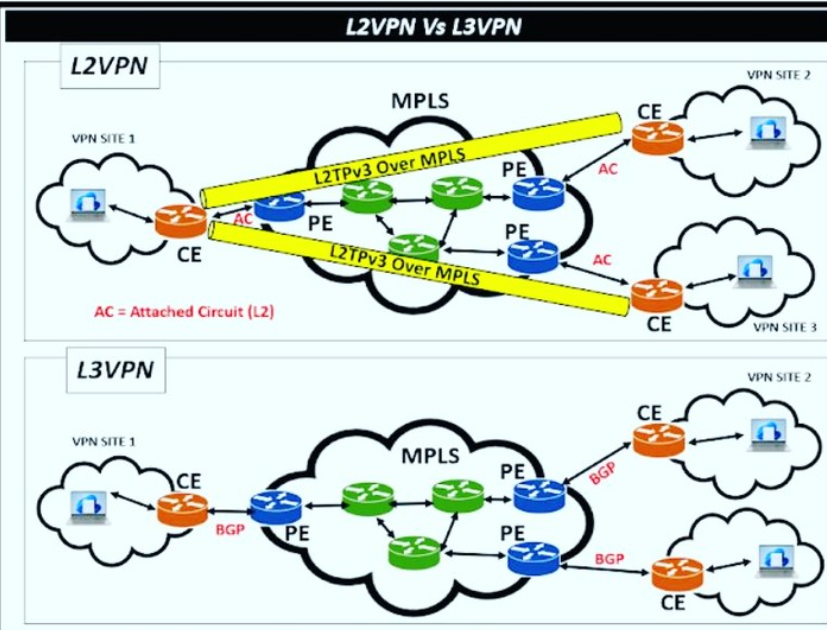
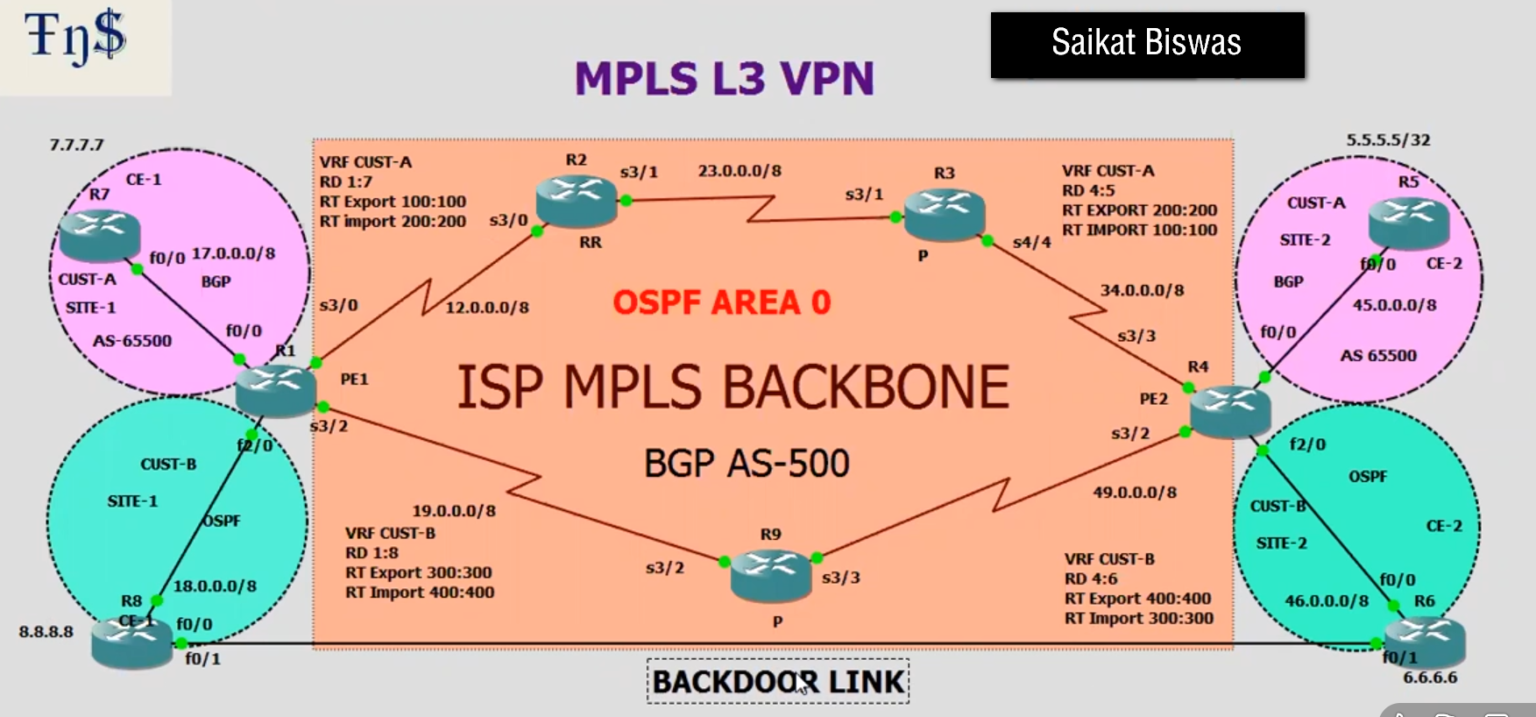
MPLS L3 VPN (Layer 3 Virtual Private Network)
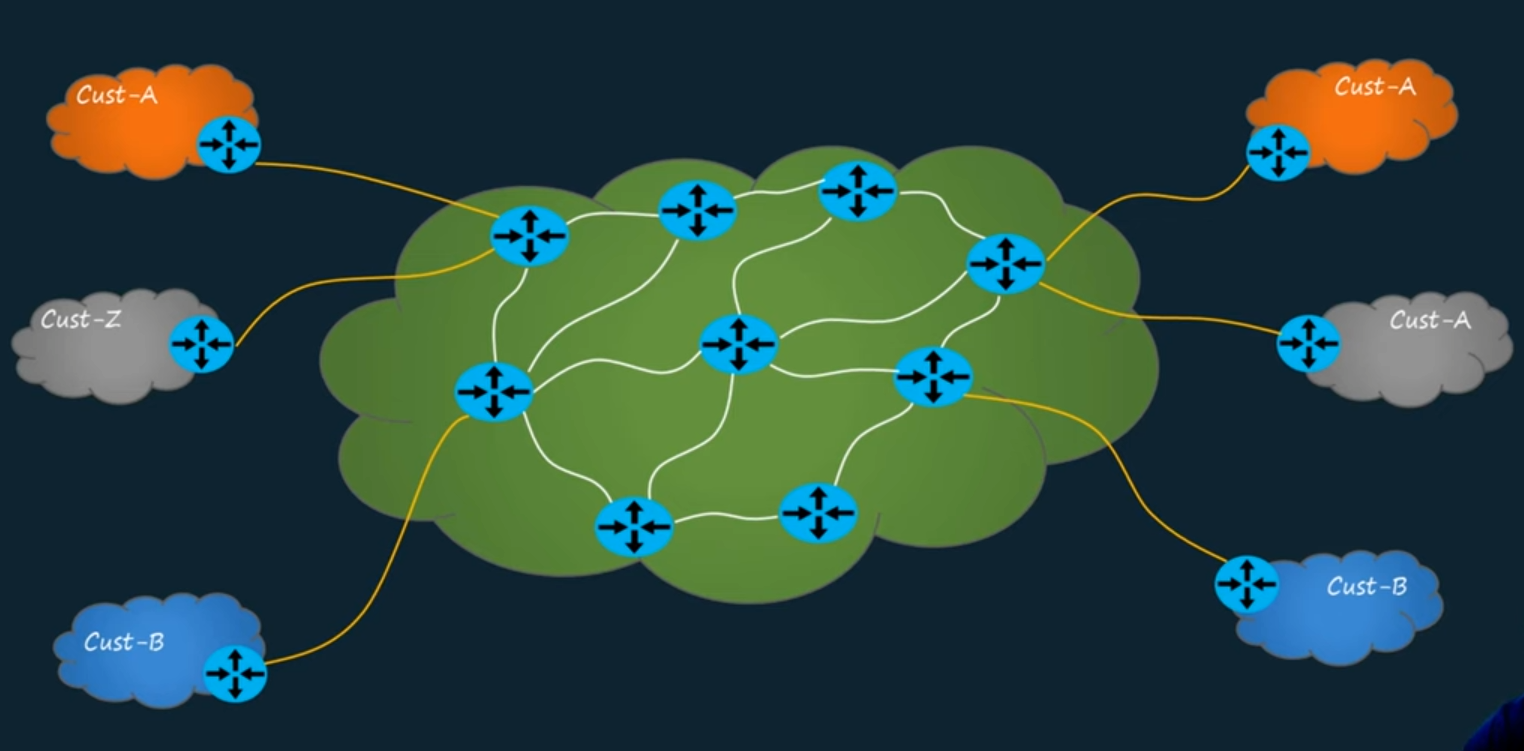
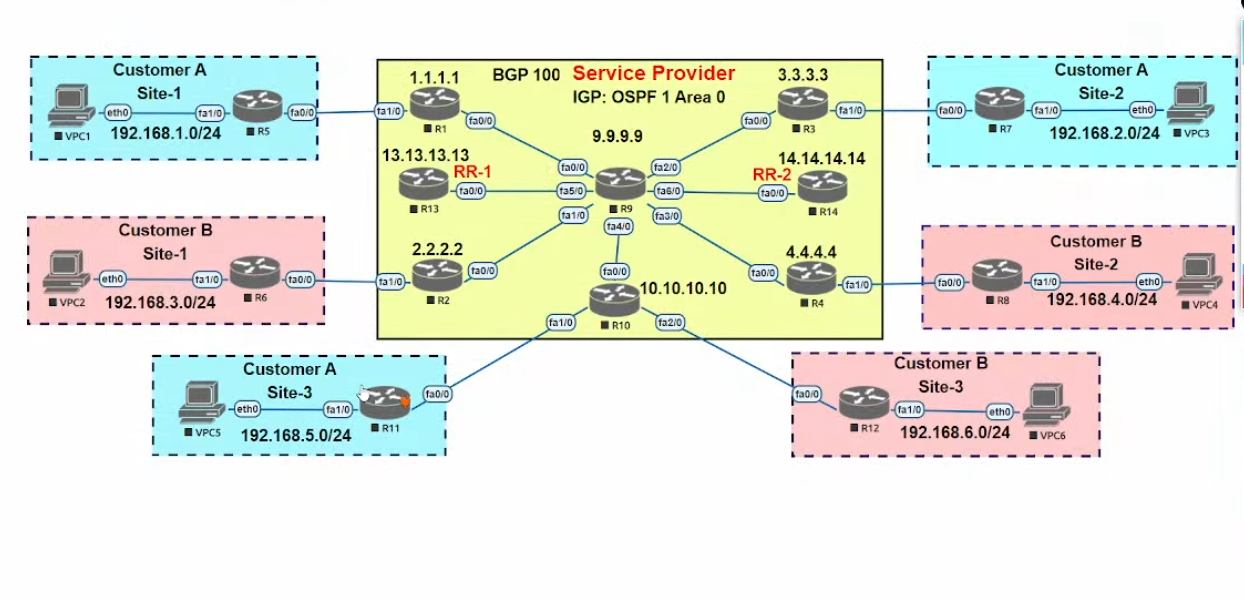
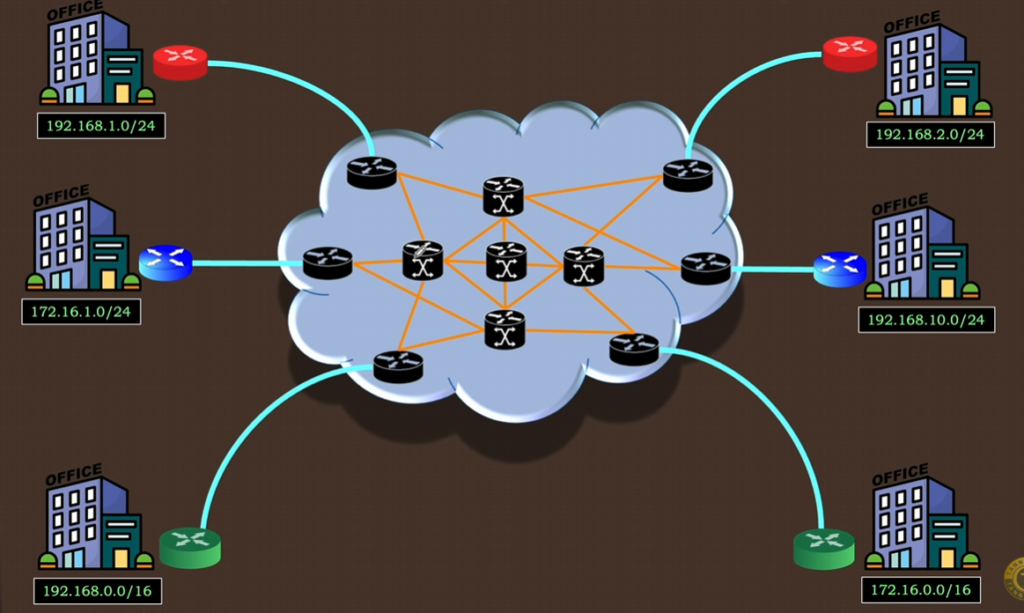
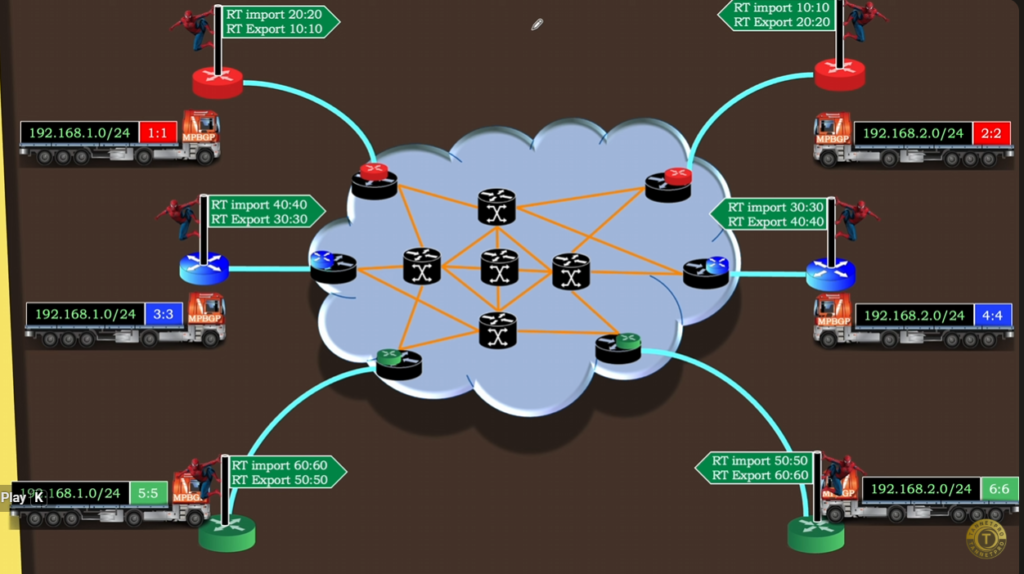
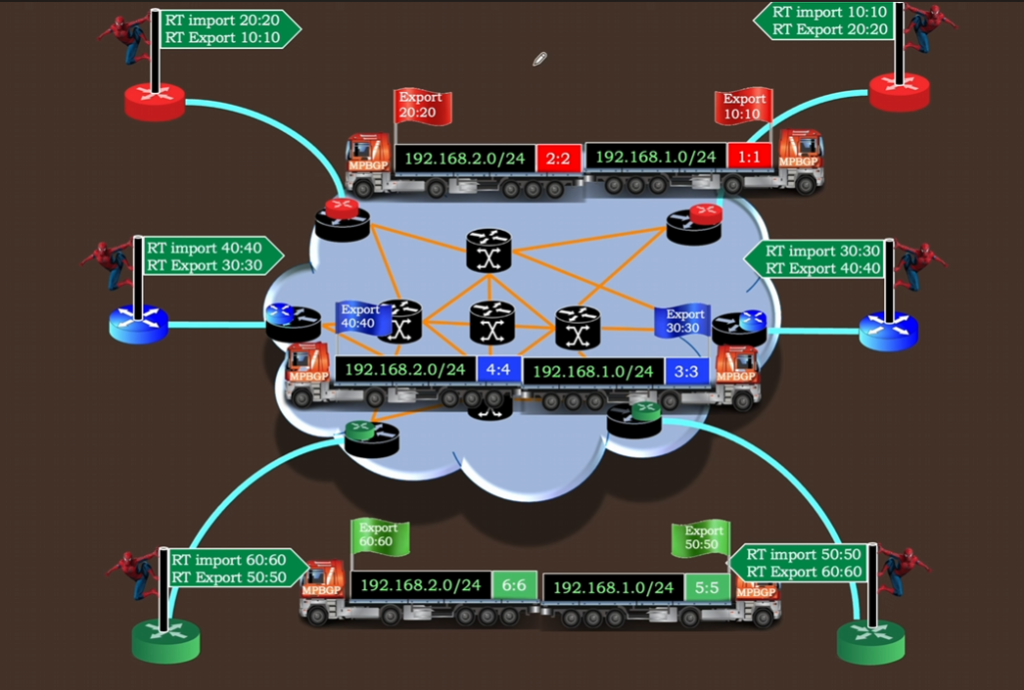
MPLS L3 VPN (Layer 3 Virtual Private Network) is a service provided by service providers that uses MPLS (Multiprotocol Label Switching) to create a secure, private network for a company over a shared provider infrastructure. It allows multiple branch offices to communicate with each other as if they are on the same private network.
What is MPLS L3 VPN
MPLS L3 VPN is a Layer 3 (IP-based) VPN where the service provider manages routing between customer sites. Each customer gets a logically separate network, even though the same physical MPLS network is shared.
👉 In simple words:
It is a private company network built on top of an ISP’s MPLS cloud.
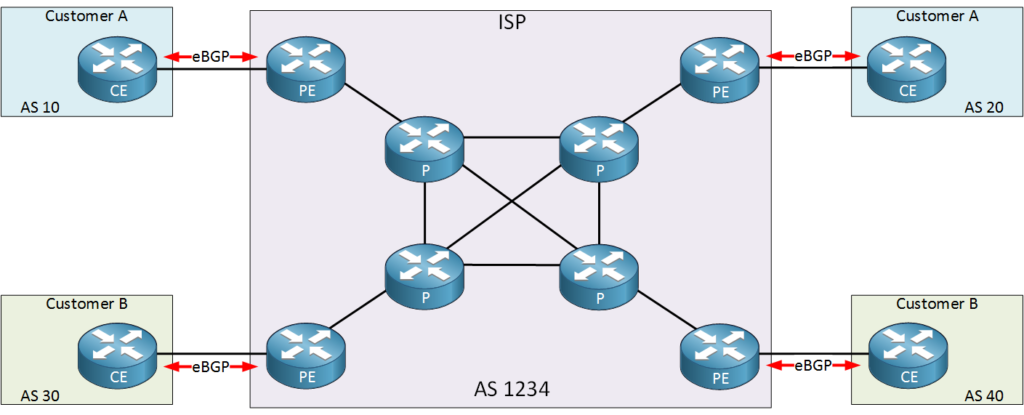
Key Components of MPLS L3 VPN
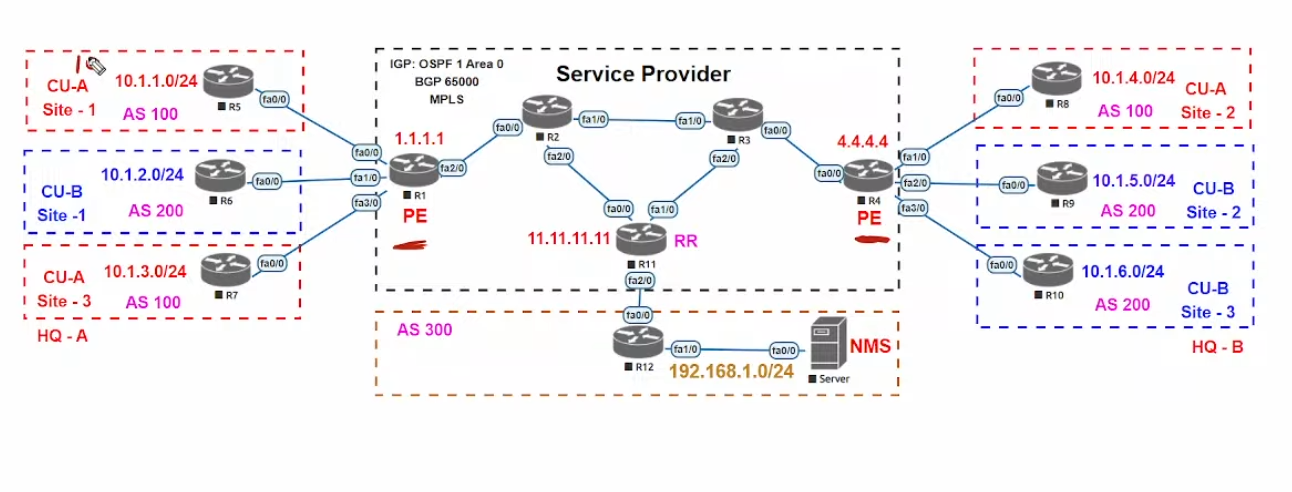
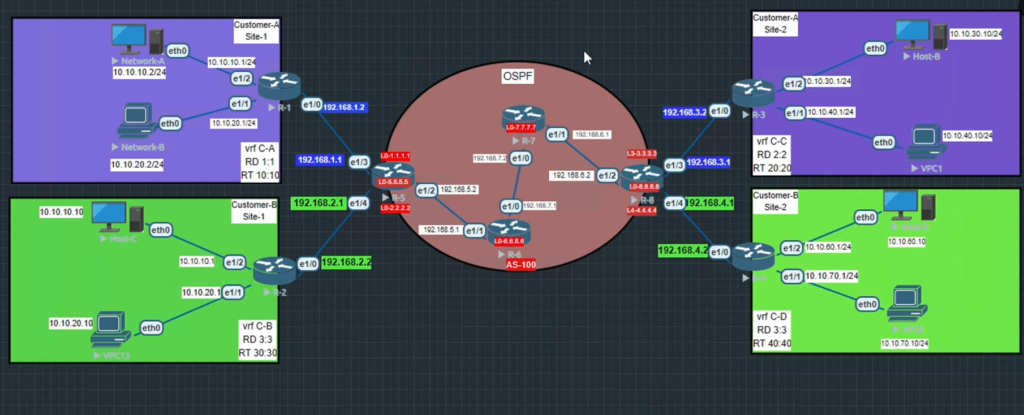
1. CE (Customer Edge Router)
- Located at the customer site
- Connects to the service provider
- Runs routing protocols (like OSPF, BGP)
2. PE (Provider Edge Router)
- Located at the ISP side
- Connects multiple customers
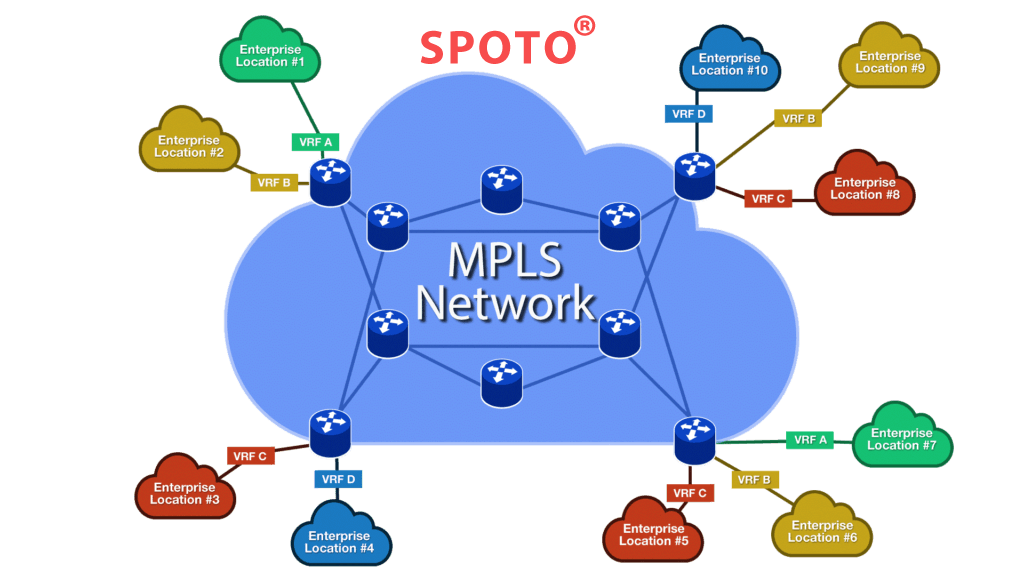
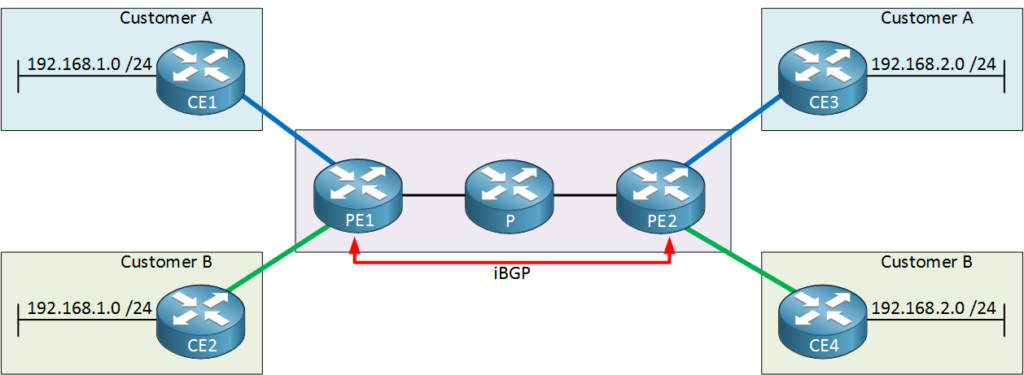
- Maintains separate routing tables for each customer (VRF)
3. P Router (Provider Router)
- Core router inside MPLS network
- Only forwards packets using labels
- Does not know customer routes
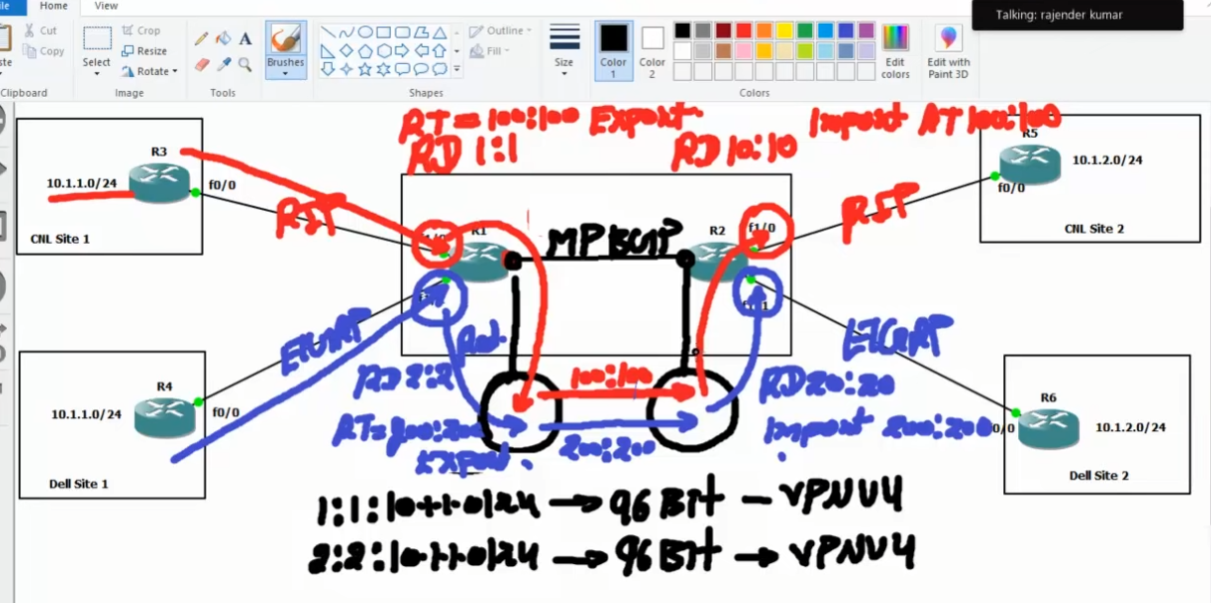
4. VRF (Virtual Routing and Forwarding)
- Separate routing table for each customer
- Ensures isolation and security
How MPLS L3 VPN Works
Step 1: Routing Information Exchange
Customer routers (CE) share routes with the provider edge (PE) router.
Step 2: VRF Separation
PE router stores routes in separate VRFs for each customer to keep networks isolated.
Step 3: Label Assignment
MPLS labels are added to packets to identify the path and the destination VPN.
Step 4: Data Forwarding
Packets travel through the MPLS network using labels (fast switching).
Step 5: Delivery
At the destination PE, labels are removed and packets are forwarded to the correct customer site.
Features of MPLS L3 VPN
- Full Mesh Connectivity – All sites can communicate easily
- High Security – Traffic is isolated using VRF
- Scalability – Easy to add new branches
- QoS Support – Prioritize important traffic
- Provider Managed – ISP handles routing complexity
Advantages
- No need for complex VPN configuration at customer side
- Better performance than internet-based VPN
- Secure communication between branches
- Simplified network management
Example
A company has offices in Kolkata, Delhi, and Mumbai:
- Each office connects to the ISP using a CE router
- ISP uses MPLS L3 VPN to connect all branches
- Employees access servers and applications securely
- Data flows privately without using public internet directly
MPLS L3 VPN vs Traditional VPN
| Feature | MPLS L3 VPN | Internet VPN |
|---|---|---|
| Security | High (isolated network) | Depends on encryption |
| Performance | High | Variable |
| Management | ISP managed | Customer managed |
| Scalability | Easy | Complex |
Final Summary
MPLS L3 VPN is a secure, scalable, and high-performance networking solution that connects multiple company locations over an MPLS network using Layer 3 routing.
In short, MPLS L3 VPN allows companies to build a private network over a shared infrastructure with high security and performance.
MPLS Slide