IPsec Technology
History Of IPsec
1. Origin of IPsec (Early 1990s)
IPsec was developed in the early 1990s as part of the work by the Internet Engineering Task Force (IETF).
At that time, the internet was growing rapidly, but it had no built-in security. Data was sent in plain text, making it vulnerable to hacking, eavesdropping, and data theft.
👉 To solve this, IETF started designing a security framework for IP (Internet Protocol).
2. Need for IPsec
Before IPsec:
- No encryption in IP communication
- No authentication of sender
- High risk of data interception
Organizations needed a way to:
- Secure communication over the internet
- Protect sensitive data (banking, business, government)
👉 This led to the development of IPsec as a standard security protocol suite.
3. First Standardization (Mid-1990s)
In 1995–1998, IETF officially introduced IPsec standards through a series of RFCs (Request for Comments).
Key components introduced:
- Authentication Header (AH)
- Encapsulating Security Payload (ESP)
- Security Associations (SA)
👉 These allowed:
- Data encryption
- Data integrity
- Authentication
4. Integration with IPv6
IPsec became a mandatory feature in IPv6 during its early design phase.
👉 This showed how important IPsec was for the future of secure networking.
Although later it became optional, IPsec is still widely supported in IPv6.
5. Growth with VPN Technology (2000s)
In the 2000s, IPsec became popular due to VPN (Virtual Private Network) usage.
Companies started using IPsec to:
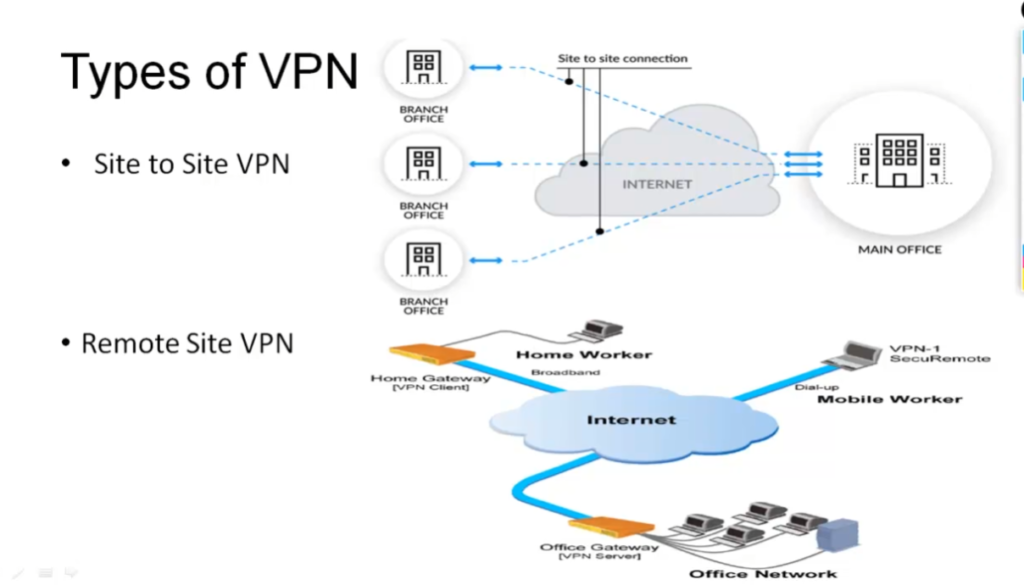
- Connect branch offices securely
- Enable remote workers to access office networks
👉 IPsec VPN became a standard solution for secure communication over the internet.
6. Modern Enhancements (2010s–Present)
Over time, IPsec improved with:
- Better encryption algorithms (AES, SHA)
- Integration with key management protocols like IKE
- Support in routers, firewalls, and operating systems
Today, IPsec is widely used in:
- Enterprise networks
- Cloud security
- Government systems
Final Summary
👉 IPsec started as a solution to secure the insecure internet and became a global standard for encrypted communication and VPNs.
What is IPsec
What is IP Security (IPSec)
IP Security (IPSec) refers to a collection of communication rules or protocols used to establish secure network connections. Internet Protocol (IP) is the common standard that controls how data is transmitted across the internet. IPSec enhances the protocol security by introducing encryption and authentication. IPSec encrypts data at the source and then decrypts it at the destination. It also verifies the source of the data.
Importance of IPSec
IPSec (Internet Protocol Security) is important because it helps keep your data safe and secure when you send it over the Internet or any network. Here are some of the important aspects why IPSec is Important:
- IPSec protects the data through Data Encryption.
- IPSec provides Data Integrity.
- IPSec is often used in Virtual Private Networks (VPNs) to create secure, private connections.
- IPSec protects from Cyber Attacks.
Features of IPSec
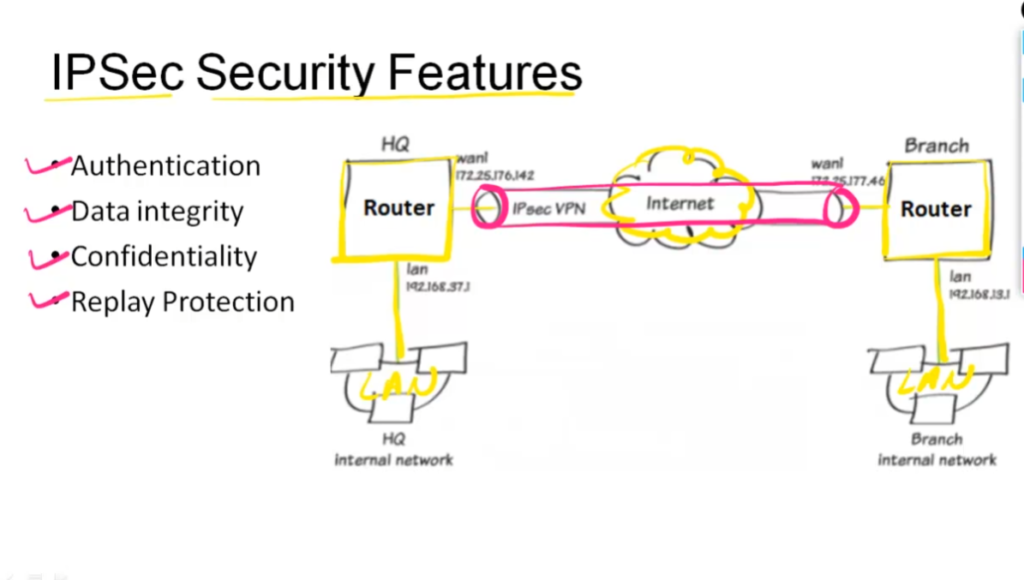
- Authentication: IPSec provides authentication of IP packets using digital signatures or shared secrets. This helps ensure that the packets are not tampered with or forged.
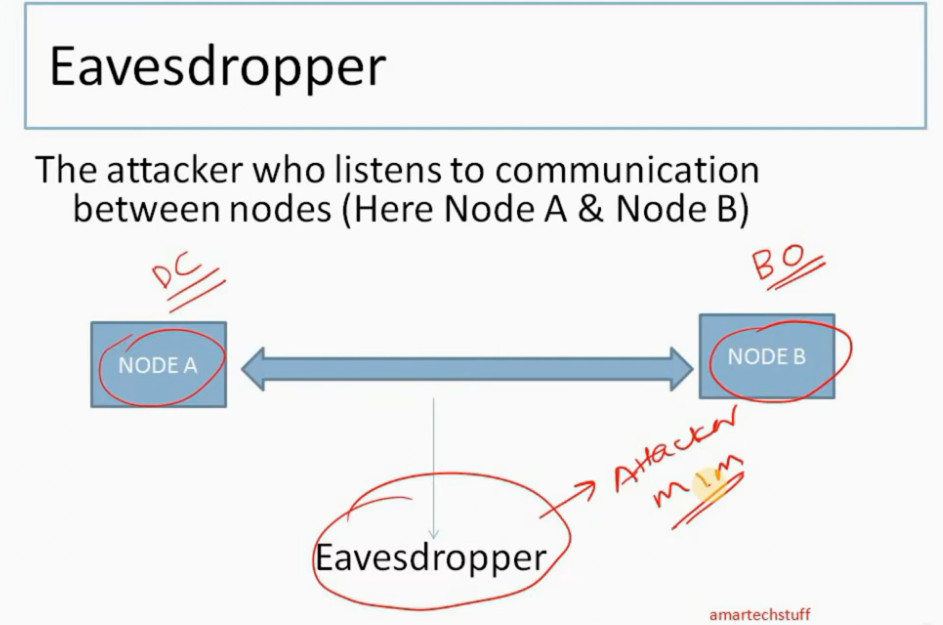
- Confidentiality: IPSec provides confidentiality by encrypting IP packets, preventing eavesdropping on the network traffic.
- Integrity: IPSec provides integrity by ensuring that IP packets have not been modified or corrupted during transmission.
- Key management: IPSec provides key management services, including key exchange and key revocation, to ensure that cryptographic keys are securely managed.
- Tunneling: IPSec supports tunneling, allowing IP packets to be encapsulated within another protocol, such as GRE (Generic Routing Encapsulation) or L2TP (Layer 2 Tunneling Protocol).
- Flexibility: IPSec can be configured to provide security for a wide range of network topologies, including point-to-point, site-to-site, and remote access connections.
- Interoperability: IPSec is an open standard protocol, which means that it is supported by a wide range of vendors and can be used in heterogeneous environments.
How Does IPSec Work
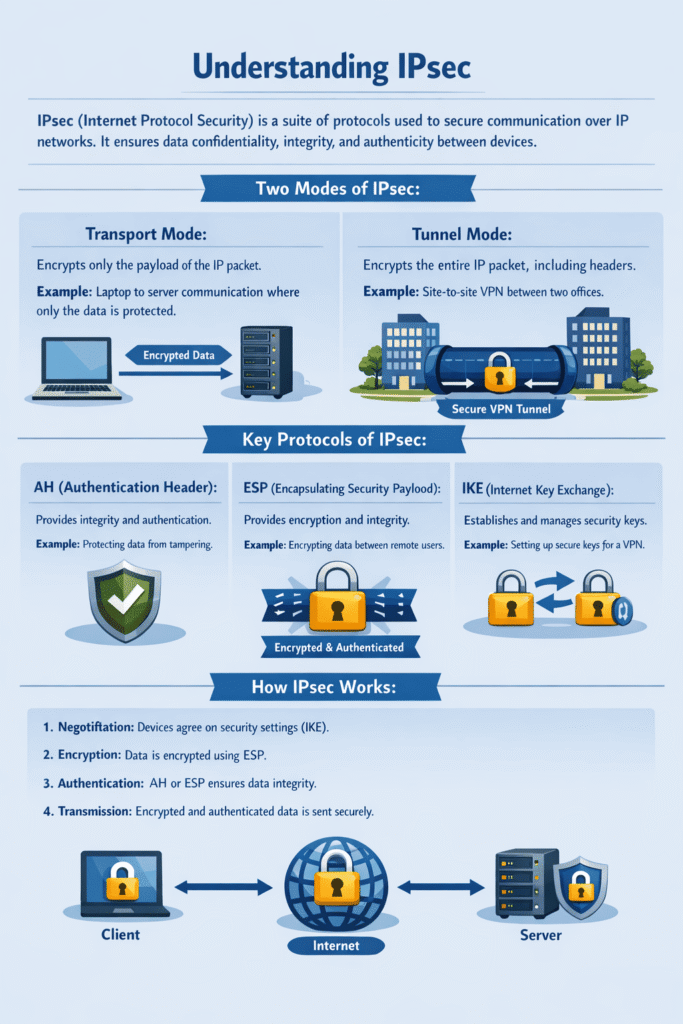
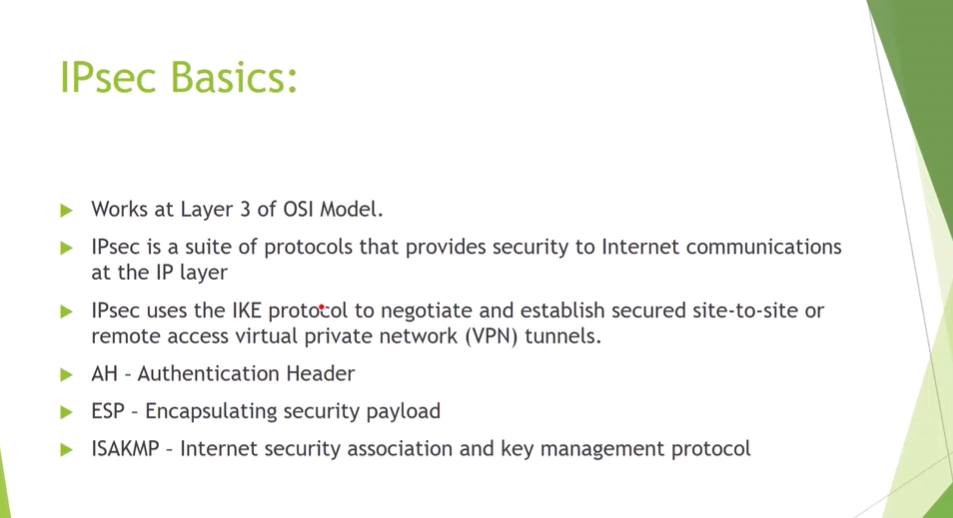
IPSec (Internet Protocol Security) is used to secure data when it travels over the Internet. IPSec works by creating secure connections between devices, making sure that the information exchanged is kept safe from unauthorized access. IPSec majorly operates in two ways i.e. Transport Mode and Tunnel Mode.
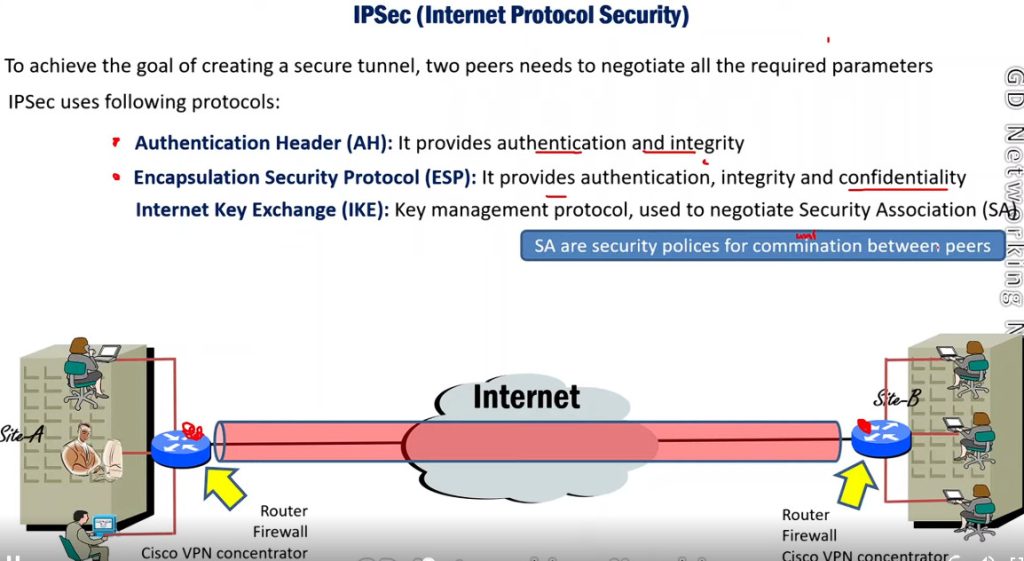
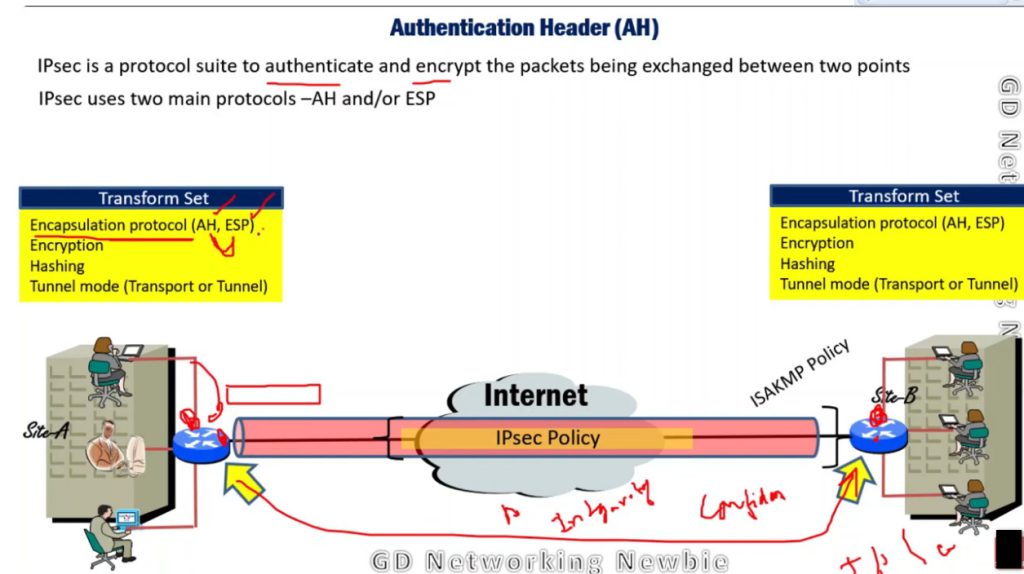
To provide security, IPSec uses two main protocols: AH (Authentication Header) and ESP (Encapsulating Security Payload). Both protocols are very useful as Authentication Header verifies the data that whether it comes from a trusted source and hasn’t been changed, and ESP has the work of performing authentication and also encrypts the data so that it becomes difficult to read.
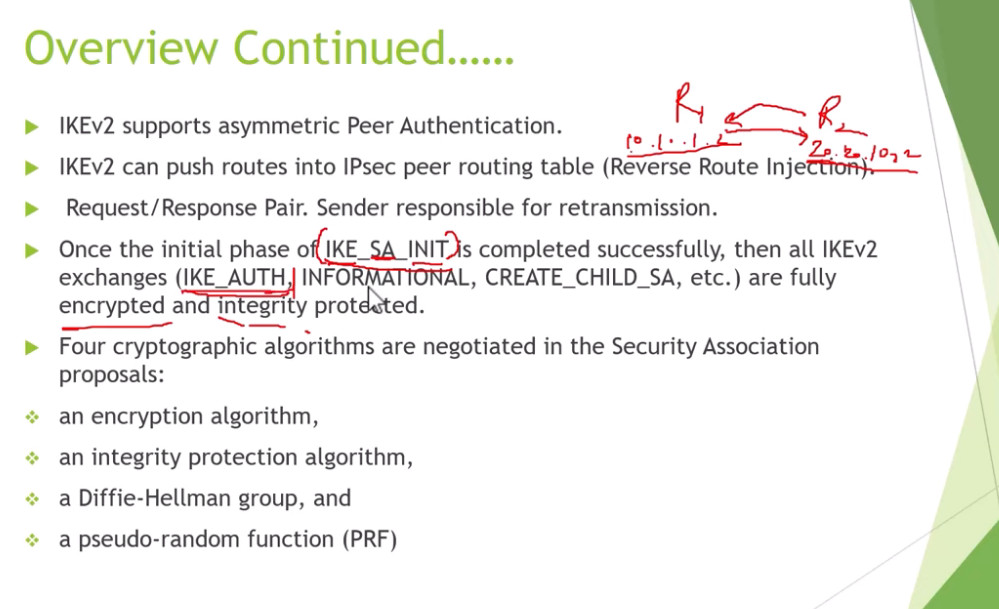
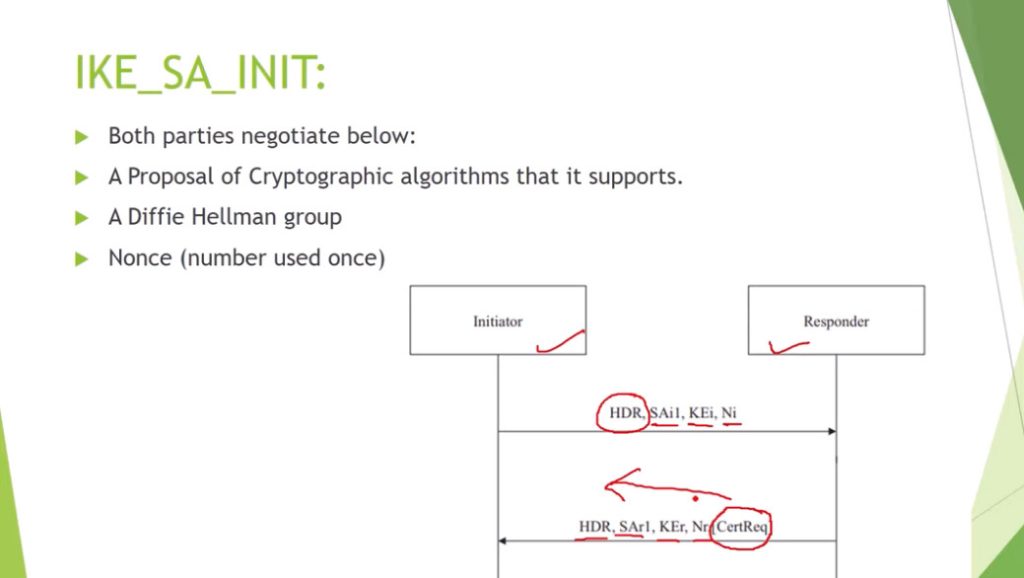
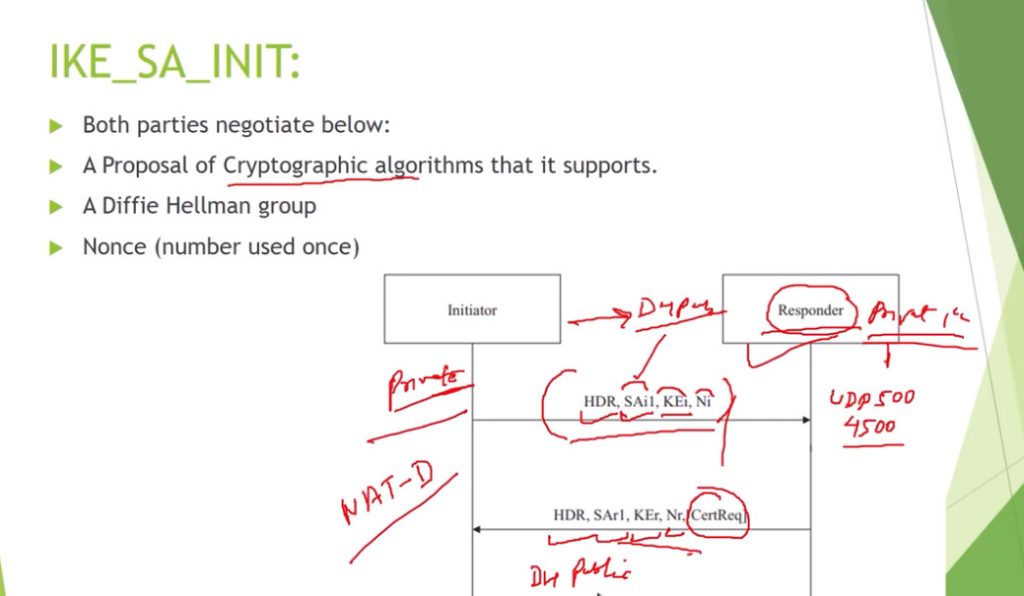
For Encryption, IPSec uses cryptographic keys. It can be created and shared using a process called IKE (Internet Key Exchange), that ensures that both devices have the correct keys to establish a secure connection.
When two devices communicate using IPSec, the devices first initiate the connection by sending a request to each other. After that, they mutually decide on protection of data using passwords or digital certificates. Now, they establish the secure tunnel for communication. Once the tunnel is set up, data can be transmitted safely, as IPSec is encrypting the data and also checking the integrity of the data to ensure that data has not been altered. After the communication is finished, the devices can close the secure connection. In this way, the IPSec works.
IPSec Connection Establishment Process
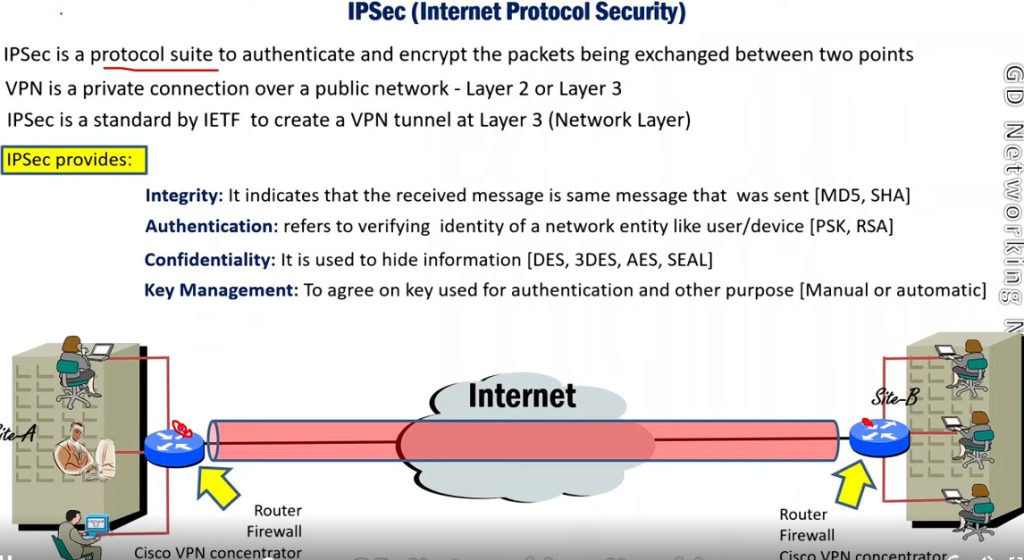
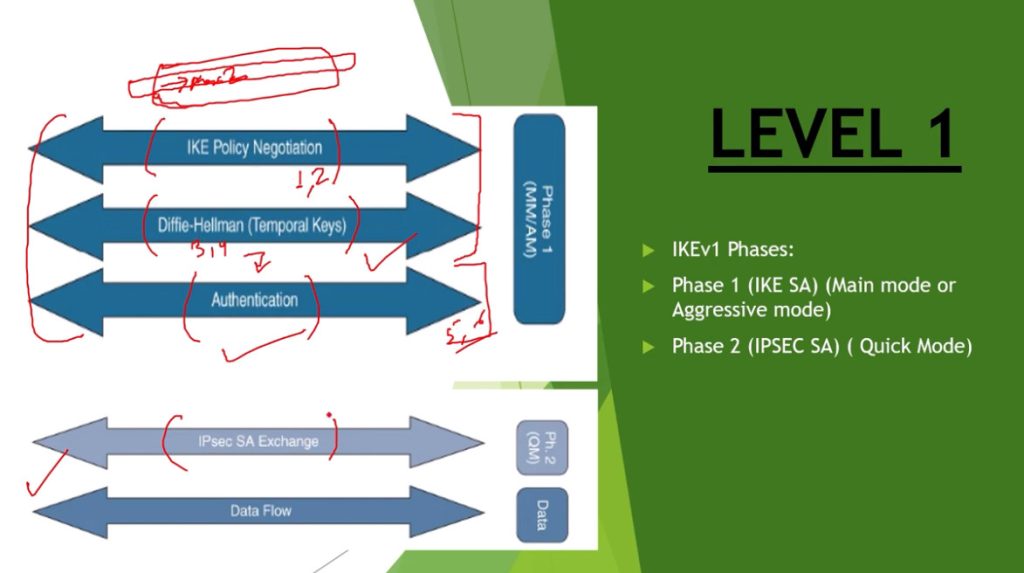
IPSec is a protocol suite used in securing communication using the Internet Protocol such that each packet communicated in the course of a particular session is authenticated and encrypted. The process of establishing an IPSec connection involves two main phases:
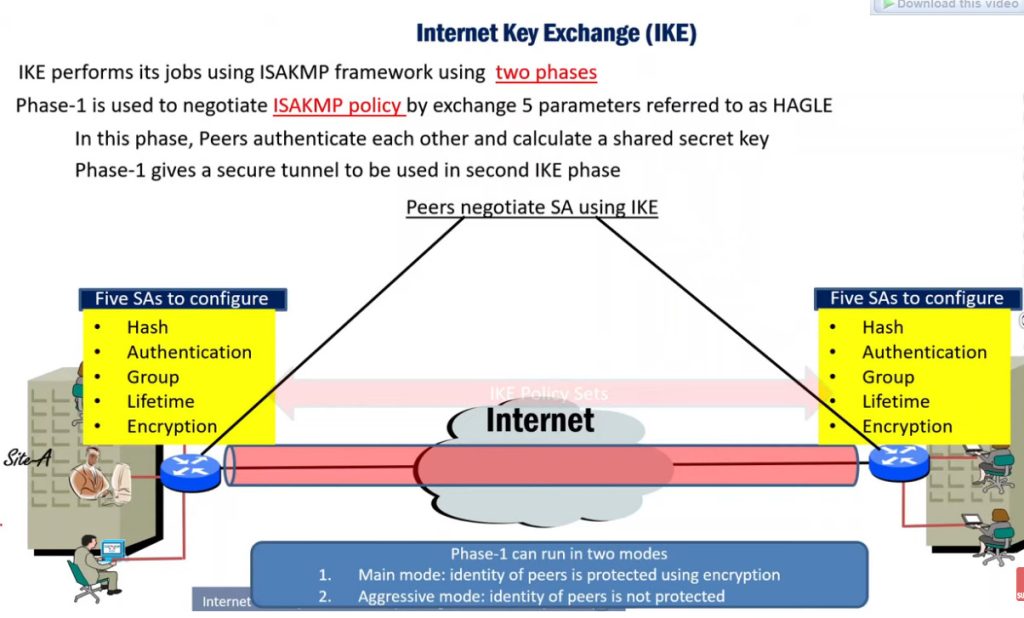
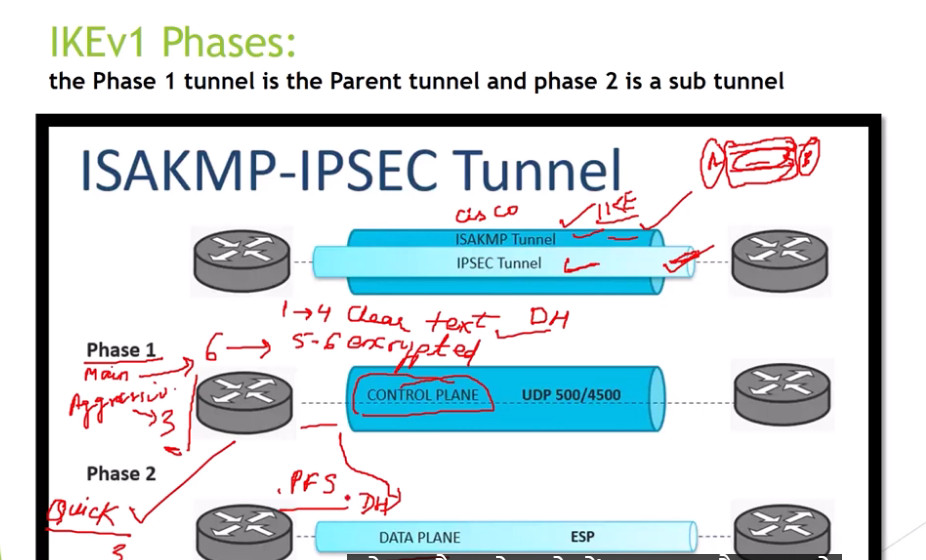
Phase 1: Establishing the IKE (Internet Key Exchange) Tunnel
In phase 1, the main aim is to establish the secure channel the IKE tunnel, which is used to further negotiations. Phase 1 can operate in one of two modes:
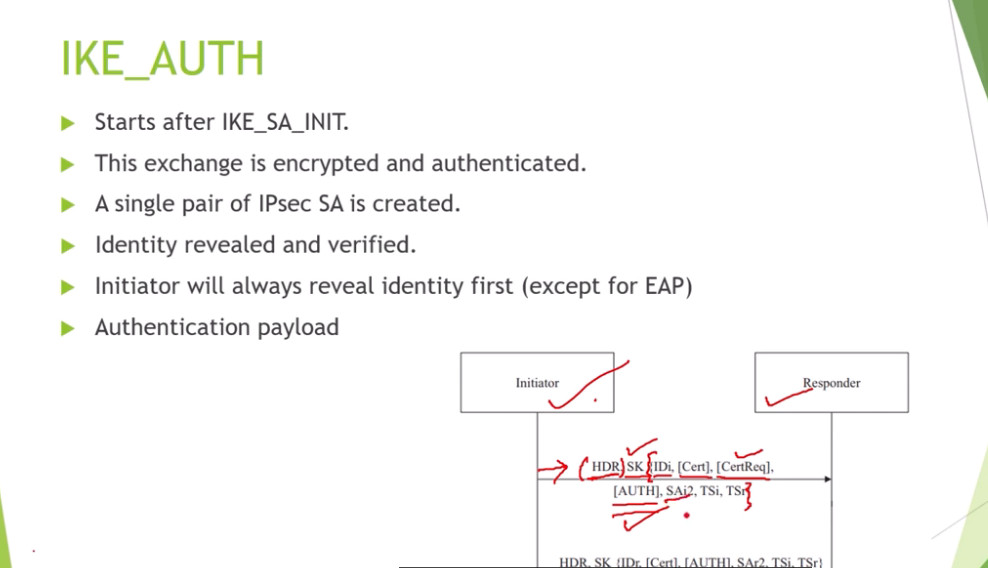
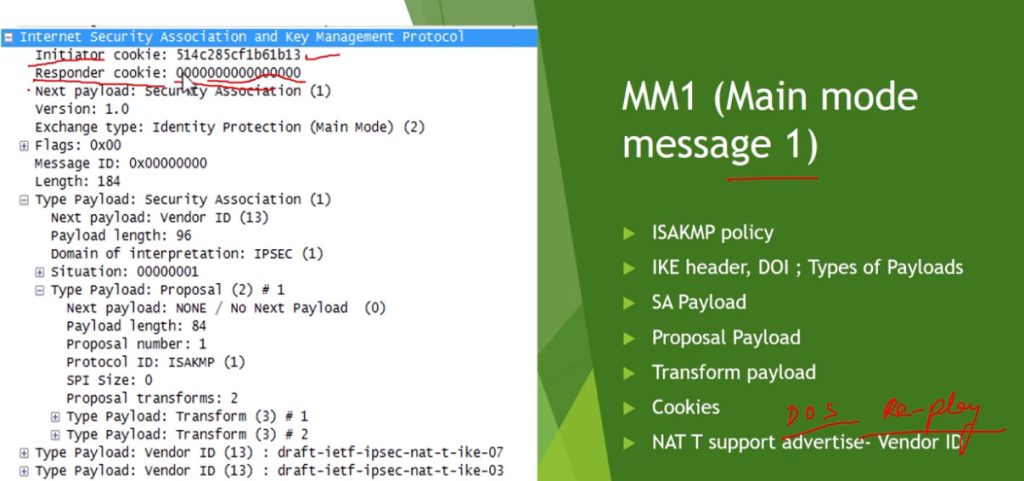
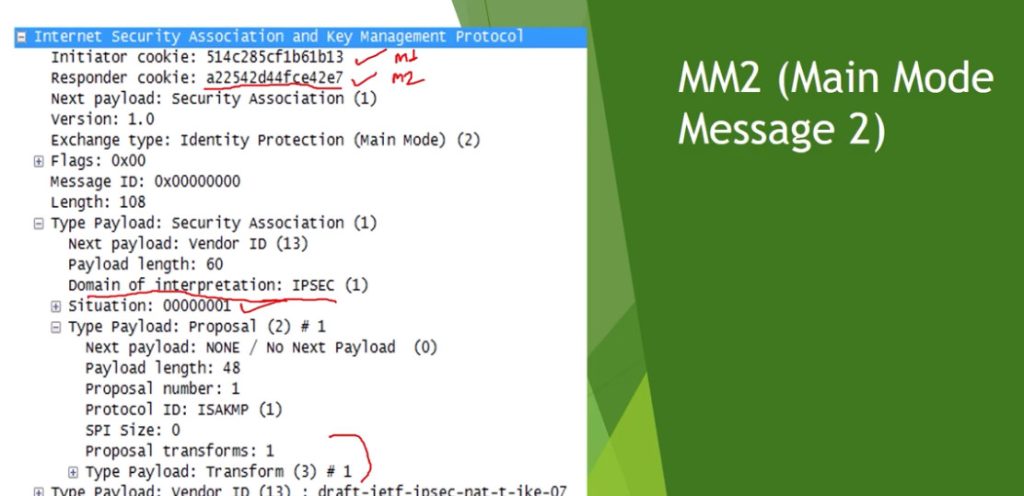
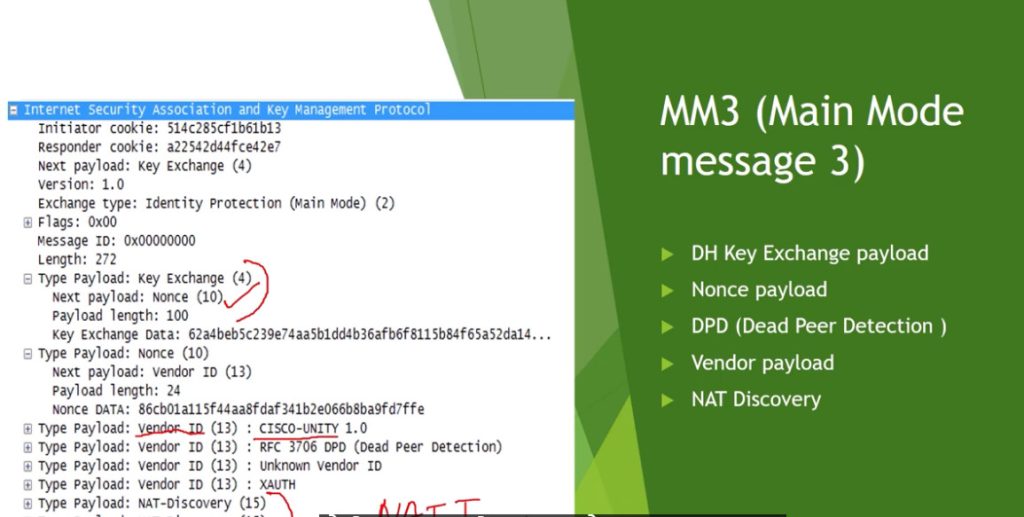
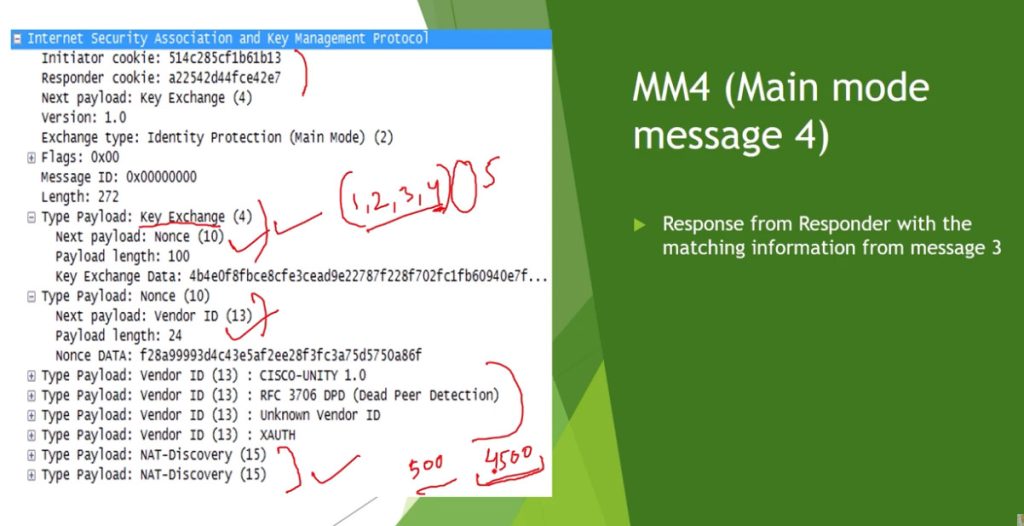
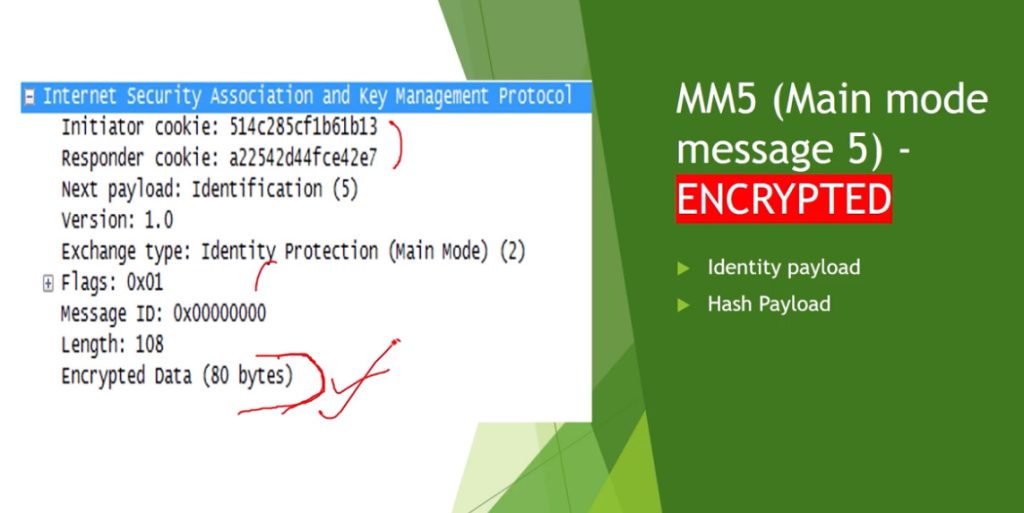
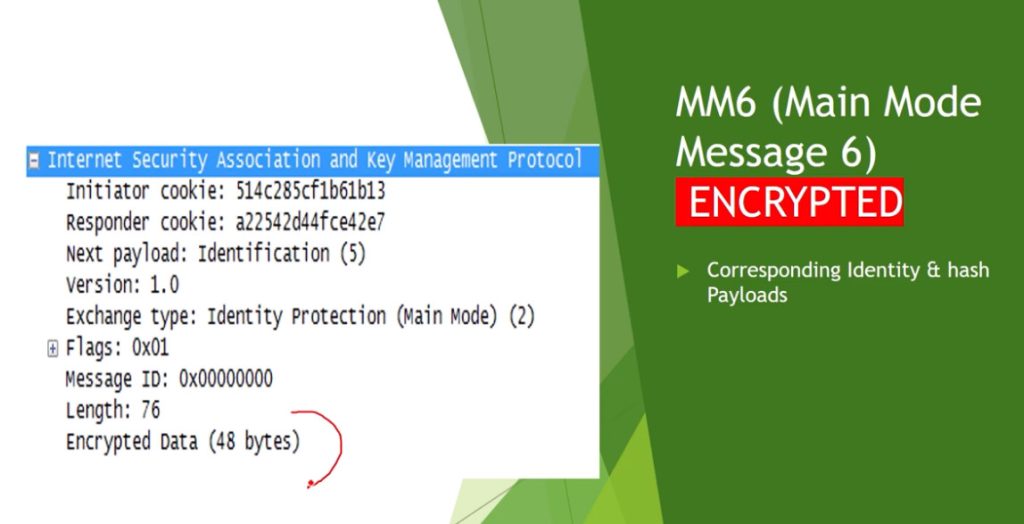
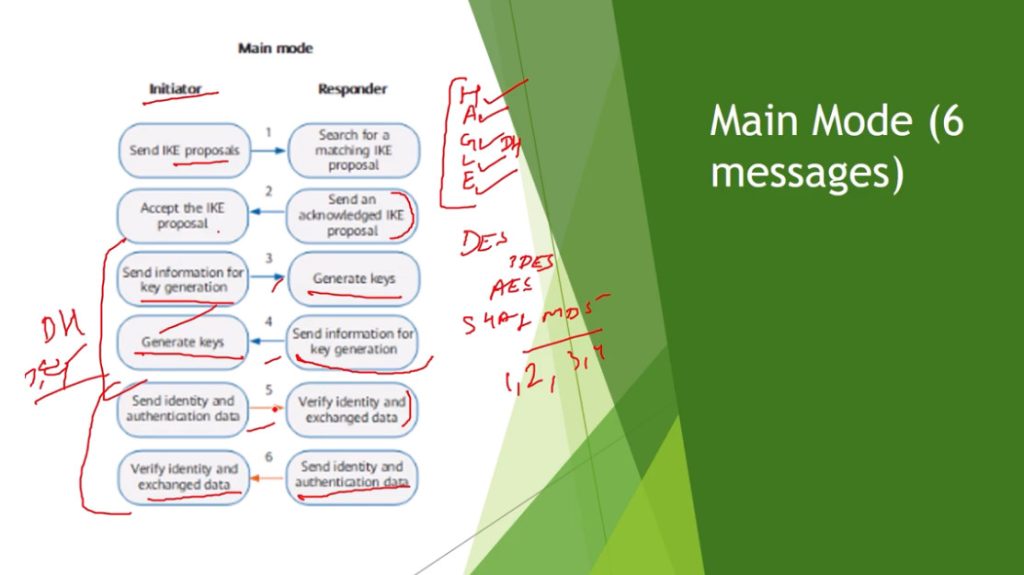
- Main Mode: Main Mode is a six-message exchange procedure that is more secure than Basic Mode, although at the cost of a longer session, since identity information is transmitted during negotiations.
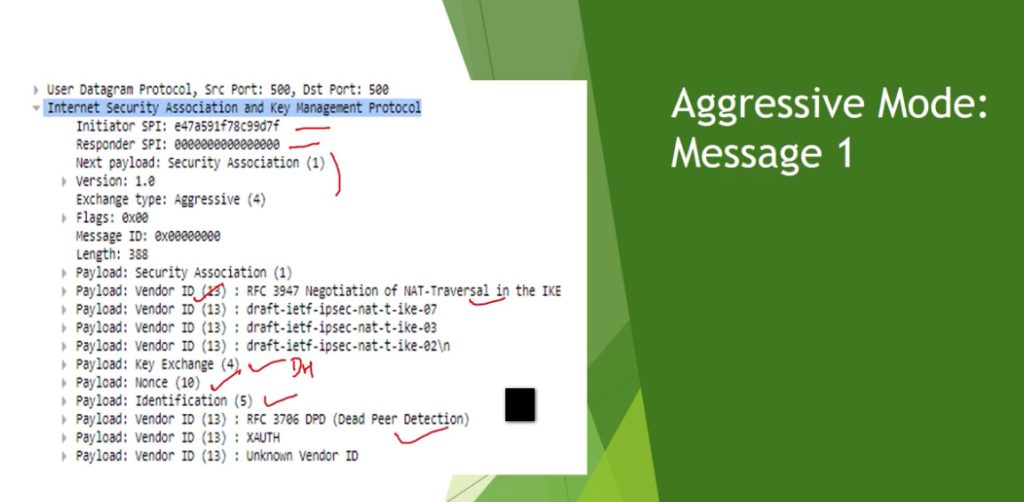
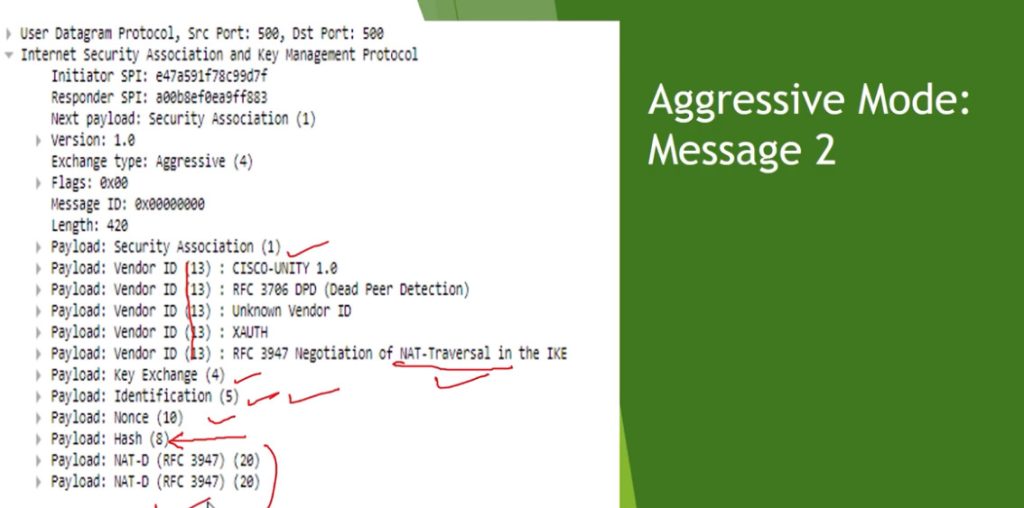
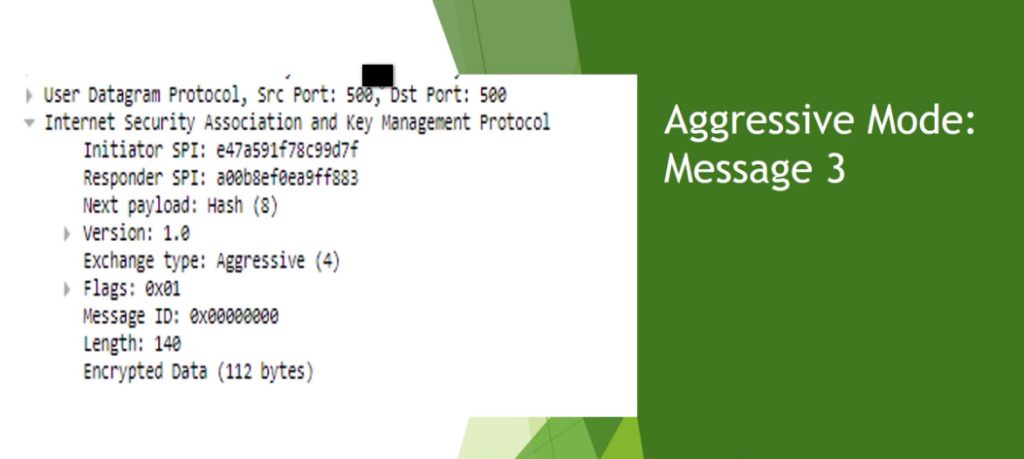
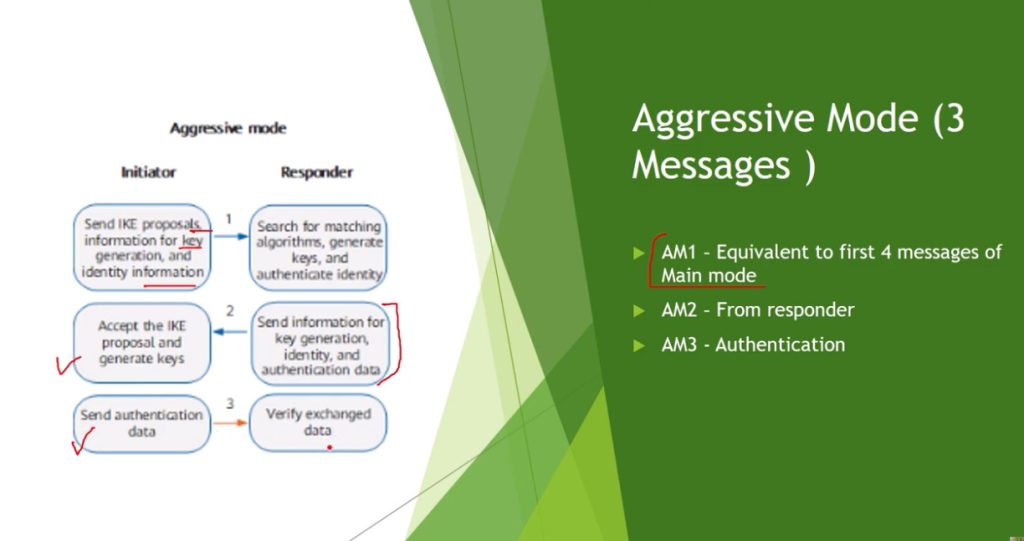
- Aggressive Mode: Aggressive Mode takes lesser time with the exchange of three messages and is less secure since more information like identity is disclosed during the course of negotiation.
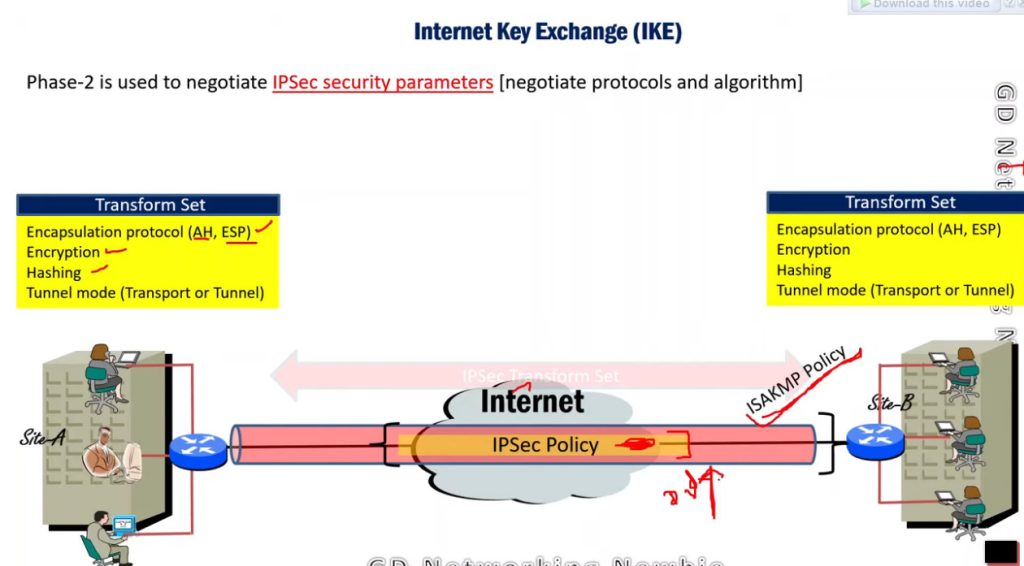
Phase 2: Establishing the IPSec Tunnel
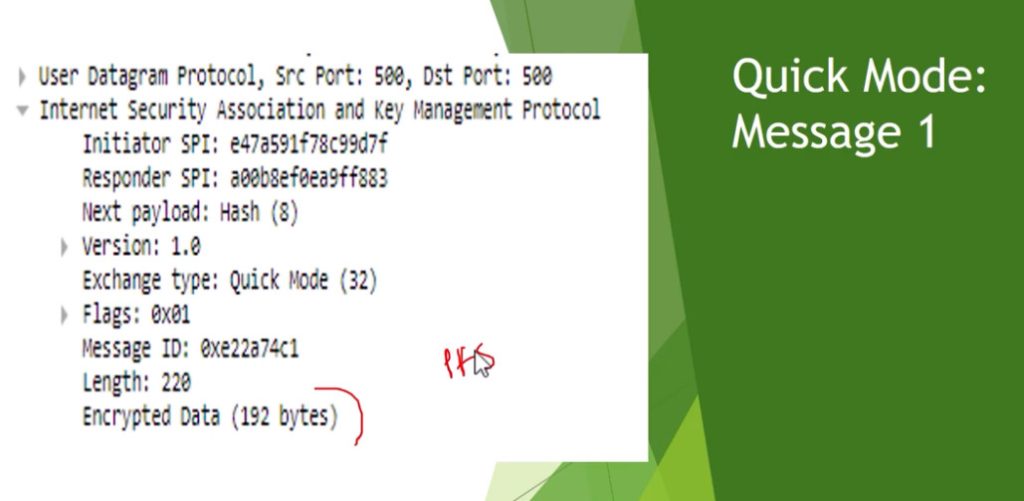
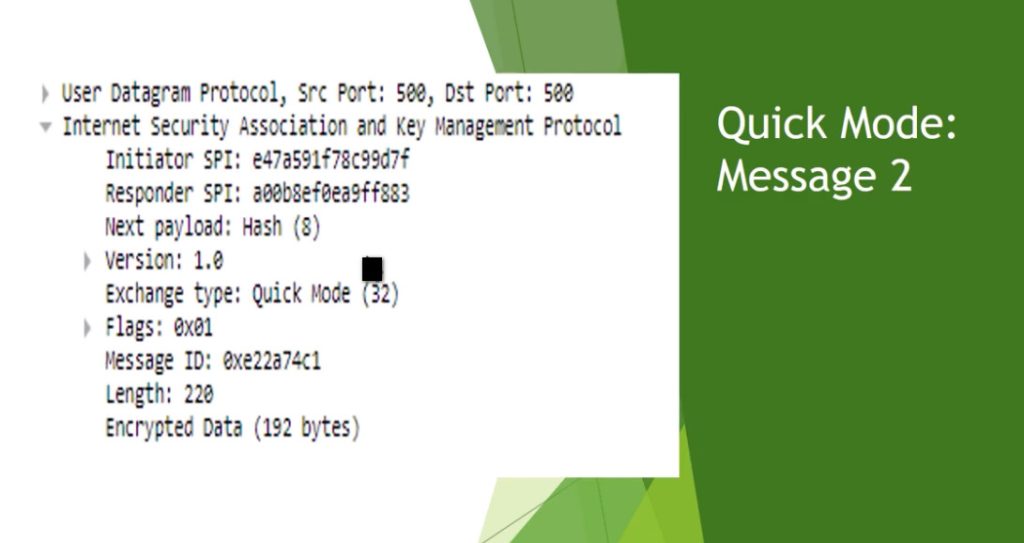
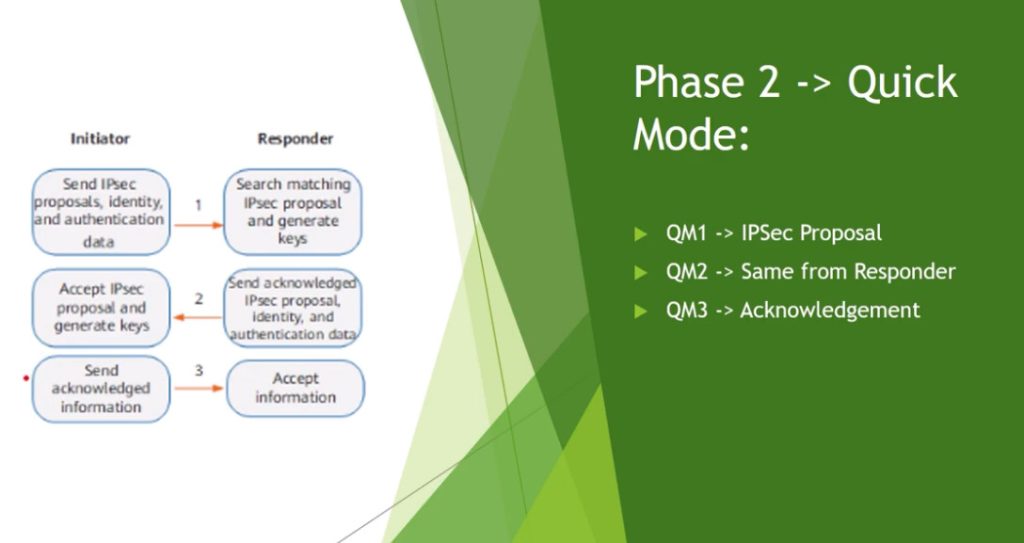
Phase 2 is called Quick Mode and its aim is to negotiate the IPSec Security Associations after the construction of a secure IKE tunnel has been made. There are two modes in Phase 2.
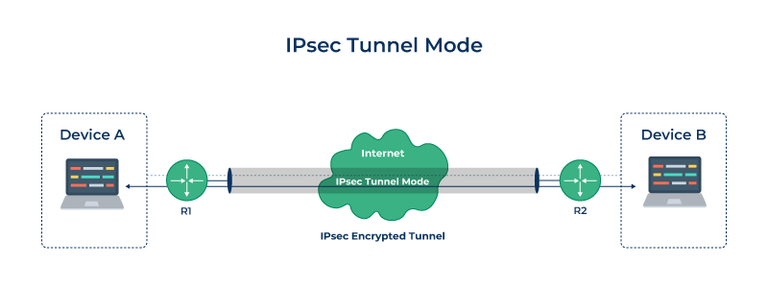
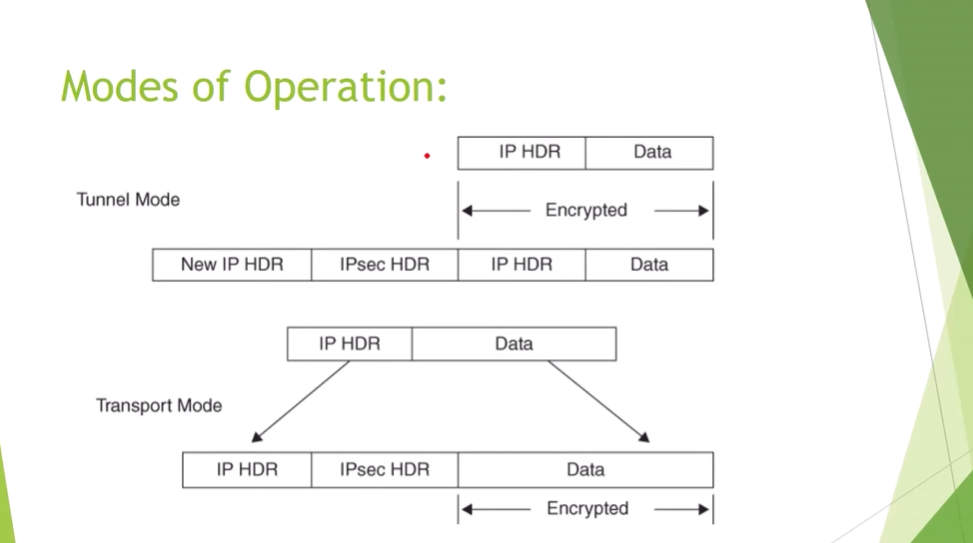
- Tunnel Mode: This mode encapsulates the whole of the original IP packet including the header and data. It is mostly deployed in the site to site VPNs.
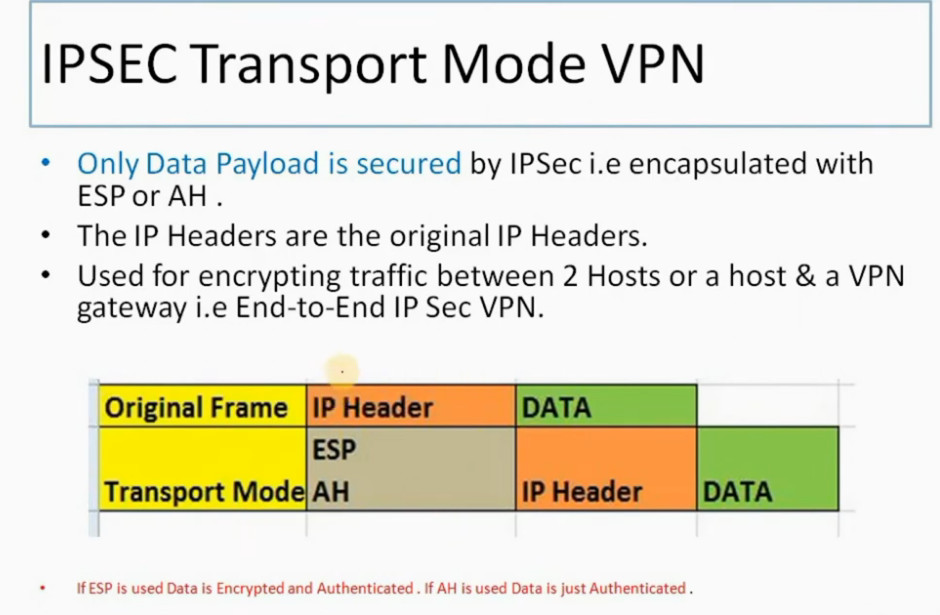
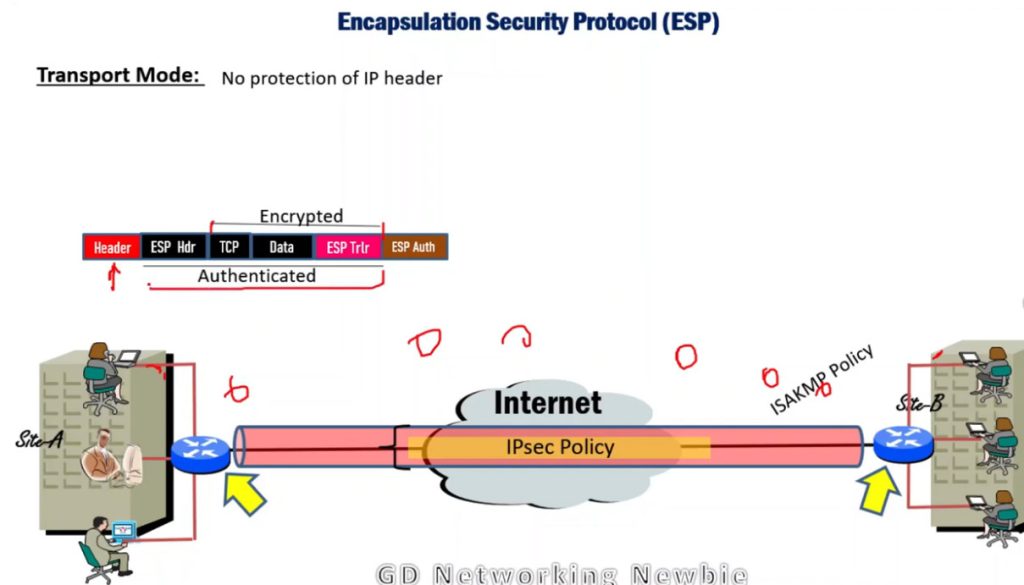
- Transport Mode: By this mode, only the actual data to be transmitted is encrypted and the header part of the IP packets remain unaltered. It is mainly employed in end to end communication between hosts.
Protocols Used in IPSec
It has the following components:
- Encapsulating Security Payload (ESP)
- Authentication Header (AH)
- Internet Key Exchange (IKE)
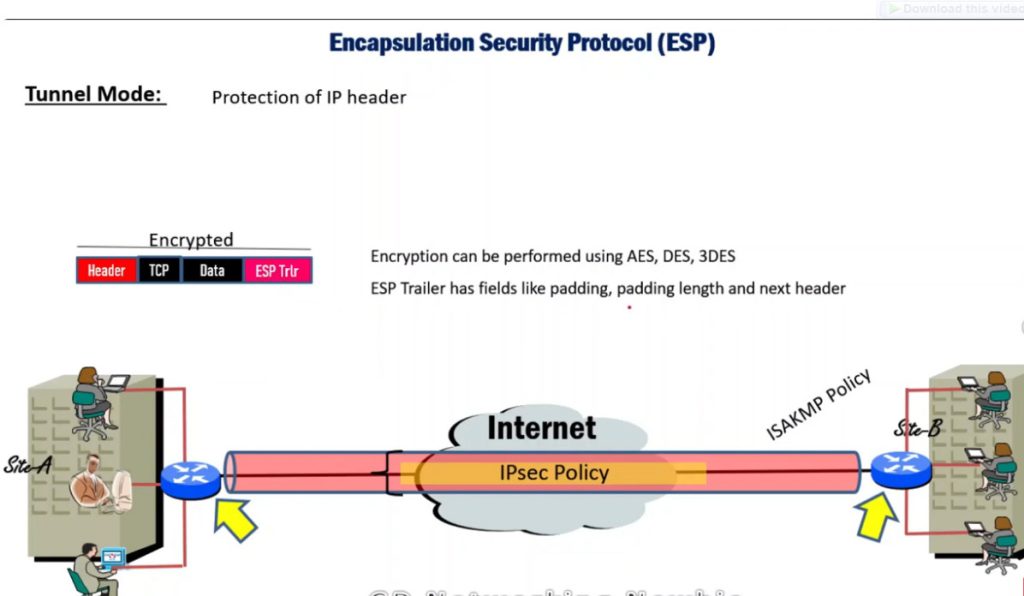
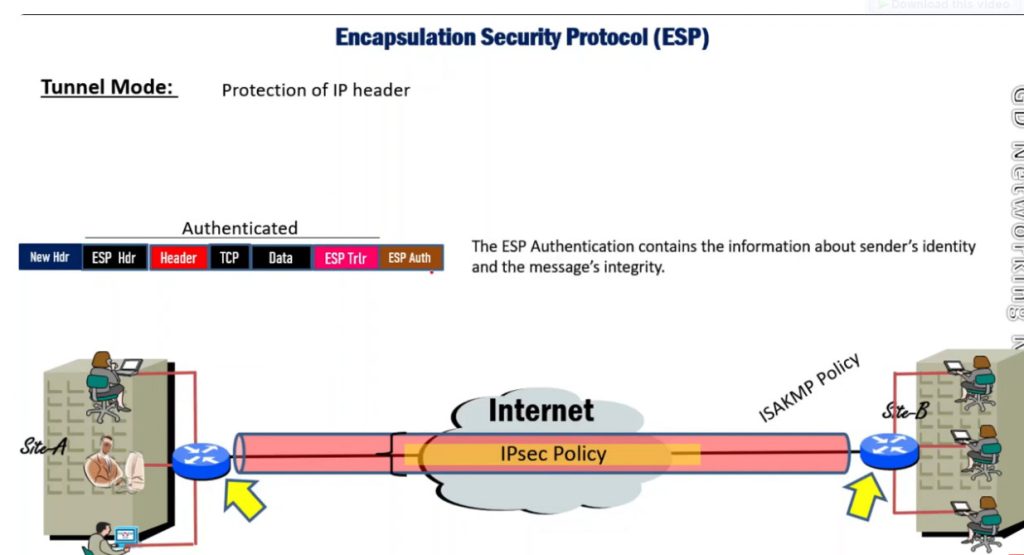
1. Encapsulating Security Payload (ESP): It provides data integrity, encryption, authentication, and anti-replay. It also provides authentication for payload.
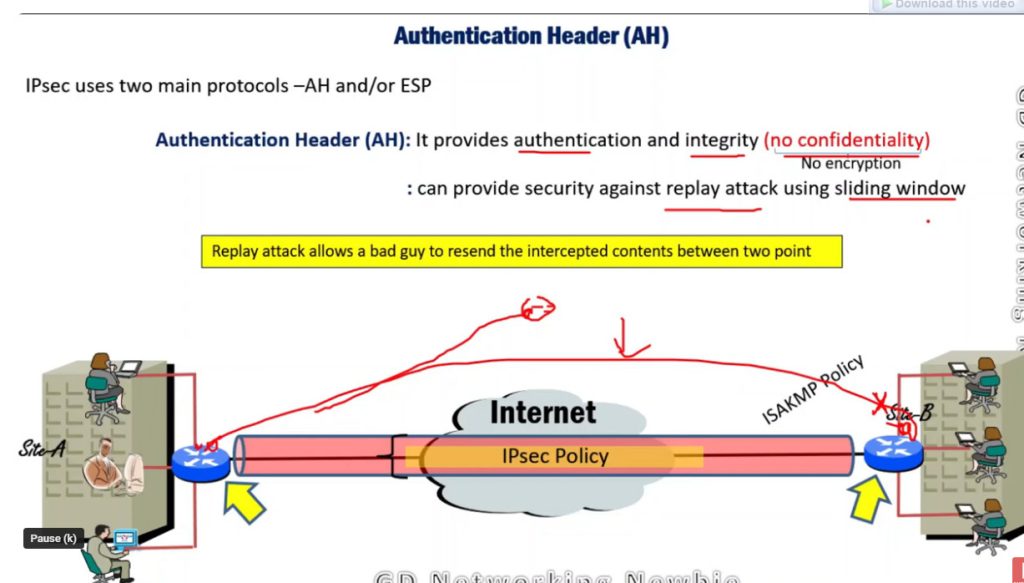
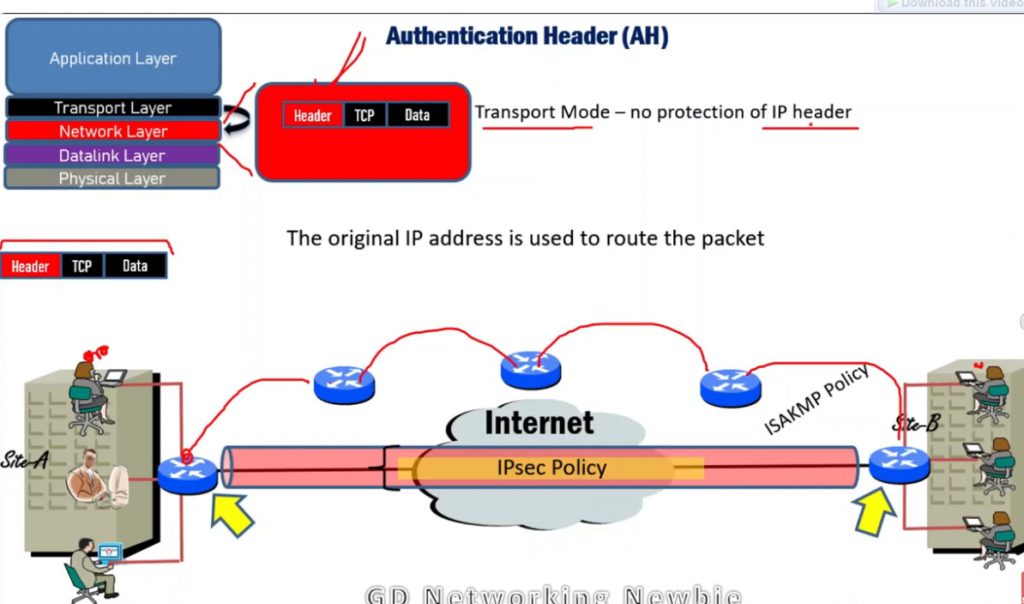
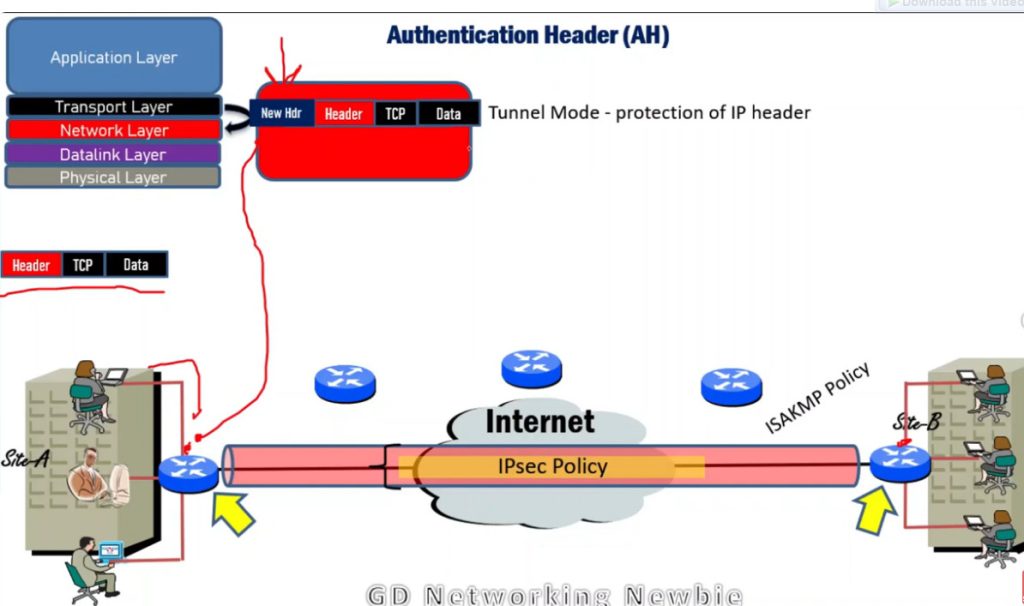
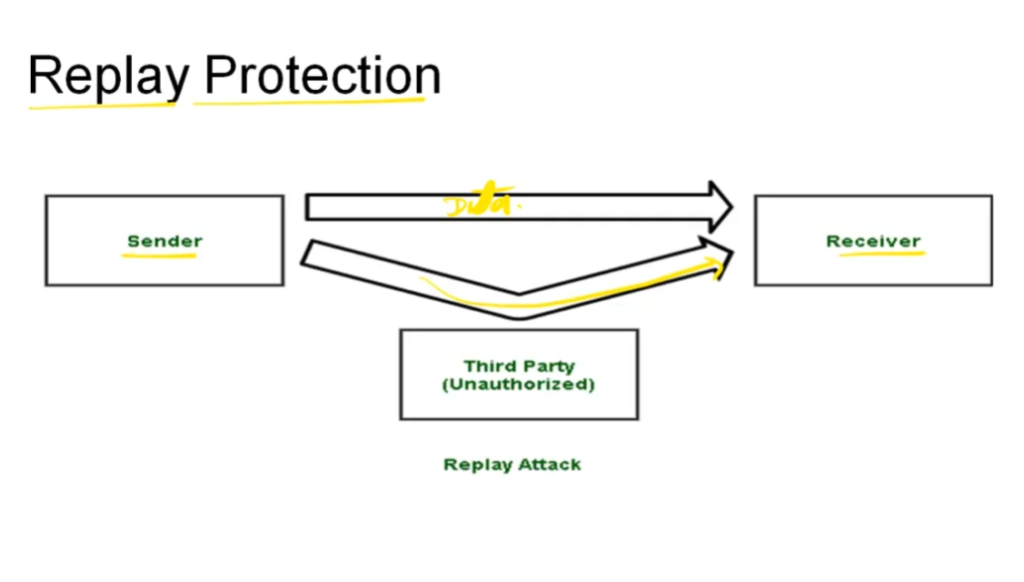
2. Authentication Header (AH): It also provides data integrity, authentication, and anti-replay and it does not provide encryption. The anti-replay protection protects against the unauthorized transmission of packets. It does not protect data confidentiality.
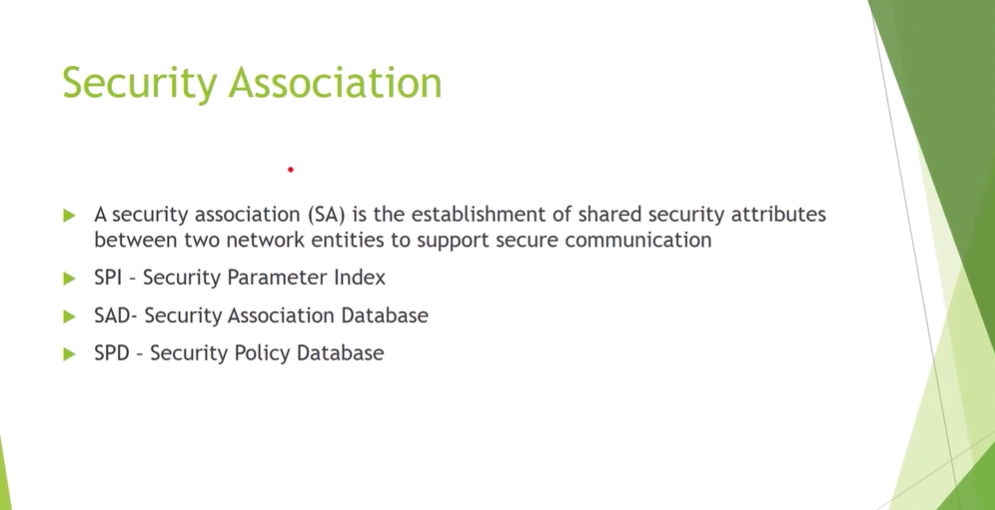
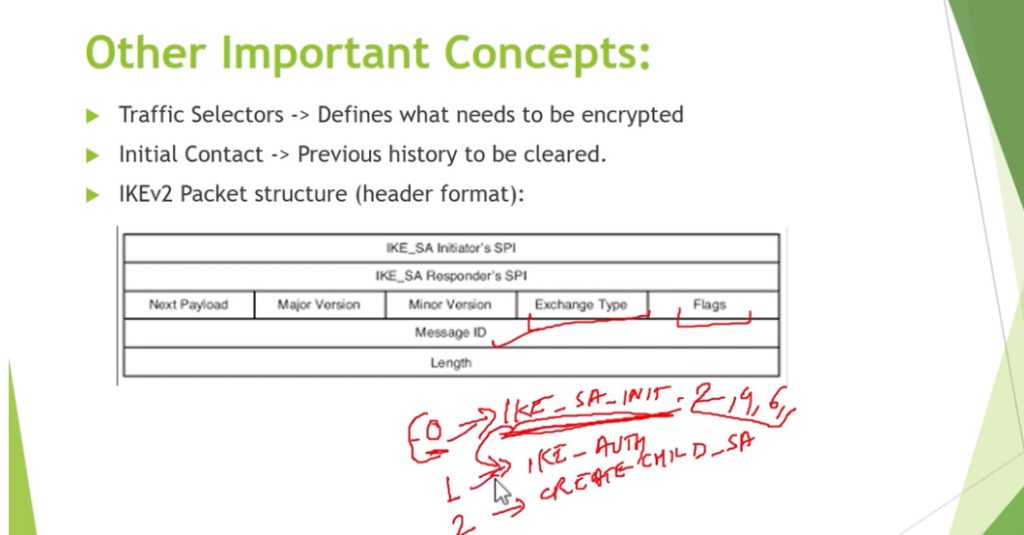
3. Internet Key Exchange (IKE): It is a network security protocol designed to dynamically exchange encryption keys and find a way over Security Association (SA) between 2 devices. The Security Association (SA) establishes shared security attributes between 2 network entities to support secure communication. The Key Management Protocol (ISAKMP) and Internet Security Association provides a framework for authentication and key exchange. ISAKMP tells how the setup of the Security Associations (SAs) and how direct connections between two hosts are using IPsec. Internet Key Exchange (IKE) provides message content protection and also an open frame for implementing standard algorithms such as SHA and MD5. The algorithm’s IP sec users produce a unique identifier for each packet. This identifier then allows a device to determine whether a packet has been correct or not. Packets that are not authorized are discarded and not given to the receiver.
IP Security Architecture
IPSec (IP Security) architecture uses two protocols to secure the traffic or data flow. These protocols are
- ESP (Encapsulation Security Payload)
- AH (Authentication Header)
IPSec Architecture includes protocols, algorithms, DOI, and Key Management. All these components are very important in order to provide the three main services such as Confidentiality, Authenticity and Integrity.
IPSec Encryption
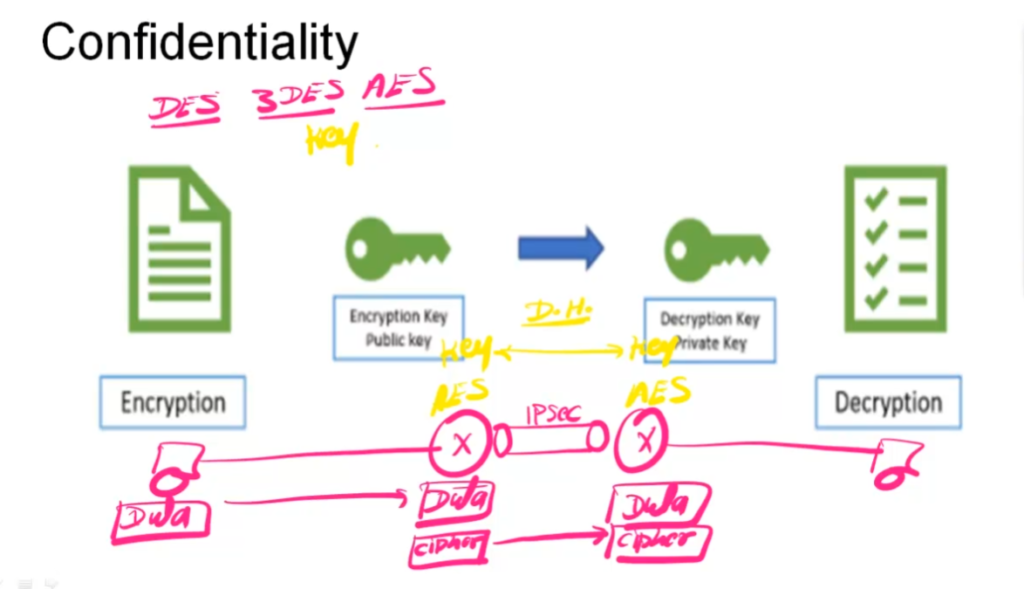
IPSec encryption is a software function that encrypts data to protect it from unauthorized access. An encryption key encrypts data, which must be decrypted. IPSec supports a variety of encryption algorithms, including AES, Triple DES etc. IPSec combines asymmetric and symmetric encryption to provide both speed and security during data transmission. In asymmetric encryption, the encryption key is made public, while the decryption key remains private. Symmetric encryption employs the same public key to encrypt and decrypts data. IPSec builds a secure connection using asymmetric encryption and then switches to symmetric encryption to speed up data transmission.
IPSec VPN
VPN(Virtual Private Network) is a networking software that enables users to browse the internet anonymously and securely. An IPSec VPN is a type of VPN software that uses the IPSec protocol to establish encrypted tunnels over the internet. It offers end-to-end encryption, which means that data is broken down at the computer and then collected at the receiving server
Uses of IP Security
Psec can be used to do the following things:
- To encrypt application layer data.
- To provide security for routers sending routing data across the public internet.
- To provide authentication without encryption, like to authenticate that the data originates from a known sender.
- To protect network data by setting up circuits using IPsec tunneling in which all data being sent between the two endpoints is encrypted, as with a Virtual Private Network(VPN) connection.
Advantages of IPSec
- Strong security: IPSec provides strong cryptographic security services that help protect sensitive data and ensure network privacy and integrity.
- Wide compatibility: IPSec is an open standard protocol that is widely supported by vendors and can be used in heterogeneous environments.
- Flexibility: IPSec can be configured to provide security for a wide range of network topologies, including point-to-point, site-to-site, and remote access connections.
- Scalability: IPSec can be used to secure large-scale networks and can be scaled up or down as needed.
- Improved network performance: IPSec can help improve network performance by reducing network congestion and improving network efficiency.
Disadvantages of IPSec
- Configuration Complexity: IPSec can be complex to configure and requires specialized knowledge and skills.
- Compatibility Issues: IPSec can have compatibility issues with some network devices and applications, which can lead to interoperability problems.
- Performance Impact: IPSec can impact network performance due to the overhead of encryption and decryption of IP packets.
- Key Management: IPSec requires effective key management to ensure the security of the cryptographic keys used for encryption and authentication.
- Limited Protection: IPSec only provides protection for IP traffic, and other protocols such as ICMP, DNS, and routing protocols may still be vulnerable to attacks.
IPSEC Slide
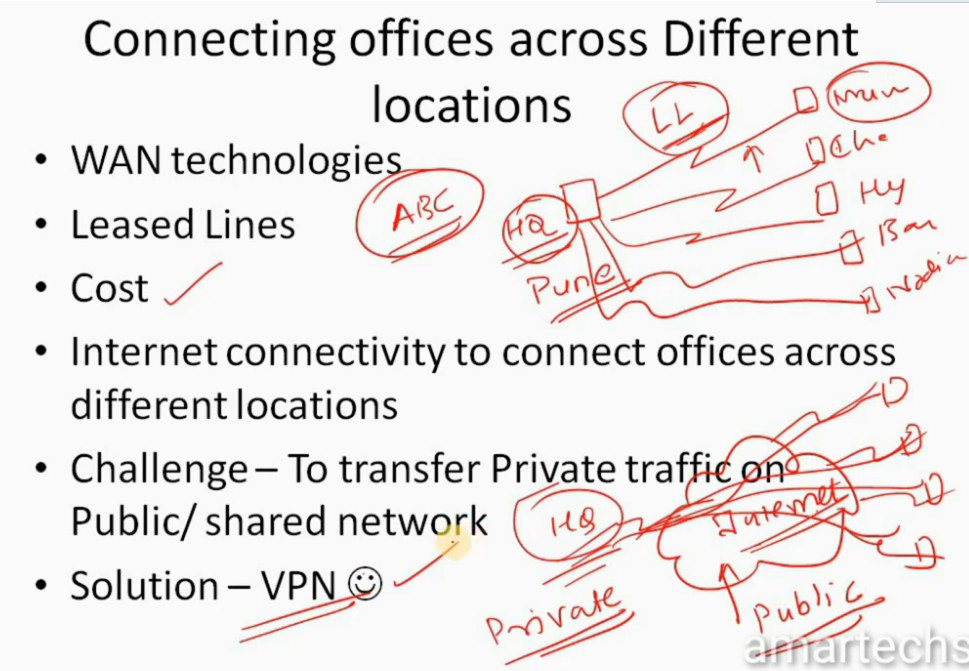
- Consider a company named xyz who have offices across India. Now Connecting offices across Different locations we need to go for WAN technologies
- When we talk about WAN we would consider Leased Lines
- But the issue with Leased line (which are very secure) is Cost which is very high
- Solution to is that we can use Internet connectivity to connect offices across different locations
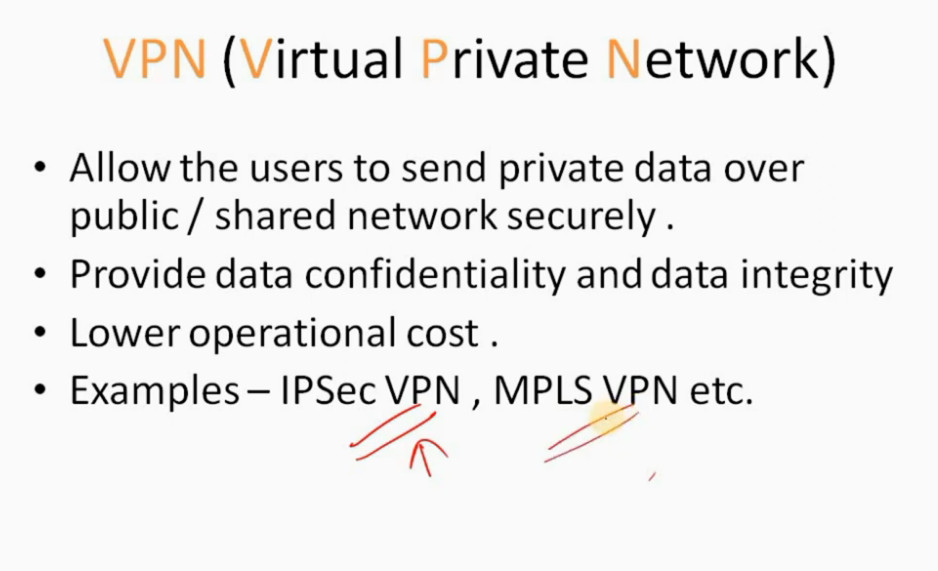
- Allow the users to send private data over public / shared network securely .
- Provide data confidentiality and data integrity
- Lower operational cost.
- Examples – IPSec VPN , MPLS VPN etc.
VPN TYPES
- Site to Site VPN – Allows HQ to connects to remote sites offices.
- Remote VPN-Allows remote users to access the corporate network securely.
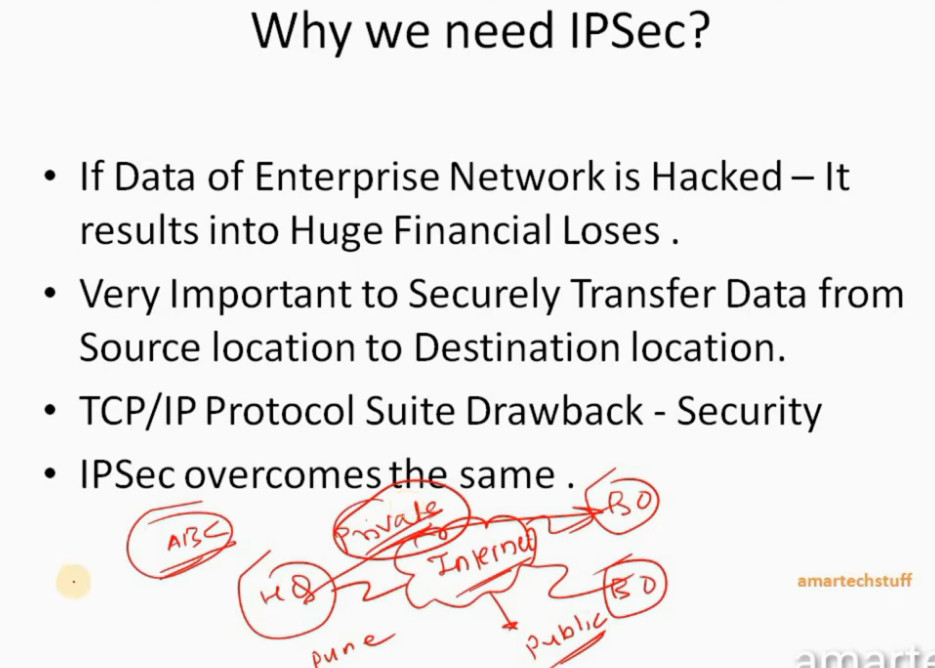
- If Data of Enterprise Network is Hacked – It results into Huge Financial Loses .
- Very Important to Securely Transfer Data from Source location to Destination location.
- TCP/IP Protocol Suite Drawback – Security • IPSec overcomes the same .
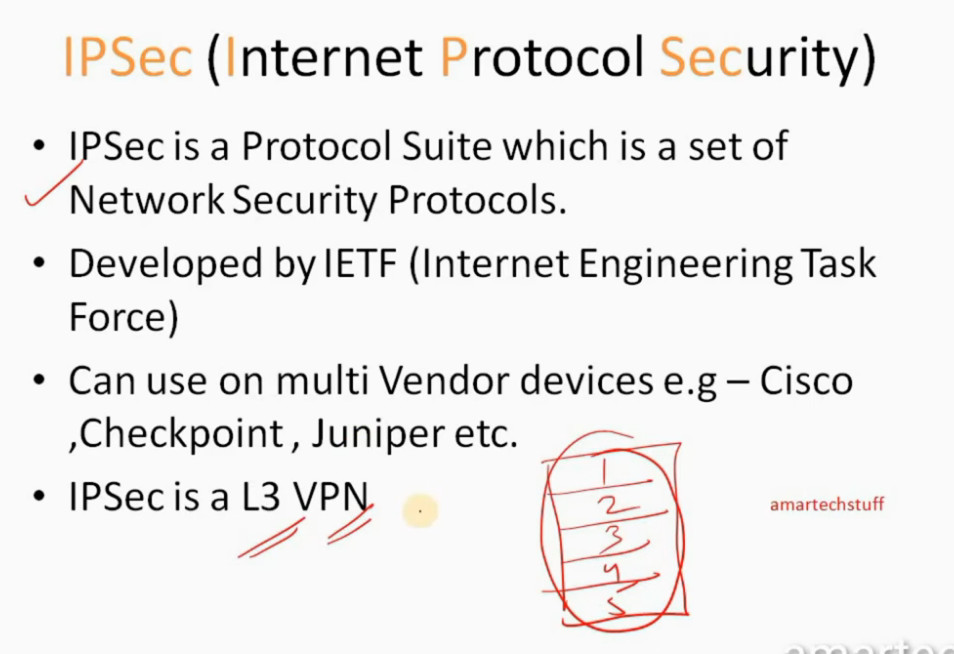
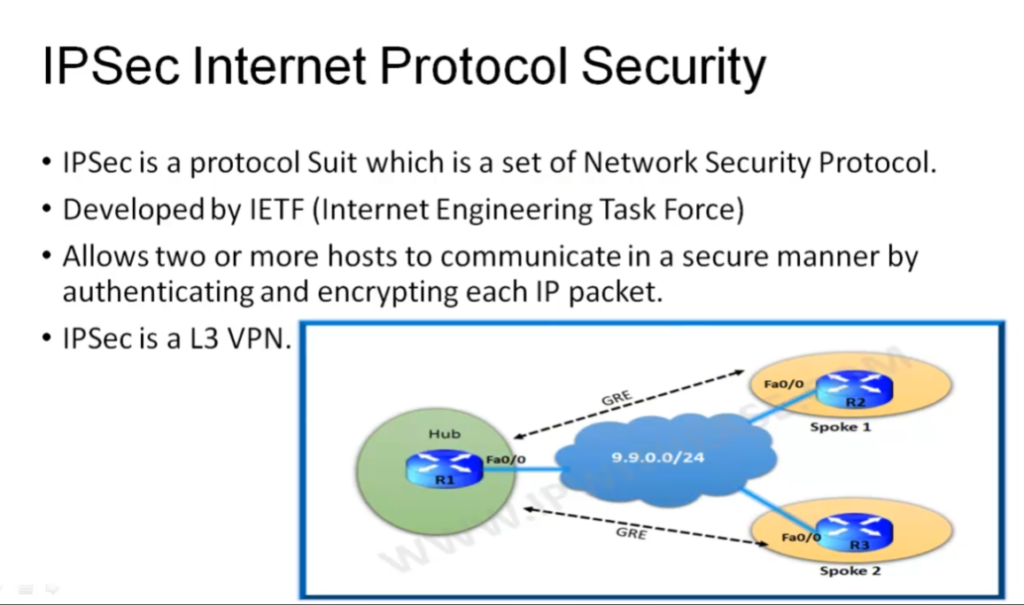
- IPSec is a Protocol Suite which is a set of Network Security Protocols.
- Developed by IETF (Internet Engineering Task Force)
- Can use on multi Vendor devices e.g – Cisco ,Checkpoint , Juniper etc.
- IPSec is a L3 VPN
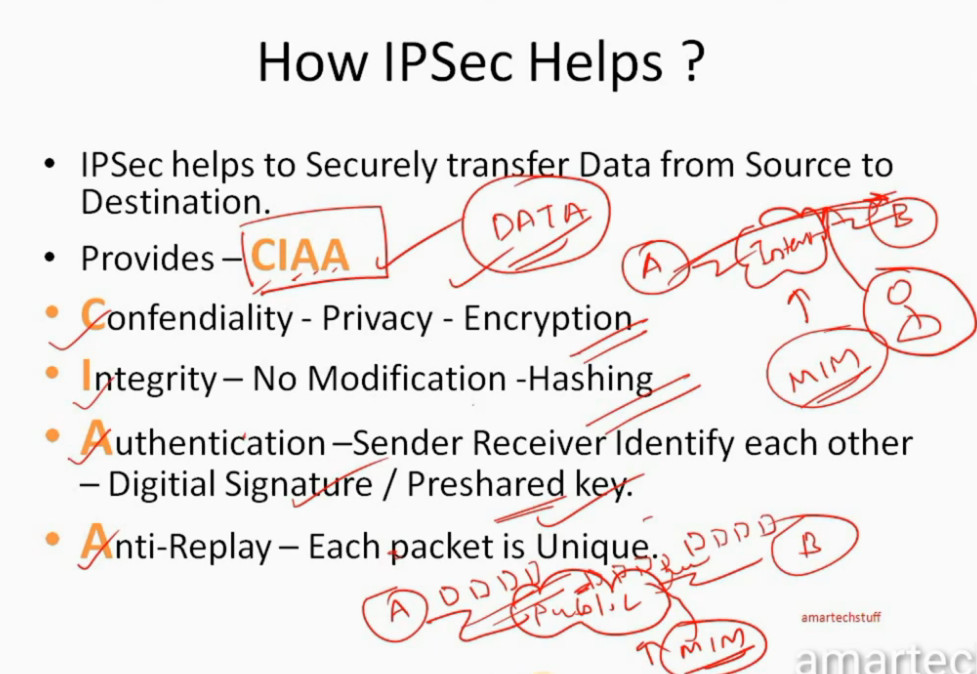
- IPSec helps to Securely transfer Data from Source to Destination.
- Provides – CIAA • Confendiality – Privacy – Encryption
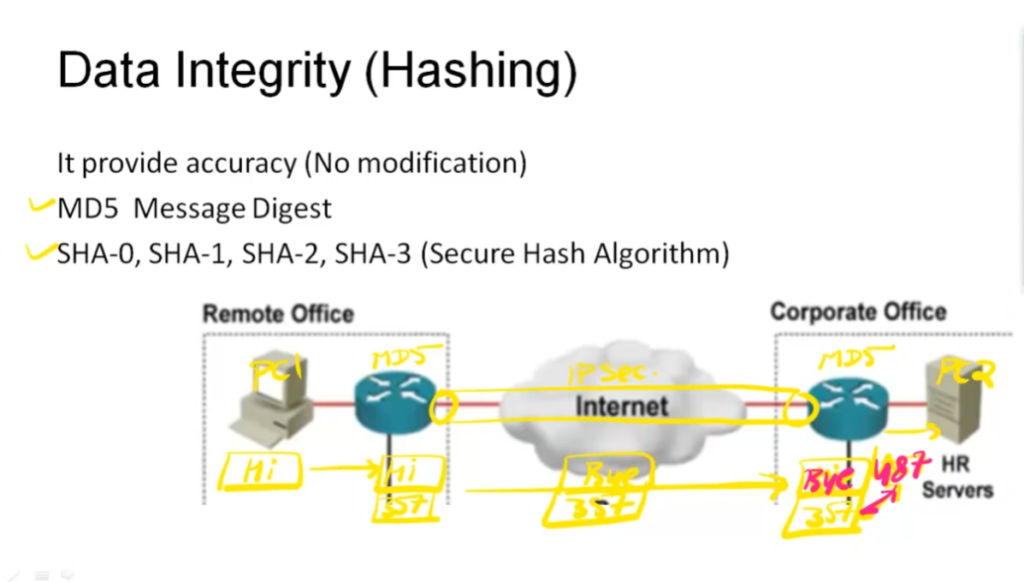
- Integrity – No Modification -Hashing
- Authentication –Sender Receiver Identify each other – Digitial Signature / Preshared key.
- Anti-Replay – Each packet is Unique
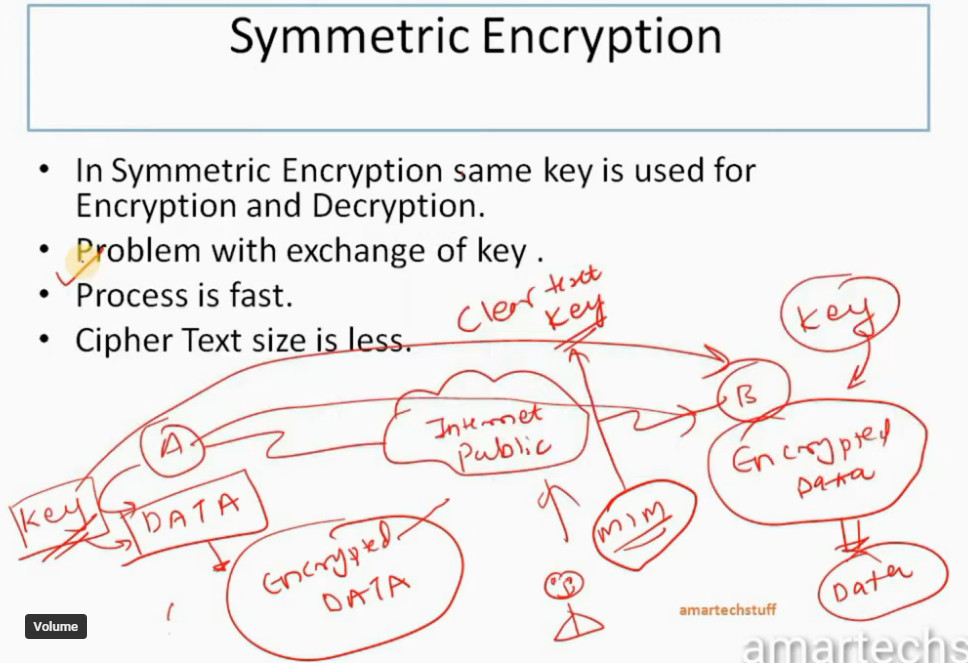
- Symmetric Encryption
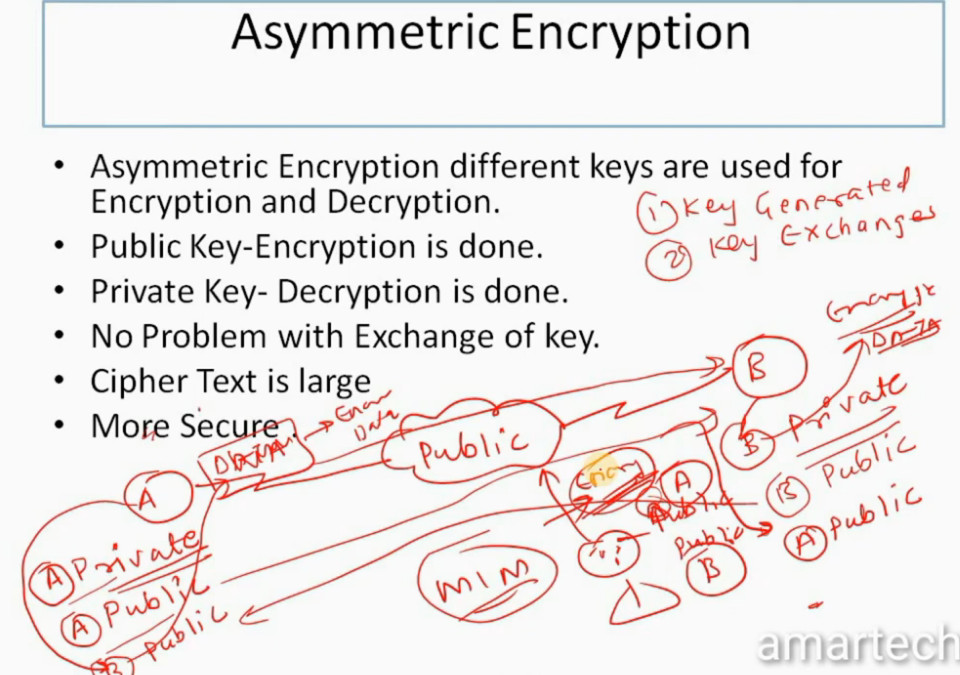
- Asymmetric Encryption
- In Symmetric Encryption same key is used for Encryption and Decryption.
- Problem with exchange of key .
- Process is fast.
- Cipher Text size is less.
- Asymmetric Encryption different keys are used for Encryption and Decryption.
- Public Key-Encryption is done.
- Private Key- Decryption is done.
- No Problem with Exchange of key.
- Cipher Text is large More Secure
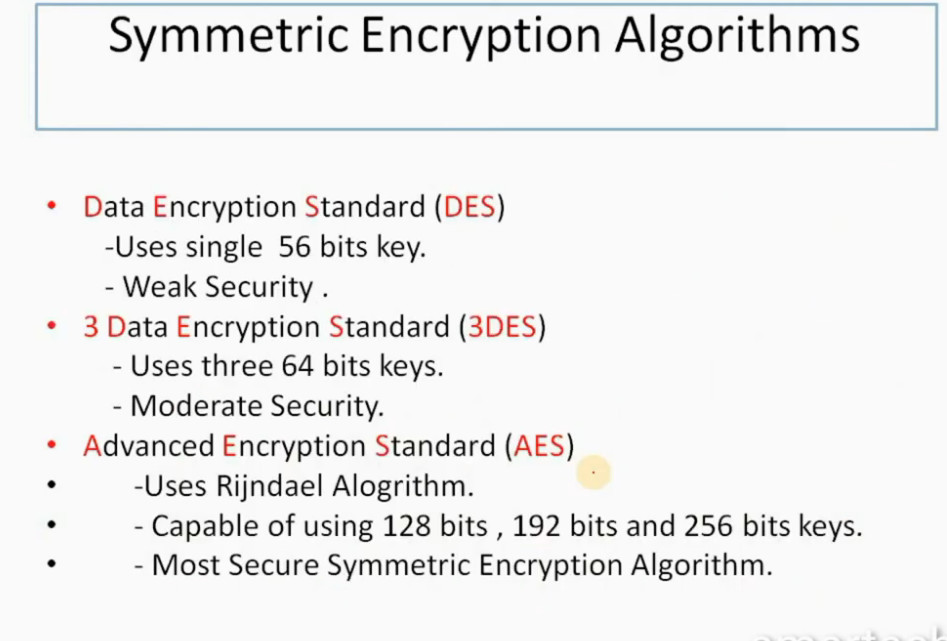
Data Encryption Standard (DES)
Uses single 56 bits key.
Weak Security .
Uses three 64 bits keys.
Moderate Security.
Uses Rijndael Alogrithm.
Capable of using 128 bits , 192 bits and 256 bits keys.
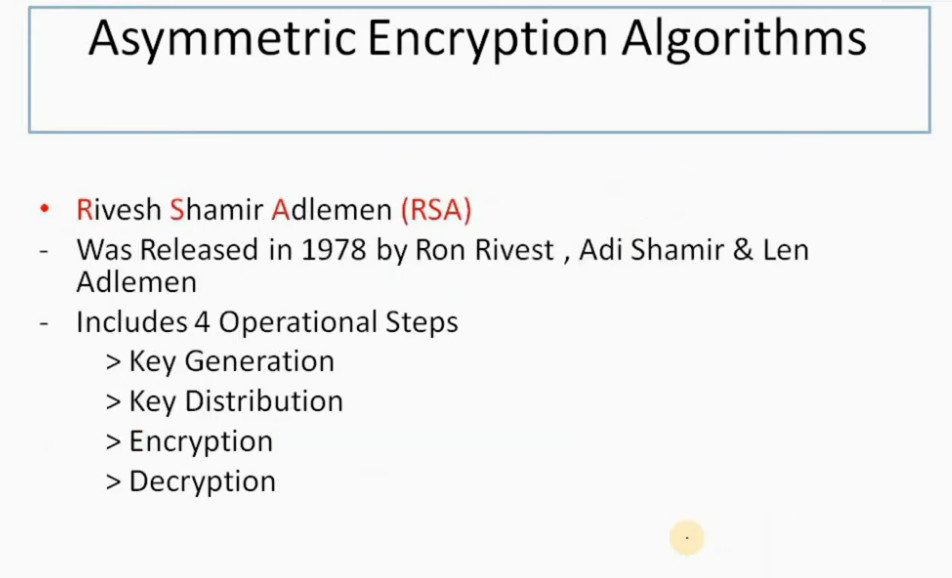
- Rivesh Shamir Adlemen (RSA)
- Was Released in 1978 by Ron Rivest , Adi Shamir & Len Adlemen
> Key Distribution
> Encryption
> Decryption
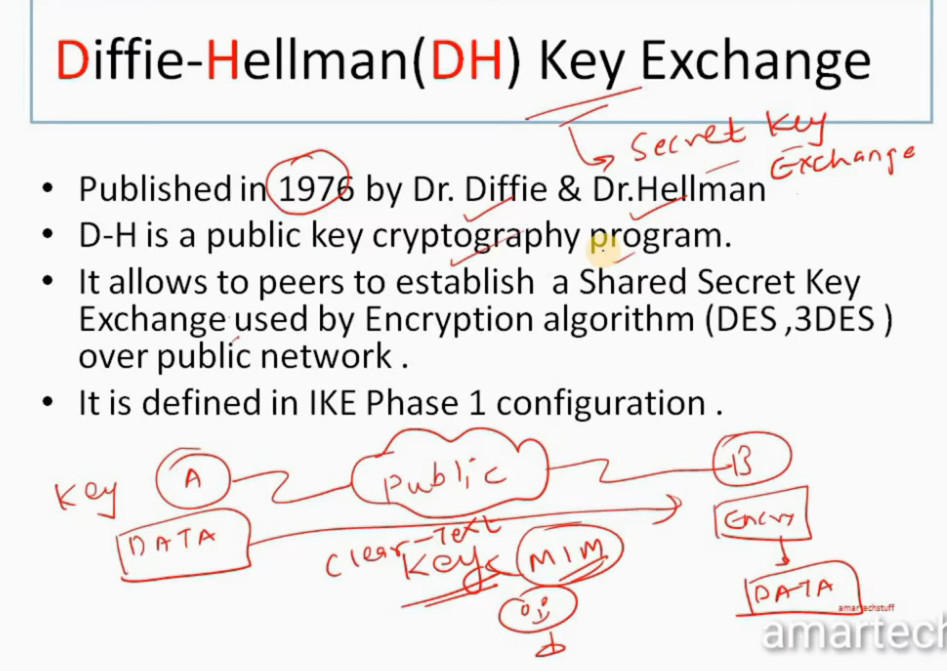
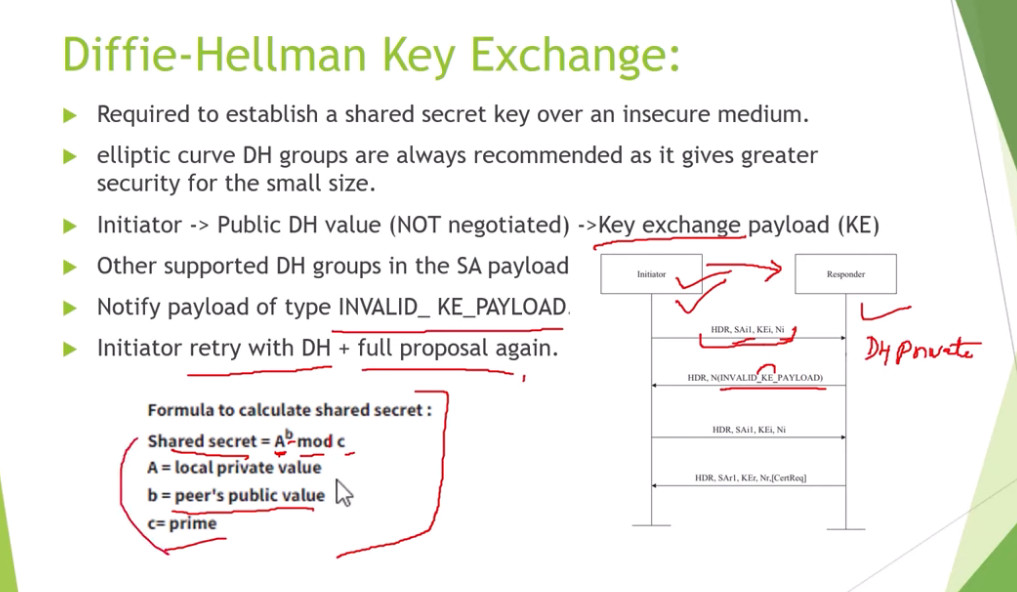
Diffie-Hellman(DH) Key Exchange
Published in 1976 by Dr. Diffie & Dr.Hellman
D-H is a public key cryptography program.
It allows to peers to establish a Shared Secret Key Exchange used by Encryption algorithm (DES ,3DES ) over public network .
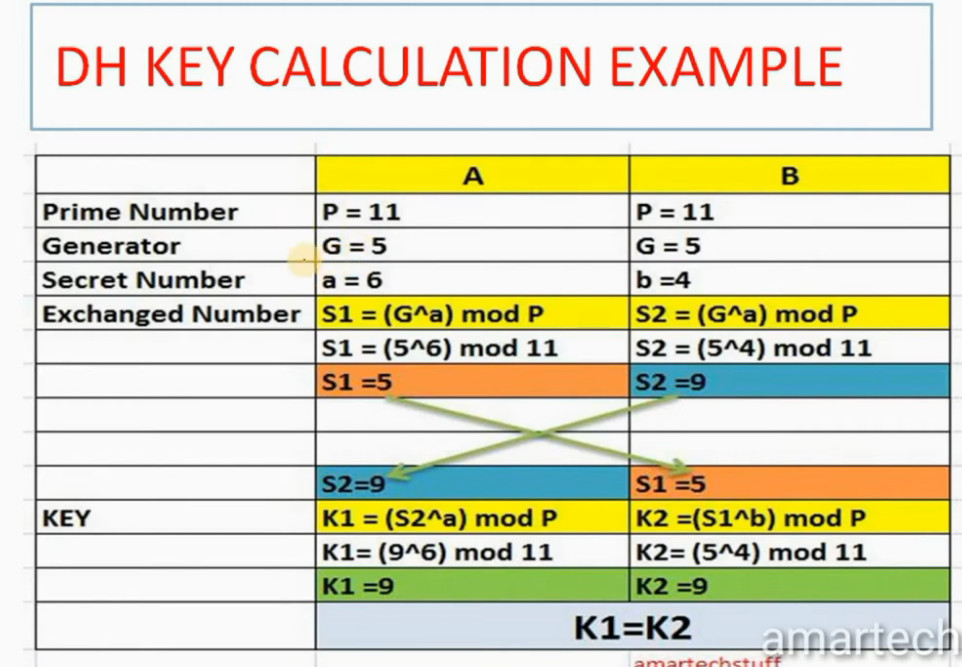
DH KEY CALCULATION
•It uses Prime Number (P)
•Prime Number can be divided by itself or 1 only without remainder.
•It also user Generator (G) , Secret Number a , b
•DH Algorithm calculates S1 for A and S2 B
•Then S1 AND S2 values exchanges between A & B.
•Using these values DH Algorithm calculates K1 for A and K2 for B.
•K1 AND K2 ARE SAME
•A and B will use this Sceret key.
•Note :- K1 AND K2 ARE NOT SHARED OVER PUBLIC NETWORK
• a and b secret values are also not shared over Public Network
• P and G are values are shared over Public Network
DH KEY CALCULATION EXAMPLE
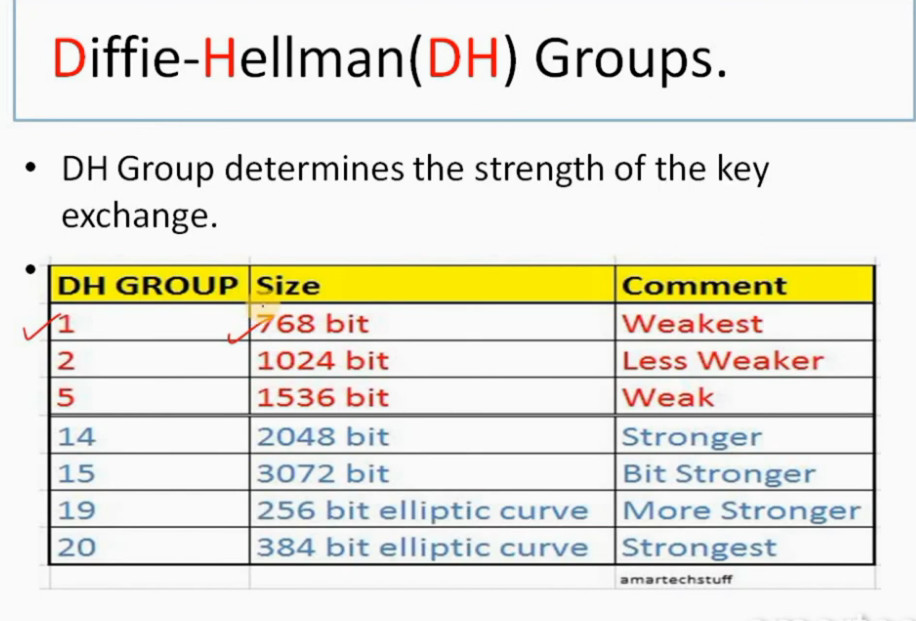
Diffie-Hellman(DH) Groups.
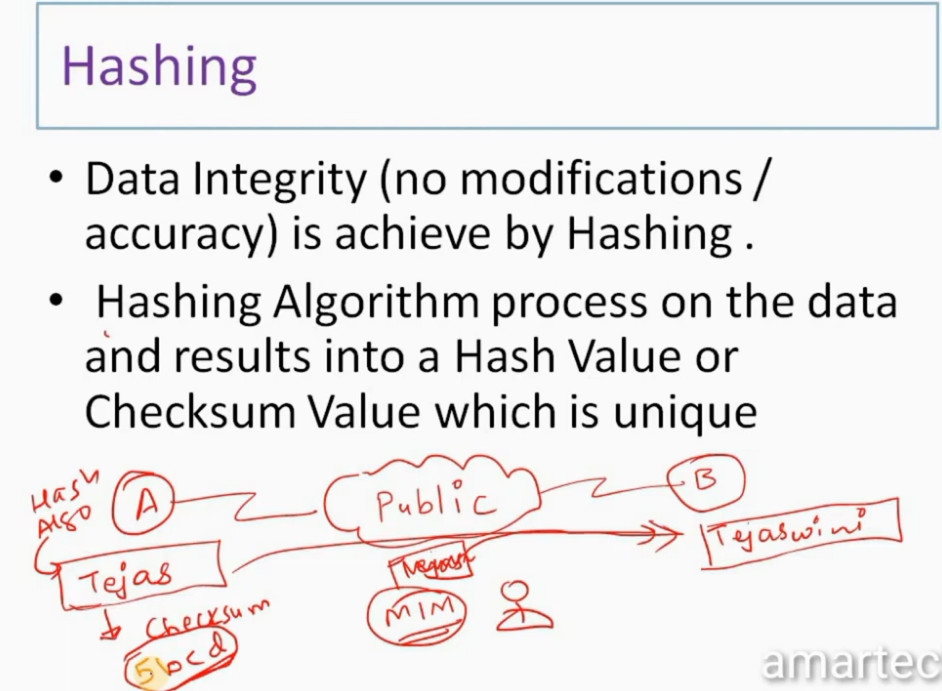
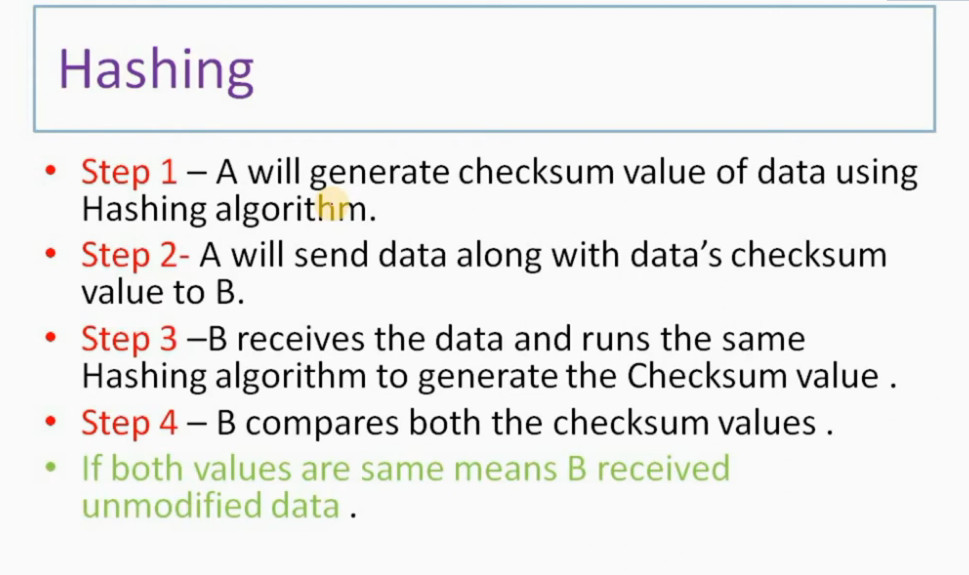
Hashing
•Step 2- A will send data along with data’s checksum value to B.
•Step 3 –B receives the data and runs the same Hashing algorithm to generate the Checksum value .
•Step 4 – B compares both the checksum values .
•If both values are same means B received unmodified data .
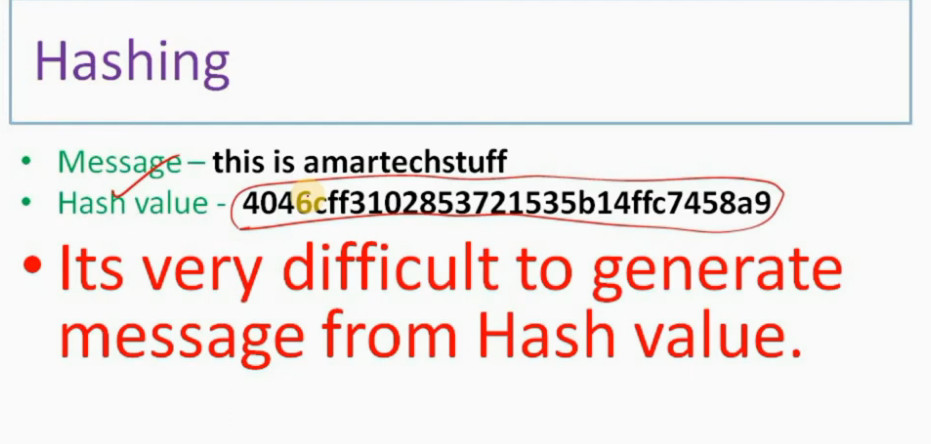
Message – this is amartechstuff
•Hash value – 4046cff3102853721535b14ffc7458a9
•Its very difficult to generate message from Hash
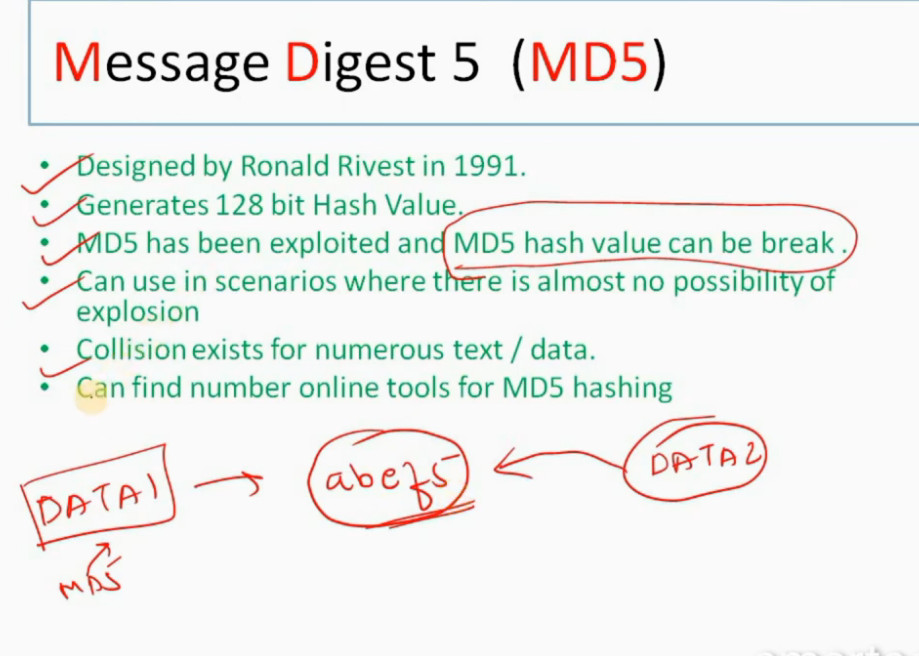
Message Digest 5 (MD5)
•Generates 128 bit Hash Value.
•MD5 has been exploited and MD5 hash value can be break .
•Can use in scenarios where there is almost no possibility of explosion
•Collision exists for numerous text / data.
•Can find number online tools for MD5 hashing
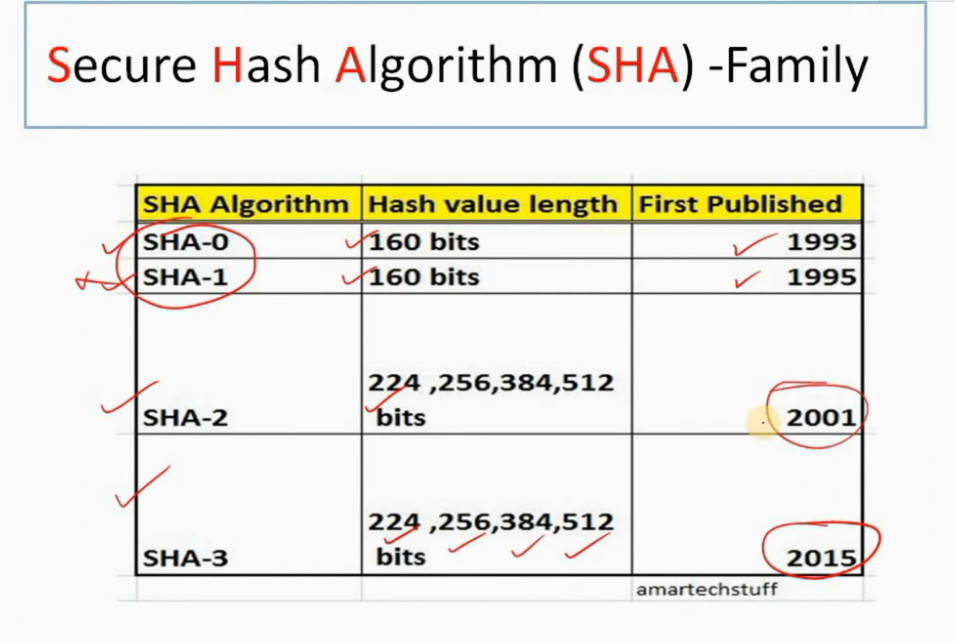
Secure Hash Algorithm (SHA) -Family
Authentication
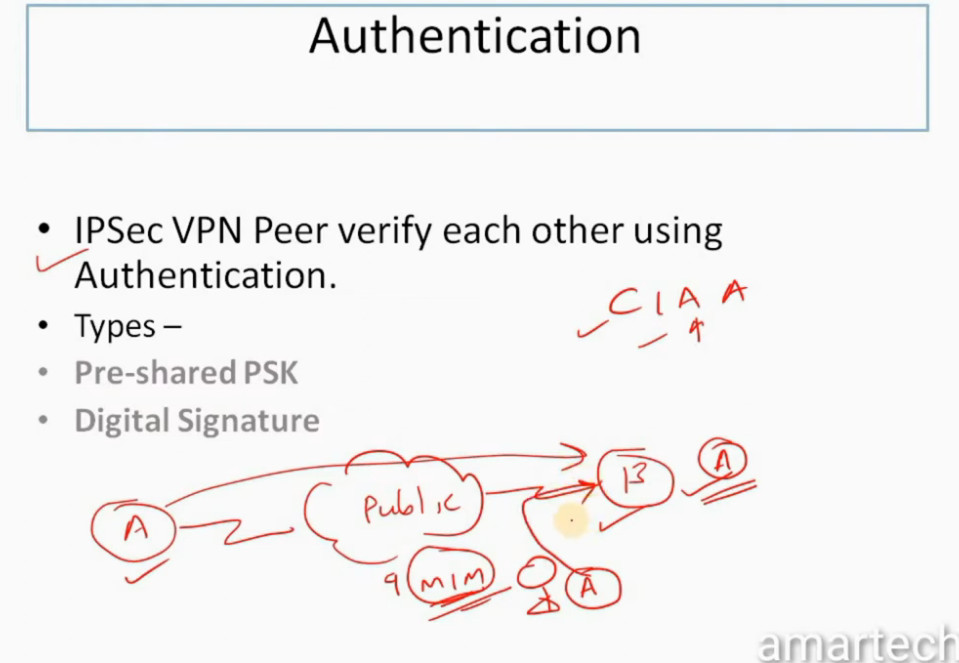
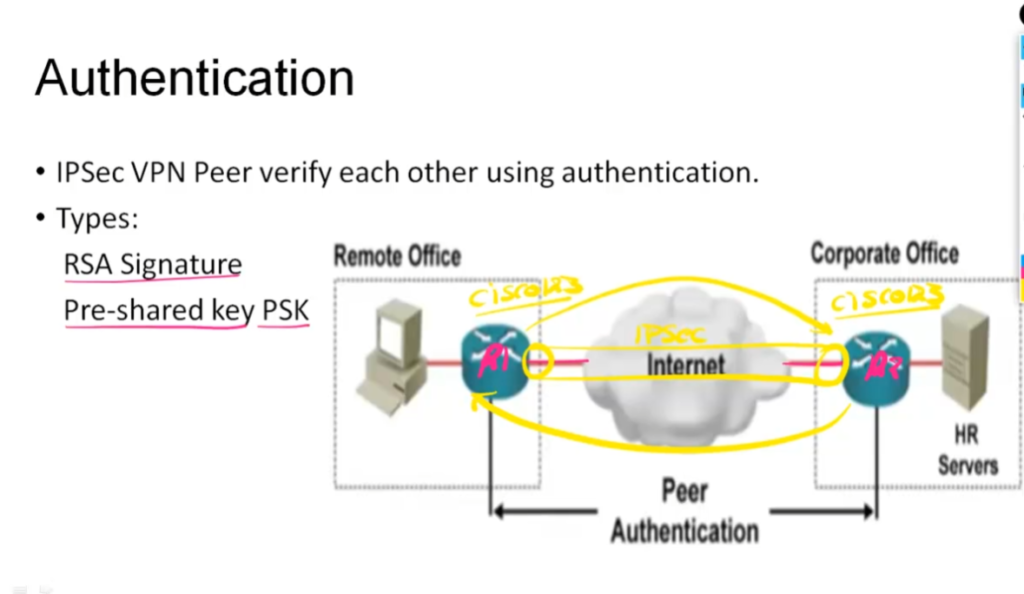
•IPSec VPN Peer verify each other using Authentication.
•Types –
•RSA Signature
•Pre-shared PSK
RSA Signature
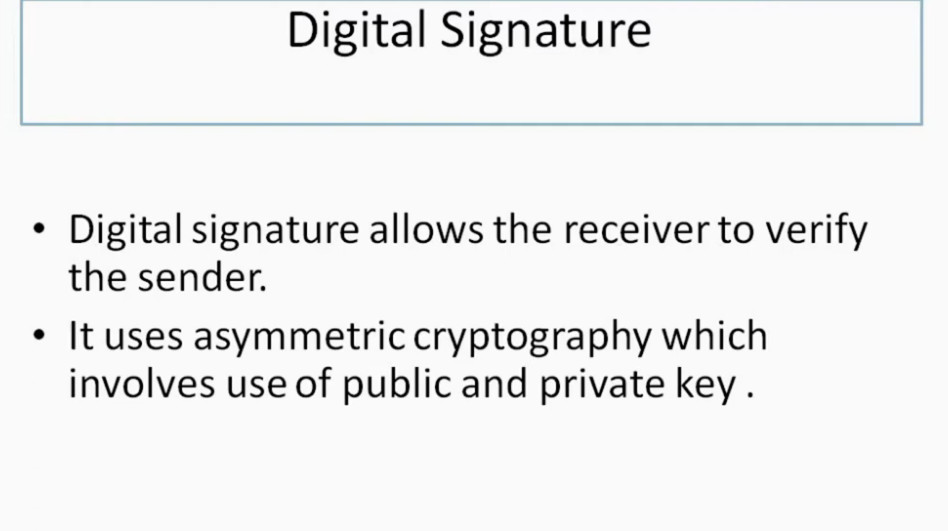
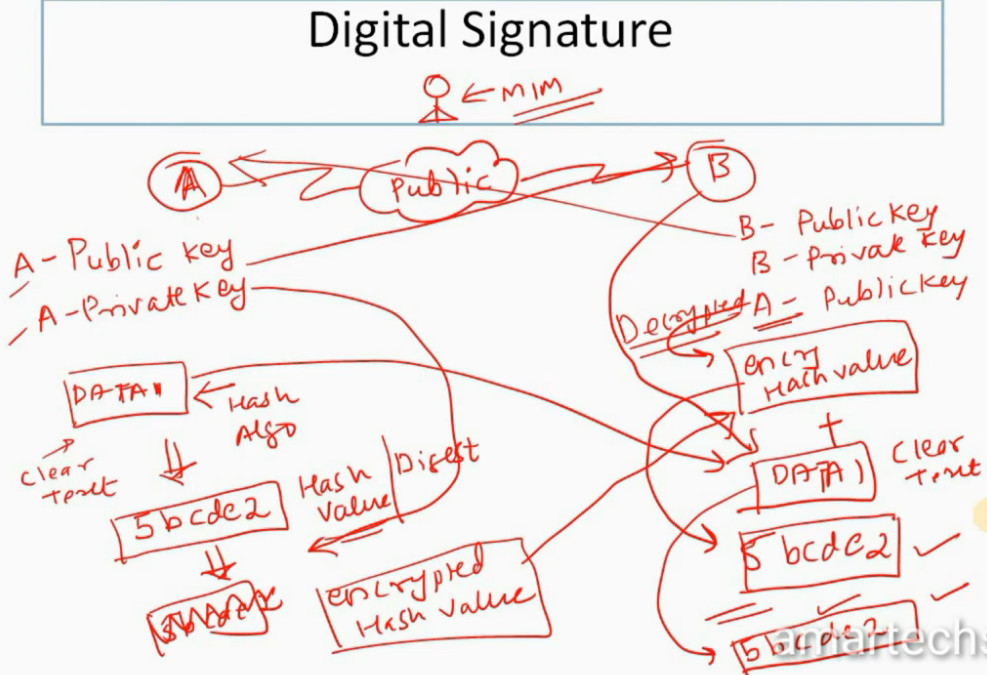
•RSA Signature – Uses digital signature setup.
•Step 1- A creates Public and Private Key .
•Step 2 – A shares its Public with B
•Step 3- A uses a Data packet . Generates a Hash value of same and they encrypt it using Public key . This value is know as Digital Signature.
•Step 4-Digital Signature is send to B.
•Step 5 – B uses A’s Public key to decrypt the Digital Signature get the hash value .
•Hence verify that the data has came from A and not from else.
PSK
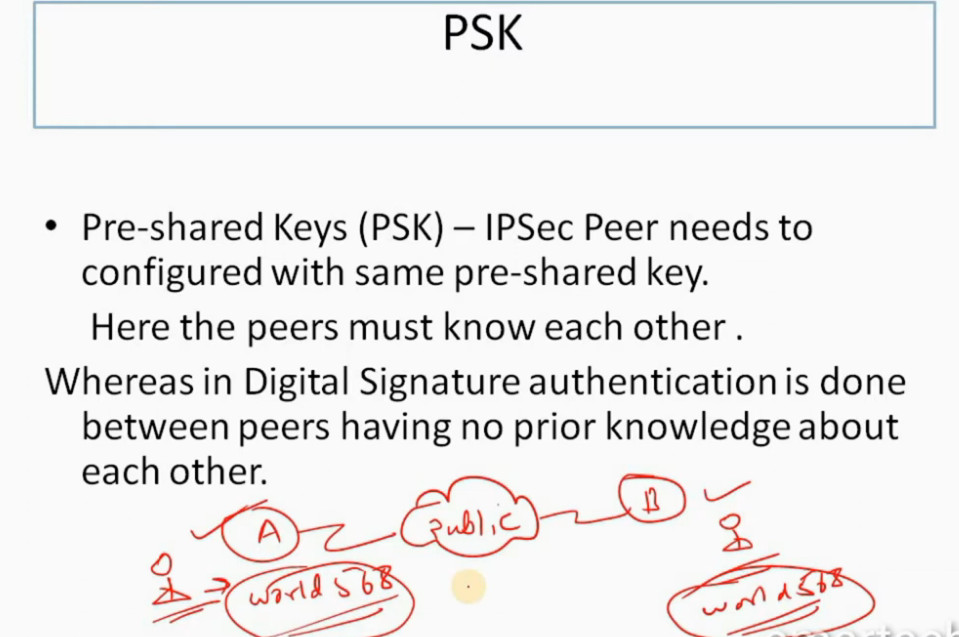
•Pre-shared Keys (PSK) – IPSec Peer needs to configured with same pre-shared key.
Here the peers must know each other .
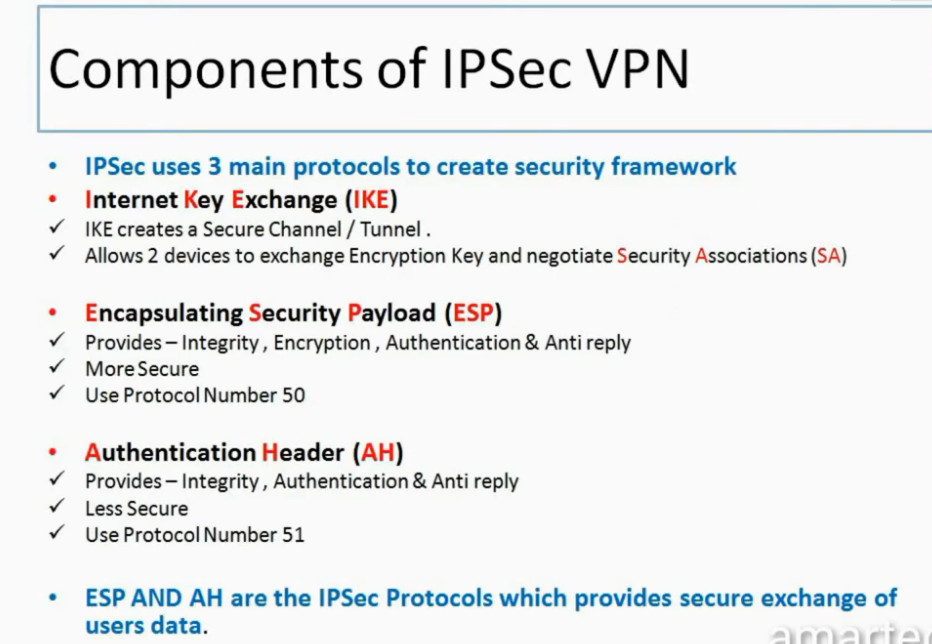
•Internet Key Exchange (IKE)
Allows 2 devices to exchange Encryption Key and negotiate Security Associations (SA)
•Encapsulating Security Payload (ESP)
More Secure
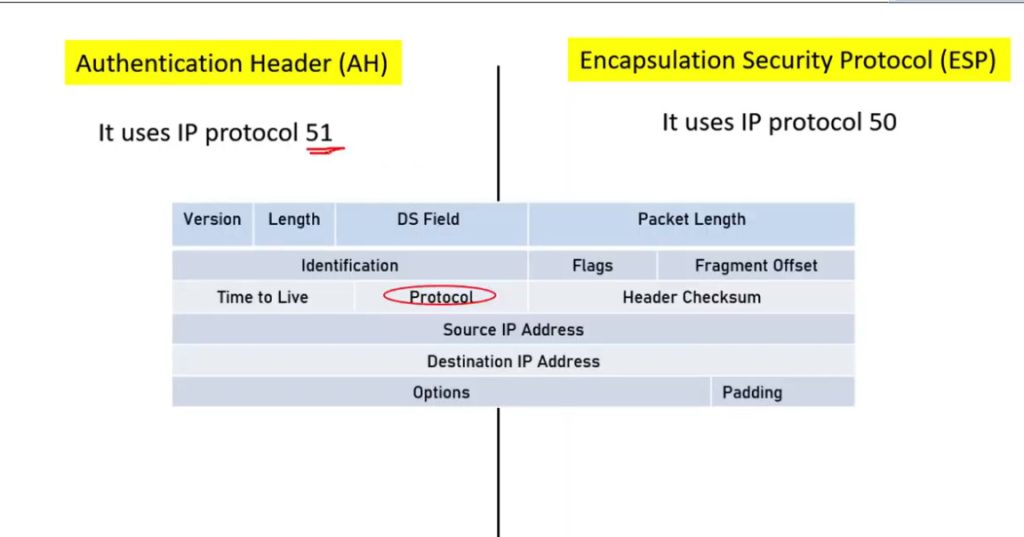
Use Protocol Number 50
•Authentication Header (AH)
Less Secure
Use Protocol Number 51
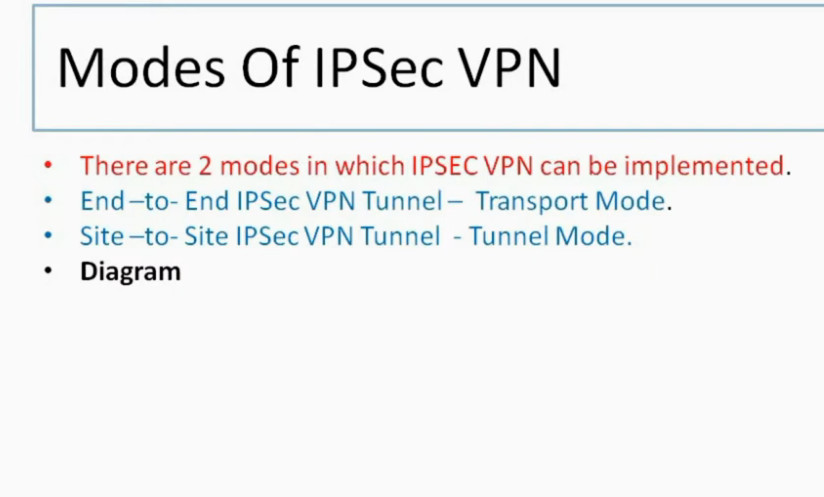
Modes Of IPSec VPN
•End –to- End IPSec VPN Tunnel – Transport Mode.
•Site –to- Site IPSec VPN Tunnel – Tunnel Mode.
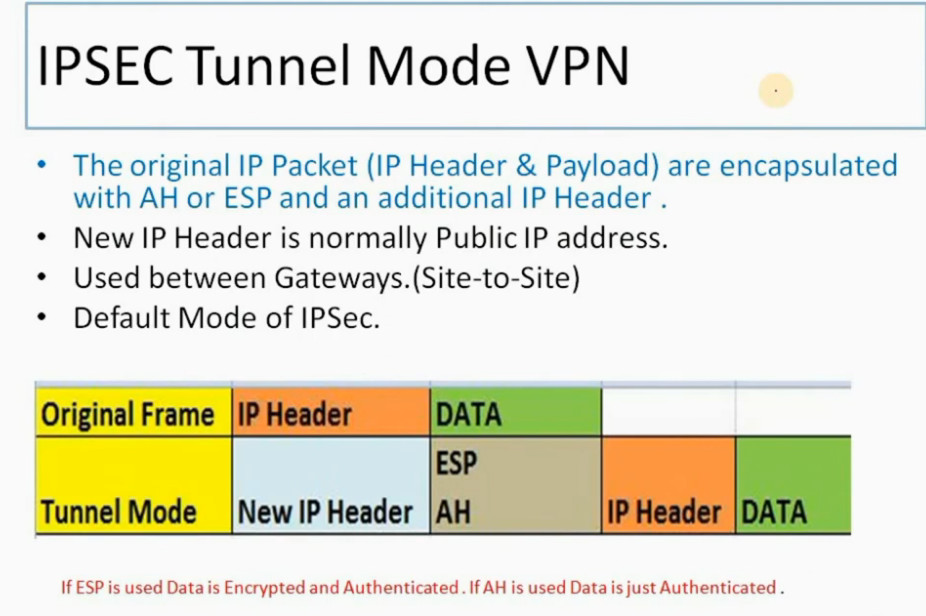
IPSEC Tunnel Mode VPN
•New IP Header is normally Public IP address.
•Used between Gateways.(Site-to-Site)
•Default Mode of IPSec.
IPSEC VPN CHAPTER 7 OPERATIONS & CONFIGURATION OF IPSEC VPN
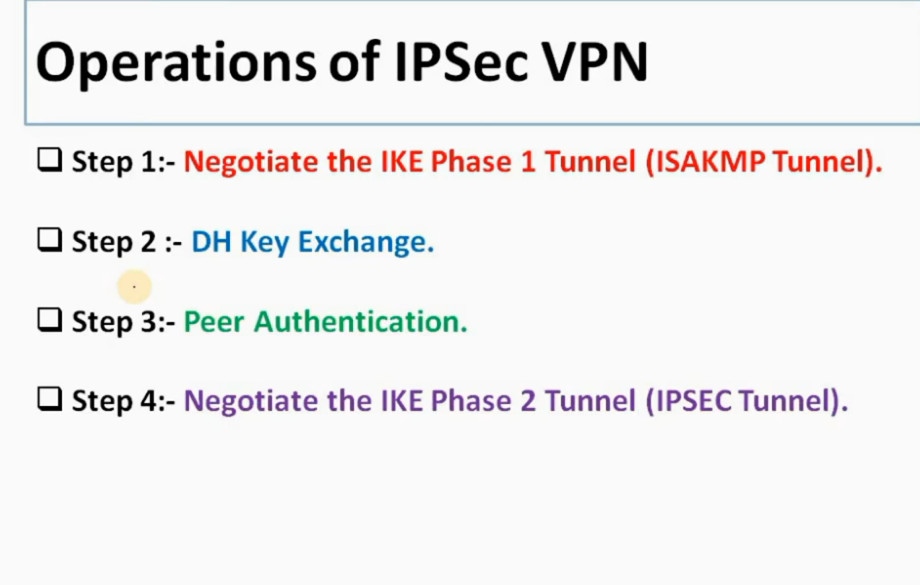
Operations of IPSec VPN
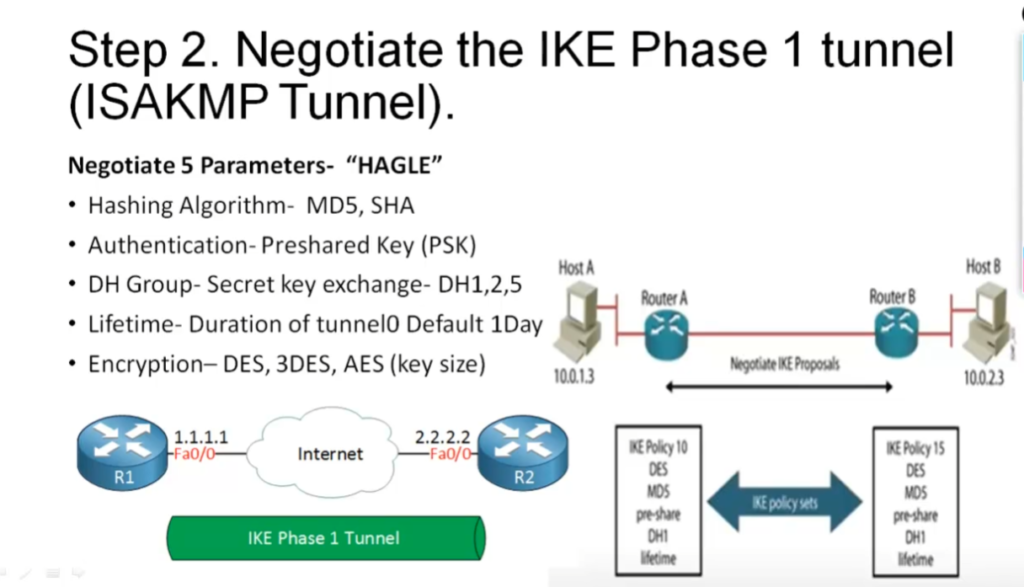
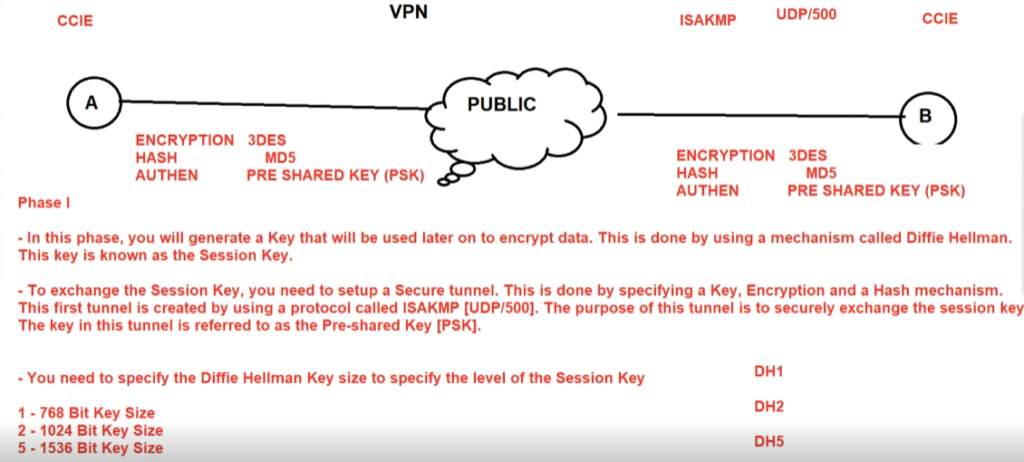
Step 1:- Negotiate the IKE Phase 1 Tunnel (ISAKMP Tunnel).
Step 2 :- DH Key Exchange.
Step 3:- Peer Authentication.
Step 4:- Negotiate the IKE Phase 2 Tunnel (IPSEC Tunnel).
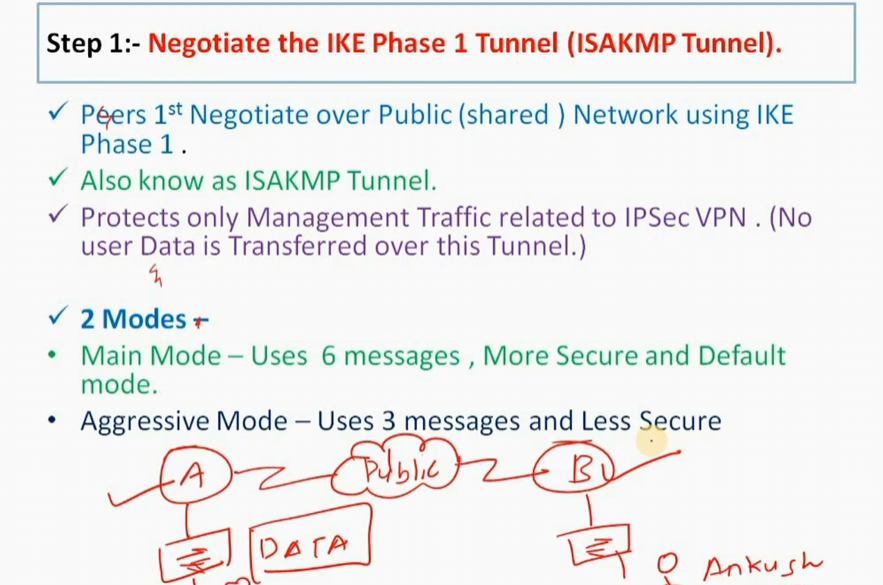
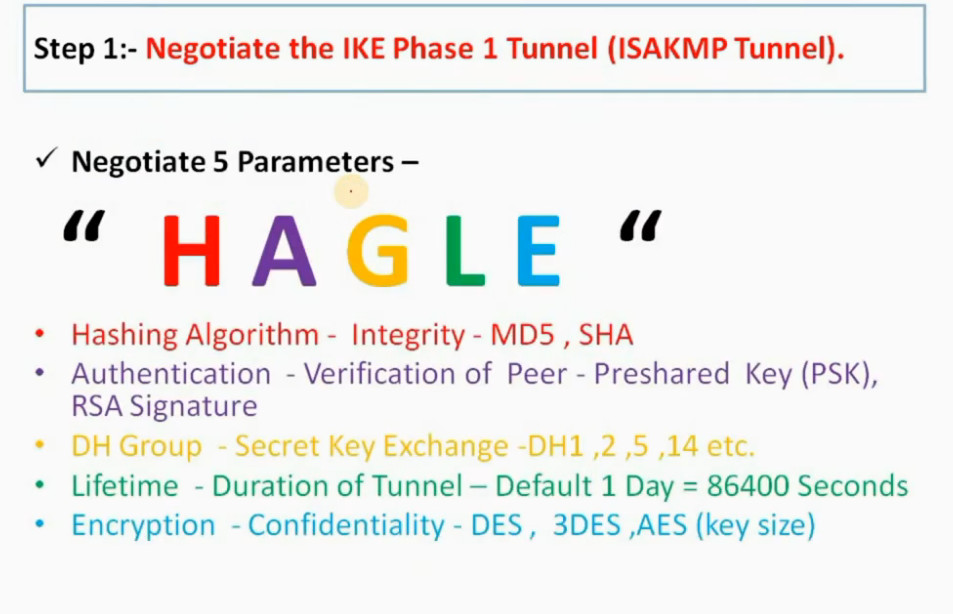
Step 1:- Negotiate the IKE Phase 1 Tunnel (ISAKMP Tunnel).
Peers 1st Negotiate over Public (shared ) Network using IKE Phase 1 .
Also know as ISAKMP Tunnel.
Protects only Management Traffic related to IPSec VPN . (No user Data is Transferred over this Tunnel.)
2 Modes –
•Main Mode – Uses 6 messages , More Secure and Default mode.
•Aggressive Mode – Uses 3 messages and Less Secure
Negotiate 5 Parameters –
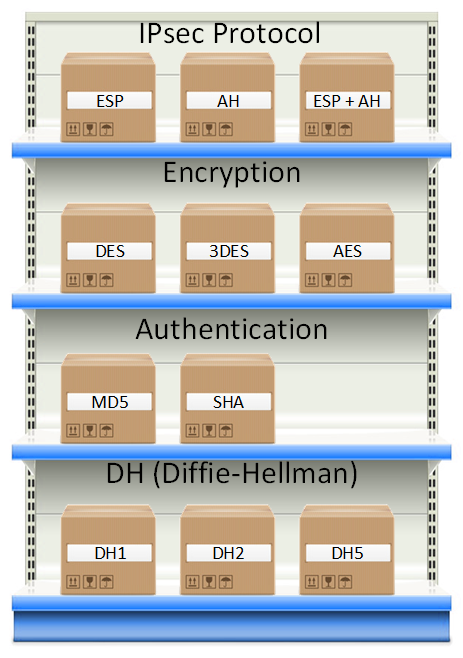
“ H A G L E “
- Hashing Algorithm – Integrity – MD5 , SHA
•Authentication – Verification of Peer – Preshared Key (PSK), RSA Signature
•DH Group – Secret Key Exchange -DH1 ,2 ,5 ,14 etc.
•Lifetime – Duration of Tunnel – Default 1 Day = 86400 Seconds
•Encryption – Confidentiality – DES , 3DES ,AES (key size)
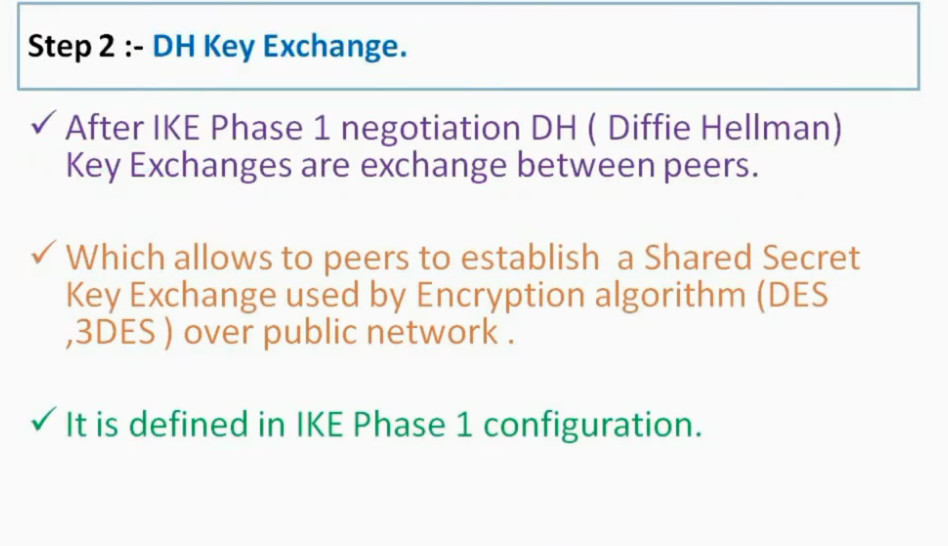
Step 2 :- DH Key Exchange.
After IKE Phase 1 negotiation DH ( Diffie Hellman) Key Exchanges are exchange between peers.
Which allows to peers to establish a Shared Secret Key Exchange used by Encryption algorithm (DES ,3DES ) over public network .
It is defined in IKE Phase 1 configuration.
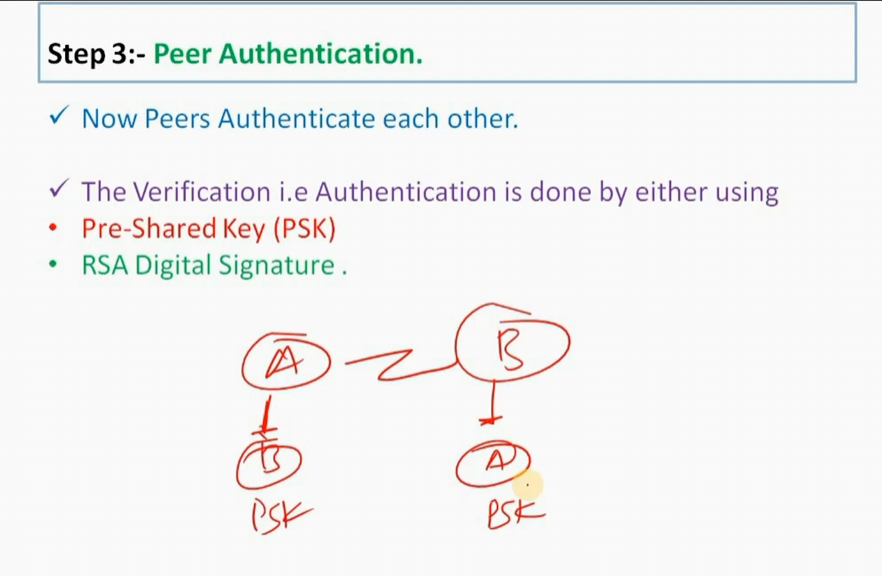
Step 3:- Peer Authentication.
Now Peers Authenticate each other.
The Verification i.e Authentication is done by either using
•Pre-Shared Key (PSK)
•RSA Digital Signature .
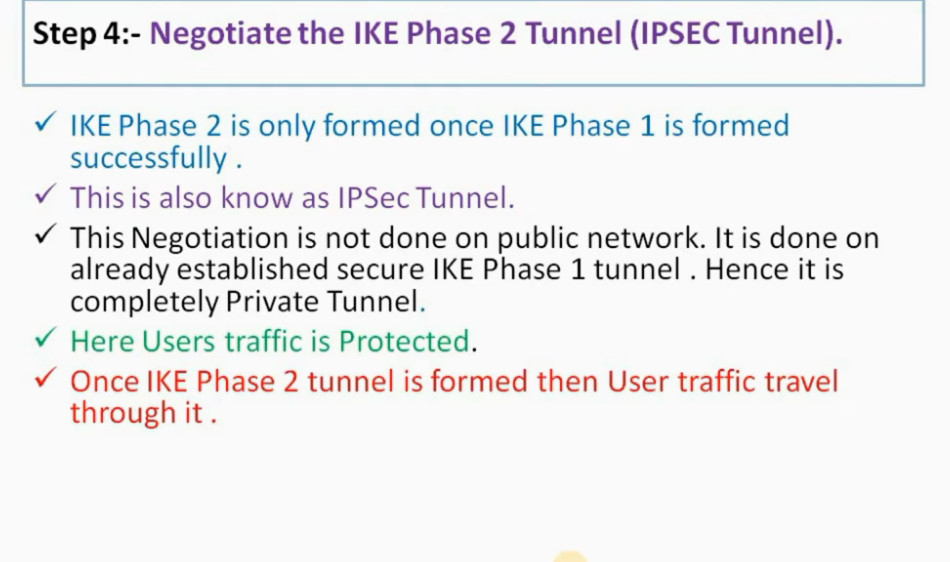
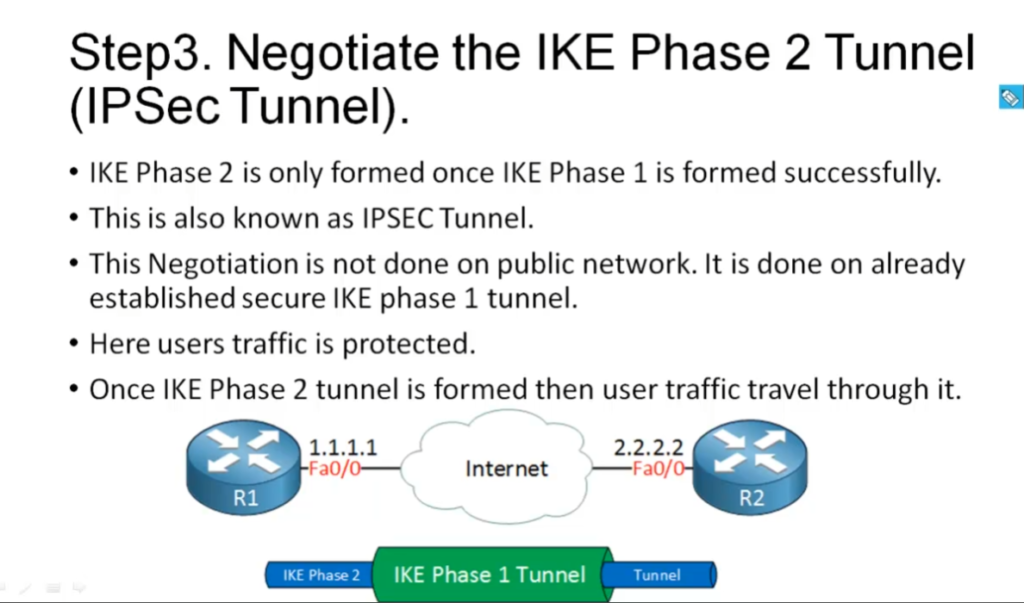
Step 4:- Negotiate the IKE Phase 2 Tunnel (IPSEC Tunnel).
IKE Phase 2 is only formed once IKE Phase 1 is formed successfully .
This is also know as IPSec Tunnel.
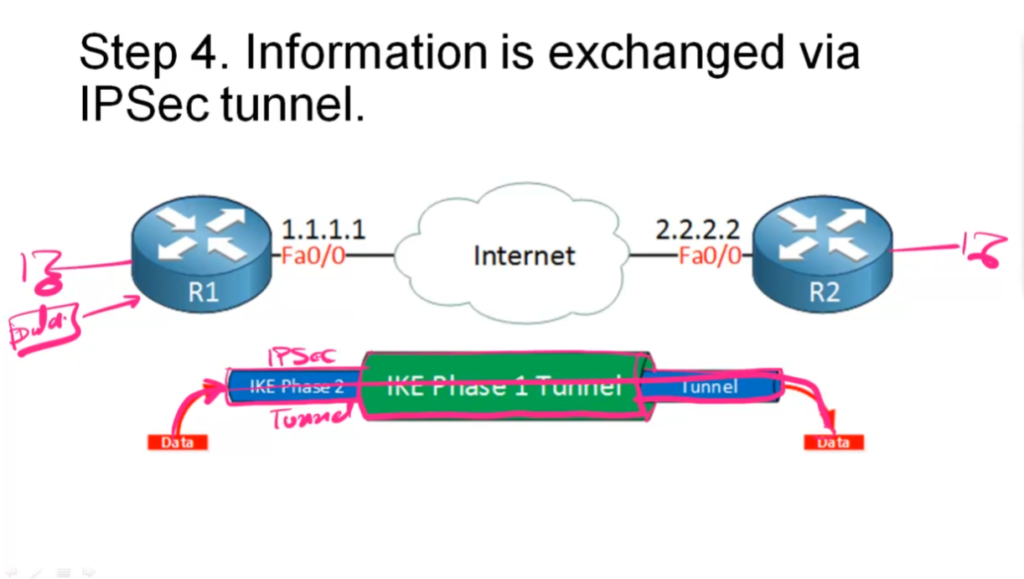
This Negotiation is not done on public network. It is done on already established secure IKE Phase 1 tunnel . Hence it is completely Private Tunnel.
Here Users traffic is Protected.
Once IKE Phase 2 tunnel is formed then User traffic travel through it .
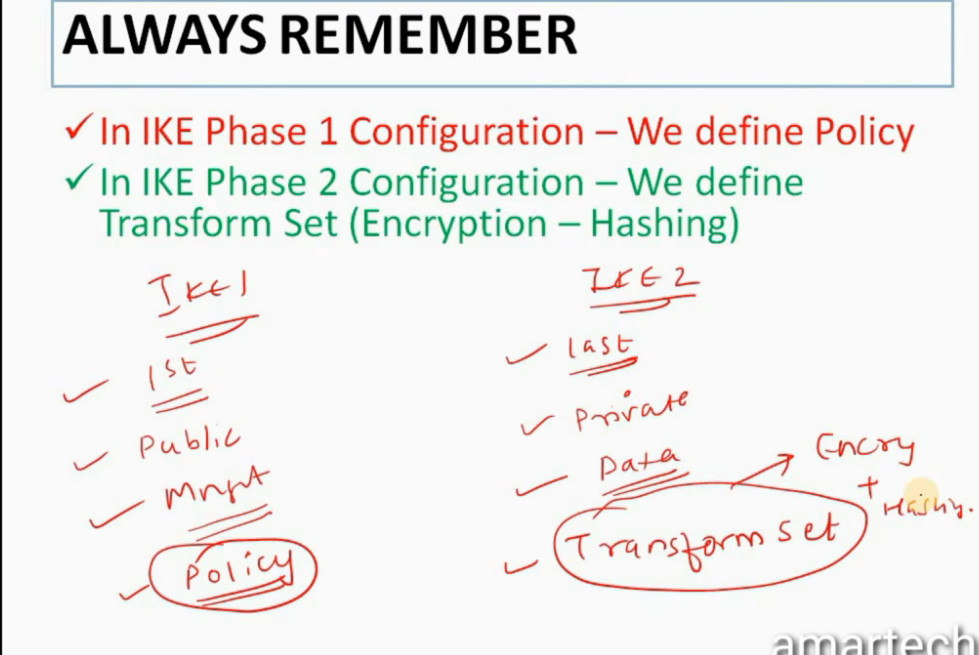
ALWAYS REMEMBER
In IKE Phase 1 Configuration – We define Policy
In IKE Phase 2 Configuration – We define Transform Set (Encryption – Hashing)
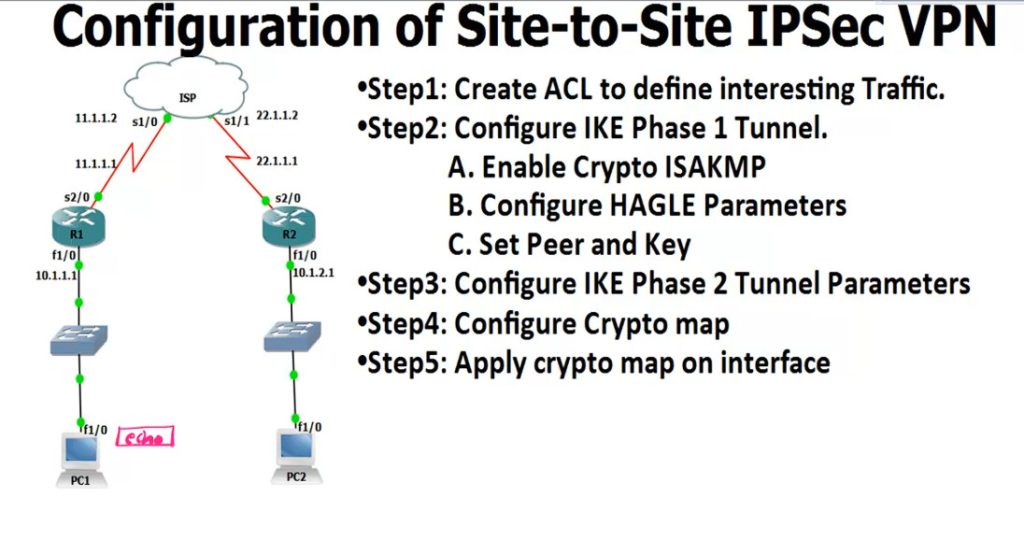
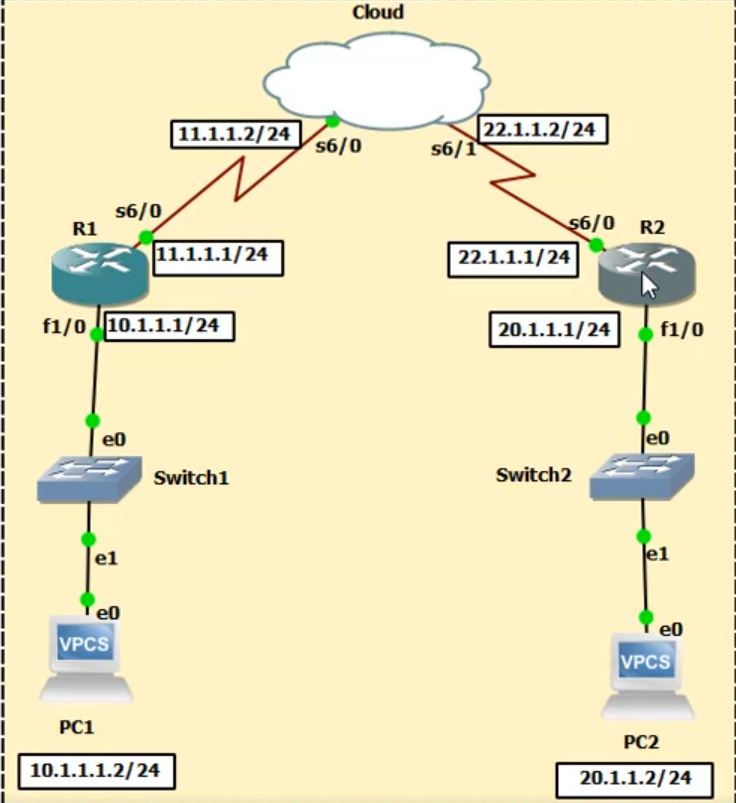
R1
------
access-list 100 permit ip 10.1.1.0 0.0.0.255 10.1.2.0 0.0.0.255
crypto isakmp enable
IPSEC Slide
Video Guide
Online Server
Offline Server
An IPsec VPN is a secure method used to connect two networks or devices over an untrusted network such as the Internet. It works by creating an encrypted “tunnel” through which data can travel safely, ensuring that sensitive information remains confidential and protected from unauthorized access. IPsec operates at the network layer (Layer 3 of the OSI model), which means it can secure almost all types of IP-based communication without requiring changes to applications. It is widely used in organizations to connect branch offices (site-to-site VPN) or allow remote users to securely access internal networks (remote access VPN).
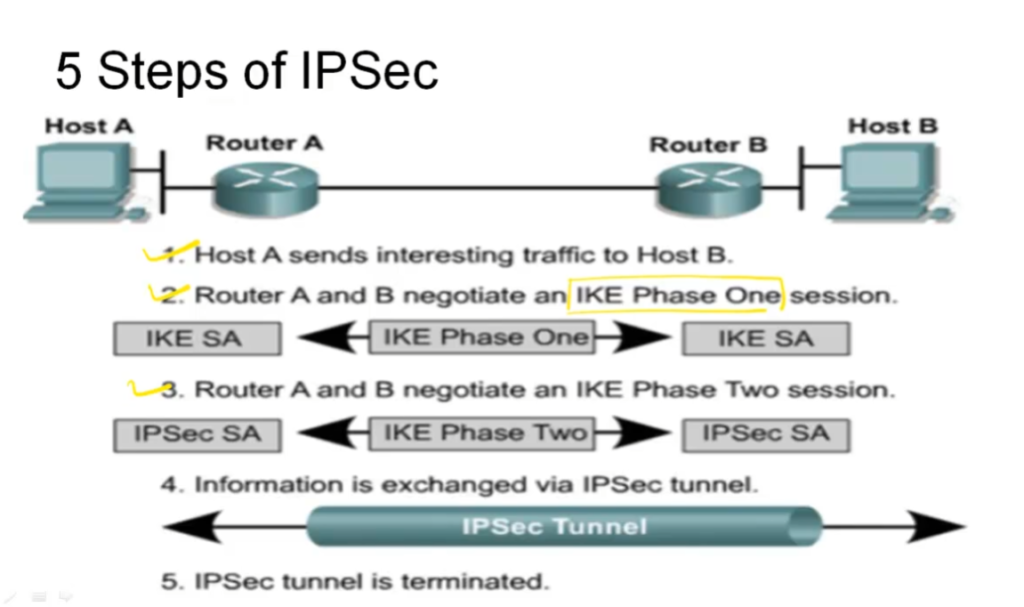
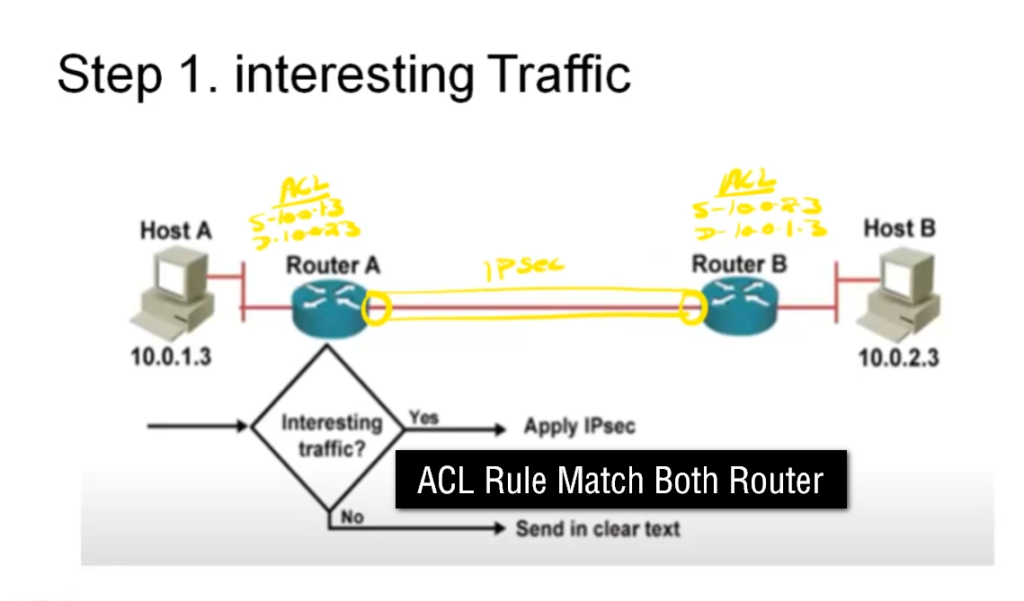
The working of an IPsec VPN begins when interesting traffic (traffic that needs to be secured) is identified by security policies configured on devices like routers or firewalls. Once such traffic is detected, the devices initiate a process to establish a secure connection using the Internet Key Exchange (IKE) protocol. In the first phase (Phase 1), both devices authenticate each other using methods such as pre-shared keys or digital certificates and agree on encryption algorithms like AES, hashing algorithms like SHA, and key exchange methods such as Diffie-Hellman. This phase creates a secure control channel called the ISAKMP Security Association (SA).
In the second phase (Phase 2), the devices negotiate how the actual data will be protected. They establish IPsec Security Associations that define parameters such as which protocol to use (usually ESP), encryption methods, and integrity checks. After this negotiation is complete, the VPN tunnel is fully established and ready to securely transmit data between the endpoints.
Once the tunnel is active, data transmission begins. When a packet is sent from the source, it is first encrypted and encapsulated using the Encapsulating Security Payload (ESP) protocol, which provides confidentiality, integrity, and authentication. In tunnel mode (commonly used in site-to-site VPNs), the entire original IP packet is encrypted and wrapped inside a new IP packet with a new header. This encrypted packet is then transmitted across the public network. Even if intercepted, the data cannot be read because it is encrypted.
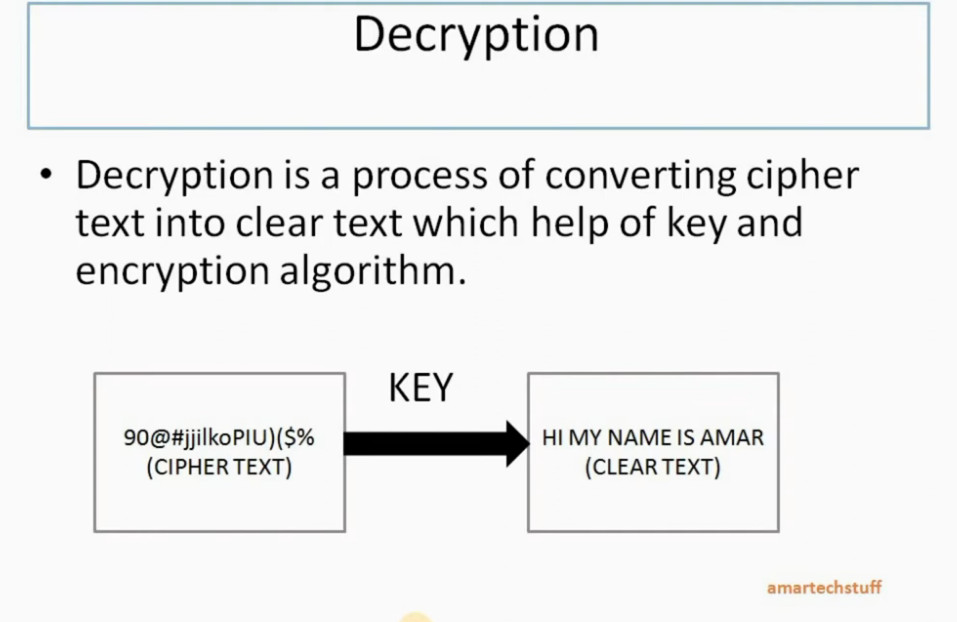
When the packet reaches the destination device, the reverse process occurs. The device decrypts the packet using the agreed encryption keys, verifies its integrity to ensure it has not been tampered with, and then removes the IPsec headers to retrieve the original data. This data is then forwarded to the destination network as if it had traveled through a private and secure link.
IPsec VPN provides several important security features, including confidentiality (through encryption), data integrity (through hashing algorithms), authentication (ensuring the identity of communicating devices), and anti-replay protection (preventing attackers from reusing captured packets). Because of these features, IPsec VPN is considered highly secure and is commonly used in enterprise networks.
In summary, an IPsec VPN creates a secure, encrypted tunnel between two endpoints using IKE for negotiation and ESP/AH for data protection. It ensures that data transmitted over public networks remains private, authentic, and unchanged, making it a fundamental technology in modern network security.
What is IPsec?
IPsec is a set of protocols to secure internet communication at the network layer. It was developed by the Internet Engineering Task Force (IETF) to provide a secure way to exchange data over the Internet, ensuring that sensitive information is protected from unauthorized access, interception, or modification.
IPsec is the short acronym for Internet Protocol Security. The “IP” stands for Internet Protocol, which is the main routing protocol used on the Internet for sending data to its destination using IP addresses. The “sec” stands for secure, as it provides encryption and authentication to the data transmission process, making it more secure.
Its main goal is to encrypt data, provide authentication and access control, and ensure the integrity of the data being transferred. It helps many organizations protect their data from malicious actors and ensure secure communication between devices. It is widely used for securing Virtual Private Networks (VPNs), providing a safe connection for remote access. IPsec also controls access, ensuring only authorized users can access the data or network. Additionally, it provides authentication, ensuring the data comes from a legitimate source. IPsec is a vital tool for organizations to protect their data and ensure secure communication.
Tracing its roots and evolution
The inception of IPsec can be traced back to the early 1990s, a time when the Internet was rapidly expanding, and the need for secure communication was becoming increasingly evident. Developed by the Internet Engineering Task Force (IETF), IPsec was designed to secure and encrypt data at the IP layer. Over the years, IPsec has evolved, adapting to the changing landscape of digital security.
In its early stages, IPsec primarily focused on securing communication between networks. However, as the Internet grew and new threats emerged, IPsec adapted to provide more robust and versatile security solutions. Key developments included the introduction of new encryption algorithms and improved key management protocols, enhancing its ability to safeguard data against increasingly sophisticated cyber threats. This evolution has established IPsec as a standard for secure Internet communication, trusted by organizations worldwide for its reliability and robustness.
What is IPsec used for?
It is commonly used to establish secure connections between networks, remote users, or individual devices over the Internet. IPsec works by encrypting and authenticating the data transmitted over a network, providing confidentiality, integrity, and authentication. This ensures that sensitive information such as passwords, credit card numbers, and personal data are protected from unauthorized access, interception, or modification. IPsec is widely used in virtual private networks (VPNs), which allow remote workers to securely access a company’s internal network from outside the office. It is also used in secure email, voice-over-IP (VoIP), and other internet-based applications that require safe communication. Overall, IPsec is an essential tool for ensuring the privacy and security of internet communications.
How does IPsec work?
To establish a secure connection, IPsec follows a set of several steps, which are the following:
- Key exchange: Keys are essential to enable encryption. A key is a sequence of random characters used to encrypt (lock) and decrypt (unlock) messages. IPsec sets up keys with a key exchange between the connected devices. That way, every device is able to decrypt the other device’s messages.
- Packet headers and trailers: When data is transmitted over a network, it is divided into smaller units known as packets. These packets include two main components: the payload, which is the actual data being transmitted, and the headers, which provide information about the data to allow the receiving computers to process it correctly. In the context of IPsec, additional headers are added to each packet to incorporate authentication and encryption information. Moreover, it also attaches trailers to the end of each packet’s payload rather than at the beginning.
- Authentication: IPsec provides authentication for every packet. This mechanism guarantees that the packets originate from a reliable source rather than a malicious attacker.
- Encryption: It provides encryption both for the payloads and the IP headers of each packet. This ensures that data transmitted over IPsec is protected and kept confidential.
- Transmission: The encrypted IPsec packets travel across different networks to reach their target destination using the UDP transport protocol. That is a significant difference compared to regular IP traffic, which typically uses TCP (Transmission Control Protocol), which sets dedicated connections between devices. On the other hand, UDP doesn’t set such connections, which allows IPsec packets to get through firewalls.
- Decryption: At the end of the communication, the packets are decrypted, allowing applications such as web browsers to access and utilize the data.
IPsec protocols
IPsec uses a variety of protocols to establish secure connections and protect data during transmission. IPsec is not one protocol but a suite of protocols. The suite includes the following:
- Authentication Header (AH): It provides data integrity and authentication and ensures that the transmitted data has not been modified or tampered with. Yet, it does not encrypt data.
- Encapsulating Security Protocol (ESP): It encrypts both the IP header and the payload of each packet unless transport mode is used, in which case only the payload is encrypted. In addition, ESP adds its own header and a trailer to each data packet.
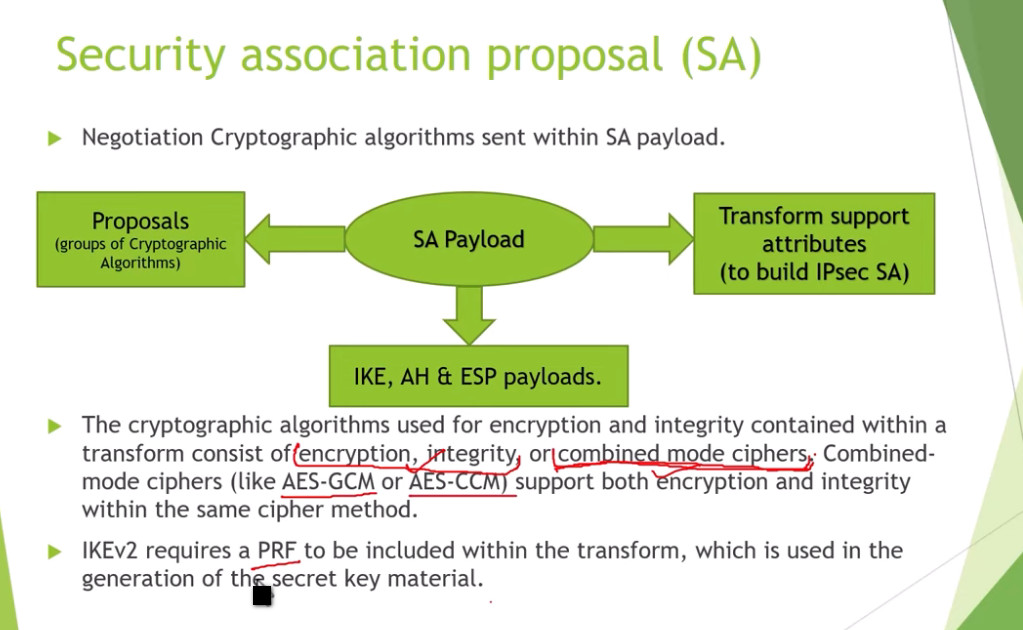
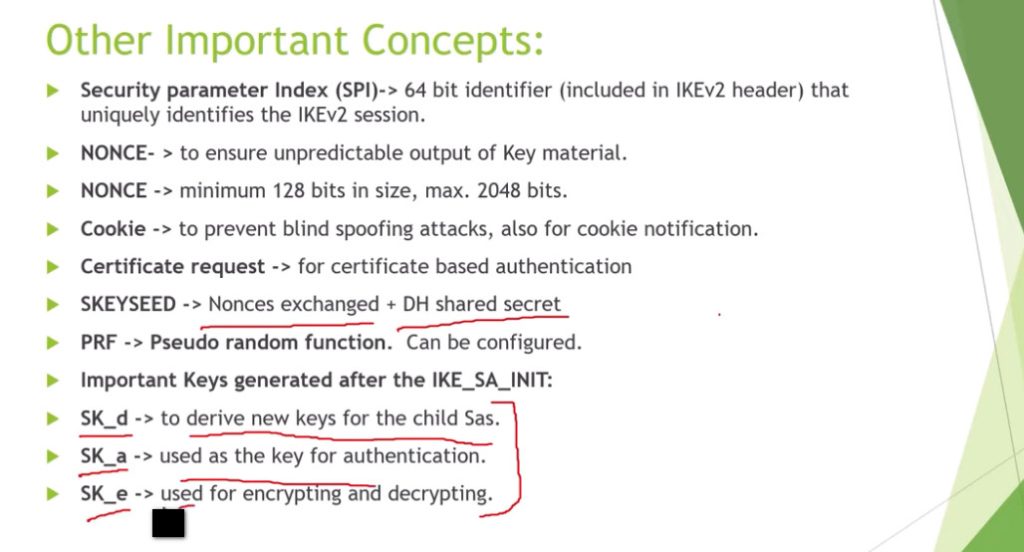
- Security Association (SA): An SA is a set of security parameters defining how two devices communicate securely. It includes information such as the encryption algorithm, authentication method, and key size. One of the most commonly used SA protocols is the Internet Key Exchange (IKE).
IPsec Modes
IPsec offers two distinct modes that provide different amounts of protection for network communication.
- Tunnel Mode: In this mode, all data, including the header and payload, is encrypted, and a new header is added. It is ideal for secure data transfer over public networks, as it provides enhanced protection against unauthorized access.
- Transport Mode: It encrypts only the payload while the IP header remains unchanged. The unencrypted header allows routers to identify the destination address of each packet, making it suitable for use in a trusted and closed network.
What is IPsec Encryption?
IPsec encryption is a process that ensures the confidentiality of data transmitted over a network by converting it into an unreadable format that can only be deciphered by authorized parties. It employs robust encryption algorithms, such as Advanced Encryption Standard (AES) and Triple Data Encryption Standard (3DES), to protect sensitive information from interception or unauthorized access.
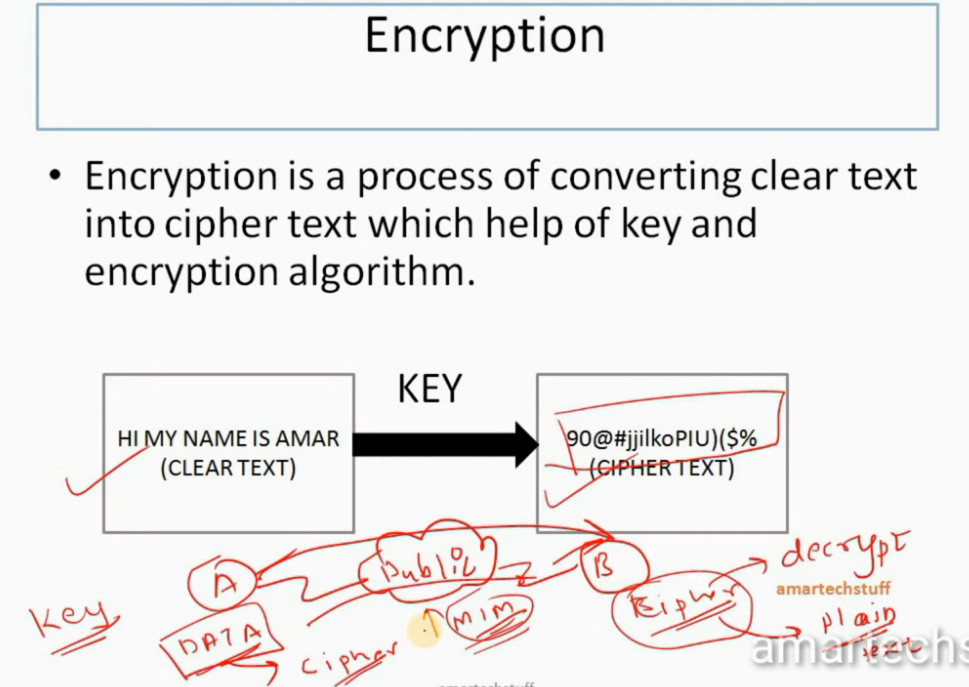
The encryption process works by transforming plaintext data into ciphertext using encryption keys, ensuring that even if the data is intercepted, it cannot be understood without the correct decryption key. IPsec encryption can secure both the payload (data) and the headers of IP packets, depending on the mode used (Transport or Tunnel). This encryption mechanism is a cornerstone of IPsec’s functionality, enabling secure communication over public or private networks, such as in Virtual Private Networks (VPNs) or between networked devices.
How to Pick Strong Algorithms & Settings?
Since you already know how IPsec encryption works, the big question is: how do you make sure it’s set up in the safest way? The truth is, not every option gives the same level of protection, and using old settings can leave the door open for attackers. Here are a few simple guidelines to keep in mind:
- Go with IKEv2 instead of IKEv1 – it’s the newer version, more stable, and much harder to break.
- Stick to modern ciphers like AES – older ones like DES or 3DES are outdated and easy to crack.
- Refresh your keys regularly – don’t let the same key live forever, or it becomes an easier target.
- Choose Main Mode over Aggressive Mode – Main Mode keeps more details private during setup, making it safer.
- Use certificates when possible – they’re stronger than simple shared passwords and better suited for businesses.
Getting these settings right isn’t complicated, but it makes a huge difference. With the right choices, IPsec becomes a solid shield for your data, instead of just another box checked in your network setup.
Benefits
IPsec offers a number of benefits, including the following:
- Data Encryption
With IPsec, all the data transmitted over the Internet is encrypted, making it impossible for cybercriminals to intercept and read it. The privacy of the data is especially important for businesses dealing with sensitive information, such as financial or personal details.
- Authentication
It provides authentication, ensuring the communication between two endpoints is legitimate. That way, it prevents unauthorized access to the network and protects the network from various cyber-attacks. IPsec uses authentication methods to verify the identity of the users and devices on the network.
- Integrity
With IPsec, the data transmitted over the Internet is not tampered with or modified in any way. As a result, it ensures that the data received at the other end is the same as the transmitted data and that there has been no unauthorized alteration or modification.
- Compatibility
IPsec is a widely used protocol and is supported by many devices and operating systems. That signifies that businesses can use it to secure their networks without having to worry about compatibility issues.
Which port does IPsec use?
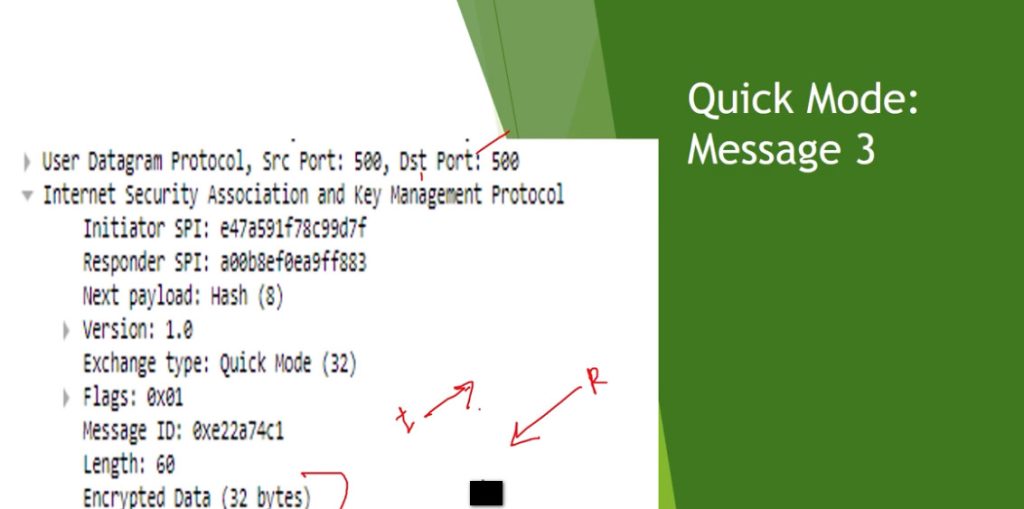
IPsec uses port 500 for its IKE (Internet Key Exchange) protocol. This port is used for the initial negotiation between two systems and to establish a secure connection. Once the connection is established, IPsec will then use a variety of other ports to send and receive data. These ports are usually randomly chosen and can range from port 4500 to port 5500.
It also uses port 4500, which allows IPsec traffic to pass through a NAT (Network Address Translation) device. This is important for allowing IPsec traffic to pass through firewalls and other security devices.
What is IPsec VPN?
An IPsec VPN is a network architecture that employs the Internet Protocol Security (IPsec) protocol suite to establish secure and encrypted communication channels over potentially unsecured networks such as the internet. This technology is designed to protect data integrity, ensure confidentiality, and authenticate data sources.
Technically, an IPsec VPN functions by encapsulating data packets and encrypting the payload with robust encryption algorithms. This process transforms the data into unreadable formats for anyone intercepting the packets. It employs two primary modes: Tunnel mode and Transport mode.
Furthermore, IPsec VPN uses sophisticated key exchange mechanisms, like IKE (Internet Key Exchange), to securely establish cryptographic keys between communicating parties. With its comprehensive approach to security, an IPsec VPN is essential for enterprises and individuals who require secure communication over the internet, especially for sensitive data transmission.
IPsec VPN vs SSL VPN
IPsec VPN and SSL VPN are both popular technologies used to secure remote access to private networks, but they operate in distinct ways and offer different benefits.
IPsec VPN
IPsec VPN establishes a secure, encrypted tunnel between two endpoints, typically between a client device and a VPN gateway or between two networks. It operates at the network layer (Layer 3), ensuring that all traffic between devices is encrypted, including non-web traffic like VoIP or file sharing. IPsec VPNs often require client-side software or hardware and are ideal for site-to-site connections and situations where security is paramount. However, IPsec can be more complex to set up and maintain.
SSL VPN
SSL VPN, on the other hand, uses the SSL (Secure Sockets Layer) or TLS (Transport Layer Security) protocols to secure data transmission. It operates at the application layer (Layer 7), typically through a standard web browser, and doesn’t require special client software. SSL VPNs are often used for remote access to specific applications or web-based services. They are easier to deploy and more user-friendly, making them a great choice for individual users or organizations that need access to internal web apps.
Key Differences:
- Security: IPsec VPN provides stronger, network-wide security due to its encryption of all traffic at the network layer.
- Ease of Use: SSL VPN is more user-friendly, requiring only a browser, which makes it convenient for remote workers accessing web-based applications.
- Deployment: IPsec VPN requires more infrastructure and configuration, whereas SSL VPN is simpler to deploy for remote access solutions.
While both IPsec and SSL VPNs provide secure connections, your choice between them depends on your organization’s specific needs, such as the type of traffic, user access requirements, and deployment complexity.
Conclusion
IPsec is the superhero of internet security! It’s an essential tool for businesses dealing with sensitive information and offers benefits like authentication, integrity, and data encryption. Implementing IPsec helps keep your internet
Main Mode, Aggressive Mode, Tunnel Mode, and Transport Mode in IPsec VPN
1. Main Mode (IKE Phase 1 – Secure Negotiation)
Main Mode is the most secure method used in Phase 1 of the Internet Key Exchange (IKE) process. Its main purpose is to establish a secure, authenticated, and encrypted control channel between two VPN peers before any real data is sent.
Main Mode uses 6 messages (3 exchanges). In the first exchange, both peers agree on security policies such as encryption algorithm (AES), hashing algorithm (SHA), authentication method (pre-shared key or certificate), and Diffie-Hellman group for key exchange. In the second exchange, they perform the Diffie-Hellman key exchange, which generates a shared secret key securely over an untrusted network. In the final exchange, both peers authenticate each other, and importantly, their identity (IP address or hostname) is encrypted, which protects against eavesdropping and identity attacks.
The output of Main Mode is an ISAKMP Security Association (SA), which is a secure channel used to manage further negotiations. Because identity protection is enabled and negotiation is gradual, Main Mode is slower but highly secure, making it ideal for site-to-site VPNs where both peers have static IP addresses.
2. Aggressive Mode (IKE Phase 1 – Fast Negotiation)
Aggressive Mode is an alternative to Main Mode designed for faster connection establishment. It reduces the number of messages from 6 to 3 messages (single exchange), which significantly speeds up the VPN setup process.
In Aggressive Mode, all required information—such as security policies, Diffie-Hellman values, and identity—is exchanged quickly in fewer steps. However, this speed comes at a cost: the identity of the peers is not encrypted during the negotiation. This means that attackers can potentially see who is trying to connect, making it less secure than Main Mode.
Aggressive Mode still creates an ISAKMP SA, but because of its reduced security, it is mainly used in remote access VPN scenarios, especially when clients have dynamic IP addresses and need quick connectivity. It is generally avoided in high-security environments.
3. Quick Mode (IKE Phase 2 – Data Tunnel Creation)
Quick Mode operates in Phase 2 of IKE and is responsible for creating the actual IPsec tunnel that carries encrypted user data. It runs inside the already secure channel established by Main Mode or Aggressive Mode.
Quick Mode uses 3 messages (request, reply, confirm) to negotiate parameters for protecting data traffic. These parameters include:
- IPsec protocol (ESP or AH)
- Encryption algorithm (AES, 3DES)
- Integrity algorithm (SHA, MD5)
- Lifetime of the session
- Perfect Forward Secrecy (optional additional key exchange)
The output of Quick Mode is the creation of IPsec Security Associations (SAs). Each SA is unidirectional, meaning one for sending and one for receiving traffic. These SAs define exactly how packets will be encrypted, authenticated, and processed.
Quick Mode is critical because it transforms the secure control channel into a fully functional encrypted data tunnel. Without Quick Mode, no actual secure data communication would occur.
4. Tunnel Mode (IPsec Data Protection Mode)
Tunnel Mode is the most commonly used IPsec mode and provides maximum security by encrypting the entire original IP packet, including both the header and payload. After encryption, a new outer IP header is added, which contains the public IP addresses of the VPN endpoints.
This process completely hides:
- Original source IP address
- Original destination IP address
- Internal network structure
Tunnel Mode is typically used in site-to-site VPNs, where entire networks communicate securely over the Internet. Because it encapsulates the entire packet, it introduces additional overhead, but this trade-off is acceptable due to the high level of security it provides.
5. Transport Mode (IPsec Data Protection Mode)
Transport Mode is a lighter-weight IPsec mode where only the payload (data portion) of the IP packet is encrypted, while the original IP header remains visible. This means that routing information (source and destination IP addresses) is not hidden.
Transport Mode is generally used for host-to-host communication, such as between two servers. It has lower overhead compared to Tunnel Mode because it does not add a new IP header. However, it provides less privacy and security, since the packet headers can still be analyzed by attackers.
Full Relationship (How All Work Together)
- Main Mode / Aggressive Mode (Phase 1)
→ Establish secure control channel (ISAKMP SA) - Quick Mode (Phase 2)
→ Create IPsec SAs (data tunnel rules) - Tunnel / Transport Mode
→ Define how actual packets are encrypted and transmitted
Deep Comparison Table
| Feature | Main Mode | Aggressive Mode | Quick Mode | Tunnel Mode | Transport Mode |
|---|---|---|---|---|---|
| Phase | IKE Phase 1 | IKE Phase 1 | IKE Phase 2 | IPsec | IPsec |
| Messages | 6 | 3 | 3 | N/A | N/A |
| Identity Protection | Yes (Encrypted) | No | Yes | Yes | No |
| Function | Secure negotiation | Fast negotiation | Create IPsec tunnel | Encrypt full packet | Encrypt payload |
| Security Level | Very High | Medium | High | Very High | Medium |
| Use Case | Site-to-site | Remote access | All VPNs | Network-to-network | Host-to-host |
Main Mode (Where used)
Used in high-security environments where identity protection is important. Common in site-to-site VPNs (office to office connection).
Aggressive Mode (Where used)
Used when fast connection is needed and IP is dynamic. Common in remote access VPNs (user connecting from home).
Tunnel Mode (Where used)
Used to connect entire networks securely. Common in site-to-site VPN (company branch connection).
Transport Mode (Where used)
Used for device-to-device (host-to-host) communication. Example: Server to server secure communication.
IPsec VPN works, with a real example
IPsec VPN Working – Advanced Step-by-Step
Real Example Scenario
- Site A (Kolkata) → LAN: 192.168.1.0/24
- Site B (Delhi) → LAN: 192.168.2.0/24
- Both sites connected over Internet
- Goal: Secure communication between both networks
Step 1: Interesting Traffic Detection
When a user from Site A (192.168.1.10) tries to access Site B (192.168.2.10), the router checks its crypto ACL (Access Control List).
👉 If traffic matches rule:
192.168.1.0 → 192.168.2.0
This is called “interesting traffic” → triggers IPsec VPN
Step 2: IKE Phase 1 (Tunnel Setup Begins)
Using Internet Key Exchange (IKE), both routers start negotiation.
What happens:
- Agree on:
- Encryption → AES
- Hash → SHA
- DH Group → 14
- Authenticate:
- Pre-Shared Key (PSK) or Certificate
Output:
- Creates ISAKMP SA (Security Association)
- Builds secure control channel
👉 Think of it as:
“Secure handshake between two routers”
Step 3: IKE Phase 2 (IPsec Tunnel Creation)
Now actual data protection parameters are negotiated.
Agreement on:
- Protocol → ESP (most common)
- Encryption → AES-256
- Integrity → SHA-256
- Lifetime
Output:
- Creates IPsec SA
- Defines how data will be encrypted
👉 Now VPN tunnel is ready for real traffic
Step 4: Packet Processing (Encryption Stage)
Original packet:
SRC: 192.168.1.10 → DST: 192.168.2.10
Process:
- Packet enters VPN router
- Matches crypto ACL
- Encapsulated using ESP
- Encrypted payload
In Tunnel Mode:
- Entire packet is encrypted
- New IP header added:
New SRC: Public IP A
New DST: Public IP B
👉 Original IPs are hidden 🔐
Step 5: Transmission Over Internet
- Encrypted packet travels through Internet
- Even if intercepted:
❌ Cannot read data
❌ Cannot modify (integrity check)
Step 6: Decryption at Destination
At Site B router:
Process:
- Receives encrypted packet
- Matches IPsec SA
- Decrypts using key
- Verifies integrity (hash check)
- Removes IPsec headers
Step 7: Forwarding to Destination
Final packet restored:
SRC: 192.168.1.10 → DST: 192.168.2.10
👉 Sent to destination inside LAN
👉 Communication looks like private network
IPsec VPN works, with a real example
What is IPsec and Why It Is Used
IPsec (Internet Protocol Security) is a protocol suite used to secure communication over untrusted networks like the Internet. It works at the network layer (Layer 3) and ensures confidentiality (encryption), integrity (data not changed), authentication (identity verification), and anti-replay protection. Organizations use IPsec VPNs to securely connect branch offices (site-to-site VPN) or allow remote users to access internal networks.
Step-by-Step Working of IPsec VPN
Step 1: Interesting Traffic Identification
When a device (for example, a router in Kolkata) sends data to another network (Delhi office), it first checks a policy called a crypto ACL. If the traffic matches the rule (e.g., 192.168.1.0 → 192.168.2.0), it is marked as “interesting traffic.” This triggers the IPsec process.
👉 Example:
A user from 192.168.1.10 tries to access 192.168.2.10 → VPN starts.
Step 2: IKE Phase 1 (Main Mode or Aggressive Mode)
Now the devices use Internet Key Exchange (IKE) to establish a secure connection.
Main Mode
Main Mode uses 6 messages to negotiate security parameters step by step. It securely exchanges encryption methods (AES), hashing (SHA), and performs authentication (pre-shared key or certificate). It also protects the identity of both peers by encrypting it.
👉 Example:
Two company routers with static IPs use Main Mode for high security.
Aggressive Mode
Aggressive Mode uses only 3 messages, making it faster. However, it does not encrypt identity, so it is less secure.
👉 Example:
A remote user connecting from home with dynamic IP uses Aggressive Mode for faster setup.
👉 Output of Phase 1:
A secure channel called ISAKMP Security Association (SA) is created.
Step 3: IKE Phase 2 (Quick Mode)
After Phase 1, Quick Mode runs inside the secure channel to create the actual data tunnel.
Quick Mode negotiates:
- Encryption → AES
- Integrity → SHA
- Protocol → ESP or AH
- Lifetime and keys
It creates IPsec Security Associations (SAs), which define how data will be encrypted and transmitted.
👉 Example:
After authentication, routers build the tunnel for real data transfer.
IPsec Protocols Used
ESP (Encapsulating Security Payload)
ESP provides:
- Encryption (confidentiality)
- Integrity (data protection)
- Authentication
👉 Most commonly used in real networks.
AH (Authentication Header)
AH provides:
- Integrity
- Authentication
❌ But no encryption → rarely used today.
Data Protection Modes
Tunnel Mode
In Tunnel Mode, the entire original IP packet (header + data) is encrypted, and a new IP header is added. This hides internal IP addresses completely.
👉 Example:
Kolkata office ↔ Delhi office secure connection (site-to-site VPN)
Transport Mode
In Transport Mode, only the payload (data) is encrypted, while the original IP header remains visible.
👉 Example:
Server-to-server secure communication
Full Data Flow (End-to-End)
- User sends packet (192.168.1.10 → 192.168.2.10)
- Router checks ACL → interesting traffic
- IKE Phase 1 (Main/Aggressive Mode) → secure channel
- IKE Phase 2 (Quick Mode) → create IPsec tunnel
- Packet encrypted using ESP
- In Tunnel Mode → full packet encrypted + new header added
- Packet travels over Internet securely
- Destination router receives packet
- Decrypts using IPsec SA
- Removes headers and forwards original packet
Advanced Concepts (Important)
- Security Association (SA): Rules for encryption/decryption
- SPI (Security Parameter Index): Identifies SA
- Diffie-Hellman: Secure key exchange
- Perfect Forward Secrecy (PFS): New key for each session
- NAT-T (NAT Traversal): Uses UDP 4500 when NAT exists
Final Easy Flow (Memory Trick)
👉 Match → Authenticate → Create Tunnel → Encrypt → Send → Decrypt → Deliver
Real-Life Example Summary
- Company A (Kolkata) connects to Company B (Delhi)
- Main Mode → Secure handshake
- Quick Mode → Build tunnel
- Tunnel Mode → Full encryption
- ESP → Protect data
- Result → Secure communication over Internet