
What is FSMO Role
The FSMO (Flexible Single Master Operation) roles are a set of special roles in a Microsoft Active Directory (AD) environment that are critical for the proper functioning of the AD infrastructure. These roles are responsible for specific operations and ensure that the domain controller (DC) acts efficiently and consistently across the network.
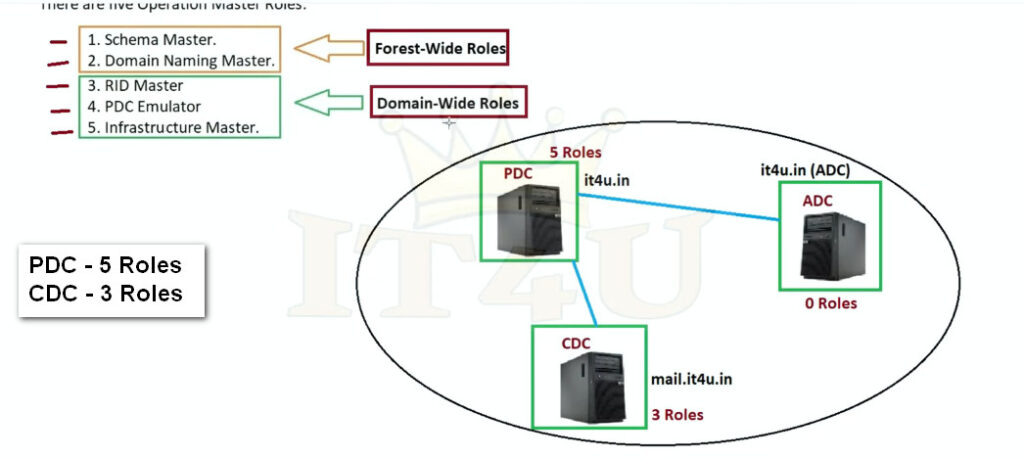
There are five FSMO roles in total, and they are split across three main categories:
- Domain-specific roles (operating at the domain level)
- Forest-specific roles (operating at the forest level)
The Five FSMO Roles:
- Schema Master (Forest-wide)
- Domain Naming Master (Forest-wide)
- Primary Domain Controller (PDC) Emulator (Domain-specific)
- RID Master (Domain-specific)
- Infrastructure Master (Domain-specific)
What is FSMO?
FSMO (which just rolls off the tongue) stands for Flexible Single Master Operation. It is a set of operations or roles in Active Directory (AD) designed to help avoid replication conflicts. To better understand why AD uses FSMO roles, commonly referred to as operation masters, we first need to understand AD’s replication structure.
Active Directory uses what is known as multi-master replication. Essentially, multi-master replication allows directory changes on any domain controller (DC) on a domain. Multi-master replication is great because having multiple DCs that can all write changes removes the risk of a single point of failure and creates redundancy. However, there are some drawbacks, including the risk of replication conflicts.
To help avoid replication disputes, especially for sensitive operations, some AD objects are updated using the single-master model, meaning specific DCs are assigned to be the primary authority of particular AD objects and structures. These designations are the FSMO role holders or operation masters. Once a FSMO role holder has updated an AD object, the changes are replicated to the rest of the DCs.
What are FSMO roles?
There are five FSMO roles, and a single DC can be given a single role, several roles, or all the roles (more on that later). Roles can be transferred to any DC in a domain or forest, preventing a single point of failure, which is where the “Flexible” in FSMO comes from. Additionally, some of these roles are forest-level roles, while others are domain level in scope.
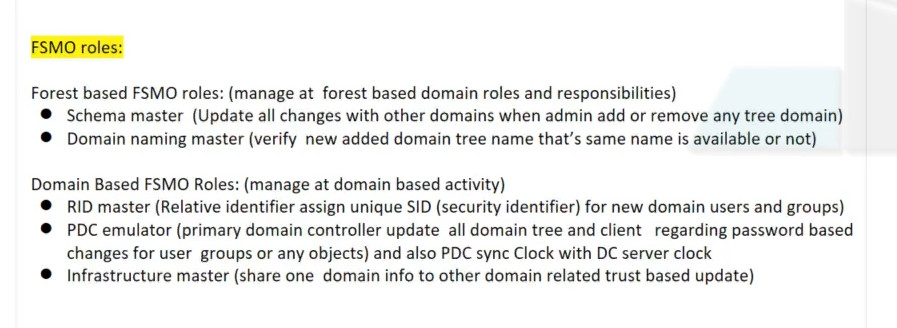
- Schema master (forest)
- Domain naming master (forest)
- RID master (domain)
- PDC emulator (domain)
- Infrastructure master (domain)
A domain has one RID master, one PDC emulator, and one infrastructure master. A forest has one schema master and one domain naming master. If a forest contains multiple domains, each domain has its own RID master, PDC emulator, and infrastructure master. However, the forest always has just one schema master and one domain naming master.
1. Schema master
The schema master role is responsible for updating changes to the directory schema and functions at the forest level.
The schema in Active Directory defines every object class and attribute in an AD forest. Think of the schema as the structure of the AD database. Any update that modifies the Active Directory schema is done via the schema master role.
Changes to the AD schema are pretty infrequent but commonly occur when raising the forest functional level or integrating applications that require a change to the schema, such as Exchange and Microsoft Configuration Manager (formerly known as SCCM). Once the change is made on the primary DC with the schema master role, the change is replicated to the remaining domain controllers.
2. Domain naming master
The domain naming master role is responsible for the forest-wide directory name space. Some responsibilities of this role include adding or removing domains, changing domain names, and adding or removing cross-references to domains. Like the schema master, the domain naming master is a forest-level role.
3. RID master
The relative ID (RID) master is responsible for ensuring each object in a domain is assigned a unique ID. No two objects in a domain can have the same security identifier (SID). The RID master accomplishes this by allocating RID sequences to each domain controller in a domain. When a domain controller has used a portion of its allotted RIDs, it requests more from the RID master domain controller. By default, the RID master assigns RIDs to domain controllers in blocks of 500. Once a domain controller issues half of its RID pool to objects, it requests more RIDs from the RID master.
4. PDC emulator
While each of the Active Directory FSMO roles is important, the primary domain controller (PDC) emulator plays perhaps the most prominent role in day-to-day directory maintenance.
Needless to say, the DC designated with the PDC emulator role has a lot on its plate. With this in mind, it’s vital to ensure this server has plenty of resources and high availability. If the PDC emulator server fails and is offline, this could significantly impact network services. If quickly recovering a failed PDC emulator server is unlikely, it may be worthwhile to seize and transfer the role to another domain controller.
Here are some of the PDC emulator’s domain responsibilities:
Password change authority
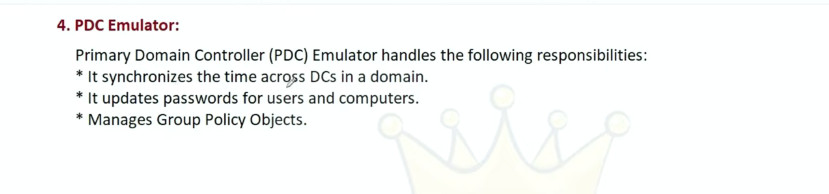
The PDC emulator is responsible for ensuring passwords are updated and properly synchronized throughout a domain. When a password is changed on a domain controller, the change is replicated preferentially to the PDC emulator, ignoring inter-site replication schedules. The change is then routinely replicated across the domain to the rest of the domain controllers. If a user fails to authenticate to a domain controller, the request is routed to the PDC emulator to check for an updated password that may not have been replicated yet. The PDC emulator then accepts or rejects the request.
Account lockouts
Since all failed authentication requests are sent to the PDC emulator, it is responsible for account lockouts. Account lockouts do not follow normal replication, instead requiring urgent replication across multiple domain controllers. This security measure ensures that users who had their accounts locked cannot immediately try to authenticate to a different domain controller that hasn’t received the account change through normal replication.
Time synchronization
Keeping time synced across clients on a network is critically important. Kerberos, the default authentication protocol used by Windows, has a clock synchronization tolerance of five minutes. If a host is out of sync by more than five minutes from the DC it’s authenticating with, the authentication request fails. Clients in a forest synchronize their time upstream to the PDC emulator. The PDC emulator in the parent domain should be configured to sync its clock with an authoritative network time protocol (NTP) server.
- Password change replication
- Account lockout processing
- Time synchronization (NTP server)
- Handles legacy clients
- Group Policy updates priority
- Authentication conflicts resolver
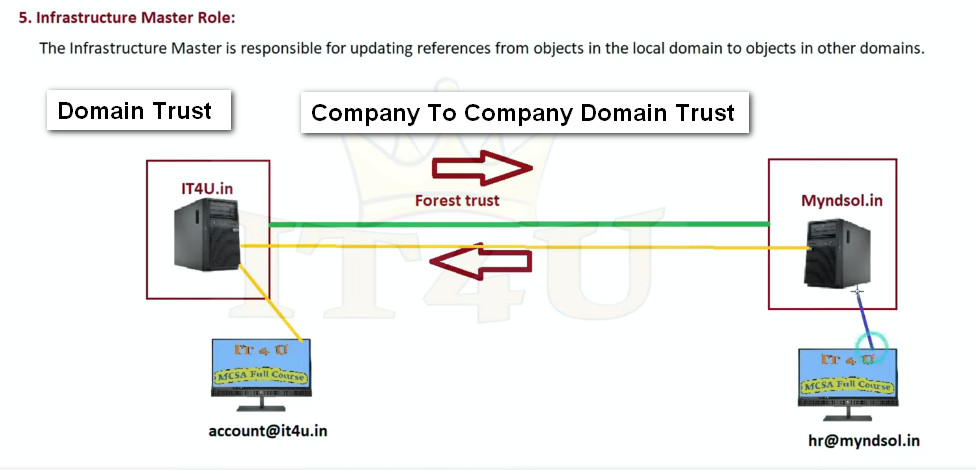
5. Infrastructure master
The infrastructure master FSMO role, along with the PDC emulator and RID master, is another domain-level role. The infrastructure master is responsible for translating cross-domain object references. The infrastructure master role should be held by a DC that is not configured as a global catalog (GC) server. If all servers on the domain are GCs, then it doesn’t matter which server holds the infrastructure master role.


How to identify FSMO role holders with the command line
From the command prompt type “netdom query fsmo” and press “enter”.

Why FSMO Roles are Important
FSMO roles are important because they ensure stability, consistency, and reliability in Microsoft Windows Server environments that use Active Directory Domain Services. Although Active Directory allows multiple Domain Controllers to update data (multi-master model), certain critical operations must be controlled by a single server to avoid conflicts and data corruption. FSMO roles manage tasks such as assigning unique security identifiers (so no two users or computers get the same ID), handling password changes and account lockouts, controlling time synchronization, managing domain creation and deletion, and protecting the Active Directory schema from unauthorized or conflicting modifications. By centralizing these sensitive operations, FSMO roles prevent duplication, resolve authentication issues, maintain accurate directory information across domains, and ensure smooth communication between Domain Controllers. Without FSMO roles, organizations could face problems like duplicate user IDs, login failures, broken trust relationships between domains, and instability in the entire Active Directory structure, making them essential for secure and efficient network administration.
Why FSMO Roles are Important
- Prevent data conflicts
- Maintain security and uniqueness
- Control forest and domain structure
- Ensure stable Active Directory operation
How to Transfer FSMO Roles
Why Should FSMO Roles Be Transferred?
All 5 roles are initially assigned to the first domain controller (DC) created in a forest. If the forest contains multiple domains, the first DC created in each new domain owns all 3 of the domain-wide FSMO roles for that domain.
However, to ensure fault tolerance, many organizations have multiple domain controllers in each domain of the forest. In this case, they do not need to leave all operations master roles assigned to the original FSMO role holder. In fact, Microsoft recommends that FSMO roles be carefully divided, with standby DCs prepared to take over each role.
Furthermore, Microsoft suggests that the 2 forest-wide roles, Domain Naming Master and Schema Master, should be on the same DC. In a given domain, the PDC Emulator and RID Master roles should be on the same DC.
Below are some other common reasons for transferring FSMO roles to another DC:
- The operating system of a DC is being upgraded.
- The IP address of the DC is changing.
- A domain controller is being demoted.
- You are removing a DC from service for maintenance.
It is a best practice to fully document when, where and why FSMO roles are transferred.
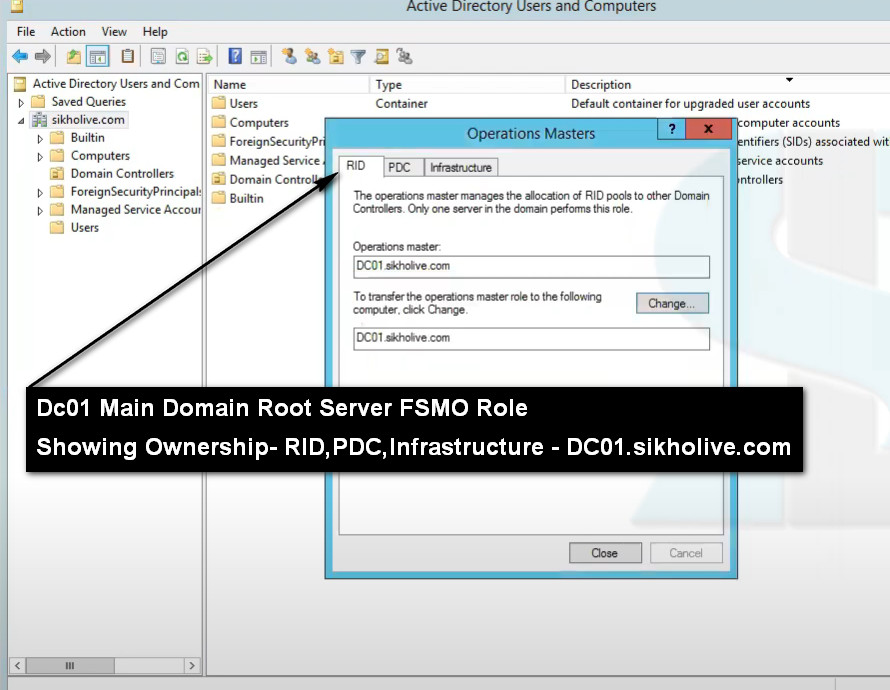
1.Transferring the RID Master, Infrastructure Master or PDC Emulator Role
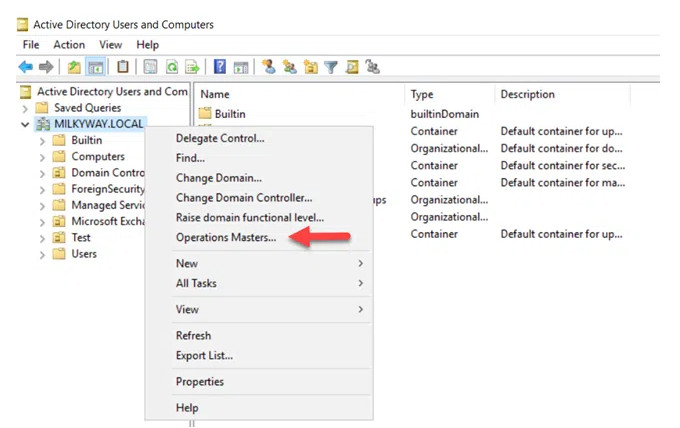
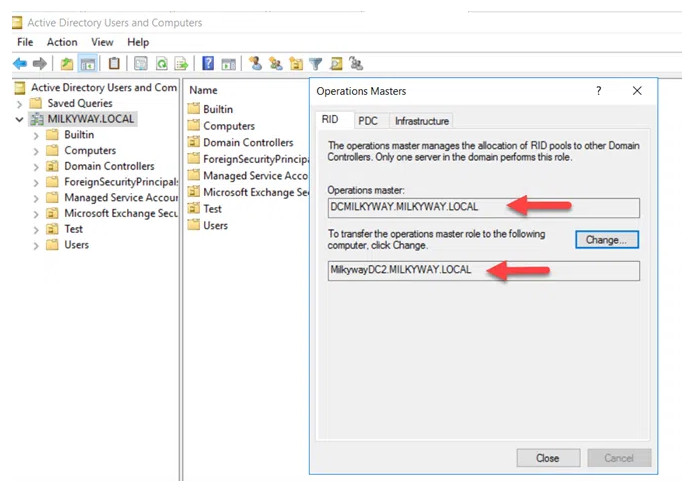
To proceed with the role transfer, click the Change button. Then click Yes to confirm the action, as shown below.

2.Transferring the Domain Naming Master Role
Right-click on the Active Directory Domains and Trusts node and choose Operations Masters
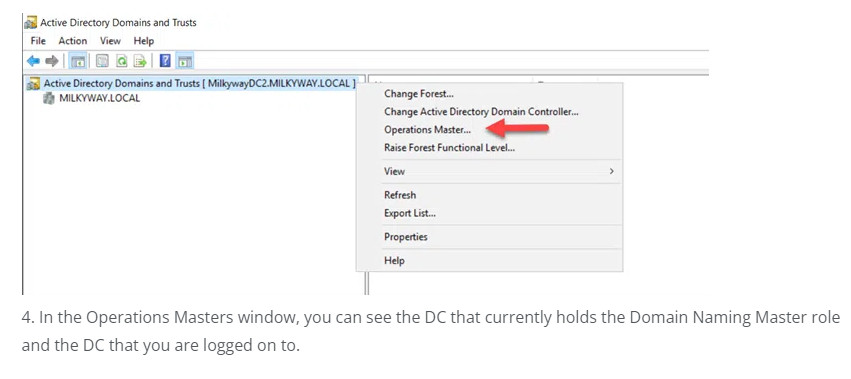
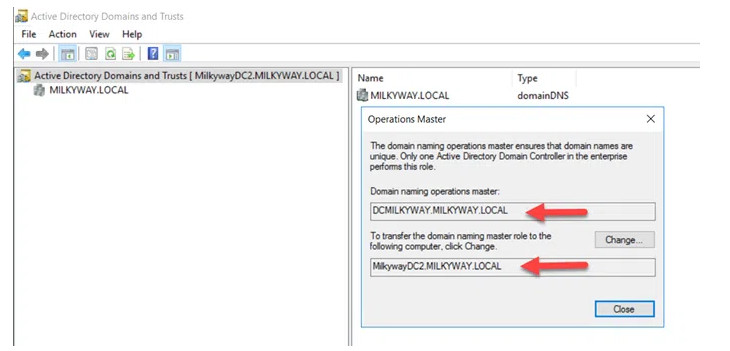
To transfer the role from the current DC to the target DC, click the Change button. When asked to confirm the action, click Yes.
3.Transferring the Schema Master Role
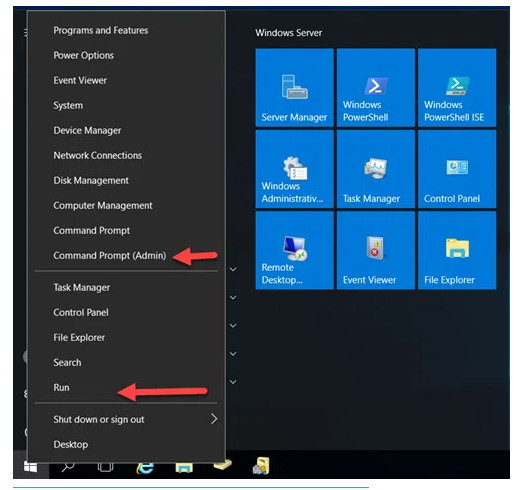
To open the command prompt window, do one of the following:
- Right-click on the Start button and click Command Prompt Admin.
- Click RUN, type CMD and click OK.
Type regsvr32 schmmgmt.dll and press Enter. You will receive a confirmation message that the command succeeded.
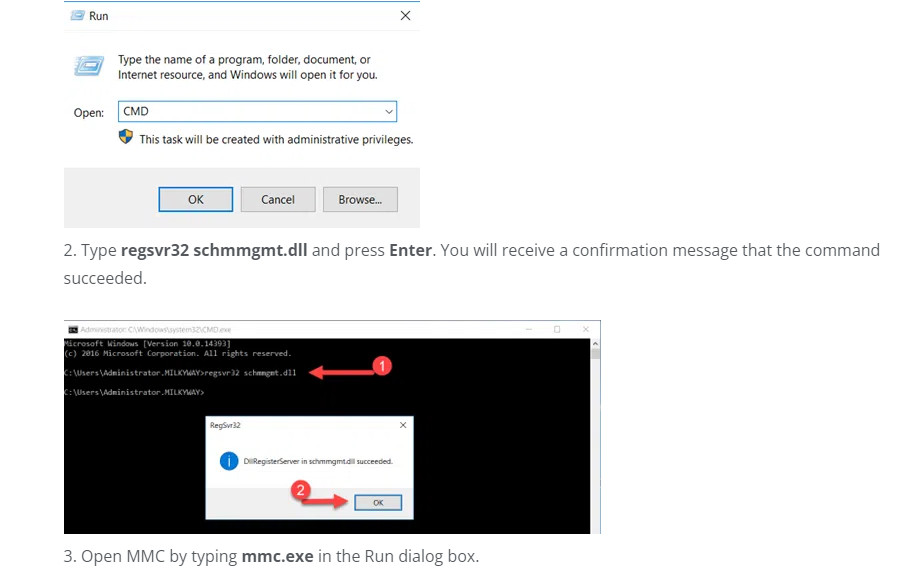
Open MMC by typing mmc.exe in the Run dialog box.
1. Next, we need to add the Active Directory Schema snap-in. Click File and then choose Add/Remove Snap-In.
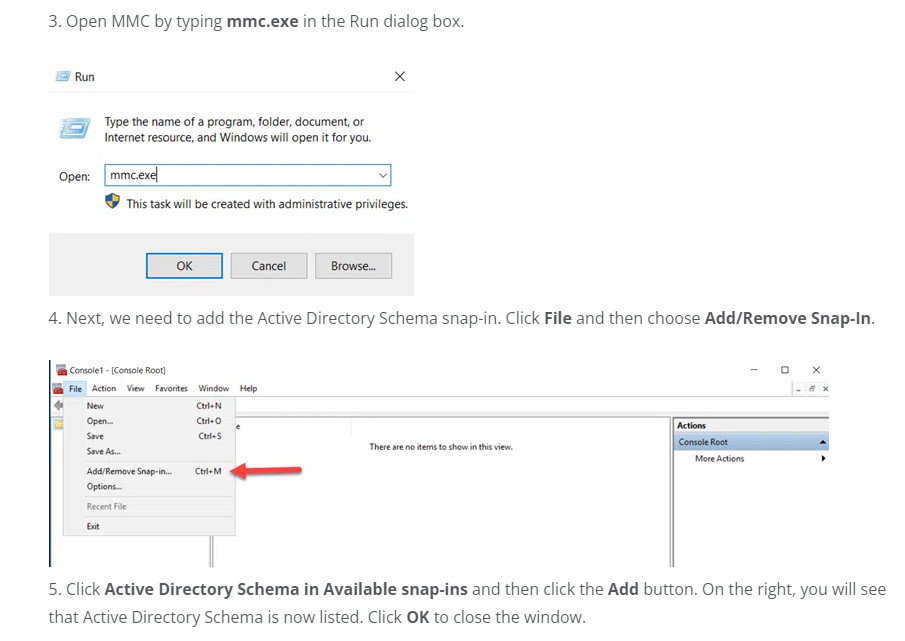
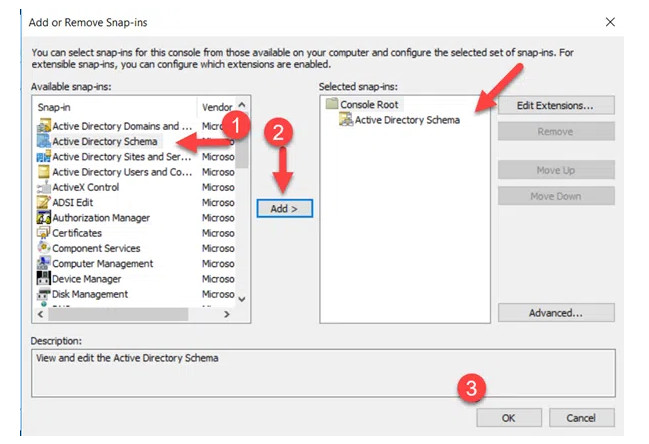
2. Click Active Directory Schema in Available snap-ins and then click the Add button. On the right, you will see that Active Directory Schema is now listed. Click OK to close the window.
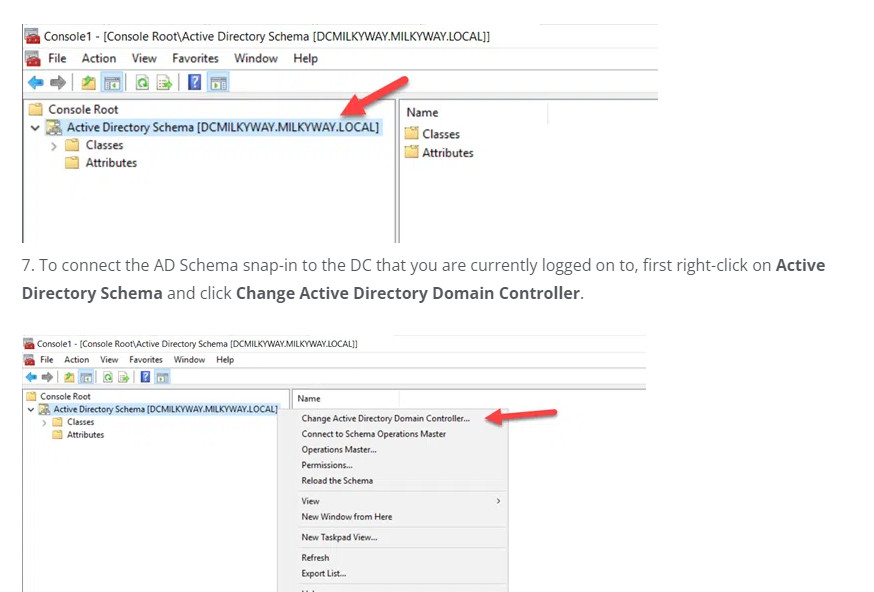
3.The Active Directory Schema snap-in is not connected to the DC that currently holds the Schema Master role — but that isn’t the DC we want to transfer the role to.
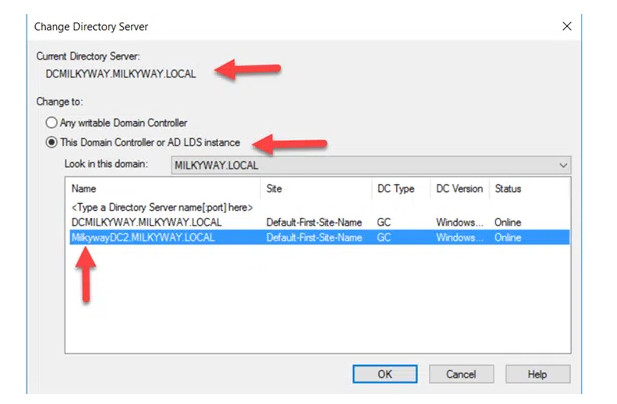
4. Select the This Domain Controller or AD LDS instance radio button and choose the correct DC. Click OK to close the window.
5. When the following warning message appears, click OK.

6. Right-click on Active Directory Schema and select Operations Master.
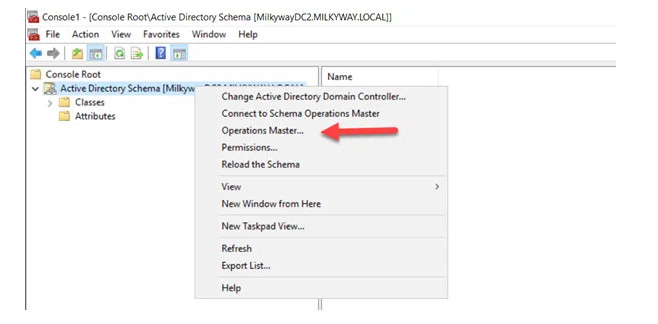
7.You will see the DC that currently holds the Schema Master role and, below it, the DC you are logged on to. To initiate the role transfer, click Change.
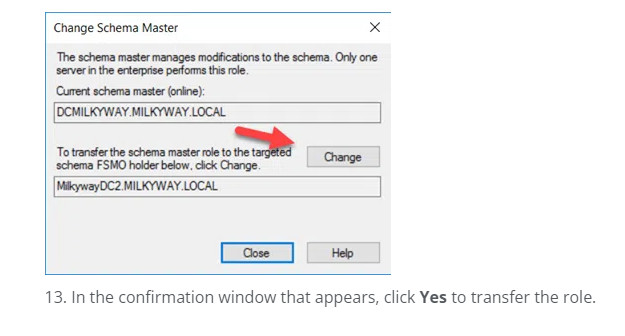
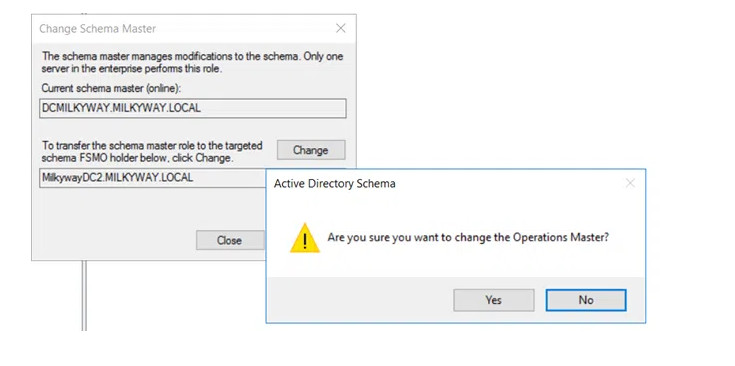
8. In the confirmation window that appears, click Yes to transfer the role.
Transfer FSMO Roles using ntdsutil.exe Commnd Line
1.Click Start and type Run. In the Run dialog box, type ntdsutil and click OK
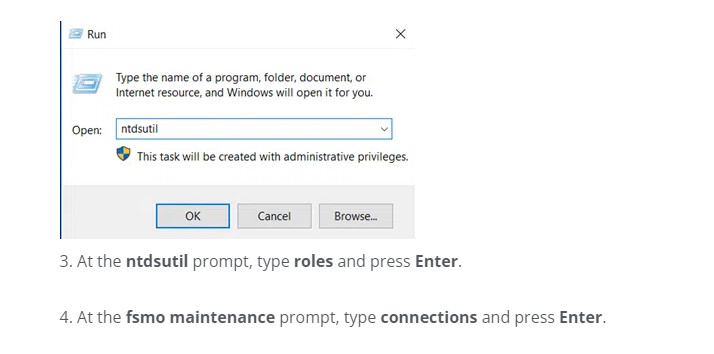
2. At the ntdsutil prompt, type roles and press Enter.
3. At the fsmo maintenance prompt, type connections and press Enter
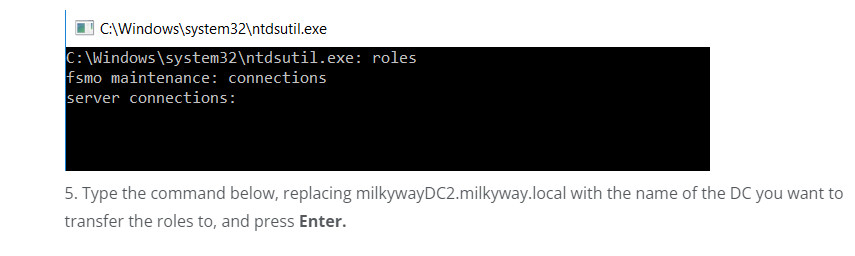
4.Type the command below, replacing milkywayDC2.milkyway.local with the name of the DC you want to transfer the roles to, and press Enter.
connect to server milkywayDC2.milkyway.local
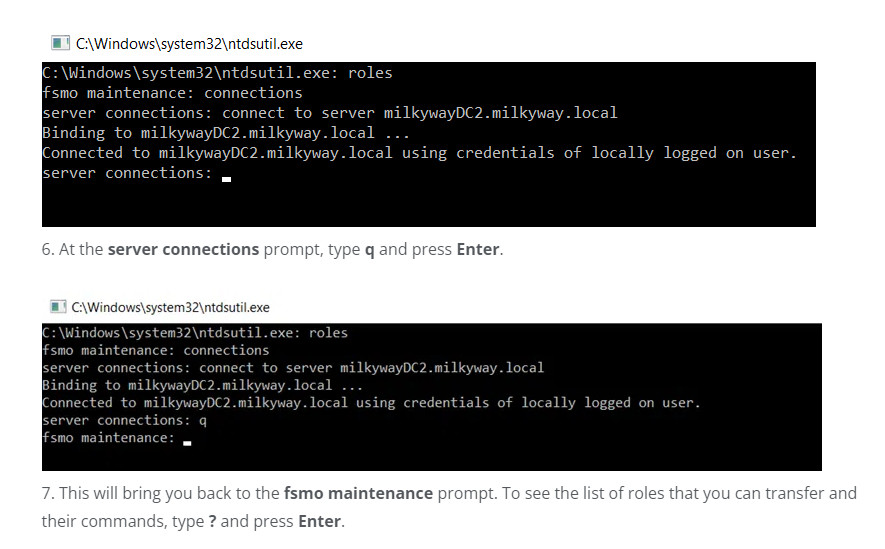
8. To transfer a role, type the corresponding command from the list below and press Enter.
					Transfer domain naming master
Transfer infrastructure master
Transfer PDC
Transfer RID master
Transfer schema master
