
What is Firewall
Introduction of Firewall in Computer Network
A firewall is a network security device, either hardware or software-based, which monitors all incoming and outgoing traffic and, based on a defined set of security rules, accepts, rejects, or drops that specific traffic. It acts like a security guard that helps keep your digital world safe from unwanted visitors and potential threats.

- Accept: allow the traffic
- Reject: block the traffic but reply with an “unreachable error”
- Drop: block the traffic with no reply
Need For a Firewall
A firewall is essential because networks are constantly exposed to both safe and harmful traffic from the internet or other networks. Without a firewall, your systems would have no protection against unwanted access, malicious activity, or accidental data leaks.
1. Preventing Unauthorized Access
Imagine your house door is always open. Anyone passing by could walk in and take your things.
A firewall is like a locked door with a guard, letting only trusted people in and keeping strangers out.
2. Blocking Malicious Traffic
Think of your email inbox. Without a spam filter, you’d get flooded with scam and spam messages. A firewall works like that spam filter it blocks harmful data before it reaches you.
3. Protecting Sensitive Information
It’s like keeping your bank PIN in a safe instead of leaving it on the table where anyone can see it. A firewall ensures your personal and business data stays hidden from cybercriminals.
4. Preventing Cyber Attacks
If you leave your car unlocked in a parking lot, thieves can steal it. A firewall locks your network so attackers can’t hijack it.
5. Controlling Network Usage
Just like parents set parental controls so kids can’t visit unsafe websites, Firewalls control where your computers are allowed to connect.
Working of Firewall
Here’s a clear explanation of the working of a firewall, including its types and flow

A firewall works like a security guard for your network, standing between your internal systems such as computers, servers, and devices and the outside world, like the internet or other networks. It carefully inspects all data entering or leaving to ensure only safe traffic is allowed through.
- When data tries to enter or leave your network, it passes through the firewall first.
- The firewall examines the data packets (small chunks of information) using predefined rules.
- Rules can be defined on the firewall based on the necessity and security policies of the organization.
- FIrewall allows decision making like Allow → If the packet matches safe rules. or Block → If the packet is suspicious, from a blacklisted source, or contains malicious code.
- The firewall records blocked or unusual traffic for security teams to review.
- Alerts can be sent in real time if a major threat is detected.
Default policy: It is very difficult to explicitly cover every possible rule on the firewall. For this reason, the firewall must always have a default policy. Default policy only consists of action (accept, reject or drop). Suppose no rule is defined about SSH connection to the server on the firewall. So, it will follow the default policy. If default policy on the firewall is set to accept, then any computer outside of your office can establish an SSH connection to the server. Therefore, setting default policy as drop (or reject) is always a good practice.
Types of Firewall
Firewalls can be categorized based on their generation.

1 Network Placement
- Packet Filtering Firewall
- Stateful Inspection Firewall
- Proxy Firewall (Application Level)
- Circuit-Level Gateway
- Web Application Firewall (WAF)
- Next-Generation Firewall (NGFW)
2 Systems Protected
- Network Firewall
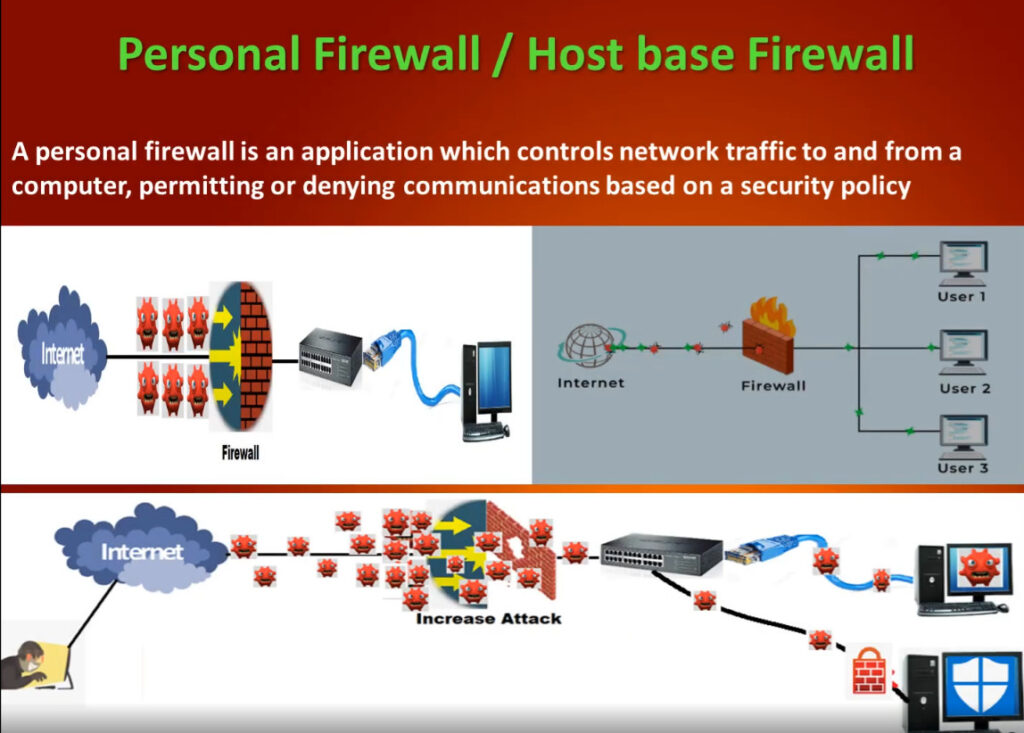
- Host-Based Firewall
3 Data Filtering Method
- Perimeter Firewall
- Internal Firewall
- Distributed Firewall
4 Form Factors
- Hardware Firewall
- Software Firewall
Importance of Firewalls
A network firewall is your first line of defense in cybersecurity. It monitors, filters, and controls data moving in and out of your network
- Networks are vulnerable to any traffic trying to access your systems, whether it’s harmful or not. That’s why it’s crucial to check all network traffic.
- When you connect personal computers to other IT systems or the internet, it opens up many benefits like collaboration, resource sharing, and creativity. But it also exposes your network and devices to risks like hacking, identity theft, malware, and online fraud.
- Once a malicious person finds your network, they can easily access and threaten it, especially with constant internet connections.
- Using a firewall is essential for proactive protection against these risks. It helps users shield their networks from the worst dangers.
History of Firewalls
Firewalls evolved from simple packet filtering to advanced, user-friendly security systems used worldwide.

- Late 1980s: Jeff Mogul, Brian Reid, and Paul Vixie at Digital Equipment Corp (DEC) developed packet-filtering technology, laying the groundwork for firewalls by checking external connections before they reached internal networks.
- Late 1980s – Early 1990s: AT&T Bell Labs researchers, including Presotto, Sharma, and Nigam, developed the circuit-level gateway, a firewall that vetted ongoing connections without reauthorizing each data packet, paving the way for more efficient security.
- 1991-1992: Marcus Ranum introduced security proxies at DEC, leading to the creation of the Secure External Access Link (SEAL), the first commercially available application-layer firewall, based on earlier DEC work.
- 1993-1994: At Check Point, Gil Shwed pioneered stateful inspection technology, filing a patent in 1993. Nir Zuk developed a graphical interface for Firewall-1, making firewalls accessible and widely adopted by businesses and homes
What Does Firewall Security Do?
A firewall serves as a security barrier for a network, narrowing the attack surface to a single point of contact. Instead of every device on a network being exposed to the internet, all traffic must first go through the firewall. This way, the firewall can filter and block non-permitted traffic, whether it’s coming in or going out. Additionally, firewalls help create a record of attempted connections, improving security awareness.
Firewalls regulate both inbound and outbound traffic, protecting the network from:
- External threats such as viruses, phishing emails, denial-of-service (DoS) attacks, and backdoors. Firewalls filter incoming traffic flows, preventing unauthorized access to sensitive data and thwarting potential malware infections.
- Insider threats like known bad actors or risky applications. A firewall can enforce rules and policies to restrict certain types of outgoing traffic, which helps identify suspicious activity and mitigate data exfiltration.
What Can Firewalls Protect Against?
Firewalls can protect against a variety of threats by monitoring and controlling incoming and outgoing network traffic. Here are the main things they help defend against:
- Infiltration by Malicious Actors: Firewalls can block suspicious connections, preventing eavesdropping and advanced persistent threats (APTs).
- Parental Controls: Parents can use firewalls to block their children from accessing explicit web content.
- Workplace Web Browsing Restrictions: Employers can restrict employees from using the company network to access certain services and websites, like social media.
- Nationally Controlled Intranet: Governments can block access to certain web content and services that conflict with national policies or values.
Types of Firewall Rules
Firewall rules are defined based on the direction that traffic is traveling. The two types include:
Inbound Rules: Inbound rules are applied to incoming traffic attempting to enter the protected network. Typically, organizations deny inbound traffic by default and then define exceptions for permitted types of traffic. For example, many organizations permit HTTPS and DNS traffic to enter their networks to support employees’ web browsing.
Outbound Rules: Outbound rules specify the types of outgoing traffic permitted to leave the network and often default to allowing traffic out. Organizations then specify the types of traffic that should not be permitted to leave. For example, blocking ICMP traffic at the private network perimeter can help protect against network scanning and information leaks due to error messages.
Components of Firewall Rules
Firewall rules can identify permitted or denied traffic based on a few different features, including:
- Source IP Address: The source IP address identifies the origin of the traffic. An organization may block traffic from certain known-bad IP addresses or IP ranges. Alternatively, particular computers or services may be only accessible from allowlisted IP addresses.
- Destination IP Address: The destination IP address specifies where the traffic is going. For example, a company may specify that users can’t browse to certain domains that are known to be malicious or in violation of corporate policies.
- Protocol Type: Firewall rules may also specify whether the traffic uses the Transmission Control Protocol (TCP), User Datagram Protocol (UDP), or Internet Control Message Protocol (ICMP). For example, organizations commonly block ICMP traffic at the network perimeter.
- Port Range: TCP/UDP ports are used to specify which application is listening for network traffic, and firewall rules use these ports to specify the types of application traffic allowed to enter or leave the network. For example, a firewall rule allowing inbound HTTPS traffic would specify that TCP traffic to port 443 should be permitted to enter the network.
Why use a firewall
The primary use case for a firewall is security. Firewalls can intercept incoming malicious traffic before it reaches the network, as well as prevent sensitive information from leaving the network.
Firewalls can also be used for content filtering. For example, a school can configure a firewall to prevent users on their network from accessing adult material. Similarly, in some nations the government runs a firewall that can prevent people inside that nation-state from accessing certain parts of the Internet.
Network Firewall Features
Access Control
Network firewalls enforce access privileges, a fundamental aspect of maintaining a secure network environment. By adopting a ‘deny by default’ approach, modern network firewalls typically align with Zero Trust security models that assume no traffic is trusted, which significantly reduces risk.
Data Protection
Data protection limits access to sensitive information. They prevent unauthorized entities from reaching critical data, safeguarding confidential information such as financial records and personal data against unauthorized disclosure.
Traffic Monitoring
Traffic monitoring is another fundamental feature of network firewalls. By monitoring data transfers, network firewalls can identify and neutralize risks, allowing network administrators to adjust security settings in response to observed traffic patterns.
Intrusion Prevention System (IPS)
The role of firewalls in preventing system hijacking is critical. They serve as a deterrent to cybercriminals by blocking access to network resources.
Threat Prevention
Network firewalls act as a crucial line of defense against malware, spyware, adware, etc. As technological complexity increases, so do the potential entry points for these threats, which network firewalls help to seal off.
History of Firewalls
Firewalls have existed since the late 1980’s and started out as packet filters, which were networks set up to examine packets, or bytes, transferred between computers. Though packet filtering firewalls are still in use today, firewalls have come a long way as technology has developed throughout the decades.
- Gen 1 Virus
- Generation 1, Late 1980’s, virus attacks on stand-alone PC’s affected all businesses and drove anti-virus products.
- Gen 2 Networks
- Generation 2, Mid 1990’s, attacks from the internet affected all business and drove creation of the firewall.
- Gen 3 Applications
- Generation 3, Early 2000’s, exploiting vulnerabilities in applications which affected most businesses and drove Intrusion Prevention Systems Products (IPS).
- Gen 4 Payload
- Generation 4, Approx. 2010, rise of targeted, unknown, evasive, polymorphic attacks which affected most businesses and drove anti-bot and sandboxing products.
- Gen 5 Mega
- Generation 5, Approx. 2017, large scale, multi-vector, mega attacks using advance attack tools and is driving advance threat prevention solutions.
Back in 1993, Check Point CEO Gil Shwed introduced the first stateful inspection firewall, FireWall-1. Fast forward twenty-seven years, and a firewall is still an organization’s first line of defense against cyber attacks. Today’s firewalls, including Next Generation Firewalls and Network Firewalls support a wide variety of functions and capabilities with built-in features, including:
The Firewalls Evolution
Early Development: Packet-Filtering Firewalls
The first generation of firewalls, introduced in the late 1980s, employed simple packet filtering. These tools examined data packets at the network layer (OSI Layer 3), and filtered the packets that a network responds to through parameters such as IP addresses, ports, and protocols. However, their lack of contextual awareness and overwhelming focus on individual packets made them vulnerable to complex attacks like IP fragmentation.
The Emergence of Stateful Inspection
The 1990s saw the advent of stateful inspection firewalls, pioneered by Check Point. These second-generation firewalls continuously monitored the state of connections, ensuring that packets were part of an established session. This enhancement significantly bolstered security.
Application Layer and Proxy Firewalls
Application layer firewalls and proxy firewalls emerged around the same time. The former operated at Layer 7, able to analyze and apply application-specific data and rulesets. They were also highly secure – boasting the ability to completely separate traffic requests from the underlying network architecture – but early models suffered from limited processing power and bad latency.
Unified Threat Management (UTM) and Next-Generation Firewalls (NGFW)
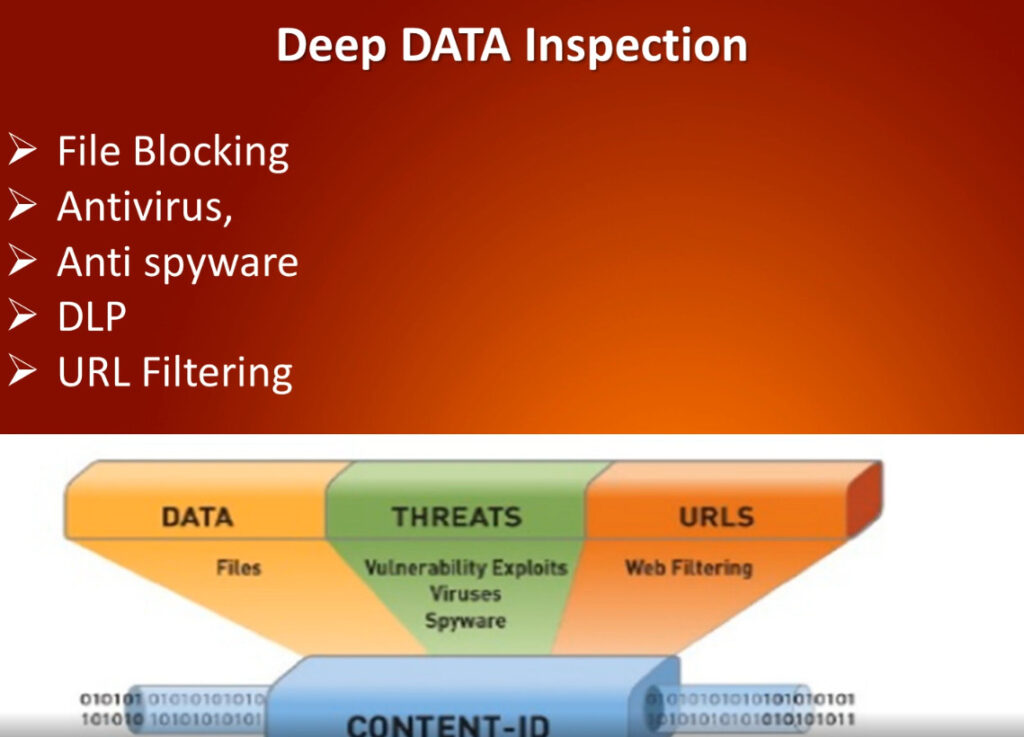
The 2010s saw the advent of UTM systems, which sought to combine a firewall’s reactivity with the extra data points from antivirus, intrusion detection, and other enterprise security systems. NGFWs were able to push these integration capabilities by adding deep packet inspection, advanced threat protection, and application-level filtering.
Modern Adaptations: Cloud and AI
Today, firewalls have adapted to cloud environments and containerized applications, giving rise to Firewall-as-a-Service (FWaaS). Building upon the foundation of cross-environment data, AI and machine learning are increasingly being deployed for their superior anomaly detection, predictive threat analysis, and adaptive policy enforcement.
From static filters to intelligent, context-aware systems, firewalls have continuously evolved to meet the demands of an ever-changing threat landscape. Let’s delve into all the features that make today’s firewalls so critical.
The Different Types of Firewalls
Packet filtering
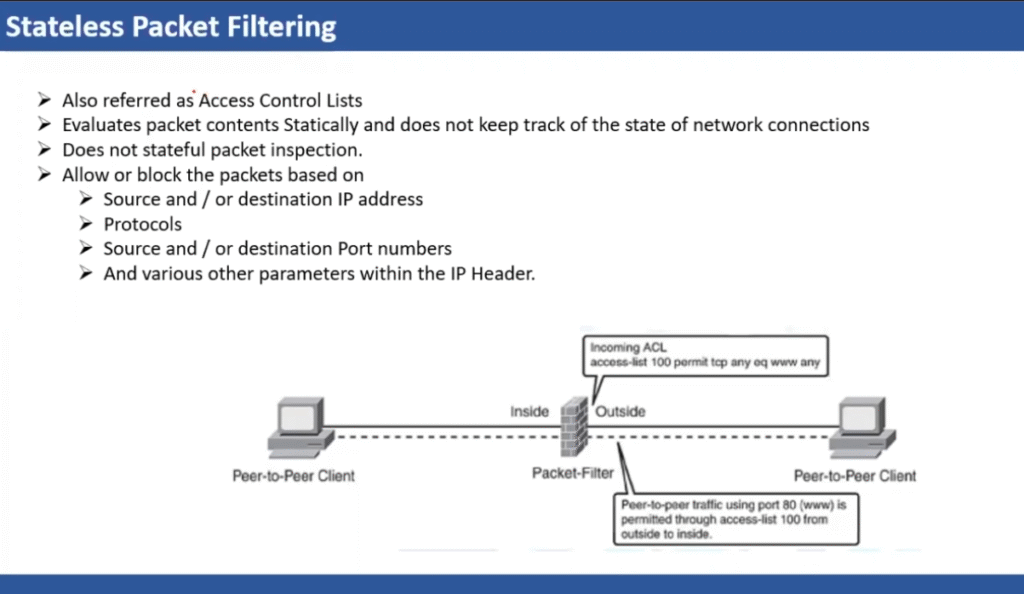
Packet filtering is a network security technique used in firewalls to control data flow between networks. It evaluates the headers of incoming and outgoing traffic against a set of predefined rules, and then decides whether to allow or block them.
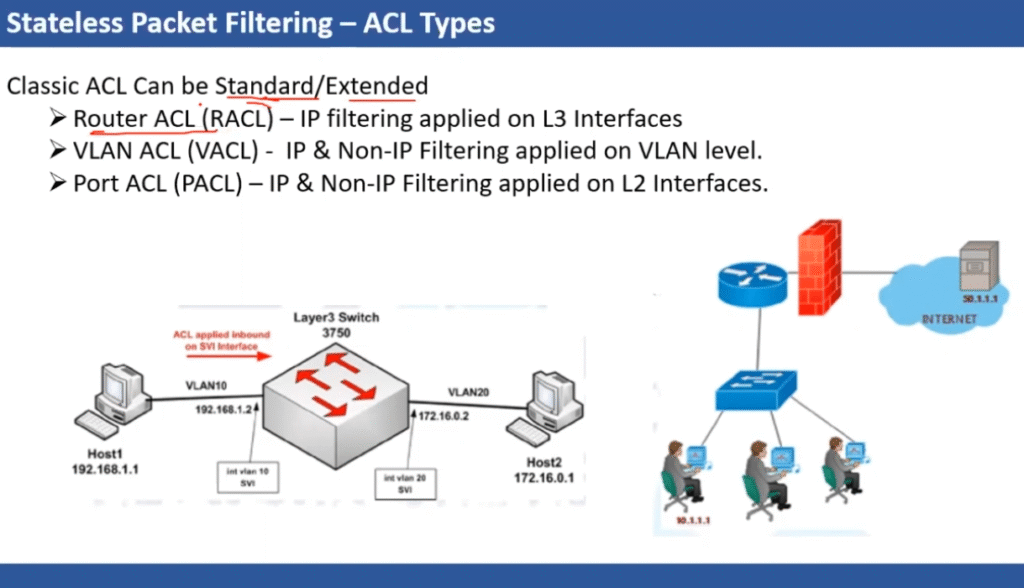
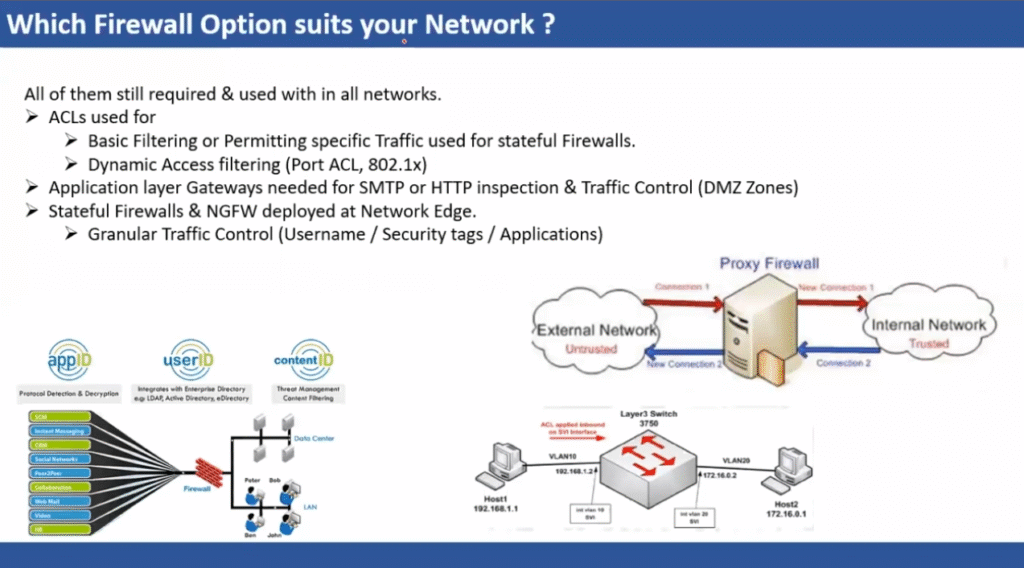
Firewall rules are precise directives that form a critical part of firewall configurations. They define the conditions under which traffic is permitted or blocked based on parameters such as source and destination IP addresses, ports, and communication protocols. In enterprise environments, these individual rules are nested together to form Access Control Lists (ACLs). When processing traffic, the firewall evaluates each packet against the ACL rules in sequential order. Once a packet matches a rule, the firewall enforces the corresponding action—such as allowing, denying, or rejecting the traffic—without further evaluation of subsequent rules. This structured and methodical approach ensures that network access is tightly controlled and consistent.
Proxy service
Since firewalls are happy to sit at the edge of a network, a proxy firewall is naturally well-suited to acting as a single point of entry: in doing so, they’re able to assess the validity of each connection. Proxy-service firewalls completely separate the internal and external, by terminating the client connection at the firewall, analyzing the request, and then establishing a new connection with the internal server.
Stateful Inspection
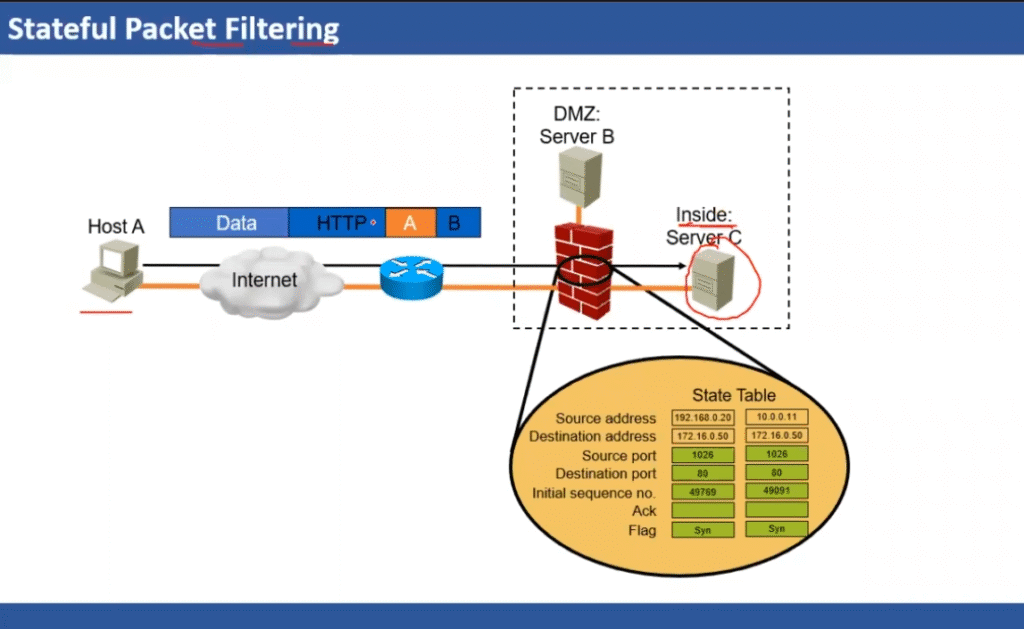
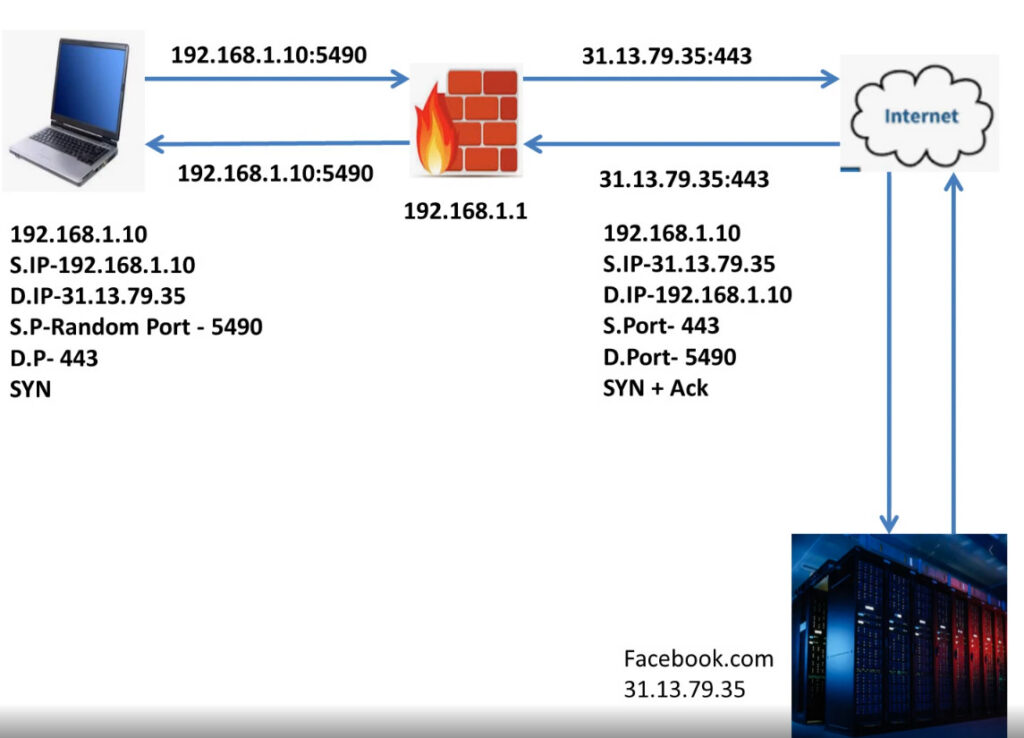
Stateful packet inspection analyzes the contents of a data packet and compares them to information about packets that have already traversed the firewall.
Stateless inspection analyzes each packet in isolation: stateful inspection, on the other hand, pulls in previous device and connection data to further understand network traffic requests. This is more akin to viewing network data as a continuous stream. By maintaining a list of active connections, and evaluating each from a more macroscopic perspective, stateful firewalls are able to assign network behavior to long-term user and device profiles.
Web Application Firewall
A Web Application Firewall (WAF) wraps around a specific application and examines the HTTP requests being sent to it. Similar to other types of firewall, it then applies predefined rules to detect and block malicious traffic. The components being scrutinized include headers, query strings, and the body of HTTP requests – all of which contribute to signs of malicious activity. When a threat is identified, the WAF blocks the suspicious request and notifies the security team.
AI-Powered Firewall
Firewalls are essentially powerful analytical engines: they’re perfectly suited for the implementation of machine learning algorithms. Because ML algorithms are able to ingest and analyze far greater amounts of data far faster than their manual counterparts, AI-powered firewalls have consistently been able to outperform their older counterparts when handling novel (zero day) threats.
One of the more common implementations of AI within firewalls, for instance, is User and Endpoint Behavioural Analysis (UEBA). This ingests the historical data from entire networks, and establishes how every user and endpoint typically interacts with it – what resources they use, when they access them, etc.
High Availability Firewalls and Hyperscale, Resilient Load-Sharing Clusters
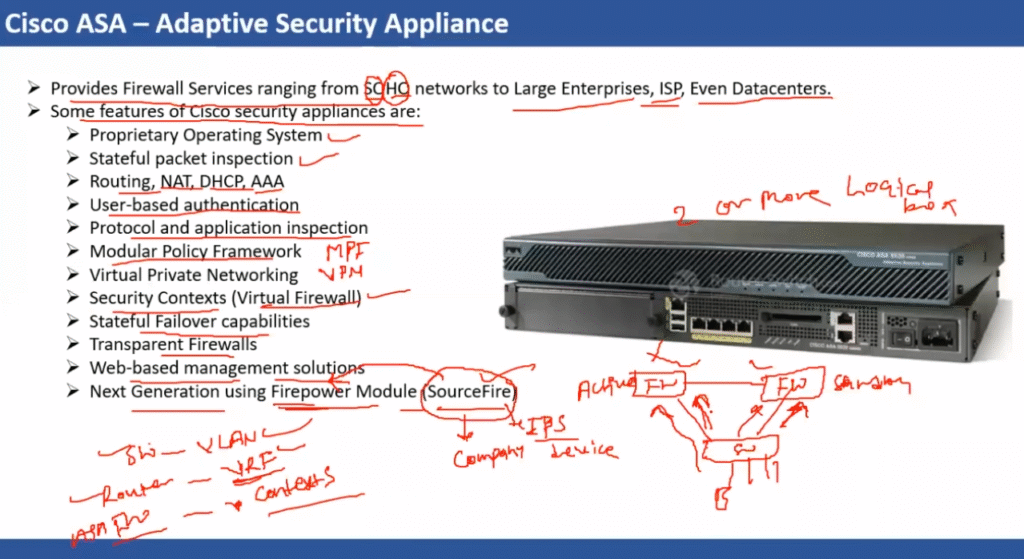
A high availability (HA) firewall is designed to maintain network protection even in the event of firewall failure. This is achieved via redundancy, in the form of HA clustering: multiple firewall peers working together to deliver uninterrupted protection. In the event of device failure, the system automatically transitions to a peer device, therefore maintaining seamless network security. Above and beyond traditional ‘high availability’ designs, many organizations now need hyper scalable and telco-class resilient firewall systems to assure 99.99999%+ uptime and up to 1,000 Gbps of network throughput with full threat prevention. An intelligent load-sharing firewall design distributes network traffic across a firewall cluster. It can also automatically reallocate additional firewall resources to critical applications during unexpected peak traffic conditions or other predefined triggers, and then reassign those firewall resources back to their original group after conditions are back to normal. This optimizes performance and prevents any single device from becoming overwhelmed, and assures maximum network performance under all conditions.
Virtual Firewall
Firewalls were traditionally hardware-exclusive, as they needed the heavy CPU power to manually flick through every rule in the ACL. Now, however, that processing power can essentially be outsourced thanks to firewall virtualization. Virtual systems support internal segmentation: where one tool can be used to set up and monitor multiple segmented firewalls, allowing sub-firewalls to have their own security policies and configurations.
Virtual firewalls offer many advantages: multi-tenancy environments, for instance, benefit from this segmentation. It also allows for larger organizations to implement network segmentation in a more streamlined way, through one central tool. Other than that, virtual firewalls can offer all the same capabilities as their hardware-based counterparts.
Cloud Firewall
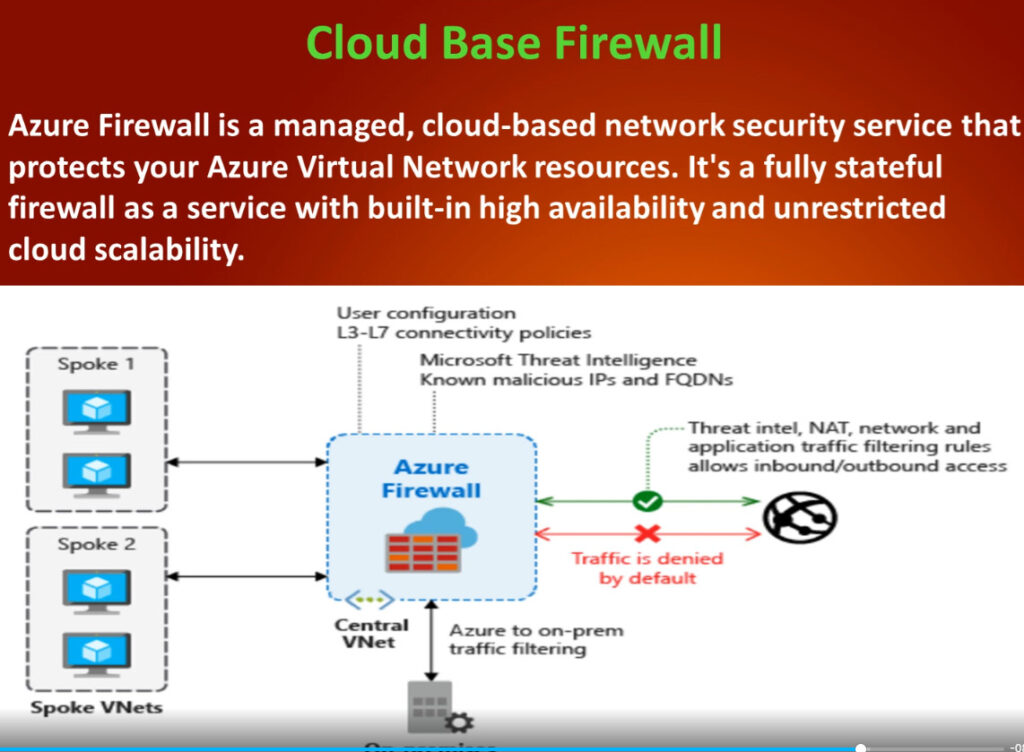
It’s common to see people conflate virtualized firewalls with cloud firewalls, but there is a distinction: whereas virtual describes the underlying architecture, cloud firewalls refer to the enterprise assets they are protecting. Cloud firewalls are those used to protect organizations’ public and private cloud-based networks.
NGFW vs Traditional Firewall
Traditional firewalls and NGFWs are both designed to identify and block malicious or unwanted traffic from crossing network boundaries. However, they do so at different levels of the TCP/IP network protocol stack.
Traditional firewalls operate primarily at the TCP and IP levels of the protocol stack. By inspecting the IP addresses and port numbers of inbound and outbound packets, they limit the types of traffic that enter and leave the protected network. However, their lack of visibility into the content of network packets leaves them blind to many modern threats.
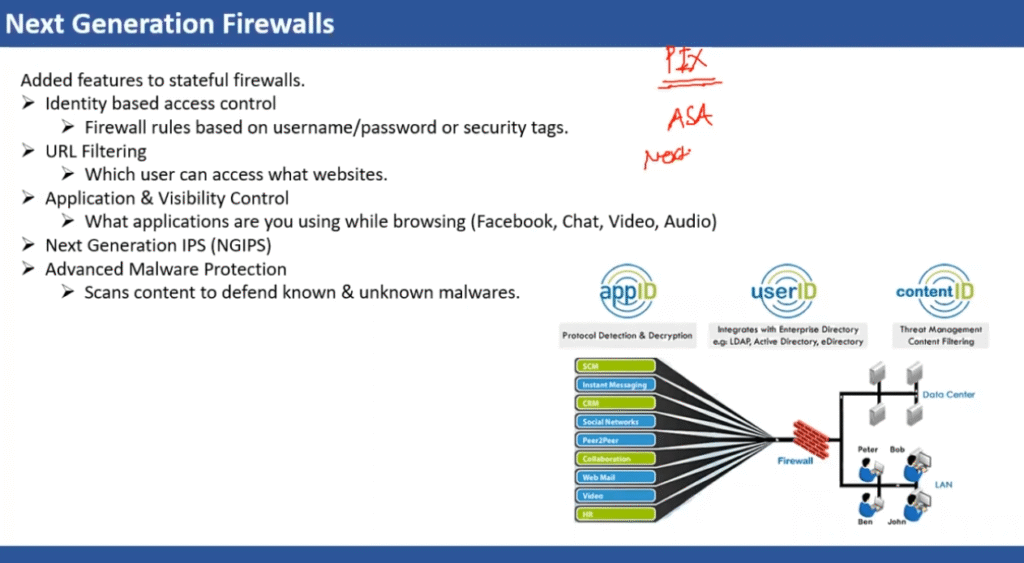
NGFWs, on the other hand, operate at the application layer of the protocol stack. With an understanding of application traffic and the ability to decrypt encrypted traffic streams, they can identify and control that application traffic and in addtion, block a greater range of threats.
NGFWs also incorporate user and machine identity into the security policy vs. a traditional IP and services port based firewall policy. This better captures business intent and provides more visibility into traffic patterns within an organization.
NGFW Capabilities
As the very foundation of a corporate network security strategy, NGFWs are responsible for protecting the corporate network against inbound threats and enforcing network segmentation, which is a cornerstone of an effective zero-trust security strategy.
To achieve these goals, a modern NGFW must include the following core features:
- Application and User Control: A NGFW has visibility into application-layer network traffic and various users on the network. This allows the NGFW to enforce granular, zero-trust access controls.
- Encrypted Traffic Inspection: NGFWs support the decryption and inspection of HTTPS encrypted tunnels. This enables them to overcome the use of encryption to hide malware delivery and command and control traffic.
- Integrated IPS: An integrated IPS is one of the core features that differentiate an NGFW from traditional firewalls. An IPS dramatically expands an NGFW’s ability to identify and block network-based exploits that target vulnerable applications and systems.
- Advanced Malware Detection: Modern malware is crafted to avoid signature-based detection schemes. NGFWs incorporate advanced malware detection capabilities, including the use of sandbox analysis to examine malicious and suspicious files.
- Threat Intelligence Feeds: Threat intelligence feeds provide insight into new and evolving cyberattack campaigns. Integrating threat intelligence enables NGFWs to leverage indicators of compromise (IoCs) to identify and block new attacks.
What are next generation firewall features
Next generation firewalls have more sophisticated features than a traditional, or legacy, network firewall. Here are some common next generation firewall features:
- Deep packet inspection — Network firewalls examine data within the four TCP/IP communication layers (from highest to lowest): application, transport, IP/network, and hardware/data link. Next gen firewalls can inspect traffic at higher order TCIP/IP communication layers, including the application layer. This provides next generation firewalls with application awareness, e.g., context about which application traffic is transiting to and from, and baselines of expected user and application behavior against which to compare transit patterns.
- Intrusion detection and intrusion prevention — Inspecting traffic at higher order TCIP/IP layers enhances next gen firewalls’ ability to detect and prevent cyberattacks. Nextgen firewalls can monitor for potentially malicious activity based on specific behavior signatures or anomalies and then block suspicious traffic from the network. These capabilities are referred to as intrusion detection services (IDS) and intrusion prevention services (IPS).
- Distributed denial of service protection — Denial of service (DoS) attacks are malicious attempts to shut down a service by intentionally flooding the service with illegitimate requests, rendering the service unable to respond to legitimate requests from users. Distributed DoS (DDoS) attacks use multiple computers to generate the flood of illegitimate requests. Next gen firewalls are better able to detect and prevent these sorts of attacks than traditional firewalls because next gen firewalls are stateful. Statefulness enables the firewall to check more characteristics of connection requests against those of established connections, which aids in the detection of illegitimate requests, even when they may be formed differently or coming from different computers.
Capability | Traditional firewall | Next generation firewall | Advantages of next generation firewall |
Inspection | Stateless | Stateful | Blocks traffic that deviates from expected norm compared to established connections |
Visibility | Rudimentary, only lower TCP/IP layers | Deep, includes all TCP/IP layers | Enables more granular and robust analysis of traffic |
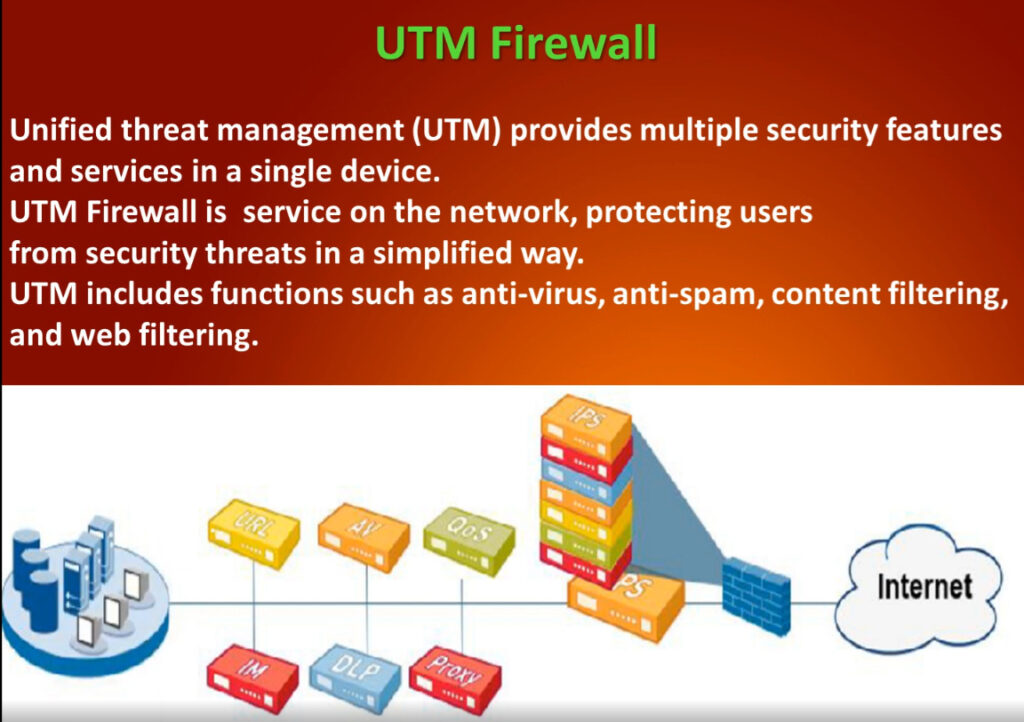
Services | Basic | Comprehensive | Includes UTM services such as antivirus, content filtering, IDS/IPS, and logging in addition to packet filtering |
Protection | Limited | Enhanced | Identifies, prevents, and reports a broader variety of attacks |
What’s the difference between next gen firewalls and unified threat management
Unified threat management (UTM) comprises security services like malware (antivirus, phishing, trojans, spyware, etc.)detection and mitigation and web content filtering (restricting user access to specific kinds of content or websites). Next generation firewalls combine UTM services with firewall capabilities to deliver comprehensive protection via a single platform.















What is the Purpose of a Firewall in a Computer Network?
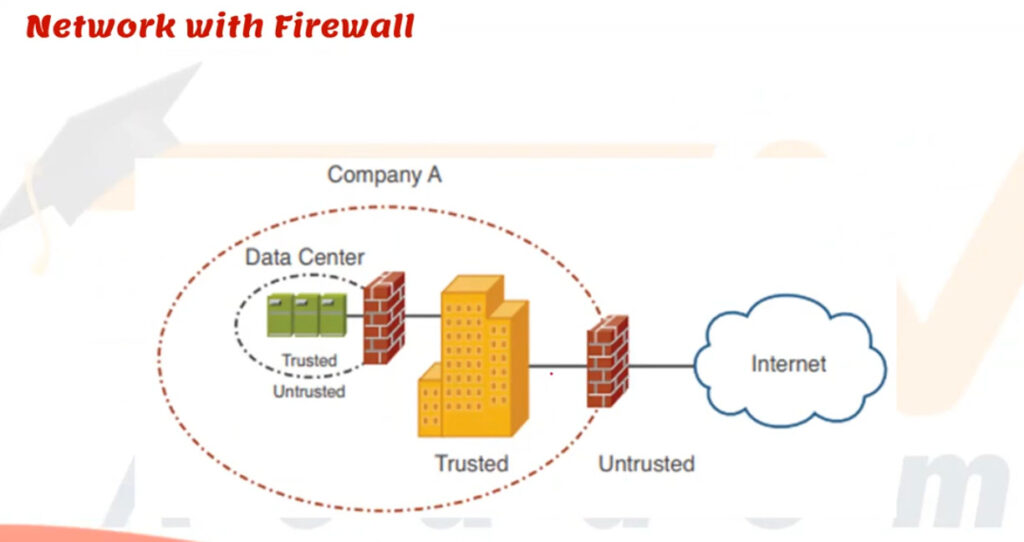
Try to think of your network as a safe building that has a small number of doors to enter. You would not leave them open and allow anybody to come walking into them, would you? That is where a firewall comes into play. In computer networking, a firewall is a security guard that blocks everything entering and leaving the network using a given set of rules. It has the mandate to pass or reject data packets based on whether they pass the security standards set or not. Essentially, a firewall in computer networking will assist in avoiding unauthorised users, hacking, viruses, and information loss. Whether you use a small-scale home setup or a huge business network, the main function of a firewall is to provide a security net between your local system and the potentially harmful external world, such as the internet. It tracks traffic in real-time and also ensures that the trusted sources pass through.
Firewalls are the backbone of any cybersecurity approach. With the increase in cyber threats, the importance of a correctly configured firewall is not only critical, but it is also necessary. A firewall helps ensure your safety, whether you are conducting business or simply browsing at home. A firewall acts as the first line of defence in any network, ensuring that only verified and safe traffic moves in and out of your system.
A Brief History of Firewalls in Computer Networks
The concept of firewalls in networking dates back to the late 1980s, when internet usage spread not only in institutions of research but also in commercial and general sectors. Originally, the networks were trusted and open by default to the public, but later on, cyber attacks rose, and it was evident that some sort of protection line had to be set up. The first kind of firewall was a basic packet filter that only examined the headers of data packets to either pass or block them according to pre-determined rules.
Check Point Technologies introduced the first stateful inspection firewall in the year 1993, and it was a significant breakthrough in security. With the passage of time, firewalls were developed to deal with more advanced traffic and application-level threats. Later in the mid-2010s, Next-Generation Firewalls (NGFWs) were introduced, which added more powerful capabilities, such as deep packet inspection, intrusion prevention, and threat intelligence. Such innovations do indicate an increasing level of digital attacks and the means necessary to fight them.
Evolution of Firewall Generations in Network Security
Over the years, firewalls have evolved through several generations to accommodate the needs of increasing cybersecurity threats. The first were referred to as packet-filtering firewalls, as the only thing they analysed was IP addresses, ports, and protocols, which is not much protection. Then there were stateful inspection firewalls, where the active connections were monitored and intelligent decisions on the filtering were made. The third generation, or user application-layer firewalls, had the potential to examine up to the application level, recognising abuse in policies such as HTTP and FTP. Current Next-Generation Firewalls (NGFWs) add deep packet inspection, intrusion prevention, SSL decryption, and identity-based access to protect against sophisticated, modern attacks.
How Firewalls Operate: Behind the Scenes of Network Filtering?
Any firewall can boil down to a group of regulations, which are basically meant to curb incoming or outgoing data through your network. Upon receiving a data packet, the firewall scans its source and destination IP address, destination port number, and protocol in order to determine whether to permit, reject, or drop the packet. This filtering is in real time, depending on pre-defined security policies. The Next-Gen Firewalls (NGFWs) are more advanced in that the system goes further–to examine packet content, including malware, and even to inspect traffic that is encrypted through SSL/SSH decryption.
Different types of firewalls operate at various layers of the OSI model. As an example, packets are normally blocked by packet-filtering firewalls acting on the network layer of the OSI model, whereas application-layer firewalls check data on the highest layer to prevent dangerous applications or data. Other firewalls also have state tables, which are used to monitor sessions, and only the understood traffic is permitted. When this flow is monitored and controlled, firewalls can become the alert guards as they provide protection to your internal systems against unpermitted access, malware, or cyberattacks. In simple terms, a firewall works like a checkpoint, which checks every packet and allows only the traffic that meets the security standards.

Major Types of Firewalls in Network Security
Below are the types of Firewalls in network security.
1. Stateful Firewalls
A “stateful” application in computer science stores information from earlier interactions and occurrences. Instead of analysing every packet, a stateful firewall stores information about open connections and uses this knowledge to evaluate incoming and outgoing traffic.
Stateful firewalls make decisions by heavily relying on context. For instance, if a connection’s outgoing packets require a specific type of response, the firewall will only permit incoming packets on that connection, provided they also include the desired response.
2. Firewall-as-a-service (FWaaS)
The more recent paradigm for providing firewall capabilities through the cloud is firewall-as-a-service (FWaaS). Another name for this service is “cloud firewall.”
Similar to how conventional firewalls enclose an organisation’s internal network, FWaaS creates a virtual wall around cloud platforms, infrastructure, and applications. FWaaS is frequently more effective than traditional firewalls at securing cloud and multi-cloud assets.
3. Web application firewalls (WAF)
WAFs help protect online applications from dangerous users, whereas conventional firewalls protect private networks from harmful web apps. A WAF filters and observes HTTP traffic between a web application and the Internet.
It typically guards against attacks such as cross-site scripting (XSS), file inclusion, SQL injection, and cross-site forgery.
4. Next-generation firewalls (NGFW)
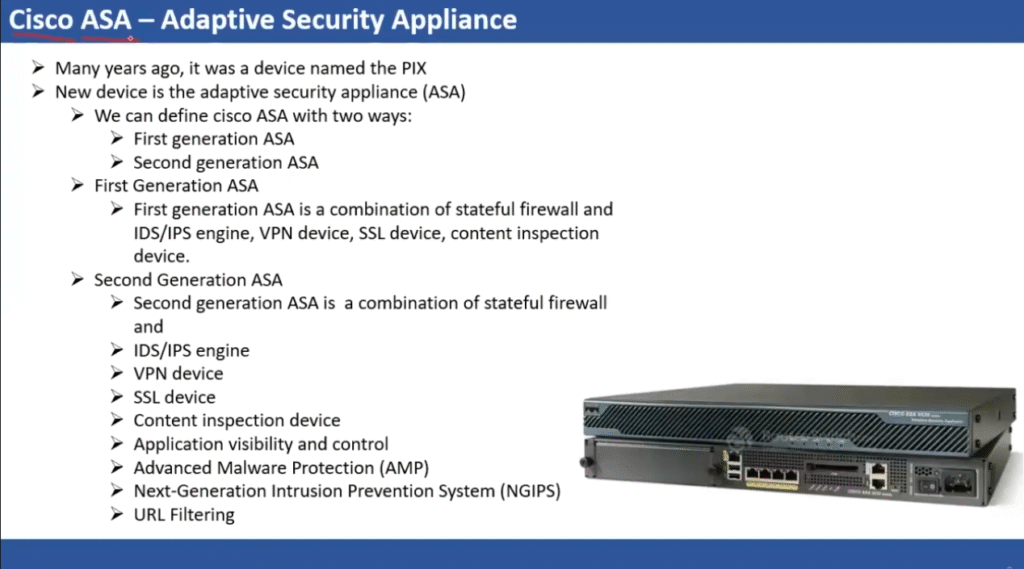
NGFWs are firewalls that combine traditional firewall functionality with a number of extra features to combat threats at various OSI model layers.
NGFWs examine packets significantly more thoroughly than conventional firewalls. Deep inspection can examine packet payloads and the applications they access, among other things. This enables the firewall to implement filtering rules with greater specificity.
5. Proxy-based firewalls
These intermediaries* between clients and servers are proxies. Clients connect to the firewall, which inspects the outgoing packets before establishing a connection with the target (the web server).
The firewall will also intercept a request from the web server trying to send a response to the client, inspect the packets, and then relay the response through a different connection to the client. Effectively preventing a direct connection between the client and server is a proxy-based firewall.
Core Functions of a Firewall in Securing Your Network
Below are the main functionalities of a firewall.
- Predefined Rule-based Traffic Filtering: Firewalls filter all the incoming and outgoing packets according to a group of security rules. Such rules may rest on IP addresses or port numbers or protocols, or application-level identifiers. The firewall filters traffic access by either allowing or disallowing any traffic that does not meet pre-approved standards, thus restricting unauthorised access and exposure to a risk that is untrusted.
- Implementation of access control: The ability to be able to control who or what gets to access your internal network is one of the most imperative firewall roles. Firewalls can also be configured with policies that may authorise or deny internet access to certain users, IP segments, or devices so that only endpoints that can be trusted to communicate with sensitive resources can do so.
- Network Activity Monitoring and Logging: Firewalls gather network traffic information to reveal user patterns, trace attempted intrusion, and audit access habits. This logging assists in identifying anomalies, responding to events, and meeting regulatory requirements such as GDPR, HIPAA, or PCI-DSS by preserving security audit trails.
- Intrusion Detection Prevention (IDP): The new generation of firewalls has incorporated intrusion detection and prevention systems that monitor the traffic to detect known attack signatures or abnormal patterns. Before they land within the network, brute-force attacks, SQL injections, DDoS attacks, and other threats that take place in real-time may be blocked with these systems.
- Blocking Data Exfiltration: Firewalls also prevent unauthorised shipping of internal data by screening the outbound traffic that does not match the permitted use cases. This helps prevent malicious insiders or malware from sending critical information such as customer records, intellectual properties, or login credentials to external command and control servers.
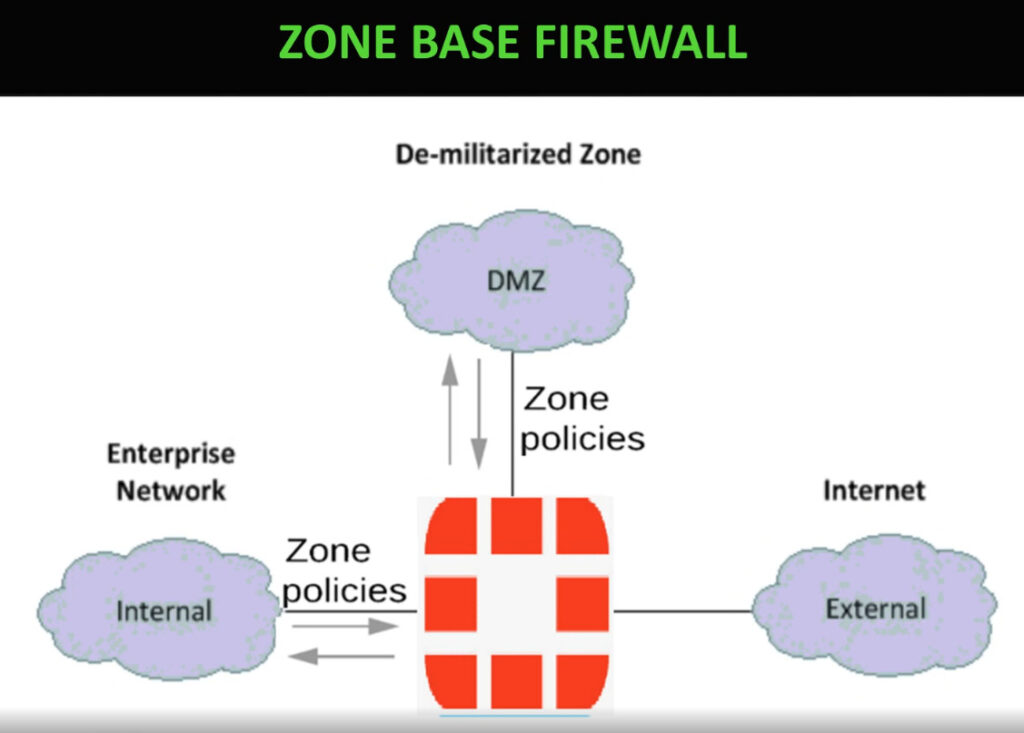
- Zone Isolation and Segmentation: Firewalls can partition a network into secure areas, e.g., the DMZs (demilitarised zones), internal and external segments, isolate critical assets, and decrease the propagation of breaches. The rules set may be different in each zone, which enables fine-grained access control between the zones.
- Application-Level Protection: Firewalls in the application layer are able to identify the abuse of a protocol like HTTP, FTP, or DNS. They determine and select traffic using the real application as opposed to ports or IPs. It particularly comes in handy in the prohibition of unsafe applications, such as remote desktop applications or web applications that have not been approved.
- Defence against Malware and Zero-Day Exploits: Some features provided by next-generation firewalls are antivirus, anti-malware, and sandboxing. These modules scan files and executable code to filter out malicious materials before they get to your environment, and even scan compressed files or encrypted packets.
- VPN Support: Firewalls often support Virtual Private Network (VPN), allowing secure remote access to private networks over the public Internet. They can authenticate and encrypt VPN connections, ensuring that sensitive data transmitted between remote users and the network remains secure.
Role of Firewalls in Zero Trust Architecture
In a Zero Trust Architecture (ZTA), the idea is simple: trust no one by default, whether they are inside or outside the network. Every user, device, and application must prove their identity and be verified before accessing any resource.
Firewalls play an important role in making this happen. Instead of just blocking or allowing traffic based on IP addresses or ports, modern firewalls in a Zero Trust setup:
- Continuously verify who is requesting access and what they are allowed to do.
- Inspect and filter traffic deeply, even between internal systems, not just at the network perimeter.
- Segment the network into smaller zones so that even if an attacker gets in, they cannot move freely.
- Work with identity and access management systems to enforce strict policies for every request.
In short, firewalls in Zero Trust are not just “gatekeepers” at the edge of the network; they are active security checkpoints at every layer, ensuring only verified and authorised traffic can pass.
Firewall Configuration Mistakes to Avoid
Here are some common firewall configuration mistakes you should avoid, explained in simple words:
- Using default settings: Not changing the firewall’s default username, password, or rules makes it easy for attackers to break in.
- Allowing too much access: Setting rules that allow all traffic instead of only what’s needed increases security risks.
- Not updating firmware: Running outdated firewall software can leave it open to known attacks.
- Overcomplicated rules: Having too many or unclear rules can cause errors and make the firewall less effective.
- Ignoring unused ports: Leaving open ports that are not in use can give hackers extra entry points.
- No proper logging: Without enabling logs, you will not know if someone tried to attack your network.
- Failing to monitor alerts: Ignoring firewall warnings means you might miss early signs of an attack.
- One-size-fits-all rules: Using the same rules for every user or device can create security gaps.
- No regular testing: Not checking if the firewall rules are still working leaves you with false security.
- Relying only on the firewall: A firewall is not enough; you also need other security measures, like antivirus and intrusion detection.
Common Limitations of Firewalls
Below are some limitations of a firewall.
- Impotent in Fighting Against Internal Threats: Firewalls are mainly oriented to protection against outside infiltration, not attacks carried out internally on the network. In case of a compromised user account of a trusted user or a rogue insider, the firewall cannot be the line of defence on its own, i.e., without being combined with other products and capabilities, such as endpoint detection or behaviour analytics.
- Minimum Malware and Phishing Security Protection: Although contemporary firewalls provide certain malware prevention, these are not infallible. These malware, particularly of the zero-day type, or phishing emails that lure users into divulging confidential data, usually evade firewall settings. These threats should be addressed using firewalls alongside endpoint security, email filters, and user training.
- Has no Protection on Compromised Devices: Once a system in a network is attacked by malware, a firewall is not able to clean or delete the malware. When a machine is already infected, it is via a USB stick, faulty software, or even the carelessness of the user; the firewall by itself does not save the day. It is not a cure; it is a preventive layer.
- Prone to misconfiguration: The quality of firewalls is dependent on their configuration. If the firewall rules are not properly established, too liberal, or obsolete, attackers have a chance to get through. A gap of any kind, even a non-permitted open port or a forgotten rule, can turn into an entry point. Repeated checks and rule maintenance will be necessary.
- Not able to control Non-Network Threats: Firewalls are security controls of a network nature and, as such, cannot be used to prevent threats such as those propagated through physical access, removable media, and social engineering. Such attacks as shoulder surfing, insider sabotage, or evil USBs do not even require network-layer defences.
- Bottlenecks in Performance during Heavy Load: Firewalls may also represent a bottleneck when not appropriately sized or optimised, in an enterprise environment with high traffic. By examining additional data packets, searching applications, and implementing deep packet inspection, they may experience a loss in performance, which may lead to slowing the network or loss of valid traffic.
- Cannot independently encrypt or decrypt end-to-end traffic: Some firewalls may allow inspection of the SSL traffic, but in most cases, the firewalls are not able to scan the encrypted traffic without being configured appropriately. The encrypted traffic can be circulating without the firewall catching on to it, and the threats remain hidden with no eyes to spot them unless the firewall is implemented with a decryption proxy that has blind spots.
Advantages and Disadvantages of Firewalls
Below are the disadvantages and advantages of firewalls.
| Advantages of Firewalls | Disadvantages of Firewalls |
| Blocks Unauthorised Access Acts as a protective shield between your internal network and external threats. | Can not Stop Insider Threats Firewalls cannot detect or prevent attacks originating from within the network. |
| Monitors Network Traffic Analyses data packets to identify suspicious activities in real-time. | Performance Overhead May slow down network performance due to deep packet inspection and filtering. |
| Customizable Rules Let’s you define granular security policies tailored to your organisation’s needs. | Requires Skilled Management Improper configuration can leave the system vulnerable or overly restrictive. |
| Supports VPN and Remote Access Secures communication for remote workers and branches via encrypted tunnels. | Does Not Replace Antivirus Firewalls do not scan for viruses or malware inside already accepted traffic. |
| Improves Compliance and Logging Helps meet regulatory requirements through logging and reporting capabilities. | May Block Legitimate Traffic Overly strict rules can disrupt business operations and productivity. |
Difference Between Traditional Firewalls and Next-Gen Firewalls
Below are the differences between traditional and modern firewalls.
| Feature | Traditional Firewalls | Next-Generation Firewalls (NGFWs) |
| Traffic Inspection | Filters traffic based on ports, IP addresses, and protocols. | Performs deep packet inspection and analyzes application-level traffic. |
| Application Awareness | No visibility into specific applications or their behaviour. | Identifies and controls applications regardless of port or protocol. |
| Threat Protection | Limited or no protection against modern threats. | Includes antivirus, anti-malware, and intrusion prevention systems. |
| User Identity Integration | Works mostly on IP addresses without user identity context. | Integrates with directory services to apply policies per user or group. |
| Cloud and Hybrid Support | Primarily designed for on-premises networks. | Optimised for hybrid and cloud-native environments. |
Best Practices for Maximum Protection
Below are some best practices one should follow while using a firewall.
- Enforce a Default Deny Policy: Following a zero-trust model, block all incoming traffic by default and only allow essential connections. This guarantees that any threat that is not known is automatically denied unless it is explicitly allowed.
- Ensure that the firmware of firewalls is updated on a regular basis: Make sure that the firewall software or firmware is kept current to add vulnerability patches and to improve threat detection functions. Most of the updates contain the correction of recently found exploits.
- Introduce Rule, Clean up, and Prioritisation: Disengage unneeded or obsolete firewall rules and sort the live ones in order of precedence. This avoids complexity, enhances performance, and avoids loopholes caused by outmoded settings.
- Traffic Log and Monitoring With Consistency: Facilitate the logging to follow all access attempts, missing packets, and strange actions. Unceasing surveillance gives you the chance to realise and act on possible penetration or misconfiguration.
- Limit the administrative privilege: Restrict users to the management console of the firewall. Assign high-level authentication procedures and access to your system by secure and in-house IP addresses to minimise the exposure to unauthorised amendments.
What Is a Firewall in Computer Networking? -FAQs
Yes, antivirus guards against the infected files, and the firewall regulates both the incoming and outgoing network traffic, both are vital layers of security.
Although firewalls make the risk very minimal, there is no security measure that can protect 100 percent. Firewalls should be used with other computer security provisions such as intrusion detection, encryption, and upgradation.
It is possible to check it by viewing your firewall configurations on your system, conducting port scans, or monitoring the network to observe whether unauthorized traffic is being denied.
A software firewall, together with a router-implemented one, is usually adequate in most home environments. To further deal with security issues, particularly on smart home applications, upgrade to hardware-based solutions.
Indeed, in the case of the use of deep packet inspection or complex filtering rules, in particular. Contemporary firewalls are, however, more focused on ensuring they pose little to no performance costs on an average machine but remain secure to a great extent.
A Next-Generation Firewall goes beyond traditional firewalls by adding features like application awareness, intrusion prevention, and advanced threat detection.