What is Firewall
History of Firewall
The history of firewalls began in the late 1980s when computer networks started connecting to the internet and security threats became a concern. The first generation of firewalls were known as packet filtering firewalls, which simply checked data packets based on IP addresses, port numbers, and protocols to allow or block traffic. In the early 1990s, as attacks became more complex, stateful inspection firewalls were developed to track active connections and make smarter decisions based on the state of network sessions. Soon after, proxy firewalls (application-level gateways) emerged, which could inspect traffic at the application layer and provide stronger security by acting as an intermediary between users and the internet.
The stateful firewall was developed in 1993 by Gil Shwed, the founder of Check Point Software Technologies. He introduced the concept of Stateful Inspection, which allowed firewalls to track the state of active connections instead of only filtering packets by IP address and port number. This innovation made firewalls much smarter and more secure, because they could understand whether a packet belonged to a legitimate session or not. Stateful firewalls became the foundation of modern network security and are still widely used today.
In the 2000s, with the rapid growth of malware, web applications, and online services, firewalls evolved into Next-Generation Firewalls (NGFWs) that combined traditional firewall features with advanced technologies such as intrusion prevention systems (IPS), antivirus, deep packet inspection, and application control. Later, Unified Threat Management (UTM) devices were introduced to provide multiple security functions in a single solution for small and medium businesses. With the rise of cloud computing and remote work, firewalls further evolved into cloud-based firewalls (Firewall as a Service – FWaaS) that protect cloud infrastructure and users from anywhere in the world. Today, modern firewalls use automation, artificial intelligence, and threat intelligence to detect and prevent sophisticated cyberattacks, making them a critical part of modern network security systems.
What is Firewall
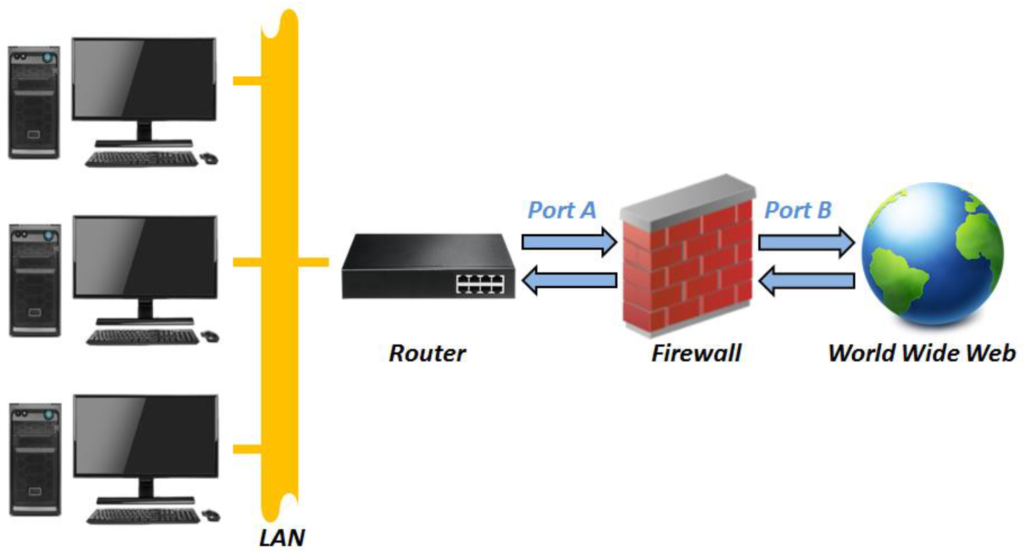
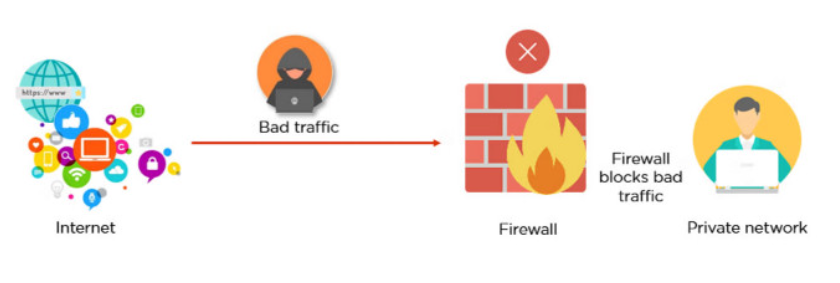
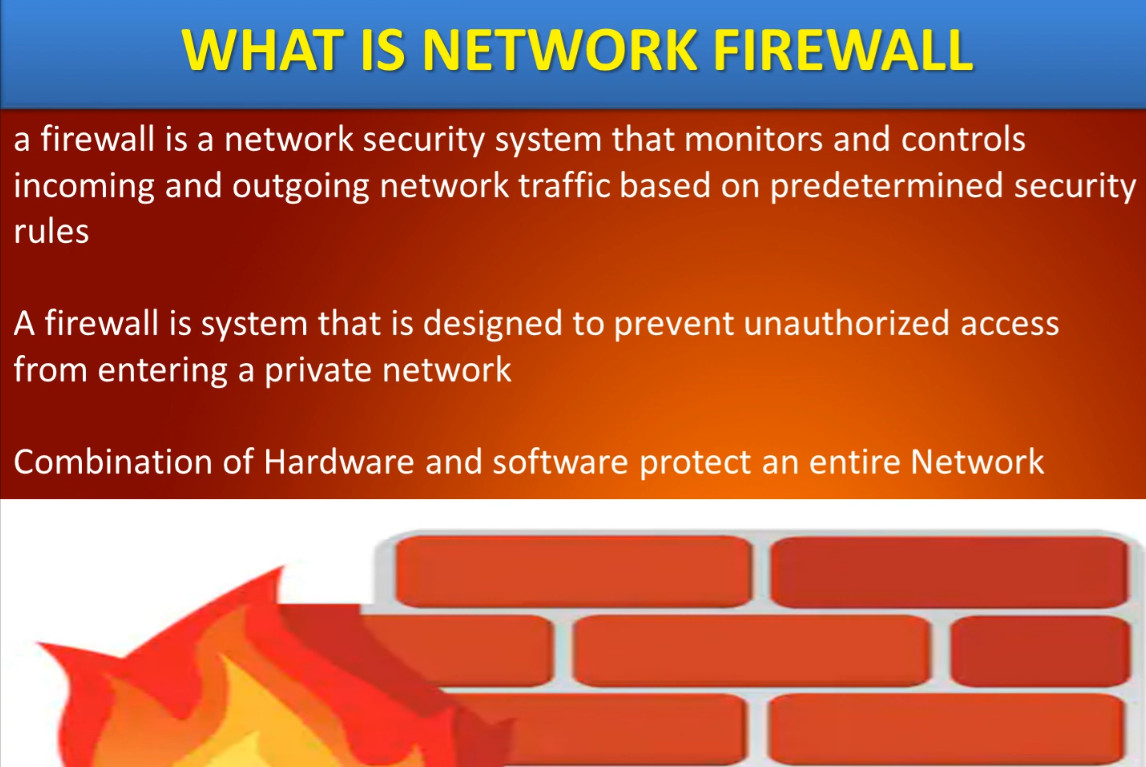
A firewall is a network security system (hardware or software) that protects computers and networks from unauthorized access, cyberattacks, and malicious traffic. It works as a protective barrier between a trusted internal network (such as a home or company LAN) and an untrusted external network (such as the internet). A firewall continuously monitors all incoming and outgoing data packets and allows or blocks them based on predefined security rules and policies. These rules can be created using parameters like IP addresses, port numbers, protocols, applications, and user identities. The main purpose of a firewall is to prevent hackers, viruses, worms, ransomware, and other threats from entering the network while still allowing legitimate communication.
A firewall not only blocks unwanted traffic but also helps in controlling network usage and improving overall security management. Modern firewalls can perform advanced functions such as stateful inspection, deep packet inspection, intrusion prevention (IPS), antivirus scanning, web filtering, VPN support, and logging and monitoring of network activities. Firewalls are used in homes, offices, data centers, and cloud environments to enforce security policies and protect sensitive information like personal data, business records, and financial transactions. In simple words, a firewall acts like a security guard for the network, checking every connection request and deciding whether it is safe or dangerous before allowing it to pass.
In Short Explain
A firewall is a network security device, either hardware or software-based, which monitors all incoming and outgoing traffic and, based on a defined set of security rules, accepts, rejects, or drops that specific traffic. It acts like a security guard that helps keep your digital world safe from unwanted visitors and potential threats.
- Accept: allow the traffic
- Reject: block the traffic but reply with an “unreachable error”
- Drop: block the traffic with no reply
A firewall works like a security guard for your network, standing between your internal systems such as computers, servers, and devices and the outside world, like the internet or other networks. It carefully inspects all data entering or leaving to ensure only safe traffic is allowed through.
- When data tries to enter or leave your network, it passes through the firewall first.
- The firewall examines the data packets (small chunks of information) using predefined rules.
- Rules can be defined on the firewall based on the necessity and security policies of the organization.
- FIrewall allows decision making like Allow → If the packet matches safe rules. or Block → If the packet is suspicious, from a blacklisted source, or contains malicious code.
- The firewall records blocked or unusual traffic for security teams to review.
- Alerts can be sent in real time if a major threat is detected.
Types of Firewall
1. Packet Filtering Firewall
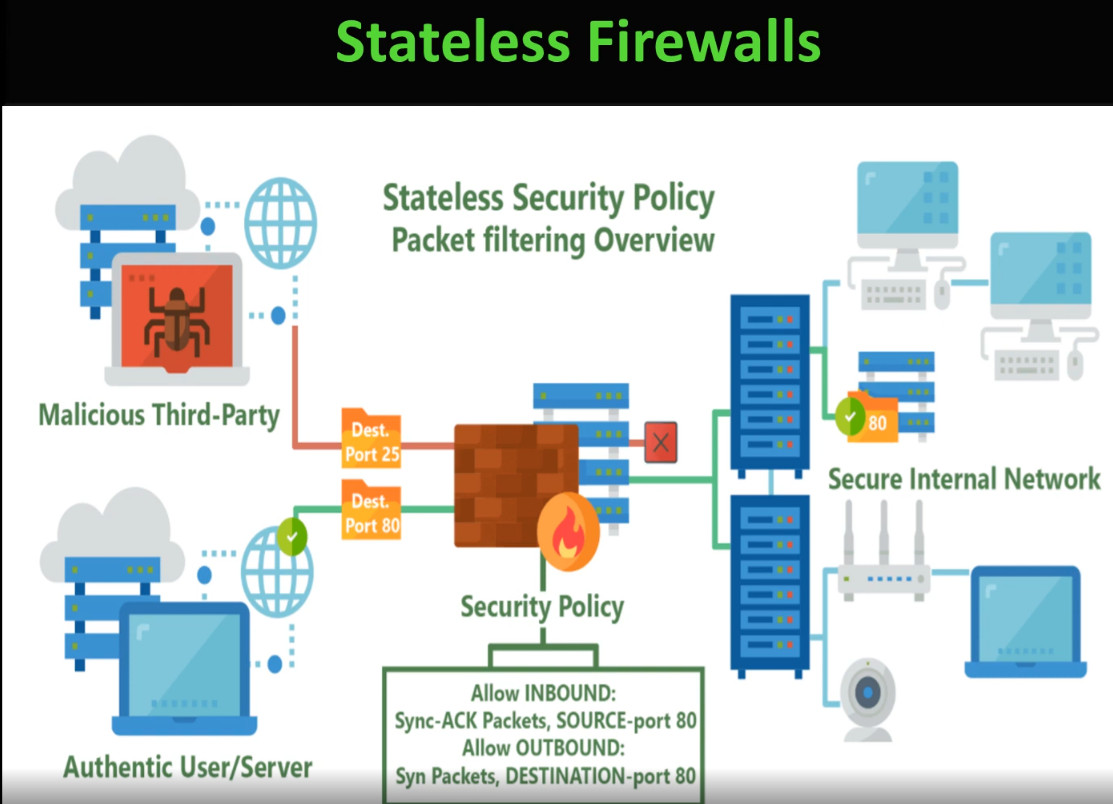
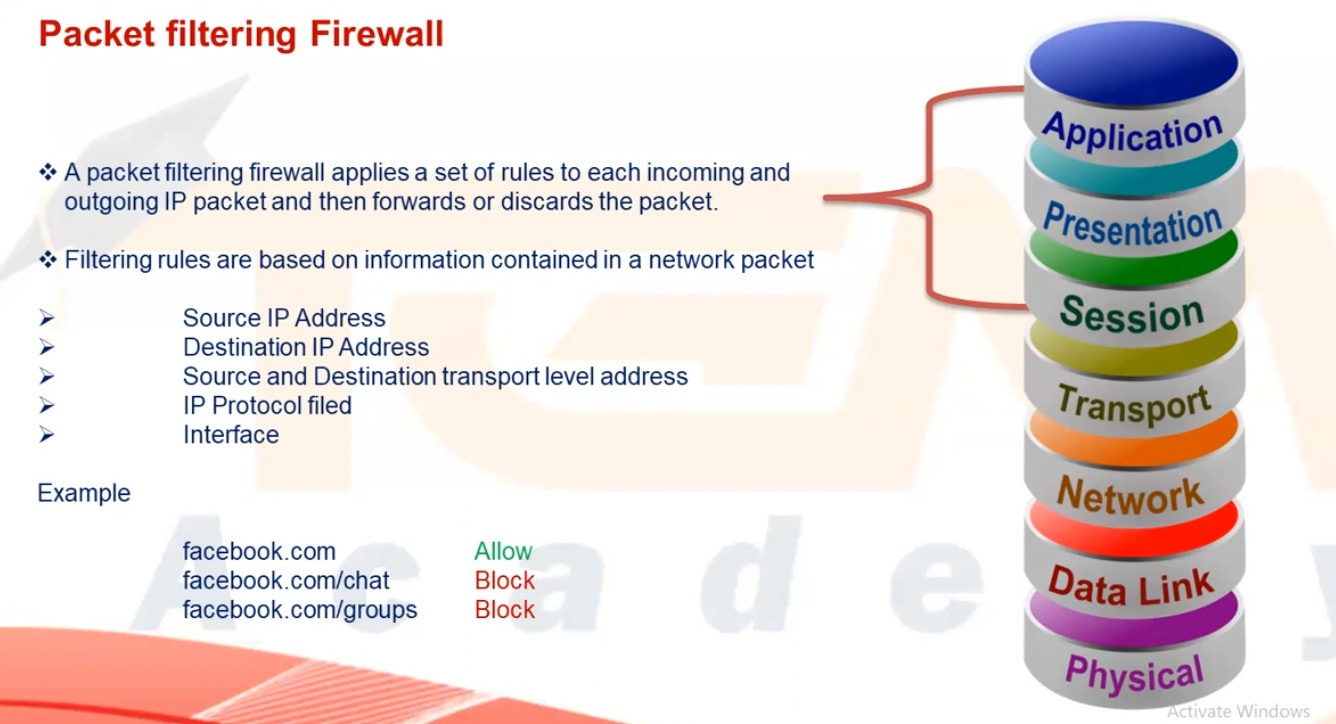
A packet filtering firewall is the simplest type of firewall that works by checking each data packet based on predefined rules such as source IP address, destination IP address, port number, and protocol. It allows or blocks traffic depending on whether the packet matches the rule. This firewall does not keep track of active connections and cannot inspect the actual data inside the packet, so it provides only basic security. It is fast and inexpensive but not suitable for protecting against modern cyber threats.
2. Stateful Inspection Firewall
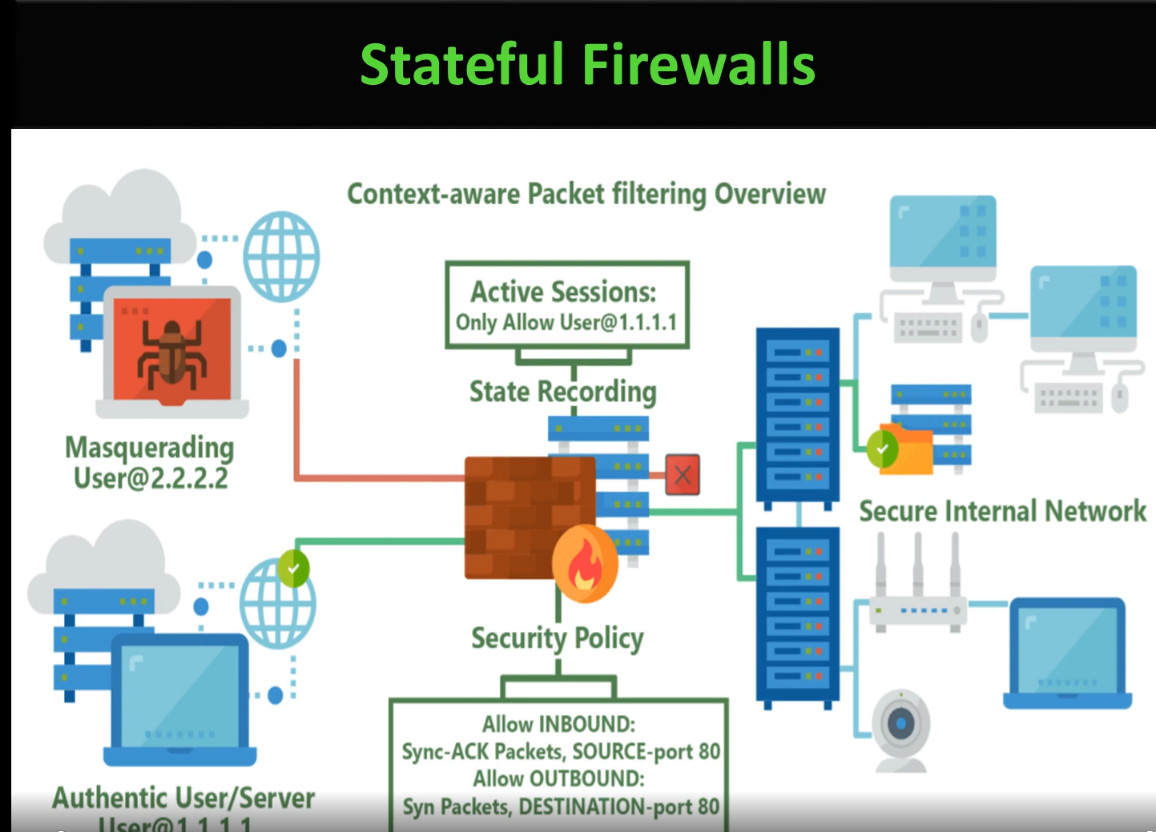
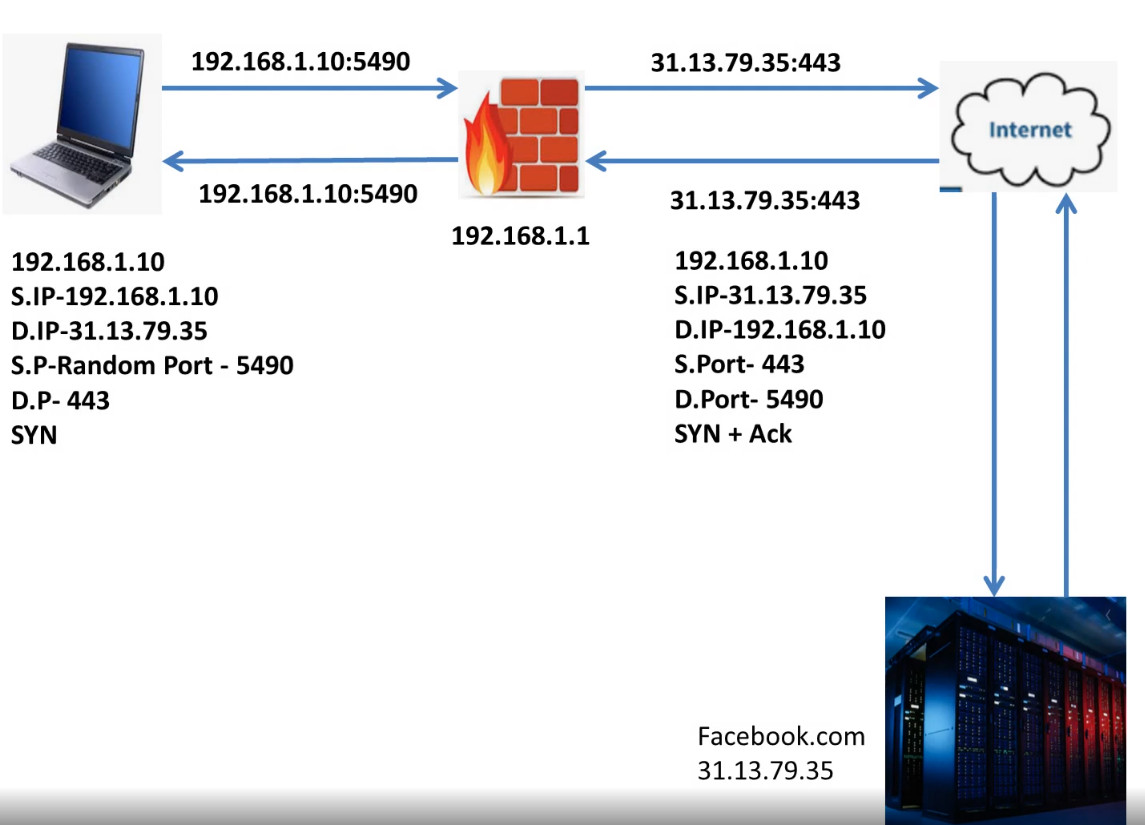
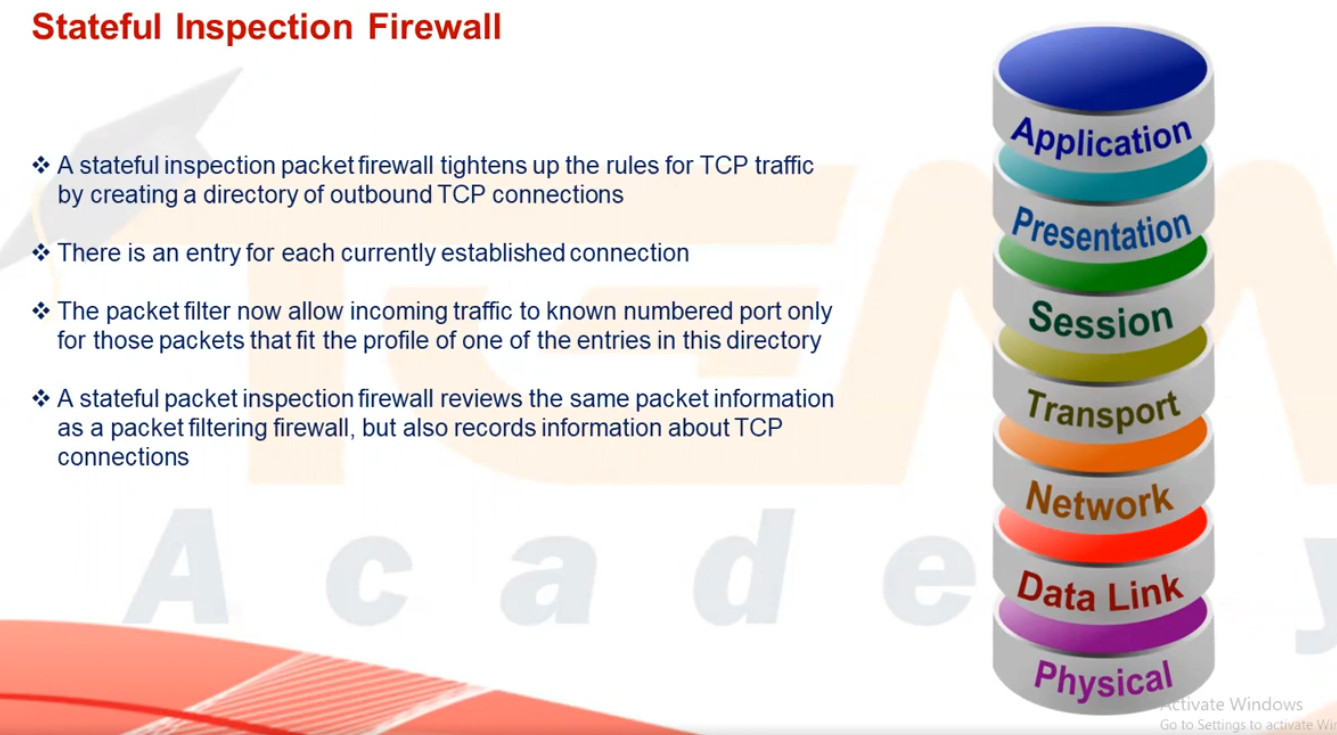
A stateful inspection firewall improves security by monitoring the state of active connections and maintaining a state table of all ongoing sessions. It allows only those packets that belong to a valid, established connection. This type of firewall provides better protection than packet filtering because it understands the context of traffic flow. However, it still cannot deeply inspect application-level data, so it offers moderate security suitable for business networks.
3. Circuit-Level Gateway Firewall
A circuit-level gateway firewall works at the session layer and focuses on verifying TCP handshakes and connection establishment between systems. It ensures that only legitimate sessions are created but does not inspect the actual content of data packets. This firewall hides internal network details and uses fewer resources, but it cannot protect against malware or application-level attacks, making it less secure than advanced firewalls.
4. Application-Level Gateway (Proxy Firewall)
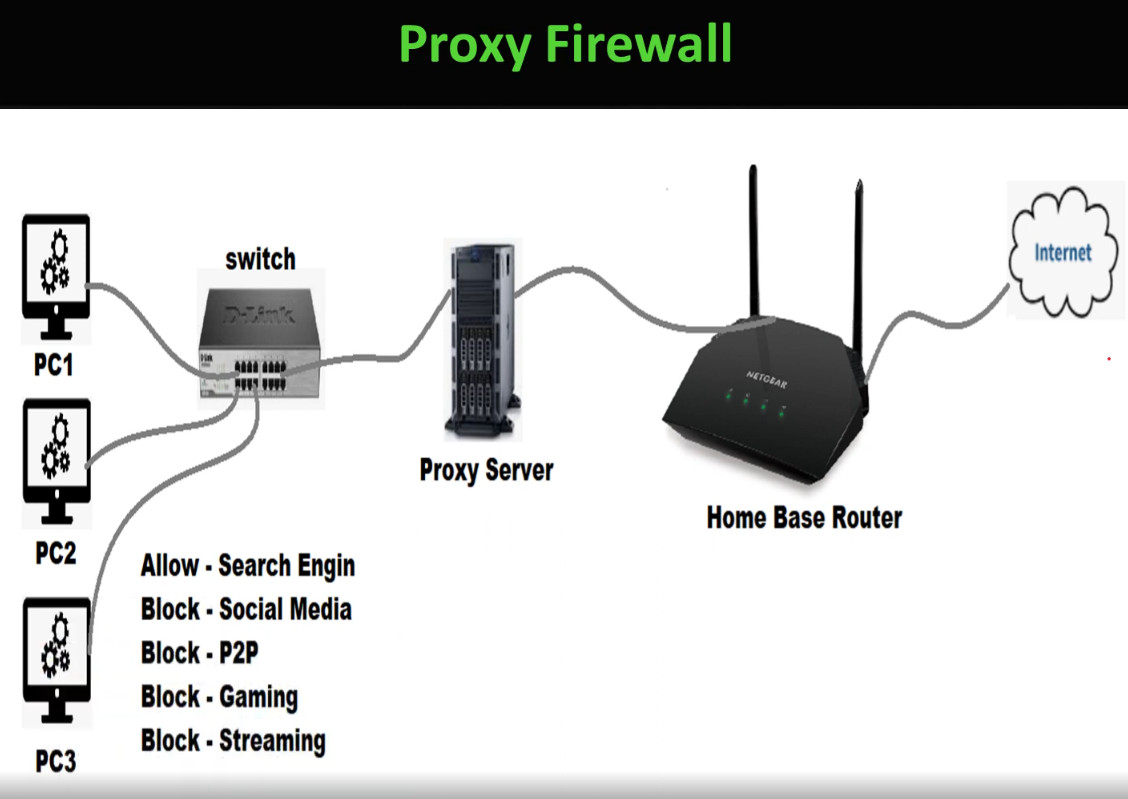
An application-level gateway firewall, also called a proxy firewall, operates at the application layer and acts as an intermediary between the user and the internet. It inspects traffic such as HTTP, FTP, and SMTP at a deeper level and can block specific applications, websites, or commands. This firewall provides very strong security and hides internal IP addresses, but it is slower in performance and requires more system resources and complex configuration.
5. Next-Generation Firewall (NGFW)
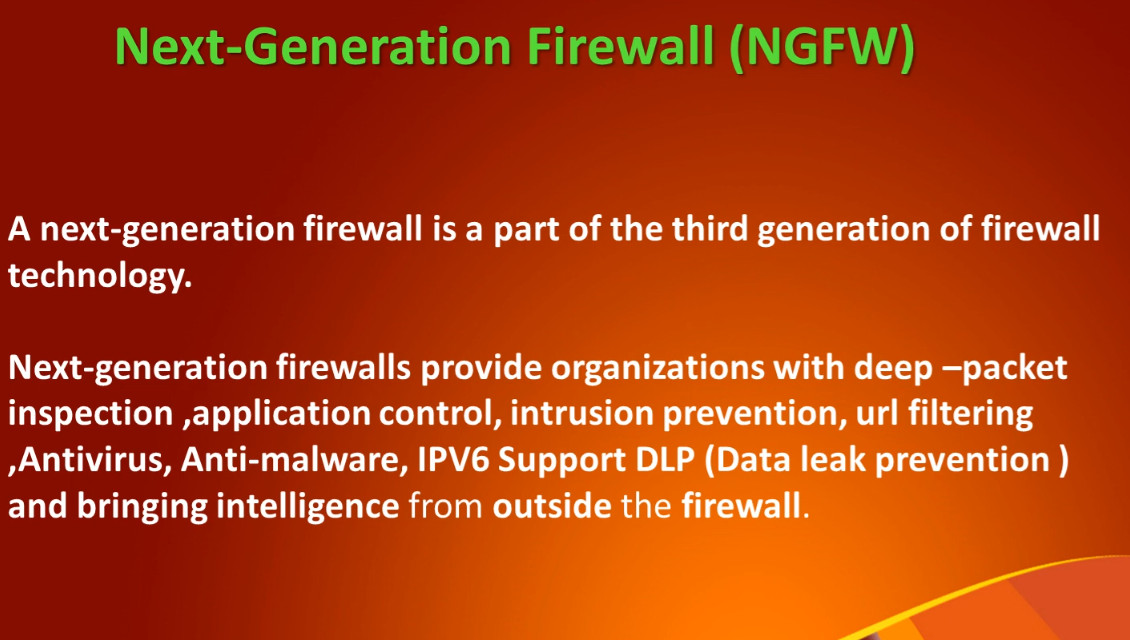
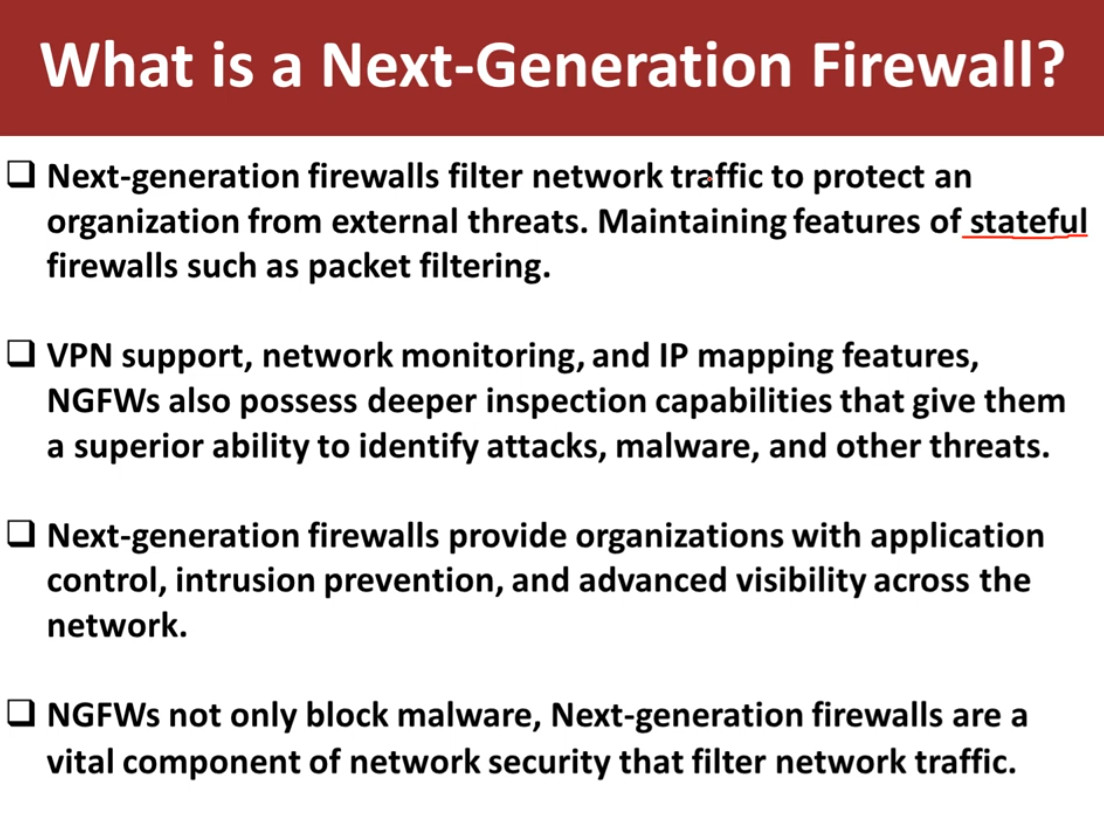
A next-generation firewall combines traditional firewall features with advanced security technologies such as deep packet inspection, intrusion prevention system (IPS), antivirus, web filtering, application control, and SSL inspection. It can identify and block modern threats like malware, ransomware, and zero-day attacks. NGFW provides very high security and is widely used in enterprises, banks, and data centers, but it is more expensive and requires skilled administrators to manage.
6. Unified Threat Management (UTM) Firewall
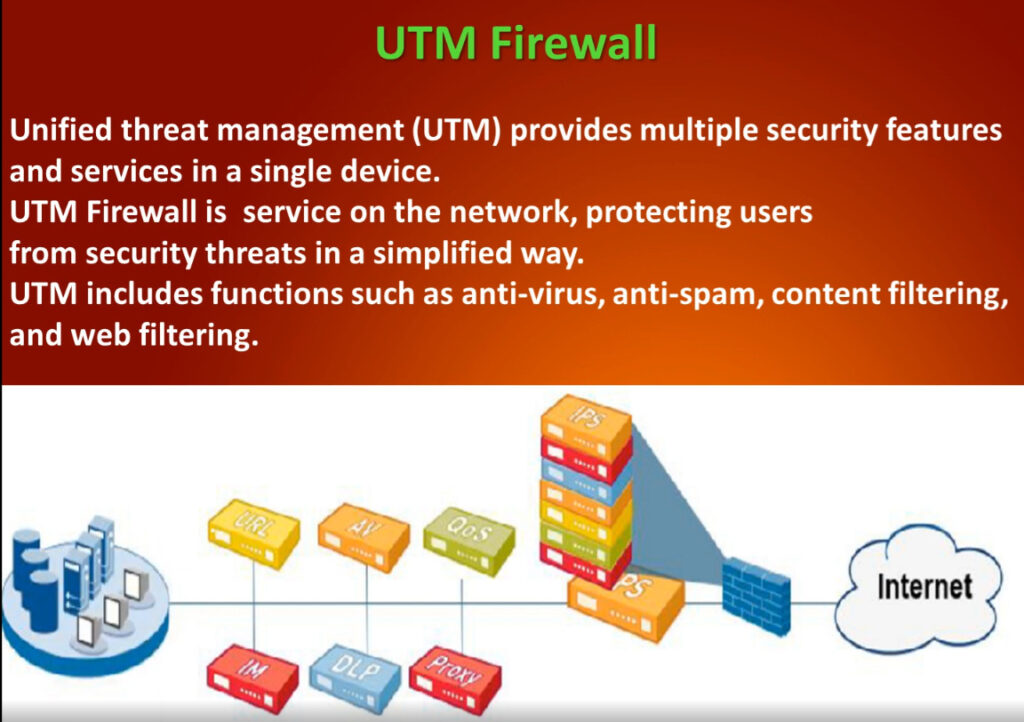
A UTM firewall integrates multiple security services into one single device, including firewall, antivirus, intrusion detection and prevention, VPN, web filtering, and anti-spam. It is designed mainly for small and medium-sized organizations that need complete protection with simple management. While UTM is cost-effective and easy to use, enabling all security features may reduce performance in high-traffic networks.
7. Cloud Firewall (Firewall as a Service – FWaaS)
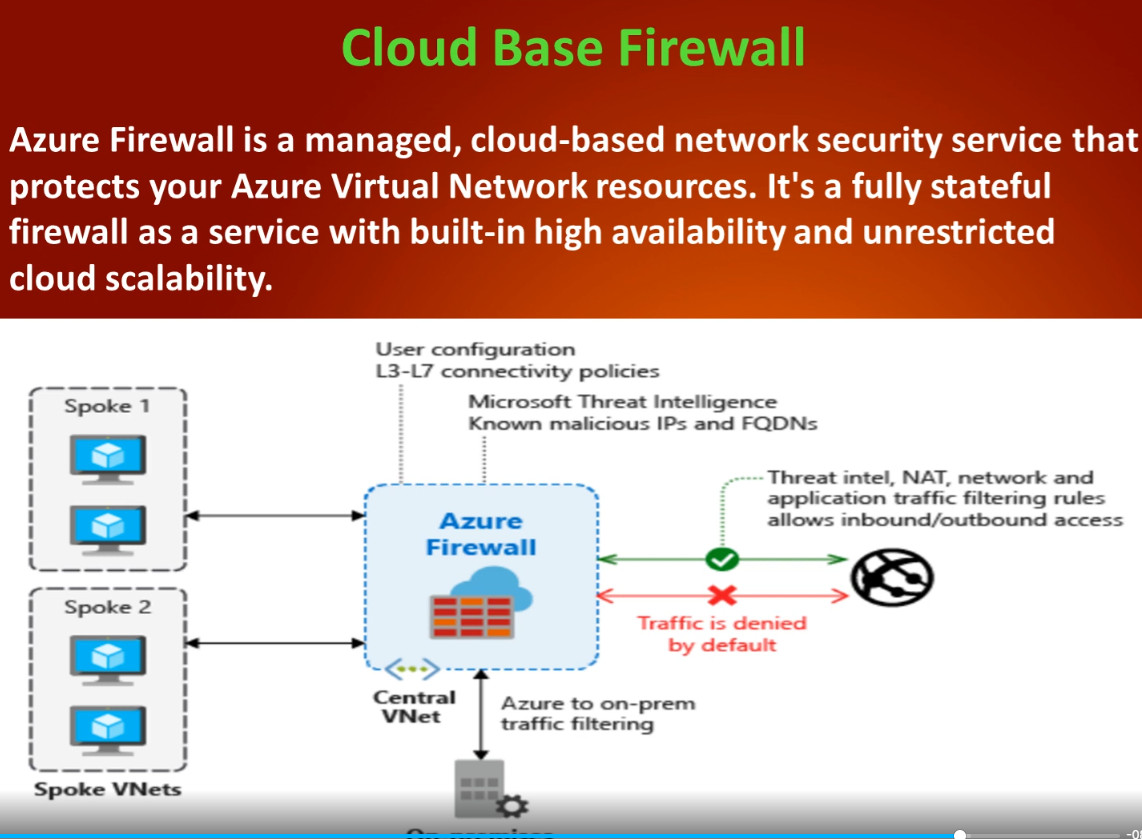
A cloud firewall is hosted in the cloud instead of being installed as physical hardware in an office network. It protects cloud servers, applications, and remote users by filtering traffic through cloud-based security rules. This firewall is highly scalable and suitable for modern cloud and work-from-home environments. However, it depends on internet connectivity and usually works on a subscription model.
8. Host-Based Firewall (Software Firewall)
A host-based firewall is installed directly on an individual computer or server, such as Windows Firewall or Linux firewall. It controls incoming and outgoing traffic for that specific system only and helps prevent unauthorized access and malware infections. This firewall is easy to use and low cost, but it cannot protect the entire network and relies on the system’s own resources.
9. Hardware Firewall (Network Firewall)
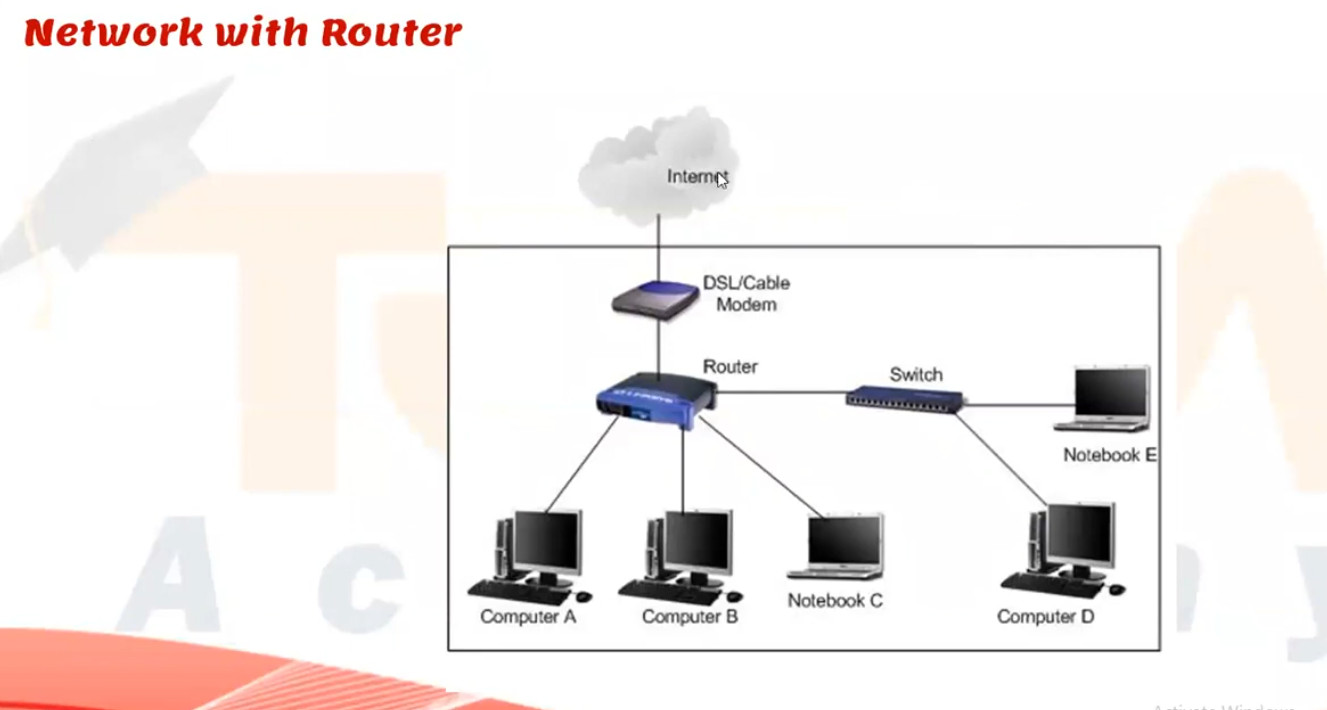
A hardware firewall is a physical security device placed between the internal network and the internet. It protects all devices in the network by filtering traffic based on security rules and policies. Hardware firewalls provide high performance, centralized control, and strong protection for organizations. However, they are costly and require technical expertise to configure and maintain.
Conclusion
Different types of firewalls are used for different needs: packet filtering and stateful firewalls provide basic and medium security, proxy and NGFW firewalls offer advanced protection, UTMs are suitable for small businesses, cloud firewalls protect cloud and remote environments, and host-based firewalls secure individual systems. Using the right type of firewall is essential for building a strong and reliable network security system.
Types of Firewall Rules
Firewall rules are defined based on the direction that traffic is traveling. The two types include:
Inbound Rules: Inbound rules are applied to incoming traffic attempting to enter the protected network. Typically, organizations deny inbound traffic by default and then define exceptions for permitted types of traffic. For example, many organizations permit HTTPS and DNS traffic to enter their networks to support employees’ web browsing.
Outbound Rules: Outbound rules specify the types of outgoing traffic permitted to leave the network and often default to allowing traffic out. Organizations then specify the types of traffic that should not be permitted to leave. For example, blocking ICMP traffic at the private network perimeter can help protect against network scanning and information leaks due to error messages.
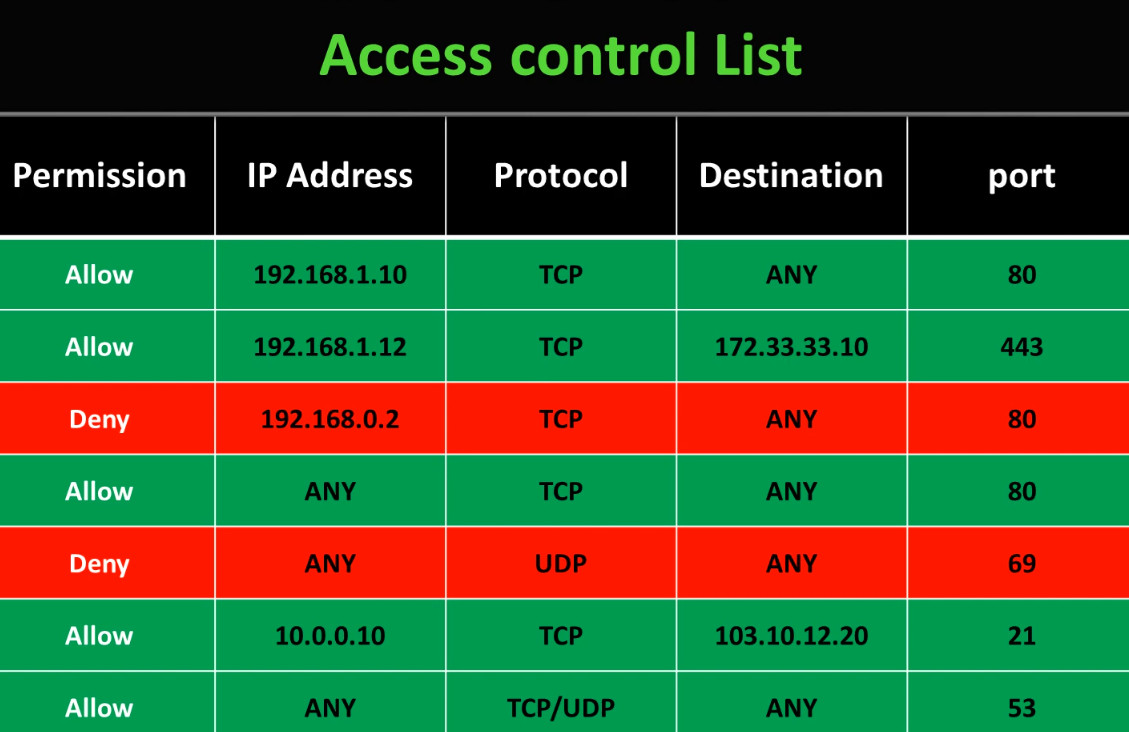
Firewall rules are instructions that tell a firewall which network traffic is allowed and which traffic must be blocked. These rules are created based on different parameters such as IP address, port number, protocol, application, and user identity. Below are the main types of firewall rules explained in paragraph with points:
1. Allow (Permit) Rule
An allow rule permits specific network traffic to pass through the firewall based on defined conditions such as source IP, destination IP, port, and protocol. For example, an allow rule can permit web traffic on port 80 or 443. This rule is used to let trusted and required services communicate while blocking everything else by default for security.
2. Deny (Block) Rule
A deny rule blocks certain types of traffic that are considered unsafe or unnecessary. It prevents unauthorized users, malicious IP addresses, or suspicious applications from accessing the network. Deny rules are very important for stopping hacking attempts and reducing attack surfaces.
3. Source-Based Rule
A source-based rule filters traffic according to the source IP address or network from where the traffic originates. For example, traffic from a trusted internal network may be allowed, while traffic from unknown or blacklisted IP addresses is blocked. This rule is useful for controlling access based on location or device.
4. Destination-Based Rule
A destination-based rule controls traffic based on the destination IP address or server. It allows or blocks access to specific servers such as web servers, database servers, or mail servers. This helps protect critical systems from unauthorized access.
5. Port-Based Rule
A port-based rule allows or blocks traffic according to port numbers like 21 (FTP), 22 (SSH), 25 (SMTP), 80 (HTTP), and 443 (HTTPS). For example, unused ports can be blocked to reduce security risks, while required service ports are allowed.
6. Protocol-Based Rule
This rule filters traffic based on protocols such as TCP, UDP, ICMP, or GRE. For instance, ICMP (ping) traffic may be blocked to prevent network scanning, while TCP traffic for business applications is allowed.
7. Application-Based Rule
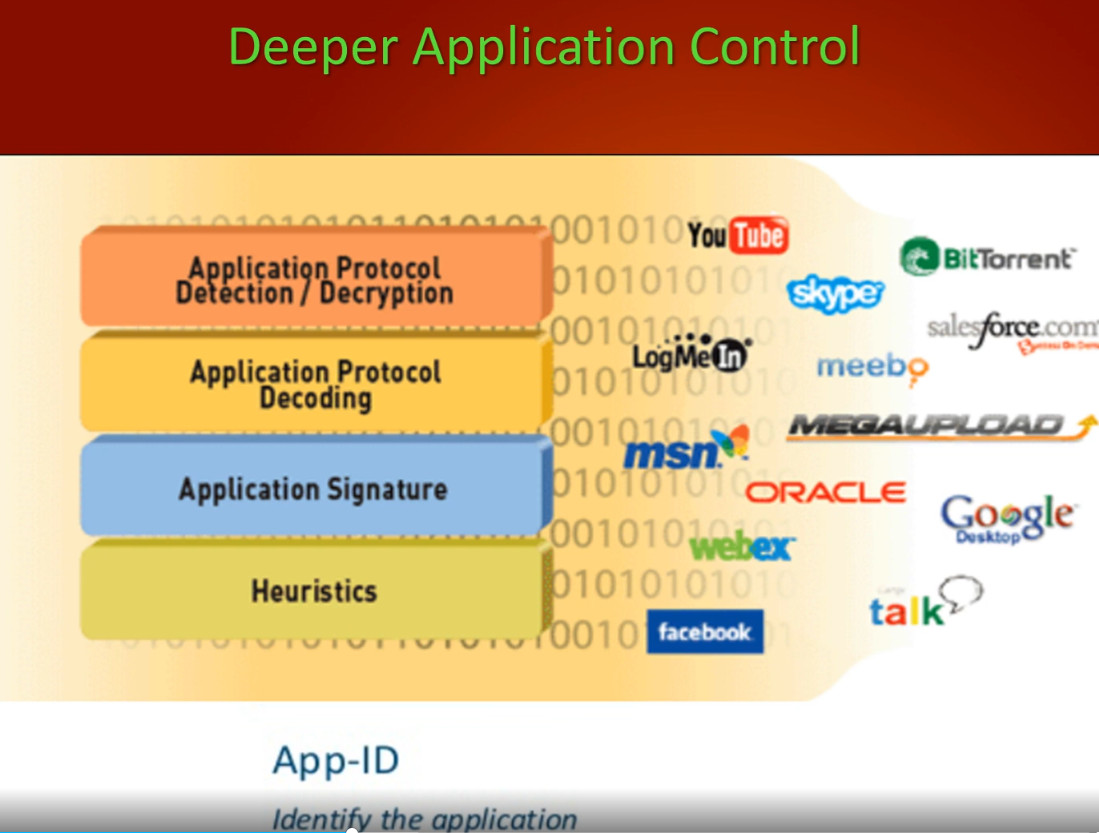
An application-based rule controls traffic by identifying specific applications such as YouTube, WhatsApp, Skype, or BitTorrent. Modern firewalls can inspect traffic at the application level and allow or block applications regardless of port number, providing stronger control over network usage.
8. User-Based Rule
A user-based rule applies firewall policies according to user identity instead of IP address. For example, managers may be allowed access to cloud services, while normal users are restricted. This rule improves security and policy enforcement in corporate environments.
9. Time-Based Rule
A time-based rule allows or blocks traffic during specific times or days. For example, social media websites can be blocked during office hours and allowed after work hours. This rule is useful for productivity control and security management.
10. NAT (Network Address Translation) Rule
NAT rules translate private IP addresses into public IP addresses and vice versa. They are used to allow internal devices to access the internet securely and to publish internal servers (like web or mail servers) to external users.
11. Logging and Monitoring Rule
These rules are used to log and monitor network traffic activities. They record allowed and blocked traffic for auditing, troubleshooting, and security analysis. Logs help administrators detect attacks and unusual behavior.
Conclusion
Firewall rules are the foundation of network security. Different types of rules such as allow, deny, source-based, destination-based, port-based, protocol-based, application-based, and time-based rules work together to protect the network. Properly configured firewall rules ensure secure communication, prevent unauthorized access, and reduce cyber threats.
Components of Firewall Rules
Firewall rules can identify permitted or denied traffic based on a few different features, including:
- Source IP Address: The source IP address identifies the origin of the traffic. An organization may block traffic from certain known-bad IP addresses or IP ranges. Alternatively, particular computers or services may be only accessible from allowlisted IP addresses.
- Destination IP Address: The destination IP address specifies where the traffic is going. For example, a company may specify that users can’t browse to certain domains that are known to be malicious or in violation of corporate policies.
- Protocol Type: Firewall rules may also specify whether the traffic uses the Transmission Control Protocol (TCP), User Datagram Protocol (UDP), or Internet Control Message Protocol (ICMP). For example, organizations commonly block ICMP traffic at the network perimeter.
- Port Range: TCP/UDP ports are used to specify which application is listening for network traffic, and firewall rules use these ports to specify the types of application traffic allowed to enter or leave the network. For example, a firewall rule allowing inbound HTTPS traffic would specify that TCP traffic to port 443 should be permitted to enter the network.
NGFW vs Traditional Firewall
Traditional Firewall
A traditional firewall mainly focuses on filtering network traffic based on basic parameters such as IP address, port number, and protocol. It works at the network and transport layers (Layer 3 and Layer 4 of the OSI model). Traditional firewalls use packet filtering and stateful inspection to allow or block traffic but cannot understand or control specific applications. They provide basic security and are suitable for small networks or simple environments. However, they cannot detect modern threats like malware hidden inside traffic, application-based attacks, or encrypted threats.
NGFW (Next-Generation Firewall)
A Next-Generation Firewall (NGFW) is an advanced firewall that combines traditional firewall functions with modern security technologies such as deep packet inspection (DPI), application awareness and control, intrusion prevention system (IPS), antivirus, web filtering, and SSL inspection. NGFW works at the application layer (Layer 7) and can identify applications like Facebook, YouTube, or Zoom regardless of port number. It protects networks from advanced cyber threats such as ransomware, zero-day attacks, and sophisticated malware. NGFW is widely used in enterprises, banks, and data centers where high security is required.
NGFW vs Traditional Firewall (Comparison Table)
| Feature | Traditional Firewall | NGFW |
|---|---|---|
| Security Level | Basic | Very High |
| OSI Layer | Layer 3 & 4 (Network & Transport) | Layer 3 to Layer 7 (Application layer) |
| Traffic Inspection | Packet filtering & stateful inspection | Deep packet inspection (DPI) |
| Application Control | ❌ Not supported | ✅ Supported |
| Intrusion Prevention (IPS) | ❌ No | ✅ Yes |
| Antivirus / Malware Protection | ❌ No | ✅ Yes |
| Web Filtering | ❌ No | ✅ Yes |
| SSL/HTTPS Inspection | ❌ No | ✅ Yes |
| Threat Detection | Limited | Advanced (zero-day & ransomware) |
| Performance | Faster | Slightly slower (due to deep inspection) |
| Cost | Low | High |
| Usage | Small networks | Enterprise & large networks |
Key Differences in Simple Words
- Traditional firewall checks only who and which port is communicating.
- NGFW checks who, which port, and which application and what data is being sent.
- Traditional firewall blocks or allows traffic only based on IP and port.
- NGFW blocks traffic based on application type, user identity, and threat behavior.
Conclusion
Traditional firewalls are useful for basic network protection, but they are not enough for modern cyber threats. NGFW provides complete security by combining firewall, IPS, antivirus, and application control in one device. Therefore, most organizations today prefer NGFW for strong and intelligent network security.
What are next generation firewall features
A Next-Generation Firewall (NGFW) works across multiple layers of the OSI model, mainly from Layer 3 (Network layer) to Layer 7 (Application layer).
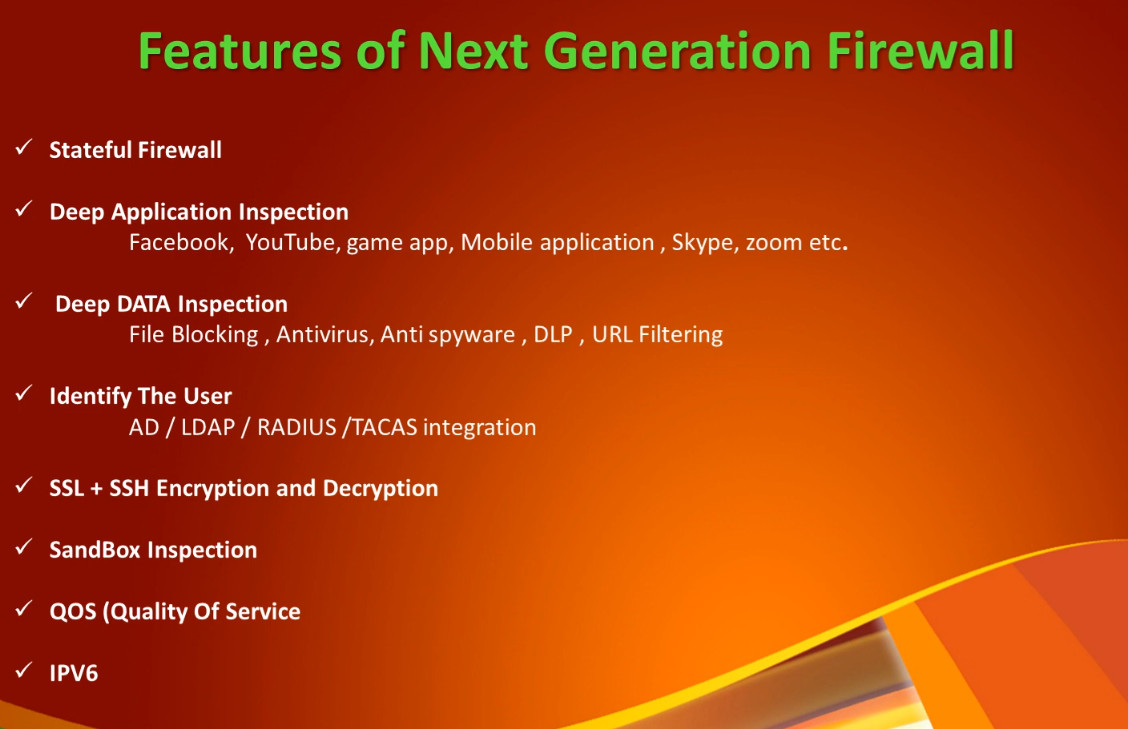
A Next-Generation Firewall (NGFW) provides advanced security by combining traditional firewall functions with modern threat prevention technologies. Below are the main features of NGFW explained in paragraph with points:
1. Application Awareness and Control
NGFW can identify and control applications such as Facebook, YouTube, WhatsApp, Skype, and cloud services regardless of port number. It allows administrators to permit or block specific applications and control how they are used inside the network, improving security and productivity.
2. Deep Packet Inspection (DPI)
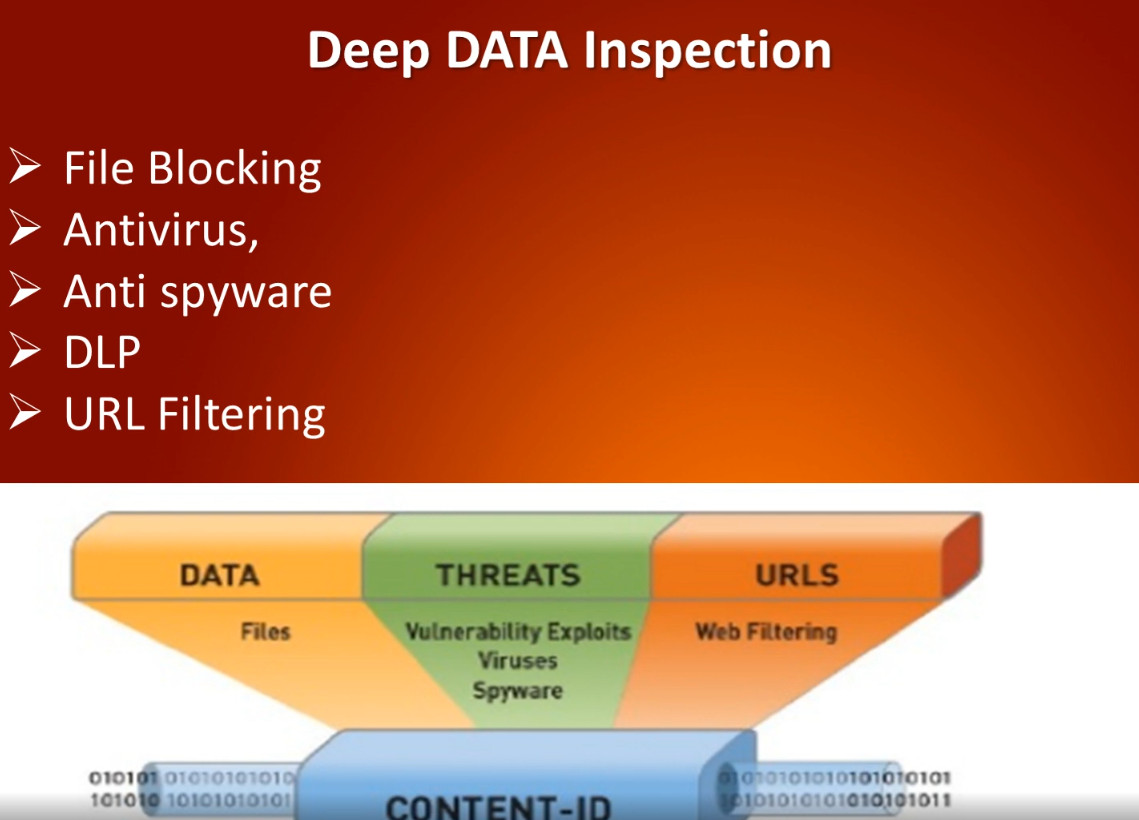
NGFW examines not only packet headers but also the actual data inside packets. This helps detect hidden malware, suspicious content, and unauthorized data transfers that traditional firewalls cannot see.
3. Intrusion Prevention System (IPS)
NGFW includes IPS to detect and block known and unknown attacks such as exploits, buffer overflow attacks, and network intrusions in real time. It protects the network from hackers and malicious activities.
4. Antivirus and Malware Protection
NGFW scans traffic for viruses, worms, ransomware, spyware, and trojans. It blocks infected files before they enter the internal network, providing strong protection against malware threats.
5. Web Filtering and URL Control
NGFW can block access to harmful or inappropriate websites such as phishing sites, adult content, and malicious domains. It also allows administrators to control internet usage based on categories and company policies.
6. SSL / HTTPS Inspection
NGFW can decrypt and inspect encrypted HTTPS traffic to detect threats hidden inside secure connections. This is important because most modern cyberattacks use encrypted channels to bypass security.
7. User and Identity Awareness
NGFW applies security rules based on user identity instead of only IP addresses. For example, different policies can be applied to managers, employees, and guests, improving access control and security management.
8. Advanced Threat Protection (ATP)
NGFW uses threat intelligence, sandboxing, and behavior analysis to detect zero-day attacks and unknown malware. Suspicious files are tested in a secure virtual environment before allowing them into the network.
9. VPN Support (IPSec & SSL VPN)
NGFW supports secure remote access through VPN tunnels, allowing employees to connect safely from outside the office while protecting data confidentiality.
10. Logging, Monitoring, and Reporting
NGFW provides detailed logs and reports of network traffic, security events, and user activities. This helps administrators analyze threats, troubleshoot issues, and meet compliance requirements.
11. High Availability (HA) and Scalability
NGFW supports failover and redundancy to ensure continuous security service if one firewall fails. It can also scale to handle large network traffic in enterprise environments.
12. Integration with Security Systems
NGFW integrates with other security tools such as SIEM, endpoint protection, and cloud security platforms, forming a complete security ecosystem.
Conclusion
Next-Generation Firewalls provide intelligent, multi-layer security by combining firewall filtering with application control, IPS, antivirus, web filtering, SSL inspection, and advanced threat protection. These features make NGFW essential for protecting modern enterprise networks from sophisticated cyber threats.
Why Need Firewall in Company Network
A firewall is very important in a company environment because it protects the organization’s network, data, and systems from cyber threats and unauthorized access. Companies use the internet daily for emails, banking, cloud applications, and customer data, which makes them a target for hackers and malware. A firewall acts as the first line of defense by controlling all incoming and outgoing network traffic based on security rules and company policies.
Why a Firewall is Needed in a Company (Detailed Explanation)
1. Protection from Cyber Attacks
A firewall prevents hackers, viruses, ransomware, spyware, and malicious traffic from entering the company network. It blocks suspicious IP addresses, unknown connections, and harmful applications before they can damage systems or steal data.
2. Prevents Unauthorized Access
Only authorized users and devices are allowed to access company servers and resources. The firewall stops outsiders from directly connecting to internal systems such as file servers, databases, and email servers.
3. Data Security and Privacy
Companies store sensitive information such as customer data, financial records, employee details, and business secrets. A firewall helps protect this data from leakage and data theft by controlling which traffic can enter or leave the network.
4. Control of Internet Usage
A firewall allows administrators to block unwanted websites (social media, gaming, adult sites) and restrict unnecessary applications. This improves employee productivity and reduces security risks.
5. Protection for Remote Access (VPN)
Firewalls support VPN services that allow employees to connect securely from outside the office. This ensures encrypted communication and safe remote work.
6. Monitoring and Logging
Firewalls record logs of network activity. These logs help administrators detect attacks, troubleshoot network problems, and maintain security audits and compliance requirements.
7. Compliance and Legal Requirement
Many industries (banks, hospitals, IT companies) must follow security standards such as ISO, PCI-DSS, and data protection laws. A firewall helps meet these security and compliance requirements.
8. Network Segmentation
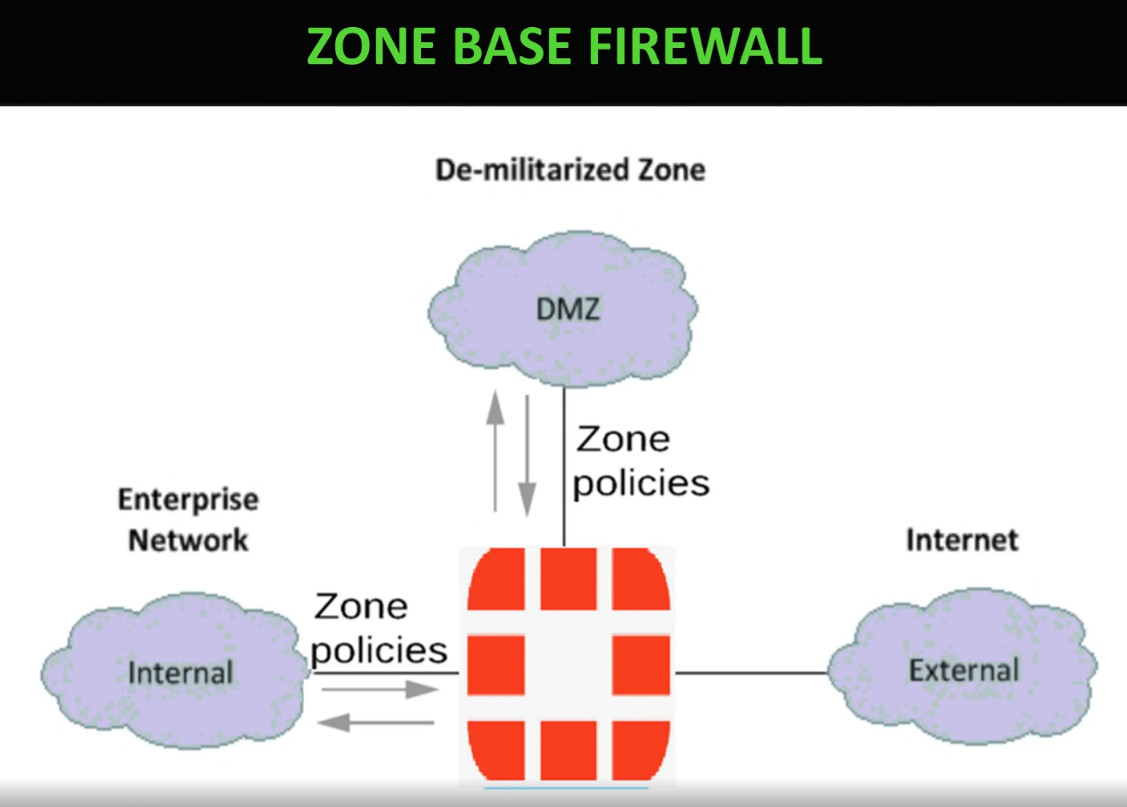
Firewalls divide the network into secure zones (LAN, DMZ, Guest network). This prevents an attack in one part of the network from spreading to the entire company.
⚠️ Problems if a Company Does NOT Use a Firewall
❌ 1. High Risk of Hacking
Without a firewall, hackers can directly access company systems and exploit open ports and vulnerabilities.
❌ 2. Data Theft and Data Loss
Sensitive company and customer data can be stolen or leaked, causing financial loss and damage to company reputation.
❌ 3. Malware and Ransomware Attacks
Viruses and ransomware can spread easily inside the network, encrypt files, and stop business operations.
❌ 4. Network Misuse by Employees
Employees may access unsafe websites, download illegal software, or use company bandwidth for personal use, which increases security risks.
❌ 5. No Control over Network Traffic
Without firewall rules, there is no way to control which applications or services are allowed or blocked.
❌ 6. Legal and Compliance Issues
Companies may face legal penalties if customer data is breached due to lack of security protection.
❌ 7. Business Downtime
Cyberattacks can shut down servers and networks, stopping work and causing huge financial loss.
Example Scenario (Without Firewall)
If a company has no firewall, a hacker can scan the network, find an open port on a server, install malware, and steal customer data. This can lead to:
- Loss of customer trust
- Financial penalties
- Business shutdown
- Reputation damage
Conclusion
A firewall is essential for every company because it protects the network from cyber threats, prevents unauthorized access, secures data, controls internet usage, and ensures smooth and safe business operations. Without a firewall, a company is exposed to hacking, data loss, malware infections, and legal problems. In today’s digital world, a firewall is not optional—it is a basic and necessary security requirement for any organization.
Why Firewall is Needed in Schools and Colleges
1. Protection from Cyber Threats
Schools and colleges are connected to the internet all the time, which makes them targets for viruses, malware, hacking, and ransomware. A firewall blocks suspicious traffic and prevents cyberattacks from entering the network and damaging computers and servers.
2. Safe Internet Access for Students
A firewall helps block harmful and inappropriate websites such as adult content, gambling sites, and malicious pages. This ensures that students use the internet only for educational and safe purposes.
3. Protection of Student and Staff Data
Institutions store sensitive information such as student records, exam results, personal details, and staff information. A firewall prevents unauthorized access and protects this data from being stolen or leaked.
4. Control of Network Usage
Firewalls allow administrators to restrict access to social media, gaming, and video streaming websites during class hours. This helps students stay focused on learning and prevents misuse of internet bandwidth.
5. Secure Online Exams and Learning Platforms
During online exams and digital classes, a firewall ensures that only authorized users can access learning management systems (LMS) and exam portals, preventing cheating and hacking attempts.
6. Protection from Internal Threats
Not only external attackers, but sometimes infected student devices (USB drives, laptops) can bring viruses into the campus network. A firewall helps stop malware from spreading inside the school or college network.
7. Monitoring and Logging
Firewalls keep logs of internet activity and network usage. This helps IT staff detect unusual behavior, investigate security issues, and maintain discipline in network usage.
8. Compliance with Rules and Policies
Many educational boards and governments require data protection and safe internet practices. A firewall helps institutions follow cybersecurity and child safety regulations.
9. Network Segmentation
Firewalls can separate networks into zones such as student network, staff network, and administration network. This prevents students from accessing confidential staff or office systems.
⚠️ Problems If Schools and Colleges Do NOT Use a Firewall
❌ 1. High Risk of Virus and Malware Infection
Without a firewall, infected websites or files can easily spread viruses across all computers in the campus.
❌ 2. Exposure to Inappropriate Content
Students may access unsafe or adult websites, which can negatively affect their learning and discipline.
❌ 3. Data Theft and Privacy Issues
Student personal information and exam data can be stolen or misused by hackers.
❌ 4. Network Misuse
Students may use the internet for gaming, movies, or illegal downloads, causing slow network speed and security risks.
❌ 5. Disruption of Classes and Exams
Cyberattacks or malware can shut down systems, interrupt online classes, and affect exams and administration work.
How Does A Firewall Protect Data
Firewall filters keep harmful data outside your computer. Some of the top risks from which firewalls protect your computer include backdoors, denial-of-service (DoS) attacks, macros, remote logins, spam, and viruses. These protections reinforce the core firewall benefits, helping organizations reduce exposure before attackers can exploit system vulnerabilities.
Backdoors are “doorways” to applications with vulnerabilities that attackers exploit to get inside. This includes operating systems that may have bugs that hackers can use to gain access to your computer.
DoS attacks are executed when a hacker requests permission to connect to a server, and when the server responds, it cannot find the system that made the request. When this is done again and again, the server gets flooded and has to expend so much power to deal with the mass of requests, rendering it unable to meet the needs of legitimate visitors. In some cases, the server has to come offline completely. There are some firewalls that can check whether the connection requests are legitimate, and thus, protect your network from DoS attacks.
Macros refer to scripts run by applications to automate processes. A macro can contain a series of dependent steps that are all launched by one command. Hackers design or purchase macros intended to work within certain applications. A macro can be hidden inside seemingly innocent data, and once it enters your computer, it wreaks havoc on your system. A firewall can detect malicious macros as it examines the packets of data that attempt to pass through.
Remote logins are often used to help someone with a computer issue. However, in the hands of the wrong person, they can be abused, particularly because remote logins provide nearly complete access to your system.
Spam can sometimes include links to malicious websites. These types of sites activate malicious code that forces cookies onto a computer. The cookies create backdoors for hackers to gain access to the computer. Preventing a spam attack is often as simple as not clicking on anything suspicious in an email, regardless of who the sender appears to be. A firewall can inspect your emails and prevent your computer from getting infected.
Viruses, once on a computer, copy themselves and spread to another device on the network. Viruses can be used to do a variety of things, ranging from relatively harmless activity to erasing data on your computer. Firewalls can inspect data packets for viruses, but it is better to use antivirus software in conjunction with a firewall to maximize your security.
Firewall Benefits
Understanding the benefits of firewall security is the first step in helping your business grow safely in the ever-changing digital age. Even if your business only relies on technology and networks for a small piece of your operations, it is still equally important that you take proactive steps to keep things protected. Firewalls serve as a first line of defense to external threats, malware, and hackers trying to gain access to your data and systems.
1. Monitors network traffic
All of the benefits of firewall security start with the ability to monitor network traffic. Data coming in and out of your systems creates opportunities for threats to compromise your operations. By monitoring and analyzing network traffic, firewalls leverage preestablished rules and filters to keep your systems protected. With a well-trained IT team, you can manage your levels of protection based on what you see coming in and out through your firewall.
2. Stops virus attacks
Nothing can shut your digital operations down faster and harder than a virus attack. With hundreds of thousands of new threats developed every single day, it is vital that you put the defenses in place to keep your systems healthy. One of the most visible benefits of firewalls is the ability to control your system’s entry points and stop virus attacks. The cost of damage from a virus attack on your systems could be immeasurably high, depending on the type of virus.
3. Prevents hacking
Unfortunately, the trend of businesses moving more toward digital operations invites thieves and bad actors to do the same. With the rise of data theft and criminals holding systems hostage, firewalls have become even more important, as they prevent hackers from gaining unauthorized access to your data, emails, systems, and more. A firewall can stop a hacker completely or deter them to choose an easier target.
4. Stops spyware
In a data-driven world, a much-needed benefit is stopping spyware from gaining access and getting into your systems. As systems become more complex and robust, the entry points criminals can use to gain access to your systems also increase. One of the most common ways unwanted people gain access is by employing spyware and malware—programs designed to infiltrate your systems, control your computers, and steal your data. Firewalls serve as an important blockade against these malicious programs.
5. Promotes privacy
An overarching benefit is the promotion of privacy. By proactively working to keep your data and your customers’ data safe, you build an environment of privacy that your clients can trust. No one likes their data stolen, especially when it is clear that steps could have been taken to prevent the intrusion.
Additionally, upgraded data-protection systems can be a competitive advantage and a selling point to customers and clients. The benefit increases the more sensitive the data your company deals with.
Hardware Firewall vs Software Firewall
Hardware Firewall
A hardware firewall is a physical device installed between the internal network and the internet. It protects the entire network by filtering all incoming and outgoing traffic based on security rules and policies. Hardware firewalls are commonly used in companies, schools, and data centers because they provide centralized security control for many devices at once. They offer strong protection, high performance, and support advanced features such as VPN, intrusion prevention, and web filtering. However, hardware firewalls are more expensive and require technical expertise to install, configure, and maintain.
Software Firewall
A software firewall is installed directly on an individual computer or server as a program or operating system feature (such as Windows Firewall or Linux firewall). It protects only that specific device by controlling which applications and services can access the network. Software firewalls are easy to use, low cost, and ideal for personal computers and small setups. However, they cannot protect an entire network and depend on the system’s own resources, which may reduce performance.
Hardware vs Software Firewall (Comparison Table)
| Feature | Hardware Firewall | Software Firewall |
|---|---|---|
| Form | Physical device | Software program |
| Protection Scope | Entire network | Single computer |
| Installation | Between network and internet | Installed on OS |
| Security Level | High | Medium |
| Performance | High (dedicated hardware) | Depends on system resources |
| Cost | Expensive | Free or low cost |
| Management | Centralized | Individual device management |
| Common Use | Companies, schools, data centers | Home users, single PCs |
| Examples | Network firewall devices | Windows Firewall, Linux firewall |
Key Differences in Simple Words
- Hardware firewall protects all devices in a network.
- Software firewall protects only one device.
- Hardware firewall is stronger but costly.
- Software firewall is cheaper but limited.
Conclusion
Both hardware and software firewalls are important for network security. Hardware firewalls are best for organizations that need strong and centralized protection, while software firewalls are suitable for individual systems and small environments. For maximum security, many organizations use both together.
Difference between next gen firewalls and unified threat management
NGFW (Next-Generation Firewall)
A Next-Generation Firewall (NGFW) is an advanced firewall designed mainly for large organizations and enterprise networks. It provides deep security by combining traditional firewall functions with modern features such as application awareness, deep packet inspection (DPI), intrusion prevention system (IPS), antivirus, SSL inspection, and advanced threat protection. NGFW can identify applications like Facebook, YouTube, or Zoom even if they use common ports like 80 or 443. It focuses on high performance, scalability, and protection against modern cyber threats such as ransomware and zero-day attacks. NGFW requires skilled administrators and is more expensive but offers very strong and intelligent security.
UTM (Unified Threat Management)
Unified Threat Management (UTM) is an all-in-one security device mainly designed for small and medium businesses (SMBs). It combines multiple security services such as firewall, antivirus, intrusion detection and prevention (IDS/IPS), VPN, web filtering, and anti-spam into a single device with simple management. UTM focuses on ease of use and cost-effectiveness rather than very high performance. When all security features are enabled, performance may decrease, but it provides complete basic protection for smaller networks.
Difference Between NGFW and UTM
| Feature | NGFW | UTM |
|---|---|---|
| Full Form | Next-Generation Firewall | Unified Threat Management |
| Target Users | Large enterprises, data centers | Small & medium businesses |
| Security Level | Very high, advanced threat protection | High but basic compared to NGFW |
| Application Control | Yes (Layer 7 control) | Limited or basic |
| Deep Packet Inspection | Advanced | Basic |
| Performance | High throughput, scalable | Lower when many features enabled |
| Management | Complex, needs skilled admin | Simple and easy to manage |
| Cost | Expensive | More affordable |
| Threat Detection | Zero-day & advanced malware protection | Known threats and basic protection |
| Scalability | Highly scalable | Limited scalability |
Key Differences in Simple Words
- NGFW = Advanced, powerful, and intelligent firewall for large networks.
- UTM = All-in-one security device for small networks with simple management.
- NGFW focuses on deep security and performance.
- UTM focuses on simplicity and cost-effectiveness.
Conclusion
NGFW is best for organizations that need strong security, application control, and high performance, such as enterprises and data centers. UTM is best for small and medium businesses that want an easy-to-use and affordable security solution in one device. Both provide firewall, antivirus, and IPS features, but NGFW offers more advanced protection against modern cyber threats.
Firewall Slide