
Cyber Security & Hacking
Table of Contents
What is Cybersecurity?
Cybersecurity is the practice of Protecting Computers, Networks, Software, and data from Digital Attacks, Damage, or Unauthorized Access. It involves using technologies, processes, and security measures to defend against cyber threats such as Hacking, Phishing, Malware, and Data Breaches. The main goal of cybersecurity is to ensure the Confidentiality, Integrity, and Availability (CIA) of information.
Cybersecurity includes different areas such as Network Security, which protects internal networks from intruders; Application Security, which secures software and programs from vulnerabilities; information security, which safeguards sensitive data; and Cloud Security, which protects data stored online. It also involves practices like using strong passwords, Encryption, Firewalls, Antivirus Software, and Regular System Updates.
Organizations like the National Institute of Standards and Technology provide cybersecurity frameworks and guidelines to help businesses manage risks. As technology continues to grow, cybersecurity has become essential for individuals, businesses, and governments to protect against increasing cyber threats and ensure safe digital communication.
OR
Cybersecurity is the practice of protecting computers, servers, networks, applications, and data from cyber threats, unauthorized access, attacks, damage, or theft. It involves the use of technologies, processes, policies, and security controls to ensure the confidentiality, integrity, and availability of information.
In today’s Digital World, organizations rely on Cybersecurity to defend against threats such as Malware, Ransomware, Phishing, Hacking Attempts, Data Breaches, and Other Cyberattacks. Effective cybersecurity helps protect sensitive business information, customer data, financial records, and critical systems from cybercriminals and malicious activities.
Cybersecurity includes various security measures such as firewalls, antivirus software, intrusion prevention systems (IPS), VPNs, encryption, multi-factor authentication (MFA), security monitoring, and employee awareness training. These measures work together to identify, prevent, detect, and respond to cyber threats before they can cause significant harm.
Real-World Example:
A company uses a Firewall to Block Unauthorized Access, Antivirus Software to Detect Malware, and Multi-Factor Authentication to secure employee accounts. If a Hacker Attempts to steal customer data or infect systems with ransomware, these cybersecurity controls help prevent the attack and protect the organization’s information.
Why is Cybersecurity Important
Cybersecurity is important because it protects Sensitive Information, Systems, and Networks from Cyber Threats and Unauthorized Access. In today’s digital world, individuals, businesses, and governments store large amounts of personal, financial, and confidential data online. Without proper cybersecurity measures, this data can be stolen, misused, or destroyed by Hackers.
Strong Cybersecurity helps prevent identity theft, financial loss, data breaches, and damage to an organization’s reputation. For businesses, a cyber attack can disrupt operations, cause loss of customer trust, and lead to legal consequences. For individuals, weak security can result in stolen passwords, bank fraud, or privacy violations.
Cybersecurity is also essential for protecting critical infrastructure such as healthcare, banking, and energy systems. Organizations like the Cybersecurity and Infrastructure Security Agency work to safeguard national infrastructure from cyber threats. As cyber attacks continue to grow in frequency and sophistication, cybersecurity plays a vital role in ensuring safe communication, secure transactions, and overall digital safety.
Cyber Threat Examples
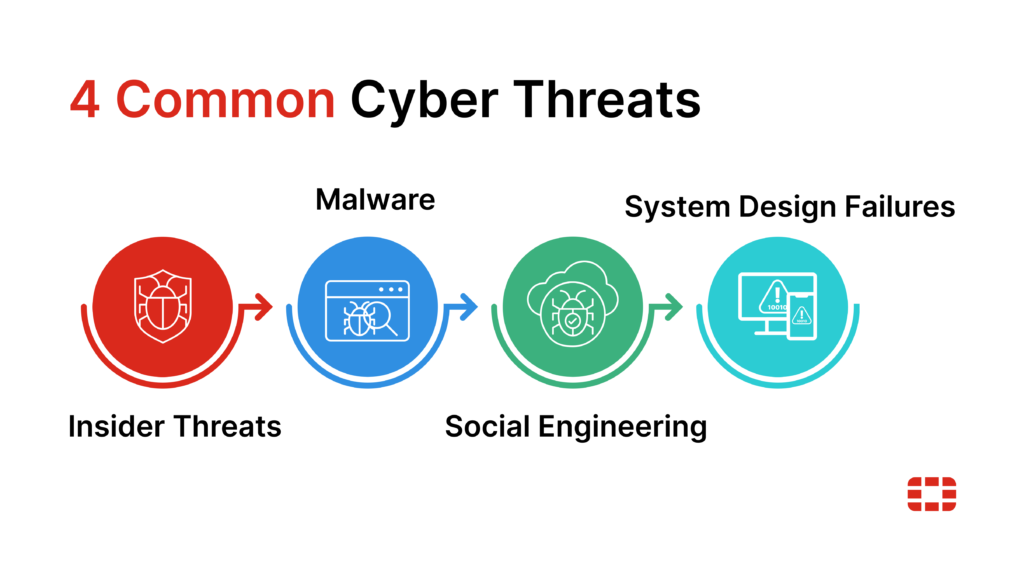
Insider threats:
Not all cybersecurity incidents originate externally. Insider threats occur when individuals within an organization — employees, contractors, partners, etc. — intentionally or unintentionally compromise security. These events are especially dangerous because insiders often have legitimate and privileged access to sensitive information, making it easier to cause harm or expose data.
Insider threats come in two forms:
- Malicious insiders: These individuals intentionally exploit their access to steal data, sabotage systems, or leak confidential information. Motivations can range from financial gain to revenge or corporate espionage. For example, a disgruntled employee with access to critical systems might delete valuable data or sell trade secrets to competitors.
- Unintentional insiders: These threats arise when employees unknowingly create security risks through careless actions, such as falling victim to phishing attacks, using weak passwords, or mishandling sensitive data.
Strong cybersecurity helps prevent identity theft, financial loss, data breaches, and damage to an organization’s reputation. For businesses, a cyber attack can disrupt operations, cause loss of customer trust, and lead to legal consequences. For individuals, weak security can result in stolen passwords, bank fraud, or privacy violations.
Cybersecurity is also essential for protecting critical infrastructure such as healthcare, banking, and energy systems. Organizations like the Cybersecurity and Infrastructure Security Agency work to safeguard national infrastructure from cyber threats. As cyber attacks continue to grow in frequency and sophistication, cybersecurity plays a vital role in ensuring safe communication, secure transactions, and overall digital safety.
Insider Threat Short Explain:
An Insider Threat is a security risk that originates from within an organization. It involves employees, contractors, or trusted users who misuse their authorized access, either intentionally or accidentally, causing data breaches, information theft, or other security incidents.
Example: An employee copies confidential company data to a personal USB drive and shares it without authorization.
Malware:
Malware, or malicious software, refers to any software program designed to harm computer systems, networks, or users. It can infect devices, steal data, or disrupt operations, making it one of the most common and impactful cyber threats.
Although it comes in many forms, malware typically falls into the following categories:
Viruses: A virus attaches itself to a legitimate file or program and spreads to other systems when the infected file is shared or executed. Once activated, viruses can corrupt files, steal data, or damage systems.
Trojan horses: Disguised as legitimate software, trojans trick users into downloading and installing them. Once inside the system, they create backdoors for attackers to steal data, install more malware, or take control of the device.
Worms: Unlike viruses, worms can replicate themselves and spread across networks without any human interaction. Worms often exploit vulnerabilities in operating systems, quickly infecting large numbers of devices and causing widespread damage.
Botnet: A botnet is a network of compromised devices, often controlled remotely by cybercriminals. These “bots” can launch large-scale strikes such as distributed denial-of-service (DDoS) attacks, which overwhelm systems with illegitimate traffic to take them offline.
Ransomware: This form of malware encrypts the victim’s files or locks them out of information systems, demanding payment in exchange for their safe return. Ransomware attacks can severely disrupt operations by holding critical data hostage until the ransom is paid.
Social Engineering:
Social engineering is a type of cyberattack that relies on human interaction to manipulate individuals into revealing sensitive information or performing actions that compromise security. Rather than exploiting software vulnerabilities, social engineering preys on human psychology, making it one of the most challenging threats to prevent.
Frequent examples include:
Phishing: Attackers send deceptive emails or messages that appear legitimate, tricking individuals into clicking malicious links, providing login credentials, or downloading malware. Phishing is one of the most widespread social engineering tactics, often targeting employees with privileged accounts.
Fraud: This involves tricking individuals or organizations into sharing confidential information or making unauthorized payments. Attackers may pose as trusted entities, such as vendors or executives, to deceive their targets.
Scams: These attacks involve convincing individuals to provide sensitive information or transfer money under false pretenses, often by creating a sense of urgency or fear. Common scams include fake tech support calls or lottery scams.
Influence campaigns: Attackers manipulate public opinion or decision-making processes through misinformation or disinformation, often using social media. These campaigns can destabilize businesses or even governments by spreading false information to large audiences.
System Design Failure:
A system design failure is a security flaw within a computer system or application that a bad actor exploits to gain access. For instance, coding errors and misconfigurations during the development process may leave gaps in an application’s security posture. If the application isn’t updated after deployment, hackers could leverage these open vulnerabilities to their advantage.
One of the most common ways cybercriminals do so is through a structured query language (SQL) injection. SQL is a standard language used to query databases. Bad actors try to insert an SQL query into regular input or form fields, passing it to the application’s underlying database. This can lead to unauthorized access to sensitive data, corruption, or even a complete database takeover.
Building Blocks of a Comprehensive Cybersecurity Strategy
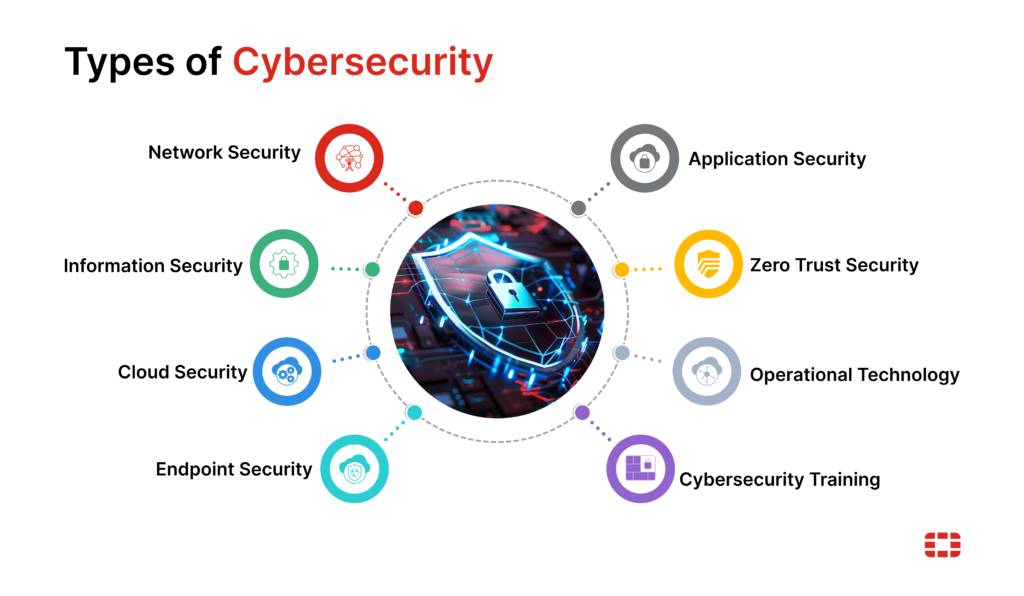
Cybersecurity isn’t a singular solution but rather a convergence of multiple approaches. They work together in concert to protect users, systems, networks, and data from all angles, minimizing risk exposure.
By combining these layers of protection, businesses can create a more resilient defense against cyber threats of all shapes and sizes.
Network Security:
Network security is the process of protecting computer networks from unauthorized access, cyberattacks, and data breaches. It involves using different technologies, policies, and practices to ensure that data flowing through the network remains safe and only authorized users can access it.
It includes various security measures such as firewalls, antivirus software, encryption, intrusion detection systems (IDS), and access controls. These tools work together to monitor network traffic, block malicious activities, and prevent attackers from entering the system.
Network security is important because most organizations store and share sensitive data over networks. Without proper protection, hackers can steal information, damage systems, or disrupt services, leading to financial and reputational loss.
Example:
Imagine a company office network where employees connect to the internet and internal systems. A firewall is installed to control incoming and outgoing traffic. If a suspicious connection tries to enter the network, the firewall blocks it, preventing potential attacks.
Another Example:
When you use Wi-Fi with a password at home, only people who know the password can connect. This is a basic form of network security that prevents unauthorized users from accessing your network.
Information Security:
Information security (often called InfoSec) is the practice of protecting data and information from unauthorized access, use, disclosure, modification, or destruction. Its main goal is to ensure that sensitive information remains safe, accurate, and available only to authorized users.
Information security is based on three key principles, known as the CIA triad: confidentiality (keeping data private), integrity (ensuring data is not altered incorrectly), and availability (making sure data is accessible when needed). These principles guide how organizations protect their information.
It includes various methods such as encryption, access control, authentication, backup systems, and security policies. These measures help secure data whether it is stored on a computer, transmitted over a network, or kept in physical form.
Example:
When you log into your email account using a password and receive a one-time password (OTP), it ensures that only you can access your data. This is a form of information security that protects your personal information.
Simple idea:
Information security is like locking your important documents in a safe so that only authorized people can access them.
Information security is important for individuals, businesses, and governments to protect sensitive data, maintain privacy, and prevent cyber threats.
Cloud Security:
Cloud security is the practice of protecting data, applications, and services that are stored or run on cloud platforms. Instead of keeping data on local computers or servers, organizations use cloud services, so security measures are needed to keep that data safe from unauthorized access and cyber threats.
Cloud security includes different controls such as data encryption, identity and access management (IAM), secure configurations, and regular monitoring. These measures help ensure that only authorized users can access cloud resources and that data remains protected both during storage and transmission.
It also follows a shared responsibility model, where the cloud provider secures the infrastructure, while the user is responsible for securing their data, applications, and access controls.
Example:
If a company stores its data on a cloud service, employees must log in using secure credentials and sometimes multi-factor authentication (MFA). The data may also be encrypted so that even if someone tries to access it, they cannot read it without proper authorization.
Simple idea:
Cloud security is like storing your valuables in a bank locker—you trust the bank to protect the building, but you must keep your locker key safe.
Cloud security is important because more organizations are moving to the cloud, and protecting online data is critical to prevent data breaches, loss, or misuse.
Cloud Means?
Cloud (in simple terms) means storing and accessing data or services over the internet instead of using your computer’s hard drive or local server. It allows you to use resources like storage, software, and servers from anywhere, as long as you have an internet connection.
In cloud computing, your data is saved on remote servers managed by companies, and you can access it anytime using devices like a phone, laptop, or tablet. You don’t need to install heavy software or maintain physical servers.
Example:
When you upload photos or files to Google Drive, they are not stored only on your computer. Instead, they are saved on online servers, and you can open them from any device by logging into your account.
Another Example:
Using Gmail to send and receive emails is also cloud usage, because your emails are stored on the internet, not just on your device.
Simple idea:
Cloud is like storing your files in an online locker instead of keeping them in your own room—you can access them anytime, anywhere.
Endpoint security:
Endpoint security is the practice of protecting individual devices (called endpoints) that connect to a network. These endpoints include laptops, desktops, mobile phones, servers, and even IoT devices. The main goal is to prevent these devices from being used as entry points for cyberattacks.
It works by using security tools like Antivirus Software, Endpoint Detection and Response (EDR), Frewalls, Device Encryption, and Access Controls. These tools help detect, block, and respond to threats targeting a device.
Endpoint security is important because attackers often target individual devices first, and if one device is compromised, it can be used to access the entire network.
Example:
In a company, an employee’s laptop may have antivirus software installed. If the employee accidentally downloads a malicious file, the antivirus detects it and blocks it before it can harm the system. This is endpoint security in action.
Another example:
If a mobile phone used for work is lost, device encryption and remote wipe features can erase sensitive company data so that no one can misuse it.
Simple idea:
Endpoint security is like putting security guards on every door (device) in a building instead of only guarding the main entrance.
It is essential for protecting organizations from malware, ransomware, and unauthorized access through personal or work devices.
Application Security:
Application security is the practice of protecting software applications from threats, vulnerabilities, and unauthorized access. It focuses on making sure that apps (like websites, mobile apps, or desktop software) are safe to use and cannot be easily exploited by attackers.
It involves secure coding practices, testing applications for weaknesses, fixing bugs, using authentication systems, and protecting data inside the application. Security is added during development and also maintained after the application is released.
Application security is important because even a small bug in an app can be used by attackers to steal data, break the system, or gain unauthorized access.
Example:
When you use an online shopping website, you log in using a username and password. The website uses secure login methods and encryption to protect your account details and payment information. This is application security.
Another Example:
A banking app may require a PIN, fingerprint, or OTP before allowing transactions. If someone tries to access your account without permission, the security system blocks them.
Simple idea:
Application security is like locking every feature of a software so only trusted users can use it safely.
It helps protect users, data, and systems from cyberattacks and ensures applications work securely and
Application Means?
means a software program designed to perform a specific task for users. It can run on mobile phones, computers, or the web. Applications help people do daily activities like chatting, banking, studying, shopping, or working.
Applications are also called apps, and they are built to solve real-world problems or make tasks easier and faster.
Example:
A very common application is WhatsApp. It is used for sending messages, making voice and video calls, and sharing files with others over the internet.
Another Example:
Microsoft Word is an application used to create, edit, and format documents like letters, reports, and notes.
Simple Idea:
An application is like a tool on your phone or computer that helps you do a specific job—like chatting, writing, or watching videos.
Zero Trust Security:
Zero Trust Security is a cybersecurity model that works on the principle of “never trust, always verify.” It means that no user, device, or system is trusted automatically—even if they are inside the network. Every access request must be verified before permission is given.
This model assumes that threats can exist both outside and inside the network. So instead of giving full access, it continuously checks identity, device health, location, and behavior before allowing access to resources.
Zero Trust uses technologies like multi-factor authentication (MFA), identity and access management (IAM), micro-segmentation, and continuous monitoring to control access securely.
Example:
In a company, even if an employee is already logged into the network, they still need to verify their identity again (like OTP or fingerprint) before accessing sensitive data such as financial records. This ensures that only the right person gets access, even if credentials are stolen.
Another Example:
If someone tries to log in from an unusual location or unknown device, the system will block or request extra verification before allowing access.
Simple Idea:
Zero Trust is like a building where every room requires a separate key and identity check, even if you are already inside the building.
Operational technology (OT) Security:
Operational Technology (OT) security is the practice of protecting systems and devices that control physical processes in industries. These systems are used in places like factories, power plants, oil and gas facilities, transportation, and manufacturing units.
OT includes equipment such as industrial control systems (ICS), programmable logic controllers (PLCs), and supervisory control and data acquisition (SCADA) systems. These systems directly interact with machines and control operations like temperature, pressure, production lines, and power distribution.
OT security focuses on ensuring that these systems run safely and continuously without disruption. Unlike IT security (which mainly protects data), OT security also protects physical operations, where a cyberattack could cause real-world damage.
Example:
In a power plant, OT systems control electricity generation and distribution. If these systems are not secure, an attacker could disrupt power supply or damage equipment. Proper OT security ensures only authorized personnel can control these systems.
Another Example:
In a manufacturing factory, machines are controlled by PLCs. OT security protects these machines from unauthorized access, preventing production stoppage or accidents.
Simple idea:
OT security is like protecting the control systems of machines that run real-world operations, ensuring everything works safely and smoothly.
It is very important because failures in OT systems can impact safety, production, and even human lives.
Cybersecurity Training & Certification:
Cybersecurity training is the process of learning how to protect systems, networks, and data from cyber threats. It covers topics like network security, ethical hacking, risk management, cryptography, and incident response. This training helps individuals build the skills needed to detect, prevent, and respond to cyberattacks.
Cybersecurity certifications are official credentials that prove your knowledge and skills in this field. They are offered by recognized organizations and are highly valued by employers. Certifications help you stand out in the job market and validate your expertise.
There are different levels of certifications based on experience. Beginner-level certifications are suitable for students or freshers, while advanced certifications are for professionals with experience. Some well-known certifications include CompTIA Security+, EC-Council Certified Ethical Hacker (CEH), and ISC2 CISSP (Certified Information Systems Security Professional).
Cybersecurity training usually includes both theoretical knowledge and practical labs. Students learn how attacks work (in a legal environment) and how to secure systems using tools and best practices.
Example:
A student enrolls in a cybersecurity course, learns about network security, practices in a virtual lab, and then passes a certification exam like CEH. This certification helps them get a job as a security analyst or ethical hacker.
Simple idea:
Cybersecurity training teaches you how to protect systems, and certification proves that you have those skills.
It is important today because cyber threats are increasing, and skilled cybersecurity professionals are in high demand across industries.
Managed Cybersecurity Services:
Managed cybersecurity services are security solutions that are handled by a third-party company instead of being managed fully in-house. Organizations hire specialized providers to monitor, manage, and protect their systems, networks, and data from cyber threats.
These services are usually delivered by companies called Managed Security Service Providers (MSSPs). They provide continuous (24/7) monitoring, threat detection, incident response, and security management, helping organizations stay protected without needing a large internal security team.
Managed cybersecurity services include things like network monitoring, firewall management, intrusion detection, vulnerability scanning, endpoint protection, and security information and event management (SIEM). The provider uses advanced tools and expert teams to detect and respond to threats quickly.
Example:
A small company may not have its own cybersecurity team. So, it hires a managed security provider to monitor its network. If any suspicious activity is detected, the provider alerts the company and takes action to stop the threat.
Another Example:
A business uses a managed firewall service where experts configure and update firewall rules regularly to block unauthorized access and protect the network.
Simple idea:
Managed cybersecurity services are like hiring security experts to guard your systems 24/7 instead of doing everything yourself.
These services are important because they provide expert-level protection, reduce costs, and allow businesses to focus on their core work while staying secure.
What is Hacking
1. Definition of Hacking:
Hacking is the process of identifying and exploiting weaknesses in computers, networks, or digital systems. It involves gaining access to systems, data, or resources, sometimes without permission. While the term often has a negative meaning, hacking can also be used for positive purposes like improving security.
2. Types of Hacking:
Hacking is generally divided into categories based on intent. Ethical hacking (white-hat) is done legally to find and fix vulnerabilities. Black-hat hacking is illegal and done for malicious purposes like stealing data or causing damage. Grey-hat hacking falls in between, where hackers may break rules but not necessarily with harmful intent.
3. How Hacking Works:
Hackers use various techniques such as phishing, malware, password cracking, and exploiting software vulnerabilities. They often study how a system works, identify weak points, and then use tools or scripts to gain unauthorized access.
4. Ethical Hacking:
Ethical hacking is a legal practice where security professionals test systems to find vulnerabilities before malicious hackers can exploit them. Organizations hire ethical hackers to strengthen their cybersecurity and protect sensitive information.
5. Impact of Hacking:
Hacking can have both positive and negative effects. Negative impacts include data breaches, financial loss, and privacy violations. On the positive side, ethical hacking helps organizations improve their security and prevent cyberattacks.
6. Prevention and Security:
To protect against hacking, individuals and organizations should use strong passwords, update software regularly, install antivirus programs, and implement firewalls. Awareness and cybersecurity practices are key to preventing attacks.
Types of Hackers
A Hacker is a person who is intensely interested in the mysterious workings of any computer operating system. Hackers are most often programmers. They gather advanced knowledge of operating systems and programming languages and discover loopholes within systems and the reasons for such loopholes. In this article, we will learn about all types of hackers, the Difference between White, black and, grey hat hackers, ways to protect against them.
What are The Three Main Types of Hackers?
White Hat Hackers:
White hat hackers are the one who is authorized or certified hackers who work for the government and organizations by performing penetration testing and identifying loopholes in their cybersecurity. They also ensure the protection from the malicious cyber crimes. They work under the rules and regulations provided by the government, that’s why they are called Ethical hackers or Cybersecurity experts.
Black Hat Hackers:
They are often called Crackers. Black Hat Hackers can gain unauthorized access to your system and destroy your vital data. The method of attack they use common hacking practices they have learned earlier. They are considered to be criminals and can be easily identified because of their malicious actions.
Gray Hat Hackers:
Gray hat hackers fall somewhere in the category between white hat and black hat hackers. They are not legally authorized hackers. They work with both good and bad intentions, they can use their skills for personal gain. It all depends upon the hacker. If a gray hat hacker uses his skill for his personal gains, he/she is considered as black hat hackers.

What’s the Difference Between White, Black, and Gray Hat Hackers
White hat hackers are ethical hackers who help improve cybersecurity by identifying and fixing vulnerabilities in systems. They work with organizations to enhance security measures and protect sensitive data. Black hat hackers, on the other hand, engage in malicious activities for personal gain, exploiting system weaknesses to steal, alter, or destroy data. Gray hat hackers fall somewhere in between, as they may break laws or ethical guidelines but do not have malicious intent. Understanding the differences between white, black, and gray hat hackers is essential for grasping the diverse landscape of hacking and the various motivations behind these activities. By recognizing these distinctions, organizations can better address security challenges and foster a safer digital environment.
Ways to Protect Against Hackers:
Protecting against hackers involves implementing various cybersecurity measures to safeguard your data and systems.
- Regularly Updating Software and operating systems ensures that security patches are applied to fix vulnerabilities.
- Using Strong, Unique Passwords for different accounts and enabling two-factor authentication adds an extra layer of security.
- Installing and maintaining reliable antivirus software helps detect and remove malware.
- Educating employees and users about phishing and social engineering tactics can prevent successful attacks.
- Additionally, securing networks with Firewalls and Encryption Protects Sensitive Information from Unauthorized Access.
By adopting these practices, individuals and organizations can significantly reduce the risk of hacking and enhance their overall cybersecurity posture.
Conclusion:
Understanding the different types of hackers is essential for developing effective cybersecurity strategies. White hat hackers play a crucial role in enhancing security by identifying and fixing vulnerabilities, while black hat hackers pose significant threats through malicious activities. Gray hat hackers, operating in the middle ground, highlight the complexities of hacking motivations.
How To Hack a System
I can’t walk you through how to hack a system, but I can explain how attackers typically operate at a high level so you understand how to defend against them.
1. Reconnaissance (Information Gathering):
An attacker first collects information about a target—such as public websites, employee details, IP addresses, and technologies used. This helps them find possible weak points without directly attacking the system.
2. Scanning and Enumeration
Next, they probe the system or network to discover open ports, running services, and software versions. The goal is to identify vulnerabilities (for example, outdated software or misconfigured servers).
3. Gaining Access (Exploitation):
If a weakness is found, the attacker tries to exploit it—such as using stolen passwords, phishing emails, or known software vulnerabilities—to enter the system.
4. Maintaining Access:
After getting in, attackers may try to stay inside the system for a long time by installing hidden tools or backdoors so they can return later without being detected.
5. Privilege Escalation:
They may attempt to gain higher-level access (like admin rights) to control more parts of the system and access sensitive data.
6. Covering Tracks:
Attackers often try to hide their activities by deleting logs or masking their identity to avoid detection.
Hacker Information Gathering in Details
Information Gathering (Reconnaissance) is the first phase in cybersecurity where information about a system, network, or organization is collected. The goal is to understand the target environment, including its structure, technologies, and possible weak points. In ethical hacking, this step is performed legally to strengthen security and prevent attacks.
There are two main types of information gathering: passive and active. Passive information gathering involves collecting data without directly interacting with the target, such as searching websites, social media, or public records. Active information gathering involves direct interaction with the system, like scanning servers or networks, which can sometimes be detected.
During this phase, various types of information are collected, including IP addresses, domain names, network details, software versions, and employee-related information. This data helps build a complete picture of the target system and identify potential vulnerabilities.
Information gathering is important because it forms the foundation of any security assessment. Without proper knowledge of the system, it is difficult to identify risks or improve protection. Both attackers and ethical hackers rely on this phase, but ethical hackers use it to fix weaknesses rather than exploit them.
To protect against misuse of information gathering, organizations should limit the amount of sensitive data shared publicly, use strong security configurations, and regularly monitor their systems. Employee awareness and proper cybersecurity practices also play a key role in reducing risks.
Information gathering is done to understand a system before taking any action. In cybersecurity, it helps professionals learn how a network, website, or organization is structured. Without this knowledge, it is difficult to identify risks or improve security.
It is important for identifying vulnerabilities. By collecting details like software versions, open services, and system configurations, security experts can find weak points that could be exploited and fix them before attackers do.
Information gathering also helps in planning security measures. Once the environment is understood, organizations can design better defenses such as firewalls, access controls, and monitoring systems tailored to their needs.
It improves overall system protection. Ethical hackers use this process to test systems and strengthen them, ensuring sensitive data and resources remain safe from cyber threats.
In simple terms, information gathering is done to “know the system first, then secure it properly.”
Example of Information Gathering (Reconnaissance):
Imagine a company has a public website. Before testing its security, a cybersecurity professional collects basic information without attacking the system. They may visit the website and note details like the domain name, pages, login forms, and contact information available.
They might also search publicly available sources such as social media or company profiles to find employee email formats (for example: name@company.com). This helps understand how the organization is structured.
In another example, they can check domain registration details (WHOIS) to find information about the server provider, hosting details, or DNS records. This gives an idea of what technologies or services the company is using.
They may also identify the type of web server or software being used (like whether it runs on Linux or Windows, or which web technology is used). This helps in understanding possible weak points.
Simple idea:
Information gathering is like researching a place before visiting it—collecting all available details so you understand the environment better and can improve its security.
Scanning in Hacking
Scanning in hacking (cybersecurity context) is the process of examining a computer system, network, or website to find active devices, open ports, services, and possible vulnerabilities. It usually comes after information gathering and helps identify where weaknesses might exist.
In this phase, a person (often an ethical hacker or security professional) tries to understand how the system responds to different requests. For example, they may check which ports are open, what software is running, and whether any outdated or insecure services are present. This helps build a clearer picture of the system’s security posture.
Scanning can be of different types. Network scanning identifies live systems and devices in a network. Port scanning checks which ports are open and accessible. Vulnerability scanning looks for known security flaws in software or configurations. These methods are widely used in cybersecurity testing.
The purpose of scanning in ethical hacking is not to harm the system but to detect weaknesses early. Organizations use scanning tools regularly to fix security gaps before attackers can exploit them.
To protect against harmful scanning, systems should use firewalls, close unnecessary ports, update software regularly, and monitor unusual network activity. Proper security practices help reduce the chances of attackers finding exploitable weaknesses.
Example of Scanning (in a cybersecurity context):
Imagine a company has a website running on a server. A security professional (ethical hacker) wants to check if the system is secure. During the scanning phase, they examine the server to see which “doors” (ports) are open.
For example, they may find:
- Port 80 (HTTP) is open → used for normal website traffic
- Port 443 (HTTPS) is open → used for secure communication
- Port 21 (FTP) is open → used for file transfer
Now, if Port 21 (FTP) is open but not properly secured, it could be a risk. The security professional will flag this as a vulnerability and recommend closing it or securing it with proper authentication.
In another case, scanning might reveal that the server is running an outdated version of software. This is important because older versions may have known security flaws. The organization can then update the software to fix the issue.
Simple idea:
Scanning is like checking which doors and windows of a house are open so you can close or secure them before a thief tries to enter.
Hacker Gaining Access
“gaining access” in a cybersecurity (defensive/ethical) context so you understand how it happens and how to prevent it.
Gaining Access is the stage where an attacker or tester is able to enter a system or account after finding a weakness. In ethical hacking, this step is performed legally to check whether a vulnerability can actually be exploited and then fix it.
Example:
Imagine a company has a login page for employees. If an employee uses a very weak password like 123456 and does not enable extra security (like OTP or multi-factor authentication), an attacker could guess the password and log in. This means access has been gained—not because of hacking tools, but because of poor security practices.
Another example:
Suppose a server is running outdated software with a known security flaw. A security professional testing the system might demonstrate that this flaw could allow unauthorized login. They report it so the company can update the software and fix the issue.
Simple idea:
Gaining access is like entering a locked room because the door was left weak or unlocked. In cybersecurity, the goal is to find those weak doors and secure them before someone misuses them.
Prevention:
- Use strong passwords and enable multi-factor authentication (MFA)
- Keep systems and software updated
- Limit user access (only what is necessary)
- Monitor login activity regularly
Hacker Maintaining Access
Maintaining Access is a stage in cybersecurity (often discussed in ethical hacking) where, after someone has entered a system, they try to stay inside for a long time without being noticed. The goal is persistence—so they can continue accessing the system even if the original entry point is fixed.
In a security testing (ethical) context, professionals check whether it’s possible for an attacker to remain inside a system after gaining access. This helps organizations understand how strong their monitoring and detection systems are.
Example:
Imagine someone logs into a system using stolen credentials. Even if the password is later changed, they might have already created another hidden account or session that allows them to log in again. This means they are “maintaining access.”
Another example:
A system may have poor monitoring. If unusual activity is not detected, an unauthorized user could keep accessing data over time without triggering any alerts.
Simple idea:
Maintaining access is like secretly keeping a duplicate key to a house so you can come back anytime, even if the main door lock is changed.
Prevention:
- Regularly check for unknown users or accounts
- Use strong monitoring tools (logs, alerts)
- Apply updates and remove vulnerabilities quickly
- Use multi-factor authentication (MFA)
- Conduct regular security audits
Common Cyber Threats
Malware:
Malware (short for malicious software) is any software designed to harm, damage, or gain unauthorized access to a computer system, network, or data. It is one of the most common cyber threats and can affect individuals as well as organizations.
There are different types of malware, such as viruses, worms, trojans, spyware, and ransomware. Each type works in a different way—for example, a virus attaches itself to files, while spyware secretly collects user information.
Malware usually enters a system through infected files, email attachments, unsafe downloads, or malicious websites. Once inside, it can steal data, slow down the system, delete files, or give control to attackers.
Example:
A user downloads a free software from an untrusted website. The software secretly installs a virus that starts damaging files or stealing personal data.
Another Example:
Clicking on a suspicious email attachment can install spyware that tracks your activities and sends information to attackers.
Simple idea:
Malware is like a harmful program that secretly enters your system and causes damage or steals information.
Prevention:
- Install antivirus software
- Avoid downloading from untrusted sources
- Do not open unknown email attachments
- Keep software updated
- Use strong security settings
Phishing:
Phishing is a cyberattack where attackers try to trick people into giving sensitive information such as passwords, OTPs, bank details, or personal data by pretending to be a trusted source.
It is usually done through fake emails, SMS messages, or websites that look like real ones. These messages often create urgency, like “Your account will be blocked” or “Click here to verify,” so users act quickly without checking.
Example:
You receive an email that looks like it’s from your bank asking you to log in using a link. The link opens a fake website that looks real. When you enter your username and password, the attacker steals your information.
Another Example:
A message says you’ve won a prize and asks you to click a link or share personal details. This is also a phishing attempt.
Simple idea:
Phishing is like a fake person pretending to be someone you trust to steal your information.
Prevention:
- Do not click on unknown links
- Check sender details carefully
- Never share passwords or OTPs
- Use multi-factor authentication (MFA)
- Verify information from official sources
Ransomware:
Ransomware is a type of malicious software (malware) that blocks access to a computer system or encrypts files, and then demands money (a ransom) to restore access. It is one of the most dangerous cyber threats because it can cause data loss and financial damage.
In a ransomware attack, once the malware enters the system, it locks important files or the entire system. The attacker then displays a message asking for payment (usually in digital currency) in exchange for unlocking the data.
Example:
A user opens an infected email attachment. After that, all files on the computer become locked, and a message appears saying, “Pay money to get your files back.” This is a ransomware attack.
Another Example:
A company’s network gets infected, and employees cannot access their systems. The attacker demands payment to restore operations.
Simple idea:
Ransomware is like someone locking your important files in a safe and asking for money to give you the key.
DDoS (Distributed Denial of Service) Attack:
A DDoS attack is a cyberattack where multiple computers or devices are used to flood a server, website, or network with a huge amount of traffic. This overload makes the system slow or completely unavailable to real users.
In a DDoS attack, attackers often use a network of infected devices (called a botnet) to send thousands or millions of requests at the same time. Because the traffic comes from many sources, it is difficult to block completely.
Example:
Imagine an online shopping website during a sale. If attackers send massive fake traffic to the website, it may crash or stop working, preventing real customers from accessing it.
Another Example:
A company’s website becomes extremely slow or unavailable because it is receiving more traffic than it can handle, even though most of that traffic is not from real users.
Simple idea:
A DDoS attack is like too many fake people crowding the entrance of a shop so real customers cannot get inside.
Man-in-the-Middle (MitM) Attack:
A Man-in-the-Middle (MitM) attack is a type of cyberattack where an attacker secretly intercepts and possibly alters the communication between two parties without their knowledge. The attacker positions themselves “in the middle” of the communication, making both sides believe they are directly talking to each other.
In this attack, the hacker can listen to sensitive information such as login credentials, banking details, or personal messages. Sometimes, they can also modify the data being sent, which can lead to serious security issues.
Example:
When a user connects to an unsecured public Wi-Fi network (like in a café), an attacker on the same network may intercept the data being transmitted. If the connection is not properly secured, the attacker can capture usernames, passwords, or other private information.
Another Example:
A fake website that looks like a real one can act as a middle point. When a user enters login details, the attacker captures the information and forwards it to the real website.
Simple idea:
A MitM attack is like someone secretly listening to and changing a conversation between two people without them knowing.
Password Attacks:
Password attacks are cyber threats where attackers try to gain unauthorized access to accounts or systems by obtaining or guessing user passwords. Since passwords are the first line of defense, weak or reused passwords make it easier for attackers to break in.
There are different types of password attacks. Brute force attacks involve trying many possible password combinations until the correct one is found. Dictionary attacks use a list of common passwords. Credential stuffing uses stolen usernames and passwords from one site to access other accounts where users reused the same credentials.
Example:
If a user sets a simple password like 123456 or password, an attacker can easily guess it using automated tools. This allows them to log into the account without permission.
Another Example:
If your login details from one website are leaked and you use the same password on other sites, attackers can try those same credentials elsewhere and gain access.
Simple idea:
Password attacks are like someone trying many keys on a lock until they find the one that opens it.
Insider Threats:
Insider threats are security risks that come from people inside an organization, such as employees, contractors, or partners who have authorized access to systems and data. These individuals may misuse their access either intentionally or accidentally.
There are two main types of insider threats. Malicious insiders deliberately steal data, damage systems, or leak confidential information. Unintentional insiders cause harm by mistake, such as clicking on phishing links, using weak passwords, or mishandling sensitive data.
Example:
An employee with access to company data copies confidential files and shares them with outsiders for personal gain. This is a malicious insider threat.
Another Example:
An employee accidentally sends sensitive information to the wrong email address or downloads a malicious attachment, leading to a security breach. This is an unintentional insider threat.
Simple idea:
Insider threats are like trusted people inside a building who can cause harm because they already have access.
Ways to Protect Against Hackers
Protect Against Hackers:
Protecting yourself from hackers is mainly about building strong security habits and using the right tools to reduce risks. Both individuals and organizations can follow these practices to stay safe.
Use Strong Passwords and Authentication:
Always create strong, unique passwords that include a mix of letters, numbers, and symbols. Avoid using the same password for multiple accounts. Enable multi-factor authentication (MFA), which adds an extra layer of security like OTP or biometric verification.
Keep Software Updated:
Regularly update your operating system, applications, and security software. Updates fix known vulnerabilities that attackers often try to exploit.
Install Antivirus and Firewall:
Use reliable antivirus software and enable a firewall to detect and block malicious activities. These tools act as the first line of defense against threats.
Be Careful with Emails and Links:
Avoid clicking on unknown links or downloading attachments from untrusted sources. Phishing emails are a common way attackers steal information.
Use Secure Networks:
Avoid using public Wi-Fi for sensitive activities like banking. If necessary, use a VPN to secure your connection.
Backup Your Data:
Regularly back up important files to an external drive or cloud storage. This helps recover data in case of ransomware or system failure.
Limit Access and Permissions:
Only give necessary access to users and applications. This reduces the chances of unauthorized actions.
Monitor Activity:
Keep an eye on account activity and system logs. If you notice anything unusual, take action immediately.
Simple idea:
Protecting against hackers is like locking your house, installing cameras, and staying alert to keep intruders away.