
Routing Technology
What is Routing
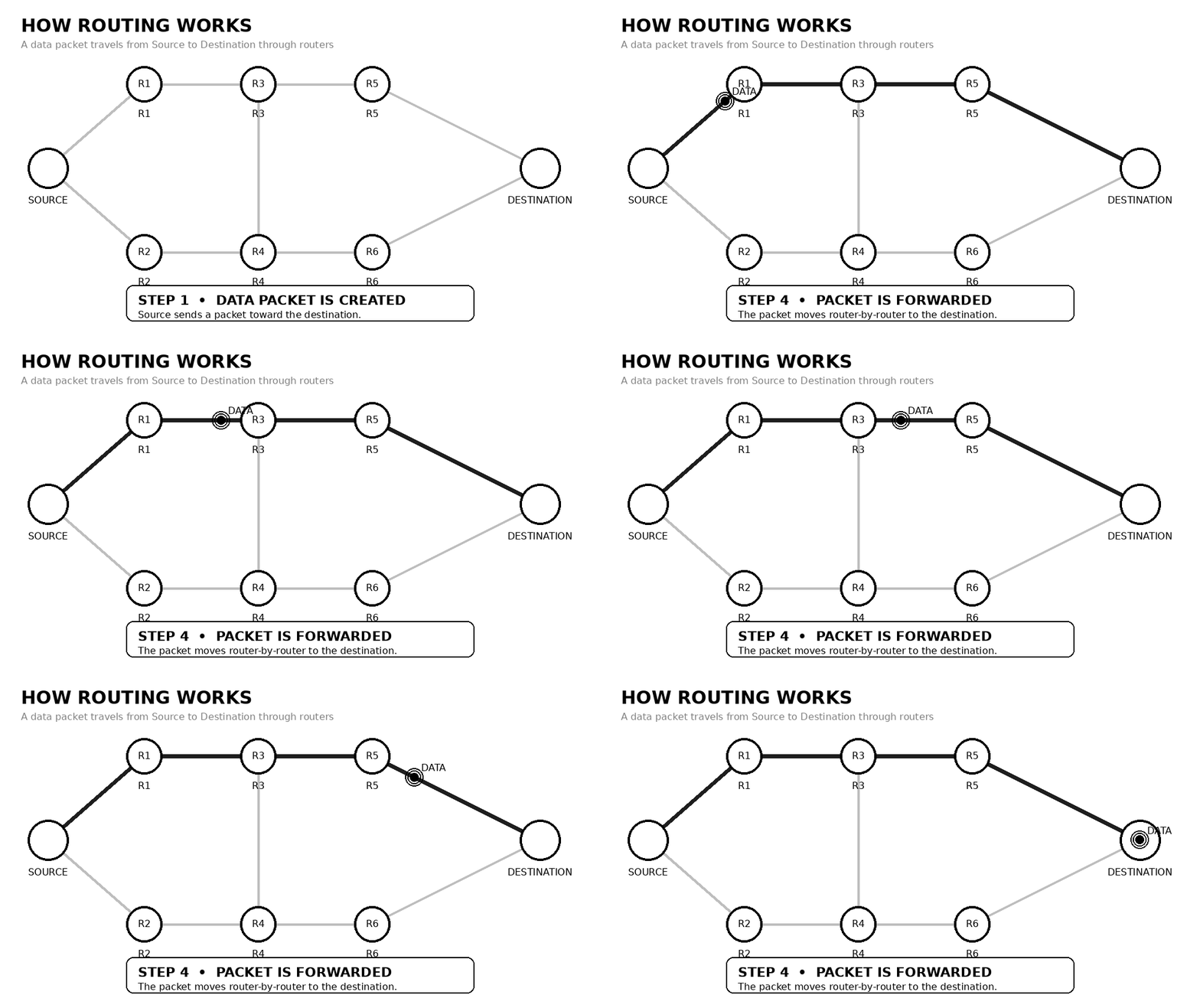
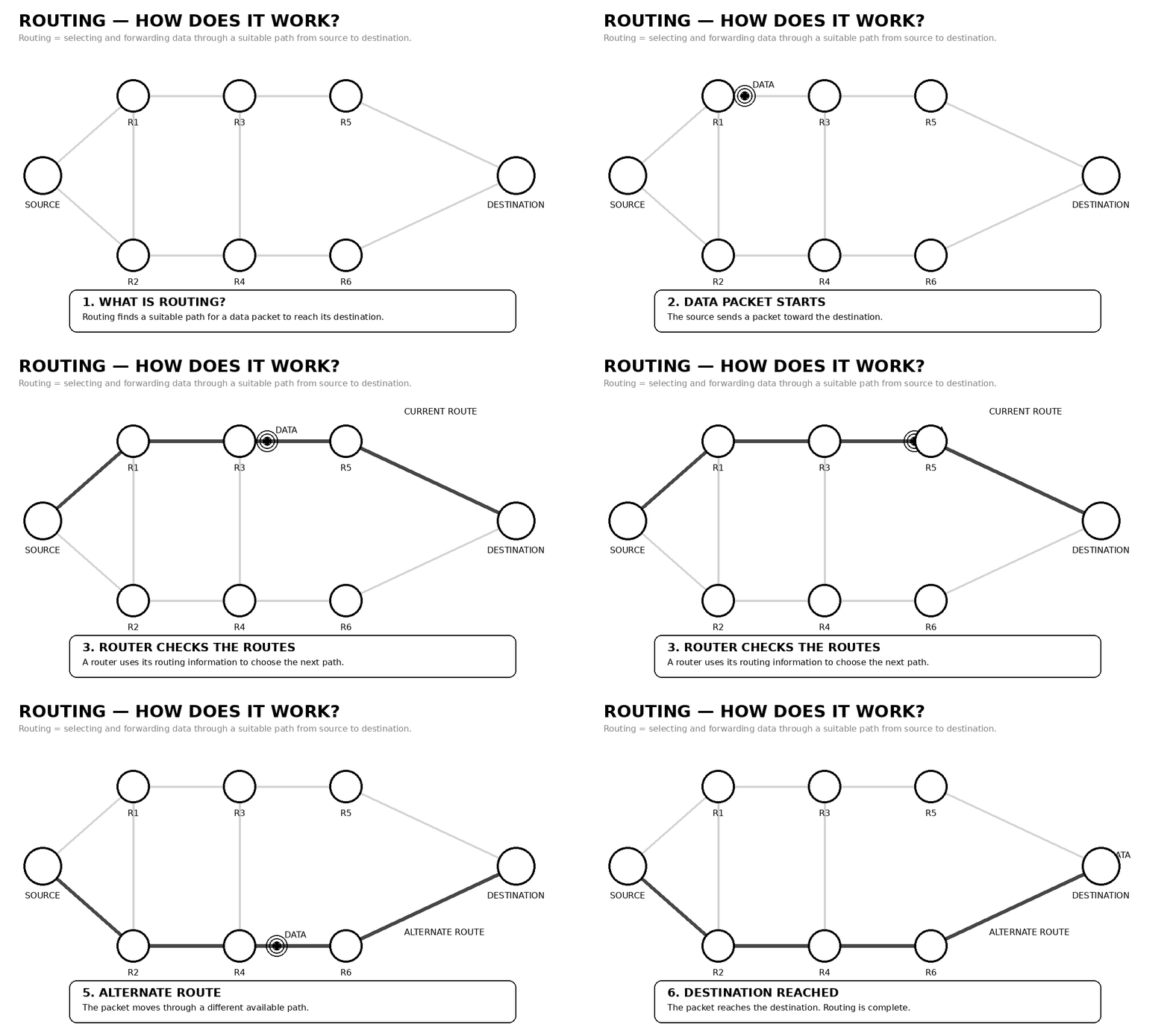
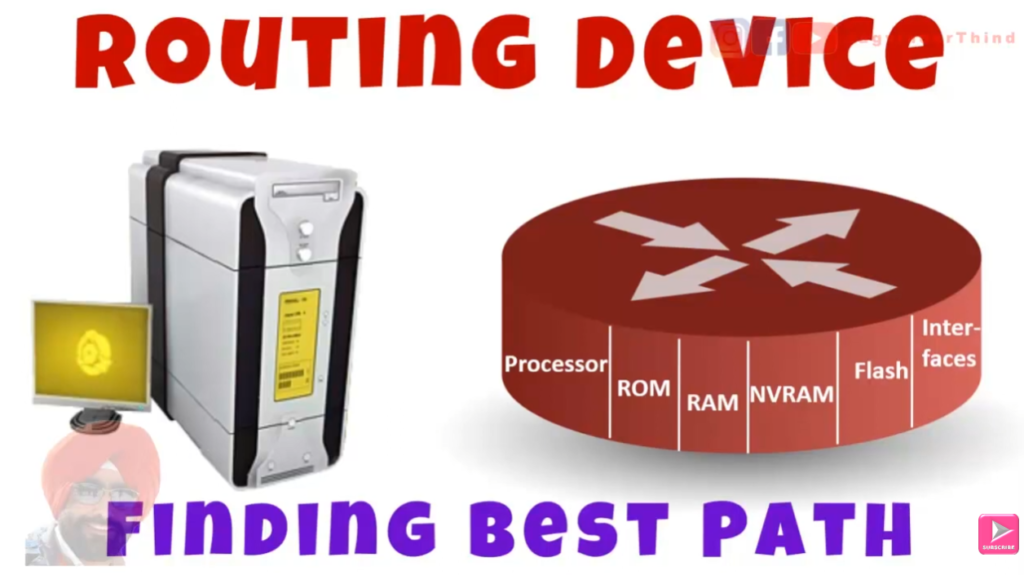
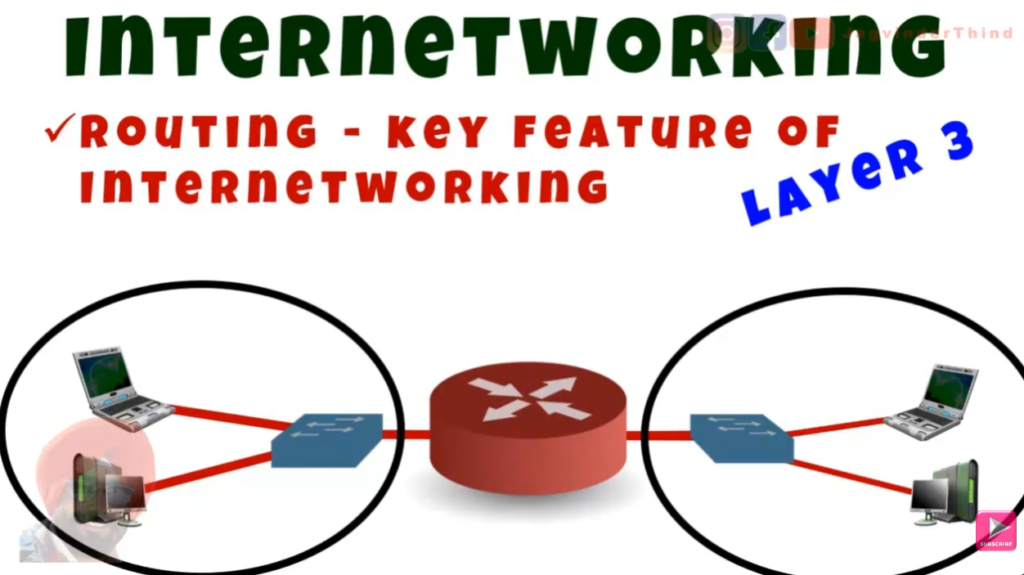
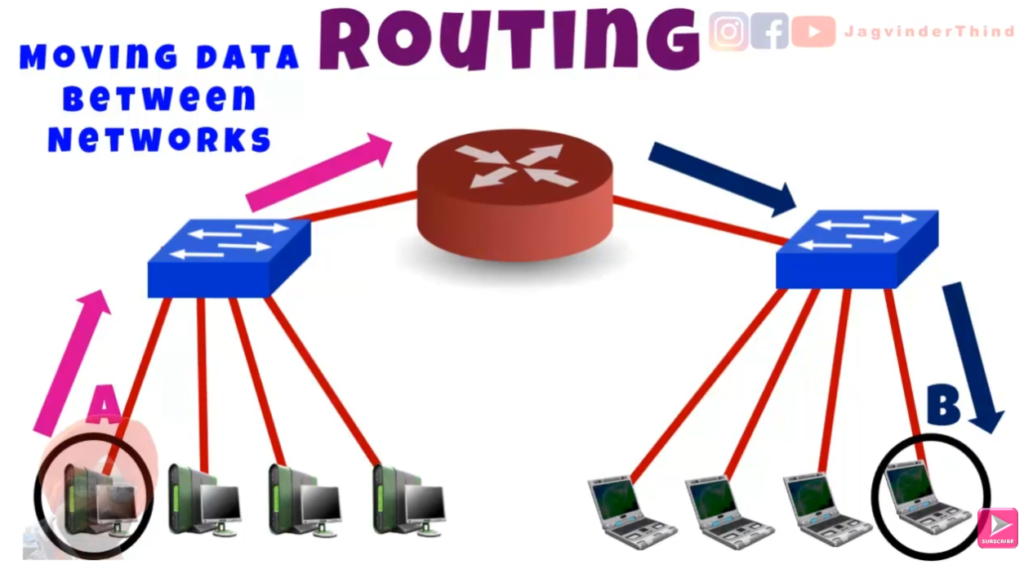
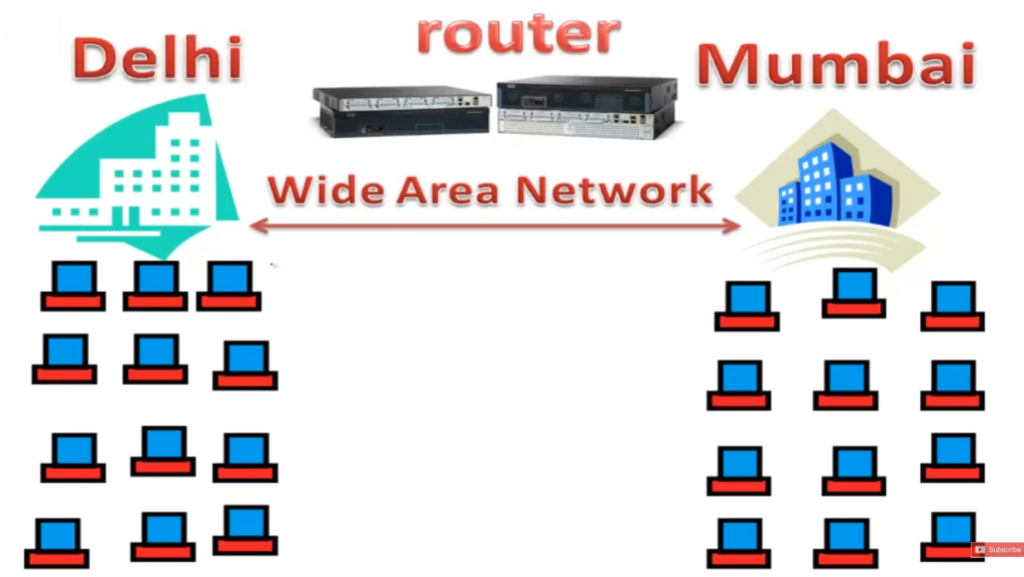
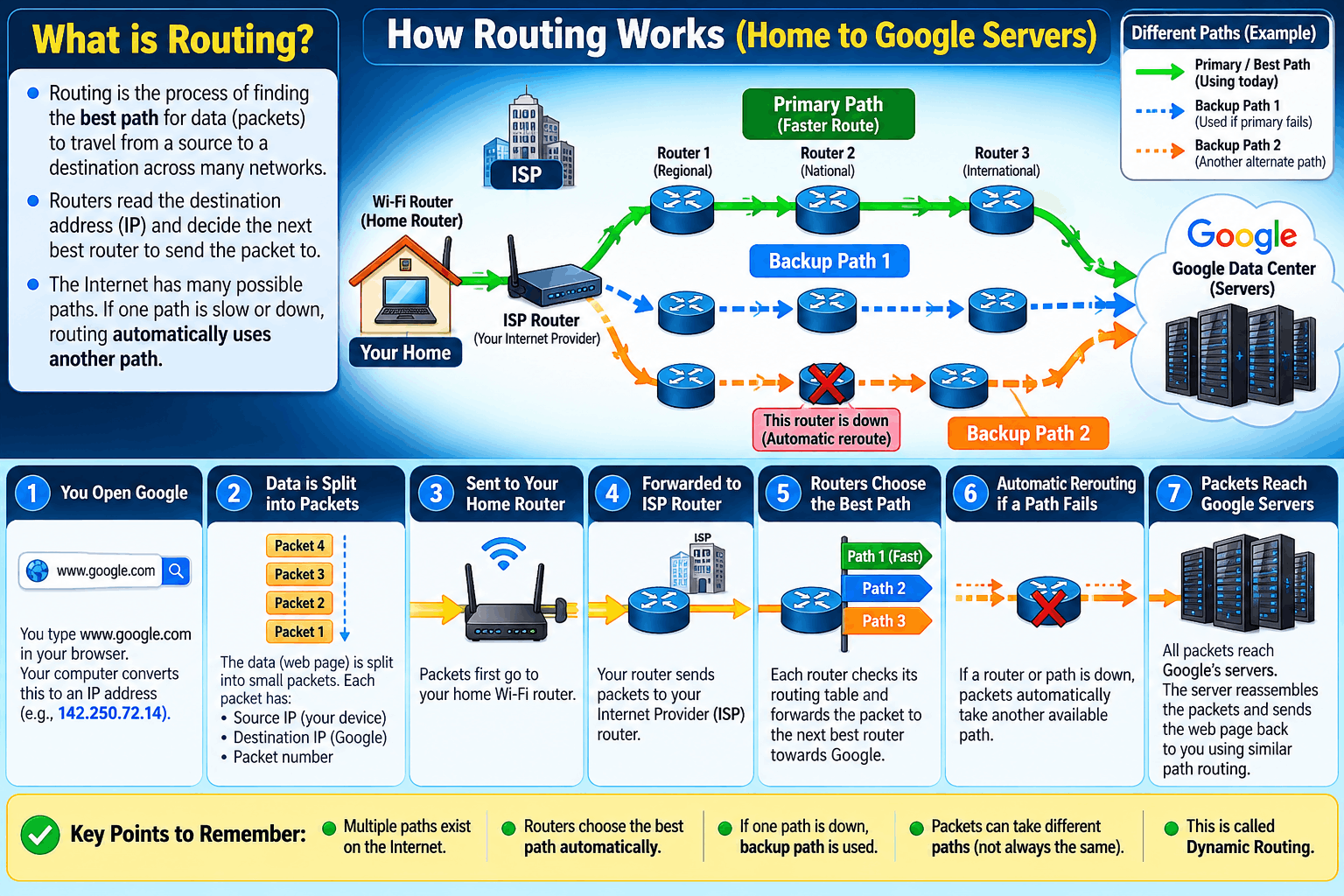
Routing is the process of selecting the Best Path for data to travel from one network to another network. When data is sent from a computer, mobile phone, or server, it is divided into packets. Each packet contains a Source IP Address and a Destination IP Address. The router reads the destination IP and decides where to send that packet next so it reaches the correct network.
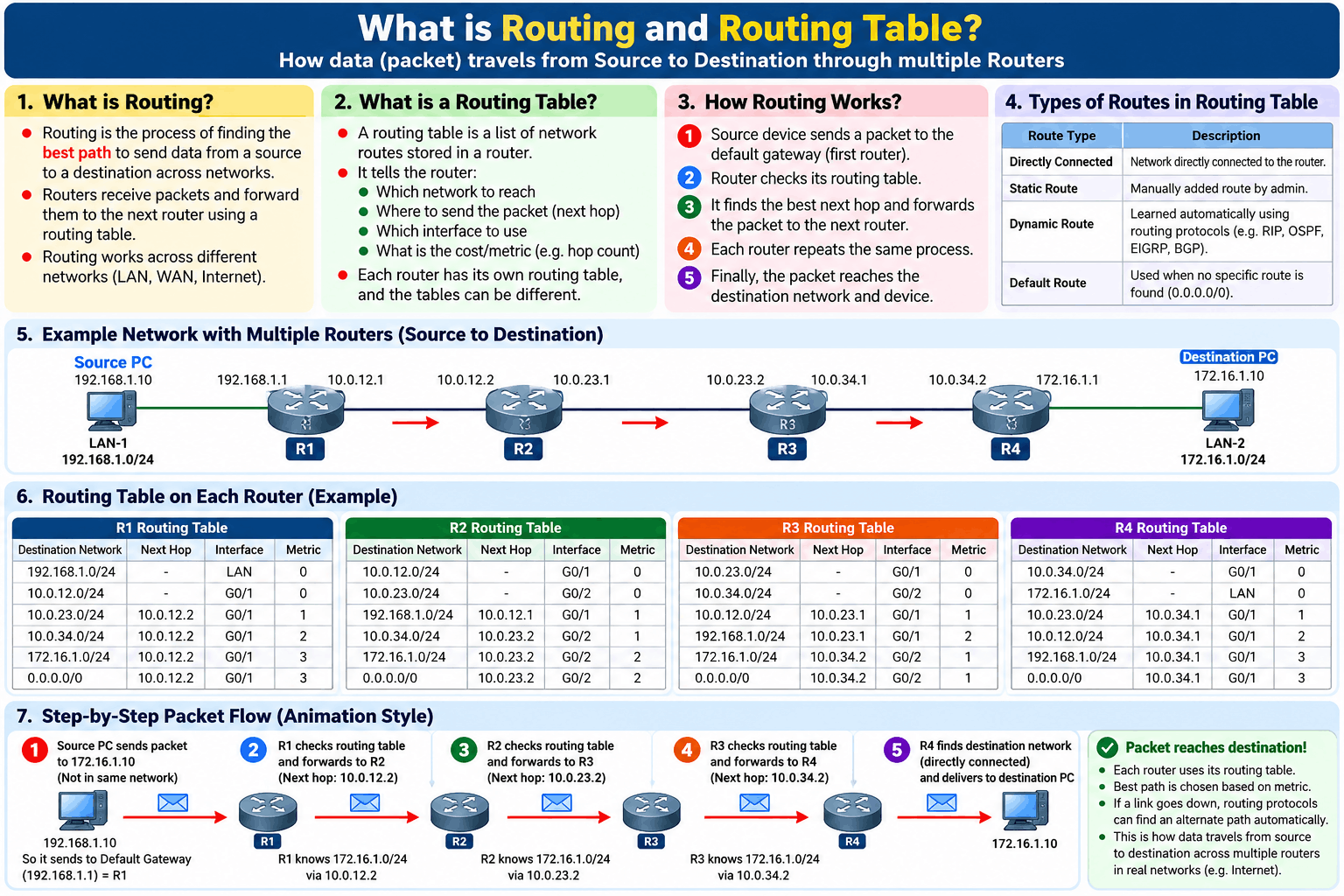
A router makes this decision using a Routing Table. A routing table is like a roadmap stored inside the router. It contains network addresses, subnet masks, next-hop gateway addresses, and outgoing interfaces. For example, a router may have these routes: 192.168.1.0/24 → LAN Port, 10.0.0.0/24 → Branch Office VPN, and 0.0.0.0/0 → ISP Gateway 103.25.50.1. Based on this table, the router chooses the correct path for every packet.
For Example, a computer with IP 192.168.1.10 wants to send data to a server with IP 8.8.8.8. The router checks its routing table. Since 8.8.8.8 is not in the local network, the router uses the Default Route (0.0.0.0/0) and forwards the packet to the ISP gateway 103.25.50.1. From there, multiple routers on the internet continue forwarding the packet until it reaches 8.8.8.8.
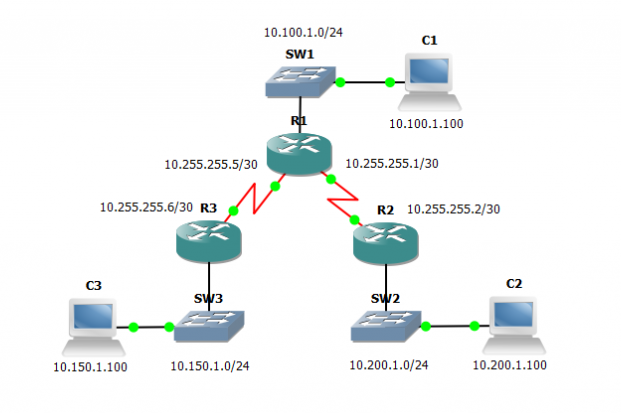
Routing can also happen between internal networks. Suppose an office has two networks: 192.168.10.0/24 for Accounts and 192.168.20.0/24 for HR. If a PC 192.168.10.25 wants to access a server 192.168.20.50, the router checks its routing table and forwards the packet from the Accounts network to the HR network. This is called inter-network routing.
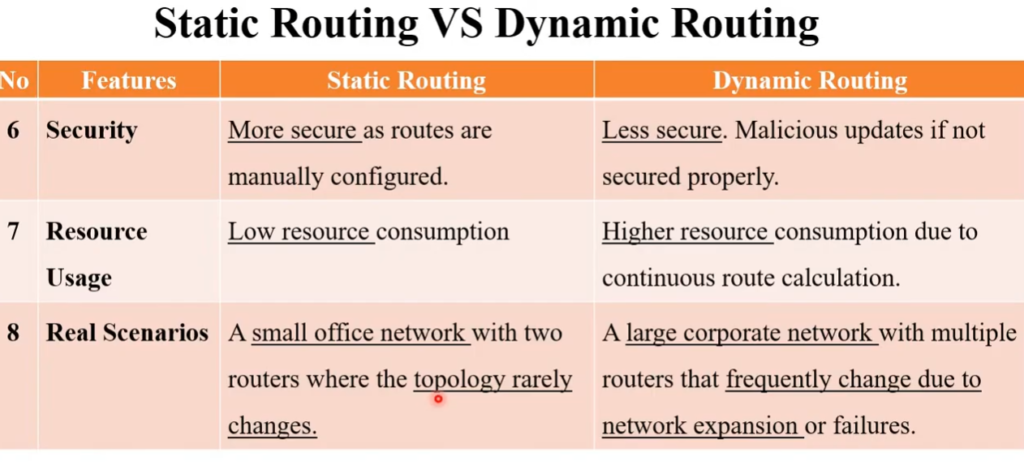
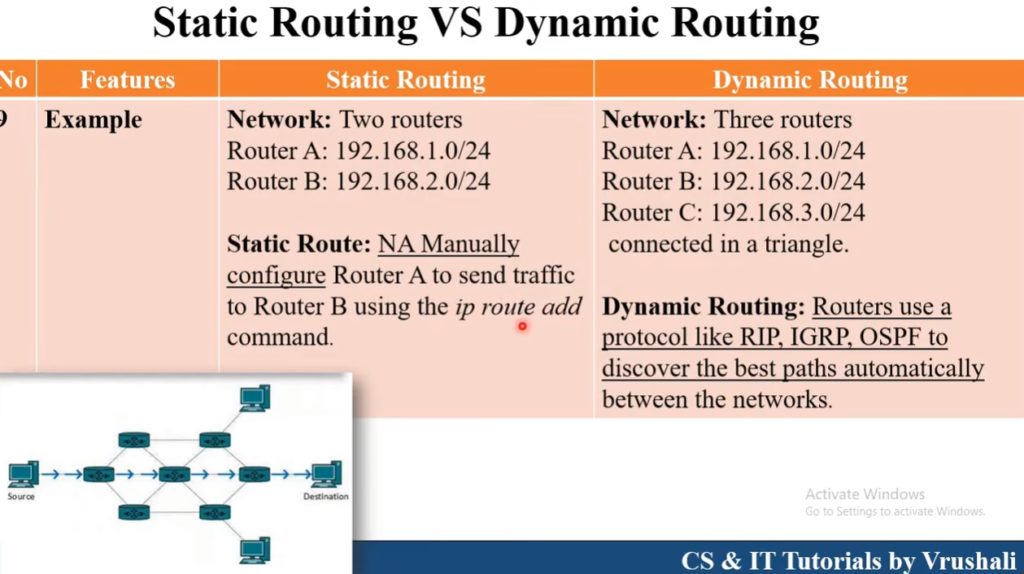
There are different types of routing. Static Routing means the administrator manually adds routes, such as telling the router that network 10.10.10.0/24 is reachable through gateway 192.168.1.2. Dynamic Routing means routers automatically learn routes using routing protocols such as Routing Information Protocol (RIP), Open Shortest Path First (OSPF), or Border Gateway Protocol (BGP). Dynamic routing is used in large networks because routes can change automatically if a path fails.
In simple words, routing is like road navigation for network traffic. The router checks the destination, chooses the best available path, and forwards the data packet step by step until it reaches the correct destination.
Example of Routing
A company has three networks connected to one router:
- Accounts Department → 192.168.10.0/24
- HR Department → 192.168.20.0/24
- Internet Connection → Gateway 103.25.50.1
A PC in Accounts has IP 192.168.10.25.
A server in HR has IP 192.168.20.50.
When PC 192.168.10.25 sends data to 192.168.20.50, the packet reaches the router. The router checks the destination IP and looks at its routing table. It finds that network 192.168.20.0/24 is connected through its HR interface, so it forwards the packet to that network. The server 192.168.20.50 receives the data. This is internal routing between two networks.
Now suppose the same PC wants to open 8.8.8.8 on the internet. The router checks its routing table and sees that 8.8.8.8 is not part of any internal network. It then uses the default route, which points to ISP gateway 103.25.50.1. The packet is sent to the ISP, and from there it travels across the internet until it reaches 8.8.8.8. This is internet routing.
What is Routing Explained Here Short
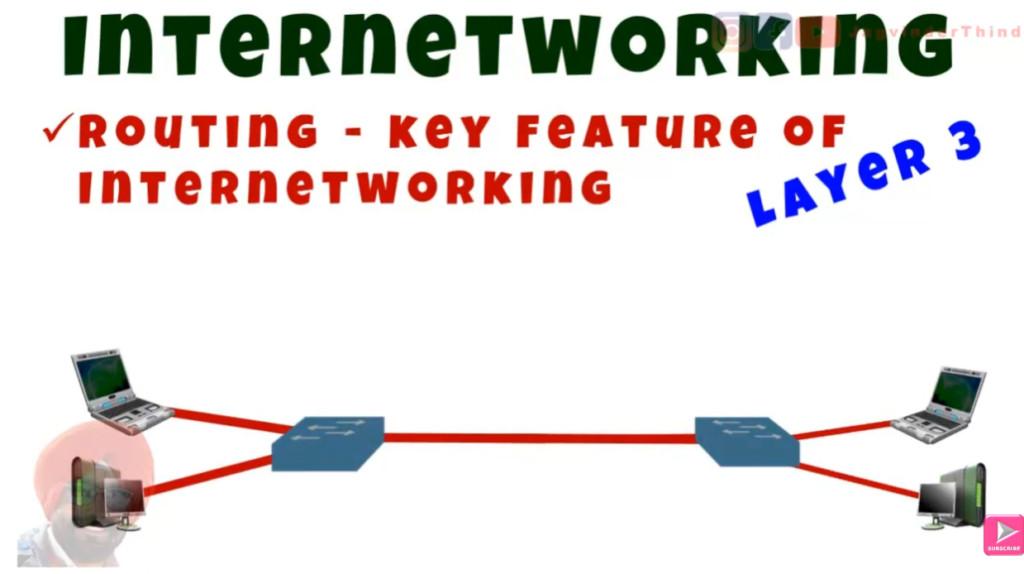
Routing is the process of selecting the best available path and forwarding data packets from a source network/device to a destination network/device. It is one of the most important functions in computer networking and is mainly performed by routers.
Definition: Routing is the process of selecting the best path for data to travel from one network to another.
Example: Computer → Router → Internet → Server.Uses IP Address: A router checks the destination IP address to decide where to send the data.
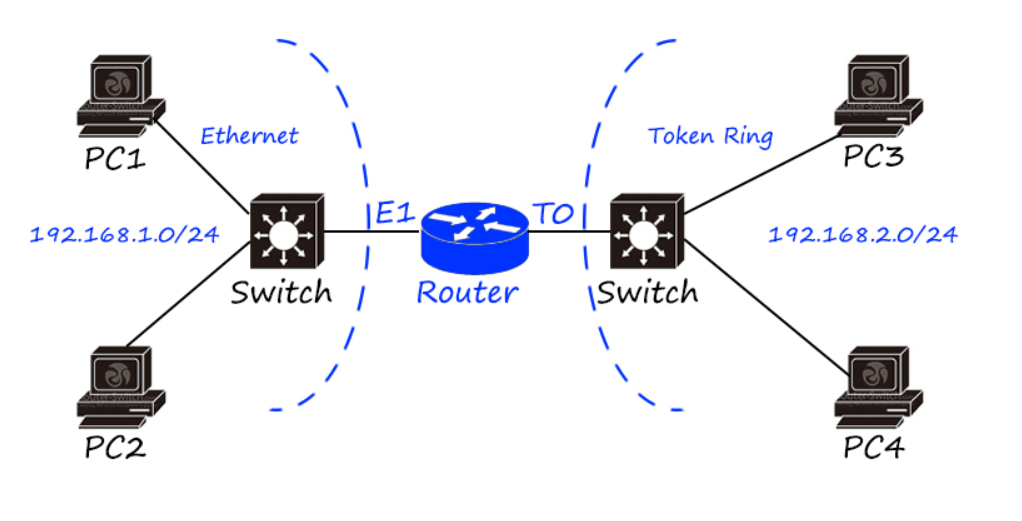
Example:192.168.1.10 → 8.8.8.8.Connects Different Networks: Routing allows devices on different networks to communicate with each other.
Example: Home Network → ISP Network.Routing Table: A router uses a routing table to determine the next path for a packet.
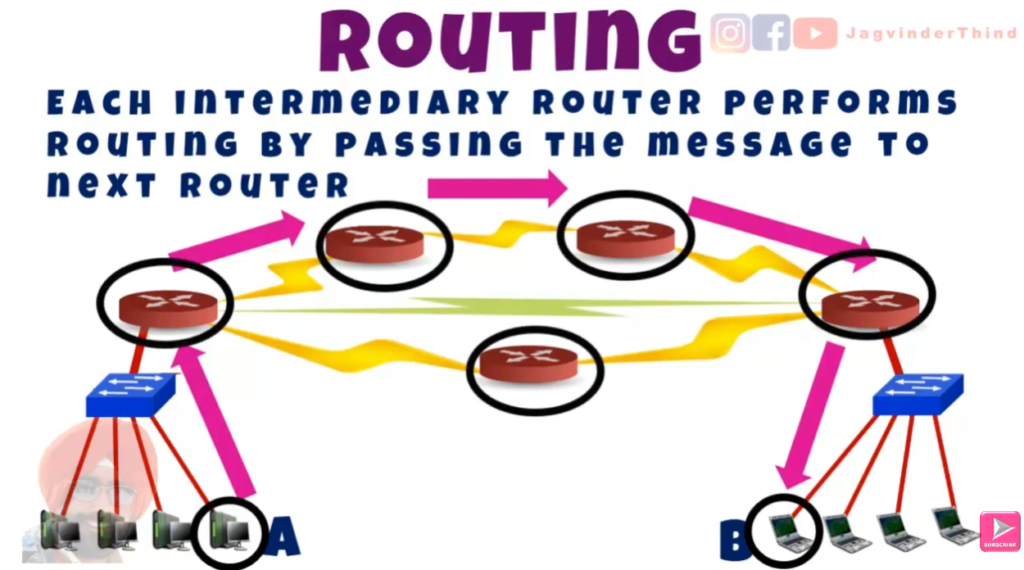
Example: Network A → Router B → Network C.Packet Forwarding: The router forwards packets to the next appropriate router or device.
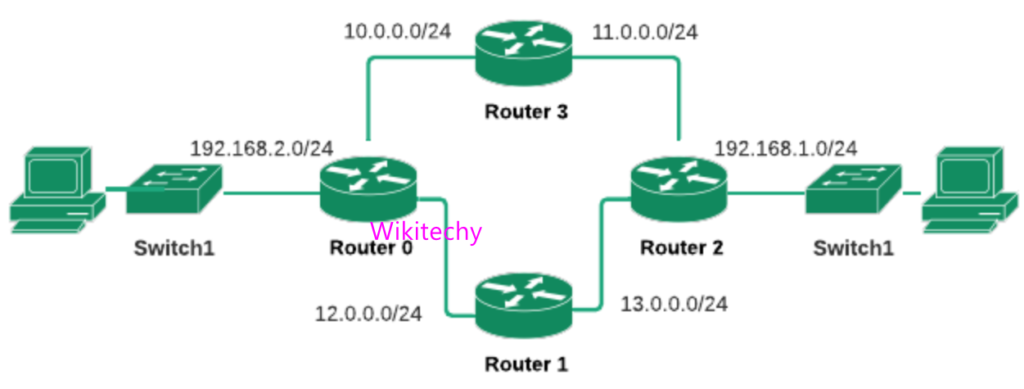
Example: Router 1 → Router 2 → Router 3 → Server.Static Routing: Routes are manually configured by a network administrator.
Example: Administrator creates a fixed route from Network A to Network B.Dynamic Routing: Routers automatically learn and update routes.
Example: OSPF automatically selects an available path.Default Gateway: A device sends traffic destined for another network to its default gateway.
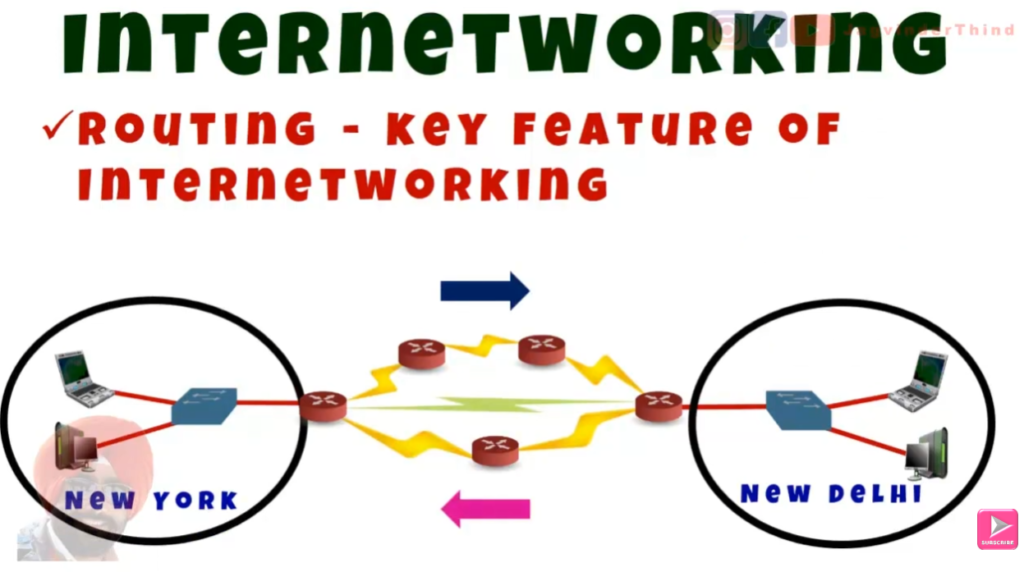
Example: PC → Default Gateway → Internet.Internet Routing: Data may pass through many routers before reaching the destination.
Example: PC → Router → ISP → Internet Routers → Web Server.Main Purpose: Routing ensures that data reaches the correct destination through an appropriate path.


Types of Routing
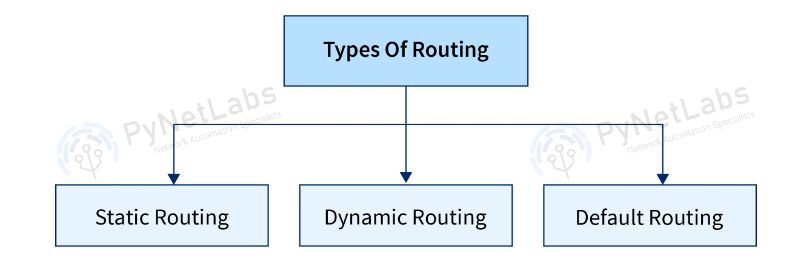
Routing is mainly divided into three types based on how routes are learned and managed in a network.
- Static Routing → Manually configured routes set by the administrator.
- Dynamic Routing → Routes learned automatically using routing protocols.
- Default Routing → A fallback route used when no specific route is available.
1. Static Routing (Manual Routing)
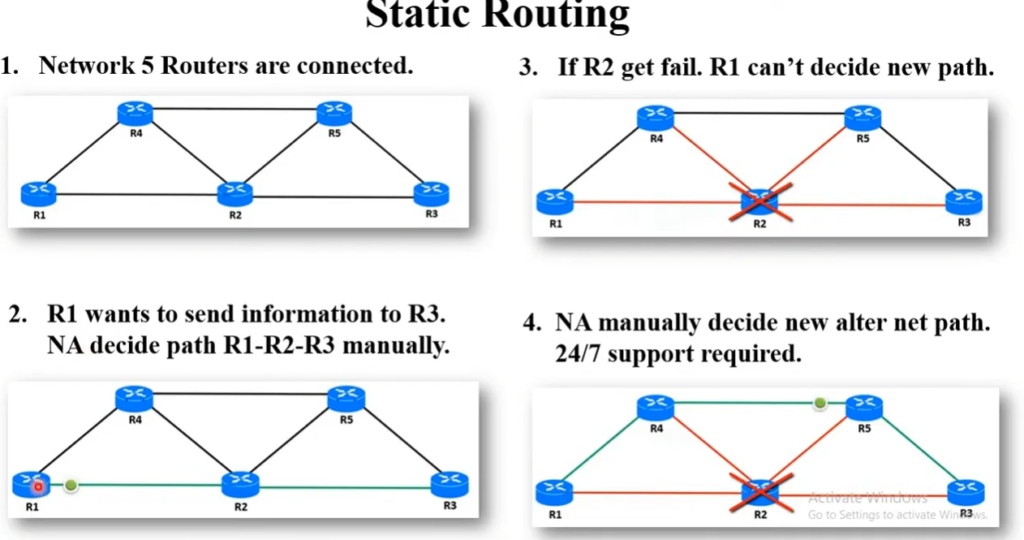
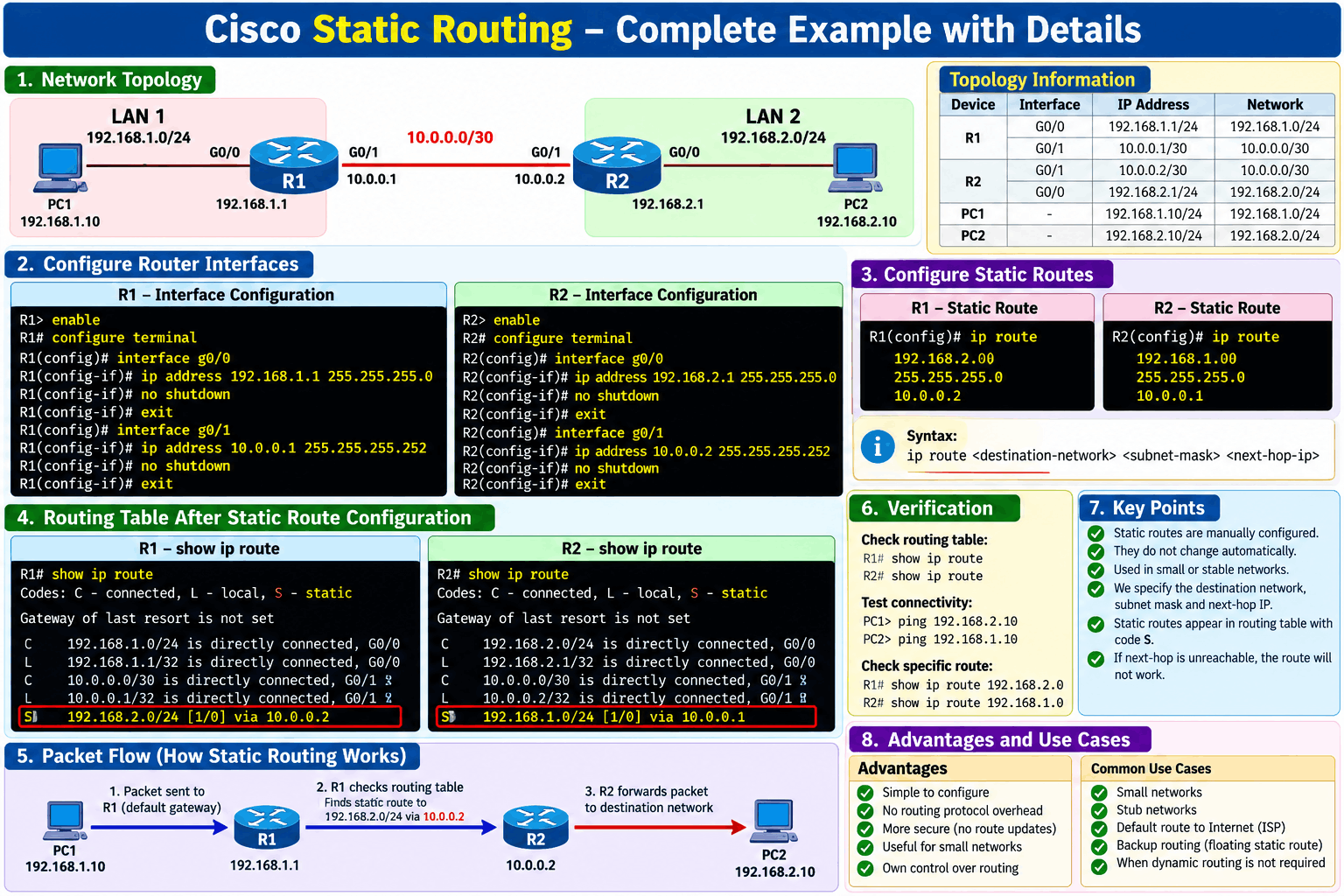
Static Routing is a type of routing where routes are Manually Configured by the network administrator. The router does not change the route automatically even if the network changes.
👉 Explanation
In static routing, the administrator defines the exact path that packets should follow. It is simple and secure because no automatic updates occur, but it is not suitable for large networks. If a link fails, the administrator must manually update the route.
👉 Example:
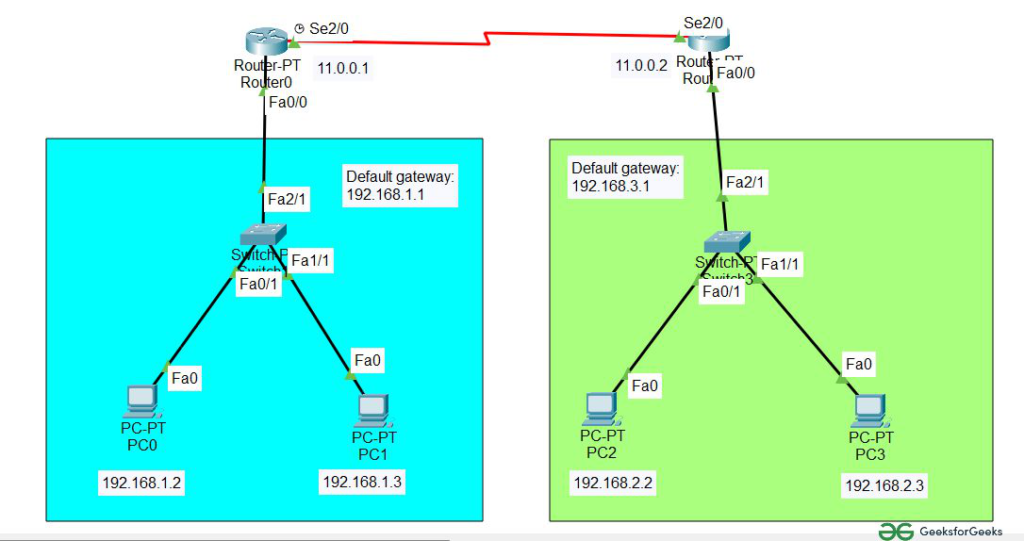
ip route 192.168.2.0 255.255.255.0 192.168.1.2
Use Case of Static Routing (Detailed Explanation with Examples)
Static routing is best used in networks where the path is fixed, simple, and does not change frequently. Since routes are manually configured, it gives full control to the administrator.
1. Small Networks (Home / Small Office)
In small networks with only a few routers, static routing is easy to configure and manage.
👉 Example:
A small office has 2 networks:
- Network A → 192.168.1.0
- Network B → 192.168.2.0
A single router connects them.
You can manually configure a static route to reach Network B.
No need for complex dynamic routing protocols.
Advantages Disadvantages of Static Routing
1. Simple and Easy to Configure
Static routes are manually added, so they are easy to understand and configure, especially in small networks.
👉 Example: A network with 2 routers can be connected using just one static route.
2. No Bandwidth Usage for Updates
Unlike dynamic routing, static routing does not send routing updates, so it saves network bandwidth.
3. Better Security
Static routes are not shared with other routers, so it reduces the risk of unauthorized route updates or attacks.
4. Full Control Over Routing Path
The administrator decides the exact path for data, giving complete control over traffic flow.
👉 Example: Forcing traffic through a firewall.
5. Low CPU and Memory Usage
No routing protocols are used, so router resources (CPU & RAM) are not heavily used.
6. Predictable Behavior
Routes remain fixed unless manually changed, making the network behavior stable and predictable.
❌ Disadvantages of Static Routing
1. Not Scalable
In large networks, manually configuring routes for many networks becomes difficult and time-consuming.
2. No Automatic Updates
If a link fails, static routes do not change automatically. The administrator must manually update them.
👉 Example: If a route goes down, traffic will fail until fixed.
3. High Maintenance
Any network change (new network, topology change) requires manual reconfiguration.
4. Human Error
Manual configuration increases the chance of mistakes, which can cause network issues.
5. No Load Balancing
Static routing cannot automatically balance traffic across multiple paths like dynamic routing can.
Summary Table
| Advantages | Disadvantages |
|---|---|
| Simple configuration | Not scalable |
| No bandwidth usage | No automatic updates |
| High security | High maintenance |
| Full control | Human errors possible |
| Low resource usage | No load balancing |
| Predictable | Not suitable for large networks |
Dynamic Routing (Automatic Routing)
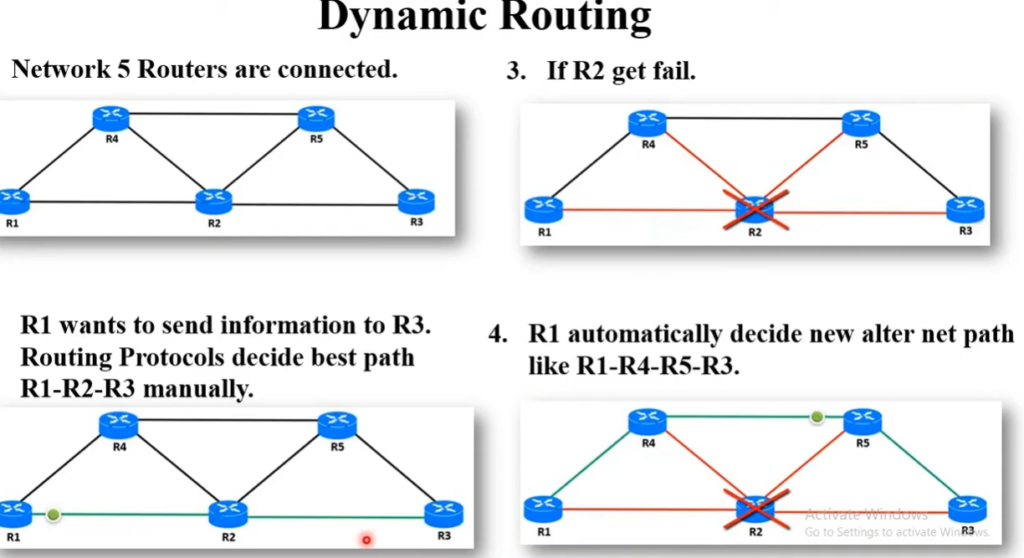
Dynamic Routing allows routers to Automatically Learn and Update Routes using routing protocols.
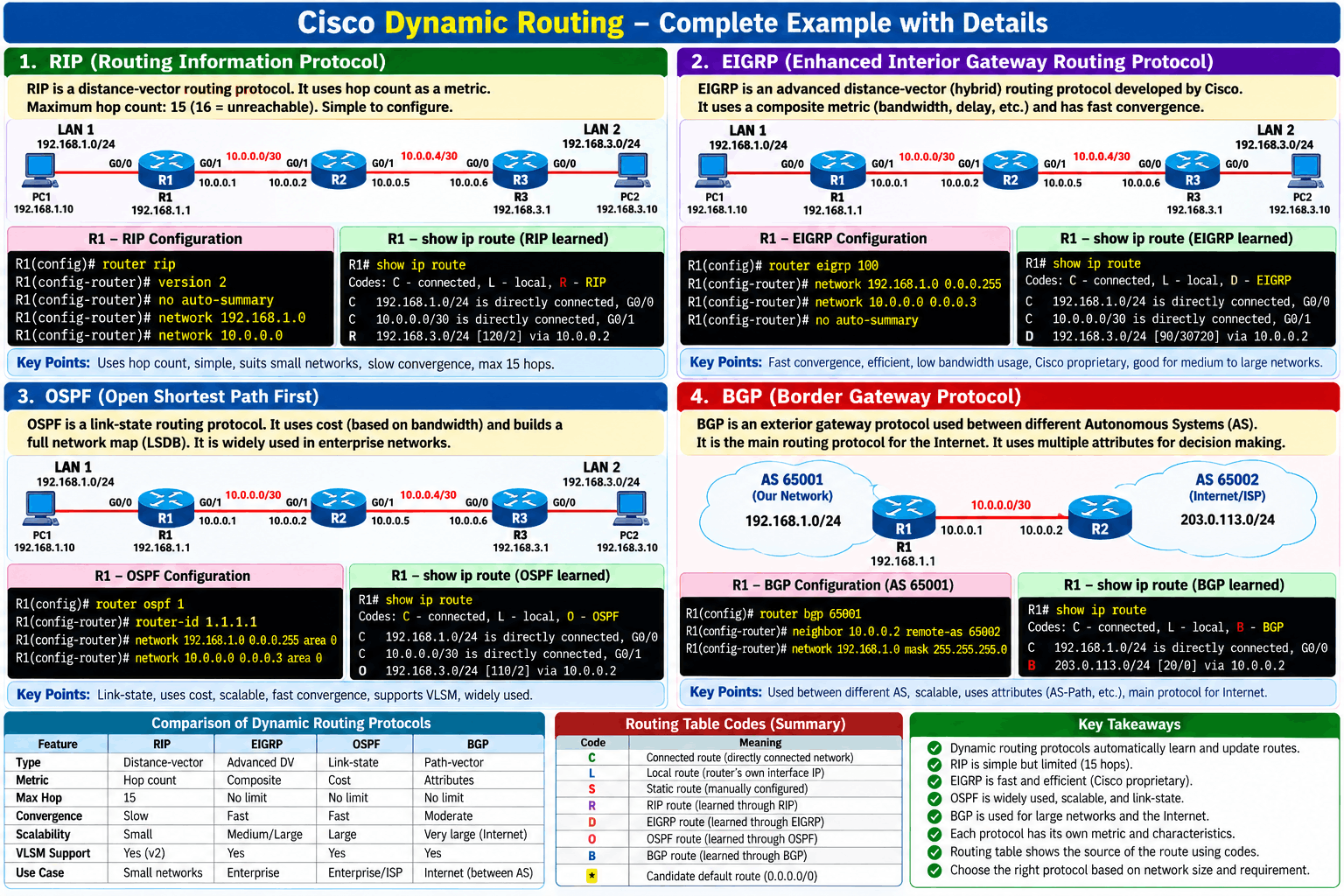
Dynamic Routing is a networking process where routers Automatically Learn, update, and select the best path for sending data from a source network to a destination network. Instead of an administrator manually entering every route, routers use Dynamic Routing Protocols such as RIP, OSPF, EIGRP, or BGP to exchange routing information with other routers.
👉 Explanation
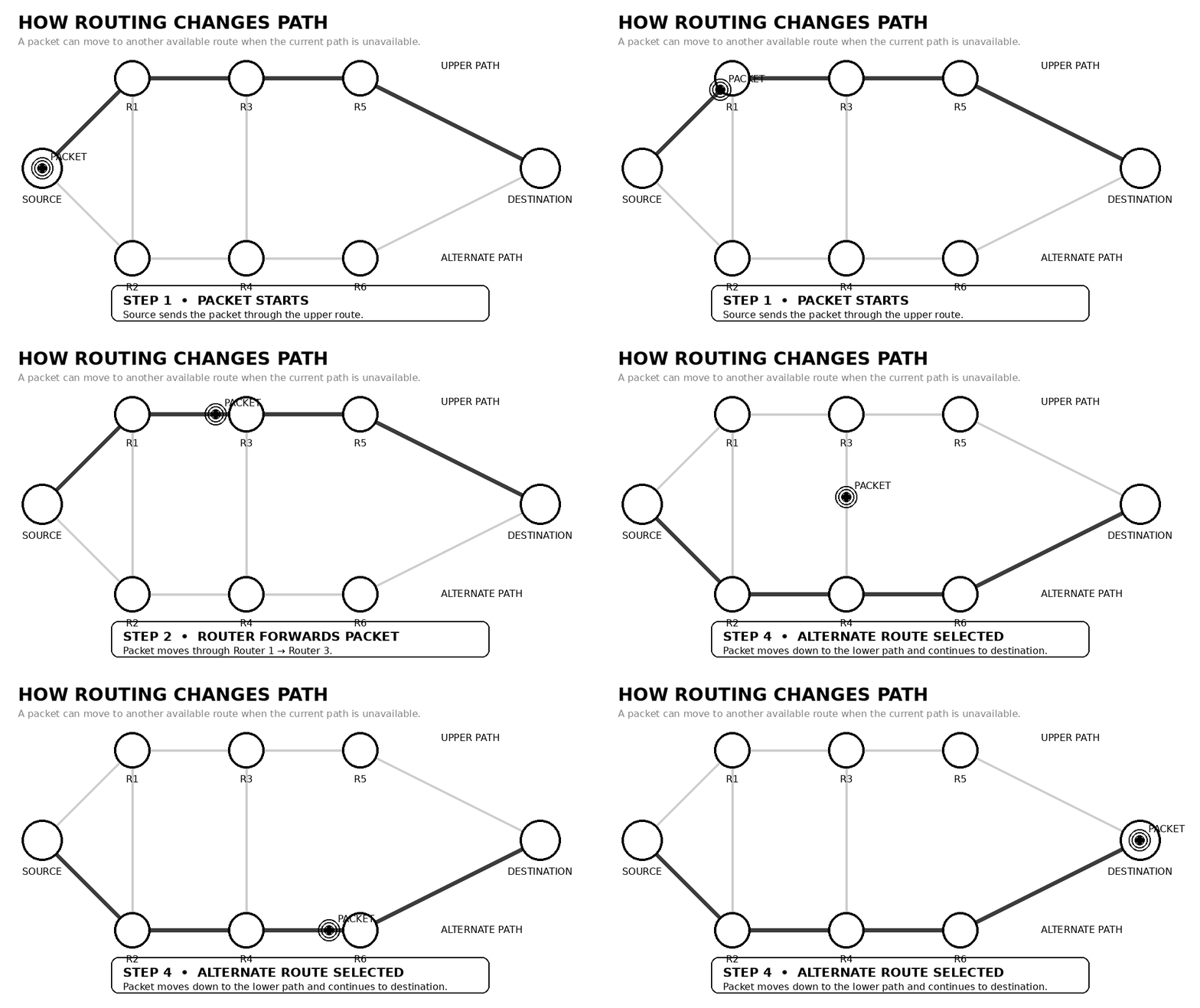
In dynamic routing, routers communicate with each other using protocols to share network information. If a network change occurs (like link failure), routers automatically update their routing tables and choose a new best path. This makes it ideal for large and complex networks.
👉 Examples of Protocols:
- OSPF
- RIP
- EIGRP
👉 Example Scenario:
If one route fails, OSPF automatically finds another shortest path.
👉 Use Case:
- Large enterprise networks
- Frequently changing networks
Real-World Example
The Internet contains thousands of routers. When you access a website, your data may travel through many different routers:
In Simple Words
Dynamic Routing means routers automatically learn the network topology, choose the best available path, and update their routing decisions when the network changes.
Main Advantage: It provides Automatic Route selection, Automatic Updates, and alternative paths, making large networks more reliable and easier to manage.
Advantages Disadvantages of Dynamic Routing
Advantages of Dynamic Routing
Dynamic routing uses protocols like RIP, OSPF, and EIGRP to automatically exchange routing information between routers.
1. Automatic Route Updates
Routers automatically learn and update routes. If a network change occurs (link failure or new network), the routing table updates without manual work.
Example:
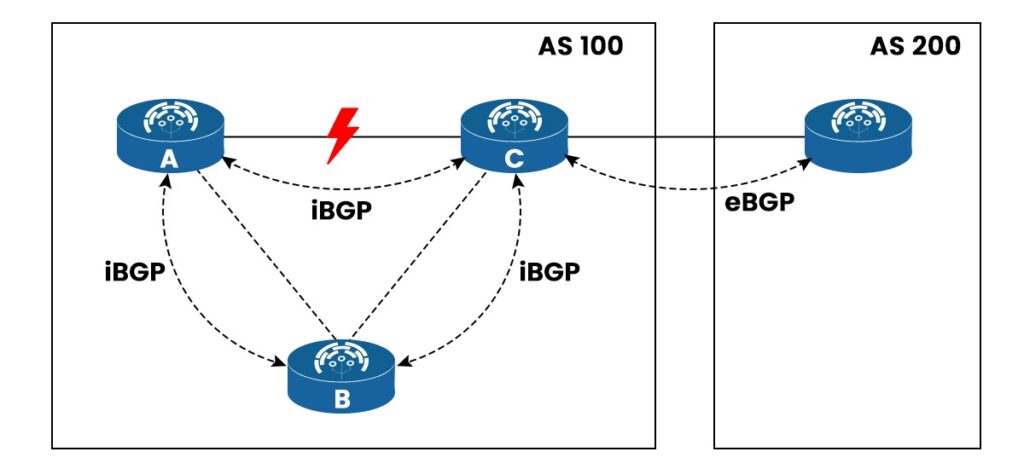
If Router A loses a link to Router B, it can automatically find another path through Router C.
2. Less Manual Configuration
No need to manually configure routes for every network, which reduces human errors.
3. Better Scalability
Dynamic routing works well in large networks where many routers are connected.
Example:
In a company with 100+ routers, dynamic routing saves a lot of time compared to static routing.
4. Supports Load Balancing
Some dynamic routing protocols can use multiple paths to send traffic.
Example:
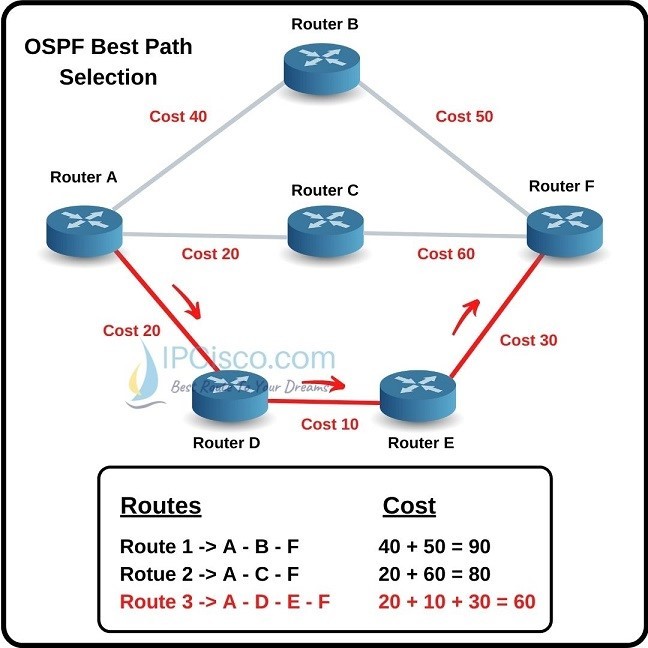
OSPF can send traffic through two equal-cost paths.
5. Fault Tolerance (High Availability)
If one path fails, the router automatically selects another best path.
Disadvantages of Dynamic Routing
1. High CPU and Memory Usage
Routers need more processing power to calculate routes and run routing protocols.
2. Network Bandwidth Usage
Routing protocols send updates periodically, which consumes bandwidth.
Example:
RIP sends updates every 30 seconds, even if no changes occur.
3. Complex Configuration
Dynamic routing protocols are more complex than static routing.
Example:
Configuring OSPF requires understanding areas, LSAs, and cost.
4. Slower Convergence (in some protocols)
It may take time for routers to learn new routes after a change.
Example:
RIP takes longer to converge compared to OSPF.
5. Security Risks
Dynamic routing can be vulnerable if not properly secured.
Example:
Unauthorized routers can send false routing updates.
Summary Table
| Feature | Dynamic Routing |
|---|---|
| Configuration | Easy (automatic) |
| Maintenance | Low |
| Scalability | High |
| Resource Usage | High |
| Convergence Speed | Medium (depends on protocol) |
| Security | Needs configuration |
Default Route
What is a Default Route
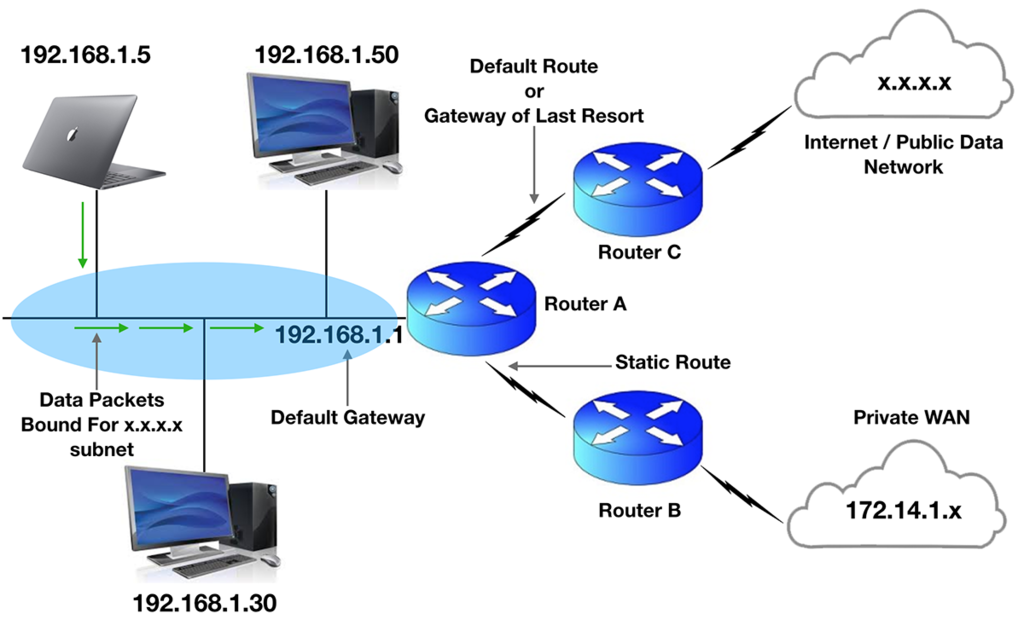
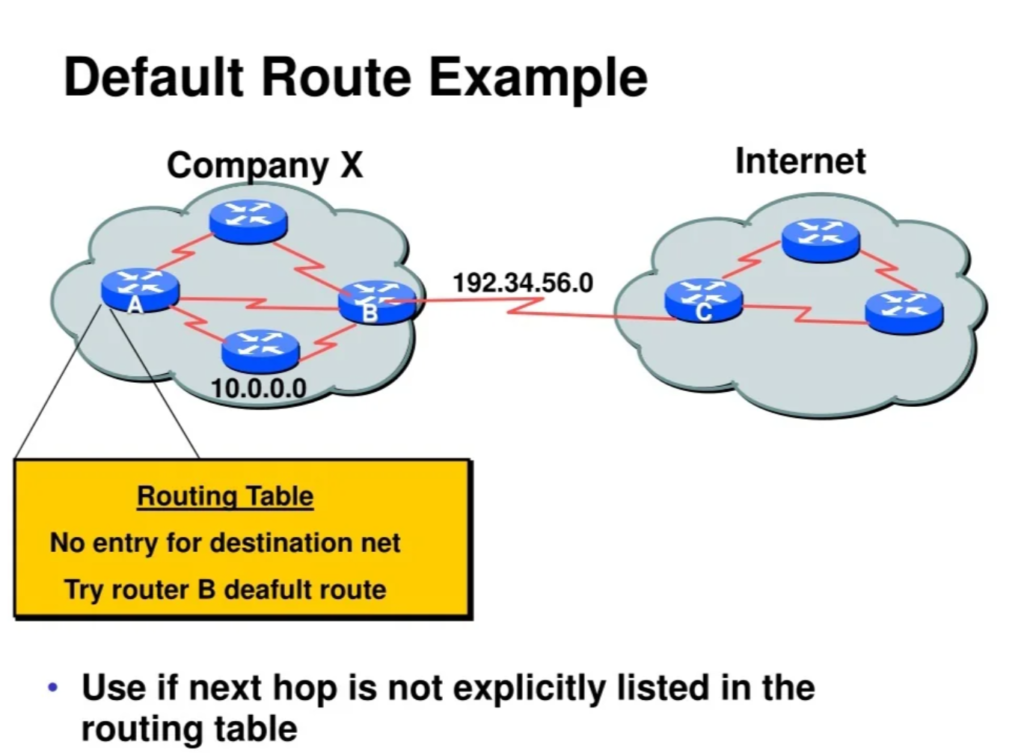
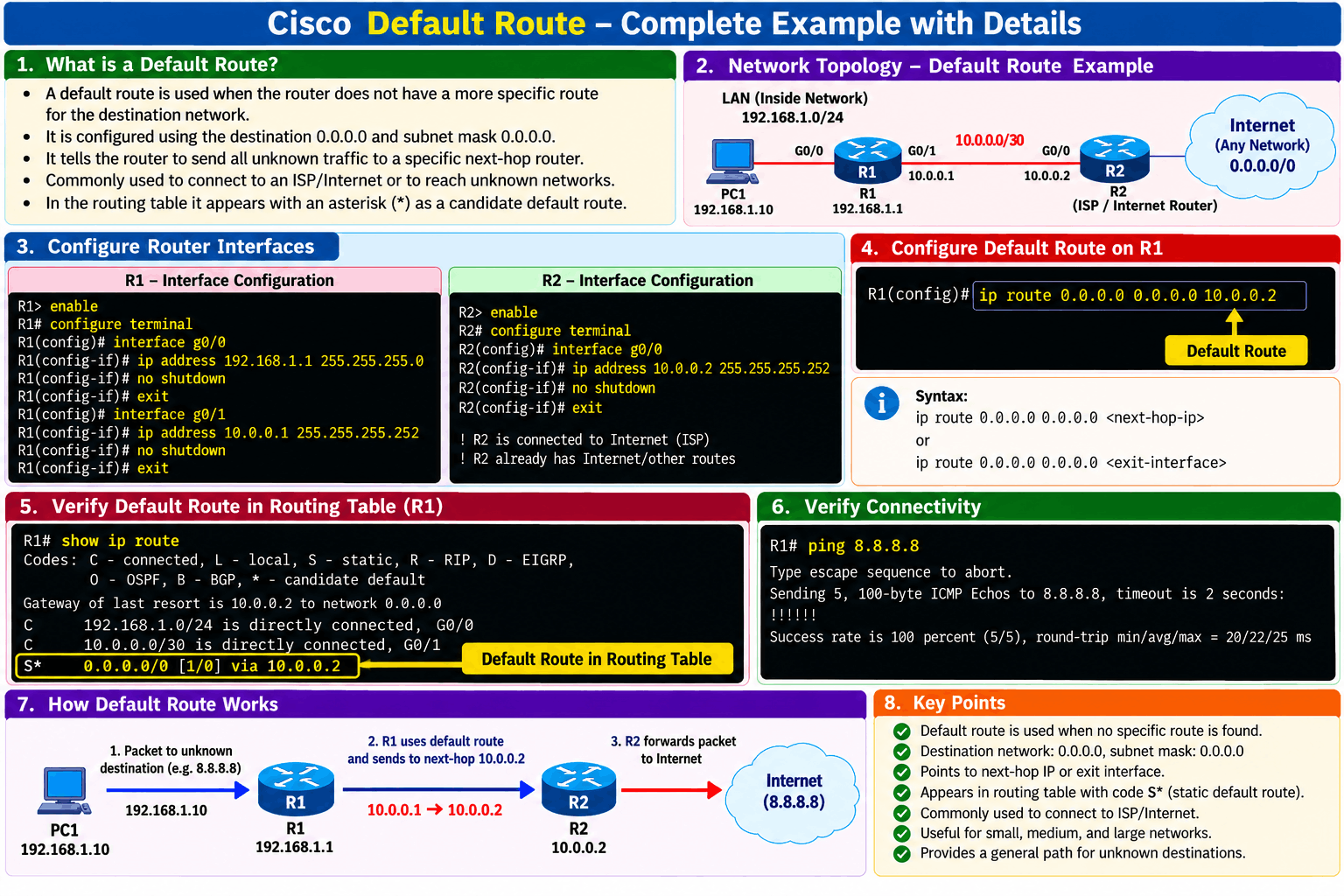
A default route is a routing rule used by a router to forward packets when there is no specific route available for the destination network in its routing table. It acts as a “last option” path, ensuring that data can still be sent even when the router does not know the exact route. The default route is represented as 0.0.0.0/0, which matches all IP addresses. For Example, in a home network, a router may have routes only for local networks like 192.168.1.0/24, but when a user tries to access a website like Google (8.8.8.8), the router does not have a specific route for it. In this case, the router forwards the packet to the default route, usually pointing to the ISP router (e.g., 10.0.0.1), which then handles the packet and sends it toward the internet.
Why Do We Need a Default Route?
A default route is needed because a router cannot store routes for every possible network, especially the entire internet. Instead of keeping thousands of routes, the router uses a default route (0.0.0.0/0) to forward all unknown traffic to a specific next-hop router (usually the ISP).
Main Reasons
1. Simplifies Routing
Without a default route, you would need to manually configure routes for every destination network, which is not practical.
2. Enables Internet Access
Your router does not know all internet networks, so it sends unknown traffic to the ISP using the default route.
3. Reduces Routing Table Size
Only one default route is needed instead of storing many routes.
4. Useful for Small/Stub Networks
Networks with only one exit path use default routing for simplicity.
Without Default Route (Problems )
If a router does not have a default route, it can only send packets to networks that are already listed in its routing table. Any unknown destination will cause problems.
1. Packet Dropping
When a packet arrives:
- Router checks routing table
- No matching route found
- No default route available
👉 Result: Packet is dropped
2. No Internet Access
Routers in small networks (home/office) usually don’t know internet routes.
❌ Without default route:
- Cannot reach websites (Google, YouTube, etc.)
- Internet completely fails
3. Limited Communication
Router can only communicate with:
- Directly connected networks
- Manually configured routes
👉 Cannot reach external or unknown networks
Default Route vs Static Route vs Dynamic Routing (Chart)
| Feature | Default Route | Static Route | Dynamic Routing |
|---|---|---|---|
| Definition | Route used when no specific path is found | Manually configured route to a specific network | Routes learned automatically using protocols |
| Route Example | 0.0.0.0/0 | ip route 192.168.2.0 255.255.255.0 10.0.0.2 | Learned via OSPF, RIP, EIGRP |
| Configuration | Very simple (one command) | Manual configuration required | Complex configuration |
| Routing Updates | No updates (fixed path) | No updates (manual changes) | Automatic updates |
| Routing Table Size | Very small | Medium (depends on entries) | Large (many routes learned) |
| Scalability | Low | Medium | High |
| CPU/Memory Usage | Very low | Low | High |
| Path Selection | No intelligence (single path) | Fixed path | Best path calculated automatically |
| Failure Handling | No automatic recovery | No automatic recovery | Automatic rerouting (high availability) |
| Best Use Case | Small networks, internet access | Small/medium networks, specific control | Large and complex networks |
| Example Use | Home router → ISP | Company connecting two branches | ISP networks, enterprise networks |
Static Route
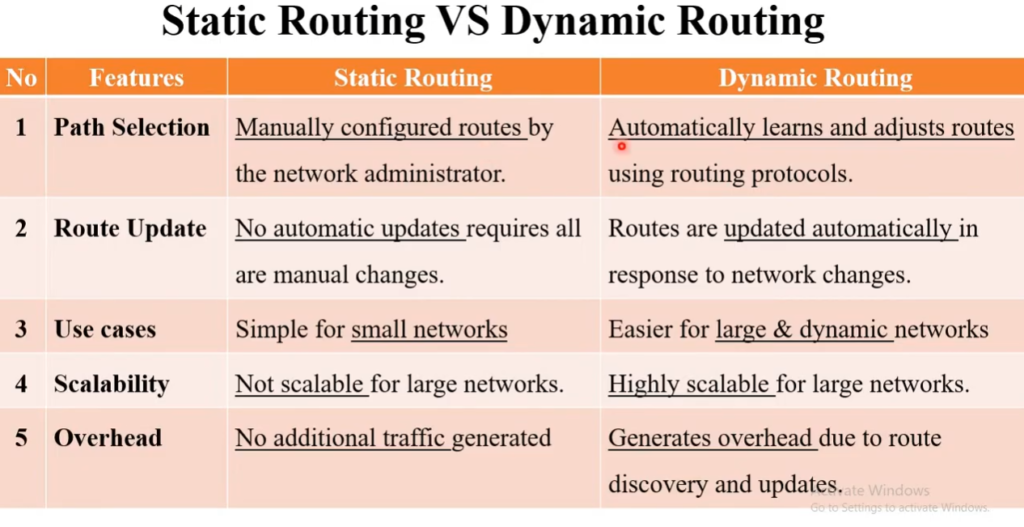
- A static route is manually configured by the network administrator.
- The administrator specifies which destination network should be reached through which next-hop router or interface.
- The route normally remains unchanged until the administrator changes or removes it.
- It is suitable for small networks, fixed paths, and specific network connections.
- Example: An administrator configures Router R1 to send all traffic for
192.168.2.0/24through Router R2. - If the R2 path fails, the router will not automatically find a new path unless another route has been configured.
Default Route
- A default route is used when a router does not have a specific route for the destination.
- It is known as the “route of last resort.”
- The default route is commonly used to send traffic from a local network toward an ISP or Internet gateway.
- The IPv4 default route is
0.0.0.0/0. - Example: A home router may have many specific local routes, but for any unknown Internet destination, it forwards the packet to the ISP using its default route.
- In simple words: “If you don’t know where the destination is, send the packet this way.”
Dynamic Route
- A dynamic route is learned automatically by routers using a dynamic routing protocol.
- Routers exchange information about available networks and paths.
- The router uses routing metrics to select the best available route.
- Common protocols include OSPF, RIP, EIGRP, and BGP.
- If a route fails, routers can learn the network change and select another available path.
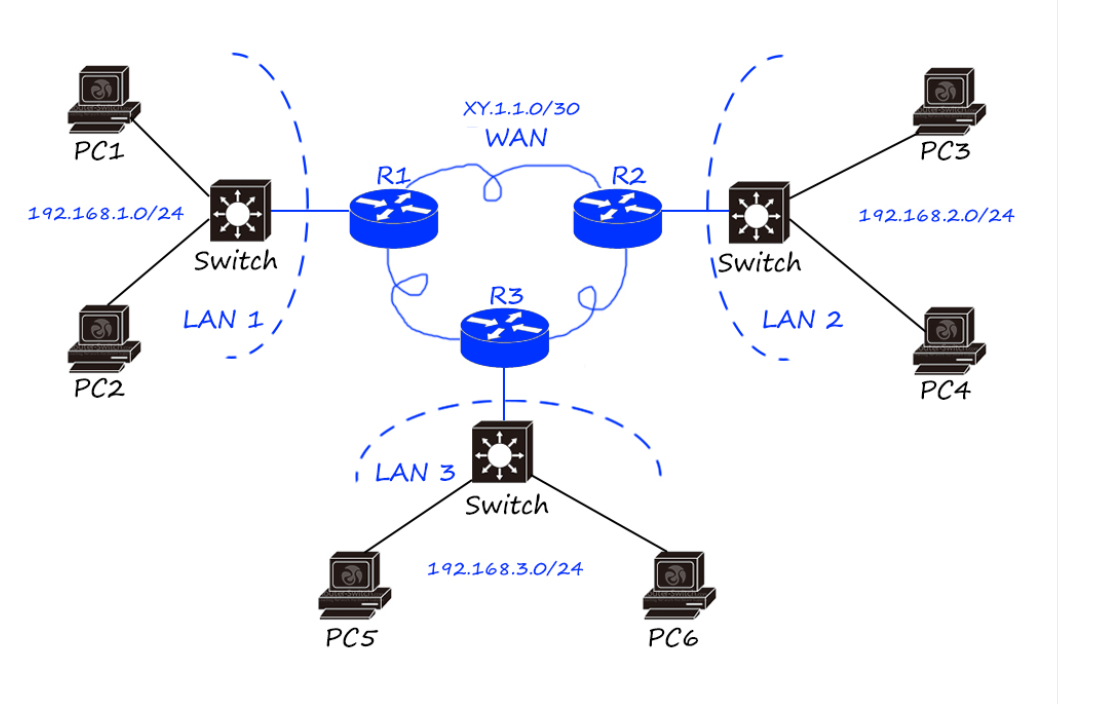
- Example: If Router R1 normally reaches a destination through R2, but the R1–R2 link fails, a dynamic routing protocol can allow R1 to learn and use an alternative path through R3.
Quick Memory Trick
- Static Route → Manually configured route.
- Default Route → Used when no specific route is known.
- Dynamic Route → Automatically learned and updated route.
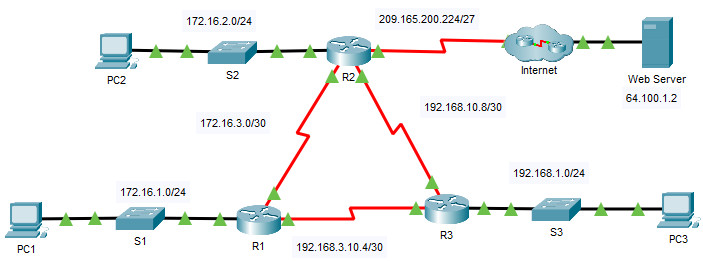
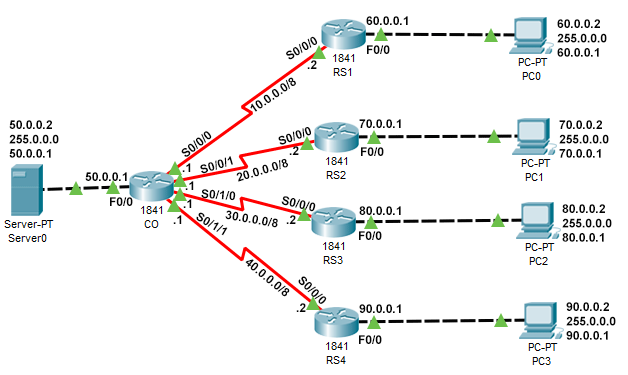
					ISP Router
..........
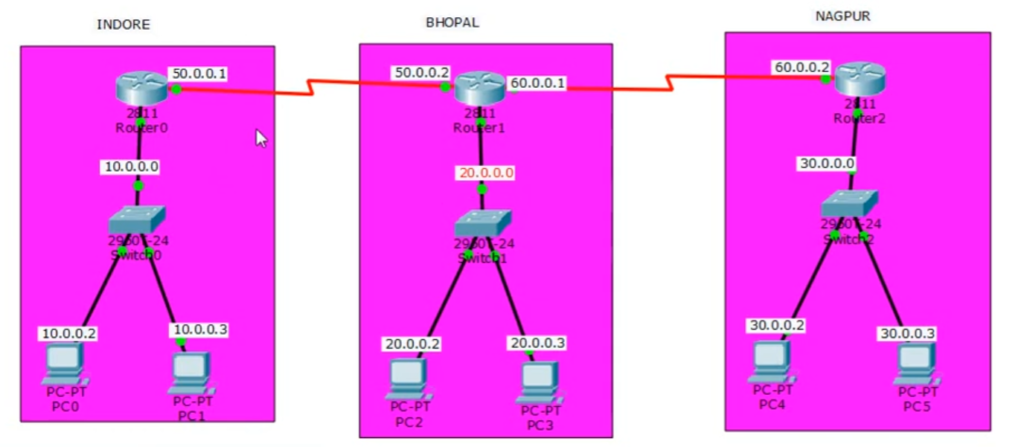
Router(config)#ip route 60.0.0.0 255.0.0.0 10.0.0.2
Router(config)#ip route 70.0.0.0 255.0.0.0 20.0.0.2
Router(config)#ip route 80.0.0.0 255.0.0.0 30.0.0.2
Router(config)#ip route 90.0.0.0 255.0.0.0 40.0.0.2


Remote site 1 (RS1)
..................
Router(config)#ip route 0.0.0.0 0.0.0.0 serial 0/0/0


Remote site 2 (RS2)
...................
Router(config)#ip route 0.0.0.0 0.0.0.0 serial 0/0/0


Remote site 3 (RS3)
...................
Router(config)#ip route 0.0.0.0 0.0.0.0 30.0.0.1


Remote site 4 (RS4)
...................
Router(config)#ip route 0.0.0.0 0.0.0.0 40.0.0.1
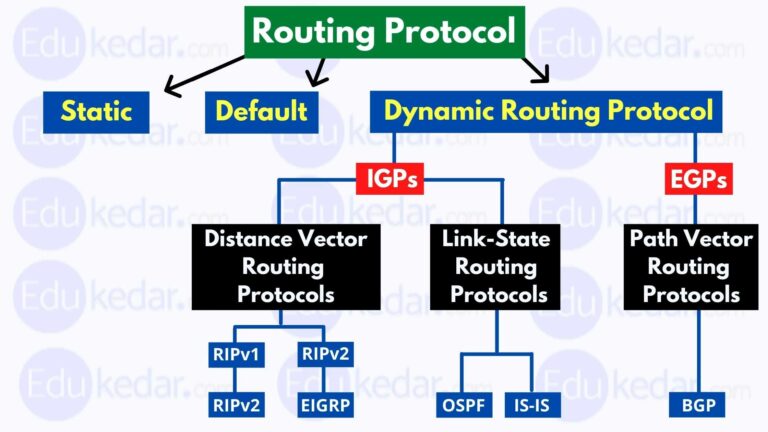
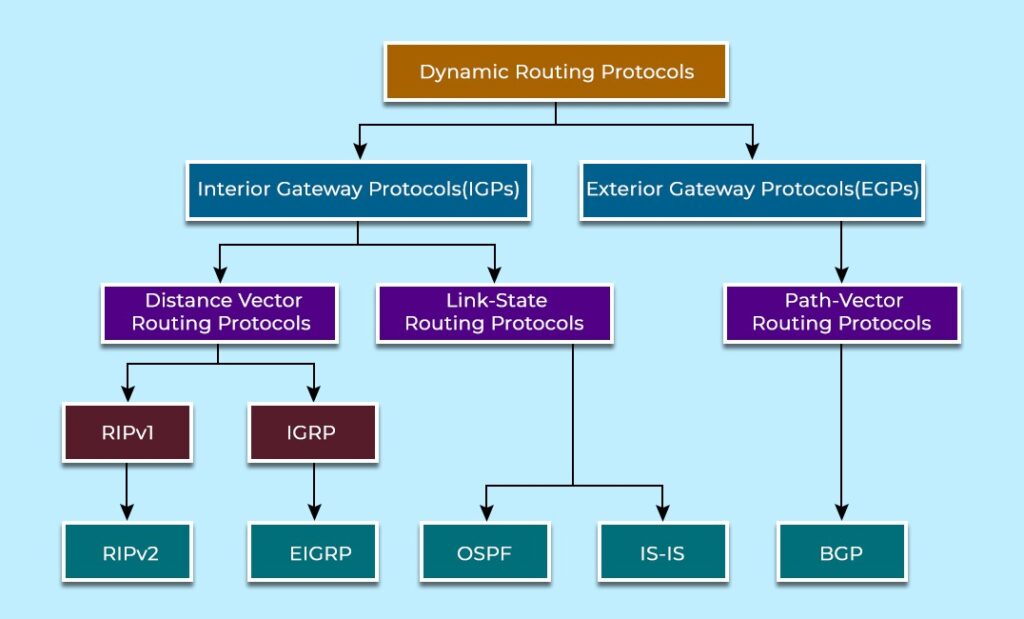
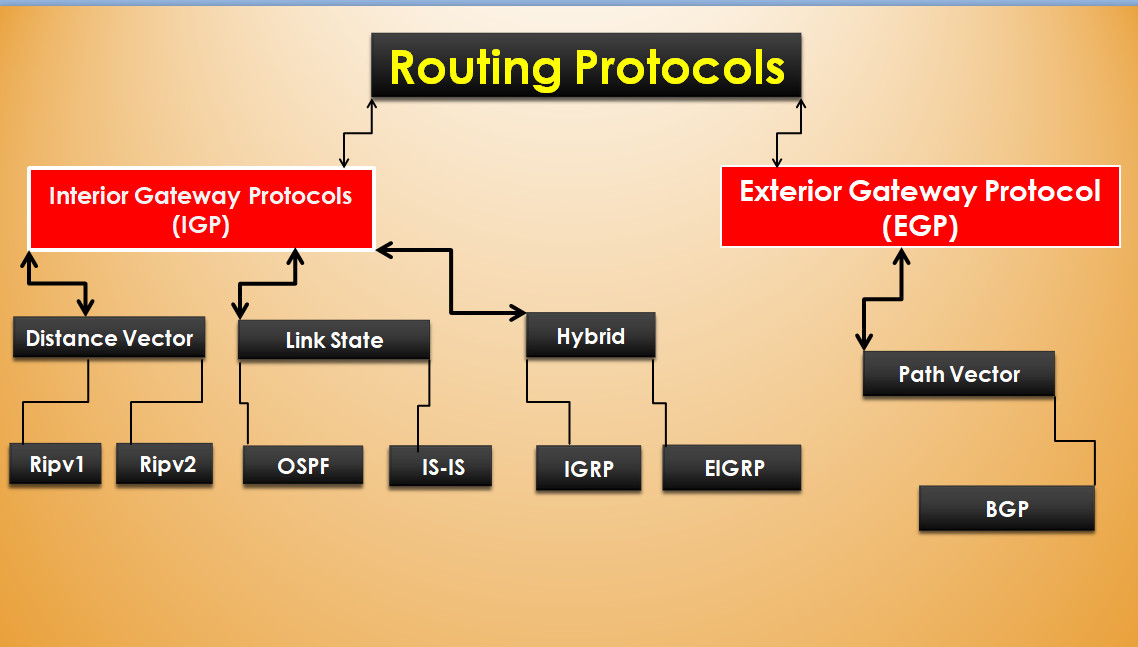
IGP and EGP Protocols
IGP (Interior Gateway Protocol)
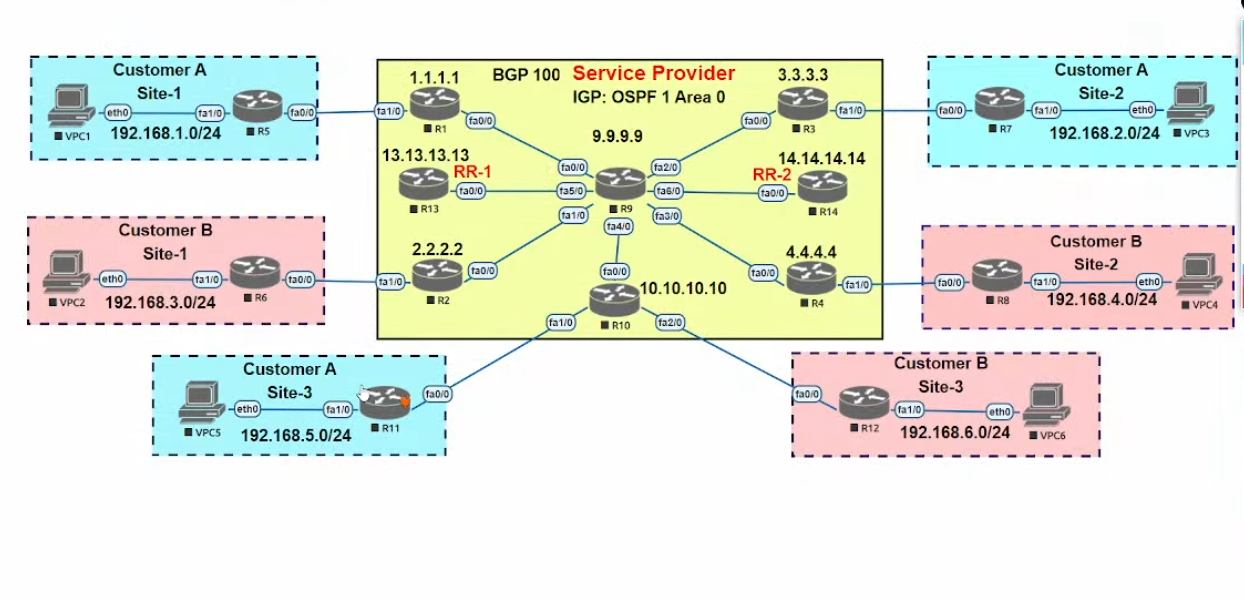
IGP is a type of routing protocol used to exchange routing information within a single Autonomous System (AS), such as a company network or an organization. It helps routers inside the same network communicate and find the best path for data transmission. IGP protocols automatically update routing tables and adapt to network changes. Common IGP protocols include RIP, OSPF, EIGRP, and IS-IS. For example, in a company with multiple routers across different departments, IGP is used to manage internal traffic efficiently.
EGP (Exterior Gateway Protocol)
EGP is used to exchange routing information between different Autonomous Systems (AS), such as between different organizations or over the internet. It helps routers decide how to route data across large, complex networks like the global internet. The most important EGP protocol is BGP (Border Gateway Protocol), which is used by ISPs and large networks. For example, when data travels from your ISP to another ISP to reach a website, BGP is used to determine the best path.
Key Difference
The main difference between IGP and EGP is that IGP works within a single network (inside an AS), while EGP works between different networks (between AS). IGP is faster and simpler, whereas EGP is more complex and designed for large-scale routing like the internet.
Types of IGP Protocols (Interior Gateway Protocols)
IGP protocols are mainly classified based on how they calculate routes and share routing information inside a network. There are three main types of IGP protocols:
1. Distance Vector Protocols
Distance Vector protocols determine the best path based on distance (hop count) and direction. Each router shares its entire routing table with its directly connected neighbors at regular intervals. The routers do not have full knowledge of the network topology; they only know the distance to a destination and the next hop.
A common example is RIP (Routing Information Protocol), which uses hop count as a metric. If a route has too many hops, it is considered unreachable. These protocols are simple to configure but have disadvantages like slow convergence and routing loops, making them less suitable for large networks.
2. Link-State Protocols
Link-State protocols work by sharing detailed information about the state of each link in the network. Every router creates a complete map (topology) of the network and calculates the shortest path using algorithms like Dijkstra’s algorithm.
Examples include OSPF (Open Shortest Path First) and IS-IS (Intermediate System to Intermediate System). These protocols provide fast convergence, better scalability, and more efficient routing. They are widely used in large enterprise and service provider networks because they quickly adapt to network changes.
3. Hybrid Protocols
Hybrid protocols combine features of both Distance Vector and Link-State protocols. They use advanced algorithms and metrics to make routing decisions more efficiently.
The main example is EIGRP (Enhanced Interior Gateway Routing Protocol). It uses metrics such as bandwidth, delay, reliability, and load to select the best path. EIGRP offers fast convergence, reduced bandwidth usage, and high performance, making it more efficient than traditional distance vector protocols.
Summary
The three types of IGP protocols—Distance Vector, Link-State, and Hybrid—differ in how they exchange routing information and calculate the best path. Distance Vector is simple but slower, Link-State is fast and scalable, and Hybrid provides a balance of both with improved performance.
Types of EGP Protocols (Exterior Gateway Protocols)
Exterior Gateway Protocols (EGP) are used for routing between different autonomous systems (AS), such as communication between different organizations, ISPs, or large networks on the internet.
1. Path Vector Protocol
The main and most widely used type of EGP is the Path Vector protocol. It maintains the path (list of AS numbers) that data must travel to reach a destination. Instead of just calculating distance or topology, it records the entire route path, which helps in avoiding routing loops and making better routing decisions.
The most important example is BGP (Border Gateway Protocol). BGP is used on the internet to exchange routing information between ISPs. It selects the best path based on attributes like AS path, next hop, policies, and rules, rather than just shortest distance. BGP is highly scalable and is the backbone of internet routing.
2. Classic EGP (Old EGP Protocol)
The original EGP (Exterior Gateway Protocol) was an early protocol used before BGP. It worked in a simple way where routers only checked whether a network was reachable or not, without calculating the best path.
However, this protocol had many limitations:
- No support for complex routing decisions
- Poor scalability
- Not suitable for modern internet
Because of these drawbacks, it is now obsolete and has been completely replaced by BGP.
Summary
There are mainly two types of EGP protocols:
- Path Vector Protocol (BGP) – Modern, powerful, and widely used
- Classic EGP – Old and no longer used
Today, BGP is the only standard EGP protocol used for
What is Routing Table
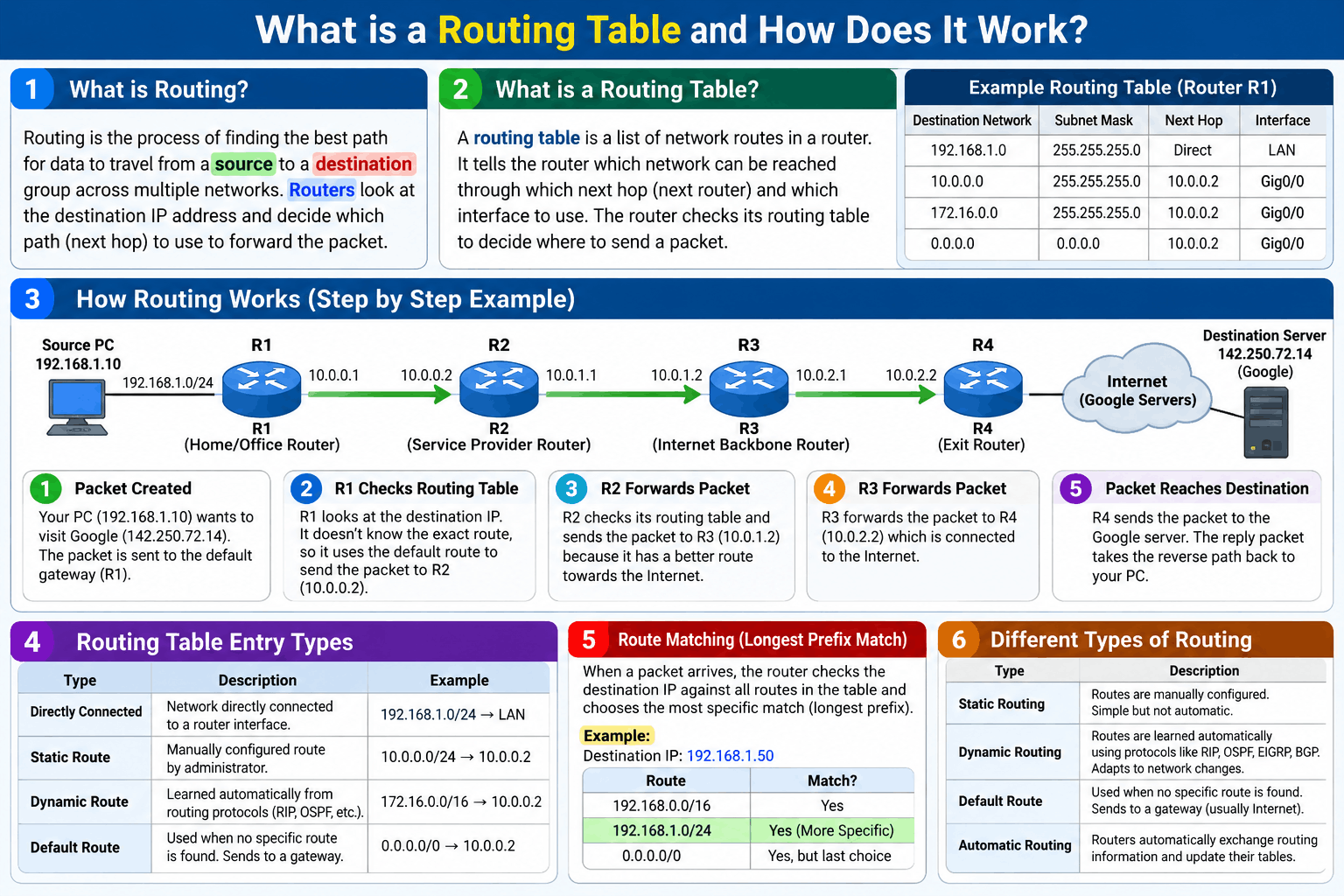
The routing table, an essential part of network devices, is a set of rules that directs where to send data packets (information sent between computers) over an IP network, identifying which physical interfaces the data packet should use while traveling from one device to another. If the data packet is meant for an external network or a different subnet, then the routing table sends it to the gateway.
Updated through manual manipulation by a network administrator or through network routing protocols and stored within the random access memory (RAM) of storage devices like network switches and routers, routing tables are individually unique, and each works as a network address map, storing source and destination IP addresses, routing information, and the addresses for default gateways. Ultimately, this helps computers communicate with other devices on different networks, expanding the distance at which networks can interact with each other.
What is a Routing Table?
A routing table is a data table stored inside a router (or a computer) that contains information about available network destinations and the paths to reach them. It helps the router decide where to send incoming data packets so they reach the correct destination efficiently.
1. Basic Concept
Whenever a router receives a packet, it checks its routing table to determine the best path to forward that packet. The routing table acts like a map of the network, showing different routes and how to reach them.
👉 Example:
If a packet needs to go to network 192.168.2.0, the router looks into its routing table and finds the best next hop to send that packet.
2. Information Stored in a Routing Table
A routing table typically contains the following details:
- Destination Network – The target network address
- Subnet Mask – Defines the network size
- Next Hop – The next router or gateway
- Interface – The exit interface (like FastEthernet, GigabitEthernet)
- Metric – Cost of the route (hop count, bandwidth, delay, etc.)
3. Types of Routes in Routing Table
Routing tables can include different types of routes:
- Static Routes – Manually configured by the administrator
- Dynamic Routes – Learned from routing protocols (like OSPF, RIP, EIGRP)
- Default Route – Used when no specific route is found (0.0.0.0/0)
What is a Routing Table?
A Routing Table is a table stored in a router that contains information about available networks and the paths used to reach those networks.
Key Points
- Destination Network: Shows the network where the packet needs to go.
- Next Hop: Shows the next router that should receive the packet.
- Outgoing Interface: Shows which router interface should be used to forward the packet.
- Metric: A value used to compare multiple routes and help select the best path.
- Route Source: Shows how the router learned the route, such as Static, Connected, OSPF, RIP, or BGP.
- Default Route: Provides a path for destinations that do not have a more specific entry.
- Best Route: When multiple routes are available, the router selects the most appropriate route according to routing rules and metrics.
- Route Update: In dynamic routing, the routing table can automatically change when the network topology changes.
Example
A router may have entries like:
192.168.1.0/24→ Directly connected192.168.2.0/24→ Next hop10.0.0.2192.168.3.0/24→ Next hop10.0.0.30.0.0.0/0→ Default route → ISP
How Does It Work?
Example: A PC sends a packet to a server with IP address 192.168.2.50.
- The packet first reaches Router R1.
- R1 looks at the packet’s destination IP: 192.168.2.50.
- R1 checks its routing table.
- It finds that
192.168.2.50belongs to the network 192.168.2.0/24. - The routing table says the next hop is 10.0.0.2.
- R1 forwards the packet to R2.
- R2 checks its own routing table and forwards the packet toward the destination.
- The process continues through the network until the packet reaches the destination server.
How Does a Routing Table Work
The goal of a routing table is to help routers determine the most effective routes for data packets. When sending data packets to host devices or other networks, routers consult routing tables to attain the IP addresses and best paths. Routing tables direct the packets to the appropriate neighboring router or next hop, eventually getting the packet to its intended destination. The entire process can happen incredibly fast, with a router consulting its routing table over a million times per second.
Network routing protocols help to keep routing tables updated and determine where data packets go. Two types of routing protocols exist to maintain the routing tables:
Static routing protocols: Static routing protocols use routes that network administrators manually input, giving routers information on how to reach different network IDs within the more extensive network. This protocol works best with preconfigured routes on the same subnet but falters when communication expands beyond the subnet. Since routers do not share static routes, static routing can conserve overhead and bandwidth. Static routing protocols are typically best used in smaller networks, as every entry requires manual entry and updates to function.
Dynamic routing protocols: Dynamic routing protocols, such as routing information protocol (RIP) and open shortest path first (OSPF), automatically create and maintain the routing table. They work automatically to communicate using routing protocols instead of a network administrator. It allows dynamic routing protocols to automatically change routes when better routes are available. This makes dynamic routing a better fit for larger organizations since automatic routing eliminates manual human interaction.
However, another protocol combines dynamic and static protocols since they connect interior autonomous systems to external networks.
OR
What is a Routing Table and How Does It Work?
A routing table is a data table stored inside a router. It contains information about different destination networks and tells the router where to forward a packet and which path to use. You can think of a routing table as a road map for a router. Just as a driver checks a map to decide which road leads to a destination, a router checks its routing table to decide where a network packet should go next.
1. How a Routing Table Gets Information
A router can learn routes in several ways. Some routes are directly connected to the router, some can be manually configured as static routes, and others can be learned automatically through dynamic routing protocols such as OSPF, RIP, EIGRP, or BGP. The router stores this information in its routing table so that it can make forwarding decisions whenever a packet arrives.
2. Example Network
Suppose we have a network where a PC wants to communicate with a server:
PC → R1 → R2 → R3 → Server
Router R1 has information about the network where the server is located. For example, the server may have the IP address 192.168.3.10, and the destination network may be 192.168.3.0/24. R1’s routing table might contain an entry saying that the 192.168.3.0/24 network can be reached through R2.
3. Packet Arrives at the Router
Now suppose the PC sends a packet to 192.168.3.10. When the packet reaches R1, R1 does not simply send the packet randomly. First, it reads the destination IP address from the packet header. R1 sees that the destination is 192.168.3.10 and then searches its routing table for a route that matches this destination.
4. Router Finds the Best Matching Route
R1 checks its routing table and finds something similar to:
Destination: 192.168.3.0/24
Next Hop: 10.0.0.2
Interface: G0/1
This tells R1 that the destination network 192.168.3.0/24 can be reached by sending the packet to the next router, R2, using interface G0/1.
5. Packet Is Forwarded
R1 then forwards the packet to R2. R2 receives the packet, checks the destination IP again, and looks at its own routing table. R2 may find that the destination network is reachable through R3. Therefore, R2 forwards the packet to R3.
The process continues:
PC → R1 → R2 → R3 → Server
Each router independently checks its own routing table and decides where to send the packet next.
6. What if There Are Multiple Routes?
Sometimes a router can reach the same destination through more than one path. For example:
Path 1: R1 → R2 → R4 → Server
Path 2: R1 → R3 → R5 → Server
The router or routing protocol uses information such as metric, cost, hop count, bandwidth, or other routing rules to select the preferred route. Therefore, the routing table helps the router determine the most appropriate available path.
7. What Happens When a Route Fails?
Suppose the normal route is:
R1 → R2 → R4 → Server
but the connection between R2 and R4 fails. If the network uses dynamic routing, the routers can exchange updated information and learn that the previous route is no longer available. R1 may then select an alternative route:
R1 → R3 → R5 → Server
The packet can therefore continue toward the destination using the new path.
8. Default Route
A routing table can also contain a default route, written in IPv4 as 0.0.0.0/0. This route is used when the router does not have a more specific route for the destination. For example, a home router may know all of its local networks, but for an unknown Internet destination it can send the packet to its ISP using the default route.
9. Simple Complete Example
Imagine you open a website on your computer. Your computer sends a packet toward the website’s server. The packet reaches your local router. The router checks the destination IP and searches its routing table. It finds the best matching route and forwards the packet to the next router. The next router performs the same process using its own routing table. This continues through multiple routers until the packet reaches the destination network and finally the server.
⭐ In Simple Words
Routing Table = The router’s map.
When a packet arrives, the router basically asks:
“Where does this packet need to go, and which next router should I send it to?”
The routing table provides the answer, allowing the packet to travel from the source → multiple routers → destination efficiently.
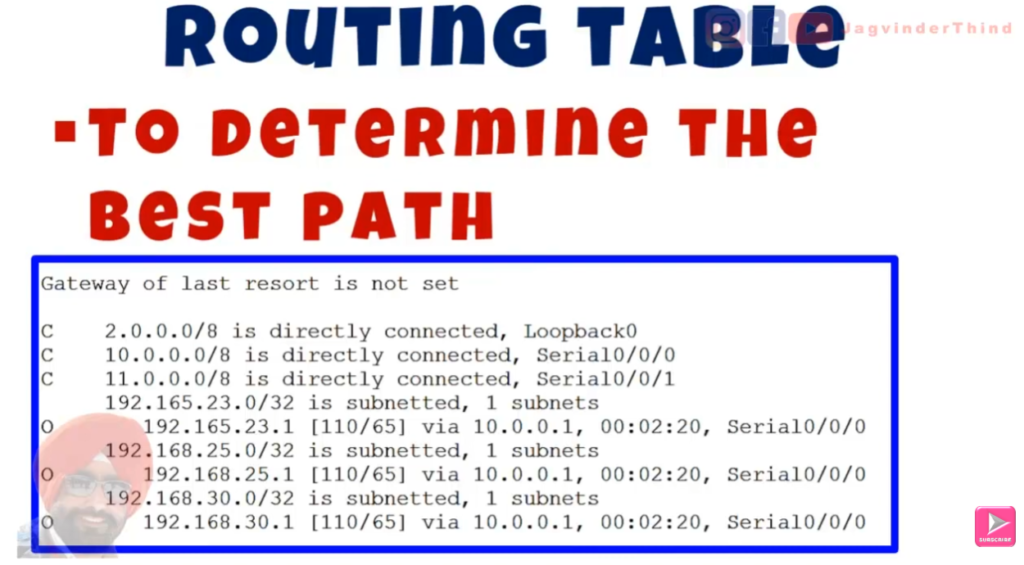
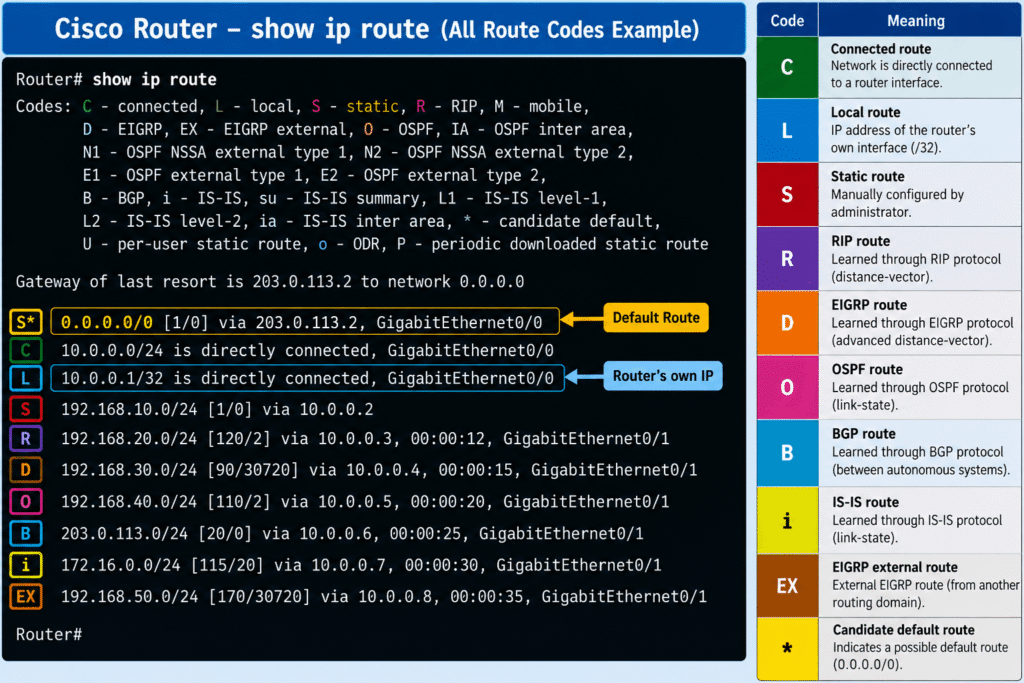
Meaning of Routing Table Codes in Cisco
Meaning of Routing Table Codes in Cisco
When a Cisco router displays its routing table, it uses different codes to identify the source or type of each route. These codes help the network administrator understand how the router learned a particular route and how that route is being used.
C — Connected
- C stands for Connected.
- It represents a network that is directly connected to one of the router’s interfaces.
- The router does not need another router to reach this network.
- Connected routes are automatically added when an interface is configured with an IP address and is operational.
- They are the basic routes from which a router learns about its directly attached networks.
L — Local
- L stands for Local.
- It represents the IP address configured on the router’s own interface.
- It identifies traffic that is specifically destined for the router itself.
- Local routes are automatically created by Cisco IOS when an interface receives an IP address and becomes active.
- They normally appear as a
/32route because they represent one specific IP address.
S — Static
- S stands for Static.
- A static route is manually configured by the network administrator.
- It does not automatically discover changes in the network.
- Static routes are useful when the network path is simple, predictable, or when a specific backup path is required.
- The administrator decides the destination network and where the router should forward the traffic.
O — OSPF
- O represents a route learned through OSPF (Open Shortest Path First).
- OSPF is a dynamic link-state routing protocol.
- Routers running OSPF exchange routing information and build knowledge of the network topology.
- OSPF calculates the best available path using its routing metric.
- It can automatically adapt when network topology changes.
D — EIGRP
- D represents a route learned through EIGRP (Enhanced Interior Gateway Routing Protocol).
- EIGRP is a dynamic routing protocol developed by Cisco.
- It uses routing information exchanged between neighboring routers to determine suitable paths.
- EIGRP can quickly react to changes in the network.
- It uses a composite metric to select the preferred route.
R — RIP
- R represents a route learned through RIP (Routing Information Protocol).
- RIP is a distance-vector routing protocol.
- It uses hop count as its primary routing metric.
- RIP is simple to configure but has limitations compared with modern routing protocols.
- RIP has a maximum usable hop count of 15; a metric of 16 represents an unreachable network.
B — BGP
- B represents a route learned through BGP (Border Gateway Protocol).
- BGP is primarily used for routing between different Autonomous Systems.
- It is the major routing protocol used for exchanging routes across the Internet.
- BGP makes routing decisions using multiple attributes rather than simply choosing the shortest physical path.
- It is designed to handle very large routing tables and complex routing policies.
* — Candidate Default Route
- The
*symbol indicates that a route is a candidate for the default route. - A default route is used when the router does not have a more specific route for a destination.
- It is commonly used to send unknown traffic toward another router, such as an ISP.
- The default route is represented by
0.0.0.0/0for IPv4. - It provides a general path for destinations that are not specifically present in the routing table.
In Short
C → Directly connected
L → Router’s own IP
S → Manually configured route
O → OSPF learned route
D → EIGRP learned route
R → RIP learned route
B → BGP learned route
* → Candidate default route
Types of Routing Protocols
Routing Protocols
Each routing protocol has a different way of selecting the best path to send data packets. Below is a list of popular routing protocols:
- Routing information protocol (RIP)
- Open shortest path first (OSPF)
- Enhanced interior gateway routing protocol (EIGRP)
- Border gateway protocol (BGP)
Let’s look deeper at some standard routing protocols and how they differ.
Routing information protocol (RIP)
RIP is one of the oldest and most widely used routing protocols, and you can use it with local area networks (LANs) and wide area networks (WANs). RIP evaluates networks by sharing their IP address and communicating with them. However, the biggest con of RIP is that it is only useful for small networks since it has a maximum hop count of 15 and uses hop count as its only metric for deciding the best path.
Open shortest path first (OSPF)
OSPF is a widely used interior gateway routing protocol in LAN networks. Routing information through an algorithm called Dijkstra, the OSPF protocol uses link state and the shortest path forward (SPF) algorithm to determine the shortest path of the data packet. Routers share link state information to calculate distances. Unlike RIP, OSPF sends information faster and has no hop count limit, making it more scalable.
Enhanced interior gateway routing protocol (EIGRP)
EIGRP is a routing protocol developed by Cisco that allows for 255 hops and uses autonomous systems. EIGRP has a shorter administrative distance than RIP and OSPF, making it a fast and efficient routing protocol. Using a dependable transport protocol, EIGRP diffuses the update algorithm to create a quicker convergence process. EIGRP stores all routes, not just the best routes, making transfers quick, even if the best route fails. EIGRP is a protocol that only Cisco routers use, so all routers on an EIGRP network must be Cisco.
Border gateway protocol (BGP)
Unlike the previous three routing protocols, which are all interior gateway protocols, BGP is an exterior gateway protocol. BGP can communicate with routers outside of a LAN, making it the protocol used for the internet. BGP chooses the best path forward using path length, origin type, router identification, and neighbor IP addresses to determine routes. Authorizing advanced security, BGP only allows authorized users to alter transfer routes and exchange data, making it a more secure protocol.
Cisco Routing Table
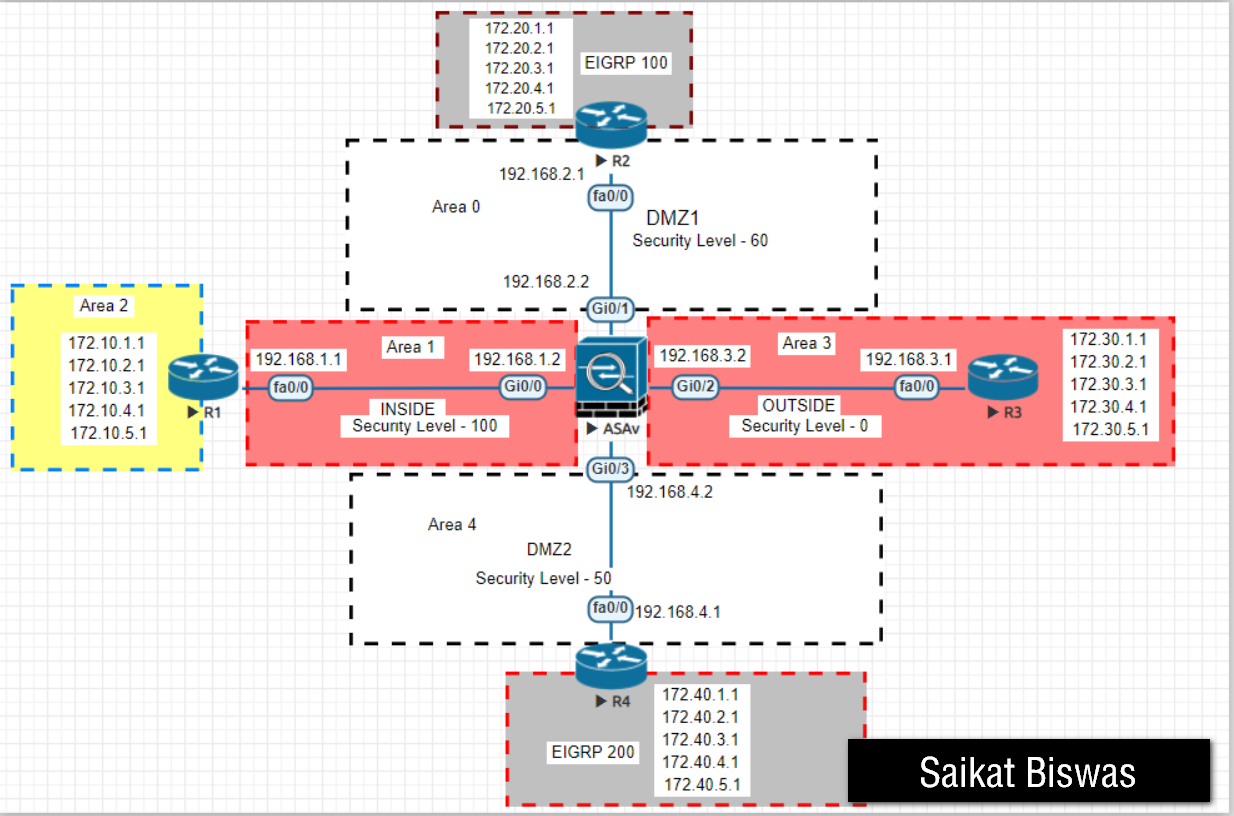
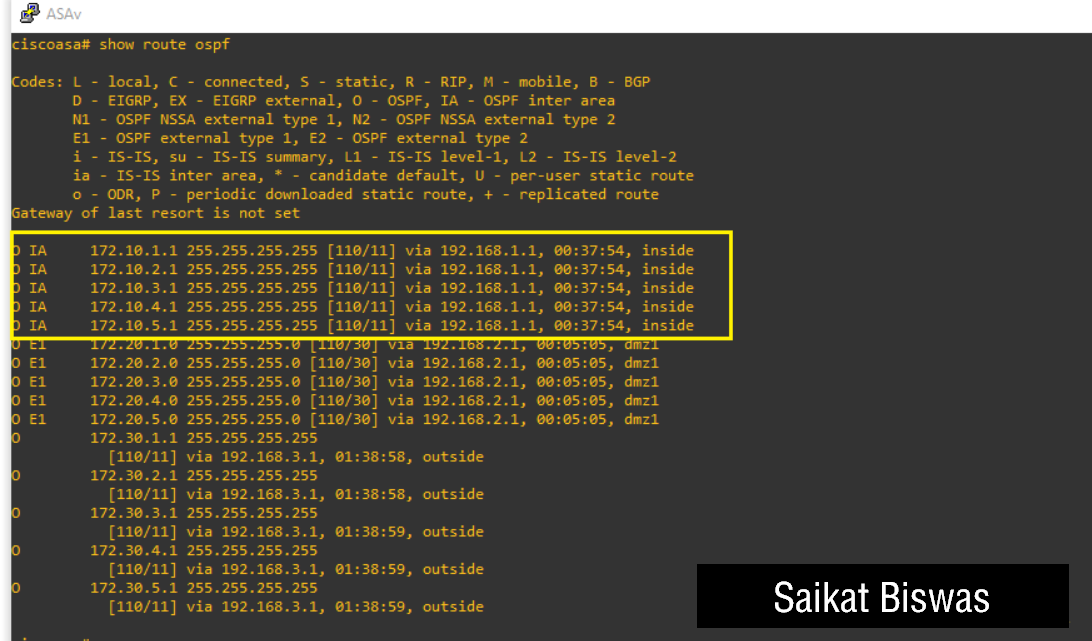
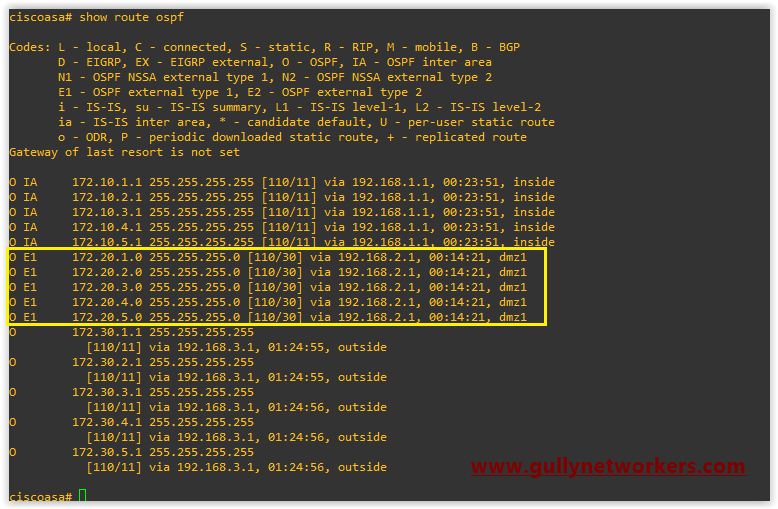
1.0 Interpreting the Components of a Routing Table
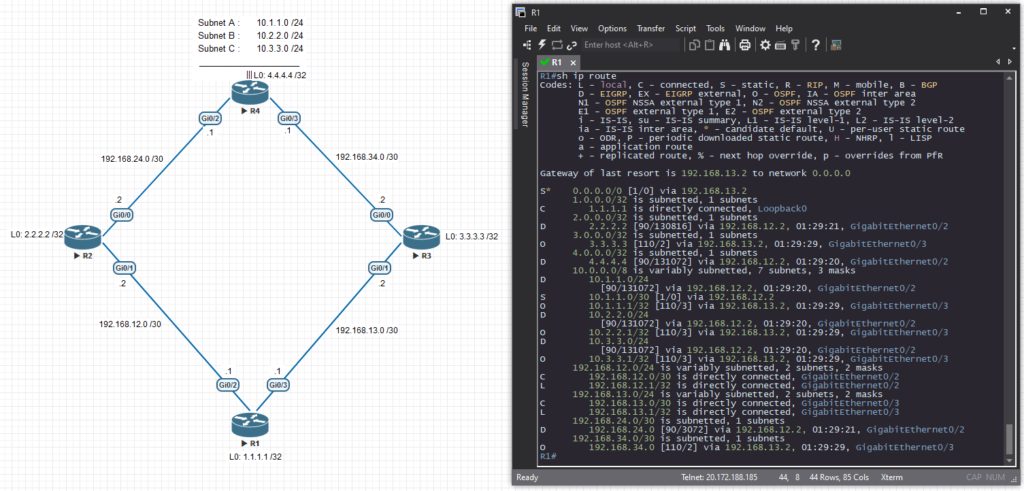
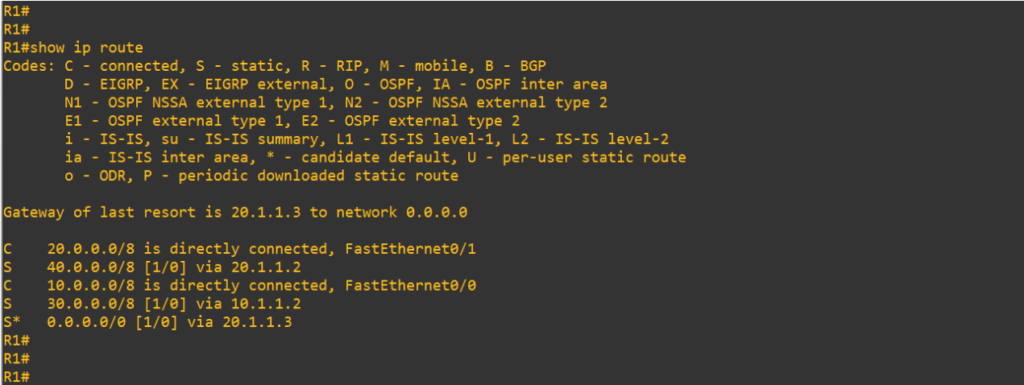
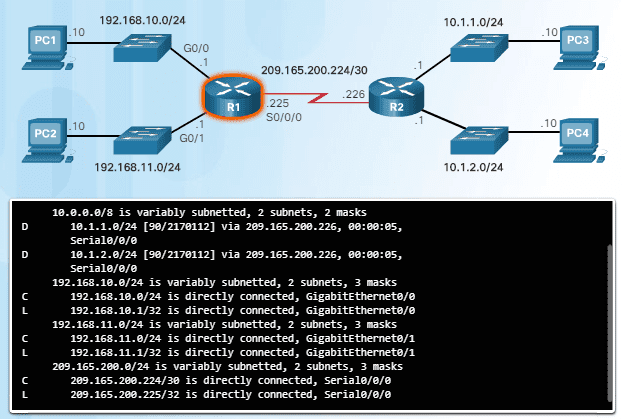
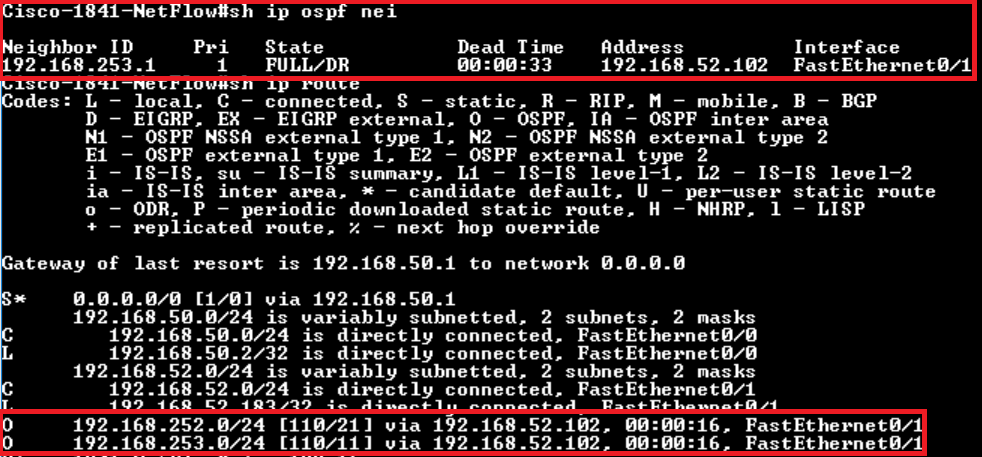
1.1 Routing Protocol code
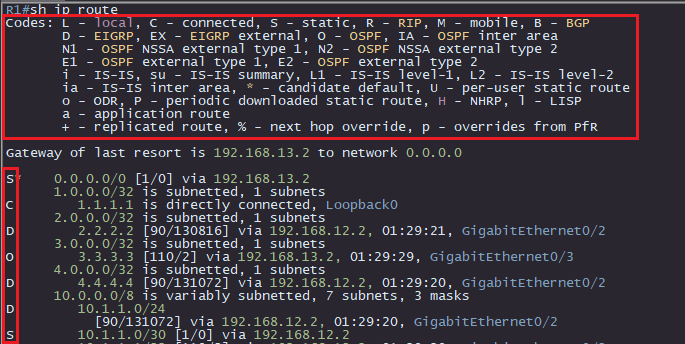
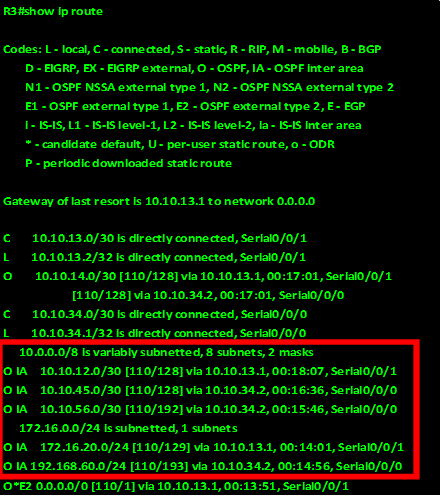
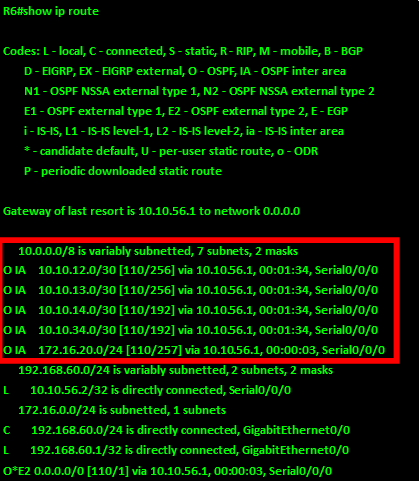
Routing protocol codes are there to indicate how the route was learned. It tells us through what means the route made it’s way onto our routing table. Luckily there is a very handy list of codes and what they mean at the top of the routing table! You will not have this list on the exam.
Each code directly corresponds with the route that is on the same line.
Let’s go over some of the most common routing protocol codes:
| Code | Title | Meaning |
|---|---|---|
| L | Local | Route to an IP address that exists locally on this device. Usually a /32 |
| C | Connected | Route to a network that this device is directly connected to with one of it’s interfaces |
| S | Static | Route that was manually, explicitly configured by a network admin |
| O | OSPF | Route learned dynamically via the Open Shortest Path First (OSPF) routing protocol |
| D | EIGRP | Route learned dynamically via the Enhanced Interior Gateway Routing Protocol (EIGRP) |
| B | BGP | Route learned dynamically via the Border Gateway Protocol (BGP) |
1.2 Destination Network
This is is the portion of routing table entry that tells you for which network this route pertains to. This is what gets compared to each packets layer 3 header, specifically the “Destination IP” portion.
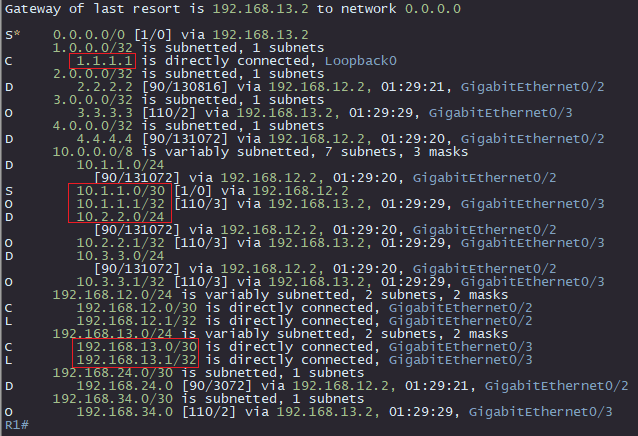
1.3 Next Hop
The next hop, along with the destination network, are arguably the two most important pieces of information you can pull from this table. This is the portion of the entry that indicates what the router will do next with packet whose destination IP address matches the route.
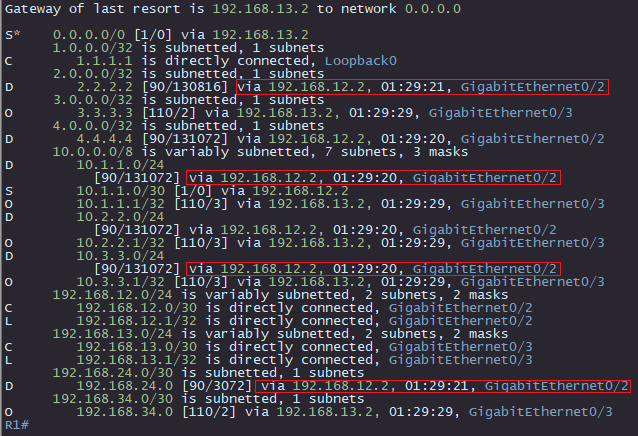
This portion of the entry may contain:
- The next hop IP address (ex. 192.168.12.2)
- The outgoing interface (ex. GigabitEthernet0/2)
- The duration that this entry has been on the table (dynamic routes only)
1.4 Administrative Distance
What does your router do when it learns about the exact same subnet via multiple different sources? It can only pick one! Administrative Distance (AD) is a value that Cisco assigned to various sources of routing information to act as a tie-breaker in this common situation.
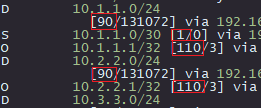
The lower the Administrative Distance, the better
Here are the most common AD’s that you need to know
| Protocol | AD |
|---|---|
| Connected | 0 |
| Static | 1 |
| BGP | 20 |
| EIGRP | 90 |
| OSPF | 110 |
Remember, the routing table only shows the best routes to any given destination
If you’re router learns about 192.168.0.0 /24 from three different sources:
- Static (1 AD)
- EIGRP (90 AD)
- OSPF (110 AD)
Only the Static route will show on the table, because that source has the lowest, or best AD.
Once again, AD is used to determine which route source takes priority, as the routing table will only show the best path to any destination.
1.5 Metric
Alright, so if AD is used when we learn about a subnet via different routing sources, what about when we receive multiple routes to the same subnet via the same routing protocol? That is where Metric comes into play.
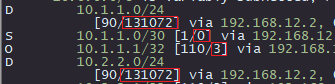
Metric is a number used internally by each routing protocol to determine the most optimal route
With dynamic routing protocols, you will often be advertised multiple paths to the same destination. Here’s an example of when that would happen
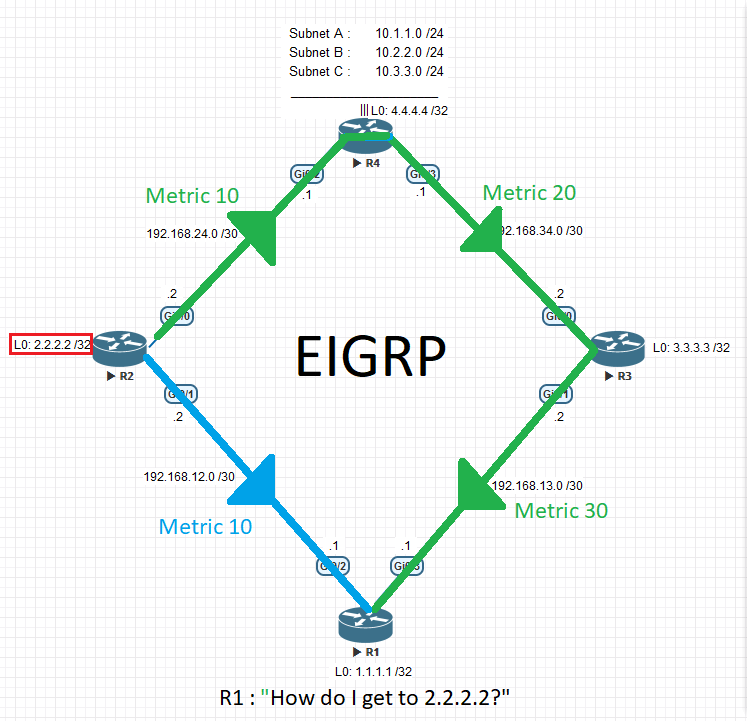
In this situation, the router looks at the metric to determine which route gets installed onto the routing table. Remember, the routing table only shows the best routes.
Remember, lowest metric wins
So, in the example above, R1 would choose R2 as it’s next hop to the 2.2.2.2/32 network, simply because that path has a lower metric value.
1.6 Gateway Of Last Resort
The “Gateway of last resort”, also known as the “default route”, is the place your router will send packets for which it has no other route. The gateway of last resort is a static route that can be configured manually or via DHCP.

ou’ll notice it’s destination network, 0.0.0.0/0 , matches ALL networks
Your PC has a default route, it’s “Default Gateway”. Your home router has a default route to the ISP.
It’s basically: “If you don’t know where to send this, you can send it here as a last ditch effort of delivery”
You might be wondering:
“If that route points everything to a certain address, doesn’t that make all the other routes useless?”
Short Answer: No, it doesn’t, but that question perfectly transitions us to the next topic.
Alright, so now we know how to read the various letters and numbers on the routing table, but how does the router read it?
How does the router choose which route to use?
Lets talk about the various rules and tie-breakers that the router uses to pick its next hop!
2.1 Longest Match
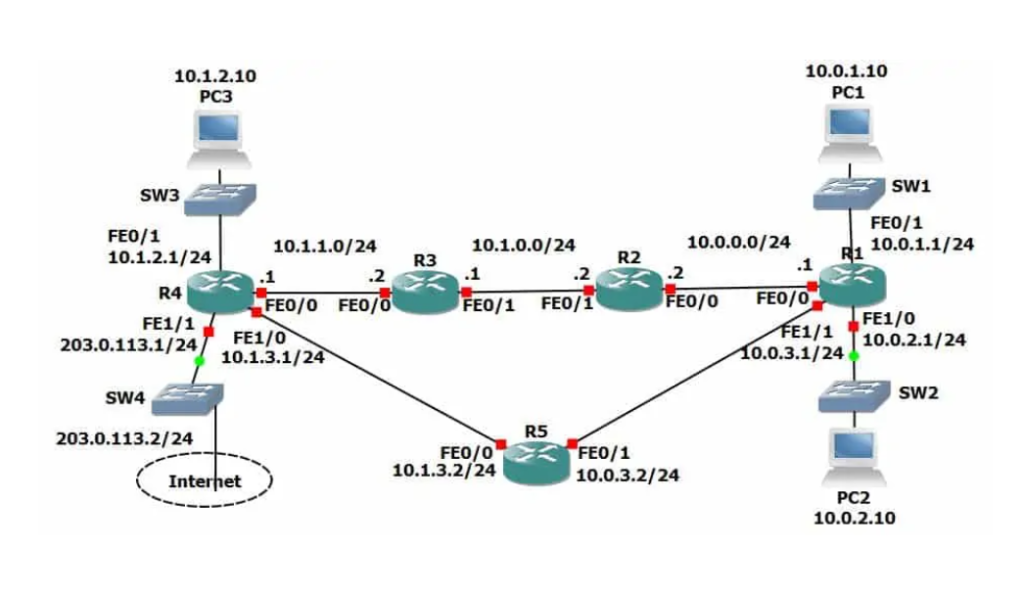
The first thing considered by the router, is how specific the route is. The more specific, the better. This is why having a default route doesn’t take over your whole routing table. Every route is more specific than 0.0.0.0/0, so therefor it only is used when no other route to the destination is present
Here’s an example.