Wan Technology
History of WAN
The history of the Wide Area Network (WAN) began in the 1960s, when researchers and governments started developing networks to connect computers over long distances. One of the earliest WAN projects was ARPANET, created by the Advanced Research Projects Agency (ARPA) of the United States Department of Defense. ARPANET connected computers at different universities and research centers, allowing them to share information and communicate with each other. This network later became the foundation for the modern Internet.
During the 1970s and 1980s, WAN technology improved with the introduction of packet-switching networks and communication protocols such as Transmission Control Protocol (TCP) and Internet Protocol (IP). These protocols allowed different networks to communicate with each other, which made large-scale networking possible. Businesses and government organizations started using WAN technologies like leased lines and early packet-switched networks to connect branch offices.
In the 1990s, WAN technologies expanded rapidly with the growth of the Internet and the use of technologies such as Frame Relay, Asynchronous Transfer Mode (ATM), and later Multiprotocol Label Switching (MPLS). These technologies improved network speed, reliability, and efficiency for enterprise networks.
Today, modern WAN networks use high-speed fiber optics, cloud connectivity, and secure technologies like Virtual Private Network (VPN) and software-defined WAN (SD-WAN). These advancements allow companies and service providers to connect global offices, data centers, and cloud platforms efficiently across the world.
What is Wan
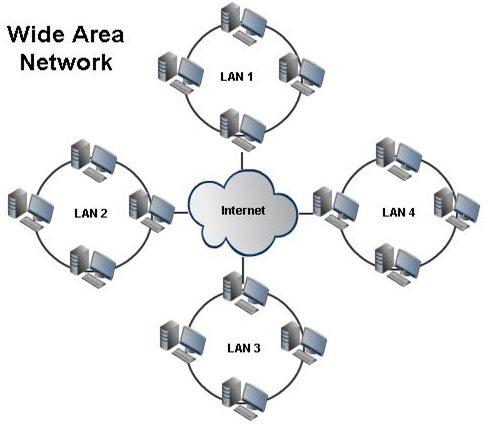
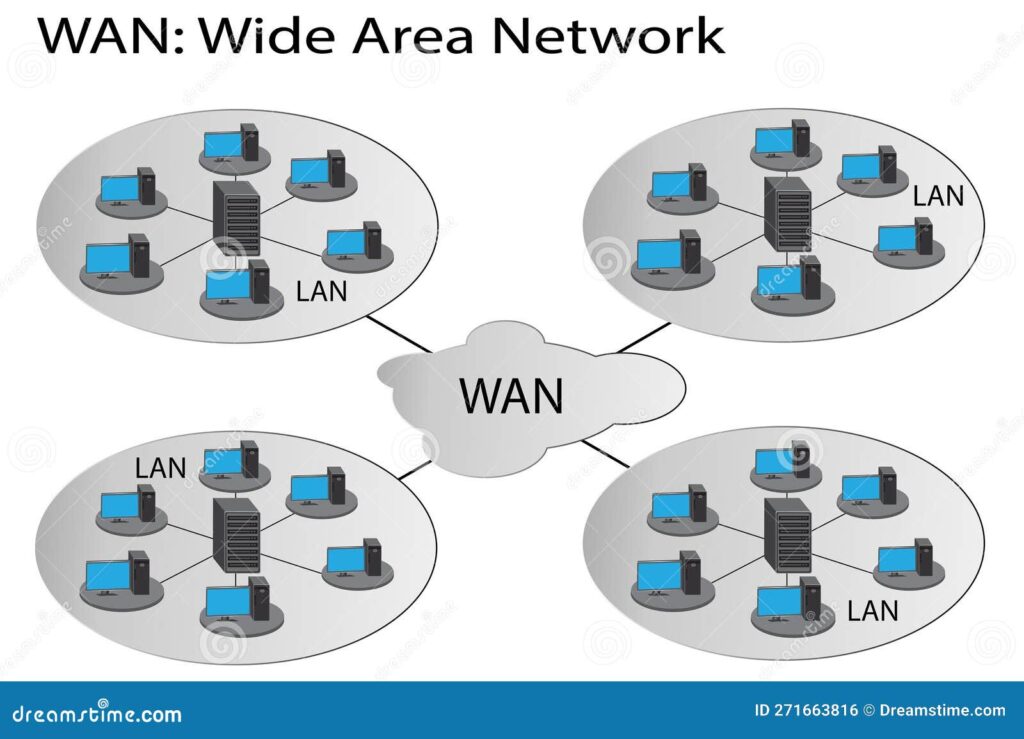
A Wide Area Network (WAN) is a type of computer network that connects multiple local networks (LANs) over a large geographic area, such as different cities, states, or even countries. WAN allows organizations, businesses, and users to communicate and share data between remote locations. It uses technologies like leased lines, fiber optics, MPLS, and the Internet to connect networks together. For example, a company with offices in different cities can use a WAN to connect all its branch office networks so employees can access shared resources such as servers, applications, and databases from anywhere.
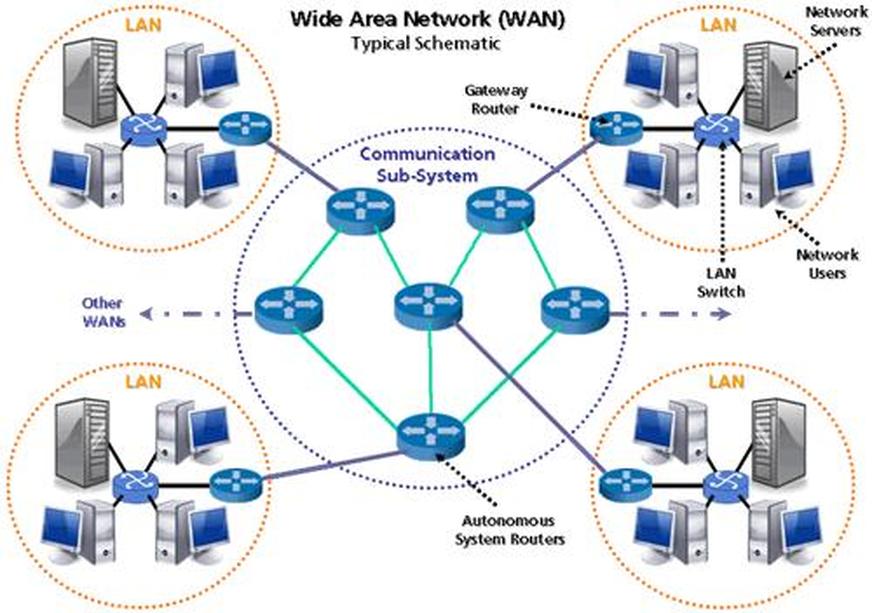
WAN networks are usually managed by telecommunication service providers, who provide the infrastructure required for long-distance communication. The biggest example of a WAN is the Internet, which connects millions of networks worldwide. WAN devices typically include routers, edge routers, and core routers that control traffic between networks and ensure data is delivered to the correct destination. WAN is very important for enterprises, cloud services, banking networks, and service provider networks because it enables reliable communication over long distances.
How Does A WAN work
A Wide Area Network (WAN) works by connecting multiple local networks (LANs) that are located in different geographic areas using communication links provided by service providers. When a user sends data from one location, the data first travels through the local network to a router. The router then forwards the data to the service provider’s network using technologies such as fiber optics, leased lines, MPLS, or the Internet. This allows data to travel long distances between different cities or countries.
Inside the WAN, the data is broken into small packets and routed through multiple network devices such as edge routers and core routers. These routers analyze the destination IP address and decide the best path to send the packets. The packets may pass through several networks and routers before reaching the destination location.
When the packets reach the destination WAN router, the router sends the data to the destination local network. Finally, the receiving device reassembles the packets and the user gets the complete data. This process happens very quickly, allowing companies to connect branch offices, data centers, and cloud networks through WAN communication.
Key Components Of WAN
The Wide Area Network (WAN) is built using several important components that help connect networks across long distances. The main key components of a WAN are explained below.
1. Routers
Routers are the main devices used in WAN networks. They connect different networks together and decide the best path for sending data packets from one network to another. WAN routers are commonly used at branch offices, data centers, and service provider networks to route traffic between networks.
2. Transmission Media
Transmission media is the communication link that carries data between locations. WAN commonly uses fiber optic cables, leased lines, satellite links, and wireless connections to transmit data over long distances.
3. Modems
A modem (modulator–demodulator) converts digital data from a computer or router into signals that can travel over communication lines. It also converts incoming signals back into digital data so devices can understand them.
4. Switches
Switches are used inside service provider or enterprise networks to forward data within the network. They help manage traffic and improve network performance.
5. Communication Protocols
Protocols define the rules for communication in WAN networks. Common WAN protocols include Point-to-Point Protocol (PPP), Multiprotocol Label Switching (MPLS), and Border Gateway Protocol (BGP). These protocols help in routing, authentication, and reliable data transmission.
6. Service Providers
Telecommunication companies provide the infrastructure required for WAN connectivity. They maintain the network links and ensure communication between different locations across large geographic areas.
These components work together to make WAN communication reliable, allowing businesses to connect branch offices, data centers, and cloud networks across the world.
Types Of WAN Technologies
Wide Area Network (WAN) uses different technologies to connect networks over long distances. These technologies provide communication between branch offices, data centers, and service provider networks. The main types of WAN technologies are explained below.
1. Leased Line
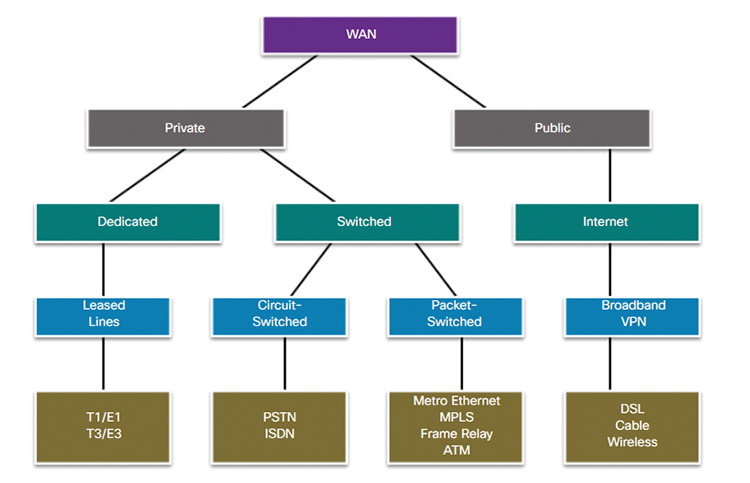
A leased line is a dedicated point-to-point connection between two locations provided by a telecom service provider. It offers high reliability, stable bandwidth, and secure communication. Companies use leased lines to connect branch offices to headquarters.
2. MPLS (Multiprotocol Label Switching)
Multiprotocol Label Switching (MPLS) is a WAN technology used by service providers to deliver high-performance private networks. It forwards data using labels instead of IP addresses, which makes traffic faster and more efficient. MPLS is widely used by enterprises for secure and reliable WAN connectivity.
3. Broadband Internet
Broadband WAN uses the Internet to connect remote locations. Technologies such as DSL, cable, and fiber broadband allow businesses to connect networks at lower cost compared to leased lines.
4. VPN (Virtual Private Network)
A Virtual Private Network (VPN) creates a secure tunnel over the public internet to connect remote users or branch offices. VPN encrypts data to keep communication secure and private.
5. Satellite WAN
Satellite WAN uses satellite communication to connect networks in remote or rural areas where wired connections are not available. It is commonly used for maritime communication, remote offices, and disaster recovery networks.
6. Cellular WAN
Cellular WAN uses mobile networks such as 4G LTE and 5G to provide wireless internet connectivity. It is often used as a backup WAN link or for mobile and temporary networks.
WAN Protocols
WAN protocols are communication rules used in a Wide Area Network (WAN) to control how data is transmitted between networks over long distances. These protocols ensure reliable communication, authentication, and proper data delivery between routers and other network devices. The main WAN protocols are explained below.
1. PPP (Point-to-Point Protocol)
Point-to-Point Protocol (PPP) is a widely used WAN protocol for direct communication between two routers. It supports authentication, error detection, and data compression. PPP is commonly used in leased line connections and older dial-up internet connections.
2. HDLC (High-Level Data Link Control)
High-Level Data Link Control (HDLC) is a Layer-2 protocol developed by ISO. It is used for point-to-point communication between network devices. Many routers, especially Cisco routers, use HDLC as a default WAN encapsulation protocol.
3. Frame Relay
Frame Relay is a packet-switched WAN protocol used in the past for connecting enterprise networks through virtual circuits. It allowed multiple connections over a single physical line but is now mostly replaced by newer technologies.
4. ATM (Asynchronous Transfer Mode)
Asynchronous Transfer Mode (ATM) is a high-speed WAN protocol that transfers data in fixed-size cells. It was used in telecom networks for voice, video, and data communication.
5. MPLS (Multiprotocol Label Switching)
Multiprotocol Label Switching (MPLS) is a modern WAN technology used by service providers. Instead of using IP addresses for routing decisions, MPLS uses labels to forward packets faster and more efficiently across the network.
6. BGP (Border Gateway Protocol)
Border Gateway Protocol (BGP) is a routing protocol used in large WAN networks and on the Internet. It exchanges routing information between different autonomous systems and helps determine the best path for data transmission.
These WAN protocols help maintain reliable communication, efficient routing, and secure connectivity between distant networks in enterprise and service provider environments.
Benefits of Wide Area Network (WAN)
Benefits of Wide Area Network (WAN)
1. Long Distance Connectivity
WAN connects networks over large geographic areas such as different cities, countries, or continents. Companies with multiple branch offices can communicate and share resources easily.
2. Centralized Data Access
WAN allows organizations to store data in a central location like a data center or cloud server. Employees from different offices can access the same applications, files, and databases.
3. Resource Sharing
Through WAN, businesses can share important resources such as servers, printers, storage systems, and enterprise applications across multiple locations.
4. Remote Access
Employees can connect to the company network from remote locations using technologies like Virtual Private Network (VPN). This supports work-from-home and remote office connectivity.
5. Business Communication
WAN supports communication tools like email, video conferencing, and VoIP across branch offices. This improves collaboration and productivity.
6. Scalability for Large Networks
WAN allows organizations to easily expand their network when new branches or offices are added.
Problems Without WAN Wide Area Network
Problems Without WAN
1. No Branch Office Connectivity
Without WAN, different company branches cannot connect with each other. Each office would work as a separate isolated network.
2. Difficult Data Sharing
Employees in different locations would not be able to access centralized servers or shared files easily.
3. Poor Communication
Business communication between offices would become slow and inefficient without WAN connectivity.
4. Higher Operational Cost
Companies might need separate systems and servers in each location, increasing hardware and maintenance costs.
5. Limited Remote Work
Employees would not be able to securely access the company network from outside the office.
6. Reduced Business Efficiency
Without WAN, organizations cannot operate as a unified network, which reduces productivity and slows business operations.
In simple terms, WAN helps organizations connect and operate multiple networks as one large network across long distances.
What is the purpose of a WAN Connection
The main purpose of a Wide Area Network (WAN) connection is to connect multiple networks over long distances so that organizations, users, and systems can communicate and share resources. WAN links different local area networks (LANs) located in different cities, countries, or continents. This allows companies with many branch offices to operate as a single unified network.
Another important purpose of a WAN connection is data and resource sharing. Through WAN, employees in different locations can access centralized resources such as servers, databases, applications, and cloud services. For example, a company headquarters can store data in a data center, and branch offices can access that data through the WAN connection.
WAN connections also support business communication and remote connectivity. Technologies such as Virtual Private Network (VPN) allow remote employees to securely connect to the company network. In addition, WAN networks enable services like email, VoIP calls, video conferencing, and access to the Internet, which are essential for modern businesses.
In simple terms, the purpose of a WAN connection is to enable communication, resource sharing, and centralized network access across long distances, helping organizations operate efficiently across multiple locations.
WAN Examples
Here are some common examples of a Wide Area Network (WAN) used in real life:
1. The Internet
The biggest example of a WAN is the Internet. It connects millions of networks and computers across the world, allowing people to access websites, send emails, and use online services.
2. Bank Network
Banks use WAN to connect their head office, branch offices, and ATMs in different cities. This allows customers to withdraw money, transfer funds, and check account balances from any branch or ATM.
3. Corporate Enterprise Network
Large companies with offices in multiple cities use WAN to connect all branch networks to the main data center. Employees can access company applications, servers, and databases from different locations.
4. Service Provider Network
Telecommunication companies use WAN technologies such as Multiprotocol Label Switching (MPLS) to deliver connectivity services to businesses and internet users across wide geographic areas.
5. Government Network
Government organizations often connect offices across states or countries using WAN to share data, communication systems, and centralized applications.
6. Cloud Network
Companies connect their offices to cloud platforms through WAN to access applications and storage hosted in remote data centers.
In simple terms, WAN is used whenever networks need to connect over large distances, such as between cities, countries, or worldwide
Private WAN & Public Wan
1. Private WAN
A Private WAN is a dedicated network connection used by an organization to connect its offices, data centers, and internal systems securely. In a private WAN, the network infrastructure is provided by a service provider but is reserved only for a specific organization, so outside users cannot access it. Technologies like Multiprotocol Label Switching (MPLS) or leased lines are commonly used to build private WAN networks.
Working:
In a private WAN, company branch offices connect to routers that link to the service provider’s private network. The data travels through secure and dedicated paths between locations. Because the network is isolated from the public internet, the communication is more secure and stable.
Purpose:
The purpose of a private WAN is to provide secure, reliable, and high-performance connectivity between company locations. It is commonly used by banks, government organizations, and large enterprises where sensitive data and stable network performance are important.
2. Public WAN
A Public WAN uses shared public infrastructure such as the Internet to connect networks. In this type of WAN, many users and organizations share the same network infrastructure. To keep communication secure, companies usually use encryption technologies like Virtual Private Network (VPN).
Working:
In a public WAN, a company network connects to the internet through an ISP. Data packets travel across multiple public networks and routers before reaching the destination network. Security is maintained using encryption and tunneling methods.
Purpose:
The purpose of a public WAN is to provide cost-effective and widely available connectivity for businesses and individuals. It is commonly used for internet access, cloud services, remote work, and connecting small branch offices.
Simple difference:
- Private WAN: Dedicated, secure, high performance, higher cost.
- Public WAN: Shared network (internet), lower cost, but less controlled performance.
WAN (Wide Area Network) — Overview
A WAN connects computers or networks over large geographic areas — cities, states, or even countries.
Examples: Internet, MPLS, VPN, Leased Line connections, etc.
There are two main types of WANs:
- Public WAN
- Private WAN
1. Public WAN
Definition
A Public WAN uses a public network infrastructure, such as the Internet, to connect different locations.
How it Works
- Data travels over the shared Internet.
- You can still make it secure using technologies like VPN (Virtual Private Network) or IPsec tunnels.
- It’s less expensive because bandwidth is shared among many users.
Examples
- Internet-based WAN connections
- VPN connections over the Internet
- Cloud-based WANs
Advantages
✅ Low cost
✅ Easy to set up and scale
✅ Global availability (Internet access anywhere)
Disadvantages
❌ Less secure (uses public paths)
❌ Performance can vary (depends on ISP congestion)
❌ Higher latency and lower reliability
2. Private WAN
Definition
A Private WAN uses dedicated or controlled network infrastructure — not shared with the public — to connect multiple sites securely.
How it Works
- Created using Leased Lines, MPLS, Frame Relay, or ATM.
- Data travels only through the service provider’s private backbone network, not the Internet.
- Provides consistent speed, low latency, and high security.
- MPLS WAN (used by enterprises)
- Leased Line between data centers
- Frame Relay or ATM WAN (older tech)
Advantages
✅ Highly secure and reliable
✅ Guaranteed bandwidth and QoS
✅ Consistent performance and low latency
Disadvantages
❌ More expensive
❌ Longer setup time
❌ Less flexible (fixed connections)
Comparison Table
| Feature | Public WAN | Private WAN |
|---|---|---|
| Connection Type | Shared (Internet) | Dedicated (Private line/MPLS) |
| Security | Lower, needs VPN/IPsec | Very high |
| Cost | Cheap | Expensive |
| Reliability | Variable | High |
| Speed | Depends on ISP | Guaranteed |
| Example | Internet VPN | MPLS, Leased Line |
| Use Case | Small businesses, remote users | Enterprises, data centers |
Example Scenarios
Public WAN Example:
A small company connects its offices in Delhi and Mumbai using VPN over the Internet — secure but low cost.
Private WAN Example:
A bank connects its branches across India using MPLS or Leased Lines for secure financial data transfer.