
Switch Ports
Type of Switch Ports
Network devices connect to a switch through its switch ports. Switch Ports which are physical opening where data cables are plugged in to connect the devices. Switch port type should be configured according to the requirement considering the factors like network architecture, speed and functionality.
Switch ports can be classified in following types based on network architecture :
- Access Port :
- Access port is a connection on a switch that transmits data to and from a specific VLAN.
- It is used to connect switches to host devices such as desktops, laptops, printers etc., only available in access link.
- It sends and receives Ethernet frames in untagged form from access VLAN.
- It can only be member of single VLAN i.e. the access VLAN, and discards all frames that are not classified to the access VLAN.
- A Switch Access Port is a switch interface that is used to connect end devices like PCs, laptops, printers, and IP phones to the network.
- It belongs to only one VLAN (Virtual LAN), so all traffic coming from that port is assigned to a single VLAN without any tagging. The switch removes or does not add VLAN tags on access ports because end devices do not understand VLAN tagging.
- For example, if a switch access port is configured for VLAN 20 (IT department), then any device connected to that port will automatically become part of VLAN 20 and can communicate only within that VLAN unless a router or Layer 3 switch is used for communication with other VLANs.
- In simple terms, a switch access port is used for connecting single devices to a specific VLAN in a network.
- Trunk Port :
- A trunk port is a switch interface that is used to carry traffic of multiple VLANs over a single physical link between network devices like switches, routers, or servers. It is mainly used in large networks where many VLANs need to communicate across different switches.
- A trunk port uses the 802.1Q VLAN tagging method, where each data frame is marked with a VLAN ID. This tagging helps the receiving switch identify which VLAN the data belongs to and keeps traffic from different VLANs separate even though they are using the same link.
- For example, if a network has VLAN 10 (HR), VLAN 20 (IT), and VLAN 30 (Finance), a trunk port between two switches can carry all these VLANs together. The frames are tagged so that each VLAN’s traffic is correctly delivered to its destination without mixing.
- Trunk ports are commonly used between switch-to-switch connections, switch-to-router connections (router-on-a-stick), and switch-to-server connections. They help reduce the number of physical cables needed and make VLAN communication more efficient.
- In simple terms, a trunk port is a special switch port that allows multiple VLANs to travel over one link while keeping their data separate using tagging.
- Hybrid Port :
- A Hybrid Port is a switch port that can carry both tagged and untagged VLAN traffic at the same time. It is mainly used in some vendor-specific switches where more flexible VLAN handling is required.
- In a hybrid port, traffic from one VLAN can be sent as untagged (like an access port), while traffic from other VLANs can be sent as tagged (like a trunk port). This allows a single port to support different types of devices and VLAN requirements simultaneously.
- For example, in an office network, a hybrid port can connect an IP phone and a PC at the same time. The voice traffic from the IP phone may be tagged with a voice VLAN, while the PC traffic can remain untagged in the data VLAN.
- Hybrid ports are useful in environments where both end devices and VLAN trunking need to be supported on the same interface, but they are not as commonly used as access or trunk ports in standard enterprise designs.
- Stack Port :
- A Stack Port is a special switch interface used to connect multiple switches together so they can work as one single logical switch (stack).
- It uses a high-speed stacking link or stacking cable to allow communication between switches with very fast data transfer. Through stack ports, all switches in the stack share a single management IP, configuration, and control plane.
- For example, if 3 switches are connected using stack ports, they will act like one big switch with combined ports. So instead of managing 3 separate switches, the network administrator manages only one device.
- Stack ports also provide high performance and redundancy. If one switch or stack link fails, the other switches continue working without interrupting the network.
- In simple terms, a stack port is used to combine multiple switches into one system for easier management, more ports, and better reliability.
- PoE (Power over Ethernet) Port :
- A PoE (Power over Ethernet) port is a switch port that can deliver both data and electrical power through a single Ethernet cable.
- It allows devices like IP cameras, wireless access points, and VoIP phones to work without a separate power adapter. The switch sends power along with network data through the same RJ45 cable.
- For example, if an IP camera is connected to a PoE port, it will receive both internet connectivity and power from the switch itself, making installation easier and reducing extra wiring.
- PoE ports are very useful in places where power sockets are limited or difficult to install, such as ceilings or outdoor areas.
- In simple terms, a PoE port is a switch port that provides network + power together in one cable.
- RJ45 Port :
- Registered Jack 45 (RJ45) is an Ethernet style network port which is used to interact or communicate with other devices where Ethernet networking is required.
- It supports up to 100 Mbps speed.
- It is used in data centers for server switching, LANs, uplinks from desktop switches, etc.
- SFP Port :
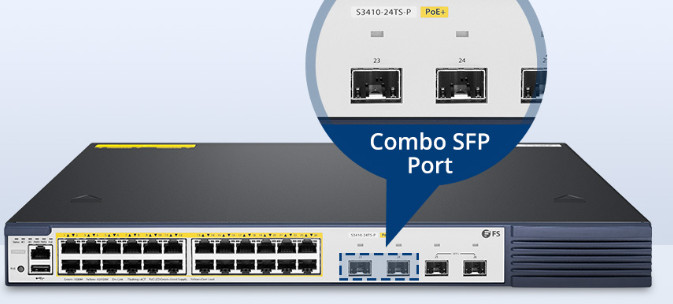
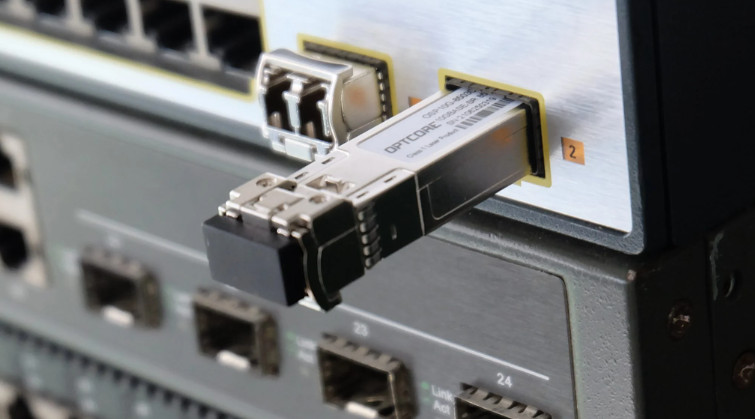
- Small form-factor pluggable (SFP) port are a slot on a network device into which SFP transceivers are inserted.
- It enables Gigabit switches to connect to a wide variety of fiber and Ethernet cables in order to extend switching functionality throughout the network.
- It supports up to 1 Gbps speed.
- It enables a gigabit switch to achieve fiber uplinks over longer distances or short-range copper uplinks.
SFP Port (Small Form-factor Pluggable Port) is a type of switch port used to connect fiber optic or high-speed Ethernet connections through removable modules called SFP transceivers.
It allows a switch to support different types of media (fiber or copper) depending on the SFP module installed. This makes it flexible for long-distance connections between switches, routers, or data centers.
For example, if two switches are far apart in different buildings, an SFP port with a fiber module is used to connect them with high speed and low signal loss.
In simple terms, an SFP port is a flexible high-speed port used for fiber or long-distance network connections.
- SFP+ Port :
- SFP+ port is an advanced version of SFP port which supports higher data rates.
- It supports up to 10 Gbps speed.
- SFP+ transceiver can’t be plugged into SFP port because SFP+ does not support speeds less than 1Gbps.
SFP+ (Small Form-factor Pluggable Plus) is an advanced version of the SFP port used for high-speed network connections up to 10 Gbps.
It is mainly used in modern switches, routers, and data centers where fast and reliable data transfer is required. Like SFP, it also uses removable transceiver modules, but supports much higher bandwidth.
For example, SFP+ ports are used to connect core switches, server farms, and data center links where large amounts of data must be transferred quickly with low latency.
In simple terms, SFP+ is a high-speed fiber/copper port that supports up to 10 Gigabit Ethernet for fast networking.
- SFP28 Port :
- SFP28 is enhanced version of SFP+ designed for 25G signal transmission.
- It supports up to 25 Gbps speed.
- It is used for networking upgrade.
SFP28 Port (Small Form-factor Pluggable 28) is an advanced high-speed switch port used for 25 Gbps Ethernet connections.
It is the upgraded version of SFP+ and is mainly used in modern data centers, cloud networks, and high-performance servers where very fast data transfer is required with low latency.
SFP28 uses similar form factor as SFP and SFP+, but it supports higher bandwidth (25G) over fiber or DAC (Direct Attach Copper) cables.
For example, SFP28 ports are used to connect core switches, server racks, and high-speed storage systems in data centers.
In simple terms, SFP28 is a 25 Gigabit high-speed network port used for ultra-fast data communication in enterprise and data center networks.
- QSFP+ Port :
- Quad small form factor +(QSFP+) port have 4 lanes which support speed 4 times their corresponding SFP( here, SFP+).
- It supports up to 40 Gbps speed.
- It have four-channel 10 Gbps SFP+ interfaces.
QSFP+ Port (Quad Small Form-factor Pluggable Plus) is a high-speed switch port used for 40 Gbps Ethernet connectivity.
It supports four lanes of data transmission (4 × 10 Gbps), which together provide very high bandwidth for data center and enterprise backbone networks. QSFP+ can use both fiber optic cables and Direct Attach Copper (DAC) depending on the module.
For example, QSFP+ ports are used to connect core switches, aggregation switches, and high-performance servers where large-scale data transfer is required.
In simple terms, QSFP+ is a 40 Gigabit high-speed port used in data centers for fast and reliable backbone connections.
- QSFP28 Port :
- Quad small form factor 28 (QSFP28) port have 4 lanes which support speed 4 times their corresponding SFP( here, SFP28).
- It supports up to 100 Gbps speed.
- It have four-channel 25 Gbps SFP28 interfaces.
QSFP28 Port (Quad Small Form-factor Pluggable 28) is a high-speed switch port used for 100 Gbps Ethernet connections.
It supports four lanes of 25 Gbps each (4 × 25G = 100G), making it much faster than QSFP+ and ideal for modern data centers, cloud infrastructure, and high-performance enterprise networks. It can use fiber optic cables or DAC (Direct Attach Copper) depending on the transceiver module.
For example, QSFP28 ports are used to connect core routers, spine-leaf switches, and large server clusters where very high bandwidth and low latency are required.
In simple terms, QSFP28 is a 100 Gigabit ultra-high-speed network port used for backbone and data center connectivity.
- Switch MGMT (Management) Port:
A switch MGMT (Management) port is a dedicated port on a network switch used for administration and management purposes. This port is not used for normal data communication between computers, servers, or other network devices. Instead, it provides a separate way for network administrators to access the switch and control its settings.
The main purpose of a switch management port is to configure and monitor the switch. Through this port, an administrator can log in to the switch, assign IP addresses, create VLANs, check port status, update firmware, and troubleshoot network issues. This helps in maintaining proper network operation and device performance.
One important advantage of the MGMT port is security. Because it is separate from regular network traffic, management access can be isolated from user data traffic. This reduces the chance of unauthorized users accessing the switch settings and makes the network easier to protect.
Another benefit is easy troubleshooting and remote access. Even if normal switch ports are busy or experiencing network problems, the management port can still be used to connect to the switch. Network engineers can remotely access the device using protocols such as SSH, Web GUI, or SNMP and solve problems quickly.
In enterprise networks, switches from companies like Cisco Systems, Juniper Networks, and Huawei commonly include a dedicated MGMT port. This port plays an important role in network management by giving administrators a reliable and secure way to control the switch.
In short, a switch MGMT port is a special administrative port used to configure, monitor, and manage a network switch separately from normal network traffic.
- Switch Console Port:
A console port is a special port on a network device, such as a switch, router, firewall, or server, used for direct local management and configuration of the device. It provides administrators with a direct connection to the device’s operating system, allowing them to configure settings, monitor performance, and troubleshoot issues. Unlike normal Ethernet ports, a console port does not carry regular network data traffic.
The main purpose of a console port is initial setup and maintenance. When a new switch or router is installed, it may not yet have an IP address or network configuration. In this situation, a network administrator connects a laptop or computer directly to the console port using a console cable and accesses the device through terminal software. From there, the administrator can perform basic setup, assign network settings, and enable remote access methods such as SSH.
A console port is also very useful for troubleshooting network problems. If a device becomes unreachable over the network because of a configuration error, IP problem, or port failure, administrators can still connect through the console port and fix the issue. This makes it an important backup management method for network devices.
Console ports are available in different types, such as RJ45 console ports, USB console ports, and serial ports, depending on the device model. Many network devices from companies like Cisco Systems, Juniper Networks, and Huawei include console ports for direct access.
In short, a console port is a dedicated management port used for direct connection to configure, manage, and troubleshoot a network device, especially when normal network access is unavailable.
Difference between a Console Port and a (Management) Port:
A Console Port is used for direct local access to the switch. An administrator connects a laptop or computer physically to the switch using a console cable. It is mainly used for initial setup, configuration, and troubleshooting when the switch has no network connection or remote access is not working.
A MGMT Port (Management Port) is used for remote management over a network. It has its own IP address and allows administrators to access the switch through SSH, Web GUI, or SNMP from another location. It is mainly used for day-to-day monitoring and management.
In short:
- Console Port → Direct cable connection, local management.
- MGMT Port → Network connection, remote management.
- What is Switch USB Port
A USB port on a network switch is a port used for management, configuration, and file transfer. It can be used to connect storage devices like a USB flash drive to backup or restore switch configuration files, update firmware, or save system logs. Some switches also use a USB console port for direct management access from a computer instead of a traditional serial console cable. Unlike Ethernet ports, a USB port is not used for normal network data traffic between devices.
- Switch Uplink Port:
An uplink port in a switch is a special port used to connect one switch to another switch, router, or core network device. It is mainly used to carry network traffic from the access switch upward to the distribution or core layer, which is why it is called an uplink port.
Uplink ports are usually higher-speed ports such as SFP, SFP+, QSFP, or dedicated RJ45 uplink ports, because they handle traffic from many connected devices at once. For example, a 48-port access switch may use a 10G SFP+ uplink port to connect to a core switch for faster communication.
The main benefit of an uplink port is high bandwidth and better network connectivity. It helps connect different switches and network layers efficiently without creating bottlenecks.
In short:
Uplink Port = A switch port used to connect the switch to another switch, router, or backbone network for higher-level network communication.
Total 27 Switch Ports / Port Types (1–27):
- RJ45 Ethernet Port – Connects PCs, printers, servers, and other devices.
- Console Port – Direct local configuration and troubleshooting port.
- MGMT (Management) Port – Dedicated remote management port.
- USB Port – Used for firmware updates, backup, logs, or USB console.
- SFP Port – 1G fiber/copper uplink port.
- SFP+ Port – 10G high-speed uplink port.
- SFP28 Port – 25G uplink port.
- QSFP+ Port – 40G high-speed port.
- QSFP28 Port – 100G ultra-high-speed port.
- PoE Port – Provides both power and data over Ethernet.
- Stack Port – Connects multiple switches as one logical switch.
- Expansion / Module Port – Adds extra ports or modules.
- Alarm Port – Connects to external alarm/monitoring systems.
- Reset Port / Button – Used to restart or factory reset the switch.
- Serial Port – Legacy port for management/configuration.
- DC Power Input Port – Connects DC power source.
- AC Power Socket – Main AC power connection.
- RPS (Redundant Power Supply) Port – Backup power connection.
- Fan Module Port / Slot – Cooling fan module connection.
- Grounding Port – Earth grounding for electrical safety.
- Sync / Clock Port – Timing synchronization port.
- Out-of-Band Management Port – Separate network management access.
- Breakout Port – Splits one high-speed port into multiple smaller links.
- Uplink Port – Connects switch to router/core switch/network backbone.
- Access Port – Carries traffic for one VLAN.
- Trunk Port – Carries traffic for multiple VLANs.
- Hybrid Port – Carries both tagged and untagged VLAN traffic.
This is a complete basic-to-advanced switch port list used in enterprise switches from Cisco Systems, Juniper Networks, and Huawei.
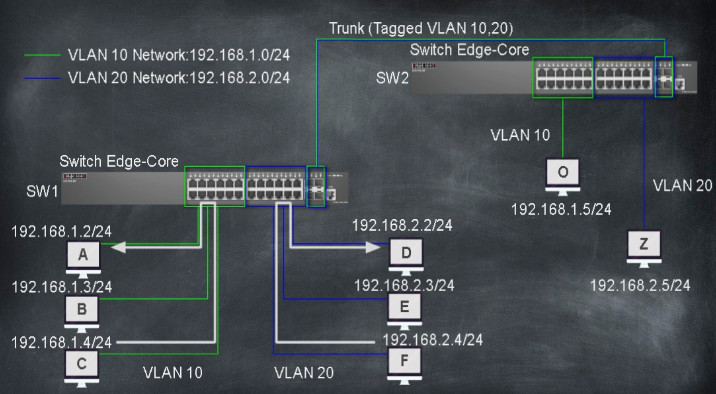
Access Ports and Trunk Port
In computer networking, access ports and trunk ports are two types of switch ports used to control how VLAN traffic is handled. They are mainly used in managed switches in company, campus, and enterprise networks to separate and manage network traffic efficiently.
Access Port (in detail)
An access port is a switch port that is configured to carry traffic for only one VLAN. It is mainly used to connect end devices such as computers, laptops, printers, IP phones, CCTV cameras, and wireless access points. Access ports send and receive untagged frames, meaning the connected device does not need to understand VLAN tagging. Internally, the switch associates all traffic coming from that port with a specific VLAN ID. Access ports help in network segmentation by assigning different departments or user groups to different VLANs, such as HR, Finance, and Students, which improves security and reduces unnecessary broadcast traffic. Access ports can also use security features like Port Security and 802.1X authentication to restrict unauthorized devices from connecting to the network.
Trunk Port (in detail)
A trunk port is a switch port that is configured to carry traffic for multiple VLANs at the same time. Trunk ports are mainly used to connect network devices such as switch-to-switch links, switch-to-router links, or switch-to-firewall links. Trunk ports use VLAN tagging (IEEE 802.1Q) to identify which VLAN each data frame belongs to. When a frame travels through a trunk port, a VLAN tag is added to the Ethernet frame so that the receiving device knows which VLAN the data belongs to. Trunk ports allow different VLANs to extend across multiple switches, which is essential in large networks where devices from the same VLAN may be connected to different switches.
Key Differences (simple points)
Access Port:
- Carries traffic for only one VLAN
- Sends untagged frames
- Used for end devices (PC, printer, IP phone)
- Simple and secure for users
Trunk Port:
- Carries traffic for multiple VLANs
- Uses VLAN tagging (802.1Q)
- Used between switches, routers, and firewalls
- Supports large and scalable networks
Conclusion
In a company or campus network, access ports are used to connect user devices and keep departments separated through VLANs, while trunk ports are used to interconnect network devices and transport multiple VLANs across the network infrastructure. Together, access and trunk ports form the backbone of VLAN-based network design, ensuring better security, performance, and network management.
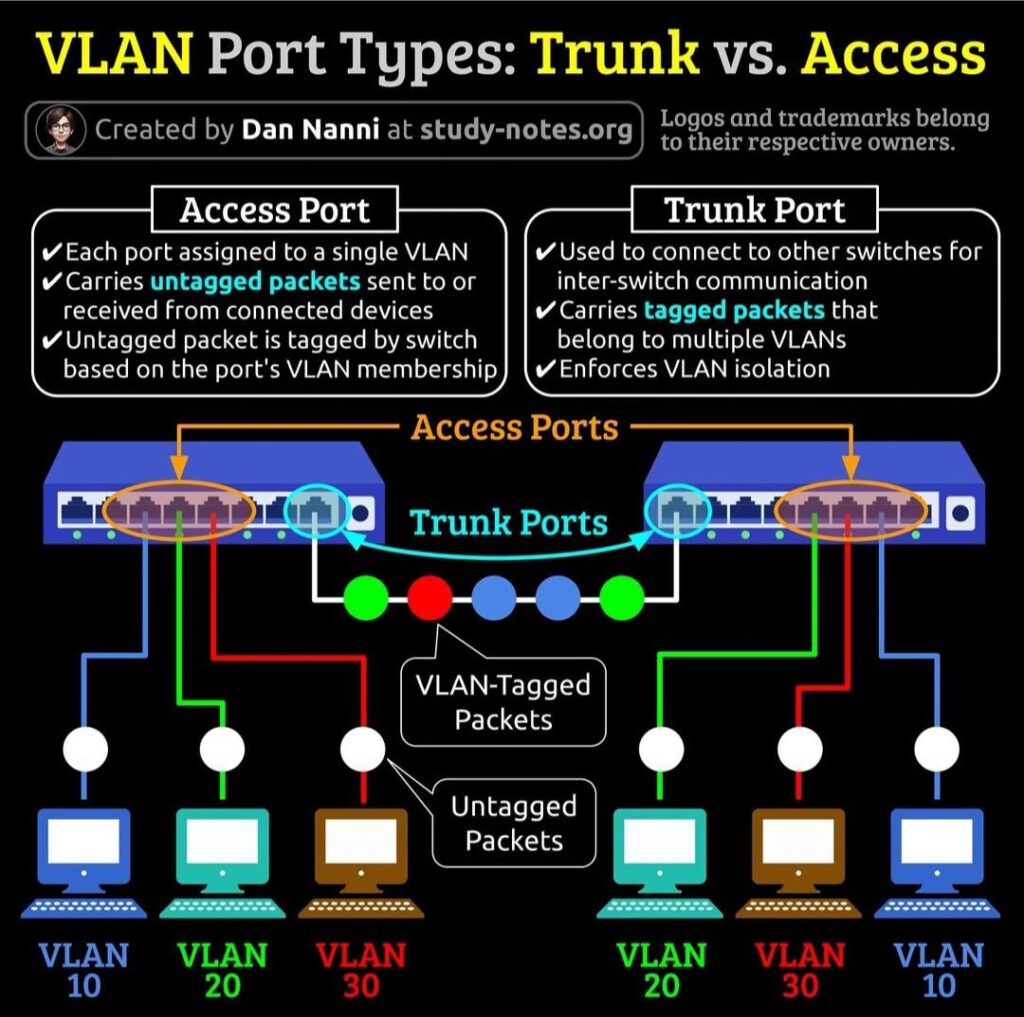
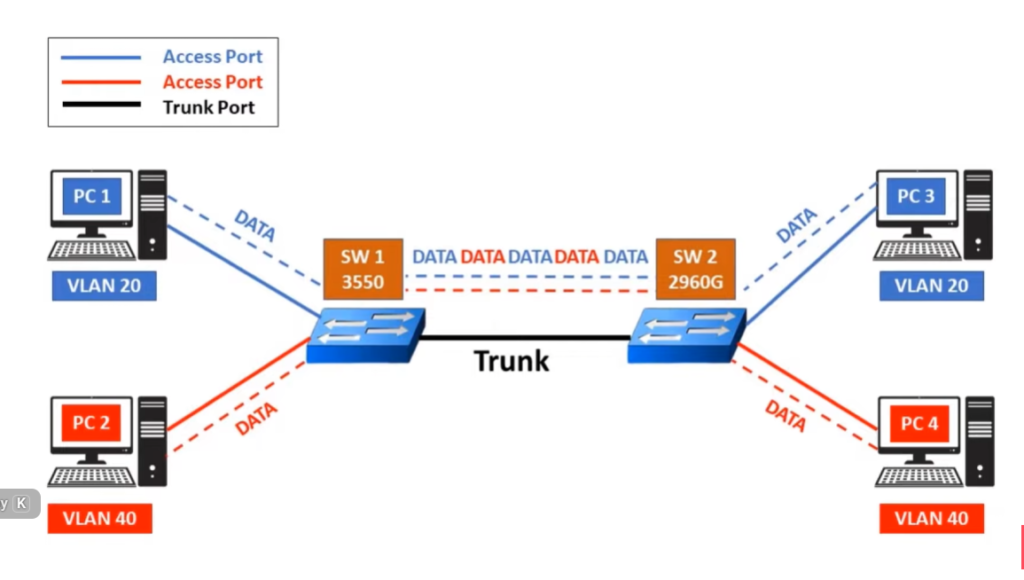
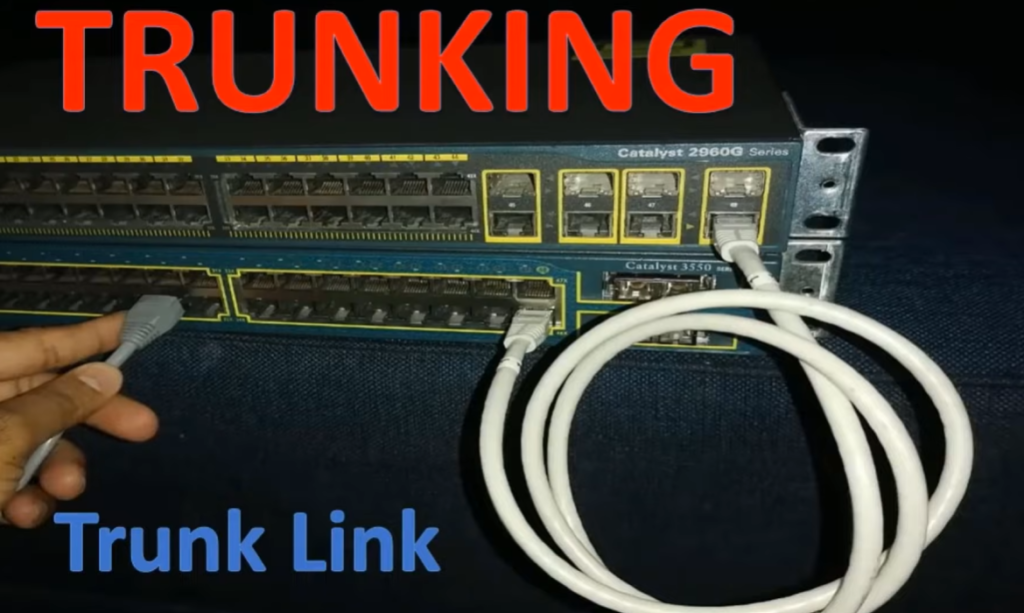
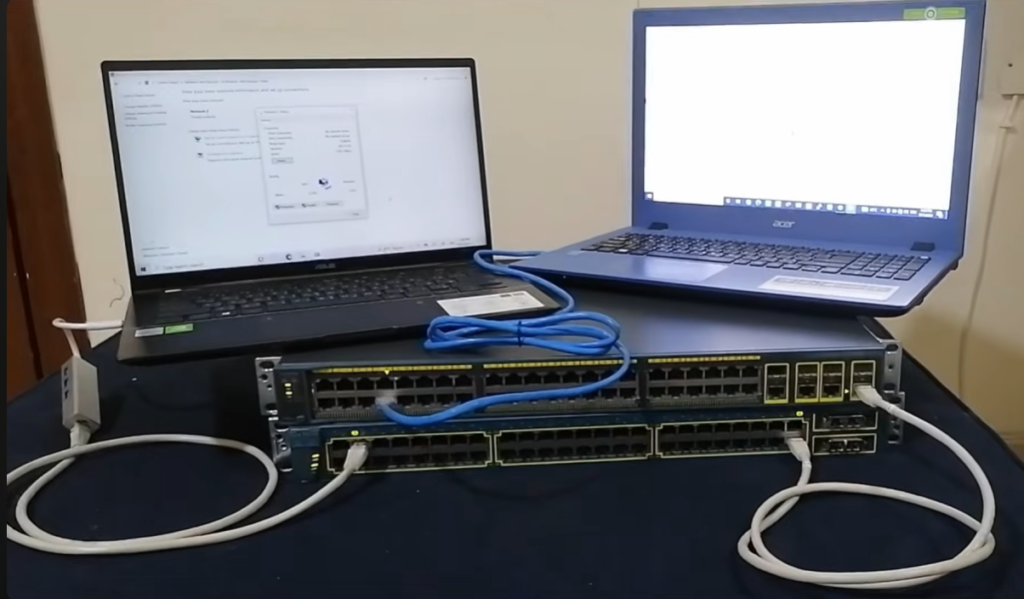
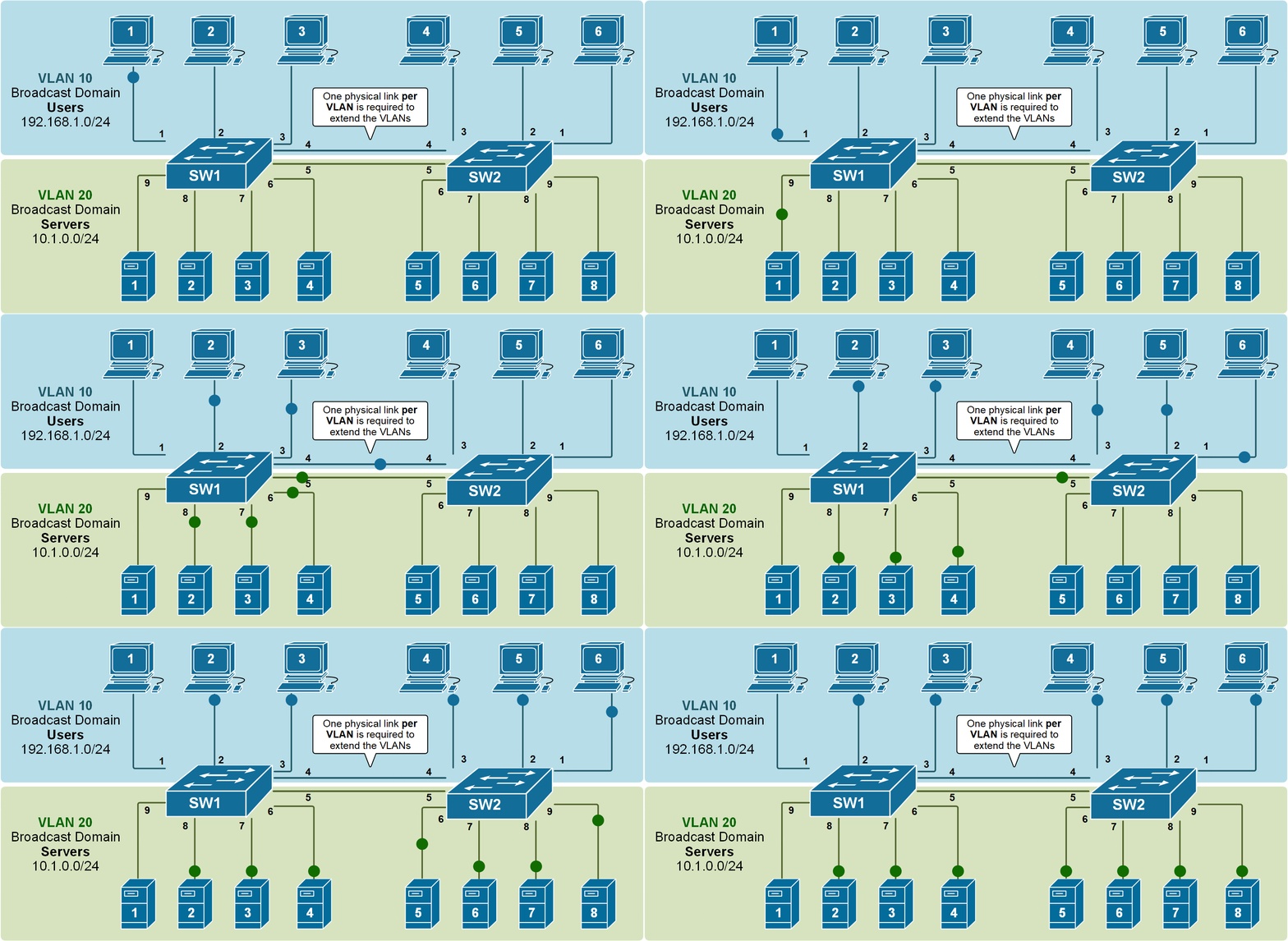
Access Ports and Trunk Port Chart
Access Port vs Trunk Port
| Feature | Access Port | Trunk Port |
|---|---|---|
| Definition | Carries traffic for one VLAN only | Carries traffic for multiple VLANs |
| VLAN ID | Single VLAN ID assigned | Multiple VLAN IDs allowed |
| Traffic Type | Mostly untagged traffic | Mostly tagged (802.1Q) traffic |
| Device Connection | End-user devices | Network devices |
| Connects To | PC, Printer, IP Phone, Camera | Switch, Router, Firewall, Server |
| Purpose | Device access to network | VLAN communication between devices |
| Bandwidth Use | Lower traffic load | Higher traffic load |
| Configuration | Easy | More complex |
| Security | Easier to control | Needs proper VLAN configuration |
| Port Membership | Member of one VLAN | Member of many VLANs |
| Broadcast Domain | One broadcast domain | Multiple broadcast domains |
| Common Layer | Access Layer | Distribution/Core Layer |
| Typical Speed | 1G / 10G | 10G / 25G / 40G / 100G |
| Example | Office PC in VLAN 10 | Link between two switches carrying VLAN 10, 20, 30 |
| Main Use | Connect user devices | Connect network infrastructure |
Cisco Switch Trunk Port And Access Port Configuration
Access and Trunk Ports
Switch ports are Layer 2 interfaces that are used to carry layer 2 traffic. A single switch port can carry single VLAN traffic. Frames are handled differently according to the type of link they are traversing.
Note: All switch ports are assigned VLAN 1 by default (VLAN 1 cannot be modified or deleted).
There are 2 different types of ports in a switched environment:
Access Ports
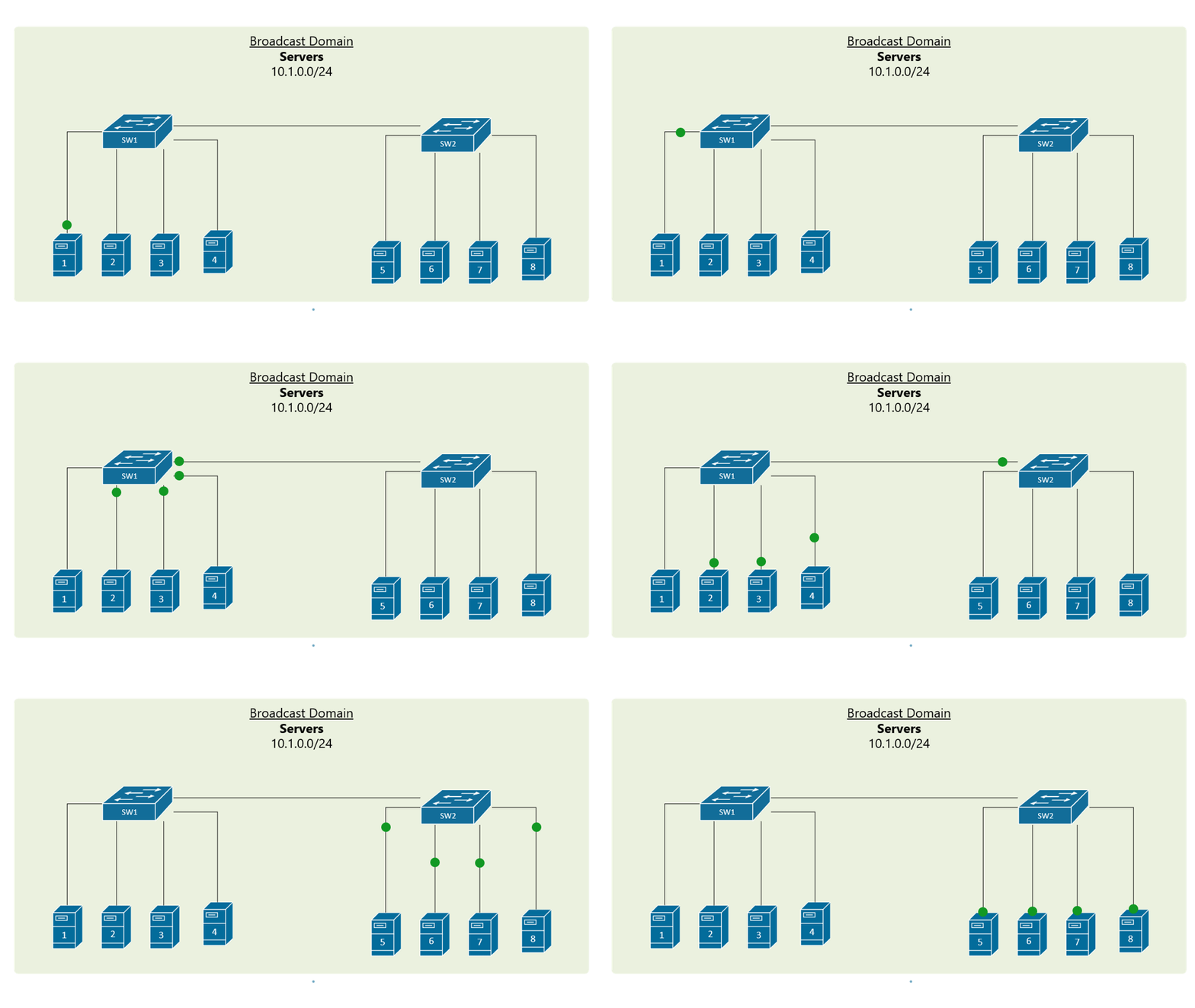
These switch ports belong to carry the traffic of only one VLAN. By default, it will carry the traffic of native VLAN (VLAN 1) . If the switch ports are assigned as access ports then they can be considered as the switch ports belongs to a single broadcast domain. Any traffic arriving on these switch ports is considered as it belongs to the VLAN assigned to the port.
Example:
Access and Trunk Ports
Switch ports are Layer 2 interfaces that are used to carry layer 2 traffic. A single switch port can carry single VLAN traffic. Frames are handled differently according to the type of link they are traversing.
Note: All switch ports are assigned VLAN 1 by default (VLAN 1 cannot be modified or deleted).
There are 2 different types of ports in a switched environment:
Access Ports
These switch ports belong to carry the traffic of only one VLAN. By default, it will carry the traffic of native VLAN (VLAN 1) . If the switch ports are assigned as access ports then they can be considered as the switch ports belongs to a single broadcast domain. Any traffic arriving on these switch ports is considered as it belongs to the VLAN assigned to the port.
Example:
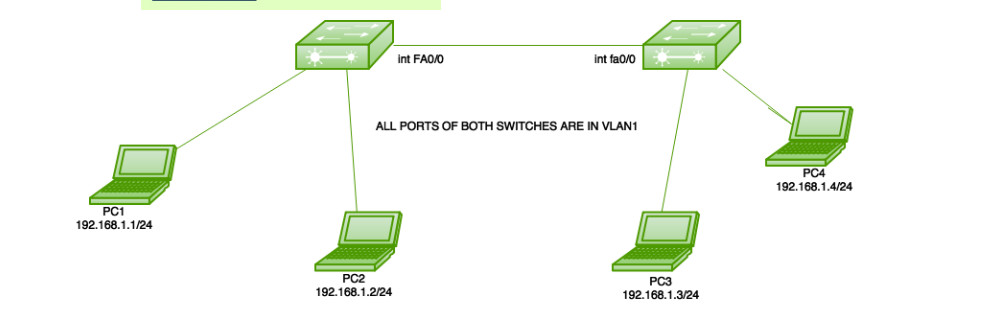
Here is a simple topology in which 2 switches are connected and only the default VLAN (VLAN 1)is configured on both switches i.e all the switch ports of both switches belong to a single broadcast domain.
Now, note that the link between the switches has to be configured as an access port because only a single VLAN (VLAN 1) data has to be exchanged. Now after assigning an IP address to PC1-192.168.1.1/24, PC2-192.168.1.2/24, PC3-192.168.1.3/24, PC3-192.168.1.4/24, the user shall configure the link between the 2 switches as an access port.
					Switch1(config)#interface fa0/0
Switch1(config-if)#switchport mode access
Here, there is no need to assign VLAN to the ports as all the switch ports on both switches are configured as VLAN 1 by default.
Advantages:
- Access ports are used to connect end devices, such as PCs, printers, and servers, to the switch. These ports are simple to configure and provide a direct connection to the network.
- Access ports are typically configured to carry traffic for a single VLAN, which provides a layer of security by segregating traffic between different VLANs.
- Access ports are less complex than trunk ports, which makes them easier to configure and troubleshoot.
Disadvantages:
- Access ports can only carry traffic for a single VLAN, which can limit network flexibility and scalability. If a device needs to communicate with devices on another VLAN, it must go through a router or Layer 3 switch.
- Access ports are susceptible to VLAN hopping attacks, where an attacker can gain access to another VLAN by exploiting weaknesses in the network.
Trunk ports Access Port:
These switch ports belong to and carry the traffic of more than one VLAN. This is a great advantage as to carry the traffic of a group of VLAN, a single switch port can be used. These are of great use if the user wants to exchange traffic between more than one switch having more than one VLAN configured. To identify traffic belongs to VLAN, the VLAN identification method (802.1q or ISL) is used. Also, to carry traffic between more than one VLAN, then inter VLAN routing is required, in which the link between router and switch is configured as trunk as the link has to carry the traffic of more than one VLAN (in case of a router on a stick configuration not in inter VLAN routing by layer 3 switches).
Note: Trunk links can carry the traffic of different VLANs across them but by default, if the links between switches are not trunk then only information from the configured access VLAN will be exchanged.
Example:
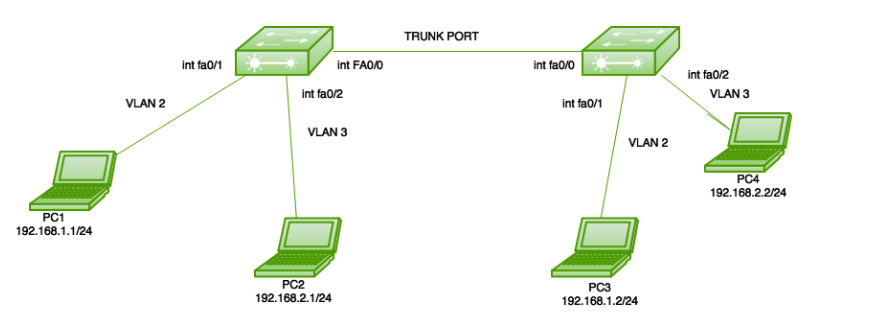
Here is a simple topology in which 2 switches are connected and VLANs 2 and 3 are configured on both switches as shown.
Note – A user has not assigned any VLANs to other ports of switches, therefore, the other ports will be in VLAN 1 by default.
Now, note that the link between the switches has to be configured as a trunk port because here more than one VLAN (VLAN 1, 2, 3) frame has to be exchanged between the switches. Now assigning IP address to PC1-12.168.1.1/24, PC2-192.168.2.1/24, PC3-192.168.1.2/24, PC3-192.168.2.2/24.
Now, the first user has to make VLANs on both switches.
					Switch1(config)#vlan 2
Switch1(config)#vlan 3
Switch2(config)#vlan 2
Switch2(config)#vlan 3
Now, a user has more than one VLAN configured on both switches. Therefore, users have to assign the VLANs to their respective ports on Switch1.
					Switch1(config)#interface fa0/1
Switch1(config-if)#switchport access vlan 2
Switch1(config)#interface fa0/2
Switch1(config-if)#switchport access vlan 3
Now, configure VLANs on their respective ports on Switch2.
					Switch2(config-if)#interface fa0/1
Switch2(config-if)#switchport access vlan 2
Switch2(config)#interface fa0/2
Switch2(config-if)#switchport access vlan 3
Now, configure the link between 2 switches as a trunk port.
					Switch1#interface fa0/0
Switch1#switchport trunk encapsulation dot1q
Switch1#switchport mode trunk
Access Ports and Trunk Port QNA
1. What is an Access Port?
An access port is a switch port that carries traffic for only one VLAN and connects end devices like PC, printer, or IP phone. It sends and receives untagged frames.
2. What is a Trunk Port?
A trunk port is a switch port that carries traffic for multiple VLANs between network devices such as switch-to-switch or switch-to-router links using VLAN tagging (802.1Q).
3. What is the main difference between access port and trunk port?
An access port supports only one VLAN and sends untagged traffic, while a trunk port supports multiple VLANs and sends tagged traffic.
4. Which devices are connected to access ports?
End devices like computers, laptops, printers, CCTV cameras, and IP phones are connected to access ports.
5. Which devices are connected to trunk ports?
Network devices like switches, routers, and firewalls are connected using trunk ports.
6. Does an access port use VLAN tagging?
No. Access ports send and receive untagged frames.
7. Does a trunk port use VLAN tagging?
Yes. Trunk ports use 802.1Q VLAN tagging to identify VLAN traffic.
8. Can one access port carry traffic for two VLANs?
No. An access port can belong to only one VLAN at a time.
9. Why is trunk port needed in large networks?
Trunk ports allow multiple VLANs to pass between switches, helping to expand VLANs across many switches in large networks.
10. What is the native VLAN in trunk port?
The native VLAN is the VLAN whose traffic is sent without a tag on a trunk port (default is VLAN 1).
11. Which protocol is used for trunking?
The standard protocol is IEEE 802.1Q.
12. Can a trunk port be connected to a PC?
Normally no, because PCs do not understand VLAN tags (unless specially configured for VLAN tagging).
13. Is security higher on access port or trunk port?
Access ports are more secure for users because they support features like Port Security and 802.1X. Trunk ports must be carefully configured to avoid VLAN hopping attacks.
14. What happens if trunk port is misconfigured as access port?
Only one VLAN will pass, and other VLAN traffic will be blocked, causing network communication failure.
15. What happens if access port is misconfigured as trunk port?
The end device may not understand VLAN tags, causing network connectivity issues.
16. Where are access ports mostly used?
In offices, schools, and companies for user devices.
17. Where are trunk ports mostly used?
Between switches, routers, and firewalls in enterprise networks.
18. Which port type reduces broadcast traffic?
Access ports reduce broadcast traffic by separating users into VLANs.
19. What is VLAN? (related question)?
VLAN is a logical network segmentation method that divides one physical network into multiple virtual networks.
20. One-line difference (exam answer):
Access Port: One VLAN, untagged traffic, used for end devices.
Trunk Port: Multiple VLANs, tagged traffic, used for network devices.