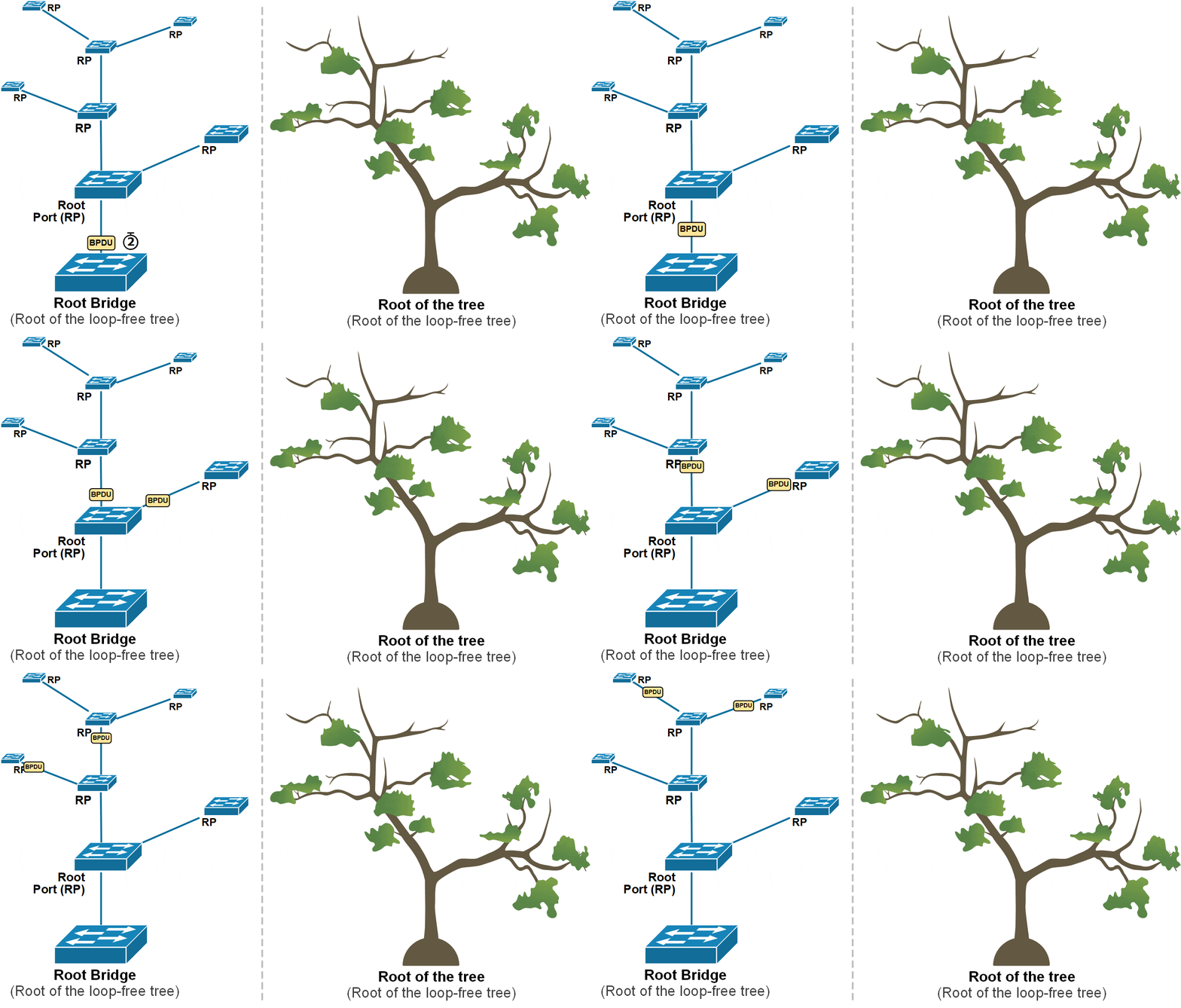
Spanning Tree Protocol (STP)

History OF STP Protocol

  • The history of STP (Spanning Tree Protocol) begins in the early 1980s when computer networks were growing and engineers faced serious problems with network loops and broadcast storms in Ethernet switch environments. At that time, there was no automatic method to control redundant links between bridges (early switches). In 1985, a network engineer named Radia Perlman working at Digital Equipment Corporation (DEC) developed the Spanning Tree Algorithm. Her goal was to create a protocol that could automatically detect loops and block extra paths while still allowing redundancy for backup. This invention became the foundation of modern Ethernet loop prevention and is considered one of the most important breakthroughs in networking history.
  • Later, the Spanning Tree Algorithm was standardized by the IEEE as IEEE 802.1D Spanning Tree Protocol in 1990. This made STP an official global networking standard so that switches from different vendors could interoperate safely. Over time, improvements were introduced to make STP faster and more efficient, such as RSTP (Rapid Spanning Tree Protocol – IEEE 802.1w) and MSTP (Multiple Spanning Tree Protocol – IEEE 802.1s). Although many vendors now use faster technologies, the original STP concept created by Radia Perlman remains the core idea behind loop prevention in Ethernet networks.

Who is the owner of STP?
No single company owns STP. The original algorithm was invented by Radia Perlman, and the protocol is maintained and standardized by the IEEE. Because it is an open standard, all networking vendors (like Cisco, Juniper, HP, etc.) can implement STP in their switches. For this reason, Radia Perlman is widely known as the “Mother of the Internet” and the inventor of Spanning Tree Protocol, while IEEE is responsible for its official standardization and global use.

Radia Perlman For STP Protocol

Why do we need Spanning-Tree

The short answer to this question is – Ethernet does not work in redundant topologies because of Ethernet loops also called layer-2 loops or broadcast storms. Without a technology that breaks the LAN with redundant links into a loop-free topology, BUM (broadcast, unknown-unicast, and multicast) frames would loop around indefinitely until a link or a device just fails. This happens because of the way switches flood BUM frames. Let’s dive into this problem in the next chapters.

IMPORTANT  Ethernet does not work in looped switched topologies such as a triangle of interconnected switches. A technique that breaks the topology into a loop-free one must be used (such as Spanning-Tree).

Switches and BUM frames

When a switch receives a frame, it checks the destination MAC address against its MAC table and if there is no matching entry, it forwards the frame out all interfaces except the incoming one. This process is called flooding and the frame whose destination MAC is unknown is called an unknown unicast.

The main idea here is that – if you don’t know where exactly to deliver a frame, send it out everywhere, and the recipient will eventually get it. And it is also likely that the receiver will reply, therefore the switch will learn both nodes’ MAC addresses and continue the future forwarding process as known-unicast (not flooding the frames). 

Switches also flood two other types of frames:

  • broadcast – ones destined to the Ethernet broadcast address FF-FF-FF-FF-FF-FF;
  • multicast – ones destined to MAC address which starts with bits ‘1110’.

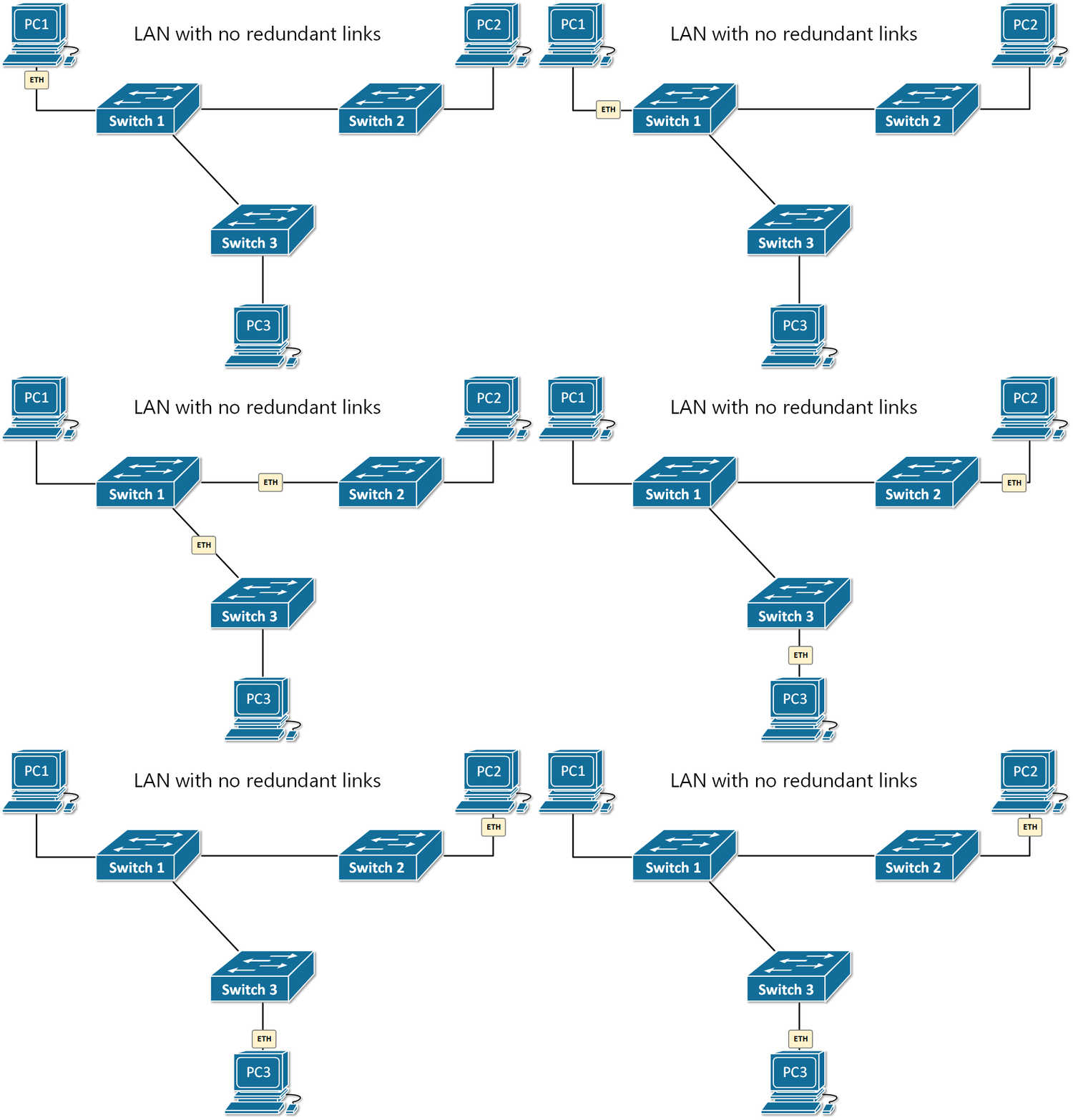
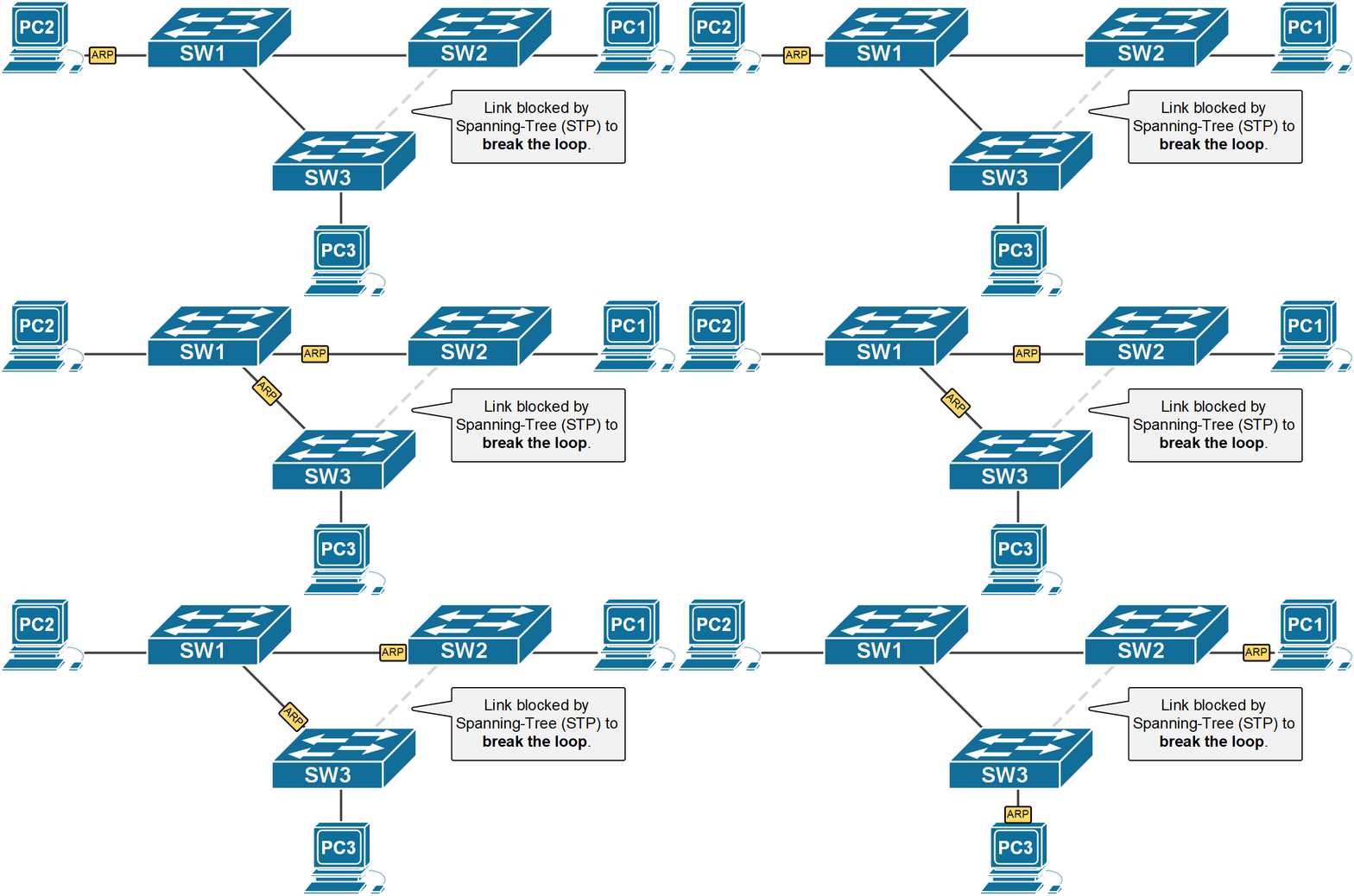
Figure 1 shows an example in which PC1 sends out a single broadcast frame. Based on the destination MAC address, switch 1 knows that this is broadcast and therefore, sends a copy out all its ports except the incoming one. So a copy of the frame goes to SW2 and SW3, which perform the same logic. Ultimately, every node in this broadcast domain gets a copy of this packet.

Everything works fine in the above LAN topology except that there is no redundancy in case of a failure. Let’s see what will happen if we introduce a redundant link between SW2 and S3.

Ethernet loops (Broadcast storms)

If there is a looped switching topology like the one shown in figure 2 and there is no Spanning-Tree running, three main problems occur: 

Problem 1 – Even one looping frame causes a broadcast storm.

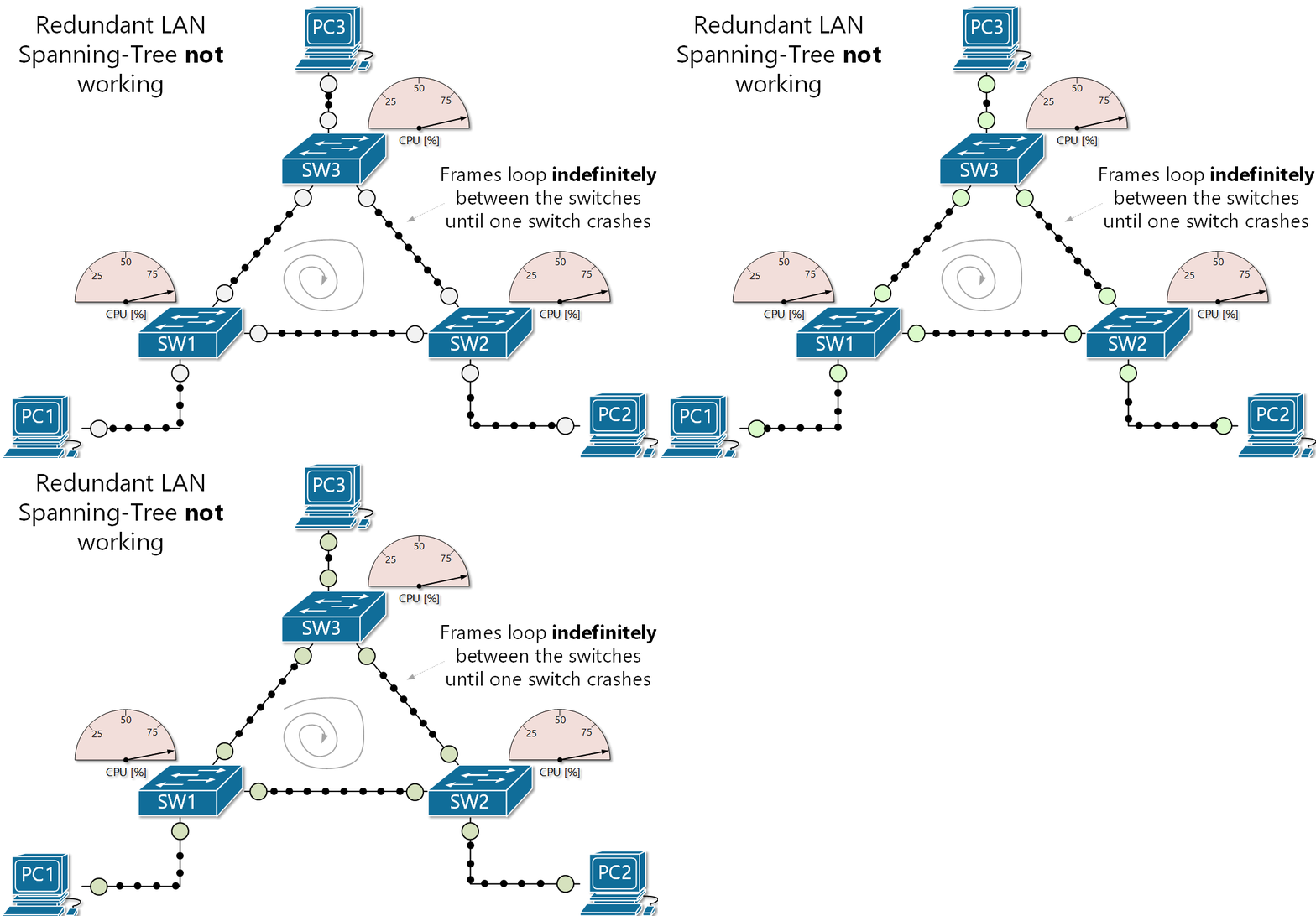
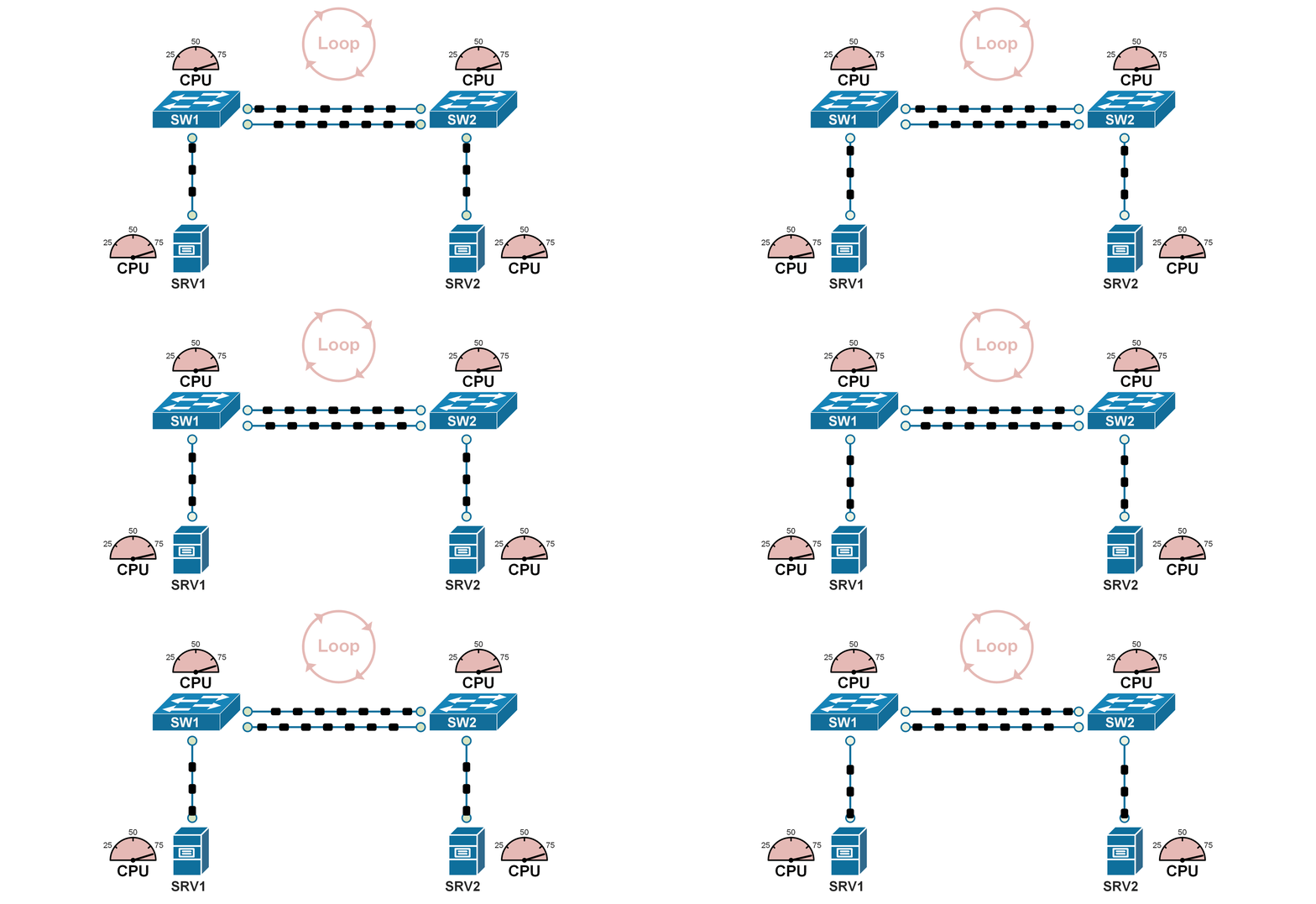
This happens when a BUM (broadcast, unknown-unicast, and multicast) frame loops around the switches indefinitely. A broadcast storm keeps going until a link is oversaturated and fails or a switch crashes because of a high CPU usage. To help you visualize this concept, we have created the animation shown in figure 2. Note that all port LEDs are blinking very rapidly, typically simultaneously and the switches are running at a very high CPU. The process will go on until something fails and break the loop. Let’s look at why this happens?

Ethernet logic tells switches to flood BUM frames on all ports except the incoming interface. If we apply this logic to our example shown in figure 2, let’s see what happens:

  • SW1 receives a broadcast frame on the link SW1-SW2, it sends a copy out all its ports (to SW3 and to PC1) except the incoming interface (link SW1-SW2);
  • SW3 gets the broadcast frame and applies the same logic. It sends a copy out all its ports except the one the frame came in. So it sends the broadcast to SW2 and PC3.
  • SW2 gets the frame, it sends a copy out all its ports except the incoming link SW3-SW2. So it sends the broadcast to SW1 and PC2.
  • And the process repeats and goes on indefinitely. 

Also, note that the same loop happens in the opposite direction.

Problem 2 – The storm causes another problem called MAC table instability.

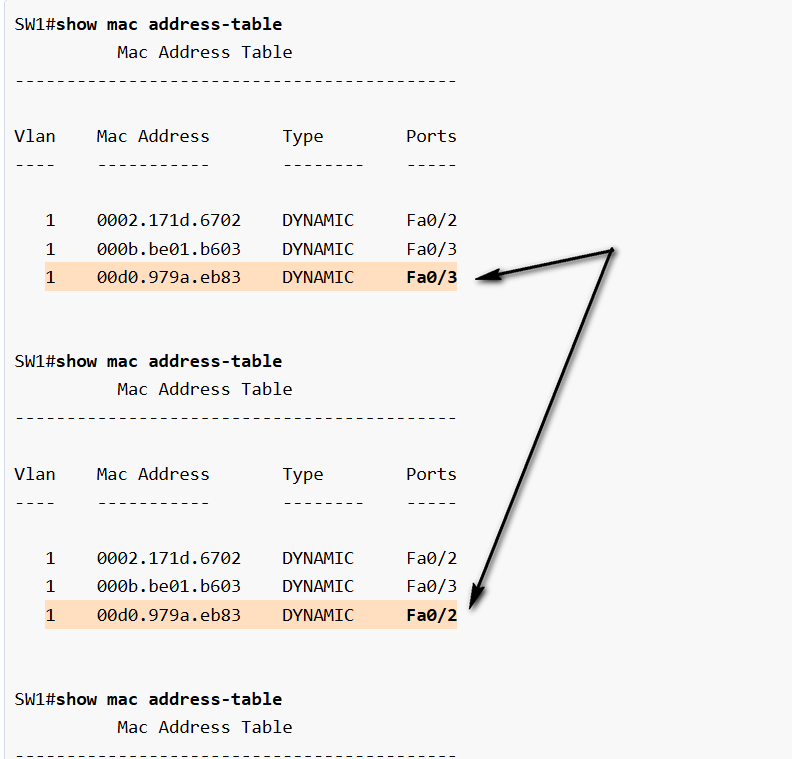
If we recall the MAC learning process, when a switch receives a frame, it creates an entry in the MAC address table for the source address and the incoming port. But in case of a broadcast storm, multiple copies of the same frame loop around and the switch receives it on multiple interfaces. But a single MAC address can be tied to one interface only. Therefore the switch is constantly rewriting the entry for the source MAC address with a different interface and hence the instability. 

In the output below, you can see that while a loop is present, every time we check the MAC address table of a switch, the highlighted MAC address is tied to a different port.  

Problem 3 – End devices receive multiple copies of the same frame.

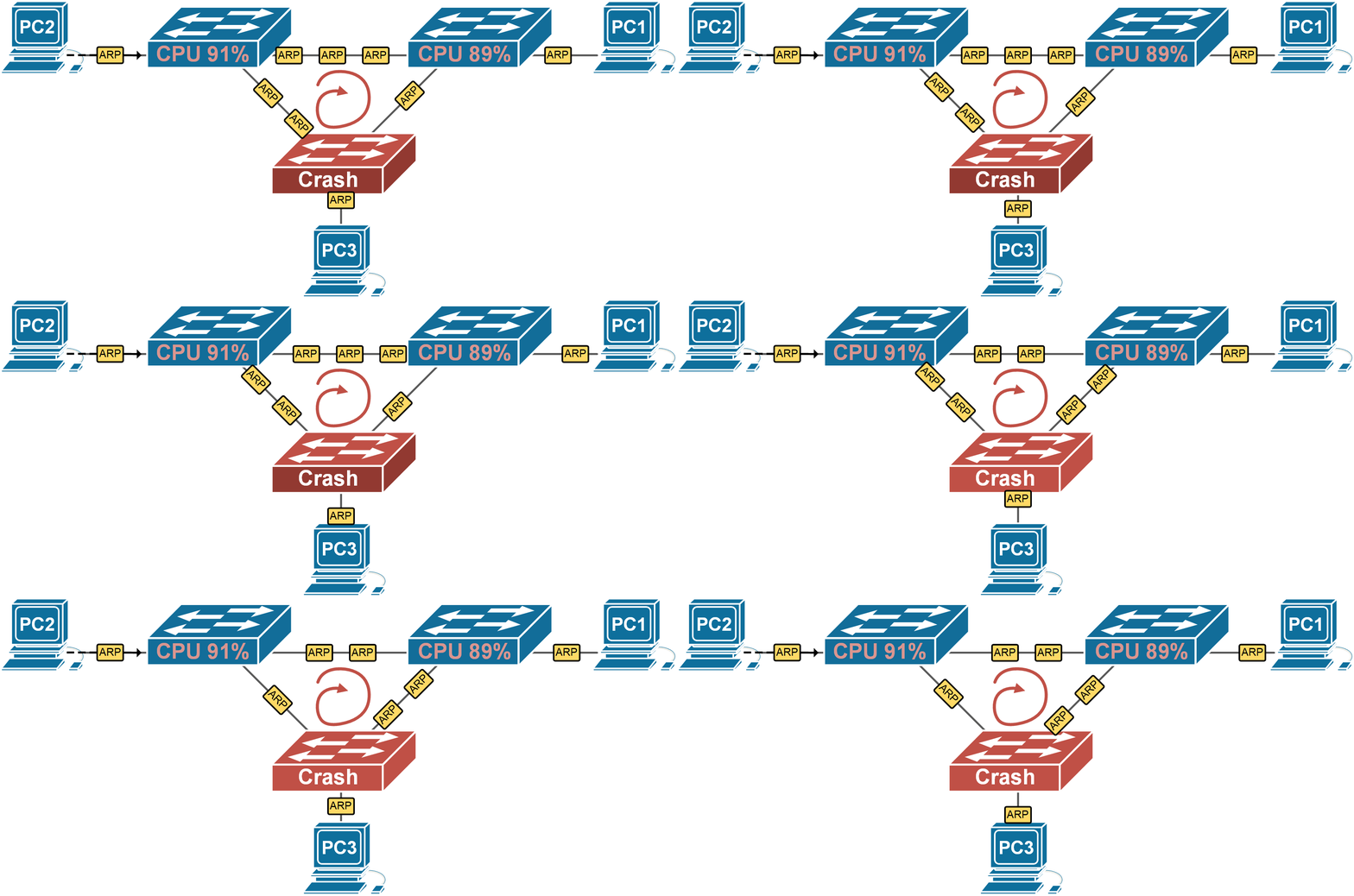
The last issue that occurs in a case of a loop is that end clients receive multiple copies of the looping frames over and over again while the broadcast storm is active. As a result, end clients may experience high CPU, and critical applications may starve of resources and fail. 

If you look at PC1 for example, you can see that it receives multiple copies of the same frame (the black dot representing a single broadcast frame). If this is an ARP frame, for example, PC1 would decapsulate each one of them and process it, which can lead to high CPU.

Summary

It is important for network engineers to understand that Ethernet just does not work in looped switched topologies. That’s is why we need a protocol that can break the loop topology into a loop-free one. 

Table 1. Three problems caused by Ethernet loops (Broadcast Storms)
Problem Description
Broadcast StormBroadcast Frames loop around the LAN indefinitely until a link or switch fails or is shut down by a network administrator.
MAC address table instabilitySwitches update their MAC address tables with incorrect entries over and over, resulting in frames being sent to wrong destinations and high CPU and memory usage.
End clients receive multiple copies of the same frameEnd clients receive a high volume of duplicated frames that can cause high CPU resulting in application failures.

What Spanning-Tree does

Figure 1. Looped topology with two Ethernet switches

But what happens when we introduce a second link between SW1 and SW2 – we have a looped topology. Remember what we have learned in our previous lesson – Ethernet does not work in looped topologies

When Spanning-Tree is enabled on a switch (it is by default on all Cisco switches), it controls the state of every switch port and places each one in either a forwarding or a blocking state where:

  • Ports in forwarding state send and receive frames and act as normal switch interface. In our examples, these ports are shown in green.
  • Ports in blocking state do not process any frames except for Spanning-Tree messages and do not learn MAC addresses. In the examples, these ports are shown in orange.

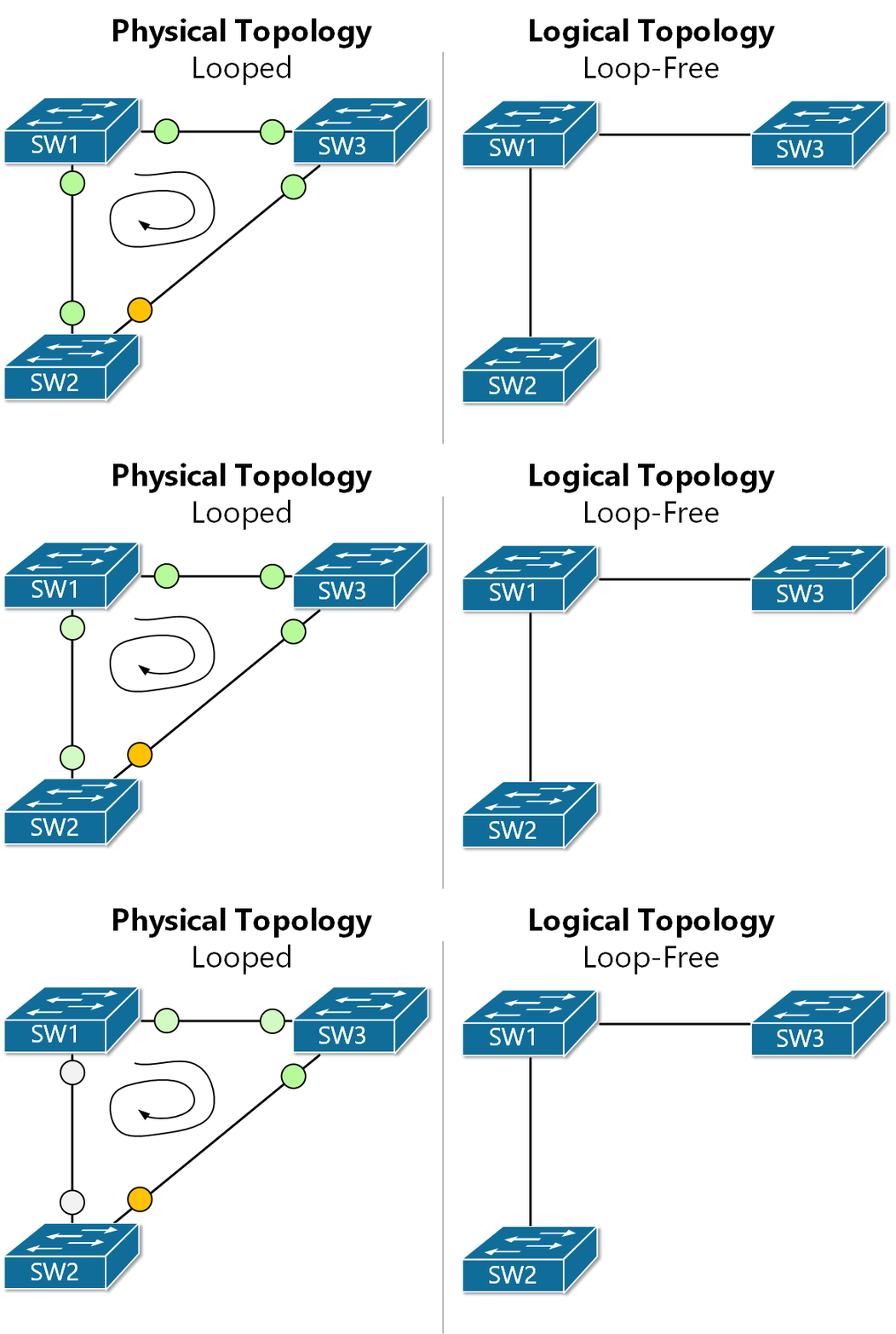
Using this logic, Spanning-Tree breaks the looped physical topology into a loop-free logic topology. Let’s visualize this with the example shown in figure 2. We have a triangle of interconnected switches. This creates a looped topology and Spanning-Tree detects that by exchanging messages over each link. In the end, STP places ports highlighted in green in forwarding state and the one in orange in blocking state. This results in the logical topology presented on the right. You can see that logically there is a loop-free topology.

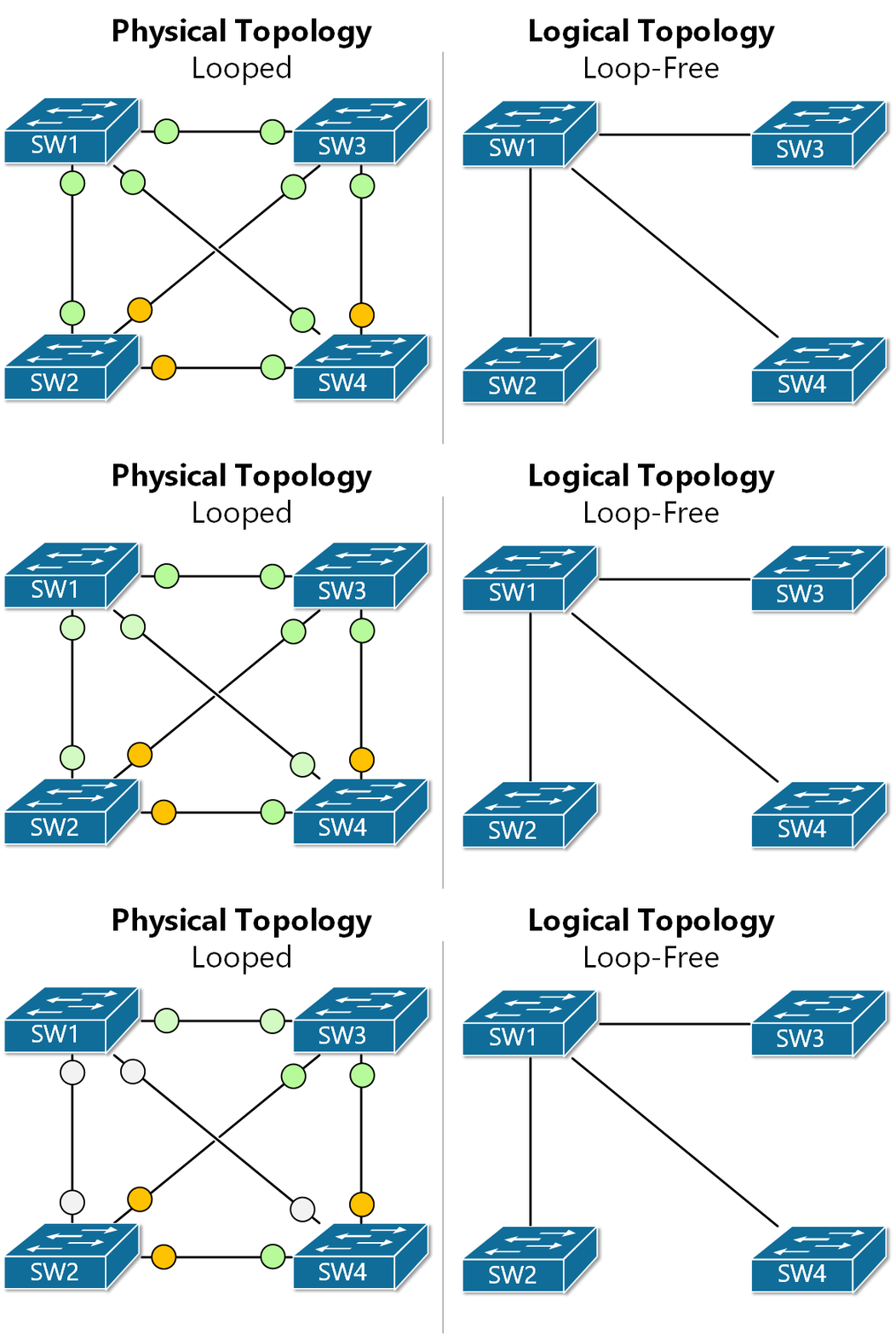
The same logic applies to larger topologies with many redundant links. If we look at figure 3 for example, we can that there are multiple looped topologies. Hence the STP protocol must block a few ports in order to achieve the loop-free topology shown on the right.

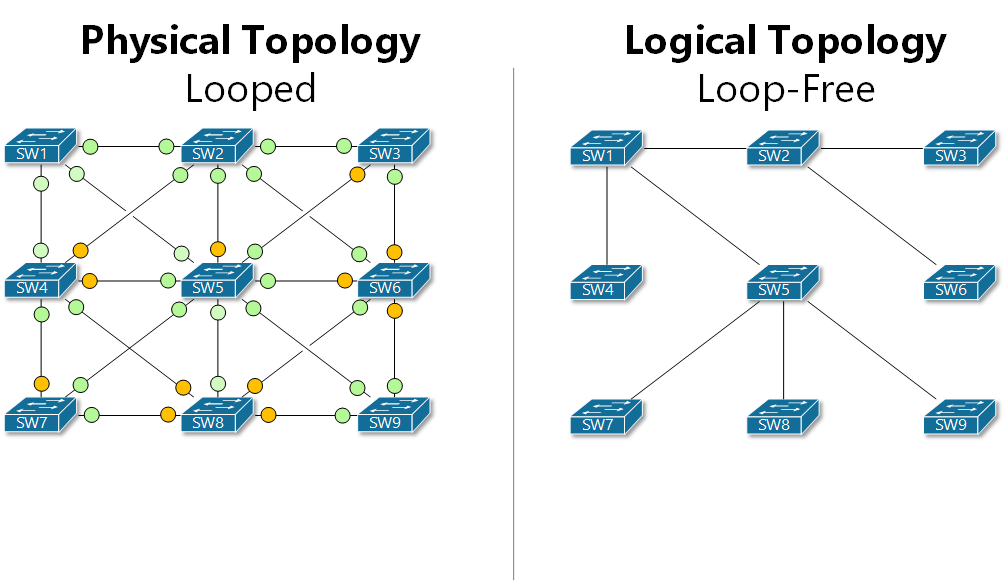
Let’s look at one more example with a higher number of switches. Note how many ports must be placed in a blocking state by Spanning-Tree in order to achieve a loop-free topology. It is important to understand that Spanning-Tree is controlling the topology by placing blocking individual ports and not links. 

Summary

Spanning-Tree prevents loops by breaking the redundant physical topology into a logical loop-free one. At the same time, it tracks the status of all inter-switch links and upon link failure, a new loop-free topology is calculated.

How Spanning-Tree Works

The STP Algorithm?

The Spanning-Tree algorithm performs a couple of steps to make sure that the topology is loop-free and Ethernet is going to work correctly:

  1. Electing a Root Bridge – The very first thing that STP does is to elect a Root Bridge. This is the most important switch in the topology. It will be the root of the loop-free tree. 
  2. Finding looped topologies – Once the Root Bridge is elected, it starts sending Spanning-Tree messages called BPDU. Based on these messages the switches find the looped parts of the topology. 
  3. Setup port roles – After the looped part of the topology is identified, each switch places as many switch ports as needed in order to ensure that the topology is loop-free.
  4. Re-converge around failures – The switches continue to exchange messages in order to keep track of links and adjacent switches’ availability. If a link or a switch goes down, the switches execute step 2 and step 3 again to make sure the new topology is loop-free.

NOTE  The term Bridge appears a lot in the context of Spanning-Tree because the protocol was created in times when switches had not even existed and local networks were using devices called bridges. That is why most protocol terms like Bridge-Priority and Bridge-ID are not Switch-Priority and Switch-ID. However, in the context of STP, both terms are really synonymous and interchangeable.

This is a simplified summary of the STP algorithm. Let’s now look at each step in more detail. 

Root Bridge Election?

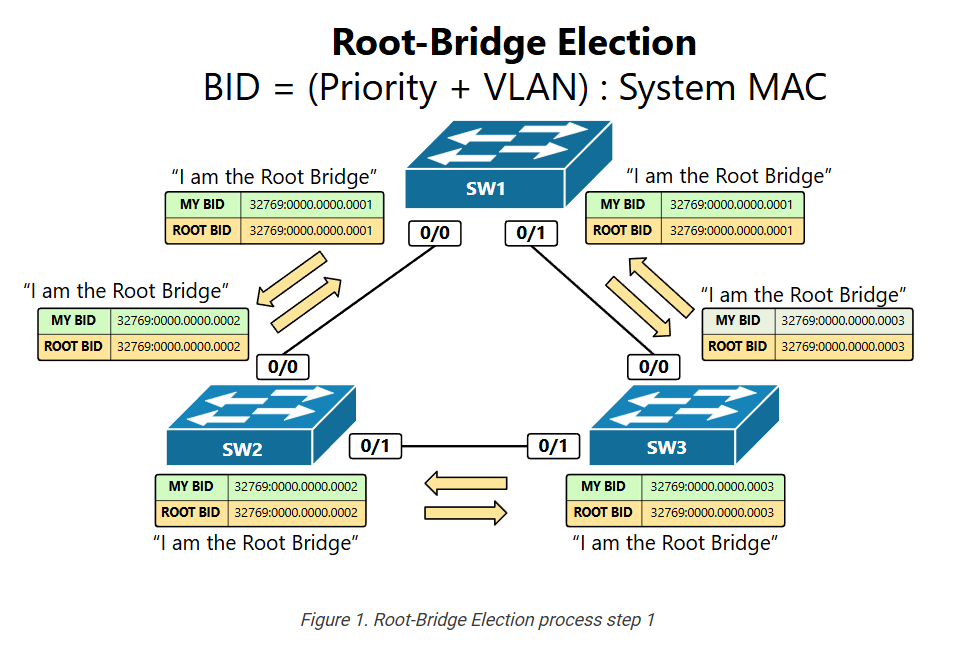
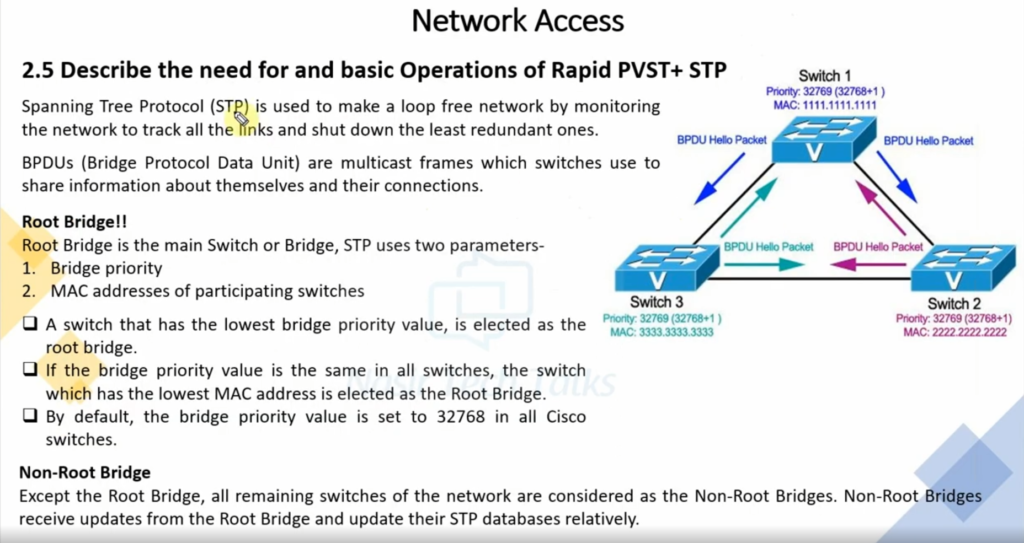
Switches elect a Root Bridge based on a value called Bridge ID. The switch that has the lowest BID value is elected the Root Bridge of the topology. BID is not a single value, but it is composed of two different value types.

BID = (Priority + VLAN number) : (System MAC address)

The first portion of the BID value is configurable and is used by network administrators to set up a particular switch as a Root Bridge.

The second part of the BID value is only used when there is a tie, meaning when there are at least two switches that have the same priority value. This typically happens when all switches are left with their default values, therefore all switches have a priority of 32768. In this case, the election process is decided by choosing the switch with the lowest Systems MAC address. 

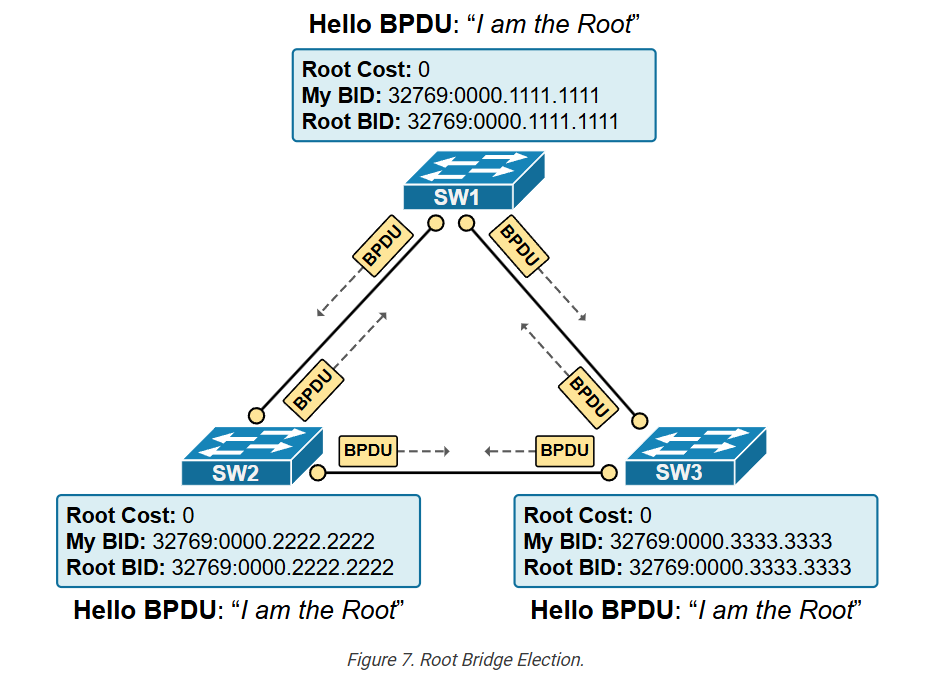
When a switch boots up, it does not know the BID values of all other switches in the topology. Thus it elects itself as the Root Bridge of the topology. Once it receives a BPDU with a Root BID value lower than its own, it immediately stops advertising itself as root and starts forwarding the superior Root Bridge value. 

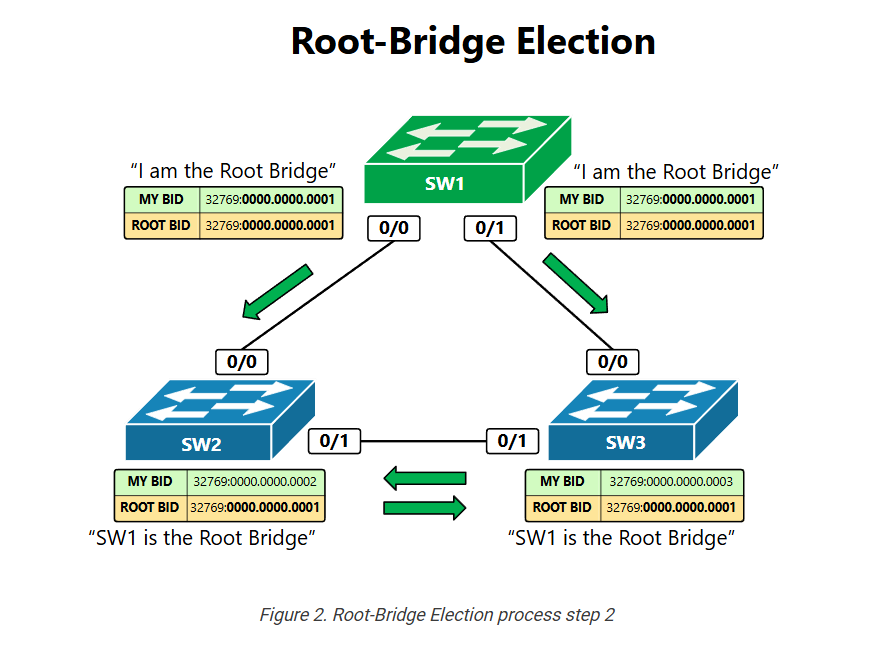
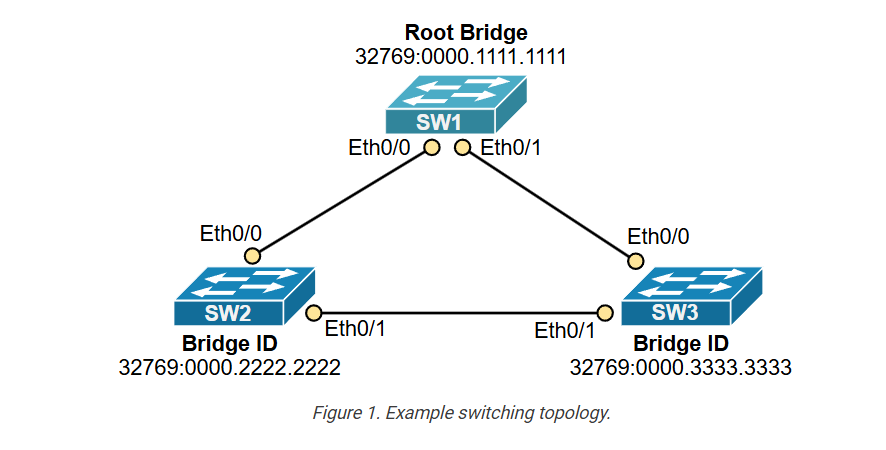
Let’s look at the example in figure 1. It shows three switches with default configurations that have been connected in a triangle and just powered on. The Spanning-Tree process starts with all switches electing and advertising themselves as Root Bridge of the topology.  In the BPDU messages, they put their own BID value and the BID of the root bridge known to them at the moment. Each switch is basically saying “I am the Root”.

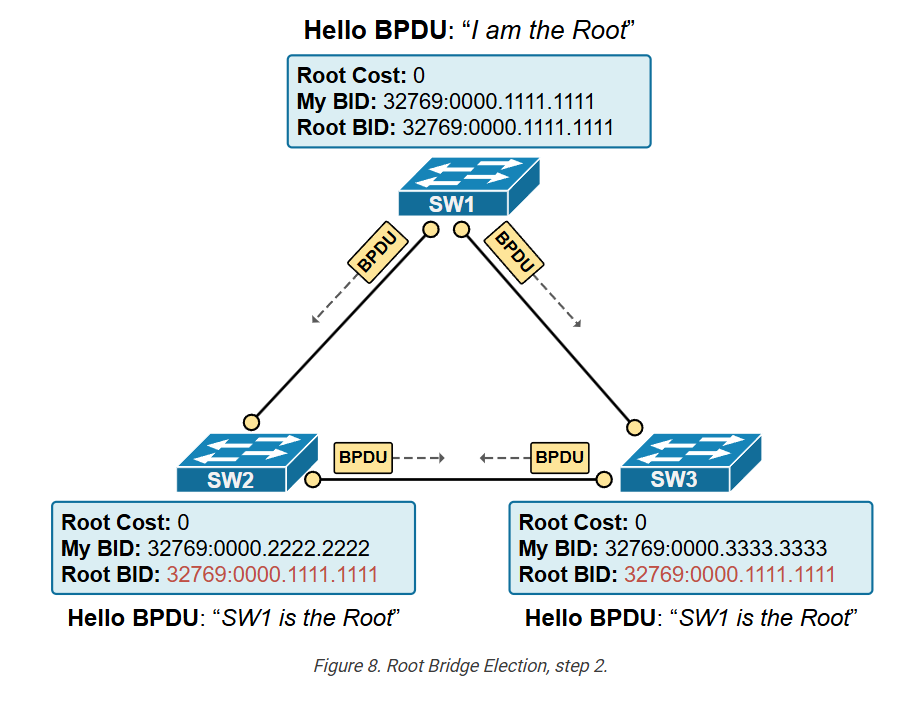
Let’s now look at the example in figure 2 and see what happens when they exchange the first BPDU messages. SW2 receives two BPDU messages, one from SW1 and one from SW3.

  • The BPDU from SW1 says that the Root Bridge has a value of 32769:0000.0000.0001.  When SW2 compares this value to the Root Bridge value known to him at the moment 32769:0000.0000.0002 – it is obviously lower. A BPDU message that has a lower Root BID value than your own is called a Superior BPDU. Once SW2 gets this superior message, it stops advertising itself as root and starts forward this Superior BPDU downstream to all other switches. Downstream means that it stops sending BPDUs toward the Root but only to other bridges.
  • The BPDU received from SW3 has a Root-BID value of 32769:0000.0000.0003.  When SW2 compares this to the Root Bridge value known to him at the moment 32769:0000.0000.0002 – it is obviously higher. A BPDU message that has the same or higher Root BID value than your own is called an Inferior BPDU. Once SW2 gets this inferior message, it discards it.

At the end of this process, all switches within the topology must agree that there is only one Root Bridge and it is the same from the perspective of each bridge.

Detecting Loops

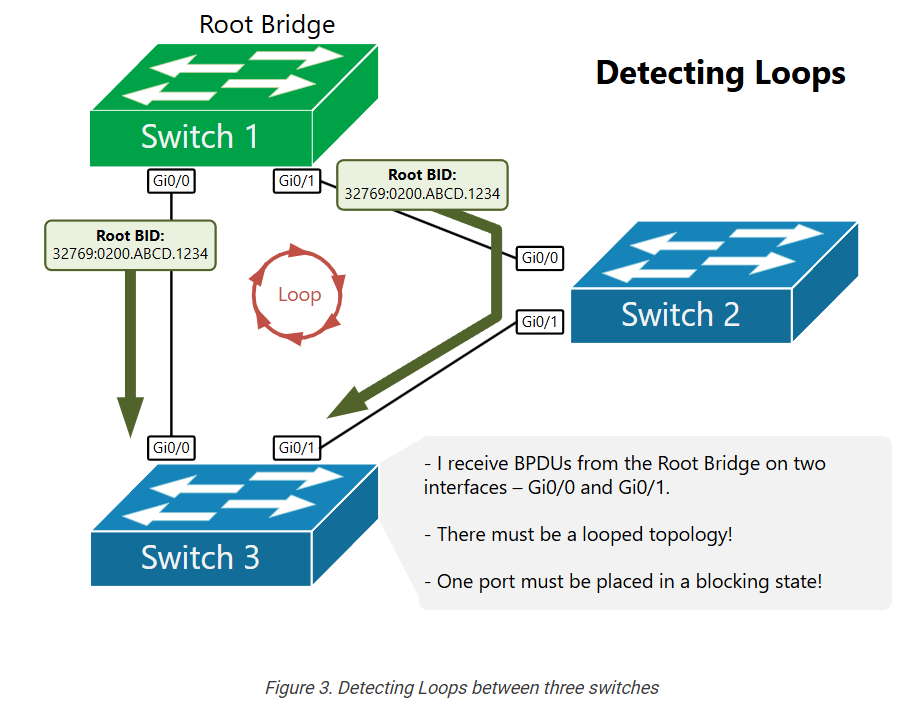
Once the Root election is completed, the switches start identifying loops. A switch understands that there is a loop when it receives BPDUs from the Root-Bridge on more than one interface.  

If a switch receives Superior BPDUs on more than one port, there must be a loop and that port must be placed in Blocking State.

A key to correctly understand how this works is to understand what Superior BPDU is. A Superior BPDU has one of the following properties in that order:

  1. Lower cost to the Root Bridge.
  2. Lower neighbor bridge ID.
  3. Lower neighbor port priority.
  4. Lower neighbor internal port number.

Let’s leave this process here and not dive into more details for now. In the next section, we are going to deep dive into this process and will do many labs and examples.

Setting up the port roles?

Once the topology is converged and each switch has placed its ports in the correct roles, BPDUs are still exchanged in order to track the link availability. If any switch detects a topology change, all switches re-calculate their port roles in order to create another loop-free topology.

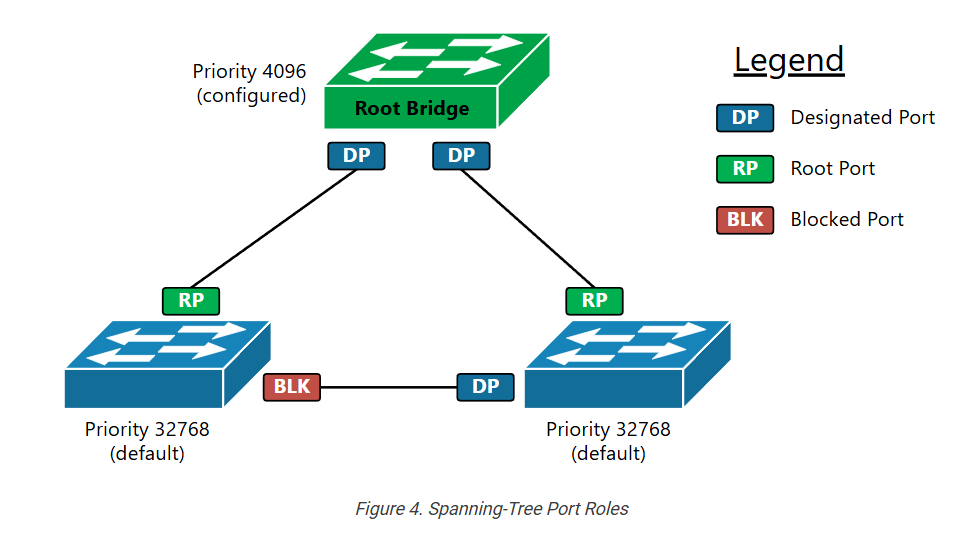
There are three main port roles as shown in the example in figure 4.

Table 1. Spanning-Tree port roles
Port RolesDescription
Root Port

The root port represents the best path towards the Root Bridge. The switch must be receiving BPDUs with the lowest cost to the root on this port.

The switch does not send BPDUs via this port.

The switch learns MAC addresses on this port.

Designated Port

A port that points away from the root (downstream port).

BPDUs are being sent out this port.

The switch learns MAC addresses on this port.

Blocked PortThe switch does not learn MAC addresses on this port. The port does not forward any Ethernet traffic.

Introduction to Common STP (CST)

In this lesson, we begin our exploration of the original Spanning Tree Protocol (STP), also known as the Common Spanning Tree (CST). Introduced in the 1990s, it allowed Ethernet LANs to have backup links without causing loops. It was a groundbreaking development that allowed networks to keep running even if a link or switch failed.

Why was Spanning-Tree (STP) invented?

Let’s quickly recap two statements about Ethernet switching that we discussed in the previous section of the course:

  • A broadcast frame (such as ARP) is intended for all devices in the same network segment (hence, the name broadcast). That’s why Ethernet switches forward a copy of the broadcast frame to all the ports in a VLAN except the one from which the frame was received. Therefore, one frame is replicated multiple times to reach all possible hosts in the segment.
  • Ethernet frames don’t have a built-in mechanism to limit their lifespan and “expire” like the Time-to-Live (TTL) field in IP packets.

Because of these two specifics of the Ethernet standard, if two switches are connected in a looped topology, even a single broadcast frame can be replicated indefinitely and circulate endlessly within the loop, consuming all available bandwidth and CPU, as shown in the diagram below.

Such a situation is called a Broadcast storm, meaning a broadcast frame loops around and is replicated indefinitely. Ethernet frames do not have a built-in expiration mechanism (e.g., TTL). The only way that a broadcast storm can stop is when a device in the loop crashes and the loop topology breaks. 

It is important to remember the fact that Ethernet networks cannot function in looped topology. An Ethernet network must always be loop-free. 

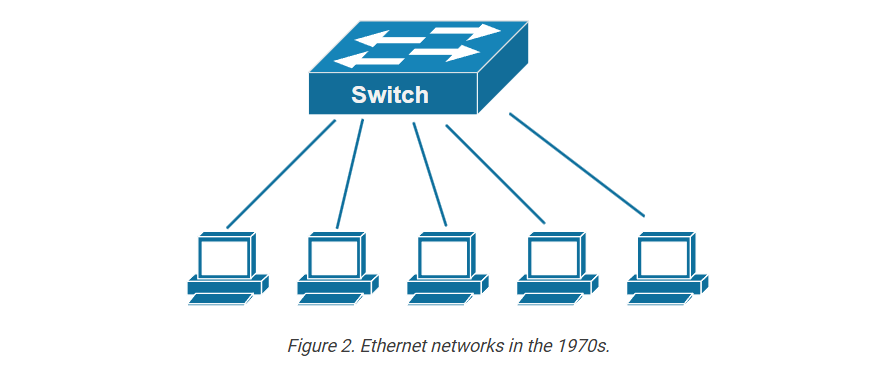
Keep in mind that Ethernet was invented back in the 1970s-80s (yes, it is that old!). Back then, people didn’t need to have redundant networks. They simply needed to have any network. Without redundancy, switched networks are loop-free, as shown in the simple diagram below.

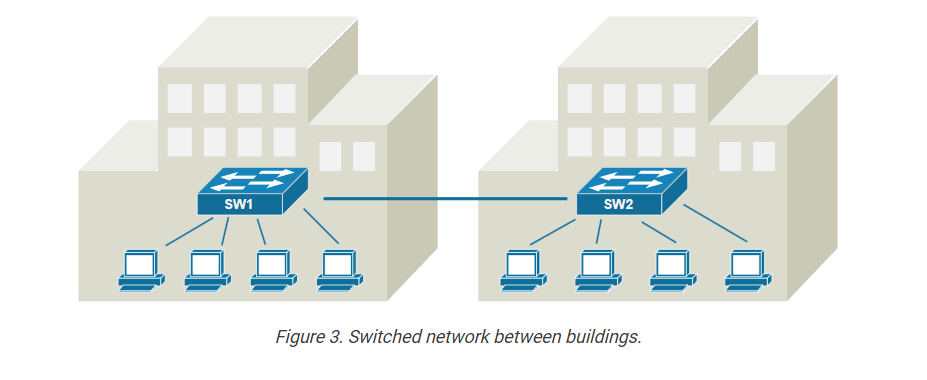
Then, over time, the number of connected devices started to grow. Interconnections between buildings emerged. People started accessing resources over the network. Organizations started relying on the network to be up and running all the time. But there was one big problem: the network didn’t have redundancy. For example, the switched network shown in the diagram below may work fine most of the time, but it has only a single link between the buildings, which is a big problem. 

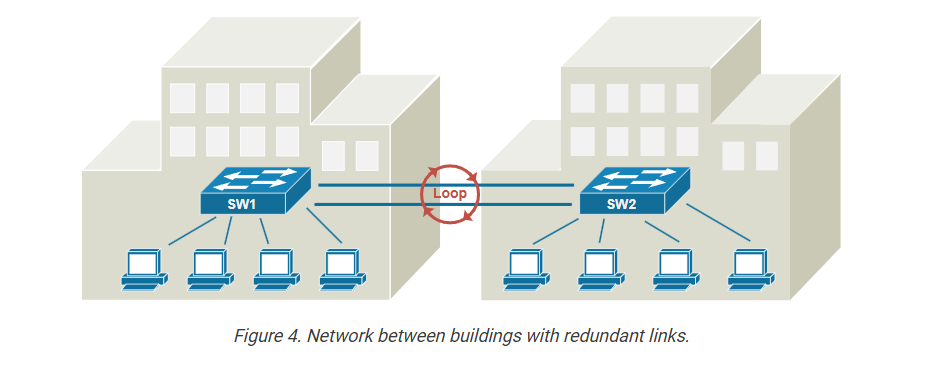
If the single link fails, the connection between the two buildings would be completely lost, disrupting communication and access to resources. In this scenario, the organization would want to install a second link between SW1 and SW2 to provide redundancy and fault tolerance. A second link would be a backup, maintaining network connectivity even if one link goes down.

However, adding redundant links to a switched network creates looped topology, as shown in the diagram above. So, engineers started to work on a solution to this problem, which is how the concept of the spanning tree protocol emerged.

What is Spanning-tree protocol (STP)?

The original Spanning Tree Protocol (STP) was developed to address the challenges of redundant paths in Ethernet networks. In 1990, it was standardized as IEEE 802.1D, a groundbreaking development that led to large-scale redundant networks. 

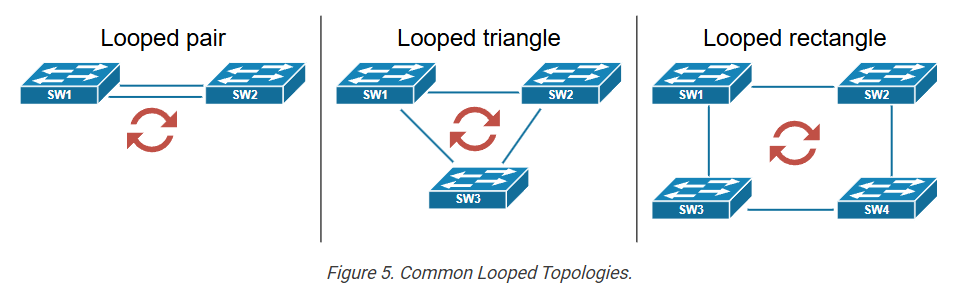
Let’s now quickly see how STP solves the redundancy problem. The following diagram shows the most common looped topologies that occur when we add redundancy to a switched network. Notice something important: Many engineers wrongly assume that a loop can only occur in a triangle or rectangular topology. However, take a look at the diagram below, and you will see that even two links between a pair of switches create a looped topology.

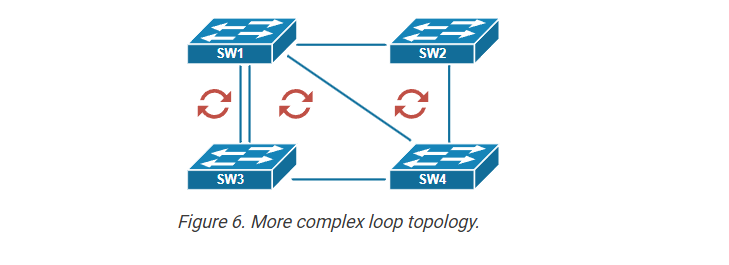
More complex looped topologies often stem from the basic ones shown in the diagram above. For instance, you can have four switches connected in a rectangular configuration but with additional redundant links, as shown in the diagram below.

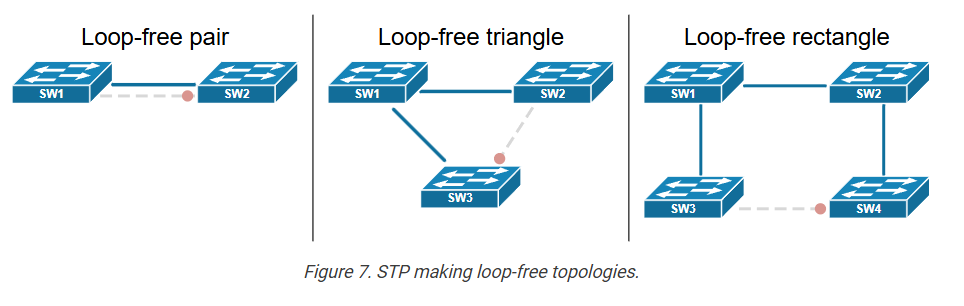
However, you can break down the structure into simpler topologies like pairs, triangles, or rectangles of switches.

Now, let’s see how the spanning tree solves this problem. It is pretty simple. It detects redundant links and temporarily blocks them to create a loop-free topology. That’s it! When the topology is not looped, a broadcast frame cannot loop around indefinitely. For example, the following diagram shows what happens when we enable spanning-tree in the topologies that are illustrated. STP blocks one link, and the topologies are now loop-free.

For instance, the pair of switches shown on the left now have only one operational cable between them. The redundant one will only be used if the primary operational cable goes down.

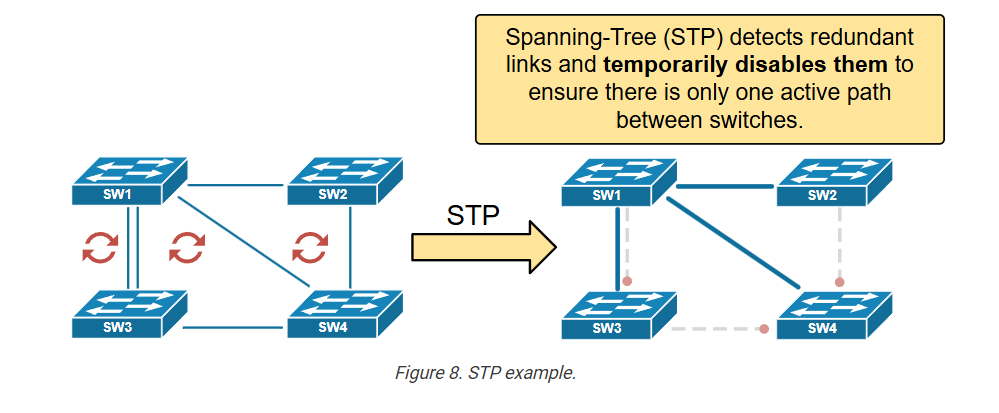
Let’s also look at the more complex topology shown in Figure 6. When the spanning-tree protocol is enabled on the switches, it detects that there are multiple redundant links and temporarily disables them so that the switched network is completely loop-free, as shown on the right side of the diagram below.

So, this is how the original spanning-tree protocol (IEEE 802.1d) works at a very high level. In the next lesson, we will start deep diving into the protocol’s algorithm. 

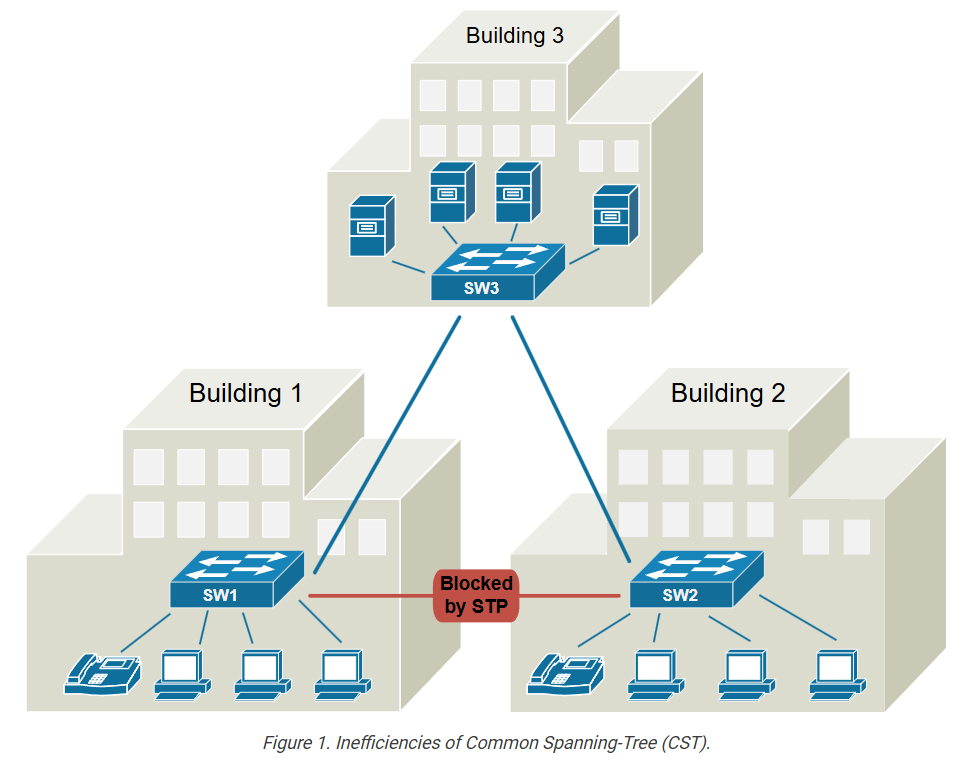
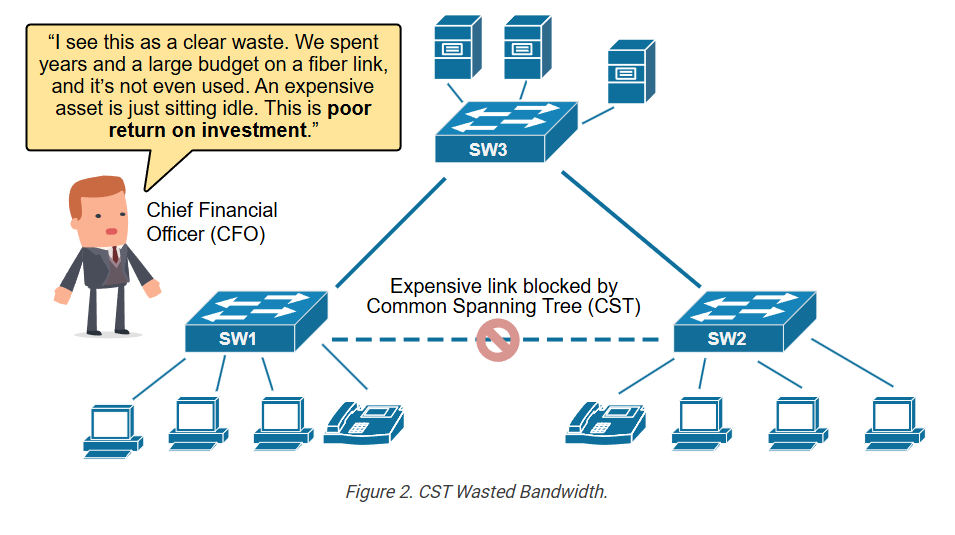
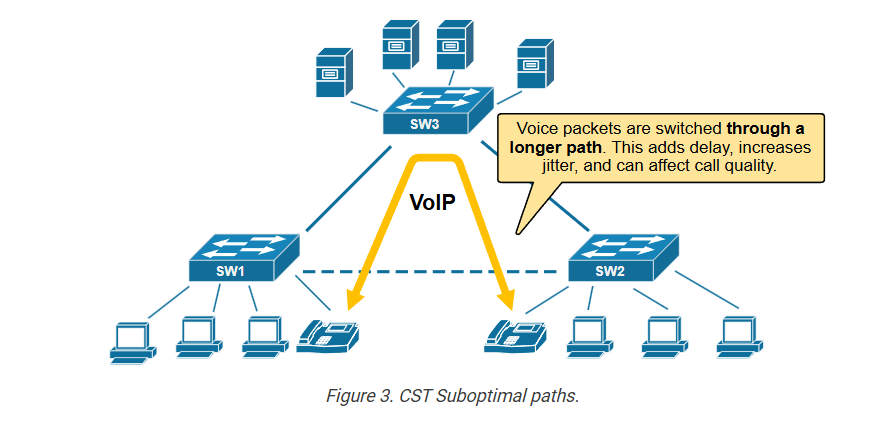
But before we move on, let’s clear up something important. Why is the original STP protocol called Common Spanning Tree (CST)? That’s because it creates a single loop-free topology for the entire network, regardless of how many VLANs exist. This means all VLANs share the same physical topology, which can lead to inefficiencies in larger networks. The common spanning tree is considered legacy now and is replaced by improved versions like Per-VLAN Spanning Tree (PVST) and Rapid PVST (RPVST). However, it is the foundation of the modern STP protocols, so let’s jump into the protocol’s algorithm.

The Spanning-Tree Algorithm

In this lesson, we begin our discussion of the Common Spanning Tree algorithm. We walk through the process of how the protocol works and what kind of messages it uses to exchange information between switches. Let’s get started.

Introducing the term “Bridge”

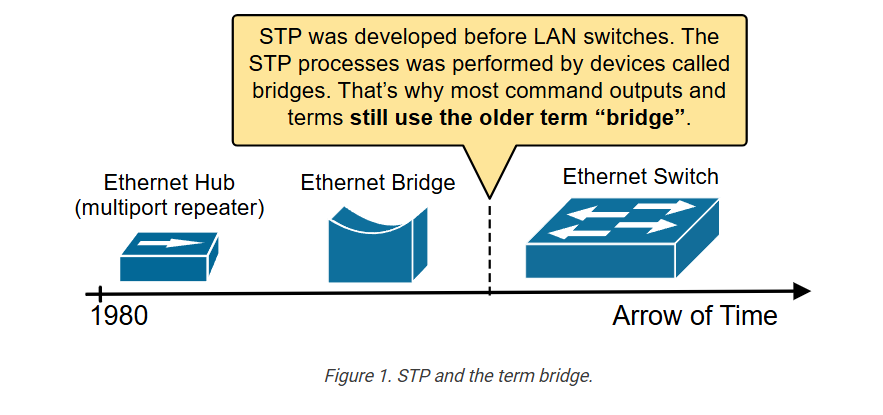
Before we begin our detailed discussion on the spanning-tree algorithm, let’s first clear something that might confuse some people. You will very often find the term “Bridge” when you read about the Spanning Tree Protocol (STP). That’s because the protocol was created before Ethernet switches existed. Back then, networks used bridges instead of switches. That’s why terms like Bridge-Priority and Bridge-ID are used instead of Switch-Priority and Switch-ID. In the context of STP, Bridge and Switch mean the same thing and can be used interchangeably.

Since bridges are long gone from modern networks, every time you see the term bridge in the context of the spanning-tree protocol, think of a switch.

The Spanning-Tree Algorithm

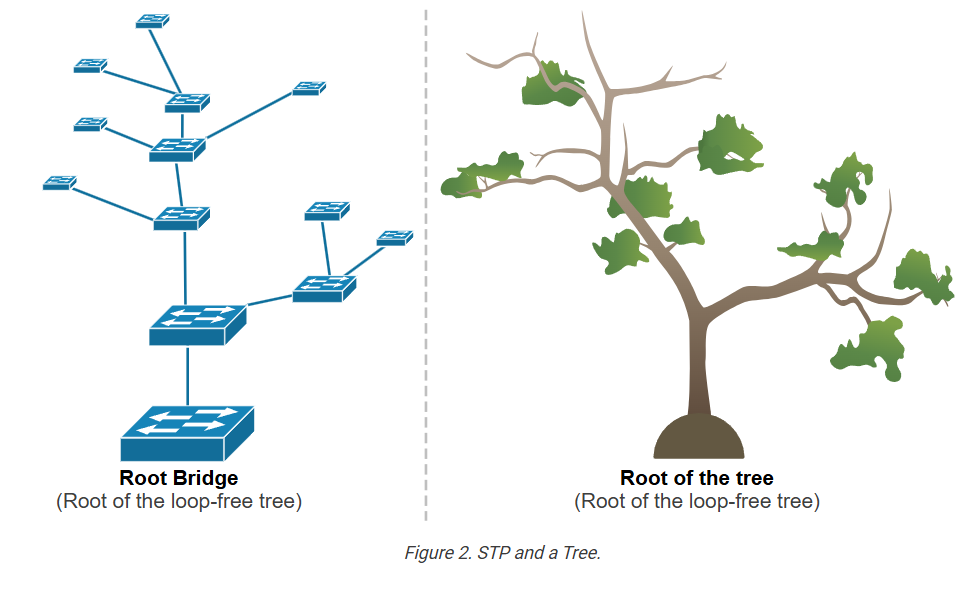
Let’s start with the very basic question that will provide us with context on how the protocol works: Why has the protocol been named “Spanning Tree”? Why wasn’t it called “Ethernet redundancy protocol” or “Ethernet loop-free protocol”?

The name basically explains the protocol’s logic. A tree’s branches naturally grow in a way that they do not form loops; each branch extends outward from the root and then further divides into smaller branches, creating a clear, hierarchical structure. This loop-free nature ensures that water flows efficiently from the roots to the leaves without looping backward.

The Spanning Tree Protocol (STP) uses similar logic. It elects one switch to be the Root Bridge. Then, it extends outward from the root, temporarily disabling redundant paths, creating a single, loop-free path for frames to travel. This prevents frames from endlessly circulating in the network, much like how a tree’s branches prevent the water flow from looping back on itself. Both systems rely on a hierarchical structure to function efficiently.

Now, let’s zoom in and see how the protocol constructs the loop-free network tree. We can break down the STP process into five steps as follows:

  • Step 1. Elect the Root Bridge – All switches compare their Bridge IDs. The switch with the lowest Bridge ID becomes the Root Bridge (the root of the tree).
  • Step 2. Select Root Ports (RPs) – Each non-root switch selects one port with the lowest path cost to the Root Bridge. This port is called the Root Port (RP) and remains active.
  • Step 3. Select Designated Ports (DPs) – For each network segment, the switch with the lowest path cost to the Root Bridge designates one active port as the Designated Port (DP) to forward traffic.
  • Step 4. Block Non-Designated Ports – Any port that is neither a Root Port nor a Designated Port is blocked to prevent loops.
  • Step 5. Monitor for failures – If a failure occurs, STP recalculates the topology and activates a previously blocked port if needed.

Step 1. BPDUs and electing the Root Bridge

The STP algorithm starts by electing a Root Bridge—the switch that will be the root of the loop-free tree, as shown in the diagram above. As with any other network protocol, the switches exchange messages to convey important information and uniquely identify each switch. 

The Bridge ID (BID)

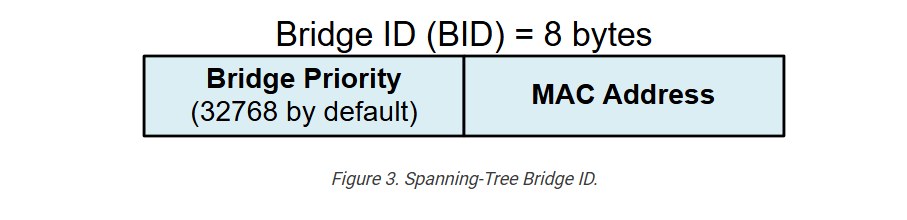
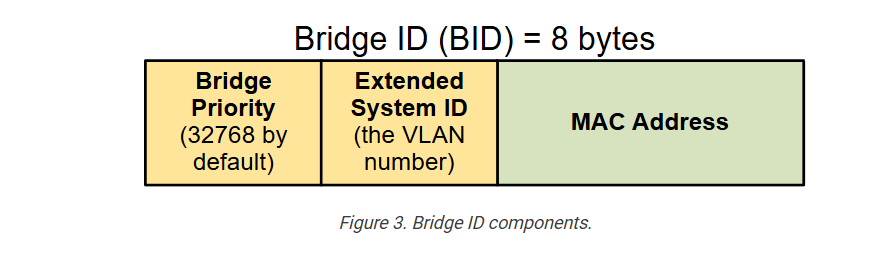
To understand the STP election process, you must first understand the STP messages and the information being exchanged. Within the STP process, each switch has a unique Bridge ID (BID), which is an 8-byte value. The BID is made of a 2-byte priority value, which is 32768 by default, and the switch’s MAC address, as shown in the diagram below. 

The bridge priority value is a configurable parameter. It is 32768 by default and can be changed, as shown in the output below. Notice that the value must be a multiple of 4096. The lowest possible value is 0.

				
					SW1(config)# spanning-tree vlan 1 priority ?
  <0-61440>  bridge priority in increments of 4096


The MAC address is taken from the switch hardware. It is typically the lowest burn-in physical address. 

The Bridge ID is the most important parameter in the spanning tree process because switches use it to elect the root bridge. The switch with the lowest BID becomes the root.  

But what does the lowest mean? The BID is made up of two components: Priority and MAC address (as you can see in the diagram above). First, the priority value is compared. Consider the example shown below. Which switch has a lower BID?

				
					Switch A has BID: 32768:0011.1111.1111
Switch B has BID:  4096:0022.2222.2222


It is switch B because it has lower priority value 4096 compared to switch A’s 32768. But what if both switches has the same priority?

				
					Switch A has BID: 32768:0011.1111.1111
Switch B has BID: 32768:0022.2222.2222


When two switches have the same bridge priority, the one with the lower MAC address wins. Hence, in this example, switch A has a lower BID.

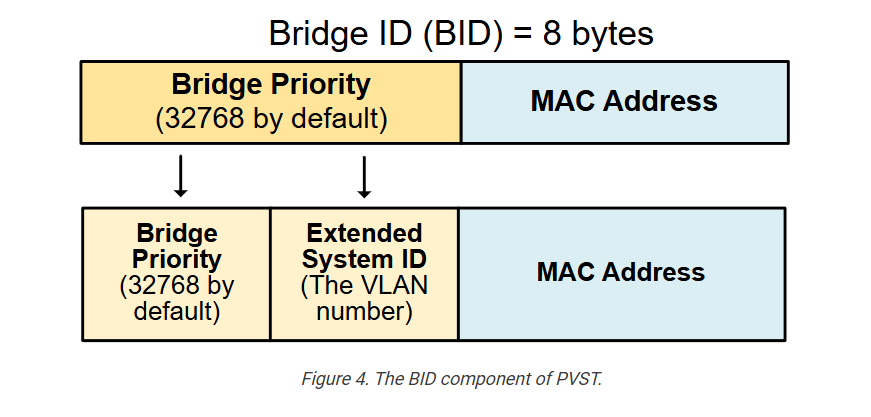
Before we move on, let’s clear up something important. In this part of the STP course, we discuss the original IEEE 802.1d spanning-tree protocol that was developed back in the 1990s, referred to as the Common Spanning Tree (CST). However, modern Cisco switches don’t support CST anymore. If you check the BID of a switch now, the BID will look slightly different. Modern Cisco switches support only Per-VLAN STP (PVST). That’s why when you log on a modern switch, the BID is made up of three components: Priority Value + Extended System ID + MAC address, as shown in the diagram below.

Since the STP process is per-VLAN, the VLAN ID is part of the Bridge ID. For example, a switch will have a different BID in each VLAN, as shown in the output below:

				
					Switch A has BID in VLAN 1:   32769:0011.1111.1111
Switch A has BID in VLAN 2:   32770:0011.1111.1111
Switch A has BID in VLAN 5:   32773:0011.1111.1111
Switch A has BID in VLAN 100: 32868:0011.1111.1111


Notice that the VLAN number is added to the configured priority value: VLAN 1 (32768+1), VLAN 5 (32768+5), VLAN 100 (32768+100), etc. We will talk more about PVST in the next section of the course. Now let’s focus on the original protocol, which is the foundation for all other versions.

BPDUs: The STP messages

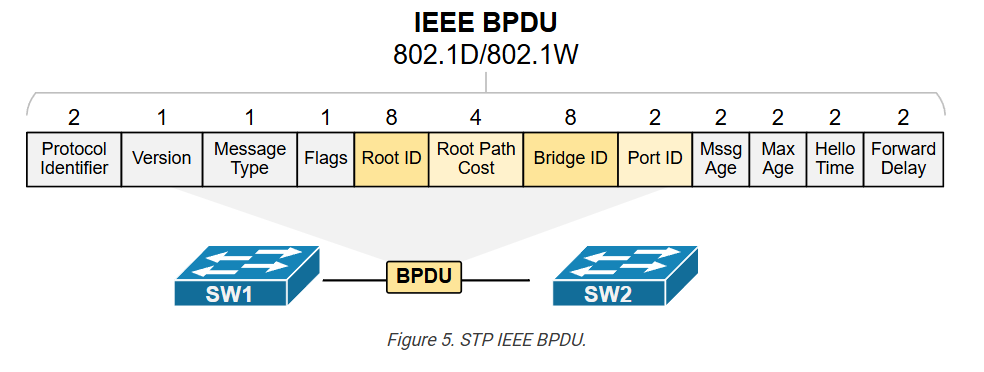
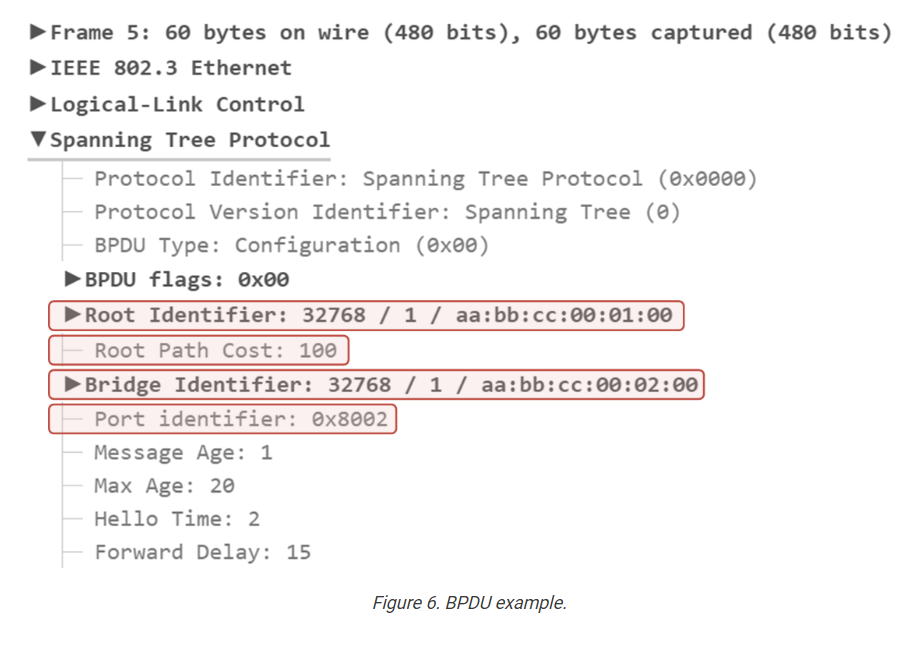
The STP process uses special messages called bridge protocol data units (BPDUs) to share information between switches. The most common type is the “Hello” BPDU, which contains important details, including the BID of the switch that was sent. Technically, the BPDU type is Configuration, but since switches send it to discover each other, it is referred to as “Hello.” This helps switches identify the sender and determine the network’s structure.

The BPDU includes essential information used in the Root Bridge election process (highlighted in yellow), such as:

  • The Bridge ID (BID) of the switch sending the BPDU.
  • The Root ID of the switch is currently considered the Root Bridge.
  • The cost to reach the root switch.
  • The port ID of the interface used to reach the Root Bridge.

The following screenshot shows a traffic capture of a BPDU sent between two Cisco switches in Vlan 1. Notice the information highlighted in red and compare it to the diagram above.

Now, let’s see how this information is used by the switches to elect which one will act as the Root Bridge for the switched network.

The Root Bridge Election Process

When a switch is first powered on, it assumes that it is the root bridge and sets its own BID as the Root BID. It sends Hello BPDUs advertising itself as the root bridge, as shown in the diagram below. 

These Hello BPDUs are sent every two seconds by default and contain the following information, as shown in the diagram:

  • The switch’s own Bridge ID (BID)
  • The current known root ID (Root’s BID)
  • The cost to reach the root bridge (initially 0)

As switches receive BPDUs from other switches, they compare the root ID in the BPDUs with their own stored root ID.

  • If the received Root ID is lowerit means a better root bridge exists. Such a BPDU packet is called “superior BPDU“. The switch updates its root ID to this new lower value and forwards the updated BPDU to its neighbors. 
  • If the received Root ID is higher, the BPDU is ignored because the switch already knows a better root bridge. Such a BPDU packet is called “inferior BPDU“.

Notice that once a switch updates its Root BID to reflect a new root bridge, all BPDU frames it sends will include the new root BID. This allows downstream switches to learn the Root Bridge ID. For instance, our example topology has only three switches. But if more switches were connected to SW2 or SW3, they would have learned the Root BID from the BPDUs of SW2 and SW3.

This process continues until all switches agree on the lowest BID, which is the root bridge of the topology. The switch with the lowest BID value becomes the root bridge. If two switches have the same priority, the one with the lowest MAC address wins. In our example, this is SW1 because it has the lowest BID of the three switches, as shown in the diagram above.

				
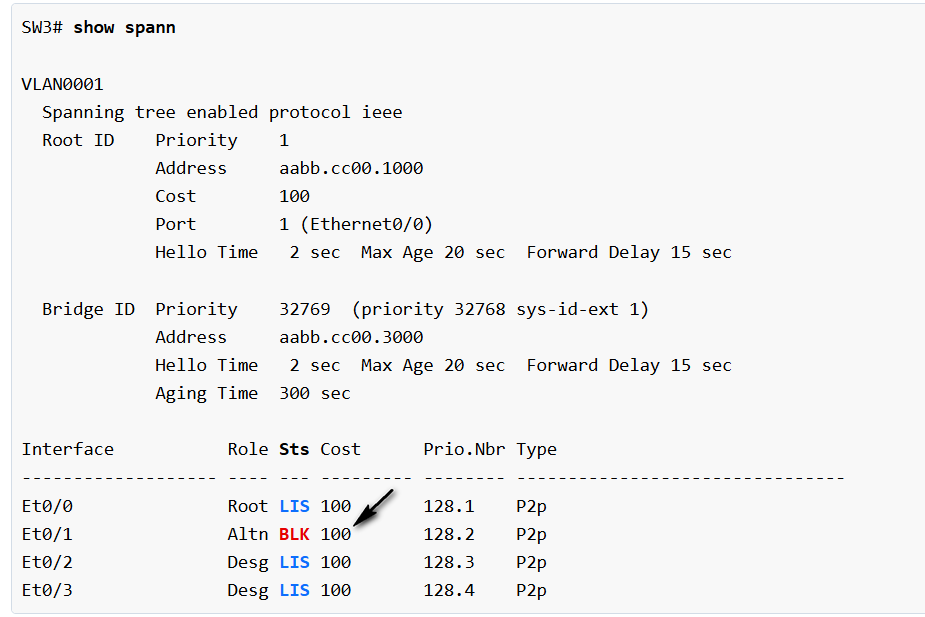
					SW1# show spanning-tree

VLAN0001
  Spanning tree enabled protocol ieee
  Root ID    Priority    32769
             Address     0000.1111.1111
             This bridge is the root
             Hello Time   2 sec  Max Age 20 sec  Forward Delay 15 sec
             
  Bridge ID  Priority    32769 (priority 32768 sys-id-ext 1)
             Address     0000.1111.1111
             Hello Time   2 sec  Max Age 20 sec  Forward Delay 15 sec
             Aging Time  300 sec
             
Interface           Role Sts Cost      Prio.Nbr Type
------------------- ---- --- --------- -------- --------------------------------
Et0/0               Desg FWD 100       128.1    P2p
Et0/1               Desg FWD 100       128.2    P2p


If we make the same check on SW3, we can see that it also knows who the root is.

				
					SW3# show spanning-tree

VLAN0001
  Spanning tree enabled protocol ieee
  Root ID    Priority    32769
             Address     0000.1111.1111
             Cost        100
             Port        1 (Ethernet0/0)
             Hello Time   2 sec  Max Age 20 sec  Forward Delay 15 sec
             
  Bridge ID  Priority    32769  (priority 32768 sys-id-ext 1)
             Address     0000.3333.3333
             Hello Time   2 sec  Max Age 20 sec  Forward Delay 15 sec
             Aging Time  300 sec
             
Interface           Role Sts Cost      Prio.Nbr Type
------------------- ---- --- --------- -------- --------------------------------
Et0/0               Root FWD 100       128.1    P2p
Et0/1               Desg FWD 100       128.2    P2p


Spanning-Tree Port Roles

In the previous lesson, we started discussing how the spanning-tree protocol constructs the loop-free network topology. We can break down the process into five steps as follows:

  • Step 1. Elect the Root Bridge.
  • Step 2. Select Root Ports (RPs).
  • Step 3. Select Designated Ports (DPs).
  • Step 4. Block Non-Designated Ports.
  • Step 5. Monitor for failures.

We have already discussed the first step. In this lesson, we are going to zoom into steps 2 through 4. Let’s jump in.

Step 1. The Root Bridge

In step 1, switches elect the root bridge. In our instance, this was SW1, as shown in the diagram below. Something important to remember about this step is that after the root bridge is elected, only the root bridge continues to generate configuration BPDUs every 2 seconds by default.

Non-root switches only forward the BPDUs they receive from the root bridge. They do not create new BPDUs themselves.

Step 2. Selecting a Root Port

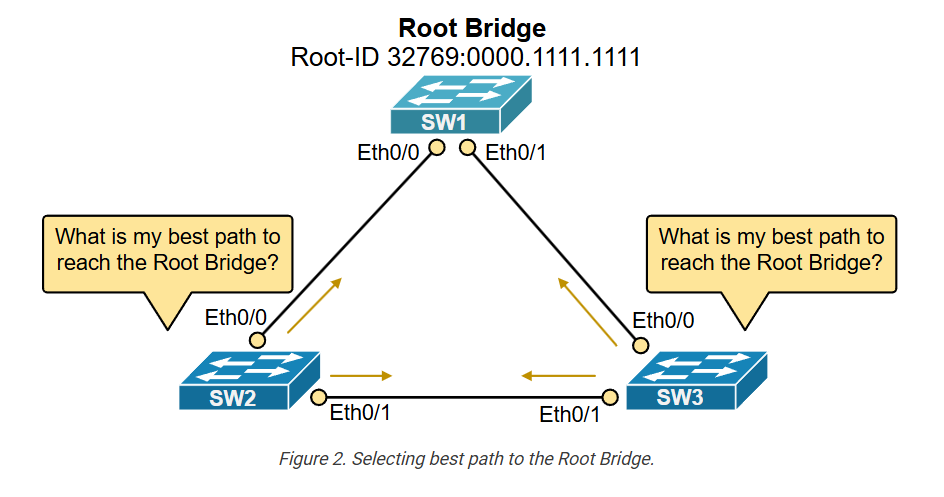
The second step in the STP process happens immediately after the Root Bridge has been elected. Every switch that is not the Root Bridge must figure out which port is best for reaching the root, as shown in the diagram below.

Each switch must choose only one root port (RP), which has the lowest cost path to reach the root bridge. But what is cost in the context of STP, and what if two paths have equal cost?

Root Path Cost

Once the root bridge is selected, the STP algorithm starts calculating the best paths from every switch to the root bridge.

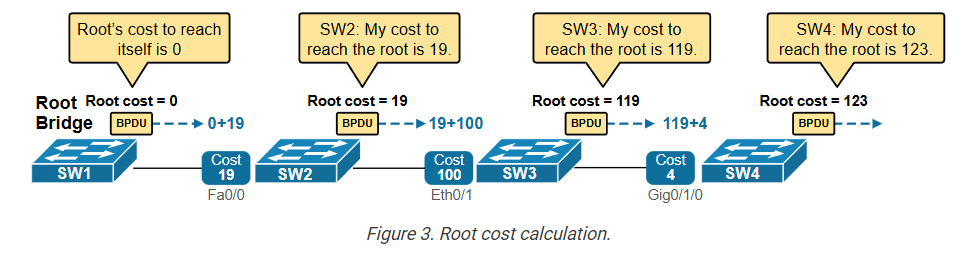
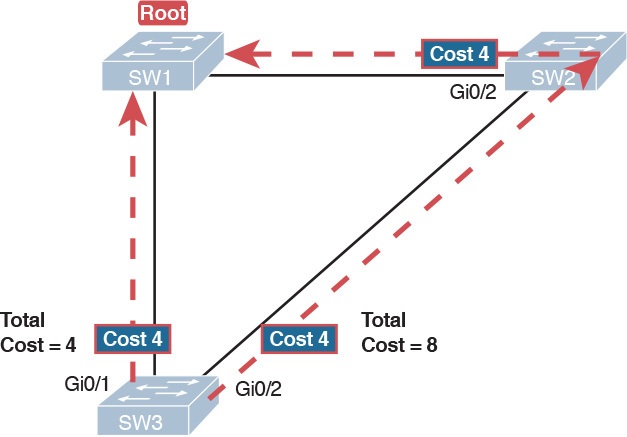
Switches exchange BPDUs, which include a value called the root path cost. This value shows how far the switch is from the root bridge, based on the cost of each port in the path. When a switch receives a BPDU, it adds the cost of the port where the BPDU arrived. This helps the switch calculate its own total cost to reach the root. Then, it sends out BPDUs with the new total cost downstream to its neighboring switches. The process is illustrated in the diagram below.

Notice two important facts: The root bridge’s cost to reach itself is always zero (logically). Hence, he sends BPDUs with root path cost set to 0. Then, each switch adds the cost of the interface where the BPDU arrived. 

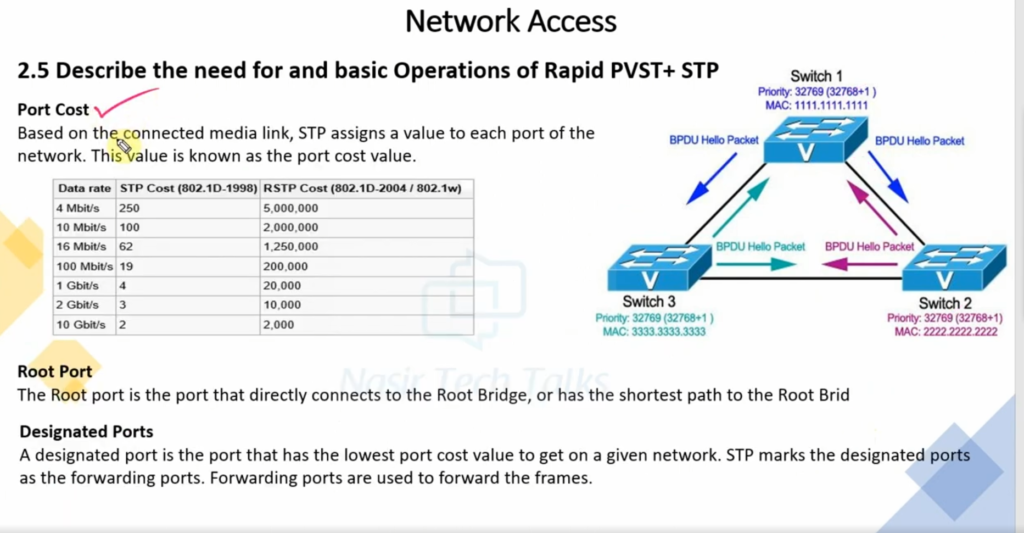
Port cost depends on the speed of the port. Faster ports have lower costs. For example, 10 Gbps ports have a cost of 2, 1 Gbps ports have a cost of 4, 100 Mbps ports have a cost of 19, and 10 Mbps ports have a cost of 100. The table below lists the most common port speeds and their cost.

Table 1. IEEE 802.1d Port Costs
Port SpeedSTP Cost
4 Mbps250
10 Mbps100
100 Mbps19
1 Gbps4
10 Gbps2
40 Gbps1

Using this process, each switch calculates the cost to reach the root bridge via each available interface. To understand the process, let’s walk through a real-world example. Let’s take the topology shown in the diagram below. SW1 is the root switch. Let’s see how SW2 can reach the root.

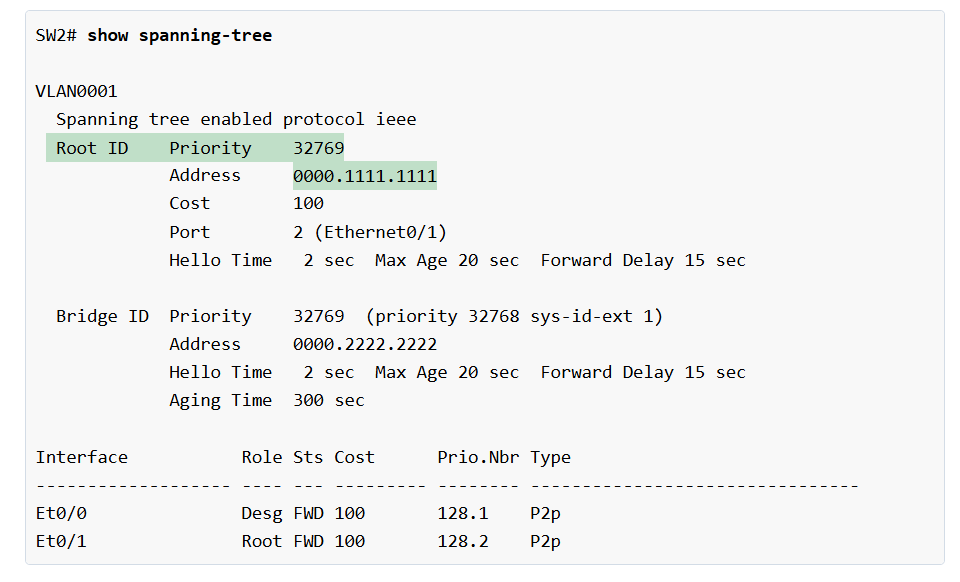
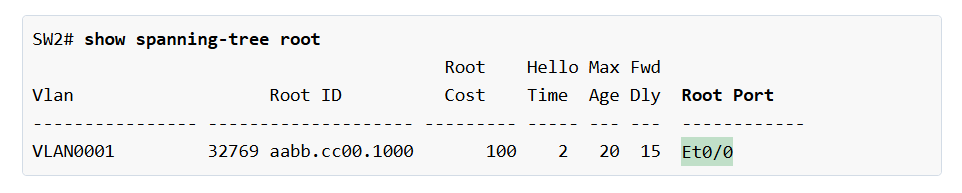
SW2 can reach SW1 in two ways: directly through Ethernet 0/0 or indirectly through SW3. The cost from SW2 to SW1 directly is 100, and the cost through SW3 is 200, then SW2 picks the direct path, because 100 is lower than 200. Therefore, Ethernet0/0 becomes the Root Port (RP). We can further verify this by looking at the output below.

				
					SW2# show spanning-tree
VLAN0001
  Spanning tree enabled protocol ieee
  Root ID    Priority    32769
             Address     0000.1111.1111
             Cost        100
             Port        1 (Ethernet0/0)
             Hello Time   2 sec  Max Age 20 sec  Forward Delay 15 sec
             
  Bridge ID  Priority    32769  (priority 32768 sys-id-ext 1)
             Address     0000.2222.2222
             Hello Time   2 sec  Max Age 20 sec  Forward Delay 15 sec
             Aging Time  15  sec
             
Interface           Role Sts Cost      Prio.Nbr Type
------------------- ---- --- --------- -------- --------------------------------
Et0/0               Root FWD 100       128.1    P2p
Et0/1               Desg FWD 100       128.2    P2p


Let’s now see which port SW3 chooses as its root port. SW3 can also reach SW1 in two ways: directly through Ethernet 0/0 or indirectly through SW2, as shown in the diagram below. 

The cost from SW3 to SW1 directly is 100, and the cost through SW2 is 200, then SW3 chooses the direct path via Eth0/0, because it has lower total cost (100). Therefore, Ethernet0/0 becomes the Root Port (RP). Let’s verify this via the CLI.

Sometimes, two or more paths have the same lowest cost. In that case, the switch uses extra rules to decide which path to pick. 

Root Port Selection Logic

The root bridge keeps sending configuration BPDUs on all its interfaces. Each switch receives these BPDUs and uses them to decide which interface is the best path to the root bridge. The switch picks its RP using this order (used in case of a tie):

  • Choose the port with the lowest path cost.
  • If the cost is the same, choose the port that received the BPDU from a switch with the lowest BID.
  • If multiple ports go to the same switch, choose the one with the lowest port priority.
  • If the port priority is also the same, pick the one with the lowest port number.

Remember that every switch uses only the RP interface to reach the root. The RP can be checked using the following command.

Step 3. Selecting Designated Ports (DPs)

Okay, let’s summarize what we have discussed so far and how the Spanning Tree Protocol (STP) works:

  • First, STP finds a starting point called the root bridge. This is the switch with the lowest BID and the root of the loop-free tree.
  • Then, each switch selects a root port (RP) with the lowest cost to reach the root bridge. 

At this point, the process has built the tree-like structure. Now, the Root Bridge starts sending configuration BPDUs every two seconds. Each switch receives those BPDUs on its root port and forwards them out all other ports, as shown in the diagram below.

However, other ports in the topology are still active, and loops can occur. To avoid these loops, STP takes one more step. It picks one designated port on each network segment. A network segment is a shared connection between two or more switches. In modern networks, a network segment in the STP context is simply a link between two switches because layer 1 hubs are no longer used, and one link cannot be shared between more than two layer 2 devices. 

What is a Designated Port (DP)?

A designated port (DP) is a port that is allowed to send and receive traffic and forward BPDUs. All ports of the Root Bridge are Designated Ports (DPs) because it generates configuration BPDUs, as shown in the diagram above. 

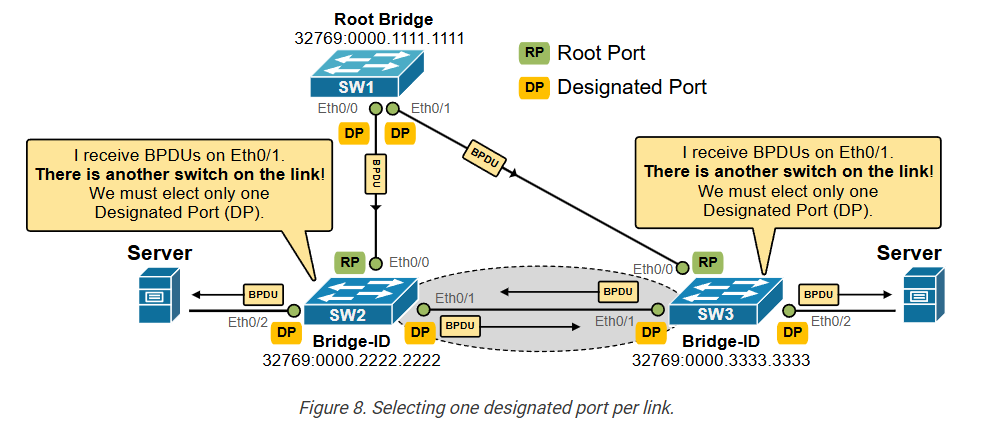
Every other non-root switch initially assumes that all its ports that are not the Root Port (RP) are designated ports (DPs). A switch doesn’t know what kind of device is connected on each interface, whether it is an end device (server, PC, phone, etc.) or another switch that can cause a loop. However, if the switch receives a BPDU on a designated port, it means it comes from another switch, and it is not coming from the loop-free path, as shown on the highlighted link in the diagram below.

Every switch must receive the root’s configuration BPDUs over its root port (RP) because the RP is the lowest-cost path to the root. For example, SW2 receives the root’s BPDUs on Eth0/0 (the RP). SW3 receives the BPDUs on Eth0/0 (the RP). 

If the switch receives configuration BPDUs on a designated port (DP), it means the port is connected to another switch via a redundant link, and there is a loop condition, as shown in the highlighted link on the diagram above. That’s why STP allows only one port on the redundant link to be a designated port (to forward BPDUs).

How is a Designated Port (DP) elected on a shared segment?

Every switch knows its own path cost to the root and includes it in its BPDUs (Bridge Protocol Data Units). If a switch receives a BPDU from a neighbor with a lower cost, that neighbor becomes the designated port. The receiving switch knows that its own port is not the designated port. But if it hears only higher costs from other switches, it knows its port is the designated one.

Sometimes, two or more switches have the same path cost. STP uses a tiebreaker system with four rules, in this order, as shown in the diagram below:

  • Lowest root path cost
  • Lowest sender bridge ID
  • Lowest sender port priority
  • Lowest sender port ID

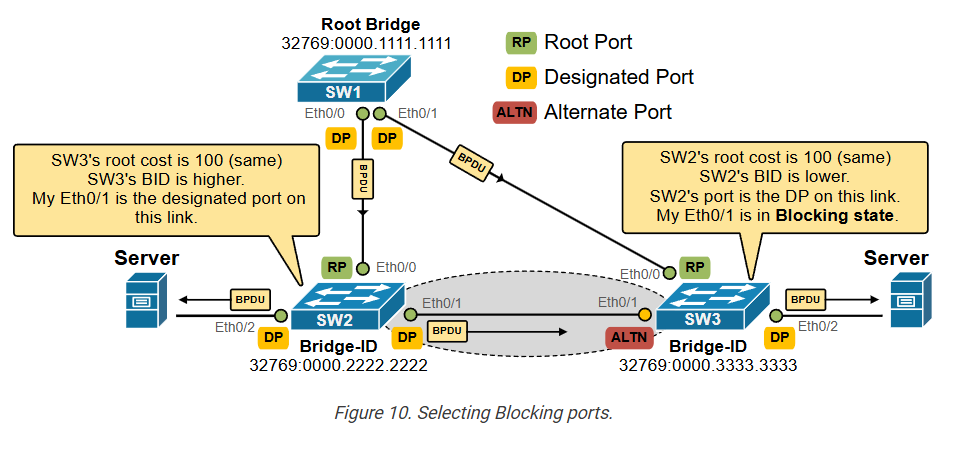
Let’s look at our example again. SW2 and SW3 receive BPDUs on non-root ports (Eth0/1). They understand that this is a redundant link between them and that this link is not part of the loop-free path. They must select a designated port for that link and block the other port to prevent loops. Using the selection algorithm shown above, they select SW2’s port as the DP port and SW3’s port as the alternate port, which is in a blocking state. The following diagram visualizes the end result. 

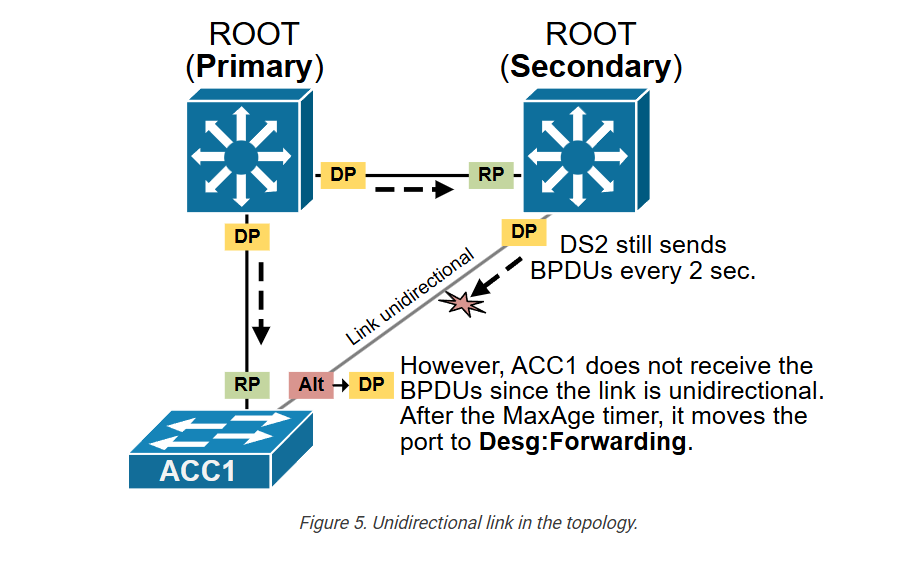
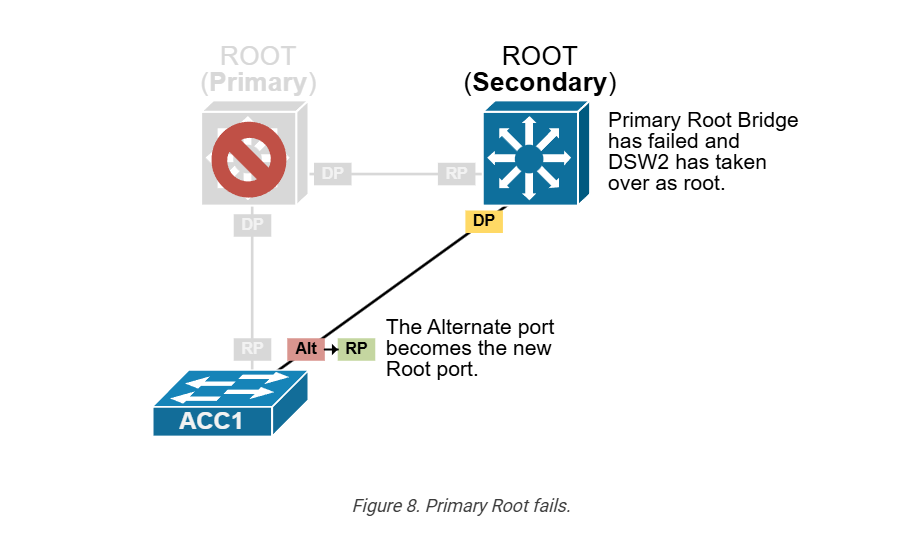
An Alternative port is a port that could be used to reach the root bridge but is not currently being used because another port already provides a better (lower-cost) path. The alternate port is in a blocking state, meaning it doesn’t forward traffic or BPDUs. However, if the main path (usually the root port) fails, the alternate port can quickly take over and start forwarding frames.

Note that in the end result, even though all three switches are still physically connected in a triangle, STP has temporarily blocked the link between SW2 and SW3. This prevents a loop while keeping the network fully connected. Switches 2 and 3 can still send traffic to each other, but only through Switch A. For example, the two servers communicate with each other over the SW1, as shown in the diagram below.

Notice the LEDs on the switches. If those are real hardware devices, the LED on SW2’s Eth0/1 port would be green but wouldn’t be blinking because no real traffic is passing through. The LED on SW3’s Eth0/1 port will be yellow and won’t be blinking either because it is in STP blocking mode. Also, notice how the blocking port is breaking the loop and the topology is loop-free.

Putting it all together

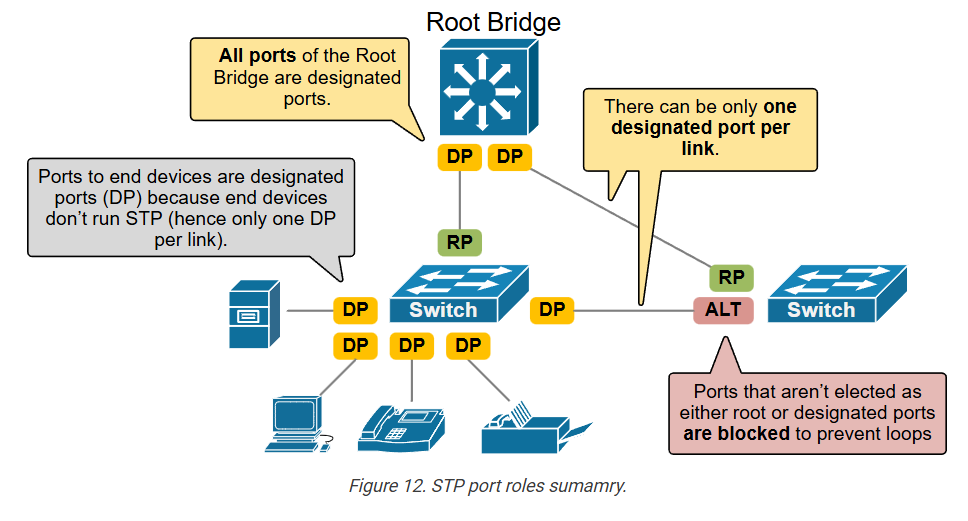
Now, let’s put it all together and summarize what we have discussed so far in the diagram shown below.

  • Everything starts with the Root Bridge election. The switch with the lowest Bridge ID becomes the Root.
  • Then, every switch in the network elects a root port (RP). The port with the lowest cost to reach the root.
  • Then, switches elect a designated port (DP) for every segment (basically for every switchport).
    • A switch initially assumes that all ports are designated and can send and receive traffic. 
    • Ports that connect to end devices such as servers and printers remain designated because end devices don’t run STP (so there are no other switches on the link to make an election with)
    • However, a designated port that connects to another switch receives BPDUs. This triggers the election process – only one designated port must be elected on every link. Don’t confuse this process with the Root Port (RP). The RP expects to receive BPDUs downstream from the root. A designed port must not receive configuration BPDUs. It forwards configuration BPDUs.
  • In the end, all ports that aren’t elected as root or designated ports are blocked to prevent loops.

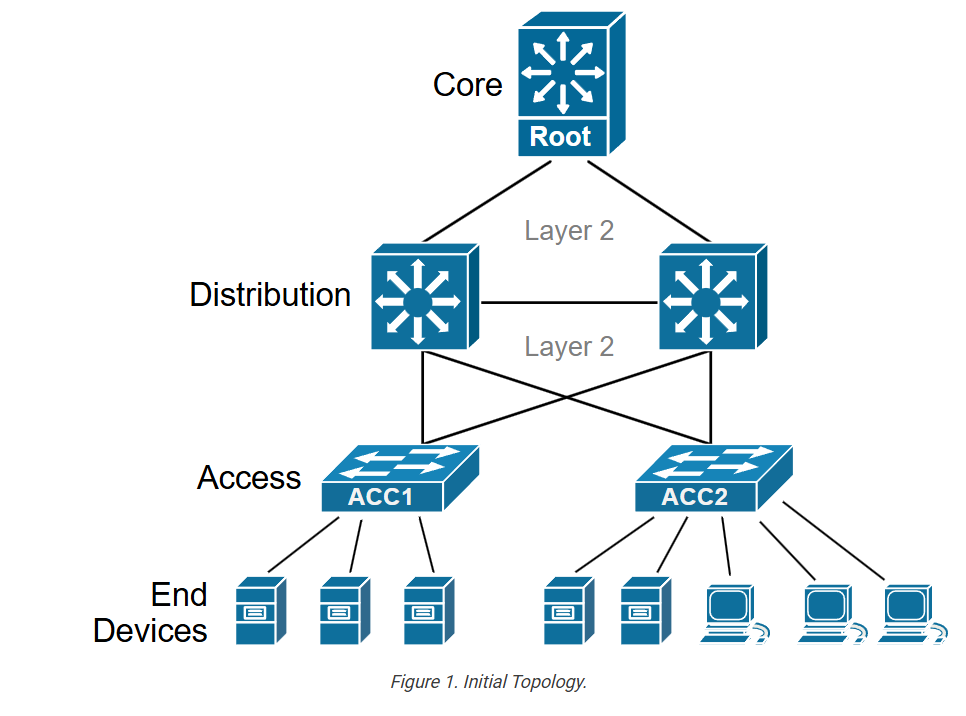
Notice that you will most likely see the root bridge in the distribution or core layer in real networks. The root bridge typically sits higher in the topology and is a more capable and high-end platform. STP blocks the path farthest from the root to stop loops.

One designated port per segment

Lastly, let’s reemphasize the concept that the spanning tree selects only one designated port (DP) per segment. What does the term “segment” mean in the context of STP? Why don’t we use the term “link”?  

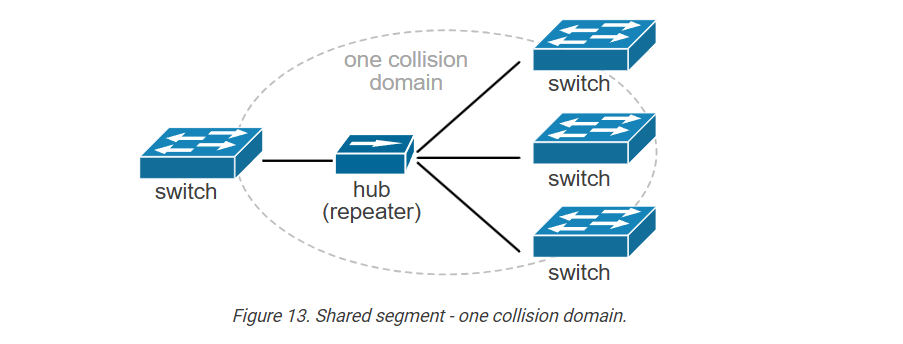
Back in the old days, a device called Hub existed. Think of a simple multiport repeater. When it receives a data signal on one of its ports, it rebroadcasts that signal out to all the other ports; it simply copies and sends the signal everywhere. 

When you connect multiple switches to a hub, they appear to be connected to the same cable. They are part of the one collision domain, as shown in the diagram above.

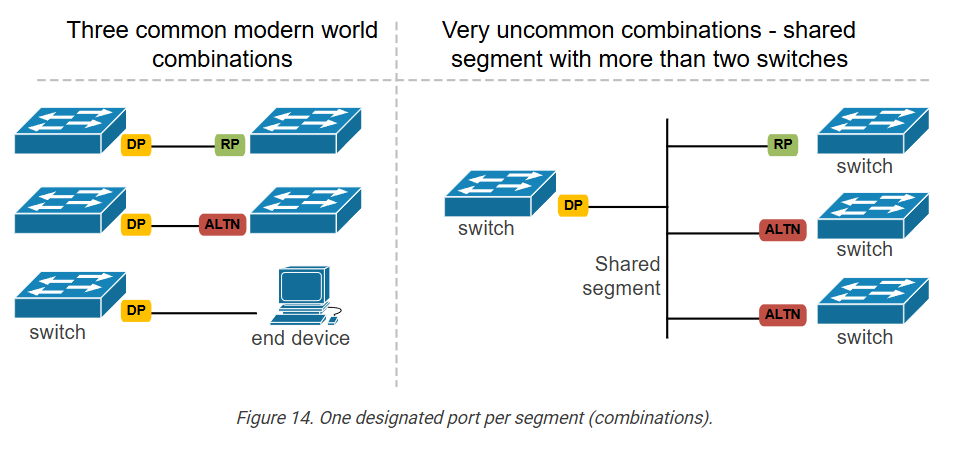
In modern networking, hubs are rarely encountered except in very old or specialized setups. Ninety-nine percent of the time, a segment means a link between two devices. In that context, there are only three combinations of STP port roles, as shown on the left side of the diagram below.

Notice that there is only one designed port per link. The other side of the link is either a Root Port, a Blocked Port, or an end device that does not run STP. Anyway, the protocol supports shared layer 1 segments, as shown on the right side. In such scenarios, again, there is only one designated port. However, some switches on the shared segment can use it as a root port, while others can be blocked, as shown on the right side of the diagram above.

STP Port States and Timers

In the previous lesson, we discussed the Spanning Tree port roles. Let’s make a quick recap:

Table 1. STP port roles.
STP Port RoleDescription
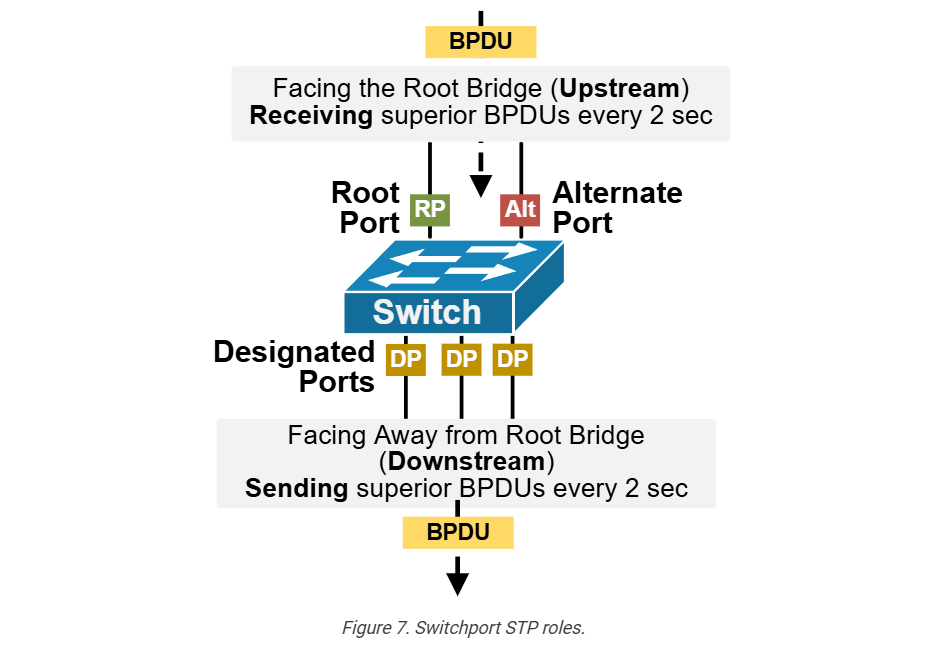
Root Port (RP)The port on a non-root switch that has the best (lowest cost) path to the Root Bridge. There is only one root port per switch. The port receives configuration BPDUs from the root.
Designated Port (DP)A port that is allowed to forward traffic on a segment and forward BPDUs. One designated port is elected per link. All ports on the root bridge are designated ports. Designated ports forward traffic away from the root bridge.
Alternate portA port that offers an alternate path to the root bridge. It remains in a blocking state and can quickly transition to the forwarding state if the current root port fails.
Disabled portA port that is administratively shut down and does not participate in the Spanning Tree Protocol.                                                                                                  

However, ports do not directly become one of the roles listed above. It must first progress through several states before the Spanning Tree process ensures that it is safe to transition the port to a particular role.

Why does STP have port states?

The Spanning Tree protocol prevents network loops while keeping redundancy in place. However, building the loop-free tree is not instantaneous. It takes time to elect the root bridge, compare costs, elect root ports, select designated ports, and, in the end, temporarily block the redundant links. But what happens with the BUM traffic while the STP process creates the loop-free topology?

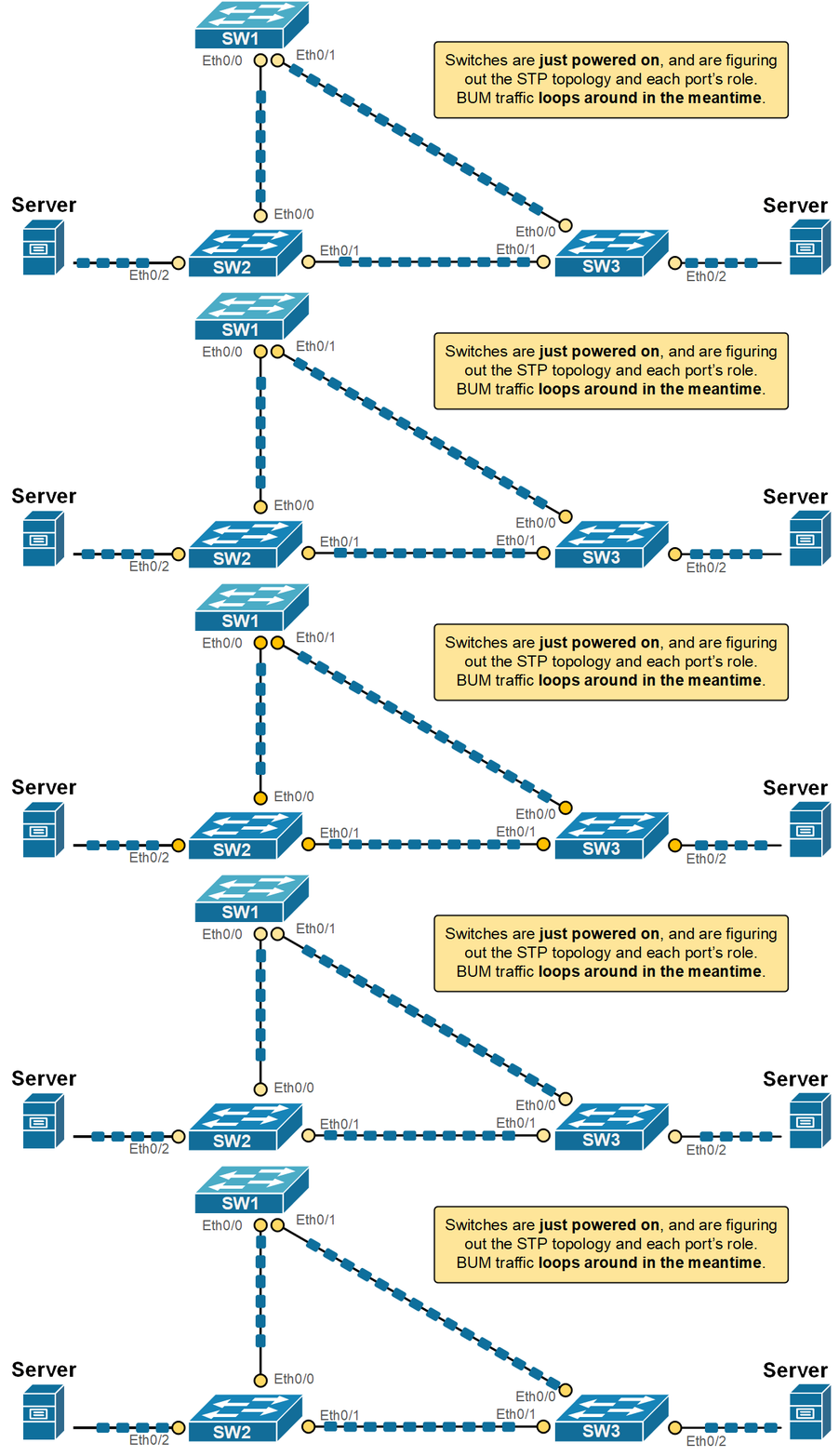
Let’s imagine a fictitious scenario where the STP process forwards traffic while it builds the loop-free topology. What would have happened is that BUM traffic would have replicated and looped around, as shown in the diagram below. 

This could cause one or more devices to crash, leading to a vicious cycle of instabilities. Obviously, the protocol needs a mechanism to control the frame forwarding during the spanning tree calculations. That’s where the port states come into the picture.

STP uses port states to help prevent network loops while the protocol builds the loop-free topology. When a switch is powered on or when the network topology changes, the switch needs time to figure out the STP role of each port. If the ports start forwarding traffic immediately, temporary loops could form before STP finishes its calculations.

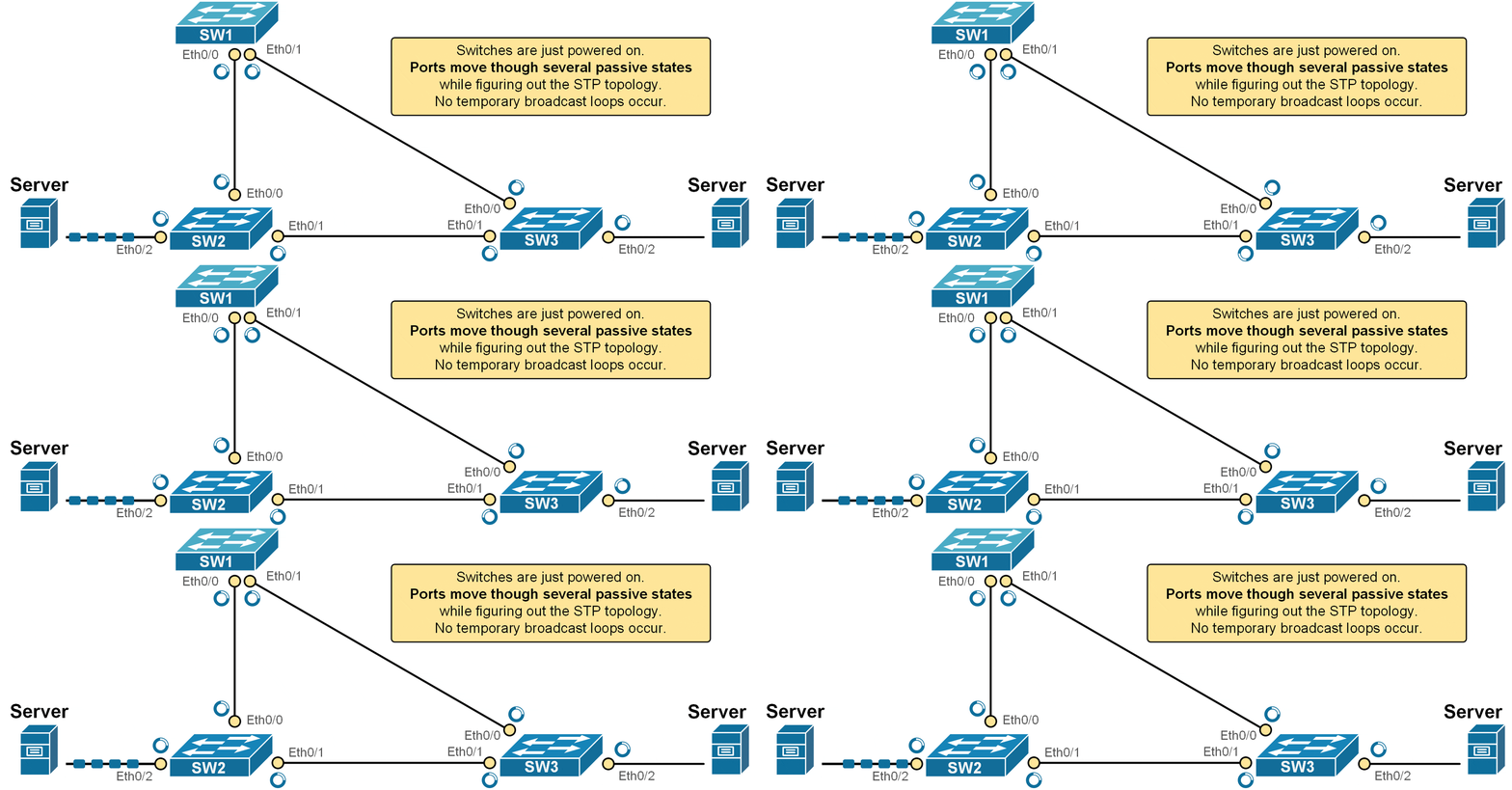
Instead of letting each port immediately assume its final role, STP uses a series of port states to safely transition a port into the determined STP role. While each port goes through the states, it does not forward frames, as shown in the diagram below.

For example, look at the animation shown above. The switches have just been powered on. Although the server on the left sends traffic to the server on the right, the network does not forward the frames. Every switchport transitions through the STP states until it reaches the Forwarding state and starts sending/receiving traffic or reaches a blocking state.

KEY TOPIC: The Spanning Tree port states are a way for the protocol to safely bring ports into the network. This prevents temporary loops and instabilities and ensures that switches have enough time to agree on the correct loop-free topology.

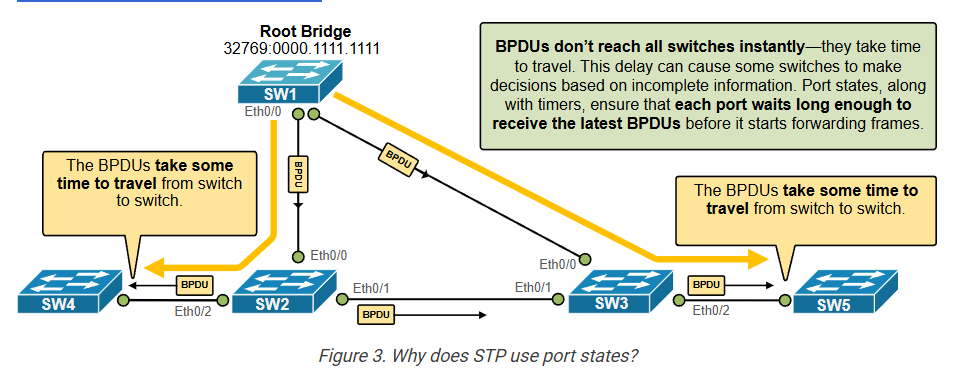
Another reason why STP uses port states is BPDUs travel time. STP works by having switches send BPDUs to each other to build a loop-free network. These messages take some time to travel from one switch to another. If there’s a change in the network, like a failed link or root bridge, it also takes time for all switches to learn about it. Because of these travel delays, STP waits before finalizing the network path so all switches can get the latest information first. The following diagram visualizes this concept.

Keep in mind that the protocol was invented in the 1980s, and the interface speeds were much slower then. Therefore, the travel times were way way longer. That’s the reason the original version of the protocol uses timers such as 15 seconds between states (more on this later on).

What are STP Port States?

  • A switchport that is administratively shut down is in the disabled state. This means that it does not participate in the STP calculations at all.
  • When a port is first initialized, it starts in the blocking state. In this state, it does not forward traffic and only listens for BPDUs. This allows the switch to learn the topology without causing loops.
  • If the port is needed in the topology, it moves to the listening state. Here, it still does not forward frames, but it begins sending and receiving BPDUs. This helps the switchport announce its presence and prepare to join the STP topology.
  • Next is the learning state. In this phase, the port begins to learn MAC addresses by watching incoming frames but still does not forward traffic. This prepares the switch to forward frames efficiently (not as BUM traffic) once it becomes active.
  • Finally, if the switchort is selected to be part of the active loop-free topology, it enters the forwarding state. Now, it can send and receive both data frames and BPDUs.

Spanning Tree Protocol (STP) uses port states to manage how each switch port behaves during the process of building a loop-free network. These states help the switch decide whether a port should forward traffic, learn MAC addresses, or stay silent to prevent loops.

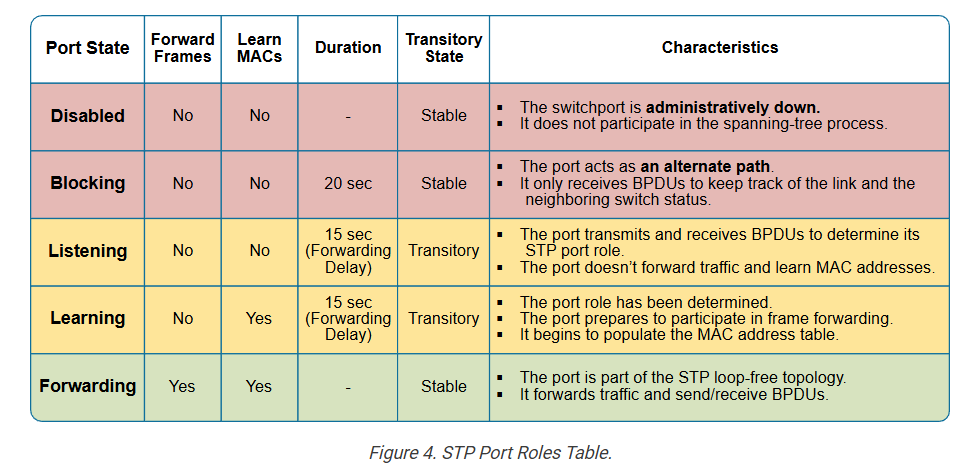
The following table summarizes all spanning tree port states. Notice that some states are permanent while others are transitory. Also pay attention to the duration of each state transition.

These port states give the switch time to understand the network before it begins forwarding traffic. This process prevents loops and makes sure the network runs smoothly.

Now, to understand the concept better, let’s look at some real-world examples.

STP Timers

The STP process uses three timers that control the transition between port states:

Table 2. STP timers.
TimerDefault ValueDescription
Hello2 secondsThe time between Configuration BPDUs sent by the root switch. 
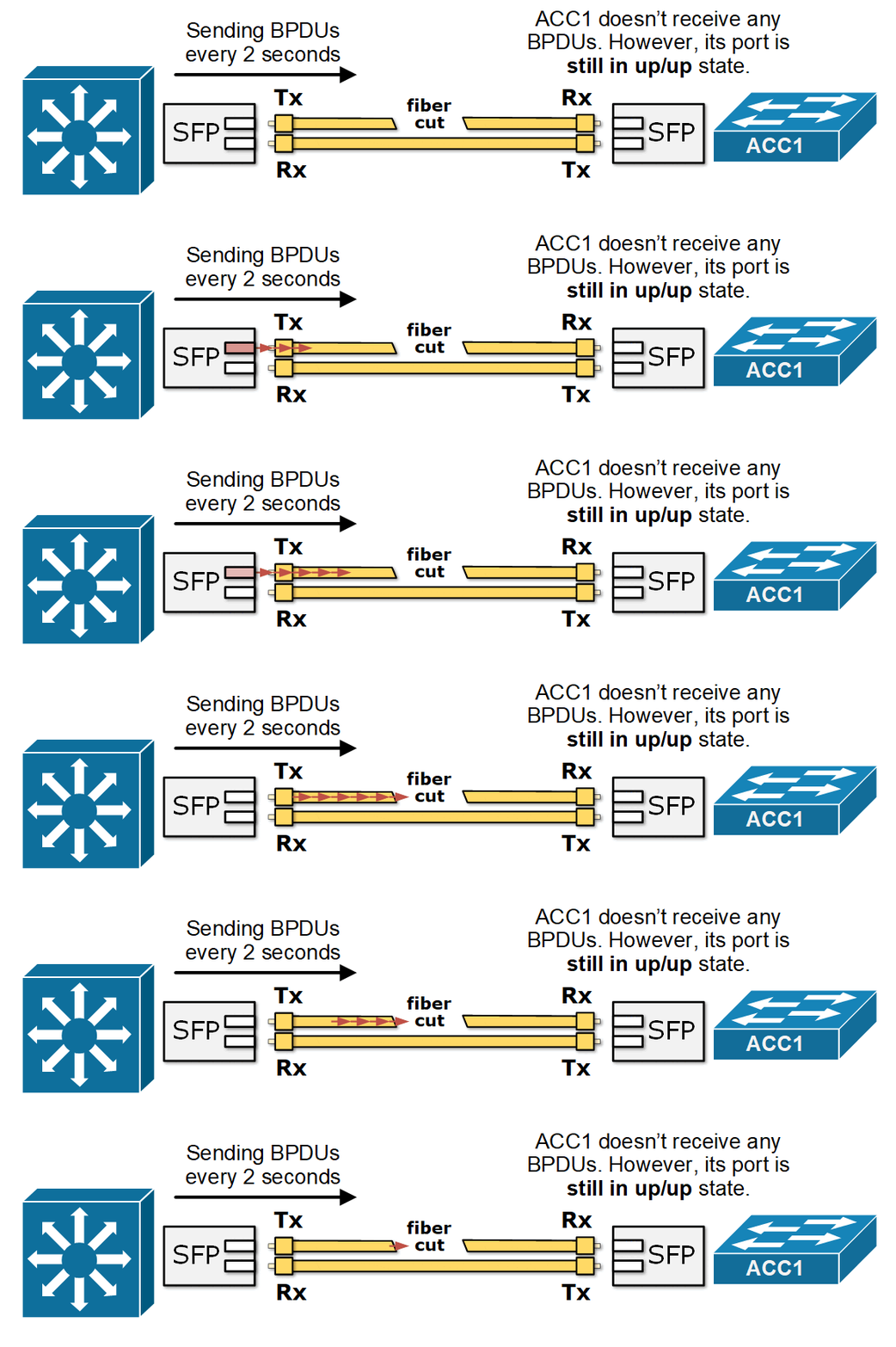
MaxAge20 seconds (10x Hello timer)The Max Age timer is how long a switch keeps a configuration BPDU before deleting it. If no new BPDUs are received in that time, the switch assumes there’s a topology change.
Forward Delay15 secondsThe time a switchport stays in the Listening and Learning states.

By default, the root bridge sends configuration BPDUs (called Hello BPDUs) every two seconds. Every other non-root switch receives these BPDUs at its root port and forwards them to its designated ports. If a switch misses a Hello BPDU, it waits and keeps working normally. But if no Hellos are received within the Max Age timer (default 20 seconds), the switch assumes something is wrong and recalculates the STP topology.

After Max Age expires, the switch reselects the root bridge, its root port, and checks if it should be the designated port on each link.

STP port roles examples

Let’s reload one non-root switch and see how the protocol goes through the different port states before it starts forwarding traffic. 

				
					SW2# reload
Proceed with reload? [confirm]


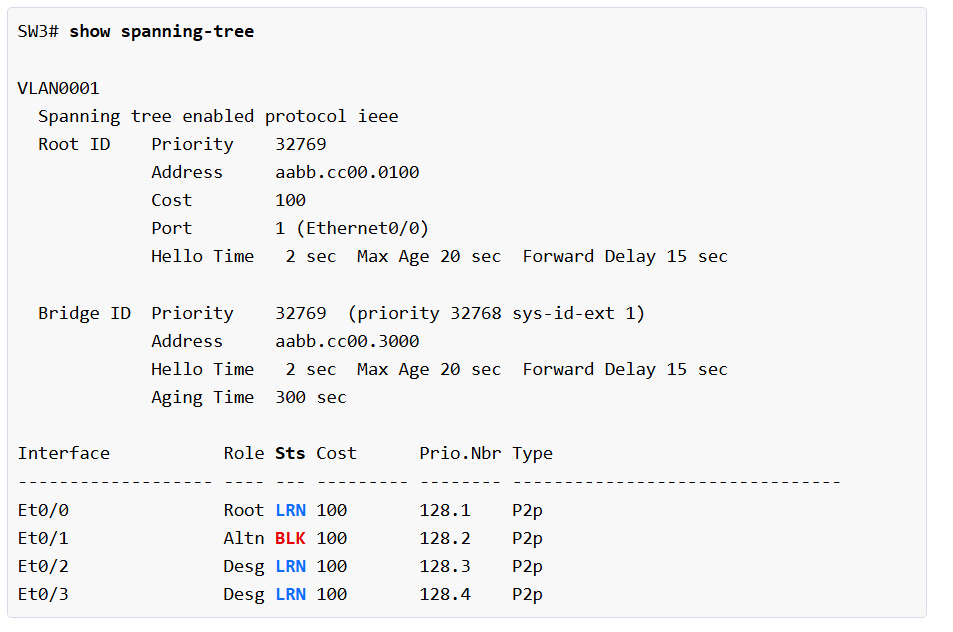
After the switch boots up, we immediately execute the show command shown below to observe how the STP protocol transition the ports to their intended roles/states.

Notice two important things in the output above (highlighted):

  • The port that is selected as the Alternate port is immediately transitioned to the blocking state. It does not go through any states. The idea is that simply moving a port to blocking is safe and cannot cause any broadcast storms (since the port does not forward neither frames nor BPDUs).
  • However, the ports that are selected to actively participate in the frame forwarding (Root and Designated ports) are transitions immediately to the Listening state.

Notice another important aspect: in classic 802.1D STP, a port normally starts in the Blocking state. However, on Cisco switches, when a port becomes a Designated Port or Root Port, it transitions immediately to the Listening state. The Blocking state is skipped for ports that are chosen to become active in the topology. The goal is to bring up forwarding ports faster while still giving time to detect loops. Also, if you’re using Rapid STP (RSTP, 802.1w), the transitions can be even faster, and the states work a bit differently (as we will see in the next sections of the course).

At this stage, none of the ports is allowed to learn MAC addresses. The ports in the Listening state only send and receive BPDUs but are not allowed to learn MAC addresses and forward frames.

				
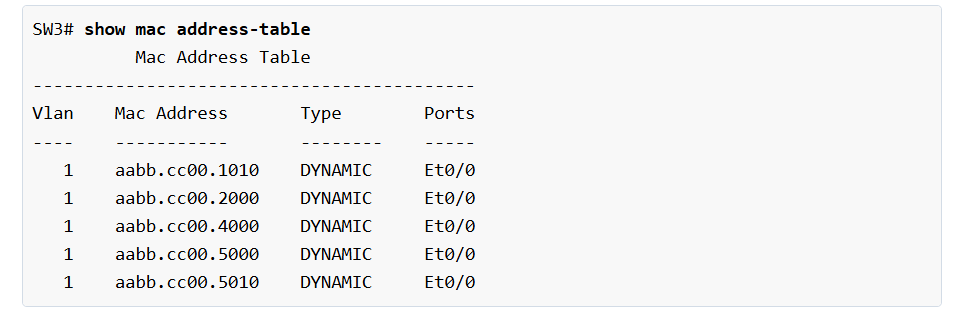
					SW3# show mac address-table
          Mac Address Table
-------------------------------------------
Vlan    Mac Address       Type        Ports


If we execute the show command after 15 seconds (one forward delay interval), we can see that the ports transitioned to the Learning state.

At this stage, we can see that the switch now learns and populates its MAC address table but is still not allowed to forward frames.

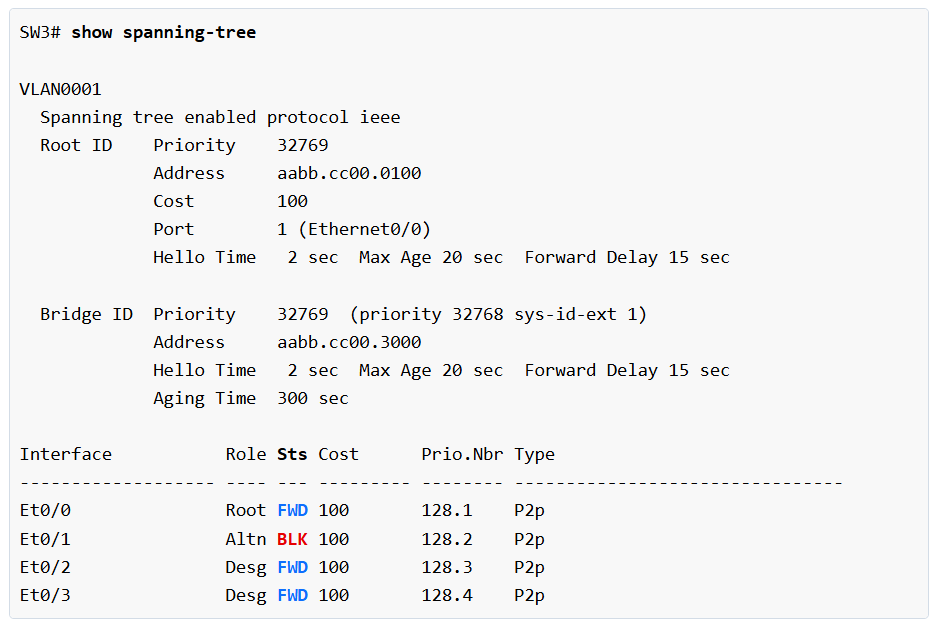
If we execute the show command after an additional 15 seconds (one forward delay), we can see that the ports transitioned to the Forwarding state.

You can see that the total time it takes for the switchport to start forwarding frames after an STP event is 30 seconds (15 seconds in Listening state and 15 seconds in Learning state).

STP Protocol Short Quick Guide

What Spanning Tree Does

Spanning Tree Protocol (STP) is a Layer 2 protocol that prevents loops in a switched network. It monitors all switch connections and creates a loop-free network topology by allowing only one active path for traffic and blocking extra redundant paths that could create loops.

Spanning Tree also selects the best path between switches by electing one switch as the Root Bridge and calculating the shortest path from other switches to that root switch. This helps traffic move efficiently through the network.

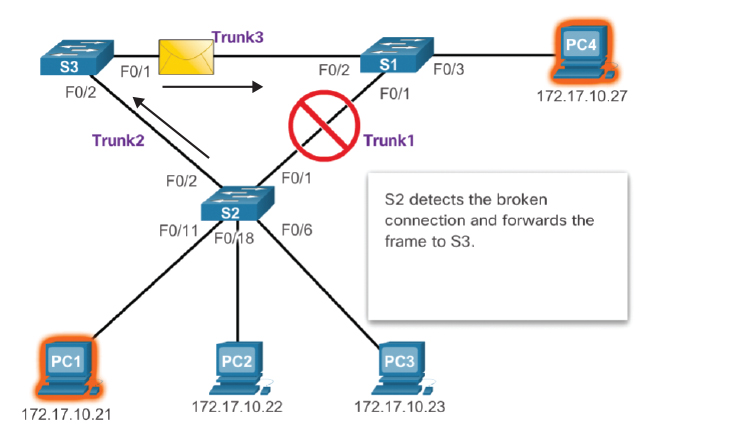
Another important job of Spanning Tree is network redundancy. If the active link fails, STP automatically unblocks a backup link and restores connectivity, keeping the network available without manual changes.

What Spanning Tree does:

  • Prevents switch loops
  • Stops broadcast storms
  • Blocks redundant paths
  • Selects best forwarding path
  • Keeps backup links ready
  • Automatically recovers from link failure
  • Improves network stability and reliability

Why Need STP Protocol in Network

What is Switch Loop?

A switch loop happens when two or more switches are connected by multiple paths, creating a circular path for data to travel again and again in the network.

When a loop occurs, network packets keep rotating between switches endlessly. This creates broadcast storms, causes MAC address table confusion, and makes the network very slow or completely down.

Example:
Switch A is connected to Switch B, and Switch B is also connected back to Switch A through another link. If both links are active without control, data packets can loop continuously.

To prevent switch loops, networks use Spanning Tree Protocol (STP), which blocks one redundant path and keeps only one active path. If the active link fails, the blocked link becomes active automatically.

What is Network Loop?

A network loop creates serious problems in a switch network because data packets keep circulating continuously between switches.

  • Broadcast Storm
    When broadcast packets enter a loop, they are copied and forwarded again and again. This creates a broadcast storm, which uses too much network bandwidth.
  • MAC Address Table Instability                                                                                            Switches learn MAC addresses from incoming frames. In a loop, the same MAC address appears on different ports repeatedly, so the MAC table keeps changing and becomes unstable.
  • Network Slowdown
    Because looped packets consume bandwidth and switch resources, the network becomes very slow. Users may face slow internet, file transfer issues, and connection timeouts.
  • Network Outage

In severe cases, the entire network can stop working because switches become overloaded by endless looping traffic.

Example of Network Loop Problem:

In a company network, Switch A, Switch B, and Switch C are connected in a circle with multiple cables. This creates a loop path.

When one PC sends a broadcast message (for example, ARP request), the packet goes from Switch A → Switch B → Switch C → back to Switch A and keeps circulating again and again.

Because of this loop:

  • Network bandwidth becomes full with repeated packets (broadcast storm)
  • Switch CPU usage becomes high
  • MAC address tables keep changing (MAC flapping)
  • Internet becomes slow
  • Users may lose network connection completely

Real Example:

  • In an office with 200 computers, if an extra cable is mistakenly connected between two switches, the whole office network may become slow or go down within minutes because packets keep looping continuously.
  • To stop this problem, Spanning Tree Protocol (STP) blocks one redundant link and keeps only one active path.

What is Switch Redundancy Link?

  • A switch redundancy link is a backup connection between two network switches. Its main purpose is to keep the network running if the primary link fails.
  • In a company network, if the main cable, port, or switch stops working, the redundancy link automatically provides another path for data traffic. This reduces network downtime and improves reliability.
  • Redundancy links are commonly used in enterprise networks, data centers, and ISP networks where continuous connectivity is important.
  • To avoid network loops when multiple links exist, switches use Spanning Tree Protocol (STP), which keeps one link active and another as backup until needed.

Example of Switch Redundancy Link:

In a company office, an Access Switch is connected to a Core Switch by a main cable. Another extra cable is also connected as a redundancy link (backup link).

Normal condition:
Main link carries all network traffic, and the backup link stays on standby.

If main link fails:
Suppose the main cable is damaged or the port stops working. The backup redundancy link automatically becomes active, so users still have network access.

Example Path:
PC → Access Switch → Core Switch (Main Link)
PC → Access Switch → Core Switch (Backup Redundancy Link)

  • Spanning Tree Protocol (STP) is needed in a network to prevent switching loops and keep the network stable. In Ethernet networks, companies often connect switches with multiple links to provide redundancy and backup paths. Without STP, these extra links can create loops where broadcast packets circulate endlessly between switches. This can quickly cause broadcast storms, high CPU usage, MAC address table instability, duplicate frames, and complete network failure.
  • STP is important because it automatically detects redundant paths and blocks unnecessary links, creating a loop-free logical network. At the same time, it keeps blocked links as standby backup links. If the main active link fails, STP automatically enables the backup path, helping maintain network connectivity without manual intervention.
  • In company networks using switches from Cisco Systems, Juniper Networks, or Huawei, STP is widely used to improve network reliability, redundancy, stability, and fault tolerance.

In short:
Need STP = Prevent loops + avoid broadcast storms + provide backup path + keep network running smoothly.

Spanning Tree Protocol (STP) is needed to prevent network loops in switch networks.

  • When multiple links connect switches, data packets can circulate endlessly, causing broadcast storms, network slowdown, and even complete network failure.
  • STP solves this by blocking extra redundant paths and keeping only one active path. If the main link fails, the blocked backup link becomes active automatically.

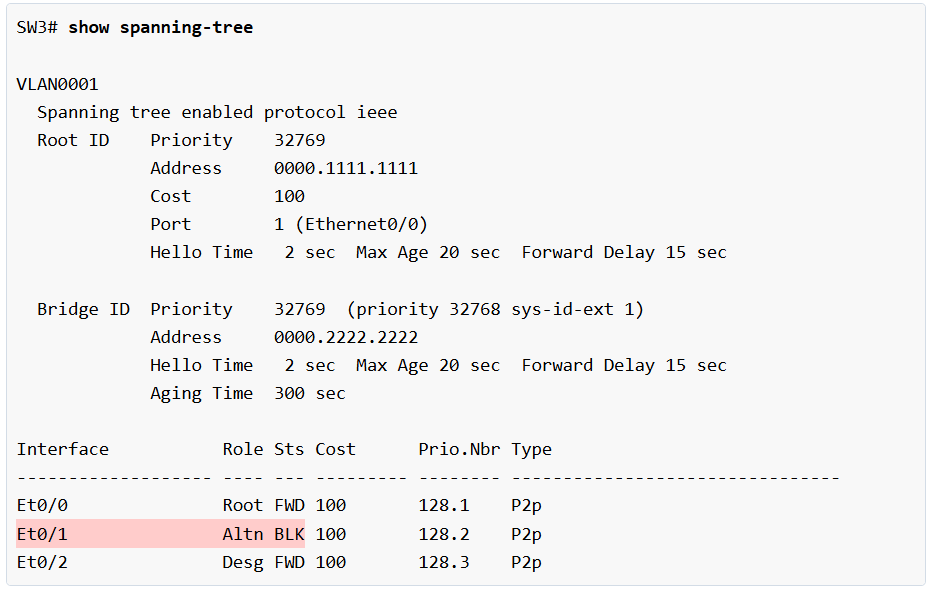
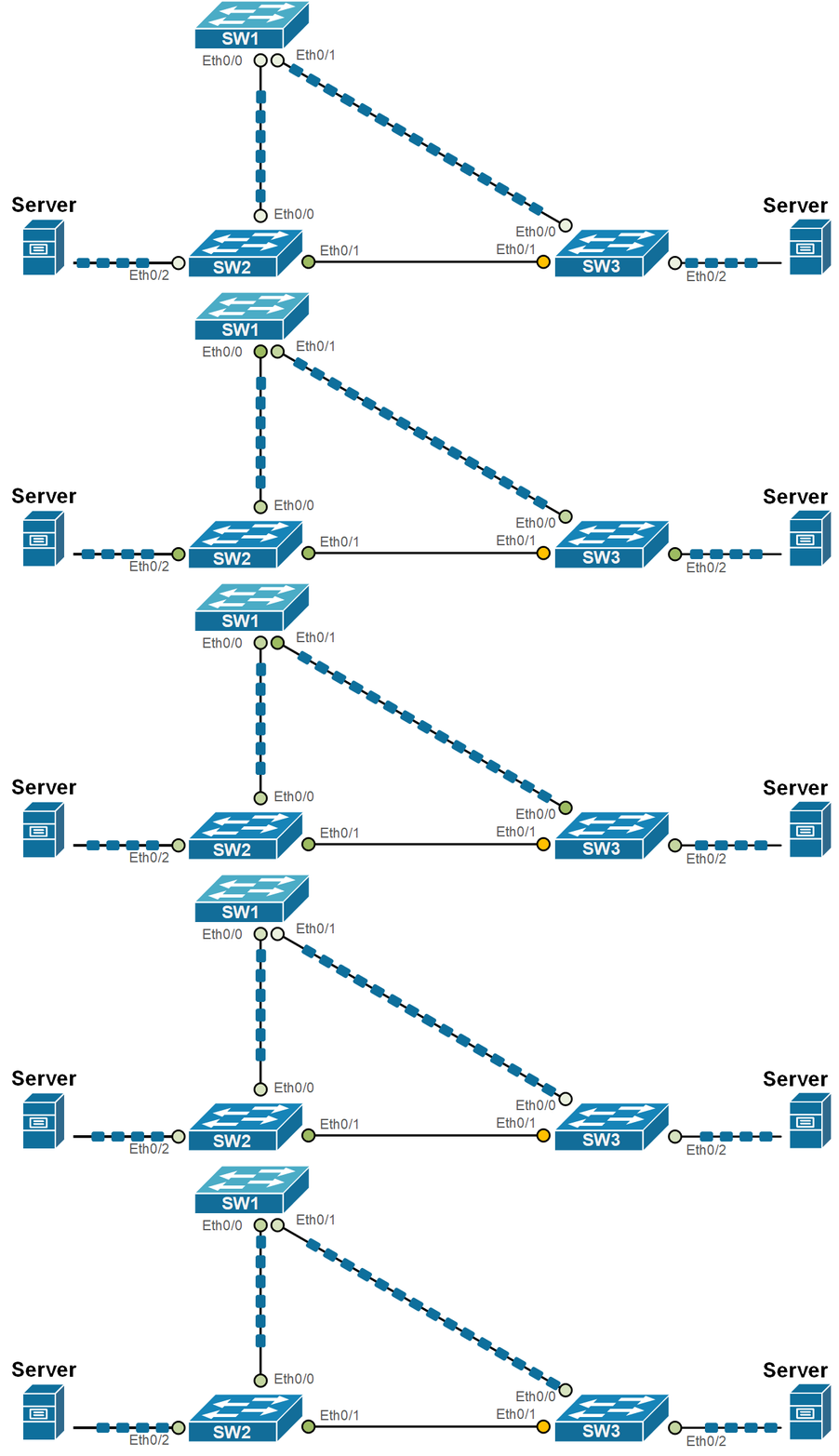
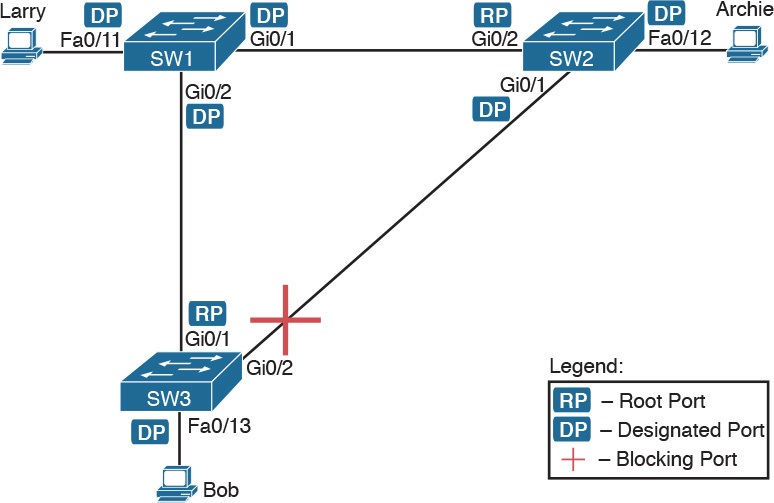
STP Protocol is working This Diagram Dont Have Any Loop Switch Number 2 ETH0/1 Path is block by STP

What is STP Protocol & How Work

  • Spanning Tree Protocol (STP) is a Layer 2 network protocol used in switches to prevent switching loops in Ethernet networks. In many company networks, switches are connected with redundant links to provide backup paths if one connection fails. While redundancy improves reliability, it can also create loops where packets continuously circulate between switches. STP solves this problem by creating a loop-free logical path and blocking unnecessary redundant links.
  • STP works by first exchanging special control messages called BPDU (Bridge Protocol Data Units) between all connected switches. These messages contain important information such as switch priority and MAC address, together called the Bridge ID. Using this information, all switches compare themselves, and the switch with the lowest Bridge ID becomes the Root Bridge. The Root Bridge acts as the central reference point for the entire switched network.
  • After the Root Bridge is selected, every other switch calculates the best and shortest path to reach the Root Bridge. This calculation is based on path cost, which depends on link speed—faster links have lower cost. The port on each switch that provides the lowest-cost path to the Root Bridge becomes the Root Port. This is the main forwarding port used by that switch to communicate toward the Root Bridge.
  • Next, STP selects a Designated Port on each network segment. The Designated Port is responsible for forwarding traffic on that segment. If there is another redundant path that could create a loop, STP places one of those ports into a Blocking state, where it does not forward normal data traffic. By blocking redundant paths, STP removes loops while still keeping backup links available.
  • STP ports move through different states before forwarding traffic. These states include Blocking, Listening, Learning, and Forwarding. In Blocking state, the port only listens for BPDU messages. In Listening state, the switch prepares topology information. In Learning state, it starts learning MAC addresses. Finally, in Forwarding state, the port begins sending and receiving normal network traffic. This process helps create a stable and loop-free network.

For example, imagine a company network using three switches from Cisco Systems connected in a triangle. Normally, this design creates a loop. STP automatically elects one switch as Root Bridge, chooses the best forwarding paths, and blocks one redundant link. If the active link fails, STP can automatically activate the blocked backup link, keeping the network running without manual intervention.

In short, STP works by electing a Root Bridge, choosing the best communication path, blocking extra loop-causing links, and maintaining a safe backup path for network reliability.

Root Switch Selection Process:?

1. Compare Bridge Priority
Each switch has a Bridge Priority value (default is often 32768).
The switch with the lowest priority is selected as Root Switch.

2. If priority is same → Compare MAC Address
If two switches have the same priority, STP checks their MAC addresses.
The switch with the lowest MAC address becomes Root Switch.

3. Root switch election
After comparison, one switch is elected as the Root Switch, and all other switches calculate the best path toward it.

Example:

  • Switch A → Priority 32768, MAC 00:11:22:33:44:55
  • Switch B → Priority 24576, MAC 00:11:22:33:44:66
  • Switch C → Priority 32768, MAC 00:11:22:33:44:77

Here, Switch B becomes Root Switch because 24576 is the lowest priority.

If all priorities were equal, the switch with the lowest MAC address would become Root Switch.

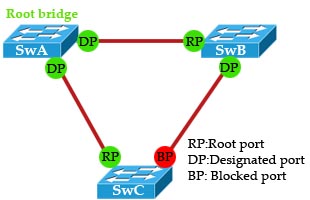
What is RP DP BP?

RP (Root Port)?
A Root Port is the port on a non-root switch that has the shortest and best path to the Root Switch. Every non-root switch has only one Root Port. This port is used to send traffic toward the root switch and remains in forwarding state.

DP (Designated Port)?
A Designated Port is the best port on a network segment chosen by Spanning Tree Protocol (STP) to forward traffic. This port handles communication on that segment and stays active in forwarding mode.

BP (Blocked Port)?
A Blocked Port is a port placed in blocking state by STP to prevent network loops. It normally does not forward traffic, but it acts as a backup link. If the active path fails, the blocked port can become active automatically.

Example
Suppose Switch A is the Root Switch, and Switch B and Switch C are connected to it. The ports on Switch B and Switch C that connect toward Switch A become Root Ports (RP). On each segment, one port becomes the Designated Port (DP) for forwarding traffic. If there is an extra connection between Switch B and Switch C, STP blocks one side of that link, making it a Blocked Port (BP) to stop looping traffic.

What is Switch BPDU?

BPDU (Bridge Protocol Data Unit) is a control message sent between network switches in Spanning Tree Protocol networks. It helps switches communicate with each other and build a loop-free network path.

Purpose of BPDU?

The main purpose of BPDU is to prevent network loops. When multiple cables connect switches, loops can happen. Loops cause broadcast storms, duplicate packets, and network slowdown. BPDU helps switches decide which path should stay active and which path should be blocked.

How BPDU Works

Each switch sends BPDU messages to neighboring switches regularly. These messages contain switch information such as:

  • Bridge ID (switch identity)
  • Root Bridge ID
  • Path cost
  • Port priority
  • Timer values

By comparing this information, switches decide the best path for traffic.

Root Bridge Selection?

BPDU helps elect one switch as the Root Bridge. The switch with the lowest Bridge ID becomes root. All other switches calculate the shortest path to reach the root switch.

Port Role Decision?

Using BPDU, switches assign port roles:

  • Root Port – Best path toward root bridge
  • Designated Port – Forwarding port on network segment
  • Blocked Port – Stops traffic to prevent loops

BPDU Example:

Imagine three switches connected in triangle shape. This creates a loop. Switches exchange BPDUs, elect one root bridge, and block one port. Now traffic flows in one active path, and loop is prevented.

Simple Meaning?

In short, BPDU is like a communication message between switches that helps STP keep the network safe, organized, and loop-free.


What are STP Port States?

When STP is enabled on a network bridge, each port is set to one of five states to control frame forwarding:

  1. Disabled. The port does not participate in frame forwarding or STP operations.
  2. Blocking. The port does not participate in frame forwarding and discards frames received from the attached network segment. However, the port continues to listen for and process BPDUs.
  3. Listening. From the blocking state, the port transitions to the listening state. The port discards frames from the attached network segment or forwarded from another port. However, it receives BPDUs and redirects them to the switch module for processing.
  4. Learning. The port moves from the listening state to the learning state. It listens for and processes BPDUs but discards frames from the attached network segment or forwarded from another port. It also starts updating the address table with the information it’s learned. In addition, it processes user frames but does not forward those frames.
  5. Forwarding. The port moves from the learning state to the forwarding state and starts forwarding frames across the network segments. This includes frames from the attached network segment and those forwarded from another port. The port also continues to receive and process BPDUs, and the address table continues to be updated.

STP moves from the blocking state through the forwarding state in relatively short order, usually between 15 to 20 seconds for each state. Every port starts in the blocking state. If it’s been disabled, the port enters directly into the blocking state upon being enabled. STP balances the states across ports to avoid bridge looping, while still making redundancy possible.

Spanning Tree Protocol (STP) is mainly available on Managed Switches

Managed Switch
A managed switch supports STP because it has software features for network control, configuration, VLANs, monitoring, and loop prevention. Network engineers can enable and configure STP on these switches.

Unmanaged Switch
An unmanaged switch usually does not support STP configuration. It works as plug-and-play and has very limited control features. Some basic unmanaged switches may have simple loop detection, but full STP is generally not available.

Example:

  • Managed Switch → Supports STP → Used in company networks
  • Unmanaged Switch → Usually no STP → Used in small home/office networks

Short:
STP = Mostly Managed Switch feature.

What is STP, RSTP, and PVST

STP (Spanning Tree Protocol – IEEE 802.1D)

STP is the original loop-prevention protocol used in Ethernet switched networks. It prevents network loops and broadcast storms by creating a loop-free logical topology. STP works by electing a Root Bridge, calculating the shortest path to the root, and then blocking redundant ports while keeping one active path. Ports move through multiple states—Blocking, Listening, Learning, and Forwarding—before they start sending data. Because of these slow transitions, STP convergence time is high (around 30–50 seconds), which can cause noticeable network downtime during failures. STP is reliable but considered slow for modern networks.


RSTP (Rapid Spanning Tree Protocol – IEEE 802.1w)

RSTP is an improved and faster version of STP designed to reduce network downtime. It performs the same basic function—preventing loops—but with much faster convergence, usually within a few seconds. RSTP introduces new port roles such as Alternate Port and Backup Port, and simplifies port states into Discarding, Learning, and Forwarding. Instead of waiting for long timers like STP, RSTP uses rapid handshakes between switches to quickly detect failures and activate backup paths. RSTP is backward compatible with STP and is widely used in modern enterprise networks.


PVST (Per-VLAN Spanning Tree – Cisco)

PVST is a Cisco-specific implementation of STP that runs a separate STP instance for each VLAN. This allows better traffic optimization because each VLAN can have a different Root Bridge, improving load balancing across links. Traditional STP and RSTP create only one spanning tree for all VLANs, but PVST gives more control in VLAN-based networks. Cisco also provides Rapid PVST+, which combines the speed of RSTP with per-VLAN operation. PVST is commonly used in Cisco environments but is not vendor-neutral.


Key Differences (Quick View)

FeatureSTPRSTPPVST
StandardIEEE 802.1DIEEE 802.1wCisco proprietary
Convergence SpeedSlow (30–50 sec)Fast (1–5 sec)Depends on STP/RSTP
Spanning TreeOne for all VLANsOne for all VLANsOne per VLAN
Port RolesRoot, Designated, BlockedRoot, Designated, Alternate, BackupSame as STP/RSTP
UsageOld networksModern networksCisco VLAN networks

Conclusion

  • STP is reliable but slow and mostly outdated
  • RSTP is fast, efficient, and best for modern networks
  • PVST provides VLAN-level control and load balancing in Cisco networks

In real enterprise designs, RSTP or Rapid PVST+ is preferred to ensure fast recovery, redundancy, and stable network performance.

STP And RSTP Difference

STP (Spanning Tree Protocol)?

Spanning Tree Protocol STP is a Layer 2 network protocol used in switches to prevent network loops. When two or more switches are connected by multiple cables, data packets may keep circulating in the network, creating a loop. STP solves this problem by selecting one active path for data traffic and blocking the extra path. This keeps the network stable and avoids broadcast storms, MAC table instability, and network slowdown.

STP (Spanning Tree Protocol)?

STP is a network protocol used in switches to prevent network loops.
When multiple links connect switches, STP blocks one link and keeps only one active path. If the main link fails, the blocked link becomes active.

Example:
Switch A connected to Switch B with 2 cables.
STP blocks 1 cable to stop looping.

Problem:
STP takes 30–50 seconds to recover after link failure. Network becomes slow during this time.

RSTP (Rapid Spanning Tree Protocol)?

Rapid Spanning Tree Protocol RSTP is an improved and faster version of STP. Its main job is also to prevent switching loops, but it reacts much faster when a network link fails. If the active link goes down, RSTP quickly enables the backup link, so network communication continues with very little interruption. Because of this fast recovery, RSTP is commonly used in modern networks.

RSTP is the faster version of STP.
It also prevents loops, but recovers very quickly when a link fails.

Example:
If main cable fails, backup cable becomes active in 1–6 seconds.

Benefit:
Network downtime is very short.

Speed Difference?

The biggest difference between STP and RSTP is convergence speed, which means how quickly the network becomes stable after a topology change. STP is slow and may take around 30 to 50 seconds to recover after a link failure because it goes through several stages before forwarding traffic again. RSTP is much faster and can recover in around 1 to 6 seconds, making it better for networks that need quick failover.

Port State Difference?

STP uses five port states: Blocking, Listening, Learning, Forwarding, and Disabled. A switch port moves through these states step by step before it starts sending data. This process takes time. RSTP simplifies this by using only three states: Discarding, Learning, and Forwarding. With fewer states and faster decision-making, RSTP activates ports much more quickly.

Port Role Difference?

In STP, switch ports have roles such as Root Port, Designated Port, and Blocked Port. RSTP keeps these roles and adds extra roles like Alternate Port and Backup Port. These additional roles help RSTP quickly switch to a backup path when the main path fails, improving recovery speed and network reliability.

Example

Imagine three switches connected in a triangle shape with three cables. This creates a loop path. STP blocks one cable and keeps two links active for normal traffic. If one active cable fails, STP takes time before enabling the blocked cable. In RSTP, the blocked backup link can become active almost immediately, so users may not even notice the failure.

Conclusion

STP and RSTP both prevent network loops in switched networks, but RSTP is faster, smarter, and more efficient. STP is mostly found in older networks, while RSTP is preferred in modern business networks because it provides quick recovery and better network performance.

STP vs RSTP

FeatureSTPRSTP
Full NameSpanning Tree ProtocolRapid Spanning Tree Protocol
SpeedSlowFast
Recovery Time30–50 sec1–6 sec
Port States5 states3 states
Network PerformanceNormalBetter
Used InOld switchesModern switches

What is PVST (Per VLAN Spanning Tree)

Introduction?

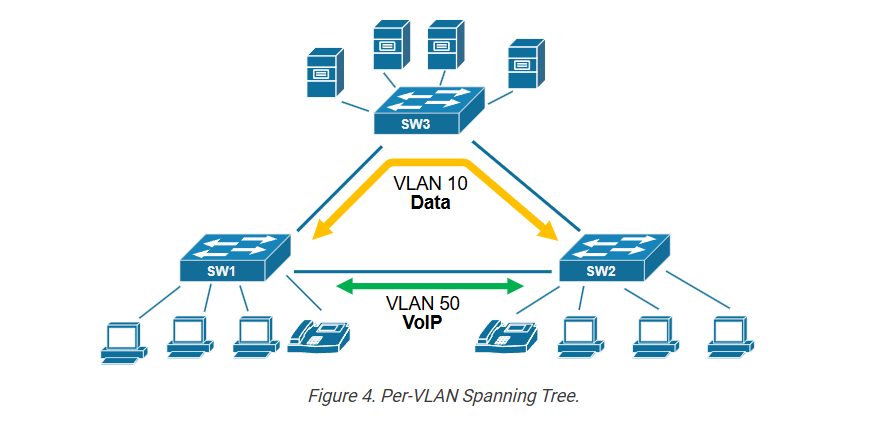
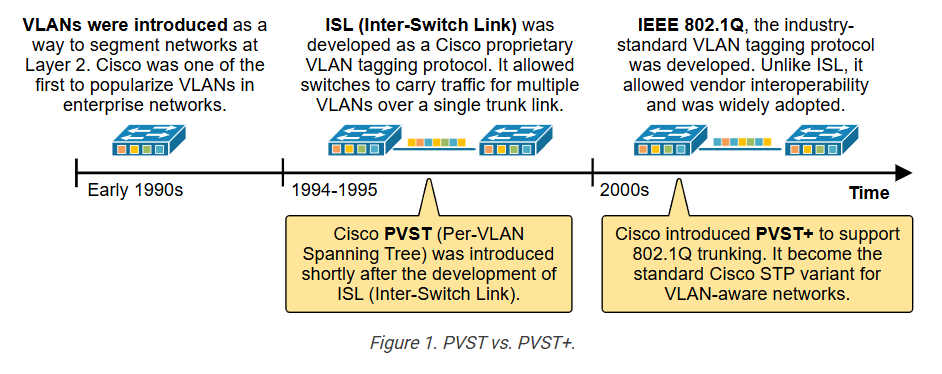
Per VLAN Spanning Tree PVST is a Layer 2 switching protocol used to prevent network loops in VLAN networks. It is mainly used in Cisco switches. PVST is an advanced version of Spanning Tree Protocol where each VLAN runs its own separate spanning tree instance. This gives better control over network traffic.

How PVST Works?

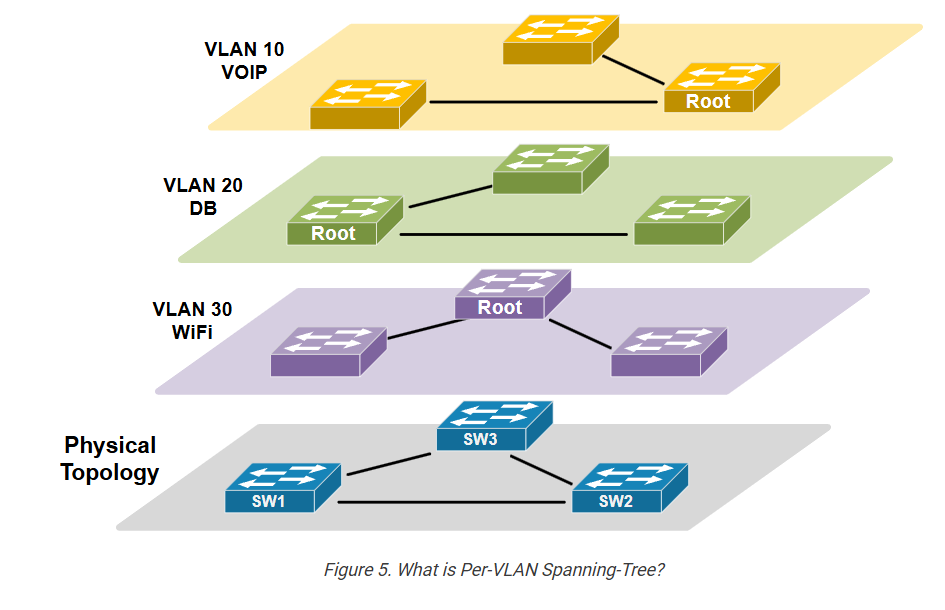
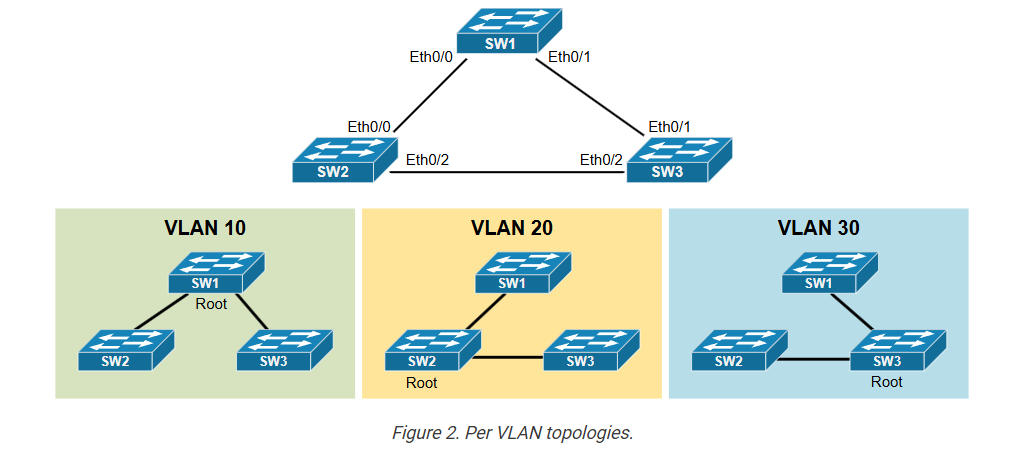
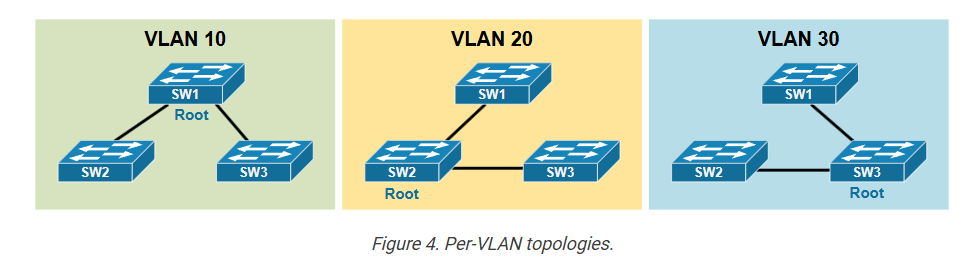
In normal STP, all VLANs share one spanning tree path. In PVST, every VLAN creates its own spanning tree topology. Each VLAN selects its own Root Bridge, Root Port, and Designated Port. Because of this, different VLANs can use different active paths in the network while still preventing loops.

Example:

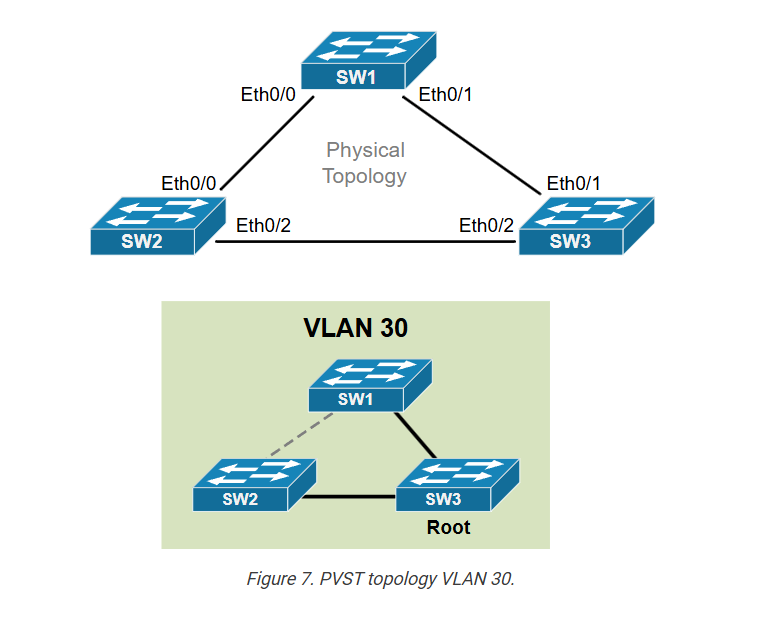
Suppose a company has three VLANs: VLAN 10 for HR, VLAN 20 for Sales, and VLAN 30 for IT. In PVST, VLAN 10 may use Switch A as Root Bridge, VLAN 20 may use Switch B as Root Bridge, and VLAN 30 may use Switch C as Root Bridge. This allows traffic from different departments to use different network paths, improving bandwidth usage.

Benefits of PVST?

The main advantage of PVST is better traffic management. It supports load balancing because each VLAN can choose a different path. It improves link utilization and gives network administrators more control over VLAN traffic flow. It also keeps loop prevention active for every VLAN separately.

Disadvantages of PVST?

PVST needs more switch resources because each VLAN runs its own spanning tree process. More VLANs mean more CPU and memory usage. Network configuration and troubleshooting also become more complex compared to normal STP.

Conclusion

PVST is useful in networks with multiple VLANs where better traffic control is needed. It prevents loops like STP, but also allows each VLAN to use its own optimized path. This makes the network more flexible, efficient, and scalable.

This lesson begins our discussion on Cisco’s PVST (Per-VLAN Spanning-Tree) and PVST+ protocols. First, we are going to examine the inefficiencies of the original STP, and then we are going to show what improvements PVST brings to the network.

Inefficiencies of Common Spanning Tree (CST)?

The original IEEE 802.1d spanning-tree protocol (commonly referred to as common spanning tree) was a significant breakthrough in networking. It solved the problem of loops in switched networks by creating a single loop-free path, making switched networks more reliable. It also allowed switched networks to scale and laid the foundation for modern data centers. However, with the increasing number of users and applications connected to the network, three major protocol inefficiencies started to uncover: 

  • wasted bandwidth
  • suboptimal traffic paths
  • limited fault isolation

We are going to use the following diagram to start discussing each of the common STP inefficiencies. 

Configuring Per-VLAN STP (PVST)

In this lesson, we will go though the process of configuring different spanning-tree topologies per VLAN.

Тhe difference between PVST and PVST+

When you start reading different documentations on per-VLAN Spanning Tree, you will eventually encounter two different terms: PVST and PVST+. Nowadays, they both mean the same thing, but that was not always the case. To understand the difference between the two, we must look back at the history of switching technologies, particularly the development and adoption of virtual LANs (VLANs) and VLAN tagging protocols.

In the early 1990s, VLANs were introduced as a way to segment layer 2 networks. It was a significant breakthrough in the industry. Cisco was one of the first vendors to really popularize VLANs in the enterprise. At that time, Cisco had developed its own VLAN tagging method called ISL (Inter-Switch Link). ISL allowed switches to carry VLANs over a single link called trunk. 

Since ISL could carry VLAN information, Cisco designed PVST to take advantage of it by running a separate instance of the Spanning Tree Protocol (STP) for each VLAN. This gave more control and flexibility in how traffic flowed through the layer 2 network. However, it only worked on Cisco equipment because both ISL and PVST were Cisco proprietary.

The industry followed along and, in the early 2000s, the IEEE introduced a standard VLAN tagging method called 802.1Q. It was accepted by many vendors and soon become the industry-standard. Cisco wanted to keep the benefits of PVST while also supporting this new VLAN tagging standard. So they created PVST+, an updated version of PVST that could work over 802.1Q trunks. PVST+ allowed Cisco switches to interoperate with other vendors using standard STP, while still maintaining one STP instance per VLAN inside Cisco’s network.

Key Note: PVST works only with ISL trunks, while PVST+ works with 802.1Q trunks (hence interoperable with other vendors).

Nowadays, wherever you encounter the term PVST it refers to the PVST+ implementation. For example, you can see the configuration command that changes the STP mode on a modern switch. Notice that it says PVST, even though it is actually PVST+.

				
					SW1(config)# spanning-tree mode ?
  mst         Multiple spanning tree mode
  pvst        Per-Vlan spanning tree mode
  rapid-pvst  Per-Vlan rapid spanning tree mode


All modern switches support only PVST+ and 802.1Q trunking. ISL and PVST are phased out. Although all official documentation and configuration lines use the term PVST, they actually mean PVST+.

Configuring different STP topology per VLAN:

Now let’s see the PVST protocol in action. We are going to use the topology shown in the diagram below. 

We have three switches connected via 802.1Q trunks and three VLANs 10, 20 and 30 alongside the default VLAN 1. Notice that all modern Cisco switches run the Rapid-PVST by default. However, since we are still discussing the PVST, we first need to change the STP protocol on each switch as shown in the output below. 

				
					// We configure this command on every swtich
SW1# conf t
Enter configuration commands, one per line.  End with CNTL/Z.
SW1(config)# spanning-tree mode pvst
Warning: Changing STP mode can disrupt the traffic and make system unstable
Recommend to change STP mode only during maintenance window


Now, all switches run per-VLAN spanning tree (PVST). We can verify this on every switch using the show spanning-tree command. If the “Spanning tree enabled protocol” line says “ieee,” the switch runs PVST, as shown in the output below. If it says “rstp,” it means the switch runs Rapid-PVST. If it says “mstp,” it means the switch runs Multiple Spanning-Tree.
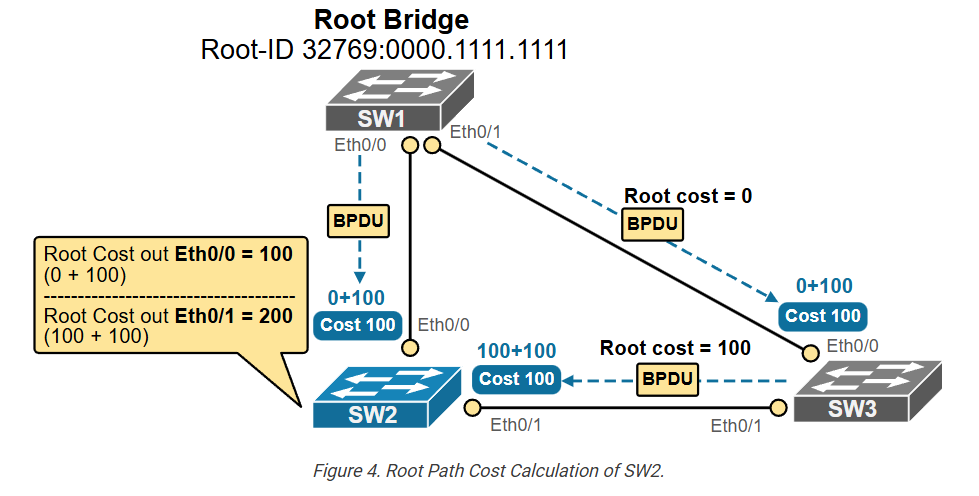
				
					SW1# show spanning-tree
VLAN0001
  Spanning tree enabled protocol ieee
<lines omitted for brevity>


Let’s now check the default topology of every VLAN. SW1 is the root bridge for each one because its MAC address is the lowest of the three switches, as you can see in the output below.

				
					SW1# show spanning-tree

VLAN0001
  Spanning tree enabled protocol ieee
  Root ID    Priority    32769
             Address     aabb.cc00.1000
             This bridge is the root
             Hello Time   2 sec  Max Age 20 sec  Forward Delay 15 sec
<lines omitted for brevity>

VLAN0010
  Spanning tree enabled protocol ieee
  Root ID    Priority    32778
             Address     aabb.cc00.1000
             This bridge is the root
             Hello Time   2 sec  Max Age 20 sec  Forward Delay 15 sec
<lines omitted for brevity>

VLAN0020
  Spanning tree enabled protocol ieee
  Root ID    Priority    32788
             Address     aabb.cc00.1000
             This bridge is the root
             Hello Time   2 sec  Max Age 20 sec  Forward Delay 15 sec
<lines omitted for brevity>

VLAN0030
  Spanning tree enabled protocol ieee
  Root ID    Priority    32798
             Address     aabb.cc00.1000
             This bridge is the root
             Hello Time   2 sec  Max Age 20 sec  Forward Delay 15 sec
<lines omitted for brevity>


Notice that the priority of all switches is the default one 32768. Technically the priority is a combination of the priority value and the vlan number, as shown in yellow in the diagram below.

For example, the default priority for VLAN 1 is 32768+1=32769. The default one for VLAN 10 is 32768+10=32778, for VLAN 20 is 32768+20=32788 and for VLAN 30 is 32768+30=32798. You can verify this on the CLI as shown in the output below.

				
					SW1# show spanning-tree bridge detail

VLAN0001
  Bridge ID  Priority    32769  (priority 32768 sys-id-ext 1)
             Address     aabb.cc00.1000
             Hello Time   2 sec  Max Age 20 sec  Forward Delay 15 sec
VLAN0010
  Bridge ID  Priority    32778  (priority 32768 sys-id-ext 10)
             Address     aabb.cc00.1000
             Hello Time   2 sec  Max Age 20 sec  Forward Delay 15 sec
VLAN0020
  Bridge ID  Priority    32788  (priority 32768 sys-id-ext 20)
             Address     aabb.cc00.1000
             Hello Time   2 sec  Max Age 20 sec  Forward Delay 15 sec
VLAN0030
  Bridge ID  Priority    32798  (priority 32768 sys-id-ext 30)
             Address     aabb.cc00.1000
             Hello Time   2 sec  Max Age 20 sec  Forward Delay 15 sec


Since none of the switches is explicitly configured to be the root bridge for any of the VLANs, SW1 is elected based on lowest MAC address. However, this means that if another switch with lower MAC connects to the topology, it can immediately become the root bridge and initiate a recalculation of the entire topology. This is not desirable by any means. It is strongly recommended that every layer 2 network has explicitly configured root bridge for every VLAN.

Configuring the root bridge for a VLAN:

Let’s now configure the VLAN topologies as shown in the diagram below. 

				
					SW2(config)# spanning-tree vlan 20 ?
  forward-time  Set the forward delay for the spanning tree
  hello-time    Set the hello interval for the spanning tree
  max-age       Set the max age interval for the spanning tree
  priority      Set the bridge priority for the spanning tree
  root          Configure switch as root
  <cr>          <cr>


The command spanning-tree vlan [vlan-id] priority sets the bridge priority value manually for a specific VLAN. This value determines which switch becomes the root bridge. Lower priority means a higher chance of becoming root. Typically, in production environments, the network admin configures the switch that must be the root with priority 0.

The command spanning-tree vlan [vlan-id] root is a macro that automatically adjusts the switch’s priority to help it become the root bridge (or backup root). Cisco calculates a good priority value and applies it for you. It’s quicker and easier to use if you don’t want to set numbers manually. 

  • When you configure a switch as root primary, the switch sets its priority to 24576 for the VLAN if that’s enough to become the root. 
  • If another switch already has a lower priority, the switch sets its priority to 4096 less than the current lowest value so that it can become the new root.

In short, priority gives you full manual control. The root command is a shortcut that helps set the switch as root in more human-friendly way.

Configuring SW1 as root for VLAN 1 and 10:

Let’s configure SW1 as root bridge for VLAN 1 and for VLAN 10. Let’s us the automatic macro command as shown in the output below.

				
					SW1# conf t
Enter configuration commands, one per line.  End with CNTL/Z.
SW1(config)# spanning-tree vlan 1 root primary
SW1(config)# spanning-tree vlan 10 root primary
SW1(config)# end
SW1#


Now, let’s verify the priority value that the switch configured. You can see that it sets the priority to 24576, as this is enough to make the switch the root bridge. If there were another switch with a lower priority (for example, 8192), it would have configured a value 4096 lower than that (i.e., 4096).

				
					SW1# show spanning-tree

VLAN0001
  Spanning tree enabled protocol ieee
  Root ID    Priority    24577
             Address     aabb.cc00.1000
             This bridge is the root
             Hello Time   2 sec  Max Age 20 sec  Forward Delay 15 sec
  Bridge ID  Priority    24577  (priority 24576 sys-id-ext 1)
             Address     aabb.cc00.1000
             Hello Time   2 sec  Max Age 20 sec  Forward Delay 15 sec
             Aging Time  300 sec
Interface           Role Sts Cost      Prio.Nbr Type
------------------- ---- --- --------- -------- --------------------------------
Et0/0               Desg FWD 100       128.1    P2p
Et0/1               Desg FWD 100       128.2    P2p
Et0/2               Desg FWD 100       128.3    P2p

VLAN0010
  Spanning tree enabled protocol ieee
  Root ID    Priority    24586
             Address     aabb.cc00.1000
             This bridge is the root
             Hello Time   2 sec  Max Age 20 sec  Forward Delay 15 sec
             
  Bridge ID  Priority    24586  (priority 24576 sys-id-ext 10)
             Address     aabb.cc00.1000
             Hello Time   2 sec  Max Age 20 sec  Forward Delay 15 sec
             Aging Time  300 sec
             
Interface           Role Sts Cost      Prio.Nbr Type
------------------- ---- --- --------- -------- --------------------------------
Et0/0               Desg FWD 100       128.1    P2p
Et0/1               Desg FWD 100       128.2    P2p
Et0/2               Desg FWD 100       128.3    P2p


Now, SW1 is the root bridge for VLANs 1 and 10. The spanning-tree topology for these VLANs looks like follows:

Lastly, let’s verify that the link between switches 2 and 3 is blocked.

				
					SW3# show spanning-tree vlan 10
VLAN0010
  Spanning tree enabled protocol ieee
  Root ID    Priority    24586
             Address     aabb.cc00.1000
             Cost        100
             Port        2 (Ethernet0/1)
             Hello Time   2 sec  Max Age 20 sec  Forward Delay 15 sec
  Bridge ID  Priority    32778  (priority 32768 sys-id-ext 10)
             Address     aabb.cc00.3000
             Hello Time   2 sec  Max Age 20 sec  Forward Delay 15 sec
             Aging Time  300 sec
Interface           Role Sts Cost      Prio.Nbr Type
------------------- ---- --- --------- -------- --------------------------------
Et0/0               Desg FWD 100       128.1    P2p
Et0/1               Root FWD 100       128.2    P2p
Et0/2               Altn BLK 100       128.3    P2p


Configuring SW2 as root for VLAN 20:

Now, let’s make SW2 the root bridge for VLAN 20 using the other CLI command that manually sets the priority value.

Any value lower than the default one (32768) will make SW2 the root for the VLAN. However, let’s set it to 0. This is a common practice in production networks.

				
					SW2# conf t
Enter configuration commands, one per line.  End with CNTL/Z.
SW2(config)# spanning-tree vlan 20 priority 0


Now let’s verify that SW2 is the root bridge for VLAN 20. Notice that it has priority of 20, which is 0 + the vlan number 20.

				
					SW2# show spanning-tree vlan 20

VLAN0020
  Spanning tree enabled protocol ieee
  Root ID    Priority    20
             Address     aabb.cc00.2000
             This bridge is the root
             Hello Time   2 sec  Max Age 20 sec  Forward Delay 15 sec
             
  Bridge ID  Priority    20     (priority 0 sys-id-ext 20)
             Address     aabb.cc00.2000
             Hello Time   2 sec  Max Age 20 sec  Forward Delay 15 sec
             Aging Time  300 sec
             
Interface           Role Sts Cost      Prio.Nbr Type
------------------- ---- --- --------- -------- --------------------------------
Et0/0               Desg FWD 100       128.1    P2p
Et0/1               Desg FWD 100       128.2    P2p
Et0/2               Desg FWD 100       128.3    P2p


Now SW2 is the root bridge for VLAN 20. The spanning-tree topology looks like follows:

Configuring SW3 as root for VLAN 30:

Lastly, we must configure SW3 as the root bridge for VLAN 30. We are going to use the manual method again. In my personal experience, most engineers prefer to use this method instead of the automatic macro using the root primary command.

				
					SW3# conf t
Enter configuration commands, one per line.  End with CNTL/Z.
SW3(config)# spanning-tree vlan 30 priority 0


Now, let’s verify that SW3 is the root. Notice the current priority value.

				
					SW3# show spanning-tree vlan 30

VLAN0030
  Spanning tree enabled protocol ieee
  Root ID    Priority    30
             Address     aabb.cc00.3000
             This bridge is the root
             Hello Time   2 sec  Max Age 20 sec  Forward Delay 15 sec
             
  Bridge ID  Priority    30     (priority 0 sys-id-ext 30)
             Address     aabb.cc00.3000
             Hello Time   2 sec  Max Age 20 sec  Forward Delay 15 sec
             Aging Time  15  sec
             
Interface           Role Sts Cost      Prio.Nbr Type
------------------- ---- --- --------- -------- --------------------------------
Et0/0               Desg FWD 100       128.1    P2p
Et0/1               Desg FWD 100       128.2    P2p
Et0/2               Desg FWD 100       128.3    P2p


The topology is as expected. SW3 is the root and all its ports are designated ports. Hence, the link between SW1 and SW2 is blocked to prevent loops. The topology is illustrated in the diagram below.

Key Takeaways

Let’s summarize what we have seen in this lesson:

  • PVST vs. PVST+
    • PVST works only with ISL trunks, while PVST+ works with IEEE 802.1Q trunks and is interoperable with other vendors.
    • Nowadays, ISL and PVST are phased out. Whenever you encounter the term PVST and it is not explicitly stated that it means the old protocol, think of PVST+.
  • There are two command that can be used to configure a switch as the root bridge for a VLAN:
    • spanning-tree [vlan_id] root primary – a macro that automatically sets the priority value to 24576 for the VLAN if that’s enough to become the root. If another switch already has a lower priority, the switch sets its priority to 4096 less than the current lowest value so that it can become the new root.
    • spanning-tree [vlan_id] priority [value] – manually sets the priority to a particular value (a multiple of 4096). Typically, this method is preferred by network administrators as it is more explicit.

What is STP PortFast & How Works

PortFast STP PortFast is a feature in Cisco switches that makes an access port go to Forwarding state immediately, instead of waiting through normal STP states. This helps end devices connect faster.

Normal STP Port Process?

In normal Spanning Tree Protocol STP, when a port comes up, it passes through Blocking → Listening → Learning → Forwarding. This process can take around 30–50 seconds before data starts flowing. During this time, devices may not get network access immediately.

How PortFast Works?

With PortFast enabled, the switch port skips Listening and Learning delay and directly enters Forwarding state. As soon as a PC, printer, IP phone, or server connects, network communication starts quickly.

Example:

Suppose a computer is connected to a switch port. Without PortFast, the computer may wait several seconds before getting network access or an IP address. With PortFast enabled, the port forwards traffic immediately, so the computer connects faster.

Where to Use?

PortFast should be enabled on access ports connected to end devices like PCs, printers, IP phones, and servers. It should not be enabled on switch-to-switch links, because that can create network loops.

Benefit?

PortFast provides fast connectivity, reduces waiting time for devices, and helps services like DHCP start quickly after a device connects.

spanning-tree feature called PortFast. It is used to optimize the ports that connect to end-user devices by skipping the Listening and Learning state and directly putting the ports to Forwarding.

Why do we need STP Portfast?

To understand why the Spanning Tree protocol has introduced the Portfast feature, let’s examine the following example. Imagine a server connected to a switch port that is not configured with PortFast. When the server reboots, the switchport goes down and then comes back up. This triggers Spanning Tree to do the following:

  1. The Spanning-Tree protocol starts its normal process of putting the interface in a forwarding state. The port transitions to the Listening state (15 seconds), then to the Learning state (15 seconds), and finally, it moves to the Forwarding state. So, the port takes about 30 seconds before the server can send and receive data.
  2. The switch sees this link flap as a topology change and triggers the Topology Change Notification (TCN) process.. In short, when a topology change is detected, switches lower their MAC table aging timer (5 min) to the MaxAge time (20 sec). 

However, if a switchport connects only to one end-user device (like a server, computer, printer, etc.), there’s very little risk of a loop. Loops only occur when the device is bridging traffic back into the network, which end-user devices do not do.

Let’s use the topology shown in the diagram below to demonstrate this STP behavior. We will power up the server and observe how STP reacts.

The server connects to port Eth0/3, which is a standard port that is not configured with the PortFast feature. To simulate the server powering up, we enable the interface, as shown in the output below. Notice that we turned the debug spanning-tree events command on to see what happens.

				
					SW3# conf t
Enter configuration commands, one per line.  End with CNTL/Z.
SW3(config)# int e0/3
SW3(config-if)# no shutdown 
SW3(config-if)#

*May  1 17:39:01.294: STP: VLAN0001 Et0/3 -> listening
*May  1 17:39:16.294: STP: VLAN0001 Et0/3 -> learning
*May  1 17:39:31.294: STP[1]: Generating TC trap for port Ethernet0/3
*May  1 17:39:31.294: STP: VLAN0001 sent Topology Change Notice on Et0/1
*May  1 17:39:31.294: STP: VLAN0001 Et0/3 -> forwarding


Notice the times in the debug outputs. It took STP 30 seconds to put the port in the forwarding state. Nowadays, servers boot much faster than that. Additionally, servers attempt to assign IPv4/IPv6/DNS settings via DHCP during their boot-up process. Therefore, servers need to access the network immediately after they are powered on, and the spanning tree protocol becomes a bottleneck.

To fix this 30-second delay, the STP protocol has introduced the PortFast feature, which skips the Listening and Learning states and moves the port straight to Forwarding. 

What is Portfast?

PortFast is a spanning-tree feature that optimizes the handling of edge ports. Edge ports are ones that connect to end-user devices such as computers, servers, and printers. PortFast is configured per port and provides two significant optimizations when enabled:

  • When the port becomes up, STP puts it into a Forwarding state right away, skipping the Listening and Learning states.
  • When the port status changes, STP does not generate a Topology Change Notifications (TCNs).

Note: In the context of Spanning-Tree, an edge port is a switch port that is directly connected to an end-user device, such as a computer, printer, or server.

Portfast must be used only on edge ports. It should not be used on ports connected to other switches or hubs, as this can cause temporary loops.

How does Portfast work?

PortFast was introduced to solve a problem where an end-user device couldn’t get a DHCP address because the switch port took 30 seconds to go through the STP states and start forwarding traffic. PortFast skips the Listening and Learning steps and puts the port directly into the Forwarding state so that the end device can immediately access the network.

The feature works per interface. There are two ways to enable it: globally on all interfaces at once or locally at one interface at a time. The following output shows how we configure the future on one interface only.

				
					SW3# conf t
Enter configuration commands, one per line.  End with CNTL/Z.
SW3(config)# interface Ethernet0/3
SW3(config-if)# spanning-tree portfast 
!
%Warning: portfast should only be enabled on ports connected to a single
 host. Connecting hubs, concentrators, switches, bridges, etc... to this
 interface  when portfast is enabled, can cause temporary bridging loops.
 Use with CAUTION
%Portfast has been configured on Ethernet0/3 but will only
 have effect when the interface is in a non-trunking mode.
 
SW3(config-if)# end


Now, if we change the port’s state, we can see that it “jumps directly from blocking to forwarding,” skipping the Listening and Learning states.

				
					SW3# conf t
Enter configuration commands, one per line.  End with CNTL/Z.
SW3(config)# interface Ethernet0/3
SW3(config-if)# no shutdown
 
*May 1 18:17:10.952: STP:VLAN0001 Et0/3 ->jump to forwarding from blocking


Notice that the interface is now listed as an edge port. It means that the spanning-tree protocol knows that this interface connects to an end-user device.

				
					SW3# show spanning-tree 

VLAN0001
  Spanning tree enabled protocol ieee
  Root ID    Priority    24577
             Address     aabb.cc00.1400
             Cost        100
             Port        2 (Ethernet0/1)
             Hello Time   2 sec  Max Age 20 sec  Forward Delay 15 sec
             
  Bridge ID  Priority    28673  (priority 28672 sys-id-ext 1)
             Address     aabb.cc00.1300
             Hello Time   2 sec  Max Age 20 sec  Forward Delay 15 sec
             Aging Time  300 sec
             
Interface           Role Sts Cost      Prio.Nbr Type
------------------- ---- --- --------- -------- ---------------------
Et0/0               Desg FWD 100       128.1    P2p 
Et0/1               Root FWD 100       128.2    P2p 
Et0/2               Desg FWD 100       128.3    P2p 
Et0/3               Desg FWD 100       128.4    P2p Edge 


We can verify that the interface is configured with Portfast using the following show command. 

				
					SW1# show spanning-tree interface Eth0/3 detail 
 Port 4 (Ethernet0/3) of VLAN0001 is designated forwarding 
   Port path cost 100, Port priority 128, Port Identifier 128.4.
   Designated root has priority 24577, address aabb.cc00.1400
   Designated bridge has priority 32769, address aabb.cc00.1000
   Designated port id is 128.4, designated path cost 200
   Timers: message age 0, forward delay 0, hold 0
   Number of transitions to forwarding state: 1
   The port is in the portfast mode
   Link type is point-to-point by default
   BPDU: sent 55, received 0


Connecting a switch to an edge port

Since we have repeatedly stated that the feature should only be used on ports that connect to end-user devices, some people might wonder: 

“Okay, but what will happen if someone accidentally connects a switch to a Portfast interface?”

It’s essential to understand the distinction between PortFast’s administrative and operational states. The administrative state is what you’ve configured, while the operational state shows whether the feature is actually active on a given port. Let’s see what happens when we connect a switch to the interface Eth0/3, as shown in the diagram below.

As soon as we connect a switch to interface Eth0/3, the port goes into the Listening and Learning states, as shown in the output below.

				
					*May  2 06:16:30.207: STP: VLAN0001 Et0/3 -> listening
*May  2 06:16:31.207: STP: VLAN0001 Topology Change rcvd on Et0/3
*May  2 06:16:31.207: STP: VLAN0001 sent Topology Change Notice on Et0/1
*May  2 06:16:45.209: STP: VLAN0001 Et0/3 -> learning
*May  2 06:17:00.210: STP[1]: Generating TC trap for port Ethernet0/3
*May  2 06:17:00.210: STP: VLAN0001 sent Topology Change Notice on Et0/1
*May  2 06:17:00.210: STP: VLAN0001 Et0/3 -> forwarding


Essentially, the spanning-tree protocol reverts the port to a normal state to prevent potential loops. It also sends a topology change notification to the root bridge to inform it that the switch topology has changed (a new switch is added to the topology).

Now, if we check the interface’s operational state, we can see that the feature is operationally disabled, even though the port is configured with Portfast. Also, notice that the interface is no longer considered an edge port by the spanning tree. 
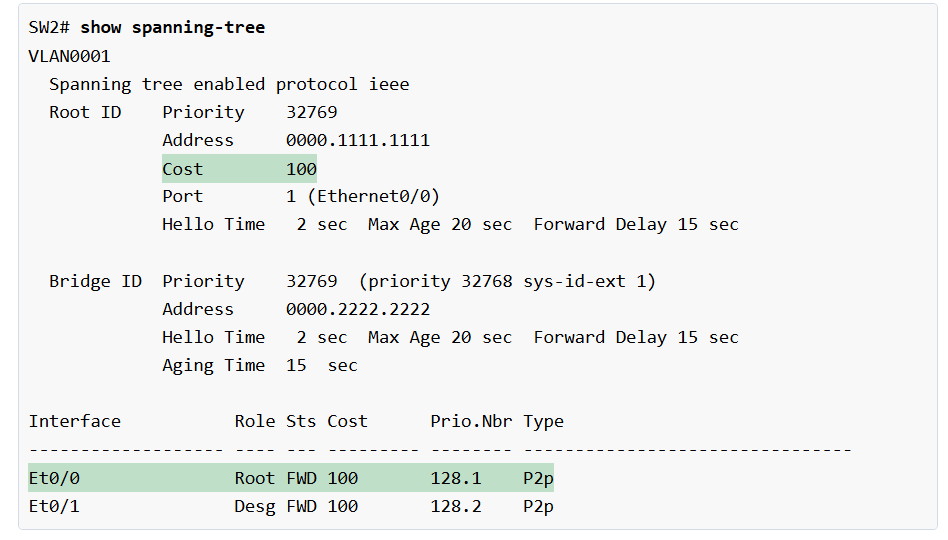
				
					SW3# show run interface Eth0/3
interface Ethernet0/3
 spanning-tree portfast
end


					SW3# show spanning-tree interface Eth0/3 portfast 
VLAN0001            disabled


					SW3# show spanning-tree 

VLAN0001
  Spanning tree enabled protocol ieee
  Root ID    Priority    24577
             Address     aabb.cc00.1400
             Cost        100
             Port        2 (Ethernet0/1)
             Hello Time   2 sec  Max Age 20 sec  Forward Delay 15 sec
             
  Bridge ID  Priority    28673  (priority 28672 sys-id-ext 1)
             Address     aabb.cc00.1300
             Hello Time   2 sec  Max Age 20 sec  Forward Delay 15 sec
             Aging Time  15  sec
             
Interface           Role Sts Cost      Prio.Nbr Type
------------------- ---- --- --------- -------- --------------------------------
Et0/0               Desg FWD 100       128.1    P2p 
Et0/1               Root FWD 100       128.2    P2p 
Et0/2               Desg FWD 100       128.3    P2p 
Et0/3               Desg FWD 100       128.4    P2p 


PortFast should only be used on ports that connect to end devices, like servers, PCs, or printers. Therefore, the switch only turns on the feature on access ports and automatically disables it on trunk ports, which connect to other switches.

Note: Portfast only works on access ports. If an interface becomes an 802.1Q trunk, the feature is automatically disabled.

Portfast and BPDUs

There’s a lot of confusion online about how the feature works in the context of BPDUs. A common misunderstanding is that it disables STP and stops sending or receiving BPDUs. That’s not true. A PortFast-enabled port still sends and receives BPDUs as every designated STP port does. In fact, if a PortFast port receives a BPDU, it acts as a normal STP port. It goes through the Spanning-Tree Algorithm (STA) steps and chooses a role (Root, Desg, or Altn) depending on the BID, the root path cost, and the port ID of the remote switch. 
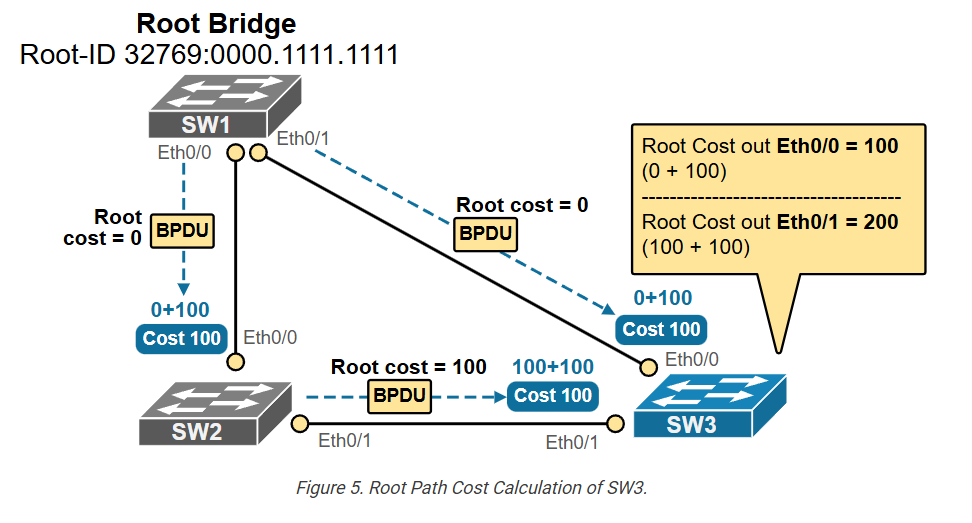
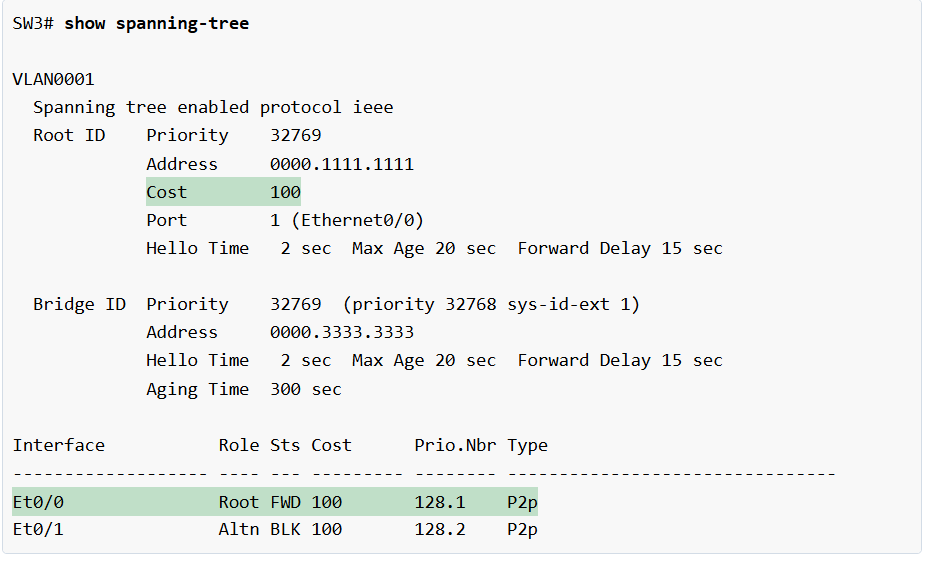
In our example, SW7 is a stub switch—it doesn’t have any other inter-switch connections. Additionally, the link between the switches is not an 802.1q trunk. In that case, SW3’s eth0/3 interface becomes a designated port and still works in a Portfast mode, as shown in the output below, even though it received a few BPDUs from SW7. 

				
					SW3# show spanning-tree interface e0/3 detail 
 Port 4 (Ethernet0/3) of VLAN0001 is designated forwarding 
   Port path cost 100, Port priority 128, Port Identifier 128.4.
   Designated root has priority 24577, address aabb.cc00.1400
   Designated bridge has priority 28673, address aabb.cc00.1300
   Designated port id is 128.4, designated path cost 100
   Timers: message age 0, forward delay 0, hold 0
   Number of transitions to forwarding state: 2
   The port is in the portfast mode
   Link type is point-to-point by default
   BPDU: sent 48, received 4


Notice two important points here:

  • SW3’s interface Eth0/3 still sends and receives BPDUs even though it is configured with Portfast.
  • It acts as a normal STP port when processing remote BPDUs. If the remote switch sends superior BPDUs, the port can go into a blocking state to prevent loops.

Now, let’s shift our focus to the different methods for enabling the feature on switchports.

Configuring Portfast on Edge ports:

The Portfast feature is disabled by default on all switchports. There are two methods you can use to configure it on one or many ports. You can enable it globally using the spanning-tree portfast default or per interface using spanning-tree portfast. In both cases, it only works on access ports.

Option 1: Enable Portfast globally:

You can set PortFast as the default for all switch ports with one global command, as shown in the diagram below. 

This will automatically enable the feature on all ports that are in access mode (non-trunking) and will disable the feature on the ones that are 802.1Q trunks.

				
					SW3# conf t
Enter configuration commands, one per line.  End with CNTL/Z.
SW3(config)# spanning-tree portfast default 
!
%Warning: this command enables portfast by default on all interfaces. You
 should now disable portfast explicitly on switched ports leading to hubs,
 switches and bridges as they may create temporary bridging loops.
 
SW3(config)# end


We can verify if the command is configured on the switch using the following command. 

				
					SW3# show spanning-tree summary 
Switch is in pvst mode
Root bridge for: none
EtherChannel misconfig guard            is enabled
Extended system ID                      is enabled
Portfast Default                        is enabled
PortFast BPDU Guard Default            is disabled
Portfast BPDU Filter Default           is disabled
Loopguard Default                      is disabled
UplinkFast                              is disabled
BackboneFast                            is disabled
Configured Pathcost method used is short
Name                   Blocking Listening Learning Forwarding STP Active
---------------------- -------- --------- -------- ---------- ----------
VLAN0001                     0         0        0          4          4
---------------------- -------- --------- -------- ---------- ----------
1 vlan                       0         0        0          4          4


Note that this is now the recommended approach in all modern networks and is included in all validated design guides. If a switchport connects to a single device, such as a server, printer, or PC, there is absolutely no reason not to enable the Portfast feature.

Option 2: Enable Portfast per-interface?

The other, more granular way to enable the feature is to use the interface-level command, as shown in the output below. 

				
					interface Ethernet0/3
 spanning-tree portfast
end


This approach is useful in scenarios when you want to enable the feature only on specific interfaces.

Using the Switchport Host macro?

You can also use a macro command switchport host that configures the port as access and configures Portfast, as you can see in the output below.

				
					SW3# conf t
Enter configuration commands, one per line.  End with CNTL/Z.
SW3(config)# interface e0/3     
SW3(config-if)# switchport ?
  access         Set access mode characteristics of the interface
  autostate      Include or exclude this port from vlan link up calculation
  dot1q          Set interface dot1q properties
  host           Set port host
  mode           Set trunking mode of the interface
  nonegotiate    Device will not engage in negotiation protocol on this
                 interface
  port-security  Security related command 
  private-vlan   Set the private VLAN configuration
  protected      Configure an interface to be a protected port
  trunk          Set trunking characteristics of the interface
  voice          Voice appliance attributes
  <cr>           <cr>
  
SW3(config-if)# switchport host 
switchport mode will be set to access
spanning-tree portfast will be enabled
channel group will be disabled

SW3(config-if)# end


In the output below, you can see that the macro command configured two individual commands that make the interface and edge port.

				
					SW3# show run interface Ethernet0/3
Building configuration...
Current configuration : 77 bytes
!
interface Ethernet0/3
 switchport mode access
 spanning-tree portfast
end


The switchport host is typically not widely used, but it can be handy in exam environments, depending on the requirements.

Portfast Design Considerations

Now let’s shift our focus on the design point of view of the feature. When should you use it, and when not?

The following diagram shows the most common scenarios when it is appropriate to use the PortFast feature and when it is not.

The general rule of thumb is this: Use PortFast on all ports connected to end-user devices, like computers, printers, or phones. Do NOT use PortFast on ports connected to other switches and hubs that bridge traffic back to the network and can cause loops. The logic behind it is this:

  • On end devices, there’s no risk of loops, so skipping STP saves time.
  • On switch-to-switch links, skipping the Listening and Learning states can cause temporary loops and harm the network.

Portfast Trunks:

Notice some special cases in the diagram above. Some of the links connecting to end devices, like access points, are actually trunks. For example, an access point can have multiple SSIDs that map to different wired VLANs. Therefore, the link to the access point (AP) must be a trunk link that carries multiple VLANs. On the other hand, the AP is an end device and does not bridge traffic back to the network. It simply provides connectivity to wireless clients. In that case, it is ok to use Portfast on the port connected to the AP to save time when the link flaps. But wait, Portfast only works on access ports, right?

In some cases, as shown in the diagram above, you may want to connect a device to a trunk port to avoid STP delays. The most common examples are access points, routers, and firewalls that connect multiple VLANs on sub-interfaces. To account for these scenarios, Cisco has introduced the spanning-tree portfast trunk command, as shown below.

				
					SW3# conf t
Enter configuration commands, one per line.  End with CNTL/Z.
SW3(config)# int eth0/3
SW3(config-if)# spanning-tree portfast ?
  disable  Disable portfast for this interface
  trunk    Enable portfast on the interface even in trunk mode
  <cr>     <cr>
SW3(config-if)# spanning-tree portfast trunk 
%Warning: portfast should only be enabled on ports connected to a single
 host. Connecting hubs, concentrators, switches, bridges, etc... to this
 interface  when portfast is enabled, can cause temporary bridging loops.
 Use with CAUTION
SW3(config-if)# end


It makes the trunk port skip the usual Spanning Tree Protocol (STP) states (listening and learning) and go immediately to forwarding. Only use it when you know there will be no loops. Cisco recommends using it only in controlled environments because it bypasses loop protection at startup.

PortFast Trunk to another Switch:

In some cases, you can go even further and use the spanning-tree portfast trunk command on a link that connects another switch. One example is to connect to a VMware ESXi host that runs multiple virtual machines and a virtual switch, as shown in the diagram below. 

In that case, the virtual switch is not part of the spanning tree topology. It does not bridge traffic back to the network. It is a stub switch that simply connects virtual machines to different VLANs. The risk of loops is very low. The goal is to avoid the 30-second delay caused by STP and provide fast link initialization to avoid delays during VM boot.

Key Takeaways

Now, let’s summarize what we have discussed in this lesson and highlight the essential points to take away from this lesson.

Why do we need Portfast in modern networks?

  • When a server connects to a regular STP port, it might not get an IP address through DHCP because the port takes about 30 seconds to enter the Forwarding state (15-sec Listening and 15-sec Learning equal 30 seconds).
  • Additionally, when a regular STP port changes its physical state (goes down and up again), the switch sends a Topology Change Notification (TCN) to the root bridge. Once the root bridge sees the TCN, it also marks all its BPDUs with the TC flag and floods them back down the tree. Every switch that gets one of these BPDUs then:
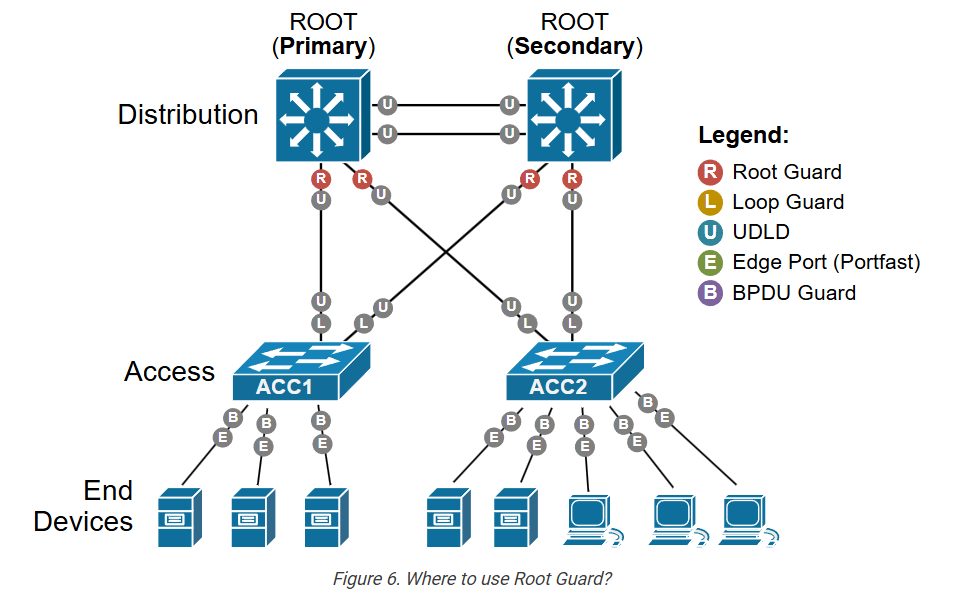
    • Flushes all dynamic MAC entries on non‑edge ports.
    • Starts using a short MAC table aging time (usually 15 seconds).
  • We don’t want a server reboot to trigger the topology change process and flush the switches’ MAC address tables.
  • We don’t want a server to wait 30 seconds before it can access the network.

What is Portfast?

  • A port configured with Portfast skips Listening and Learning states and “jumps” directly to Forwarding. Hence, as soon as the port goes up, the connected device can access the network immediately. (hence the name “PortFast“)
  • When a port configured with Portfast goes down and up again, the switch does not send TCN notifications to the root bridge.
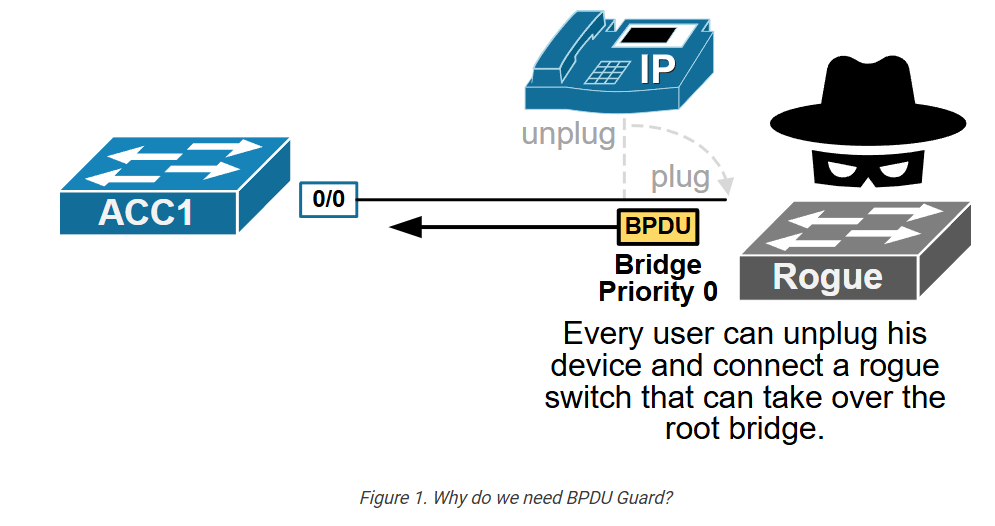
How does Portfast work?

  • Portfast is configured per switch interface.
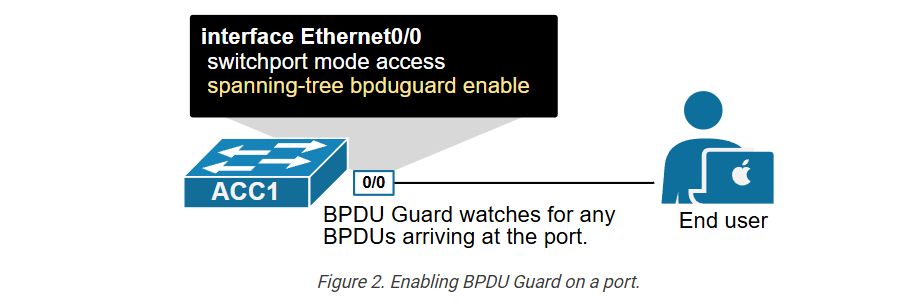
  • By default, the feature is disabled on all switchports.
  • There are two ways to configure Portfast:
    • Globally, using the spanning-tree portfast default command in global config mode. It enables Portfast on all access ports. It is recommended in all modern networks.
    • Locally, using the spanning-tree portfast in interface config mode. It enables Portfast on a specific interface.
  • The feature works only on access ports. The feature is automatically disabled on trunk ports.
  • It is strongly recommended that Portfast be configured on all ports that connect to end devices like servers and printers.
  • Portfast must not be configured on ports that connect to switches and hubs.

Special Use Cases?

  • In some situations, we may want to configure a trunk port with Portfast. That’s why we have the spanning-tree portfast trunk command.
  • Trunk ports that connect to devices that do not bridge traffic back to the network can be configured as Portfast trunks.
    • The most common examples are trunk links to routers, firewalls, and access points that must connect to multiple VLANs.
    • Additionally, trunk links to stub switches can also be configured with Portfast. Such an example is a trunk to a virtual VMWare switch that does not bridge traffic back to the network. Hence, the risk of loops is low.

What is Switch Root Guard

What is Root Guard?

Root Guard Root Guard is a protection feature in Spanning Tree Protocol STP that stops an unwanted switch from becoming the Root Bridge in the network. It keeps the current root bridge stable and protects network design.

Why Root Guard is Needed?

In STP, the switch with the lowest Bridge ID becomes the Root Bridge. If a new switch is connected with a lower Bridge ID by mistake, it may become the new Root Bridge. This changes the spanning tree topology and can cause traffic path changes, instability, or network problems. Root Guard prevents this.

How Root Guard Works?

Root Guard is enabled on specific switch ports. If that port receives a superior BPDU (a BPDU claiming a better Root Bridge), the port does not allow that switch to become root. Instead, the port goes into Root-Inconsistent state (temporary blocked state) until the superior BPDU stops.

Example:

Suppose Switch A is the Root Bridge in a company network. An engineer connects a new switch that has a lower Bridge ID. Normally, the new switch may become Root Bridge. If Root Guard is enabled on that port, the switch port blocks that superior BPDU, and Switch A remains Root Bridge.

Where to Use Root Guard?

Root Guard is usually enabled on designated ports facing access switches or user-side switches, where you do not want a downstream switch to become root. It is used to keep the core/distribution switch as Root Bridge.

Benefit

Root Guard provides STP stability, protects root bridge placement, prevents accidental topology changes, and improves network reliability.

Root Guard Example (Hacker Scenario):

  • Suppose in a company network, Core Switch is the main Root Bridge. All traffic paths are designed around this switch.
  • Now imagine a hacker connects a rogue switch to an office network port. That rogue switch is configured with a lower Bridge ID, so it sends superior BPDU messages claiming, “I should be the Root Bridge.”
  • Without Root Guard, Spanning Tree Protocol STP may elect the rogue switch as the new Root Bridge. Network traffic could then start flowing through the hacker’s switch. The attacker may monitor traffic, perform man-in-the-middle attacks, or cause network instability.
  • With Root Guard Root Guard enabled on that port, the switch detects the superior BPDU and places the port into Root-Inconsistent state (blocked). The rogue switch cannot become Root Bridge, and the company’s main Core Switch remains root.

Short Example:

  • Company Root Bridge = Core Switch
  • Hacker connects rogue switch
  • Rogue switch sends better BPDU
  • Without Root Guard → Rogue switch may become root
  • With Root Guard → Port blocked, hacker switch stopped

Root Guard = Protects network from unauthorized root switch changes

Once an STP topology has fully converged and loops are eliminated, each switch port takes on a specific role, as follows:

  • Root Port: The port with the best path (lowest cost) to the root bridge.
  • Designated Port: The port on a segment that is closest to the root bridge. It sends BPDUs toward other switches.
  • Alternate Port: A backup root port that’s also close to the root but currently blocked.
  • Edge Port: Ports connected to end devices with no STP role—normal user-facing ports.

The root bridge is always expected to be reachable through the root and alternate ports since they have the best path to it.

Why do we need Root Guard?

To understand the Root Guard feature, let’s look at the example topology shown below. We have a three-tier switched network with core, distribution, and access switches. The core switch is the root bridge in the topology since it is the most powerful and reliable platform.

				
					Switch(config-if)# spanning-tree guard root


					Switch# show spanning-tree inconsistentports


					ACC1# conf t
Enter configuration commands, one per line.  End with CNTL/Z.
ACC1(config)# spanning-tree vlan 1 priority 0


					DSW1# debug spanning-tree events 
*May 13 10:41:48.114: %SPANTREE-2-ROOTGUARD_BLOCK: 
Received a superior STP BPDU from bridge aabb.cc00.1900. 
Root guard blocking port Ethernet0/0 on VLAN0001.


					DSW1# show spanning-tree 

VLAN0001
  Spanning tree enabled protocol rstp
  Root ID    Priority    24577
             Address     aabb.cc00.1800
             This bridge is the root
             Hello Time   2 sec  Max Age 20 sec  Forward Delay 15 sec
             
  Bridge ID  Priority    24577  (priority 24576 sys-id-ext 1)
             Address     aabb.cc00.1800
             Hello Time   2 sec  Max Age 20 sec  Forward Delay 15 sec
             Aging Time  300 sec
             
Interface           Role Sts Cost      Prio.Nbr Type
------------------- ---- --- --------- -------- ----------------------
Et0/0               Desg BKN*100       128.1    P2p *ROOT_Inc 
Et0/1               Desg FWD 100       128.2    P2p 
Et0/2               Desg FWD 100       128.3    P2p 
Et0/3               Desg FWD 100       128.4    P2p 


					DSW1# show spanning-tree interface ethernet 0/0 detail 
 Port 1 (Ethernet0/0) of VLAN0001 is broken  (Root Inconsistent)
   Port path cost 100, Port priority 128, Port Identifier 128.1.
   Designated root has priority 24577, address aabb.cc00.1800
   Designated bridge has priority 24577, address aabb.cc00.1800
   Designated port id is 128.1, designated path cost 0
   Timers: message age 15, forward delay 0, hold 0
   Number of transitions to forwarding state: 1
   Link type is point-to-point by default
   Root guard is enabled on the port
   BPDU: sent 1127, received 80


					DSW1# show spanning-tree inconsistentports
Name                 Interface                      Inconsistency
-------------------- ------------------------------ ------------------
VLAN0001             Ethernet0/0                    Root Inconsistent
Number of inconsistent ports (segments) in the system : 1


What is Switch BPDU Guard

BPDU Guard?

BPDU Guard BPDU Guard is a security feature of Spanning Tree Protocol STP that protects switch access ports from receiving BPDU (Bridge Protocol Data Unit) packets. Normally, access ports are connected to end devices like PCs, printers, or IP phones, and these devices should not send BPDU packets.

How BPDU Guard Works?

When BPDU Guard is enabled on a port, the switch keeps watching for BPDU packets. If the port receives any BPDU, the switch treats it as an unexpected switch connection. To protect the network, the port is immediately placed into Err-disabled state (shutdown/blocked state). This stops loops and unauthorized switch connections.

Example:

Suppose an office switch port is configured as a normal PC port with PortFast PortFast + BPDU Guard enabled. A hacker connects another switch or rogue network device to that port. The rogue switch sends BPDU packets. BPDU Guard detects the BPDU and instantly shuts down the port, blocking that device from affecting the network.

Difference from Root Guard:

Root Guard allows the port to stay up but blocks superior BPDU from changing the Root Bridge.
BPDU Guard is stricter—if any BPDU is received, the port is shut down immediately.

Where to Use?

BPDU Guard should be enabled on access ports / PortFast ports connected to end devices. It should not be used on normal switch-to-switch trunk links.

Benefit?

BPDU Guard improves network security, prevents accidental loops, blocks unauthorized switches, and protects STP topology.

spanning-tree security feature called BPDU Guard. It is used to protect the STP topology and the root bridge from rogue switches.

Why do we need a BPDU Guard?

Spanning-tree and most of the other layer 2 technologies were developed back in the 1980s and 1990s when security was not the main focus of network protocols. By default, switches allow you to connect whatever device you want. However, this creates a security vulnerabilityat the access layer. Anyone can simply unplug its end device and connect a switch, as shown in the diagram below.

				
					ACC1# show interface status err-disabled 
Port         Name         Status       Reason               Err-disabled Vlans
Et0/0                     err-disabled bpduguard


					ACC1# conf t
Enter configuration commands, one per line.  End with CNTL/Z.
ACC1(config)# interface e0/0
ACC1(config-if)# shutdown 
ACC1(config-if)#
%LINK-5-CHANGED: Interface Ethernet0/0, changed state to administratively down
%LINEPROTO-5-UPDOWN: Line protocol on Interface Ethernet0/0, changed state to down
ACC1(config-if)# no shutdown 
ACC1(config-if)#
%LINK-5-UPDOWN: Interface Ethernet0/0, changed state to up
%LINEPROTO-5-UPDOWN: Line protocol on Interface Ethernet0/0, changed state to up


					ACC1# show interface e0/0
Ethernet0/0 is up, line protocol is up
  Hardware is Ethernet, address is aabb.cc00.2400 (bia aabb.cc00.2400)


					Switch(config)# spanning-tree portfast bpduguard default


					Switch(config-if)# [no] spanning-tree bpduguard enable


					*May 19 08:33:12.058: %SPANTREE-2-BLOCK_BPDUGUARD: Received BPDU from bridge aabb.cc00.2000 on port Et0/0 with BPDU Guard enabled. Disabling port.
*May 19 08:33:12.058: %PM-4-ERR_DISABLE: bpduguard error detected on Et0/0, putting Et0/0 in err-disable state
*May 19 08:33:13.058: %LINEPROTO-5-UPDOWN: Line protocol on Interface Ethernet0/0, changed state to down
*May 19 08:33:14.058: %LINK-3-UPDOWN: Interface Ethernet0/0, changed state to down


					ACC1(config)# errdisable recovery cause bpduguard


					ACC1(config)# errdisable recovery interval 300


					ACC1# show errdisable recovery
ErrDisable Reason            Timer Status
-----------------            --------------
arp-inspection               Disabled
bpduguard                    Enabled
<lines omitted for brevity>
Timer interval: 300 seconds
Interfaces that will be enabled at the next timeout:
Interface        Errdisable reason       Time left(sec)
---------        -----------------       --------------
Et0/0                    bpduguard          276


					spanning-tree portfast default
spanning-tree portfast bpduguard default


					interface GigabitEthernet0/1
description Link-to-another-Switch
no spanning-tree portfast
no spanning-tree bpduguard


What is Switch Loop Guard

Loop Guard?

Loop Guard Loop Guard is a protection feature in Spanning Tree Protocol STP that helps prevent Layer 2 switching loops caused by lost or missing BPDU messages. It protects blocked or alternate ports from incorrectly moving into the Forwarding state.

Why Loop Guard is Needed?

In STP, blocked ports receive BPDU packets continuously from the designated switch. These BPDU messages tell the blocked port to remain blocked. If BPDU packets stop arriving because of a link issue, unidirectional link problem, or hardware fault, the blocked port may wrongly think the path is safe and start forwarding traffic. This can create a switching loop.

How Loop Guard Works?

When Loop Guard is enabled, the switch monitors BPDU packets on non-designated ports. If BPDU packets suddenly stop, instead of moving the port to Forwarding state, the switch places that port into Loop-Inconsistent state (temporary blocked state). This prevents a loop from forming.

Example:

Suppose two switches are connected by redundant links. One link is active and another is blocked by STP. The blocked link keeps receiving BPDU packets. If a cable fault causes BPDU packets to stop arriving, that blocked port may become active by mistake. With Loop Guard enabled, the port enters Loop-Inconsistent state and stays blocked until BPDU packets return.

Hacker Example?

A hacker may try to create a network loop by disrupting BPDU communication or connecting a faulty/rogue device that interferes with BPDU packets. Without Loop Guard, a blocked port may start forwarding and create a broadcast storm. With Loop Guard, the suspicious port stays blocked, protecting the network.

Where to Use?

Loop Guard is mainly enabled on switch-to-switch links, especially on non-designated / alternate ports where BPDU should always be received.

Benefit?

Loop Guard prevents accidental forwarding on blocked ports, avoids switching loops, protects against BPDU loss, and improves network stability.

In networking, fiber optic cables are typically made of a pair of fiber strands: one strand for transmitting (Tx) data and the other for receiving (Rx) data, as shown in the diagram below. This setup allows full-duplex communication—data can travel in both directions at the same time.

				
					ACC1# show spanning-tree

VLAN0001
  Spanning tree enabled protocol ieee
  Root ID    Priority    24577
             Address     aabb.cc00.1c00
             Cost        100
             Port        2 (Ethernet0/1)
             Hello Time   2 sec  Max Age 20 sec  Forward Delay 15 sec
             
  Bridge ID  Priority    32769  (priority 32768 sys-id-ext 1)
             Address     aabb.cc00.1e00
             Hello Time   2 sec  Max Age 20 sec  Forward Delay 15 sec
             Aging Time  300 sec
             
Interface           Role Sts Cost      Prio.Nbr Type
------------------- ---- --- --------- -------- --------------------------------
Et0/1               Root FWD 100       128.2    P2p 
Et0/2               Desg BKN*100       128.3    P2p *LOOP_Inc 


					ACC1# show spanning-tree inconsistentports 

Name                 Interface                      Inconsistency
-------------------- ------------------------------ ------------------
VLAN0001             Ethernet0/2                    Loop Inconsistent
Number of inconsistent ports (segments) in the system : 1


					ACC1# debug spanning-tree events
*May 16 05:17:05.309: %SPANTREE-2-LOOPGUARD_UNBLOCK: Loop guard unblocking port Ethernet0/2 on VLAN0001.
*May 16 05:17:05.309: RSTP(1): initializing port Et0/2
*May 16 05:17:05.309: RSTP(1): updt roles, received superior bpdu on Et0/2 
*May 16 05:17:05.309: RSTP(1): Et0/2 is now alternate


STP Slide