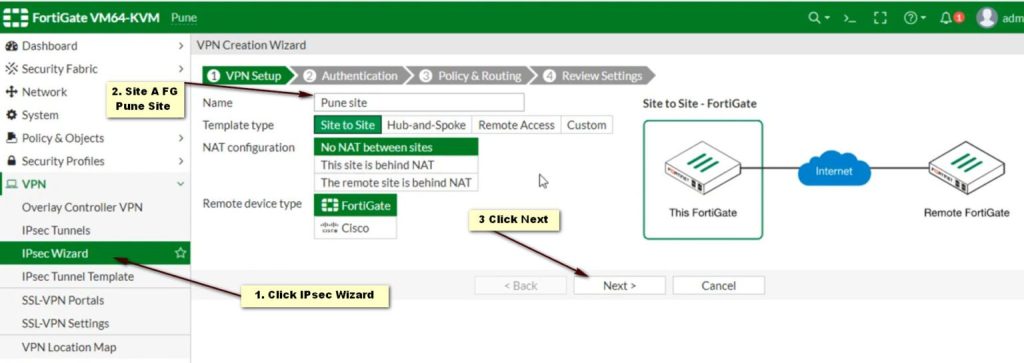
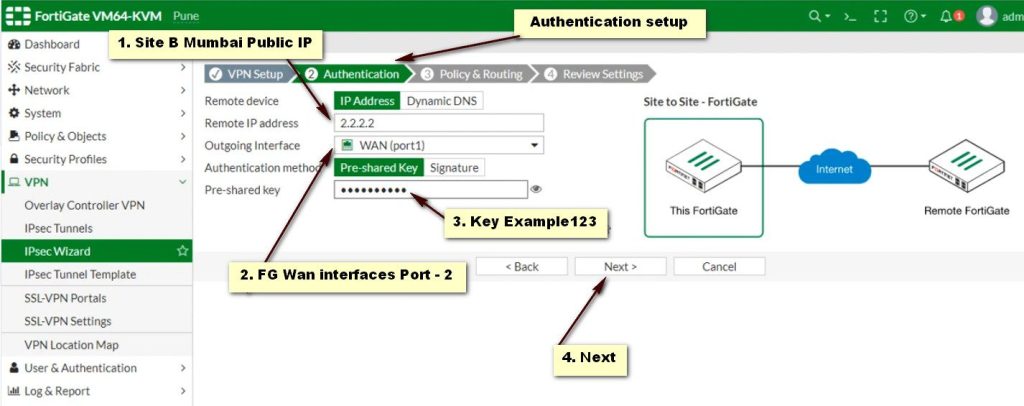
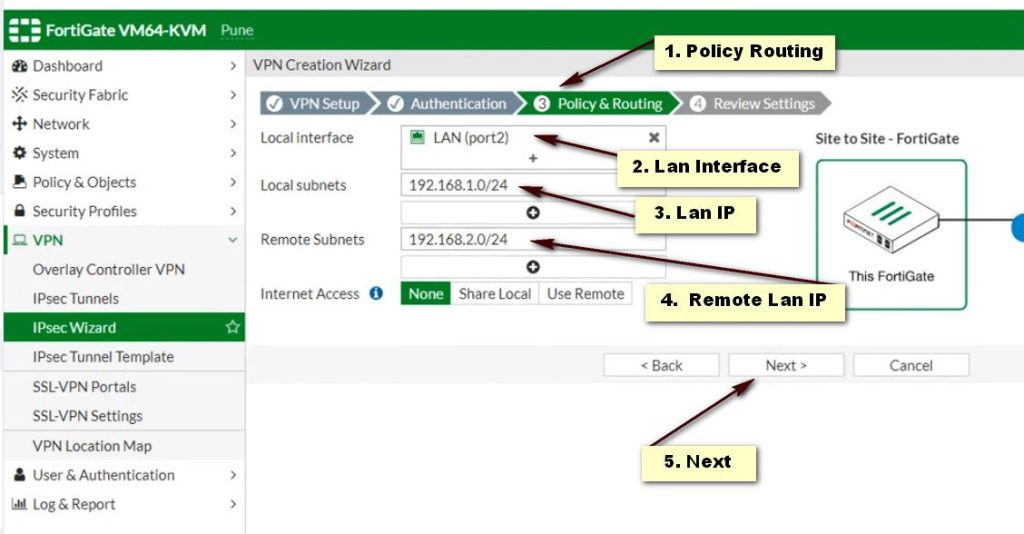
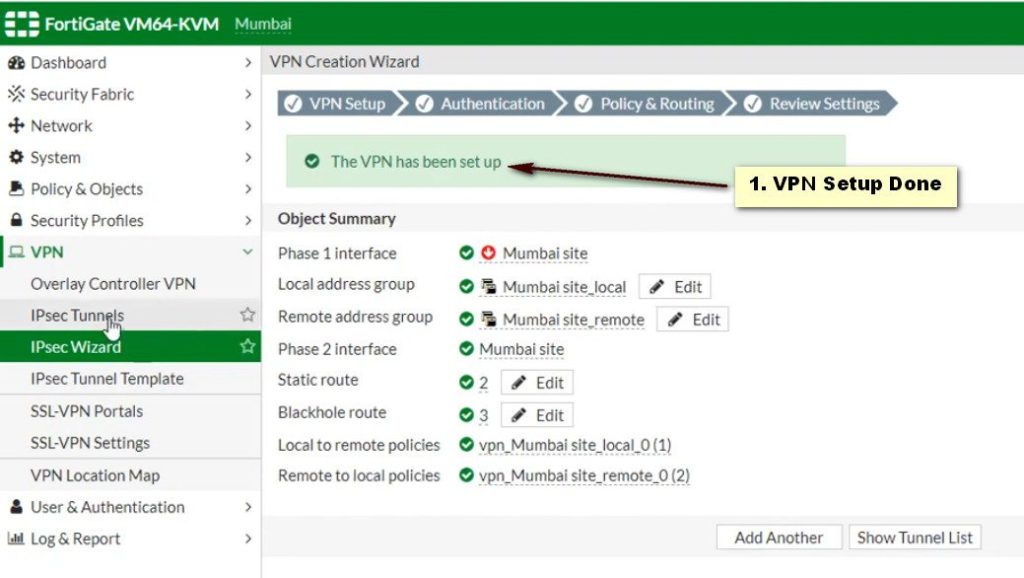
Site to Site VPN Fortinet
Site-to-Site VPN Defined
A site-to-site virtual private network (VPN) refers to a connection set up between multiple networks. This could be a corporate network where multiple offices work in conjunction with each other or a branch office network with a central office and multiple branch locations.
Site-to-site VPNs are useful for companies that prioritize private, protected traffic and are particularly helpful for organizations with more than one office spread out over large geographical locations. These businesses often have to access resources housed on a primary network, which could include servers that facilitate email or store data. In some instances, a server may be the operational hub of an application essential to the company’s business. A site-to-site VPN can, in that case, give all sites full access to the application—as if it were housed within their physical facility.
The history of site-to-site VPNs intersects, in many ways, with the history of the internet itself. Site-to-site VPNs were a forbearer of what we now know as the internet. They were first made possible through the use of the original packet switching network named Advanced Research Projects Agency Network (ARPANET), as well as the initial uses of Transmission Control Protocol/Internet Protocol (TCP/IP).
TCP/IP outlines how data is organized according to packets, given addresses, transmitted, and received across different computers on the internet. Before the internet was launched as we know it today, computers were connected between sites through a private network and TCP/IP. In this way, site-to-site networks predated the internet, forming the foundation for what we have today.
The modern iteration of a VPN gained popularity because of people wanting to mask their IP addresses and surf the internet more safely. A hidden IP address gives you the freedom to download torrents without revealing who you are. You can also gain access to geo-blocked content, regardless of your location. In addition, on a public network, you have to deal with a constant barrage of cyberattacks, but with a VPN, you can enjoy a more secure, encrypted connection. These attributes made private VPNs a top choice among individual users.
However, VPNs designed for one—or a few—users at a time do not have the capabilities to serve the needs of a large organization. In many cases, big companies must send many terabytes of data between locations, quickly and safely, and the kind of VPN sufficient for a normal torrent user or web surfer would not be able to handle the workload.
Understanding VPN And Its Types
There are a few different types of SSL VPNs, and each comes with its own benefits. Depending on the needs of your organization, one type may better fit your objectives than others.
Remote Access VPNs
A remote access VPN refers to a temporary connection set up between two or more users and a central location. In most cases, a remote access VPN is used to give each location access to a data center. In some situations, a connection that makes use of Internet Protocol security (IPsec) is sufficient. However, it is also common for an organization to utilize a VPN, which avails them of the security positioned at the gateways at each end of the VPN.
A remote access VPN is a useful tool for companies with remote workers either on the road or in their homes. If these workers need to access private or sensitive information housed in the company’s servers, they can connect to a remote access VPN. In this way, each employee is able to gain access to the resources they need to do their jobs.
This VPN type can be used to provide workers in different locations with an experience similar to that of those in the main office who can connect to the server at their desks using an Ethernet cable. In a sense, the remote access VPN extends a cable across many miles—and even international borders—right into each employee’s workstation, which includes desktops, laptops, and mobile devices.
Intranet-based site-to-site
An intranet-based site-to-site VPN connects more than one local-area network (LAN) to form a wide-area network (WAN). A company may also use this kind of setup to incorporate software-defined WAN (SD-WAN). Intranet-based site-to-site VPNs are useful tools for combining resources housed in disparate offices securely, as if they were all in the same physical location.
An intranet-based site-to-site VPN is particularly helpful if each site either develops its own resources or houses unique processes that the entire company would benefit from having access to. For example, if each office had design schematics that were constantly being updated and adjusted for clients, an intranet-based site-to-site VPN would give decision-makers in a number of offices secure access to everything produced—regardless of their physical location.
Extranet-based site-to-site
Extranet-based site-to-site VPNs are often used by two or more different companies that want to share certain resources but keep others private. With an extranet-based site-to-site VPN, each entity connects to the VPN and chooses what they want to make available to the other companies. In this way, they can collaborate and share without exposing proprietary data.
VPN Meaning: What Does VPN Stand For?
A VPN, meaning a virtual private network masks your Internet protocol (IP) address, creating a private connection from a public wi-fi connection. A VPN is one of the best tools for privacy and anonymity for a user connected to any public internet service because it establishes secure and encrypted connections.
Using a Wi-Fi network, especially one that is unsecured, means potential exposure of personal information to third parties, some of which may have malicious intentions. What is a VPN capable of? A VPN hides a lot of information, including your browsing history, your IP address, your location, your endpoint devices (whether you’re on a Windows computer or an an Android smartphone), and your overall web activity. Cyber criminals often use unsecured connections to gain access to information that enables identity theft and other malicious activities. A VPN solution helps to protect against these activities by creating an encrypted tunnel for all data you send and receive, unobserved by others.
In the context of this VPN meaning, a VPN solution helps to protect against nefarious activities by creating an encrypted tunnel for all data you send and receive, unobserved by others. Data security can also be enhanced through VPN split tunneling, which enables users to route some traffic through their VPN and enable other traffic to retain direct access to the internet.
But in some cases, organizations may choose to install a VPN blocker to prevent employees from accessing sites that may hinder their productivity, such as social networking or shopping sites.
What Does A VPN Do?
VPNs use virtual connections to create a private network, keeping any device you connect to a public wi-fi safe from hackers and malware, and protecting sensitive information from unauthorized viewing or interception. A VPN routes your device’s connection through a private server rather than the ISP, so that when your data reaches the Internet, it’s not viewable as coming from your device.
A virtual network keeps your data private using encryption, which turns your information into unreadable gibberish only decipherable using a key, which is known to your device. Different VPNs use somewhat different encryption processes, but the general process includes tunneling and your data is encoded as it travels between your device and the server, which then decrypts the data and sends it on to your destination, such as a website. The encryption process prevents anyone who may intercept the data between you and the server, such as a government agency or hacker, from being able to decipher its contents.
Now that you know the answer to “What is VPN protection?” you might be curious about where it is most frequently used. Two of the best-known and most popular secure network protocols used in VPN technology are Internet Protocol Security (IPSec) and secure sockets layer (SSL). IPSec connections use pre-shared keys on clients and servers in order to encrypt and send traffic back and forth. SSL VPNs use public key cryptography to securely exchange encryption keys.
How Does A VPN Work?
A virtual network keeps your data private using encryption, which turns your information into unreadable gibberish only decipherable using a key, which is known to your device. Different VPNs use somewhat different encryption processes, but the general process includes tunneling and your data is encoded as it travels between your device and the server, which then decrypts the data and sends it on to your destination, such as a website. The encryption process prevents anyone who may intercept the data between you and the server, such as a government agency or hacker, from being able to decipher its contents.
Now that you know the answer to “What is VPN protection?” you might be curious about where it is most frequently used. Two of the best-known and most popular secure network protocols used in VPN technology are Internet Protocol Security (IPSec) and secure sockets layer (SSL). IPSec connections use pre-shared keys on clients and servers in order to encrypt and send traffic back and forth. SSL VPNs use public key cryptography to securely exchange encryption keys.
Why Use A Virtual Private Network (VPN)?
Use of the Internet is now essential to global business, from shopping to banking to medicine to entertainment. Using Internet services involves transmitting very important information online, including credit card and social security numbers, and personal information, such as medical histories or home addresses. VPNs keep your Internet use safe from prying eyes, and, when used in a corporate setting, help keep business information from getting into the wrong hands.
For businesses who wonder “what is a VPN going to do for my company?” these provide improved security overall, improved remote access, independence from countries with strict Internet access laws, and a better total-cost-of-ownership when it comes to the aggregate costs of security and networking technologies used by corporate teams. VPNs can also provide safe and secure data sharing between employees and with individuals and groups outside of the business when necessary.
It is important to note that these do not make users completely anonymous on the Internet. Internet services requiring a login, such as Google or Facebook, know when you sign in, and websites can still leave cookies on your machine that identify your visits from particular Internet browsers. Anyone with direct access to the devices you use might also be able to view your activity. And law enforcement officials, depending on local legal authority, may be able to monitor your devices directly or require your virtual network service to give up records of your actions.
Types Of Virtual Private Networks (VPN)
There are two main types of VPN that people can use to securely connect to corporate networks.
1. Remote access VPN
A remote access VPN enables the user to connect their device to a network from outside their organization’s office. This device-to-network approach typically involves a user connecting their laptop, smartphone, or tablet to a network through their VPN. For organizations with changing IP addresses, dynamic DNS (DDNS) can help maintain consistent VPN connectivity by automatically updating domain names with the correct IP address.
Increasingly, advances in VPN technology enable security checks to be carried out to ensure the device is secure before it is granted permission to connect. Remote access VPNs include cloud VPNs, which enable users to securely access applications and data via their web browser.
2. Site-to-Site VPN
A site-to-site VPN enables connections between multiple networks. This network-to-network approach is typically used to connect multiple offices or branch locations to a central office. Site-to-site VPN encryption is useful for organizations with several offices based in various geographical locations. It enables them to share resources from a primary network, such as email servers or data storage facilities, across multiple locations. It also allows access to all users as if servers were located in the physical office.
How Does A VPN Work In Practice?
A VPN masks a user’s true location to the one they set their VPN to. This enables them to access content or websites typically restricted to that region. For example, a user in the U.S. can set their location to the United Kingdom and watch content from streaming websites aimed at British audiences. A U.S. citizen can also continue streaming their favorite shows even when they are away from the country on holiday.
Let us take a look at some of the common uses of VPNs.
1. Protecting browsing history
ISPs and web browsers can track everything a user does while connected to the internet. They also keep a history of the websites users visit and tie that information to the IP address used, then often issue targeted advertisements related to that search information or even sell users’ browsing data. Keeping these details secret can be really important to people, especially if they are using a shared device or web browser.
A VPN enables users to keep search information—such as medical conditions, required surgery or treatment, travel plans, or even gift idea research—private and prevents their ISP and web browser from serving related ads.
2. Securing IP address and location data
An IP address is the internet’s equivalent of the return address on a handwritten letter. Therefore, anyone that knows a user’s IP address can access the information they have searched for on the internet and where they were when they searched for it. Furthermore, a user’s search history can be viewed if they connect to a web browser on a public or work computer.
VPNs use IP addresses that do not belong to a user, which enables them to connect to and browse the web anonymously while maintaining their privacy online. Using a VPN also enables users to prevent their search history data from being collected, viewed, and sold.
3. Hiding streaming location
Streaming services like Amazon Prime Video, Hulu, and Netflix offer different content to users located in different countries. Using a VPN enables a streaming customer to access the content intended for people living in different countries regardless of their actual location.
It can also enable a user to access a streaming subscription they have in their home country while traveling. For example, a user on holiday in another country could use a VPN to set their location to the U.S. and stream their favorite sports team’s live game.
4. Protecting devices
A VPN is also crucial to protecting users’ devices, such as computers, laptops, smartphones, and tablets, from being intercepted by cyber criminals. Bad actors often target devices that connect to the internet on specific networks, such as a public Wi-Fi network. A VPN helps a user mask their device’s location and protect the data on it from being seen by a potential hacker.
5. Ensuring internet freedom
A VPN enables people to protect themselves from government surveillance by hiding their browsing history. As long as their VPN provider does not log browsing history, which some do, users can rest assured that their freedom on the internet is protected.
VPN Encryption—All You Need To Know
“Do VPNs really work?” is a fair question, and anyone asking should know they do. VPNs use encryption to keep internet users secure and their data private. A VPN works based on encryption, which hides the true meaning of information. This ensures data cannot be read unless someone unlocks it with a password, known as an encryption key. When using a VPN, the encryption key protecting a user’s data and web activity is only known by their computer and VPN server.
VPN services use various types of encryption processes, but encryption, in a nutshell, typically creates a secure tunnel in which the user’s data is encoded. Data is encrypted into unreadable code as it moves between the user’s computer and the VPN server. The device connects to the local network the VPN is connected to, which masks the user’s IP address as belonging to a server from the VPN provider.
VPN Protocols
All VPN services use VPN protocols to ensure they provide users with the fastest and most secure internet connection. VPN protocols use a combination of encryption and transmission standards to determine how a user’s data is transported between their device and the VPN server.
1. Point-to-Point Tunneling Protocol (PPTP)
PPTP is one of the oldest protocols still active on the internet. Created by Microsoft, it uses the Transmission Control Protocol (TCP) control channel and Generic Routing Encapsulation (GRE) tunneling protocol. It relies on the Point-to-Point Protocol (PPP), which is a Layer 2 communications protocol directly between two routers, to implement security functionalities.
PPTP is fast and simple to deploy but only really applicable to people using older Windows operating systems. It also has several well-known security issues, so any VPN that only uses PPTP should be avoided.
2. Layer 2 Tunneling Protocol (L2TP)
This protocol combines PPTP with the Layer 2 Forwarding (L2F) tunneling protocol. It strengthens the data tunnel provided by PPTP but does not provide users with encryption or privacy capabilities. As a result, the protocol is typically bundled with a security protocol such as Internet Protocol security (IPsec).
3. Secure Socket Tunneling Protocol (SSTP)
SSTP is a VPN tunnel created by Microsoft and is a much more secure option. It transports PPP traffic through the secure sockets layer/transport layer security (SSL/TLS) channel, which provides encryption, key negotiation, and traffic integrity checking. As such, only the two parties that transmit the data are able to decode it. Using this over the TCP port 443 ensures that SSTP can travel through most firewalls and proxy servers.
4. Internet Key Exchange Version 2 (IKEv2)
IKEv2 handles request and response actions to ensure traffic is secure and authenticated, usually using IPsec. It establishes the security attributes of the device and server, then authenticates them, and agrees which encryption methods to use. It supports 256-bit encryption and allows the use of popular ciphers such as Advanced Encryption Standard (AES), Camellia, and ChaCha20. IKEv2 is mostly used to secure mobile devices, in which it is particularly effective.
5. OpenVPN
OpenVPN is widely considered the best open-source VPN technology available. The free software uses pre-shared certificates, secret keys, and usernames and passwords to authenticate every device or server. It uses the open secure sockets layer (OpenSSL) encryption library and TLS, in addition to a custom protocol utilizing SSL/TLS for key exchange. OpenVPN offers the same protection as established protocols but on a wider scale.
How does a site-to-site VPN work?
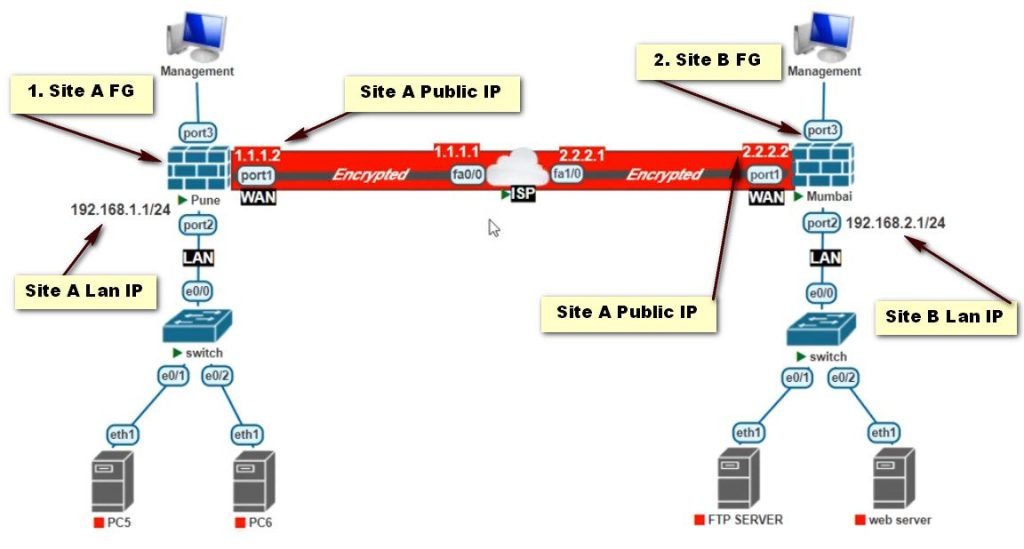
A site-to-site VPN creates a secure connection between two or more networks at different locations. It encrypts data transmitted between these networks over the public internet, forming a virtual “tunnel” for secure communication.
What is the function of a site-to-site VPN?
A site-to-site VPN securely connects separate office networks, allowing them to function as one cohesive network. This enables secure communication and resource sharing between different locations, improving collaboration and productivity.
What are the benefits of a site-to-site VPN?
Site-to-site VPNs offer secure communication between geographically dispersed networks, reduced operational costs compared to dedicated leased lines, and centralized network management for improved efficiency.
What are the challenges of a site-to-site VPN?
Challenges include potential performance issues due to latency and bandwidth limitations, complexity in configuration and ongoing management, and ensuring compatibility between different VPN devices and protocols.
What is the difference between site-to-site VPN vs. remote access VPN?
Site-to-site VPNs connect entire networks together, while remote access VPNs connect individual devices, like laptops or smartphones, to a network, often used by employees working remotely.
What is the difference between site-to-site VPN vs. point-to-site VPN?
Site-to-site VPNs connect entire networks, while point-to-site VPNs connect individual devices to a network. Point-to-site offers more granular control over access for individual users and devices.
What is a VPN and what does VPN stand for?
VPN, meaning a virtual private network masks your Internet protocol (IP) address, creating a private connection from a public wi-fi connection.
What does a VPN do and how does it work?
VPNs use virtual connections to create a private network, keeping any device you connect to a public wi-fi safe from hackers and malware, and protecting sensitive information from unauthorized viewing or interception.
What are the advantages of using a VPN?
A VPN masks a user’s true location to the one they set their VPN to. Common uses include; Protecting Browsing History, Hiding your Private Information, Prevent Data Throttling, and Protecting Devices.
Here are some common reasons as to why you might use a VPN:
Secure your data
Sensitive data like work emails, payment information, and location tagging is constantly being transmitted online. This information is trackable and easy to exploit, especially on a public network, where anyone who has access to the network has potential access your personal data. A VPN connection scrambles your data into code and renders it unreadable to anyone without an encryption key. It hides your browsing activity so that no one else can see it.
Work from home
Today, remote work is more widespread than ever before. With a VPN, remote workers can access company resources over a private connection from anywhere, so long as they are able to get online. This provides employees with a greater sense of flexibility, while also ensuring that company data remains protected and secure, even on a public Wi-Fi network.
Access or stream regional content from anywhere
Some sites and services restrict their media content based on geographic location, which means you may not have access to certain kinds of content. A VPN disguises, or spoofs, the location of your local server so that it appears as if it’s based elsewhere, such as in another country.
Bypass censorship and surveillance
Some regions may not have access to certain sites or services due to government restrictions, censorship, or surveillance. Location spoofing gives these users the ability to circumvent firewalls, view blocked websites, and move freely online.
Prevent ISP and third-party tracking
Internet service providers (ISPs) log and track your browsing history through your device’s unique IP address. This information could potentially be sold to third-party advertisers, given to the government, or left vulnerable in the face a security compromise. By routing to a remote VPN server instead of your ISP’s servers, a VPN masks your IP address, prevents ISP tracking, and keeps your personal data private
| Name | Type | Connection method | Use Case |
|---|---|---|---|
Remote access VPN (also known as client-to-site VPN) | Home | Connect to a private network or third-party server via SSL/TSL | For remote workers who need access to company files and resources over a private connection, or for users who wish to browse the public Internet over an encrypted connection |
Site-to-site VPN | Private | Network connects to another network via LAN, WAN | For large organizations that need to link their internal networks across multiple sites in different locations, while maintaining a secure connection |
VPN applications | Mobile | Connect to a private network via VPN app on mobile or smartphone device | For mobile users who wish to take advantage of the benefits of a VPN while on the go, or while experiencing an unstable Internet connection |
Remote access VPN (also known as client-to-site VPN)
One of the most widely used types of VPN for the computer, a remote access VPN, gives off-site users the ability to connect to an organization’s network, or a remote server, from their personal device. This can be accomplished by entering your authentication credentials via a login page, which then authorizes you to make the connection through your web browser.
Users may also connect to the VPN through a virtual desktop client or VPN app, which also connects to a network or server after you enter your credentials. A client provides its users with an easy interface to work with, connectivity information, and the ability to toggle between the VPN’s various features.
A remote access VPN can be used for both professional and personal use, which is why it’s one of the most common forms of VPN. It gives remote workers the ability to access company files and resources without having to be in the office, and it safeguards the private data of remote-first companies so that it’s likely to stay private. As for individual users who simply wish to browse the public Internet with increased autonomy and anonymity, a remote access VPN is integral to avoiding content blocks, firewalls, and ISP tracking.
Site-to-site VPN
Large organizations in need of a more robust, custom solution may opt for site-to-site VPNs. A site-to-site VPN is a private, internal network comprised of multiple networks within an organization, which are connected to each other’s local area networks (LANs) through the public Internet. This setup allows users across two separate networks, either within or adjacent to the organization, to share resources with each other while still limiting full access to all their resources, ensuring that communication within the company remains as private and as secure as possible. Due to the scale and complexity of site-to-site VPNs, this type of connection is best suited for enterprise-level companies with departments across multiple locations.
Within site-to-site VPNs, there are two network types:
Intranet
An intranet site-to-site VPN links several sites from the same organization together by way of LAN. This is useful when multiple departments across multiple locations need to collaborate with each other within a closed, private network. Through a site-to-site connection, these departments can securely and efficiently exchange resources with each other.
Extranet
An extranet site-to-site VPN links several sites from different organizations together by way of LAN. An organization that frequently collaborates with third-party suppliers, partners, or business vendors may need the ability to form this network. Organizations may also customize the scope of access between each network, so that only some resources are shared, while others remain private.
Access the FortiGate Admin Interface
- Log into your FortiGate firewall using its web interface. You’ll typically find this at https://<FORTINET_IP>.
Create a VPN Configuration
- Go to VPN > IPSec Tunnels.
- Click Create New and select Custom.
Phase 1 Configuration
- Name: Enter a name for the tunnel.
- Remote Gateway: Select Static and enter the StrongSwan public IP.
- Interface: Choose the interface that connects to the internet.
- Mode: Set to Main (Identity Protection).
- Pre-shared Key: Enter the same shared secret used in StrongSwan.
- Encryption and Authentication: Use default settings (AES256, SHA256).
- Advanced Settings: Adjust settings based on your requirements.
Phase 2 Configuration
- Select the tunnel you just created.
- Under Phase 2 Select, click Create.
- Name: Provide a name.
- Local Subnet: Enter the StrongSwan local subnet.
- Remote Subnet: Enter the FortiGate remote subnet.
- Encryption and Authentication: Match the settings used in Phase 1.
Review Policy Route
- Go to Policy & Objects > IPv4 Policy.
- Create a new policy that allows traffic from the local network to the remote network via the VPN tunnel.
Apply Changes
Save the configuration and apply changes.