
OSPF Network Types
Why does OSPF need network types?
Routers can be connected via various types of WAN services. Many old and new WAN technologies can provide IP connectivity between devices. To establish adjacency and calculate the best path, the OSPF process must know the essential properties of the network between the routers. However, different WAN services have different properties. For example:
- Some WAN services support full-mesh communication, some support only hub-and-spoke, and some only point-to-point.
- For example, services like Ethernet, Metro Ethernet, VPLS, VxLAN, and WiFi support multi-access any-to-any communication between nodes.
- Direct cables between routers (copper or fiber), E1/T1, leased lines, and overlay tunnels such as GRE and IPsec support only point-to-point communication.
- WAN services such as Frame Relay, mGRE, and DMVPN support only hub-and-spoke communication.
- Some WAN services support multicast/broadcast communication, while others support only unicast.
- For example, most modern WAN services support multicast/broadcast, while some old technologies, such as Frame Relay, ATM, X.25, and VSAT, do not inherently support broadcasting/multicasting.
In that context, when an OSPF router connects to a WAN link, how can it determine the WAN service’s properties?
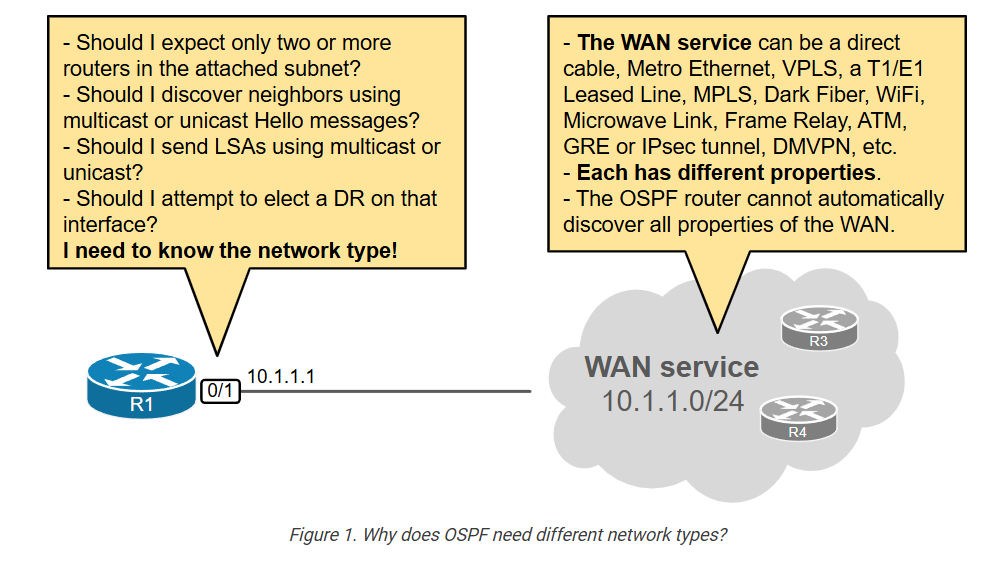
That’s where the OSPF Network types come into play. It is explicitly configured per interface and informs the routers of the essential properties of the WAN transport.
OSPF Network Types
OSPF defines five different network types to account for the different WAN technologies and their underlying properties. The network type is a configurable per-interface setting that tells the OSPF process how to establish and maintain neighborship over the given interface.
					Router(config)# interface eth0/1
Router(config-if)# ip ospf network ?
  broadcast            Specify OSPF broadcast multi-access network
  non-broadcast        Specify OSPF NBMA network
  point-to-multipoint  Specify OSPF point-to-multipoint network
  point-to-point       Specify OSPF point-to-point network
Let’s start with the three main types, which are used 99% of the time and are within the scope of the CCNA exam.

The diagram above shows a summary of the most common ones. Let’s dive into each one.
Network Type: Point-to-Point
When an OSPF interface is configured as Point-to-Point (explicitly or by default), it assumes the following truths:
- I can connect to only one remote router via this interface.
- Connectivity is one-to-one.
- Multicast is allowed. I can discover neighbors dynamically using multicast Hellos to 224.0.0.5.
- Since only two routers sit on the same link, a DR/BDR election IS NOT required to optimize the LSA flooding.
The point-to-point type is the most simple and straightforward one. It is used on WAN links that support only one-to-one communication. Routers automatically set the network type to point-to-point on Serial links, E1/T1 leased lines, GRE, and IPsec tunnels.

If we want to configure an Ethernet interface as an OSPF point-to-point link, we use the following command (in blue).
					R3# conf t
Enter configuration commands, one per line.  End with CNTL/Z.
R3(config)# int eth0/1
R3(config-if)# ip ospf network point-to-point
R3(config-if)# end
R3#
We can verify the OSPF type of an interface using the following command.
					R3# sh ip ospf interface eth0/1
Ethernet0/1 is up, line protocol is up
  Internet Address 10.15.1.1/30, Interface ID 3, Area 0
  Attached via Network Statement
  Process ID 1, Router ID 3.3.3.3, Network Type POINT_TO_POINT, Cost: 10
  Topology-MTID    Cost    Disabled    Shutdown      Topology Name
        0           10        no          no            Base
  Transmit Delay is 1 sec, State POINT_TO_POINT
  Timer intervals configured, Hello 10, Dead 40, Wait 40, Retransmit 5
    oob-resync timeout 40
    Hello due in 00:00:07
  Supports Link-local Signaling (LLS)
  Cisco NSF helper support enabled
  IETF NSF helper support enabled
  Can be protected by per-prefix Loop-Free FastReroute
  Can be used for per-prefix Loop-Free FastReroute repair paths
  Not Protected by per-prefix TI-LFA
  Index 1/2/2, flood queue length 0
  Next 0x0(0)/0x0(0)/0x0(0)
  Last flood scan length is 1, maximum is 1
  Last flood scan time is 0 msec, maximum is 0 msec
  Neighbor Count is 1, Adjacent neighbor count is 1
    Adjacent with neighbor 4.4.4.4
  Suppress hello for 0 neighbor(s)
Point-to-point links do not use the concept of Designated (DR) and Backup Designated Router (BDR) because the maximum number of routers is two. Hence, it doesn’t make sense to have a DR hat optimizes the LSA flooding. That’s why when we are looking at the output of the show ip ospf neighbor command, there is a dash alongside the state of the neighbor (highlighted in blue). This means that no DR/BDR election takes place on this interface.
					R3# sh ip ospf neighbor
Neighbor ID     Pri   State           Dead Time   Address         Interface
4.4.4.4           0   FULL/  -        00:00:32    10.15.1.2       Ethernet0/1
An essential aspect of the point-to-point type is that it is represented as two links in the LSA Type 1 that the router creates and floods, as shown in blue in the output below.
					R3# sh ip ospf database router 3.3.3.3

            OSPF Router with ID (3.3.3.3) (Process ID 1)

                Router Link States (Area 0)
  LS age: 4
  Options: (No TOS-capability, DC)
  LS Type: Router Links
  Link State ID: 3.3.3.3
  Advertising Router: 3.3.3.3
  LS Seq Number: 80000005
  Checksum: 0x1B4E
  Length: 60
  Number of Links: 3

    Link connected to: another Router (point-to-point)
     (Link ID) Neighboring Router ID: 4.4.4.4
     (Link Data) Router Interface address: 10.15.1.1
      Number of MTID metrics: 0
       TOS 0 Metrics: 10

    Link connected to: a Stub Network
     (Link ID) Network/subnet number: 10.15.1.0
     (Link Data) Network Mask: 255.255.255.252
      Number of MTID metrics: 0
       TOS 0 Metrics: 10

    Link connected to: a Transit Network
     (Link ID) Designated Router address: 10.10.1.3
     (Link Data) Router Interface address: 10.10.1.3
      Number of MTID metrics: 0
       TOS 0 Metrics: 10
The first highlighted section represents the point-to-point link and the neighboring router. The second Stub Network section represents the subnet on the point-to-point link. OSPF uses this approach to facilitate using unnumbered IP addresses on p2p links.
For example, you can configure the p2p interface as IP Unnumbered and use an IP address of another interface. In that case, the p2p link will be represented only with “another Router (point-to-point)” link in the Type 1 LSA and won’t have a “Stub Network” link that advertises the p2p subnet. However, this is out of the scope of the CCNA exam.
Network Type: Broadcast
When an OSPF interface is configured as Broadcast (explicitly or by default), it assumes the following truths:
- I can connect to an unlimited number of routers via this interface.
- Connectivity is any-to-any.
- Multicast is allowed. I can discover neighbors dynamically using multicast Hellos to 224.0.0.5.
- Since many routers sit on the same segments, a DR/BDR election is required to optimize the LSA flooding.
Broadcast is the most used network type because it is the default one on Ethernet interfaces. Hence, when you enable OSPF on an Ethernet, FastEthernet, GigabitEthernet, TenGigabitEthrnet, 40GigabitEthernet or 100GigabitEthernet port, it defaults to OSPF network type Broadcast.
The Broadcast type assumes that the interface is connected to a multi-access segment (meaning every node can communicate with any other) and that broadcasting/multicasting is allowed. In the LAN, both those capabilities are always true. However, one of these requirements may not be true for certain WAN services.
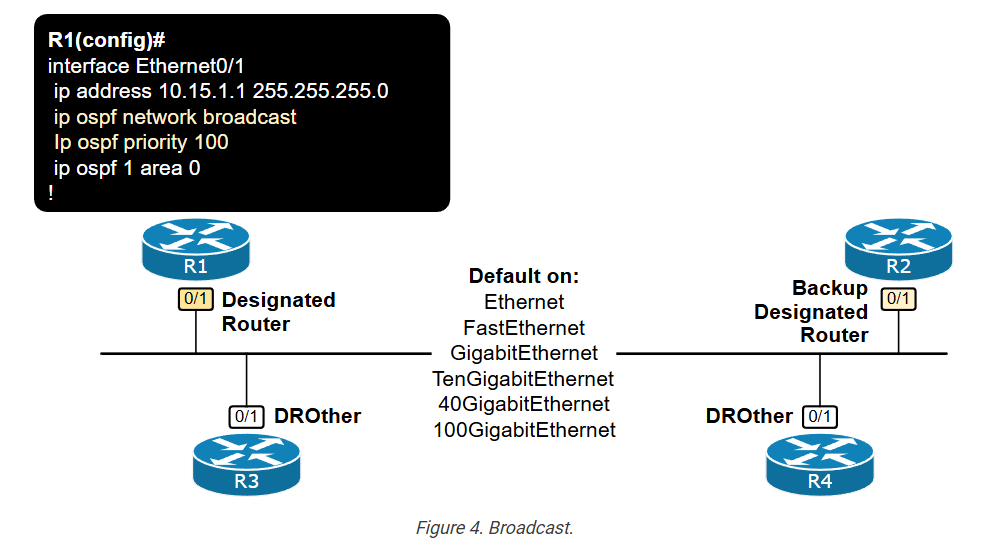
The number of connected OSPF nodes on multiaccess segments such as an Ethernet VLAN is unlimited. That’s why routers elect DR and BDR to optimize the LSA flooding process. If you don’t feel confident with the DR/BDR concept, check out this lesson.
We can verify an interface’s type by checking the output of the show ip ospf interface command, as shown below.
					R1# show ip ospf interface eth0/1
Ethernet0/1 is up, line protocol is up
  Internet Address 10.10.1.1/24, Interface ID 3, Area 0
  Attached via Network Statement
  Process ID 1, Router ID 1.1.1.1, Network Type BROADCAST, Cost: 10
  Topology-MTID    Cost    Disabled    Shutdown      Topology Name
        0           10        no          no            Base
  Transmit Delay is 1 sec, State DROTHER, Priority 1
  Designated Router (ID) 3.3.3.3, Interface address 10.10.1.3
  Backup Designated router (ID) 2.2.2.2, Interface address 10.10.1.2
  Timer intervals configured, Hello 10, Dead 40, Wait 40, Retransmit 5
    oob-resync timeout 40
    Hello due in 00:00:08
  Supports Link-local Signaling (LLS)
  Cisco NSF helper support enabled
  IETF NSF helper support enabled
  Can be protected by per-prefix Loop-Free FastReroute
  Can be used for per-prefix Loop-Free FastReroute repair paths
  Not Protected by per-prefix TI-LFA
  Index 1/2/2, flood queue length 0
  Next 0x0(0)/0x0(0)/0x0(0)
  Last flood scan length is 0, maximum is 1
  Last flood scan time is 0 msec, maximum is 0 msec
  Neighbor Count is 2, Adjacent neighbor count is 2
    Adjacent with neighbor 2.2.2.2  (Backup Designated Router)
    Adjacent with neighbor 3.3.3.3  (Designated Router)
  Suppress hello for 0 neighbor(s)
Notice the Hello and Dead intervals and the DR and BDR addresses.
Recall that interfaces that elect DR/BDR and have at least one neighbor are represented as a “Transit Network” in the LSA Type 1, as shown in blue in the output below. This means that the elected DR generates an LSA Type 2 to describe the multiaccess network further.
					R1# sh ip ospf database router 1.1.1.1

            OSPF Router with ID (1.1.1.1) (Process ID 1)

                Router Link States (Area 0)
  LS age: 1586
  Options: (No TOS-capability, DC)
  LS Type: Router Links
  Link State ID: 1.1.1.1
  Advertising Router: 1.1.1.1
  LS Seq Number: 80000009
  Checksum: 0x6A45
  Length: 48
  Number of Links: 2

    Link connected to: a Transit Network
     (Link ID) Designated Router address: 10.10.1.3
     (Link Data) Router Interface address: 10.10.1.1
      Number of MTID metrics: 0
       TOS 0 Metrics: 10

    Link connected to: a Stub Network
     (Link ID) Designated Router address: 10.5.1.2
     (Link Data) Router Interface address: 10.5.1.1
      Number of MTID metrics: 0
       TOS 0 Metrics: 10
We can check the LSA Type 2 using the following command. Notice the LSA ID is the interface IP address of the DR, as highlighted in green.
					R1# sh ip ospf database network 10.10.1.3
            OSPF Router with ID (1.1.1.1) (Process ID 1)
                Net Link States (Area 0)
  LS age: 1668
  Options: (No TOS-capability, DC)
  LS Type: Network Links
  Link State ID: 10.10.1.3 (address of Designated Router)
  Advertising Router: 3.3.3.3
  LS Seq Number: 80000002
  Checksum: 0x44B4
  Length: 36
  Network Mask: /24
        Attached Router: 3.3.3.3
        Attached Router: 1.1.1.1
        Attached Router: 2.2.2.2
Network Type – Point-to-Multipoint
When an OSPF interface is configured as P2MP (explicitly), it assumes the following truths:
- I can connect to an unlimited number of routers via this interface.
- Connectivity is hub-and-spoke. I am the hub.
- Multicast is allowed. I can discover neighbors dynamically using multicast Hellos to 224.0.0.5.
- Since I am the hub, I optimize the LSA flooding. Hence, a DR/BDR election IS NOT required.
The P2MP network type is used only on hub-and-spoke WAN services such as Frame Relay and DMVPN. It is not configured by default on any interface. A network administrator must explicitly configure it, as shown in the diagram below.
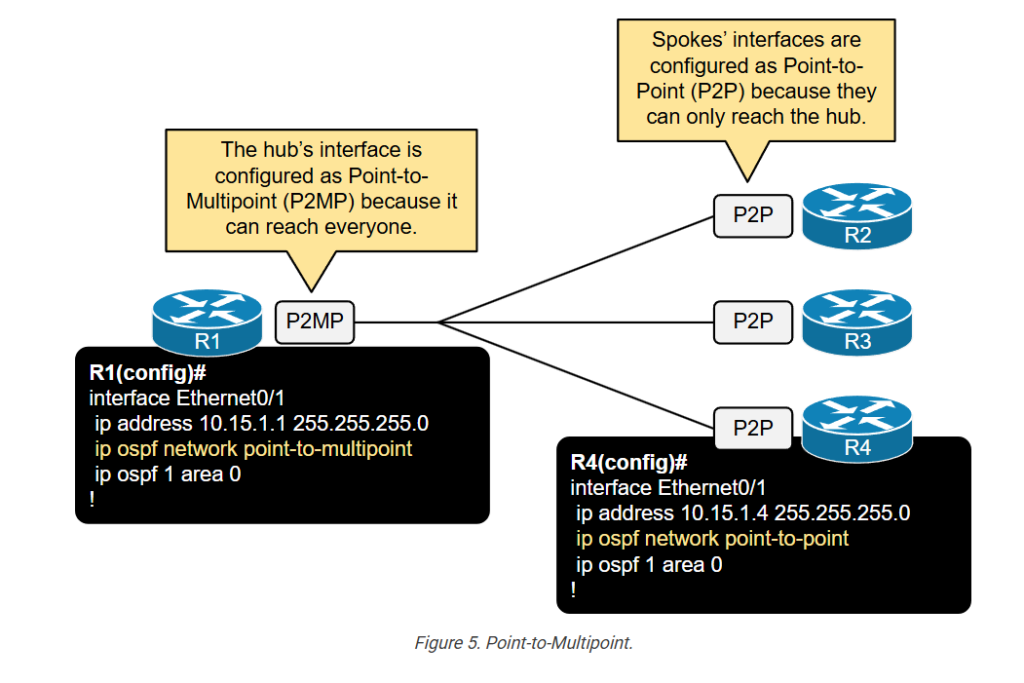
Notice that generally, only the hub is configured as a P2MP interface. This is something that is often misunderstood at the CCNA level. The spokes’ interfaces are configured as P2P because they can only reach the hub (hence, one-to-one communication).
Advanced Network Types – NBMA and P2MP Non-Broadcast
Let’s quickly go through the other two types, which are outside the scope of the CCNA exam but are useful for building a solid foundation on the topic.
Non-Broadcast Multi-access (NBMA)
When an OSPF interface is configured as NBMA (explicitly), it assumes the following truths:
- I can connect to an unlimited number of routers via this interface.
- Connectivity is any-to-any.
- Multicast IS NOT allowed. I CANNOT discover neighbors dynamically. Neighbors must be pre-defined by an administrator.
- Since many routers sit on the same segments, a DR/BDR election is required to optimize the LSA flooding.
The NBMA type is basically the same as the Broadcast one. The only difference is that the multiaccess network does not support multicast/broadcast (hence the name NBMA). NBMA is not configured by default on any interface. A network administrator must explicitly configure it, as shown in the diagram below.
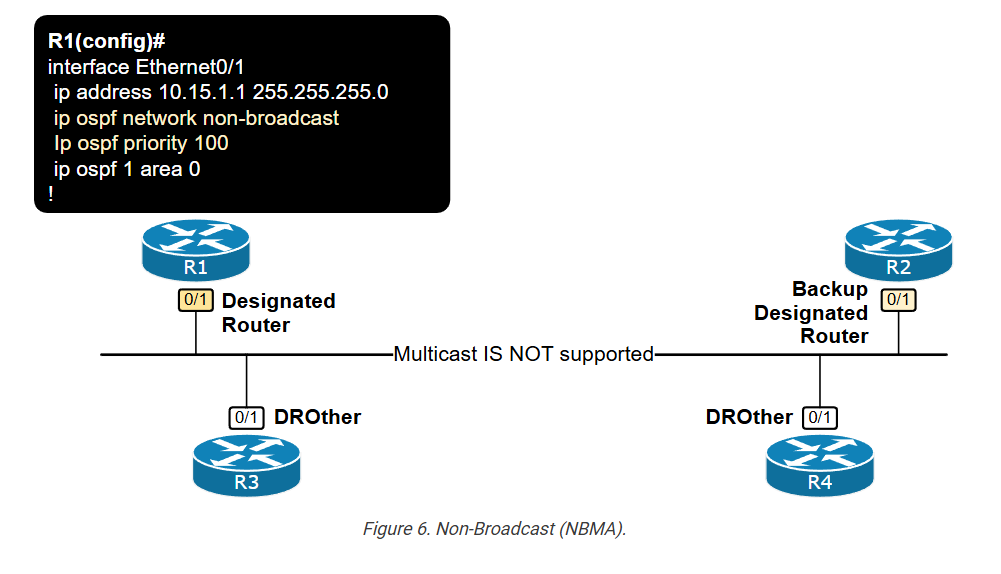
It shares the same properties as the Broadcast type. However, since multicast is not supported, dynamic discovery of neighbors is impossible, and an administrator must manually configure each neighbor. Then, the control-plane communication between neighbors happens via unicast.
In modern WAN networks, the use of NBMA is less common due to the decline of legacy non-broadcast technologies and the rise of modern WAN environments that support multicast and broadcast traffic. However, in legacy environments (and in exams) where non-broadcast characteristics are present, NBMA might still be used.
Point-to-Multipoint Non-Broadcast
When an OSPF interface is configured as P2MP Non-Broadcast (explicitly), it assumes the following truths:
- I can connect to an unlimited number of routers via this interface.
- Connectivity is hub-and-spoke. I am the hub.
- Multicast IS NOT allowed. I CANNOT discover neighbors dynamically. Neighbors must be pre-defined by an administrator.
- Since I am the hub, I optimize the LSA flooding. Hence, a DR/BDR election is not required.
The P2MP Non-Broadcast type is basically the same as the P2MP one. The only difference is that the P2MP segment does not support multicast/broadcast. It is not configured by default on any interface. A network administrator must explicitly configure it, as shown in the output below.
					R1# conf t
Enter configuration commands, one per line.  End with CNTL/Z.
R1(config)# int eth0/1
R1(config-if)# ip ospf network point-to-multipoint non-broadcast
R1(config-if)# end
R1#
This interface type is also less commonly used in modern WAN services and is out of the scope of the CCNA exam. However, it is used in the CCNP/CCIE exams.
How to choose which network type to use?
In modern networks, there is little need to change the default network type setting. Most modern LAN and WAN services provide full-mesh connectivity with multicast support. Therefore, on most of the interfaces, you stick with the default Broadcast type. On tunnel interfaces, you use the default Point-to-Point type.
However, in exam environments and more custom WAN deployment, you must be able to determine which network type to use based on the WAN properties.
To decide which network type is appropriate for a given WAN transport, you must answer the following two questions:
- What is the connectivity model of the WAN services?
- Does the WAN service support multicast?
The answers to these two questions determine the OSPF network type you will use on the interface connecting to the WAN transport, as shown in the following table.
| WAN Connectivity Model | Multicast Support | OSPF Network Type |
| One-to-One | Yes | ip ospf network point-to-point |
| Any-to-Any | Yes | ip ospf network broadcast |
| One-to-Any | Yes | ip ospf network point-to-multipoint |
| Any-to-Any | No | ip ospf network non-broadcast |
| One-to-Any | No | ip ospf network point-to-multipoint non-broadcast |
In the LAN, you generally always use the Broadcast network type because all modern LAN segments are multi-access and support multicast.
Key Takeaways
The most important takeaway from this lesson is to understand why OSPF needs different network types per interface. – Because it cannot automatically understand all properties of the WAN service. When an OSPF router connects to a new network, it must know the following properties of the underlying medium:
- What is the communication model of the network? Is it point-to-point, point-to-multipoint, or multiaccess?
- Does the underlying medium support broadcast/multicast? Yes or No.
The following table summarizes the differences between the OSPF Network Types.
| P2P | Broadcast | NBMA | P2MP | P2MP-NB | |
| Max Number of Routers | 2 | Unlimited | Unlimited | Unlimited | Unlimited |
| Assumed Connectivity | Full-Mesh | Full-Mesh | Full-Mesh | Hub-and-Spoke | Hub-and-Spoke |
| DR/BDR Election | No | Yes | Yes | No (the hub basically plays the role of the DR) | No (the hub basically plays the role of the DR) |
| Hello/Dead Timer | 10/40 | 10/40 | 30/120 | 30/120 | 30/120 |
| Dynamic Neighbor Discovery | Yes | Yes | No (since there is no broadcast/multicast) | Yes | No (since there is no broadcast/multicast) |
| Hellos Sent to | 224.0.0.5 | 224.0.0.5 | 224.0.0.5 | ||
| LSAs Sent to | 224.0.0.5 | 224.0.0.6 DR/BDR | Unicast to DR/BDR | Unicast | Unicast |
| Next-Hop IP | Peer | Originating Router | Originating Router | Hub | Hub |
Keep in mind that there is one more network type – Loopback. It is configured by default on all loopback interfaces. It cannot be used on any other interface type.

OSPF Network Types
1. Introduction to OSPF Network Types
In OSPF (Open Shortest Path First), a network type defines how routers communicate with each other over a network segment. It controls the behavior of OSPF such as how neighbors are discovered, how routing updates are sent, and whether a Designated Router (DR) or Backup Designated Router (BDR) is elected. Different network environments require different communication methods, so OSPF uses various network types to adapt efficiently.
2. Broadcast Network Type
A broadcast network type is used in environments where all routers can directly communicate with each other using broadcast or multicast messages, such as Ethernet LANs. In this type, OSPF automatically discovers neighbors using multicast addresses and elects a DR and BDR to reduce routing traffic. The DR acts as a central point for exchanging routing information. This network type is commonly used in local area networks where multiple routers are connected through a switch.
3. Non-Broadcast (NBMA) Network Type
The Non-Broadcast Multi-Access (NBMA) network type is used in networks where multiple routers are connected but broadcast or multicast communication is not supported, such as older WAN technologies like Frame Relay or ATM. In this type, OSPF still elects a DR and BDR, but routers cannot automatically discover neighbors. Therefore, neighbors must be manually configured. This makes NBMA slightly more complex to manage compared to broadcast networks.
4. Point-to-Point Network Type
A point-to-point network type is used when there are only two routers directly connected, typically over a serial link or dedicated connection. In this type, there is no need for DR or BDR election because only two routers exist. Communication is simple and efficient, and OSPF quickly forms neighbor relationships. This type is widely used in WAN connections between two routers.
5. Point-to-Multipoint Network Type
The point-to-multipoint network type is designed for networks where one router connects to multiple routers, but the connections are treated as separate point-to-point links. In this type, OSPF does not perform DR/BDR election, which simplifies the network operation. It supports multicast and allows easier configuration compared to NBMA because it does not require full mesh connectivity.
6. Point-to-Multipoint Non-Broadcast Network Type
This is a variation of the point-to-multipoint network type where multicast is not supported. In this case, routers must be manually configured with neighbor information. Like the standard point-to-multipoint type, there is no DR or BDR election. This type is used in special WAN scenarios where multicast communication is unavailable.
7. DR and BDR Role in Network Types
The concept of DR (Designated Router) and BDR (Backup Designated Router) is important in multi-access networks like broadcast and NBMA. These routers help reduce OSPF traffic by acting as a central exchange point for routing updates. In point-to-point and point-to-multipoint networks, DR/BDR is not required because the number of routers is limited or logically separated.
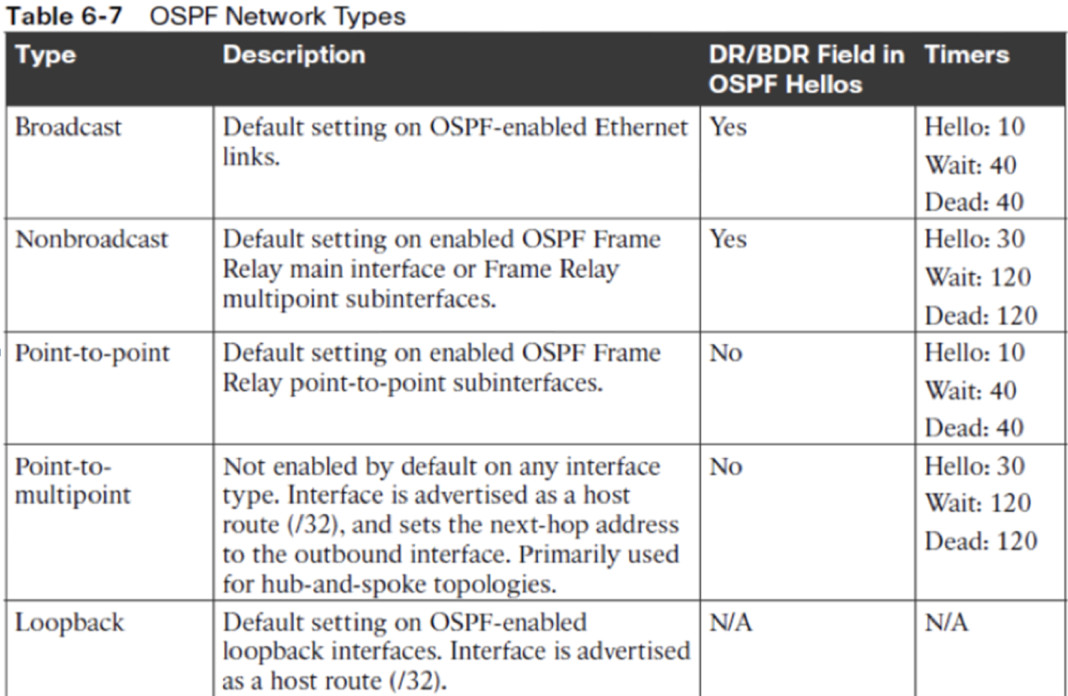
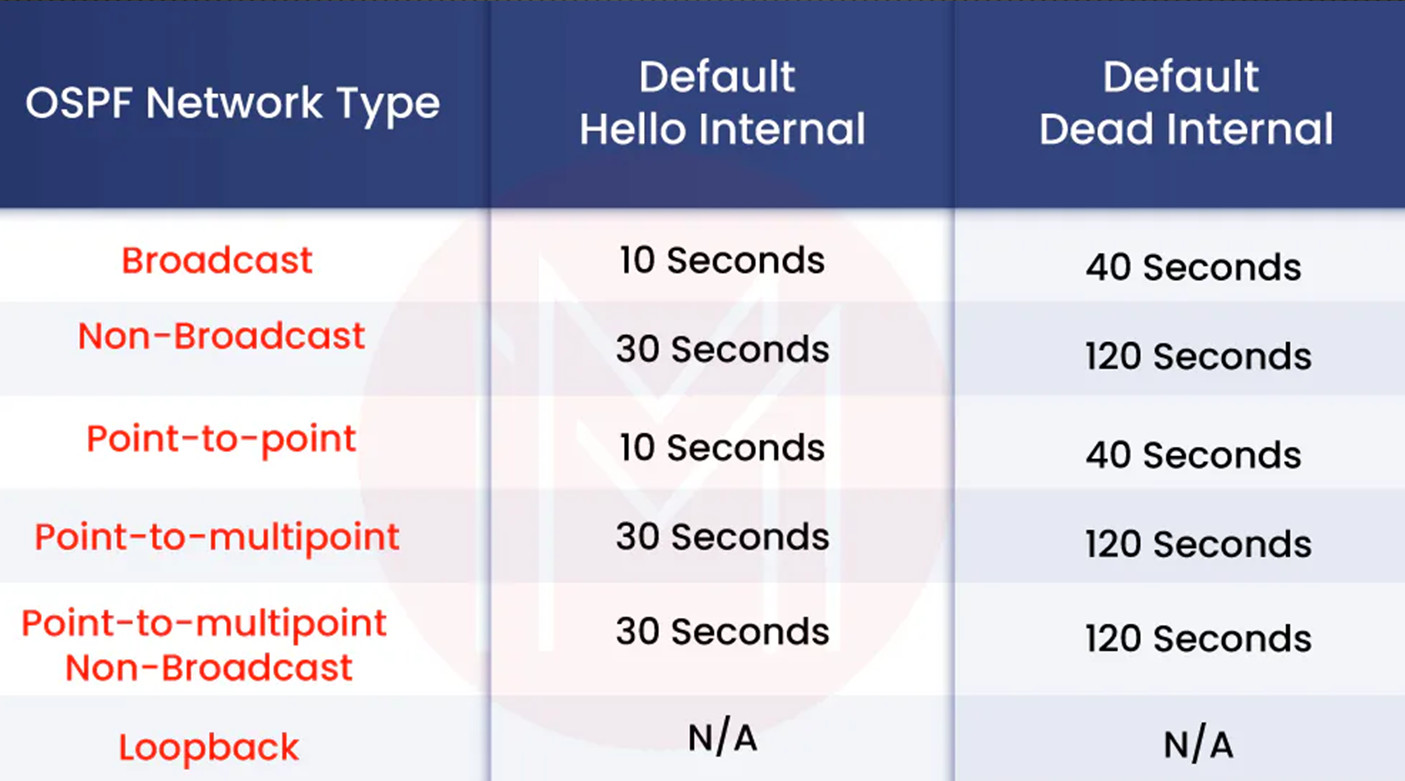
8. Timers in OSPF Network Types
Each network type has default Hello and Dead timers, which determine how frequently routers send hello packets and how long they wait before declaring a neighbor down. Broadcast and point-to-point networks typically use faster timers (10 seconds Hello, 40 seconds Dead), while NBMA networks use slower timers (30 seconds Hello, 120 seconds Dead) due to their WAN nature.
9. Importance of Choosing the Correct Network Type
Selecting the correct OSPF network type is very important for proper network operation. If the wrong type is configured, routers may fail to form neighbor relationships or may generate unnecessary traffic. Proper configuration ensures efficient routing, faster convergence, and stable communication between routers.
10. Conclusion
OSPF network types play a critical role in defining how routers interact within a network. Each type—broadcast, NBMA, point-to-point, and point-to-multipoint—has its own characteristics and use cases. Understanding these types helps network engineers design efficient and scalable networks while avoiding configuration issues.
When to Use OSPF Network Types
In OSPF (Open Shortest Path First), different network types are used depending on how routers are connected and how they communicate. Choosing the correct network type is important because it affects neighbor discovery, routing updates, and overall network performance. Each type is designed for a specific scenario, such as LAN, WAN, or point-to-point connections.
The broadcast network type is used in Local Area Networks (LANs) where all routers can communicate directly using multicast or broadcast messages. This is common in Ethernet networks where routers are connected through a switch. For example, in an office network with three routers connected to the same switch, OSPF automatically discovers neighbors and elects a Designated Router (DR) and Backup Designated Router (BDR) to manage routing updates efficiently.
The non-broadcast (NBMA) network type is used in WAN environments where broadcast and multicast are not supported, such as Frame Relay or ATM networks. In this case, routers cannot automatically discover neighbors, so they must be configured manually. For example, if a head office router is connected to multiple branch routers using a Frame Relay cloud, the administrator must manually define each neighbor, even though a DR and BDR will still be elected.
The point-to-point network type is used when there are only two routers connected directly, typically through a serial or leased line. Since only two devices are involved, there is no need for DR/BDR election, making the configuration simple and efficient. For example, a direct WAN link between two branch routers uses point-to-point mode to ensure fast and straightforward communication.
The point-to-multipoint network type is used in hub-and-spoke topologies where one central router connects to multiple branch routers. In this type, each connection is treated as a separate point-to-point link, and no DR/BDR election occurs. For example, a headquarters router connected to several branch offices can use this mode to simplify configuration and avoid the complexity of full mesh connectivity.
Finally, the point-to-multipoint non-broadcast network type is used in similar hub-and-spoke networks where multicast is not supported. In this case, routers must be manually configured with neighbor information. For example, if a WAN network does not allow multicast traffic, this mode ensures communication while still avoiding DR/BDR elections.
Overall, OSPF network types should be selected based on the network structure: broadcast for LANs, NBMA for non-broadcast WANs, point-to-point for two-router links, and point-to-multipoint for hub-and-spoke designs. Proper selection ensures efficient routing, reduced overhead, and stable network performance.