
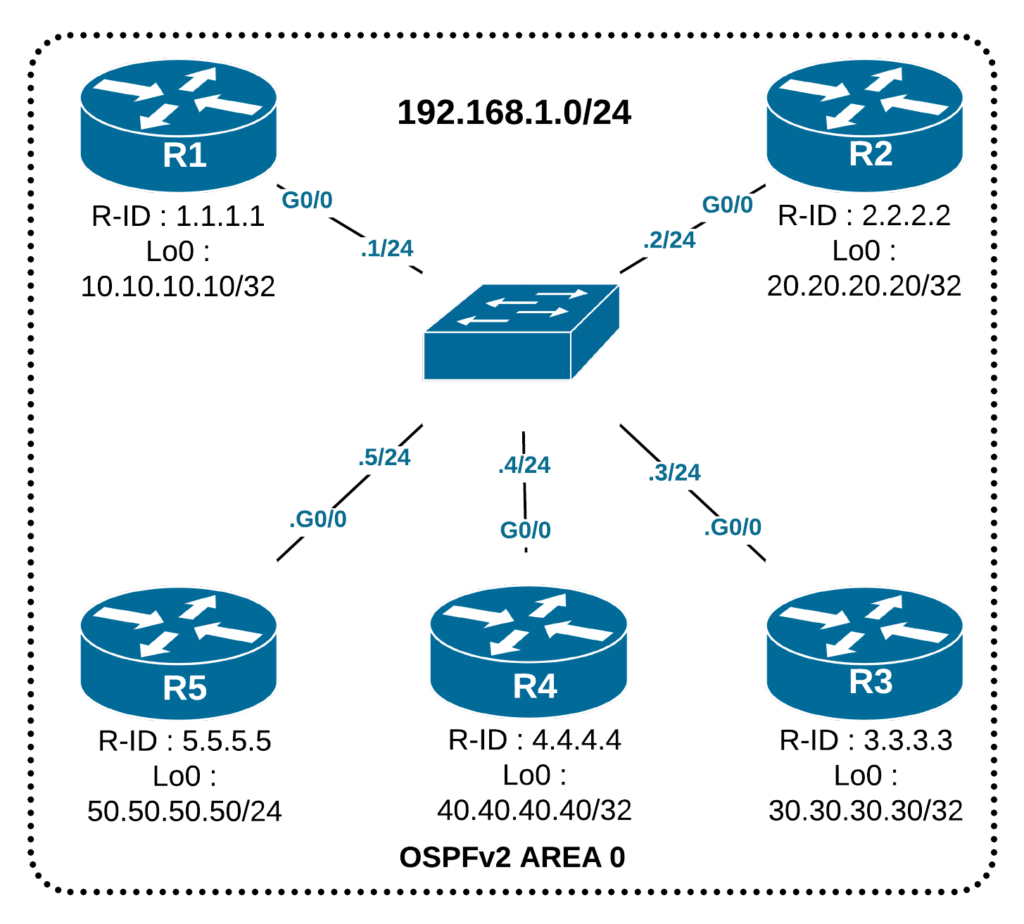
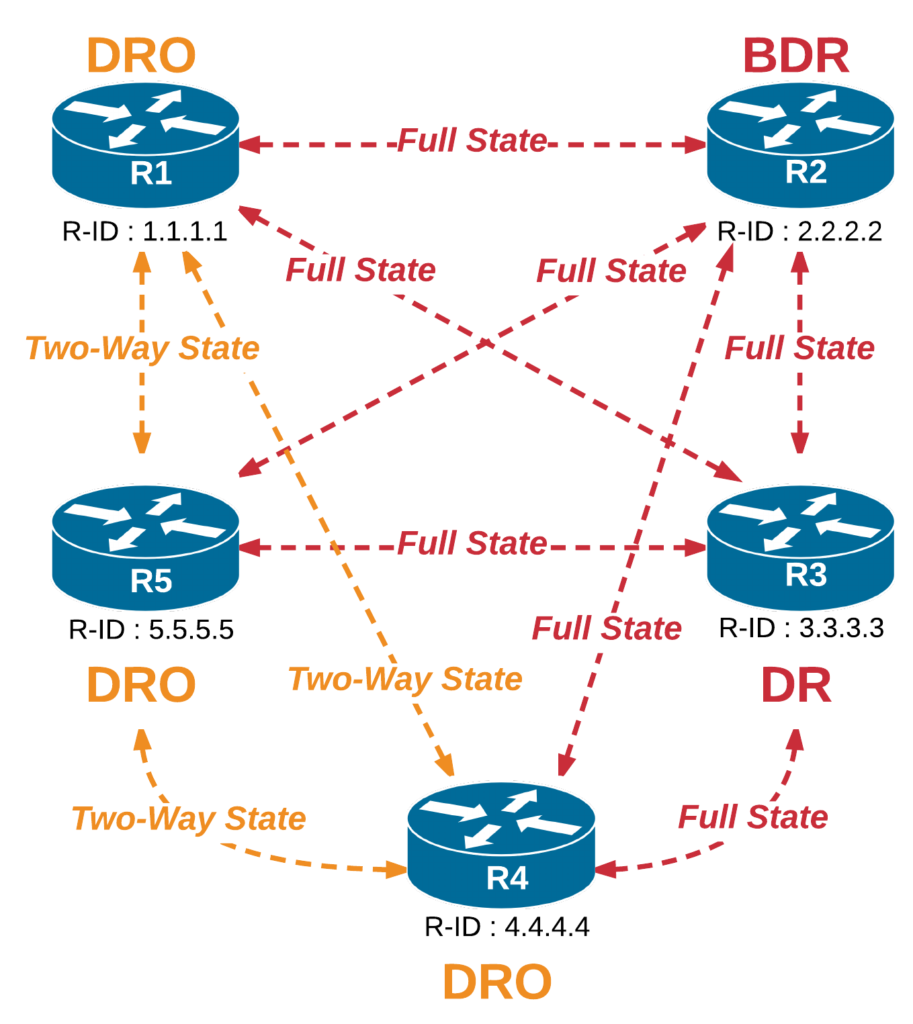
This lesson demonstrates the OSPF concept of a Designated Router (DR) and a Backup Designated router (BDR). We discuss why we need DR and BDR in the first place. Then, we walk through the process of electing DR and BDR on a multiaccess segment and show some advanced examples.
OSPF DR and BDR
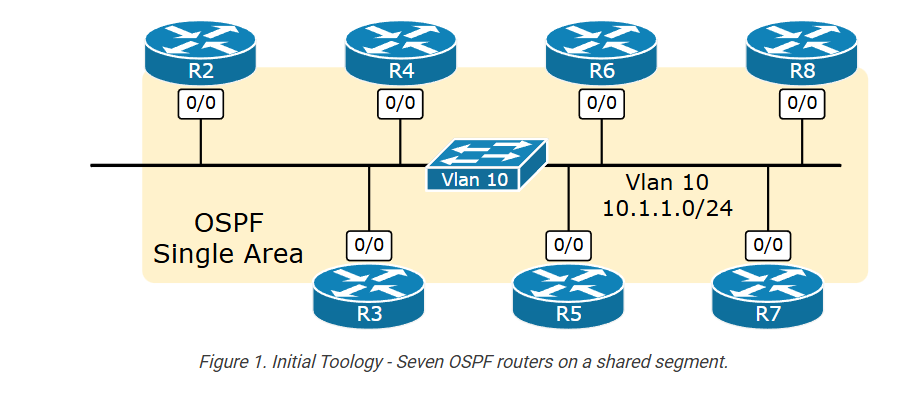

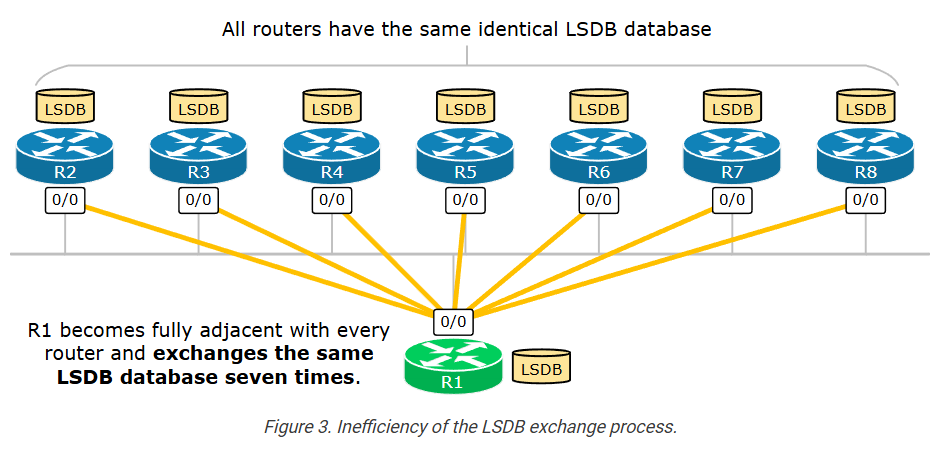
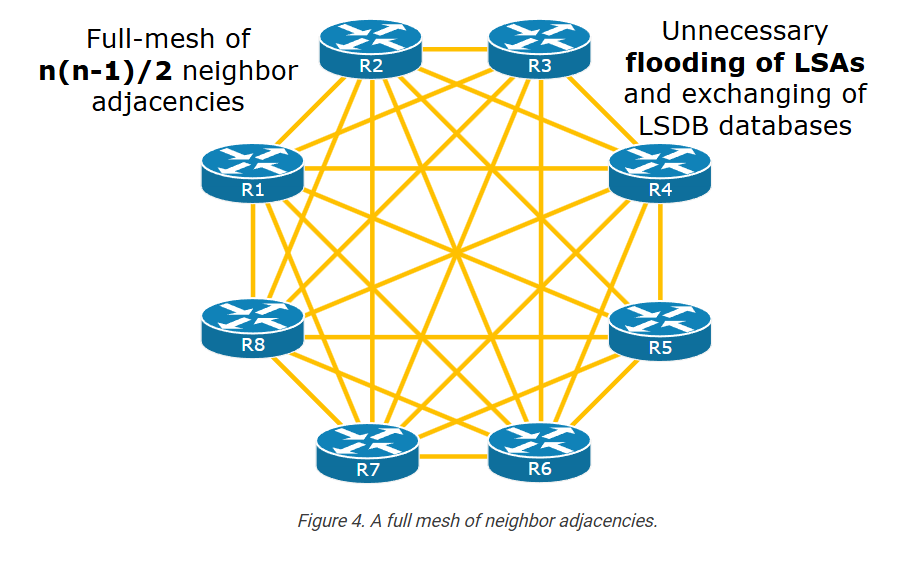
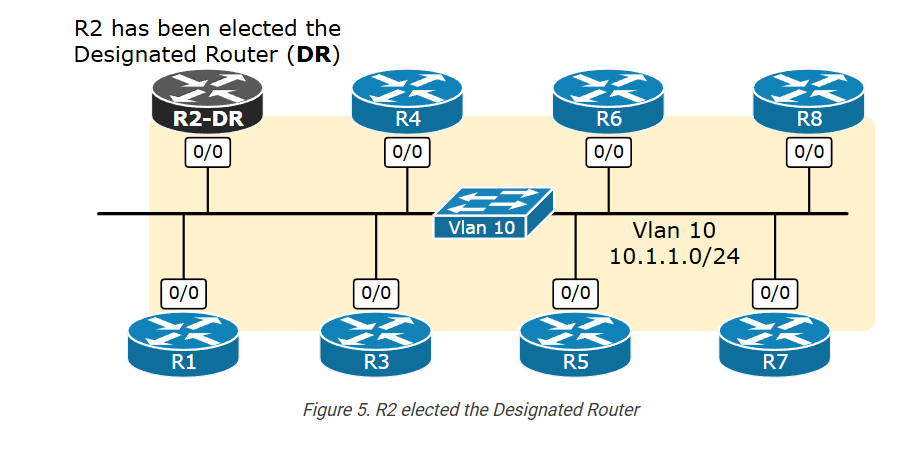
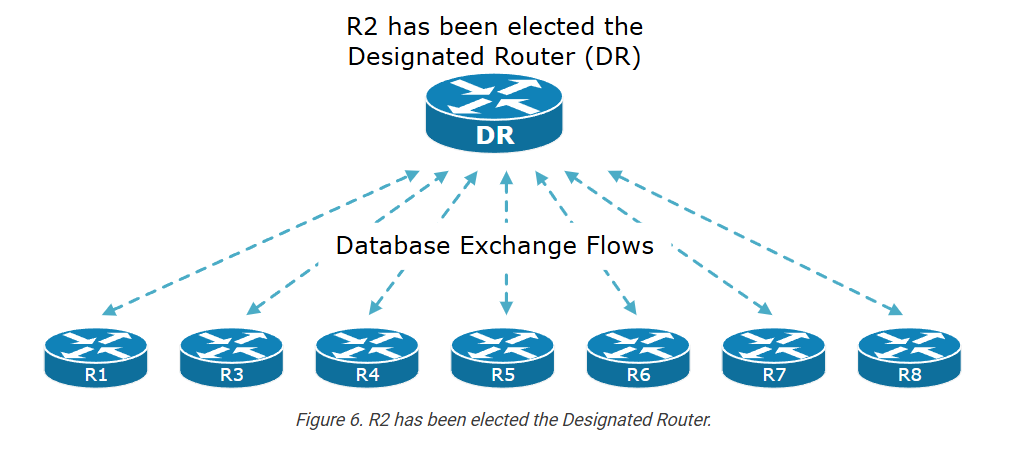
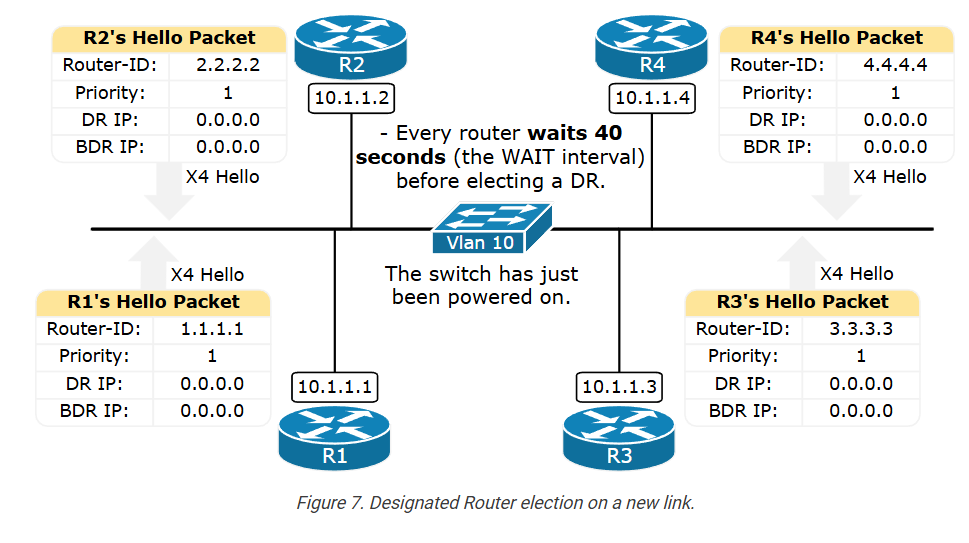
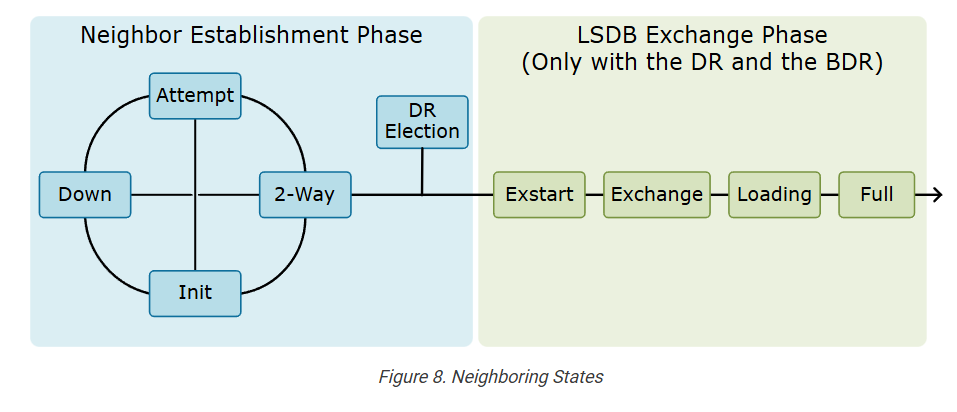
					R1# sh ip ospf neighbor
Neighbor ID     Pri   State           Dead Time   Address         Interface
2.2.2.2           1   2WAY/DROTHER    00:00:38    10.1.1.2        Ethernet0/0
3.3.3.3           1   2WAY/DROTHER    00:00:39    10.1.1.3        Ethernet0/0
4.4.4.4           1   2WAY/DROTHER    00:00:38    10.1.1.4        Ethernet0/0
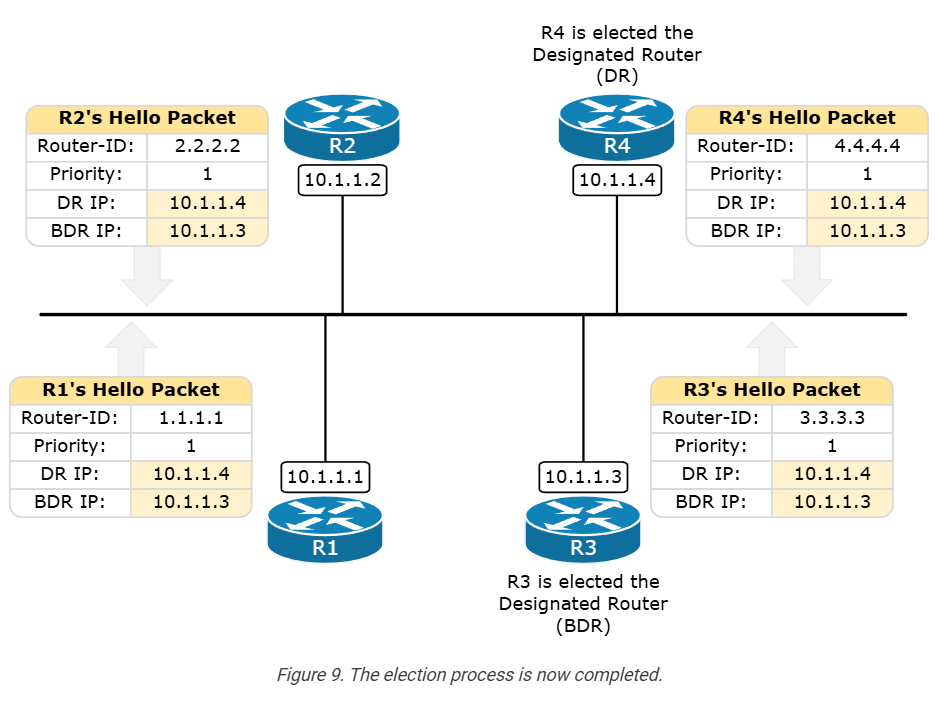
					R1# sh ip ospf neighbor
Neighbor ID     Pri   State           Dead Time   Address         Interface
2.2.2.2           1   2WAY/DROTHER    00:00:39    10.1.1.2        Ethernet0/0
3.3.3.3           1   FULL/BDR        00:00:32    10.1.1.3        Ethernet0/0
4.4.4.4           1   FULL/DR         00:00:31    10.1.1.4        Ethernet0/0
					R1# sh ip ospf interface e0/0
Ethernet0/0 is up, line protocol is up
  Internet Address 10.1.1.1/24, Interface ID 2, Area 0
  Attached via Network Statement
  Process ID 1, Router ID 1.1.1.1, Network Type BROADCAST, Cost: 10
  Topology-MTID    Cost    Disabled    Shutdown      Topology Name
        0           10        no          no            Base
  Transmit Delay is 1 sec, State DROTHER, Priority 1,
  Designated Router (ID) 4.4.4.4, Interface address 10.1.1.4
  Backup Designated router (ID) 3.3.3.3, Interface address 10.1.1.3
  Timer intervals configured, Hello 10, Dead 40, Wait 40, Retransmit 5
    oob-resync timeout 40
    Hello due in 00:00:07
  Supports Link-local Signaling (LLS)
  Cisco NSF helper support enabled
  IETF NSF helper support enabled
  Can be protected by per-prefix Loop-Free FastReroute
  Can be used for per-prefix Loop-Free FastReroute repair paths
  Not Protected by per-prefix TI-LFA
  Index 1/1/1, flood queue length 0
  Next 0x0(0)/0x0(0)/0x0(0)
  Last flood scan length is 0, maximum is 1
  Last flood scan time is 0 msec, maximum is 0 msec
  Neighbor Count is 3, Adjacent neighbor count is 2
    Adjacent with neighbor 3.3.3.3  (Backup Designated Router)
    Adjacent with neighbor 4.4.4.4  (Designated Router)
  Suppress hello for 0 neighbor(s)
					R1# sh ip ospf neighbor
Neighbor ID     Pri   State           Dead Time   Address         Interface
2.2.2.2           1   2WAY/DROTHER    00:00:30    10.1.1.2        Ethernet0/0
3.3.3.3           1   FULL/BDR        00:00:32    10.1.1.3        Ethernet0/0
4.4.4.4           1   FULL/DR         00:00:32    10.1.1.4        Ethernet0/0
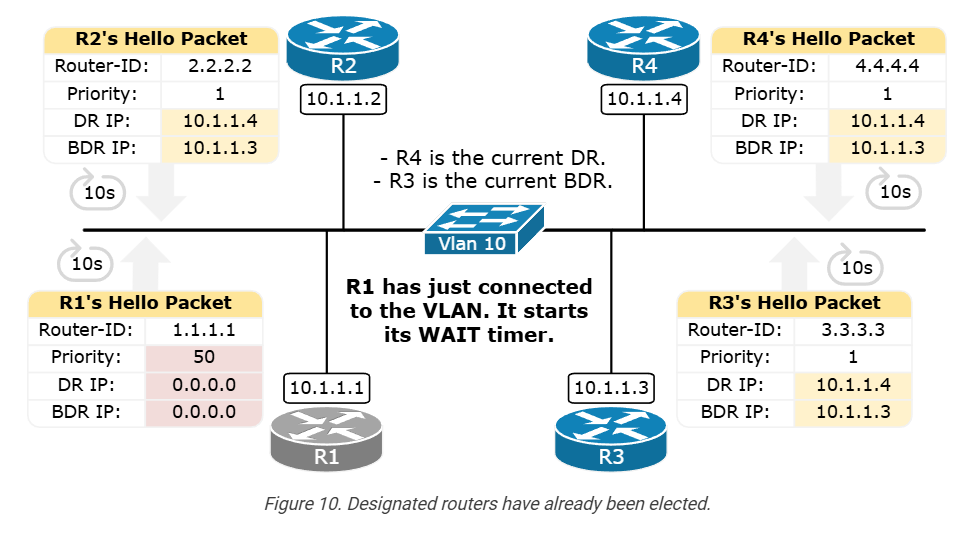
					R1# sh ip ospf neighbor
Neighbor ID     Pri   State           Dead Time   Address         Interface
2.2.2.2           1   2WAY/DROTHER    00:00:32    10.1.1.2        Ethernet0/0
3.3.3.3           1   FULL/BDR        00:00:35    10.1.1.3        Ethernet0/0
4.4.4.4           1   FULL/DR         00:00:32    10.1.1.4        Ethernet0/0
					R1# sh ip ospf interface e0/0
Ethernet0/0 is up, line protocol is up
  Internet Address 10.1.1.1/24, Interface ID 2, Area 0
  Attached via Network Statement
  Process ID 1, Router ID 1.1.1.1, Network Type BROADCAST, Cost: 10
  Topology-MTID    Cost    Disabled    Shutdown      Topology Name
        0           10        no          no            Base
  Transmit Delay is 1 sec, State DROTHER, Priority 50
  Designated Router (ID) 4.4.4.4, Interface address 10.1.1.4
  Backup Designated router (ID) 3.3.3.3, Interface address 10.1.1.3
  Timer intervals configured, Hello 10, Dead 40, Wait 40, Retransmit 5
    oob-resync timeout 40
    Hello due in 00:00:00
  Supports Link-local Signaling (LLS)
  Cisco NSF helper support enabled
  IETF NSF helper support enabled
  Can be protected by per-prefix Loop-Free FastReroute
  Can be used for per-prefix Loop-Free FastReroute repair paths
  Not Protected by per-prefix TI-LFA
  Index 1/1/1, flood queue length 0
  Next 0x0(0)/0x0(0)/0x0(0)
  Last flood scan length is 0, maximum is 1
  Last flood scan time is 0 msec, maximum is 0 msec
  Neighbor Count is 3, Adjacent neighbor count is 2
    Adjacent with neighbor 3.3.3.3  (Backup Designated Router)
    Adjacent with neighbor 4.4.4.4  (Designated Router)
  Suppress hello for 0 neighbor(s)
					R4# clear ip ospf process
Reset ALL OSPF processes? [no]: yes
R4#
*Jul 22 15:25:04.969: %OSPF-5-ADJCHG: Process 1, Nbr 1.1.1.1 on Ethernet0/0 from FULL to DOWN, Neighbor Down: Interface down or detached
*Jul 22 15:25:04.969: %OSPF-5-ADJCHG: Process 1, Nbr 2.2.2.2 on Ethernet0/0 from FULL to DOWN, Neighbor Down: Interface down or detached
*Jul 22 15:25:04.969: %OSPF-5-ADJCHG: Process 1, Nbr 3.3.3.3 on Ethernet0/0 from FULL to DOWN, Neighbor Down: Interface down or detached
					R1# sh ip ospf interface e0/0
Ethernet0/0 is up, line protocol is up
  Internet Address 10.1.1.1/24, Interface ID 2, Area 0
  Attached via Network Statement
  Process ID 1, Router ID 1.1.1.1, Network Type BROADCAST, Cost: 10
  Topology-MTID    Cost    Disabled    Shutdown      Topology Name
        0           10        no          no            Base
  Transmit Delay is 1 sec, State BDR, Priority 50
  Designated Router (ID) 3.3.3.3, Interface address 10.1.1.3
  Backup Designated router (ID) 1.1.1.1, Interface address 10.1.1.1
  Timer intervals configured, Hello 10, Dead 40, Wait 40, Retransmit 5
. . .
					R3# clear ip ospf process
Reset ALL OSPF processes? [no]: yes
R3#
*Jul 22 15:32:01.156: %OSPF-5-ADJCHG: Process 1, Nbr 1.1.1.1 on Ethernet0/0 from FULL to DOWN, Neighbor Down: Interface down or detached
*Jul 22 15:32:01.156: %OSPF-5-ADJCHG: Process 1, Nbr 2.2.2.2 on Ethernet0/0 from FULL to DOWN, Neighbor Down: Interface down or detached
*Jul 22 15:32:01.156: %OSPF-5-ADJCHG: Process 1, Nbr 4.4.4.4 on Ethernet0/0 from FULL to DOWN, Neighbor Down: Interface down or detached
					R1# sh ip ospf interface e0/0
Ethernet0/0 is up, line protocol is up
  Internet Address 10.1.1.1/24, Interface ID 2, Area 0
  Attached via Network Statement
  Process ID 1, Router ID 1.1.1.1, Network Type BROADCAST, Cost: 10
  Topology-MTID    Cost    Disabled    Shutdown      Topology Name
        0           10        no          no            Base
  Transmit Delay is 1 sec, State DR, Priority 50
  Designated Router (ID) 1.1.1.1, Interface address 10.1.1.1
  Backup Designated router (ID) 4.4.4.4, Interface address 10.1.1.4
  Timer intervals configured, Hello 10, Dead 40, Wait 40, Retransmit 5
    oob-resync timeout 40
    Hello due in 00:00:04
  Supports Link-local Signaling (LLS)
  Cisco NSF helper support enabled
  IETF NSF helper support enabled
  Can be protected by per-prefix Loop-Free FastReroute
  Can be used for per-prefix Loop-Free FastReroute repair paths
  Not Protected by per-prefix TI-LFA
  Index 1/1/1, flood queue length 0
  Next 0x0(0)/0x0(0)/0x0(0)
  Last flood scan length is 1, maximum is 3
  Last flood scan time is 0 msec, maximum is 0 msec
  Neighbor Count is 3, Adjacent neighbor count is 3
    Adjacent with neighbor 2.2.2.2
    Adjacent with neighbor 3.3.3.3
    Adjacent with neighbor 4.4.4.4  (Backup Designated Router)
  Suppress hello for 0 neighbor(s)


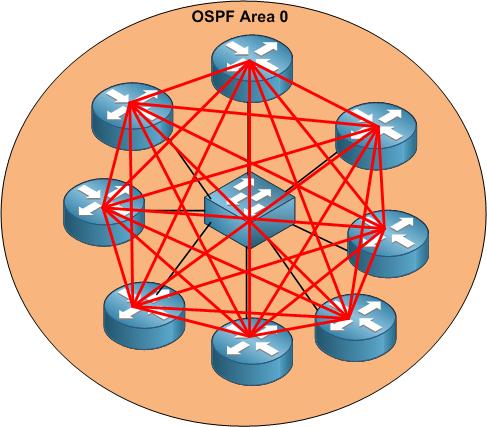
OSPF DR BDR
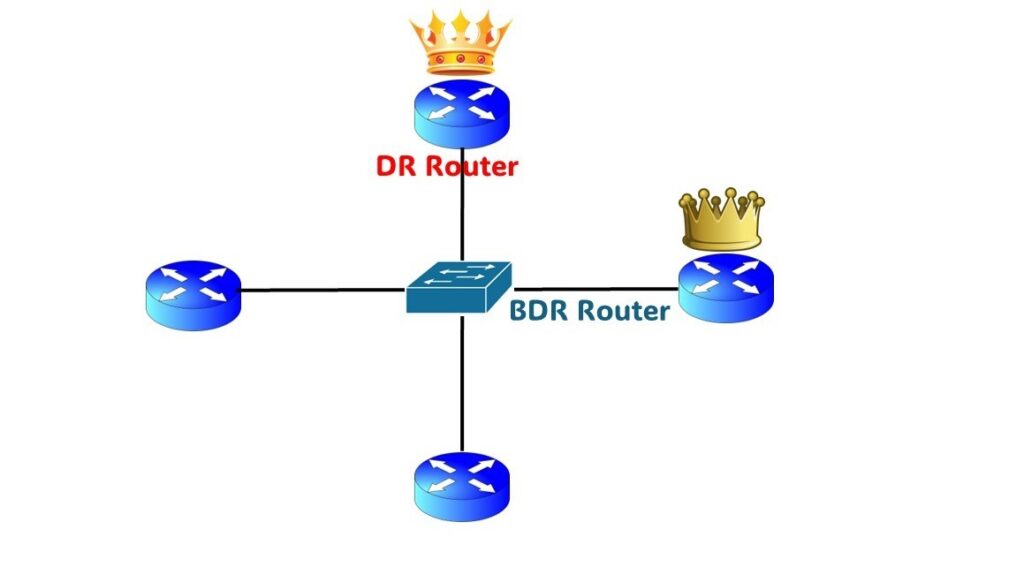
In Open Shortest Path First (OSPF), DR and BDR are special routers elected in a broadcast network (like Ethernet) to reduce routing traffic and make the network more efficient.
1. DR (Designated Router)
DR (Designated Router) is the main router responsible for exchanging routing information with all other routers in the OSPF network segment.
Functions of DR:
- Collects LSA (Link State Advertisement) from all routers.
- Creates and distributes the LSDB (Link State Database) to other routers.
- Reduces the number of adjacencies between routers.
- Acts as the central communication point in the OSPF network segment.
Example:
If 5 routers are connected in the same LAN, instead of each router forming adjacency with all others, they send updates to the DR, and the DR distributes them to the rest.
2. BDR (Backup Designated Router)
BDR (Backup Designated Router) is the backup router for the DR.
Functions of BDR:
- Monitors the DR continuously.
- If the DR fails, the BDR immediately becomes the new DR.
- Ensures high availability and prevents network disruption.
3. Why DR and BDR are needed
Without DR/BDR, every router must create adjacency with every other router.
Example with 5 routers:
- Without DR/BDR → 10 adjacencies
- With DR/BDR → Only DR and BDR handle most communication
This reduces network traffic and CPU usage.
4. DR and BDR Election Criteria
Routers elect DR and BDR based on:
- OSPF Priority (highest wins)
- Router ID (highest wins if priority same)
Priority range: 0 – 255
- 0 = Router cannot become DR/BDR
- 255 = Highest priority
Example:
| Router | Priority | Router ID | Result |
|---|---|---|---|
| R1 | 1 | 1.1.1.1 | DROther |
| R2 | 100 | 2.2.2.2 | DR |
| R3 | 50 | 3.3.3.3 | BDR |
5. OSPF Router Roles
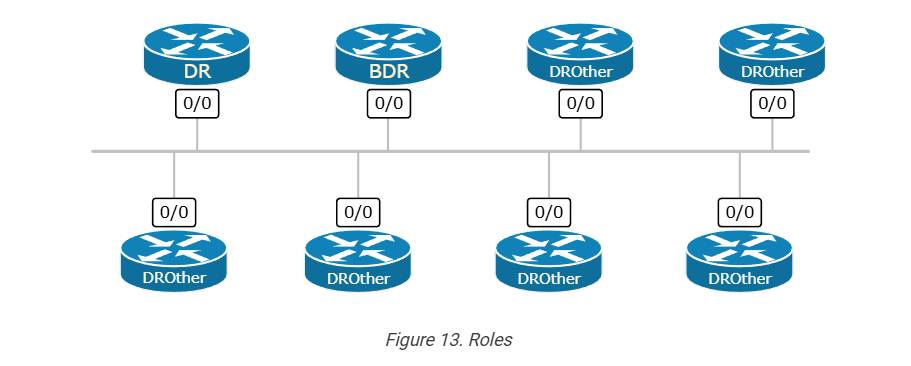
- DR – Main router
- BDR – Backup router
- DROther – All other routers
6. DR/BDR Election Commands (Cisco)
Example in Cisco Systems router:
					interface g0/0
ip ospf priority 200
show ip ospf neighbor
Why Need DR BDR in OSPF
In Open Shortest Path First (OSPF), DR (Designated Router) and BDR (Backup Designated Router) are used to reduce routing traffic and make the network more efficient in broadcast networks like Ethernet.
1. Reduce Too Many Neighbor Connections
If many routers are in the same LAN, each router would normally connect (form adjacency) with every other router.
Example with 5 routers:
Without DR/BDR
R1 ↔ R2
R1 ↔ R3
R1 ↔ R4
R1 ↔ R5
R2 ↔ R3
R2 ↔ R4
R2 ↔ R5
R3 ↔ R4
R3 ↔ R5
R4 ↔ R5
Total 10 adjacencies
With DR/BDR
All routers connect mainly with DR and BDR
Total much fewer adjacencies
👉 This reduces network complexity.
2. Reduce LSA Flooding
Routers send LSA (Link State Advertisement) updates.
Without DR:
Every router sends updates to every router → too much traffic
With DR:
- Routers send updates to DR
- DR distributes updates to other routers
👉 Less routing traffic
3. Reduce CPU and Memory Load
If every router communicates with all routers:
- CPU usage increases
- Memory usage increases
DR/BDR centralizes communication, so routers use less CPU and resources.
4. Network Stability
BDR acts as backup.
If DR fails:
- BDR immediately becomes new DR
- Network continues working
👉 High availability
5. Faster Convergence
Because updates are controlled by DR:
- Routing table updates become faster
- Network becomes more stable
Short Answer:
DR and BDR are used in OSPF to reduce routing traffic, reduce adjacencies, improve network performance, and provide backup if the main router fails.
OSPF Router Roles
- DR – Main router
- BDR – Backup router
- DROther – All other routers
6. DR/BDR Election Commands (Cisco)
Example in Cisco Systems router:
					interface g0/0
ip ospf priority 200
show ip ospf neighbor
1. Introduction
In OSPF (Open Shortest Path First), DR (Designated Router) and BDR (Backup Designated Router) are used to manage communication between multiple routers in a network. They are mainly required in multi-access networks like Ethernet LANs.
2. Problem Without DR/BDR
If DR and BDR are not used, every router must form a neighbor relationship with every other router. This creates a full mesh topology.
For example, if 5 routers are connected:
- Each router connects with 4 others
- Total adjacency = 10 connections
This leads to:
- High CPU usage
- High memory usage
- Excessive LSA (Link-State Advertisement) traffic
3. Need for DR/BDR
To solve this problem, OSPF introduces DR and BDR. Instead of full mesh:
- One router becomes DR
- One router becomes BDR
- All other routers connect only to DR/BDR
This reduces:
- Number of adjacencies
- Network traffic
- Resource usage
4. Role of DR
The DR acts as a central communication point. All routers send their LSAs to the DR, and the DR distributes them to other routers. This avoids unnecessary duplication of messages.
5. Role of BDR
The BDR works as a backup router. It listens to all OSPF updates and stays ready. If the DR fails, the BDR immediately takes over as DR, ensuring no network interruption.
6. Example Scenario
Consider 4 routers in a LAN:
| Router | Priority | Role |
|---|---|---|
| R1 | 100 | DR |
| R2 | 90 | BDR |
| R3 | 1 | DROTHER |
| R4 | 1 | DROTHER |
Working:
- R3 and R4 send updates to DR (R1)
- DR sends updates to all routers
- If R1 fails → R2 becomes DR automatically
7. Adjacency Comparison
Without DR/BDR:
4 routers → 6 adjacencies
With DR/BDR:
Only 3–4 adjacencies
This significantly improves performance.
8. Where DR/BDR is Used
Used in:
- Broadcast networks (Ethernet)
- Non-broadcast networks (NBMA)
Not used in:
Point-to-point links
9. DR/BDR Election Rule
Election is based on:
- Highest OSPF Priority
- If same → Highest Router ID
👉 Priority 0 = cannot become DR/BDR
10. Benefits
- Reduces network complexity
- Improves scalability
- Minimizes LSA flooding
- Provides backup (BDR)
Final Conclusion
DR and BDR are essential in OSPF to make the network efficient and scalable.
- DR = Main communication router
- BDR = Backup for reliability
Without DR/BDR, OSPF networks would become slow and overloaded in multi-access environments.
DR BDR Multicast IP Addresses
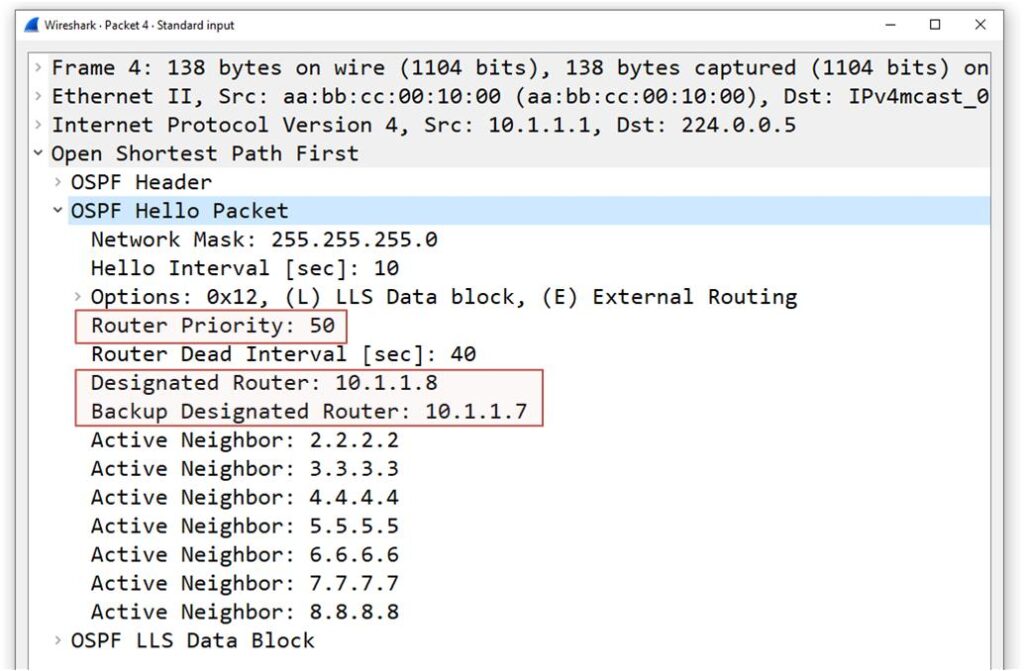
In Open Shortest Path First (OSPF), routers use multicast IP addresses to communicate with DR (Designated Router) and BDR (Backup Designated Router). These addresses help send routing updates efficiently in a network.
1. 224.0.0.5 – All SPF Routers Address
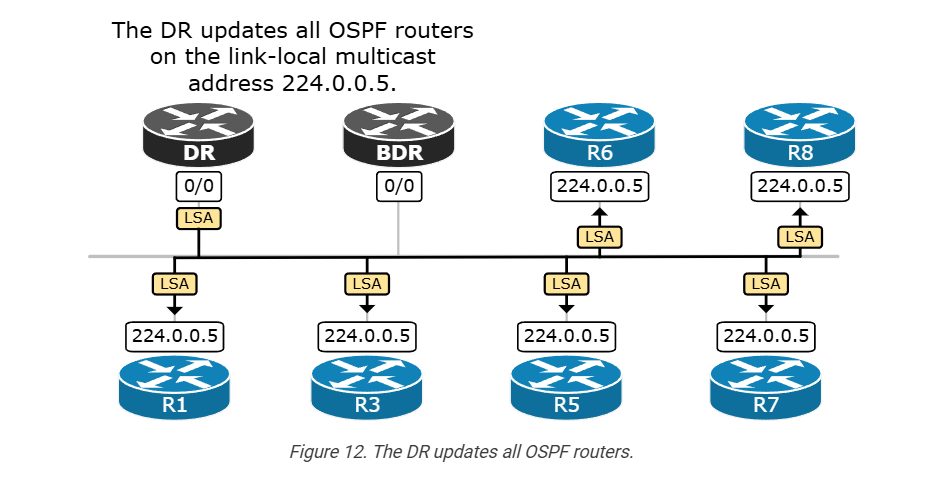
224.0.0.5 is the multicast address used by all OSPF routers.
Explanation:
- Every OSPF router joins this multicast group.
- Hello packets and some routing updates are sent to this address.
- All routers on the network segment receive these packets.
Example:
Router R1 sends a Hello packet to 224.0.0.5 →
R2, R3, R4 (all OSPF routers) receive it.
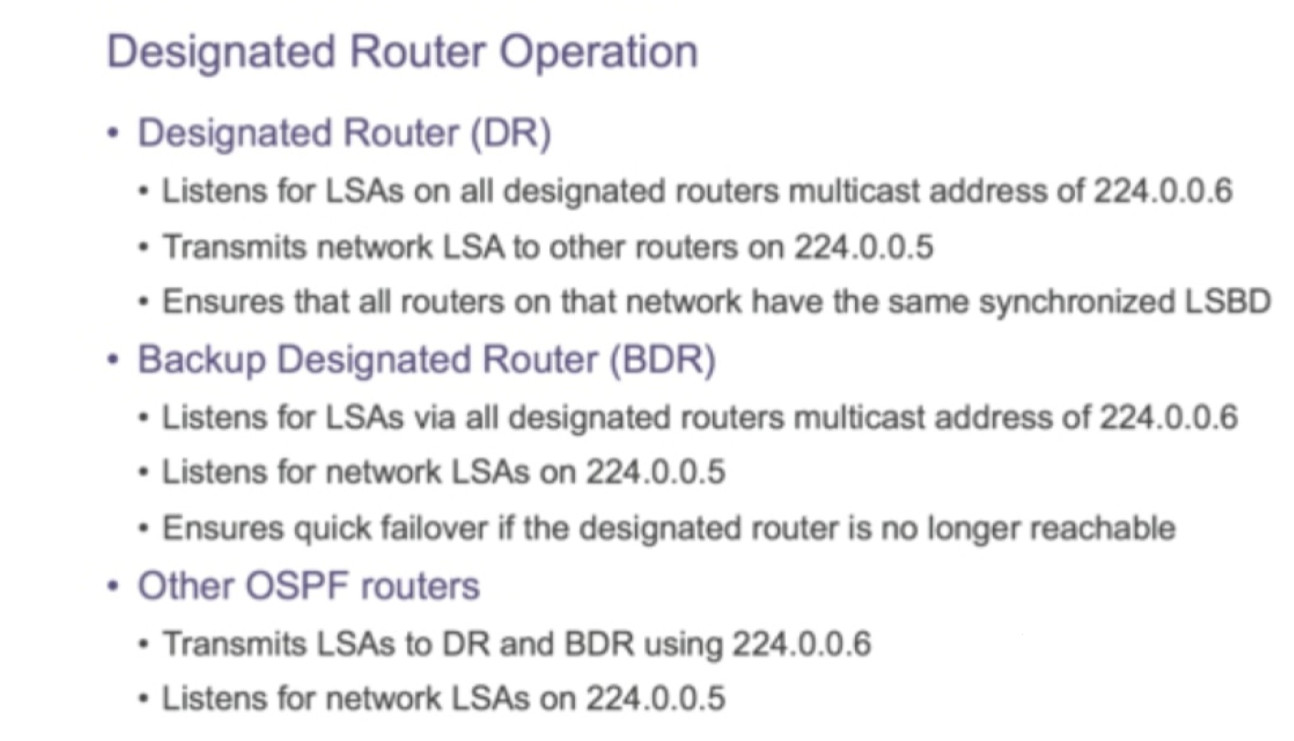
2. 224.0.0.6 – All DR BDR Routers Address
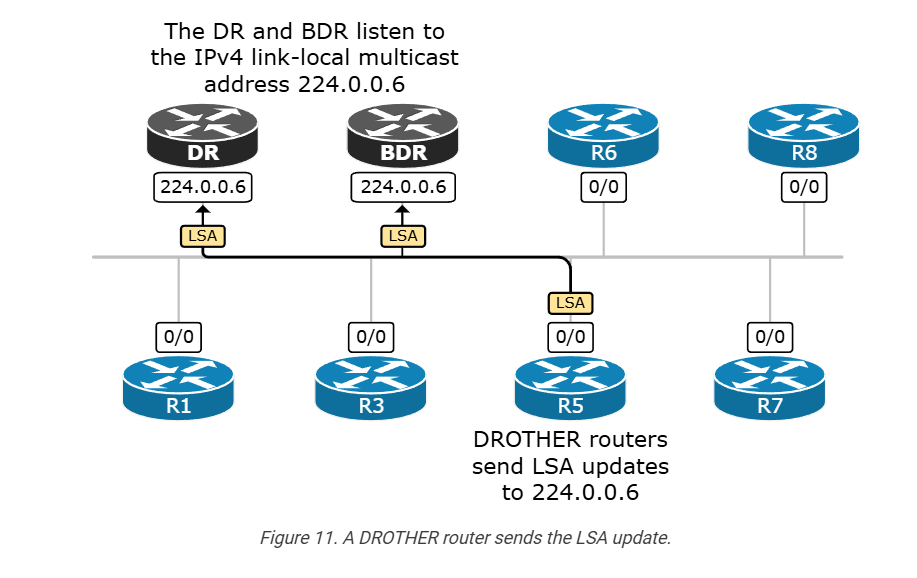
224.0.0.6 is the multicast address used by DR and BDR routers.
Explanation:
- Only DR and BDR listen to this address.
- Other routers (called DROther) send their LSA updates to this address.
- DR then distributes the information to all routers.
Example:
R1 (DROther) sends LSA → 224.0.0.6
DR receives it → DR sends update to 224.0.0.5 so all routers get it.
3. Communication Flow Example
Step-1: All routers send Hello → 224.0.0.5
Step-2: Routers elect DR and BDR
Step-3: DROther routers send updates → 224.0.0.6
Step-4: DR distributes updates → 224.0.0.5
4. Summary Table
| Multicast Address | Name | Used For |
|---|---|---|
| 224.0.0.5 | AllSPFRouters | Communication between all OSPF routers |
| 224.0.0.6 | AllDRouters | Communication with DR and BDR |
Short definition:
- 224.0.0.5 → All OSPF routers receive packets.
- 224.0.0.6 → Only DR and BDR receive packets.
