Router, Switch, and Firewall
Differences Between Router and Firewall
What is a Router
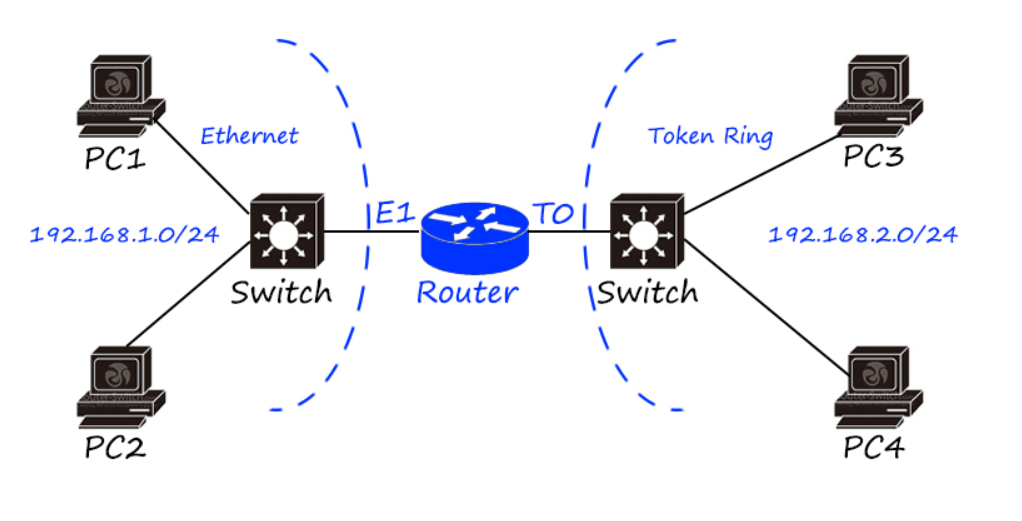
A router is a networking device used to help route traffic from source to destination. Routers have an upstream port and multiple downstream ports, and route traffic originating from one port to the appropriate destination port. This includes routing traffic between machines within the subnet and routing traffic between internal and external machines.
Routers primarily route traffic at Layer 3 (Network) of the OSI model, though they do operate at Layer 1 (Physical) and Layer 2 (Data Link) as well. A router will have IP addresses assigned to each of its ports and will route traffic to the appropriate port based on the destination address specified within a network packet.
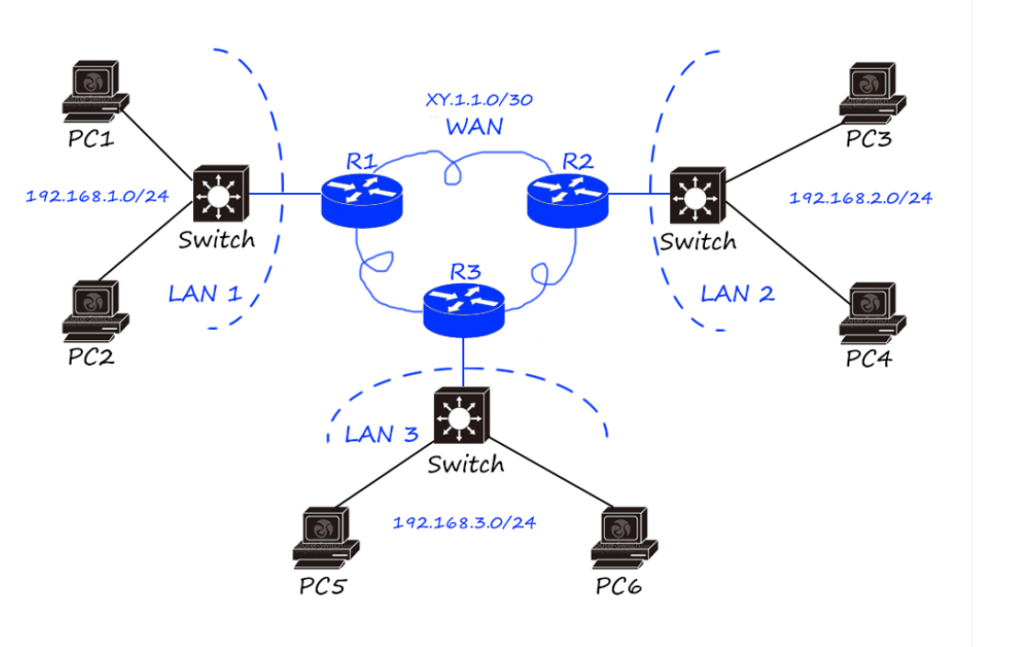
Routers are the backbone of the Internet as well as of private, internal networks. When traveling from point A to point B, a network packet is likely to make multiple hops from one router to the next while traversing the Internet or a large private network.
What is a Firewall
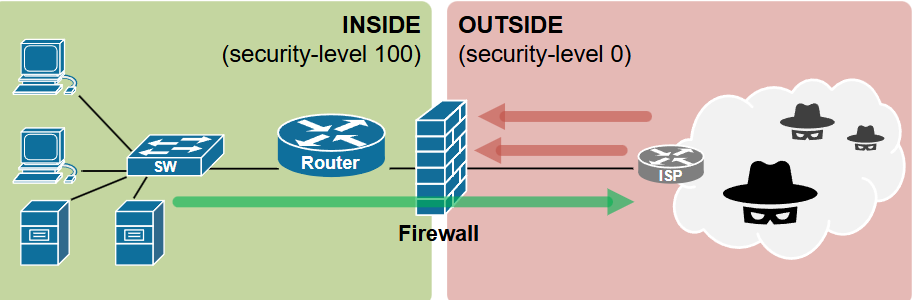
A firewall is a solution that defines and protects network boundaries. Firewalls are deployed at the edge of the network — where it connects to another network — and all traffic flows through the firewall for inspection and filtering. For instance organizations often have a perimeter firewall to segment internal networks and assets of an organization from the Internet.
Firewalls work based on predefined firewall rules. The rules use the packet’s header — and potentially its contents — to determine whether or not it should be permitted to enter or leave the network. For example, a firewall may be configured to block traffic to or from certain IP ranges, restrict inbound network connections, or prevent certain network protocols from entering or leaving the corporate network.
Firewalls are important to an organization’s cybersecurity program because they can block potential inbound threats and outbound data exfiltration. Firewalls come in a variety of forms, including stateless and stateful firewalls — which make decisions based solely on IP address and port in packet headers — and next-generation firewalls (NGFWs), which incorporate additional functions — such as an intrusion prevention system (IPS) — and can identify malicious content in the body of a network packet.
The Difference Between Firewalls and Routers
Firewalls and routers are both essential components of an organization’s network infrastructure. However, they are different systems with very different functions.
A router is a tool for networking. Routers make up much of the backbone of the Internet, connecting networks together and routing traffic between them. A router has no security capabilities, it is solely intended to help a network packet travel from point A to point B.
Firewalls, on the other hand, are security solutions designed to help protect the organization against cyber threats. All traffic flowing through a firewall is inspected and evaluated against predefined rules. Based on these rules, the firewall will decide to either allow the packet to continue on to its destination or block the attempted connection.
Router vs. Firewall:What are they and When to use them
In the digital age, where every device from your phone to your fridge can connect to the internet, securing and managing your network is more important than ever. Two essential tools in this process are routers and firewalls. While they may seem similar—or even come bundled in a single device—they serve very different purposes. Let’s break down Router vs. Firewall what they do, what is their Key Function, what is router and firewall difference, and when to use each one.
What Is a Router
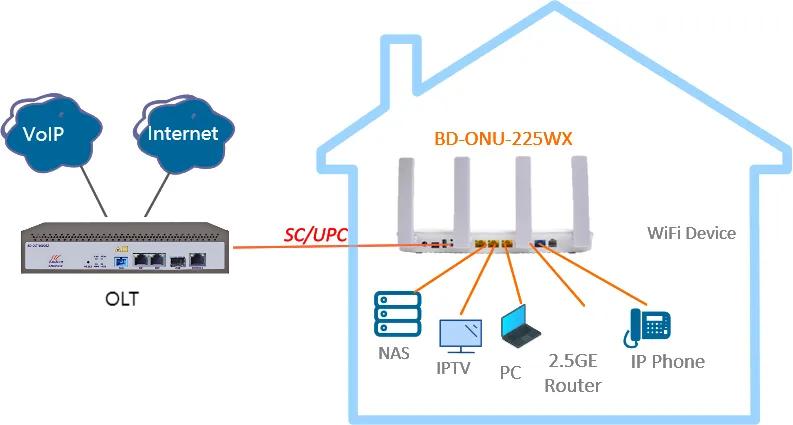
A router is a networking device that forwards data packets between different computer networks. In simpler terms, it’s the device that connects your home or office network to the internet.
Key Functions of a Router:
Traffic Direction (Routing Data):
Routers determine the most efficient path for data to travel from your device (like your laptop or smartphone) to its destination (like a website or server) and back again. They make real-time decisions to ensure that data flows quickly and reliably.
Network Segmentation:
Routers can create multiple logical networks within a single physical network. For example, they can separate a “Guest” Wi-Fi network from your main home network to prevent guests from accessing your personal devices.
IP Address Assignment (DHCP Server):
Most routers automatically assign unique IP addresses to each connected device using a feature called DHCP (Dynamic Host Configuration Protocol). This prevents address conflicts and simplifies network management.
Basic Security Features (NAT and SPI):
Routers typically include basic protection features like Network Address Translation (NAT), which hides your internal IP addresses from external networks, and Stateful Packet Inspection (SPI), which inspects data packets to allow only legitimate traffic.
What Is a Firewall
A firewall is a network security device—or software—that monitors, filters, and controls incoming and outgoing network traffic based on pre-defined security rules. Its main job is to prevent unauthorized access and safeguard your network from threats.
Key Functions of a Firewall:
Traffic Filtering Based on Rules:
Firewalls inspect data packets and determine whether to allow or block them based on configured policies. These rules can be based on IP addresses, port numbers, protocols, or even specific applications.
Intrusion Detection and Prevention (IDS/IPS):
Advanced firewalls can identify suspicious or malicious activity—like port scanning or brute-force attacks—and take action by alerting administrators or automatically blocking the threat.
Application-Level Filtering:
Some firewalls can control access to specific applications or services. For instance, they can block access to social media platforms during work hours or prevent certain apps from sending data to the internet.
Traffic Logging and Monitoring:
Firewalls keep detailed logs of all allowed and denied traffic. These logs are essential for identifying security incidents, conducting audits, and maintaining compliance with data protection laws.
Router vs. Firewall: The Key Differences
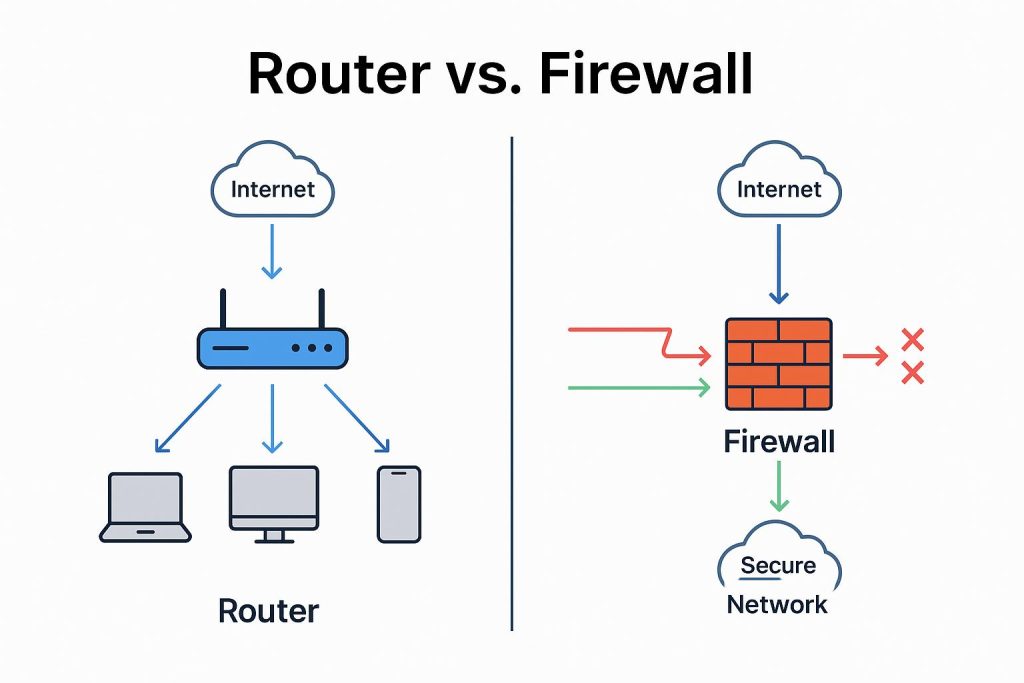
| Feature | Router | Firewall |
| Primary Role | Connects different networks and routes data. | Protects the network by filtering and blocking malicious traffic. |
| Data Management | Determines where data should go based on destination IP. | Determines whether data should be allowed or blocked based on rules. |
| Security Level | Basic: NAT, SPI, limited rule sets. | Advanced: deep packet inspection, threat detection, behavioral analysis. |
| Network Focus | Efficiency and connectivity. | Security, control, and compliance. |
| Physical Placement | Sits between your internal network and the external internet. | Can be placed before, after, or integrated with a router in the network. |
When to use Router vs. Firewall
You should use a Router when:
You need to connect multiple devices to a single internet connection.
Routers allow many devices to access the internet simultaneously using a single public IP address from your ISP.
You want to create a local area network (LAN).
Routers allow your devices to communicate with each other—like streaming a movie from your computer to your smart TV or sharing a printer across the network.
You need Wi-Fi connectivity.
Most home routers include built-in wireless access points, allowing devices to connect to your network wirelessly.
You require basic security for a small or home network.
For typical home users, a router with built-in NAT and SPI offers sufficient protection against casual attacks and unauthorized access.
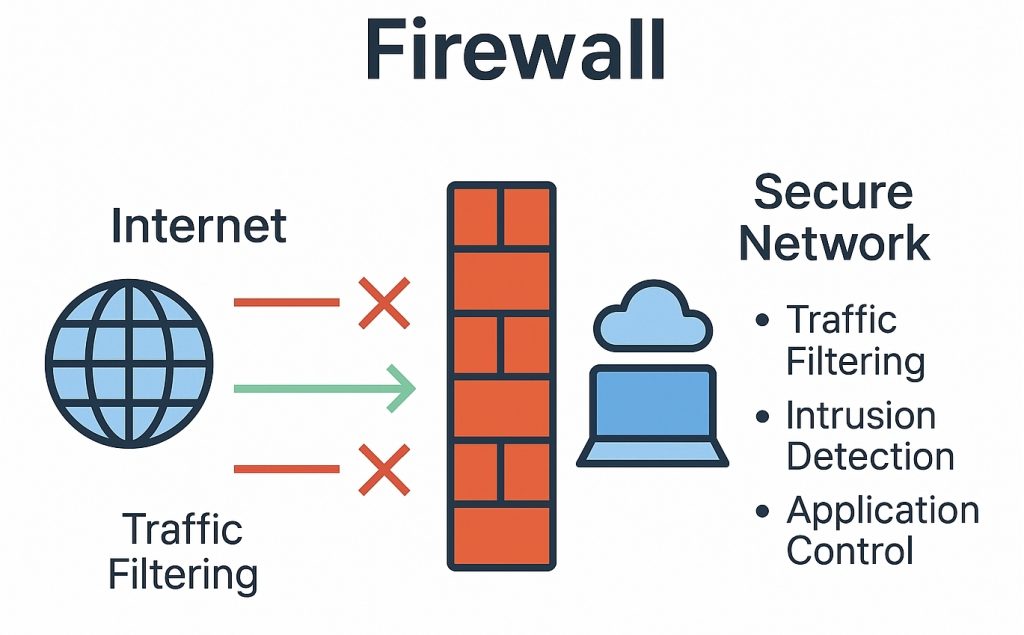
You want to protect your network from cyber threats.
Firewalls detect and block unauthorized access attempts, viruses, worms, and other malware that routers alone can’t handle.
You need to enforce strict access controls.
Businesses often use firewalls to control which users or devices can access sensitive resources like databases or financial systems.
You must meet regulatory or compliance requirements.
Industries like healthcare (HIPAA) or finance (PCI DSS) are required to implement firewalls to secure sensitive customer data.
You want visibility and logging of network activity.
Firewalls offer detailed logs that help administrators detect anomalies and take action before an attack escalates.
You need layered security in high-risk environments.
In enterprises, firewalls are often part of a multi-layered defense system that includes antivirus software, intrusion detection systems, and endpoint protection.
Can a Router Be a Firewall
Yes, many modern routers include basic firewall features, but they’re not as robust as dedicated firewalls. While they can perform basic packet filtering and block some types of traffic, they usually lack deep inspection capabilities and comprehensive threat detection.
In business environments or high-security setups, it’s common to see a router paired with a dedicated firewall, where:
The router manages traffic flow and IP routing.
The firewall enforces security policies and monitors for threats.
So Do You Need Both? Router vs. Firewall
In most cases, yes. Here’s why:
Home Networks: A router with a built-in firewall works for basic needs.
Business Networks: Pair a standalone router with a dedicated firewall (or NGFW) for robust security.
Hybrid Setups: Modern “security routers” combine both, but enterprises often layer them for defense-in-depth.
Pro Tip: Even if your router has a firewall, consider adding a software firewall on critical devices (e.g., work laptops).
Differences Between Router and Firewall
| Basis | Router | Firewall |
|---|---|---|
| Definition | A device that forwards data between different networks | A device that monitors and controls network traffic for security |
| Main Role | Network connectivity | Network security |
| Working Principle | Uses routing tables to send packets | Uses security rules to allow/block packets |
| OSI Layer | Layer 3 (Network Layer) | Layer 3, 4, and 7 |
| Address Used | IP Address | IP, Port Number, Protocol, Application |
| Security Function | Basic (NAT, ACL) | Advanced (Stateful filtering, IDS/IPS) |
| Traffic Handling | Routes all valid traffic | Filters traffic based on policies |
| Threat Protection | Cannot stop most attacks | Protects against hacking, malware, unauthorized access |
| Placement | Connects LAN to WAN/Internet | Placed between trusted and untrusted networks |
| Example Use | Home or office internet connection | Company network protection system |
A router is a networking device used to connect different networks and forward data packets from one network to another. It works mainly at the network layer (Layer 3) and uses IP addresses and routing tables to decide the best path for data transmission. In a company environment, a router is typically used to connect the internal office network (LAN) to the internet (WAN). For example, in a company like a bank or IT office, the router ensures that employees’ computers can access external services such as websites, cloud servers, or remote branches by directing traffic correctly.
A firewall, on the other hand, is a security device that monitors and controls incoming and outgoing network traffic based on predefined security rules. It works across multiple layers (Layer 3, 4, and even Layer 7) and is designed to protect the network from unauthorized access, cyberattacks, and malware. In a company, a firewall is placed between the internal network and the internet to act as a protective barrier. For example, in the same bank or IT company, the firewall blocks unauthorized users, prevents hacking attempts, and restricts access to harmful websites while allowing safe and necessary traffic.
Example (Company Scenario):
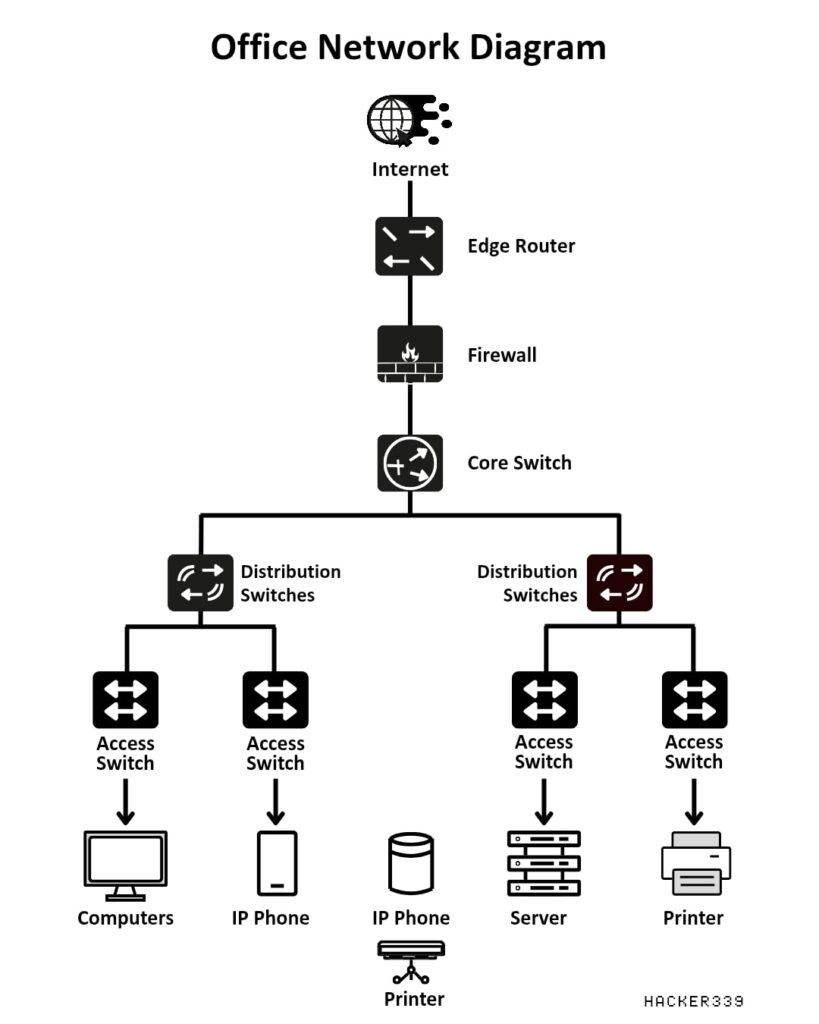
In a corporate office, when an employee tries to access a website, the request first goes to the router, which forwards it toward the internet. Before leaving or entering the network, the traffic passes through the firewall, which checks whether the request is safe or allowed. If the firewall finds any suspicious activity (like a malicious website or unauthorized access), it blocks the traffic.
Features Difference Between Router and Firewall
| Feature | Router | Firewall |
|---|---|---|
| Core Feature | Routing (path selection) | Security (traffic filtering) |
| Address Handling | Uses IP address | Uses IP, Port, Protocol, Application |
| Traffic Control | Forwards packets to destination | Allows or blocks packets |
| Security Feature | NAT, basic ACL | Stateful inspection, IDS/IPS, deep packet inspection |
| Access Control | Limited | Strong access control policies |
| Monitoring | Basic traffic logs | Advanced logging and monitoring |
| Attack Protection | Not designed for attacks | Protects from hacking, malware, DDoS |
| VPN Support | Supported (basic/advanced in some routers) | Strong VPN security support |
| Content Filtering | Not available | Website/app filtering possible |
| User Control | No user-level control | Can control users, applications, services |
Network Switch vs Network Router vs Network Firewall
There are three basic devices that are utilized in almost every network—network switch, network router and network firewall. They can be integrated into one device for small size networks such as for home networking, but it will not be the case for larger networks. For any network, none of the three devices can be dismissed. Learn to know how they work and how they build your network in this post.
Switch Bridge Your Devices in a Network
In a local area network (LAN), network switch functions similar to the overpasses in cities that bridge other network devices, like switches, routers, firewalls and wireless access points (WAPs), and connect client devices, such as computers, servers, Internet Protocol (IP) cameras and IP printers. It provides a central place of connections for all the different devices on the network.

Figure 1: Switches bridge different network devices and client devices like overpasses in cities.
How Does a Switch Work?
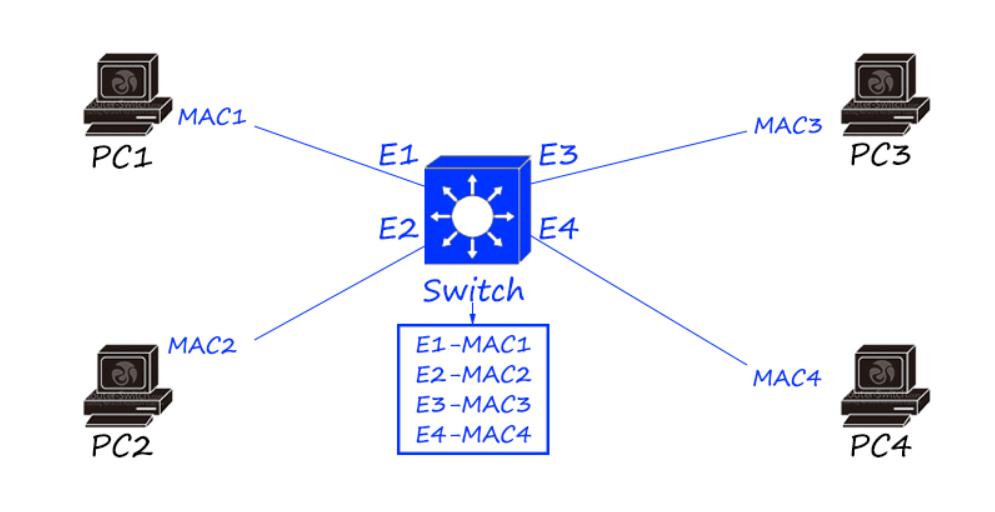
A switch switches data frames by keeping a table of what Media Access Control (MAC) addresses have been seen on which switch port. MAC address is a burnt-in mark in the hardware of a network interface controller (NIC). Every network card and every port of switches and routers has a unique MAC address. The switch learns the source and destination MAC addresses from the data frames and keeps them in the table. It refers to the table to determine where to send the frames that it receives. If it receives a destination MAC address that it does not have in the table, it floods the frame to all switch ports, which is known as broadcast. When it receives a response, it puts the MAC address in the table and it needs not to flood next time.

Figure 2: A switch learns MAC addresses from the data frames.
Router Connect You with the Internet
Routers (sometimes called Gateways) are hardware devices used to route packets between different networks, and to connect your network with the Internet. In fact, the Internet is made up by hundreds of thousands of routers.
How Does a Router Work?
A router checks the source and destination IP addresses of each packet, looks up the destination of the packet in the router’s IP routing table, and routes the packet to another router or a switch. The process keeps happening until the destination IP address is reached and responds back. When there is more than one way to go to the destination IP address, routers can smartly choose the most economical one. When the destination of the packet is not listed in the routing table, the packet will be sent to the default router (if it has one). If there’s no destination existing for the packet, it will be dropped.

Figure 3: How routers route packets from the source to the destination.
Generally, your router is provided by your Internet Service Providers (ISP). Your Internet provider assigns you one router IP address, which is a public IP address. When you browse the Internet, you’re identified to the outside world by the public IP address and your private IP address is protected. However, the private IP addresses of your desktop, laptop, iPad, TV media box, network copier are completely different. Otherwise, the router cannot recognize which device is requesting what.
What Does a Router Do?
Routers interpret different networks. Apart from the most commonly used Ethernet, there are many other different networks, such as ATM and Token Ring. The networks encapsulate data in different methods so they cannot communicate directly. Routers can “translate” these packets from different networks so they can understand each other.
Routers prevent broadcast storm. Without a router, a broadcast will go to every port of every device and be processed by every device. When the amount of broadcasts is too large, chaos can occur in the whole network. A router subdivides the network into two or more smaller networks that are connected by it, and it won’t allow the broadcast to flow between subnets.

Figure 4: Broadcast storm occurs when there is a large amount of broadcasts.
Switches vs. Routers
Why to compare switches vs. routers? Because Layer 3 switches are able to do routing. Someone may ask why not just use an L3 switch then you need no router at all. Every device has its own features and the choice depends on many factors. On one hand, for instance, for a small network with 10-100 users, an L3 switch is an overkill with regard to the cost or the functionality. An appropriate router can do the job well at a fair cost. On the other hand, you can have switching modules on routers to make it work like a L3 switch according to your needs. So the point of which device to use should consider its scalability, resiliency, software features, hardware performance, etc.
Firewall The One Who Safeguard Your Network
Firewalls are literally walls used to block fires in emergency. Network firewall sets up a barrier between an intranet/LAN and the Internet. Generally, a network firewall protects an internal/private LAN from outside attack and prevents important data to leak out. While routers without firewall capability blindly pass traffic between two separate networks, firewalls monitor the traffic and block unauthorized traffic out.

Figure 5: Firewalls set up a barrier between the Internet and the intranet/LAN.
In addition to separating the LAN from the Internet, network firewalls can also be used for segmenting important data from ordinary data within a LAN. So that internal invasion can also be avoided.

Figure 6: Internal firewall separates important data from others.
How Does a Network Firewall Work?
One common type of hardware firewall allows you define the blocking rules, such as by IP address, by Transmission Control Protocol (TCP) or User Diagram Protocol (UDP) of the port. So unwanted ports and IP addresses are forbidden. Some other firewalls are software applications and services. Such firewalls are like a proxy server which interconnect the two networks. The internal network does not communicate with outside network directly. The combination of these two types is usually safer and more efficient.
Switch, Router & Firewall: How Are They Connected?
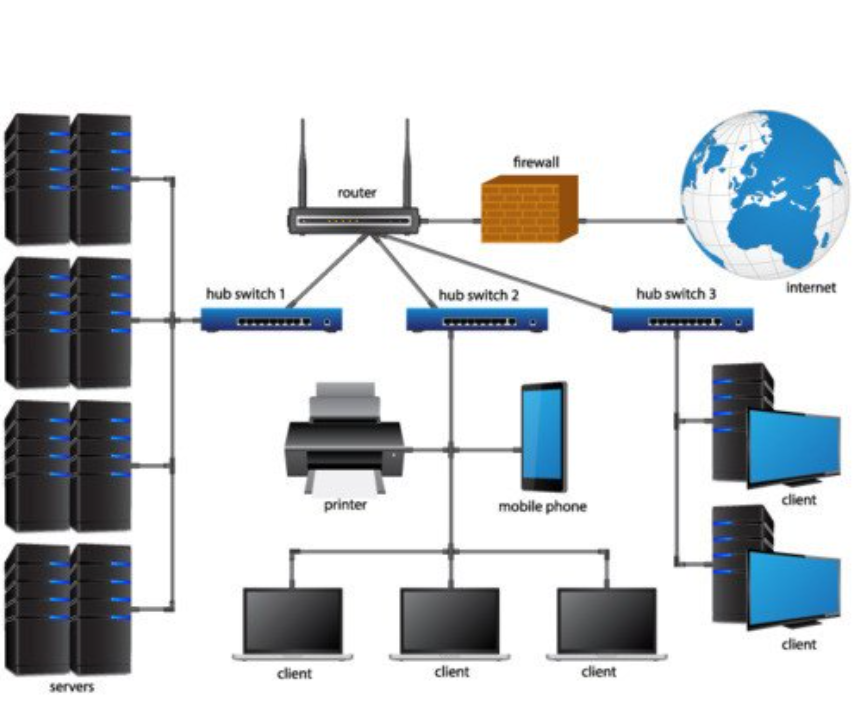
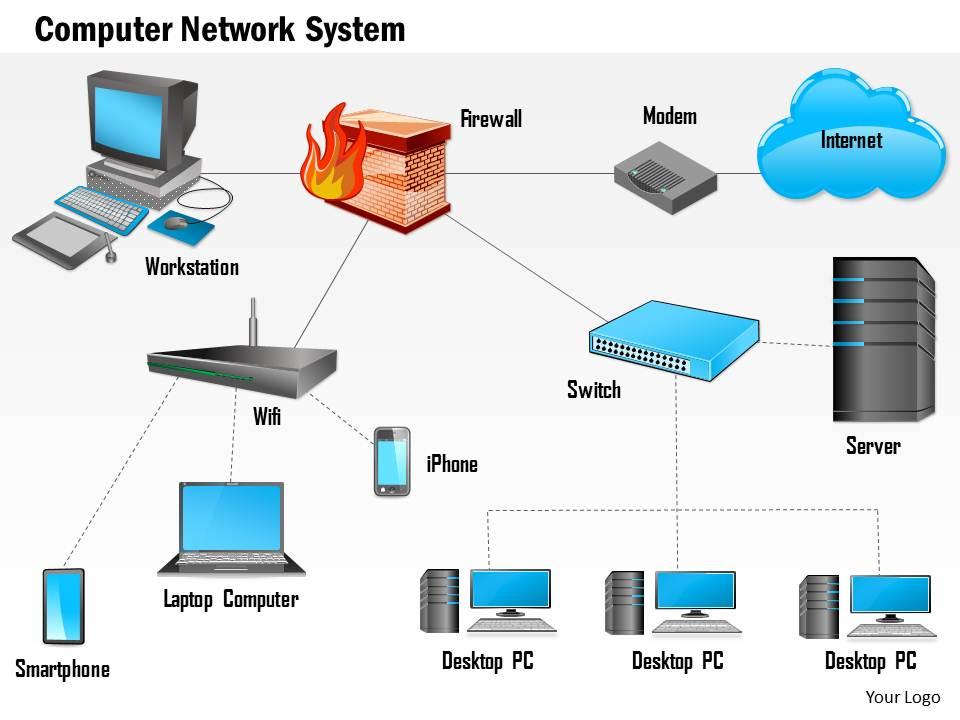
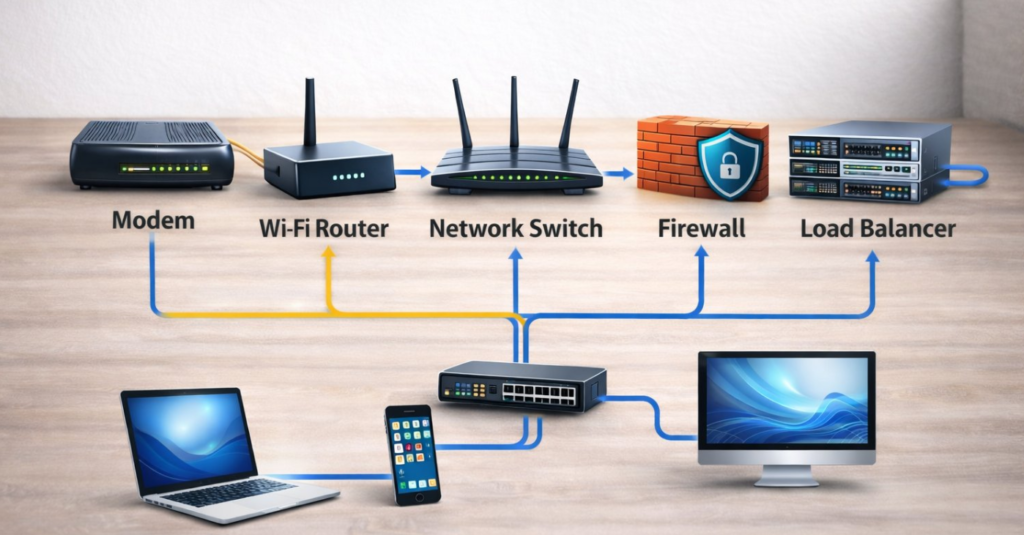
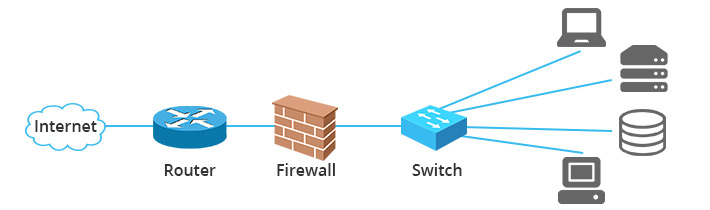
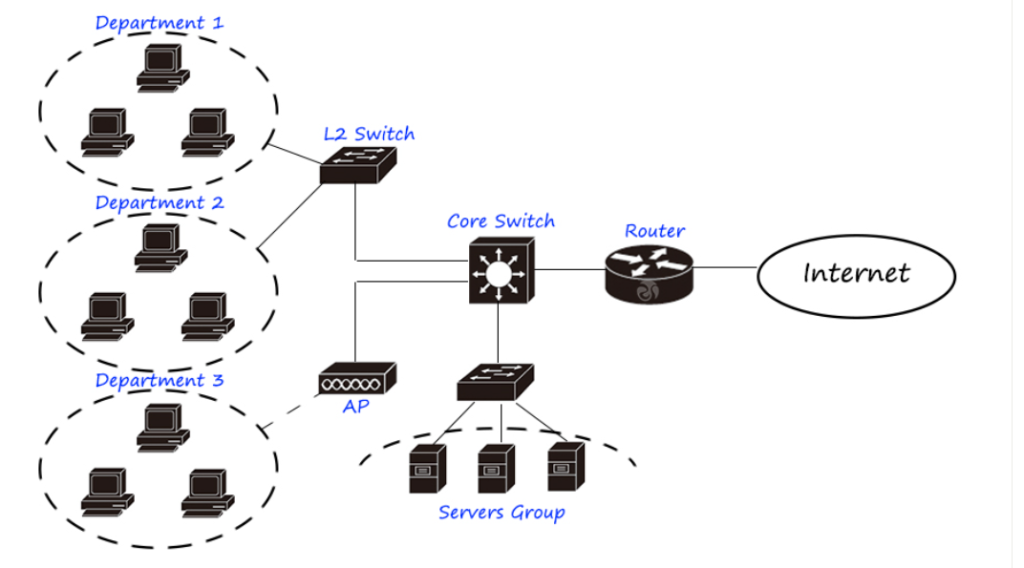
Usually router is the first thing you will have in your LAN, a network firewall is between the internal network and the router so that all flows in and out can be filtered. Then the switch follows. Since many Internet providers are now providing Fiber Optic Service (FiOS), you need a modem before the network firewall to turn the digital signal to electrical signals that could be transmitted over Ethernet cables. So the typical configuration would be Internet-modem-firewall-switch. Then the switch connects other network devices.

Figure 7: How switch, router and firewall are connected in a network.
Summary
Switches enable internal communication in your LAN; routers connect you to the Internet; firewalls secure your network. All the three components are indispensable in a network. Small networks may have an integrated device of the three, while large networks like enterprise networks, data centers, your Internet service providers will have all these three to keep multiple, complex and highly-secured communications.
Difference between a router, switch, and firewall
Routers, Switches, and Firewalls are three core devices used in computer networks. Each device has a different role in communication, connectivity, and security.
1. Router
A router is a network device that connects multiple different networks and forwards data packets between them using IP addresses. It mainly works at Layer 3 (Network Layer) of the OSI Model. Routers examine the destination IP address in a packet and decide the best path to send the packet to another network.
Routers are commonly used to connect a local network (LAN) to the internet (WAN). For example, in a company network, a router connects the internal office network to the internet service provider. Routers also support routing protocols such as OSPF, BGP, and EIGRP to exchange routing information between networks.
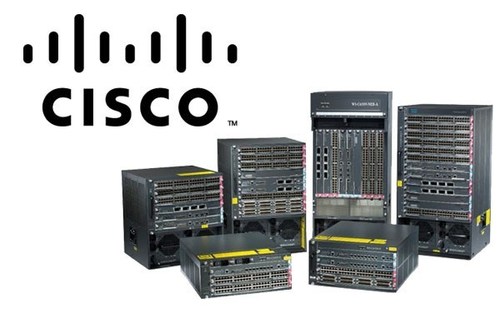
Routers are widely manufactured by networking companies such as Cisco.
Main functions of a router:
- Connects different networks
- Routes packets using IP addresses
- Chooses best path for data transmission
- Connects LAN to WAN or internet
2. Switch
A switch is a networking device that connects multiple devices within the same local network (LAN) such as computers, printers, servers, and IP phones. It mainly works at Layer 2 (Data Link Layer) of the OSI Model and forwards data using MAC addresses.
When a device sends data, the switch checks the MAC address and sends the frame only to the correct port. This makes communication faster and reduces unnecessary network traffic. Modern switches also support VLANs, trunking, and sometimes Layer-3 routing features.
Switches are commonly used in offices, schools, and data centers to connect multiple devices within the same network. Many enterprise networks use switches from Cisco and other vendors.
Main functions of a switch:
- Connects devices within a LAN
- Uses MAC addresses to forward frames
- Supports VLAN segmentation
- Provides high-speed communication between devices
3. Firewall
A firewall is a network security device that monitors and controls incoming and outgoing network traffic based on security rules. Unlike routers and switches, the firewall’s main purpose is security and protection. It can work across multiple layers of the OSI Model.
A firewall analyzes traffic and decides whether to allow or block connections based on defined security policies. It helps prevent unauthorized access, cyber attacks, and malware from entering the network. Many modern firewalls also provide advanced features such as intrusion prevention, application filtering, VPN support, and threat detection.
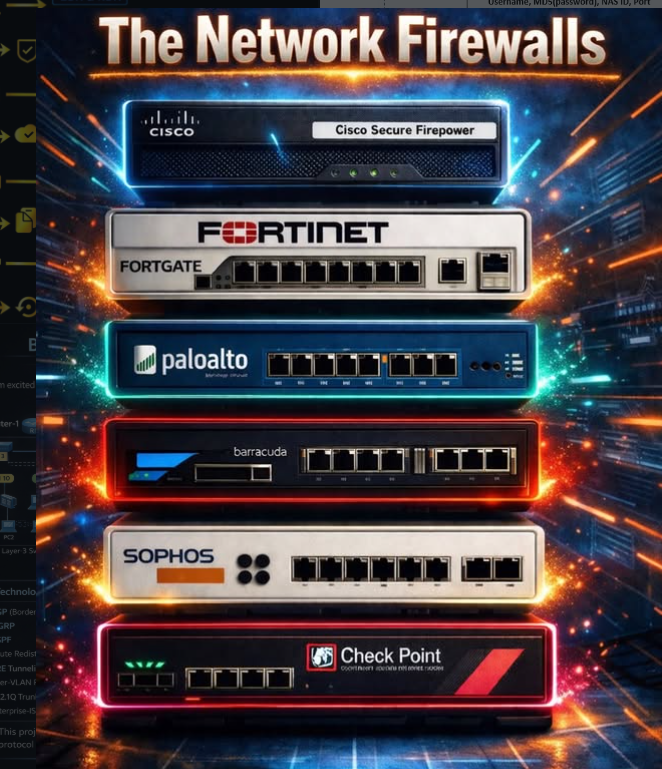
Common firewall vendors include Palo Alto Networks and Fortinet, which are widely used in enterprise and banking networks.
Main functions of a firewall:
- Filters and inspects network traffic
- Blocks unauthorized access
- Protects networks from cyber threats
- Provides VPN and secure connectivity
Simple summary
- Router → Connects different networks and routes packets.
- Switch → Connects devices inside the same network.
- Firewall → Protects the network from unauthorized access and cyber attacks.
Router vs Switch vs Firewall
| Feature | Router | Switch | Firewall |
|---|---|---|---|
| Definition | Connects different networks | Connects devices within same network | Secures network from threats |
| Main Function | Routing (IP-based) | Switching (MAC-based) | Filtering & security |
| OSI Layer | Layer 3 (Network Layer) | Layer 2 (Data Link Layer) (L3 also) | Layer 3–7 (Advanced security) |
| Address Used | IP Address | MAC Address | IP, Port, Protocol |
| Purpose | Internet connectivity | Internal network communication | Protect network |
| Speed | Slower than switch | Faster (LAN speed) | Depends on inspection |
| Security | Basic (NAT, ACL) | Very limited | High (IPS, VPN, filtering) |
| Example Use | Home router connects to ISP | Office LAN connection | Block hackers, control traffic |
1. Router
A router connects multiple networks and directs traffic using IP addresses. It is mainly used to connect a local network to the internet.
2. Switch
A switch connects multiple devices within the same network and uses MAC addresses to send data to the correct device.
3. Firewall
A firewall protects the network by monitoring and filtering incoming and outgoing traffic based on security rules.
4. Simple Understanding
👉 Router → Connects networks (Internet)
👉 Switch → Connects devices (LAN)
👉 Firewall → Protects network (Security)
5. Real-Life Example
- Router → Connects your home to ISP
- Switch → Connects all office computers
- Firewall → Blocks unauthorized access