Network Switch vs Network Router vs Network Firewall

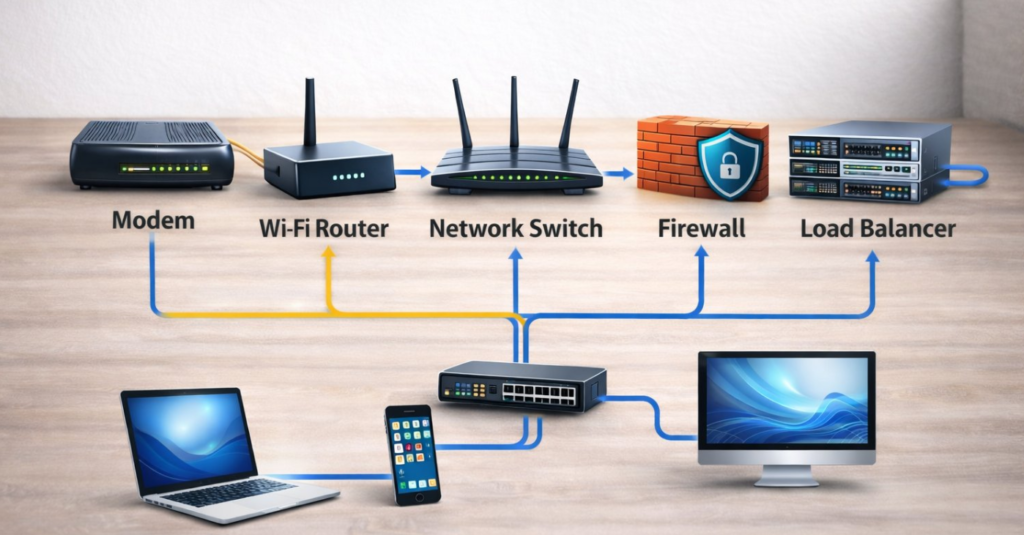
There are three basic devices that are utilized in almost every network—network switch, network router and network firewall. They can be integrated into one device for small size networks such as for home networking, but it will not be the case for larger networks. For any network, none of the three devices can be dismissed. Learn to know how they work and how they build your network in this post.

Switch—Bridge Your Devices in a Network

In a local area network (LAN), network switch functions similar to the overpasses in cities that bridge other network devices, like switches, routers, firewalls and wireless access points (WAPs), and connect client devices, such as computers, servers, Internet Protocol (IP) cameras and IP printers. It provides a central place of connections for all the different devices on the network.

Figure 1: Switches bridge different network devices and client devices like overpasses in cities.

How Does a Switch Work?

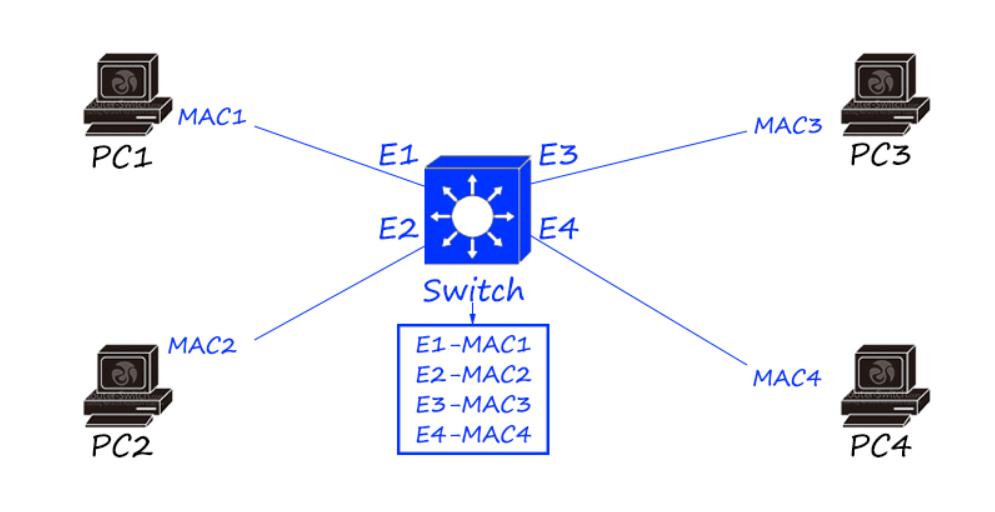
A switch switches data frames by keeping a table of what Media Access Control (MAC) addresses have been seen on which switch port. MAC address is a burnt-in mark in the hardware of a network interface controller (NIC). Every network card and every port of switches and routers has a unique MAC address. The switch learns the source and destination MAC addresses from the data frames and keeps them in the table. It refers to the table to determine where to send the frames that it receives. If it receives a destination MAC address that it does not have in the table, it floods the frame to all switch ports, which is known as broadcast. When it receives a response, it puts the MAC address in the table and it needs not to flood next time.

Figure 2: A switch learns MAC addresses from the data frames.

Router—Connect You with the Internet

Routers (sometimes called Gateways) are hardware devices used to route packets between different networks, and to connect your network with the Internet. In fact, the Internet is made up by hundreds of thousands of routers.

How Does a Router Work?

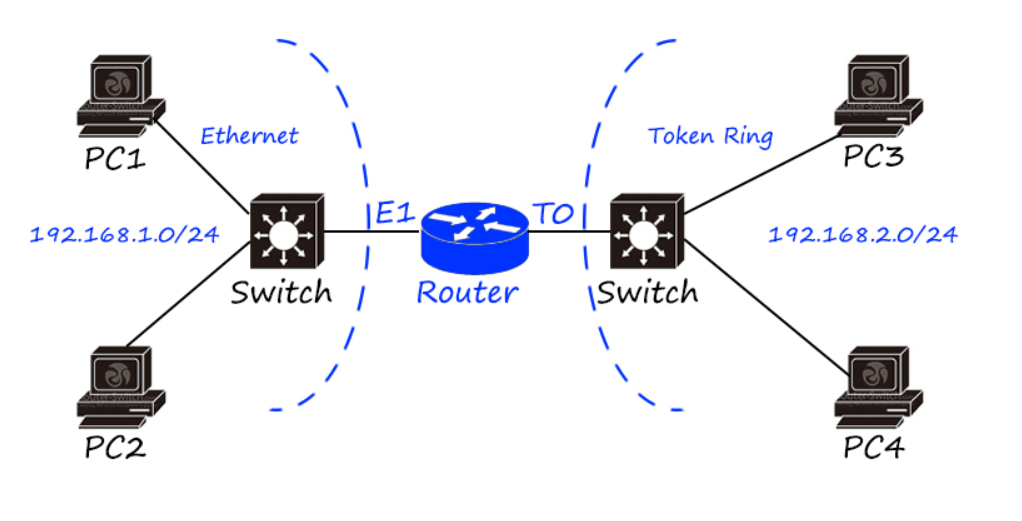
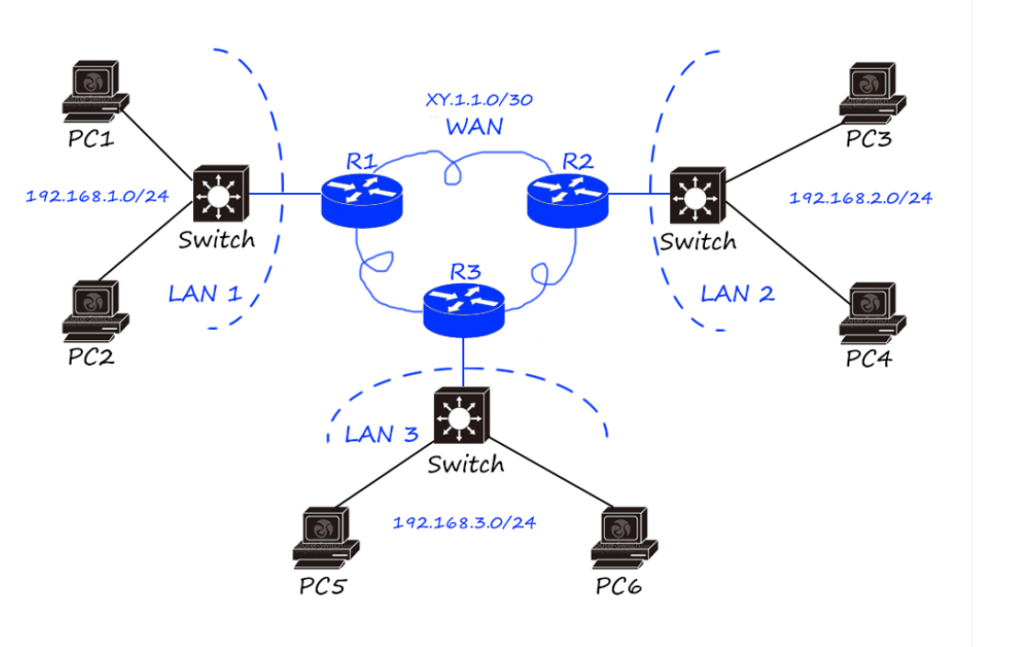
A router checks the source and destination IP addresses of each packet, looks up the destination of the packet in the router’s IP routing table, and routes the packet to another router or a switch. The process keeps happening until the destination IP address is reached and responds back. When there is more than one way to go to the destination IP address, routers can smartly choose the most economical one. When the destination of the packet is not listed in the routing table, the packet will be sent to the default router (if it has one). If there’s no destination existing for the packet, it will be dropped.

Figure 3: How routers route packets from the source to the destination.

Generally, your router is provided by your Internet Service Providers (ISP). Your Internet provider assigns you one router IP address, which is a public IP address. When you browse the Internet, you’re identified to the outside world by the public IP address and your private IP address is protected. However, the private IP addresses of your desktop, laptop, iPad, TV media box, network copier are completely different. Otherwise, the router cannot recognize which device is requesting what.

What Does a Router Do?

Routers interpret different networks. Apart from the most commonly used Ethernet, there are many other different networks, such as ATM and Token Ring. The networks encapsulate data in different methods so they cannot communicate directly. Routers can “translate” these packets from different networks so they can understand each other.

Routers prevent broadcast storm. Without a router, a broadcast will go to every port of every device and be processed by every device. When the amount of broadcasts is too large, chaos can occur in the whole network. A router subdivides the network into two or more smaller networks that are connected by it, and it won’t allow the broadcast to flow between subnets.

Figure 4: Broadcast storm occurs when there is a large amount of broadcasts.

Switches vs. Routers

Why to compare switches vs. routers? Because Layer 3 switches are able to do routing. Someone may ask why not just use an L3 switch then you need no router at all. Every device has its own features and the choice depends on many factors. On one hand, for instance, for a small network with 10-100 users, an L3 switch is an overkill with regard to the cost or the functionality. An appropriate router can do the job well at a fair cost. On the other hand, you can have switching modules on routers to make it work like a L3 switch according to your needs. So the point of which device to use should consider its scalability, resiliency, software features, hardware performance, etc.

Firewall—The One Who Safeguard Your Network

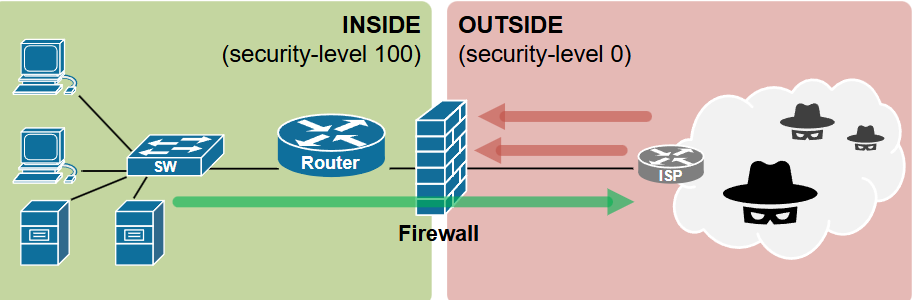
Firewalls are literally walls used to block fires in emergency. Network firewall sets up a barrier between an intranet/LAN and the Internet. Generally, a network firewall protects an internal/private LAN from outside attack and prevents important data to leak out. While routers without firewall capability blindly pass traffic between two separate networks, firewalls monitor the traffic and block unauthorized traffic out.

Figure 5: Firewalls set up a barrier between the Internet and the intranet/LAN.

In addition to separating the LAN from the Internet, network firewalls can also be used for segmenting important data from ordinary data within a LAN. So that internal invasion can also be avoided.

Figure 6: Internal firewall separates important data from others.

How Does a Network Firewall Work?

One common type of hardware firewall allows you define the blocking rules, such as by IP address, by Transmission Control Protocol (TCP) or User Diagram Protocol (UDP) of the port. So unwanted ports and IP addresses are forbidden. Some other firewalls are software applications and services. Such firewalls are like a proxy server which interconnect the two networks. The internal network does not communicate with outside network directly. The combination of these two types is usually safer and more efficient.

Switch, Router & Firewall: How Are They Connected?

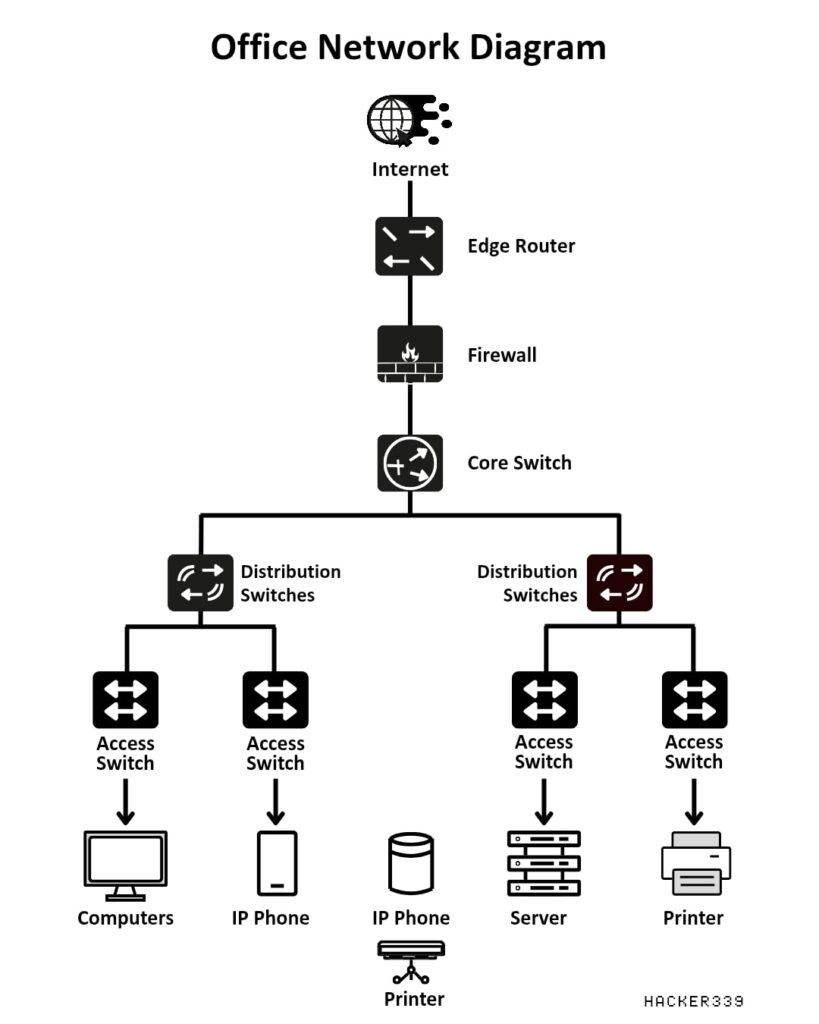
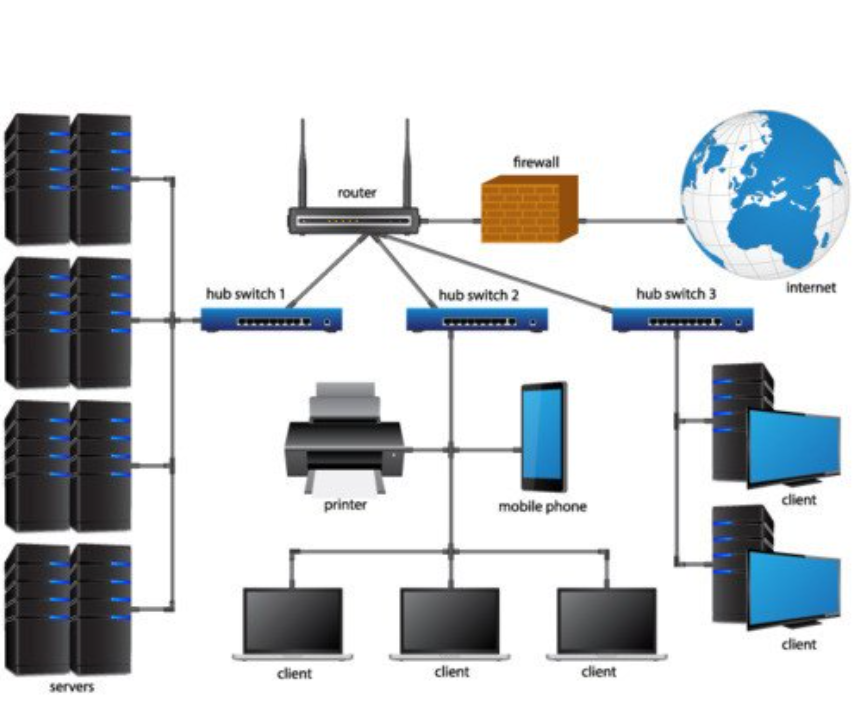
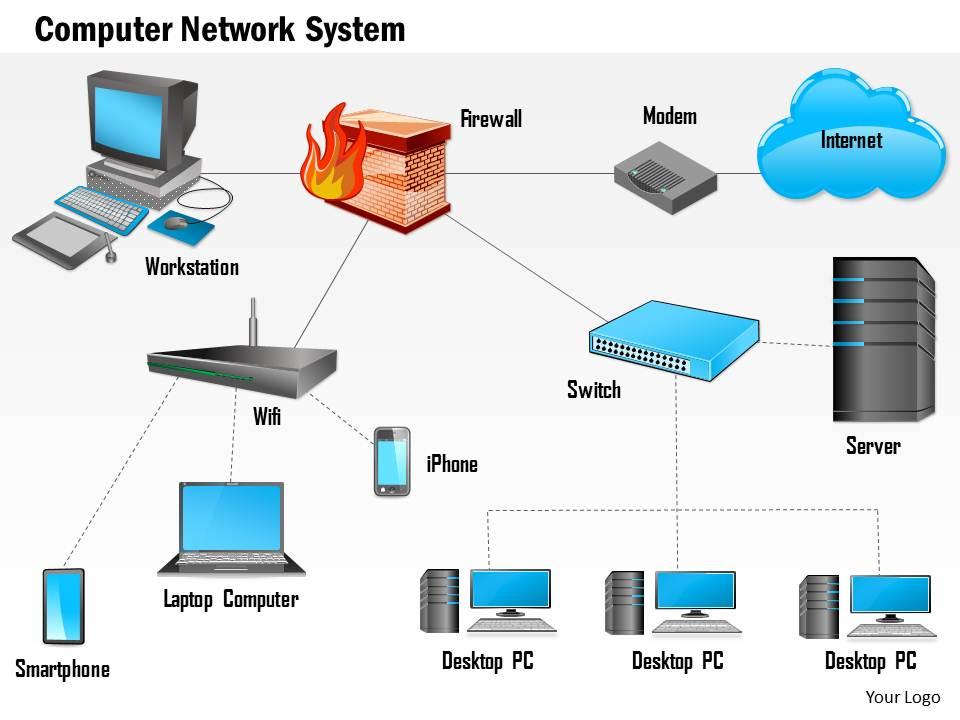
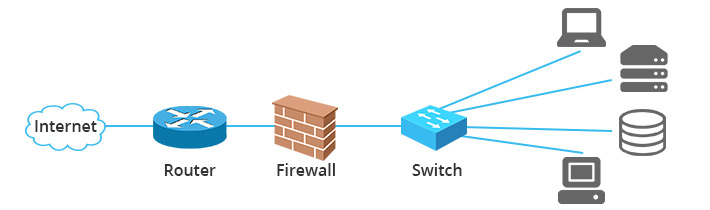
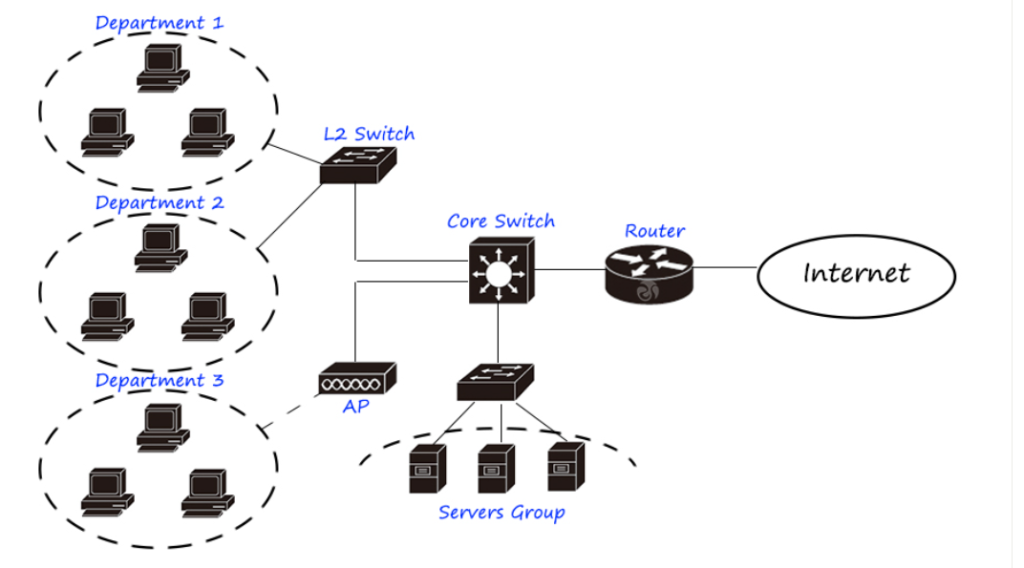
Usually router is the first thing you will have in your LAN, a network firewall is between the internal network and the router so that all flows in and out can be filtered. Then the switch follows. Since many Internet providers are now providing Fiber Optic Service (FiOS), you need a modem before the network firewall to turn the digital signal to electrical signals that could be transmitted over Ethernet cables. So the typical configuration would be Internet-modem-firewall-switch. Then the switch connects other network devices.

Figure 7: How switch, router and firewall are connected in a network.

Summary

Switches enable internal communication in your LAN; routers connect you to the Internet; firewalls secure your network. All the three components are indispensable in a network. Small networks may have an integrated device of the three, while large networks like enterprise networks, data centers, your Internet service providers will have all these three to keep multiple, complex and highly-secured communications.

Routers and firewalls are two technologies that have different purposes, so why do we even compare them? Thanks to the evolution in the tech world, both routers and firewalls are constantly changing. Now you can find routers with built-in firewalls, very advanced hardware firewalls, and software firewalls. Check the ultimate router vs firewall comparison. 

What is a router? 

A typical router is a network device that manages the traffic on the network. In order to do it, it forwards data packets between different devices and networks. When the router receives the data packets, it checks them and compares them to its routing table. Then it redirects these packets to the next network on the way to the final destination. In short, it routes data between IP subnets and manages traffic between multiple devices on a local network and external networks.
You probably have one at home that lets you connect to the Internet. For that purpose, the router does network address translation (NAT). This allows multiple devices to have different IP addresses on the local network and the same public IP address to connect to the Internet. 

 Purpose 

The routers manage the traffic. They direct traffic (data packets) between different networks, based on the IP addresses of the sender and the receiver. They ensure efficient data flow and connectivity across different network segments. 

 The layer of operation 

Routers operate on Layer 3 (network) and 4 (transport) of the OSI model. As we already mentioned, routers primarily deal with IP addresses and data routing, but they can also manage some aspects of the data transport. 

 Encryption 

Typically, these devices don’t offer encryption. Efficient transfer is not always a synonym of secure transfer. Just check the UDP protocol. It does not offer any verification method to establish a secure connection. This has caused many problems with the DNS network.  

 Network sharing 

The router can share an Internet connection between various networks (LANs, WANs, etc.), enabling multiple devices to “talk” to each other and connect to the Internet simultaneously. 


 What is a firewall? 

The firewall is a hardware or software barrier. It filters the data passing through it and that way it protects the devices from spam and malicious software. The firewall applies rules to the traffic, and based on the rules discards or allows the traffic to pass. It is the sentinel that keeps your devices safe and allows communication on selected channels only. 

 Types of firewalls: 

  • Hardware firewalls: The firewall can exist as a stand-alone device or it can be built-in in a router. It is very convenient to have it built-in. That way you will need one less device and you will have active protection on your network. The firewall does its job by reviewing the headers of the data packets and then it makes a decision whether to trust them or drop them. 
  • Software firewalls: The software firewall is an application that can be part of your antivirus suit or it can come separately as a standalone program. It can be installed on a server, and protect the rest of the devices. You can also install it on your device, start it, or stop it as you please. It won’t protect the whole network, just the device on which it is installed. To protect all the devices on the network with a software firewall, you would need to install it on each of them. A drawback is that the software runs in the background and it could slow down your device. 

 Purpose 

The firewall’s purpose is to filter data and that way to protect the network. It can control the incoming and the outgoing traffic, based on the rules, the network administrator has defined. Such rules can be banned ports of communication, data packet limits, session duration, maximum number of concurrent devices connected, and more.
The firewall can stop unauthorized access and different cyber threats such as malware. 

 The layer of operation 

The firewall operates on Layer 4 (Transport Layer), and Layer 7 (Application Layer) of the OSI model. It depends on the type. This allows firewalls to inspect not only the data transport mechanisms but also the content and applications, that are part of the communication. 

 Encryption 

The firwall can encrypt the data before transmission. This adds a layer of security while the data is transferred. If you want to know a bit more about encryption, check out our article about TLS certificates and how you can use them to encrypt data. 


 Router vs firewall, a comparison table 

Aspect Router Firewall 
Primary Function Routes data packets between different networks.  Secures a network by applying rules that apply to the incoming and the outgoing traffic. 
Layer of Operation (OSI) Layer 3 (Network Layer) and Layer 4 (Transport Layer). Layer 4 (Transport Layer) and higher  Layer 7 (Application Layer). 
Packet Handling Forwards packets to destination IP addresses. Inspects packets and apply security policies. 
Security Features Basic security features (e.g., NAT, ACLs). Extensive security features (e.g., packet filtering, IPS). 
Performance Impact Optimized for high-speed data forwarding with minimal delay. It can introduce latency due to security checks which are additional to the data transfer.  
Configuration Complexity Complex for advanced routing protocols, straightforward for basics. Complex due to detailed security policies and rules. 
NAT (Network Address Translation) Performs NAT to share a single public IP address. Performs NAT with added focus on security. 
User Access Control Basic ACLs to permit or deny traffic. Detailed access control, user authentication, VPN support. 
VPN Support Some support for VPNs, limited security features. Robust VPN support with advanced security features. 
Logging and Monitoring Basic logging for network performance and routing issues. Extensive logging and monitoring of security incidents. 
Traffic Shaping and QoS Includes QoS features for traffic prioritization. May include QoS, but secondary to security functions. 
Placement in Network Network perimeter or between segments. Network boundaries for external and internal protection. 
Hardware vs. Software Usually hardware solution, but there are software implementations.  Usually software solution, but there are hardware implementations.  
Cost Generally less expensive. Often more expensive due to advanced security features. 
Usage Scenario Interconnecting networks, managing traffic flow. Protecting networks from threats, enforcing security policies. 
Advanced features Dual-band and even Tri-band Wi-Fi. This allows better performance, and optimized handling of multiple devices.  Intrusion Detection and Prevention Systems (IDPS): Monitoring and preventing potential threats. 


Deep Packet Inspection (DPI): Examining the data part of a packet to enhance security. 

Router Switch Firewall

1. Firewalls

A firewal is a network security device whose main function is to monitor and control network traffic by setting a series of rules. It can determine which traffic is allowed to pass and which needs to be blocked according to a predefined set of security rules. A firewall can be a hardware device, a software program, or a combination of both.


The primary purpose of a firewall is to protect the network from unauthorized access and potential security threats. It filters packets by setting rules to prevent suspicious activities and malicious traffic from entering the network. The functions of a firewall are not limited to simple packet filtering and can also include more complex intrusion detection systems (IDS) and intrusion prevention systems (IPS).


The history of firewalls can be traced back to the 1980s. As the Internet became more popular and network threats increased, firewall technology has continued to evolve. Early firewalls mainly relied on static packet filtering, while modern firewalls incorporate multiple security technologies such as deep packet inspection (DPI), application layer gateway (ALG), and next-generation firewalls (NGFW). Currently, firewalls have become a crucial part of network security and play an important role in protecting enterprise and personal network security.


1.1 Functions and Roles of Firewalls

Traffic Filtering

– Packet Filtering Based on IP Address, Port, and Protocol: The firewall examines incoming and outgoing network packets according to predefined rules. It can decide whether to allow a packet to pass based on information such as the source address, destination address, source port, destination port, and protocol type (e.g., TCP, UDP, ICMP). This basic filtering method ensures that only packets meeting specific conditions can enter or leave the network.


– Stateful Packet Inspection (SPI): A stateful inspection firewall not only checks the header information of packets but also monitors the state of packets. It can identify and track the state of each connection, such as connection establishment, progress, and closure, and only allows packets related to existing connections to pass, blocking unauthorized connection attempts.


Application Layer Filtering

Some advanced firewalls can perform filtering at the application layer (the seventh layer of the OSI model), analyzing the content and context of packets. This filtering method can identify and block traffic for specific applications or services, such as prohibiting the transfer of certain file types or blocking the operation of specific applications.


Preventing Invasions

– Intrusion Detection System (IDS): The firewall can integrate an intrusion detection system to identify potential intrusion behaviors by monitoring network traffic and system activities. The IDS can detect abnormal behaviors, suspicious traffic, and known attack patterns and alert administrators in a timely manner for them to take measures.

– Intrusion Prevention System (IPS): Compared with the IDS, the intrusion prevention system (IPS) is more proactive. It can not only detect attacks but also automatically take actions to prevent them. The IPS can intercept and block malicious traffic in real-time to ensure network security.


Protecting Privacy

 NAT (Network Address Translation) Function: Firewalls usually have the NAT function, which can convert the private IP addresses of the internal network into public IP addresses, thus hiding the internal network structure and increasing security. NAT can also effectively save IP address resources, enabling multiple devices to share a public IP address to access the Internet.


– VPN Support: Firewalls usually support virtual private network (VPN) functions, allowing remote users to securely access the internal network through encrypted tunnels. The VPN ensures the confidentiality and integrity of data during transmission, effectively preventing data leakage and tampering.


Logging and Auditing

 Recording Traffic Logs: The firewall can record detailed network traffic logs, including information such as source, destination, port, protocol, and time. These logs provide important reference for administrators, helping with network traffic analysis, problem troubleshooting, and security auditing.


– Generating Security Reports: The firewall can generate security reports regularly, summarizing network activities and security incidents. The reports can help administrators understand the network security situation, discover potential security risks, and adjust security policies in a timely manner.


1.2 Types of Firewalls


Hardware Firewalls

Dedicated Devices: Hardware firewalls are specially designed devices with independent hardware resources such as CPU, memory, and storage for efficiently processing network traffic and security functions. They are usually installed at the network boundary to protect the internal network from external threats.


– High Performance and Stability: Due to their dedicated hardware design, hardware firewalls can handle a large number of concurrent connections and high traffic, providing high performance and stability. They are suitable for large enterprises and data centers that require high security and performance.


Software Firewalls

Software Installed on Servers or PCs: A software firewall is a software that can be installed on an operating system to monitor and control network traffic to and from the device. Common ones include Windows Firewall, iptables (Linux), and the firewall functions integrated into antivirus software.


Flexible Configuration: Software firewalls offer high flexibility, allowing users to customize security policies and rules according to their needs. They are suitable for small and medium-sized enterprises, individual users, and environments that require flexible configuration.


Next-Generation Firewalls (NGFW)

Combining Traditional Firewall and Advanced Security Functions: Next-generation firewalls (NGFW) combine the packet filtering function of traditional firewalls with modern security technologies such as deep packet inspection (DPI), intrusion prevention systems (IPS), application identification, and control.


– Deep Packet Inspection and Application Identification: NGFWs can deeply examine the content of packets, identify application layer protocols and applications, and finely control and protect network traffic. They provide higher security and can defend against complex network attacks.


Cloud Firewalls

Cloud-Based Firewall Services: Cloud firewalls are firewall services deployed and managed in a cloud environment, usually provided by cloud service providers (such as AWS, Azure, Google Cloud). They protect cloud resources and applications from network threats.


– Suitable for Cloud Computing Environments: Cloud firewalls are flexible and scalable, suitable for dynamically changing cloud computing environments. They can provide consistent security policies and protection across multiple cloud regions and data centers.


1.3 Working Principles of Firewalls

Packet Filtering

Checking the Source Address, Destination Address, Port, and Protocol of Each Packet: The firewall examines each incoming and outgoing network packet according to a predefined set of rules. It can decide whether to allow a packet to pass based on information such as the source address, destination address, source port, destination port, and protocol type (e.g., TCP, UDP, ICMP).


Deciding Whether to Allow or Block Based on Rules: If a packet meets the conditions in the security rule set, the firewall will allow it to pass; otherwise, the packet will be blocked. This packet filtering method ensures that only packets meeting specific security conditions can enter or leave the network.


State Detection

Monitoring the State of Connections: A stateful inspection firewall (SPI) not only checks the header information of packets but also monitors the state of each connection. It can identify and track the state of each connection, including connection establishment, progress, and closure.


Allowing Packets of Legitimate Connections to Pass and Blocking Packets of Illegal Connections: The SPI firewall only allows packets related to existing connections to pass, blocking unauthorized connection attempts, ensuring the legitimacy and security of network connections.


Proxy Services

 Acting as an Intermediary to Proxy Network Requests: The firewall can act as a proxy server, sending requests on behalf of devices in the internal network to the external network and returning responses from the external network to the internal devices. The proxy service enhances security by hiding the internal network structure.


– Hiding the Internal Network Structure and Enhancing Security: The proxy service prevents the external network from directly accessing internal devices, reducing the attack surface and enhancing network security and privacy protection.


Deep Packet Inspection

Checking the Content of Packets: Deep packet inspection (DPI) technology allows the firewall to deeply examine the content of packets, rather than just checking the header information. DPI can analyze the payload part of the packet to identify application layer protocols and content.


– Detecting and Blocking Malware and Attacks: Through DPI, the firewall can identify and block malicious software, viruses, worms, Trojan horses, and other malicious content, as well as complex network attacks such as SQL injection and cross-site scripting (XSS).


1.4 Application Scenarios of Firewalls

 Enterprise Network Security: In an enterprise environment, firewalls are used to protect the internal network from attacks from external networks (such as the Internet). The firewall can block unauthorized access while allowing legitimate communications to pass through.


Data Centers: Data centers store a large amount of sensitive information, such as user data and financial information. The role of the firewall here is to prevent data leakage and unauthorized access.


Personal Device Protection: Firewalls can also be installed on personal devices (such as computers and mobile phones) to prevent the intrusion of malware and the leakage of personal information.


Internet of Things (IoT) Security: With the popularization of IoT devices, such as smart home devices and industrial control systems, the application of firewalls on these devices is also becoming more widespread. Firewalls can prevent these devices from being hacked and protect their normal operation.

– Virtual Private Network (VPN): Firewalls are also often used in conjunction with virtual private networks (VPN). The VPN can create a secure network connection, and the firewall can protect this connection from attacks.


2. Router  

A router is a device that connects multiple networks and is responsible for transmitting data packets between these networks. Based on the destination IP address, the router selects the optimal path to forward data packets from one network to another.  


The primary function of a router is routing at the network layer. It uses routing tables and routing protocols to determine the best path for data packet transmission. By examining the destination IP address of each packet and referring to its routing table, the router decides whether to forward the packet to the next-hop router or the final destination device. Routers are widely used in both home and enterprise networks, enabling users to connect to the internet and facilitating data transfer between local area networks (LANs) and wide area networks (WANs).  


In addition to basic routing functions, modern routers offer various advanced features, such as firewall capabilities, VPN support, Quality of Service (QoS) management, and Network Address Translation (NAT). These features enhance network security, manageability, and performance beyond simple packet forwarding.  


Routers play a central role in network architecture. Home routers typically connect household devices to an Internet Service Provider (ISP), while enterprise-grade routers manage more complex network environments, supporting a large number of devices and high-traffic demands.  

2.1 Functions and Roles of a Router  

Routing  

Static and Dynamic Routing: Routers can use static or dynamic routing to determine packet paths. Static routes are manually configured by administrators, while dynamic routes are automatically learned and updated via routing protocols. Dynamic routing adapts to network topology changes, improving flexibility and fault tolerance.  

– Support for Multiple Routing Protocols: Routers support protocols such as RIP (Routing Information Protocol), OSPF (Open Shortest Path First), and BGP (Border Gateway Protocol). These protocols help routers efficiently select optimal paths in large and complex networks, ensuring reliable and high-performance data transmission.  

Connection Management  

LAN and WAN Connectivity: Routers connect different LANs and WANs, enabling data transfer between networks. They link home or corporate networks to ISP networks for internet access.  

– VPN Support: Routers often include VPN functionality, allowing users in different locations to securely access internal networks through encrypted tunnels. VPNs enhance data security and simplify remote work and branch communications.  

Network Segmentation  

Subnetting and VLAN Support: Routers can divide a large network into multiple subnets, optimizing IP address allocation and resource management. They also support VLANs (Virtual LANs), logically segmenting networks to isolate traffic and improve security and performance.  

Network Optimization  

QoS Management: Routers implement QoS policies to prioritize critical applications and allocate bandwidth efficiently, ensuring optimal network performance and user experience.  

– Bandwidth Control: Routers monitor and regulate bandwidth usage, preventing excessive consumption by individual users or applications and ensuring fair resource distribution.  


2.2 Types of Routers  


Home Routers  

 Designed for small home networks, providing basic routing to connect devices (e.g., computers, smartphones, smart home gadgets) to an ISP.  


-Most include built-in Wi-Fi access points for wireless connectivity.  


Enterprise Routers  

High-performance, feature-rich routers for medium to large businesses, supporting advanced routing protocols, redundancy, and multiple WAN ports.  

Capable of handling complex network topologies and high concurrent connections for reliability and security.  


Edge Routers  

Deployed at the boundary of enterprise networks to connect to ISPs, managing inbound and outbound traffic.  

– Handle high traffic volumes and provide advanced security (e.g., VPN, DDoS protection) and QoS features.  


Core Routers  

Backbone devices in large networks, connecting multiple branch routers and switches for high-speed, reliable data transfer.  

– Built for high throughput, availability, and redundancy to ensure network stability.  


2.3 How Routers Work


Routing Process

Routing Table Lookup: Routers use routing tables to determine packet paths. These tables contain destination network addresses and next-hop router information.  


– Dynamic Updates via Routing Protocols: Protocols like RIP, OSPF, and BGP automatically update routing tables, adapting to network changes for optimal path selection.  


Packet Forwarding  

Destination IP Check: Upon receiving a packet, the router checks its destination IP and consults the routing table to determine the forwarding interface.


– Packet Transmission: The router forwards the packet to the appropriate interface, directing it toward the next hop or final destination.  


NAT (Network Address Translation)  

Converts private IP addresses to a public IP, allowing multiple internal devices to share a single public IP for internet access.  


– Hides internal network structures, enhancing security by preventing direct external access.  


Firewall Features  

Basic routers may include firewall rules to filter unauthorized traffic.  


– Advanced routers offer intrusion detection/prevention, content filtering, and VPN support for comprehensive security.  


2.4 Router Applications  

Home Networks: Connect household devices (PCs, smartphones, smart TVs) to the internet.  

– Enterprise Networks: Link internal and external networks, enabling load balancing, VPNs, and complex policies.  

– Data Centers: Provide high-speed, reliable connections between servers.  

– ISPs: Manage large-scale user traffic and internet access services.  

– IoT (Internet of Things): Connect smart home devices, industrial systems, and other IoT endpoints to the internet.


In current applications, routers serve as the backbone of seemingly ubiquitous internet connectivity, supporting a range of environments from cozy homes to sprawling data centers. They facilitate not only human communication but also the stream of data that powers the Internet of Things (IoT), industrial automation, and cloud computing.


Baudcom proudly introduces two groundbreaking products designed to elevate networking solutions to new heights. Our 64-bit Multi-Core Flow-Control Gateway Routers leverage cutting-edge multi-core processing architecture, ensuring unmatched throughput and advanced flow control for demanding deployments. Capable of handling massive data volumes with efficiency, these routers are ideal for high-traffic enterprise environments requiring robust, scalable, and secure routing solutions.


Complementing this, our Layer-3 10G Routing Switches offer ultra-high-speed switching capabilities at 10 gigabits per second, supporting intricate VLAN segmentation, and advanced routing features. They are perfect for backbone connections within data centers or core network infrastructures, delivering rapid, reliable data transfer with enhanced management and security features. Both products exemplify Baudcom’s commitment to innovation, quality, and tailored networking solutions for modern communication needs.


3. Switch


A switch is a network device used to connect multiple devices in a local area network (LAN). It enables communication between devices by switching data frames. Operating at the data link layer, a switch forwards data frames based on the MAC address table.


The main functions of a switch are data frame forwarding and filtering. It can determine the transmission path of data according to the MAC address of the data frame. Usually, a switch has multiple ports, which can connect multiple devices such as computers, printers, and servers to form a LAN.


Switches are widely used in both enterprise networks and home networks, providing efficient LAN connections and data transmission. By learning and recording the MAC address of each connected device, a switch builds and maintains a MAC address table, and then forwards data frames to the corresponding ports based on the target MAC address. This MAC – address – based forwarding mechanism allows the switch to handle network traffic efficiently, reducing conflicts and congestion and improving network performance.


Switches are generally divided into unmanaged switches and managed switches. Unmanaged switches provide basic connection functions and are suitable for small – scale networks and home networks. Managed switches, on the other hand, offer advanced management and configuration functions, such as VLAN (Virtual Local Area Network) support, QoS (Quality of Service) management, traffic monitoring and control, etc., and are suitable for large – scale and complex enterprise network environments.


3.1 Functions and Roles of Switches


Data Frame Forwarding

MAC – Address – Based Frame Forwarding: A switch builds a MAC address table by learning and recording the MAC address of each connected device. It forwards data frames to the corresponding ports according to the target MAC address of the data frame. This MAC – address – based forwarding mechanism enables the switch to handle network traffic efficiently, reducing conflicts and congestion.


– Full – Duplex Communication: Modern switches usually support full – duplex communication, allowing devices to send and receive data simultaneously, which improves network throughput and communication efficiency.


Network Expansion

 Providing Multiple Ports for Network Expansion: A switch typically has multiple ports, which can connect multiple devices such as computers, printers, and servers to form a LAN. By connecting multiple switches, the network scale can be further expanded, and the number of connected devices can be increased.


Supporting Stacking and Link Aggregation: Some advanced switches support stacking and link aggregation functions. Stacking allows multiple switches to be managed and operated as a single logical switch, improving network scalability and manageability. Link aggregation bundles multiple physical links together to provide higher bandwidth and redundancy.


VLAN Support

Virtual Local Area Network Partitioning: A switch supports the VLAN function. By logically partitioning the network, it isolates the network traffic of different departments or users. VLANs not only enhance network security but also improve network manageability and flexibility.


– Enhancing Network Security and Management: Through VLAN partitioning, a switch can effectively prevent broadcast storms and network congestion, improving network stability and security. In addition, VLANs make network management more flexible and convenient, allowing administrators to adjust the network structure and access rights as needed.


Traffic Management

Traffic Monitoring and Control: A switch can monitor network traffic, detect and control abnormal traffic, and prevent network congestion and performance degradation. The traffic control function ensures the reasonable use of network resources and improves the overall network performance.


– Supporting QoS Management: Switches usually support QoS management. Through means such as priority division and bandwidth allocation, they ensure that critical applications and services receive sufficient bandwidth and priority processing, thereby improving the overall network performance and user experience.


3.2 Types of Switches


Unmanaged Switches

Simple and Easy to Use: Unmanaged switches are simply designed. They can be used by just plugging in the power and network cables, without the need for configuration and management. They are suitable for small offices or home networks.


Basic Connection Function: They provide basic network connection functions and are suitable for simple network environments. They do not support advanced functions such as VLAN partitioning and QoS management.


Managed Switches

Providing Advanced Management and Configuration Functions: Managed switches support configuration and management through the command – line interface (CLI), graphical user interface (GUI), or network management protocols (such as SNMP). They offer advanced functions such as VLAN, QoS, link aggregation, and traffic monitoring.


– Suitable for Large and Complex Networks: These switches are suitable for enterprise networks and data centers that require fine – grained control and management, providing high – performance and flexible network management capabilities.


Smart Switches

Between Unmanaged and Managed Switches: Smart switches offer some management functions. They are more powerful than unmanaged switches but not as complex as fully managed switches. They are suitable for small and medium – sized enterprises that need some advanced functions but do not require full – scale management.


Providing VLAN and Basic QoS Functions: They support VLAN partitioning and basic QoS management, providing a certain degree of traffic control and network optimization.


Stackable Switches

Multiple Switches Stacked as a Logical Device: Stackable switches use dedicated stacking interfaces and cables to stack multiple physical switches into a single logical switch, which can be managed and configured uniformly.


– Improving Scalability and Manageability: Stackable switches are suitable for large – scale enterprise networks that require high scalability and simplified management. Network expansion can be achieved through stacking, providing redundancy and high availability.


3.3 Working Principle of Switches


MAC Address Learning

Recording the MAC Address of Connected Devices: A switch records the MAC address of the device connected to each port by receiving data frames and stores it in the MAC address table. Every time a device sends a data frame, the switch updates the MAC address table to ensure that the information in the table is up – to – date.


Dynamically Updating the MAC Address Table: A switch can dynamically learn and update the MAC address table. When a new device is connected to the switch, the switch automatically records the device’s MAC address and the connected port, keeping the MAC address table accurate.


Data Frame Forwarding

 Searching for the Target MAC Address: When a switch receives a data frame, it checks the target MAC address of the data frame and searches for the corresponding port in the MAC address table.


– Forwarding the Data Frame: Based on the result of the MAC address table, the switch forwards the data frame to the corresponding port, transmitting the data to the target device. This MAC – address – based forwarding mechanism ensures that data frames can be efficiently transmitted to the correct device.


Broadcast and Multicast Processing

Processing Broadcast Data Frames: When a switch receives a data frame with the target MAC address as the broadcast address, it copies and sends the data frame to all ports to ensure that all devices in the network can receive the data frame.


Processing Multicast Data Frames: A switch supports the processing of multicast data frames. It can forward data frames to specific port groups according to the multicast group address, reducing unnecessary network traffic and improving network efficiency.


VLAN (Virtual Local Area Network)

Logically Partitioning the Network: Through the VLAN function, a switch can divide the physical network into multiple logical sub – networks. Each VLAN acts as an independent broadcast domain, isolating the network traffic of different departments or users.


– Enhancing Network Security and Performance: VLANs can effectively prevent broadcast storms and network congestion, improving network security and performance. Administrators can configure and manage VLANs as needed to achieve flexible network management and optimization.


3.4 Application Scenarios of Switches


Enterprise Networks

In an enterprise environment, switches are used to connect internal network devices such as computers, printers, and servers, providing high – speed network connections.


Data Centers

In data centers, switches are used to connect a large number of servers, providing high – speed and highly reliable network connections. Switches can also implement complex network policies such as load balancing and VLANs.


Home Networks

In a home environment, switches are usually used to expand the connection capabilities of the home network, such as connecting multiple computers, smart TVs, and other devices.


Schools and Universities

In school and university environments, switches are used to connect network devices in classrooms, laboratories, libraries, etc., and provide Internet access.


Internet Service Providers (ISPs)

Internet service providers (ISPs) use switches to manage and control a large amount of user traffic and provide Internet access services.


As network demands evolve, new products continue to enhance switching technology. Baudcom is excited to introduce two innovative solutions tailored to various networking needs. The first is our 8-Port Manageable Gigabit Ethernet Switch, designed for small to medium-sized offices requiring reliable performance, straightforward management, and dynamic traffic control. Its compact design coupled with manageable features makes it ideal for environments seeking both simplicity and advanced control.


Complementing this is our 24-Port SFP Gigabit Ethernet Switch, a robust, manageable solution aimed at enterprise data centers and campus networks. Equipped with 24 SFP ports, it supports fiber optic connectivity for long-distance transmission, ensuring high-speed data exchange across extensive network segments. Its advanced management capabilities, including VLAN support and QoS prioritization, empower network administrators to optimize performance and security.


Both devices exemplify Baudcom’s commitment to delivering cutting-edge communication solutions that elevate network efficiency, security, and scalability.


Summary  

Firewalls, routers, and switches are three essential devices in network architecture, each playing a distinct role in protecting network security, optimizing data transmission, and managing network connections. Firewalls primarily safeguard networks from threats by filtering and inspecting packets to control traffic. Routers are responsible for forwarding data packets between different networks, selecting the optimal path based on routing tables. Switches, on the other hand, connect multiple devices within a local area network (LAN) and forward data frames using MAC address tables.  


Switch:  

Switches operate at the lower layer of the network, connecting various devices such as computers and printers. When these devices need to communicate, the switch uses the destination device’s MAC address to directly deliver packets, ensuring efficient data transfer.  


Router:  

Routers function at the intermediate layer, primarily forwarding data packets between different networks. When a device needs to communicate with another network, the packet is sent to the router, which then determines the best forwarding path based on the destination IP address.  


Firewall:  

Firewalls operate at the outermost layer of the network, protecting it from external threats. They inspect all incoming and outgoing packets, allowing only those that comply with predefined rules. This prevents malware intrusions and ensures network security.  


Together, these three components form the foundation of enterprise networks, enabling efficient data transmission and robust security through their respective functions.

Difference between a router, switch, and firewall

1. What is a ROUTER?

Function: Connects different networks (like your home/office network to the internet).

Key Role:

  • Sends data between your network and the internet.

  • Assigns IP addresses to devices (via DHCP).

  • Performs NAT (Network Address Translation) to hide private IPs.

Example:

  • When you open a website, the router sends your request to the internet and brings the data back to your device.

Common Devices:

  • Home Wi-Fi router

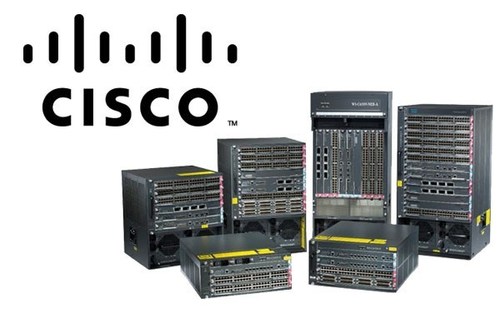
  • Office edge routers (e.g., Cisco, MikroTik)


2. What is a SWITCH?

Function: Connects multiple devices inside the same network (LAN).

Key Role:

  • Sends data between computers, printers, servers inside your home or office.

  • Uses MAC addresses to forward data to the correct device.

Example:

  • You print a document from your computer — the switch sends that data to the printer.

Common Devices:

  • Network switch in offices or server rooms (e.g., Cisco, TP-Link)


3. What is a FIREWALL?

Function: Protects your network from unauthorized access and threats.

Key Role:

  • Filters traffic: allows or blocks data based on rules.

  • Blocks hackers, malware, and suspicious connections.

  • Can inspect and log traffic (Next-Gen Firewalls).

Example:

  • Blocks access to a harmful website or prevents unknown devices from connecting.

Common Devices:

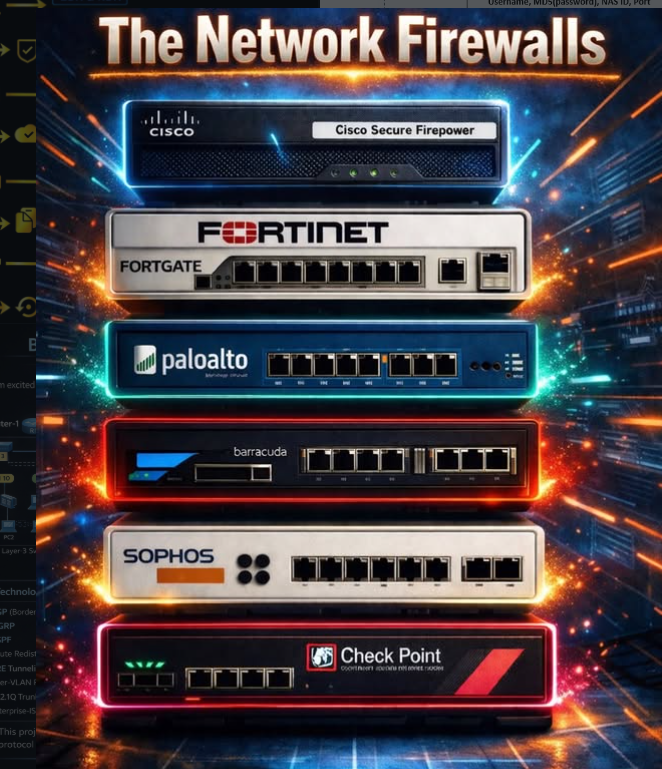
  • Hardware: Fortinet, Palo Alto, Cisco ASA

  • Software: Windows Firewall, pfSense

COMPARISON TABLE

FeatureRouterSwitchFirewall
Main RoleConnects networks (LAN ↔ WAN)Connects devices in LANProtects network with security rules
Works OnIP addressesMAC addressesIP, ports, protocols
Security FeaturesBasic (NAT, ACLs)NoneStrong (filtering, IDS/IPS)
Assigns IP?✅ Yes (DHCP)❌ No❌ No
Internet Access?✅ Yes❌ No❌ (but controls access)

Why a Company Needs a Router, Switch, and Firewall

Why a Company Needs:


1. Router – “The Gateway to the Internet”

Why Needed:

  • Connects the internal company network (LAN) to the internet (WAN).

  • Routes traffic between networks (e.g., office network ↔ cloud services).

  • Assigns IP addresses to devices (via DHCP).

  • Uses NAT to allow multiple devices to share one public IP.


Without It:

  • No access to the internet or external services (email, cloud, websites).

  • Devices can’t communicate with other networks or remote offices.


 Example in a Company:

  • Employees need to use email, Zoom, or browse websites → the router sends that traffic out to the internet and brings responses back.


2. Switch – “The Internal Connector”

Why Needed:

  • Connects all devices within the internal network: PCs, printers, servers, access points, VoIP phones.

  • Sends data to the correct device using MAC addresses.

  • Allows fast and efficient local communication between devices.


Without It:

  • Devices in the same office can’t talk to each other (no file sharing, no printing).

  • You’d need to connect every device directly to the router (which usually has very few ports).


Example in a Company:

  • An accountant prints to a shared office printer.

  • A designer accesses a shared file server — all through the switch.


3. Firewall – “The Security Guard”

Why Needed:

  • Protects the company from outside threats: hackers, malware, DDoS attacks.

  • Controls what traffic is allowed in and out (e.g., block social media or gaming).

  • Creates secure zones (e.g., separates guest Wi-Fi from internal systems).

  • Logs and monitors traffic for compliance and troubleshooting.


Without It:

  • The network is wide open to the internet.

  • Hackers or malicious software can enter and steal or damage company data.

  • No control over who accesses what (even internally).


 Example in a Company:

  • Firewall blocks unauthorized remote access to payroll systems.

  • Detects and stops a malware attack from spreading inside the network.


 Summary: Why All 3 Are Important

Device🧠 Why the Company Needs It
RouterTo connect to the internet and other networks
SwitchTo connect internal devices (computers, printers)
FirewallTo protect the network from attacks and threats