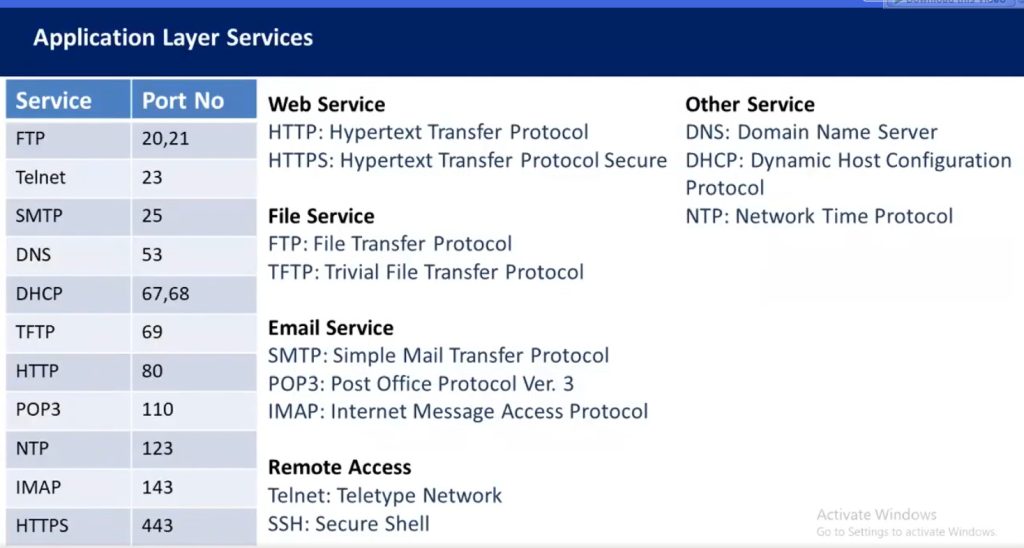
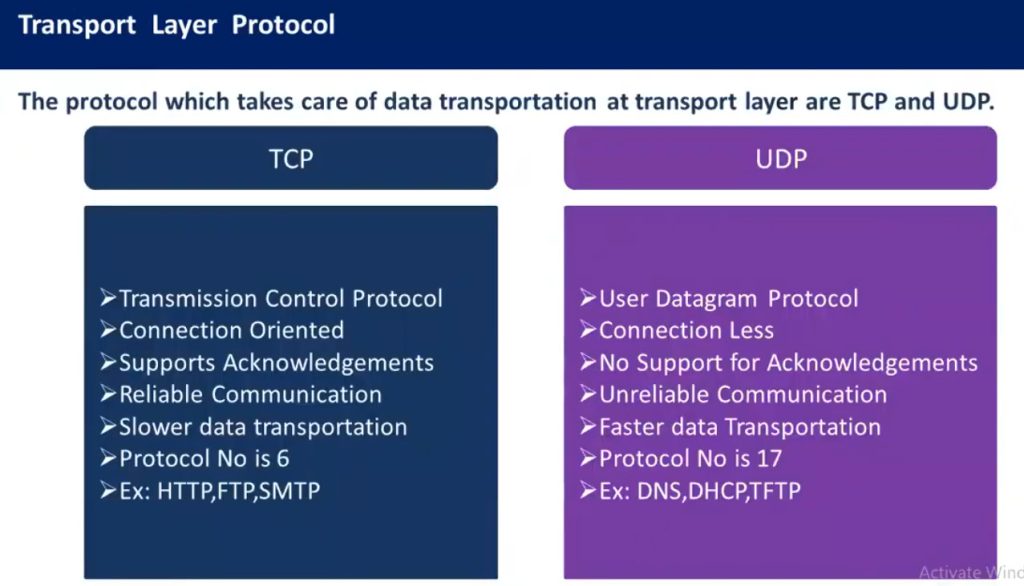
Network Protocols & Port No
History of Network Protocols
1. Early Communication Systems (1960s)
The history of network protocols began in the 1960s when computers started communicating with each other over simple networks. At that time, there were no standard rules for communication, so different computers could not easily exchange data. Researchers began developing protocols to define how data should be transmitted between computers. Early networking research was funded by organizations like Advanced Research Projects Agency (ARPA) in the United States.
2. ARPANET and First Protocols (Late 1960s – 1970s)
In 1969, the first packet-switching network called ARPANET was created. ARPANET connected universities and research institutions and became the foundation of modern networking. The first protocol used in ARPANET was NCP (Network Control Protocol), which allowed computers to communicate over the network. However, NCP had limitations and could not support larger interconnected networks.
3. Development of TCP/IP (1970s)
To solve the limitations of earlier protocols, researchers Vint Cerf and Robert E. Kahn developed the Transmission Control Protocol / Internet Protocol (TCP/IP) in the 1970s. TCP/IP introduced a flexible system that allowed multiple networks to connect and communicate with each other. It became the standard protocol suite for the Internet and allowed reliable data transmission between different networks.
4. Adoption of TCP/IP (1983)
A major milestone occurred on January 1, 1983, when ARPANET officially switched from NCP to TCP/IP. This event is considered the birth of the modern Internet. After this transition, TCP/IP became the universal protocol for communication across networks, enabling the growth of global networking.
5. Development of Application Protocols (1980s – 1990s)
During the 1980s and 1990s, many new protocols were developed for specific applications. These protocols allowed users to perform different tasks over the Internet.
Examples include:
- HTTP for web communication
- FTP for file transfer
- SMTP for sending emails
- DNS for converting domain names to IP addresses
These protocols made the Internet more useful and accessible for businesses and individuals.
6. World Wide Web and Internet Expansion (1990s)
In 1991, Tim Berners-Lee introduced the World Wide Web, which used protocols like HTTP and HTML to access information on the Internet. This development made the Internet user-friendly and led to rapid growth in web services, online communication, and digital information sharing.
7. Modern Network Protocols (2000s – Present)
Today, network protocols continue to evolve to support modern technologies such as cloud computing, video streaming, IoT devices, and mobile networks. Secure and high-speed protocols like HTTPS, IPv6, QUIC, and advanced routing protocols are widely used to improve performance, scalability, and security of modern networks.
Type of Network Protocols
Network protocols are rules and standards that allow devices to communicate with each other over a network. Different types of protocols perform different tasks such as data communication, routing, security, file transfer, and network management.
1. Communication Protocols
Communication protocols are used to transfer data between devices on a network. These protocols define how data is formatted, transmitted, and received between computers. They ensure that devices can exchange information correctly and understand each other.
Examples:
- HTTP (Hypertext Transfer Protocol) – used for web browsing
- HTTPS (Hypertext Transfer Protocol Secure) – secure web communication
- FTP (File Transfer Protocol) – file transfer between computers
Example: When a user opens a website, the web browser uses HTTP or HTTPS to send a request to the web server and receive the webpage.
2. Routing Protocols
Routing protocols are used by routers to determine the best path for data packets to travel across networks. These protocols allow routers to exchange routing information and update routing tables dynamically so that packets reach their destination efficiently.
Examples:
- RIP (Routing Information Protocol)
- OSPF (Open Shortest Path First)
- BGP (Border Gateway Protocol)
- EIGRP (Enhanced Interior Gateway Routing Protocol)
Example: Internet Service Providers use BGP to exchange routing information between different networks on the global Internet.
3. Network Management Protocols
Network management protocols help administrators monitor, control, and manage network devices such as routers, switches, servers, and firewalls. These protocols collect network performance data and help detect problems.
Examples:
- SNMP (Simple Network Management Protocol) – monitors network devices
- ICMP (Internet Control Message Protocol) – used for diagnostics and error reporting
Example: The ping command uses ICMP to check whether a device is reachable on the network.
4. Security Protocols
Security protocols are used to protect data during transmission. They provide encryption, authentication, and data integrity to prevent unauthorized access and attacks.
Examples:
- SSL (Secure Sockets Layer)
- TLS (Transport Layer Security)
- SSH (Secure Shell)
- IPsec (Internet Protocol Security)
Example: HTTPS websites use TLS encryption to secure communication between a web browser and a web server.
5. File Transfer Protocols
File transfer protocols are used to transfer files between computers over a network. These protocols allow users to upload, download, and manage files remotely.
Examples:
- FTP (File Transfer Protocol) – standard file transfer
- TFTP (Trivial File Transfer Protocol) – simple file transfer used in network devices
- SFTP (Secure File Transfer Protocol) – secure file transfer
Example: Network engineers use TFTP to upload configuration files or firmware to routers and switches.
6. Email Protocols
Email protocols are used to send, receive, and store email messages over the Internet. Different protocols handle sending and receiving emails.
Examples:
- SMTP (Simple Mail Transfer Protocol) – sends emails
- POP3 (Post Office Protocol version 3) – downloads emails from server
- IMAP (Internet Message Access Protocol) – accesses emails on server
Example: When you send an email using Gmail, the email is sent using SMTP and retrieved using IMAP or POP3.
7. Addressing and Configuration Protocols
These protocols are used to assign and resolve network addresses so devices can communicate with each other.
Examples:
- DNS (Domain Name System) – converts domain names to IP addresses
- DHCP (Dynamic Host Configuration Protocol) – automatically assigns IP addresses to devices
- ARP (Address Resolution Protocol) – converts IP address to MAC address
Example: When a user types google.com, DNS translates the domain name into an IP address so the computer can find the server.
8. Time Synchronization Protocols
Time synchronization protocols ensure that all devices in a network maintain the same time. Accurate time is important for logging, security, and network operations.
Example:
NTP (Network Time Protocol) – synchronizes clocks of computers and network devices.
9. Multimedia Communication Protocols
These protocols support voice, video, and real-time communication over networks.
Examples:
- SIP (Session Initiation Protocol) – establishes voice/video calls
- RTP (Real-Time Transport Protocol) – delivers audio and video streams
Example: Video conferencing applications use RTP and SIP for real-time communication.
Ports in Networking
A port is a logical identifier used to distinguish different applications or services on a device, allowing network traffic to reach the correct program.
- Ports work at the Transport layer, using TCP and UDP to send and receive data between devices.
- They enable multiple applications to use the network simultaneously without interference.
- Ports help the operating system route incoming data to the appropriate application.
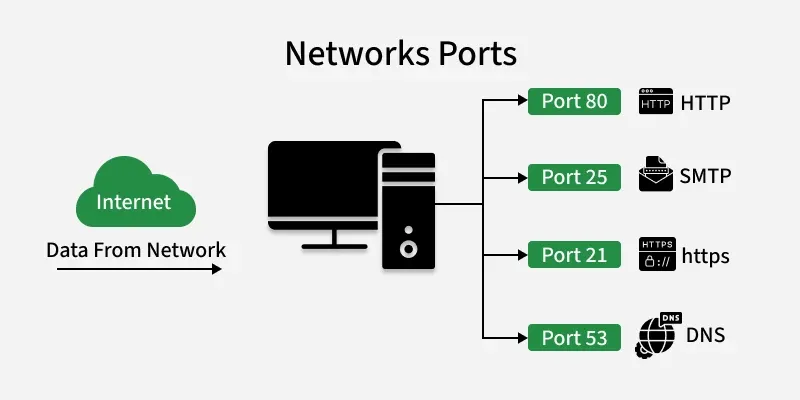
How Ports Work
When a device communicates over a network, data packets are sent to its IP address. Each packet also includes a port number, which tells the operating system which application or service should receive that data.
- Port numbers identify services: Each application listens on a specific port, so incoming data reaches the correct program.
- IP + Port + Protocol = Socket: This combination ensures that network traffic is delivered precisely to the right process on the right device.
- TCP and UDP protocols use ports differently: TCP ensures reliable delivery, while UDP is faster but without guaranteed delivery.
Ports act like entry doors for data — the IP brings the data to the device, and the port directs it to the correct application.
Port Number Range
A port number is a 16-bit number used to identify network services on a device. Since it is 16 bits, it can have values from 0 to 65535, giving enough unique numbers to support many applications running simultaneously.
- 0–65535: Total possible port numbers.
- Lower numbers are usually reserved for standard services (like HTTP, FTP, SSH).
- Higher numbers are often used temporarily for client connections or custom applications.
- Port numbers help organize and manage network traffic efficiently, preventing conflicts between different services.
Types of Ports
Ports are mainly classified into the following types:
1. Physical Ports
- These are actual hardware connectors on devices.
- Examples include USB for keyboards and storage devices, Ethernet (RJ-45) for network connections, HDMI for video, and audio ports for sound.
- These are any connector you can plug a device into.
2. Logical/Network Ports
- These are software-based endpoints that let programs communicate over a network.
- Each port is numbered from 0 to 65535 and is divided into different groups.
- Well-known Ports (0–1023): Reserved for standard services like HTTP (80), HTTPS (443), FTP (21), SSH (22).
- Registered Ports (1024–49151): Used by specific applications like databases (MySQL 3306, SQL Server 1433).
- Dynamic/Private Ports (49152–65535): Temporarily assigned for client connections, like when your browser opens a port to connect to a website.
- Internal Ports only used inside your private network (LAN) for local communication between devices.
- External Ports are open to the internet, routers map them to internal ports so external users can access services safely.
3. Serial and Parallel Ports
- Older hardware ports mostly used before USB became standard.
- Serial Ports (COM) transmits data one bit at a time, often used in industrial equipment.
- Parallel Ports (LPT) send multiple bits at once, historically used for printers.
4. Virtual Ports
- Software-defined ports used in virtual machines, containers, or applications to communicate internally without physical hardware.
- Useful for running multiple services on one device or isolating network traffic.
Importance of Ports
- Service Identification: Multiple applications running on the same device are distinguished using port numbers. For example, HTTP (port 80) and SMTP (port 25) can operate simultaneously on a single computer because each service listens on a different port, ensuring data reaches the correct service.
- Efficient Data Routing: When a device receives data from the network, port numbers help the operating system direct incoming packets to the appropriate application efficiently.
- Traffic Control and Security: Firewalls use port numbers to allow or block traffic for specific applications or services. Blocking traffic to certain ports helps prevent access to services that may pose security risks.
- Service Scalability: Port numbers enable a single device to support many services at the same time. By assigning different ports to different services, the system can scale and handle multiple network applications concurrently.
Network Protocols & Port No
Network protocols are essential rules and standards that govern data exchange across networks, ensuring devices and systems can communicate effectively. Here is a comprehensive list of common network protocols, categorized based on their function or layer in the OSI (Open Systems Interconnection) model:
1. Application Layer Protocols (Layer 7)
- HTTP (Hypertext Transfer Protocol): Used for web page communication.
- HTTPS (Hypertext Transfer Protocol Secure): Secure version of HTTP, using SSL/TLS encryption.
- FTP (File Transfer Protocol): Used for transferring files between systems.
- SFTP (Secure File Transfer Protocol): Secure version of FTP, typically over SSH.
- SMTP (Simple Mail Transfer Protocol): Used for sending emails.
- POP3 (Post Office Protocol 3): Used for retrieving emails from a mail server.
- IMAP (Internet Message Access Protocol): Another protocol for retrieving emails, but more feature-rich than POP3.
- DNS (Domain Name System): Resolves domain names into IP addresses.
- DHCP (Dynamic Host Configuration Protocol): Automatically assigns IP addresses to devices on a network.
- SNMP (Simple Network Management Protocol): Used for network management and monitoring.
- TELNET: Used for remote terminal access, though now often replaced by SSH.
- SSH (Secure Shell): Secure remote login protocol.
- LDAP (Lightweight Directory Access Protocol): Used for directory services, such as accessing LDAP databases.
- NTP (Network Time Protocol): Synchronizes clocks across devices on a network.
- RDP (Remote Desktop Protocol): Used to access a remote computer desktop.
- XMPP (Extensible Messaging and Presence Protocol): Used for instant messaging and presence information.
- TFTP (Trivial File Transfer Protocol): A simple file transfer protocol, typically used for bootstrapping.
2. Transport Layer Protocols (Layer 4)
- TCP (Transmission Control Protocol): A reliable, connection-oriented protocol for transmitting data.
- UDP (User Datagram Protocol): A connectionless protocol used for faster, less reliable communication.
- SCTP (Stream Control Transmission Protocol): A transport layer protocol that provides reliable message delivery with multi-homing and multi-streaming support.
3. Network Layer Protocols (Layer 3)
- IP (Internet Protocol): Defines addressing and routing for packets between devices.
- IPv4 (Internet Protocol version 4): The most commonly used version of IP, using 32-bit addresses.
- IPv6 (Internet Protocol version 6): The newer version of IP, using 128-bit addresses.
- ICMP (Internet Control Message Protocol): Used for error messages and network diagnostics (e.g., Ping).
- ARP (Address Resolution Protocol): Resolves IP addresses to MAC addresses.
- RARP (Reverse Address Resolution Protocol): Resolves MAC addresses to IP addresses (rarely used today).
- IGMP (Internet Group Management Protocol): Manages multicast group memberships.
4. Data Link Layer Protocols (Layer 2)
- Ethernet: A widely used LAN protocol for wired networking.
- Wi-Fi (IEEE 802.11): Wireless networking protocol.
- PPP (Point-to-Point Protocol): Used for direct connections between two nodes (e.g., dial-up, DSL).
- Frame Relay: A WAN protocol used for connecting devices in a network.
- HDLC (High-Level Data Link Control): A bit-oriented protocol used in point-to-point communication.
- MPLS (Multiprotocol Label Switching): A data-carrying mechanism that routes traffic based on labels.
5. Physical Layer Protocols (Layer 1)
- DSL (Digital Subscriber Line): High-speed internet connection over telephone lines.
- Ethernet (IEEE 802.3): Defines physical cables (e.g., twisted pair cables) for Ethernet communication.
- Fiber Optic (e.g., SFP, TOSA/ROSA): Used in high-speed optical networks.
- Wi-Fi (IEEE 802.11): Defines radio frequencies for wireless communication.
6. Security Protocols
- SSL/TLS (Secure Sockets Layer / Transport Layer Security): Encryption protocols used to secure communications.
- IPsec (Internet Protocol Security): A suite of protocols used for securing IP communication through encryption and authentication.
- VPN (Virtual Private Network): Protocols like PPTP, L2TP, and OpenVPN used for secure communication over public networks.
- Kerberos: A network authentication protocol that provides secure, single sign-on access to services.
7. Routing Protocols
- RIP (Routing Information Protocol): An old and simple distance-vector routing protocol.
- OSPF (Open Shortest Path First): A link-state routing protocol used in large networks.
- BGP (Border Gateway Protocol): A path-vector protocol used for routing between different autonomous systems (inter-domain routing).
- EIGRP (Enhanced Interior Gateway Routing Protocol): A Cisco proprietary routing protocol.
- IS-IS (Intermediate System to Intermediate System): A link-state routing protocol.
8. File Sharing and Access Protocols
- SMB (Server Message Block): A network file sharing protocol used by Windows.
- NFS (Network File System): A file sharing protocol for Unix and Linux systems.
- AFP (Apple Filing Protocol): A file-sharing protocol used in macOS.
9. Multicast Protocols
- IGMP (Internet Group Management Protocol): Used for managing multicast groups.
- PIM (Protocol Independent Multicast): A multicast routing protocol.
- MLD (Multicast Listener Discovery): IPv6’s version of IGMP for multicast group management.
10. Wireless Networking Protocols
- Wi-Fi (IEEE 802.11): The standard for wireless LANs.
- Bluetooth: A short-range wireless communication protocol for devices like phones and computers.
- Zigbee: A low-power, low-data rate wireless communication standard, often used in IoT.
11. Miscellaneous Protocols
- NTP (Network Time Protocol): Used for synchronizing the clocks of devices across a network.
- BGP (Border Gateway Protocol): A protocol used for routing data between different networks, especially in the internet backbone.
- DCCP (Datagram Congestion Control Protocol): A transport layer protocol for congestion control in applications that require UDP-like performance.
- MPTCP (Multipath TCP): Extends TCP to allow multiple paths between two devices.
This list covers the most common network protocols across the various layers of the OSI model and other areas like routing, security, file sharing, and wireless communication.
Here’s a list of common network port numbers that correspond to various protocols, categorized by service and purpose. Port numbers are typically divided into three ranges: Well-Known Ports (0-1023), Registered Ports (1024-49151), and Dynamic/Private Ports (49152-65535).
1. Well-Known Ports (0–1023)
These are reserved ports, commonly used by system processes or applications that require root or administrative privileges.
Network Port No
| Port Number | Protocol | Service Name |
|---|---|---|
| 20 | TCP | FTP Data |
| 21 | TCP | FTP Control |
| 22 | TCP | SSH (Secure Shell) |
| 23 | TCP | Telnet |
| 25 | TCP | SMTP (Simple Mail Transfer Protocol) |
| 53 | TCP/UDP | DNS (Domain Name System) |
| 67 | UDP | DHCP (Dynamic Host Configuration Protocol) |
| 68 | UDP | DHCP (Dynamic Host Configuration Protocol – Client) |
| 69 | UDP | TFTP (Trivial File Transfer Protocol) |
| 80 | TCP | HTTP (Hypertext Transfer Protocol) |
| 110 | TCP | POP3 (Post Office Protocol) |
| 119 | TCP | NNTP (Network News Transfer Protocol) |
| 123 | UDP | NTP (Network Time Protocol) |
| 143 | TCP | IMAP (Internet Message Access Protocol) |
| 161 | UDP | SNMP (Simple Network Management Protocol) |
| 162 | UDP | SNMP Trap |
| 443 | TCP | HTTPS (Hypertext Transfer Protocol Secure) |
| 445 | TCP | Microsoft-DS (Active Directory, SMB over TCP) |
| 514 | UDP | Syslog |
| 587 | TCP | SMTP (Secure Submission) |
| 631 | TCP | IPP (Internet Printing Protocol) |
| 993 | TCP | IMAPS (IMAP Secure) |
| 995 | TCP | POP3S (POP3 Secure) |
| 1080 | TCP | SOCKS Proxy |
| 1433 | TCP | Microsoft SQL Server |
| 1434 | UDP | Microsoft SQL Monitor |
| 1512 | TCP | WINS (Windows Internet Name Service) |
| 1616 | TCP | SIP (Session Initiation Protocol) |
| 1645 | UDP | RADIUS (Old version) |
| 1646 | UDP | RADIUS Accounting (Old version) |
| 1701 | UDP | L2TP (Layer 2 Tunneling Protocol) |
| 1723 | TCP | PPTP (Point-to-Point Tunneling Protocol) |
| 1812 | UDP | RADIUS (Authentication) |
| 1813 | UDP | RADIUS (Accounting) |
| 2049 | TCP/UDP | NFS (Network File System) |
| 3306 | TCP | MySQL Database |
| 3389 | TCP | RDP (Remote Desktop Protocol) |
| 5432 | TCP | PostgreSQL |
| 5900 | TCP | VNC (Virtual Network Computing) |
| 6379 | TCP | Redis Database |
| 6660-6669 | TCP | IRC (Internet Relay Chat) |
| 8080 | TCP | HTTP Alternate (Proxy/Relay) |
2. Registered Ports (1024–49151)
These ports are not as strictly reserved as Well-Known Ports but are registered with IANA for use by specific services or applications.
| Port Number | Protocol | Service Name |
|---|---|---|
| 1025 | TCP | NFS (Portmapper) |
| 1433 | TCP | Microsoft SQL Server |
| 1434 | UDP | Microsoft SQL Monitor |
| 1723 | TCP | PPTP (Point-to-Point Tunneling Protocol) |
| 3306 | TCP | MySQL Database |
| 5432 | TCP | PostgreSQL |
| 5900 | TCP | VNC |
| 8080 | TCP | HTTP Alternate (Proxy) |
| 10000 | TCP | Webmin (System Administration) |
3. Dynamic or Private Ports (49152–65535)
These ports are dynamically allocated by the operating system for client-side applications, used for temporary connections. They are often referred to as ephemeral ports.
- 49152–65535: The range for dynamic or ephemeral ports, assigned dynamically by the OS for outbound connections.
Commonly Used Application-Specific Ports
- 3389: Remote Desktop Protocol (RDP)
- 1521: Oracle Database
- 6660-6669: IRC (Internet Relay Chat)
- 27017: MongoDB
- 8080: Web Proxy/Alternate HTTP Port
- 9000: PHP-FPM, SonarQube
- 11211: Memcached
- 27015: Steam gaming servers
- 5000: UPnP (Universal Plug and Play)
Other Notable Protocol Ports
- 69: TFTP (Trivial File Transfer Protocol)
- 25: SMTP (Simple Mail Transfer Protocol)
- 53: DNS (Domain Name System)
These ports are often assigned for specific services to help ensure that clients can always connect to a service regardless of location or configuration. For security reasons, many firewalls restrict access to well-known ports unless specifically needed.
Port Numbers for Popular Services
- Web:
- HTTP (80), HTTPS (443), HTTP Alternate (8080)
- Email:
- SMTP (25), POP3 (110), IMAP (143)
- Remote Access:
- SSH (22), Telnet (23), RDP (3389)
- File Transfer:
- FTP (21), TFTP (69)
- Database:
- MySQL (3306), PostgreSQL (5432), Microsoft SQL Server (1433)
Email Service All Port No
Here’s a list of email-related port numbers, along with the protocols they correspond to. These ports are used for sending, receiving, and managing email, both securely and non-securely.
Common Email Port Numbers
| Port Number | Protocol | Service Name / Description |
|---|---|---|
| 25 | SMTP | Simple Mail Transfer Protocol (Used for sending email between servers, often blocked by ISPs for outgoing mail to reduce spam) |
| 465 | SMTP Secure (SMTPS) | Secure version of SMTP, typically used for sending email over SSL/TLS encryption |
| 587 | SMTP (Submission) | SMTP Submission – Secure SMTP used by email clients to send emails securely to mail servers (with STARTTLS or SSL/TLS) |
| 110 | POP3 | Post Office Protocol 3 – Used to retrieve emails from a mail server (non-encrypted by default) |
| 995 | POP3S | Secure version of POP3 (POP3 over SSL/TLS) |
| 143 | IMAP | Internet Message Access Protocol – Used to retrieve and store emails from the server, allows multiple devices to access email (non-encrypted by default) |
| 993 | IMAPS | Secure version of IMAP (IMAP over SSL/TLS) |
| 220 | SMTP | SMTP Greeting (This is the initial connection message from the SMTP server when starting communication) |
| 421 | SMTP | SMTP Service not available (Temporary failure response) |
| 587 | SMTP | SMTP Submission (Client-to-server submission for sending email securely) |
| 465 | SMTPS | SMTP Secure (SSL) (Older method for secure email submission) |
Email Protocols in Detail
SMTP (Simple Mail Transfer Protocol):
- Port 25 is traditionally used for sending email from one mail server to another.
- Port 587 is used for email submission from a client (like Outlook or Thunderbird) to a mail server, with STARTTLS encryption.
- Port 465 was historically used for SMTP over SSL/TLS, but is now considered deprecated, and many modern systems use port 587 with STARTTLS instead.
POP3 (Post Office Protocol 3):
- Port 110 is used by POP3 for receiving email. It allows the client to download email from the mail server and typically deletes the messages from the server after they are downloaded (unless specified otherwise).
- Port 995 is used for POP3S, the secure version of POP3, which uses SSL/TLS to encrypt the communication.
IMAP (Internet Message Access Protocol):
- Port 143 is used by IMAP for receiving and managing email. Unlike POP3, IMAP allows email to be stored on the server, and multiple clients can access the same email box (with the state of messages synchronized).
- Port 993 is used for IMAPS, the secure version of IMAP, using SSL/TLS encryption for secure communication.
Other Email Ports
- 2525: Some mail servers (especially for submission) use port 2525 for SMTP submission, especially when port 25 is blocked by ISPs to prevent spam.
- 587: SMTP Submission (Client to Server), encrypted using STARTTLS.
- 110: POP3 (non-secure version).
- 995: POP3S (Secure POP3 over SSL).
- 143: IMAP (non-secure version).
- 993: IMAPS (Secure IMAP over SSL).
Summary of Common Email Ports
| Port | Protocol | Description |
|---|---|---|
| 25 | SMTP | Email sending between servers (unsecured, often blocked by ISPs for outgoing email) |
| 587 | SMTP (Submission) | Email client to server for sending (STARTTLS) |
| 465 | SMTP (SMTPS) | Secure email submission (SSL/TLS) (Deprecated in favor of 587) |
| 110 | POP3 | Email retrieval (non-secure) |
| 995 | POP3S | Secure POP3 (SSL/TLS) |
| 143 | IMAP | Email retrieval and management (non-secure) |
| 993 | IMAPS | Secure IMAP (SSL/TLS) |
These are the primary ports used for email-related services, ensuring that email can be sent and received securely and efficiently. Depending on the provider or system, encryption and security standards (such as STARTTLS or SSL/TLS) are increasingly used to protect email communications.
All Database Port No
Database Port Numbers for Specific Services
Many databases allow configuration of custom ports or use ports for specific services such as replication, clustering, and management interfaces. Here’s a breakdown of common port usage for database-related services.
MySQL/MariaDB Ports
- 3306: Default port for MySQL and MariaDB database servers.
- 33060: MySQL X Protocol (used for NoSQL and JSON data queries, in addition to SQL queries).
PostgreSQL Ports
- 5432: Default port for PostgreSQL.
- 5433: PostgreSQL replication port (used for standby servers in a replication setup).
- 5000: Sometimes used for PostgreSQL replication (typically in custom configurations).
Microsoft SQL Server Ports
- 1433: Default port for Microsoft SQL Server.
- 1434: SQL Server Browser Service (UDP) for resolving dynamic ports used by SQL Server instances.
Oracle Database Ports
- 1521: Default port for Oracle Database (SQL*Net).
- 2483: Oracle SQL*Net (non-secure).
- 2484: Oracle SQL*Net (secure with SSL/TLS).
- 1158: Oracle Web Listener port.
MongoDB Ports
- 27017: Default port for MongoDB.
- 27018: MongoDB Sharded Cluster.
- 27019: Used by MongoDB for replication (secondary member communication).
Cassandra Ports
- 7000: Cassandra internal communication between nodes (non-SSL).
- 7001: Cassandra internal communication with SSL enabled.
- 7199: Cassandra JMX (Java Management Extensions) for monitoring and management.
Redis Port
- 6379: Default port for Redis database (in-memory key-value store).
- 6380: Redis server with SSL/TLS encryption.
IBM DB2 Ports
- 50000: Default port for IBM DB2 database communication.
Database Management and Monitoring Ports
- 8080: Apache Tomcat, often used in conjunction with web applications that interact with databases.
- 9000: Used by SonarQube for database interaction and reporting.
- 9092: Default port for Apache Kafka (used as a distributed event streaming platform which might interact with databases).
Summary of Common Database Ports
| Port Number | Database | Description |
|---|---|---|
| 3306 | MySQL, MariaDB | Default port for MySQL and MariaDB |
| 5432 | PostgreSQL | Default port for PostgreSQL |
| 1433 | Microsoft SQL Server | Default port for Microsoft SQL Server |
| 1521 | Oracle Database | Default port for Oracle Database |
| 27017 | MongoDB | Default port for MongoDB database |
| 11211 | Memcached | Port for Memcached (distributed caching system) |
| 50000 | IBM DB2 | Default port for IBM DB2 |
| 50000 | SAP HANA | Port for SAP HANA Database |
| 1527 | InterBase | Default port for InterBase |
| 9092 | Apache Kafka | Default port for Kafka |
Common Communication Protocols and Their Port Numbers
| Protocol | Port Number | Protocol Type | Purpose |
|---|---|---|---|
| HTTP | 80 | TCP | Used for web browsing |
| HTTPS | 443 | TCP | Secure web communication |
| FTP | 21 | TCP | File transfer between computers |
| SFTP | 22 | TCP | Secure file transfer |
| SSH | 22 | TCP | Secure remote login |
| Telnet | 23 | TCP | Remote login (not secure) |
| SMTP | 25 | TCP | Sending email |
| DNS | 53 | TCP/UDP | Domain name to IP conversion |
| DHCP | 67 / 68 | UDP | Automatic IP address assignment |
| TFTP | 69 | UDP | Simple file transfer |
| HTTP Alternate | 8080 | TCP | Alternate web server port |
| POP3 | 110 | TCP | Receiving email |
| IMAP | 143 | TCP | Email retrieval |
| SNMP | 161 | UDP | Network management |
| SNMP Trap | 162 | UDP | SNMP notifications |
| LDAP | 389 | TCP/UDP | Directory services |
| SMB | 445 | TCP | File sharing in Windows |
| RDP | 3389 | TCP | Remote desktop connection |
| SIP | 5060 | UDP/TCP | VoIP signaling |
Slide