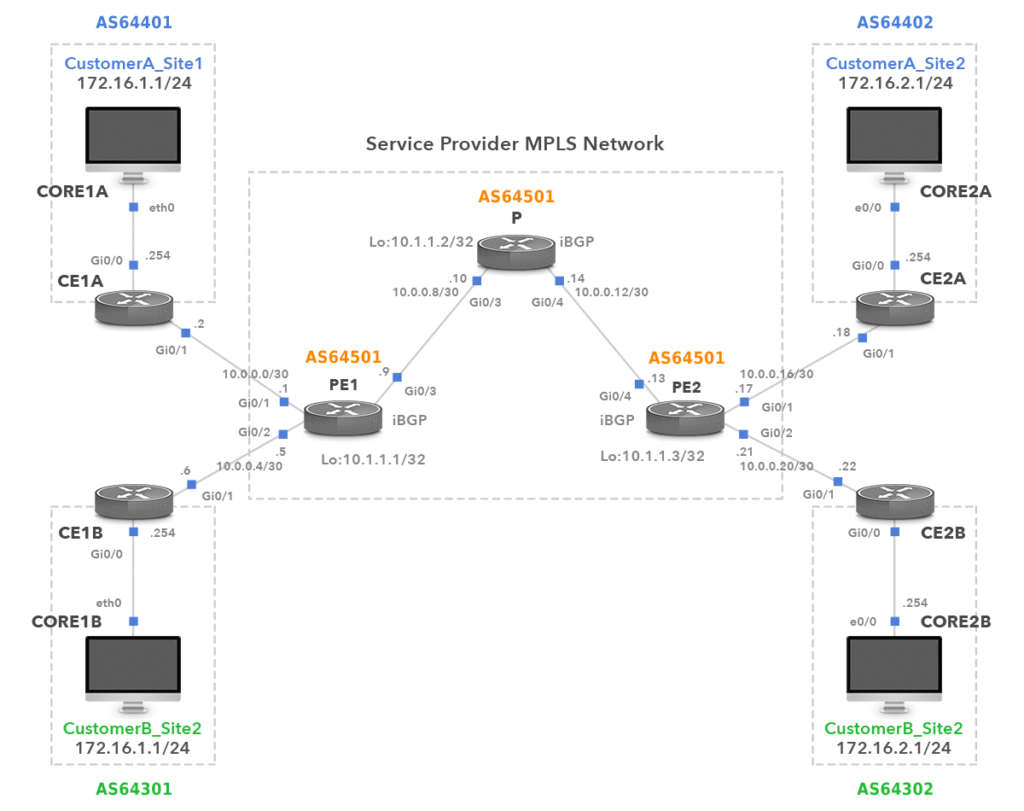
MPLS MPBGP L3 VPN LAB
- Layer 3: the service provider will participate in routing with the customer. The customer will run OSPF, EIGRP, BGP or any other routing protocol with the service provider, these routes can be shared with other sites of the customer.
- VPN: routing information from one customer is completely separated from other customers and tunneled over the service provider MPLS network.
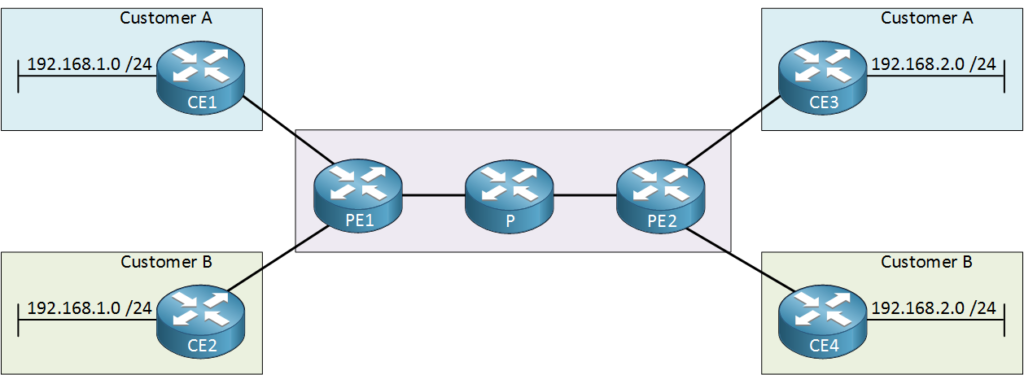
Above we have two customers connected to a service provider network. Customer A and B each have two sites and you can see that they are using the same IP ranges.
Customer A might use OSPF between their sites and customer B could use EIGRP between their sites. Everything from these customers is completely separated by the service provider.
VRF (Virtual Routing and Forwarding)
Let’s start with VRFs. This is the first step in separating traffic from different customers. Instead of using a single global routing table, we use multiple routing tables. Each customer of the service provider will use a different VRF. Let’s take a closer look:
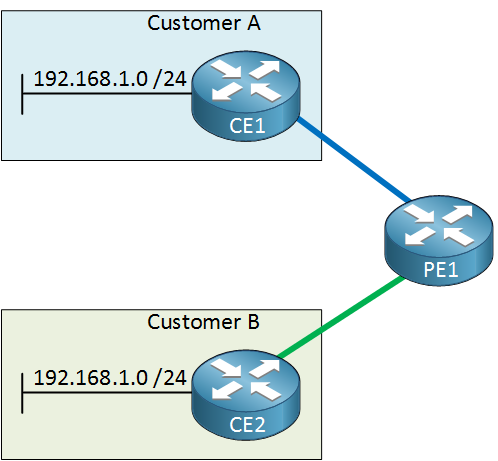
Above we have our PE1 router with the two customer sites. Each customer will use a different VRF so the overlapping address space is no problem. Now you might be wondering, why don’t we use VRFs everywhere instead of MPLS? We could but there’s one downside to using VRFs. Take a look at the following picture:
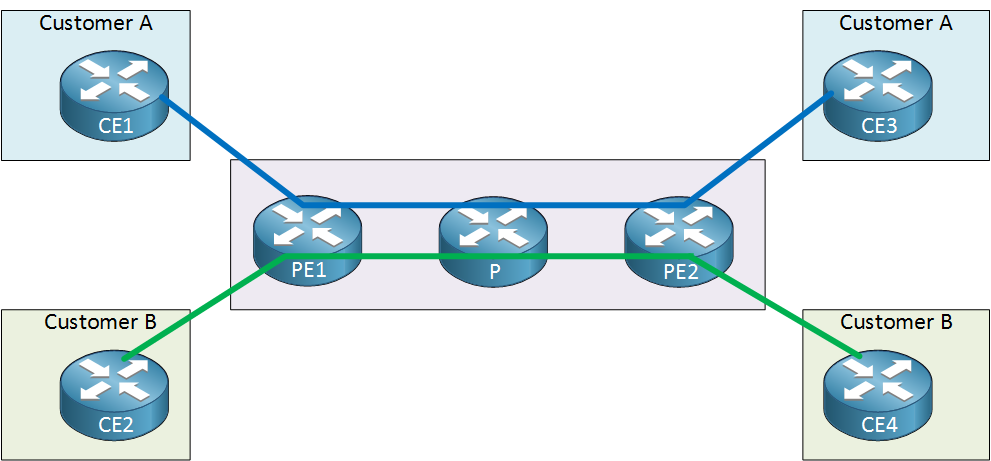
The problem with VRFs is that you have to create them everywhere. When our goal is to have connectivity between CE1 and CE3 then we will have to add a VRF on the PE1, P and PE2 router. Also, all the service provider routes will have to participate with routing. For example, when customer A wants to run OSPF between their two sites then it means that we have to configure OSPF on the PE1, P and PE2 router of the service provider for their VRF.
When customer B wants to run EIGRP between their sites, we have to participate…we’ll have to configure EIGRP on all service provider routers for the VRF of customer B.
This is not a scalable solution so it’s not going to happen. Instead, we will configure the VRFs only on the PE routers. The core of the service provider network (P router) will only do switching based on labels.
To share information about VRFs between PE routers, we will use BGP.
Multi Protocol BGP (MP-BGP)
We will use BGP between the PE routers so that they can share information from the VRFs. Here’s how it works:
- One of the CE routers advertises something to the PE router, this can be done through OSPF, EIGRP, BGP or any other routing protocol (static routing is also possible).
- The PE router uses a VRF for the customer so it will store everything it learns in the routing table of the customer’s VRF.
- The PE router will then redistribute everything in BGP.
- The PE router will advertise to the other PE router through iBGP.
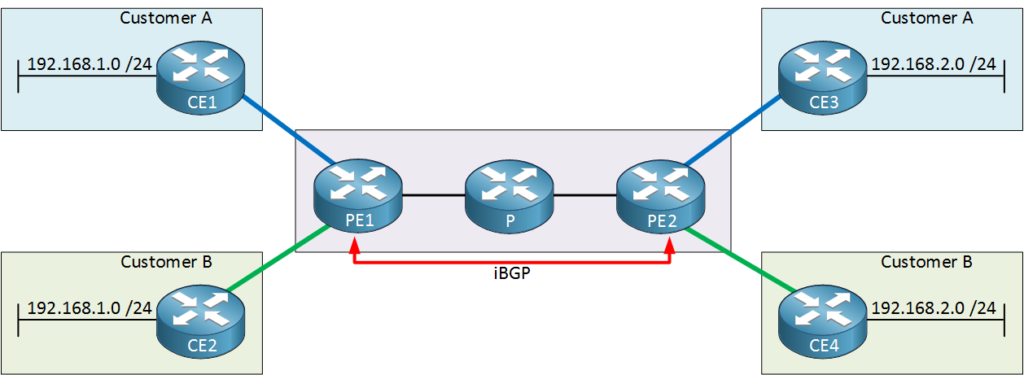
There’s a couple of problems though. First of all, our two customers are using overlapping address space. Let’s say that our PE1 router is advertising 192.168.1.0 /24 from customer A to the PE2 router on the other side. Here’s what happens:
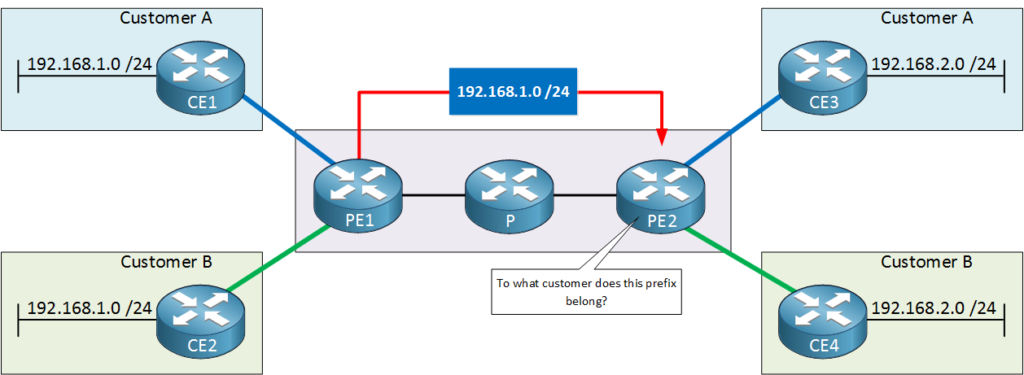
The PE2 router will learn 192.168.1.0 /24 from the PE1 router but it has no clue to what customer it will belong. There is no way to differentiate if something belongs to customer A or B.
What we need is something to make all prefixes that we learn unique.
RD (Route Distinguisher)
To fix this issue, we will use a RD (Route Distinguisher). We will add something to the prefix of the customer so that it will become unique:
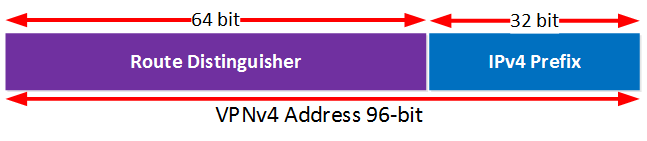
The RD is a 8 byte (64 bit) field. You can use any value you want but typically we use the ASN:NN format where ASN is the service provider’s AS number and NN is a number we pick that identifies the site of the customer.
The RD and the prefix combined is what we call a VPNv4 route. We now have a method to differentiate between the different prefixes of our customers. Here’s an example:
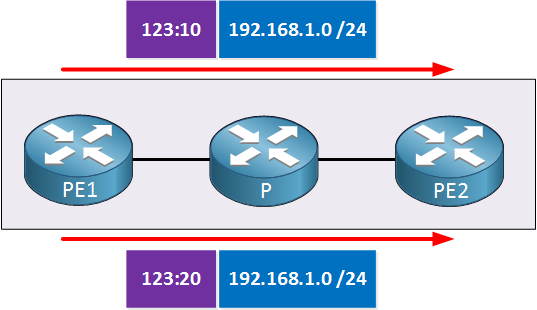
Let’s say that we use RD 123:10 for customer A and RD 123:20 for customer B. By adding these values, we have unique VPNv4 routes.
How do we advertise these VPNv4 routes? That’s what we need MP-BGP for.
MP-BGP supports IPv4 unicast/multicast, IPv6 unicast/multicast and it has support for VPNv4 routes. To exchange VPNv4 routes, MP-BGP uses a new NLRI (Network Layer Reachability Information) format that has the following attributes:
- RD (Route Distinguisher)
- IPv4 prefix
- Next Hop
- VPN Label
This is how PE routers exchange VPNv4 routes with each other. This NLRI also has an attribute called the VPN label, we’ll get back to this one later in this lesson.
RT (Route Target)
When a PE router learns these VPNv4 routes, what will it do with it? Take a look at the picture below:
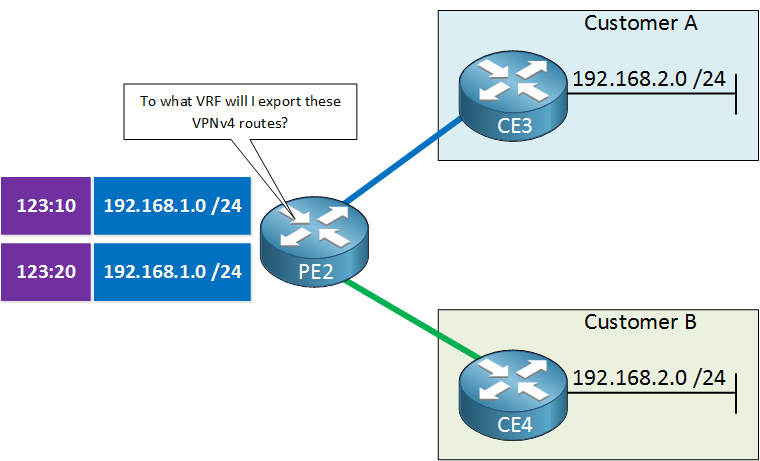
Our PE2 router has learned the two VPNv4 routes, one for each customer. You might think that the PE2 router will automatically export each VPNv4 route in the correct customer VRF but that’s not going to happen.
We use something called a RT (Route Target) to decide in which VRF we import and export VPNv4 routes.
The RT is a 8 byte value that uses the same format as the RD (ASN:NN). It’s advertised between PE routers by using a BGP extended community value. For each VRF that we configure, we tell it what RTs we want to import and export. Here’s an example:
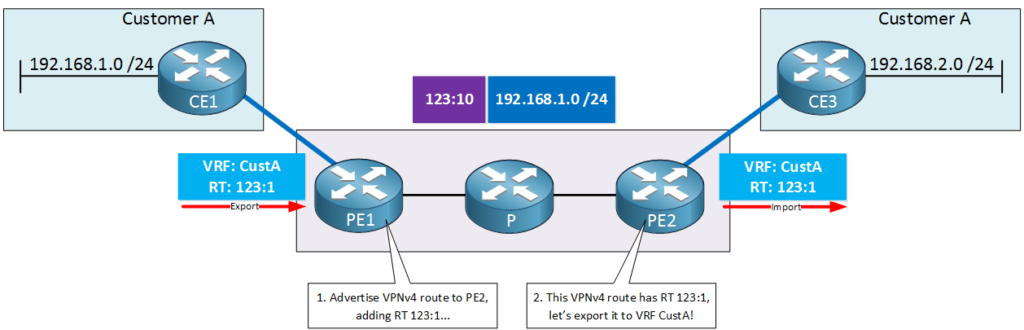
Let me explain the picture above:
- Both PE routers are configured to use a VRF called “CustA”for customer A.
- When PE1 receives a prefix from CE1, it will add RD 123:10 to it to create a unique VPNv4 route.
- PE1 is configured to add RT 123:1 to all VPNv4 routes for VRF CustA.
- PE1 will advertise the VPNv4 route to PE2.
- PE2 is configured to export all VPNv4 routes that use RT 123:1 into VRF CustA.
- When PE2 receives the VPNv4 route, it will redistribute it into the VRF so that CE3 will learn the prefix.
The end result will be that CE3 will learn prefix 192.168.1.0 /24 that was advertised by CE1.
Since the RD and RT use the same format, many students confuse these two. Normally we use the same value for these two but to emphasize that the RD and RT are two different things, I used 123:10 for the RD and 123:1 for the RT.
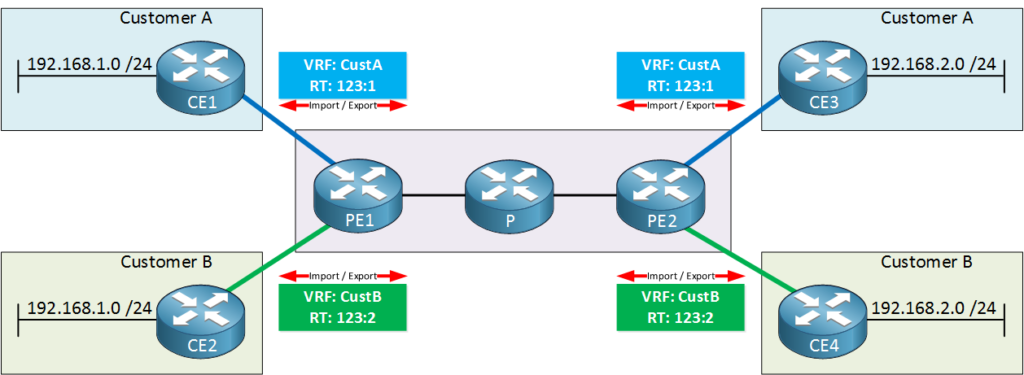
In the picture above you can see that the PE routers are importing and exporting everything from customer A with RT value 123:1. This allows CE1 and CE3 to learn everything from each other. We do the same thing for customer B but we use RT 123:2 for VRF CustB.
CE2 and CE4 will be able to learn everything from each other.
The RT gives us a lot of control over our VPNv4 routes. Do you want to give customer B access to the networks behind CE3 of customer A? Just import and export some RTs and it’s done.
Do you want to build a hub and spoke topology for a third customer? No problem, we can do this by importing and exporting some RTs. The service provider can also use this to offer “shared services” like Internet access.
Transport and VPN Label
Everything that we just discussed about the VRFs, MP-BGP, RD and RT occurs on the control plane. On the data plane, we still have a problem. Let me give you an example:
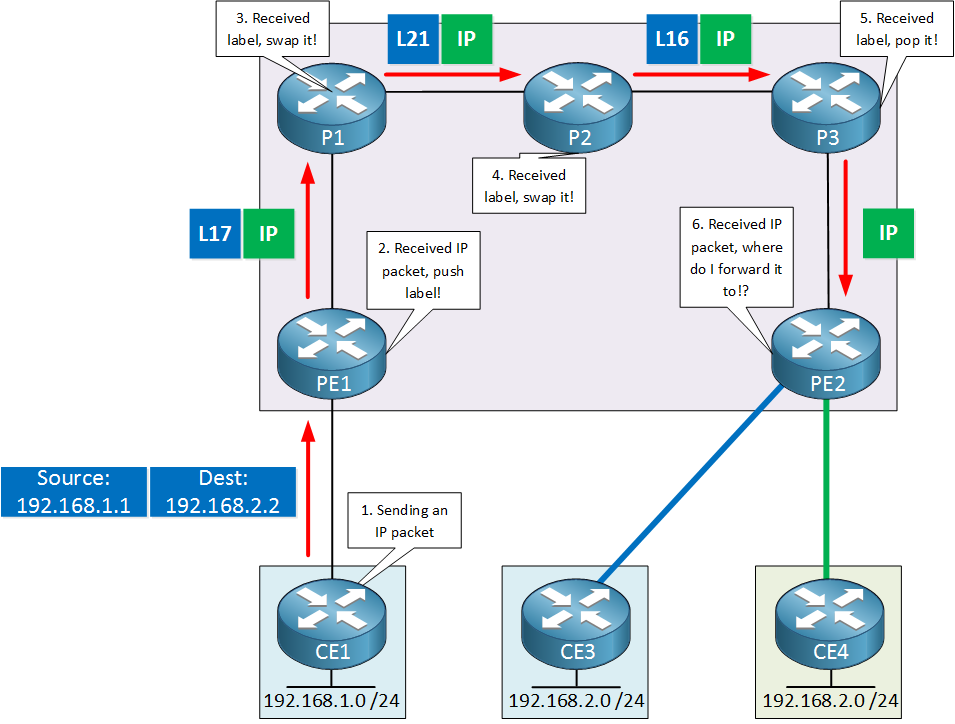
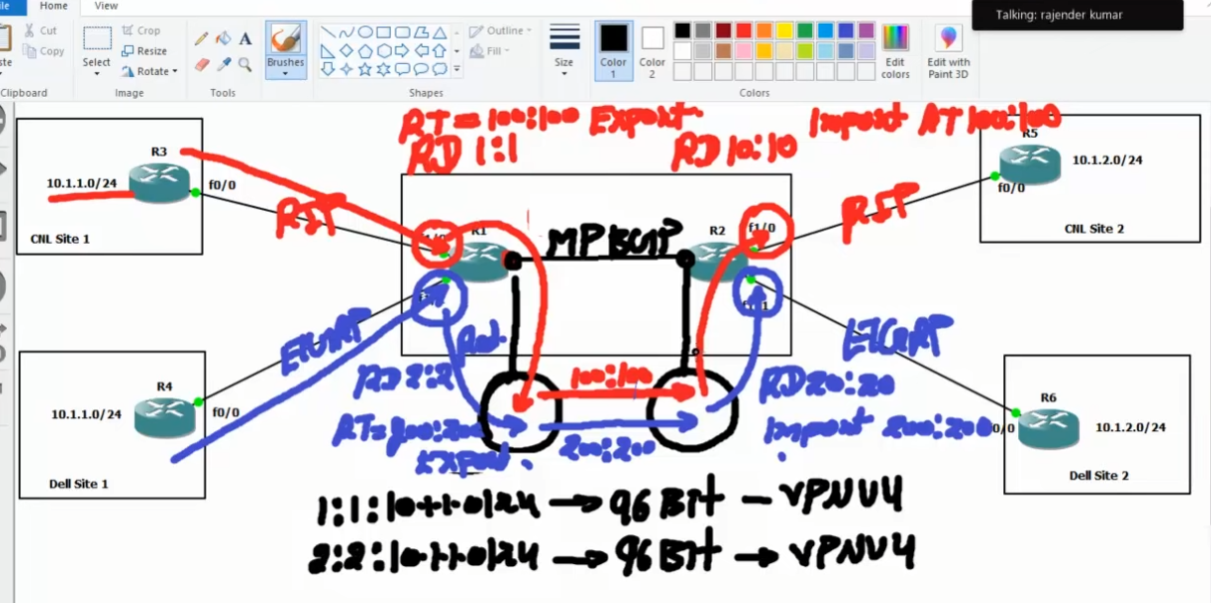
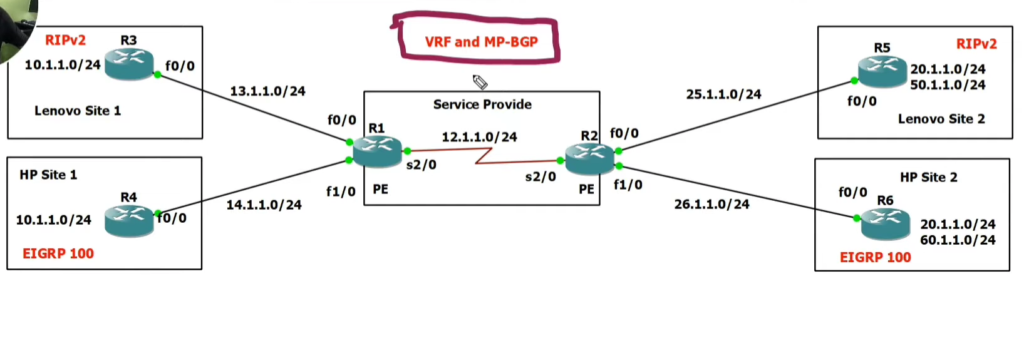
					Site 1 Customar Router CNL
..........................
hostname R3

interface f0/0
 ip address 13.1.1.3 255.255.255.0
 no shutdown

interface lo0
 ip address 10.1.1.1 255.255.255.0
exit

router rip
ver 2
network 0.0.0.0 <0.0.0.0 <Means All Interface Advertise To Rip

OR

network 10.1.1.0 <Optional
network 13.1.1.0 <Optional
					Site 1 Customar Router DELL
..........................
hostname R2

interface f0/0
 ip address 14.1.1.4 255.255.255.0
 no shutdown

interface lo1
 ip address 10.1.1.1 255.255.255.0
exit


router eigrp 100
network 0.0.0.0
no auto-summary
exit
show ip route
					Site 2 Customar Router CNL
..........................
hostname R5

interface f0/0
 ip address 25.1.1.5 255.255.255.0
 no shutdown

interface lo1
 ip address 10.1.2.1 255.255.255.0
exit


router rip
ver 2
network 0.0.0.0 <0.0.0.0 Means All Interface Advertise To Rip

OR

network 25.1.1.0 <Optional
network 13.1.2.0 <Optional
					Site 2 Customar Router DELL
...........................
hostname R6

interface f0/0
 ip address 26.1.1.6 255.255.255.0
 no shutdown

interface lo1
 ip address 10.1.2.1 255.255.255.0
exit


router eigrp 100
network 0.0.0.0
no auto-summary
exit
show ip route
(Service Provider Router PE R1 Router)
					(Service Provider Router PE R1 Router)

Step 1:- For All interface Configuration But After VRF Create IP Remove
.......................................................................

hostname R1

interface f1/0
 ip address 13.1.1.1 255.255.255.0
 no shutdown

interface 1/1
 ip address 14.1.1.1 255.255.255.0
 no shutdown


Step 2:- Wan Interface Configuration
....................................
WAN LINK
.........
interface serial 2/2
 ip address 12.1.1.1 255.255.255.0
 no shutdown
  mpls ip
exit
show ip route


Step 3:- VRF Create PE Router For Customar CNL and Dell
.......................................................

VRF Create PE Router R1
........................

ip vrf CNL             < Create VRF CNL
ip vrf DELL            < Create VRF DELL
exit

show ip vrf            < Checking  VRF Table
show ip vrf route CNL  < Checking CNL VRF Route
show ip vrf route DELL < Checking DELL VRF Route


Step 4:- VRF Interface Configuration
....................................
int f1/0
  ip vrf forwarding CNL
  ip add 13.1.1.1 255.255.255.0
  no sh

  int f1/1
  ip vrf forwarding DELL
  ip address 14.1.1.1 255.255.255.0
  no sh

show ip vrf            < Checking  VRF Table
show ip route vrf CNL  < Checking CNL VRF Route
show ip route vrf DELL < Checking DELL VRF Route
show ip vrf detail


Step 5:- VRF ROUTE to Global Routing Table RD Value
...................................................
ip vrf CNL
RD 1:1
route-target export 100:100
route-target import 100:100
exit
ip vrf DELL
RD 2:2
route-target export 200:200
route-target import 200:200
exit


show ip vrf
show ip bgp vpnv4 all <VPNV4 Route Check
show ip bgp vpnv4 vrf cnl 10.1.1.0 255.255.255.0 <VRF Route Details Check
show run | sec bgp route  <BGP configure Check


Step 6:- RIP Routing Enable for ipv4 CNL VRF (Not For Global Routing)
.....................................................................
router rip
address-family ipv4 VRF CNL
ver 2
network 0.0.0.0
no auto-summary
exit
show ip route vrf CNL


Step 7:- EIGRP Routing Enable for ipv4 DELL VRF (Not For Global Routing)
..............................................................
router eigrp 100
address-family ipv4 VRF DELL autonomus system 100
network 0.0.0.0
no auto-summary
exit
show ip route vrf DELL


Step 8- Normal BGP 32 BITS ipv4
...............................
router bgp 100
neighbor 12.1.1.2 remote-as 100
neighbor 12.1.1.2 next-hop-self


Step 9 - VPNV4 MPBGP neighborship fom FOR Carry 96 BITS Prefix
.....................................................
router bgp 100
address-family vpnv4
neighbor 12.1.1.2 activate

OR

BGP Pearing for Loopback interfaces
...................................
router bgp 100
neighbor 12.1.1.2 remote-as 100
neighbor 12.1.1.2 update-source loopback 0


Step 10 - Redistribution VRF Route To BGP Global Routing Table
.......................................

Redistribution RIP Route To MPBGP
.................................
router BGP 100
address-family ipv4 vrf CNL
redistribute RIP
exit


Redistribution EIGRP Route To MPBGP
...................................
router BGP 100
address-family ipv4 vrf DELL
redistribute eigrp 100
exit


Redistribution MPBGP Route To RIP
...............................
router rip
address-family ipv4 vrf CNL
redistribute bgp 100 metric 1
exit


Redistribution MPBGP Route To EIGRP
.................................
router eigrp 100
address-family ipv4 VRF DELL autonomus system 100
redistribute bgp 100 metric 1 1 1 1 1
exit


show ip bgp vpnv4 all <VPNV4 Route Check
show ip bgp vpnv4 vrf CNL 10.1.1.0 255.255.255.0 <VRF Route Details Check
show run | sec bgp route  <BGP configure Check
(Service Provider Router PE R2 Router)
					Service Provider PE R2 Router
.............................
hostname R2

interface f1/0
 ip address  25.1.1.2 255.255.255.0
 no shutdown

interface 1/1
 ip address 26.1.1.2 255.255.255.0
 no shutdown


WAN LINK
.........
interface serial 2/2
 ip address 12.1.1.2 255.255.255.0
 no shutdown
 mpls ip
exit

show ip route


VRF Create PE Router R2
........................

ip vrf CNL             < Create VRF CNL
ip vrf DELL            < Create VRF DELL
exit

show ip vrf            < Checking  VRF Table
show ip route vrf CNL  < Checking CNL VRF Route
show ip route vrf DELL < Checking DELL VRF Route


int f1/0
  ip vrf forwarding CNL
  ip add 25.1.1.2 255.255.255.0
  no sh

  int f1/1
  ip vrf forwarding DELL
  ip address 26.1.1.2 255.255.255.0
  no sh


ip vrf CNL
RD 1:1
route-target import 100:100
route-target export 100:100
exit
ip vrf DELL
RD 2:2
route-target import 200:200
route-target export 200:200
exit


show ip vrf
show ip bgp vpnv4 all <VPNV4 Route Check


RIP Routing Enable for ipv4 CNL VRF (Not For Global Routing)
............................................................
router rip
address-family ipv4 VRF CNL
ver 2
network 0.0.0.0
no auto-summary
exit
show ip route vrf CNL


EIGRP Routing Enable for ipv4 DELL VRF (Not For Global Routing)
..............................................................

router eigrp 200
address-family ipv4 VRF DELL autonomus system 100
network 0.0.0.0
no auto-summary
exit
show ip route vrf DELL


Normal BGP 32 BITS ipv4
.......................
router bgp 100
neighbor 12.1.1.1 remote-as 100
neighbor 12.1.1.1 next-hop-self


VPNV4 MPBGP neighborship fom FOR Carry 96 BITS Prefix
.....................................................
router bgp 100
address-family vpnv4
neighbor 12.1.1.1 activate


OR

BGP Pearing for Loopback interfaces
...................................
router bgp 100
neighbor 12.1.1.1 remote-as 100
neighbor 12.1.1.1 update-source loopback 0


Redistribution RIP Route To MPBGP
.................................
router BGP 100
address-family ipv4 vrf CNL
redistribute RIP
exit


Redistribution EIGRP Route To MPBGP
...................................
router BGP 100
address-family ipv4 vrf DELL
redistribute eigrp 100
exit


Redistribution MPBGP Route To RIP
...............................
router rip
address-family ipv4 vrf CNL
redistribute bgp 100 metric 1
exit


Redistribution MPBGP Route To EIGRP
.................................
router eigrp 200
address-family ipv4 VRF DELL autonomus system 100
redistribute bgp 100 metric 1 1 1 1 1
exit

show ip bgp vpnv4 all <VPNV4 Route Check