
HSRP Protocol
Table of Contents
HSRP (Hot Standby Router Protocol)
HSRP (Hot Standby Router Protocol) is a Cisco redundancy protocol designed to provide high availability for the default gateway in an IP network. It allows two or more routers or Layer 3 switches to operate together as a logical group and share a virtual IP address and virtual MAC address. Instead of configuring client devices with the physical IP address of a single router, network administrators configure a shared virtual gateway. If the Active Router fails, another router in the HSRP group takes over the gateway role, helping maintain network connectivity without requiring users to manually change their gateway settings.
OR
HSRP (Hot Standby Router Protocol) is a Cisco-Developed redundancy protocol that provides high availability for IP networks by allowing multiple routers to work together as a group and share a virtual IP address. It ensures that if the active router fails, another standby router automatically takes over the gateway role, helping users maintain network connectivity with minimal interruption.
Why HSRP Is Important in Networking
In an enterprise network, users in different VLANs rely on a default gateway to communicate with other VLANs, remote networks, and the Internet. If a single gateway router fails because of hardware issues, power failure, software problems, or a network link failure, users may lose connectivity. HSRP helps overcome this single point of failure by providing a standby gateway that is ready to take over when the active gateway becomes unavailable. This is especially important in enterprise networks, campus networks, data centers, and business environments where network downtime can affect daily operations.
OR
Why is HSRP Used?
HSRP is used to prevent a single router from becoming a point of failure in a network. In a typical LAN environment, client devices use a default gateway to access other networks or the Internet. If that gateway router goes down, users may lose connectivity. HSRP solves this problem by providing a virtual gateway shared between two or more routers.
Why Does a Company Need HSRP? – Enterprise Network Example
Why Companies Need HSRP
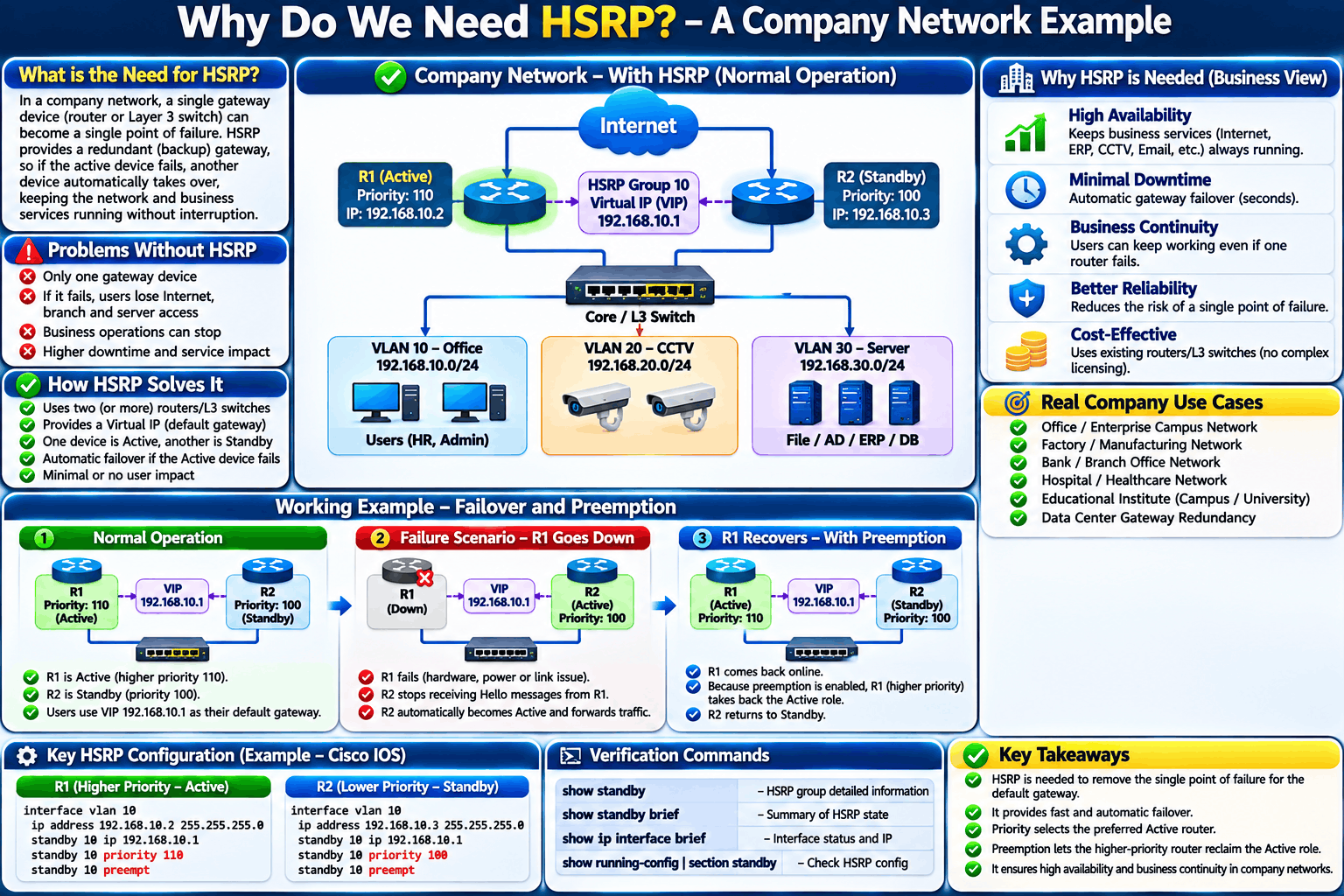
Companies use HSRP (Hot Standby Router Protocol) to maintain network availability and reduce downtime when a gateway router or Layer 3 switch fails. In a corporate network, hundreds or thousands of employees may depend on network connectivity to access email, ERP applications, databases, cloud services, CCTV systems, VoIP phones, servers, and the Internet. If the main gateway fails and no redundant gateway is available, users across multiple departments may lose network access. HSRP provides a backup gateway that can automatically take over, helping the company maintain connectivity during a router failure.
Real-World Company Network Example
Imagine a company with 500 employees working in departments such as Finance, HR, IT, Sales, and Operations. The company has multiple VLANs, internal servers, Internet connectivity, IP phones, Wi-Fi, and business applications. The employees use a Layer 3 switch or router as their default gateway to communicate with other networks. If that gateway device fails, employees may lose access to company resources and Internet services. To prevent this situation, the company deploys two Layer 3 switches or routers and configures HSRP between them, creating a redundant virtual gateway.
How HSRP Works
HSRP works by electing one router as the Active Router and another as the Standby Router. The Active Router forwards traffic from end-user devices using the virtual gateway, while the Standby Router continuously monitors the Active Router through periodic hello messages. Both routers belong to the same HSRP group and share a virtual IP address and virtual MAC address. When the Active Router becomes unavailable, the Standby Router detects the failure and transitions to the Active state, allowing it to continue forwarding traffic through the virtual gateway.
HSRP Practical Example
Consider an enterprise office network with two Layer 3 switches, Switch 1 and Switch 2, connected to VLAN 10. Employees use VLAN 10 for their computers and require access to the Internet and other internal networks. Switch 1 is configured as the Active Router with a higher HSRP priority, while Switch 2 is configured as the Standby Router. Both switches share the virtual gateway IP address 192.168.10.1, which is configured as the default gateway on employee computers. Under normal conditions, Switch 1 forwards traffic. If Switch 1 fails, Switch 2 automatically takes over the virtual gateway and continues routing traffic, reducing the impact of the failure.
OR
How HSRP Works
HSRP routers work together in a group where one router is elected as the Active Router and another router becomes the Standby Router. The Active Router forwards traffic for the virtual gateway, while the Standby Router continuously monitors the Active Router through HSRP hello messages. If the Active Router fails or becomes unreachable, the Standby Router takes over the active role and begins forwarding traffic using the same virtual IP and MAC address.
Active Router
The Active Router is responsible for forwarding packets received from clients that use the HSRP virtual IP address as their default gateway. It handles normal gateway traffic while maintaining communication with other HSRP group members.
Standby Router
The Standby Router monitors the Active Router and remains ready to take over the gateway function if the Active Router fails. It receives HSRP hello messages and checks the availability of the Active Router.
Virtual IP Address
HSRP creates a virtual IP address that is shared by the routers in the HSRP group. End-user devices configure this virtual IP address as their default gateway instead of using the physical IP address of a particular router. This allows gateway failover to happen without requiring changes to client configurations.
HSRP Priority
HSRP priority determines which router is preferred to become the Active Router. The router with the higher priority generally becomes the Active Router. The default HSRP priority is 100, and administrators can change the priority to control the active gateway selection.
HSRP Preemption
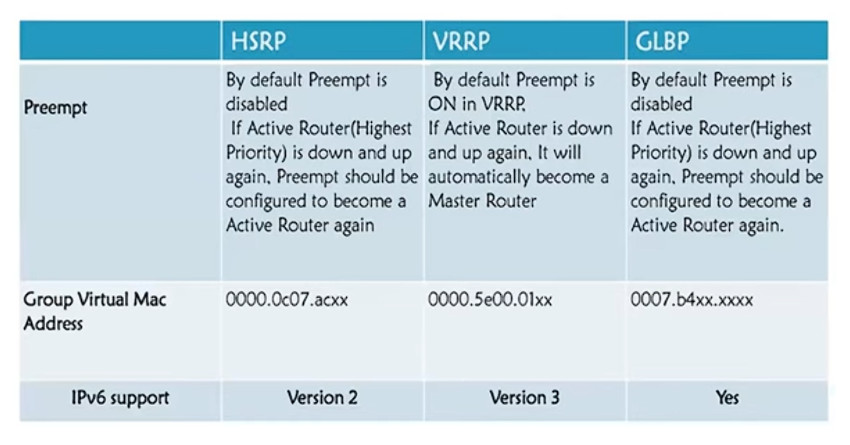
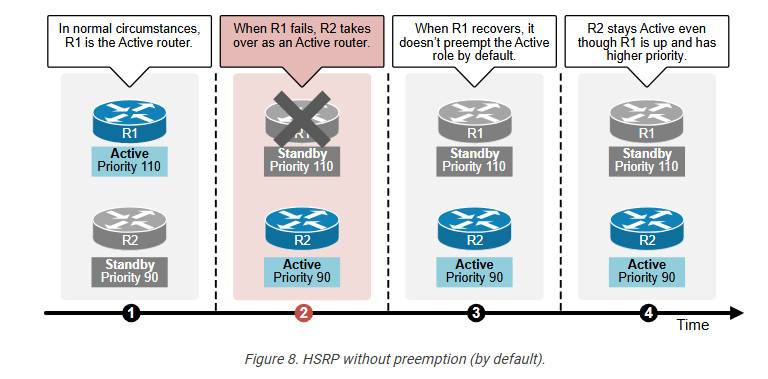
Preemption allows a router with a higher configured priority to take over the Active role when it becomes available again. Without preemption, a recovered router may remain in the Standby role even if it has a higher priority than the current Active Router.
HSRP States
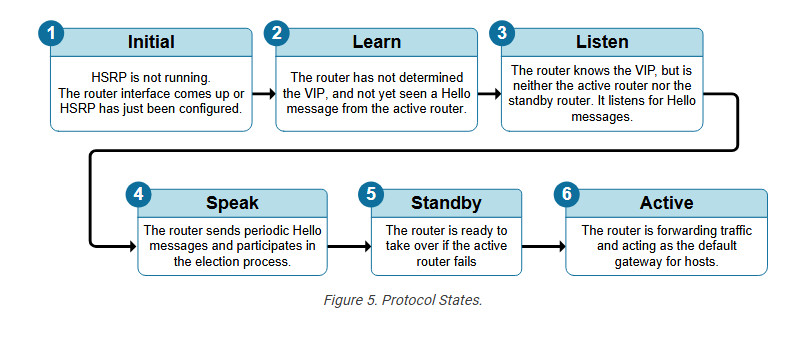
HSRP routers move through different states while establishing and maintaining redundancy. These states include Initial, Learn, Listen, Speak, Standby, and Active. Each state represents a stage of HSRP operation, from initialization and learning virtual gateway information to election and forwarding responsibilities.
HSRP Versions
HSRP supports two main versions: HSRP Version 1 and HSRP Version 2. HSRP Version 2 provides improvements such as support for a larger group number range and enhanced IPv6-related capabilities, depending on the platform and implementation.
HSRP in Enterprise Networks
HSRP is commonly deployed in enterprise campus networks, data centers, branch office networks, and Layer 3 gateway designs where uninterrupted connectivity is important. It is frequently used between distribution-layer routers or multilayer switches to provide redundant default gateways for VLANs.
HSRP Benefits
- High Availability: Provides gateway redundancy during router failures.
- Automatic Failover: Standby router takes over when the Active Router becomes unavailable.
- Virtual Gateway: Clients use a single virtual IP address as their default gateway.
- Reduced Downtime: Helps minimize network service interruption.
- Flexible Design: Supports priority-based active router selection and preemption.
HSRP Priority and Preemption
HSRP priority determines which router is preferred to become the Active Router. The Default Priority is 100, and a router with a higher priority normally wins the Active Router election. In the example, Switch 1 uses priority 110 while Switch 2 uses priority 100, so Switch 1 is preferred. The standby 10 preempt command allows a higher-priority router to reclaim the Active role when it returns, subject to the configured HSRP conditions.
HSRP Priority
HSRP Priority is used to determine which router should become the Active Router in an HSRP group. By default, Cisco HSRP routers use a priority value of 100. When multiple routers participate in the same HSRP group, the router with the higher priority is normally elected as the Active Router, while the other router becomes Standby. Network administrators can manually increase or decrease the priority to control which router handles gateway traffic under normal conditions.
HSRP Preemption
Preemption allows a router with a higher configured priority to take back the Active Router role when it comes back online after a failure. If preemption is enabled, a higher-priority router can replace a lower-priority router that is currently Active. Without preemption, the recovered router may remain in the Standby role even if it has a higher priority.
HSRP Failover Process
When the Active Router is operating normally, it sends HSRP hello messages to other routers in the group. The Standby Router listens for these messages and monitors the Active Router’s availability. If the Active Router stops sending hello messages and the standby router determines that the active role is no longer available, the Standby Router transitions to the Active state. It begins forwarding traffic for the virtual gateway. End-user devices continue using the same virtual IP address, so they generally do not need to change their default gateway.
HSRP Verification Commands
Network engineers use the following Cisco IOS commands to verify HSRP status and troubleshoot gateway redundancy:
- show standby – Displays HSRP group information, Active and Standby roles, virtual IP addresses and timers.
- show standby brief – Provides a concise overview of HSRP groups and router states.
- show ip interface brief – Displays interface status and IP addressing.
- show running-config interface vlan 10 – Checks the VLAN interface configuration.
- show track – Displays object tracking information if tracking is configured.
HSRP States
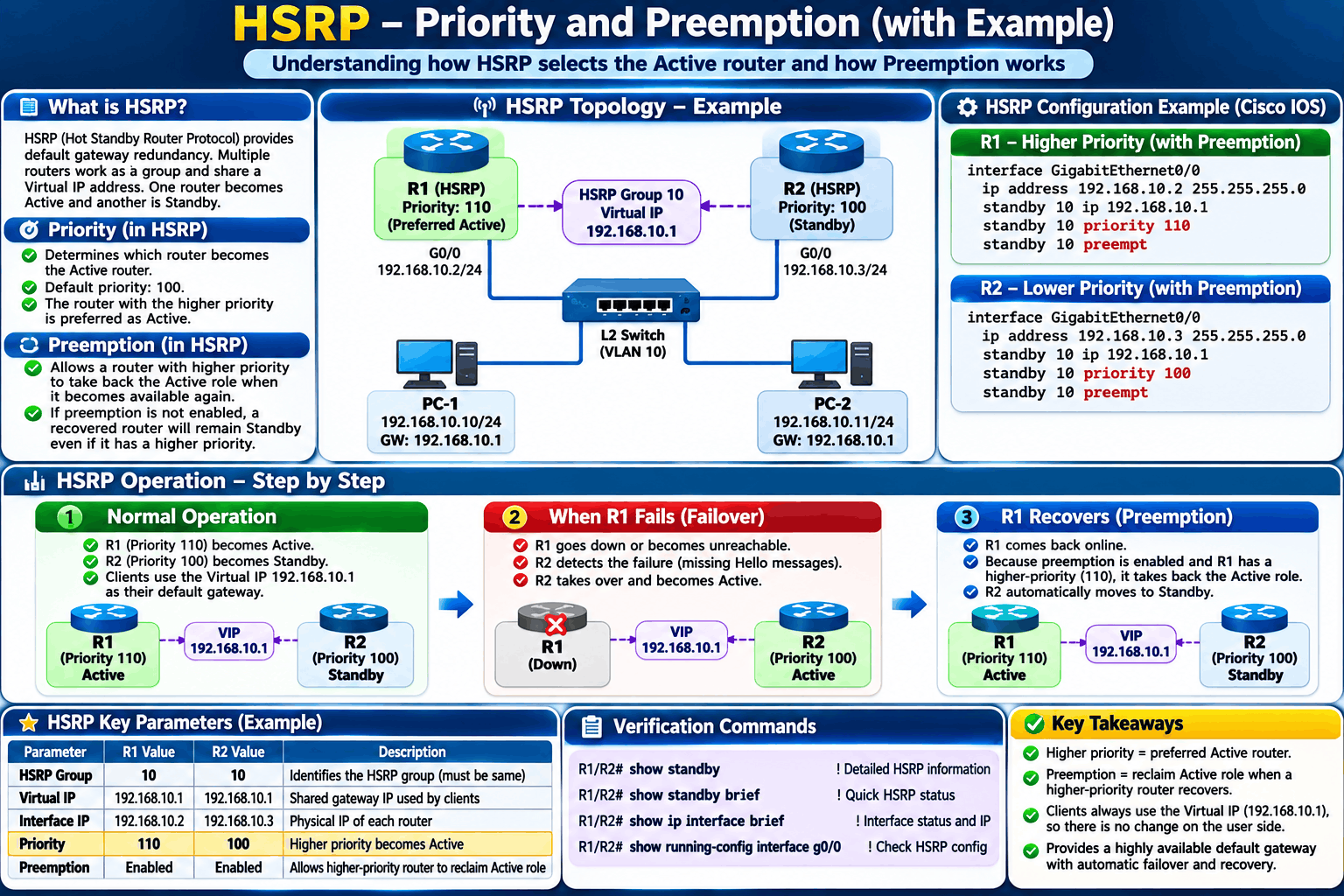
HSRP (Hot Standby Router Protocol) uses different states to manage router participation, gateway elections, redundancy, and failover. When an HSRP-enabled interface starts, it moves through a sequence of states before becoming Active or Standby. These states help routers discover other HSRP members, exchange information, elect the Active Router, and maintain a redundant virtual gateway for the network.
1. Initial State
Initial – HSRP is not yet operating normally.
The Initial state is the starting state of an HSRP interface when HSRP is not yet fully initialized or when the HSRP process is disabled or reset. In this state, the router is not actively participating in the HSRP election process. When HSRP is enabled and the interface becomes ready, the router begins progressing through the HSRP states.
Example: A network engineer configures HSRP on a router’s VLAN interface. Initially, the interface may show the Initial state while the HSRP process is being started or reset.
2. Learn State
Learn – The router is learning HSRP information.
In the Learn state, the router is waiting to learn the virtual IP address of the HSRP group from another router. The router has not yet fully established the information needed to participate in the gateway election. Once it receives the required HSRP information, it can move forward in the state process.
Example: R2 joins HSRP Group 10 and is waiting to learn the virtual gateway IP address 192.168.10.1 from the HSRP group before proceeding.
3. Listen State
Listen – The router listens for HSRP messages.
In the Listen state, the router knows the virtual IP address of the HSRP group and listens for Hello messages from other HSRP routers. However, it does not send Hello messages or actively participate in the Active and Standby election at this stage. It waits to determine whether an Active Router or Standby Router already exists in the group.
Example: R2 has learned the virtual IP 192.168.10.1 and listens to HSRP messages from R1 to determine the current group status.
4. Speak State
Speak – The router actively participates in HSRP.
In the Speak state, the router sends HSRP Hello messages and participates in the election process to determine which router will become Active and which router will become Standby. Routers exchange information such as priority and state through HSRP messages. Based on this information, the routers determine their roles in the HSRP group.
Example: R1 has priority 110 and R2 has priority 100. Both routers enter the Speak state during the election process and exchange HSRP messages. R1 is preferred because it has the higher priority.
5. Standby State
Standby – The router is ready to take over.
In the Standby state, the router is selected as the backup router for the HSRP group. It continuously monitors the Active Router by receiving periodic Hello messages. The Standby Router does not normally forward traffic for the virtual gateway. If the Active Router becomes unavailable, the Standby Router can take over the Active role and start forwarding traffic.
Example: R1 is Active with priority 110, while R2 is Standby with priority 100. R2 continuously monitors R1. If R1 fails, R2 becomes Active and continues using the virtual IP 192.168.10.1.
6. Active State
Active – The router forwards traffic.
In the Active state, the router is responsible for forwarding traffic for the HSRP virtual IP and virtual MAC address. It acts as the default gateway for the clients in that VLAN. The Active Router continues sending Hello messages to other HSRP members so they can monitor its availability. If it fails, the Standby Router can take over the gateway role.
Example: R1 is the Active Router in HSRP Group 10. PCs in VLAN 10 use 192.168.10.1 as their default gateway. R1 forwards traffic from those PCs toward other networks or the Internet.
Router | Priority | Initial role |
R1 | 110 | Active |
R2 | 100 | Standby |
Virtual IP | — | 192.168.10.1 |
- Both routers start HSRP and progress through the initialization and election states.
- They exchange HSRP Hello messages in the Speak state.
- R1 wins the election and becomes Active.
- R2 becomes Standby.
- If R1 fails, R2 takes over and becomes Active.
- If R1 returns and preemption is enabled, R1 can reclaim the Active role.
HSRP Hello Messages
What is an HSRP Hello Message?
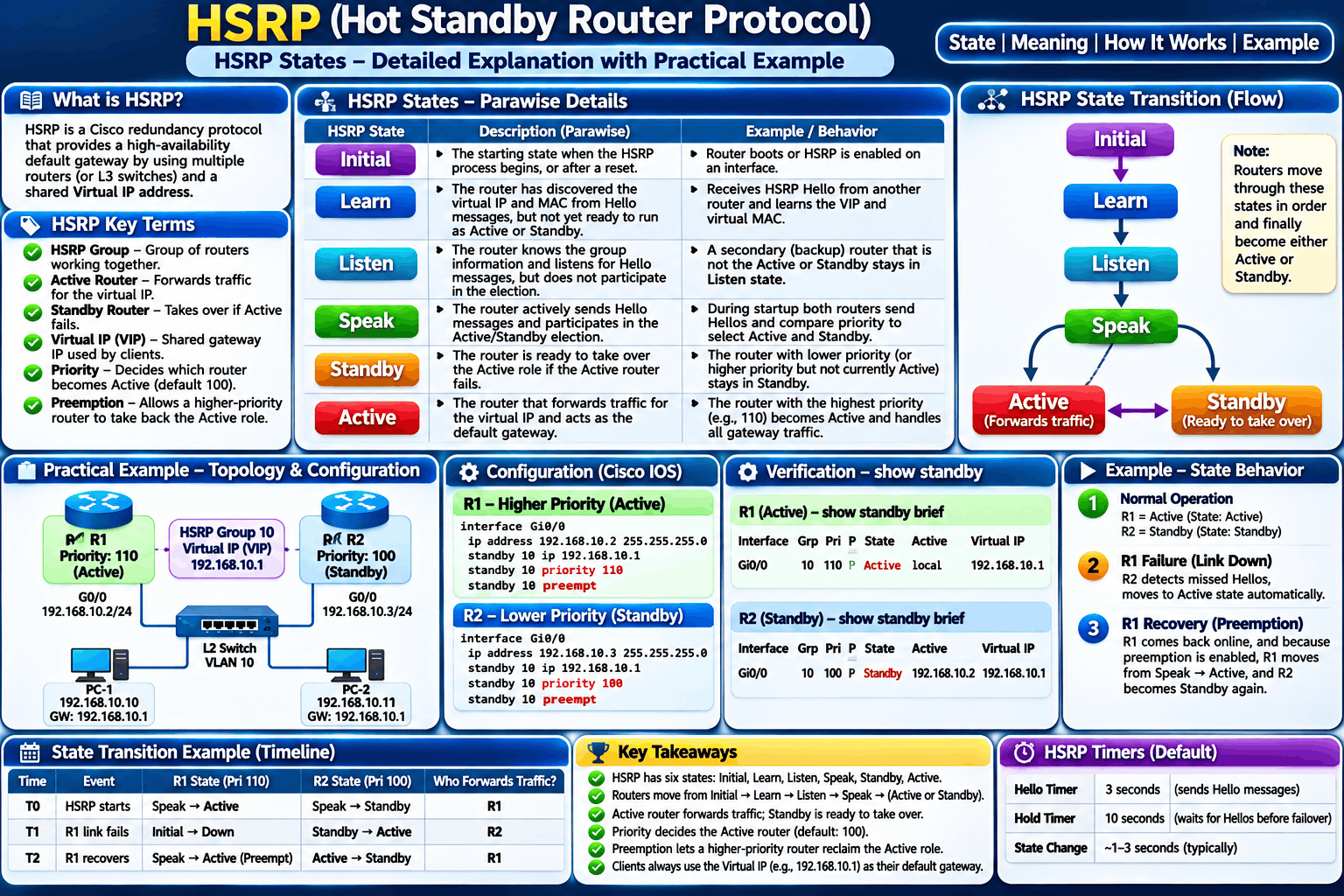
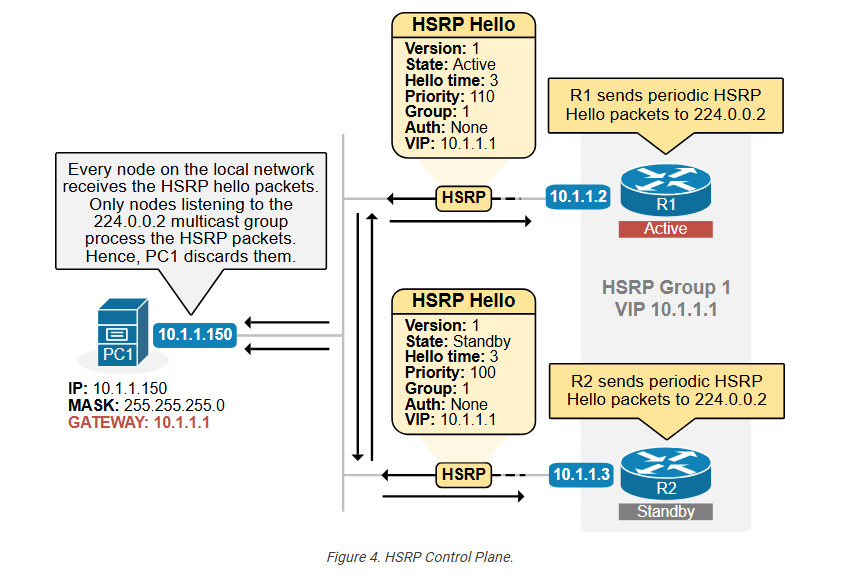
HSRP Hello messages are periodic messages exchanged between routers or Layer 3 switches participating in the same HSRP group. These messages allow HSRP devices to communicate their current status, role, priority, virtual IP information, and timer values to other group members. Hello messages help the Standby Router monitor the Active Router and determine whether it is still operating normally.
Why Are HSRP Hello Messages Needed?
In a company network, the Standby Router must continuously know whether the Active Router is healthy and functioning. HSRP Hello messages provide this communication mechanism. The Active Router regularly sends Hello messages, and the Standby Router receives them to confirm that the Active Router is still available. If the Hello messages stop arriving and the hold timer expires, the Standby Router can take over the Active role.
How HSRP Hello Messages Work
In an HSRP group, routers send and receive Hello messages periodically. These messages contain information such as HSRP state, priority, group number, Hello timer, Hold timer, and virtual IP address. When the Standby Router receives Hello messages from the Active Router, it resets its monitoring timer and continues waiting. If the messages are no longer received within the configured hold time, it assumes that the Active Router is unavailable and may transition to the Active state.
HSRP Hello Message – Practical Example
Suppose R1 is the Active Router and R2 is the Standby Router in HSRP Group 10. R1 sends a Hello message periodically, and R2 receives it to confirm that R1 is operating normally. Every time R2 receives the expected Hello message, it refreshes its monitoring timer. If R1 stops sending Hello messages because of a failure, R2 waits until the Hold timer expires and then can transition to Active.
HSRP Hello Message Communication
HSRP uses UDP port 1985 for its protocol messages. HSRPv1 uses multicast address 224.0.0.2, while HSRPv2 uses 224.0.0.102. These multicast messages allow HSRP routers to communicate with other members of their group.
HSRP Hello and Hold Timers
Timer | Default value | Purpose |
|---|---|---|
Hello Timer | 3 seconds | How often Hello messages are sent |
Hold Timer | 10 seconds | How long a router waits before declaring the Active Router unavailable |
HSRP Version 1 vs HSRP Version 2
HSRP Version 1 vs HSRP Version 2
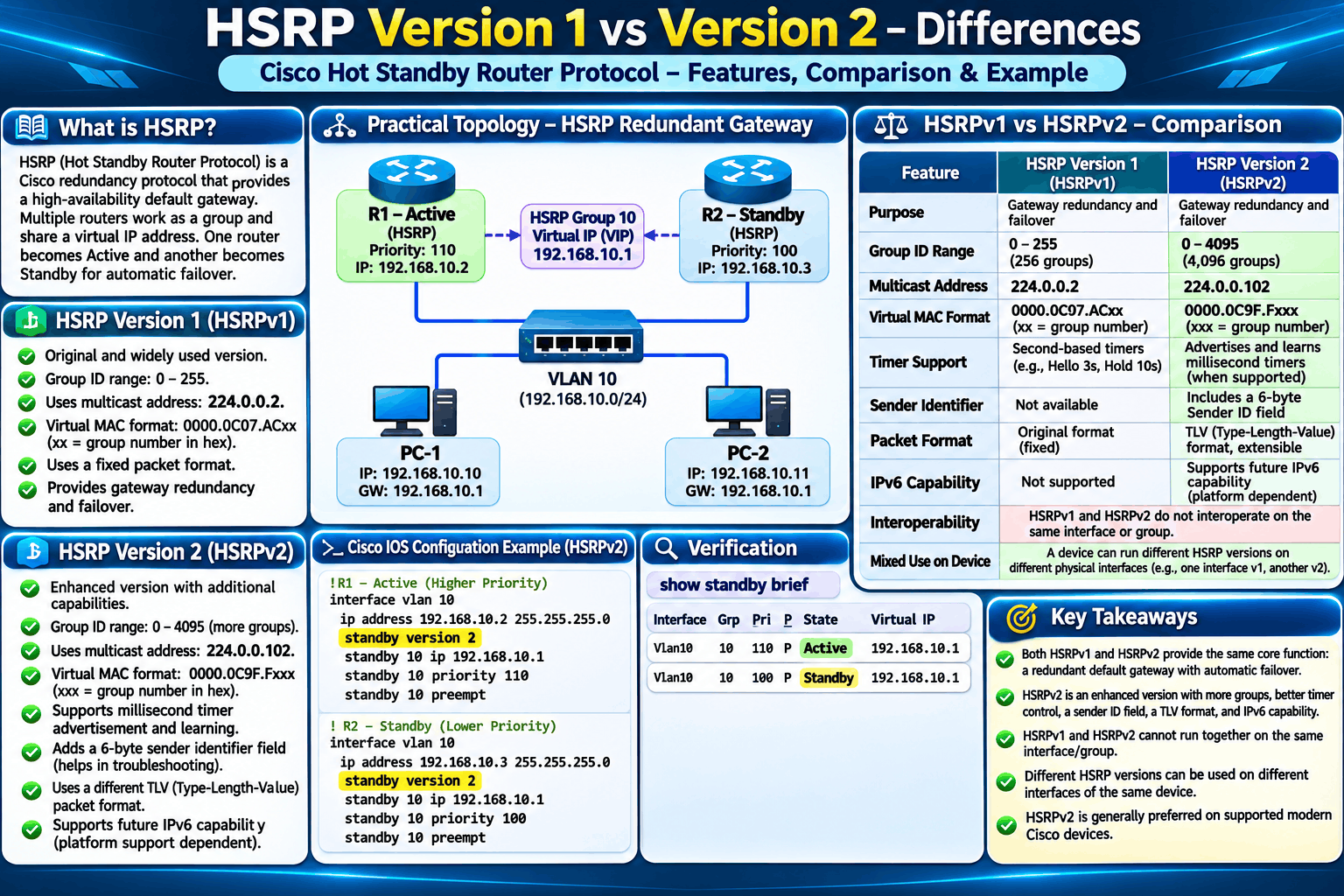
HSRP (Hot Standby Router Protocol) has two versions, HSRPv1 and HSRPv2, which provide default-gateway redundancy for IP networks. Both versions allow multiple routers or Layer 3 switches to share a virtual IP address and automatically take over the gateway role when the Active Router fails, but HSRPv2 introduces improvements in group numbering, multicast communication, and protocol compatibility.
HSRPv1 vs HSRPv2 – Detailed Differences
HSRP Version 1 (HSRPv1) and HSRP Version 2 (HSRPv2) are both Cisco gateway redundancy protocols used to provide a highly available default gateway for network clients. HSRPv2 was introduced to improve HSRPv1 by expanding the group number range, changing the multicast address, improving identification of the sending router, and supporting enhanced timer and packet-format capabilities. Both versions provide the same core gateway redundancy function, but HSRPv2 offers more flexibility for modern network designs.
1. HSRP Group Number
HSRPv1 supports group numbers from 0 to 255, allowing up to 256 group identifiers. HSRPv2 expands the group range from 0 to 4095, allowing more flexibility when deploying HSRP across multiple VLANs. The expanded range makes it easier for network engineers to use VLAN numbers as HSRP group numbers in larger networks
2. Multicast Address
HSRPv1 sends Hello messages using multicast address 224.0.0.2. HSRPv2 uses multicast address 224.0.0.102. The change in multicast address helps HSRPv2 avoid certain conflicts associated with HSRPv1, including CGMP leave processing.
3. Virtual MAC Address
HSRPv1 uses a virtual MAC address format of 0000.0C07.ACXX, where XX represents the HSRP group number in hexadecimal. HSRPv2 uses a different virtual MAC address format, 0000.0C9F.FXXX, corresponding to the expanded group range. The different MAC address ranges help distinguish the two protocol versions.
HSRPv1 vs HSRPv2 Comparison Table
Feature | HSRPv1 | HSRPv2 |
|---|---|---|
Group range | 0–255 | 0–4095 |
Multicast address | 224.0.0.2 | 224.0.0.102 |
Virtual MAC | 0000.0C07.ACXX | 0000.0C9F.FXXX |
Millisecond timers | Not advertised/learned | Advertised/learned |
Sender identifier | No 6-byte identifier field | 6-byte identifier field |
Packet format | Original format | TLV format |
IPv6 capability | Original IPv4 implementation | Future IPv6 capability, platform-dependent |
Interoperability | Cannot share same group with v2 | Cannot share same group with v1 |
HSRP PPT








Basic Configuration of HSRP
					R1

interface Ethernet0/1
description LAN Interface of Active Router
ip address 192.168.1.1 255.255.255.0
standby 1 ip 192.168.1.254 <—- Create HSRP Group 1 and assign Virtual IP
standby 1 priority 101 <—- Assign priority above 100 to make this the primary router
standby 1 preempt <—- Makes router active if it has higher priority


R2

interface Ethernet0/1
description LAN Interface of Standby Router
ip address 192.168.1.2 255.255.255.0
standby 1 ip 192.168.1.254 <—- Create HSRP Group 1 and assign Virtual IP
standby 1 preempt <—- Makes router active if it has higher priority


