Layer-2 and Layer-3 Switches
Difference Between Layer-2 and Layer-3 Switches
Layer-2 Switch (Explanation)
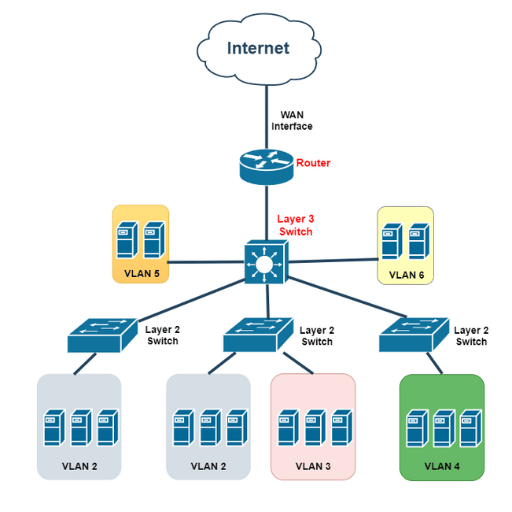
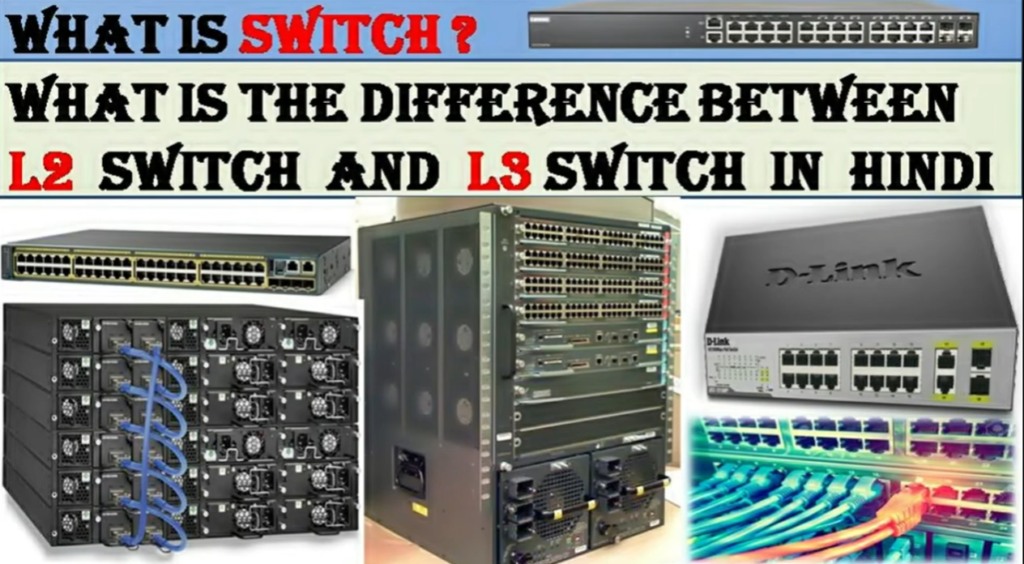
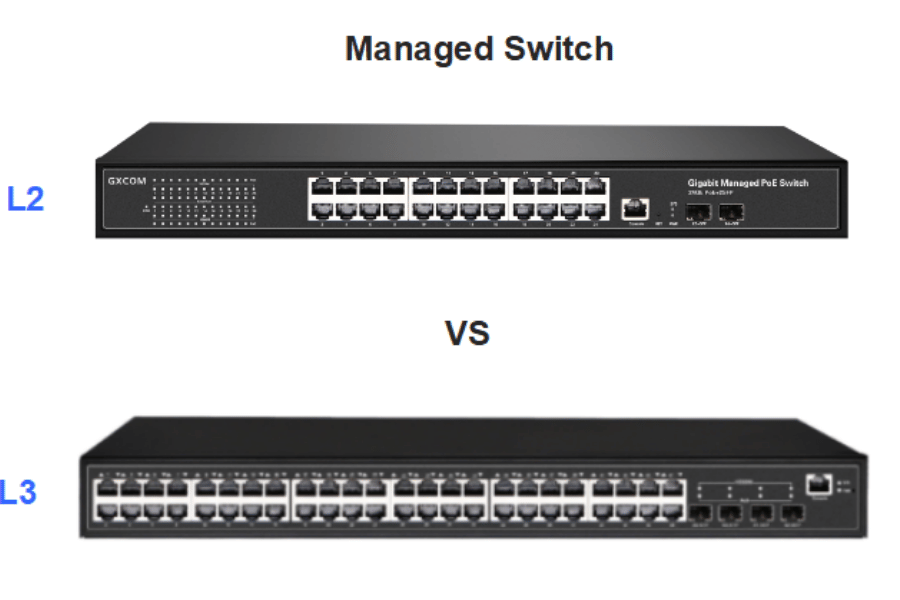
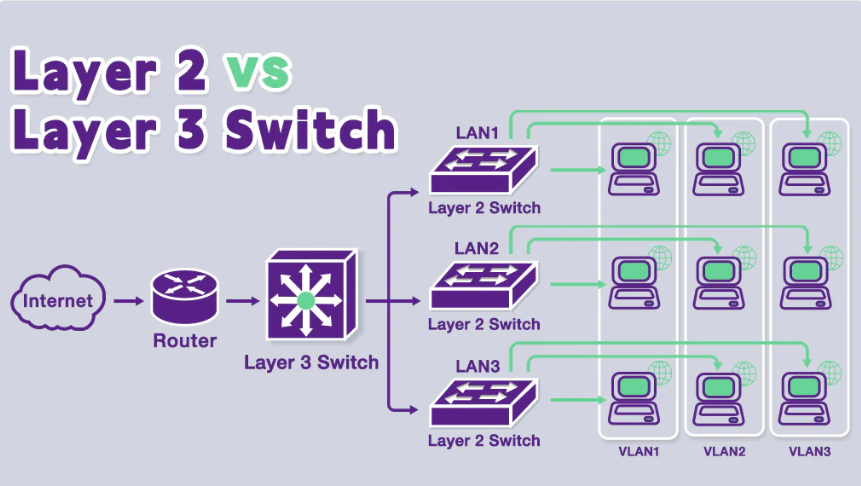
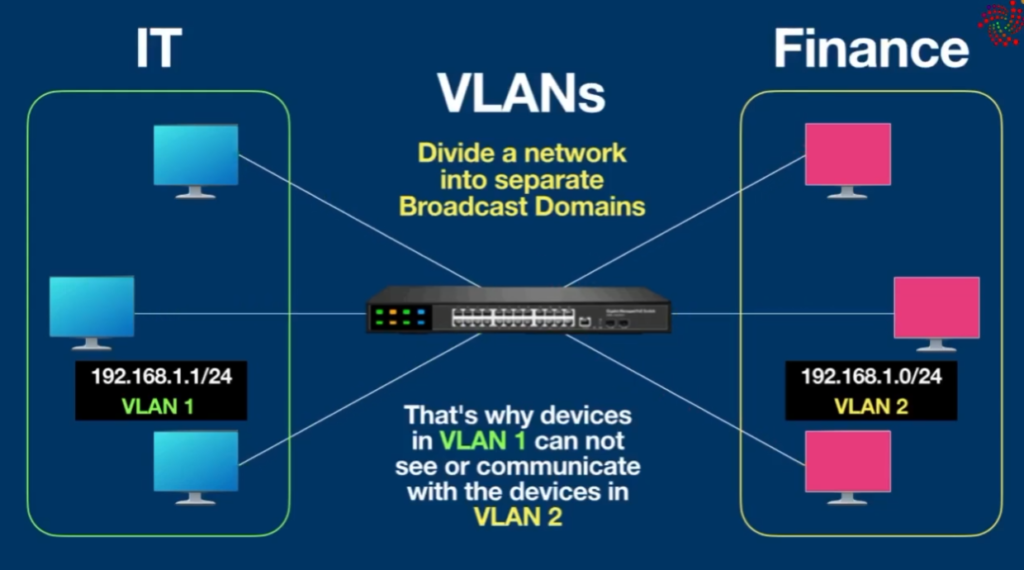
A Layer-2 switch works only with MAC addresses to forward frames inside the same network or VLAN. It is mainly used to connect end devices such as computers, printers, and IP phones. It can create VLANs to separate departments, but it cannot allow communication between VLANs by itself. For inter-VLAN communication, a router or Layer-3 switch is required. Layer-2 switches are commonly used in access layer networks in offices and schools.
Layer-3 Switch (Explanation)
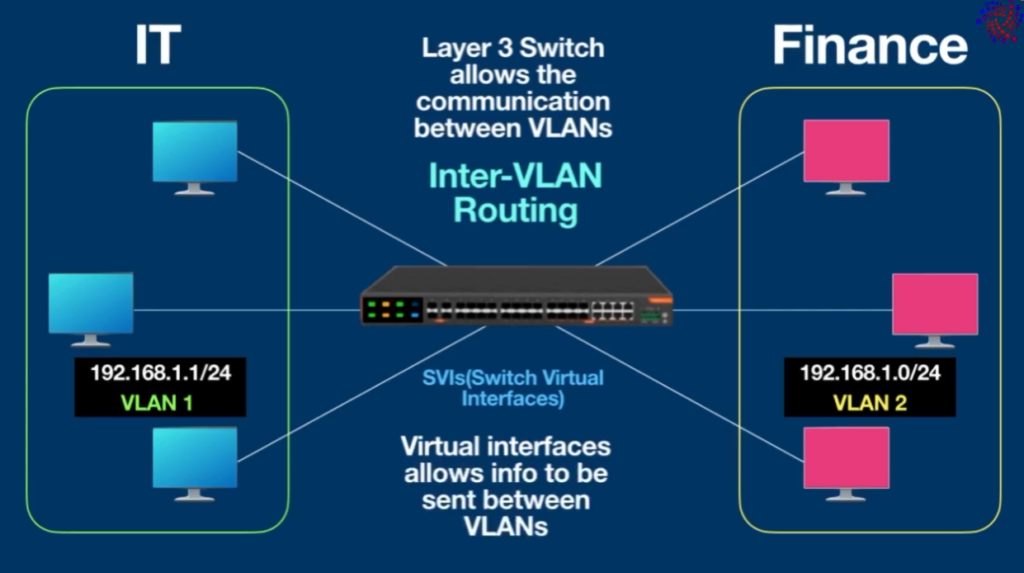
A Layer-3 switch is a combination of a switch and a router. It can forward traffic based on IP addresses and perform routing between VLANs (Inter-VLAN routing) without needing an external router. Layer-3 switches support routing protocols like static routing, OSPF, and RIP. They are used in distribution and core layers of enterprise networks where high speed and efficient routing are required.
Key Differences (One-line answers)
- Layer-2 switch: Uses MAC address, no routing.
- Layer-3 switch: Uses IP address and performs routing.
- Layer-2: Needs router for VLAN communication.
- Layer-3: Does routing itself between VLANs.
Example
- Office with one VLAN → Layer-2 switch is enough
- Office with multiple VLANs (HR, Finance, IT) → Layer-3 switch needed for inter-VLAN routing
Conclusion
Layer-2 switches are used for simple device connectivity within the same network, while Layer-3 switches are used in larger networks where routing and VLAN communication are required. A Layer-3 switch improves performance, reduces network complexity, and removes the need for a separate router for internal routing.

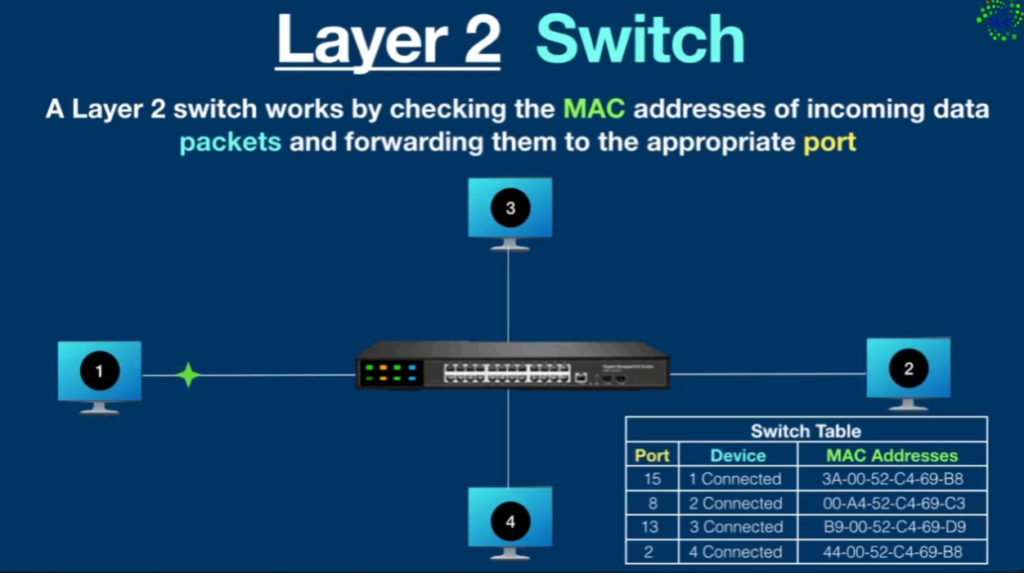
A switch is a device that sends a data packet to a local network. What is the advantage of a hub? A hub floods the network with the packet and only the destination system receives that packet while others just drop due to which the traffic increases a lot. To solve this problem switch came into the picture. A switch first learns, by flooding the network just like a hub to fill the MAC- address table, on which port a particular device is connected. After learning it sends packets to that particular host only.
What is a Layer-2 Switch?
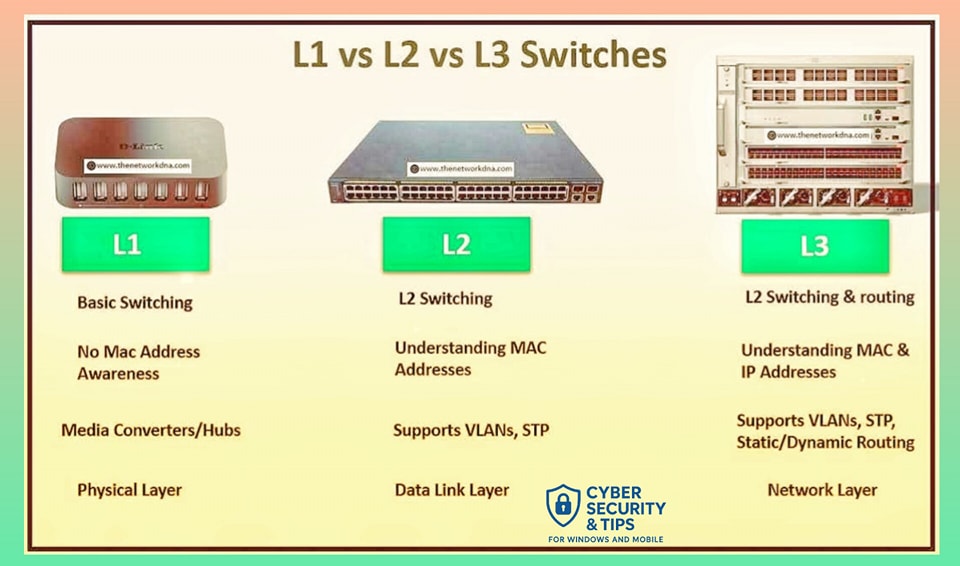
A Layer-2 switch works at the Data Link layer or Layer 2 of the OSI reference model. It especially utilizes MAC addresses to direct information packets between devices that are on the exact same network.
- MAC Address Table: A Layer-2 switch will keep a MAC address table that identifies the MAC address of the connected device and the port number. This enables the switch to direct frames towards the correct destination.
- VLAN Support: Layer-2 switches can support VLANs (Virtual Local Area Networks), which means that the network can be segmented at this layer.
- Switching Frames: These forward Ethernet frames are according to MAC addresses and are vital in minimizing collision within LANs.
- Broadcast Domains: Layer-2 switches do not partition broadcast domains, all the devices connected to a Layer-2 switch are in the same broadcast domain.
What is a Layer-3 Switch?
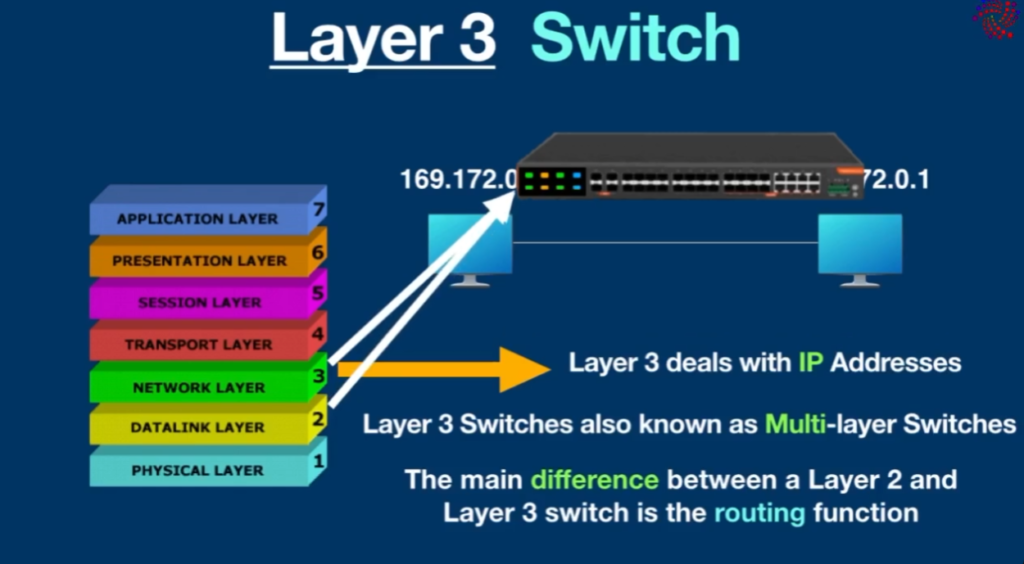
A Layer-3 switch works at the third layer of the OSI mode and it has features of both a switch and a router. It employs IP addresses in the forwarding of packets and routing among one or different networks/subnets. Layer-3 switches are characterized by:
- Routing Capabilities: Layer – 3 switches are different from Layer – 2 switches in that Layer – 3 switches are capable of routing by inspecting the IP headers of the packets and computing the best path for the data.
- Inter-VLAN Routing: Layer-3 switches can also forward traffic between VLANs, but this is often needed only in larger networks where segmentation has to be performed.
- Reduced Latency: Due to FULL layer routing implementation, this means that Layer-3 switches can avoid having to use a different router hence improving on the existing less latency in the networks.
- Advanced Features: Layer-3 switches are usually equipped with features such as ACL and QoS among others in the process of managing the switches.
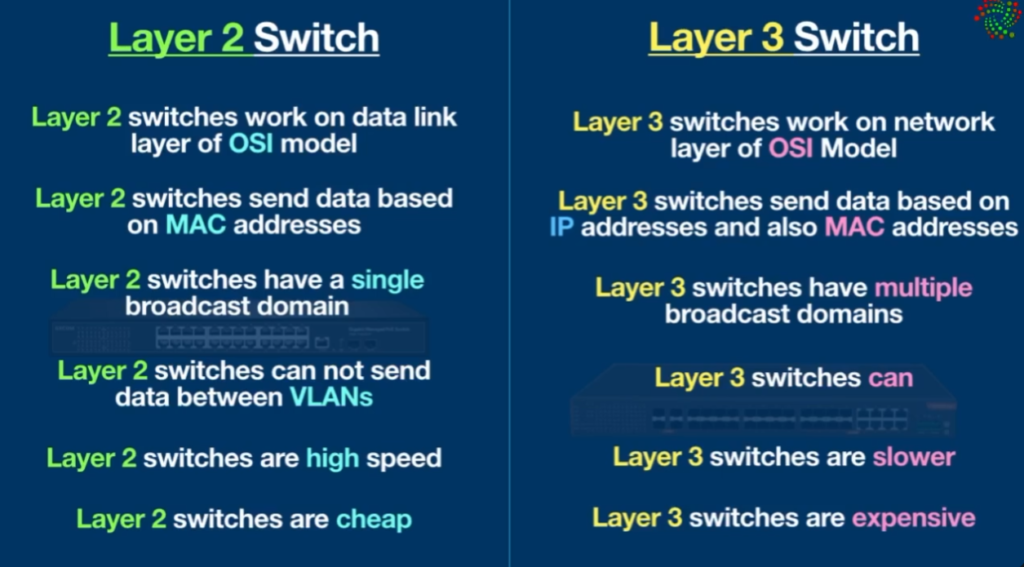
Layer 2 switch work on layer 2 of OSI model i.e. data link layer and sends a “Frames” to destination port using MAC address table which stores the mac address of a device associated with that port. Layer 3 switch work on layer 3 of OSI model i.e. network layer where it route packet by using IP address, it is used widely on VLANs.
Difference Between Layer-2 and Layer-3 Switches
| Layer 2 Switch | Layer 3 Switch |
|---|---|
| Operate on layer 2 (Data link) of OSI model. | Operate on layer 3 (Network Layer) of OSI model. |
| Send “frames” to destination on the basis of MAC address. | Route Packet with help of IP address |
| Work with MAC address only | Can perform functioning of both 2 layer and 3 layer switch |
| Used to reduce traffic on local network. | Mostly Used to implement VLAN (Virtual Local area network) |
| Quite fast as they do not look at the Layer 3 portion of the data packets. | Takes time to examine data packets before sending them to their destination |
| It has single broadcast domain | It has multiple broadcast domain. |
| Can communicate within a network only. | Can communicate within or outside network. |
Thus, the choice to use or not to use a layer 3 switch or router can be evaluated considering the following factors:
| Criteria | Layer 3 | Router |
|---|---|---|
| Scope | ScopeLayer 3 switches enable data transfer between multiple devices simultaneously across LANs, VLANs, and subnets. They do not support WANs. | Support for WANs, and the ability to connect multiple networks simultaneously, enables routers to be effectively used in organizations with complex network segments. |
| Traffic management | Layer 3 switches offer hardware-based switching, which makes them well-suited for handling large amounts of network traffic. High throughput, high port density, and high traffic speed is enabled by layer 3 switches’ hardware configurations and the ability to combine switching and routing capabilities. | Routers typically use software-based routing, which can be slower but offers more advanced routing. Low throughput, low port density, and low traffic management speed when compared to layer 3 switches. |
| Routing protocols | Layer 3 switches typically support a limited number of routing protocols. | Routers support multiple routing protocols, such as OSPF, BGP, and EIGRP, making them well-suited for complex routing scenarios. |
| Advanced features | Layer 3 switches do not support edge technologies and have comparably limited features for modern IT. | Routers offer a wider range of security features, such as firewalls, VPNs, and access control lists (ACLs), along with edge technologies support. |
| Cost | Comparatively low cost. | Comparatively high cost. |
L2 vs L3 Switches Choosing the right Switch for your Network
Choosing between a Layer 2 switch and a Layer 3 switch depends on the size of your network, number of VLANs, and whether you need routing inside your network. Understanding their roles helps you design a network that is cost-effective, secure, and scalable.
A Layer-2 switch is needed when your network only requires basic device connectivity within the same network or VLAN and does not require routing between different networks. It works using MAC addresses and is mainly used to connect end devices such as computers, printers, IP phones, and access points. Layer-2 switches are ideal for small offices, schools, or simple LAN environments where there are one or two VLANs and all communication stays inside the same subnet. They are also commonly used at the access layer of a network because they are cost-effective, easy to configure, and provide fast switching for user devices. If communication between VLANs is required, a separate router or firewall must be used with a Layer-2 switch.
A Layer-3 switch is needed when your network has multiple VLANs or subnets and requires fast routing between them. It combines the functions of a switch and a router by forwarding traffic based on both MAC and IP addresses. Layer-3 switches are used in medium to large company networks, campuses, and data centers where departments such as HR, Finance, IT, and Guest networks must communicate securely and efficiently. They are commonly placed at the distribution or core layer of a network to handle inter-VLAN routing, apply access control policies, and reduce the load on external routers. In short, use a Layer-2 switch for simple connectivity and user access, and use a Layer-3 switch when your network needs internal routing, better performance, and scalability for future growth.
Key Comparison
| Feature | Layer 2 Switch | Layer 3 Switch |
|---|---|---|
| OSI Layer | Layer 2 (Data Link) | Layer 3 (Network) |
| Forwarding | MAC address only | MAC + IP address |
| Inter-VLAN Routing | ❌ Not supported | ✅ Supported |
| VLAN Support | Yes (no routing) | Yes (with routing) |
| Cost | Lower | Higher |
| Complexity | Simple | More advanced |
| Network Size | Small | Medium to large |
How to Choose the Right Switch for Your Network
Choose a Layer 2 switch if:
- You have a small office or home network
- Only one VLANs are needed
- You already use a router for routing
- Budget is limited
- You just need device connectivity
Choose a Layer 3 switch if:
- You have many VLANs and departments
- You need fast inter-VLAN communication
- You want to reduce load on routers
- You are building a scalable enterprise network
- You need advanced features like routing protocols
Practical Example
- Small office (20 PCs, one network): Layer 2 switch is enough.
- Company with HR, Finance, IT, and Guest VLANs: Layer 3 switch is the better choice for fast and secure inter-VLAN routing.
Conclusion
Layer 2 switches are ideal for simple device connectivity and basic VLAN segmentation, while Layer 3 switches are designed for networks that require routing, multiple VLANs, and higher performance. Choosing the right switch depends on your network size, budget, and future growth plans. For modern company and campus networks, a combination of both is often used: Layer 2 switches at the access layer and Layer 3 switches at the distribution/core layer.
- Layer-3 Switch: Used for fast routing inside a local network (VLAN routing).
- Router: Used for connecting different networks and accessing the internet.
Working Difference
| Feature | L3 Switch | Router |
|---|---|---|
| Main Work | Inter-VLAN routing | Network-to-network routing |
| Speed | Very fast (hardware switching) | Slower than L3 switch |
| Use Location | Inside LAN / enterprise network | Edge of network / internet connection |
| Ports | Many Ethernet ports | Usually fewer ports |
| WAN Support | Usually limited | Full WAN support |
1. Layer-2 Switch Purpose
A Layer-2 switch works at Data Link Layer (Layer-2) and forwards data using MAC addresses.
Purpose 1: Connect Devices in LAN
Layer-2 switches connect devices in the same local network.
Example:
In an office:
- PC1
- PC2
- Printer
- IP Phone
All connect to a Layer-2 switch to communicate inside the LAN.
Purpose 2: Fast Local Communication
Layer-2 switches provide high-speed communication inside the same network.
Example:
Employees access a local file server through a Layer-2 switch.
Purpose 3: VLAN Creation
Layer-2 switches can create VLANs to separate departments.
Example:
| Department | VLAN |
|---|---|
| HR | VLAN 10 |
| Accounts | VLAN 20 |
| IT | VLAN 30 |
Traffic between these VLANs is separated.
Purpose 4: Network Expansion
Layer-2 switches increase the number of devices in a LAN.
Example:
A router has 4 ports but the office has 30 computers → connect a Layer-2 switch.
2. Layer-3 Switch Purpose
A Layer-3 switch works at Network Layer (Layer-3) and forwards packets using IP addresses.
Purpose 1: Inter-VLAN Routing
Layer-3 switches allow communication between different VLANs.
Example:
| VLAN | Department |
|---|---|
| VLAN 10 | HR |
| VLAN 20 | Accounts |
If HR needs to access an Accounts server, the Layer-3 switch routes the traffic.
Purpose 2: High-Speed Routing in Large Networks
Layer-3 switches provide faster routing than routers inside enterprise networks.
Example:
Large companies use Layer-3 switches in core networks to route traffic between multiple LANs.
Purpose 3: Large Enterprise Networks
Layer-3 switches are used in data centers and enterprise networks.
Example organizations:
- Amazon
- Banks and large enterprises
They need high-speed routing between many networks.
Purpose 4: Static and Dynamic Routing
Layer-3 switches support routing protocols like:
- Static Routing
- OSPF
- RIP
Example:
A company connects multiple branch networks using Layer-3 switching.