
Transmission Media
Transmission Media in Computer Network
Introduction
The modern global environment is constantly evolving. Data Communication and networking technologies have revolutionized many aspects of modern life. They now depend on computer networks for almost everything. Computers and other types of telecommunication devices may represent data as signals. They are transferred as electromagnetic signals from one device to another. Electromagnetic signals may travel from one sender to another through a vacuum, air, or other transmission media. This blog aims to provide you with an overview of the transmission media in computer networks and types of transmission media.
What is Transmission Media in Computer Networks?
Transmission Media is a method of establishing a communication medium to transmit and receive information in the form of electromagnetic signal waves. Since different physical components operate it, it is put under the physical layer while being worked on by physical elements from the physical layer. A LAN, or local area network, is the physical setup where a transmitter and receiver communicate utilizing a Transmission medium. Copper-based or fiber-based transmission media are used to carry either electric or optical signals. The transmission medium is also known as a communication channel.

- Copper-based or fibre-based transmission media are used to carry either electric or optical signals. The transmission medium is also known as a communication channel.
- The transmission media is mainly of two types: Wired Media and Wireless Media through which data is transmitted. To measure the quality of data that is transmitted, and its characteristics can be calculated by the characteristics of medium and signal.
- In wired media, the characteristics of the medium are more important and on the other hand in wireless media, the characteristic of the signal are much more vital.
- There are several Transmission Media and all of them have different properties which includes bandwidth, delay, cost and ease of installation and maintenance. And depending on these factors Transmission media is selected for the data transfer.
Media Terminology
- Segment length – The signal degrades for each type of media after traveling a certain distance to the point where it becomes unintelligible. This distance is referred to as the segment length.
- Attenuation – The loss of signal strength when traveling a distance is called attenuation. Measured in decibels (DB).
- Bandwidth – Amount of data that can travel through the cable in a unit period of time. Measure in kbps, Mbps, etc.
- Interference – Each cable is susceptible to certain forms of external noise. This is called EMI (Electromagnetic Interference) or RFI (Radio frequency interference)
- Crosstalk – When a signal carrying conductor is placed near another signal carrying conductor. Interference is generated in the other cable. This is called crosstalk.
Now, that we have a good knowledge of Transmission Media, it is time to indulge ourselves to the types of Transmission Media.
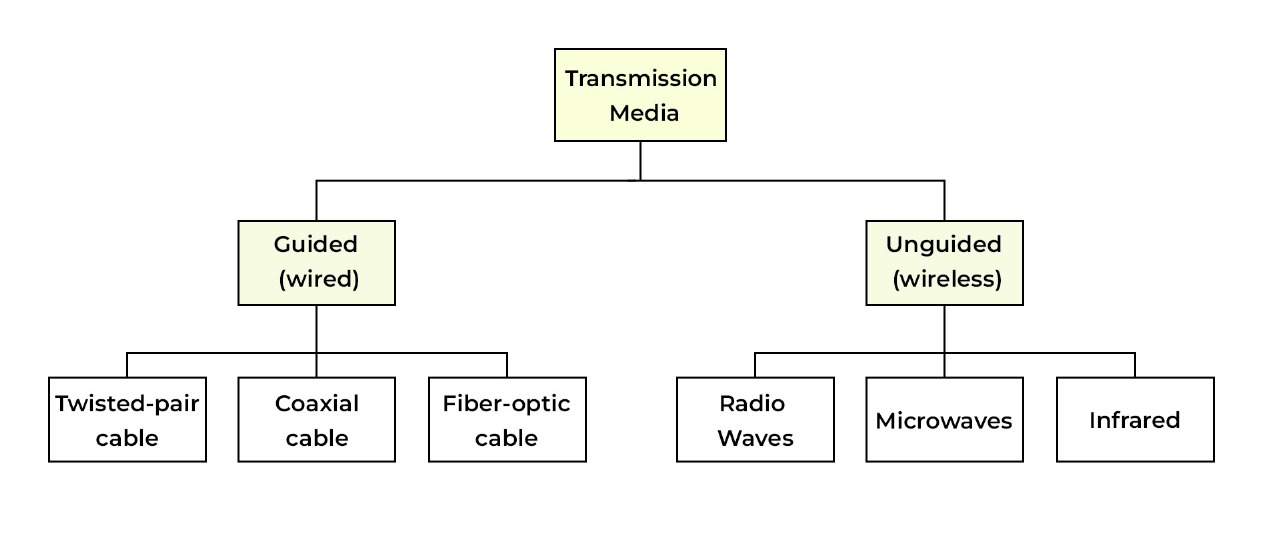
Guided Cable and Unguided Cable
1. Guided Cable (Guided Media)
Guided cable is a type of transmission media where data travels through a physical path like wire or cable. The signal is controlled and guided inside the cable, so it does not spread outside easily.
👉 In simple terms: Data travels through a wire
Example:
When you connect your computer to a router using an Ethernet cable, the data flows through that cable.
2. Types of Guided Cable
There are three main types of guided cables:
- Twisted Pair Cable: Two wires twisted together, used in LAN networks (like Ethernet cable)
- Coaxial Cable: Used in cable TV and broadband connections
- Fiber Optic Cable: Uses light signals for very high-speed internet
Example:
Fiber optic cable is used in high-speed broadband connections like FTTH (Fiber to Home).
3. Advantages of Guided Cable
Guided media provides high security because the signal stays inside the cable. It has less interference, gives stable performance, and offers high speed, especially in fiber optic cables.
4. Disadvantages of Guided Cable
Guided cables require physical installation, which can be costly and time-consuming. It also offers limited mobility, and if the cable is damaged, communication may stop.
5. Unguided Cable (Unguided Media)
Unguided media is a type of communication where data travels through air (wireless) without any physical cable. Signals are transmitted using electromagnetic waves.
👉 In simple terms: Data travels through air (no wire)
Example:
When you use Wi-Fi on your mobile phone, data is transmitted wirelessly through the air.
6. Types of Unguided Media
Main types include:
- Radio Waves: Used in Wi-Fi and mobile networks
- Microwaves: Used in satellite communication
- Infrared: Used in TV remote controls
Example:
Bluetooth is a wireless technology that uses radio waves for short-distance communication.
7. Advantages of Unguided Media
Unguided media does not require cables, so it is easy to install and supports mobility. It is useful for covering large areas and is often more flexible.
8. Disadvantages of Unguided Media
It is less secure because signals spread in the air. It can face interference, and speed may be lower compared to fiber. Weather conditions and obstacles can affect signal quality.
9. Simple Real-Life Comparison
- Guided Media Example: Office computer connected using LAN cable
- Unguided Media Example: Using Wi-Fi or mobile internet
Coaxial Cable
1. What is Coaxial Cable
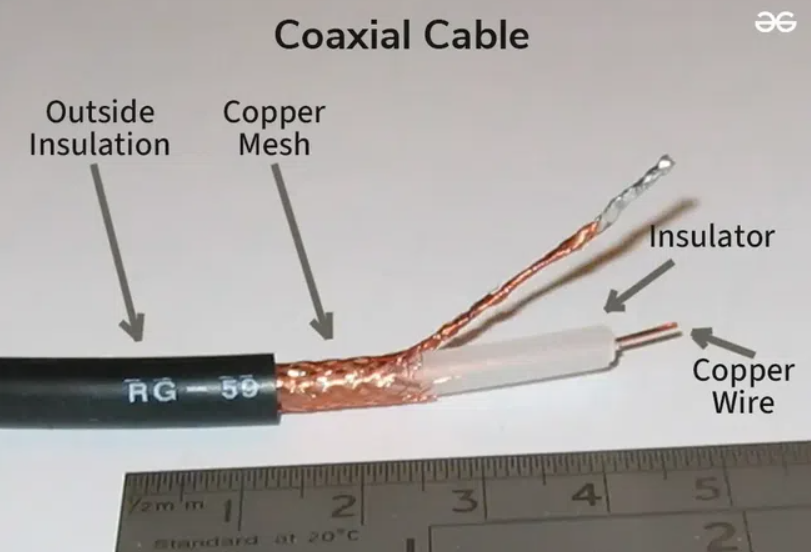
Coaxial cable is a type of guided transmission media used to transmit data, video, and audio signals. It is called “coaxial” because it has two conductors that share the same axis (inner conductor and outer shield). This design helps the signal travel efficiently with very little loss.
👉 In simple words:
Coaxial cable is a special type of wire that carries signals safely with less interference
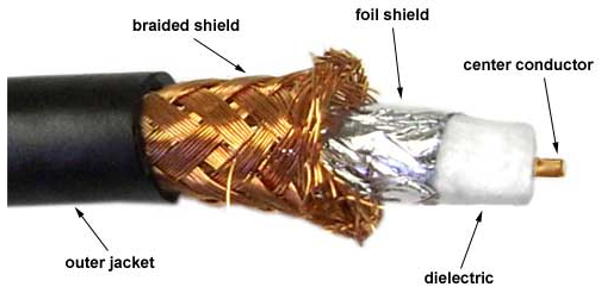
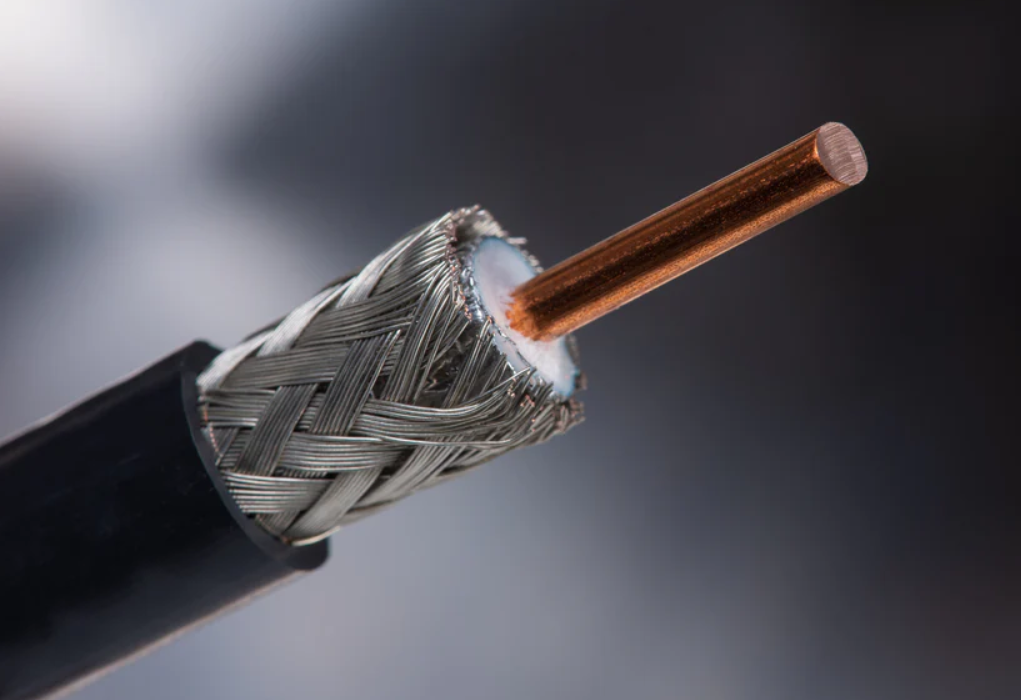
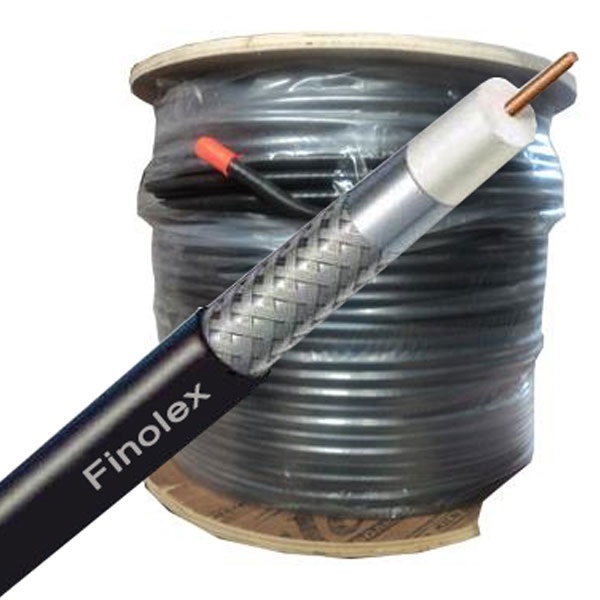
2. Structure of Coaxial Cable
Coaxial cable has a unique layered structure that protects the signal:
- Inner Conductor:
A solid copper wire that carries the signal - Dielectric Insulator:
A plastic layer that separates the inner conductor from the outer shield - Outer Shield (Braided/Foil):
A metallic layer that blocks external noise and interference - Outer Jacket:
A plastic covering that protects the cable from physical damage
👉 This structure makes coaxial cable more reliable than normal wires.
3. Working of Coaxial Cable
Coaxial cable works by transmitting electrical signals through the inner conductor. The outer shield acts as a barrier to prevent external electromagnetic interference from affecting the signal. Because of this shielding, coaxial cable provides clear and stable communication, even over long distances.
4. Types of Coaxial Cable
Different types of coaxial cables are used based on application:
- RG-6: Used for cable TV and internet connections
- RG-59: Used for CCTV cameras and short-distance video
- Thick Coaxial (10Base5): Used in early Ethernet networks
- Thin Coaxial (10Base2): Used in smaller old networks
5. Uses of Coaxial Cable
Coaxial cable is widely used in real-world applications:
1. Cable Television
It is used to deliver TV signals from service providers to homes.
2. Broadband Internet
Used by cable internet providers to supply internet services.
3. CCTV Systems
Connects security cameras to recording devices (DVR/NVR).
4. Antennas and Radio Systems
Used for transmitting radio frequency signals.
5. Computer Networks (Old Ethernet)
Used in early LAN technologies before twisted pair cables became popular.
6. Advantages of Coaxial Cable
- Strong protection from interference (noise)
- Better signal quality than twisted pair
- Can carry both video and data signals
- Durable and long-lasting
7. Disadvantages of Coaxial Cable
- More expensive than twisted pair cable
- Thick and less flexible
- Installation and maintenance are more complex
- Being replaced by fiber optic cables in modern networks
8. Real-Life Examples
- The cable connected to your TV set-top box is coaxial cable
- Cable broadband internet connection at home
- CCTV camera wiring in shops and offices

Coaxial Cable Standards
The designs of coaxial cable are categorized by their radio government (RG) ratings. A unique set of physical specifications defines by each RG number.
Specifications such as the wire gauge of the inner conductor, the thickness and type of the inner insulator also the construction of the shield and type of the outer casing used and the size of this casing.
RG ratings define each cable for a specialized function. The following are a few of the common ones:
- RG-8 – It is used in thick Ethernet
- RG-9 – It is also used in thick Ethernet
- RG-11 – It is used in thick Ethernet
- RG-58 – It is used in thin Ethernet
- RG-59 – Used for Television
Coaxial Cable Connectors
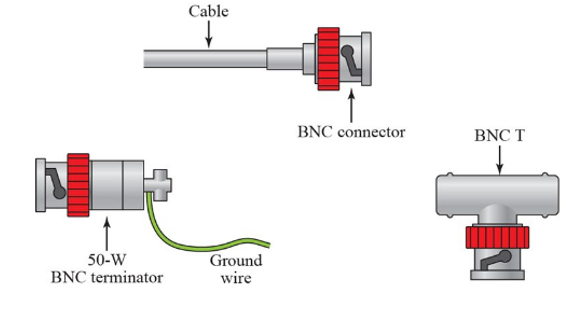
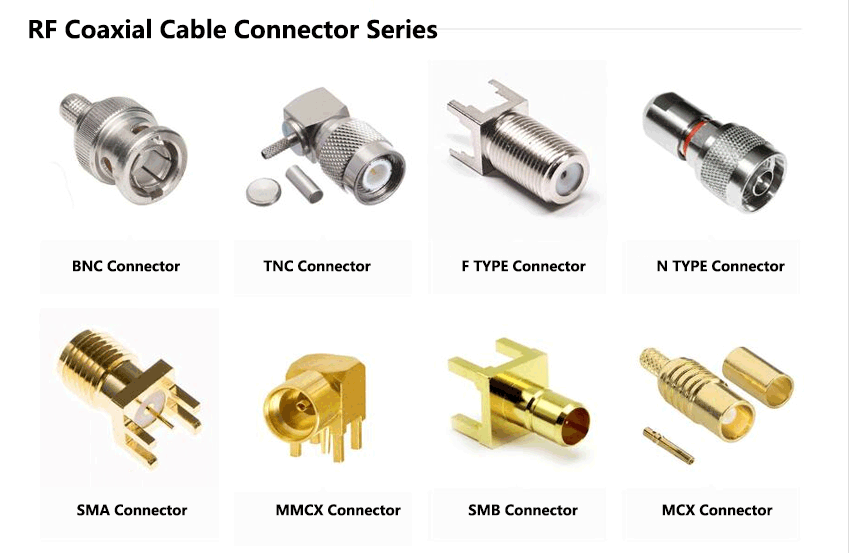
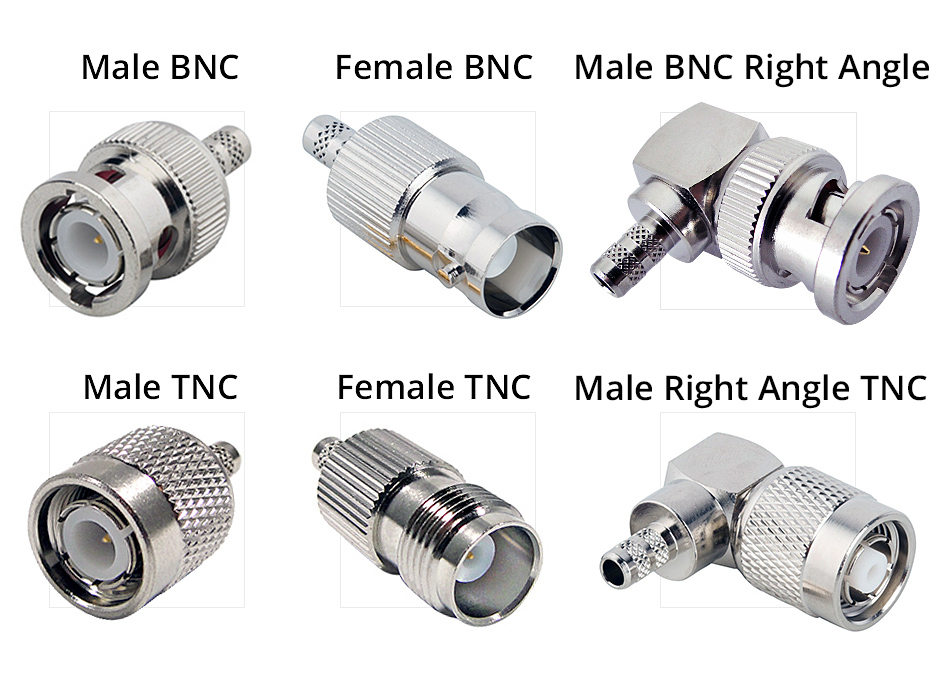
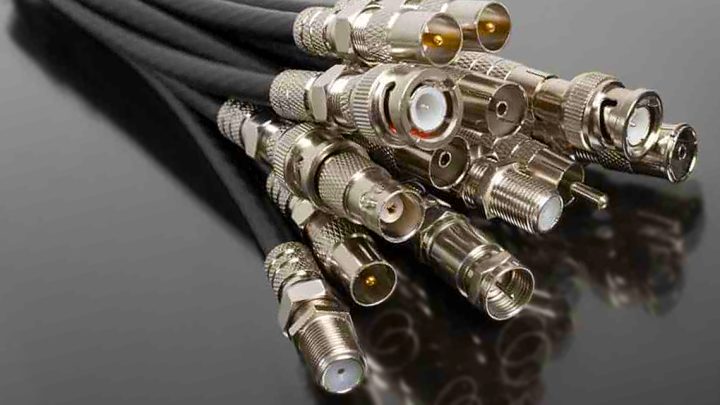
- To connect devices with the cable, we require coaxial connectors. The most common of these is called a barrel connector because of its shape.
- The most common type of connector used today is the Bayonet Neill-Concelman (BNC) connector which pushes on and locks into place with a half turn. Other types of barrel connectors either screw together and thus require more effort to install, or push on without locking, which is less secure.
- This figure shows three types of connectors are,
- BNC Connector
- BNC T-Connector
- BNC Terminator
Categories of Coaxial Cables
There are two categories of coaxial cables:
1. BaseBand
For digital transmission, a 50 ohm (Ω) coaxial cable is used. It defines a process of transmitting a single signal at a time with a very high speed. It is generally used for LAN’s. We can consider a drawback that is needs amplification after every 1000 feet.
2. BroadBand
Analog transmission on standard cable television cabling is used by this. It defines a process of transmitting multiple signals simultaneously with very high speed. It covers a large area as compared to Baseband Coaxial Cable.
Applications of Coaxial Cable
The following are the applications of coaxial cables:
- In analog telephone networks where a single coaxial network could carry 10,000 voice signals, Coaxial cable was widely used.
- In Cable TV networks coaxial cables are used. A cable TV network uses RG-59 coaxial cable.
- It is used in traditional Ethernet LANs. Because it is of high bandwidth, and consequence high data rate,
- In early Ethernet LANs for digital transmission, coaxial cable was chosen.
Performance of Coaxial Cable
The Performance of Twisted Pair Cables and Coaxial cable can be measured in the same way. The attenuation is much higher in the coaxial cable as compared with twisted-pair cable.
In other words, although much higher bandwidth is contained by the coaxial cable, the signal rapidly weakens and frequently requires the use of repeaters.
Twisted Pair Cable
Twisted Pair Cable
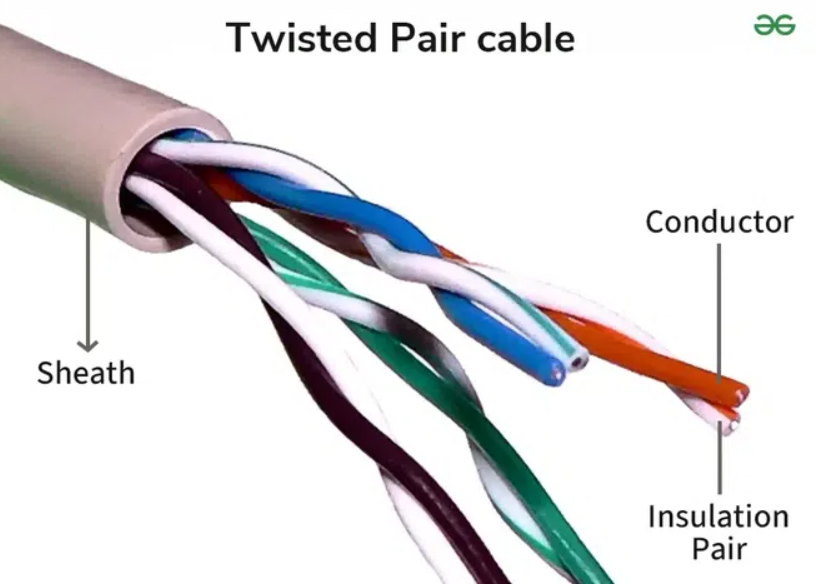
This cable has eight insulated wires. These are paired in groups of 2 and are twisted together based on a color code. The twisting is done to decrease interference caused by the adjacent wires. One wire in the pair may send signals to the receiver, while the other serves as a ground reference. The twisted pair is further divided into two parts, i.e., shielded and unshielded.
1. What is Twisted Pair Cable
Twisted Pair Cable is a type of guided transmission media in which two insulated copper wires are twisted together. The twisting helps reduce interference (noise) from external signals.
👉 In simple words:
It is a pair of wires twisted together to carry data signals
2. Why Wires are Twisted
The wires are twisted to reduce electromagnetic interference (EMI) and crosstalk (signal disturbance between wires). This improves the quality and reliability of data transmission.

3. Types of Twisted Pair Cable
There are two main types of twisted pair cable:
- Unshielded Twisted Pair (UTP):
Does not have extra shielding, cheaper, and widely used in LAN networks - Shielded Twisted Pair (STP):
Has additional shielding for better protection against interference, used in noisy environments
4. Categories of Twisted Pair Cable
Twisted pair cables are classified into categories based on speed and performance, such as Cat5, Cat5e, Cat6, and Cat7. Higher category cables support higher data speeds.
5. Uses of Twisted Pair Cable
Twisted pair cable is commonly used in:
- Computer networks (LAN) to connect devices like computers, routers, and switches
- Telephone systems for voice communication
- Office and home networking for internet access
6. Advantages of Twisted Pair Cable
Twisted pair cable is low cost, easy to install, flexible, and widely available. It is suitable for short-distance communication and is commonly used in homes and offices.
7. Disadvantages of Twisted Pair Cable
It is more prone to interference compared to coaxial and fiber cables. It also has limited bandwidth and is not suitable for long-distance communication.
8. Real-Life Example
- Ethernet cable used to connect a computer to a router
- Telephone wire used in homes for landline communication
Dfference Between UTP and STP Cable
1. What is UTP Cable (Unshielded Twisted Pair)
UTP cable is a type of twisted pair cable that does not have any extra shielding around the wires. It only uses twisted pairs to reduce interference. It is the most commonly used cable in LAN networks.
👉 Example:
Ethernet cable used in homes and offices (Cat5e, Cat6)
2. What is STP Cable (Shielded Twisted Pair)
STP cable is a type of twisted pair cable that has additional shielding (metal foil or braid) around the wires. This shielding protects the cable from external interference and noise.
👉 Example:
Used in industries or areas with high electrical noise
3. Difference in Basic Concept
Unshielded Twisted Pair (UTP) cable is a type of network cable that does not have any additional shielding around the twisted wire pairs, while Shielded Twisted Pair (STP) cable includes an extra protective shielding layer (foil or braided metal) around the wires. This shielding is the main factor that differentiates STP from UTP.
4. Difference in Interference Protection
UTP cables rely only on the twisting of wires to reduce interference, so they are more affected by electromagnetic interference (EMI) and crosstalk. In contrast, STP cables have shielding that provides better protection against noise and interference, making them suitable for environments with heavy electrical equipment.
5. Difference in Cost
UTP cables are cheaper and more cost-effective, which is why they are widely used in homes and offices. On the other hand, STP cables are more expensive due to the additional shielding material and better protection features.
6. Difference in Installation
UTP cables are lightweight, flexible, and easy to install, making them ideal for general networking. STP cables are thicker, heavier, and more difficult to install, and they often require proper grounding for effective shielding.
7. Difference in Performance
UTP cables provide good performance for normal networking conditions, such as LAN connections in homes and offices. STP cables offer higher performance in noisy environments, where interference can affect signal quality.
8. Difference in Usage
UTP cables are commonly used in home networks, offices, and standard LAN setups, while STP cables are used in industrial areas, data centers, and environments with high electrical interference.
9. Summary
In summary, UTP cable is simple, low-cost, and widely used, whereas STP cable is more secure, better protected, and used in specialized environments where interference is a concern.


Fiber Optics Cable
Fiber Optics Cable
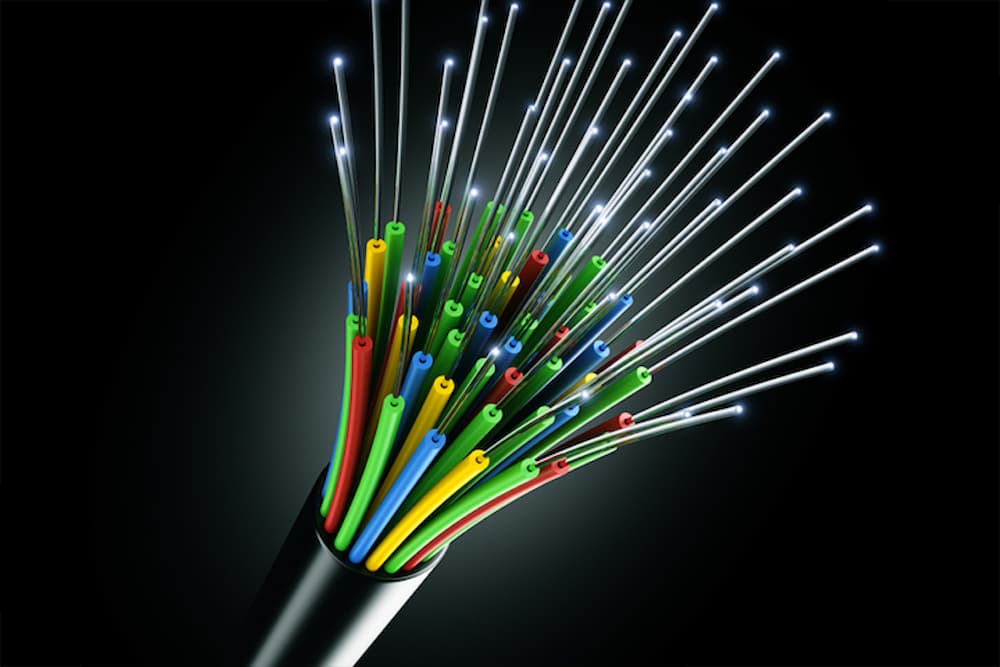
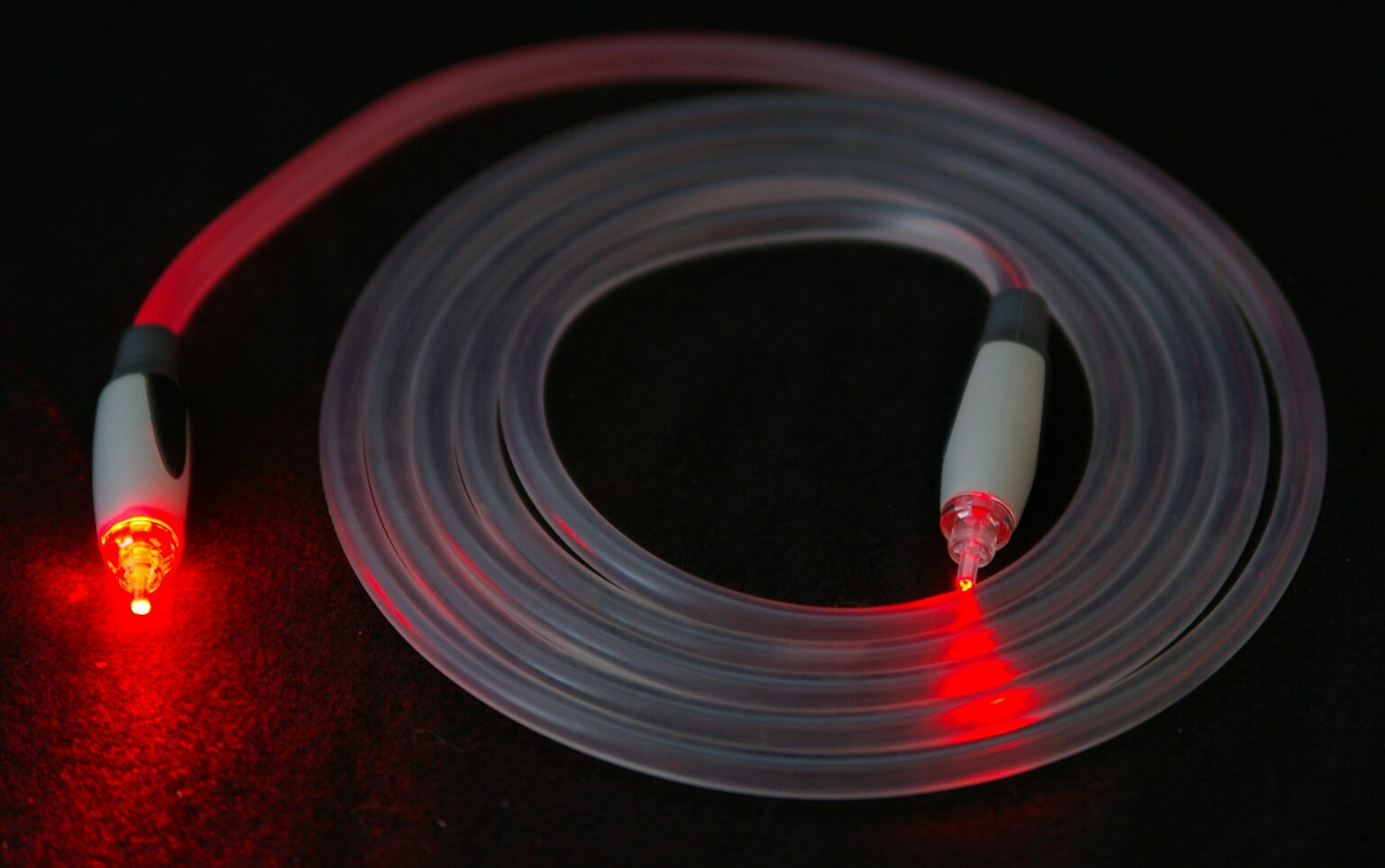
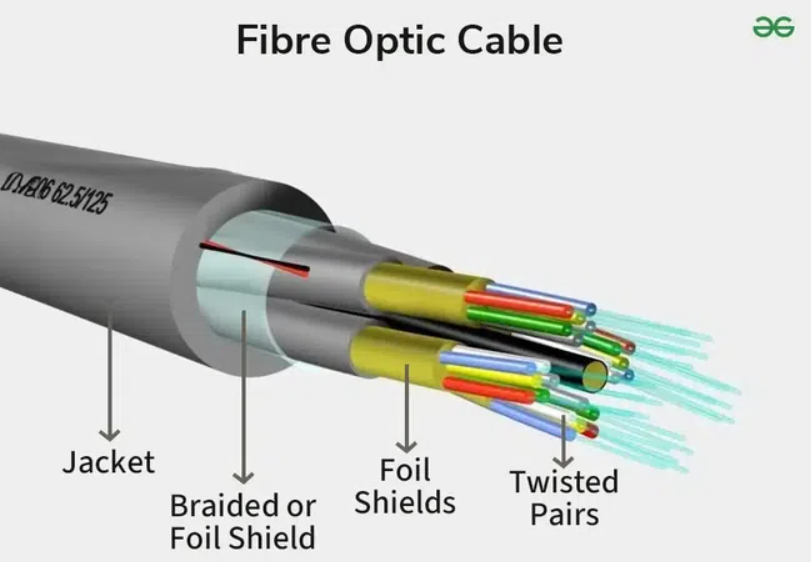
In addition, optical fiber, a physical medium, has also become the standard for long-distance communications. Optical fibers are transparent, flexible wires composed of glass (silica) or plastic that are just a little thicker than a human hair. It acts as a waveguide, allowing light to travel between the fiber’s two ends.
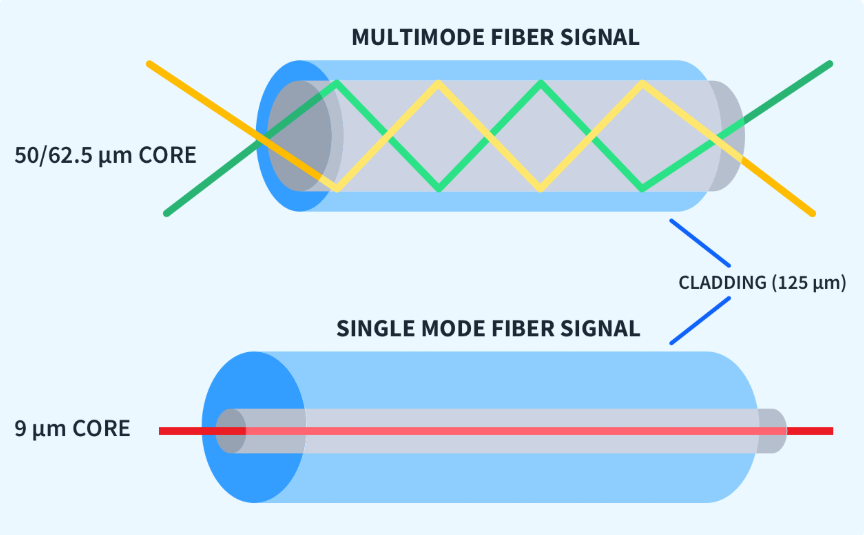
Fiber optic communications rely heavily on optical fibers because they allow for greater bandwidths (data rates) and transmission over greater distances than traditional modes of communication. It contains strands of glass fibers inside an insulated casing. The route for light is provided by the core, located in the center. The core is surrounded by cladding that reflects light to prevent loss of signal and allow the passage of light.
What is Fiber Optic Cable
Fiber optic cable is a type of guided transmission media that uses light signals instead of electrical signals to transmit data. It is made of very thin strands of glass or plastic called fibers.
👉 In simple words:
Fiber optic cable sends data using light at very high speed
2. Structure of Fiber Optic Cable
Fiber optic cable has several layers:
- Core:
The inner glass part through which light travels - Cladding:
Surrounds the core and reflects light back into it - Buffer Coating:
Protects the fiber from damage - Outer Jacket:
Provides overall protection
👉 This design helps light travel long distances without loss.
3. Working of Fiber Optic Cable
Fiber optic cable works on the principle of total internal reflection. Light signals are sent through the core, and the cladding reflects the light back, allowing it to travel long distances with very little signal loss.
4. Types of Fiber Optic Cable
There are two main types:
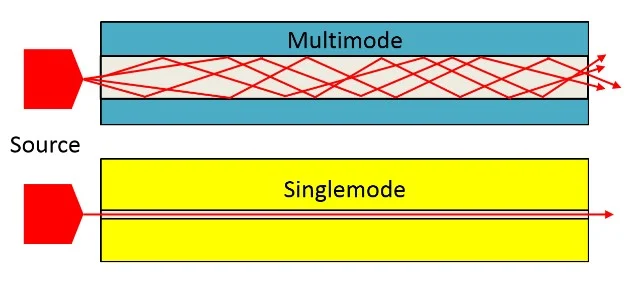
- Single Mode Fiber (SMF):
Uses a single light path, suitable for long-distance communication - Multi Mode Fiber (MMF):
Uses multiple light paths, suitable for short distances
5. Uses of Fiber Optic Cable
Fiber optic cable is widely used in:
- High-speed internet (FTTH)
- Telecommunication networks
- Cable TV services
- Data centers and cloud computing
- Medical equipment (endoscopy)
6. Advantages of Fiber Optic Cable
- Very high speed (Gbps and beyond)
- Long-distance transmission with low signal loss
- Immune to electromagnetic interference
- High security (difficult to tap)
7. Disadvantages of Fiber Optic Cable
- Expensive compared to copper cables
- Installation is complex
- Fragile (glass fiber can break easily)
8. Real-Life Example
- Fiber broadband internet in homes (FTTH connection)
- Internet backbone connecting cities and countries
- Single mode
- Single strand of glass fiber
- Single data signal
- Can span large distances
- Uses laser
- Transmission speeds are faster
- Long Distance Data Transmisson up To 80KM
2. Multi-mode
- Can carry multiple modes of the data signal
- Can carry multiple light signals
- Can span lesser distances than single mode
- Uses LED
- Transmission speeds are lower than single mode
- Short Distance Data Transmisson up To 2KM




Unguided or Wireless Transmission Media
Unguided or Wireless Transmission Media
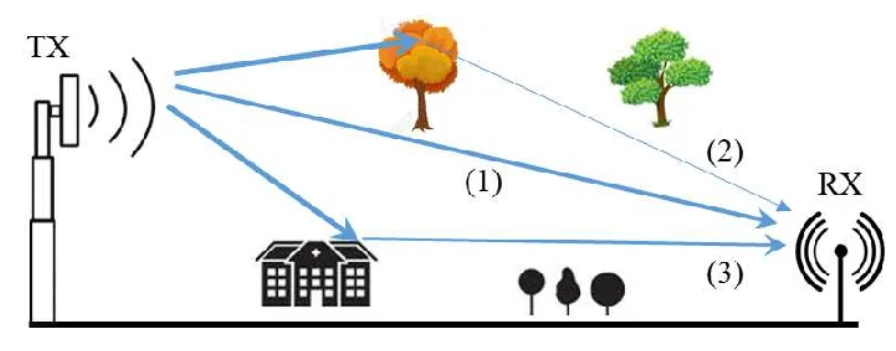
Unguided media, also termed as unbound transmission medium, is a method of transmitting data without the need for cables. Physical geography has no bearing on these media. Unguided media are also known as wireless communication. It is a wireless transmission media channel that does not need a physical medium to connect to network nodes or servers.
There are three types of unguided Transmission Media, that are:
- Radio Waves
- Microwave
- Infrared
Let’s understand each in detail.
1. What is Radio Waves Transmission
Radio waves transmission is a type of unguided (wireless) communication in which data is transmitted through the air using radio frequency signals. It does not require any physical cable or wire.
👉 In simple words:
Data is sent through air using radio signals
2. Frequency Range of Radio Waves
Radio waves operate in a wide frequency range from about 3 kHz to 1 GHz. These waves can travel long distances and can pass through walls and obstacles.
3. How Radio Waves Transmission Works
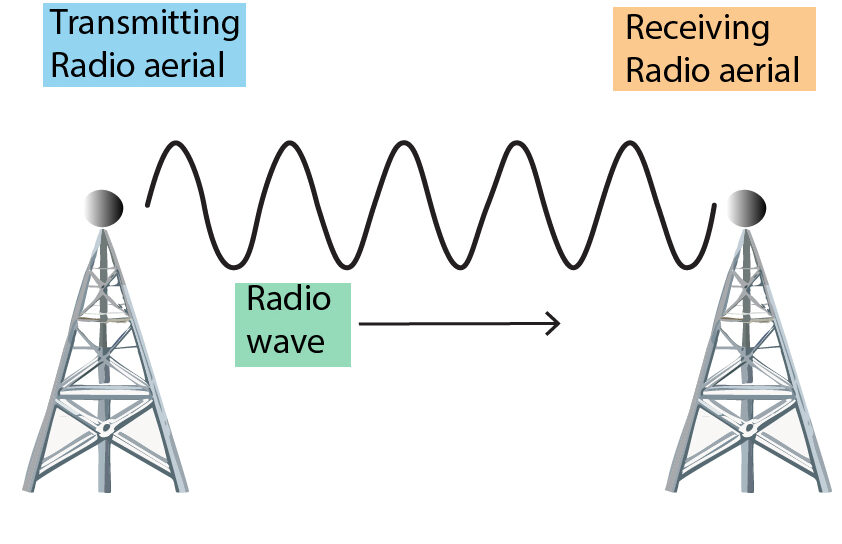
In radio wave transmission, a transmitter antenna sends signals into the air, and a receiver antenna receives them. Unlike microwaves, radio waves do not always require strict line-of-sight, so they can bend and spread in different directions.
4. Types of Radio Wave Transmission
Radio wave transmission can be classified into:
- Ground Wave Propagation:
Travels along the surface of the earth - Sky Wave Propagation:
Reflects off the ionosphere to reach long distances - Line-of-Sight Propagation:
Direct communication between antennas
5. Uses of Radio Waves Transmission
Radio waves are widely used in:
- Radio broadcasting (AM/FM)
- Television broadcasting
- Wi-Fi networks
- Mobile communication systems
- Bluetooth devices
6. Advantages of Radio Waves Transmission
- No cables required
- Can cover large areas
- Can pass through walls and buildings
- Easy and cost-effective communication
7. Disadvantages of Radio Waves Transmission
- More prone to interference and noise
- Less secure (signals spread in air)
- Lower data speed compared to fiber or microwave
- Signal quality may decrease over long distances
8. Real-Life Examples
- Listening to FM radio
- Using Wi-Fi at home
- Mobile phone communication
- Bluetooth devices like wireless headphones
9. Conclusion
Radio wave transmission is one of the most widely used wireless communication methods. It is suitable for long-distance and broad coverage, making it essential for modern communication systems.

Microwave Transmission
Microwave transmission is a method of transmitting data through high-frequency electromagnetic waves over long distances.
1. What is Microwave Transmission
Microwave transmission is a type of unguided (wireless) communication that uses microwave signals (high-frequency radio waves) to transmit data through the air. It does not require any physical cable.
👉 In simple words:
Data is transmitted through air using microwaves
2. Frequency Range of Microwaves
Microwaves operate in the frequency range of approximately 1 GHz to 300 GHz. These high-frequency waves can carry large amounts of data at high speed.
3. How Microwave Transmission Works
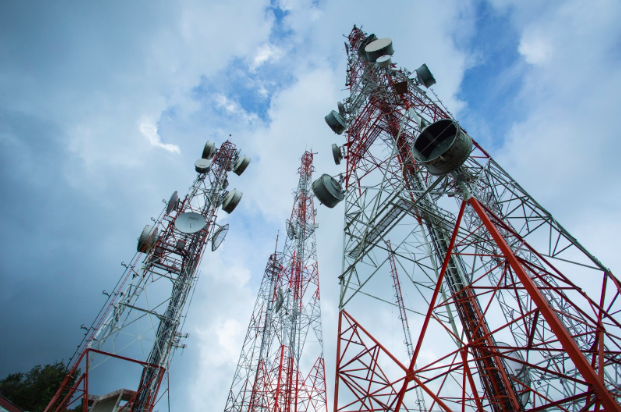
In microwave communication, signals are sent from one antenna (transmitter) to another antenna (receiver). The antennas must be in a line-of-sight (LOS) path, meaning there should be no obstacles like buildings or mountains between them.
👉 Often, towers are placed at high locations to maintain clear communication.
4. Types of Microwave Transmission
There are mainly two types:
- Terrestrial Microwave:
Communication between ground-based towers - Satellite Microwave:
Communication through satellites in space
5. Uses of Microwave Transmission
Microwave transmission is widely used in:
- Mobile communication (cellular networks)
- Satellite TV broadcasting
- Internet backhaul connections
- Radar systems
- Wireless communication between buildings
6. Advantages of Microwave Transmission
- No need for physical cables
- High-speed data transmission
- Suitable for long-distance communication
- Easy to install compared to wired systems
7. Disadvantages of Microwave Transmission
- Requires line-of-sight (LOS)
- Affected by weather conditions (rain, fog)
- Signal interference can occur
- Installation cost of towers can be high
8. Real-Life Example
- Mobile towers communicating with each other
- Satellite TV signals received through dish antennas
- Wireless internet links between two office buildings
9. Conclusion
Microwave transmission is an important wireless communication technology that provides fast and efficient data transfer over long distances, especially where wired connections are not practical.


Satellite Microwaves: These microwaves are used for communication between the Earth and a satellite in orbit. It is crucial for global communication and broadcasting.


Infrared Transmission
1. What is Infrared Transmission
Infrared transmission is a type of unguided (wireless) communication that uses infrared light waves to transmit data through the air. These waves are invisible to the human eye and are part of the electromagnetic spectrum.
👉 In simple words:
Data is transmitted using invisible light signals (infrared)
2. Frequency Range of Infrared
Infrared waves operate at frequencies roughly from 300 GHz to 400 THz. They have higher frequency than radio and microwave signals but lower than visible light.
3. How Infrared Transmission Works
Infrared communication works by sending signals from a transmitter (IR LED) to a receiver (photodiode). It usually requires line-of-sight (LOS), meaning the transmitter and receiver must be directly aligned without obstacles.
4. Types of Infrared Transmission
- Direct Infrared:
Requires clear line-of-sight between devices - Diffuse Infrared:
Signals reflect off surfaces like walls and ceilings
5. Uses of Infrared Transmission
Infrared is commonly used in:
- TV remote controls
- Wireless keyboards and mouse (older models)
- Short-range device communication
- Security systems and sensors
- Night vision equipment
6. Advantages of Infrared Transmission
- No interference from radio signals
- High security (does not pass through walls easily)
- Simple and low-cost technology
- No licensing required
7. Disadvantages of Infrared Transmission
- Requires line-of-sight (LOS)
- Cannot pass through walls or obstacles
- Limited range (short distance)
- Affected by sunlight and physical barriers
8. Real-Life Examples
- TV remote controlling a television
- Infrared sensors in automatic doors
- Remote-controlled devices
9. Conclusion
Infrared transmission is a simple and secure wireless communication method used mainly for short-distance communication. It is widely used in everyday devices like remote controls and sensors.


How to choose the right Transmission Media?
For Effective communication, it is crucial to choose the right transmission media. Let us discuss some of the factors that need to be considered.
- Distance: It simply means the distance the signal needs to travel. For short distances, twisted pair or fiber optic cables may be suitable. For longer distances, fiber cable or satellite transmission is suitable.
- Bandwidth: It means the amount of data to be transmitted. Low-bandwidth applications such as voice calls can use twisted pair cables. At the same time, high-bandwidth applications such as video streaming require fibre optics or coaxial cables.
- Cost: It is crucial to consider the cost factor while choosing the transmission media. If someone wants to go for a cheaper option, twisted pair cables are the best option to go.
- Security: It is always good to secure your network in order to protect sensitive information as well as resources. For example, fiber optic cables are often used for high-security applications.
Comparison Chart: Guided vs Unguided Transmission Media
| Feature | Guided Media (Wired) | Unguided Media (Wireless) |
|---|---|---|
| Definition | Data travels through physical cable | Data travels through air |
| Medium | Copper wire, Fiber optic | Air, vacuum, space |
| Types | Twisted Pair, Coaxial, Fiber | Radio waves, Microwave, Infrared |
| Speed | High (especially fiber optic) | Medium to high |
| Bandwidth | High | Lower than guided (varies) |
| Security | High (difficult to hack) | Low (signals spread in air) |
| Interference | Less interference | More interference |
| Installation | Difficult and time-consuming | Easy and fast |
| Cost | High installation cost | Lower (no cables needed) |
| Mobility | Limited (fixed connection) | High (supports movement) |
| Reliability | Very reliable | Less reliable (weather effects) |
| Examples | Ethernet, Fiber optic cable | Wi-Fi, Bluetooth, Mobile network |
Frequently Asked Questions
Q1. What is the transmission media?
Transmission Media carries the information through LAN in the form of bits. It mainly carries information between the sender and the receiver therefore known as communication channels. Examples include twisted pair cables, coaxial cables, fiber optic cables, wireless technologies (like Wi-Fi and Bluetooth), microwave transmission, and satellite communication. The choice of transmission media depends on factors like distance, bandwidth requirements, and susceptibility to interference.
Q2. What are 4 types of transmission media?
Here are the 4 types of transmission media – Twisted Pair, Coaxial Cable, Fiber Optic Cable, and Wireless Transmission.
Q3. What is guided and unguided media?
Guided media refers to transmission media that provide a physical path or conductor for transmitting signals. It includes media like twisted pair cables, coaxial cables, and fiber optic cables, where the signals are guided along the transmission path.
Unguided media, on the other hand, refers to transmission media that do not provide a physical path for signal transmission. Instead, the signals are propagated through the air or space using wireless technologies such as radio waves, microwaves, and satellite communication. Unguided media do not rely on a physical medium to transmit signals and are sometimes referred to as wireless or free space communication.
Q4. What are the types of unguided media?
Here are a the types of unguided media – Radio Waves, Microwaves, Infrared, Light Waves, and Satellite Communication.
Networking Cable Details
1. Introduction to Networking Cables
Networking cables are used to connect devices like computers, routers, and switches to enable communication and data transfer. Over time, these cables have evolved to provide higher speed, better reliability, and improved performance.
2. Early Communication (Pre-Network Era)
Before modern networking, communication relied on telegraph and telephone lines, which used simple copper wires to transmit electrical signals. These systems laid the foundation for future networking technologies.
3. Coaxial Cable Era (1970s – 1980s)
Ethernet technology was invented in the early 1970s by Robert Metcalfe at Xerox PARC. The goal was to connect computers and printers in an office environment. The first Ethernet system had a speed of about 2.94 Mbps.
In the early days of computer networking, coaxial cables were widely used. Technologies like 10Base5 (Thick Ethernet) and 10Base2 (Thin Ethernet) allowed multiple computers to connect in a shared network.
👉 These cables were reliable but difficult to install and maintain.
4. Standardization of Ethernet
In 1983, Ethernet was standardized by IEEE as IEEE 802.3. This helped create uniform networking systems and increased the adoption of Ethernet cables worldwide.
5. Introduction of Twisted Pair Cables (1990s)
In the 1990s, twisted pair cables (UTP) replaced coaxial cables in most networks. With the introduction of 10Base-T, networking became easier and more flexible.
👉 These cables were cheaper, easier to install, and suitable for office and home networks.
6. Fast Ethernet and Gigabit Ethernet
As demand increased, faster technologies were developed:
- Fast Ethernet (100 Mbps) using Cat5 cables
- Gigabit Ethernet (1 Gbps) using Cat5e and Cat6 cables
👉 This improved speed and performance significantly.
7. Fiber Optic Cable Era (2000s – Present)
With the growth of the internet, fiber optic cables became popular. They use light signals instead of electrical signals and provide very high speed (Gbps to Tbps) and long-distance communication.
👉 Fiber is now widely used in backbone networks and high-speed internet.
8. Modern Networking Cables
Today, networking cables include:
- Cat6, Cat6a, Cat7, Cat8 for high-speed Ethernet
- Fiber optic cables for ultra-fast communication
- Hybrid systems combining wired and wireless technologies
9. Current Trends
Modern networks focus on:
- High-speed data transmission
- Cloud computing and data centers
- Internet of Things (IoT) connectivity
Fiber optics and advanced Ethernet cables are key to these developments.
10. Conclusion
The history of networking cables shows a clear evolution from simple copper wires to advanced fiber optic systems. Each stage improved speed, reliability, and efficiency, making modern communication faster and more powerful.
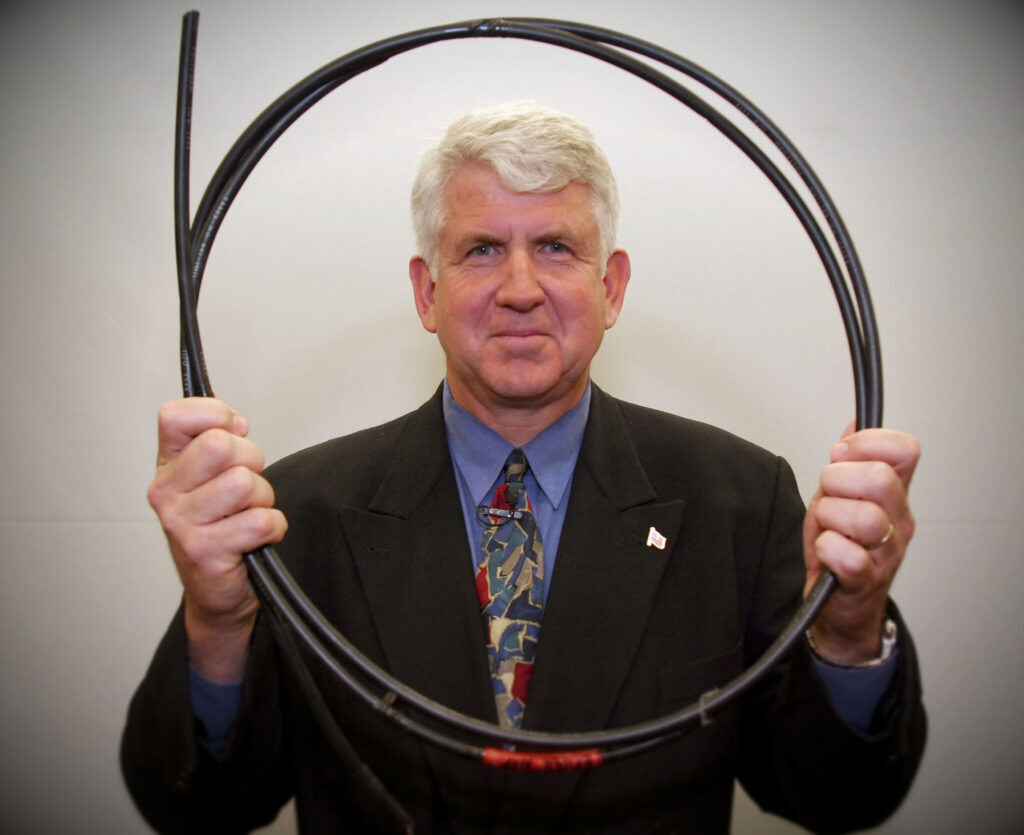
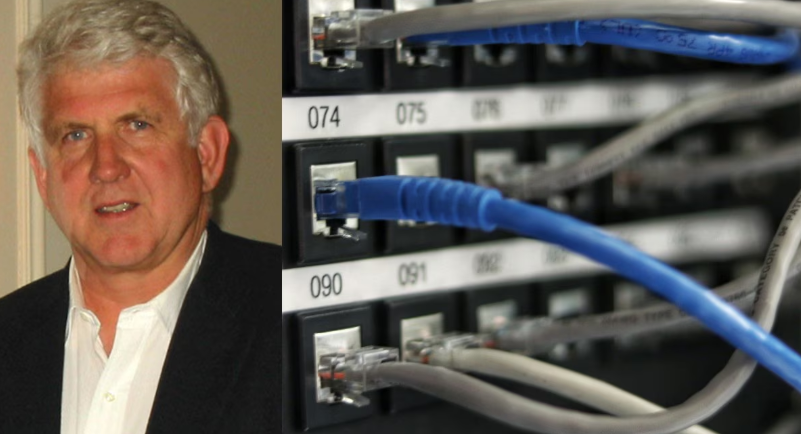
Dr. Robert (Bob) M. Metcalfe joined Polaris Venture Partners in January 2001 and is a General Partner in the Waltham office. Metcalfe had three other careers in technological innovation before becoming a venture capitalist. While an engineer-scientist (1965–1979), Metcalfe helped pioneer the Internet. In 1973, at the Xerox Palo Alto Research Center, he invented Ethernet, the local-area networking (LAN) standard — Internet plumbing — on which he shares four patents
Ethernet Cables Categories,CAT 5, 5e, 6, 6a, 7, 8
Here’s a detailed comparison of Cat5, Cat5e, Cat6, Cat6a, and Cat7 cables, which are all types of Ethernet cables used in networking.
1. Cat5 (Category 5) Cable
- Standard: The original Ethernet standard for networking.
- Speed: Supports speeds up to 100 Mbps.
- Bandwidth: Up to 100 MHz.
- Max Length: Maximum transmission distance of 100 meters (328 feet).
- Use Case: Primarily used for 10/100 Mbps Ethernet networks. It’s now considered outdated and generally not recommended for modern networks.
- Shielding: No shielding (UTP – Unshielded Twisted Pair).
- Availability: Being phased out in favor of higher-performance cables like Cat5e and Cat6.
2. Cat5e (Category 5 Enhanced) Cable
- Standard: An enhanced version of Cat5, designed to reduce crosstalk and electromagnetic interference (EMI).
- Speed: Supports speeds up to 1 Gbps (Gigabit Ethernet).
- Bandwidth: Up to 100 MHz.
- Max Length: Maximum transmission distance of 100 meters (328 feet) at 1 Gbps.
- Use Case: Ideal for home and small office networks. Still widely used for Gigabit Ethernet networks.
- Shielding: Typically unshielded (UTP) but can be shielded (STP or FTP) for environments with higher interference.
- Availability: Common in most networking environments due to its cost-effectiveness and performance for general-purpose use.
3. Cat6 (Category 6) Cable
- Standard: A higher-performance cable, often used for more demanding network setups.
- Speed: Supports speeds up to 10 Gbps over short distances (up to 55 meters or 180 feet).
- Bandwidth: Up to 250 MHz.
- Max Length: Maximum transmission distance of 100 meters (328 feet) at lower speeds (1 Gbps), and 55 meters (180 feet) at 10 Gbps.
- Use Case: Used in businesses, data centers, and high-speed internet installations where Gigabit Ethernet or higher is required.
- Shielding: Usually unshielded (UTP), but can come in shielded variants (STP, FTP).
- Availability: Common for new installations, especially when 10 Gbps speeds are needed.
4. Cat6a (Category 6 Augmented) Cable
- Standard: An augmented version of Cat6 that supports higher speeds and better performance at longer distances.
- Speed: Supports speeds up to 10 Gbps over the full 100-meter length.
- Bandwidth: Up to 500 MHz.
- Max Length: Maximum transmission distance of 100 meters (328 feet) at 10 Gbps.
- Use Case: Common in enterprise environments, data centers, and situations requiring consistent 10 Gbps performance over longer distances.
- Shielding: Often comes with shielding (STP or FTP) to reduce crosstalk and external interference.
- Availability: Becoming increasingly popular in networks where future-proofing is important (higher speeds, longer distances).
5. Cat7 (Category 7) Cable
- Standard: Designed for high-speed networks and environments with substantial electromagnetic interference.
- Speed: Supports speeds up to 10 Gbps.
- Bandwidth: Up to 600 MHz.
- Max Length: Maximum transmission distance of 100 meters (328 feet) at 10 Gbps.
- Use Case: Used in high-performance environments, including large data centers, server farms, or areas with high EMI (electromagnetic interference).
- Shielding: Fully shielded (STP – Shielded Twisted Pair) with individual shielding around each pair of wires, as well as an overall shield. This helps reduce crosstalk and external interference.
- Availability: Less common for general consumer use due to its cost and over-engineering for typical home or office networks. However, it’s beneficial for environments with significant electrical noise or very high-speed requirements.
8. What is Cat 8 Cable
Cat 8 (Category 8) is the latest and fastest Ethernet cable standard used for high-speed networking. It is designed mainly for data centers and enterprise networks where extremely high data transfer speed is required.
👉 In simple words:
Cat 8 is a very high-speed Ethernet cable
1. Speed and Bandwidth
Cat 8 cable supports speeds up to 25 Gbps to 40 Gbps and operates at a bandwidth of 2000 MHz (2 GHz). This is much higher compared to older cables like Cat6 or Cat7.
3. Cable Structure
Cat 8 cables are usually shielded (STP) to reduce interference. They have strong shielding around each pair and the entire cable, which helps maintain high performance and signal quality.
3. Distance Limitation
Cat 8 cables support high speeds over short distances (up to 30 meters). Because of this limitation, they are mainly used in controlled environments like server rooms.
4. Uses of Cat 8 Cable
Cat 8 cable is commonly used in:
- Data centers
- Server rooms
- High-speed network switches
- Enterprise-level networking
👉 It is not commonly used in homes.
5. Advantages of Cat 8 Cable
- Extremely high speed (up to 40 Gbps)
- Very high bandwidth (2000 MHz)
- Excellent protection from interference
- Ideal for high-performance networks
6. Disadvantages of Cat 8 Cable
- Expensive compared to other cables
- Limited distance (30 meters)
- Not required for normal home use
- Less flexible due to heavy shielding
7. Real-Life Example
- Connecting servers inside a data center
- High-speed connections between network switches
Ethernet Cable Categories Difference (Cat5 to Cat8)
| Category | Speed | Bandwidth | Max Distance | Shielding | Usage Example |
|---|---|---|---|---|---|
| Cat5 | Up to 100 Mbps | 100 MHz | 100 meters | UTP | Old LAN networks |
| Cat5e | Up to 1 Gbps | 100 MHz | 100 meters | UTP | Home/office internet |
| Cat6 | Up to 10 Gbps* | 250 MHz | 100 m (1G) / 55 m (10G) | UTP/STP | Office networks, gaming |
| Cat6a | Up to 10 Gbps | 500 MHz | 100 meters | STP | Enterprises, data centers |
| Cat7 | Up to 10 Gbps | 600 MHz | 100 meters | STP (Fully shielded) | Industrial/high-speed use |
| Cat8 | 25–40 Gbps | 2000 MHz | 30 meters | STP (Heavy shielding) | Data centers, servers |


D-Link CAT6 305M Armored Outdoor Use 23AWG Copper Cable


D-Link CAT6 UTP Pure Copper 100mtrs Cable Indoor Use


Fiber Cable Details
Fiber optic cables are categorized based on their construction and how they transmit light signals. The two main types of fiber optic cables are single-mode fiber (SMF) and multi-mode fiber (MMF). Within these categories, there are variations depending on the performance requirements, the number of cores, and the applications they support.
Here’s a breakdown of the different types of fiber optic cables:
1. Single-Mode Fiber (SMF)
- Core Size: Small core diameter, typically 8 to 10 microns.
- Light Transmission: Uses a single light path (laser or LED) to transmit data.
- Bandwidth: High bandwidth and low attenuation (signal loss) over long distances.
- Max Distance: Supports longer transmission distances, from several kilometers to tens of kilometers (up to 40 km or more).
- Applications: Ideal for long-distance data transmission, such as telecommunications, internet backbones, data centers, and networking between cities.
- Advantages:
- Long-range communication without significant signal degradation.
- Higher data rates (up to 100 Gbps or more).
- Low dispersion and loss over long distances.
- Disadvantages:
- More expensive than multi-mode fiber.
- Requires more precise installation and alignment.
2. Multi-Mode Fiber (MMF)
- Core Size: Larger core diameter, typically 50 microns or 62.5 microns.
- Light Transmission: Uses multiple light paths or modes, typically transmitted by an LED light source.
- Bandwidth: Supports lower bandwidth and shorter distances than SMF.
- Max Distance: Typically used for distances up to 2 km (1.24 miles) at 1 Gbps, but can handle shorter distances for higher speeds (e.g., 10 Gbps over 300 meters).
- Applications: Suitable for local area networks (LANs), data centers, enterprise networking, and shorter distance communications (within buildings or campuses).
- Advantages:
- Less expensive than single-mode fiber.
- Easier to handle and install.
- Disadvantages:
- Shorter transmission distances due to higher attenuation and modal dispersion.
- Lower data transfer rates over longer distances.
3. Types of Multi-Mode Fiber
There are different grades or “types” of multi-mode fiber, based on core size and performance:
OM1 (Optical Multi-mode 1):
- Core Size: 62.5 microns.
- Bandwidth: Up to 200 MHz·km at 850 nm.
- Max Distance: Supports up to 275 meters at 1 Gbps, and around 33 meters at 10 Gbps.
- Use: Older fiber type, now mostly phased out but still found in legacy systems.
OM2 (Optical Multi-mode 2):
- Core Size: 50 microns.
- Bandwidth: Up to 500 MHz·km at 850 nm.
- Max Distance: Supports up to 550 meters at 1 Gbps, and around 82 meters at 10 Gbps.
- Use: Suitable for 1 Gbps applications, but less efficient at higher speeds.
OM3 (Optical Multi-mode 3):
- Core Size: 50 microns.
- Bandwidth: Up to 2000 MHz·km at 850 nm.
- Max Distance: Supports up to 300 meters at 10 Gbps, and 100 meters at 40 Gbps.
- Use: Designed for higher-speed applications, including 10 Gbps and 40 Gbps transmission.
OM4 (Optical Multi-mode 4):
- Core Size: 50 microns.
- Bandwidth: Up to 4700 MHz·km at 850 nm.
- Max Distance: Supports up to 400 meters at 10 Gbps, and up to 150 meters at 100 Gbps.
- Use: High-performance fiber for data centers and high-speed enterprise networks, optimized for higher data rates and longer distances.
OM5 (Optical Multi-mode 5):
- Core Size: 50 microns.
- Bandwidth: Up to 20000 MHz·km at 850 nm (supports wideband transmission).
- Max Distance: Supports 40 Gbps over 150 meters and 100 Gbps over 100 meters.
- Use: A more recent addition for supporting short-wavelength division multiplexing (SWDM), used in high-performance, future-proof networks.
4. Armored Fiber Optic Cable
- Description: Fiber optic cables with an additional protective layer (typically steel or aluminum) to prevent physical damage.
- Applications: Used in environments where cables are exposed to harsh conditions or are at risk of being damaged, such as outdoor installations or industrial settings.
- Advantages:
- Provides physical protection against impacts, rodents, and crushing forces.
- Can be used in underground, outdoor, or heavy-duty installations.
5. Aerial Fiber Optic Cable
- Description: Fiber optic cables designed for overhead installations, usually suspended between utility poles.
- Applications: Used for telecommunication services in rural or suburban areas where underground cabling is not feasible.
- Advantages:
- Cost-effective for long-distance outdoor installations.
- Can be easily installed and maintained.
6. Loose Tube Fiber Optic Cable
- Description: Fiber cables where the fibers are enclosed in a loose tube filled with gel or water-blocking material to protect against moisture and temperature extremes.
- Applications: Suitable for outdoor and underground applications, especially in environments where water or temperature variations can affect performance.
- Advantages:
- Offers more protection against environmental factors like moisture and temperature changes.
7. Tight-Buffered Fiber Optic Cable
- Description: Fiber optic cables where each fiber is coated with a protective buffer layer (often a plastic coating), making them more rugged.
- Applications: Primarily used for indoor installations, such as inside buildings, data centers, and structured cabling systems.
- Advantages:
- More flexible than loose-tube cables.
- Easier to handle for indoor applications.
Fiber Cable Construction Types:
- Simplex Cable: Single fiber inside the cable. Typically used for one-way communication.
- Duplex Cable: Two fibers, often used for bidirectional data transmission.
- Ribbon Cable: A type of fiber optic cable where multiple fibers are arranged side by side in a flat ribbon-like formation. It allows for high-density installations, ideal for data centers.


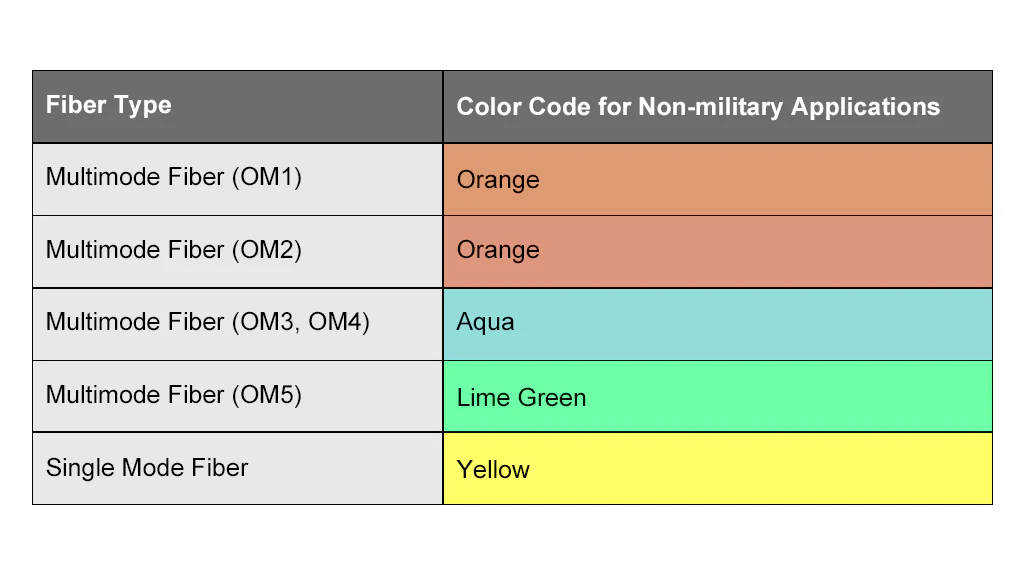
Summary Table of Fiber Optic Cable Types
| Fiber Type | Core Diameter | Transmission Method | Max Distance | Max Bandwidth | Applications |
|---|---|---|---|---|---|
| Single-Mode (SMF) | 8-10 microns | Laser (1 light path) | Long distance (up to 40 km or more) | High (e.g., 100 Gbps) | Long-distance communication, telecommunications |
| Multi-Mode (MMF) | 50 or 62.5 microns | LED (multiple light paths) | Short distance (up to 2 km) | Lower (e.g., 1-10 Gbps) | LANs, data centers, enterprise networks |
| OM1 | 62.5 microns | LED | 275 meters (1 Gbps), 33 meters (10 Gbps) | 200 MHz·km | Legacy networks, low-speed applications |
| OM2 | 50 microns | LED | 550 meters (1 Gbps), 82 meters (10 Gbps) | 500 MHz·km | Mid-range speed networks, general use |
| OM3 | 50 microns | LED | 300 meters (10 Gbps), 100 meters (40 Gbps) | 2000 MHz·km | High-speed data centers, enterprise networks |
| OM4 | 50 microns | LED | 400 meters (10 Gbps), 150 meters (100 Gbps) | 4700 MHz·km | High-speed, high-performance applications |
| OM5 | 50 microns | LED | 150 meters (40 Gbps), 100 meters (100 Gbps) | 20000 MHz·km | Future-proof, high-performance networks |