Application Control & DNS Filtering
What is Application Control
Application Control is a firewall security feature that Identifies, Monitors, And Controls Applications Running on a Network, regardless of the port or protocol they use. It allows administrators to allow, block, or restrict specific applications based on security policies.
Unlike traditional filtering (which checks only websites or ports), application control inspects the actual application traffic. This means it can detect apps like WhatsApp, Facebook, YouTube, Zoom, or Gaming Applications even if they try to use different ports to bypass restrictions.
When a user starts an application, the firewall analyzes the traffic using deep packet inspection. It then matches the application with predefined rules and either allows, blocks, or limits its usage (for example, allowing WhatsApp Messages But Blocking WhatsApp Calls).
Example:
- In a company network, the administrator may allow business applications like Microsoft Teams or Zoom for meetings but block gaming apps like PUBG or entertainment apps to improve productivity.
- In a school, applications like YouTube may be blocked completely, while educational apps like Google Classroom are allowed.
Importance:
Application control helps improve security, reduce bandwidth misuse, and ensure that only authorized applications are used in the network.
In advanced firewalls like Fortinet FortiGate, Application Control is a key security feature that uses a large application database to identify and manage thousands of applications with fine-grained control.
1. What is Application Control?
Application Control is a firewall security feature used to identify, monitor, allow, or block specific applications running on a network. It can control applications such as Facebook, YouTube, WhatsApp, Telegram, BitTorrent, and online games.
2. Facebook Example
Suppose an office has 100 computers connected to the internet through a firewall. The company wants employees to use Google and other business websites, but it does not want them to use Facebook during office hours.
3. How Application Control Works
When a user opens Facebook, the traffic first passes through the firewall. The firewall analyzes the network traffic and identifies it as Facebook application traffic. If Facebook is blocked in the Application Control Policy, the firewall will prevent the connection.
4. Firewall Policy
The administrator can create a policy such as:
Facebook → Block ❌
YouTube → Allow ✅
Google → Allow ✅
Microsoft Teams → Allow ✅
This means users can access allowed applications but cannot use Facebook.
5. Why Not Simply Block a Port?
Modern applications such as Facebook use HTTPS, multiple servers, IP addresses, CDNs, and different network connections. Therefore, simply blocking a particular port may not effectively block Facebook. Application Control identifies the application itself rather than relying only on a port number.
6. Example in a Company
For example, a company can configure its firewall so that Facebook is blocked for all employees, while the IT department is allowed to access Facebook. The firewall can use different policies for different users, groups, VLANs, or IP addresses.
7. Application Control vs Web Filtering
Application Control controls applications, while Web Filtering mainly controls websites and URLs. For example, Web Filtering can block facebook.com, while Application Control can identify and control Facebook-related application traffic.
8. Main Benefit
The main benefit of Application Control is that the administrator gets Better Control Over Network Applications. It can improve productivity, reduce unwanted traffic, save bandwidth, and increase network security.
Why Application Control is needed
Why Application Control is Needed:
Application Control is needed because normal firewall rules (based on IP addresses or ports) are not enough to control modern applications. Many apps like WhatsApp, Facebook, or YouTube can use different ports, encryption, or hidden channels, so they can bypass basic filtering.
With Application Control, a firewall can identify the actual application (not just the website or port) and apply strict rules such as allow, block, or limit usage. This gives organizations much better visibility and control over network activity.
Application Control Example – Facebook App:
Application Control in a firewall is used to manage how specific applications like Facebook are used inside a network. It can allow, block, or restrict different features of the same application based on security policies.
In a school network, the firewall may completely block the Facebook application. When students try to open Facebook, the app will not load and access will be denied. This is done to prevent distraction and ensure students focus on studies.
In an office environment, Facebook may be partially allowed for official use like managing company pages, but personal chat features such as Facebook Messenger may be blocked. This helps improve productivity and reduces unnecessary communication during working hours.
In some organizations, Facebook is allowed but with restrictions. For example, text-based browsing may be allowed, but video autoplay and file sharing features may be limited. This helps in reducing bandwidth usage and improving network performance.
Application Control works by identifying Facebook traffic and applying predefined rules such as allow, block, monitor, or limit. This gives administrators full control over how the application behaves in the network.
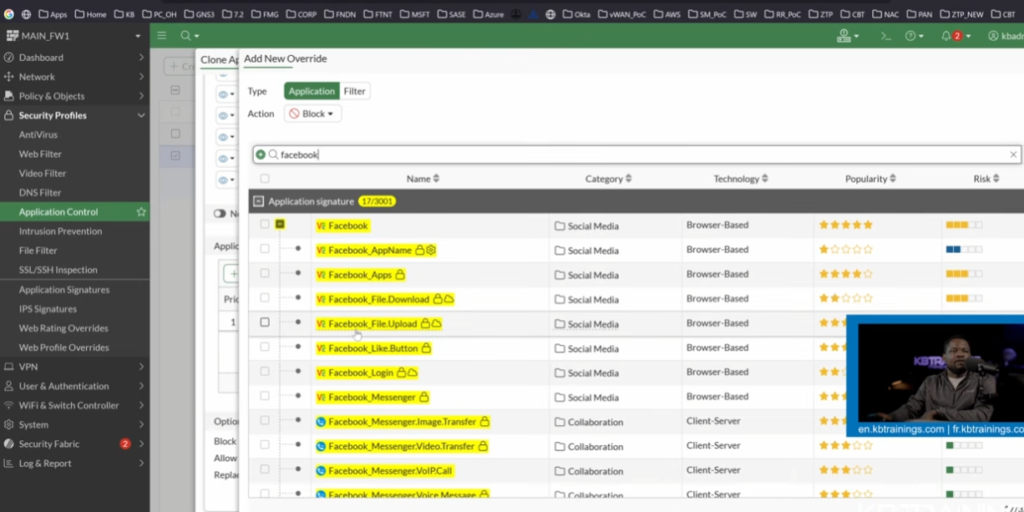
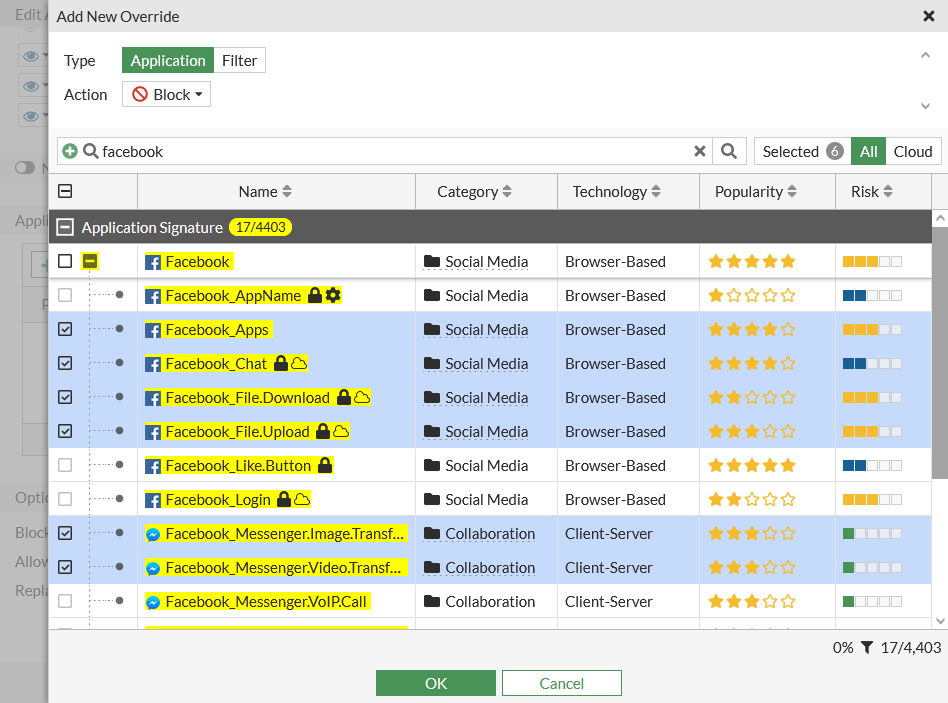
In advanced firewalls like Fortinet FortiGate, Facebook is detected as multiple application components such as Facebook browsing, Facebook chat, and Facebook video, allowing fine-grained control over each feature separately.
How a firewall’s Application Control feature can be configured to allow users to access Facebook while blocking Facebook Chat/Messenger and Video Upload.
1. Facebook Open – Allow
The firewall allows users to access Facebook normally. Users can open the Facebook website and browse posts, profiles, pages, and other permitted content.
2. Facebook Chat – Block
The firewall’s Application Control feature identifies Facebook Chat or Messenger traffic and blocks it. As a result, users can open Facebook, but they cannot use the chat or messaging function.
3. Facebook Video Upload – Block
The firewall can be configured to block Facebook video-upload activity when its application signatures support this function. Users can continue using Facebook, but they cannot upload videos.
4. Facebook Video Viewing – Allow
The administrator can allow normal Facebook video viewing while blocking video uploads. Therefore, users may watch videos but cannot upload their own videos, provided the firewall can distinguish these activities.
5. Example
Facebook Website → Allow ✅
Facebook Browsing → Allow ✅
Facebook Chat → Block ❌
Messenger → Block ❌
Facebook Video Upload → Block ❌
Facebook Video Viewing → Allow ✅

What is DNS Filtering
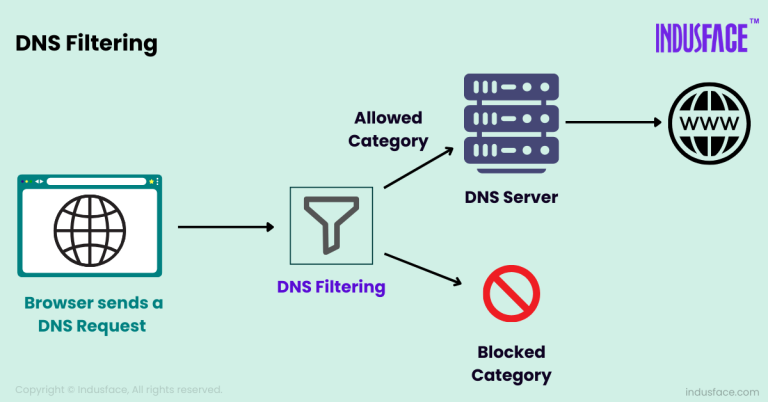
DNS Filtering is a security feature of a firewall that controls and blocks access to websites by filtering DNS (Domain Name System) requests. It works by checking the domain name a user is trying to access and then allowing or blocking it based on security policies.
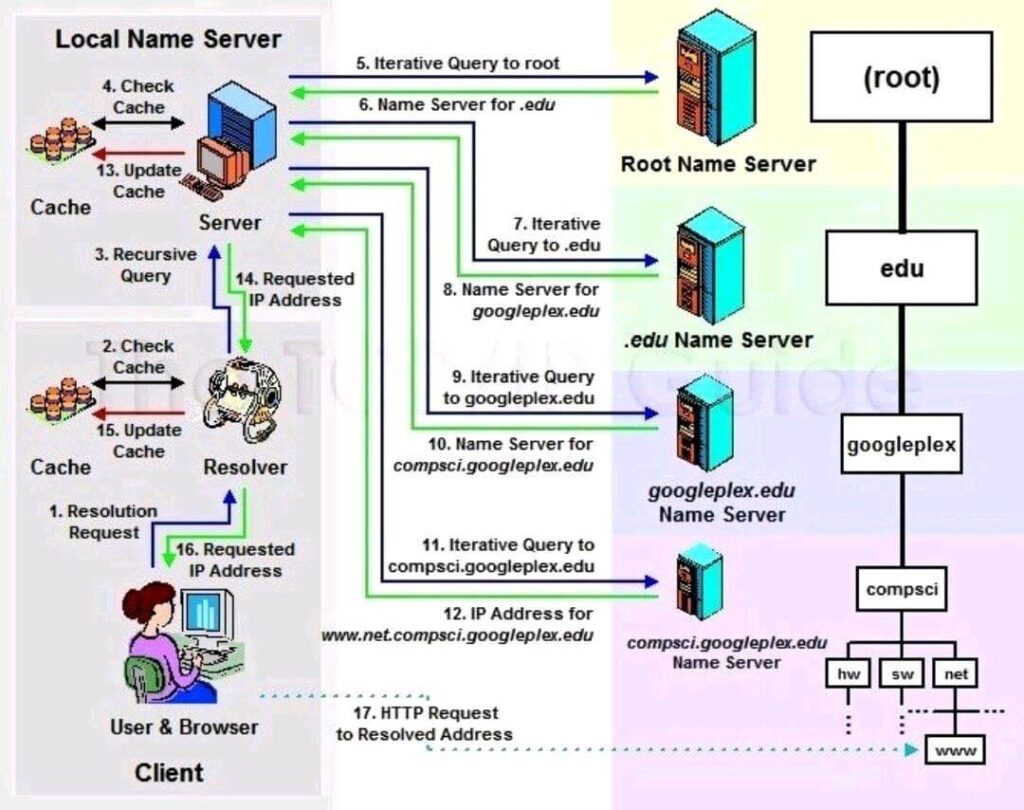
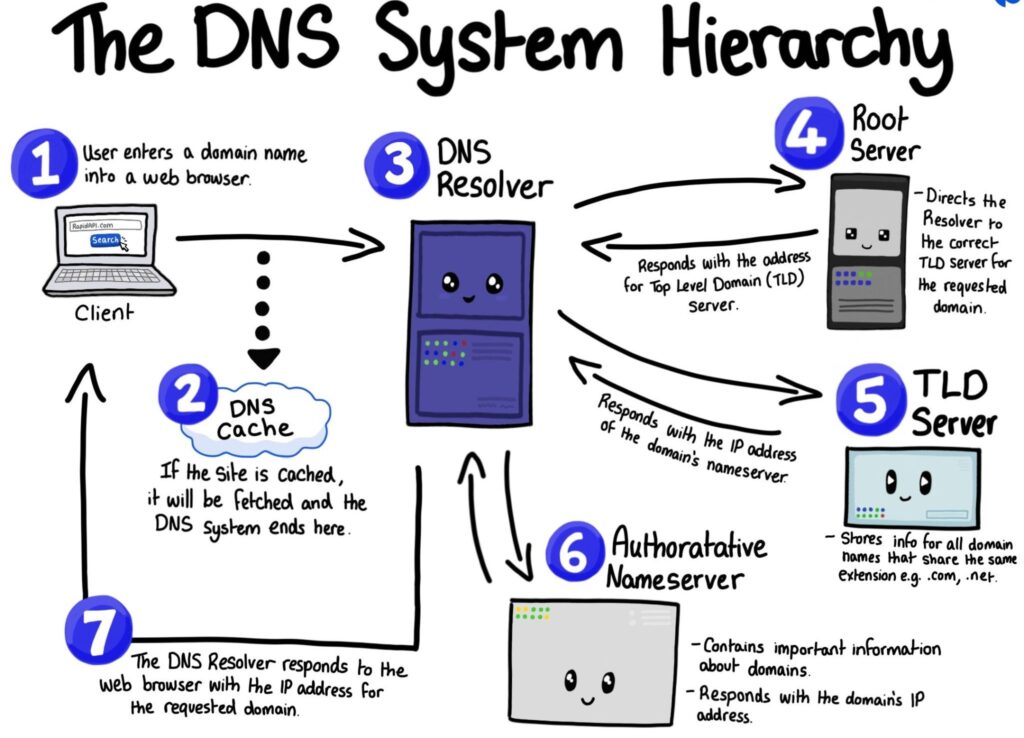
When a user enters a website name like facebook.com or youtube.com, the DNS converts it into an IP address. DNS filtering intercepts this request and checks whether the domain is allowed or blocked. If it is on the blocked list (like malicious, adult, or social media sites), the firewall prevents access even before the website loads.
DNS filtering is widely used in schools, colleges, and offices to block unsafe or non-productive websites. It is also effective against phishing sites and malware domains because it stops the connection at the domain lookup stage itself.
Example:
- In a school network, when a student tries to open a gaming or social media website, DNS filtering blocks the domain name, and the website does not open. Only educational websites are allowed to load.
- In an office, DNS filtering may allow business websites but block entertainment, gambling, or suspicious websites to improve productivity and security.
In advanced firewalls like Fortinet FortiGate, DNS filtering is used as part of web security policies to block malicious domains, phishing websites, and unwanted categories before the connection is established.
- DNS Filter: This is the system that enforces filtering rules. It can be an on-premises appliance, a software-based solution, or a cloud service that filters DNS requests based on a set of policies.
- Policy Configuration: Administrators define policies to block or allow specific categories of websites (e.g., “Malware,” “Social Media,” “Adult Content”) or specific domains based on threat intelligence.
- Enforcement: When a DNS request is made, the DNS filter checks if the requested domain matches any policy rules. If the domain is blocked, the request is denied or redirected to a warning page.