Transparent Firewall
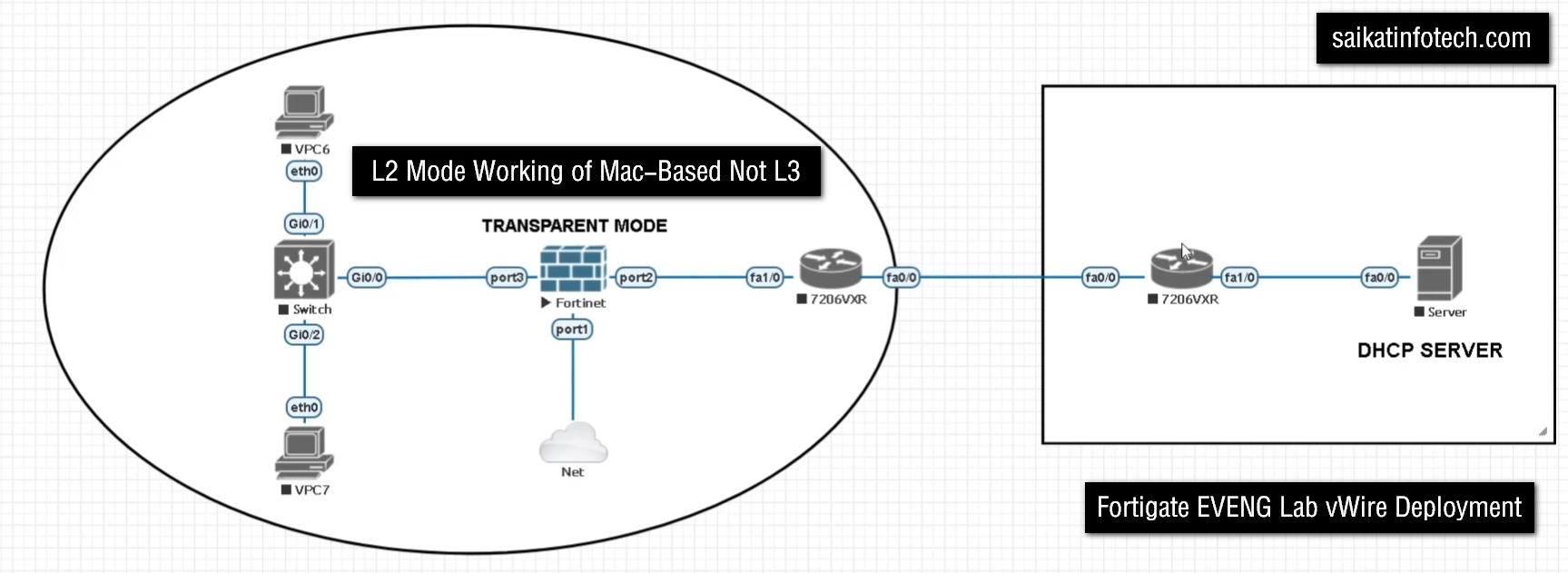
FortiGate vWire Transparent Firewall
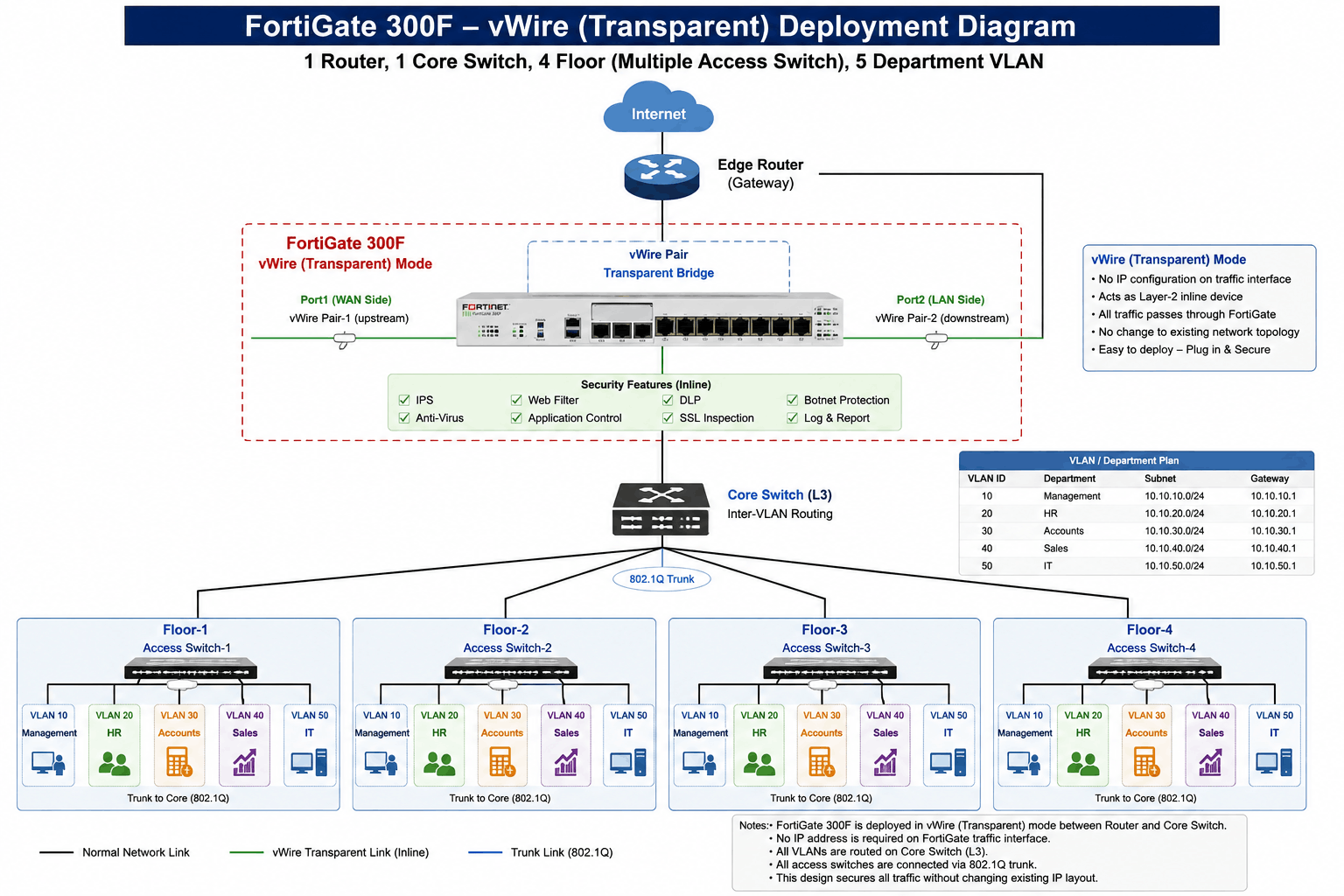
vWire (Virtual Wire) is a FortiGate Deployment Mode in which the FortiGate works as a Transparent Inline Firewall between two network devices. Instead of acting as a normal Layer-3 router or default gateway, FortiGate transparently passes traffic from one interface to another while inspecting and controlling that traffic according to firewall policies and security profiles.
1. Transparent Firewall Deployment
FortiGate vWire (Virtual Wire) is a transparent firewall deployment mode in which FortiGate is placed directly between two network devices, such as an ISP router and a core switch. Unlike a traditional routed firewall, FortiGate does not normally become the default gateway for the transit network. Instead, it transparently passes traffic from one interface to another while inspecting the traffic according to firewall policies and security profiles. This is useful when an organization wants to add FortiGate security without making major changes to its existing IP addressing and routing design.
2. Existing Network Security
vWire is especially useful when an existing network is already working properly and the administrator does not want to change the current gateway, routing, or IP configuration. For example, an existing network may have ISP Router → Core Switch → Users. FortiGate can be inserted between the router and core switch as ISP Router → FortiGate vWire → Core Switch. User PCs can continue using the existing gateway, while FortiGate becomes an inline security inspection point.
3. Traffic Inspection
In vWire mode, traffic physically passes through the FortiGate. When a user accesses a website or application, the traffic reaches the FortiGate, where the configured firewall policy determines whether the traffic should be allowed or blocked. Additional security features such as IPS, Antivirus, Web Filter, Application Control, and SSL/SSH Inspection can be applied depending on the traffic and configuration. If the traffic is permitted, FortiGate forwards it to the other side; if it violates the policy, FortiGate blocks or logs it.
4. Real Enterprise Example
Consider a company with an existing network consisting of an ISP Router, a Layer-3 Core Switch, multiple VLANs, and several departments such as HR, IT, Accounts, and Sales. The company wants to introduce FortiGate security But does not want to change the Existing VLAN Gateways or Routing Architecture. The FortiGate can be deployed as a vWire between the router and core switch. In this design, the existing network continues to perform its normal routing functions, while FortiGate transparently inspects traffic and provides an additional security layer.
					Internet
   |
ISP Router
   |
FortiGate vWire
   |
Core L3 Switch
   |
+------+------+------+
|      |      |      |
HR     IT   Accounts Sales
5. Main Purpose
The main purpose of vWire is to add firewall and security inspection to an existing network with minimal network changes. It is useful when FortiGate does not need to perform the primary routing or NAT functions and the administrator mainly wants FortiGate to act as an inline security checkpoint. If FortiGate needs to become the default gateway and perform routing, NAT, DHCP, or inter-VLAN routing, a normal NAT/Route deployment is generally more appropriate.
Easy definition:
vWire is a transparent inline FortiGate deployment that allows traffic to pass through FortiGate for security inspection without normally making FortiGate the Layer-3 gateway.
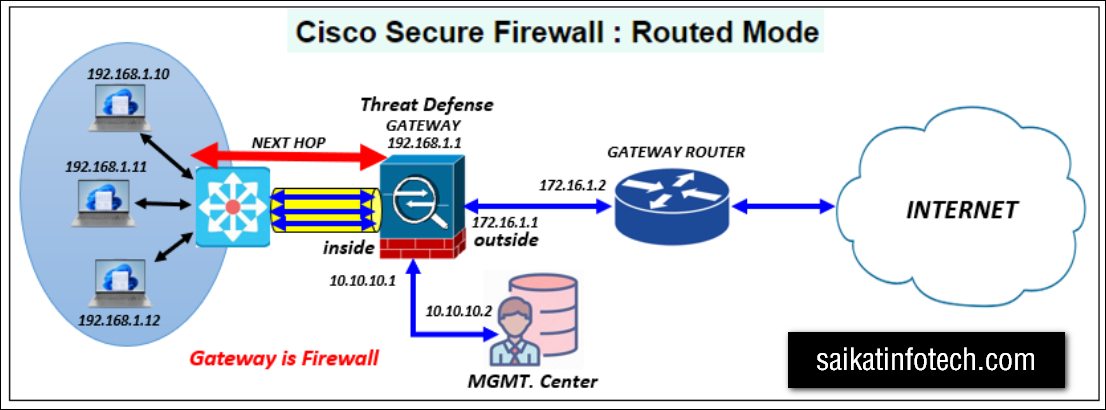
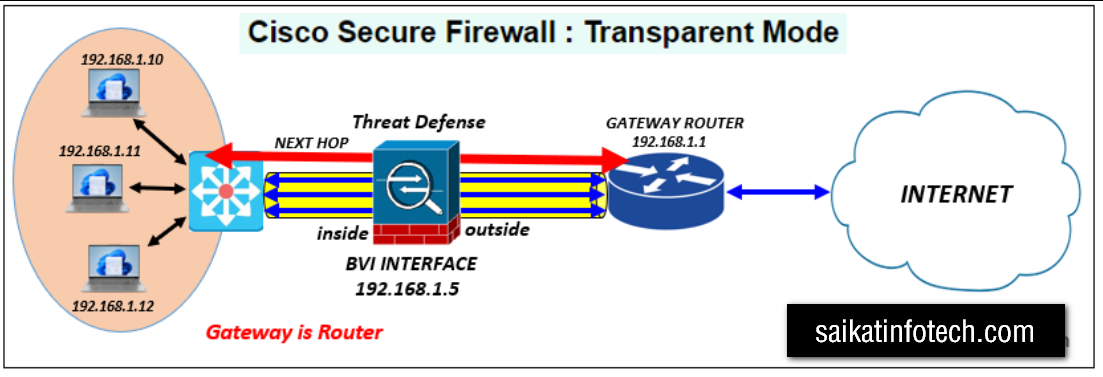
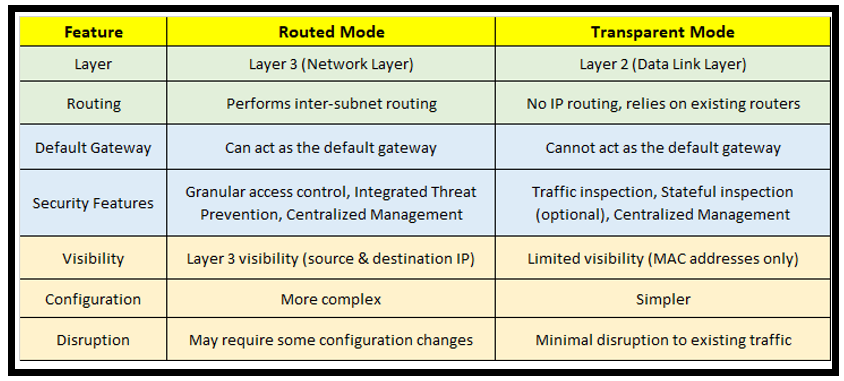
FortiGate vWire is generally considered a Layer-2/transparent deployment, but there is an important distinction.
Why?
In a vWire deployment, FortiGate sits transparently between two devices:
					ISP Router
    |
    |  L2/transparent traffic
    |
FortiGate vWire
    |
    |
Core Switch
FortiGate does not normally act as the Layer-3 gateway for the traffic passing through the vWire pair. The existing router or Layer-3 switch continues to handle the routing.
					PC
 |
Core L3 Switch
Gateway: 192.168.10.1
 |
FortiGate vWire
 |
Internet Router

The PC still uses:
IP:       192.168.10.50
Gateway:  192.168.10.1
FortiGate is inserted transparently into the path.
Important point
Don’t think of vWire as simply “FortiGate becomes an L2 switch.”
It is better to say:
vWire is a transparent inline firewall deployment that operates at Layer 2 for forwarding, while FortiGate can still inspect traffic and enforce Layer 3/4/7 security policies.
So, for an interview:
“Yes, vWire is a transparent Layer-2 deployment. FortiGate forwards traffic transparently between the two vWire interfaces instead of acting as the Layer-3 gateway, while applying firewall and security inspection.”
Do all FortiGate security profiles work in vWire mode?
FortiGate vWire mode supports many security profiles, but it is not correct to say that every security profile will work with every type of traffic. The availability and effectiveness of a profile depend on the traffic protocol, encryption, inspection mode, firewall policy, and FortiGate configuration.
1. Firewall Policy
FortiGate Firewall Policy works in vWire mode. The policy controls whether traffic passing through the FortiGate is allowed or denied. For example, if internal users are allowed to access the Internet using HTTP and HTTPS, you can create a policy that allows those services. If you want to block a particular type of traffic, another policy can deny it.
Example: An employee tries to access an unauthorized service. The traffic reaches the FortiGate vWire interface, the firewall policy checks the source, destination, service, and other conditions, and FortiGate blocks the traffic if it does not match an allowed policy.
2. Antivirus
The Antivirus security profile can work in vWire mode for supported traffic and protocols. It scans files or content passing through the firewall and attempts to detect malicious files or malware.
Example: An employee downloads an executable file from the Internet. FortiGate inspects the file, and if it detects malware according to the configured Antivirus profile, the file can be blocked and the event can be logged.
3. IPS
IPS (Intrusion Prevention System) can also be used with vWire. IPS examines traffic for known attack signatures, exploits, and other suspicious patterns.
Example: An attacker attempts to exploit a vulnerability on an internal web server. The traffic passes through the FortiGate, IPS identifies the attack pattern, and FortiGate can block the malicious traffic before it reaches the server.
4. Web Filter
Web Filter can be used to control access to websites and web categories. This is useful when an organization wants to prevent employees from accessing inappropriate, malicious, or non-business-related websites.
Example: A company blocks the Social Media category. When an employee attempts to access Facebook, FortiGate’s Web Filter checks the request and can block it according to the configured policy.
5. Application Control
Application Control can identify applications in network traffic and allow or block them according to company policy.
Example: A company wants to allow normal HTTPS browsing but prevent employees from using a particular social-media or file-sharing application. Application Control can identify the application and block it while other permitted traffic continues normally.
6. SSL/SSH Inspection
SSL/SSH Inspection can be used when traffic is encrypted. This is important because much modern Internet traffic uses HTTPS. With appropriate SSL inspection, FortiGate can inspect encrypted sessions and apply security controls to the traffic.
Example: An employee accesses a malicious website using HTTPS. Without appropriate inspection, FortiGate has limited visibility into the encrypted content. With Deep Inspection properly configured, FortiGate can inspect the decrypted session and apply profiles such as Web Filter, Antivirus, or Application Control.
7. DNS Filter
DNS Filter can also be used where the relevant DNS traffic is passing through and being handled by FortiGate. It can prevent users from resolving or accessing domains that belong to blocked categories or known malicious destinations.
Example: A user attempts to access a known phishing domain. The DNS request is checked against the configured DNS Filter policy, and FortiGate can block the request.
8. DLP
DLP (Data Loss Prevention) can be used to detect or control sensitive information leaving the organization, depending on the traffic and inspection capabilities.
Example: An employee attempts to send confidential company information to an external destination. If the traffic is inspectable and matches a configured DLP rule, FortiGate can log or block the transmission.
9. File Filter
File Filter can control certain types of files passing through supported traffic. This can be useful when an organization wants to prevent users from downloading potentially dangerous or unwanted file types.
Example: The company decides to block executable files downloaded from the Internet. A user attempts to download an .exe file, and FortiGate’s file filtering policy can block it.
10. Important Point
The important thing to understand is that vWire does not mean that security profiles are disabled. vWire describes how FortiGate is deployed in the network—as a transparent inline device. Security profiles determine what FortiGate does with the traffic.
However, it is not correct to say that every security profile works on every type of traffic. The actual inspection depends on the protocol, encryption, inspection mode, firewall policy, FortiOS version, and FortiGate hardware capabilities.
11. Simple Real-World Example
Suppose a company places a FortiGate vWire between its existing router and core switch. The company creates an Internet access policy with Antivirus, IPS, Web Filter, Application Control, and SSL Inspection enabled.
An employee downloads a file, visits a website, or uses an application. The traffic passes through FortiGate, the firewall policy evaluates it, and the applicable security profiles inspect it. If the traffic is legitimate, it is allowed. If FortiGate detects malware, an attack, a blocked website, or an unauthorized application, it can block or log the traffic according to the configured policy.
In short: vWire is the deployment mode; Firewall Policy and Security Profiles provide the actual security inspection.
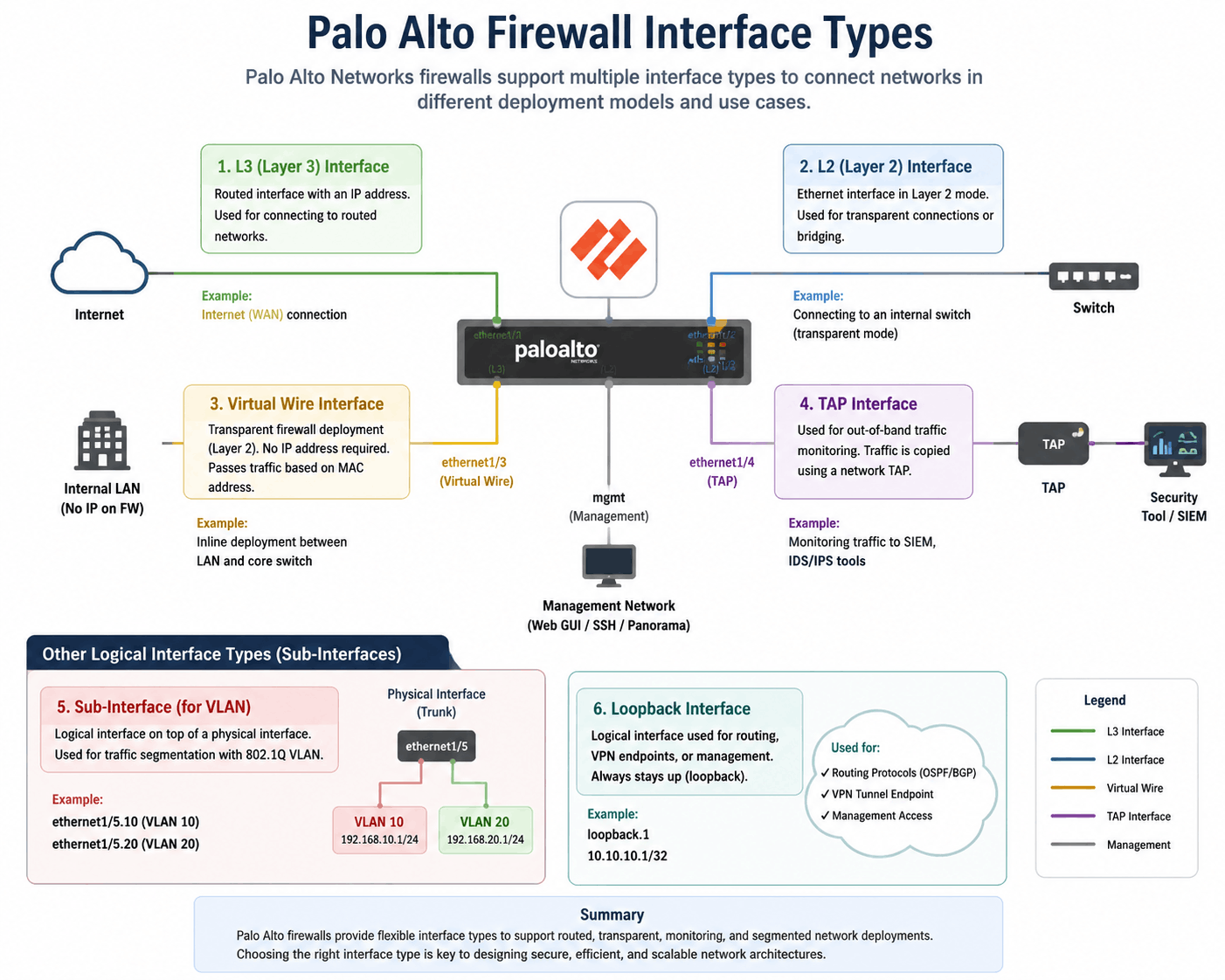
Palo Alto Firewall Interface Type
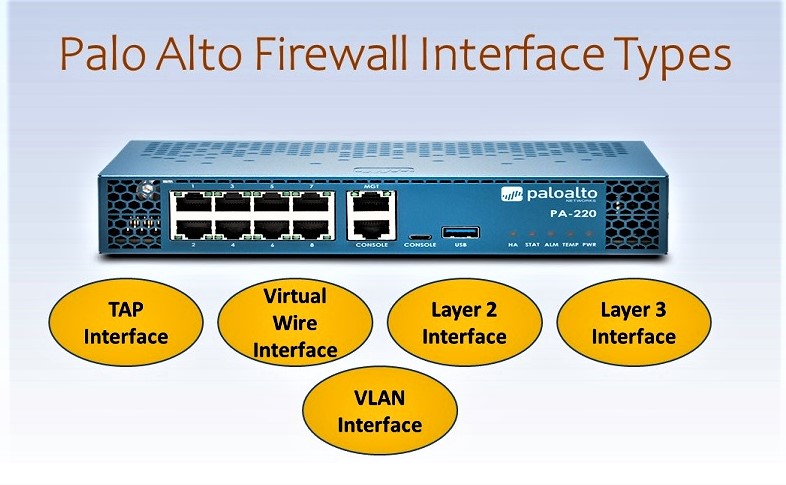
The image shows the five major Palo Alto Networks firewall interface types: TAP, Virtual Wire, Layer 2, Layer 3, and VLAN Interface. Each interface type is designed for a different network architecture. The main difference is how the Palo Alto firewall connects to the network and how it handles traffic. Some interface types are used only for monitoring, while others allow the firewall to operate inline and enforce security policies.
1. TAP Interface
A TAP interface is mainly used for traffic monitoring and visibility. In this deployment, the Palo Alto firewall does not normally sit directly in the path of the production traffic. Instead, a network TAP or switch SPAN/mirror port sends a copy of the network traffic to the Palo Alto firewall. The firewall can analyze this copied traffic and identify applications, threats, suspicious activity, and other security events. Because the firewall is receiving a copy rather than forwarding the original traffic, TAP deployment is generally used for monitoring rather than actively blocking the original traffic.
Example: Suppose a company has an existing network where Internet traffic goes from the router to the core switch and then to users. The company wants to monitor the traffic using Palo Alto without changing the existing network. The switch can mirror traffic to the Palo Alto TAP interface. Palo Alto can then analyze the copied traffic and generate visibility and threat information. If a user visits a suspicious website or suspicious traffic is detected, the administrator can see the event, but the TAP interface itself is not normally inline to block the original connection.
Main purpose: Traffic visibility, monitoring, threat detection, and security analysis.
2. Virtual Wire Interface
A Virtual Wire (vWire) interface is used when Palo Alto needs to be deployed as an inline transparent firewall. In this mode, two interfaces are connected as a virtual wire, and the firewall is placed between two existing network devices. Palo Alto transparently forwards traffic between the two sides while applying security policies and inspection. The important advantage is that Palo Alto does not normally need to become the Layer-3 gateway for the transit network, so an existing IP addressing and routing design can often remain unchanged.
Example: Imagine an existing network with an ISP router connected directly to a core switch. The company wants to add Palo Alto security but does not want to change the existing router, gateway, or routing configuration. Palo Alto can be inserted between the router and the core switch using Virtual Wire. When a user accesses the Internet, the traffic passes through Palo Alto. The firewall can inspect the traffic using security policies, App-ID, threat prevention, URL filtering, and other supported security features. If the traffic is allowed, Palo Alto forwards it; if the policy blocks it, the firewall drops it.
Main purpose: Transparent inline firewall deployment with minimal changes to an existing network.
3. Layer 2 Interface
A Layer 2 interface is used when Palo Alto participates in a Layer-2 network. Instead of primarily routing packets using IP addresses, the firewall forwards Ethernet frames within the Layer-2 environment. This deployment can be useful when the network design requires the firewall to operate between Layer-2 segments while still applying security policies to traffic.
Example: Suppose an organization has different Layer-2 networks for HR, IT, and Accounts. The Palo Alto firewall is placed into the Layer-2 topology and configured with Layer-2 interfaces. Traffic between the relevant network segments can pass through the firewall, where security policies can be applied. For example, the company can allow IT users to access an Accounts server while preventing HR users from accessing that server.
The important point is that a Layer-2 interface is not the same as a Virtual Wire interface. Both can be used for transparent or inline security designs, but they represent different Palo Alto interface/deployment mechanisms. Layer 2 participates in a Layer-2 topology, while Virtual Wire is specifically designed as a transparent point-to-point firewall connection.
Main purpose: Security enforcement within a Layer-2 network topology.
4. Layer 3 Interface
A Layer 3 interface is used when Palo Alto operates as a routed firewall. The interface is assigned an IP address and participates in Layer-3 communication. This is one of the most common firewall deployments because Palo Alto can become the default gateway for users, servers, or VLANs and can perform routing between different networks.
Example: Suppose the company has an HR network 192.168.10.0/24 and an IT network 192.168.20.0/24. Palo Alto has interfaces such as 192.168.10.1 and 192.168.20.1. The HR PCs use 192.168.10.1 as their default gateway, while IT PCs use 192.168.20.1. When an HR user tries to access an IT server, the traffic reaches Palo Alto. Palo Alto checks the routing table and security policy and then decides whether the communication should be allowed.
A Layer-3 deployment can also be used for Internet connectivity, NAT, static routing, dynamic routing, VPN, inter-VLAN routing, and many other firewall functions, depending on the overall configuration.
Main purpose: Routed firewall deployment where Palo Alto acts as a Layer-3 gateway or routing device.
5. VLAN Interface
A VLAN interface is a logical Layer-3 interface associated with a VLAN. It is commonly used when multiple VLANs need to communicate through a Palo Alto firewall and the physical connection between the switch and firewall is configured as a trunk. Instead of requiring a separate physical firewall port for every VLAN, multiple VLANs can be carried over a single physical connection.
Example: Suppose a company has three VLANs: VLAN 10 for HR, VLAN 20 for IT, and VLAN 30 for Accounts. A trunk link from the core switch carries all three VLANs to Palo Alto. Palo Alto has logical VLAN interfaces associated with those networks. Each VLAN can have its own Layer-3 gateway, and security policies can control communication between them.
For example, HR users may be allowed to access the Internet but denied access to the Accounts network. IT users may be allowed to access both HR and Accounts resources. Palo Alto can enforce these rules between the VLANs.
Main purpose: Logical Layer-3 connectivity for VLAN-based networks, especially when multiple VLANs are carried over a trunk.
6. TAP vs Virtual Wire
The biggest difference between TAP and Virtual Wire is whether the firewall is directly in the traffic path. TAP is primarily used for monitoring, where Palo Alto receives a copy of the traffic. Virtual Wire is an inline deployment, so the actual traffic passes through Palo Alto.
For example, if you only want to observe what users are doing, TAP can be useful. If you want Palo Alto to actively enforce a security policy and block traffic, an inline deployment such as Virtual Wire, Layer 2, or Layer 3 is generally required depending on the network design.
7. Virtual Wire vs Layer 3
The main difference between Virtual Wire and Layer 3 is the role of Palo Alto in the network. In Virtual Wire, Palo Alto is normally transparent and does not become the Layer-3 gateway for the transit network. In Layer 3 mode, Palo Alto has IP addresses on its interfaces and participates directly in routing.
For example, if your existing router is already the gateway and you simply want to insert Palo Alto for security inspection, Virtual Wire may be suitable. If you want Palo Alto to become the gateway for your users and perform routing and NAT, Layer 3 is generally more appropriate.
8. Layer 2 vs VLAN Interface
A Layer 2 interface is used for Layer-2 forwarding within a Layer-2 topology, whereas a VLAN interface is a logical Layer-3 interface associated with a VLAN. VLAN interfaces are particularly useful in designs where a trunk carries multiple VLANs and Palo Alto needs to provide Layer-3 gateway functionality for those VLANs.
For example, if the core switch sends VLAN 10, VLAN 20, and VLAN 30 over one trunk to Palo Alto, logical VLAN interfaces can be used to provide Layer-3 connectivity for those networks.
9. Real Enterprise Example
Consider an organization with an ISP router, two core switches, several access switches, and multiple departments. The company has HR, IT, Accounts, Sales, and Server VLANs.
If the company wants to Monitor Traffic without affecting production, it can use a TAP interface.
If the company wants to insert Palo Alto inline without changing the existing routing design, it can use Virtual Wire.
If the company wants Palo Alto to participate in the Layer-2 network, it can use Layer-2 interfaces.
If the company wants Palo Alto to become the Gateway and Perform Routing between networks, it can use Layer-3 interfaces.
If the company has multiple VLANs coming over a trunk and wants logical Layer-3 interfaces, VLAN interfaces can be used.
10. Easy Way to Remember
You can remember the five interface types like this:
TAP → Monitor traffic
Virtual Wire → Transparent inline firewall
Layer 2 → Layer-2 firewall deployment
Layer 3 → Routed firewall / gateway
VLAN Interface → Logical interface for VLAN networks
Interview Answer
Palo Alto firewall provides different interface types for different deployment requirements. TAP is used for traffic monitoring, Virtual Wire is used for transparent inline security, Layer 2 is used when the firewall participates in a Layer-2 topology, Layer 3 is used for routed firewall deployments where the firewall has IP addresses and can act as a gateway, and VLAN interfaces are used to provide logical Layer-3 connectivity for VLAN-based networks. The correct interface type depends on whether the organization needs monitoring, transparent inline security, Layer-2 forwarding, routing, or VLAN-based gateway functionality.