
Intel Motherboard Chipset
What is Motherboard Chipset
- A motherboard chipset is a set of electronic components on the motherboard that controls communication between the CPU and other hardware parts of the computer. It acts like a manager that helps different components work together properly.
- The chipset connects and controls devices such as RAM, storage drives, USB ports, graphics cards, network devices, and other peripherals. It ensures smooth data transfer between the processor and the connected hardware.
- The motherboard chipset also decides which features and technologies the system can support. This includes RAM speed, PCIe support, number of USB ports, storage options, and overclocking capabilities.
- Different chipsets are designed for different purposes. Basic chipsets are made for normal office and home use, while advanced chipsets support gaming, high performance, and overclocking.
- In short, the motherboard chipset is the main controller on the motherboard that manages communication and feature support for the entire computer system.
H Series Chipset
H Series Chipset :
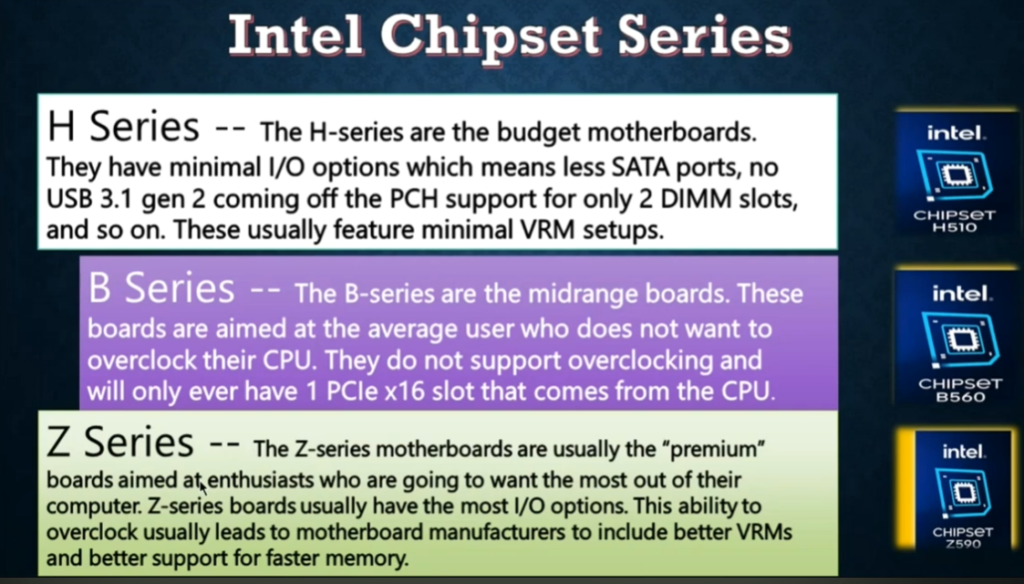
- The H-series chipset is Intel’s basic motherboard chipset designed for everyday computer use. It is commonly found in budget desktops and laptops where advanced features are not required. It focuses on stability and low cost rather than high performance.
- This chipset supports basic functions like browsing, office work, video playback, and simple applications. It usually does not support CPU overclocking, making it suitable for normal users.
- H-series chipsets offer limited expansion options, fewer PCIe lanes, and basic connectivity features compared to higher-end chipsets.
- In short, the H-series chipset is best for simple and affordable computers used for daily tasks.
Intel H-Series Chipset (Desktop Mainstream)
Older H Series Chipsets:
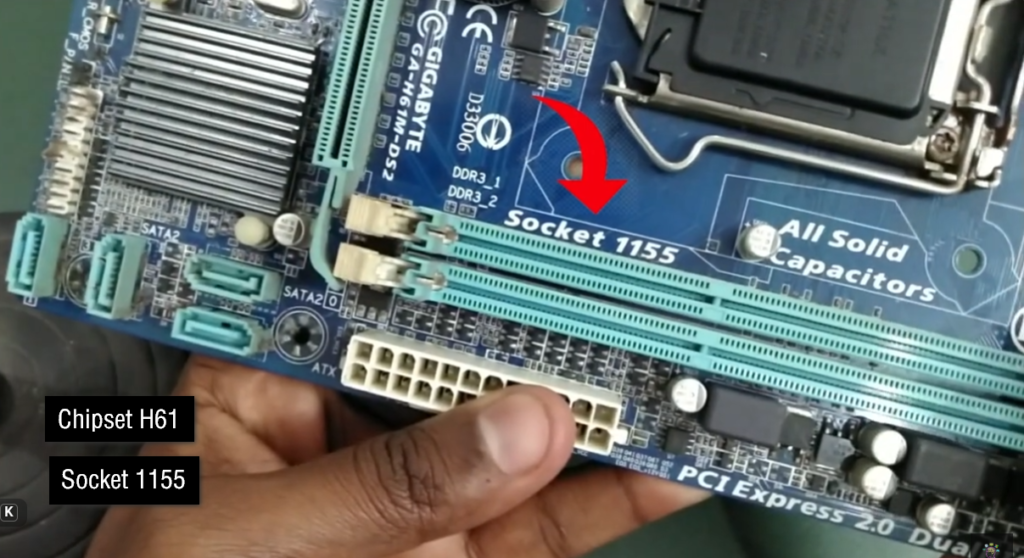
- H61 → 2nd & 3rd Gen Intel Core support (Sandy/Ivy Bridge)
- H67 → Early 2nd Gen support with better features
- H77 → 3rd Gen Intel Core support
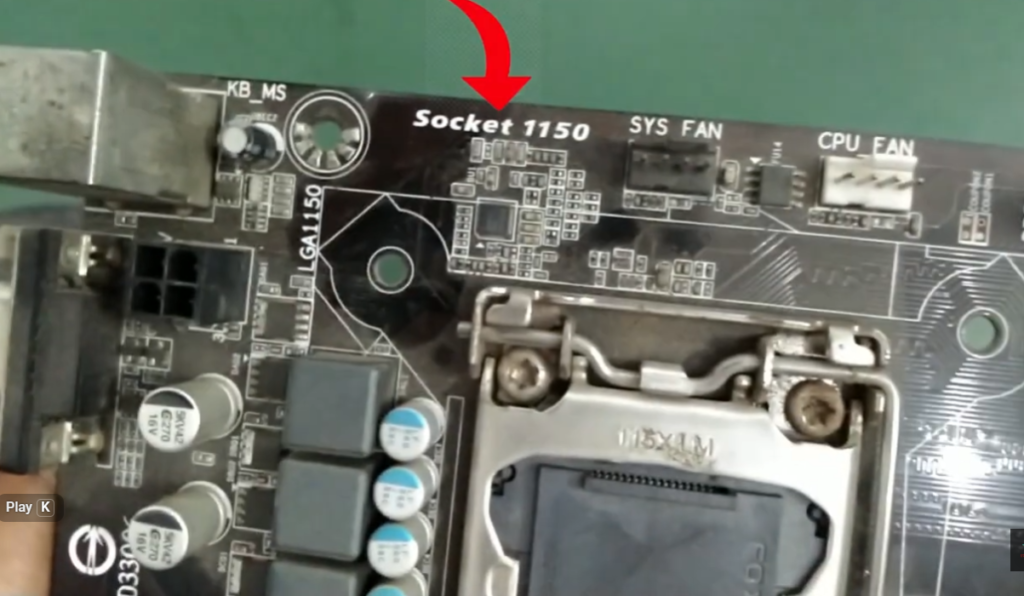
- H81 → 4th Gen Intel Core (Haswell) budget boards
- H87 → 4th Gen mid-range chipset
- H97 → 4th Gen improved version of H87
Modern H Series Chipsets:
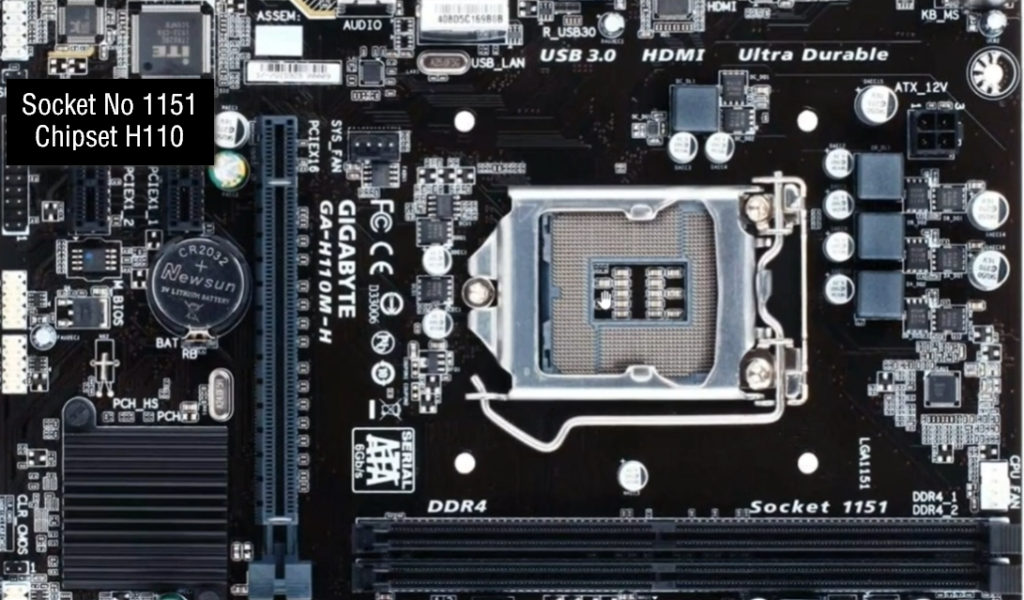
- H110 → 6th & 7th Gen Intel Core (Skylake/Kaby Lake)
- H170 → 6th & 7th Gen mid-range chipset
- H310 → 8th & 9th Gen Intel Core (Coffee Lake) entry-level
- H370 → 8th & 9th Gen mid-range support
- H410 → 10th Gen Intel Core (Comet Lake) budget boards
- H470 → 10th Gen improved features over H410
- H510 → 11th Gen Intel Core support (Rocket Lake)
- H570 → 11th Gen mid-range chipset
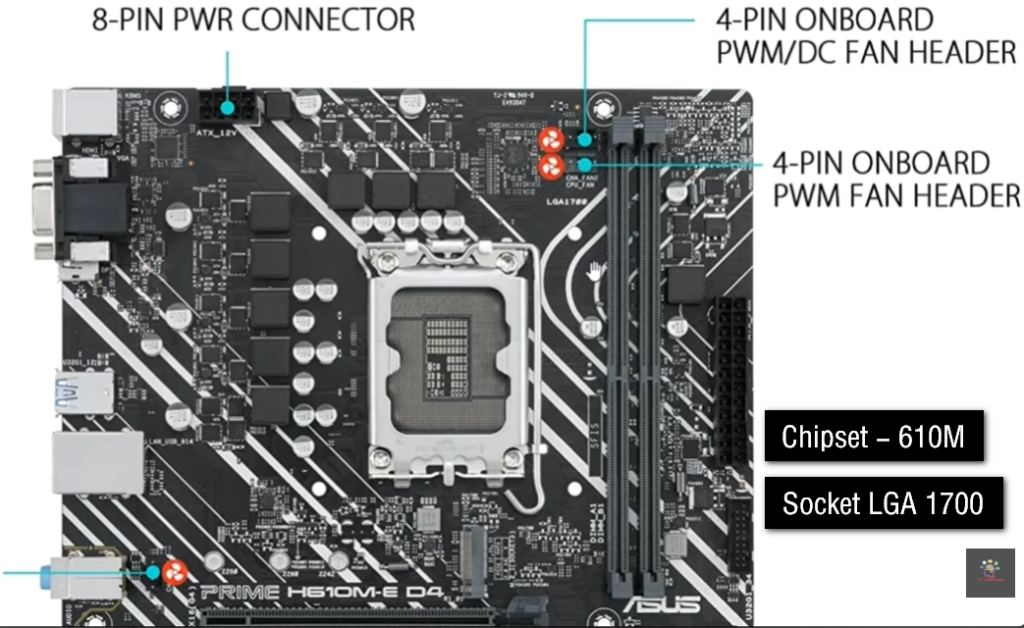
- H610 → 12th & 13th Gen Intel Core entry-level
- H710 → (Rare/limited OEM platforms, not widely used)
- H770 → 13th Gen mid-range chipset
- H810 → Newer entry-level chipset (14th Gen support in newer boards)
B Series Chipset
B Series Chipset :
- The B-series chipset is designed for mid-range systems and business users. It offers better features than the H-series, making it suitable for multitasking and moderate gaming.
- This chipset supports more USB ports, better storage options, and improved connectivity. It provides a balance between price and performance but still does not support CPU overclocking.
- B-series chipsets are commonly used in office systems, school computers, and mid-level gaming PCs.
- In short, the B-series chipset is a balanced option for users who need more performance than basic systems.
Intel B-Series Chipset (All Model List + Info)
The B-series chipset is Intel’s mid-range motherboard chipset, designed for balanced performance, business use, and light–moderate gaming. It offers more features than H-series but less than Z-series.
Older B Series Chipsets:
- B65 → 1st/2nd Gen Intel Core support (rare business boards)
- B75 → 3rd Gen Intel Core (Ivy Bridge) support
- B85 → 4th Gen Intel Core (Haswell) support
- B150 → 6th Gen Intel Core (Skylake)
- B250 → 7th Gen Intel Core (Kaby Lake)
Modern B Series Chipsets:
- B360 → 8th & 9th Gen Intel Core (Coffee Lake)
- B365 → Improved version of B360 (8th/9th Gen support)
- B460 → 10th Gen Intel Core (Comet Lake)
- B560 → 10th & 11th Gen Intel Core (better memory support)
- B660 → 12th & 13th Gen Intel Core (Alder/Raptor Lake)
- B760 → 13th & 14th Gen Intel Core (latest mainstream B-series)
Z Series Chipset
Z Series Chipset :
- The Z-series chipset is Intel’s high-performance motherboard chipset designed for gamers and power users. It supports advanced features like CPU and RAM overclocking.
- This chipset provides more PCIe lanes, faster memory support, and better expansion options for graphics cards and storage devices.
- Z-series boards are used in gaming PCs and high-end systems where performance is a priority.
- In short, the Z-series chipset is designed for gaming and performance-focused computers.
Intel Z-Series Chipset List (High-End / Gaming)
The Z-series chipset is Intel’s premium motherboard chipset line, designed for gaming, high performance, and overclocking support (CPU + RAM).
Older Z Series Chipsets
- Z68 → 2nd/3rd Gen Intel Core (Sandy/Ivy Bridge)
- Z77 → 3rd Gen Intel Core support
- Z87 → 4th Gen Intel Core (Haswell)
- Z97 → 4th Gen improved version (Haswell Refresh)
Modern Z Series Chipsets:
- Z170 → 6th Gen Intel Core (Skylake)
- Z270 → 7th Gen Intel Core (Kaby Lake)
- Z370 → 8th Gen Intel Core (Coffee Lake)
- Z390 → 8th & 9th Gen Intel Core
- Z490 → 10th Gen Intel Core (Comet Lake)
- Z590 → 10th & 11th Gen Intel Core
- Z690 → 12th Gen Intel Core (Alder Lake, DDR5 support)
- Z790 → 13th & 14th Gen Intel Core (Raptor Lake series)
X Series Chipset
X Series Chipset
- The X-series chipset is designed for extreme performance systems and professional workstations. It is used in high-end computing environments like video editing, 3D rendering, and scientific workloads.
- This chipset supports very powerful CPUs, large memory capacity, and maximum expansion options. It is more expensive but offers top-level performance and stability.
- X-series motherboards are used by professionals who need maximum computing power.
- In short, the X-series chipset is for extreme performance and workstation-grade systems.
Intel X-Series Chipset List (Extreme / Workstation)
The X-series chipset is Intel’s high-end enthusiast and workstation platform, designed for extreme performance, heavy multitasking, content creation, and professional workloads.
Intel X-Series Chipsets (List)
- X58 → Core i7 (1st Gen “Nehalem” era, triple-channel RAM support)
- X79 → 2nd Gen Core i7 Extreme (Sandy Bridge-E)
- X99 → 5th/6th Gen Core i7 Extreme (Haswell-E / Broadwell-E)
- X299 → Core X-series (6th to 10th Gen Intel Core X CPUs)
Intel Motherboard Chipset vs CPU & Socket Table
Intel Motherboard Chipset vs CPU Compatibility Table :
| Chipset Series | Socket | Supported CPU Generation | Example CPUs | Use |
|---|---|---|---|---|
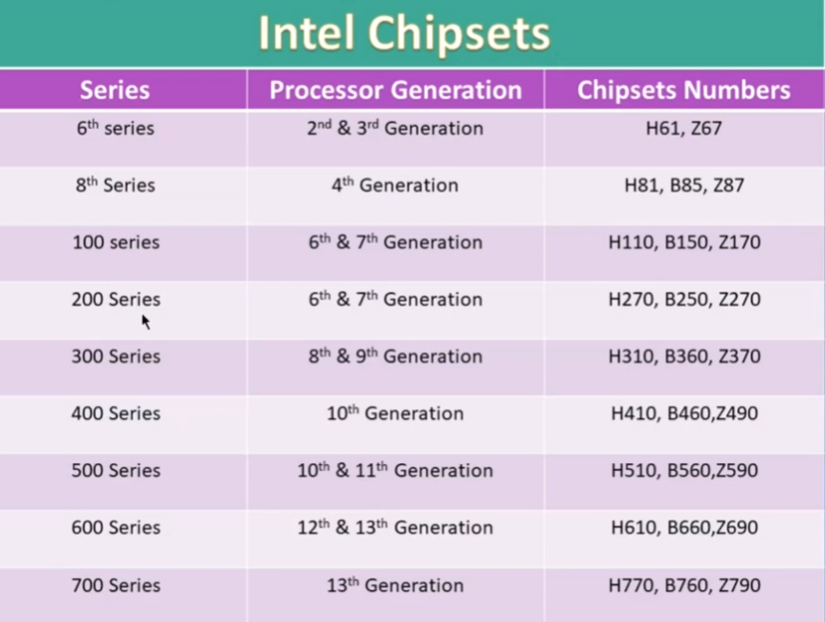
| H61 / B65 / Z68 | LGA 1155 | 2nd–3rd Gen | i3-2100, i5-2500K | Old basic systems |
| H81 / B85 / Z87 | LGA 1150 | 4th–5th Gen | i5-4590, i7-4770 | Office + basic gaming |
| H110 / B150 / Z170 | LGA 1151 | 6th Gen | i5-6400, i7-6700 | Mid systems |
| H270 / B250 / Z270 | LGA 1151 | 7th Gen | i7-7700, i5-7500 | Gaming (older) |
| H310 / B360 / Z370 | LGA 1151 (v2) | 8th–9th Gen | i5-8400, i9-9900K | Gaming PCs |
| H410 / B460 / Z490 | LGA 1200 | 10th Gen | i5-10400, i7-10700K | Modern budget–high |
| H510 / B560 / Z590 | LGA 1200 | 11th Gen | i5-11400, i7-11700K | Better performance |
| H610 / B660 / Z690 | LGA 1700 | 12th Gen | i5-12400, i7-12700K | DDR5 era start |
| H770 / B760 / Z790 | LGA 1700 | 13th–14th Gen | i5-13400, i9-14900K | Latest gaming PCs |
| X58 | LGA 1366 | 1st Gen Core i7 | i7-920, i7-980X | Old extreme |
| X79 | LGA 2011 | 2nd Gen Core i7 | i7-3930K | Workstation |
| X99 | LGA 2011-3 | 5th–6th Gen | i7-5960X | Heavy work |
| X299 | LGA 2066 | Core X series | i9-10980XE | Pro workstation |
DDR4 vs DDR5 Support Table (Intel Platform):
| Intel Generation | Socket | Chipset Series | Supported RAM Type | Example CPU |
|---|---|---|---|---|
| 6th Gen | LGA 1151 | H110 / B150 / Z170 | DDR4 | i5-6600 |
| 7th Gen | LGA 1151 | B250 / Z270 | DDR4 | i7-7700 |
| 8th Gen | LGA 1151 (v2) | B360 / Z370 | DDR4 | i5-8400 |
| 9th Gen | LGA 1151 (v2) | Z390 | DDR4 | i9-9900K |
| 10th Gen | LGA 1200 | B460 / Z490 | DDR4 | i5-10400 |
| 11th Gen | LGA 1200 | B560 / Z590 | DDR4 | i7-11700K |
| 12th Gen | LGA 1700 | H610 / B660 / Z690 | DDR4 or DDR5 (board dependent) | i5-12400 |
| 13th Gen | LGA 1700 | B760 / Z790 | DDR4 or DDR5 (board dependent) | i7-13700K |
| 14th Gen | LGA 1700 | B760 / Z790 | DDR4 or DDR5 (board dependent) | i9-14900 |
Intel H-Series Motherboard Price List
Intel H110 Motherboard
- Intel H110 Motherboard (Overall) → ₹3,500 – ₹7,500 (India) → Budget Intel 6th/7th Gen board
- ASUS H110M-CS → ₹4,500 – ₹6,000 → Basic office PC motherboard
- Gigabyte GA-H110M-H → ₹5,500 – ₹7,500 → Stable budget gaming + office use
- MSI H110M PRO-VD → ₹5,000 – ₹7,000 → Reliable entry-level motherboard
- EVM H110M DDR4 Board → ₹4,000 – ₹5,500 → Cheap budget assembled PC board
- ASRock H110M-HDV → ₹5,000 – ₹6,500 → Good for i3/i5 6th–7th Gen CPUs
H110 (Old Budget Board – LGA 1151)
- ASUS H110M-CS → ₹4,500 – ₹6,000 → Basic office PC motherboard
- Gigabyte H110M-H → ₹6,000 – ₹7,500 → Stable 6th/7th Gen Intel support
- MSI H110M PRO-VD → ₹5,000 – ₹7,000 → Entry gaming + office use
- EVM H110 DDR4 Board → ₹4,000 – ₹5,500 → Cheapest assembled PC board
H310 (Budget 8th/9th Gen)
- ASUS H310M-K → ₹5,500 – ₹7,000 → Basic Intel 8th/9th Gen support
- Gigabyte H310M H → ₹6,000 – ₹8,000 → Budget gaming + office PC
- MSI H310M PRO-VDH → ₹6,500 – ₹8,500 → Stable entry motherboard
H410 (Budget 10th Gen)
- ASUS H410M-K → ₹6,000 – ₹8,000 → Intel 10th Gen support
- Gigabyte H410M H → ₹6,500 – ₹8,500 → Office + light gaming
- MSI H410M PRO → ₹7,000 – ₹9,000 → Budget stable board
H510 (11th Gen Support)
- ASUS H510M-K → ₹7,000 – ₹9,000 → 11th Gen Intel support
- Gigabyte H510M H → ₹7,500 – ₹10,000 → Basic gaming + office
- MSI H510M PRO → ₹8,000 – ₹11,000 → Improved performance board
H610 (12th–14th Gen Modern Budget)
- ASUS Prime H610M-E → ₹4,500 – ₹7,000 → Latest budget Intel board
- Gigabyte H610M H → ₹5,500 – ₹7,500 → DDR4/DDR5 support options
- MSI PRO H610M-E → ₹5,500 – ₹8,000 → Most popular budget board
- ASRock H610M-HDV → ₹5,000 – ₹7,000 → Stable entry gaming board
Intel B-Series Motherboard Price List
B360 (8th/9th Gen Intel)
- ASUS B360M-K → ₹6,000 – ₹9,000 → Basic gaming + office PC
- Gigabyte B360M DS3H → ₹7,000 – ₹10,000 → Stable mid-budget board
- MSI B360M PRO-VDH → ₹7,500 – ₹11,000 → Good for i3/i5 8th/9th Gen
B460 (10th Gen Intel)
- ASUS B460M-A → ₹7,000 – ₹10,000 → Office + entry gaming
- Gigabyte B460M DS3H → ₹8,000 – ₹11,000 → Balanced performance board
- MSI B460M PRO-VDH → ₹8,500 – ₹12,000 → Stable budget motherboard
B560 (10th/11th Gen Intel)
- ASUS B560M-K → ₹8,000 – ₹12,000 → RAM overclock support
- Gigabyte B560M DS3H → ₹9,000 – ₹13,000 → Gaming + multitasking
- MSI B560M PRO-VDH → ₹9,500 – ₹14,000 → Best value B-series board
B660 (12th/13th Gen Intel)
- ASUS B660M-K → ₹10,000 – ₹15,000 → Modern budget gaming board
- Gigabyte B660M DS3H → ₹12,000 – ₹18,000 → Strong mid-range motherboard
- MSI PRO B660M-A → ₹13,000 – ₹20,000 → Popular gaming + editing board
B760 (13th/14th Gen Intel)
- ASUS B760M-K → ₹12,000 – ₹18,000 → Latest budget Intel board
- Gigabyte B760M DS3H → ₹14,000 – ₹20,000 → Gaming + productivity
- MSI B760M PRO → ₹15,000 – ₹22,000 → High stability + future support
Intel Z-Series Motherboard Price List
Z170 / Z270 (6th–7th Gen Intel)
- ASUS Z170-A → ₹8,000 – ₹15,000 → Old gaming & overclock board
- Gigabyte Z170-HD3 → ₹9,000 – ₹14,000 → Basic enthusiast board
- MSI Z270-A PRO → ₹10,000 – ₹16,000 → Stable overclocking board
Z370 / Z390 (8th–9th Gen Intel)
- ASUS Z370-E Gaming → ₹12,000 – ₹20,000 → Gaming + OC support
- Gigabyte Z370 HD3 → ₹10,000 – ₹18,000 → Mid-range performance board
- MSI Z390-A PRO → ₹13,000 – ₹22,000 → Popular gaming motherboard
- ASUS ROG Strix Z390-E → ₹18,000 – ₹30,000 → High-end gaming board
Z490 / Z590 (10th–11th Gen Intel)
- ASUS Z490-A → ₹15,000 – ₹25,000 → 10th Gen gaming support
- Gigabyte Z490 Gaming X → ₹14,000 – ₹22,000 → Balanced performance
- MSI Z590 PRO → ₹16,000 – ₹28,000 → Strong VRM support
- ASUS ROG Z590-E → ₹25,000 – ₹40,000 → High-performance OC board
Z690 / Z790 (12th–14th Gen Intel)
- ASUS Z690-P → ₹18,000 – ₹30,000 → DDR5/DDR4 support
- MSI Z690 Tomahawk → ₹22,000 – ₹40,000 → Gaming + editing
- Gigabyte Z690 AORUS Elite → ₹25,000 – ₹45,000 → Premium mid-high board
- ASUS Z790 Prime → ₹28,000 – ₹45,000 → Latest Gen support
- MSI Z790 Gaming Edge → ₹30,000 – ₹55,000 → High-end gaming board
- ASUS ROG Maximus Z790 Hero → ₹60,000 – ₹90,000+ → Extreme performance board
AMD Motherboard Chipset
What is AMD Chipset
- An AMD chipset is a set of electronic controllers on an AMD motherboard that manages communication between the Ryzen CPU and other hardware components. It helps different parts of the computer work together smoothly.
- The chipset connects the CPU with important components like RAM, storage drives, graphics cards, USB devices, and network ports. It ensures proper data transfer between all hardware parts.
- It also controls the features and capabilities of the motherboard, such as how many USB ports are available, which type of storage is supported, and how many PCIe lanes can be used.
- Different AMD chipsets are designed for different levels of performance. Some are basic for normal use, while others are made for gaming and high-performance systems.
- In short, an AMD chipset is the main controller on the motherboard that manages communication, compatibility, and features for Ryzen-based computers.
AMD A-Series Chipset
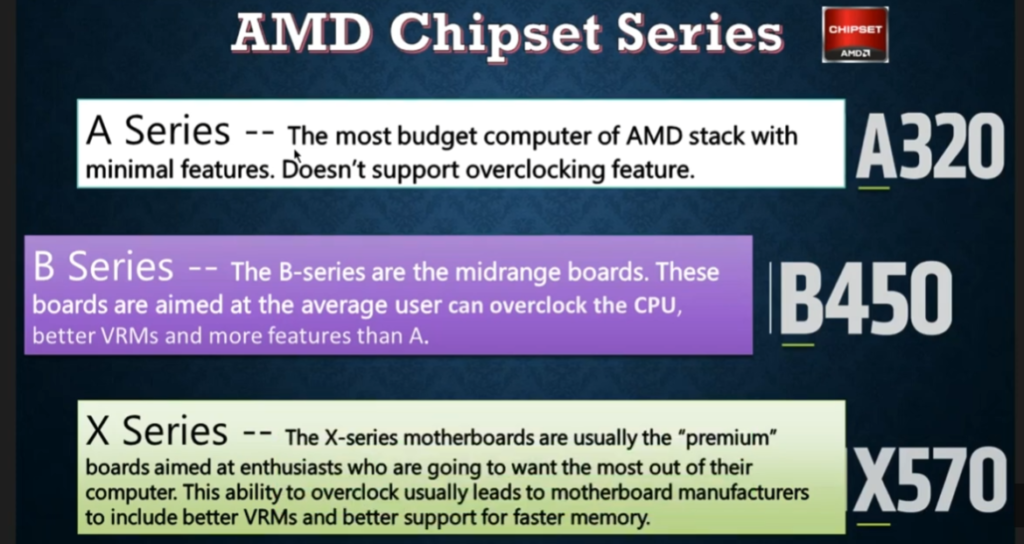
- The AMD A-series chipset is the basic level motherboard chipset designed for low-cost and everyday computers. It is mainly used in budget systems where advanced performance is not required.
- This chipset is suitable for simple tasks like web browsing, office work, watching videos, and basic applications. It focuses more on affordability than high performance.
- A-series chipsets have limited features and usually do not support CPU overclocking. They also offer fewer PCIe lanes and expansion options compared to higher-end chipsets.
- In short, the AMD A-series chipset is best for basic and budget-friendly computers.
AMD A-Series Chipset List:
- A55 → Old FM2/FM2+ CPUs (A-series APUs)
- A58 → FM2+ platform, basic budget boards
- A68H → FM2+ improved version with USB 3.0 support
- A78 → FM2+ higher feature budget chipset
- A85X → Top FM2+ A-series chipset
Modern AMD A-Series Chipsets (AM4 / AM5):
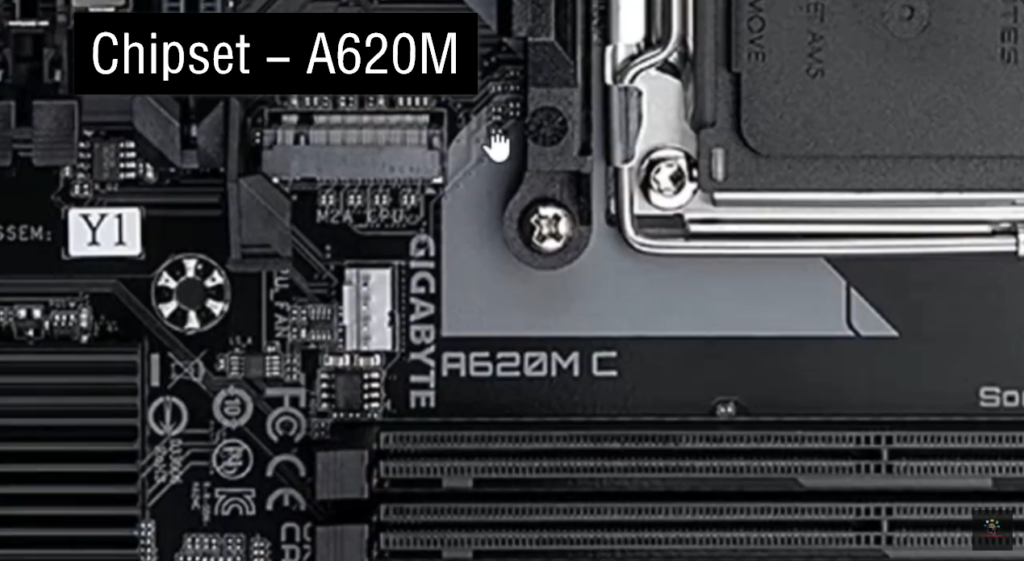
- A320 → Ryzen 1000–3000 series (basic AM4 boards)
- A520 → Ryzen 3000–5000 series (budget AM4 boards)
- A620 → Ryzen 7000 series (AM5 entry-level, DDR5 support)
- A-series = basic AMD motherboard chipset line
- Newer number = newer Ryzen support + better features
- No heavy gaming focus, mainly budget & office use
AMD B-Series Chipset
- The AMD B-series chipset is the most popular mid-range option for Ryzen systems. It offers a good balance between price and performance, making it suitable for gaming and multitasking.
- This chipset supports better connectivity options, more storage devices, and improved system performance compared to A-series. Many B-series boards also support CPU overclocking (depending on model).
- It is widely used in gaming PCs, student systems, and general-purpose computers.
- In short, the AMD B-series chipset is a balanced choice for performance and value.
AMD B-Series Chipset List (Motherboard)
The AMD B-series chipsets are mid-range motherboards designed for balanced performance, gaming, and multitasking.
AMD B-Series Chipset List (FM2 / Older Platform):
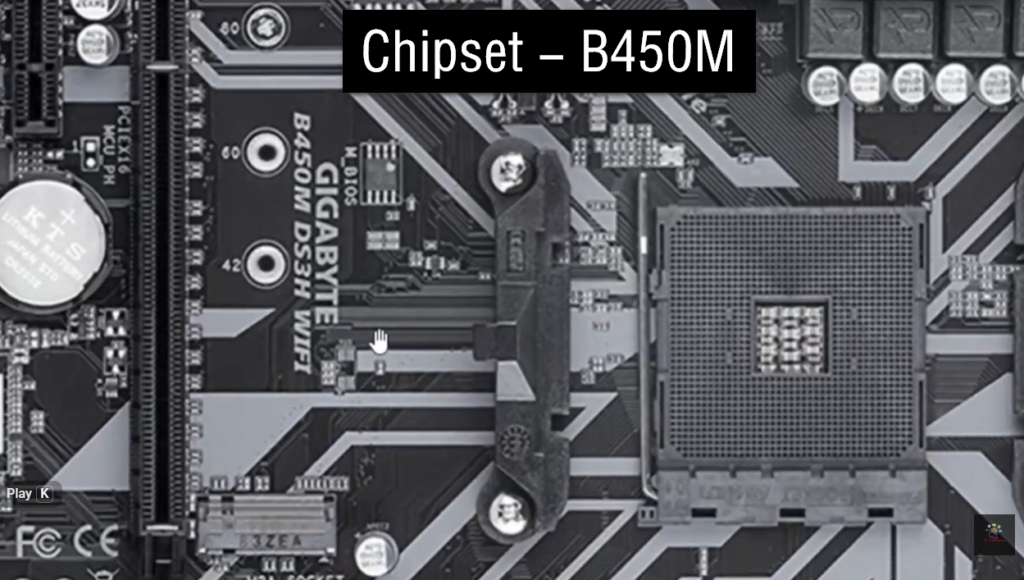
- B350 → Early Ryzen (1st–2nd Gen support, AM4)
- B450 → Improved AM4 support (Ryzen 1000–5000 with BIOS update)
- B550 → Ryzen 3000–5000 (PCIe 4.0 support)
Modern AMD B-Series (AM5 Platform):
- B650 → Ryzen 7000 series (DDR5 support, balanced gaming board)
- B650E → Enhanced version with more PCIe 5.0 support
- B840 → Entry mid-range AM5 boards (newer budget-friendly option)
- B850 → Improved AM5 mid-range boards (latest generation support)
- B-series = balanced gaming + performance chipset
- Best for: gaming PCs, editing, multitasking
- Middle level between A (basic) and X (high-end)
AMD X-Series Chipset
- The AMD X-series chipset is designed for high-end performance systems and professional users. It supports advanced features and maximum system capabilities.
- This chipset is used in gaming PCs, content creation setups, and workstation systems. It supports more PCIe lanes, faster memory, and full overclocking support for Ryzen processors.
- X-series motherboards are built for users who need maximum speed, power, and expandability.
- In short, the AMD X-series chipset is the top-level option for performance and professional computing.
AMD X-Series Chipset List (Motherboard)
The AMD X-series chipsets are high-end and enthusiast-grade motherboards designed for maximum performance, gaming, and professional workloads like editing, 3D rendering, and streaming.
AMD X-Series Chipset List (AM4 Platform):
- X370 → Ryzen 1st–2nd Gen (high-end AM4 boards)
- X470 → Improved AM4 support (Ryzen 1000–5000 with updates)
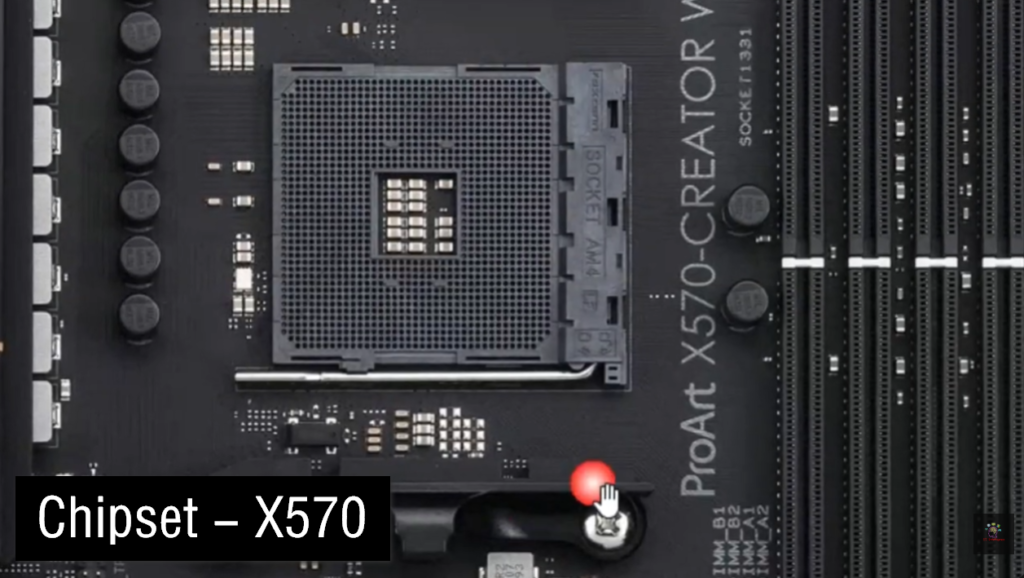
- X570 → Ryzen 3000–5000 (PCIe 4.0 support, very popular high-end board)
Modern AMD X-Series Chipsets (AM5 Platform):
- X670 → Ryzen 7000 series (DDR5, PCIe 5.0 support)
- X670E → Extreme version with full PCIe 5.0 support
- X870 → Newer high-end AM5 chipset (Ryzen 8000/9000 support)
- X870E → Top-tier extreme performance motherboard chipset
Key Features of X-Series:
- Full CPU overclocking support
- Maximum PCIe lanes (best GPU + SSD performance)
- High RAM support (DDR4/DDR5 depending on platform)
- Best connectivity and upgrade options
AMD CPU Support (Motherboard Chipset):
- Ryzen 1000 (Zen 1) → AM4 → A320 / B350 / X370 → DDR4 → Entry gaming
- Ryzen 2000 (Zen+) → AM4 → B450 / X470 → DDR4 → Improved performance
- Ryzen 3000 (Zen 2) → AM4 → B450 / B550 / X570 → DDR4 → Gaming + work
- Ryzen 5000 (Zen 3) → AM4 → B550 / X570 → DDR4 → High performance
- Ryzen 7000 (Zen 4) → AM5 → A620 / B650 / X670 → DDR5 → Modern PCs
- Ryzen 8000 (Zen 4 APU) → AM5 → B650 / X670 → DDR5 → AI + graphics
- Ryzen 9000 (Zen 5) → AM5 → B850 / X870 → DDR5 → High-end gaming
Athlon CPU Support:
- Athlon 64 / X2 → AM2 / AM2+ → DDR2 → Very old basic PCs
- Athlon II / Phenom II → AM3 / AM3+ → DDR3 → Old office + light use
- Athlon X4 (FM2+) → FM2+ → DDR3 → Budget desktop PCs
- Athlon 200GE → AM4 → A320 / B350 → DDR4 → Basic modern PC
- Athlon 3000G → AM4 → A320 / B450 / B550 → DDR4 → Office + light graphics
AMD CPU Support → Motherboard Chipset
Athlon Series
- Athlon 3000G / 200GE → AM4 → A320 / B450 / B550 → DDR4 → Basic office + light use
Ryzen 1000 Series (Zen 1)
- Ryzen 3 1200 / 1300X → AM4 → A320 / B350 / X370 → DDR4 → Entry gaming
- Ryzen 5 1600 / 1600X → AM4 → B350 / X370 → DDR4 → Mid performance
- Ryzen 7 1700 / 1800X → AM4 → X370 → DDR4 → Early high-end
Ryzen 2000 Series (Zen+)
- Ryzen 3 2200G / 2400G → AM4 → A320 / B450 → DDR4 → APU gaming
- Ryzen 5 2600 / 2600X → AM4 → B450 / X470 → DDR4 → Gaming
- Ryzen 7 2700 / 2700X → AM4 → X470 → DDR4 → High performance
Ryzen 3000 Series (Zen 2)
- Ryzen 3 3100 / 3300X → AM4 → B450 / B550 / X570 → DDR4 → Budget gaming
- Ryzen 5 3600 / 3600X → AM4 → B450 / B550 / X570 → DDR4 → Popular gaming CPU
- Ryzen 7 3700X / 3800X → AM4 → B550 / X570 → DDR4 → High performance
- Ryzen 9 3900X / 3950X → AM4 → X570 → DDR4 → Extreme performance
Ryzen 5000 Series (Zen 3)
- Ryzen 5 5600 / 5600X → AM4 → B550 / X570 → DDR4 → Best gaming value
- Ryzen 7 5800X / 5800X3D → AM4 → B550 / X570 → DDR4 → High-end gaming
- Ryzen 9 5900X / 5950X → AM4 → X570 → DDR4 → Workstation level
Ryzen 7000 Series (Zen 4)
- Ryzen 5 7600 / 7600X → AM5 → A620 / B650 / X670 → DDR5 → Modern gaming
- Ryzen 7 7700 / 7700X → AM5 → B650 / X670 → DDR5 → High performance
- Ryzen 9 7900X / 7950X → AM5 → X670 / X670E → DDR5 → Extreme performance
Ryzen 8000 Series (APU Zen 4)
- Ryzen 5 8600G → AM5 → B650 / X670 → DDR5 → Gaming + AI graphics
- Ryzen 7 8700G → AM5 → B650 / X670 → DDR5 → Strong APU performance
Ryzen 9000 Series (Zen 5)
- Ryzen 5 9600X → AM5 → B850 / X870 → DDR5 → New generation gaming
- Ryzen 7 9700X → AM5 → B850 / X870 → DDR5 → High-end gaming
- Ryzen 9 9900X / 9950X → AM5 → X870 / X870E → DDR5 → Top performance
Chipset Table
AMD Motherboard Chipset vs CPU & Socket Table
| CPU Generation | Socket | Chipset Series | Chipsets (Examples) | RAM Support | Example CPU | Use |
|---|---|---|---|---|---|---|
| Ryzen 1000 (Zen 1) | AM4 | A / B / X | A320, B350, X370 | DDR4 | Ryzen 5 1600 | Basic–Gaming |
| Ryzen 2000 (Zen+) | AM4 | A / B / X | A320, B450, X470 | DDR4 | Ryzen 7 2700X | Gaming |
| Ryzen 3000 (Zen 2) | AM4 | A / B / X | A520, B450, B550, X570 | DDR4 | Ryzen 5 3600 | Gaming + Work |
| Ryzen 5000 (Zen 3) | AM4 | A / B / X | B550, X570 | DDR4 | Ryzen 7 5800X | High gaming |
| Ryzen 7000 (Zen 4) | AM5 | A / B / X | A620, B650, X670 | DDR5 | Ryzen 5 7600X | Modern PC |
| Ryzen 8000 (Zen 4 APU) | AM5 | B / X | B650, X670 | DDR5 | Ryzen 7 8700G | AI + Gaming |
| Ryzen 9000 (Zen 5) | AM5 | B / X | B850, X870 | DDR5 | Ryzen 9 9900X | High-end |
AMD Athlon CPU Support Table (Socket + Chipset + Generation)
| Athlon Series | Platform | Socket | Chipset | RAM Type | Example CPU | Use |
|---|---|---|---|---|---|---|
| Athlon 64 (Old) | K8 | Socket 754 / 939 | N/A | DDR / DDR2 | Athlon 64 3000+ | Very old PCs |
| Athlon X2 | K8 | AM2 / AM2+ | A55 / 7-series (old) | DDR2 | Athlon X2 6000+ | Basic office |
| Athlon II | K10 | AM3 / AM3+ | 8-series / 9-series | DDR3 | Athlon II X4 640 | Budget PCs |
| Athlon A-Series APU | FM1 | FM1 | A55 / A75 | DDR3 | Athlon II X4 651K | Entry graphics |
| Athlon X4 (FM2+) | FM2+ | FM2+ | A58 / A68H / A88X | DDR3 | Athlon X4 860K | Budget gaming |
| Athlon 200GE | Ryzen-based | AM4 | A320 / B350 / B450 | DDR4 | Athlon 200GE | Office PC |
| Athlon 3000G | Ryzen-based | AM4 | A320 / B450 / B550 | DDR4 | Athlon 3000G | Light use + iGPU |
| Athlon 3000 Series (Zen) | AM4 | AM4 | A520 / B450 / B550 | DDR4 | Athlon Gold 3150G | Basic modern PC |
CPU Socket Type
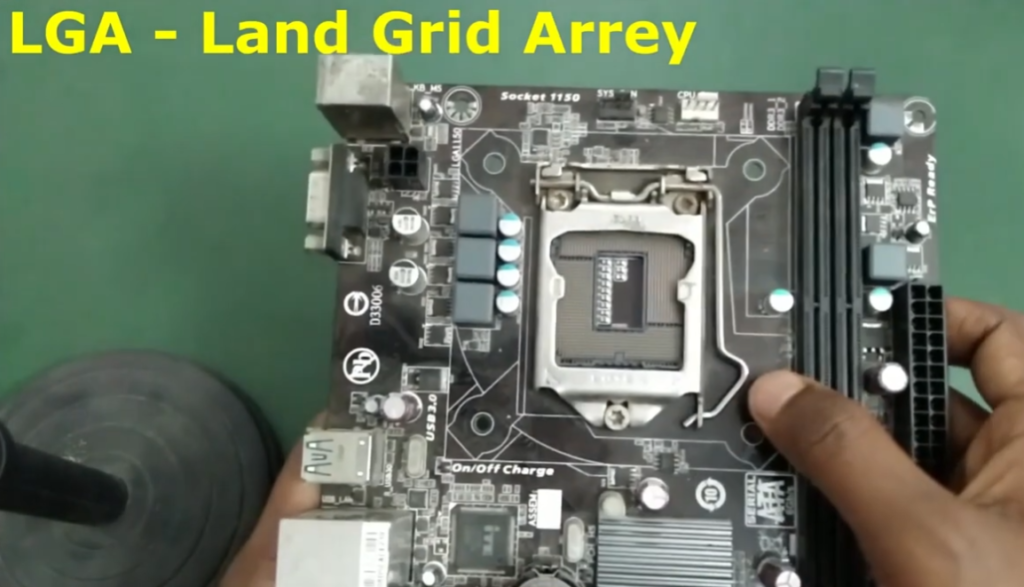
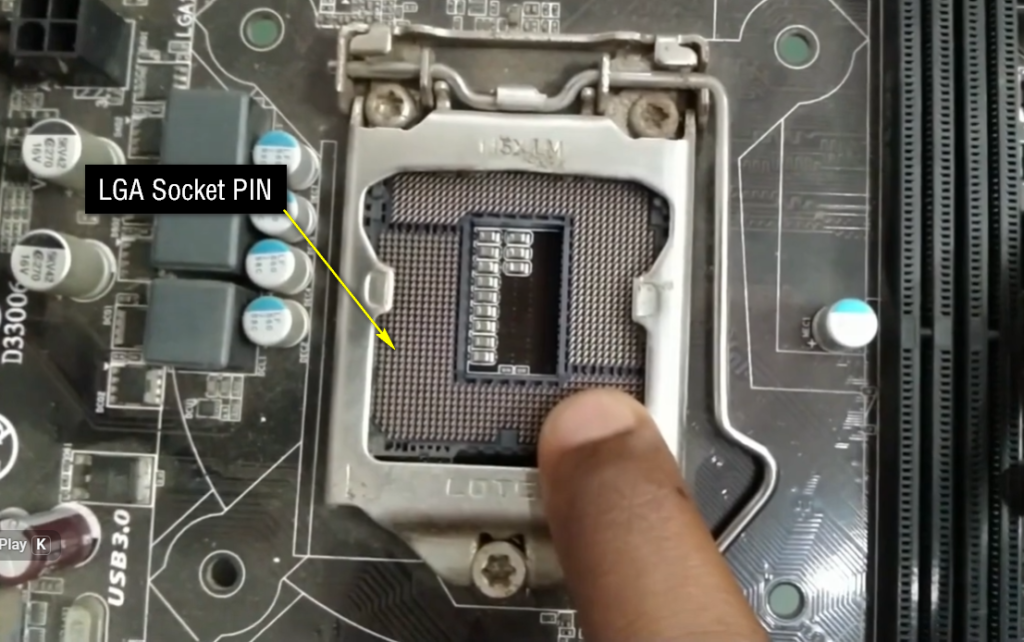
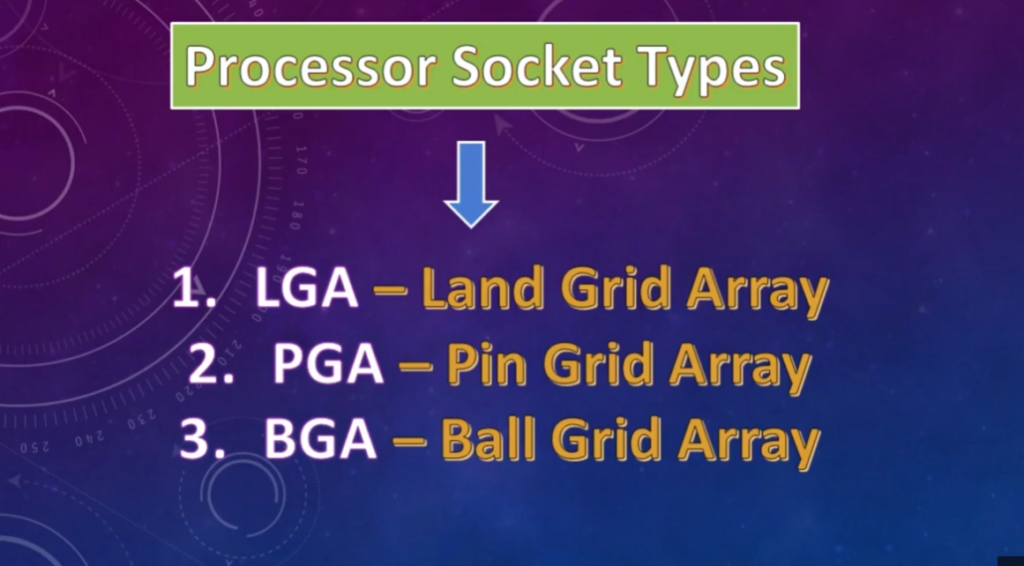
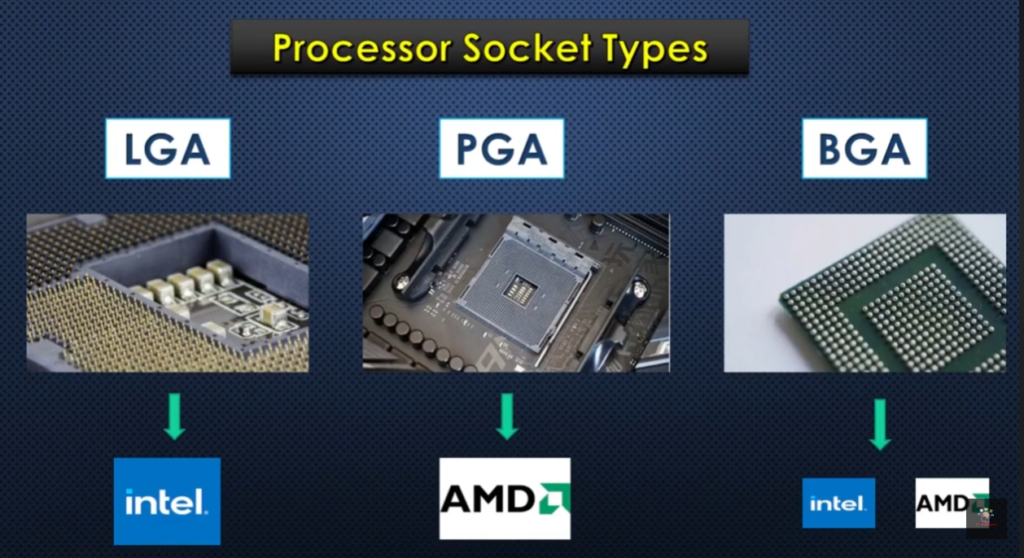
- LGA (Land Grid Array) → Used in Intel desktop CPUs, pins on motherboard
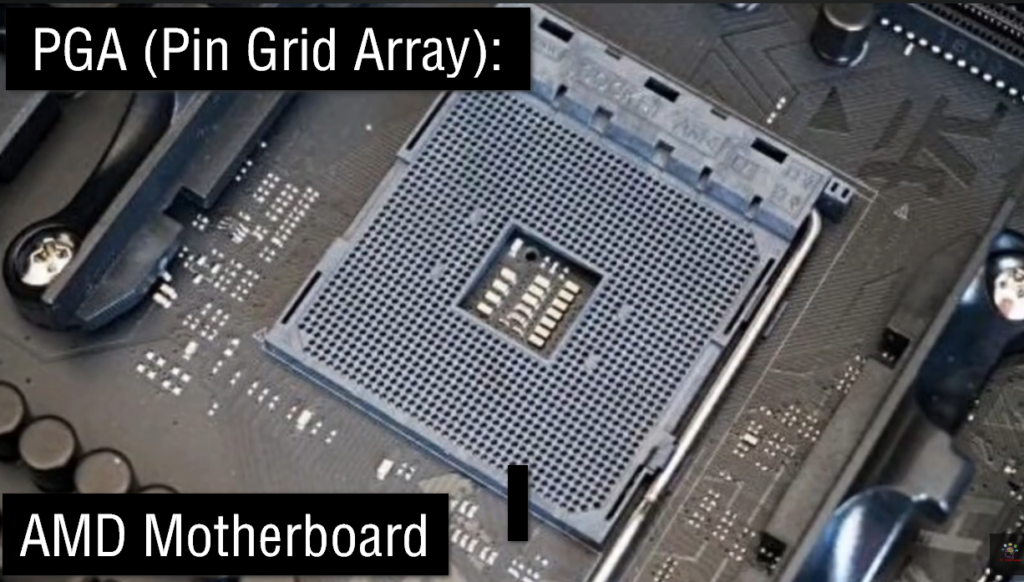
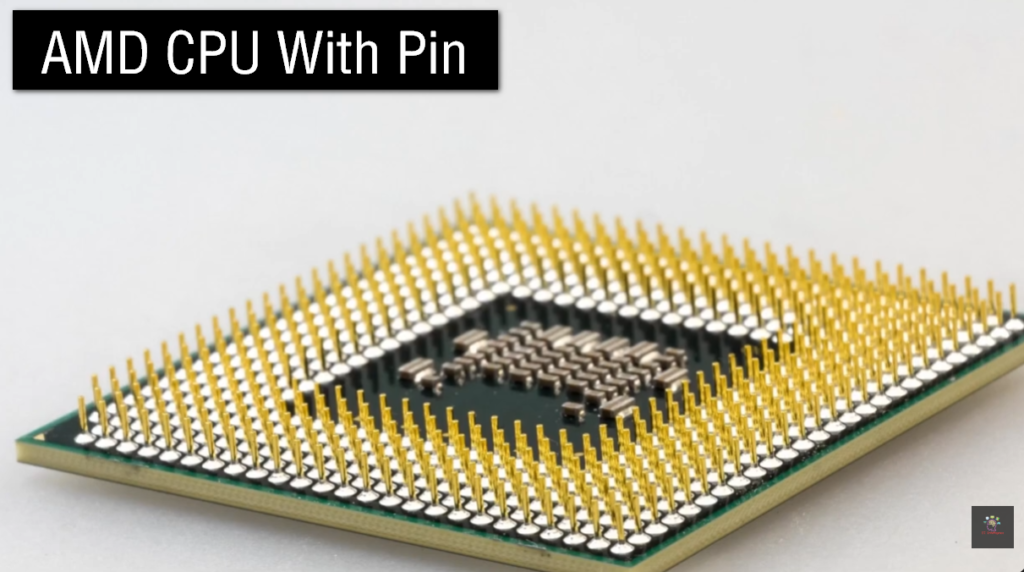
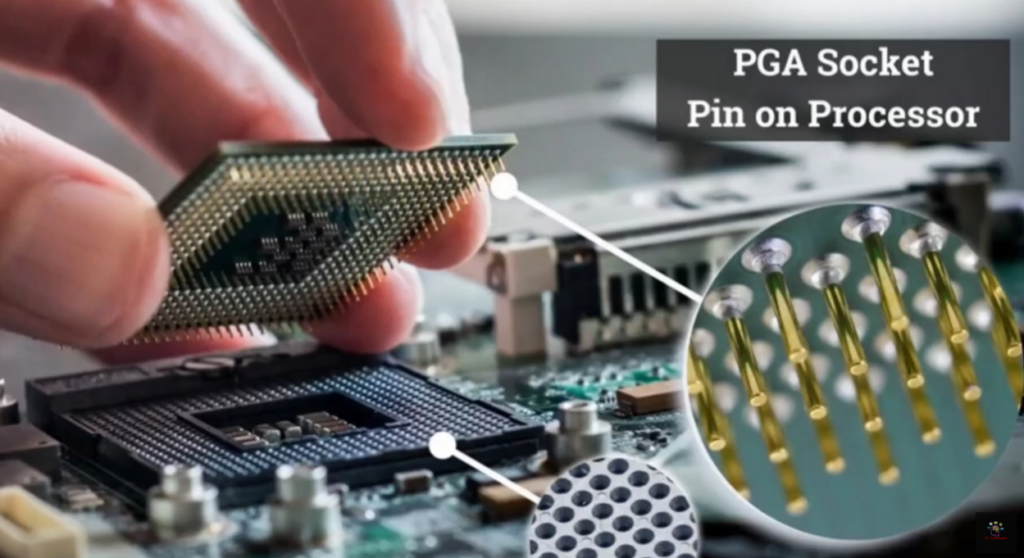
- PGA (Pin Grid Array) → Used in AMD desktop CPUs, pins on CPU
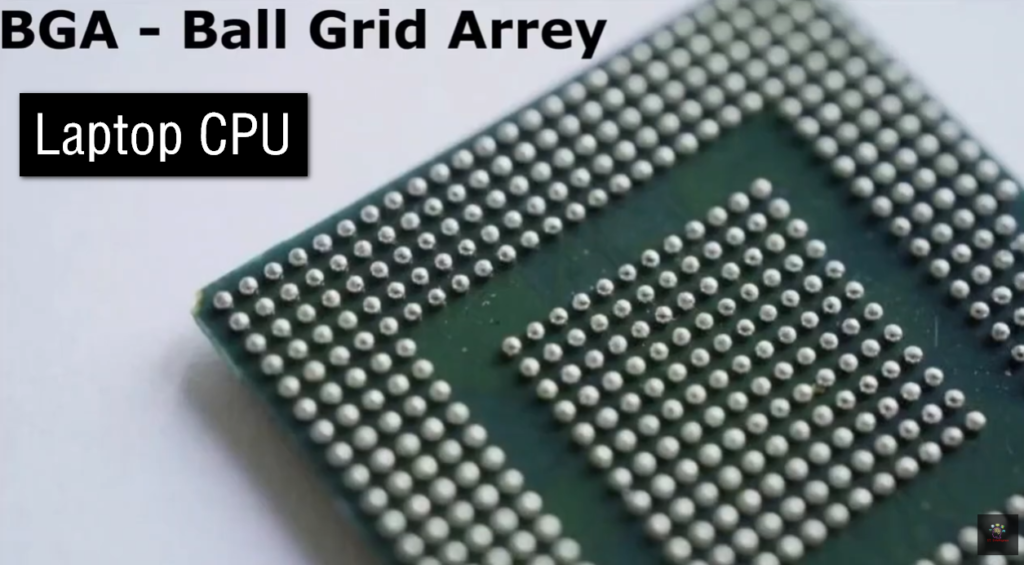
- BGA (Ball Grid Array) → Used in laptops/mobile devices, CPU soldered (not removable)
LGA (Land Grid Array)
LGA (Land Grid Array)
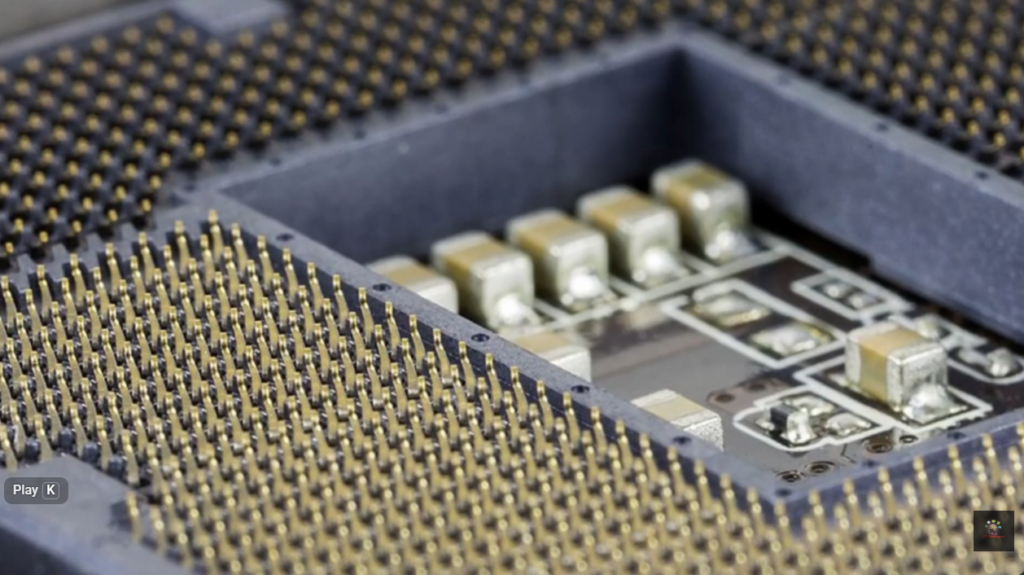
LGA is a CPU socket type where the pins are located on the motherboard socket, and the CPU has flat contact points. The processor simply sits on the socket and is secured with a latch. This design reduces the risk of bending CPU pins and is widely used in modern Intel desktop processors like LGA 1700.
LGA (Who uses it)
LGA is mainly used in desktop computers, especially by Intel. In this design, the motherboard has the pins and the CPU has flat contact pads. It is widely used in modern gaming PCs, office desktops, and workstations because it is durable and reduces CPU pin damage.
PGA (Pin Grid Array)
PGA (Pin Grid Array):
PGA is a CPU socket type where the pins are located on the CPU itself, and the motherboard has holes to receive those pins. The CPU is inserted directly into the socket. This type was commonly used in older Intel CPUs and many AMD processors such as AM4 Ryzen CPUs. It is easier to replace but CPU pins can get damaged.
PGA (Who uses it):
PGA is mainly used by AMD desktop processors, especially on the AM4 platform. In this design, the CPU has pins and the motherboard has holes. It is common in budget and mid-range gaming PCs. Some older Intel processors also used PGA.
BGA (Ball Grid Array)
BGA (Ball Grid Array)
BGA is a CPU mounting method where the processor is permanently soldered to the motherboard using small solder balls. The CPU cannot be removed or upgraded. This design is mostly used in laptops, smartphones, and compact devices where space and power efficiency are important.
BGA (Who uses it)
BGA is used in laptops, ultrabooks, tablets, and mobile devices. In this design, the CPU is permanently soldered to the motherboard, so it cannot be removed or upgraded. It is used by Intel, AMD, and Apple in compact devices where space and power efficiency are important.
What is AMD Socket
What is AMD Socket
- An AMD socket is the physical slot on an AMD motherboard where the processor (CPU) is installed. It holds the CPU securely and creates the electrical connections needed for communication between the processor and the rest of the computer system.
- The socket allows the CPU to connect with important hardware components such as RAM, storage devices, graphics cards, and USB controllers. Without the correct socket, the processor cannot work properly with the motherboard.
- Different AMD processor families use different socket types depending on their generation and architecture. This means the CPU and motherboard socket must match for compatibility.
- Older AMD processors like Athlon, Athlon X2, and Phenom commonly used sockets such as AM2, AM2+, and AM3. AMD Athlon and A-series APUs also used FM1 and FM2+ sockets in budget desktop systems.
- Modern AMD Ryzen processors mainly use AM4 and newer AM5 sockets. AM4 supports Ryzen 1000–5000 series with DDR4 memory, while AM5 supports Ryzen 7000 and newer processors with DDR5 memory.
- In short, an AMD socket is the CPU connection slot on the motherboard that determines which AMD processors, including Athlon and Ryzen series, can be installed and supported.
- AM2 / AM2+ → Used for older AMD Athlon and Phenom CPUs with DDR2 support
- AM3 / AM3+ → Used for Athlon II, Phenom II, and FX processors with DDR3 support
- FM1 / FM2 / FM2+ → Used for AMD Athlon and A-series APUs with integrated graphics
- AM4 → Used for Athlon and Ryzen 1000–5000 CPUs with DDR4 support
- AM5 → Used for Ryzen 7000+ CPUs with DDR5 support
- TR4 / sTRX4 → Used for Ryzen Threadripper workstation processors
AMD Motherboard Price List
A-Series (Entry Level – Budget)
- A320 → ₹3,500 – ₹6,000 → Basic PC, Athlon / Ryzen 1st–3rd Gen support
- A520 → ₹4,500 – ₹7,500 → Budget AM4 board, Ryzen 3000–5000 support
- A620 → ₹6,000 – ₹10,000 → Entry AM5 board, Ryzen 7000 support (DDR5)
👉 Use: office PC, basic gaming, low budget builds
B-Series (Mid Range – Best Value)
- B450 → ₹4,500 – ₹8,000 → Ryzen 1000–5000 support (popular budget gaming)
- B550 → ₹7,000 – ₹15,000 → Ryzen 3000–5000, PCIe 4.0 support
- B650 → ₹12,000 – ₹25,000 → Ryzen 7000/9000, AM5 DDR5 platform
- B840 / B850 (new gen) → ₹15,000 – ₹30,000 → Latest AM5 mid-range boards
👉 Use: gaming, editing, best value performance PCs
X-Series (High End / Enthusiast)
- X470 → ₹8,000 – ₹15,000 → High-end AM4 Ryzen support
- X570 → ₹12,000 – ₹25,000 → PCIe 4.0, strong gaming + editing
- X670 → ₹25,000 – ₹50,000 → High-end AM5, DDR5 support
- X670E / X870 → ₹35,000 – ₹80,000+ → Extreme performance, PCIe 5.0
👉 Use: professional editing, AI work, extreme gaming