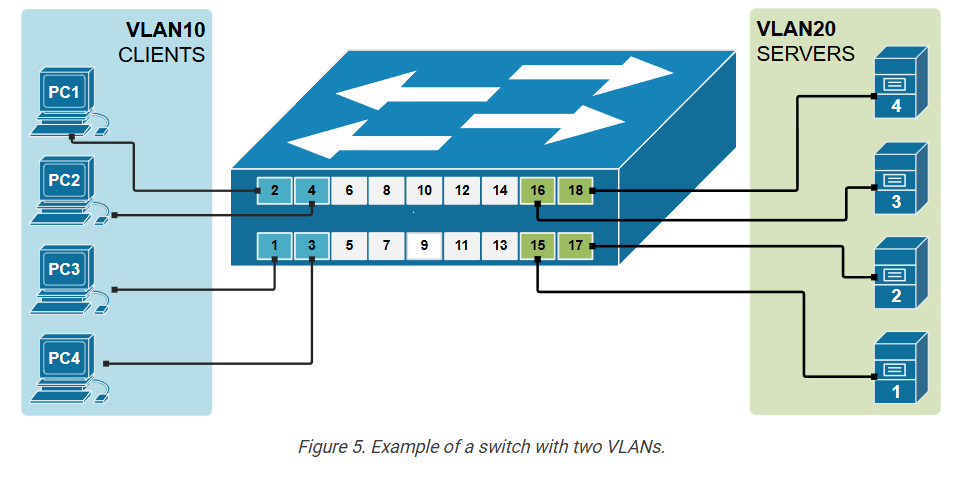
VLAN Concept Details

he most important topic in the networking field – Virtual LANs (VLANs). It is a simple yet very powerful concept that changed the network industry and is nowadays used in EVERY network.

LAN switches and BUM traffic

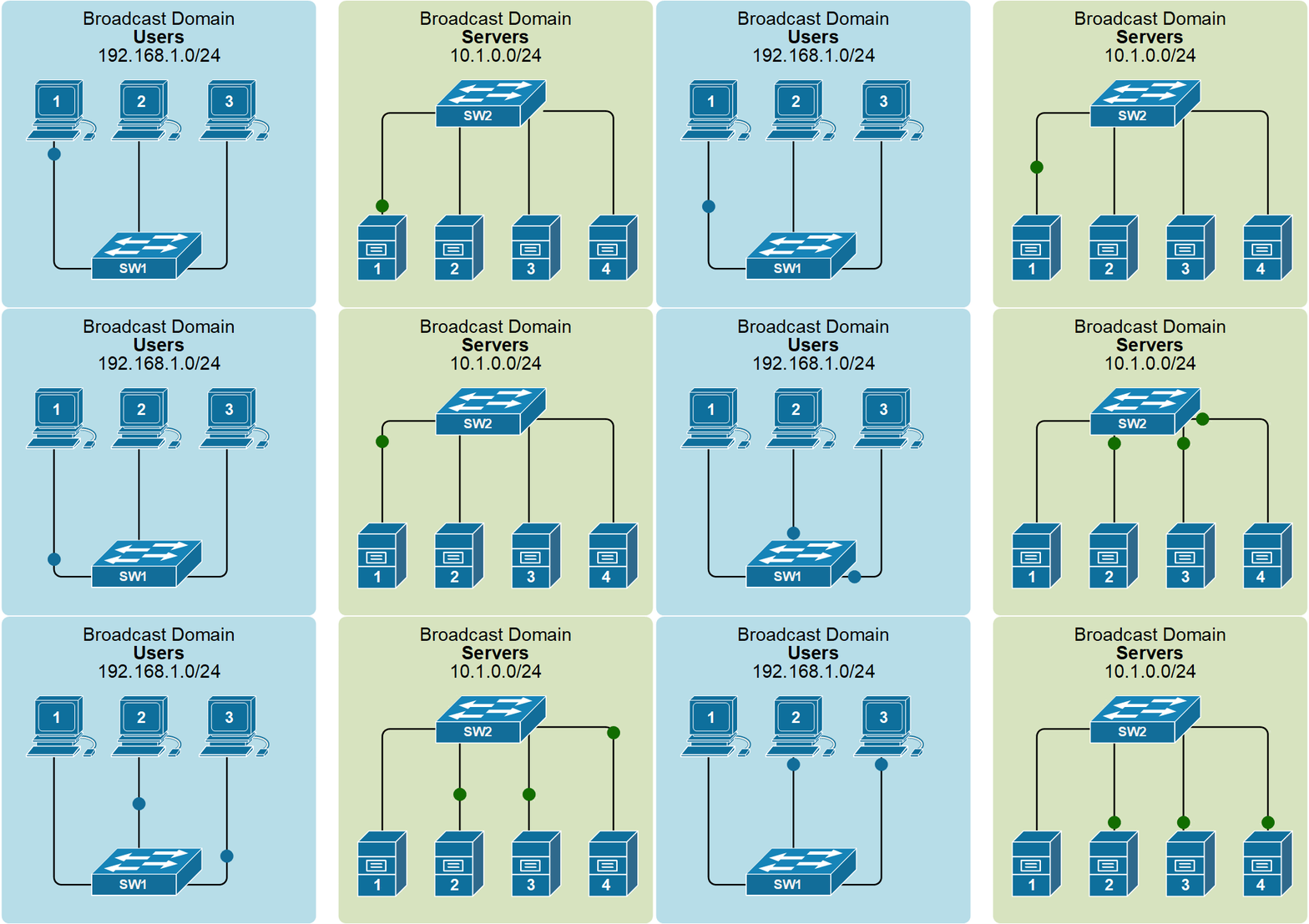
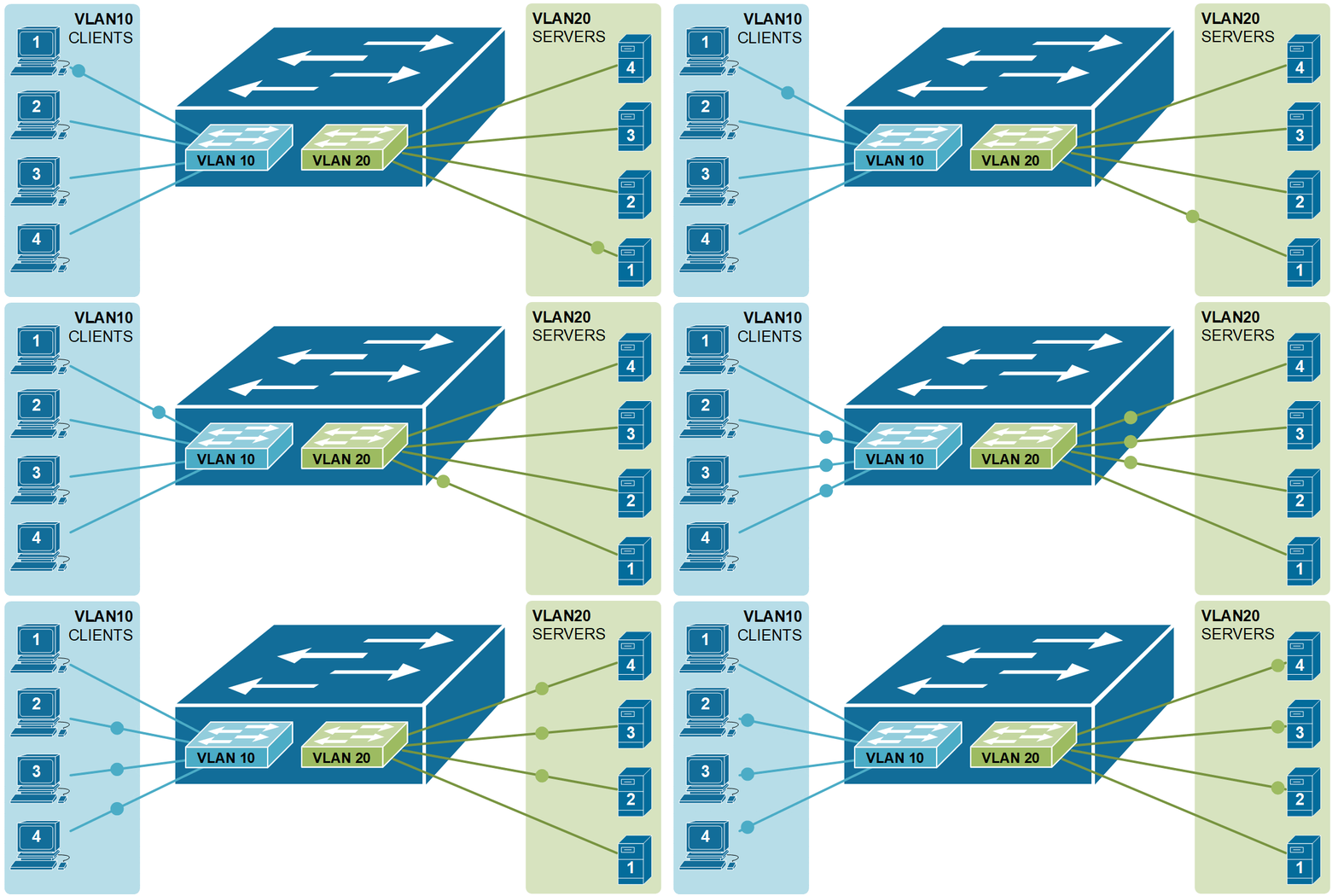
Before understanding the VLAN concept, you must first understand two core concepts about the Ethernet standard – what is a broadcast domain and what BUM traffic is. Let’s start with the BUM data type. BUM stands for broadcast, unknown unicast, and multicast. When a LAN switch receives a frame that belongs to one of these types, it sends the frame to all its ports except the port it received the frame on. This behavior is shown in the diagram below.

				
					Switch# show vlan brief 
 
VLAN Name                             Status    Ports
---- -------------------------------- --------- -------------------------------
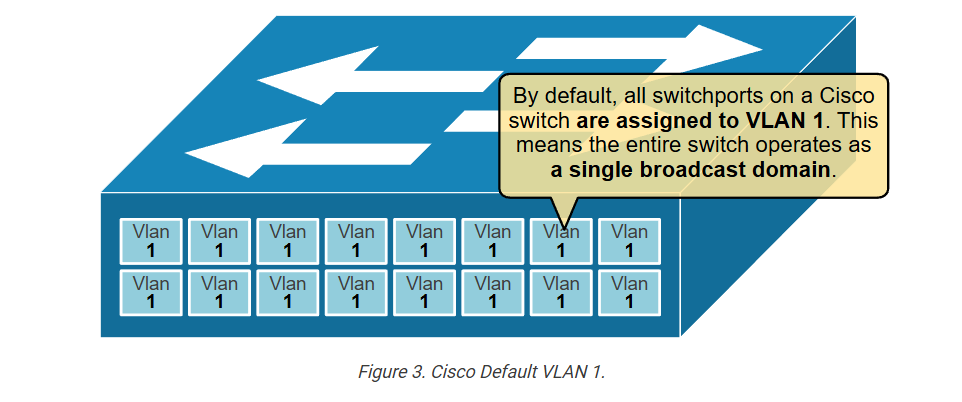
1    default                          active    Fa0/1, Fa0/2, Fa0/3, Fa0/4
                                                Fa0/5, Fa0/6, Fa0/7, Fa0/8
                                                Fa0/9, Fa0/10, Fa0/11, Fa0/12
                                                Fa0/13, Fa0/14, Fa0/15, Fa0/16
                                                Fa0/17, Fa0/18, Fa0/19, Fa0/20
                                                Fa0/21, Fa0/22, Fa0/23, Fa0/24
                                                Gig0/1, Gig0/2
1002 fddi-default                     act/unsup    
1003 token-ring-default               act/unsup 
1004 fddinet-default                  act/unsup 
1005 trnet-default                    act/unsup 


					Switch# configure terminal 
Enter configuration commands, one per line.  End with CNTL/Z.
Switch(config)# vlan 10
Switch(config-vlan)# name CLIENTS
Switch(config-vlan)# exit
Switch(config)# vlan 20
Switch(config-vlan)# name SERVERS
Switch(config-vlan)# end


					Switch#show vlan brief 

VLAN Name                             Status    Ports
---- -------------------------------- --------- -------------------------------
1    default                          active    Fa0/1, Fa0/2, Fa0/3, Fa0/4
                                                Fa0/5, Fa0/6, Fa0/7, Fa0/8
                                                Fa0/9, Fa0/10, Fa0/11, Fa0/12
                                                Fa0/13, Fa0/14, Fa0/15, Fa0/16
                                                Fa0/17, Fa0/18, Fa0/19, Fa0/20
                                                Fa0/21, Fa0/22, Fa0/23, Fa0/24
                                                Gig0/1, Gig0/2
10   CLIENTS                          active 
20   SERVERS                          active    
1002 fddi-default                     act/unsup
1003 token-ring-default               act/unsup
1004 fddinet-default                  act/unsup
1005 trnet-default                    act/unsup


					Switch# configure terminal
Enter configuration commands, one per line.  End with CNTL/Z.
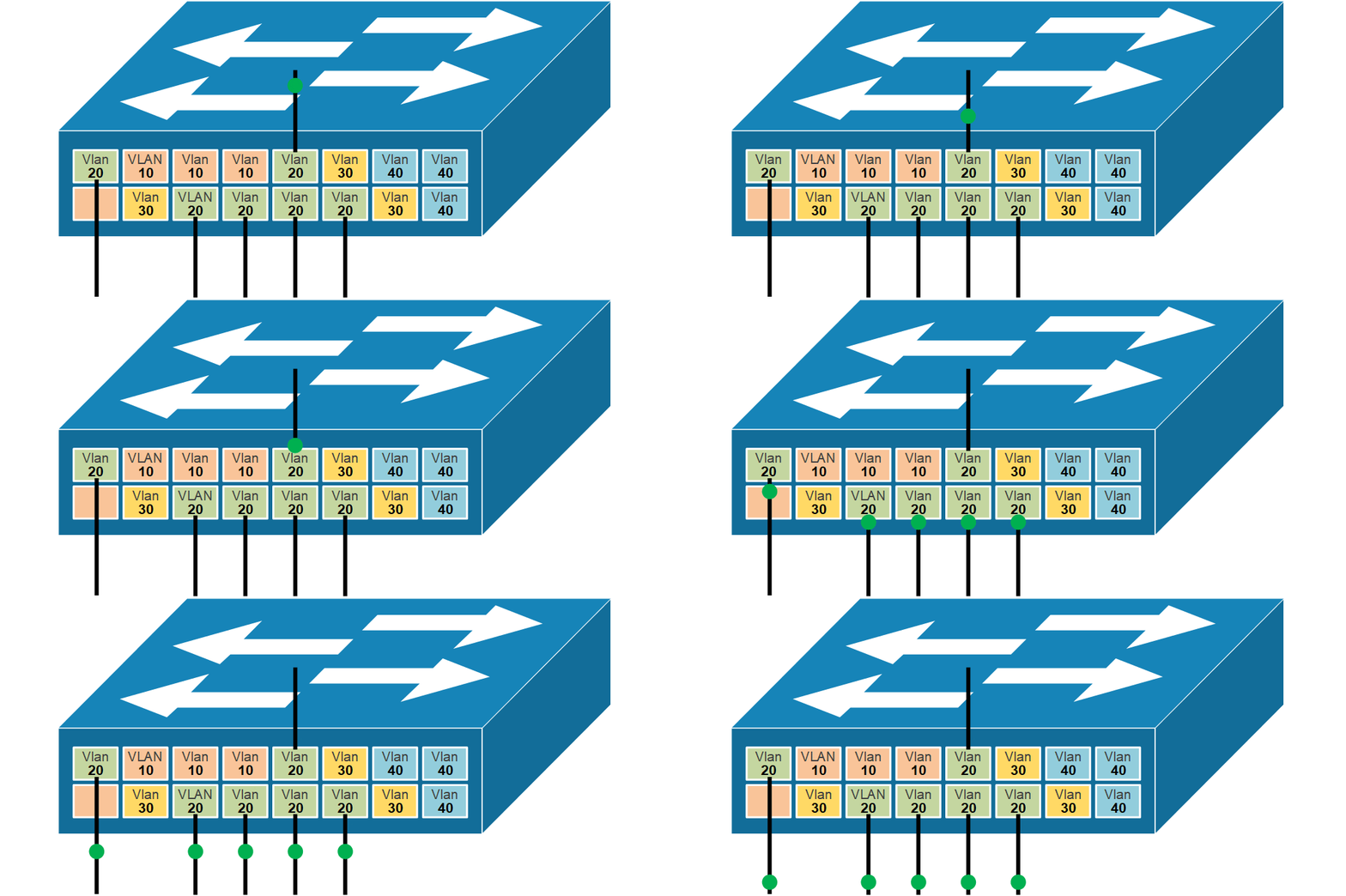
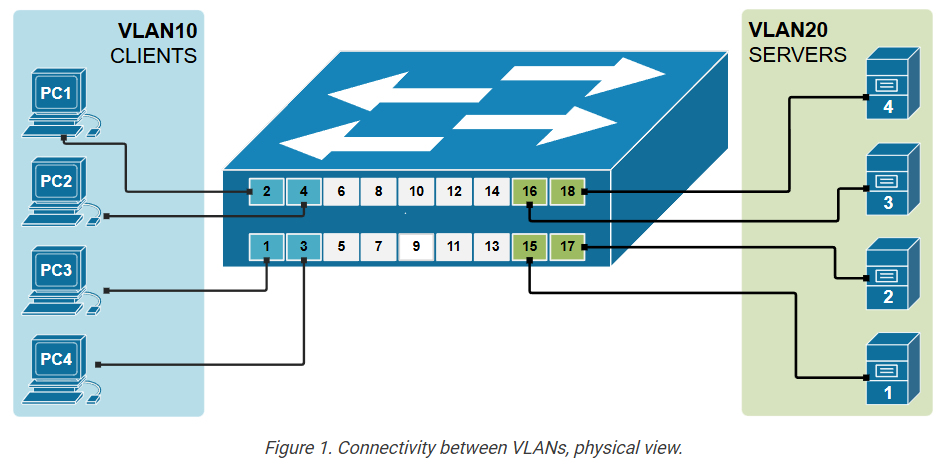
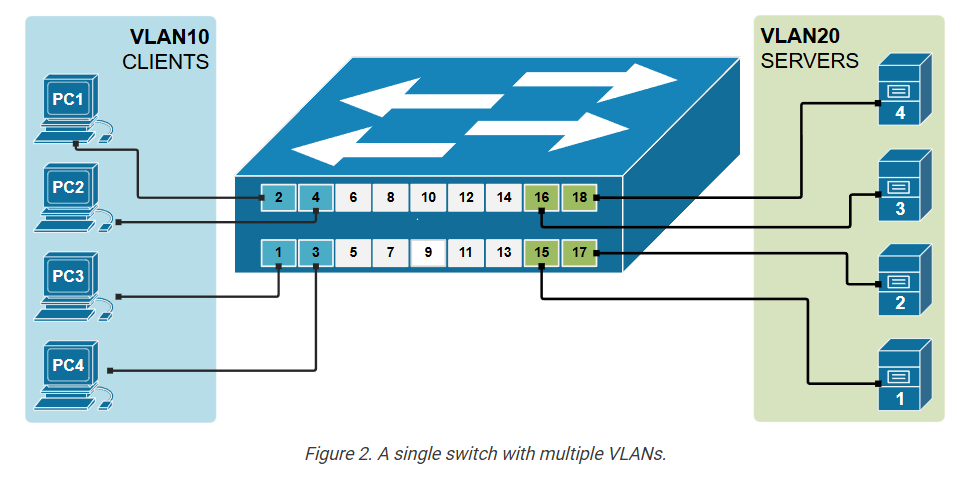
Switch(config)# interface range fastEthernet 0/1 - 4
Switch(config-if-range)# switchport access vlan 10
Switch(config-if-range)# switchport mode access 
Switch(config-if-range)# exit
Switch(config)# interface range fastEthernet 0/15 - 18
Switch(config-if-range)# switchport access vlan 20
Switch(config-if-range)# switchport mode access 
Switch(config-if-range)# end


					Switch#show vlan brief 
VLAN Name                             Status    Ports
---- -------------------------------- --------- -------------------------------
1    default                          active    Fa0/5, Fa0/6, Fa0/7, Fa0/8
                                                Fa0/9, Fa0/10, Fa0/11, Fa0/12
                                                Fa0/13, Fa0/14, Fa0/19, Fa0/20
                                                Fa0/21, Fa0/22, Fa0/23, Fa0/24
                                                Gig0/1, Gig0/2
10   CLIENTS                          active    Fa0/1, Fa0/2, Fa0/3, Fa0/4
20   SERVERS                          active    Fa0/15, Fa0/16, Fa0/17, Fa0/18
1002 fddi-default                     act/unsup 
1003 token-ring-default               act/unsup 
1004 fddinet-default                  act/unsup 
1005 trnet-default                    act/unsup              


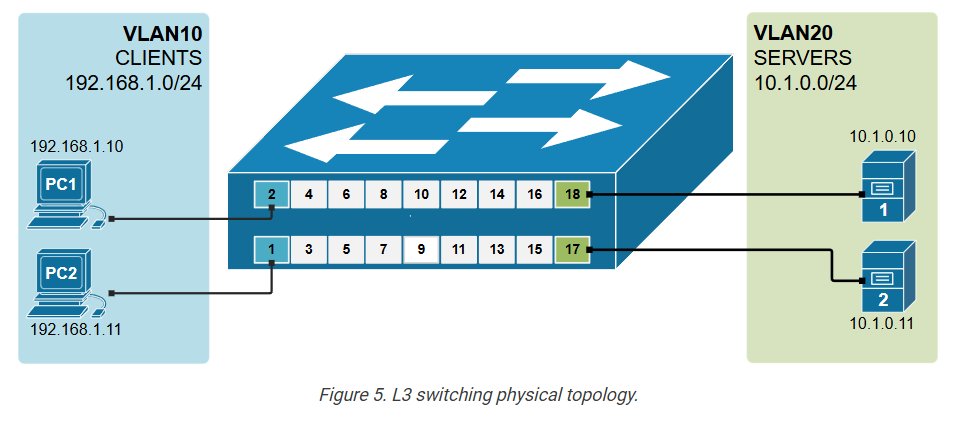
					C:\> ipconfig

FastEthernet0 Connection:(default port)
   Link-local IPv6 Address.........: FE80::20A:41FF:FE83:371A
   IP Address......................: 192.168.1.10
   Subnet Mask.....................: 255.255.255.0
   Default Gateway.................: 0.0.0.0
   
C:\>ping 192.168.1.11
Pinging 192.168.1.11 with 32 bytes of data:
Reply from 192.168.1.11: bytes=32 time<1ms TTL=128
Ping statistics for 192.168.1.11:
    Packets: Sent = 4, Received = 4, Lost = 0 (0% loss)


					C:\> ping 10.1.0.10
Pinging 10.1.0.10 with 32 bytes of data:
Request timed out.
Request timed out.
Request timed out.
Request timed out.
Ping statistics for 10.1.0.10:
    Packets: Sent = 4, Received = 0, Lost = 4 (100% loss)


VLAN Trunking

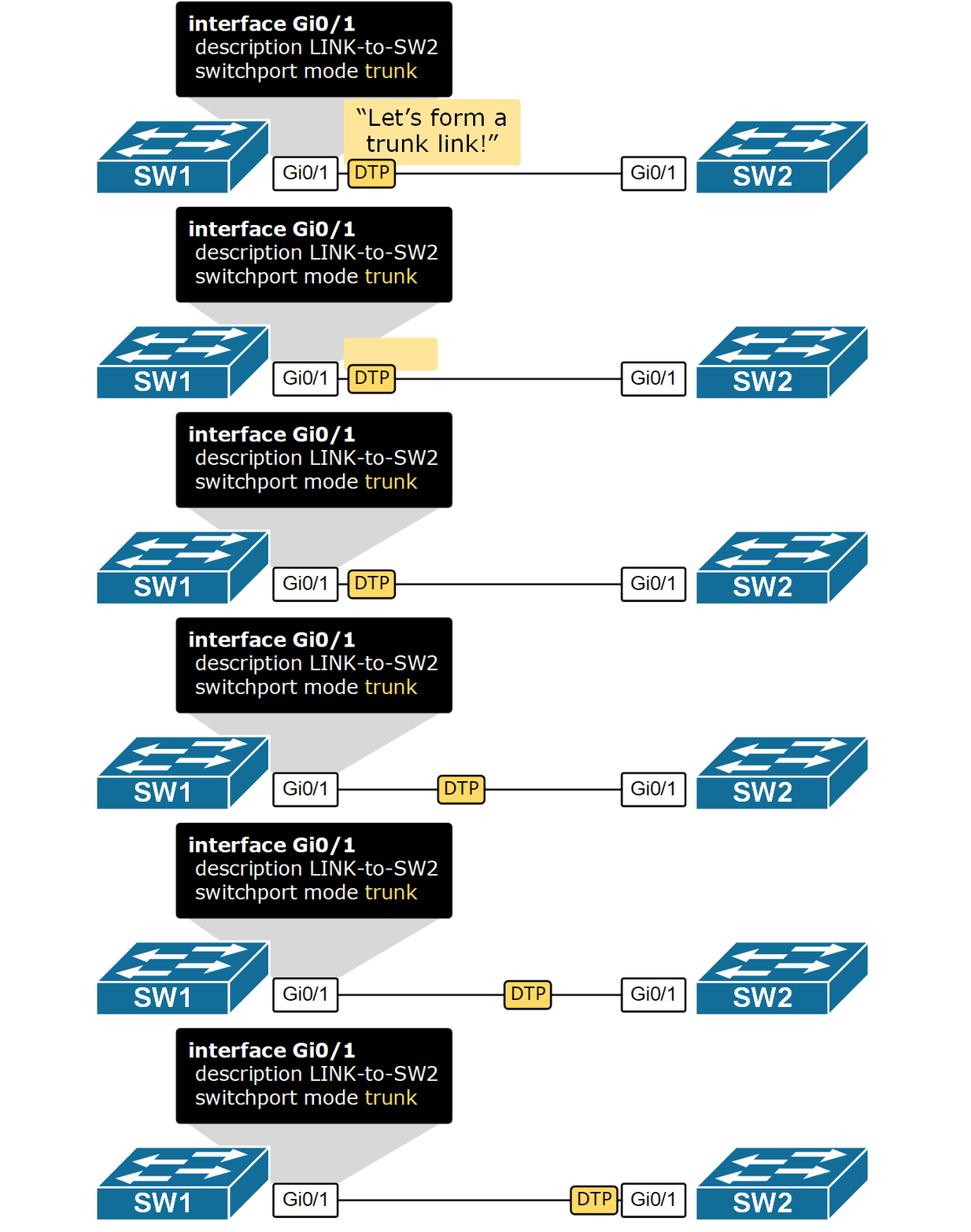
This lesson discusses VLAN trunking – a technology that switches use to carry traffic for multiple VLANs over a single physical link called a trunk link. It is a fundamental topic of the CCNA exam and the networking field in general.

Why do we need trunk links?

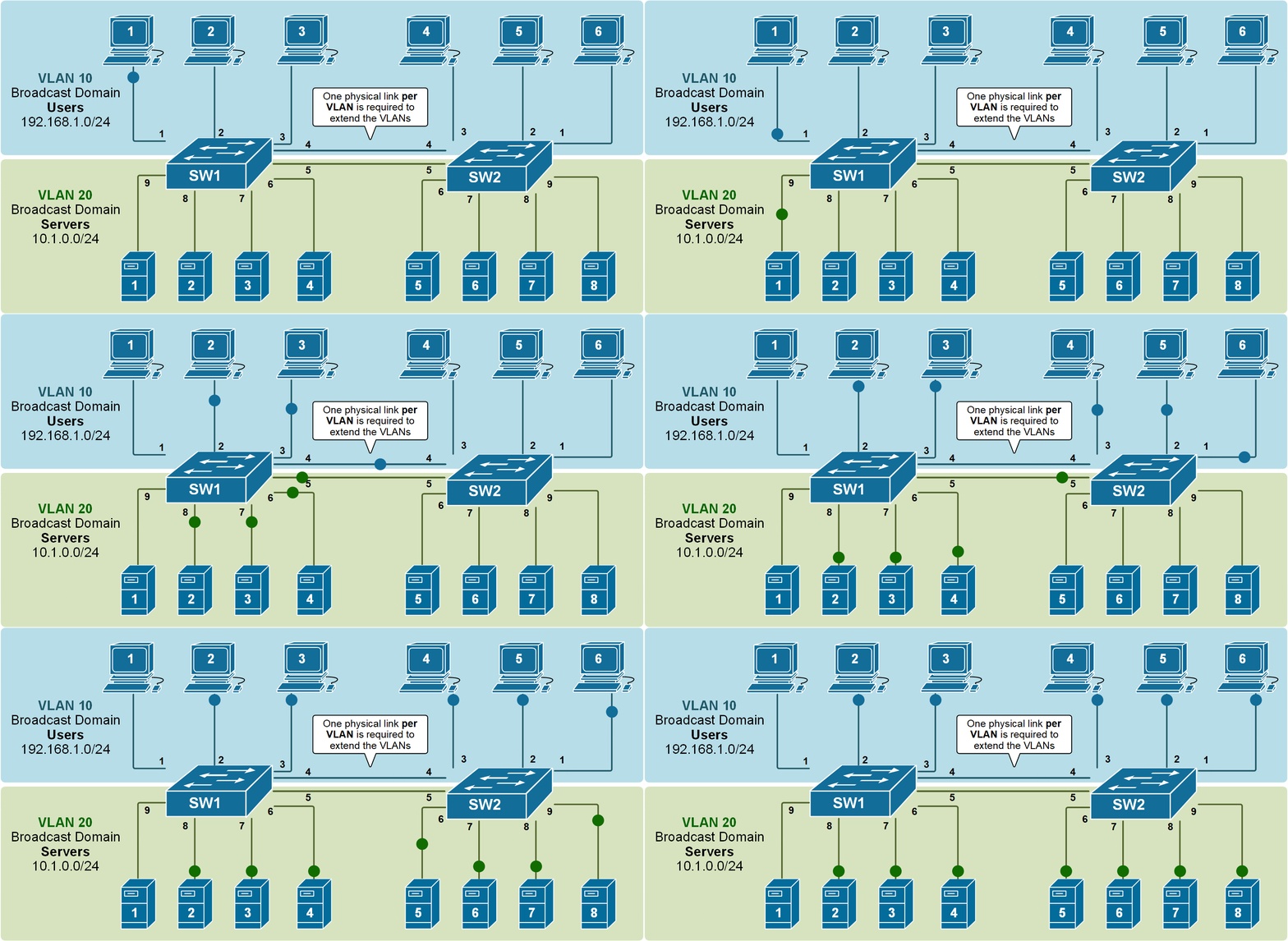
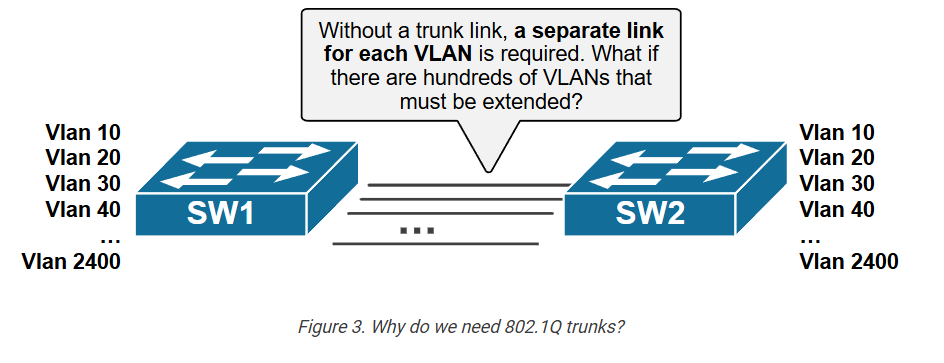
Soon after VLANs were introduced, people realized they needed to extend them across multiple switches. But some challenges had to be solved first. How do we span multiple VLANs between switches? Let’s find out.

Multiswitch broadcast domains

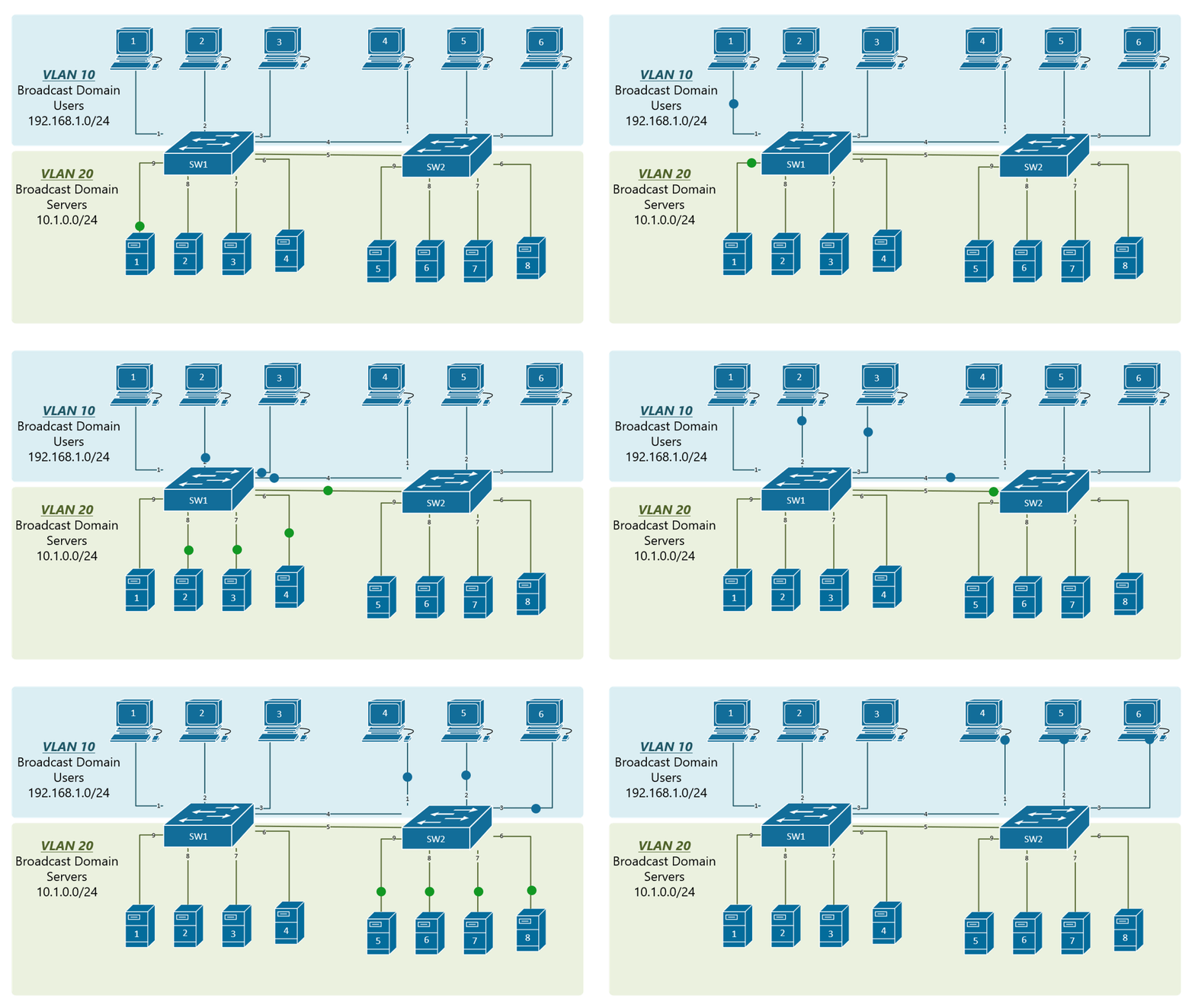
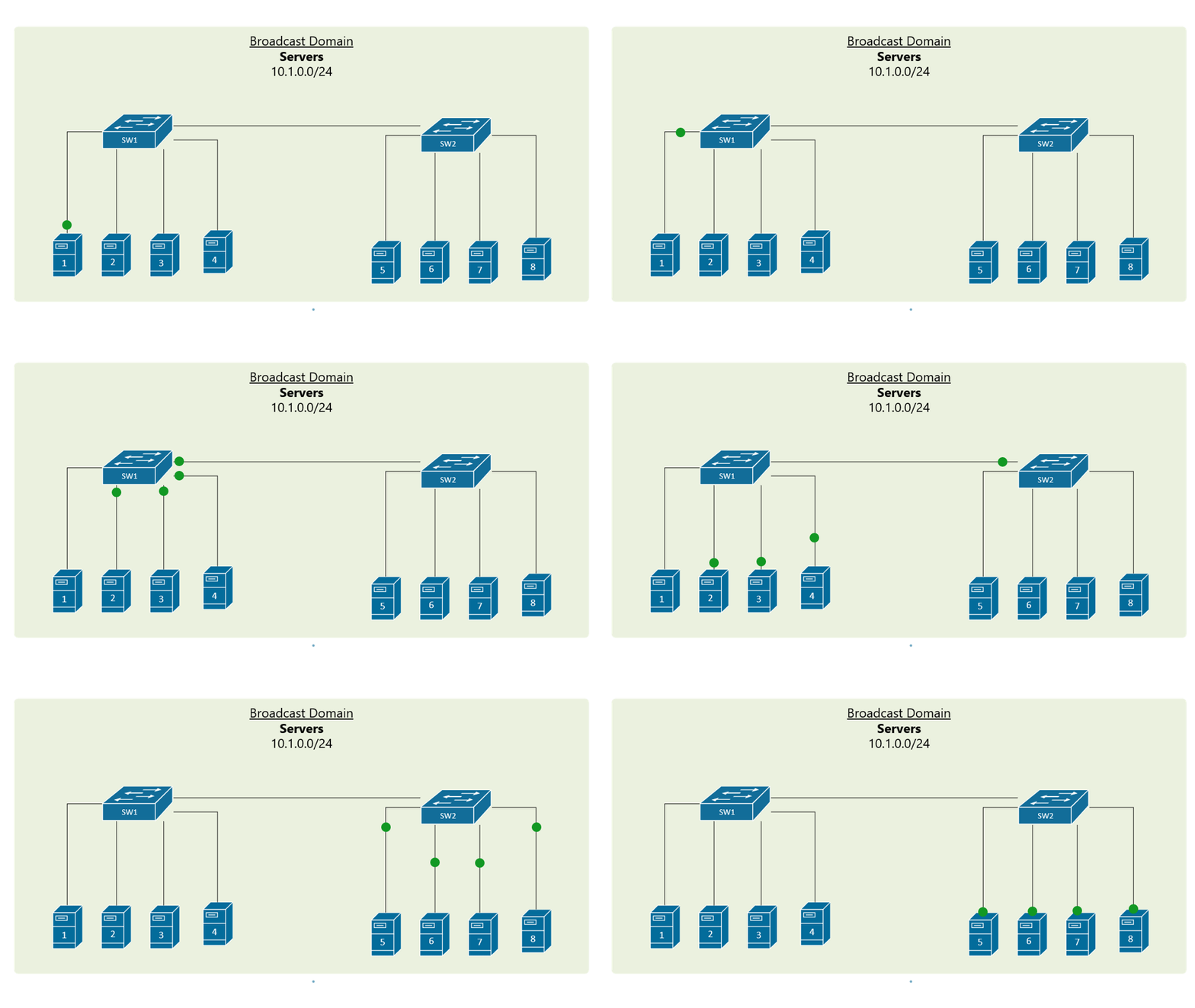
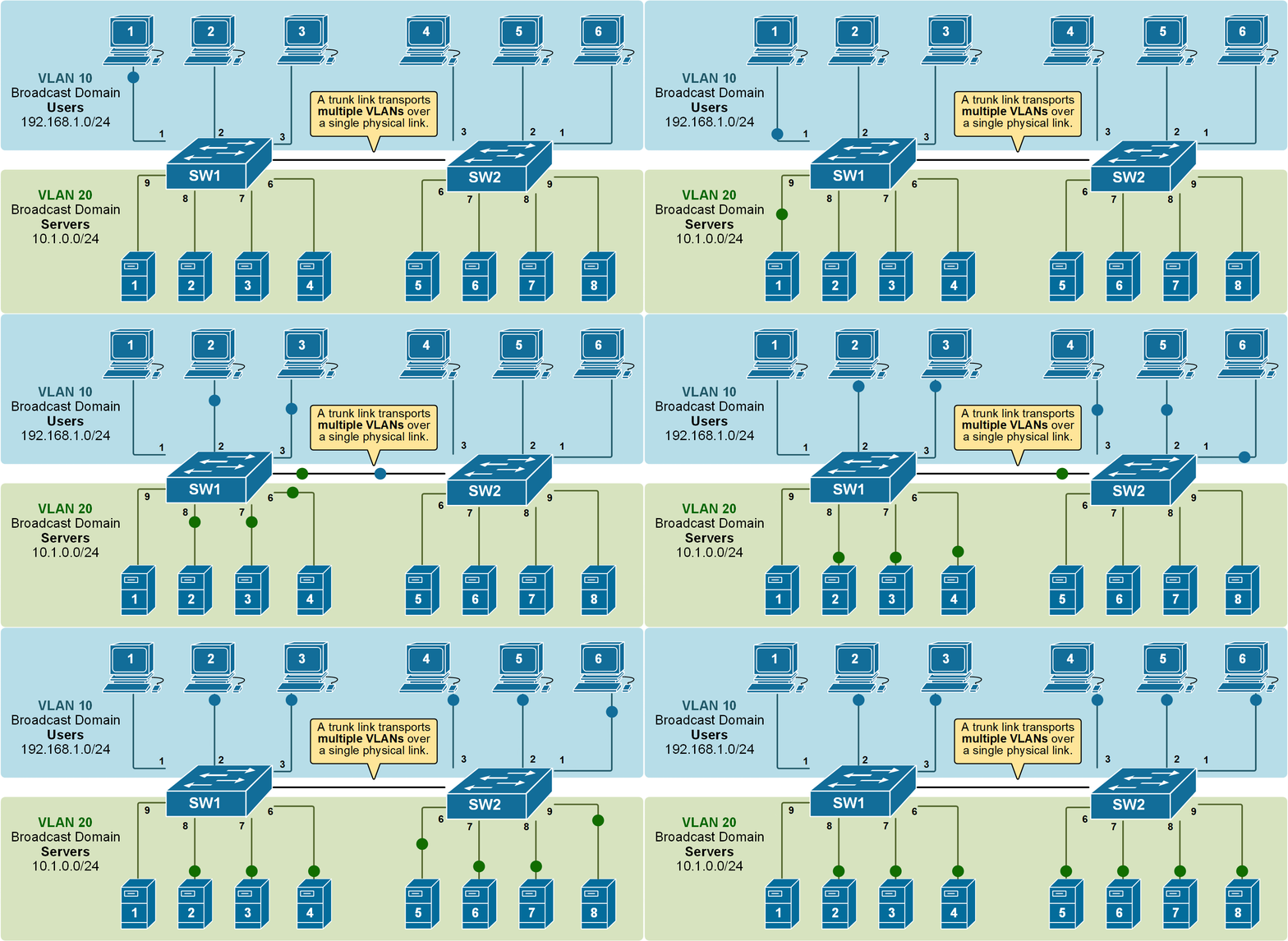
Recall that when a broadcast frame is received on any switch port, the switch forwards it out to all its other ports. Having that in mind, if we connect two default setting switches, as shown in the diagram below, any broadcast frame received by either switch is forwarded to the other one and then out all its ports. Therefore, a broadcast domain is not limited to one switch only; it includes all devices that get a copy of any broadcast frame, even if they are connected to other

				
					SW1# conf t
Enter configuration commands, one per line.  End with CNTL/Z.
SW1(config)# interface GigabitEthernet 0/1
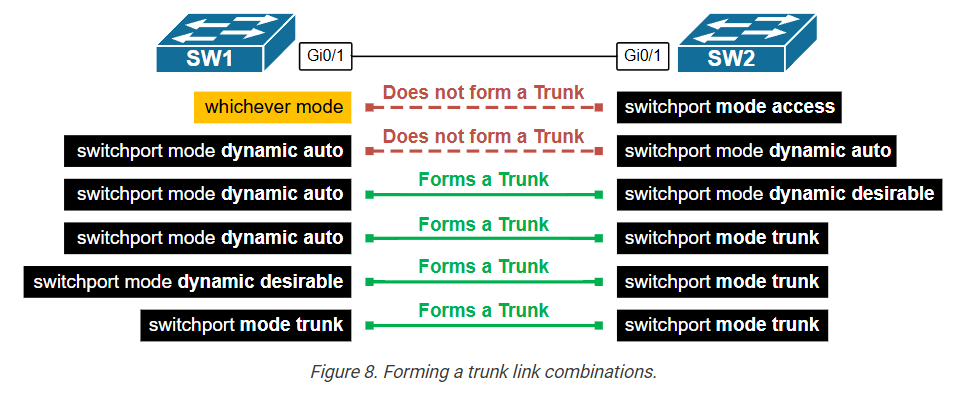
SW1(config-if)#switchport mode dynamic ?
  auto       Set trunking mode dynamic negotiation parameter to AUTO
  desirable  Set trunking mode dynamic negotiation parameter to DESIRABLE

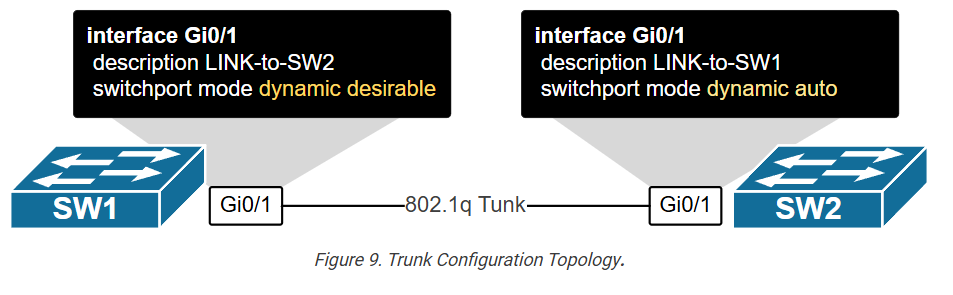
SW1(config-if)# switchport mode dynamic desirable
SW1(config-if)# end
%SYS-5-CONFIG_I: Configured from console by console


					SW1# show interface trunk 

Port        Mode         Encapsulation  Status        Native vlan
Gig0/1      desirable    n-802.1q       trunking      1

Port        Vlans allowed on trunk
Gig0/1      1-1005

Port        Vlans allowed and active in management domain
Gig0/1      1,10,20

Port        Vlans in spanning tree forwarding state and not pruned
Gig0/1      1,10,20


					SW2#sh interfaces trunk 

Port        Mode         Encapsulation  Status        Native vlan
Gig0/1      auto         n-802.1q       trunking      1

Port        Vlans allowed on trunk
Gig0/1      1-1005

Port        Vlans allowed and active in management domain
Gig0/1      1,10,20

Port        Vlans in spanning tree forwarding state and not pruned
Gig0/1      1,10,20


Trunk Native VLAN

This lesson discusses the Native VLAN – one of the most confusing and challenging topics in the CCNA exam — and networking overall. Although it may seem simple at first, it often causes misunderstandings and mistakes in real-world setups. This lesson will help you clearly understand the topic through many diagrams and animated examples.

Why do we need the Native VLAN?

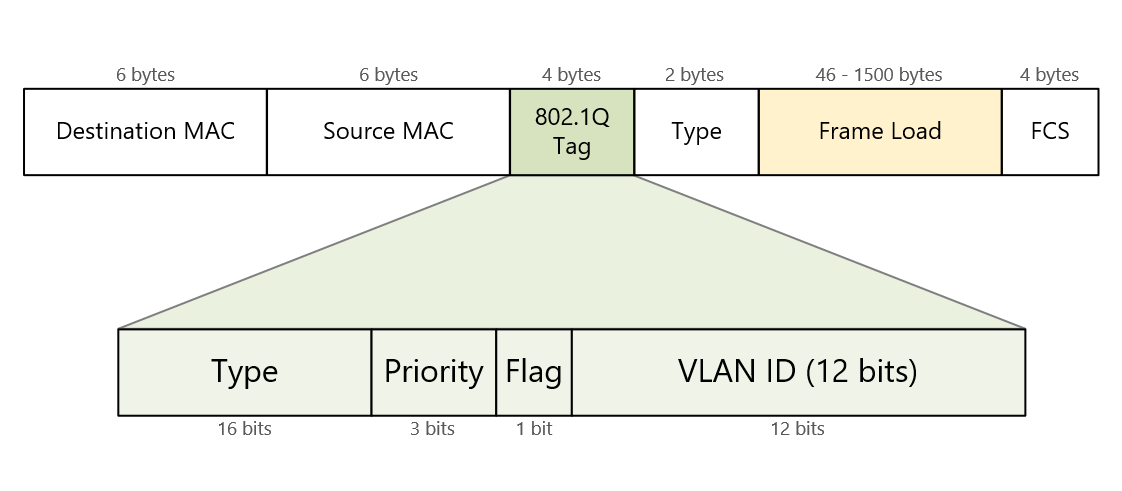
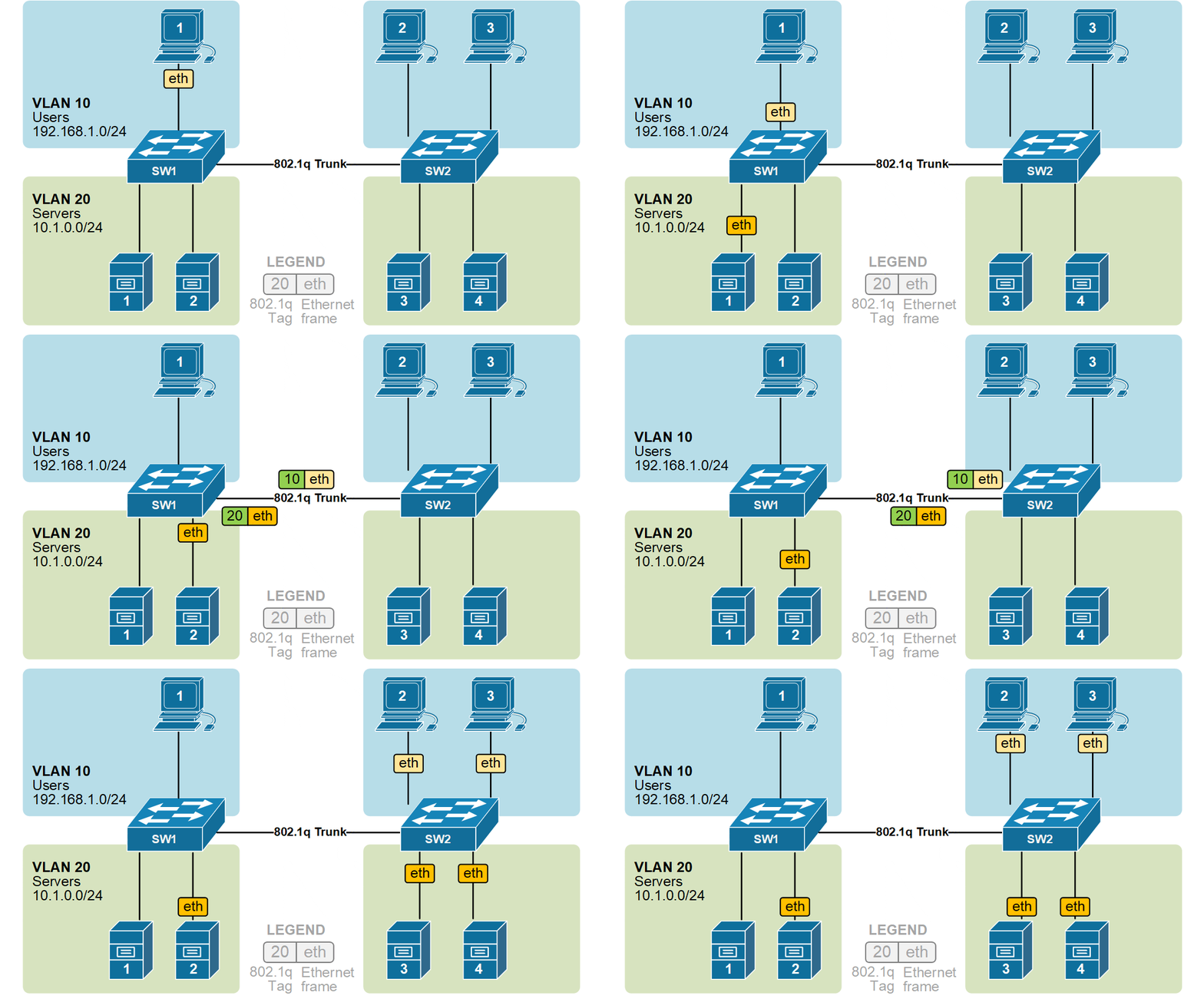
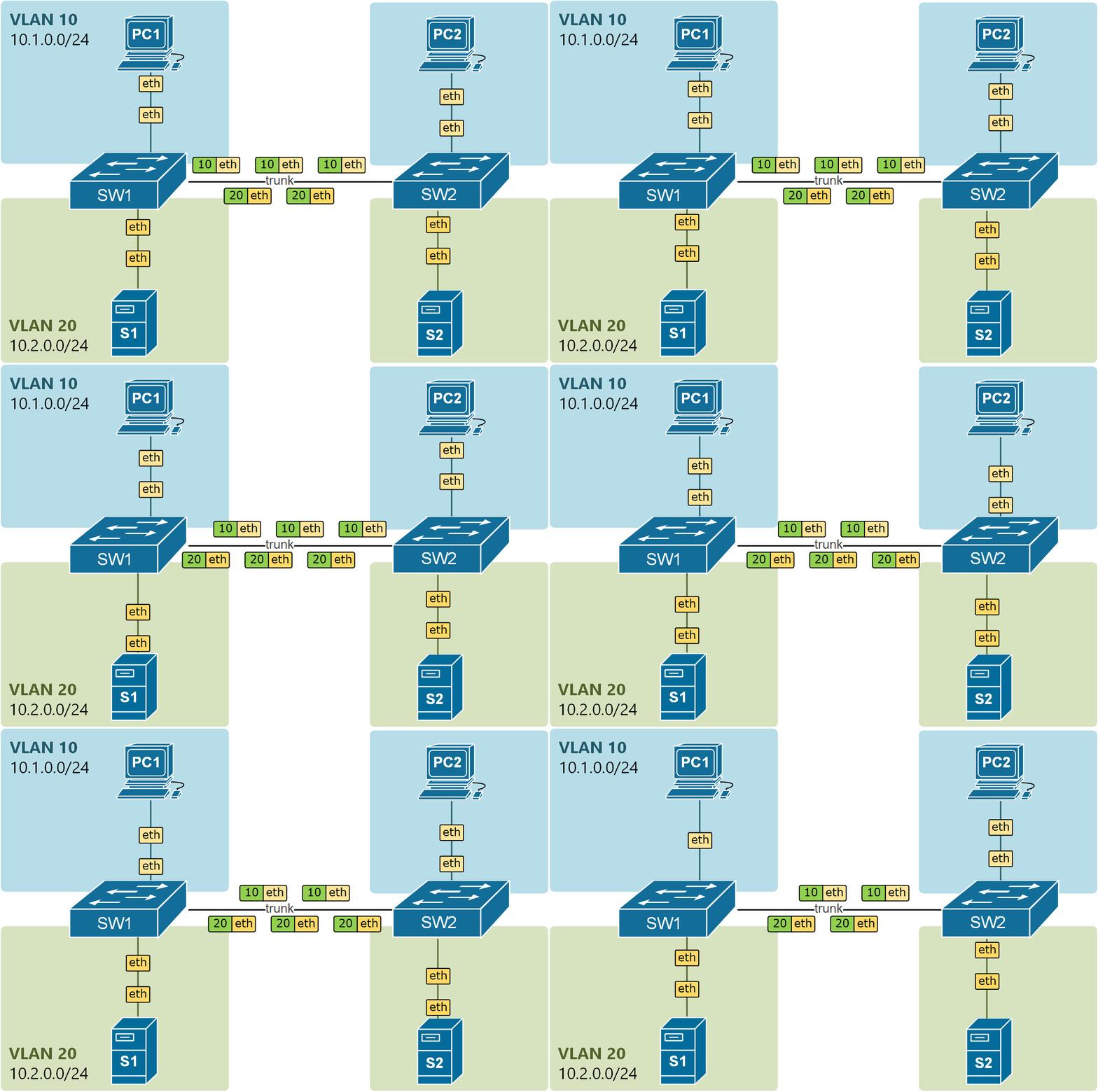
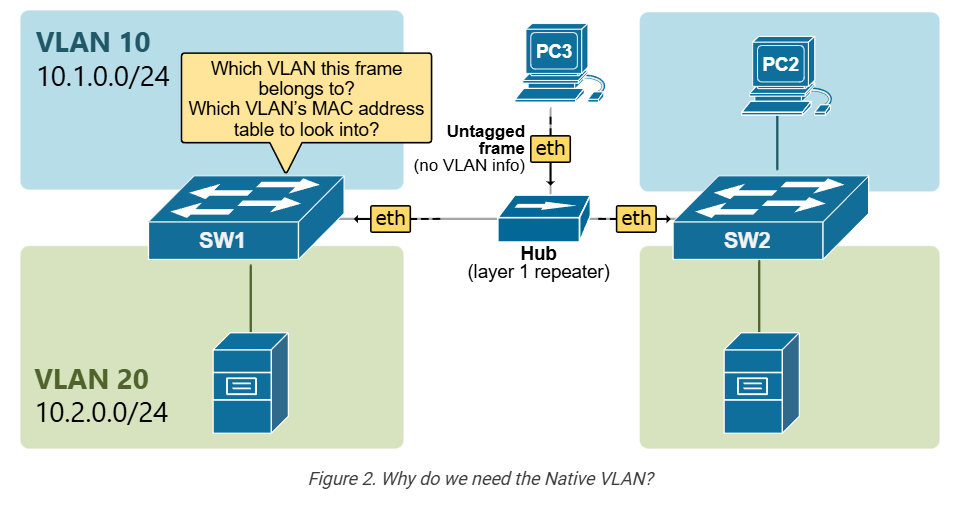
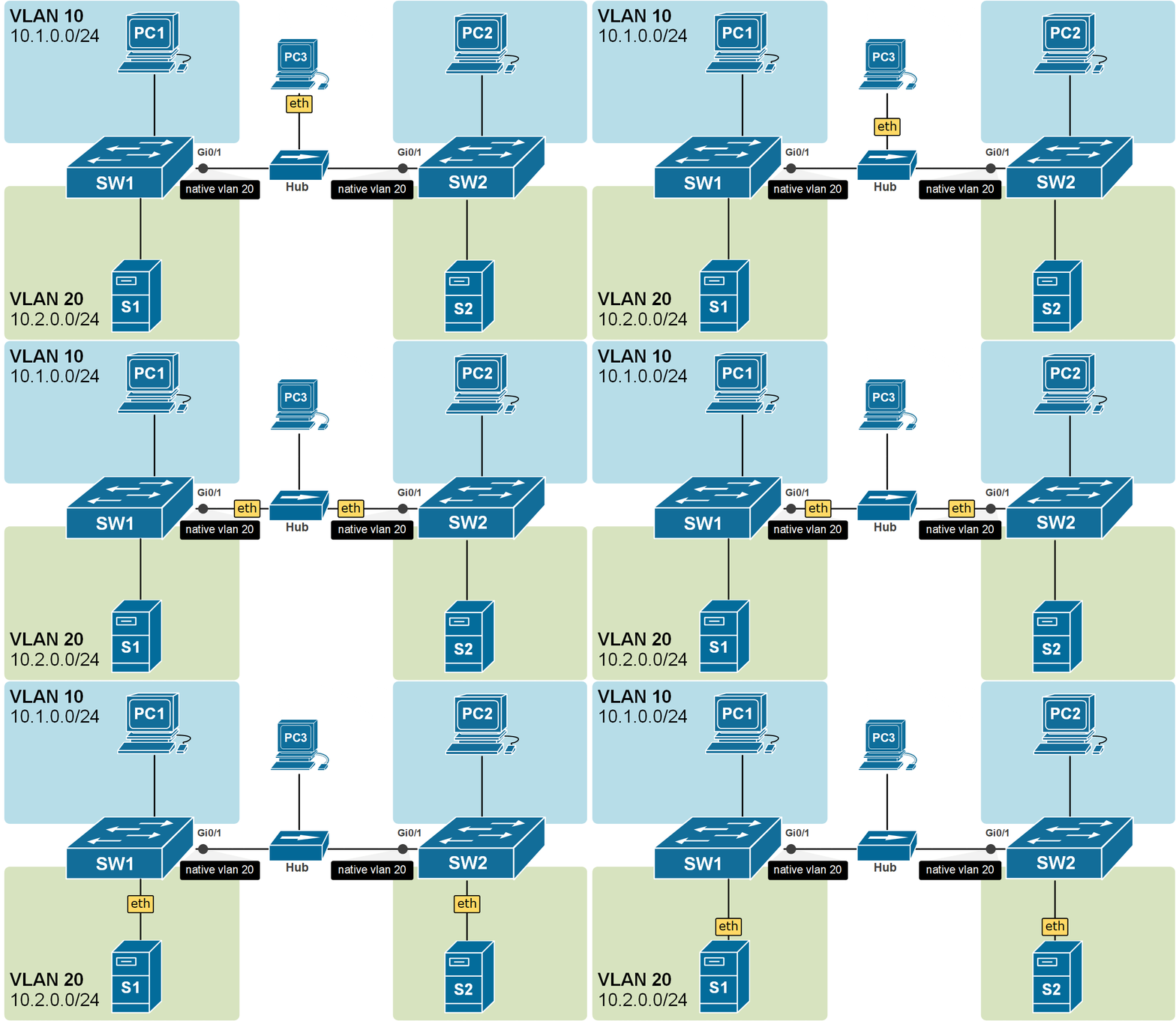
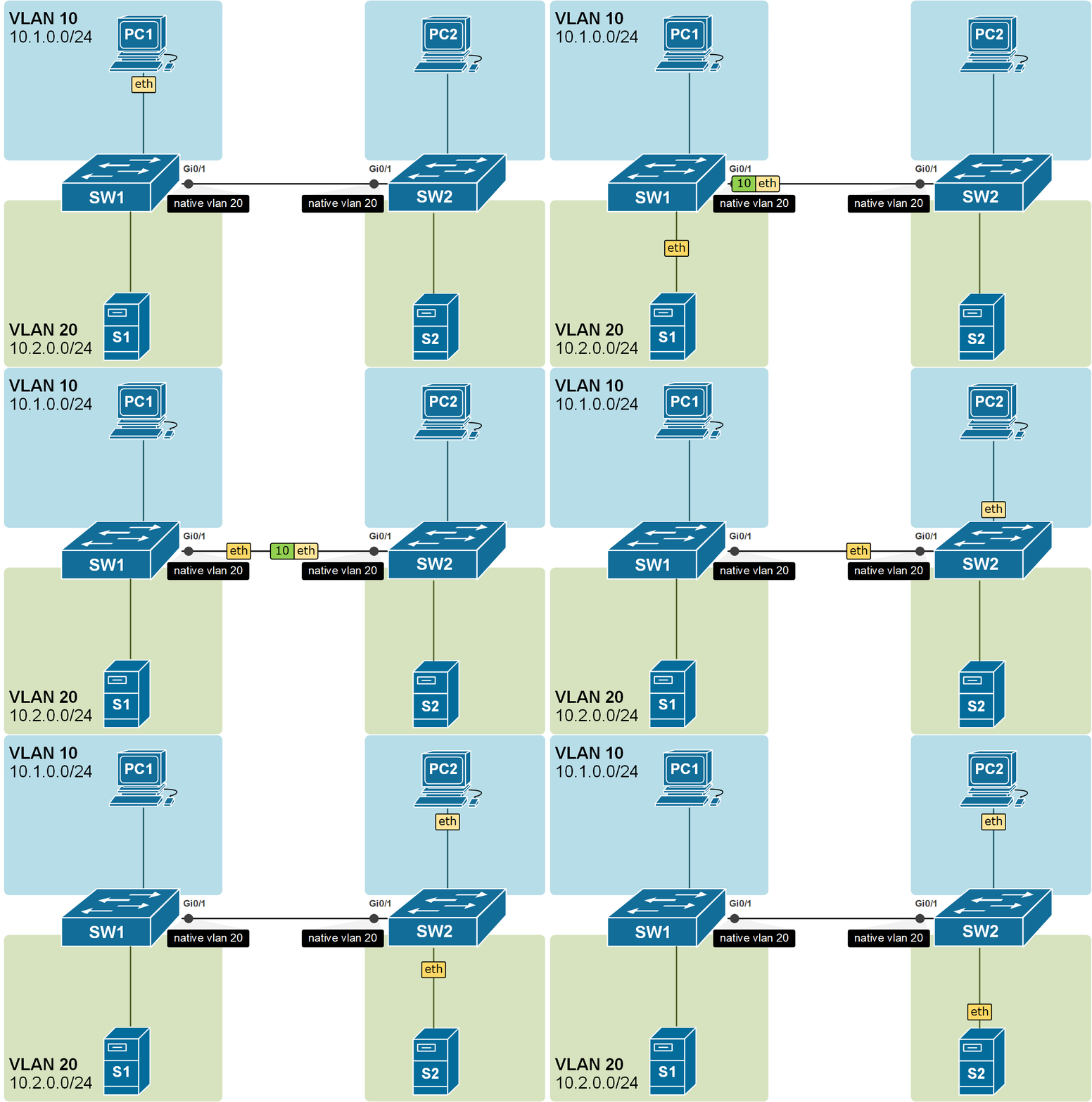
Recall that a trunk port sends and receives Ethernet frames tagged with IEEE 802.1q VLAN tags. The primary idea behind this is to be able to transport frames from multiple VLANs over a single physical link between switches. This means that both ends of a trunk will always receive tagged frames, as shown in the diagram below.

				
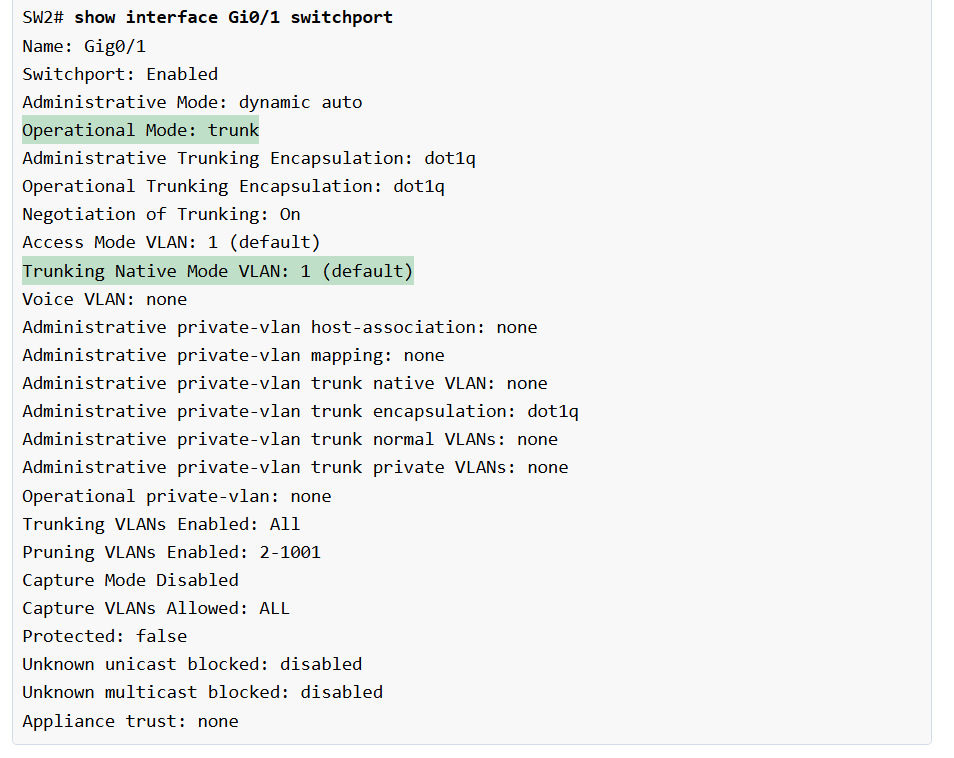
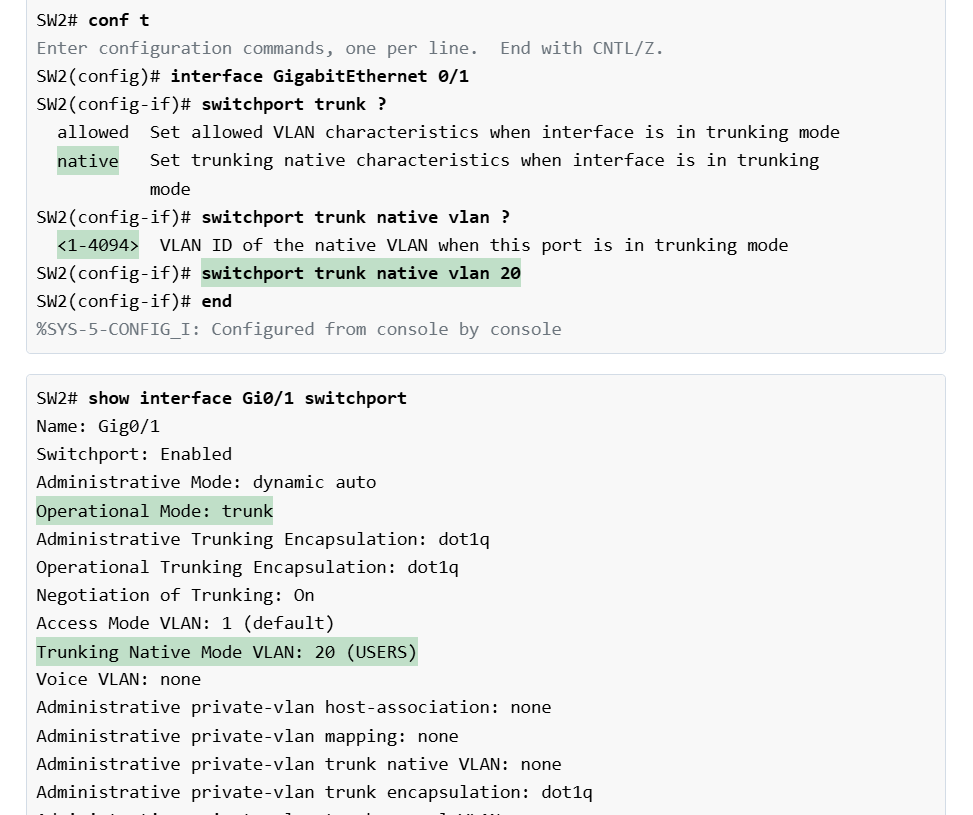
					SW2# show interface Gi0/1 switchport
Name: Gig0/1
Switchport: Enabled
Administrative Mode: dynamic auto
Operational Mode: trunk
Administrative Trunking Encapsulation: dot1q
Operational Trunking Encapsulation: dot1q
Negotiation of Trunking: On
Access Mode VLAN: 1 (default)
Trunking Native Mode VLAN: 1 (default)
Voice VLAN: none
Administrative private-vlan host-association: none
Administrative private-vlan mapping: none
Administrative private-vlan trunk native VLAN: none
Administrative private-vlan trunk encapsulation: dot1q
Administrative private-vlan trunk normal VLANs: none
Administrative private-vlan trunk private VLANs: none
Operational private-vlan: none
Trunking VLANs Enabled: All
Pruning VLANs Enabled: 2-1001
Capture Mode Disabled
Capture VLANs Allowed: ALL
Protected: false
Unknown unicast blocked: disabled
Unknown multicast blocked: disabled
Appliance trust: none


					SW2#
%CDP-4-NATIVE_VLAN_MISMATCH: Native VLAN mismatch discovered on GigabitEthernet0/1 (20), with SW1 GigabitEthernet0/1 (10).


					SW1# show vlan

VLAN Name                             Status    Ports
---- -------------------------------- --------- -------------------------------
1    default                          active    Fa0/5, Fa0/6, Fa0/7, Fa0/9
                                                Fa0/10, Fa0/11, Fa0/12, Fa0/13
                                                Fa0/14, Fa0/20, Fa0/21, Fa0/22
                                                Fa0/23, Fa0/24, Gig0/2
10   USERS                            active    Fa0/2, Fa0/3, Fa0/4
20   SERVERS                          active    Fa0/15, Fa0/16, Fa0/17
30   SALES                            active    Fa0/8
40   MGMT                             active    Fa0/18, Fa0/19
1002 fddi-default                     active    
1003 token-ring-default               active    
1004 fddinet-default                  active    
1005 trnet-default                    active    


					SW2# show vlan

VLAN Name                             Status    Ports
---- -------------------------------- --------- -------------------------------
1    default                          active    Fa0/5, Fa0/6, Fa0/7, Fa0/8
                                                Fa0/9, Fa0/10, Fa0/11, Fa0/19
                                                Fa0/22, Fa0/23, Fa0/24,
                                                Gig0/2
10   USERS                            active    Fa0/2, Fa0/3, Fa0/4
20   SERVERS                          active    Fa0/12, Fa0/13, Fa0/14
50   IT                               active    Fa0/15, Fa0/16, Fa0/17, Fa0/18
60   SENSORS                          active    Fa0/20, Fa0/21
1002 fddi-default                     active    
1003 token-ring-default               active    
1004 fddinet-default                  active    
1005 trnet-default                    active  


					SW1#sh int trunk 

Port        Mode         Encapsulation  Status        Native vlan
Gi0/1       on           802.1q         trunking      1
     
Port        Vlans allowed on trunk
Gi0/1       1-1005

Port        Vlans allowed and active in management domain
Gi0/1       1,10,20,30,40

Port        Vlans in spanning tree forwarding state and not pruned
Gi0/1       1,10,20,30,40


					SW2#sh int trunk 

Port        Mode         Encapsulation  Status        Native vlan
Gi0/1       on           802.1q         trunking      1
     
Port        Vlans allowed on trunk
Gi0/1       1-1005

Port        Vlans allowed and active in management domain
Gi0/1       1,10,20,50,60

Port        Vlans in spanning tree forwarding state and not pruned
Gi0/1       1,10,20,50,60


					SW2# conf t
Enter configuration commands, one per line.  End with CNTL/Z.
SW2(config)# interface Gi0/1
SW2(config-if)# switchport trunk ?
  allowed  Set allowed VLAN characteristics when interface is in trunking mode
  native   Set trunking native characteristics when interface is in trunking
           mode
  
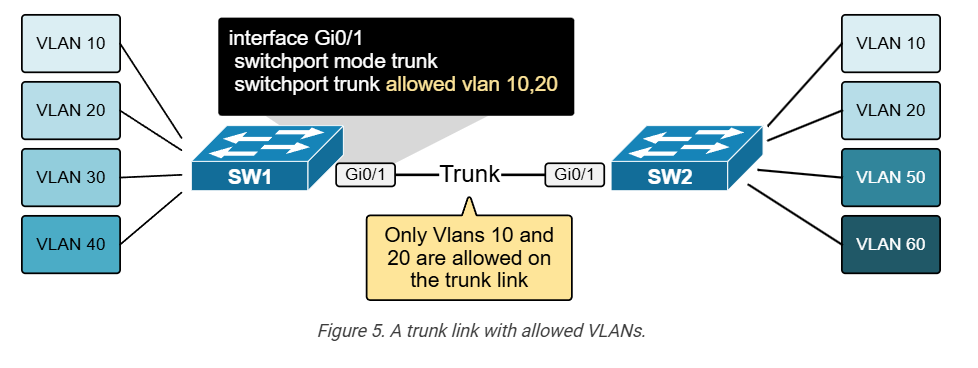
SW2(config-if)# switchport trunk allowed vlan 10,20
SW2(config-if)# end
SW2#
%SYS-5-CONFIG_I: Configured from console by console


					SW2# show interfaces trunk 

Port        Mode         Encapsulation  Status        Native vlan
Gi0/1       on           802.1q         trunking      1
     
Port        Vlans allowed on trunk
Gi0/1       10,20

Port        Vlans allowed and active in management domain
Gi0/1       10,20

Port        Vlans in spanning tree forwarding state and not pruned
Gi0/1       10,20


Forwarding Data Between VLANs

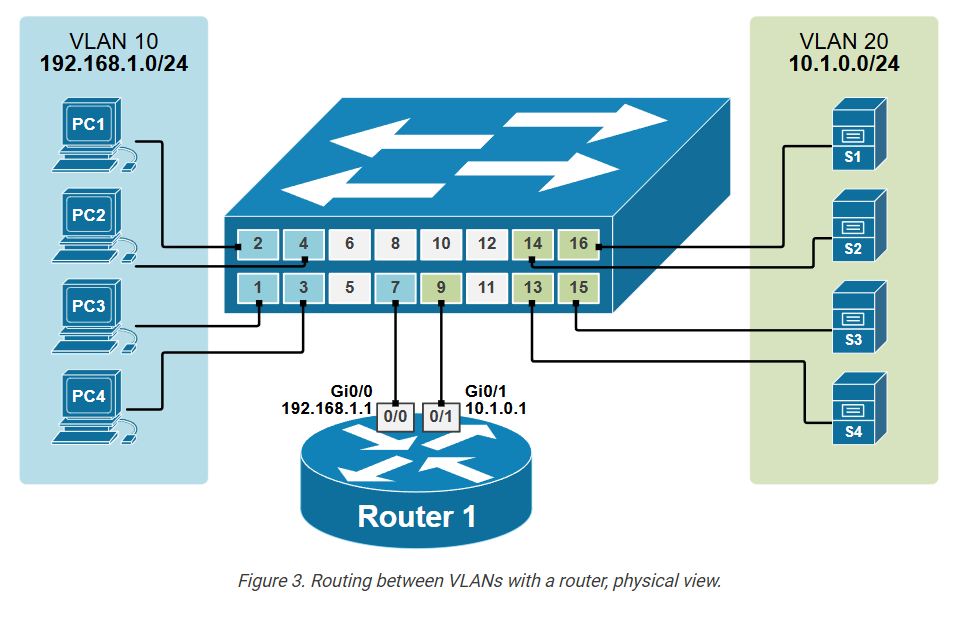
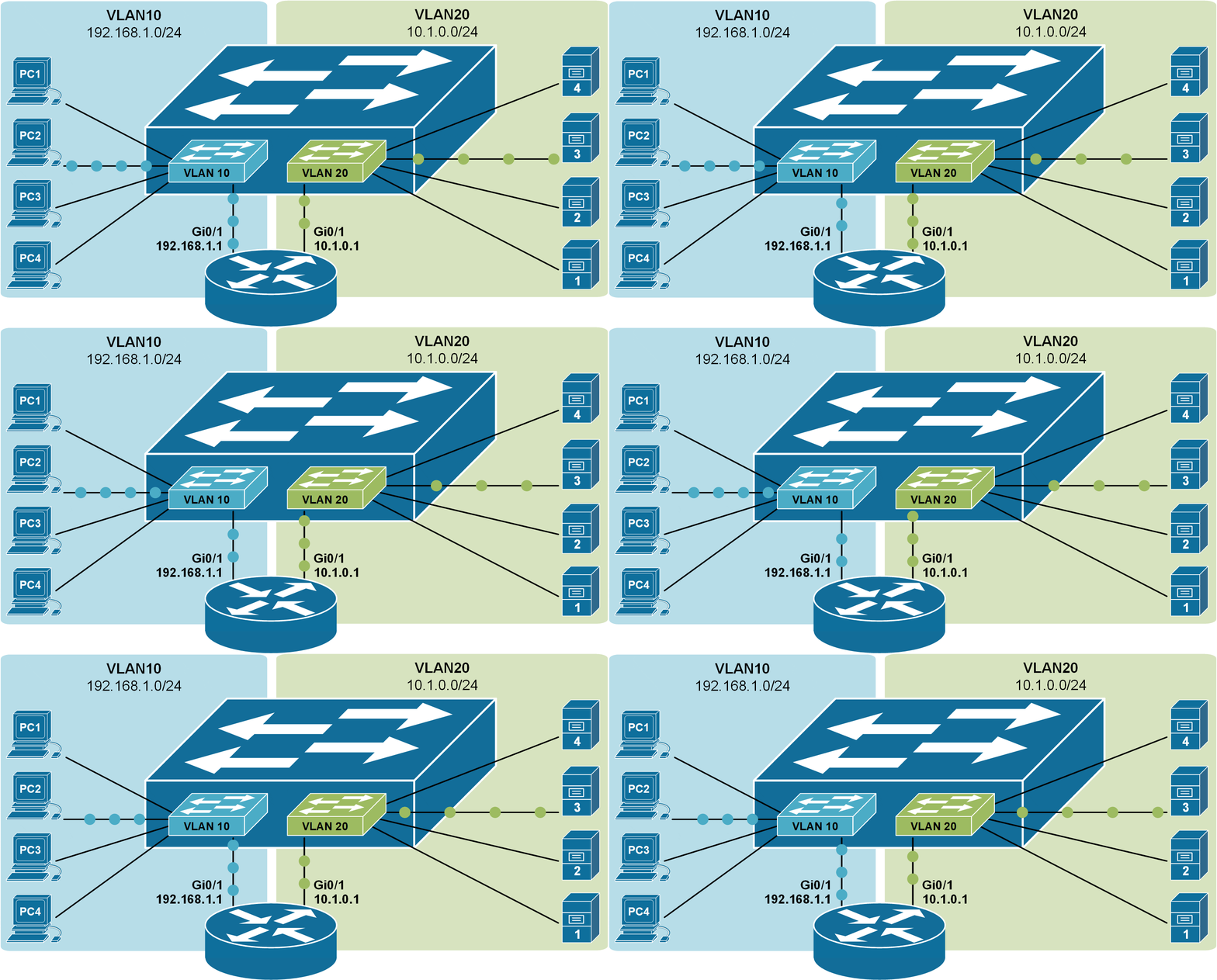
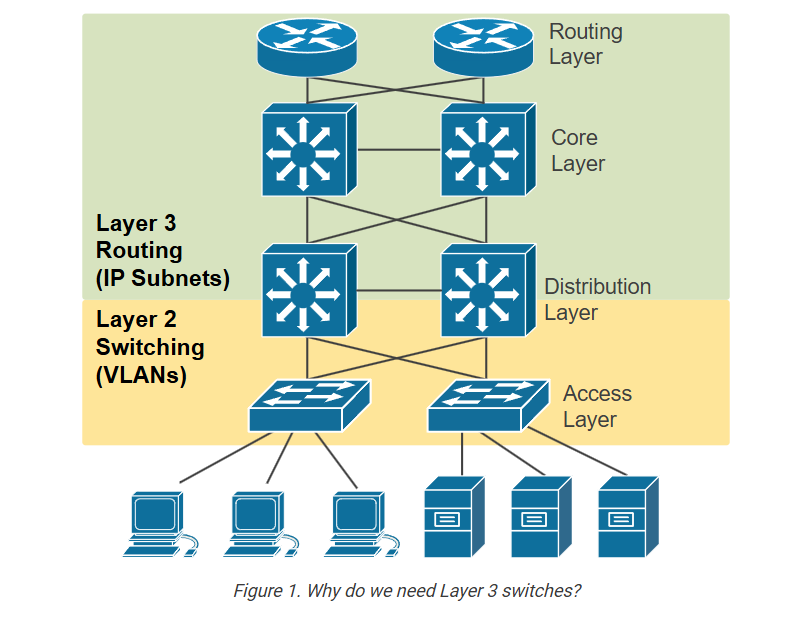
This lesson discusses the most basic method of forwarding data between VLANs using a router with multiple Interfaces. Each VLAN connects to a separate physical interface on the router. This method is older and not common today. However,  it is fundamental to use the most modern methods, which we will see in the following lessons. 
Connectivity between VLANs

Recall that LAN switches forward frames based on Layer 2 logic. This means that when a switch receives an Ethernet frame, it looks at the destination MAC address and forwards the frame out to another interface or multiple interfaces if it is a BUM frame. This type of switch is often called a Layer 2 switch
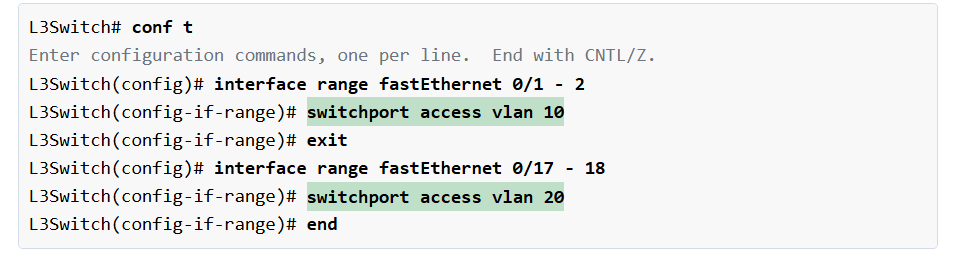
				
					Switch(config)# vlan 10
Switch(config-vlan)# name CLIENTS
Switch(config-vlan)# vlan 20
Switch(config-vlan)# name SERVERS
Switch(config-vlan)# end


					Switch(config)# interface range Fa0/1-4
Switch(config-if-range)# description CLIENTS
Switch(config-if-range)# switchport mode access 
Switch(config-if-range)# switchport access vlan 10
Switch(config-if-range)# exit


					Switch(config)# interface range Fa0/13-16
Switch(config-if-range)# description SERVERS
Switch(config-if-range)# switchport mode access 
Switch(config-if-range)# switchport access vlan 20
Switch(config-if-range)# end


					interface FastEthernet0/7

 description Link-to R1-Gi0/0
 switchport access vlan 10
!
interface FastEthernet0/9
 description Link-to R1-Gi0/1
 switchport access vlan 20
!


					SW1# show vlan

VLAN Name                             Status    Ports
---- -------------------------------- --------- -------------------------------
1    default                          active    Fa0/5, Fa0/6, Fa0/8
                                                Fa0/10, Fa0/11, Fa0/12
                                                Fa0/17, Fa0/18, Fa0/19, Fa0/20
                                                Fa0/21, Fa0/22, Fa0/23, Fa0/24
                                                Gig0/1, Gig0/2
10   CLIENTS                          active    Fa0/1, Fa0/2, Fa0/3, Fa0/4, Fa0/7
20   SERVERS                          active    Fa0/9, Fa0/13, Fa0/14, Fa0/15, Fa0/16
1002 fddi-default                     active    
1003 token-ring-default               active    
1004 fddinet-default                  active    
1005 trnet-default                    active    


					Router# conf t
Enter configuration commands, one per line.  End with CNTL/Z.

Router(config)# interface gi0/0
Router(config-if)# no shutdown 
%LINK-5-CHANGED: Interface GigabitEthernet0/0, changed state to up
%LINEPROTO-5-UPDOWN: Line protocol on Interface GigabitEthernet0/0, 
changed state to up

Router(config-if)# ip address 192.168.1.1 255.255.255.0
Router(config-if)#description CLIENTS
Router(config-if)# exit

Router(config)# int gigabitEthernet 0/1
Router(config-if)# no shutdown 
%LINK-5-CHANGED: Interface GigabitEthernet0/1, changed state to up
%LINEPROTO-5-UPDOWN: Line protocol on Interface GigabitEthernet0/1, 
changed state to up

Router(config-if)# ip address 10.1.0.1 255.255.255.0
Router(config-if)# description SERVERS
Router(config-if)# end


					Router#sh ip interface brief
Interface            IP-Address      OK? Method Status                Protocol 
GigabitEthernet0/0   192.168.1.1     YES manual up                    up 
GigabitEthernet0/1   10.1.0.1        YES manual up                    up 
GigabitEthernet0/2   unassigned      YES unset  administratively down down 
Vlan1                unassigned      YES unset  administratively down down


					Router# show ip route
Codes: L - local, C - connected, S - static, R - RIP, M - mobile, B - BGP
       D - EIGRP, EX - EIGRP external, O - OSPF, IA - OSPF inter area
       N1 - OSPF NSSA external type 1, N2 - OSPF NSSA external type 2
       E1 - OSPF external type 1, E2 - OSPF external type 2, E - EGP
       i - IS-IS, L1 - IS-IS level-1, L2 - IS-IS level-2, ia - IS-IS inter area
       * - candidate default, U - per-user static route, o - ODR
       P - periodic downloaded static route

Gateway of last resort is not set

     10.0.0.0/8 is variably subnetted, 2 subnets, 2 masks
C       10.1.0.0/24 is directly connected, GigabitEthernet0/1
L       10.1.0.1/32 is directly connected, GigabitEthernet0/1
     192.168.1.0/24 is variably subnetted, 2 subnets, 2 masks
C       192.168.1.0/24 is directly connected, GigabitEthernet0/0
L       192.168.1.1/32 is directly connected, GigabitEthernet0/0


					C:\> ipconfig

FastEthernet0 Connection:(default port)

   Connection-specific DNS Suffix..: 
   Link-local IPv6 Address.........: FE80::20D:BDFF:FEE0:46C1
   IPv6 Address....................: ::
   IPv4 Address....................: 192.168.1.10
   Subnet Mask.....................: 255.255.255.0
   Default Gateway.................: 192.168.1.1


					C:\> ping 10.1.0.10

Pinging 10.1.0.10 with 32 bytes of data:

Reply from 10.1.0.10: bytes=32 time<1ms TTL=127
Reply from 10.1.0.10: bytes=32 time=1ms TTL=127
Reply from 10.1.0.10: bytes=32 time=8ms TTL=127
Reply from 10.1.0.10: bytes=32 time<1ms TTL=127

Ping statistics for 10.1.0.10:
    Packets: Sent = 4, Received = 4, Lost = 0 (0% loss),
Approximate round trip times in milli-seconds:
    Minimum = 0ms, Maximum = 8ms, Average = 2ms


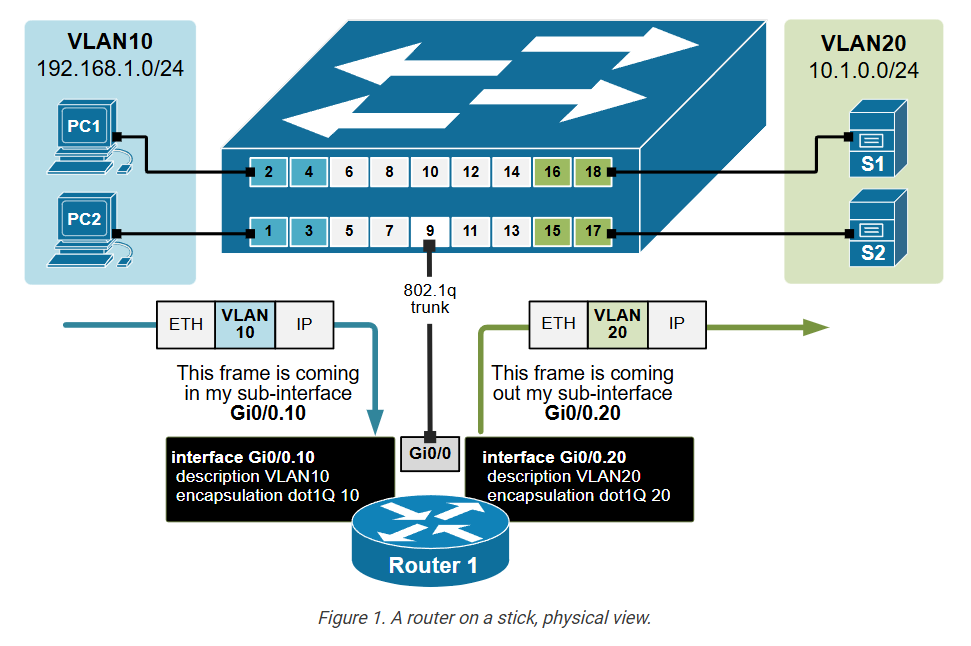
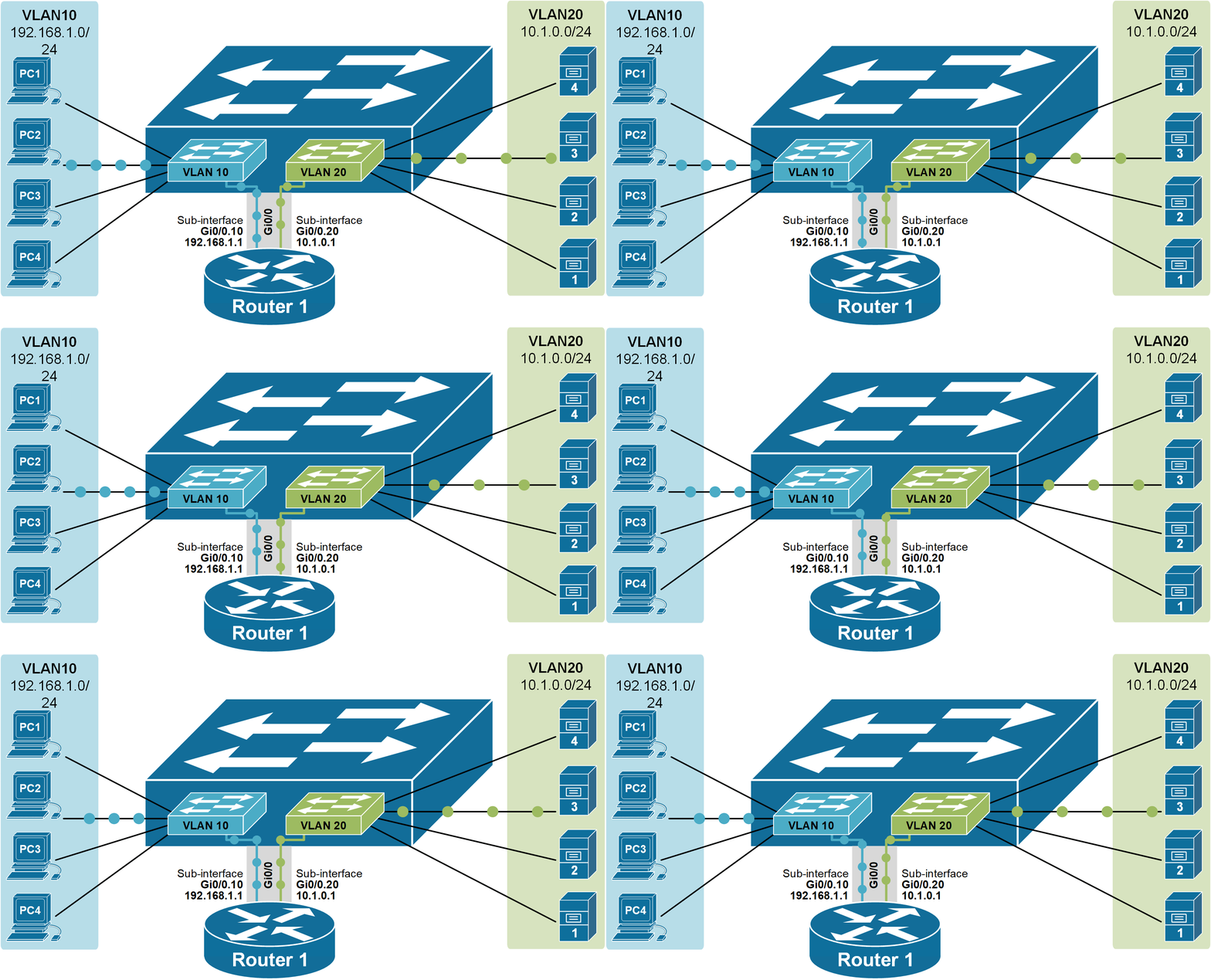
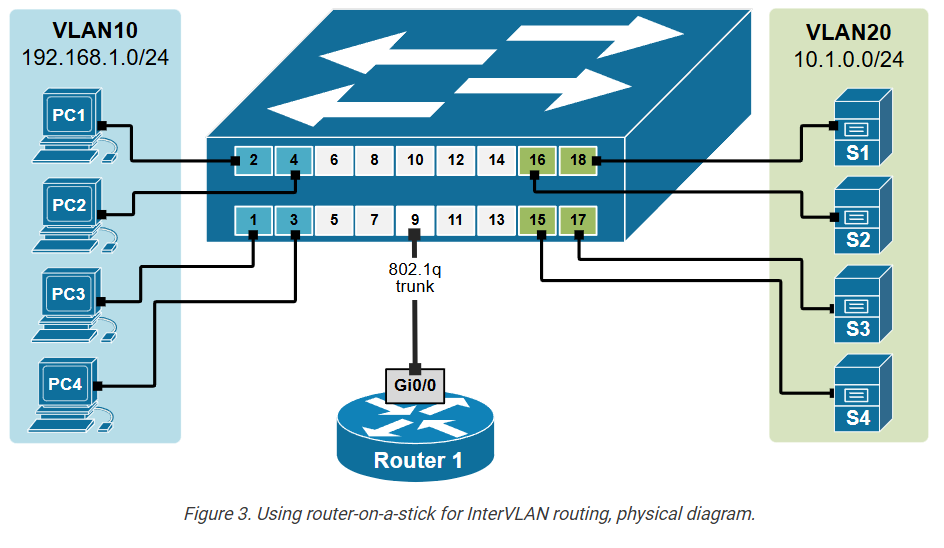
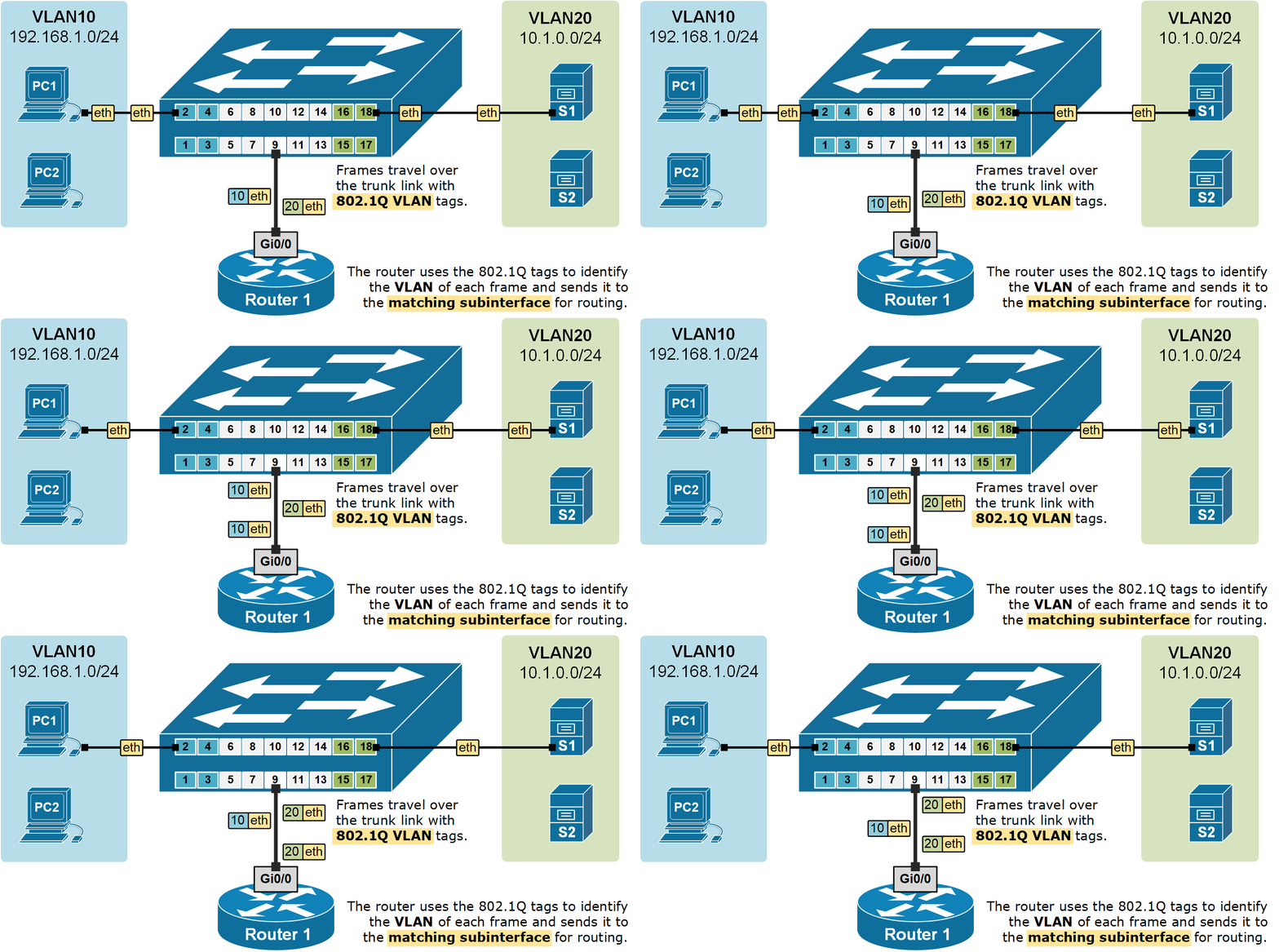
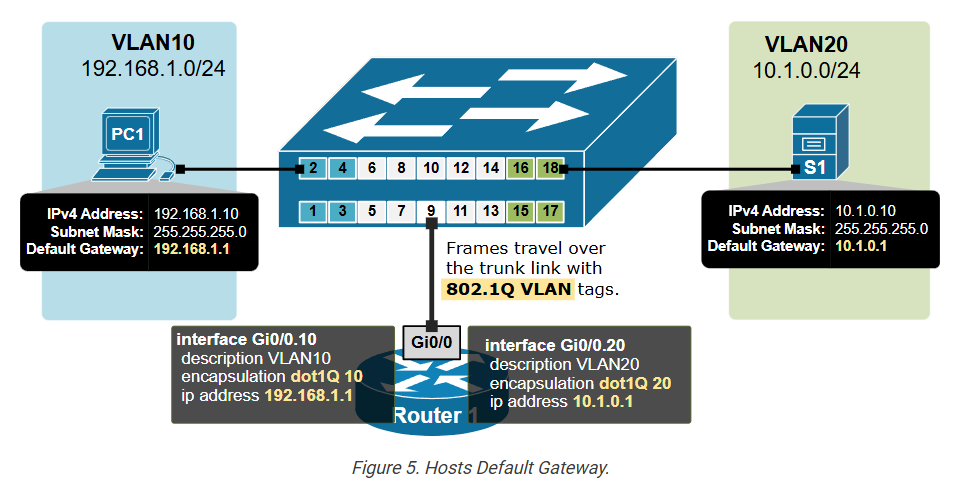
Router on a stick (ROAS)

				
					Router(config)# interface [interface-name].[sub-interface-number]


					Router(config-subif)# encapsulation dot1Q [vlan-id]


					Router1(config)# interface GigabitEthernet 0/0.10 
Router1(config-subif)# encapsulation dot1Q ?
  <1-4094>  IEEE 802.1Q VLAN ID


					Router1(config-subif)# encapsulation dot1Q 10
Router1(config-subif)# ip address 192.168.1.1 255.255.255.0
Router1(config-subif)# no shutdown


					Switch1(config)# vlan 10
Switch1(config-vlan)# name CLIENTS
Switch1(config-vlan)# vlan 20
Switch1(config-vlan)# name SERVERS
Switch1(config-vlan)# exit


					Switch1(config)# interface range fastEthernet 0/1-4
Switch1(config-if-range)# description CLIENTS
Switch1(config-if-range)# switchport mode access 
Switch1(config-if-range)# switchport access vlan 10
Switch1(config-if-range)# exit


					Switch1(config)# interface range fastEthernet 0/15-18
Switch1(config-if-range)# description SERVERS
Switch1(config-if-range)# switchport mode access 
Switch1(config-if-range)# switchport access vlan 20
Switch1(config-if-range)# end


					Switch1(config)# interface fastEthernet 0/9
Switch1(config-if)# description LINK-TO-ROUTER1
Switch1(config-if)# switchport mode trunk 
Switch1(config-if)# exit


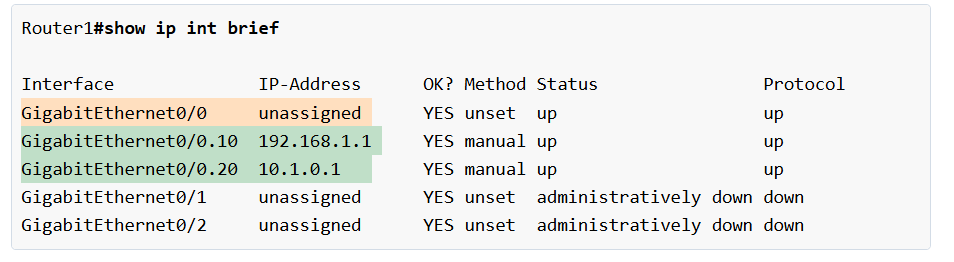
					Router# show ip int brief 
 
Interface              IP-Address      OK? Method Status                Protocol 
GigabitEthernet0/0     unassigned      YES unset  administratively down down 
GigabitEthernet0/1     unassigned      YES unset  administratively down down 
GigabitEthernet0/2     unassigned      YES unset  administratively down down


					Router1# configure terminal 
Enter configuration commands, one per line.  End with CNTL/Z.
Router1(config)# interface gigabitEthernet 0/0
Router1(config-if)# no shutdown 

%LINK-5-CHANGED:Interface GigabitEthernet0/0, changed state to up
%LINEPROTO-5-UPDOWN:Line protocol on Interface GigabitEthernet0/0, changed state to up


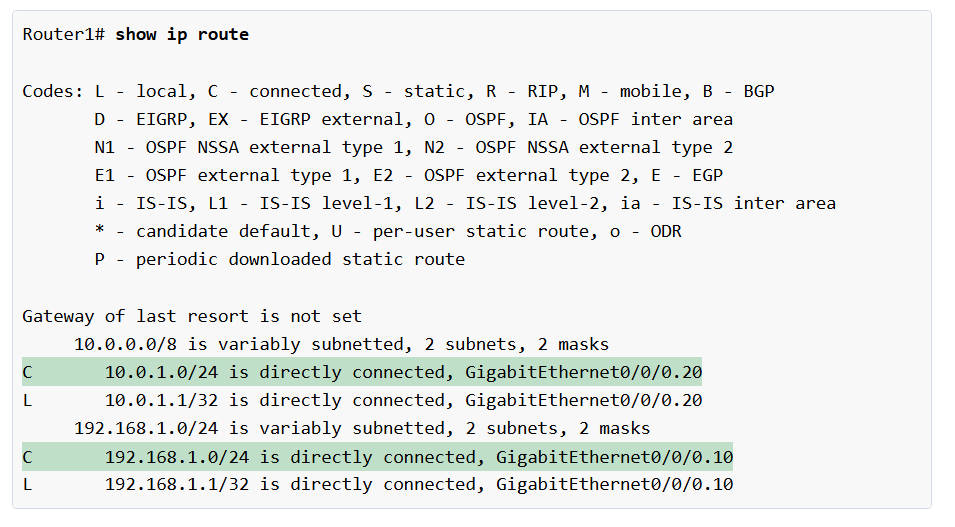
					Router1(config)# interface gigabitEthernet 0/0.10
%LINK-5-CHANGED: Interface GigabitEthernet0/0.10, changed state to up
%LINEPROTO-5-UPDOWN: Line protocol on Interface GigabitEthernet0/0.10,
changed state to up

Router1(config-subif)# encapsulation dot1Q 10
Router1(config-subif)# ip address 192.168.1.1 255.255.255.0
Router1(config-subif)# exit


					Router1(config-if)# interface gigabitEthernet 0/0.20
%LINK-5-CHANGED: Interface GigabitEthernet0/0.20, changed state to up
%LINEPROTO-5-UPDOWN: Line protocol on Interface GigabitEthernet0/0.20,
 changed state to up
 
Router1(config-subif)# encapsulation dot1Q 20
Router1(config-subif)# ip address 10.1.0.1 255.255.255.0
Router1(config-subif)# exit


					C:\> ipconfig

FastEthernet0 Connection:(default port)
   Connection-specific DNS Suffix..: 
   Link-local IPv6 Address.........: FE80::2D0:FFFF:FE31:697A
   IPv6 Address....................: ::
   IPv4 Address....................: 192.168.1.10
   Subnet Mask.....................: 255.255.255.0
   Default Gateway.................: 192.168.1.1


					C:\> ping 10.1.0.10

Pinging 10.1.0.10 with 32 bytes of data:
Reply from 10.1.0.10: bytes=32 time<1ms TTL=127

Ping statistics for 10.1.0.10:
    Packets: Sent = 4, Received = 4, Lost = 0 (0% loss),
Approximate round trip times in milli-seconds:
    Minimum = 0ms, Maximum = 0ms, Average = 0ms


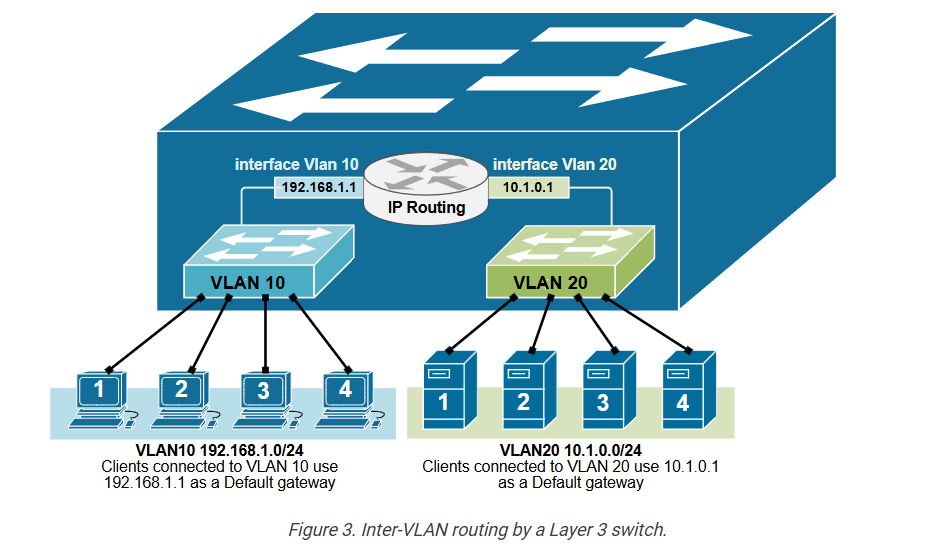
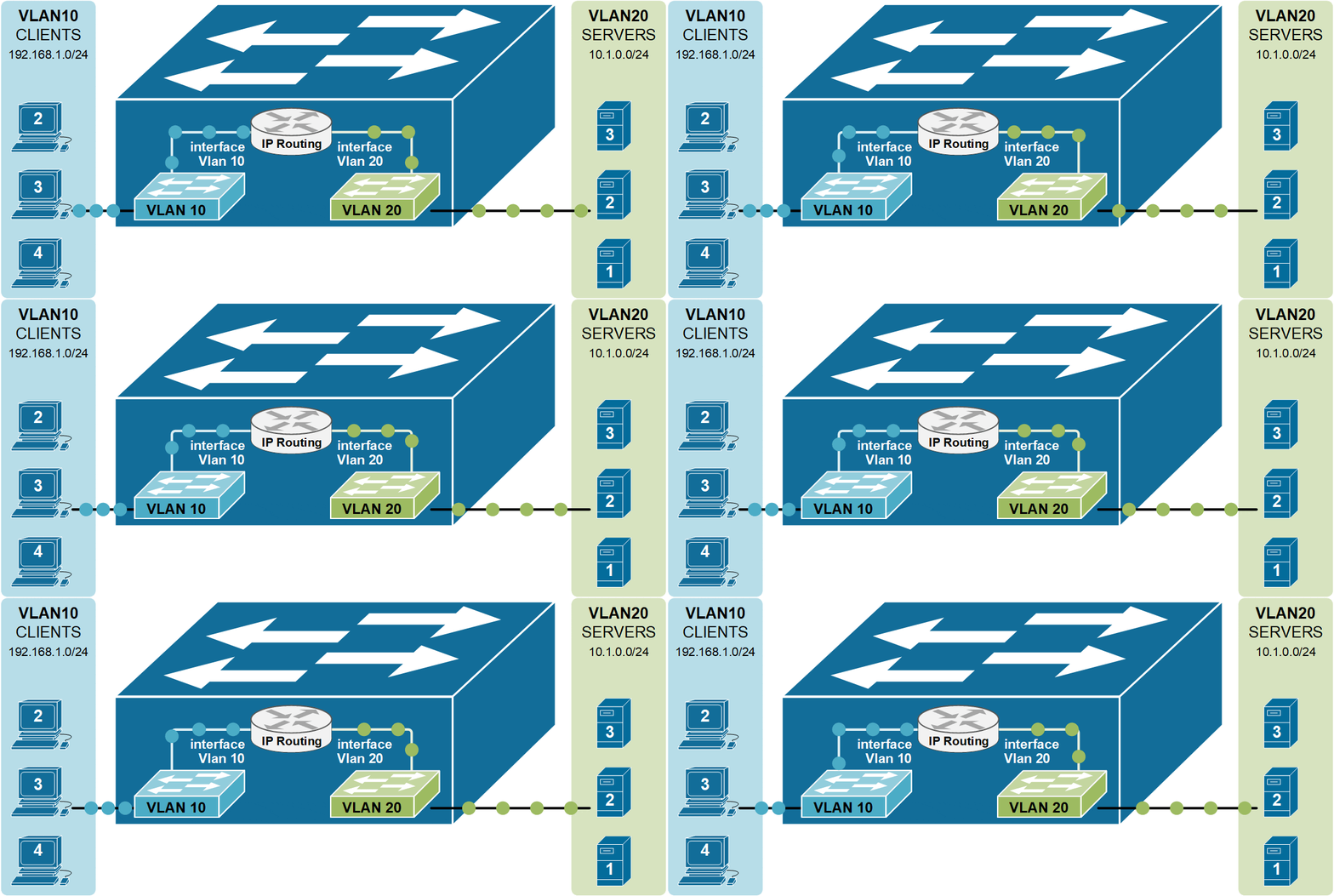
InterVLAN routing using Layer 3 switch

				
					L3Switch(config)# interface Vlan10
%LINK-5-CHANGED: Interface Vlan10, changed state to up
%LINEPROTO-5-UPDOWN: Line protocol on Interface Vlan10, 
changed state to up


					L3Switch(config-if)# description VLAN10
L3Switch(config-if)# ip address 192.168.1.1 255.255.255.0
L3Switch(config-if)# no shutdown


					L3Switch# show ip interface brief
Interface              IP-Address      OK? Method Status                Protocol 
FastEthernet0/1        unassigned      YES unset  up                    up 
FastEthernet0/2        unassigned      YES unset  up                    up 
FastEthernet0/3        unassigned      YES unset  up                    up 
FastEthernet0/4        unassigned      YES unset  up                    up 
FastEthernet0/5        unassigned      YES unset  down                  down 
FastEthernet0/6        unassigned      YES unset  down                  down 
FastEthernet0/7        unassigned      YES unset  down                  down 
FastEthernet0/8        unassigned      YES unset  down                  down 
FastEthernet0/9        unassigned      YES unset  down                  down 
FastEthernet0/10       unassigned      YES unset  down                  down 
FastEthernet0/11       unassigned      YES unset  down                  down 
FastEthernet0/12       unassigned      YES unset  down                  down 
FastEthernet0/13       unassigned      YES unset  down                  down 
FastEthernet0/14       unassigned      YES unset  down                  down 
FastEthernet0/15       unassigned      YES unset  up                    up 
FastEthernet0/16       unassigned      YES unset  up                    up 
FastEthernet0/17       unassigned      YES unset  up                    up 
FastEthernet0/18       unassigned      YES unset  up                    up 
GigabitEthernet0/1     unassigned      YES unset  down                  down 
GigabitEthernet0/2     unassigned      YES unset  down                  down 
Vlan1                  unassigned      YES unset  administratively down down


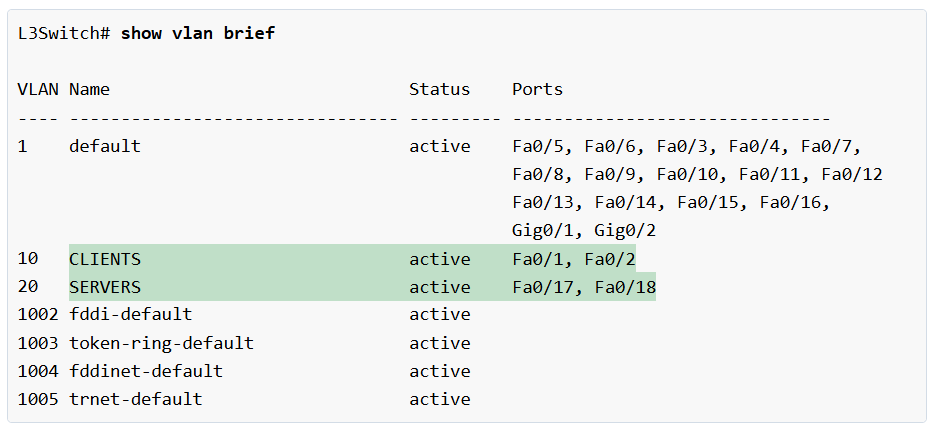
					L3Switch(config)# vlan 10
L3Switch(config-vlan)# name CLIENTS
L3Switch(config-vlan)# exit
!
L3Switch(config)# vlan 20
L3Switch(config-vlan)# name SERVERS
L3Switch(config-vlan)# exit


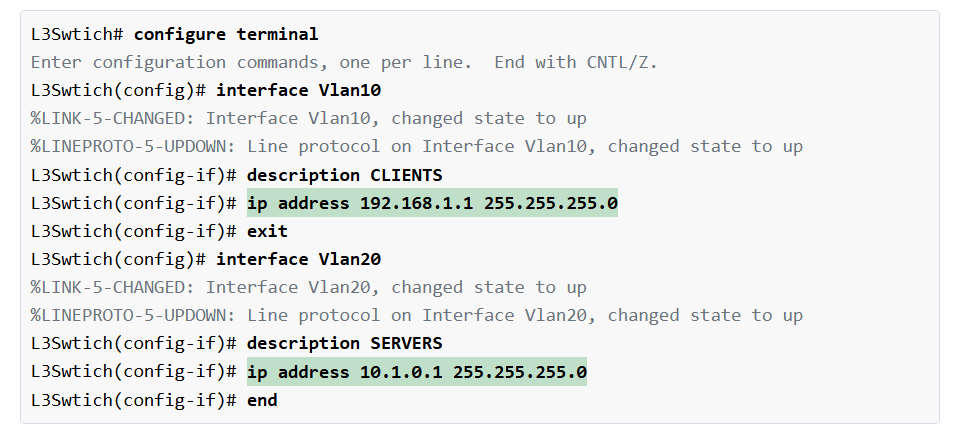
					L3Swtich(config)# ip routing 


					L3Swtich# configure terminal 
Enter configuration commands, one per line.  End with CNTL/Z.
L3Swtich(config)# interface Vlan10
%LINK-5-CHANGED: Interface Vlan10, changed state to up
%LINEPROTO-5-UPDOWN: Line protocol on Interface Vlan10, changed state to up
L3Swtich(config-if)# description CLIENTS
L3Swtich(config-if)# ip address 192.168.1.1 255.255.255.0
L3Swtich(config-if)# exit

L3Swtich(config)# interface Vlan20
%LINK-5-CHANGED: Interface Vlan20, changed state to up
%LINEPROTO-5-UPDOWN: Line protocol on Interface Vlan20, changed state to up
L3Swtich(config-if)# description SERVERS
L3Swtich(config-if)# ip address 10.1.0.1 255.255.255.0
L3Swtich(config-if)# end


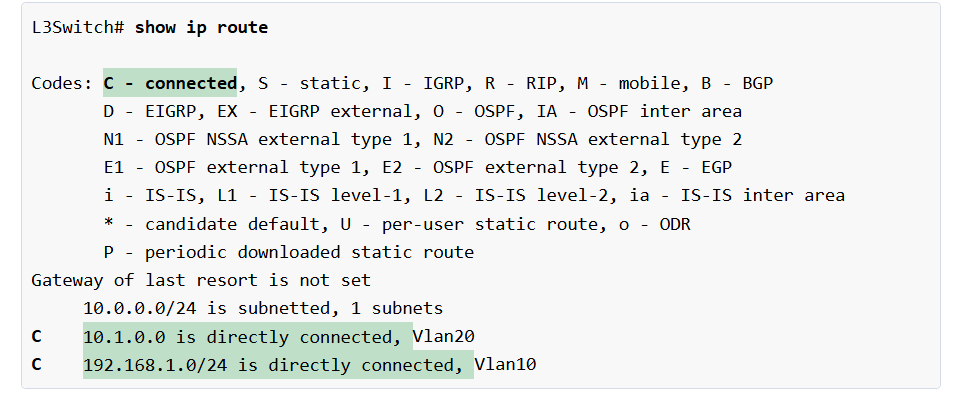
					L3Switch# show ip route

Codes: C - connected, S - static, I - IGRP, R - RIP, M - mobile, B - BGP
       D - EIGRP, EX - EIGRP external, O - OSPF, IA - OSPF inter area
       N1 - OSPF NSSA external type 1, N2 - OSPF NSSA external type 2
       E1 - OSPF external type 1, E2 - OSPF external type 2, E - EGP
       i - IS-IS, L1 - IS-IS level-1, L2 - IS-IS level-2, ia - IS-IS inter area
       * - candidate default, U - per-user static route, o - ODR
       P - periodic downloaded static route
Gateway of last resort is not set
     10.0.0.0/24 is subnetted, 1 subnets
C    10.1.0.0 is directly connected, Vlan20
C    192.168.1.0/24 is directly connected, Vlan10