Firewall Security Policy
Table of Contents
What is a Firewall Security Policy
A security policy in a firewall is a set of rules that tells the firewall what network traffic is allowed, blocked, or inspected when data moves between interfaces, zones, or networks. In simple words, a security policy acts like a traffic control rulebook for the firewall. It decides who can communicate, where they can communicate, what service they can use, and under what conditions traffic should be permitted or denied.
When a packet enters a firewall, the firewall checks it against configured security policies. The firewall examines information such as the source IP address, destination IP address, source interface, destination interface, port number, protocol type, user identity, application type, and security profile. Based on matching policy rules, the firewall decides whether to allow, deny, log, inspect, or apply security scanning to that traffic.
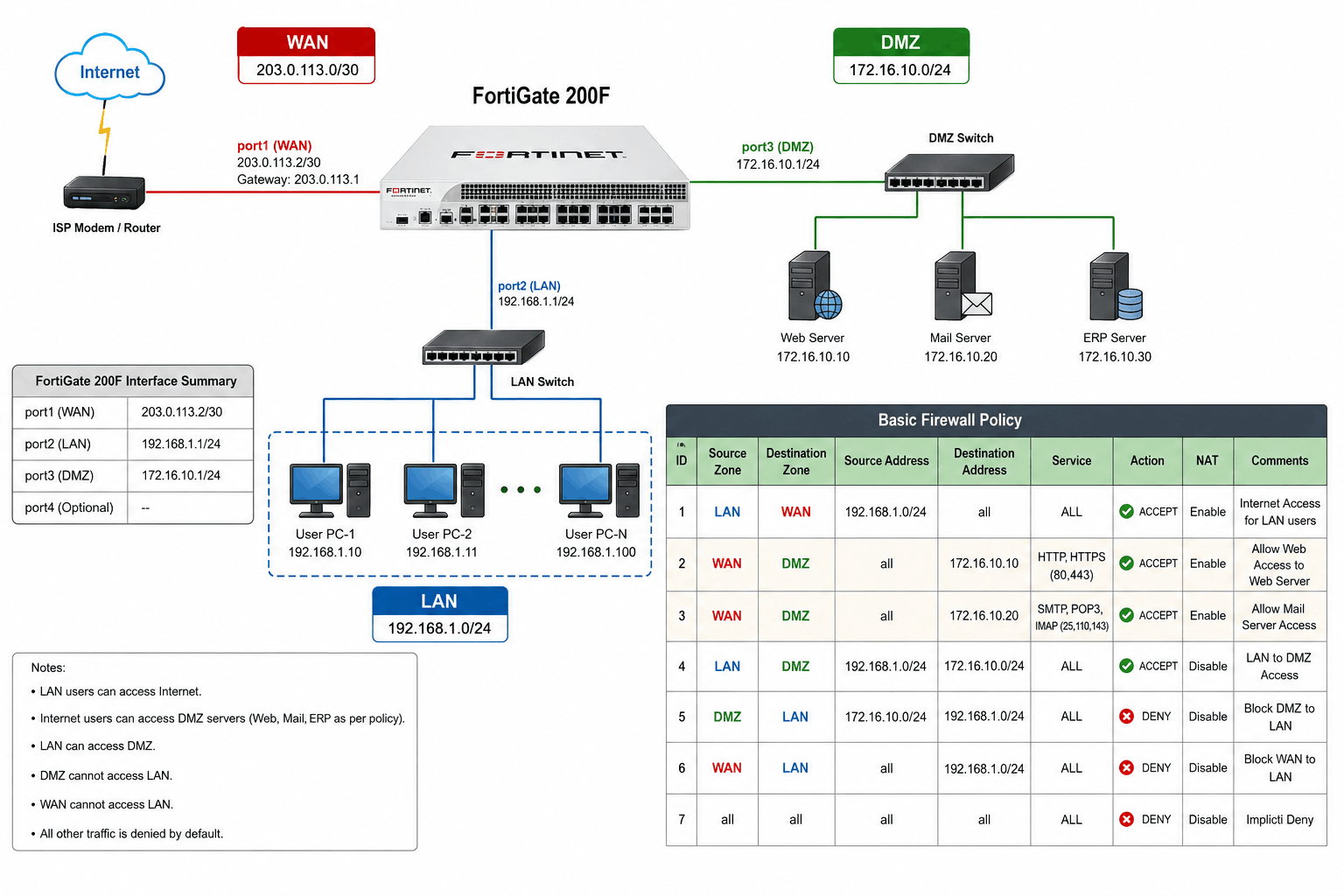
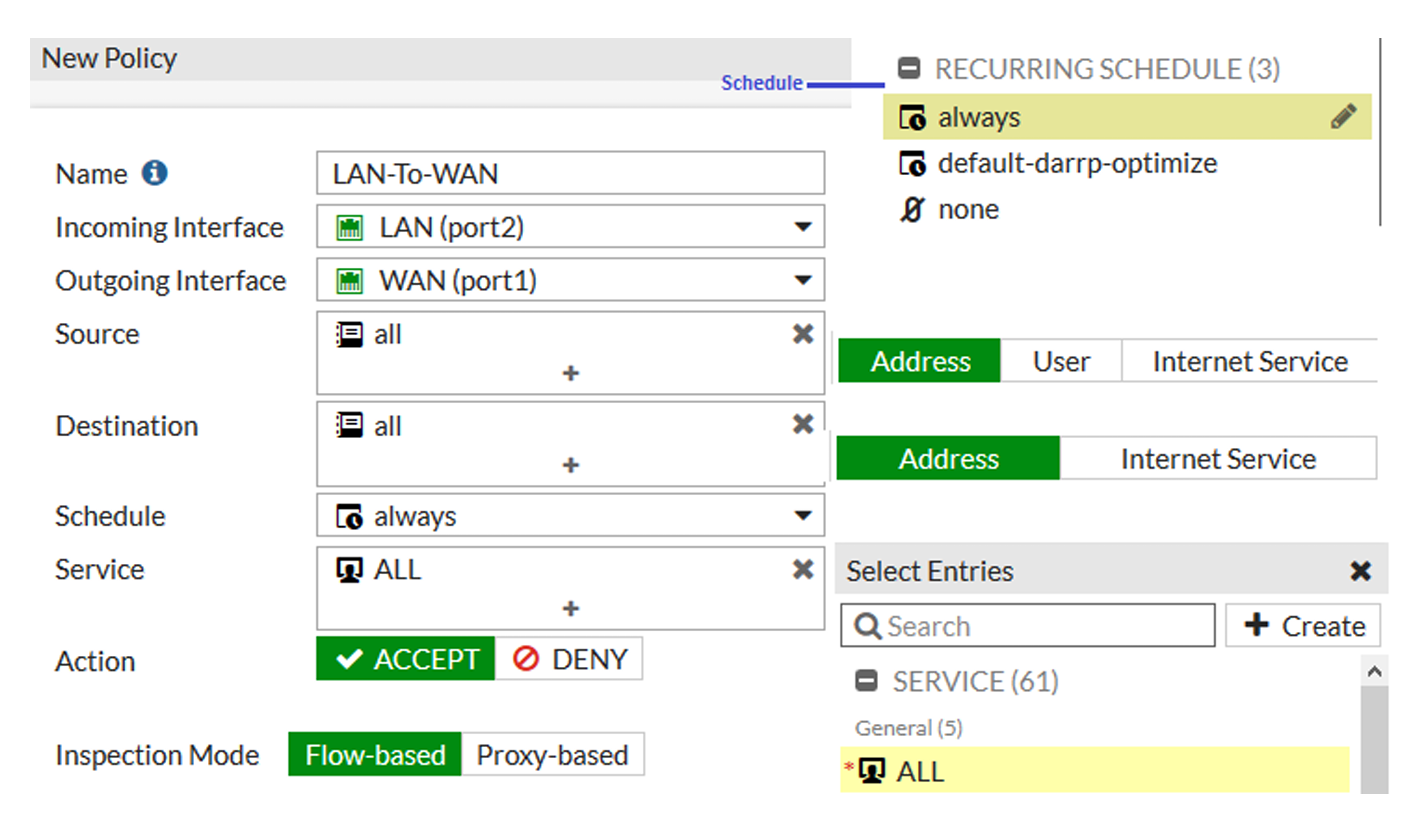
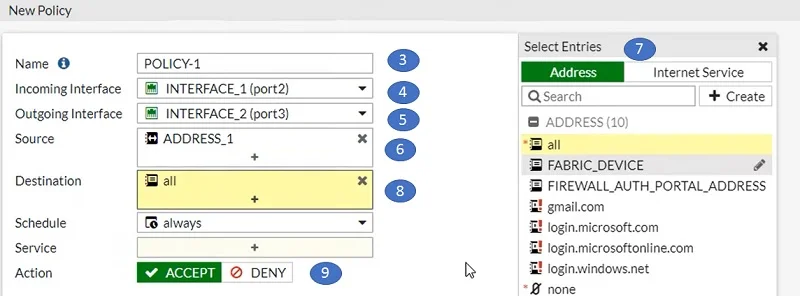
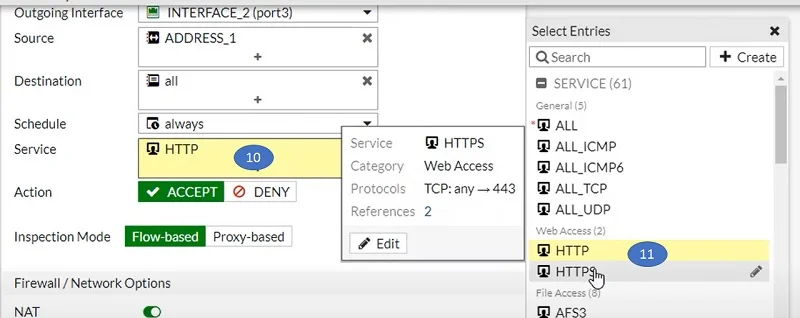
A security policy normally contains several elements. It defines the source zone or interface (where traffic comes from), the destination zone or interface (where traffic is going), the source address, destination address, service or port (such as HTTP, HTTPS, FTP, SSH), and the action (allow or deny). It may also include advanced security controls like Intrusion Prevention System (IPS), antivirus scanning, web filtering, application control, SSL deep inspection, logging, and bandwidth control.
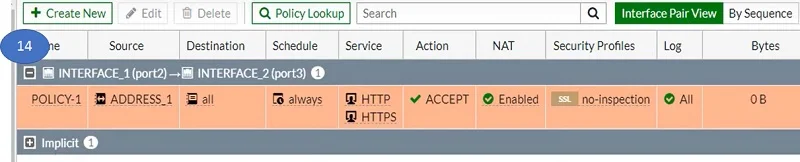
For Example, in an FortiGate firewall, a Security Policy may say:
- Source Interface: LAN
- Destination Interface: WAN
- Source Address: Internal users
- Destination Address: Internet
- Service: HTTP, HTTPS
- Action: Allow
- Security: IPS + Antivirus + Web Filter
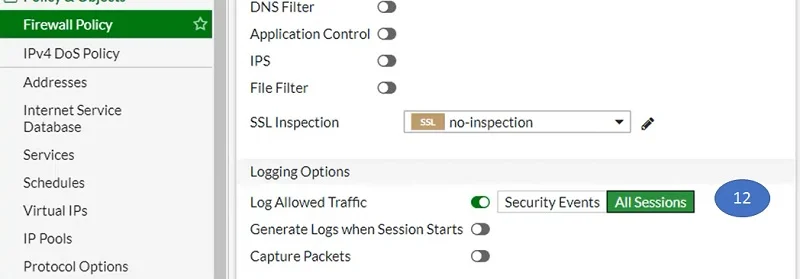
- Logging: Enable
This means employees can browse the Internet, but their traffic is inspected for threats.
Another Policy May Say:
- Source Interface: Guest VLAN
- Destination Interface: LAN
- Action: Deny
This blocks guest users from accessing internal company systems.
Security policies are important because they control access, protect systems, enforce company rules, and stop unauthorized communication. Without policies, traffic would move freely between networks, creating serious security risks.
In short:
A security policy is a firewall rule that controls which traffic is allowed, blocked, or inspected, helping secure communication between networks.
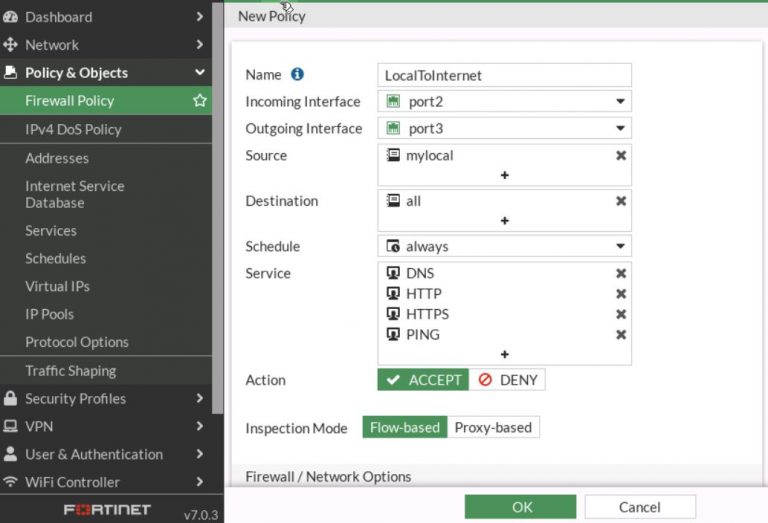
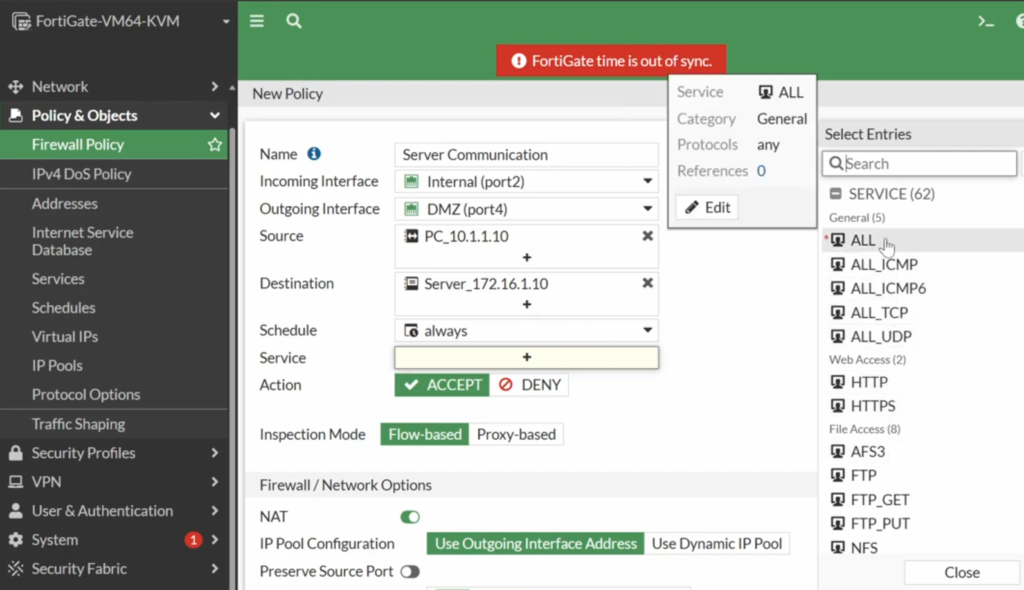
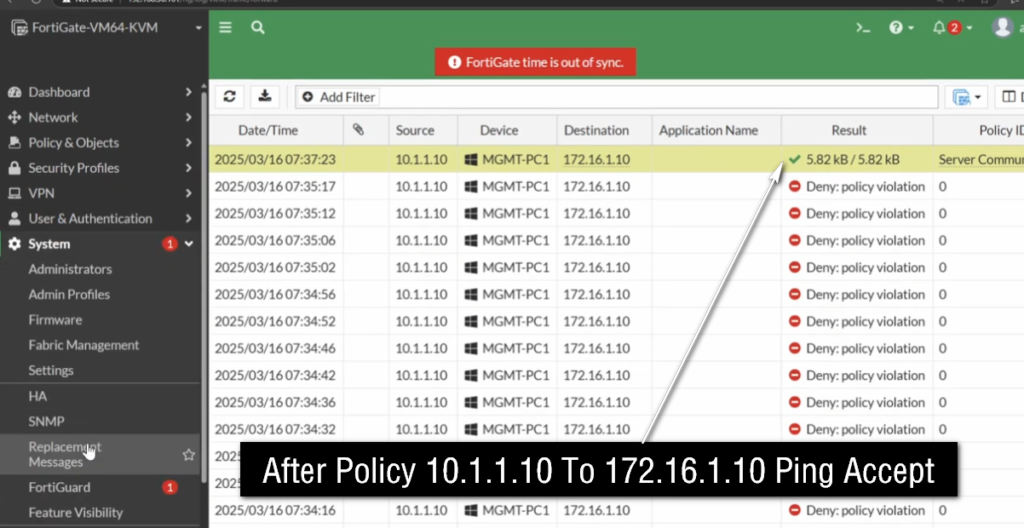
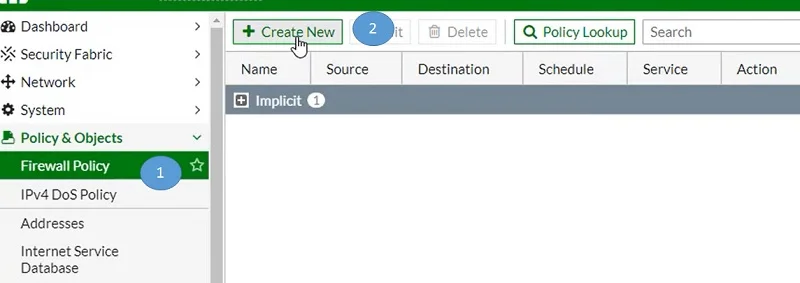
Security Policy How It Works?
A Security Policy is a set of rules configured on a firewall to control network traffic. It tells the firewall who can communicate with whom, which services or applications are allowed, which traffic should be blocked, and which security inspections should be applied. Every time network traffic passes through the firewall, the firewall checks that traffic against its security policies.
1. Traffic Arrives at the Firewall
When a user wants to access a website, server, or application, the traffic first reaches the firewall.
For example:
					User PC
   ↓
HTTPS Request
   ↓
Firewall
The firewall receives information such as the source IP, destination IP, port, protocol, interface/zone, and application information when available.
2. Firewall Checks the Security Policy
After receiving the traffic, the firewall compares it with its configured security policies. A policy normally contains information such as source, destination, service/port, application, and action.
For example:
					Source: LAN
Destination: Internet
Service: HTTPS
Action: Allow
f the traffic matches these conditions, the firewall applies the configured action.
3. Allow Policy Example
Suppose a company wants its employees to access normal HTTPS websites. The administrator creates a policy allowing LAN users to access the Internet using HTTPS.
					PC
 ↓
HTTPS :443
 ↓
Firewall
 ↓
LAN → Internet
HTTPS
 ↓
MATCH
 ↓
ALLOW ✅
 ↓
Internet
The user can access the website because the traffic matches the security policy.
4. Block Policy Example
Suppose the company wants to block Facebook. The administrator creates a policy that blocks Facebook traffic.
					PC
 ↓
Facebook
 ↓
Firewall
 ↓
Application Control
 ↓
Security Policy
 ↓
Facebook = BLOCK
 ↓
BLOCK ❌
The firewall detects the application and applies the block action.
5. Security Policy with Web Filtering
A security policy can also use security profiles such as Web Filtering. For example, the company may allow Internet access but block malicious or inappropriate website categories.
					LAN → Internet
       ↓
Security Policy
       ↓
Web Filter
       ↓
Malware Website
       ↓
BLOCK ❌
Normal websites can be allowed while dangerous categories are blocked.
6. Security Policy with Antivirus
A security policy can also apply an Antivirus security profile. When a user downloads a file, the firewall can inspect the traffic and scan the file.
					User
 ↓
Download File
 ↓
Firewall
 ↓
Security Policy
 ↓
Antivirus Scan
 ↓
Malware Found
 ↓
BLOCK ❌
If the file is clean, the firewall can allow the traffic.
7. Security Policy with IPS
IPS means Intrusion Prevention System. When IPS is attached to a security policy, the firewall can inspect traffic for known attack patterns and exploits.
For example, if an attacker sends a malicious exploit toward an internal server:
					Attacker
   ↓
Malicious Traffic
   ↓
Firewall
   ↓
Security Policy
   ↓
IPS Inspection
   ↓
Attack Detected
   ↓
BLOCK ❌
This helps protect internal systems from network attacks.
8. Policy Order
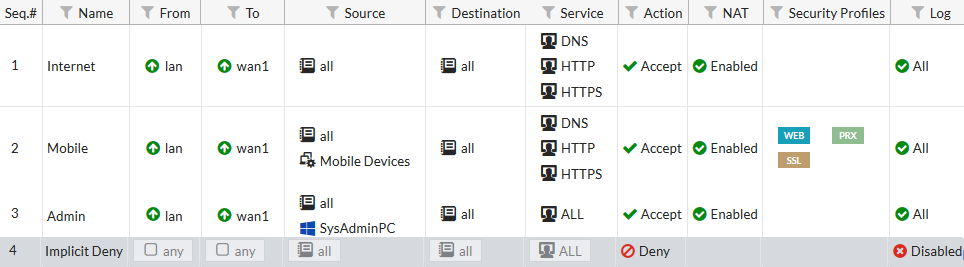
Security policies are generally processed from top to bottom. The order is very important, especially when there are both specific and general rules.
For example:
					Rule 1: LAN → Facebook → BLOCK
Rule 2: LAN → Internet → ALLOW
When a user accesses Facebook, the traffic matches Rule 1 first, so Facebook is blocked.
But if the order is:
					Rule 1: LAN → Internet → ALLOW
Rule 2: LAN → Facebook → BLOCK
the general allow rule may match first, preventing the Facebook-specific rule from being used. Therefore, specific policies are normally placed above more general policies.
9. Security Policy Example in an Office
Suppose an office has 100 computers. The administrator wants normal Internet access but wants to block malware websites and Facebook Chat.
The policies could be:
					Rule 1 → Facebook Chat → BLOCK ❌
Rule 2 → Malware Websites → BLOCK ❌
Rule 3 → LAN → Internet HTTPS → ALLOW ✅
The Firewall Checks each request against these policies and takes the appropriate action.
10. Complete Flow
					                 USER PC
                    │
                    ▼
              Network Traffic
                    │
                    ▼
              ┌───────────┐
              │ FIREWALL  │
              └─────┬─────┘
                    │
                    ▼
           Security Policy Check
                    │
          ┌─────────┴─────────┐
          │                   │
       Match                 No Match
          │                   │
          ▼                   ▼
   Apply Policy            Deny/Default
          │
    ┌─────┴─────┐
    │            │
   ALLOW       BLOCK
    │            │
    ▼            ▼
 Internet       ❌
11. Simple Definition
Security Policy is the firewall’s rule for deciding whether network traffic should be allowed, blocked, or inspected. It checks information such as source, destination, service, port, and application, and then applies the configured security action.
Security Policy – Short Points
- Security Policy is a set of rules configured on a firewall.
- It decides whether network traffic is Allowed, Blocked, or Inspected.
- Firewall checks Source IP, Destination IP, Port/Service, Application, and Interface/Zone.
- Policies are generally checked from top to bottom.
- The first matching policy is normally applied.
- Security policies can include Antivirus, IPS, Web Filter, Application Control, and SSL Inspection.
					Example: LAN → Internet → HTTPS → Allow ✅
Example: LAN → Facebook,Youtube,Adult Site,Gaming Site → Block ❌
					User
  ↓
Firewall
  ↓
Check Security Policy
  ↓
Match?
 ┌───────┴───────┐
Yes              No
 ↓                ↓
Allow/Block      Deny
 ↓
Internet
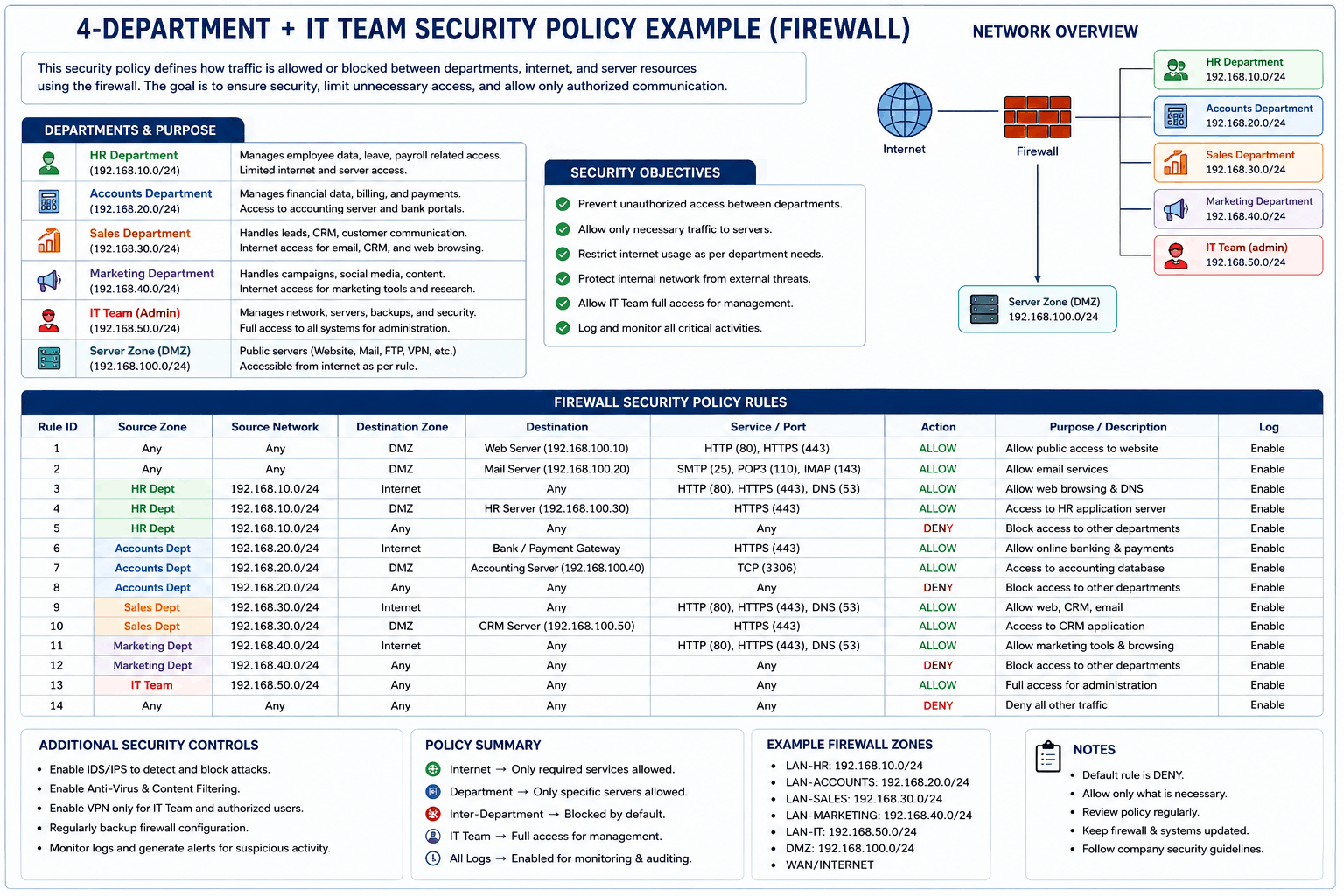
4 Department + IT Team Security Policy Example
Here is the previous 4-department + IT Team security policy example in English, with the meaning of Users → Server made clear.
Real-World Security Policy Example
Suppose a company has 4 departments and an IT Team:
					Internet
    │
    ▼
 Firewall
    │
    ├── HR Department       VLAN 10
    ├── Accounts Department VLAN 20
    ├── Sales Department    VLAN 30
    ├── Admin Department    VLAN 40
    └── IT Team             VLAN 50
Department Network
					HR        → 192.168.10.0/24
Accounts  → 192.168.20.0/24
Sales     → 192.168.30.0/24
Admin     → 192.168.40.0/24
IT        → 192.168.50.0/24
Servers   → 192.168.100.0/24
Security Policies
| Policy | Source | Destination | Service/Application | Action |
|---|---|---|---|---|
| 1 | IT Team | All Servers | RDP, SSH, HTTPS | Allow |
| 2 | HR | Internet | HTTP/HTTPS | Allow |
| 3 | Accounts | Internet | HTTP/HTTPS | Allow |
| 4 | Sales | Internet | HTTP/HTTPS | Allow |
| 5 | Admin | Internet | HTTP/HTTPS | Allow |
| 6 | HR | Accounts | Any | Block |
| 7 | Sales | Accounts | Any | Block |
| 8 | Users | Required Servers | Required Ports | Allow |
| 9 | Users | IT VLAN | Any | Block |
| 10 | All Users | Malware Websites | Any | Block |
What does “Users → Required Servers → Required Ports” mean?
Here Users means normal employees’ computers from HR, Accounts, Sales, or Admin.
For example, suppose the Accounts department needs to use an ERP Server:
					ERP Server:
192.168.100.10

ERP Service:
HTTPS / TCP 443
The firewall policy can be:
					Source:      Accounts VLAN
Destination: ERP Server
Service:     HTTPS / 443
Action:      ALLOW

....So....

Accounts PC
     │
     │ TCP 443 ✅
     ▼
ERP Server
192.168.100.10
But the Accounts user does not need RDP or database access:
					Accounts PC
     │
     ├── HTTPS 443  → ALLOW ✅
     ├── RDP 3389   → BLOCK ❌
     ├── SSH 22     → BLOCK ❌
     └── MySQL 3306 → BLOCK ❌
This is called least-privilege access—users get only the access required for their job.
IT Team Access
The IT Team needs administrative access to servers and network devices.
For example:
					IT PC
  │
  ├── RDP 3389 → Windows Server ✅
  ├── SSH 22   → Linux Server ✅
  └── HTTPS 443 → Management Interface ✅
Therefore, IT users can have more administrative access than normal department users.
Department Isolation
HR should not normally access the Accounts network directly:
					HR VLAN
    │
    ▼
 Firewall
    │
    ▼
Accounts VLAN
    │
    X
  BLOCK ❌
Similarly:
					Sales → Accounts     BLOCK ❌
HR → IT VLAN         BLOCK ❌
Admin → IT VLAN      BLOCK ❌
But the IT Team can be allowed to access these networks when required for administration.
Complete Deployment
					                         INTERNET
                            │
                            ▼
                     ┌─────────────┐
                     │  FIREWALL   │
                     └──────┬──────┘
                            │
        ┌───────────────────┼───────────────────┐
        │                   │                   │
      VLAN 10             VLAN 20             VLAN 30
        HR                Accounts              Sales
        │                   │                   │
        └───────────────────┼───────────────────┘
                            │
                         VLAN 40
                          Admin
                            │
                         VLAN 50
                         IT Team
                            │
                            ▼
                      Server VLAN
                            │
                ┌───────────┼───────────┐
                ▼           ▼           ▼
             File Server  ERP Server  Database
In short: The firewall separates the departments, controls communication between them, allows users to access only the servers and ports they need, and gives the IT Team additional administrative access.
Security Policy – Different Departments
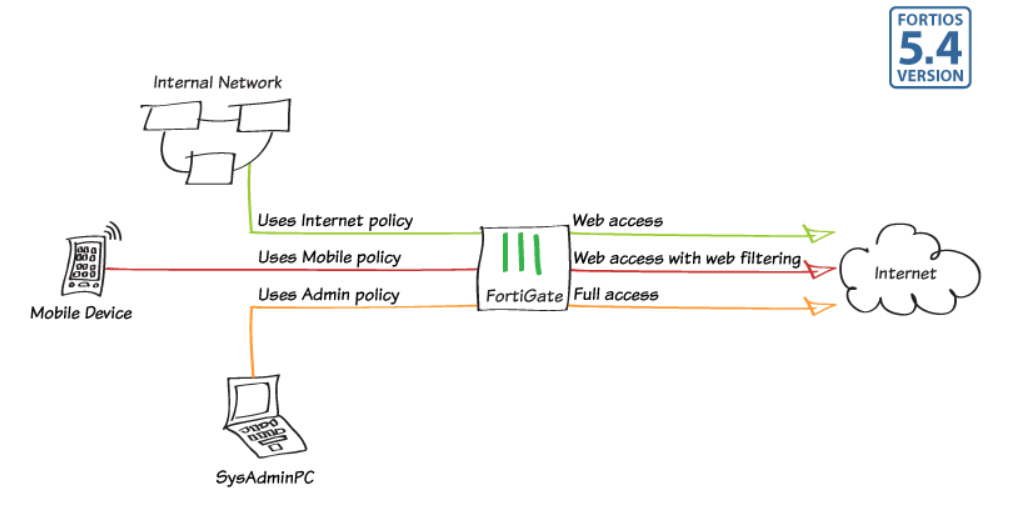
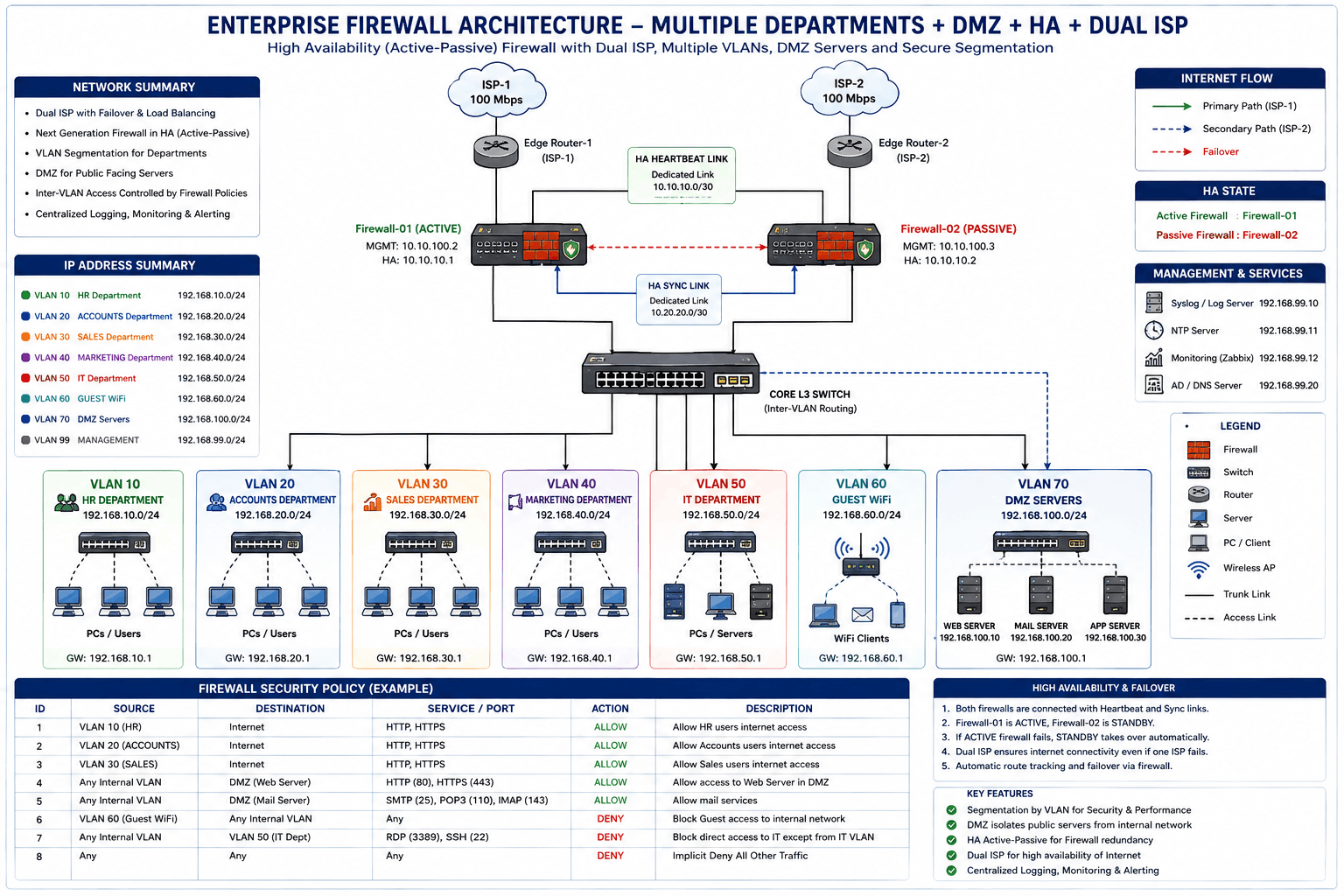
A firewall can use different security policies for different departments, based on their job requirements.
- HR: Internet access allowed, but access to Accounts and IT networks blocked.
- Accounts: Internet allowed and ERP/Accounting server access allowed only on required ports.
- Sales: Internet and CRM server allowed; restricted applications can be blocked.
- Admin: Internet and required office servers allowed.
- IT Team: Higher-level access allowed to servers, switches, routers, and firewall management interfaces.
Example
					HR       → Internet        → ALLOW ✅
HR       → Accounts VLAN   → BLOCK ❌

Accounts → ERP Server 443  → ALLOW ✅
Accounts → Server RDP 3389 → BLOCK ❌

Sales    → CRM Server 443  → ALLOW ✅

IT       → Servers RDP/SSH → ALLOW ✅
IT       → Network Devices → ALLOW ✅

Why Need Security Policy
A Security Policy is needed because it controls How Traffic Moves Through a Firewall and protects networks from unauthorized access, attacks, and misuse. Without a security policy, the firewall would have no clear rules about which traffic should be allowed or blocked. This could let harmful traffic, hackers, malware, or unauthorized users access sensitive systems. Security policies act like a set of access rules that tell the firewall how to handle every connection.
One important reason for security policies is Access Control. Not every user or device should have access to every network resource. A Security Policy allows administrators to decide who can access what. For example, employees may be allowed to browse the Internet, HR Staff may access HR Servers, Finance Staff may access Accounting Systems, and guest users may only access the Internet. This prevents unnecessary or unauthorized access.
Security policies are also needed for Threat Protection. Firewalls can attach Security Features to policies, such as Intrusion Prevention System (IPS), antivirus scanning, web filtering, DNS filtering, application control, and SSL deep inspection. This means allowed traffic is not simply passed—it is inspected for malware, suspicious behavior, harmful websites, or attack signatures before reaching users or servers.
Another reason is Network Segmentation and Security Isolation. Organizations often have different zones such as LAN, WAN, DMZ, Guest, and VPN. Security policies control communication between these zones. For Example, Internet users may be allowed to access only DMZ Web Servers, while direct access to the internal LAN is blocked. Guest Wi-Fi may be blocked from internal office systems. This separation improves security.
Security policies are also important for Compliance and Monitoring. Many businesses must follow security standards that require traffic logging, access restrictions, and security inspection. Policies allow administrators to log traffic, monitor suspicious activity, and generate reports for auditing and troubleshooting.
For Example, in an FortiGate firewall:
- LAN → WAN = Allow web browsing with IPS + Antivirus
- Guest → LAN = Block
- WAN → DMZ = Allow HTTPS only
- VPN → Internal Server = Allow secure business access
- Unknown traffic = Deny
These rules protect the company network while allowing required communication.
In short:
A security policy is needed to control network access, block unauthorized traffic, inspect for threats, separate network zones, and enforce security rules across the organization.
Example of Security Policy in a School / College
Suppose a school or college uses a firewall such as FortiGate to protect its campus network. The institution has different users and systems, such as students, teachers, administrative staff, library computers, Wi-Fi users, online learning platforms, and internal servers. Not every user should have the same level of access. To control this, the firewall uses security policies.
First, the college creates separate network zones. For example, there may be a Student Network, Teacher Network, Admin Network, Guest Wi-Fi Network, Server Network, and Internet (WAN). Each zone is treated differently because each has different security needs. Student devices may need access to educational websites, while the admin department may need access to financial systems and confidential records.
A security policy can allow the Student Network to access educational websites, e-learning portals, email, and research resources, while blocking harmful websites, adult content, gaming sites, or dangerous downloads. Application control may block social media or streaming apps during class hours to reduce distraction and save bandwidth. Antivirus and web filtering can inspect student traffic for malware and suspicious content.
Another security policy can allow the Teacher Network to access teaching platforms, student records, online meeting applications, and school servers. Teachers may receive broader access than students, but security scanning such as IPS, antivirus, and web filtering still applies. This keeps staff devices protected from cyber threats.
The Admin Network usually has stricter protection because it contains payroll systems, student databases, examination records, and financial information. Security policies may allow only authorized staff to access these systems and block all student or guest access. Multi-factor authentication, logging, and strict access control are often applied for sensitive systems.
For visitors, the college may provide Guest Wi-Fi, but a security policy can restrict this network to Internet-only access. Guests are blocked from reaching internal servers, staff computers, printers, or administrative databases. This keeps the internal college network isolated from unknown users.
For example, firewall rules may look like this:
- Student Zone → Internet = Allow educational browsing + Web Filter + Antivirus
- Student Zone → Admin Server = Deny
- Teacher Zone → School Server = Allow
- Admin Zone → Finance Server = Allow secure access
- Guest Wi-Fi → Internal Network = Block
- Guest Wi-Fi → Internet = Allow only
In this way, a security policy helps the school or college protect student data, secure staff systems, control Internet usage, block harmful content, and separate different user groups for better security and network management.
How Security Policy Works
A security policy works by checking every network connection that passes through the firewall and deciding whether that traffic should be allowed, blocked, or inspected. Whenever a user, device, or server sends data from one network to another, the traffic first reaches the firewall. The firewall then compares that traffic against its configured security policies to determine what action should be taken.
First, when a packet enters the firewall, the firewall identifies where the traffic is coming from and where it is going. It checks the source interface or zone (such as LAN, Guest, VPN, or WAN) and the destination interface or zone (such as Internet, DMZ, or internal server network). This helps the firewall understand the direction of communication.
Next, the firewall checks the source IP address and destination IP address. This tells the firewall which device is sending the traffic and which system is receiving it. For example, a student computer may have IP 192.168.10.20, and it may be trying to reach a website on the Internet or a server inside the school network.
Then the firewall checks the service, port, and protocol being used. For example:
- HTTP = Port 80
- HTTPS = Port 443
- FTP = Port 21
- SSH = Port 22
- DNS = Port 53
This tells the firewall what kind of communication is happening, such as web browsing, file transfer, remote login, or DNS lookup.
After matching the connection with a policy rule, the firewall performs the configured action. The action may be:
- Allow → traffic is permitted
- Deny / Block → traffic is stopped
- Inspect → traffic is scanned for threats before allowing it
- Log → activity is recorded for monitoring
If advanced security is attached to the policy, the firewall may also apply:
- Intrusion Prevention System (IPS) → blocks attack signatures
- Antivirus scanning → checks files for malware
- Web filtering → blocks harmful or restricted websites
- Application control → blocks apps like games or social media
- SSL inspection → scans encrypted traffic
Example:
Suppose a college student opens YouTube during class time:
Student PC → Firewall → Internet
The firewall checks:
- Source Zone = Student Network
- Destination Zone = WAN/Internet
- Service = HTTPS (Port 443)
- Application = YouTube
Policy says:
Student Zone → Internet → Block streaming apps during class
Result: ❌ Blocked
Now student opens an educational website:
Policy says:
Student Zone → Internet → Allow educational websites + scan for malware
Result: ✅ Allowed
In short:
A security policy works by inspecting traffic details, matching them with firewall rules, and then allowing, blocking, or scanning traffic based on security settings.
What is Top to Bottom Policy Working in Firewall
Top-to-Bottom Policy Working in Firewall:
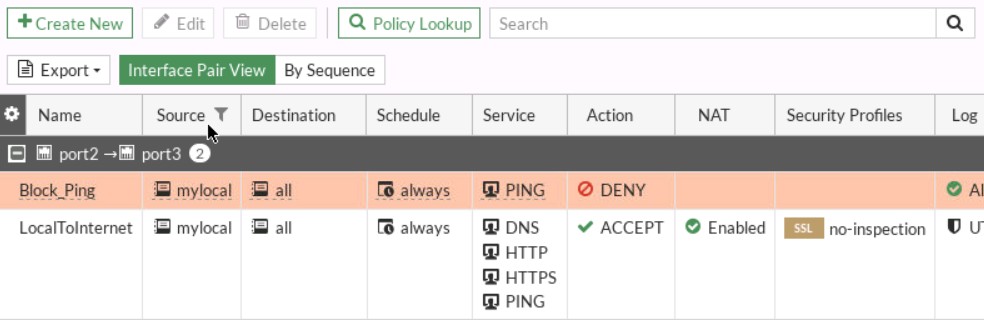
A firewall security policy usually works in a top-to-bottom order. This means when traffic enters the firewall, the firewall checks policy rules starting from the first rule at the top, then moves downward rule by rule until it finds the first matching rule. Once a match is found, the firewall applies that rule and stops checking further policies. This is called first match rule processing.
Because of this top-to-bottom behavior, policy order is very important. More specific rules should normally be placed higher in the policy list, while general rules should be placed lower. If a broad rule is placed at the top, it may match traffic before a more specific security rule gets checked, causing unintended access or blocking.
For example, imagine a school firewall such as FortiGate has these policies:
Policy 1 (Top)
Source: Student Network
Destination: Internet
Service: All
Action: Allow
Policy 2
Source: Student Network
Destination: YouTube
Service: HTTPS
Action: Block
When a student opens YouTube, the firewall starts at Policy 1. The traffic matches because Student Network → Internet → All services is allowed. Since a match is found, the firewall allows the traffic and stops checking. Policy 2 is never reached, so YouTube is allowed even though there is a block rule below. This is a policy order mistake.
Correct order:
Policy 1 (Top)
Source: Student Network
Destination: YouTube
Service: HTTPS
Action: Block
Policy 2
Source: Student Network
Destination: Internet
Service: All
Action: Allow
Now when a student opens YouTube, the firewall checks from the top, matches Policy 1, blocks the traffic, and stops there. Other websites continue to be allowed by Policy 2.
At the bottom of most firewall policy lists, there is often an implicit deny rule (default deny). This means if traffic does not match any policy, the firewall automatically blocks it. This prevents unknown or unauthorized traffic from passing.
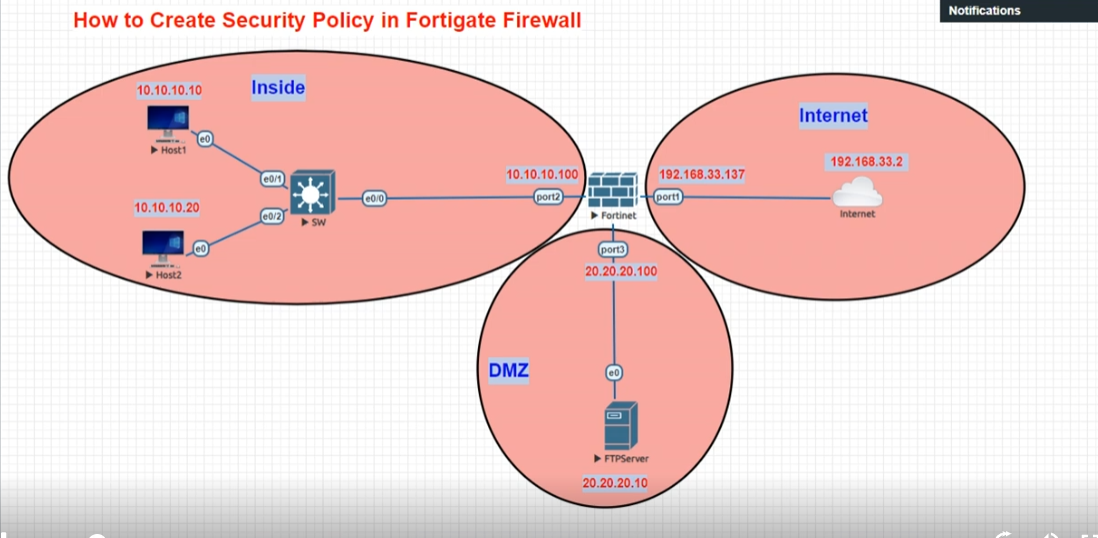
Types of Firewall Policies
- Allow Policy – Allows specific traffic.
- Deny / Block Policy – Blocks unwanted traffic.
- User-Based Policy – Controls access based on user identity.
- MAC-Based Policy – Controls access based on device MAC address.
- Source IP-Based Policy – Controls traffic based on source IP address.
- Destination IP-Based Policy – Controls traffic based on destination IP address.
- Port / Service-Based Policy – Controls traffic by port or service (HTTP, HTTPS, FTP, etc.).
- Protocol-Based Policy – Controls by protocol (TCP, UDP, ICMP, etc.).
- Schedule-Based Policy – Active only during specific times/days.
- Application Control Policy – Controls specific applications (Facebook, WhatsApp, YouTube, etc.).
- Web Filtering Policy – Blocks/Allows website categories or URLs.
- DNS Filtering Policy – Controls access through DNS domain filtering.
- Antivirus Policy – Scans files/traffic for malware.
- Intrusion Prevention (IPS) Policy – Detects and blocks attacks.
- SSL Inspection Policy – Inspects encrypted HTTPS traffic.
- VPN Policy – Controls secure VPN traffic.
- NAT Policy – Translates private IP to public IP (and vice versa).
- QoS / Traffic Shaping Policy – Controls bandwidth and priority.
- Routing Policy – Chooses traffic path (WAN1/WAN2).
- Zone-Based Policy – Rules between security zones.
- DMZ Access Policy – Controls traffic to/from DMZ servers.
- Guest Network Policy – Restricts guest users.
- Content Filtering Policy – Blocks harmful/inappropriate content.
- Data Loss Prevention (DLP) Policy – Prevents sensitive data leakage.
- Authentication Policy – Requires user/device authentication.
- Device Control Policy – Controls USB / external device usage.
- Geo-IP Policy – Allows/blocks traffic by country/region.
- High Availability (HA) Policy – Controls failover / cluster traffic.
- Logging / Monitoring Policy – Defines what traffic to log/monitor.
- Default / Implicit Deny Policy – Blocks unmatched traffic by default.
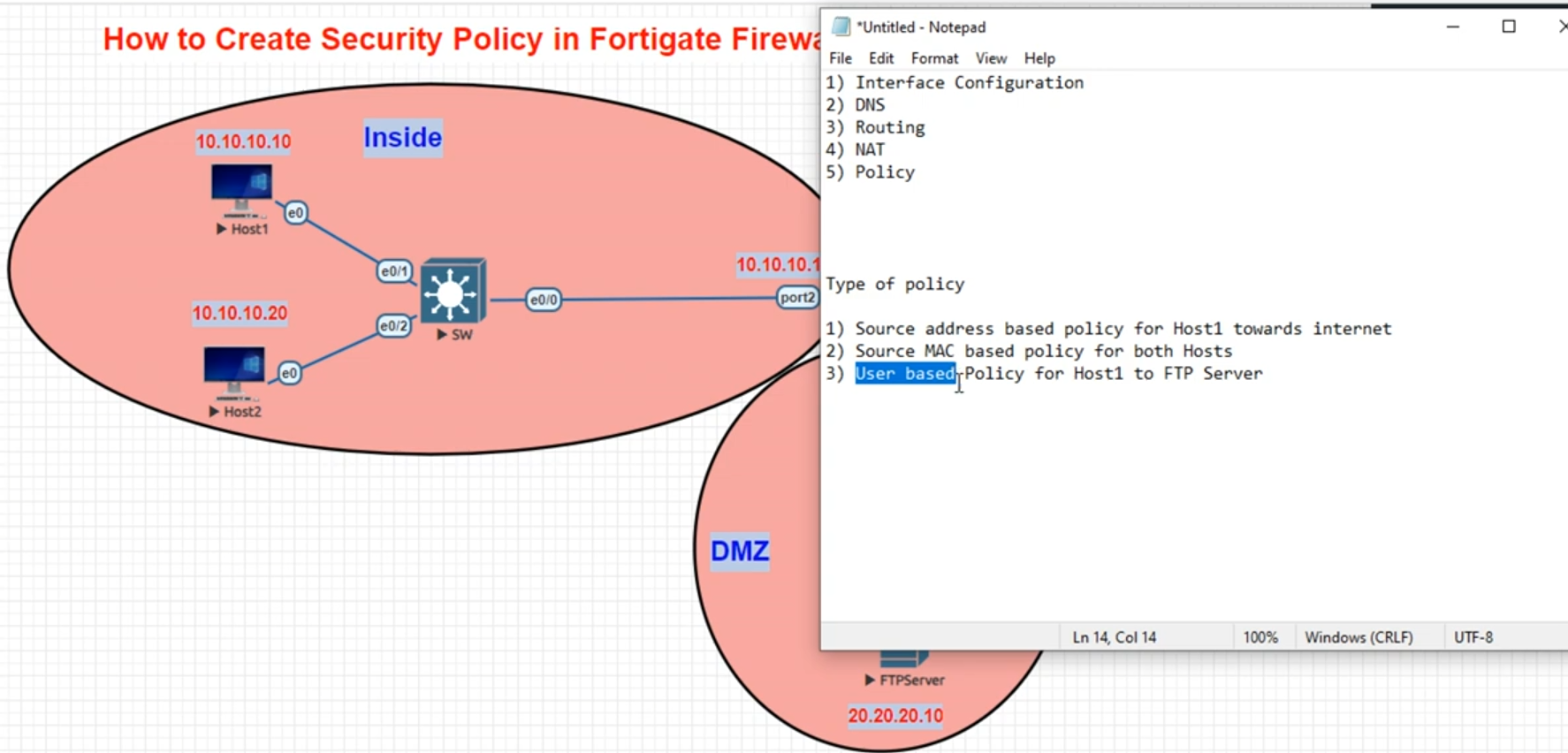
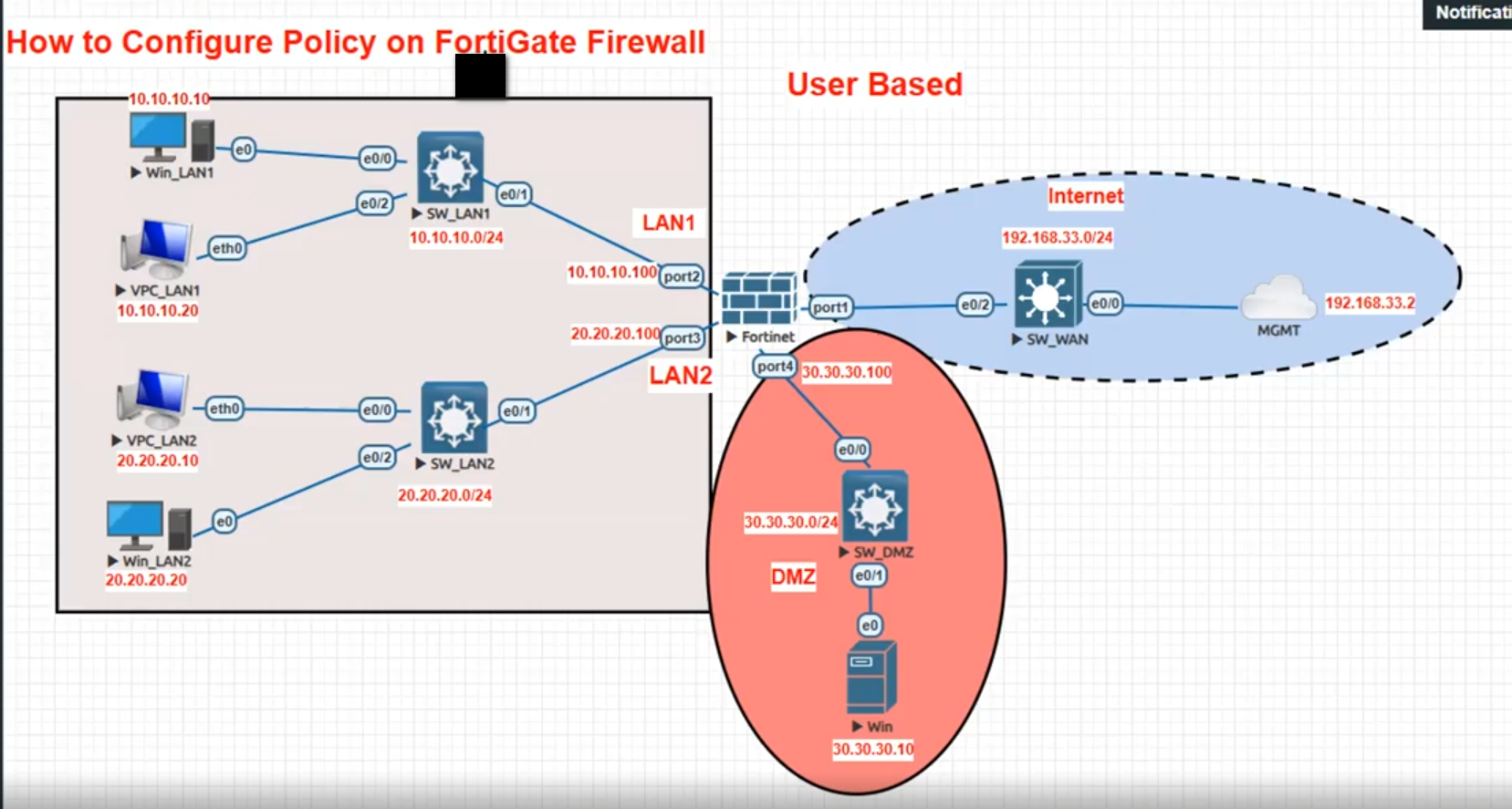
What is User Based Policy
User-Based Policy:
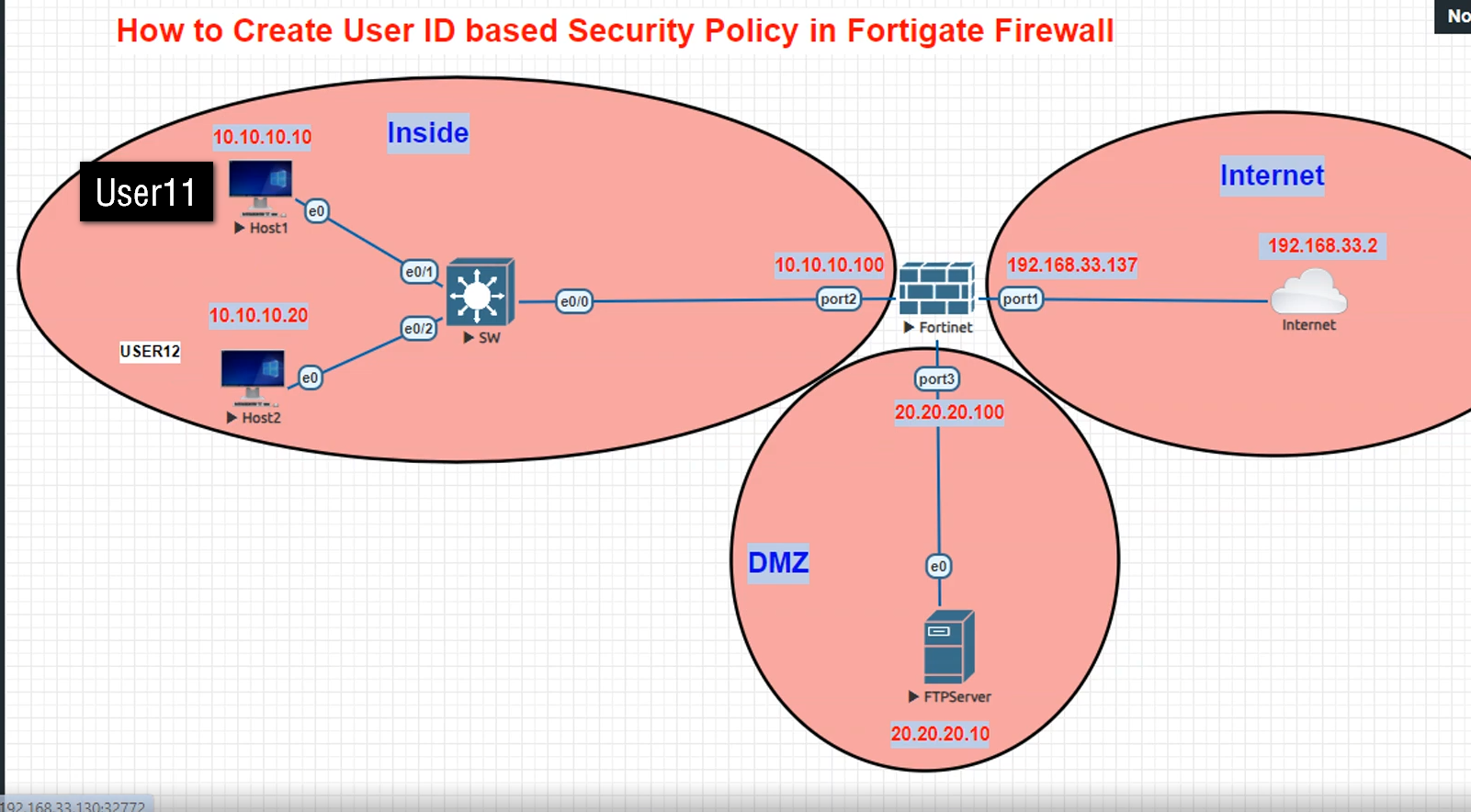
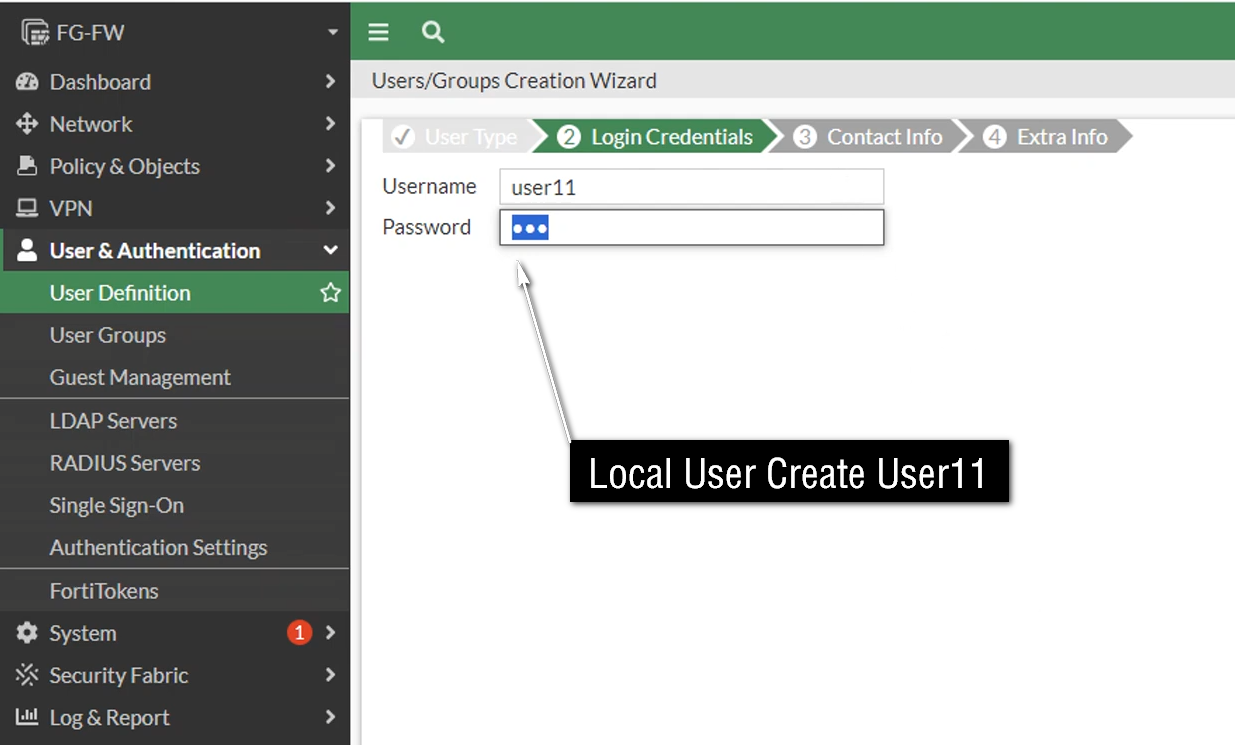
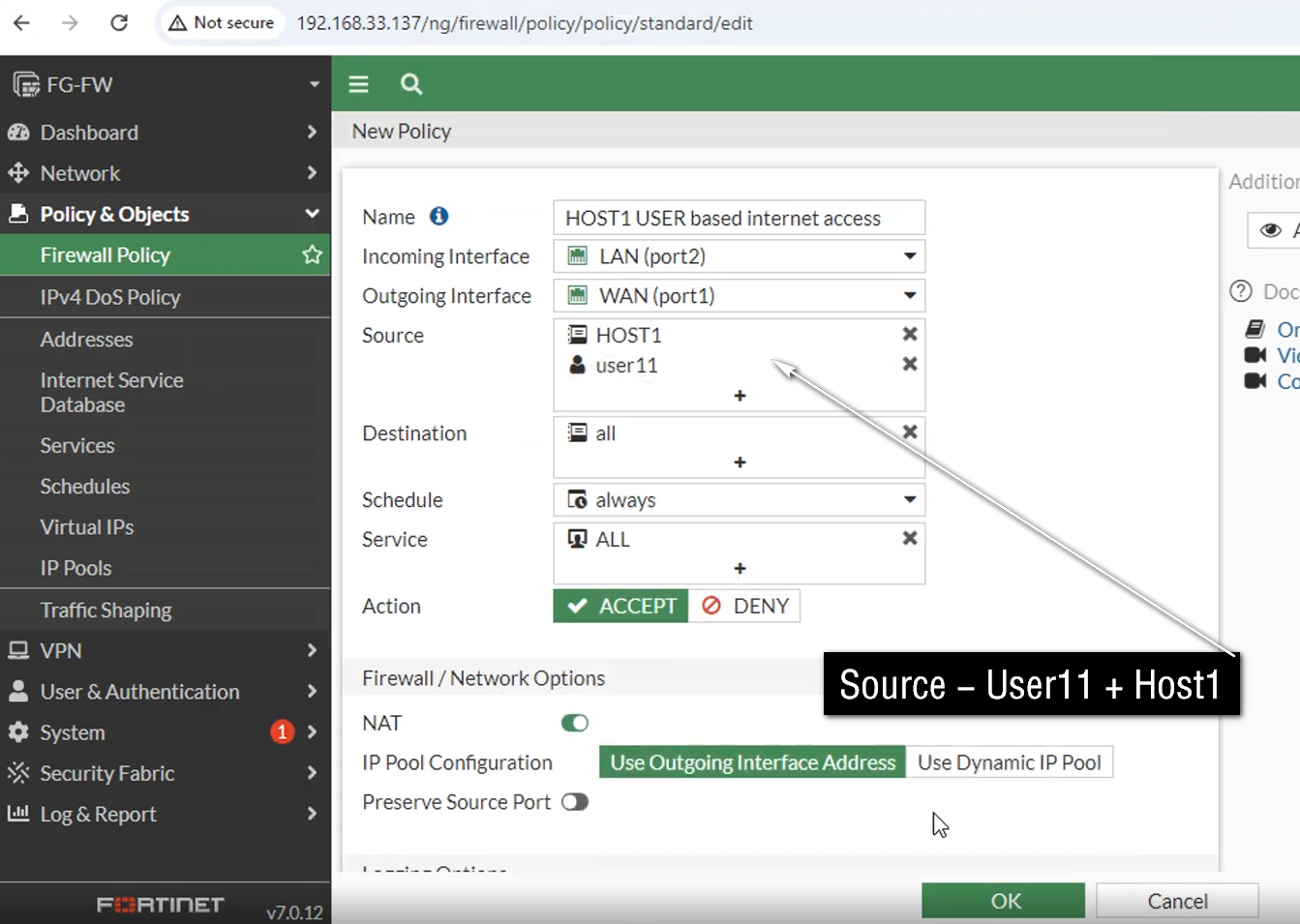
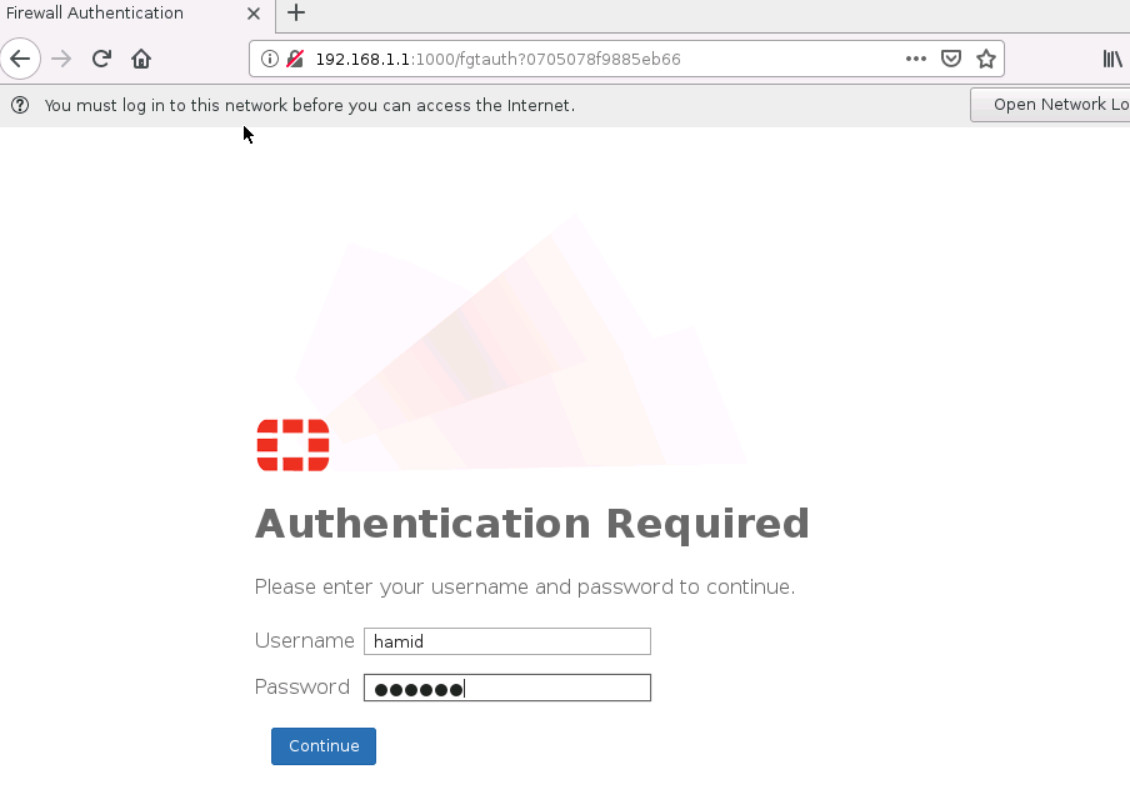
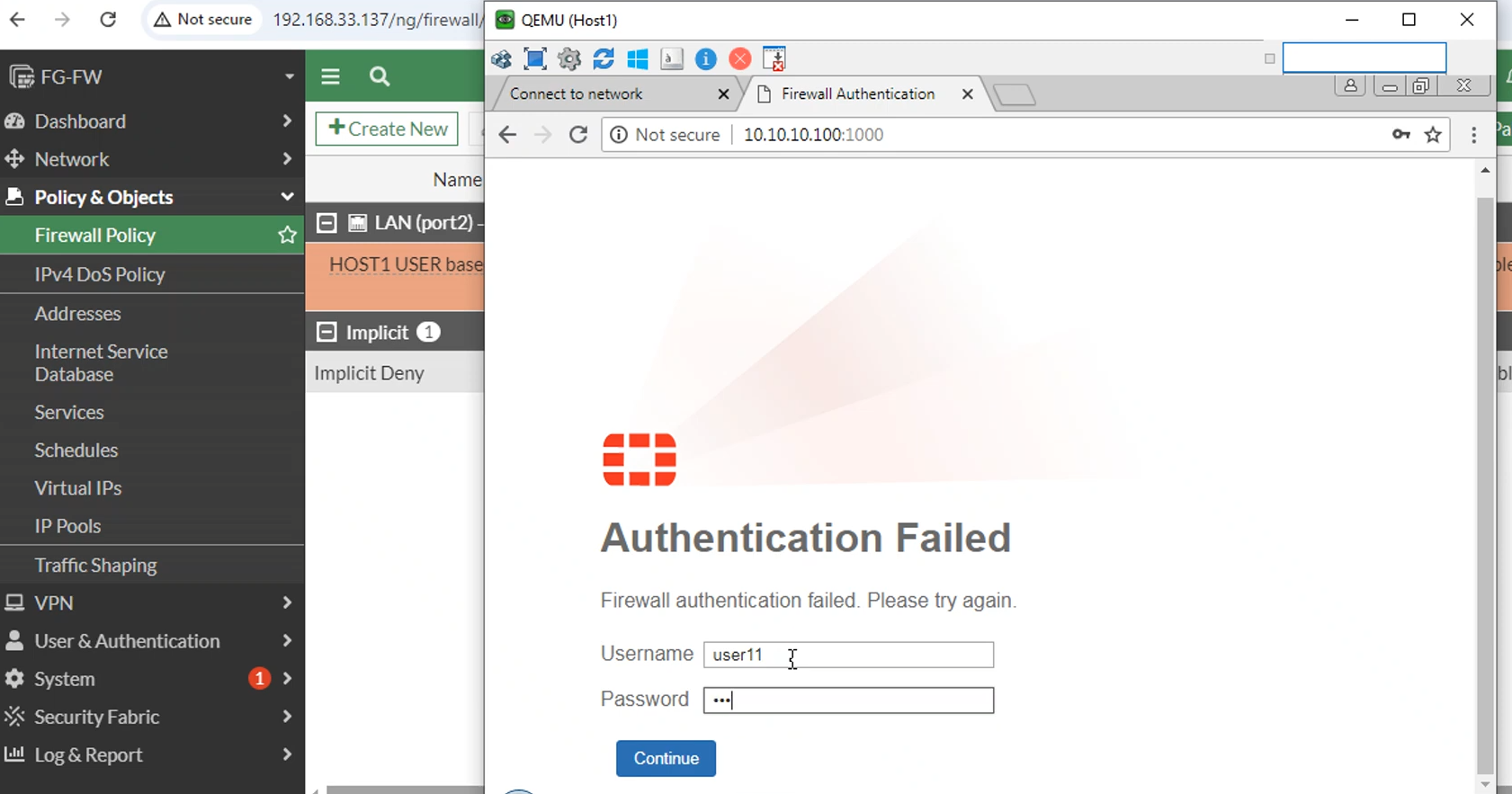
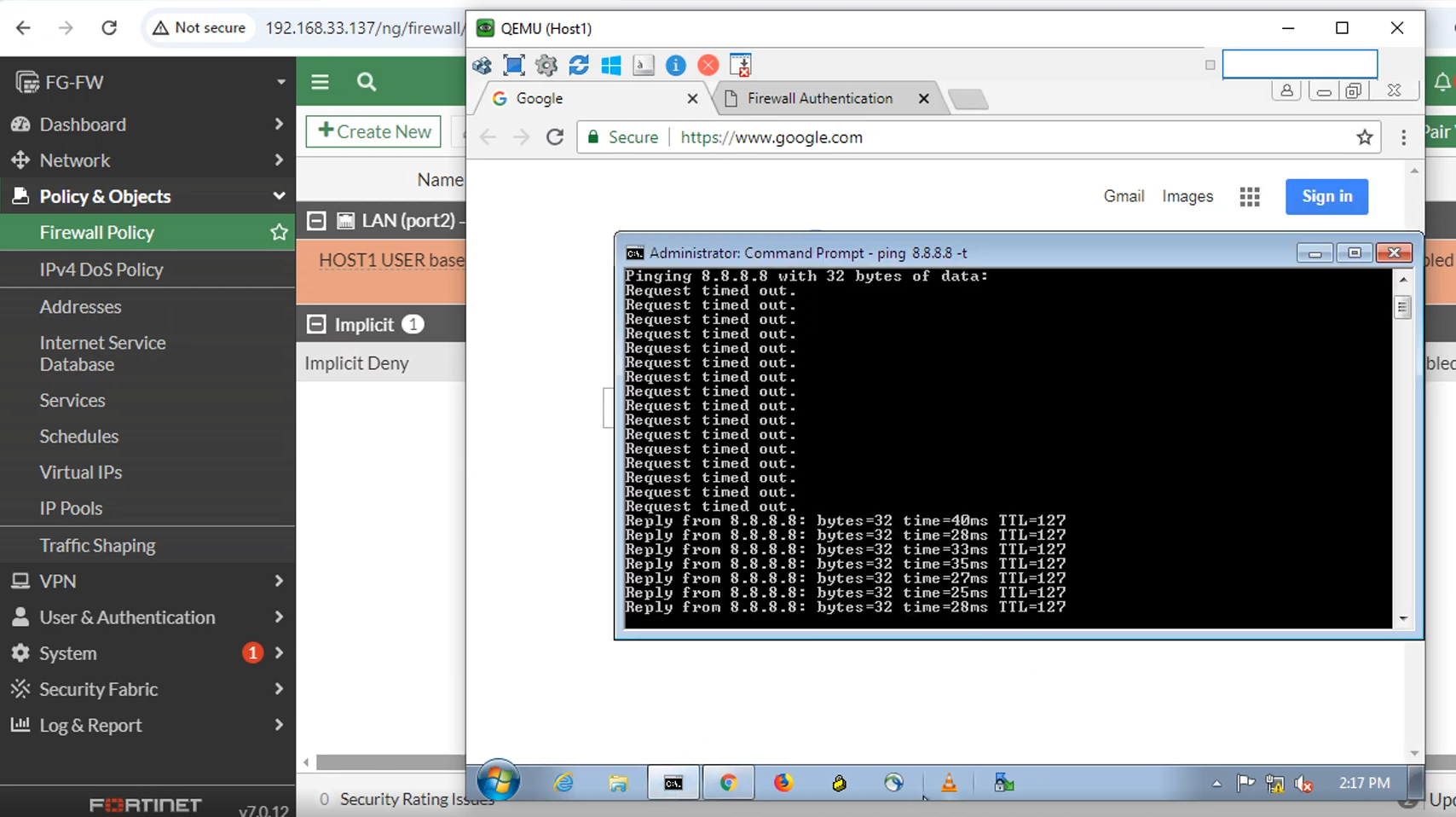
A User-Based Policy is a firewall security policy that controls network access based on the identity of the user instead of only using IP address, MAC address, or device location. In this policy, the firewall first identifies who the user is, then applies security rules according to that user’s role, department, or permissions. This allows different users on the same network to receive different access rights.
The firewall identifies users through methods such as login authentication, VPN login, captive portal login, LDAP, RADIUS, or integration with Microsoft Active Directory / Single Sign-On (SSO). Once the user is authenticated, the firewall maps that identity to a policy and controls what websites, applications, servers, or services that user can access.
For example, in a college network using a FortiGate firewall, three people connect to the same Wi-Fi network:
- Student Rahul logs in → Firewall identifies him as Student Group
- Teacher Priya logs in → Firewall identifies her as Faculty Group
- Admin Staff Amit logs in → Firewall identifies him as Administration Group
Even though all three are using the same network, the firewall applies different policies:
Student Group Policy:
- Allow Educational Websites
- Allow Email Access
- Block Social Media Like Facebook,Youtube during class Hours 10:00 A.M To 16:00 P.M
- Block Gaming Sites & Adult Site
- Limited download bandwidth
Faculty Group Policy:
- Allow educational websites
- Allow YouTube for teaching videos
- Allow video conferencing apps
- Access internal learning management server
Administration Group Policy:
- Access Student Database
- Access finance/payroll server
- Full business application access
- High security logging enabled
Suppose Rahul tries to open Facebook during class time. The firewall checks his identity, sees he belongs to the Student Group, matches the student policy, and blocks access. Later, Teacher Priya opens YouTube for a classroom lecture. The firewall identifies her as Faculty and allows access because her policy is different.
This shows that the same network can have different access rules for different users, based on identity.
In short:
A User-Based Policy is a firewall rule that controls access according to who the user is, allowing personalized and role-based network security.
1. What is User-Based Policy?
A User-Based Firewall Policy controls network access based on the User or User Group, instead of relying only on the user’s IP address. The firewall identifies the logged-in user and applies the policy assigned to that user or group.
2. Active Directory Integration
In a real company, the firewall can integrate with Windows Server Active Directory (AD). Users are placed into groups such as HR, Accounts, Sales, and IT. The firewall receives the user’s identity and can apply different security rules to each group.
3. HR Example
HR users may be allowed to access normal business websites, but social media or other restricted applications can be blocked.
					HR User → Firewall → Web Filter → Business Site ✅Allow
                              → Restricted Site Block❌
4. Accounts Example
Accounts users may need access to an ERP server. The firewall can allow only the required ERP service, such as HTTPS port 443, while blocking unnecessary administrative ports.
					Accounts → ERP Server :443 → ALLOW ✅
Accounts → Server RDP :3389 → BLOCK ❌
5. IT Team Example
IT administrators normally require more access because they manage servers and network devices. The firewall can allow IT users to use RDP, SSH, HTTPS management, and other approved administrative services.
					IT User → Windows Server RDP → ALLOW ✅
IT User → Linux Server SSH   → ALLOW ✅
6. Main Advantage
The major advantage is individual or group-based access control. Two users can be connected to the same network but receive different permissions because they belong to different groups.
					HR User      → HR Policy      → Restricted Access
Accounts User → Accounts Policy → ERP Access
IT User      → IT Policy      → Administrative Access
8. Real-World Example
Suppose Saikat belongs to the IT group and Rahul belongs to the HR group. Even if both users are connected to the same office network, the firewall identifies their groups and applies different policies.
					Saikat → IT Group → RDP/SSH → ALLOW ✅
Rahul  → HR Group → RDP/SSH → BLOCK ❌
User-Based Firewall Policy
- User-Based Policy controls network access based on the user or user group, not only the IP address.
- The firewall can integrate with Active Directory (AD) to identify users.
- Different departments can have different permissions.
- HR: Normal Internet access → Allow; restricted sites → Block.
- Accounts: ERP Server → Allow; unnecessary server access → Block.
- Sales: CRM Server → Allow.
- IT: RDP, SSH, and network management → Allow.
					HR User      → HR Policy      → Restricted Access
Accounts User → Accounts Policy → ERP Access
IT User      → IT Policy      → Admin Access
Simple meaning:
User login → Firewall identifies user/group → Correct security policy is applied.
What is Source IP-Based Policy
Source IP-Based Policy:
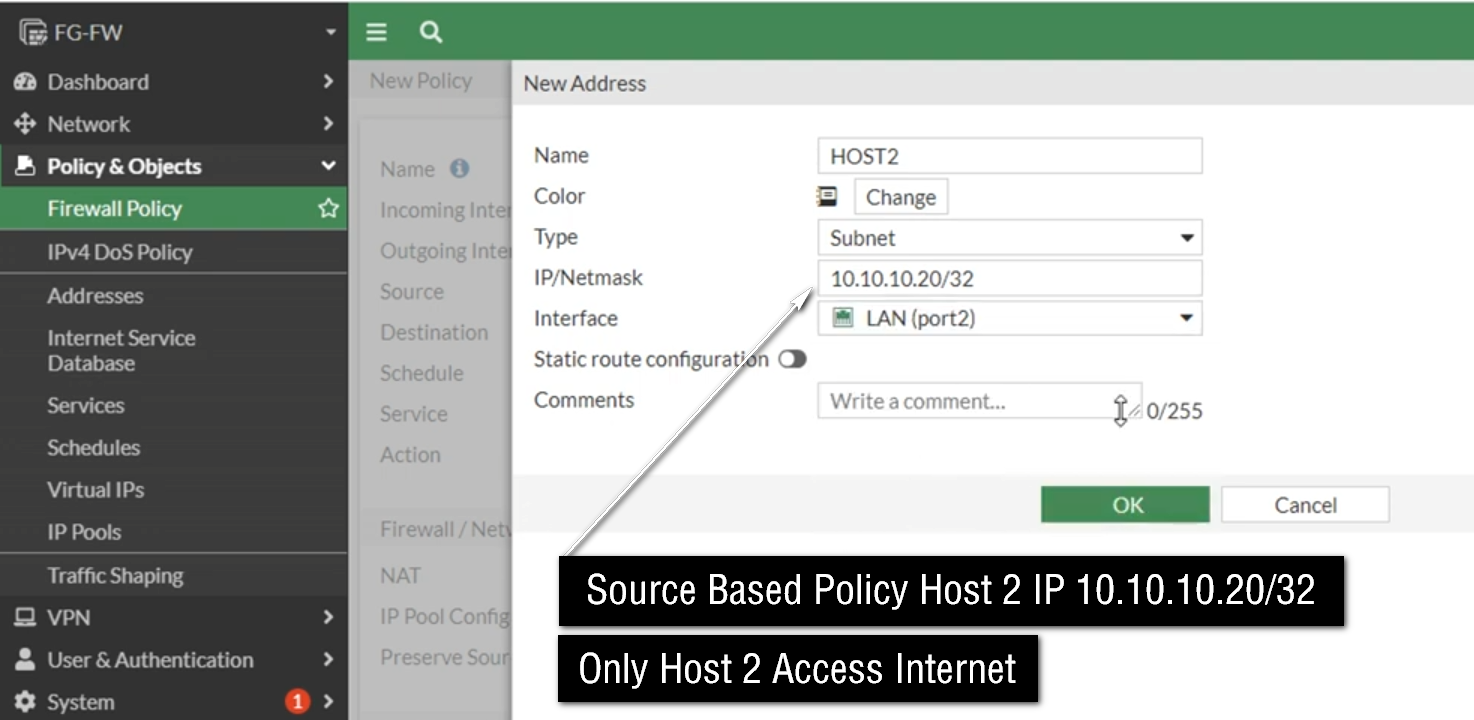
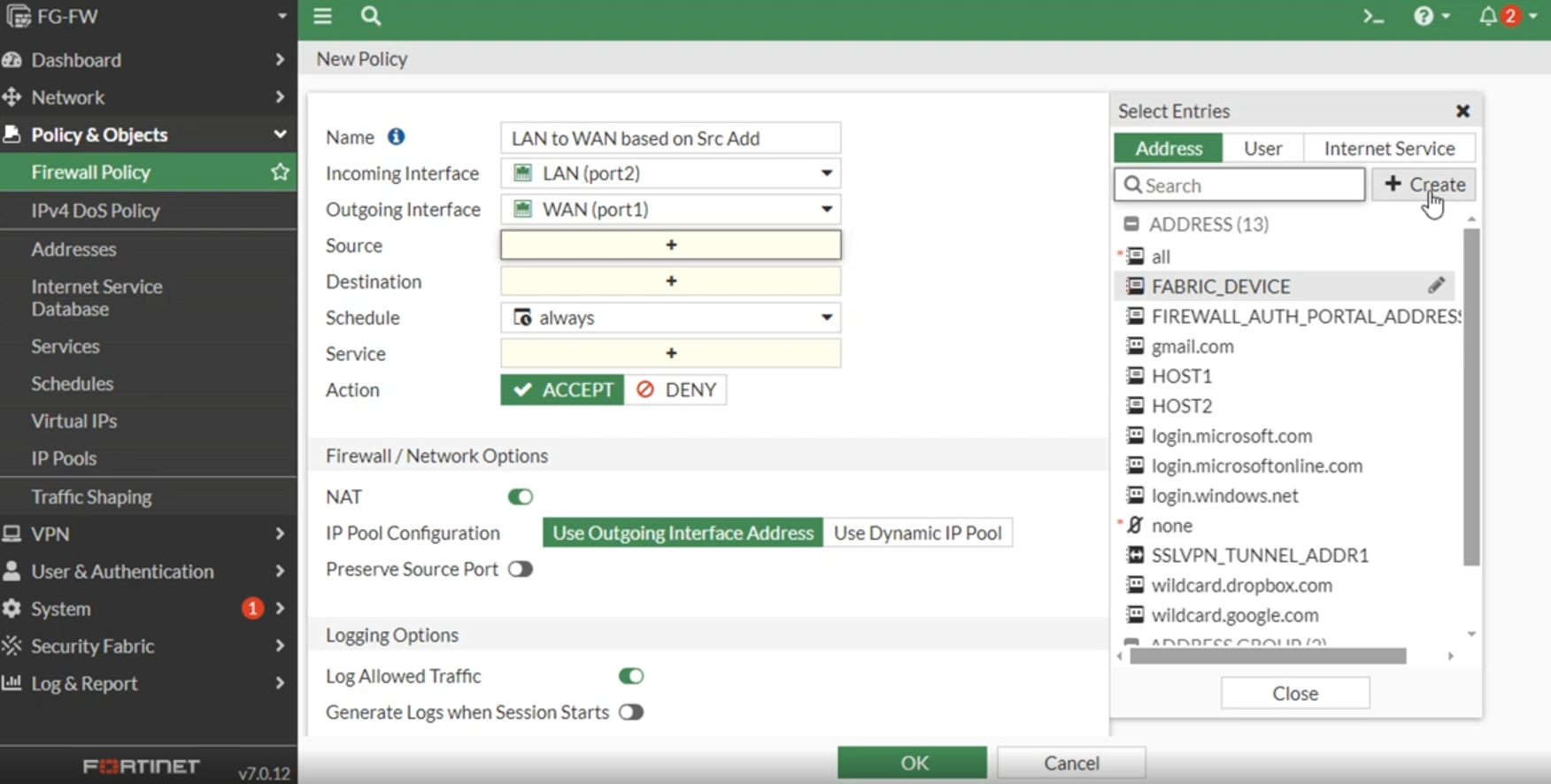
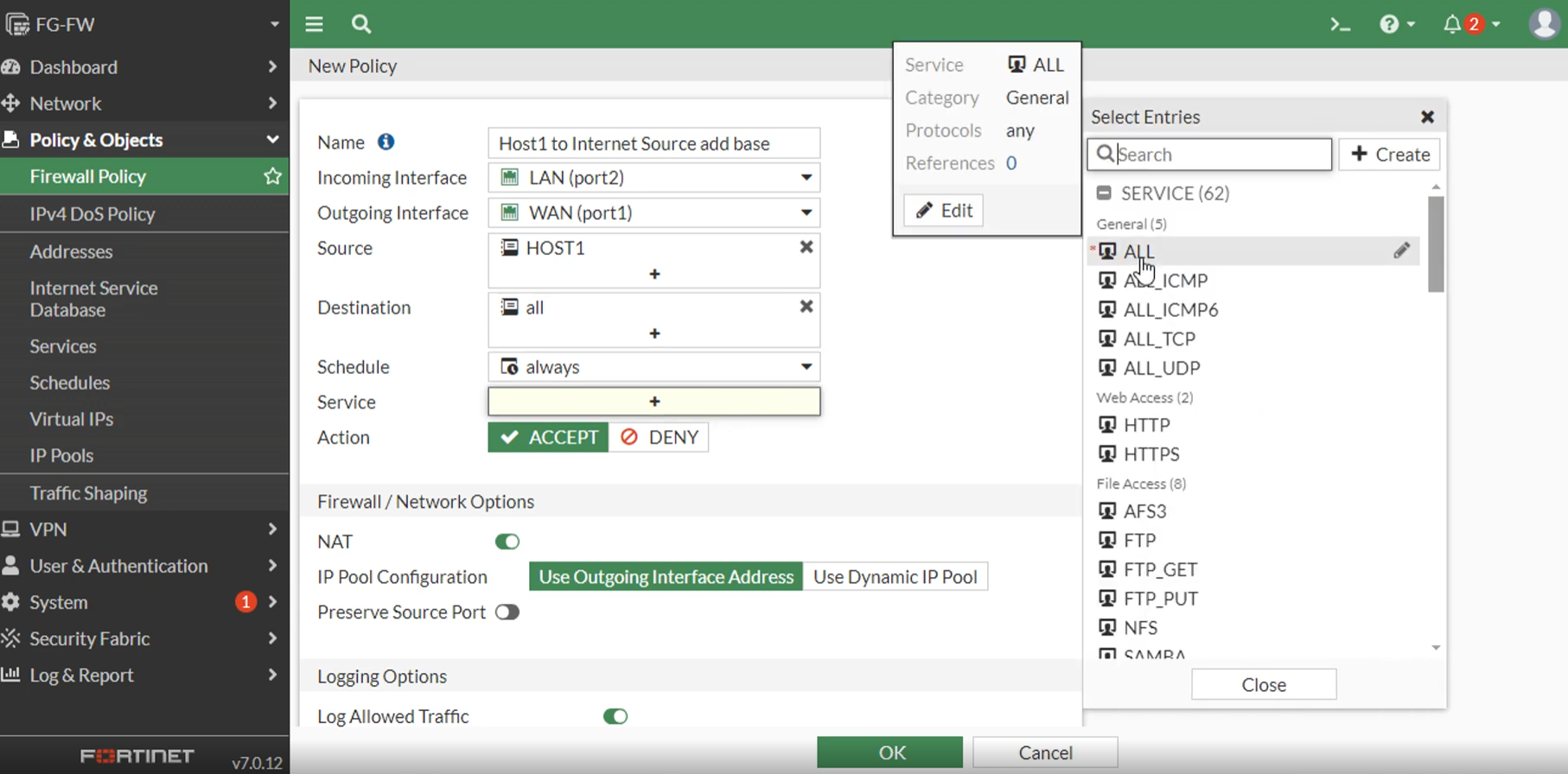
A Source IP-Based Policy is a firewall security policy that controls network traffic based on the IP address of the device sending the traffic. In simple words, the firewall checks where the traffic is coming from (source IP) and then decides whether to allow, block, or inspect that traffic according to configured rules.
Every device connected to a network has an IP address, such as 192.168.1.10 or 10.0.0.25. When that device sends data, the firewall reads the source IP address in the packet header. If that IP matches a configured security policy, the firewall applies the action defined in that rule.
For example, in a college network using a FortiGate firewall:
- 192.168.10.0/24 → Student Network
- 192.168.20.0/24 → Teacher Network
- 192.168.30.0/24 → Admin Network
- 192.168.40.0/24 → Guest Wi-Fi
The firewall creates policies:
- Source IP: 192.168.10.0/24 (Students) → Allow educational websites only
- Source IP: 192.168.20.0/24 (Teachers) → Allow full educational access + YouTube
- Source IP: 192.168.30.0/24 (Admin) → Allow access to finance server + Internet
- Source IP: 192.168.40.0/24 (Guest) → Internet only, block internal servers
Suppose a device with IP 192.168.10.25 tries to open Facebook. The firewall checks the source IP, recognizes it belongs to the Student Network, matches the student policy, and blocks access if social media is restricted.
If a teacher device with IP 192.168.20.15 opens YouTube, the firewall checks the source IP, sees it belongs to the Teacher Network, matches the teacher policy, and allows access.
Source IP-based policy is widely used because it is simple, fast, and easy to manage, especially when networks are separated into VLANs or subnets.
In short:
A Source IP-Based Policy controls traffic based on the sender’s IP address, deciding what network access is allowed or blocked depending on where the traffic comes from.
What is MAC Based Policy
MAC-Based Policy:
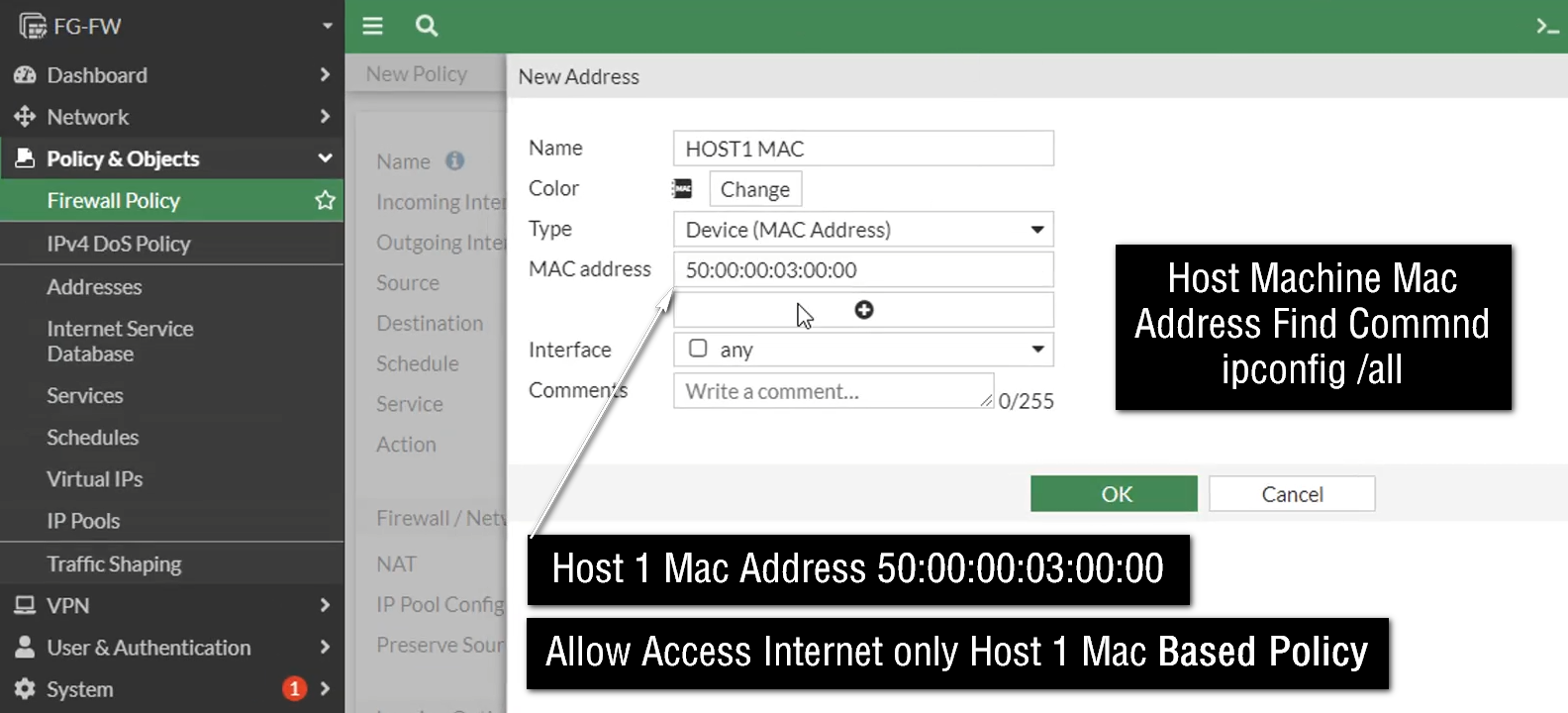
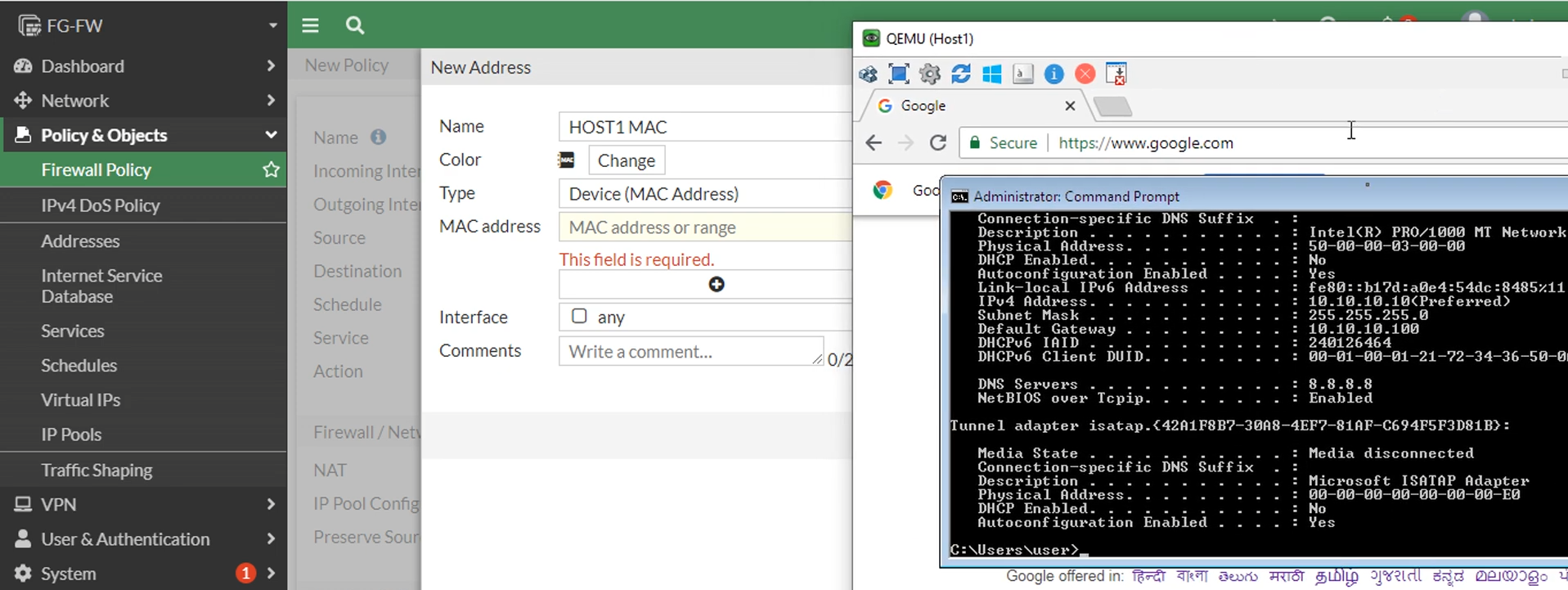
A MAC-Based Policy is a firewall security policy that controls network access based on a device’s MAC (Media Access Control) address instead of its IP address or user identity. A MAC address is a unique hardware address assigned to every network device’s network card (NIC), such as a laptop, mobile phone, printer, IP camera, or server. Because the MAC address is tied to the hardware, the firewall can identify a specific device and apply security rules directly to it.
A MAC address is usually written in hexadecimal format, such as 00:1A:2B:3C:4D:5E. When a device connects to the network and sends traffic, the firewall reads the MAC address and compares it with configured MAC-based security policies. If the MAC address matches a rule, the firewall applies the defined action such as allow, block, limit bandwidth, or apply security inspection.
For example, in a college network using a FortiGate firewall:
- Laptop MAC: 00:11:22:33:44:55 → Student Laptop → Allow educational sites only
- Laptop MAC: 11:22:33:44:55:66 → Teacher Laptop → Full teaching access + YouTube
- Printer MAC: AA:BB:CC:DD:EE:FF → Allow only print server communication
- Unknown MAC → Block network access
Suppose a student changes their IP address using DHCP or manually configures a different IP. The firewall may still recognize the same device by its MAC address and continue applying the student policy. This is useful when IP addresses change frequently.
MAC-based policy is often used for:
- Device authentication
- BYOD (Bring Your Own Device) control
- IoT device security
- Printer and camera network control
- Blocking unauthorized devices
- Guest device management
However, MAC addresses can sometimes be spoofed (changed in software), so MAC-based policy is often combined with user authentication or IP-based rules for stronger security.
In short:
A MAC-Based Policy controls network traffic based on the device’s unique hardware MAC address, allowing the firewall to apply security rules to specific devices regardless of their IP address.
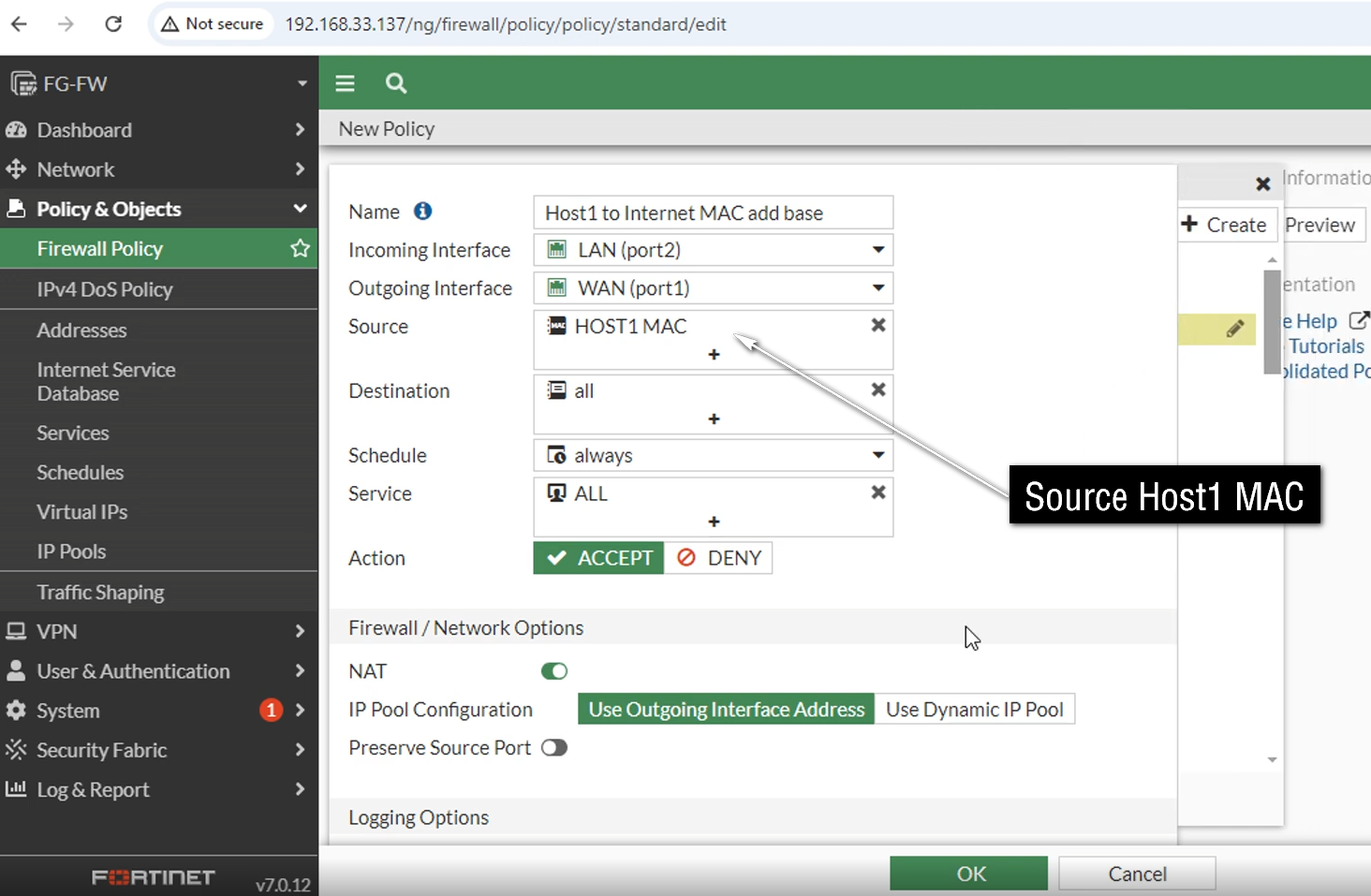
A MAC-Based Policy is a firewall rule that identifies a device by its physical hardware address (MAC address) and applies security rules based on that device. Every network device—such as a laptop, mobile phone, printer, IP camera, or server—has its own unique MAC address. The firewall uses this address like a device identity card to recognize which device is trying to access the network.
Unlike IP-based policy, where rules depend on IP address, MAC-based policy depends on the device hardware address. This is important because IP addresses can change (for example through DHCP), but the MAC address usually remains the same for that network card. Because of this, the firewall can still recognize the device even if its IP changes.
For example, in a school network, the firewall may create MAC-based rules:
- School Computer MAC → Allow Internet + school portal access
- Teacher Laptop MAC → Allow full educational access
- Projector MAC → Allow only presentation server access
- Printer MAC → Allow only print server communication
- Unknown Device MAC → Block network access
Suppose a student connects an unauthorized laptop to the school Wi-Fi. The firewall checks the laptop’s MAC address. Since that MAC is not in the allowed list, the firewall blocks network access. But when a teacher connects their registered laptop, the firewall recognizes the MAC address and allows access according to teacher policy.
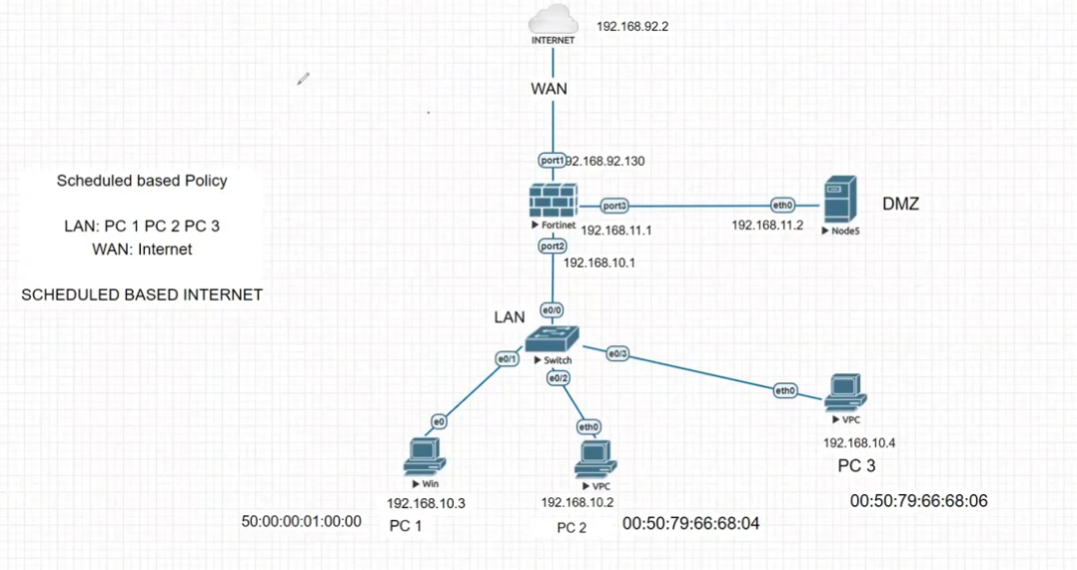
What is Schedule Based Policy
Schedule-Based Policy:
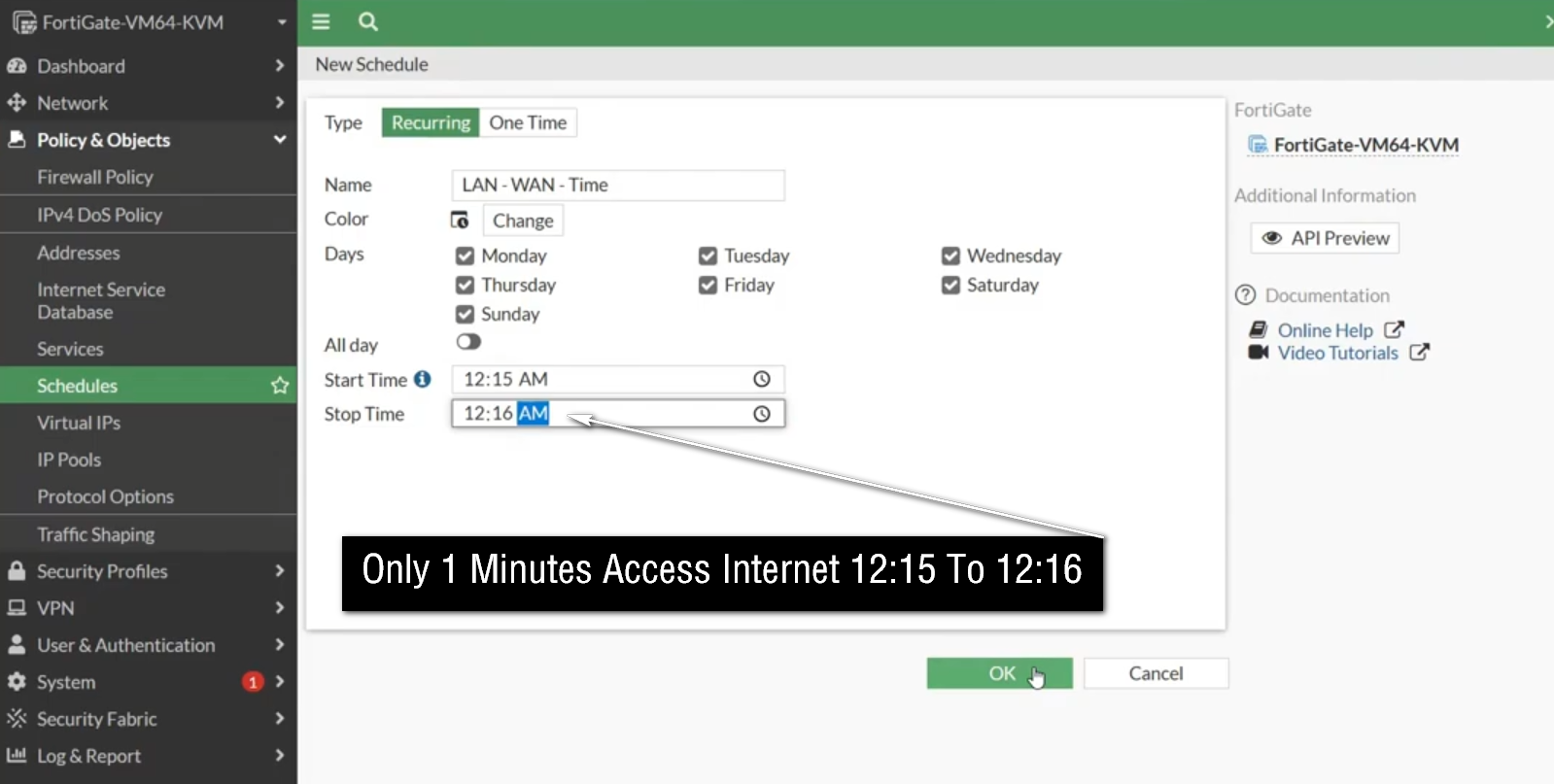
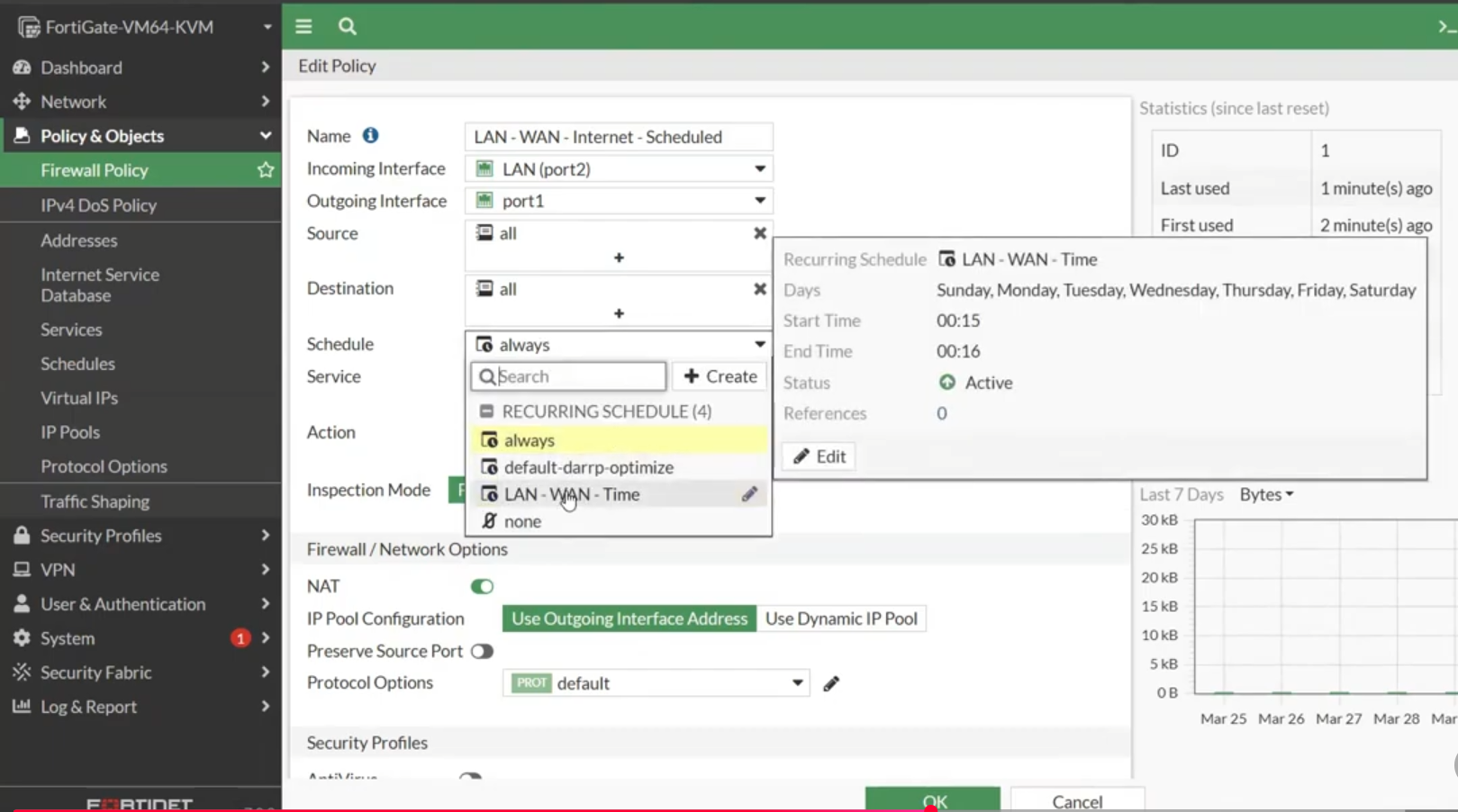
A schedule-based policy is a firewall security policy that works only during a specific time, day, or date defined by the administrator. Instead of allowing or blocking traffic all the time (24×7), the firewall follows a schedule and applies the rule only during the configured period. Outside that scheduled time, the policy becomes inactive or another policy takes effect.
This type of policy is useful when an organization wants to control network access based on working hours, class hours, office timing, or special events. It helps improve security, reduce misuse of the Internet, and manage bandwidth by allowing certain applications or websites only at approved times.
For example, a school using a FortiGate firewall may create a schedule called Class_Hours from Monday to Friday, 9:00 AM to 4:00 PM. During this time, the firewall can block social media, online gaming, or video streaming sites so students focus on studies. After class hours, those restrictions may be removed or relaxed.
A company can also use schedule-based policies. For example, office staff may be allowed access to business applications only during office hours, while remote administrative access may be allowed only during maintenance windows. Certain backup servers may communicate only at night, and software updates may be scheduled after office hours to reduce network load.
Schedule-based policy can be used for:
- Internet access control
- Application access control
- VPN access timing
- Server maintenance access
- Guest Wi-Fi availability
- Bandwidth control during peak hours
Example
College firewall policies:
Policy 1
Source: Student Network
Destination: YouTube / Social Media
Action: Block
Schedule: Monday–Friday, 9 AM–4 PM
Policy 2
Source: Student Network
Destination: Internet
Action: Allow
Schedule: Always
Result:
- During class hours → YouTube blocked ❌
- After 4 PM → YouTube allowed ✅ (if other policies allow)
In short
A schedule-based policy is a firewall rule that becomes active only during specified times or days, helping organizations control network access according to time-based requirements.