Type of Interfaces
Table of Contents
- LAN Interfaces
- VLAN Interfaces
- WAN Interfaces
- DMZ Interfaces
- Tunnel Interfaces
- Zone Interfaces
- HA Interfaces
- MGNT Interfaces
What is a Firewall Interface?
A Firewall Interface is a Physical or Virtual Connection point on a firewall device through which network traffic enters or leaves the firewall. Every firewall uses interfaces to connect different networks, such as the Internet, internal office networks, wireless networks, and secure server zones. These interfaces act like gateways between networks, allowing the firewall to inspect, filter, and control data traffic according to security policies. Without interfaces, a firewall would have no path to receive or send network packets, making communication between networks impossible.
How Firewall Interfaces Work:
When data travels from one network to another, it must pass through a firewall interface. As soon as traffic reaches the interface, the firewall begins examining it. The firewall checks the packet’s source IP address, destination IP address, port number, protocol type, application type, and security signatures. Based on configured rules, the firewall may allow the traffic, block it, log it, or inspect it more deeply for threats such as malware, intrusion attempts, or suspicious behavior. In this way, the interface is not just a cable connection—it is also a control point where security inspection begins.
Physical Firewall Interfaces:
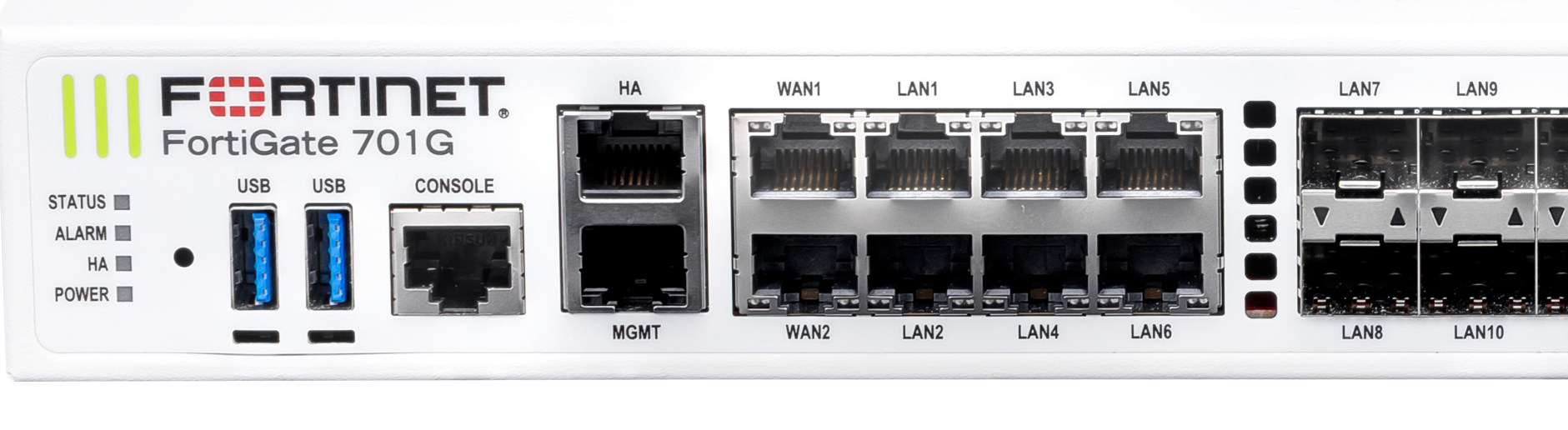
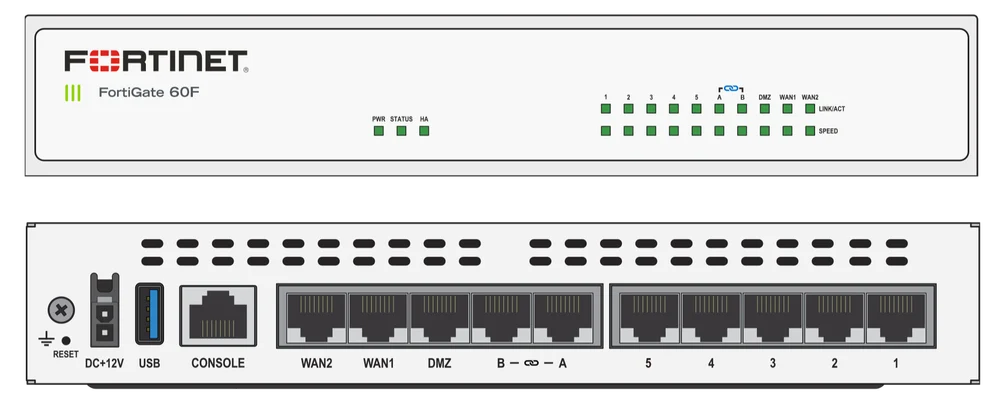
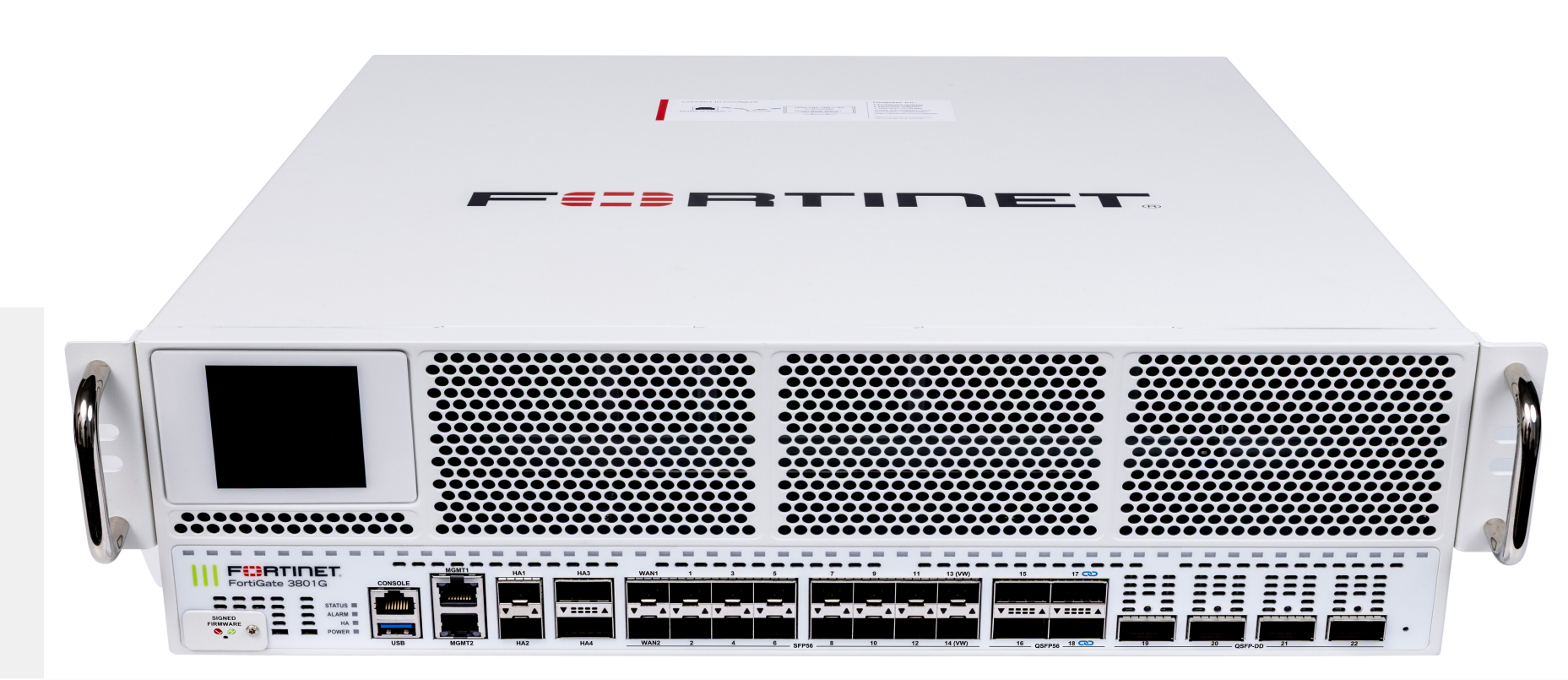
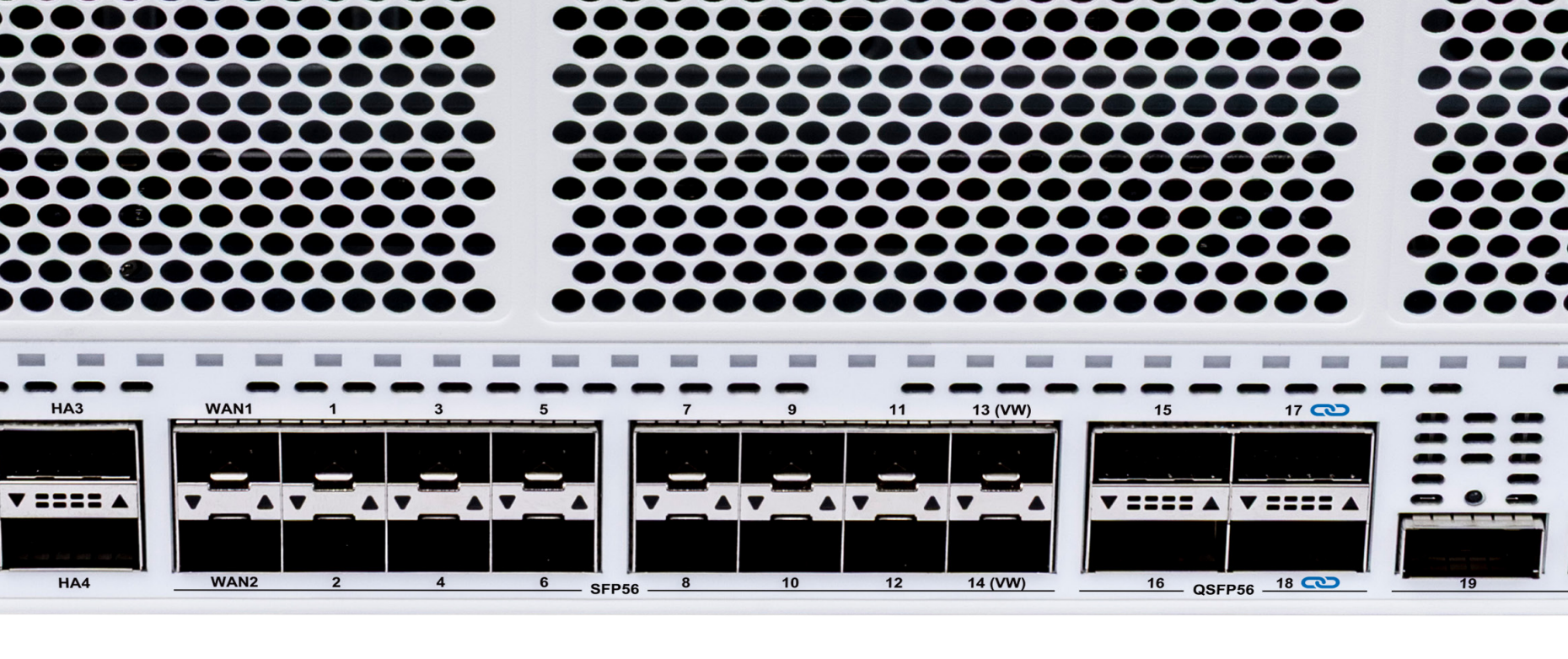
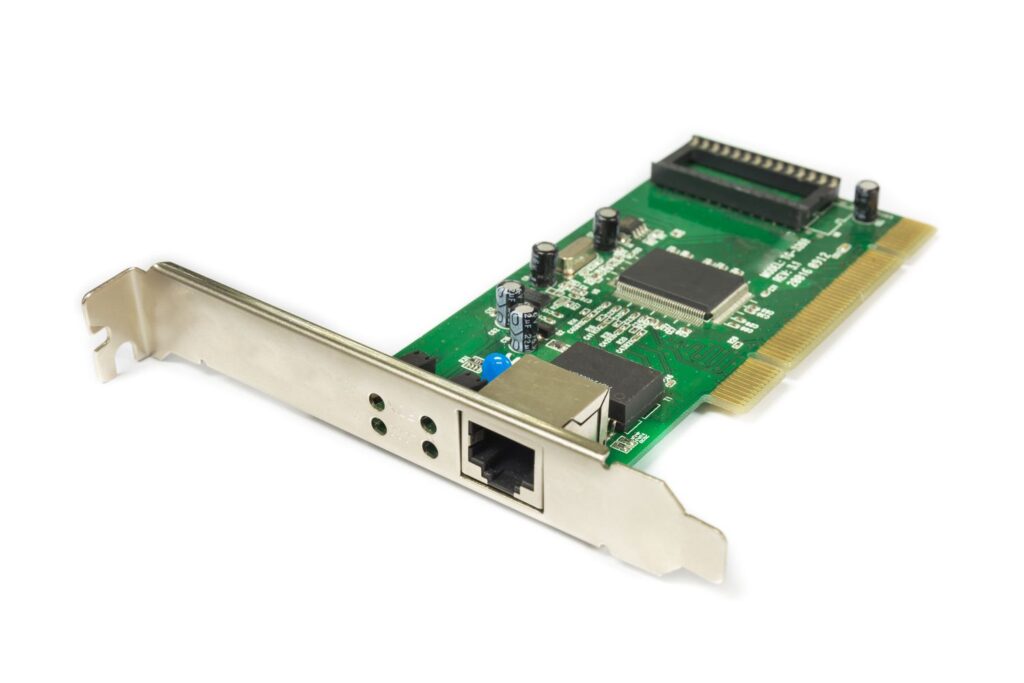
A physical firewall interface is an actual hardware port on the firewall appliance, such as Ethernet ports like Port1, Port2, or Port3. Each port can be connected to a separate network. For example, one port may connect to the Internet Service Provider, another may connect to the company’s internal LAN, and another may connect to a DMZ network hosting public servers. Physical interfaces often support settings such as speed (1 Gbps / 10 Gbps), duplex mode, VLAN tagging, IP addressing, bandwidth limits, and link monitoring. Enterprise firewalls from companies like Fortinet or Cisco may include many physical interfaces for complex network design.
Virtual Firewall Interfaces:
A virtual firewall interface is a software-created interface rather than a physical port. It allows a single hardware port to be divided into multiple logical interfaces. Examples include VLAN interfaces, tunnel interfaces (VPN), loopback interfaces, and software-defined interfaces. Virtual interfaces help organizations separate network traffic without needing extra hardware ports. For example, one physical port can carry separate traffic for HR, Finance, and Guest Wi-Fi using VLAN virtual interfaces. This improves network segmentation, management, and security while reducing hardware cost.
WAN Interface:
The WAN (Wide Area Network) interface connects the firewall to external networks, mainly the Internet. This is usually the most exposed interface because it directly faces public traffic, including attackers, malware, bots, and scanning tools. Because of this risk, strong security features such as Intrusion Prevention System (IPS), anti-malware scanning, DDoS protection, web filtering, and SSL inspection are commonly enabled on WAN interfaces. The WAN interface usually has a public IP address assigned by the ISP and acts as the entry and exit point for Internet communication.
LAN Interface:
The LAN (Local Area Network) interface connects the firewall to internal networks such as office computers, printers, servers, and local applications. This interface usually uses private IP addresses like 192.168.x.x or 10.x.x.x. While the LAN side is considered trusted compared to the Internet, security is still important because threats can come from infected internal devices, insider attacks, or unauthorized users. Firewalls monitor LAN traffic, control access to the Internet, enforce policies, and sometimes inspect internal communication between departments for segmentation security.
DMZ Interface:
A DMZ (Demilitarized Zone) interface connects to a special isolated network where public-facing servers are placed, such as web servers, email servers, DNS servers, and application servers. The purpose of the DMZ is to separate public services from the internal network. If an attacker compromises a DMZ server, the firewall still prevents direct access to the internal LAN. This adds an extra layer of defense. Traffic rules between WAN → DMZ, DMZ → LAN, and LAN → DMZ are usually tightly controlled for security.
Management Interface:
The management interface is dedicated to firewall administration. Network administrators use it to log in, configure policies, monitor logs, update firmware, and troubleshoot issues. This interface is usually separated from normal traffic for security reasons. Access is often restricted using strong authentication, VPN access, IP restrictions, and encryption such as HTTPS or SSH. Keeping management separate reduces the risk of attackers reaching firewall controls through normal network paths.
Interface Security Zones:
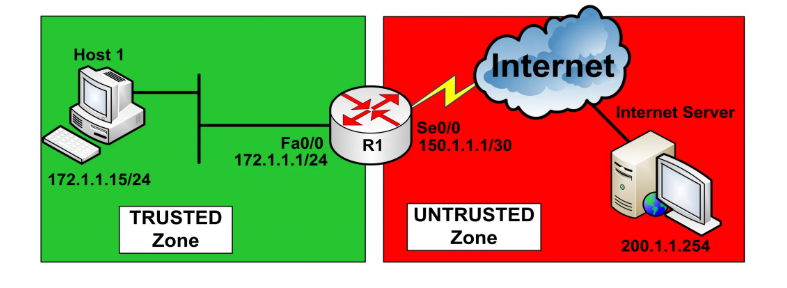
Many modern firewalls assign interfaces to security zones, such as Trusted, Untrusted, Guest, Server, or Management. Instead of creating rules interface by interface, administrators create rules between zones. For example, LAN zone → Internet zone = Allow web browsing, Internet zone → LAN zone = Block, LAN zone → Server zone = Allow only database traffic. Zone-based design simplifies policy management and improves security visibility.
Interface Configuration Example in FortiGate:
In a FortiGate firewall:
- port1 → WAN → Public IP → Internet connection
- port2 → LAN → Internal office network
- port3 → DMZ → Web server network
- port4 → Guest Wi-Fi network
- mgmt → Dedicated management access
Each interface can have:
- IP address and subnet
- DHCP server/client settings
- VLAN tagging
- Bandwidth limits
- Security policies
- Monitoring and logging
- NAT configuration
- IPS / Antivirus / Web filtering profiles
Importance of Firewall Interfaces:
Firewall interfaces are important because they define how networks connect and how traffic is controlled. They create network boundaries, apply security inspection, support segmentation, and provide visibility into network communication. Proper interface design improves performance, strengthens protection, and reduces the chance of unauthorized access. In enterprise security architecture, interfaces are one of the core building blocks of firewall deployment.
In short:
A firewall interface is much more than a network port—it is a security checkpoint, traffic controller, and network connection gateway that helps the firewall protect communication between different networks.
What is LAN Interface
LAN Interface:
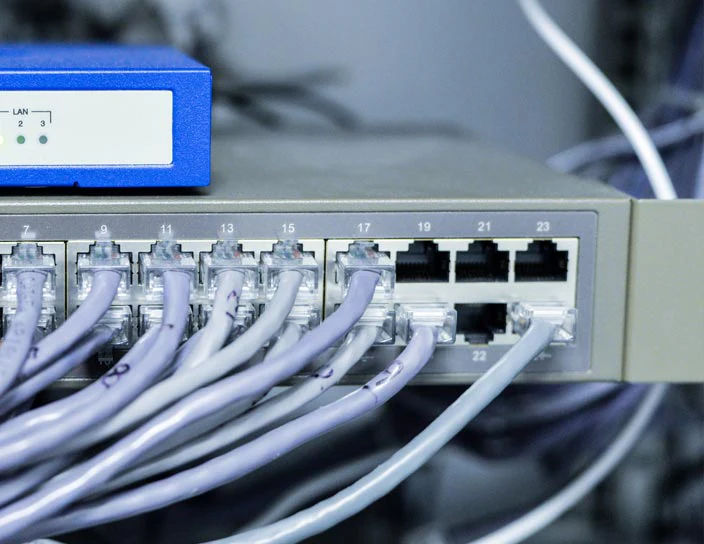
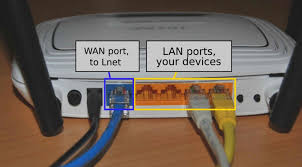
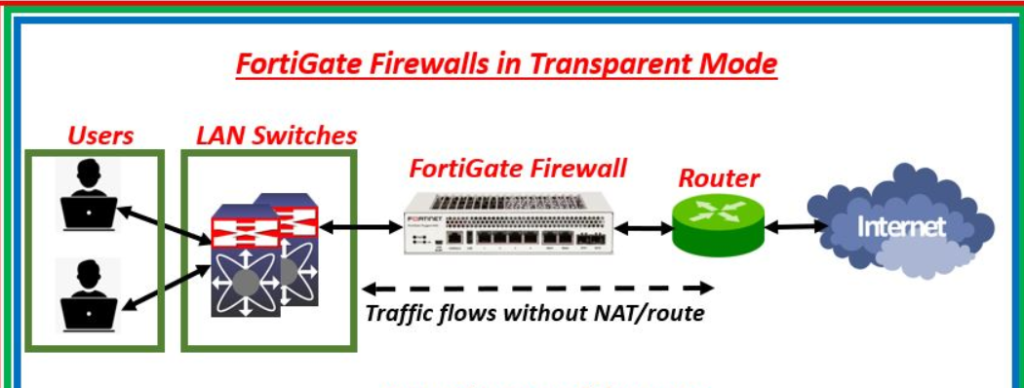
A LAN (Local Area Network) interface is the firewall interface that connects the firewall to the internal private network of an organization, office, or home. It is the interface through which internal devices such as computers, laptops, printers, IP phones, servers, and Wi-Fi access points communicate with the firewall. The LAN interface acts as the gateway for internal users, allowing them to access external networks like the Internet while also protecting them from outside threats.
The LAN interface is usually configured with a Private IP Address Range, such as 192.168.0.0 – 192.168.255.255,10.0.0.0 – 10.255.255.255 or 172.16.0.0 – 172.31.255.255 which are used only inside private networks. Internal devices use the LAN interface IP as their default gateway, meaning all traffic going outside their local network is sent to the firewall through this interface. The firewall then decides whether to allow, inspect, or block that traffic based on security policies.
A LAN interface is generally considered a Trusted Interface because it connects to internal users and company devices. However, trust does not mean no security is needed. Internal systems can still be infected by malware, ransomware, unauthorized USB devices, phishing attacks, or insider misuse. Because of this, modern firewalls inspect LAN traffic using features like application control, antivirus scanning, intrusion prevention (IPS), DNS filtering, and web filtering to protect users even inside the network.
The LAN interface can also support multiple VLAN interfaces, allowing one LAN connection to be divided into separate logical networks such as HR, Finance, IT, and Guest networks. Each VLAN can have its own IP subnet, access permissions, and firewall policies. This provides better segmentation and improves internal security.
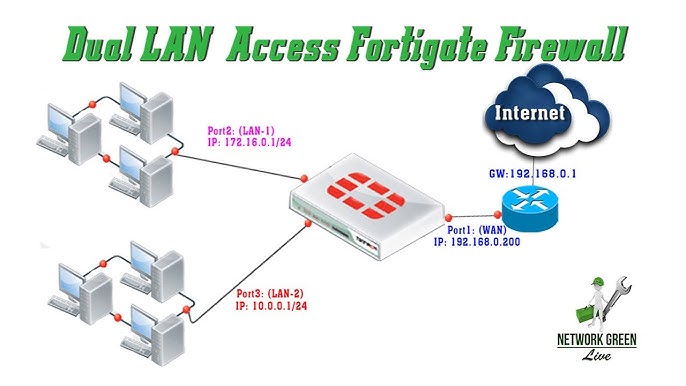
For Example, in a FortiGate firewall:
- Port2 = LAN Interface
- IP Address = 192.168.1.1/24
- Connected Devices = PCs, printers, servers
- Services = DHCP, DNS forwarding, security inspection
- Policies = Allow Internet, block risky websites, inspect malware
When an employee opens a website:
PC → LAN Interface → Firewall inspection → WAN Interface → Internet
The LAN interface checks and controls the traffic before sending it outside.
In short:
A LAN interface is the internal-facing firewall connection that links private devices to the firewall and securely manages their communication with other networks.
What is VLAN Interface (Virtual LAN Interface)
VLAN Interface (Virtual LAN Interface):
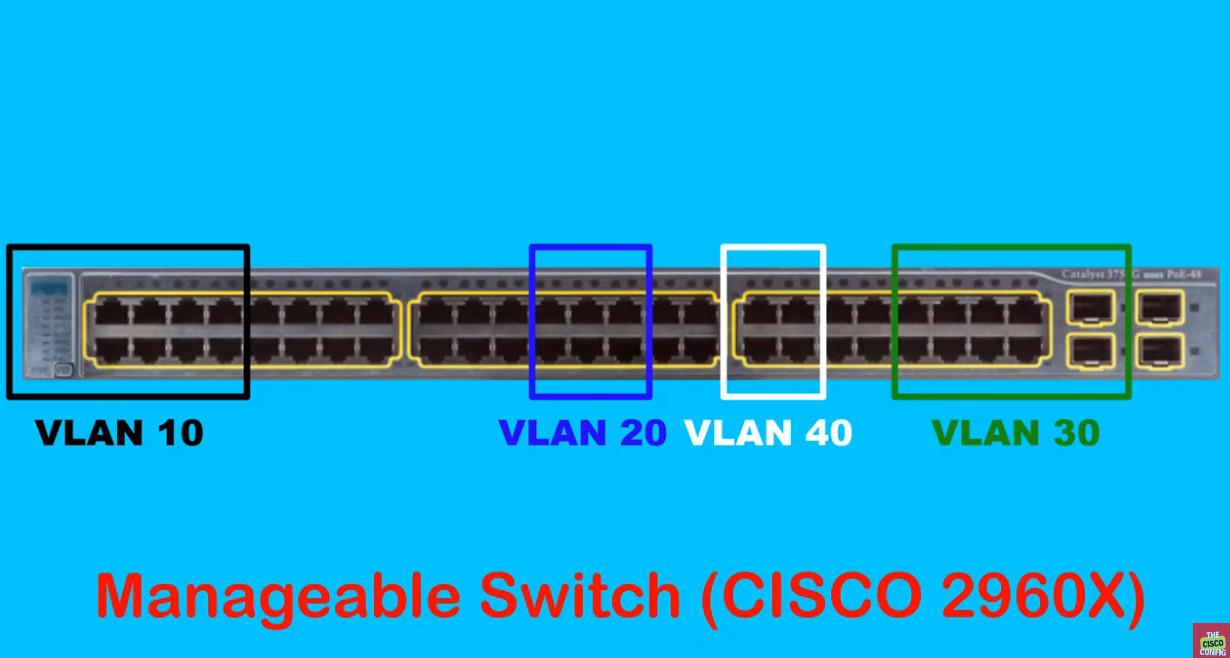
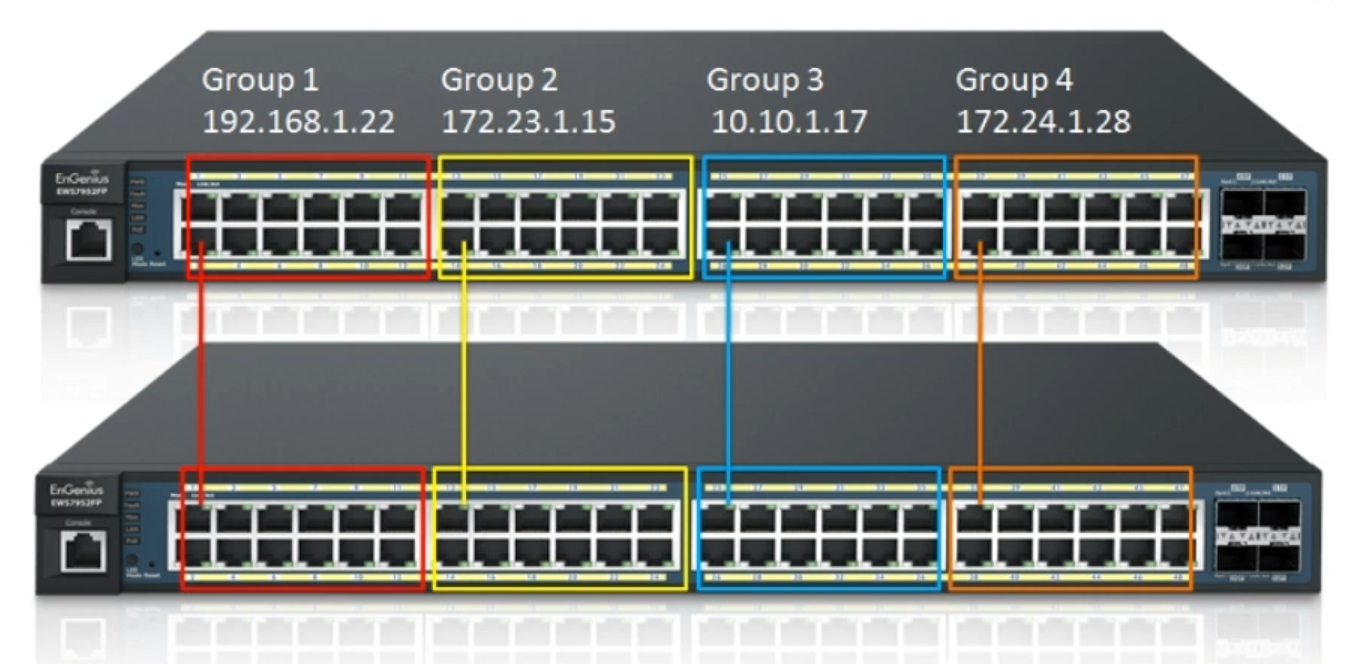
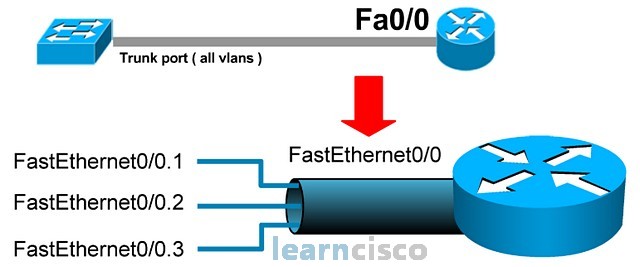
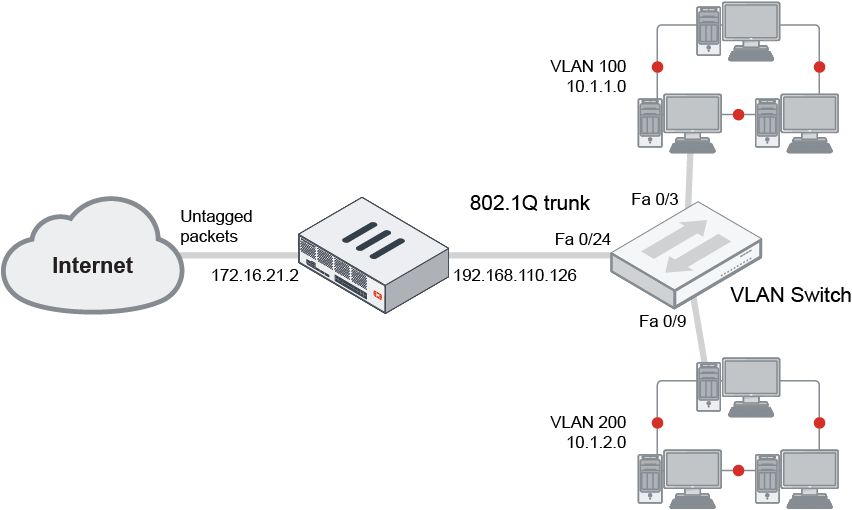
A VLAN interface is a virtual firewall interface created on top of a physical network port to separate network traffic into different logical networks. VLAN stands for Virtual Local Area Network. Instead of using separate physical cables and ports for each department or network, one physical interface can carry multiple VLANs, each acting like its own independent network. This improves network organization, security, and efficient use of hardware resources.
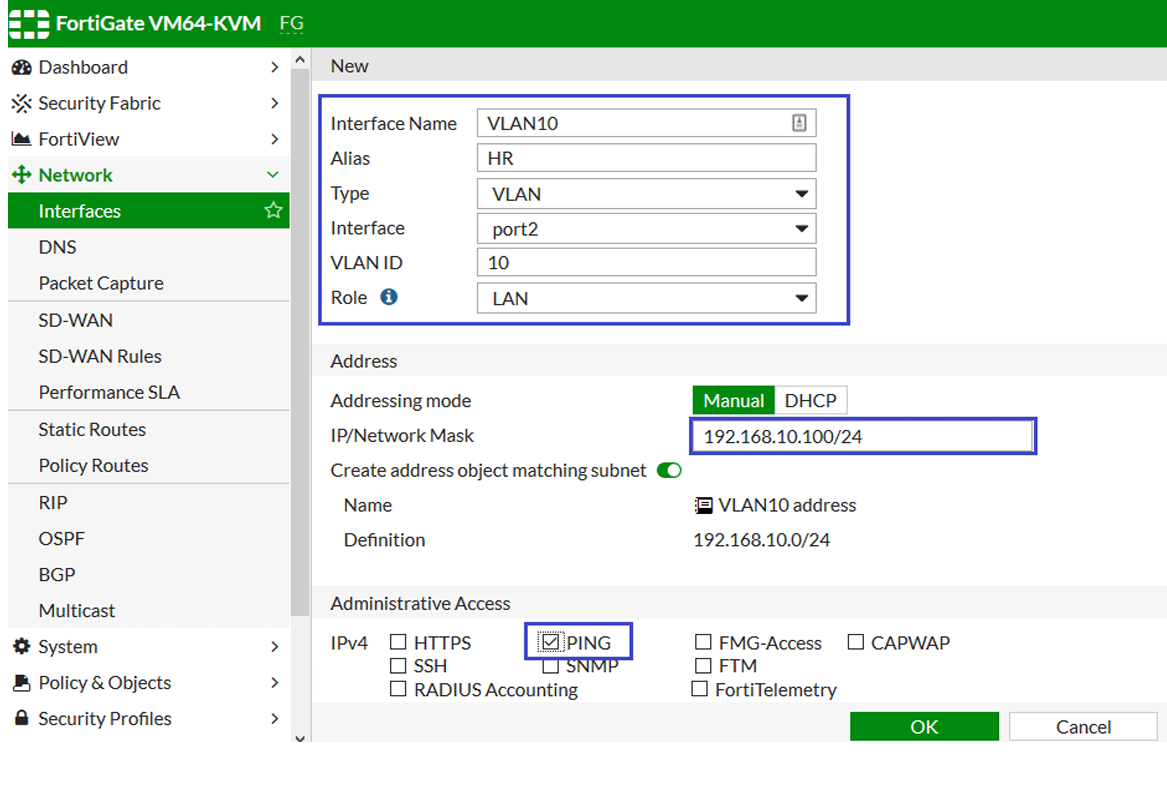
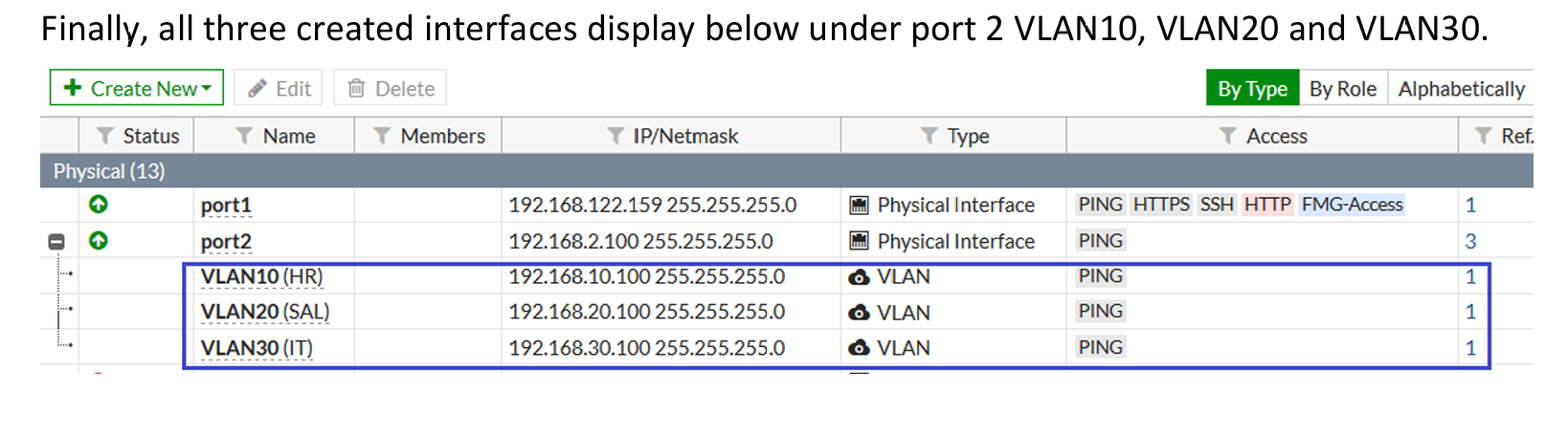
For example, on a FortiGate firewall, physical port2 may be connected to a managed switch. On that single port, the firewall can create:
- VLAN 10 → HR Department → 192.168.10.0/24
- VLAN 20 → Finance Department → 192.168.20.0/24
- VLAN 30 → Guest Network → 192.168.30.0/24
Even though all traffic uses one physical cable, the firewall treats each VLAN as a separate interface with its own:
- IP address
- Security policy
- DHCP settings
- Bandwidth control
- Access permissions
For example, the firewall can allow HR VLAN to access company servers, allow Finance VLAN to access accounting software, and restrict the Guest VLAN to Internet-only access. This keeps networks isolated and improves security.
In short:
A VLAN interface is a software-based firewall interface that divides one physical connection into multiple separate logical networks.
Why Need VLAN
Why Need VLAN (Virtual Local Area Network)?
A VLAN (Virtual Local Area Network) is needed to separate and organize network traffic inside the same physical network. Without VLANs, all computers, printers, servers, and devices would be in one large network, where everyone can communicate directly. This creates security risks, high network traffic, and poor management. VLAN solves these problems by dividing one physical network into multiple logical networks.
1) Improved Security:
VLAN increases security by separating users and devices into different network groups. For example, a company can create separate VLANs for HR, Finance, IT, and Guests. The HR VLAN may contain employee records, while the Guest VLAN is only for visitors’ Internet access. By separating them, guest users cannot directly access HR or Finance systems. Firewalls and switches can apply security rules between VLANs, reducing unauthorized access and limiting attack spread.
2) Better Network Performance:
In a normal flat network, broadcast traffic (such as ARP requests and network discovery messages) goes to every device. As the network grows, this creates congestion and slows communication. VLANs reduce this by creating smaller broadcast domains. Each VLAN only receives its own broadcast traffic, which lowers unnecessary network load, improves speed, and increases overall efficiency.
3) Easy Network Management:
VLAN makes network management easier because administrators can group devices by department, function, or location instead of physical connection. For example, all Finance computers can be placed in one VLAN even if they are on different floors of a building. This makes configuration, monitoring, troubleshooting, and policy management much simpler.
4) Cost Saving:
Without VLANs, separate networks may require separate switches, cables, and hardware ports. VLAN allows multiple logical networks to run over the same physical switch and connection using VLAN tagging. This reduces hardware cost, saves cabling, and makes better use of existing infrastructure.
5) Control Access Between Departments:
VLAN helps control communication between network segments. For example:
- HR VLAN → Can access HR server
- Finance VLAN → Can access accounting server
- Guest VLAN → Internet only, no internal access
This controlled access protects sensitive data and supports network segmentation.
Example:
In a company using FortiGate:
- VLAN 10 → HR Department
- VLAN 20 → Finance Department
- VLAN 30 → IT Team
- VLAN 40 → Guest Wi-Fi
All VLANs may use one physical interface, but each works like a separate network with its own rules and IP range.
In short:
VLAN is needed for security, better performance, easier management, cost reduction, and controlled network access. It turns one physical network into multiple secure logical networks.
What is WAN Interface
A WAN (Wide Area Network) interface is the firewall interface that connects the firewall to an external network, usually the Internet or a service provider’s network. It is the main gateway through which outside traffic enters the firewall and internal users access online resources. In most network designs, the WAN interface is considered the untrusted side because it is directly exposed to public networks, where cyber threats such as hackers, malware, botnets, port scanning, and denial-of-service attacks can originate.
The WAN interface is usually configured with a Public IP Address provided by an Internet Service Provider (ISP), although in some cases it may use a Private IP if another router is placed before the firewall. This interface handles incoming and outgoing traffic such as web browsing, email communication, cloud access, VPN connections, software updates, and remote access sessions. All traffic passing through the WAN interface is inspected by the firewall according to configured security policies.
Because the WAN interface faces the Internet, strong security controls are commonly enabled on it. These may include Intrusion Prevention System (IPS), antivirus scanning, web filtering, DNS filtering, SSL deep inspection, anti-bot protection, DDoS protection, and geo-blocking. The firewall can also monitor suspicious traffic patterns such as repeated login attempts, abnormal connection requests, or port scanning activity and automatically block malicious sources.
The WAN interface often performs Network Address Translation (NAT). NAT converts internal private IP addresses into a public IP address so internal devices can communicate on the Internet. It also hides the internal network structure from outside users, adding another security layer. Port forwarding can be configured on the WAN interface when external users need access to internal services like web servers, VPN gateways, or email servers.
For example, in a FortiGate firewall:
- port1 = WAN Interface
- IP Address = Public IP from ISP (example: 203.103.100.20)
- Connected To = ISP modem/router
- Services = Internet access, VPN, public server access
- Security = IPS, antivirus, web filtering, SSL inspection, DDoS protection
Traffic flow example:
Internet → WAN Interface → Firewall inspection → LAN Interface → Internal user/server
Or for outbound traffic:
Employee PC → LAN Interface → Firewall inspection → WAN Interface → Internet
In short:
A WAN interface is the external-facing firewall connection that links the firewall to the Internet or service provider network and serves as the first line of defense against outside threats.
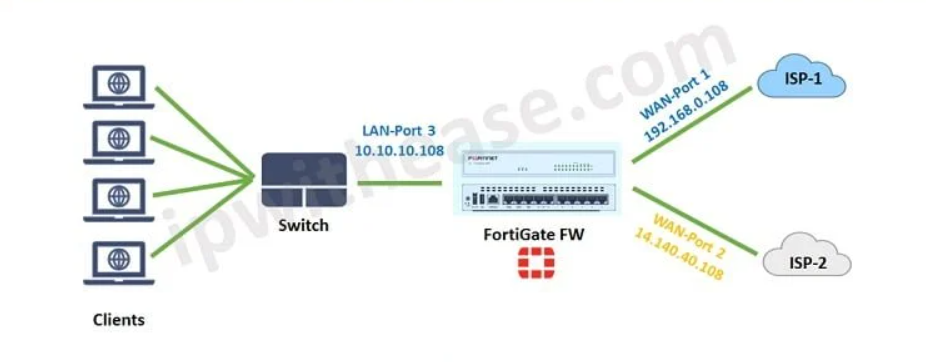
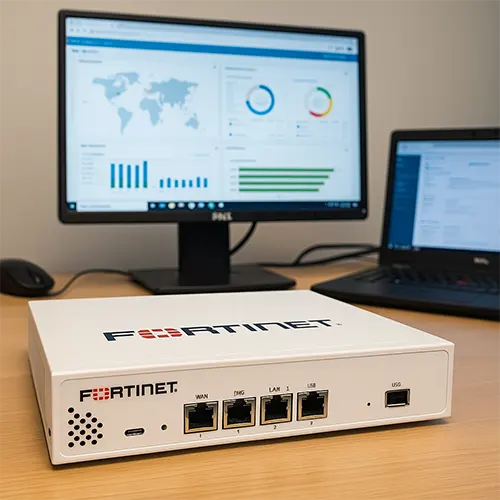
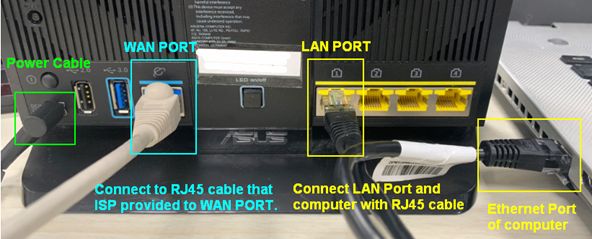
A WAN port is simply a firewall/network port that is configured to connect to an external network (Internet/ISP). There is no fixed hardware rule that a specific port must always be WAN—the administrator defines it in configuration.
For example, in a FortiGate firewall:
- port1 → configured as WAN (connected to ISP)
- port2 → configured as LAN (internal office network)
- port3 → configured as DMZ (public server zone)
- port4 → configured as Guest network
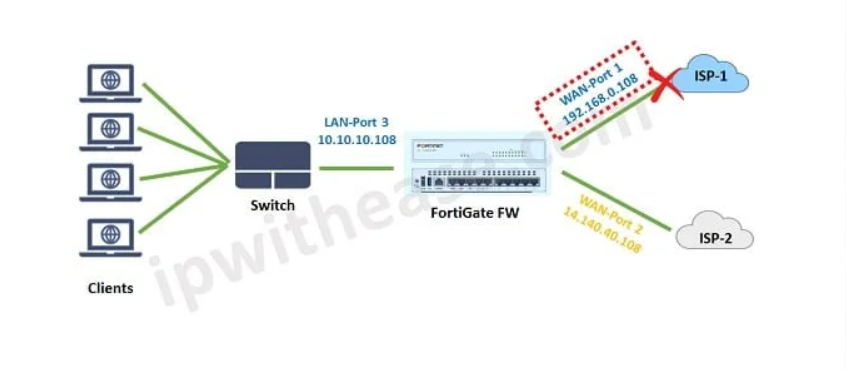
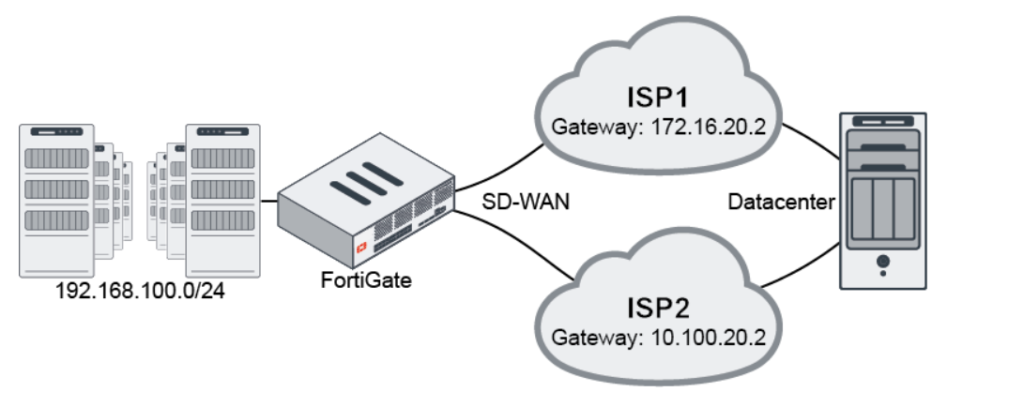
Here, port1 becomes WAN because the administrator assigned it that role. If needed, port2 or another port could also be configured as WAN (for backup Internet, second ISP, load balancing, etc.).
Example:
Suppose a company has two Internet providers:
- port1 = WAN1 → Primary ISP
- port5 = WAN2 → Backup ISP
If WAN1 fails, traffic can automatically switch to WAN2.
In short:
Any physical port can be defined as a WAN port, as long as it is configured to connect to an external/public network. The “WAN” role is based on configuration and usage, not on the port number itself.
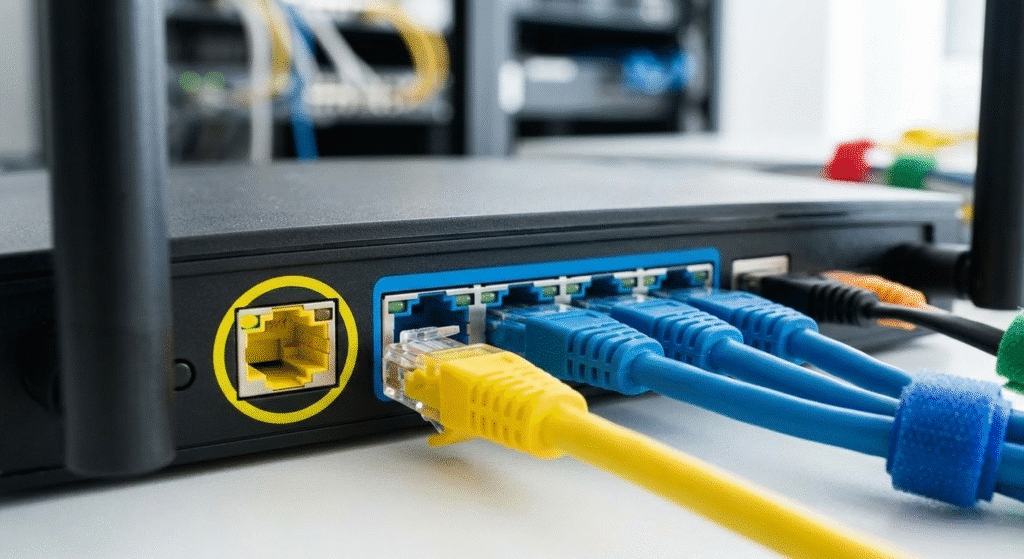
What is DMZ Interface
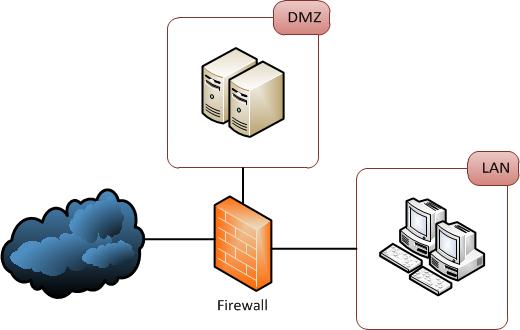
A DMZ (Demilitarized Zone) interface is a special firewall interface used to connect a Separate Network Segment that hosts Public-Facing Services, such as Web Servers, Mail Servers, DNS Servers, FTP Servers, or Application Servers. The main purpose of a DMZ is to place systems that must be accessible from the Internet in an Isolated Network, separate from the internal LAN. This creates an additional security layer between the public Internet and the private internal network.
The DMZ interface is considered a Semi-Trusted Zone. It is more trusted than the public Internet because it is under the organization’s control, but it is less trusted than the internal LAN because systems in the DMZ are exposed to outside users and therefore face a higher risk of attack. Because of this, strict firewall rules are usually applied to traffic moving between the WAN → DMZ, DMZ → LAN, and LAN → DMZ networks.
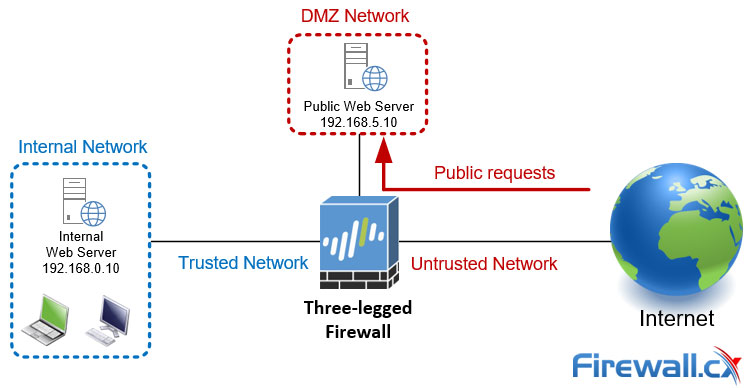
When External Users Access a Company Website, they normally connect through the WAN interface, and the firewall forwards allowed traffic to a server connected to the DMZ interface. If that public server is attacked or compromised, the attacker reaches only the DMZ network—not the internal LAN—because firewall policies block direct access to sensitive internal systems. This network separation greatly reduces the risk of attackers moving deeper into the organization.
The DMZ interface commonly uses Private IP Addressing, but public access is provided using NAT (Network Address Translation) or port forwarding. Security features such as Intrusion Prevention System (IPS), antivirus scanning, web application firewall (WAF), DDoS protection, and traffic logging are often enabled on DMZ traffic to protect public-facing servers.
For Example, in a FortiGate Firewall:
port1 = WAN → Connected to Internet
port2 = LAN → Internal office network
port3 = DMZ → Connected to web server network
Example IPs:
WAN = Public IP from ISP
LAN = 192.168.1.1/24
DMZ = 192.168.100.1/24
Traffic flow example:
Internet User → WAN Interface → Firewall inspection → DMZ Interface → Web Server
The firewall allows only specific traffic (for example HTTP/HTTPS) to the DMZ server while blocking unauthorized access.
In short:
A DMZ interface is a firewall interface used to create a protected network zone for public-facing servers, keeping them accessible from the Internet while isolating them from the internal private network.
Why Need DMZ (Demilitarized Zone)?
A DMZ (Demilitarized Zone) is needed to create a secure area between the Internet and the internal network for hosting public-facing services. Organizations often need to make services such as websites, email servers, DNS servers, VPN portals, or application servers accessible to external users. If these servers are placed directly inside the internal LAN, attackers who compromise one of them may gain a path into sensitive company systems. A DMZ prevents this by placing public servers in a separate isolated network segment.
Protect Internal Network:
The biggest reason for using a DMZ is to protect the internal LAN. Public servers are exposed to the Internet and are common targets for hacking, malware, and exploitation. By placing these servers in the DMZ, the firewall keeps them separated from employee computers, databases, and confidential systems. Even if a DMZ server is compromised, firewall rules can stop attackers from directly reaching the internal network.
Secure Public Access:
Many organizations need external users to access company resources such as websites, mail services, or VPN login portals. A DMZ allows these services to be accessible from the Internet while keeping the internal network hidden. The firewall can allow only required traffic—such as HTTP, HTTPS, SMTP, or VPN protocols—to the DMZ while blocking everything else.
Reduce Attack Surface:
If every server is placed inside the internal network, the attack surface becomes large. A DMZ reduces this risk by separating exposed services into a dedicated zone. Only specific ports and services are opened, making security easier to manage and reducing opportunities for attackers.
Better Security Control:
Traffic between Internet ↔ DMZ, DMZ ↔ LAN, and LAN ↔ DMZ can each have separate firewall policies. For example:
- Internet → DMZ → Allow HTTPS only
- Internet → LAN → Block all
- DMZ → LAN → Allow only database query port (if required)
- LAN → DMZ → Allow management access for admins only
This fine control improves overall security.
Monitoring and Threat Detection:
Because DMZ traffic is separated, security teams can closely monitor it. Firewalls can apply:
- Intrusion Prevention System (IPS)
- Antivirus scanning
- Web Application Firewall (WAF)
- DDoS protection
- Logging and alerting
This helps detect attacks on public servers quickly.
Example
A company uses FortiGate:
- port1 = WAN → Internet
- port2 = LAN → Employee computers
- port3 = DMZ → Web server + Mail server
Traffic:
Internet User → WAN → Firewall → DMZ Web Server
But:
Internet User → WAN → Internal Finance Server ❌ Blocked
This keeps internal systems protected.
In short:
A DMZ is needed to safely host public-facing servers, allow external access, and protect the internal network from Internet-based attacks by creating an isolated security zone.
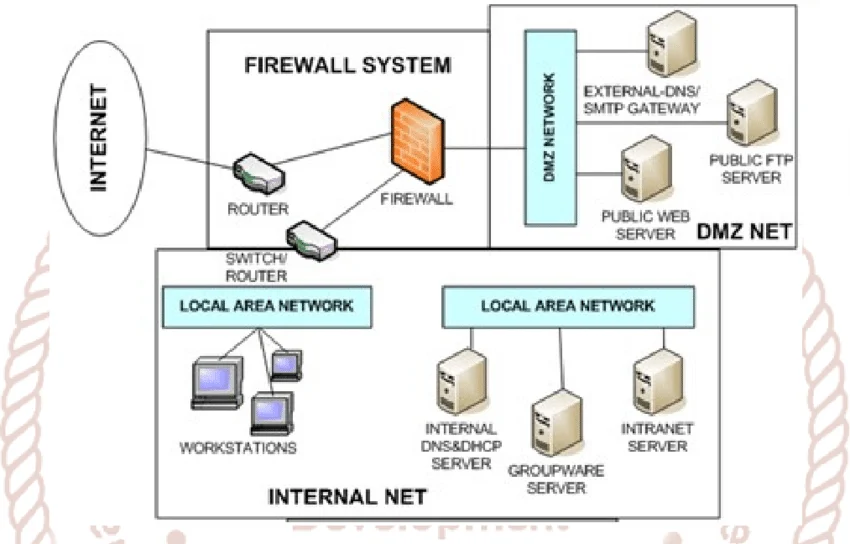
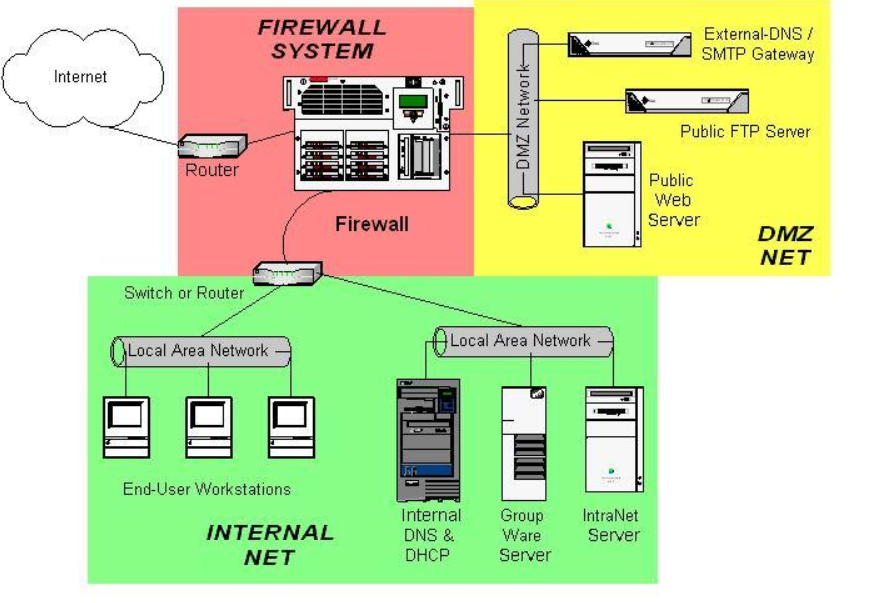
Example of DMZ Interfaces
Suppose a company has an internal office network where employees use computers, printers, file servers, and business applications. The company also runs a public website and an email server that must be accessible from the Internet. If these public-facing servers are placed directly inside the internal LAN, they become a security risk because attackers on the Internet can target them. If one server is compromised, the attacker may gain access to sensitive internal systems such as HR databases, finance servers, or employee computers.
To improve security, the company creates a DMZ (Demilitarized Zone) using a firewall such as FortiGate. The firewall is configured with three interfaces: a WAN interface connected to the Internet, a LAN interface connected to the internal office network, and a DMZ interface connected to a separate network segment for public servers. The web server, mail server, and DNS server are placed in this DMZ network instead of the internal LAN.
When a customer visits the company website, the request comes from the Internet to the firewall’s WAN interface. The firewall checks the traffic and forwards only allowed web traffic, such as HTTP or HTTPS, to the Web Server located in the DMZ. The internal office network is not exposed directly to the Internet. This means customers can access public services, but they cannot directly reach internal systems.
If an Attacker Tries to Hack the Public Web Server, the attack reaches only the DMZ Server. Even if the server is compromised, strict firewall policies block direct movement from the DMZ to the internal LAN. As a result, sensitive systems such as employee laptops, accounting databases, and internal file servers remain protected. This separation limits damage and gives security teams time to detect and respond to threats.
In this way, the DMZ acts as a buffer security zone between the public Internet and the private internal network. It allows organizations to safely host public-facing services while reducing the risk of attackers reaching critical internal resources. This is why DMZ is widely used in enterprise network security.
Suppose a company has:
- Employee computers inside the office
- A company website that customers visit online
- A mail server for receiving emails
- A firewall such as FortiGate
- Internet connection from ISP
If the company places the web server and mail server directly in the LAN, attackers on the Internet could target those servers. If one server is hacked, the attacker may move into the internal network and access employee PCs, file servers, or confidential company data.
To solve this, the company creates a DMZ network.
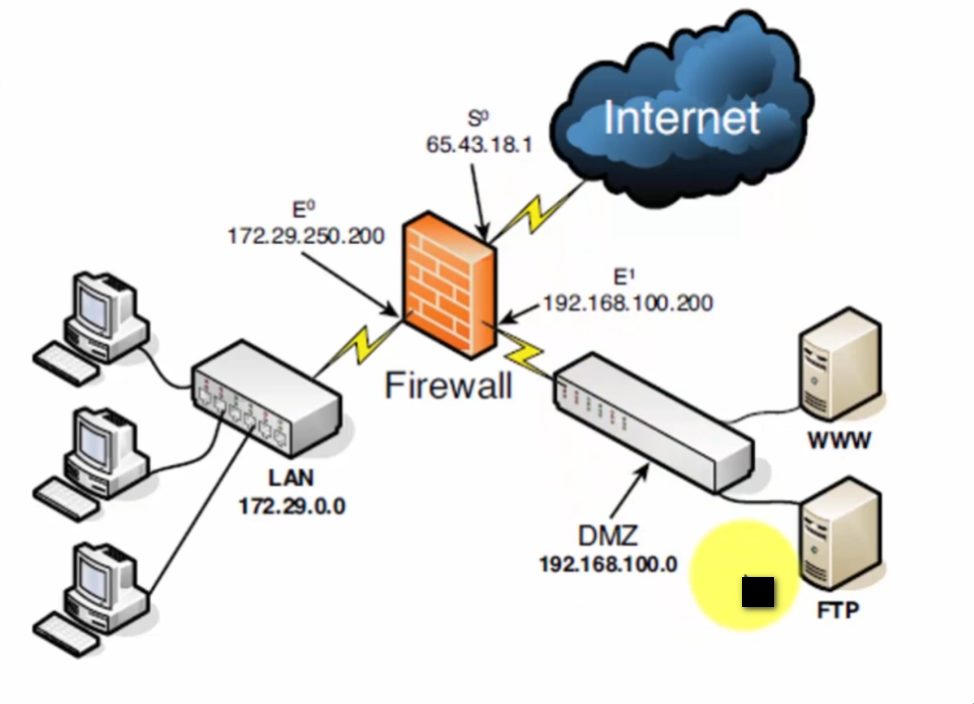
Network Design:
- port1 = WAN → Internet connection
- port2 = LAN → Employee network (192.168.1.0/24)
- port3 = DMZ → Public servers (192.168.100.0/24)
DMZ Contains:
- Web Server → 192.168.100.10
- Mail Server → 192.168.100.20
- DNS Server → 192.168.100.30
LAN Contains:
- Employee PCs
- HR server
- Finance database
- Internal file server
Traffic Example:
A customer opens the company website:
Customer → Internet → WAN Interface → Firewall → DMZ Web Server
The firewall allows only HTTP/HTTPS (port 80/443) to the web server.
If a Hacker Tries:
Hacker → Internet → Firewall → Internal HR Server
❌ Blocked, because Internet has no direct access to LAN.
If hacker attacks DMZ web server and compromises it:
Hacker → DMZ Web Server → Internal Finance Server
❌ Usually blocked by firewall rules, unless a very specific connection is allowed.
Real-life analogy:
Think of a company building:
- Reception area = DMZ
- Main office rooms = LAN
- Outside street = Internet
Visitors can enter the reception area, but they cannot freely enter secure office rooms without permission. DMZ works the same way.
In short:
DMZ acts like a security buffer zone between the Internet and the internal network, allowing public services while protecting private systems.
What is Loopback Interfaces
Loopback Interface:
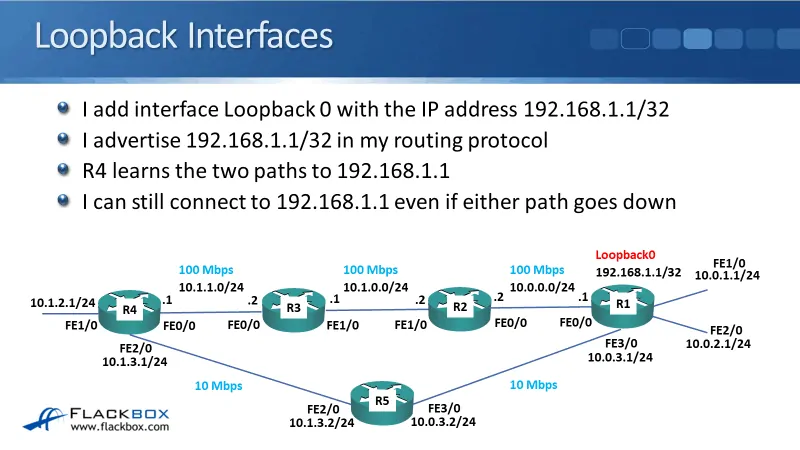
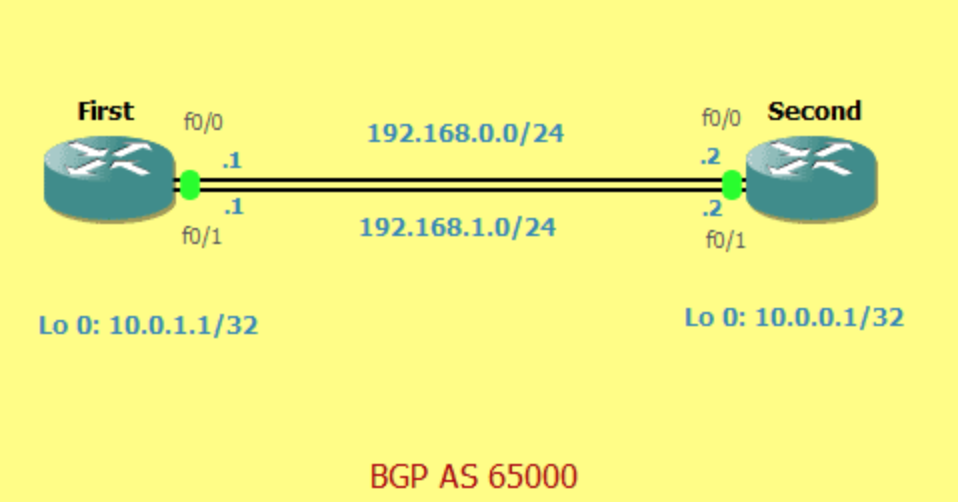
A loopback interface is a virtual network interface created inside a device such as a firewall, router, or server. Unlike physical interfaces, a loopback interface is not connected to any cable, switch, or external network hardware. It exists only in software and is always logically active as long as the device is running. Because it does not depend on physical links, it remains stable even if physical ports go down.
A loopback interface is mainly used for management, routing identification, monitoring, and internal communication. Network administrators often assign a fixed IP address to the loopback interface and use that address for secure device management, VPN endpoints, routing protocols, or firewall services. Since the loopback IP does not change when physical interfaces fail or are reconfigured, it provides a consistent address for network communication.
In firewalls such as FortiGate, a loopback interface can be used as a stable source IP address for services like logging, authentication requests, DNS queries, VPN tunnels, or management access. For example, if a firewall has multiple WAN links, physical interface IP addresses may change or fail. A loopback interface gives the firewall one permanent internal address that can be used regardless of which WAN connection is active.
Loopback interfaces are also useful for testing and troubleshooting. Engineers can ping the loopback IP to verify that the device itself is operational. Because the loopback interface is internal to the device, successful communication confirms that the system software and network stack are working properly.
For example, a company firewall may have:
- port1 = WAN → Internet
- port2 = LAN → Internal network
- port3 = DMZ → Public servers
- loopback0 = 10.10.10.1/32 → Virtual management/service interface
Administrators may use 10.10.10.1 for VPN configuration, monitoring, routing identification, or centralized management.
In short:
A loopback interface is a software-based virtual interface with a stable IP address used for management, routing, monitoring, and internal network services, independent of physical network ports.
Why Need Loopback Interface:
One major reason for using a loopback interface is stable device management. Network administrators can assign a fixed IP address to the loopback interface and use it for monitoring, secure login, SNMP, logging, DNS requests, or authentication services. Even if a physical port changes, the loopback IP remains the same, making management simpler and more reliable.
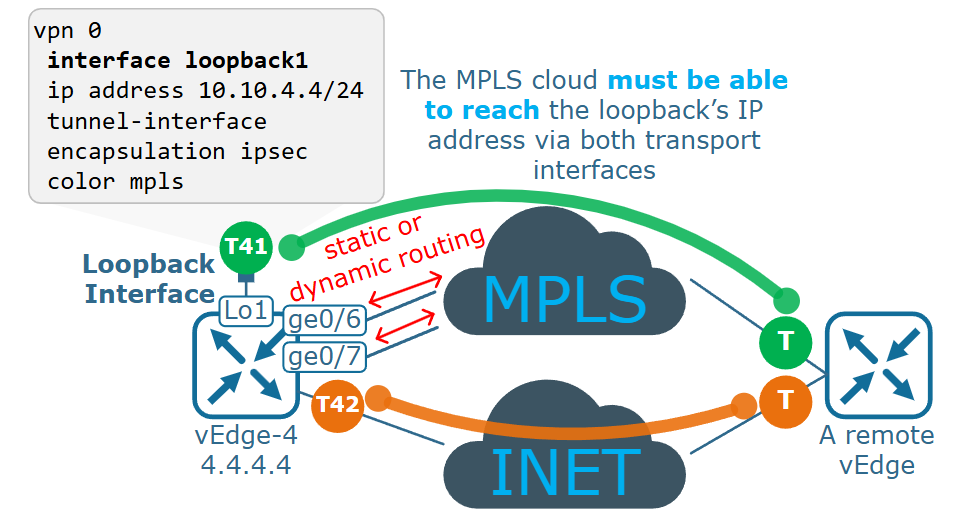
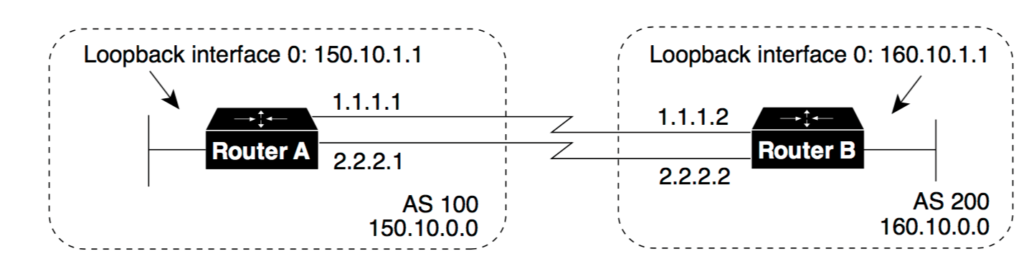
Loopback interfaces are also important in routing protocols and VPN design. Routing systems often need a permanent router ID or source IP address. A loopback interface provides a consistent identity for the device. In VPN deployments, using a loopback address as the tunnel endpoint creates a stable connection point that is independent of any one physical interface, which is useful when multiple WAN links are available.
Another reason is high availability and redundancy. In devices with multiple Internet connections, traffic may switch from one WAN interface to another if a link fails. Physical WAN IP addresses may differ, but the loopback IP remains constant. Services using the loopback address continue working without needing reconfiguration, improving uptime.
Loopback is also useful for testing and troubleshooting. Engineers can ping the loopback IP to verify that the firewall or router itself is operating correctly. Because the loopback interface is internal to the device, it helps confirm that the system network stack is functioning even if external network links have problems.
For example, in a FortiGate firewall:
- port1 = WAN1 → Primary ISP
- port2 = WAN2 → Backup ISP
- port3 = LAN → Internal network
- loopback0 = 10.10.10.1 → Permanent management/service IP
If WAN1 fails and traffic switches to WAN2, services using 10.10.10.1 continue operating because the loopback address does not change.
In short:
A loopback interface is needed for stable IP addressing, reliable management, routing identity, VPN stability, redundancy, and troubleshooting, independent of physical network ports.
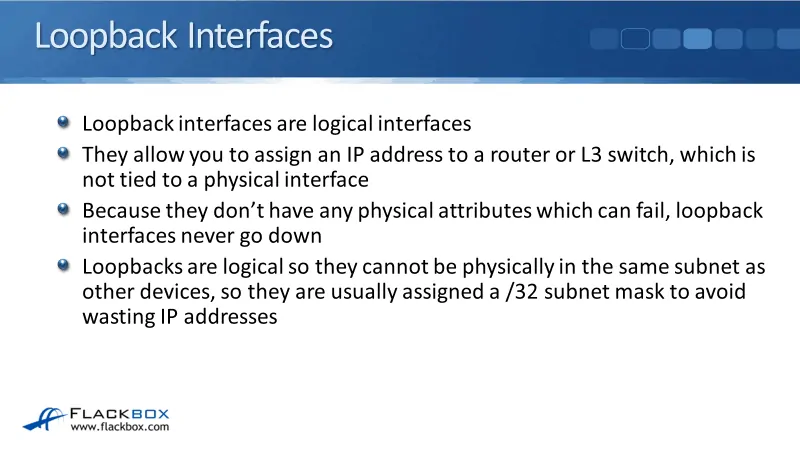
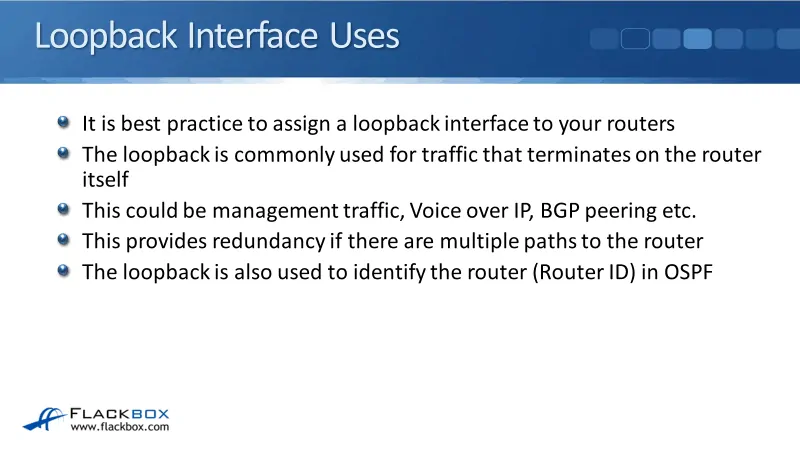
Example of Loopback Interfaces
Suppose a company uses a FortiGate firewall with multiple interfaces. The firewall has one LAN interface connected to the office network and two WAN interfaces connected to different Internet Service Providers for backup connectivity. The company also uses centralized monitoring, VPN services, and remote administration. For these services, the company needs one permanent IP address that does not change even if Internet links fail.
To solve this, the administrator creates a loopback interface on the firewall and assigns it a virtual IP address such as 10.10.10.1/32. This IP address is not connected to any physical cable or hardware port. It exists only inside the firewall software, but it remains active all the time as long as the firewall is running.
The company then uses 10.10.10.1 for important services such as firewall management login, monitoring tools, DNS requests, authentication servers, and VPN tunnel identification. Network administrators configure monitoring systems to communicate with this loopback IP instead of using the physical WAN or LAN interface IP addresses.
Now imagine the primary Internet connection on WAN1 fails. Normally, services using that WAN IP could stop working or require reconfiguration. However, because the company uses the loopback interface IP (10.10.10.1) as its stable service address, traffic automatically shifts through WAN2, and management, monitoring, and VPN services continue working without changing IP settings.
In another situation, a network engineer wants to test whether the firewall itself is functioning properly. The engineer pings 10.10.10.1. If the ping succeeds, it confirms that the firewall’s internal network system is operational, even if an external link has problems.
In short:
A loopback interface acts like a permanent virtual address for the firewall, providing stable communication for management, monitoring, VPNs, and troubleshooting, regardless of physical interface changes or failures.
What is Tunnel Interfaces
Tunnel Interface:
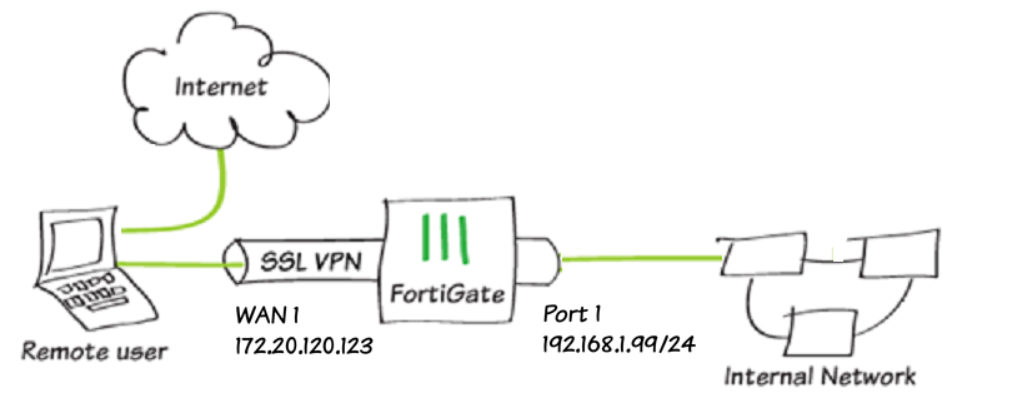
A tunnel interface is a virtual firewall or router interface used to create a secure communication path between two different networks over another network, usually the Internet. It is called a “tunnel” because data is logically sent through a protected path, even though it travels across a public network. The tunnel interface is created in software, not by using a separate physical cable, and it acts like a virtual network connection between two locations.
The main purpose of a tunnel interface is to build VPN (Virtual Private Network) connections, secure site-to-site communication, and encrypted remote access. When data enters the tunnel interface, it is encapsulated, meaning the original packet is wrapped inside another packet, and often encrypted before being sent across the Internet. At the other end of the tunnel, the packet is decrypted, unpacked, and delivered to the destination network. This process protects data from interception or unauthorized viewing while in transit.
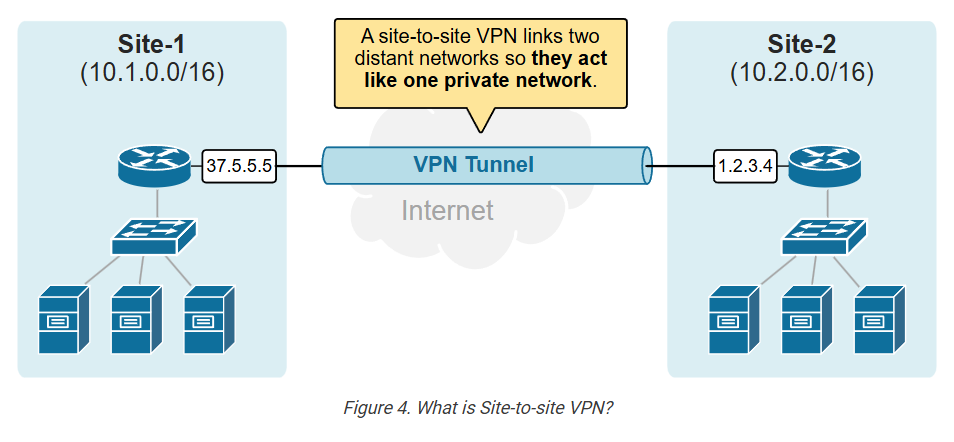
Tunnel interfaces are commonly used to connect branch offices, cloud networks, remote workers, or business partners securely. For example, a company’s head office in one city can securely connect to a branch office in another city through an encrypted tunnel over the public Internet. To users, it appears as if both offices are connected by a private dedicated link, even though communication uses the Internet.
In firewalls such as FortiGate, tunnel interfaces are often used for IPsec VPN tunnels or SSL VPN connections. The tunnel interface is assigned a virtual IP or used as a logical path for routing traffic between networks. Security policies can be applied directly to tunnel interfaces, allowing administrators to control which traffic is allowed through the VPN.
For example:
- port1 = WAN → Internet connection
- port2 = LAN → Internal office network
- VPN_Tunnel1 = Tunnel Interface → Secure connection to branch office
Traffic flow:
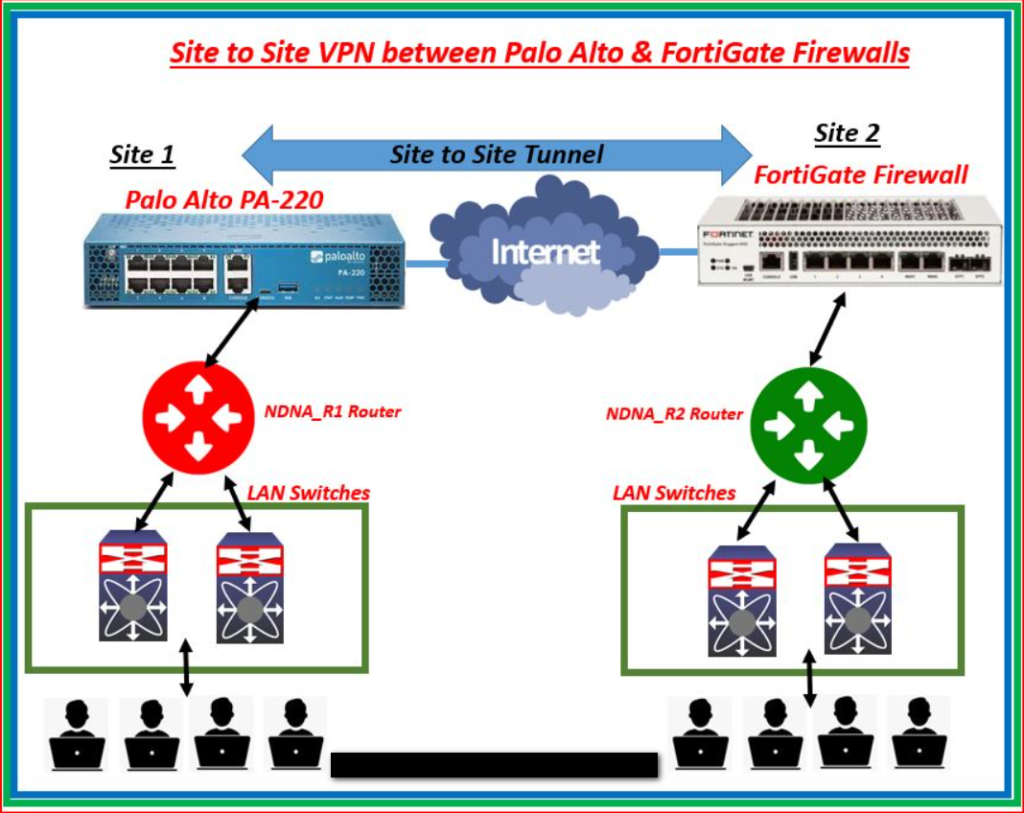
Head Office LAN → Tunnel Interface → Encrypted Internet path → Remote Tunnel Interface → Branch LAN
Employees at both locations can securely share files, access servers, and use business applications through the tunnel.
In short:
A tunnel interface is a virtual interface that creates a secure encrypted path for network communication over another network, commonly used for VPN connections between remote locations.
Why Need VPN Tunnel:
A VPN tunnel (Virtual Private Network tunnel) is needed to create a secure and private communication path over a public network such as the Internet. Normally, data sent across the Internet can pass through many networks and may be vulnerable to interception, spying, or attack. A VPN tunnel protects that data by encrypting it and sending it through a secure virtual path, so only authorized devices at the other end can read it.
One major reason for using a VPN tunnel is secure data transmission. Businesses often send sensitive information such as financial records, employee data, customer details, and internal business communication between offices or remote users. Without encryption, attackers may capture this data. A VPN tunnel encrypts traffic, making intercepted data unreadable.
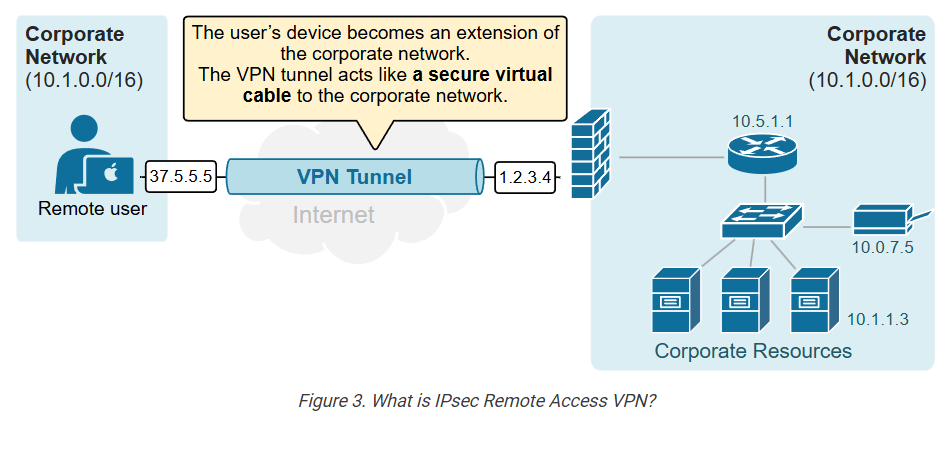
Another reason is secure remote access. Employees working from home, traveling, or using public Wi-Fi often need access to company systems. A VPN tunnel allows them to connect securely to the office network over the Internet, as if they were physically inside the office. This protects login credentials, files, and company communication from hackers on public networks.
VPN tunnels are also needed for site-to-site connectivity. Companies with branch offices in different cities or countries need secure communication between locations. Instead of paying for expensive dedicated private lines, organizations can use the Internet and build encrypted VPN tunnels between sites. This provides secure communication at lower cost.
A VPN tunnel also helps with privacy and identity protection. Since traffic is encrypted, outsiders such as hackers, unauthorized users, or network snoopers cannot easily see what data is being sent. This improves confidentiality and protects business operations.
For example, a company uses FortiGate firewalls in two offices:
- Head Office → Jamshedpur
- Branch Office → Kolkata
Both offices create an IPsec VPN tunnel through the Internet.
Traffic flow:
Head Office LAN → VPN Tunnel → Encrypted Internet path → VPN Tunnel → Branch LAN
Employees in both offices can securely access shared servers, applications, and files as if they were on one private network.
In short:
A VPN tunnel is needed for secure encrypted communication, safe remote access, private data transfer, and cost-effective connection between distant networks over the Internet.
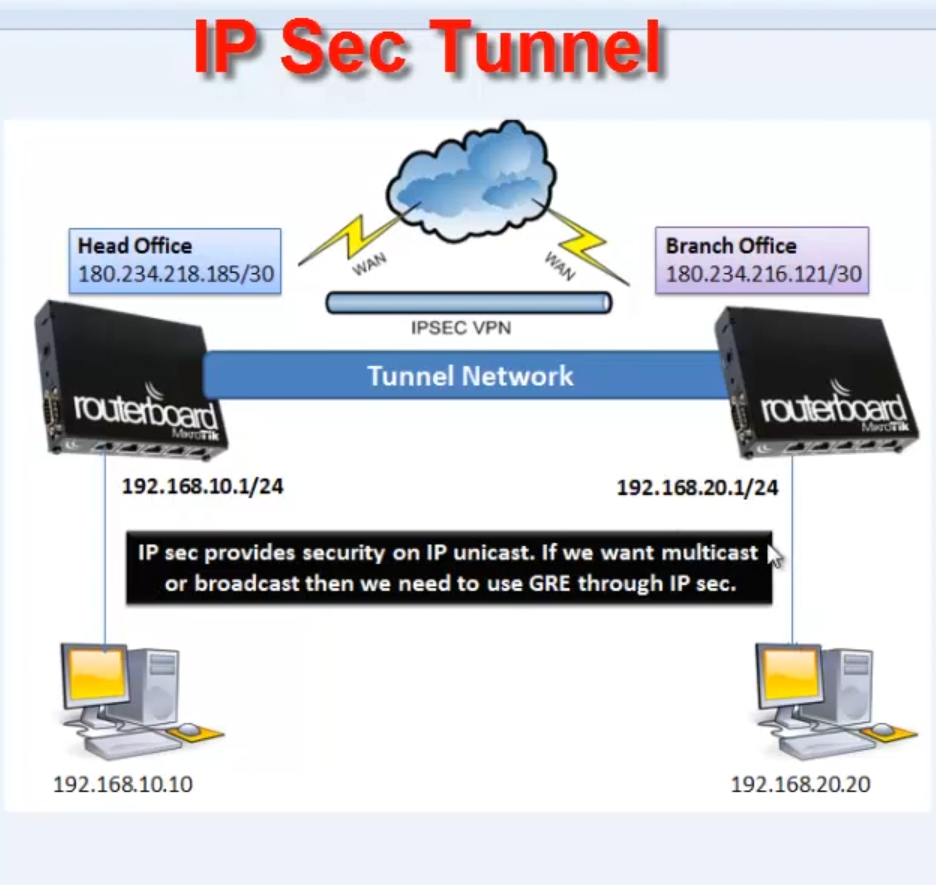
Example of VPN Tunnel Interfaces
Suppose a company has its Head Office in Jamshedpur and a Branch Office in Kolkata. Both offices need to share company files, access the same business applications, and communicate securely. If they send data normally over the Internet, hackers may intercept sensitive information such as passwords, financial data, or customer records. This creates a security risk.
To solve this problem, the company installs FortiGate firewalls at both offices and creates an IPsec VPN tunnel between them. This tunnel is a secure virtual connection built over the public Internet. All data traveling between the two offices is encrypted before it leaves one office and decrypted only when it reaches the other office. Anyone intercepting the traffic in between would see unreadable encrypted data.
For example, an employee in the Head Office wants to access a file stored on a server in the Branch Office. The request first goes to the local firewall, enters the VPN tunnel interface, gets encrypted, and travels securely across the Internet. At the Branch Office firewall, the data is decrypted and forwarded to the internal server. The reply follows the same encrypted path back. To the employee, it feels like accessing a server on the local network, even though it is in another city.
VPN tunnels are also useful for remote workers. Suppose a manager is traveling and connects from a hotel Wi-Fi network. By using a VPN tunnel to the company firewall, the manager can securely access office email, internal applications, and files without exposing company data to public network risks.
In this way, a VPN tunnel acts like a private secure road built through the public Internet, allowing offices and remote users to communicate safely, privately, and reliably.
What is Zone Interfaces
Zone Interface:
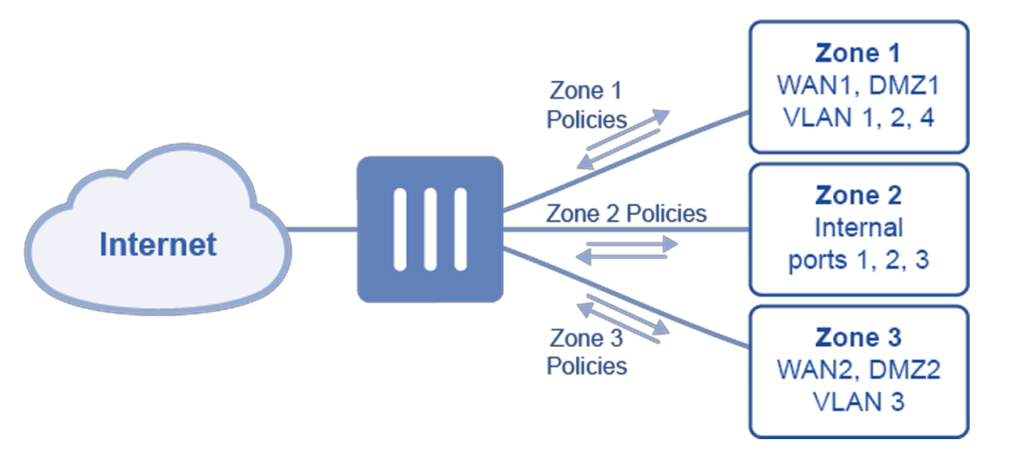
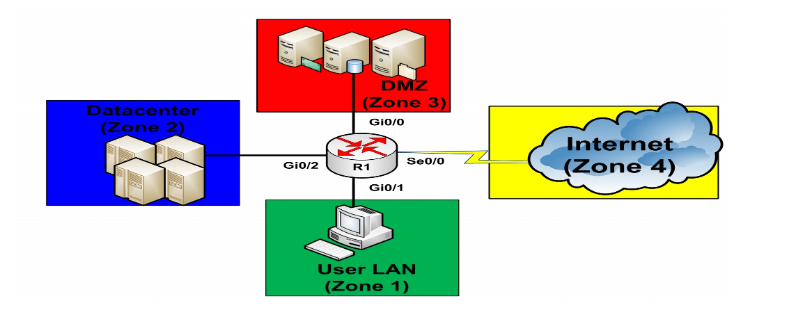
A zone interface is a logical grouping of one or more firewall interfaces into a security zone so that security policies can be applied based on zones instead of individual ports. In simple words, rather than creating separate rules for each interface one by one, administrators group similar interfaces together (such as LAN ports, WAN ports, or Guest networks) and treat them as one zone. This makes firewall management easier, more organized, and more secure.
For example, a company firewall such as FortiGate may have many interfaces:
- port1 = Internet connection
- port2 = Office LAN
- port3 = HR VLAN
- port4 = Finance VLAN
- port5 = Guest Wi-Fi
- VPN_Tunnel1 = Remote office tunnel
Instead of creating security rules for each port separately, the administrator creates zones:
- WAN Zone → port1
- Internal Zone → port2, port3, port4
- Guest Zone → port5
- VPN Zone → VPN_Tunnel1
Now the firewall can apply policies between zones, such as:
- Internal Zone → WAN Zone = Allow Internet access
- Guest Zone → Internal Zone = Block
- VPN Zone → Internal Zone = Allow secure business traffic
- WAN Zone → Internal Zone = Block by default
This is easier than creating many individual interface-to-interface rules.
Zone interfaces are useful because they simplify policy management, especially in large networks with many interfaces and VLANs. If a new internal VLAN is added later, it can simply be placed inside the Internal Zone, and existing policies automatically apply. This reduces configuration time and minimizes mistakes.
Zone interfaces also improve security segmentation. Different zones can have different trust levels:
- Trusted Zone → Internal office network
- Semi-Trusted Zone → DMZ servers
- Untrusted Zone → Internet
- Restricted Zone → Guest network
The firewall can enforce different security controls between each zone.
In short:
A zone interface is a logical firewall grouping of multiple interfaces into one security zone, making firewall policies simpler, scalable, and easier to manage.
Why Need Zone Interface:
A zone interface is needed to make firewall security management simple, organized, and scalable. In small networks with only a few interfaces, administrators can create firewall policies directly between ports, such as LAN to WAN or LAN to DMZ. However, in large networks there may be many physical interfaces, VLAN interfaces, VPN tunnels, wireless networks, guest networks, and server networks. Creating separate security rules for each interface becomes complex and difficult to manage. A zone interface solves this by grouping similar interfaces into one logical security zone.
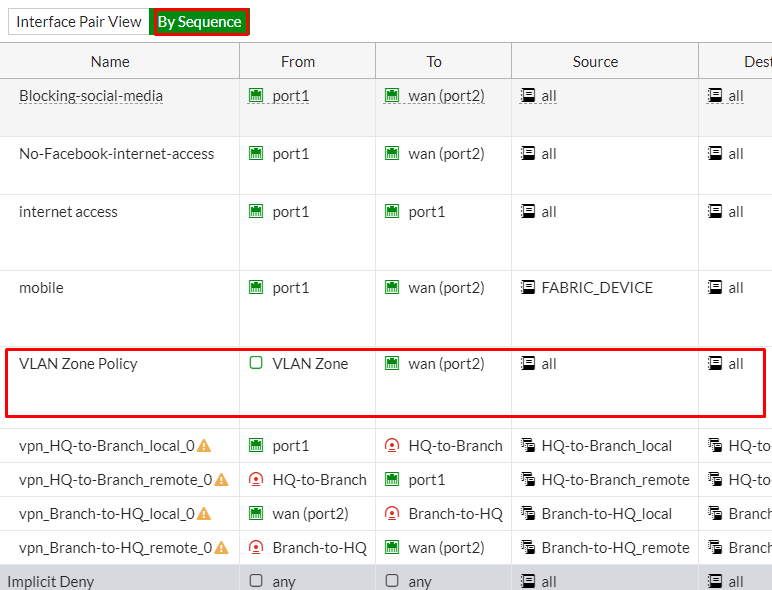
One important reason for using zones is simplified firewall policy management. Instead of creating rules for every individual interface, administrators create policies between zones. For example, multiple internal interfaces such as LAN, HR VLAN, Finance VLAN, and IT VLAN can all be placed inside one Internal Zone. Then one policy—Internal Zone → WAN Zone = Allow Internet—covers all of them. This reduces the number of rules and makes configuration easier.
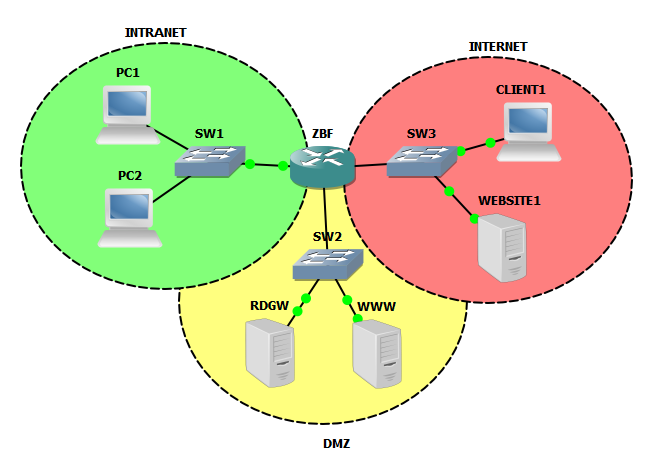
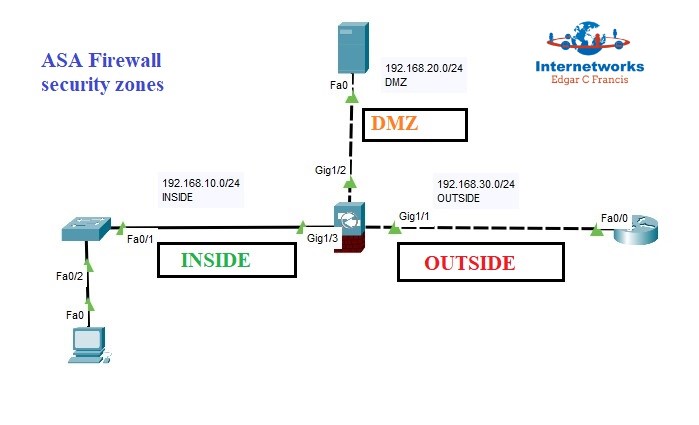
Zones are also needed for better security segmentation. Different network areas have different trust levels. Internal employee devices may be trusted, DMZ servers may be semi-trusted, guest networks may be restricted, and the Internet is untrusted. By placing these interfaces into separate zones, the firewall can apply different security controls between them. This improves protection and limits unnecessary access between networks.
Another reason is easy expansion of the network. If a company adds a new VLAN or new branch VPN tunnel, administrators do not need to create many new firewall rules. They can simply place the new interface into an existing zone, and the zone’s security policies automatically apply. This saves time and reduces configuration mistakes.
Zone interfaces also improve monitoring and visibility. Security logs can show traffic moving between zones, such as Guest Zone → Internal Zone blocked or VPN Zone → Server Zone allowed. This helps administrators understand network behavior and quickly identify suspicious activity.
For example, in a FortiGate firewall:
- Internal Zone → LAN + HR VLAN + Finance VLAN
- WAN Zone → Internet interfaces
- DMZ Zone → Public servers
- Guest Zone → Visitor Wi-Fi
- VPN Zone → Remote office tunnel
Policies:
- Internal Zone → WAN Zone = Allow
- Guest Zone → Internal Zone = Block
- WAN Zone → DMZ Zone = Allow web traffic only
- VPN Zone → Internal Zone = Allow secure access
This is much easier than managing each interface separately.
In short:
A zone interface is needed to simplify firewall rules, improve security segmentation, support network growth, and make firewall management easier and more efficient.
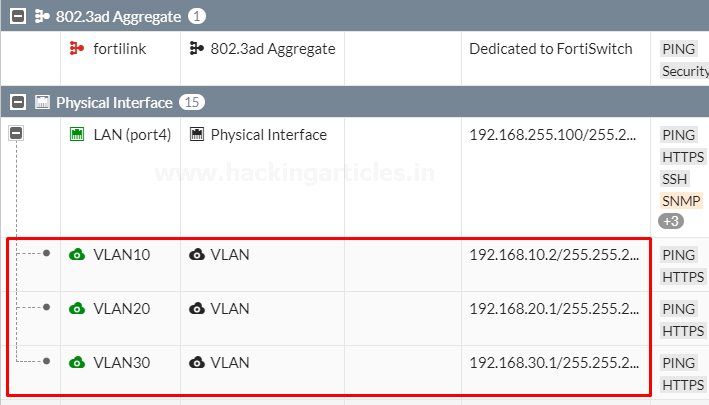
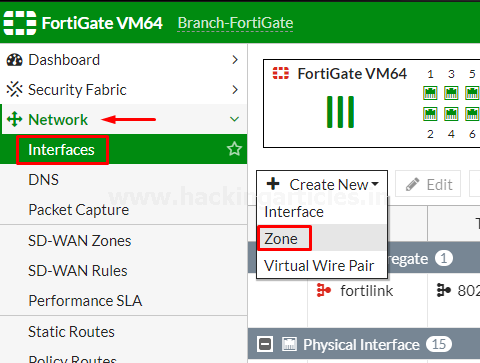
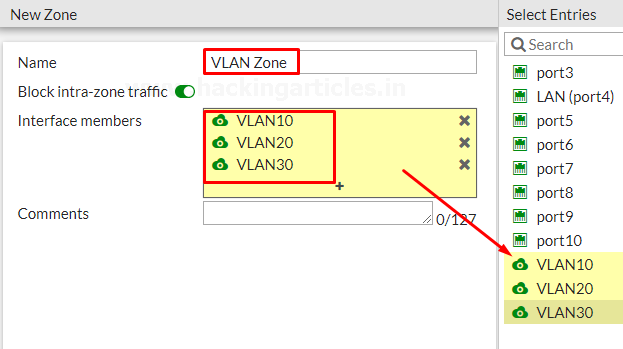
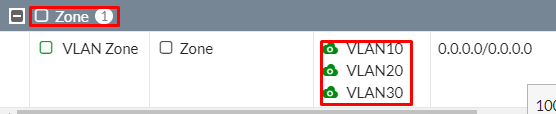
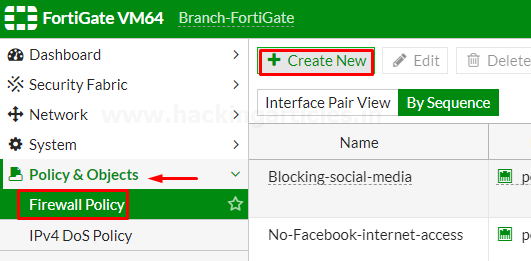
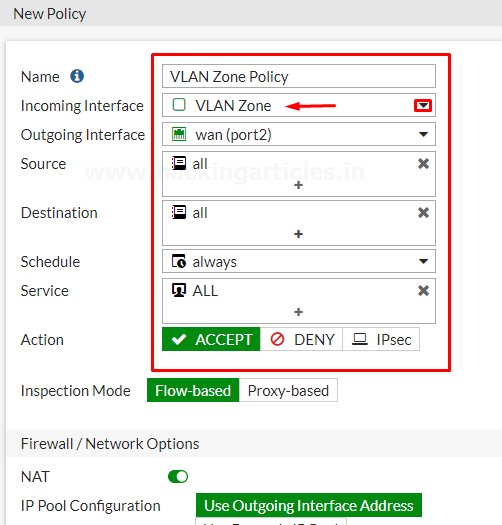
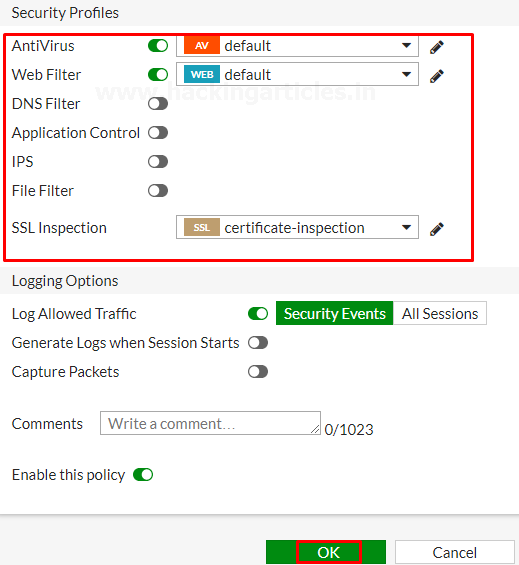
Example of Zone Interfaces
Suppose a company uses a FortiGate firewall and has many different network connections. The firewall has interfaces for office computers, HR department, Finance department, guest Wi-Fi, public servers, Internet connection, and a VPN connection to a branch office. If the administrator creates separate firewall rules for every interface, the configuration becomes large, complex, and difficult to manage.
To simplify management, the administrator creates security zones and groups similar interfaces together. For example, the office LAN, HR VLAN, and Finance VLAN are grouped into one Internal Zone because they are all trusted internal networks. The Internet-facing interface is placed in a WAN Zone because it connects to an untrusted public network. Public-facing servers are placed in a DMZ Zone, guest Wi-Fi is placed in a Guest Zone, and the VPN tunnel is placed in a VPN Zone.
Now the firewall administrator creates rules between zones instead of individual interfaces. The firewall allows traffic from the Internal Zone to the WAN Zone so employees can browse the Internet. It blocks traffic from the Guest Zone to the Internal Zone so visitors cannot access company systems. It allows only web traffic from the WAN Zone to the DMZ Zone so customers can access the company website. It also allows secure traffic from the VPN Zone to the Internal Zone so branch office employees can use company applications.
Later, the company adds a new IT department VLAN. Instead of creating many new firewall rules, the administrator simply adds the new VLAN interface into the Internal Zone. Immediately, all existing Internal Zone security policies apply to the new VLAN automatically. This saves time, keeps configuration simple, and reduces errors.
In this way, a zone interface acts like grouping multiple doors of the same type under one security category, allowing the firewall to manage traffic based on trust levels rather than managing every door separately.
What is HA Interface (High Availability Interface)
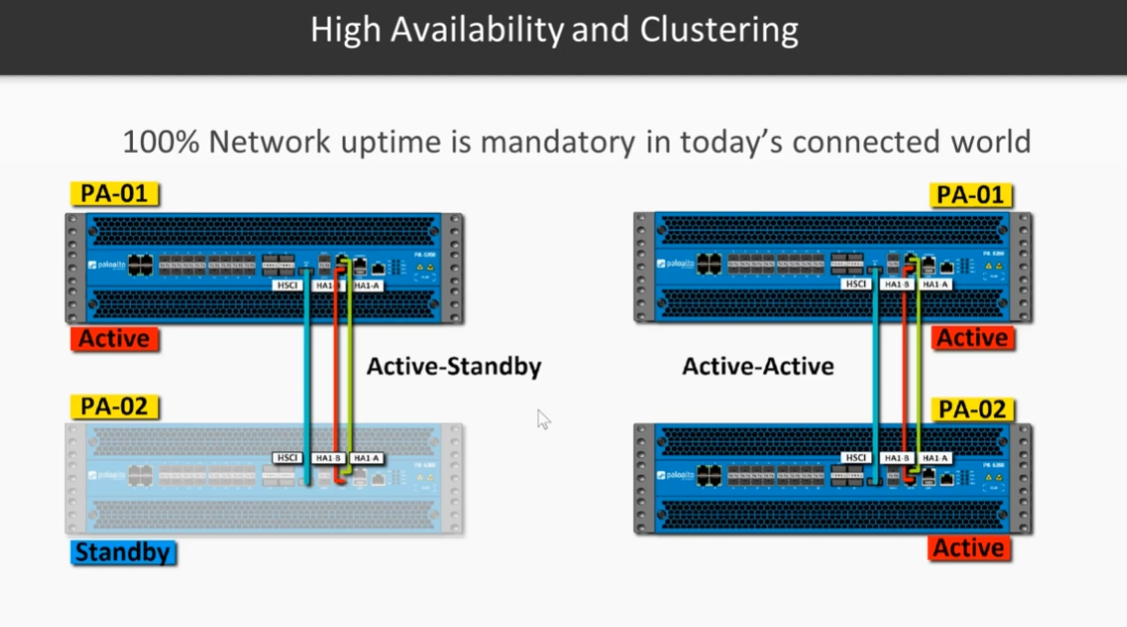
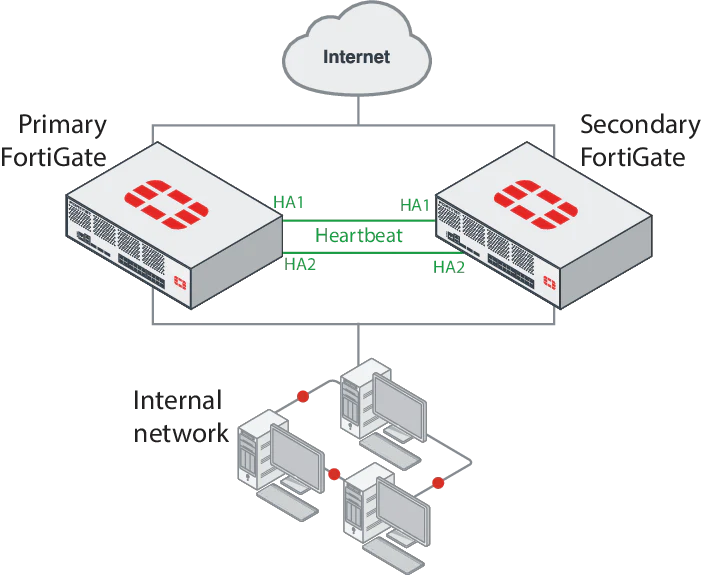
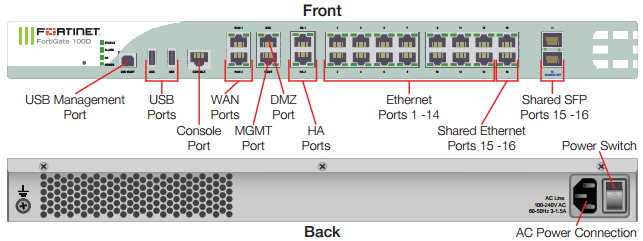
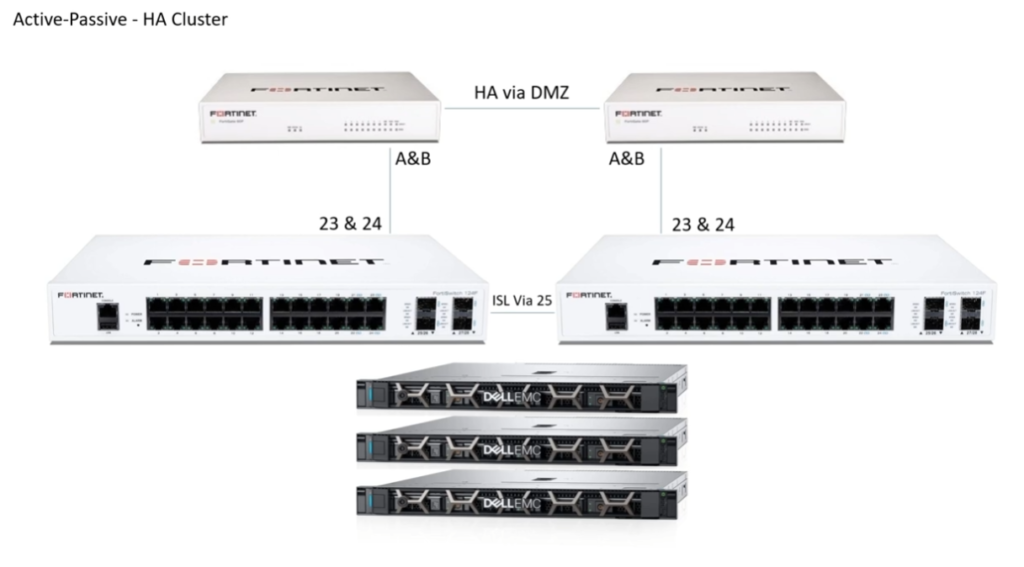
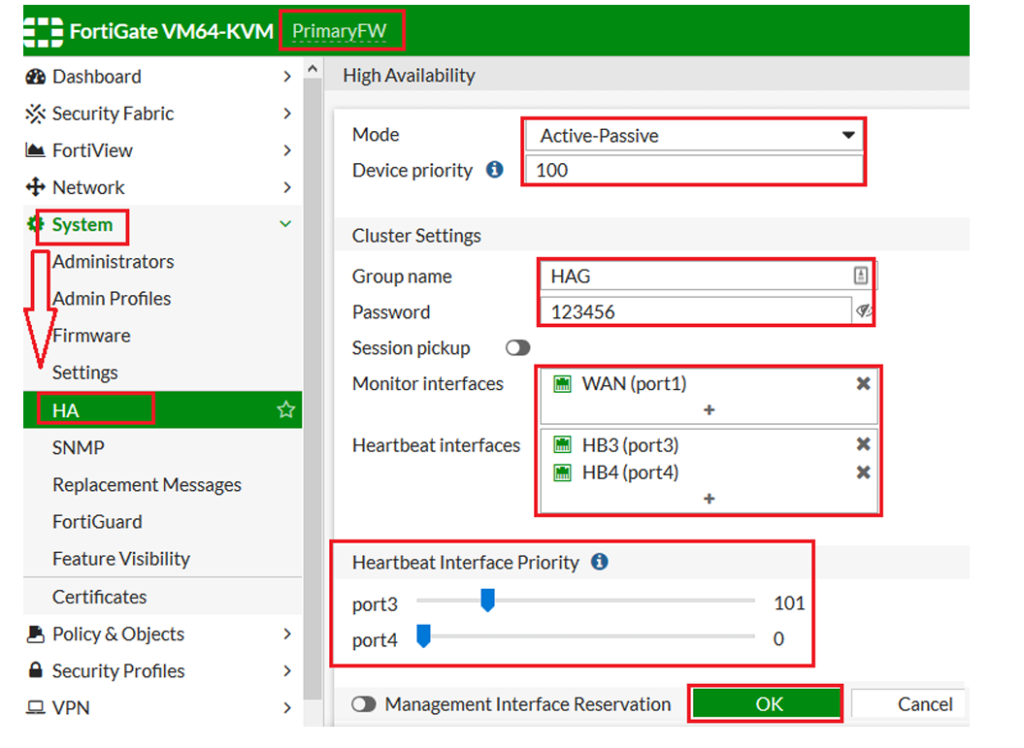
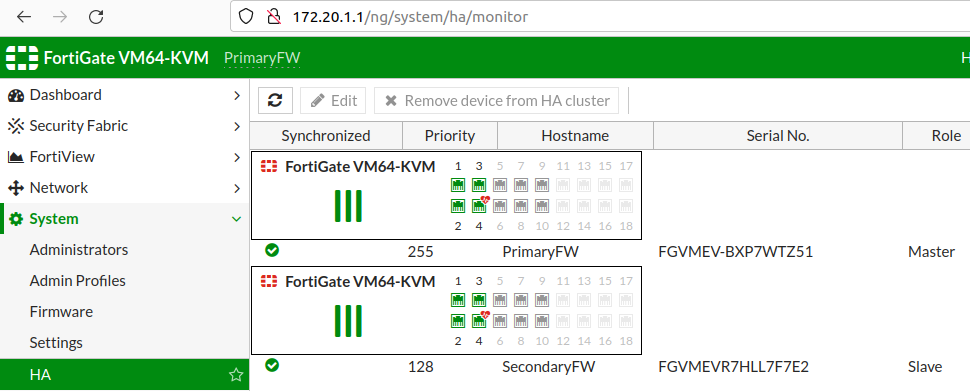
A HA (High Availability) interface is a special firewall interface used to connect two or more firewalls together so they can work as a redundant pair or cluster. The main purpose of an HA interface is to provide continuous network service even if one firewall fails. Through this interface, firewalls exchange status information, synchronize configuration, and monitor each other’s health in real time.
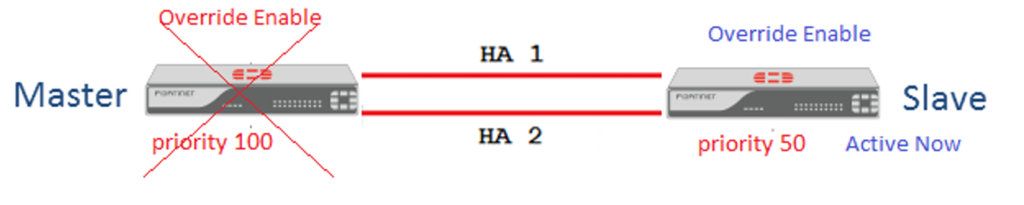
In a High Availability setup, one firewall usually works as the Primary (Active) firewall, handling all network traffic, while the second firewall works as the Secondary (Standby) firewall, remaining ready to take over if the primary device fails. The HA interface acts like a communication channel between these firewalls, constantly sending Heartbeat Messages to confirm that both devices are operating normally.
If the Primary Firewall Stops responding because of Hardware Failure, Software Crash, Power Loss, or Network Issue, the standby firewall detects the failure through the HA interface and Automatically Takes Control. This process is called Failover. Failover happens very quickly, often within seconds, so users experience little or no network downtime.
The HA interface also Synchronizes important information between Firewalls, such as:
- Firewall Policies
- Routing Tables
- VPN Tunnel Settings
- Session Information
- User Authentication Status
- Security Profiles and Logs
Because of this synchronization, the standby firewall is always ready to continue operations exactly where the active firewall stopped.
For Example, in an FortiGate HA setup:
- Firewall 1 = Active Unit
- Firewall 2 = Standby Unit
- Port1 = WAN
- Port2 = LAN
- Port3 = HA Interface (heartbeat/sync link)
Normal operation:
Users → Active Firewall → Internet
If active firewall fails:
Users → Standby Firewall → Internet
Network service continues automatically.
A HA interface is very important in Environments like:
- Banks
- Data centers
- Hospitals
- Cloud Networks
- Large Enterprises
- 24×7 online services
These organizations cannot afford firewall downtime.
In short:
A HA interface is a dedicated connection between firewalls used for heartbeat communication, synchronization, and automatic failover, ensuring high network availability and minimal downtime.


What is Management Interfaces
Management Interface:
A management interface (MGMT interface) is a dedicated firewall interface used for administration, configuration, monitoring, and maintenance of the firewall. Unlike WAN, LAN, or DMZ interfaces that carry normal user or application traffic, the management interface is mainly used by network administrators to securely access and control the firewall. It provides a separate path for managing the device without mixing management traffic with normal network traffic.
The management interface is usually assigned a private IP address and connected to a secure administration network. Administrators use this interface to log in to the firewall through HTTPS, SSH, SNMP, or centralized management tools. Through the management interface, they can configure firewall rules, monitor traffic logs, update firmware, create VPN settings, check security alerts, and troubleshoot network problems.
One major reason for using a dedicated management interface is security isolation. If firewall management is done over normal LAN or WAN interfaces, attackers may attempt to reach the management service through public or user networks. A separate management interface reduces this risk by restricting access only to authorized administrator systems or a secure management VLAN.
The management interface also improves network stability and control. Even if user traffic is heavy or production interfaces are experiencing problems, administrators may still access the firewall through the management interface for troubleshooting and recovery. This dedicated access path makes administration more reliable.
For Example, in an FortiGate firewall:
- port1 = WAN → Internet
- port2 = LAN → Internal users
- port3 = DMZ → Public servers
- mgmt = Management Interface → Admin network (192.168.50.1/24)
An administrator PC connected to the management network can securely log in to the firewall, review logs, change policies, or update firmware without using normal production interfaces.
The management interface is often protected with:
- Strong passwords / MFA
- IP access restrictions
- HTTPS / SSH encryption
- Admin role control
- Logging and audit monitoring
In short:
A management interface is a dedicated secure firewall interface used only for administration and monitoring, helping keep firewall management separate, protected, and reliable.