
SSL Inspection & Intrusion Prevention
Table of Contents
SSL Deep Inspection
SSL Deep Inspection is a firewall security feature that decrypts, inspects, and analyzes encrypted HTTPS traffic (SSL/TLS traffic) to detect hidden threats such as malware, phishing, or data leaks.
Normally, most internet traffic today is encrypted using SSL/TLS (shown as HTTPS), which makes it secure. However, attackers can also hide viruses or malicious content inside encrypted traffic. SSL Deep Inspection solves this problem by temporarily Decrypting The Traffic, Checking It, and then Re-Encrypting it before sending it to the user.
When a user visits an HTTPS Website, the Firewall acts like a Middle Layer. It decrypts the data, scans it for threats using security rules, and then allows or blocks the content based on the result. This ensures that even encrypted traffic is not used to bypass security.
Example:
In an office network, an employee tries to download a file from an HTTPS website. The firewall performs SSL inspection, detects that the file contains malware, and blocks it before it reaches the system.
In another case, if a phishing website uses HTTPS to look safe, SSL Deep Inspection can still detect and block it.
Importance:
SSL Deep Inspection is important because:
- Most modern websites use HTTPS encryption
- Hackers hide malware inside encrypted traffic
- Basic firewalls cannot see encrypted data
- It improves overall network security
In advanced firewalls like Fortinet FortiGate, SSL Deep Inspection is used to inspect encrypted web traffic, detect hidden threats, and enforce security policies effectively.
Why Need SSL Deep Inspection
SSL Deep Inspection is needed because most of today’s internet traffic is encrypted using SSL/TLS (HTTPS). While encryption protects data from outsiders, it also creates a security blind spot for traditional firewalls because they cannot see what is inside the encrypted traffic.
Attackers take advantage of this by hiding malware, ransomware, phishing pages, and data theft activities inside HTTPS connections. Without inspection, these threats can easily bypass normal security filters and enter the network without detection.
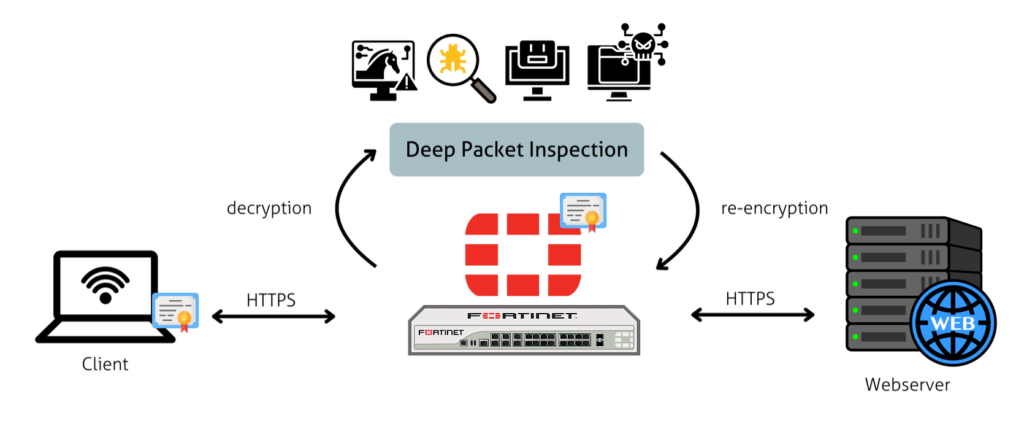
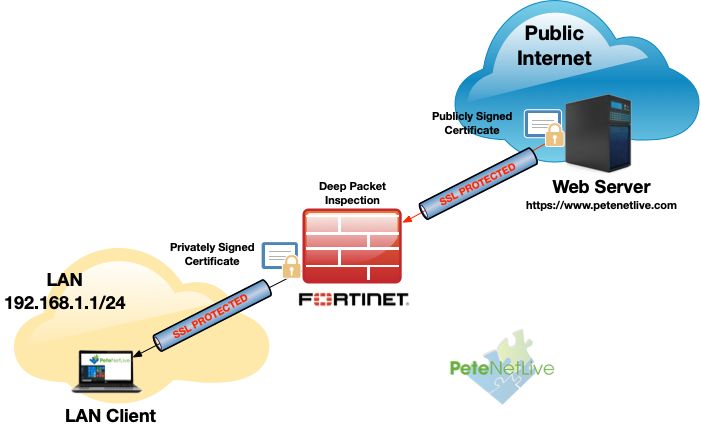
SSL Deep Inspection solves this problem by decrypting the traffic, scanning it for malicious content, applying security policies, and then re-encrypting it before sending it to the user. This allows the firewall to maintain security even in encrypted communication.
It is also needed to prevent data leakage. Employees or users may unknowingly upload sensitive information through encrypted channels to unauthorized websites or cloud services. SSL inspection helps detect and control such activities.
In organizations like offices, banks, and schools, SSL Deep Inspection is important because it ensures that even secure websites are not used as a medium for cyberattacks or unauthorized data transfer.
In advanced firewalls such as Fortinet FortiGate, SSL Deep Inspection is a key feature used to inspect HTTPS traffic, Block Hidden Threats, and enforce strong security policies across the network.
SSL Deep Inspection Example
Example 1: Malware Hidden in HTTPS Download (Office Network):
An employee tries to download a software tool from a website that uses HTTPS (secure connection). Since the connection is encrypted, a normal firewall cannot see inside it.
However, With SSL Deep Inspection Enabled, the Firewall:
- Decrypts the HTTPS traffic
- Scans the downloaded file
- Detects that the file contains a Trojan virus
- Blocks the download immediately
- Re-encrypts safe traffic and sends it to the user
So, even though the website looked secure, the threat is stopped before entering the system.
Example 2: Phishing Website using HTTPS:
A user receives a link that looks like a bank login page (example: fake banking site). The site uses HTTPS to appear safe.
Without SSL inspection, the firewall may allow it because it is encrypted.
With SSL Deep Inspection:
- Firewall decrypts the website content
- Detects it is a phishing page (fake login form)
- Blocks access and warns the user
This prevents theft of login credentials like passwords and OTPs.
Example 3: Data Leakage in Organization:
An employee tries to upload confidential company files to a personal cloud storage website using HTTPS.
With SSL Deep Inspection:
- Firewall decrypts upload traffic
- Detects sensitive company data
- Blocks the upload based on security policy
- Logs the activity for admin review
This helps prevent data theft or leakage.
In the modern digital world, network security has undergone a fundamental shift. The widespread adoption of HTTPS—where over 90% of web traffic is encrypted—has created a paradox: while it protects user privacy, it also creates a massive security blind spot. Malicious actors now leverage this encryption to hide a vast array of threats, from malware and ransomware to data exfiltration attempts. SSL inspection is the necessary response to this challenge. It is a sophisticated, purpose-built “man-in-the-middle” (MitM) process that allows network firewalls to decrypt, inspect, and re-encrypt encrypted traffic, thereby securing communications wrapped in both legitimate and illegitimate certificates.
What is SSL Inspection?
SSL inspection, also known as HTTPS inspection or TLS interception, is an active security process where a network security device, typically a Next-Generation Firewall (NGFW), intercepts and decrypts encrypted traffic streams. The goal is to gain full visibility into the contents of the data, which would otherwise be unreadable. By doing so, the firewall can apply various security policies and protections to the traffic, much like it does with unencrypted HTTP traffic.
- The “Trusted” Part: Unlike a malicious MitM attack, SSL inspection is performed with the explicit consent and control of the organization. The trust is established by a company-controlled Certificate Authority (CA) that is installed on all managed devices, signaling to the browsers that the firewall’s actions are legitimate and not hostile.
- The “Man-in-the-Middle” Part: The firewall literally places itself between the user and the destination server. It terminates the original encrypted connection, performs its inspection, and then creates a new, separate encrypted connection to forward the traffic.
How Does It Work?
The process is intricate and relies on careful certificate management to avoid breaking user experience and application functionality.
- Client Request: A user’s browser sends an HTTPS request to a website (e.g., https://pseudowire.in).
- Firewall Interception: The firewall intercepts this request before it leaves the internal network.
- Two-Way Handshake: The firewall initiates two separate SSL/TLS handshakes simultaneously:
- Trust Verification: The user’s device, having the firewall’s CA Certificate installed, trusts this new certificate, and the secure connection is established without a security warning.
- Decryption and Inspection: With the two-way connection established, the firewall can now fully decrypt the traffic. It passes the unencrypted data through its security engines, including:
- Re-encryption and Forwarding: Once the inspection is complete and the traffic is deemed safe, the firewall re-encrypts the data using its own certificate and forwards it to the intended recipient.
Why is SSL Inspection Necessary?
The need for SSL inspection has become critical for several reasons:
- Cybercriminals are Hiding in Plain Sight: Over 90% of modern malware uses encrypted channels to communicate, including for command-and-control (C2) and data exfiltration. Without inspection, these threats pass right through perimeter defenses.
- The Lock Icon is No Longer Enough: The presence of a padlock icon and “HTTPS” in a browser’s address bar signifies a secure connection—not a safe website. Phishing sites and malicious domains can easily obtain and use valid SSL certificates to trick users and security tools.
- Compliance and Regulation: Many industries and regulatory frameworks (e.g., GDPR, HIPAA, PCI DSS) require organizations to have strict data protection and monitoring capabilities. SSL inspection provides the necessary visibility to meet these compliance obligations.
- The Rise of Encrypted IoT and SaaS: Encrypted traffic is not limited to web browsing. IoT devices, cloud applications, and APIs all use encryption, creating more entry points for threats that can only be seen with deep inspection.
Firewall SSL Deep Inspection How Work?
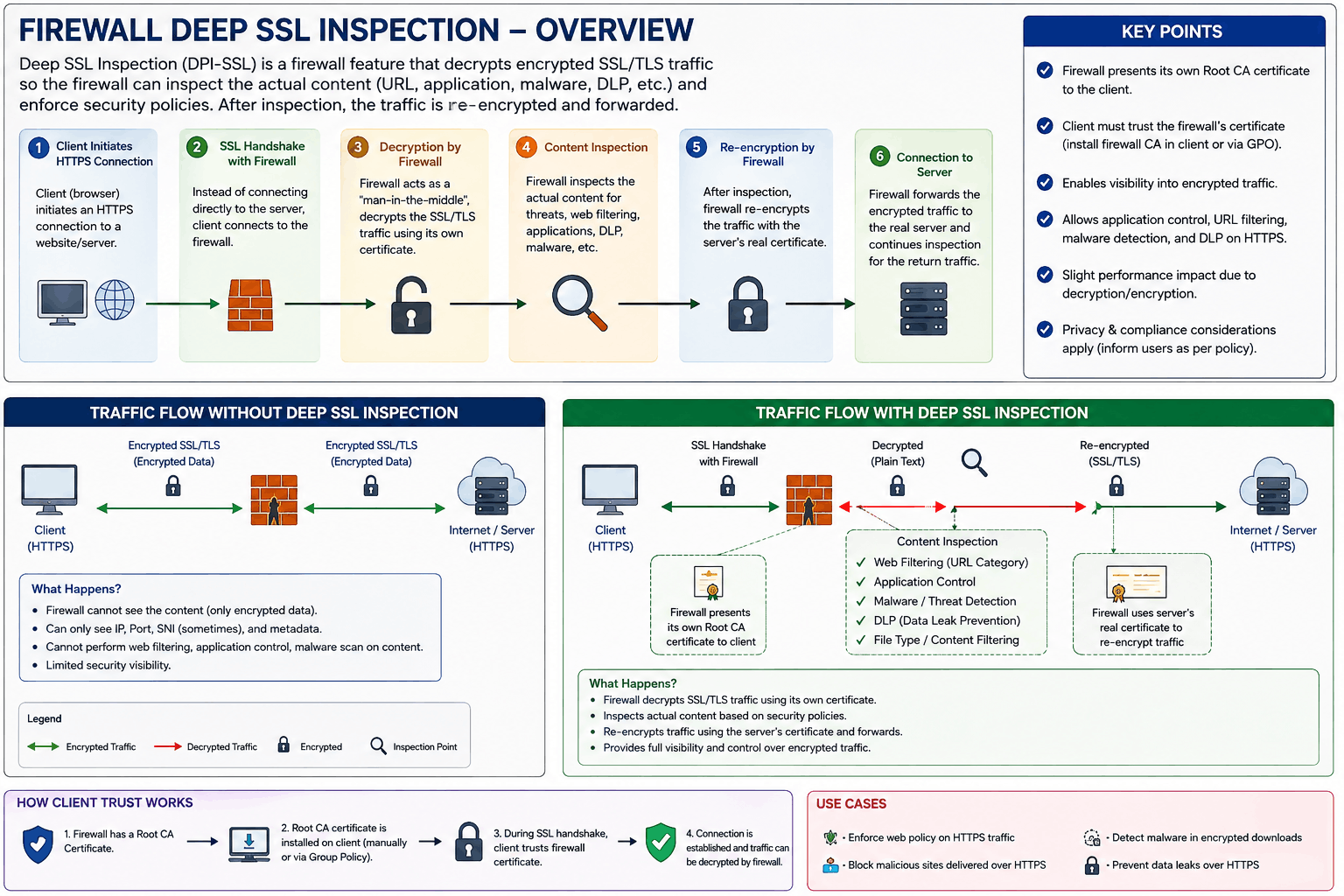
SSL Deep Inspection is a firewall security feature used to inspect encrypted HTTPS traffic. Normally, when a user visits an HTTPS website, the data between the computer and the website is encrypted. Because of this encryption, the firewall cannot see the actual content of the communication. SSL Deep Inspection allows the firewall to decrypt the traffic, inspect it for security threats, and then encrypt it again before forwarding it to the destination.
Example: Suppose an employee visits https://example.com and downloads a file. The file is transferred through an encrypted HTTPS connection. Without SSL Deep Inspection, the firewall may know that the user is communicating with example.com, but it may not be able to inspect the actual file. With SSL Deep Inspection, the firewall decrypts the HTTPS traffic and checks the file before allowing it to reach the user’s computer.
The working process can be explained as Decrypt → Inspect → Re-encrypt. First, the firewall receives the encrypted HTTPS traffic from the user’s computer. It decrypts the traffic so that it can see the actual application data. Then it checks the traffic using security features such as Antivirus, IPS, Web Filtering, and Application Control. If the traffic is safe, the firewall encrypts it again and sends it to the destination server.
Example: A user downloads virus.exe from an HTTPS website. The traffic reaches the firewall in encrypted form. The firewall decrypts the traffic and sends the file to its security inspection engine. If the antivirus detects malware, the firewall blocks the download. If the file is safe, the firewall allows the traffic to continue.
SSL Deep Inspection normally creates Two Separate Encrypted Connections. The first connection is between the user’s computer and the firewall, and the second connection is between the firewall and the actual web server. Therefore, the communication looks like:
					PC  ←→  Firewall  ←→  Web Server
       TLS 1          TLS 2
The firewall decrypts the first connection, inspects the traffic, and then sends the allowed traffic through the second encrypted connection to the web server.
To perform this inspection without constant certificate warnings, the firewall uses an Inspection CA certificate. This CA certificate is installed as a trusted certificate on company computers. When the user accesses a website, the firewall can generate an inspection certificate for that website and sign it using the trusted Inspection CA. Because the computer trusts the CA, the browser can accept the certificate.
Example: If the user visits https://google.com, the firewall may generate an inspection certificate for google.com. The user’s computer trusts the organization’s Inspection CA, so the HTTPS connection can continue normally while the firewall inspects the traffic.
SSL Deep Inspection is especially useful because attackers can hide malicious content inside encrypted HTTPS traffic. Malware, malicious downloads, exploit attempts, and other threats can be transmitted using HTTPS. Deep Inspection gives the firewall an opportunity to see this content and apply security policies before the traffic reaches the internal user.
Example: An attacker hosts a malicious PDF on an HTTPS website. The user downloads the PDF. The firewall intercepts the HTTPS session, decrypts the traffic, scans the PDF, and detects the malicious content. The firewall can then block the file instead of allowing it to reach the user’s computer.
However, SSL Deep Inspection can sometimes cause compatibility problems. Some applications use certificate pinning, meaning they expect a specific certificate from the server. When the firewall presents its own inspection certificate, the application may reject the connection. In such cases, administrators may need to create an SSL inspection exemption for that application or website.
SSL Deep Inspection also requires more firewall processing power because the firewall has to decrypt, inspect, and re-encrypt large amounts of traffic. Therefore, when selecting a firewall, administrators should consider its SSL inspection throughput, not only its normal firewall throughput.
In simple terms, SSL Deep Inspection means the firewall temporarily decrypts HTTPS traffic, checks what is inside it for security threats, and then encrypts the traffic again before sending it forward. For example, if a user downloads malware through HTTPS, the firewall can decrypt the traffic, detect the malware, and block it.
					Without SSL Deep Inspection:
PC → 🔒 HTTPS → Firewall → 🔒 HTTPS → Server

With SSL Deep Inspection:
PC → 🔒 HTTPS → Firewall → 🔓 Decrypt → Inspect → 🔒 Encrypt → Server
HTTPS Flow: Without vs With SSL Deep Inspection
1. Without SSL Deep Inspection
					┌─────────────┐
│   User PC   │
└──────┬──────┘
       │
       │ HTTPS 🔒
       │ Encrypted
       ▼
┌─────────────┐
│  Firewall   │
│             │
│ Cannot see  │
│ actual HTTPS│
│ content     │
└──────┬──────┘
       │
       │ HTTPS 🔒
       │ Encrypted
       ▼
┌─────────────┐
│ Web Server  │
└─────────────┘
What happens: The PC establishes HTTPS communication with the web server. The traffic remains encrypted while passing through the firewall. The firewall can inspect connection information, but it does not decrypt the actual HTTPS content.
Example: If the user downloads virus.exe through HTTPS, the firewall may not be able to inspect the actual file content because it remains encrypted.
2. With SSL Deep Inspection
					┌─────────────┐
│   User PC   │
└──────┬──────┘
       │
       │ HTTPS 🔒
       ▼
┌────────────────────┐
│      Firewall      │
│ SSL Deep Inspection│
└─────────┬──────────┘
          │
          │ Decrypt 🔓
          ▼
┌────────────────────┐
│ Security Inspection│
│                    │
│ Antivirus          │
│ IPS                │
│ Web Filter         │
│ File Inspection    │
│ Application Control│
└─────────┬──────────┘
          │
      ┌───┴────┐
      │        │
   Threat     Safe
      │        │
      ▼        ▼
   BLOCK ❌  Encrypt 🔒
                │
                ▼
          ┌─────────────┐
          │ Web Server  │
          └─────────────┘
What happens: The firewall intercepts the HTTPS connection, decrypts the traffic, inspects the content, and decides whether to allow or block it. If the traffic is safe, the firewall encrypts it again and sends it to the web server.
Example: If virus.exe is downloaded through HTTPS, the firewall decrypts the traffic, scans the file, detects malware, and blocks the download.
Main Difference
					WITHOUT SSL DEEP INSPECTION

PC
 ↓ 🔒 Encrypted
Firewall
 ↓ 🔒 Encrypted
Web Server

Firewall → Does not inspect the actual HTTPS content


WITH SSL DEEP INSPECTION

PC
 ↓ 🔒 Encrypted
Firewall
 ↓ 🔓 Decrypt
Inspect
 ↓
Allow / Block
 ↓ 🔒 Re-encrypt
Web Server

Firewall → Can inspect the HTTPS content
					Easy way to remember:
Without Deep Inspection: Encrypt → Pass → Encrypt
With Deep Inspection: Encrypt → Decrypt → Inspect → Encrypt → Pass
Intrusion Prevention System (IPS)
1. Introduction:
An Intrusion Prevention System (IPS) in Fortinet is a security feature that monitors network traffic and detects and blocks malicious activities in real time. It is built into Fortinet security products, mainly the FortiGate firewall, to protect networks from cyber threats like hacking attempts, malware, and exploits.
2. Working of Fortinet IPS:
Fortinet IPS continuously inspects data packets flowing in and out of the network. It compares this traffic with a database of known attack signatures and suspicious behavior patterns. If any threat is detected, it immediately takes action such as blocking the traffic, resetting the connection, or alerting the administrator.
3. Features of Fortinet IPS:
Fortinet IPS provides features like signature-based detection, anomaly detection, real-time blocking, and automatic updates of threat intelligence. It also uses FortiGuard Labs threat intelligence to stay updated with the latest cyber threats worldwide.
4. Example of IPS in action:
For example, if a hacker tries to exploit a vulnerability in a company’s server or inject malware through network traffic, Fortinet IPS will detect the attack pattern and stop it instantly before it reaches the system, preventing damage.
5. Importance of Fortinet IPS:
Fortinet IPS is important because it provides proactive protection, meaning it stops attacks before they succeed. It helps organizations secure sensitive data, maintain network performance, and reduce risks from cyber threats.
Why We Need Intrusion Prevention System (IPS)
Why we need Intrusion Prevention System (IPS):
An Intrusion Prevention System (IPS) is needed to protect computer networks from cyber threats by detecting and automatically blocking malicious activities in real time.
1. Protection from Cyberattacks
IPS helps stop attacks like hacking attempts, malware, ransomware, port scanning, and denial-of-service (DoS) attacks before they enter the system.
2. Real-time blocking of threats
Unlike systems that only detect and alert, IPS can immediately block harmful traffic, preventing damage at the source.
3. Prevent data theft and unauthorized access
IPS protects sensitive information such as user data, financial records, and company files by stopping unauthorized attempts to access them.
4. Early detection of suspicious activity
It monitors network traffic and identifies unusual behavior like repeated login failures or scanning of multiple ports, which may indicate an attack.
5. Reduces downtime and damage
By stopping attacks early, IPS helps avoid system crashes, service disruption, and costly recovery operations.
6. Strengthens overall security
IPS works with firewalls and antivirus systems to provide multi-layered network protection, making the system more secure.
Simple Example:
If a hacker tries to scan open ports or exploit a server vulnerability, the IPS will detect the activity and block it instantly before any harm is done.
Example of Intrusion Prevention System (IPS)
Example of Intrusion Prevention System (IPS):
Example 1: Port scanning attack
A hacker uses a tool like Nmap to scan a company’s server and checks multiple ports (like 22, 80, 443) to find open services.
👉 The IPS detects this unusual pattern of repeated port requests and blocks the hacker’s IP address immediately, stopping further scanning.
Example 2: Malware injection attempt
A user tries to send a malicious file through the network that matches a known virus signature.
👉 The IPS identifies the file as malware and blocks it before it reaches the system.
Example 3: Brute-force login attack
A hacker repeatedly tries different passwords to access a server.
👉 The IPS notices too many failed login attempts and automatically blocks that IP address.
Simple summary:
IPS works like a security guard that watches network traffic and stops suspicious activity instantly before it can harm the system.
IPS, Antivirus, DLP, URL Filtering, Anti Bot, Application Control
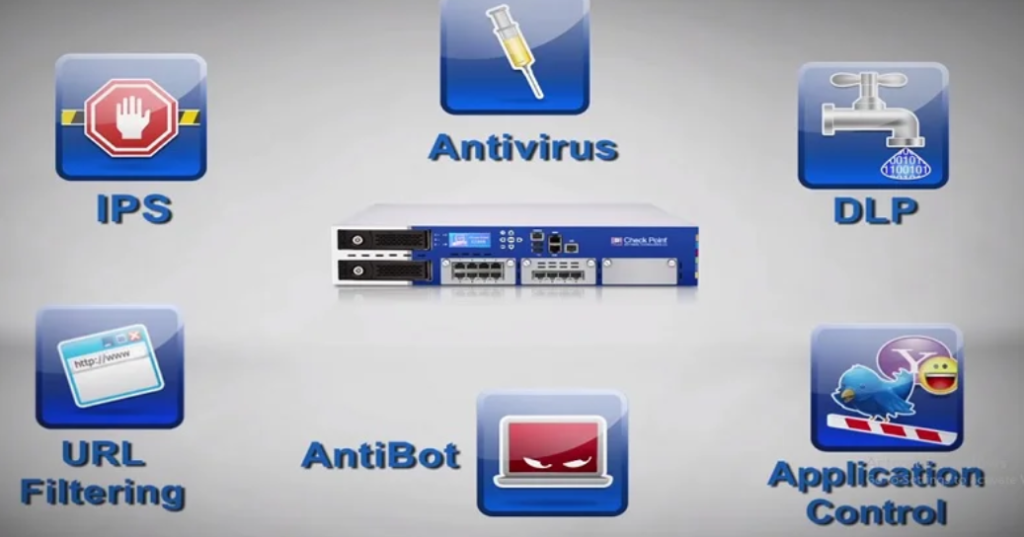
The image shows several important security features of a Check Point Firewall / Next-Generation Firewall (NGFW). These features work together to protect an organization’s network from cyberattacks, malware, unauthorized websites, application abuse, data leakage, and infected computers. Each security feature has a different purpose, and administrators can create security policies according to the organization’s requirements.
1. IPS – Intrusion Prevention System
IPS (Intrusion Prevention System) is a security feature that monitors network traffic and detects known attacks, suspicious behavior, and attempts to exploit vulnerabilities. When a user or attacker sends malicious traffic toward a server or computer, the IPS engine analyzes the traffic and compares it with known attack signatures and security rules. If the traffic is identified as an attack, the firewall can automatically block it.
For Example, suppose an attacker tries to exploit a vulnerability in a company’s web server. The traffic comes through the firewall, and IPS identifies the malicious pattern. The firewall can then stop the traffic before it reaches the server. IPS can help protect against attacks such as vulnerability exploitation, port scanning, protocol attacks, and other network-based threats.
Main purpose: IPS protects the network by detecting and preventing network attacks.
2. Antivirus
The Antivirus security feature protects users and servers from malware such as viruses, trojans, worms, ransomware, and other malicious files. When files are downloaded from the internet or transferred through the network, the firewall can inspect the traffic and look for known malicious content.
For example, an employee may receive an email containing a malicious attachment or download an infected executable file from a website. If the firewall’s security engine detects that the file contains malware, it can block the file or prevent the malicious communication from reaching the user.
Antivirus protection is important because malware can steal information, damage systems, encrypt files, or provide attackers with unauthorized access to computers.
Main purpose: Antivirus protects the network and users from Malicious Files and Malware.
3. DLP — Data Loss Prevention
DLP (Data Loss Prevention) is designed to prevent sensitive or confidential information from leaving an organization without authorization. Organizations may have sensitive information such as customer records, employee information, financial documents, passwords, business documents, or other confidential data.
For Example, suppose an employee tries to upload a confidential customer database to a personal cloud storage account. A DLP system can inspect the content and identify sensitive information according to configured policies. Depending on the policy, it can block the transfer, generate an alert, or log the event for the administrator.
DLP is especially useful in companies where protecting confidential information is important. It helps reduce the risk of accidental or intentional data leakage.
Main purpose: DLP protects the organization against Unauthorized Data Leakage.
4. URL Filtering
URL Filtering controls which websites users are allowed to access through the organization’s network. The administrator can create policies based on URLs, domains, or website categories.
For Example, an organization may allow employees to access Google, Microsoft, and business-related websites but block categories such as gambling, malicious websites, adult websites, or other unwanted content.
					Google               → Allow ✅
Microsoft            → Allow ✅
Business websites    → Allow ✅
Malware websites     → Block ❌
Gambling websites    → Block ❌
URL Filtering can also help improve productivity and reduce security risks because users can be prevented from visiting known malicious or inappropriate websites.
Main purpose: URL Filtering provides Website and Web-Access Control.
5. Anti-Bot
Anti-Bot protects the network from computers that have already been infected by malware and have become part of a botnet. A compromised computer may secretly communicate with an attacker’s Command-and-Control (C&C) server to receive commands.
The attacker may use the infected computer to steal information, send spam, participate in attacks, or download additional malware. Anti-Bot technology can identify suspicious communication between the infected computer and known or suspicious botnet infrastructure and block that communication.
This is important because antivirus may not always detect every new infection immediately. Anti-Bot protection provides another layer of defense by monitoring the computer’s network communication.
Main purpose: Anti-Bot helps prevent infected computers from communicating with attackers or botnet infrastructure.
6. Application Control
Application Control allows administrators to identify and control applications used by network users. Unlike simple port-based firewall rules, Application Control focuses on identifying applications and applying policies to them.
For example, an organization might allow general Facebook access but restrict certain Facebook-related applications or functions, depending on what the firewall’s application signatures can distinguish.
					Facebook              → Allow ✅
Facebook/Messenger    → Block ❌
BitTorrent            → Block ❌
YouTube               → Allow ✅
Online Games          → Block ❌
Application Control is useful for controlling applications that consume large amounts of bandwidth or create security and productivity risks. Administrators can create different policies for different users, departments, VLANs, or IP ranges.
Main purpose: Application Control provides Application-level Access and Usage Control.
For example, a company may want employees to use Facebook, but does not want them to use Facebook Chat/Messenger during working hours.
					                 USER PC
                    │
                    │ HTTPS
                    ▼
              ┌─────────────┐
              │  FIREWALL   │
              │             │
              │ Application │
              │   Control   │
              └──────┬──────┘
                     │
              Detect Application
                     │
             ┌───────┴────────┐
             │                │
             ▼                ▼
          Facebook          Facebook
           Website            Chat
             │                │
             ▼                ▼
          ALLOW ✅          BLOCK ❌
             │
             ▼
       Facebook Website
How it Works
When a user opens Facebook, the firewall identifies the traffic as the Facebook application. The administrator’s policy can allow Facebook, so the user can access the website normally.
However, the administrator can create another Application Control rule for Facebook Chat/Messenger and set the action to Block. When the user tries to use the chat feature, the firewall identifies that application/service and blocks the traffic.
Important Point
This is different from Web Filtering.
Web Filtering generally controls websites or URL categories, while Application Control identifies and controls applications and, where the firewall’s application signatures support it, specific application functions.
					Application Control Policy

Facebook              → ALLOW ✅
Facebook Chat/Messenger → BLOCK ❌
Facebook Video         → ALLOW/BLOCK as required
7. How All Features Work Together
These security features are most effective when used together. A firewall does not need to depend on only one security mechanism. Different security engines provide different layers of protection.
For example, when an employee accesses a website, the firewall can apply multiple security checks:
					User PC
   ↓
Firewall
   ↓
URL Filtering
   ↓
Application Control
   ↓
Antivirus
   ↓
IPS
   ↓
Anti-Bot
   ↓
Internet
If the website is allowed, the firewall can still inspect the traffic for malware, attacks, suspicious applications, or other threats.
8. Real-World Company Example
Suppose a company has 200 employees and all computers access the internet through a Check Point firewall. The administrator wants to allow normal internet access but maintain strong security.
The administrator could configure the firewall as follows:
					Facebook          → Allow
Facebook Chat     → Block
YouTube           → Allow
BitTorrent        → Block
Gambling          → Block
Malware websites  → Block
Malicious files   → Block
Known attacks     → Block
Sensitive data    → DLP protection
Botnet traffic    → Block
In this example, URL Filtering controls websites, Application Control controls applications, Antivirus detects malware, IPS prevents attacks, Anti-Bot blocks botnet communication, and DLP protects confidential information.
9. Summary
A modern firewall provides multiple layers of network security. IPS protects against network attacks, Antivirus protects against malware, DLP prevents sensitive data leakage, URL Filtering controls website access, Anti-Bot protects against botnet and C&C communication, and Application Control controls applications.
Together, these technologies provide layered security, helping organizations protect their users, servers, applications, and sensitive information from different types of cyber threats.