FortiGate Antivirus Profile
Table of Contents
What is FortiGate Antivirus Profile
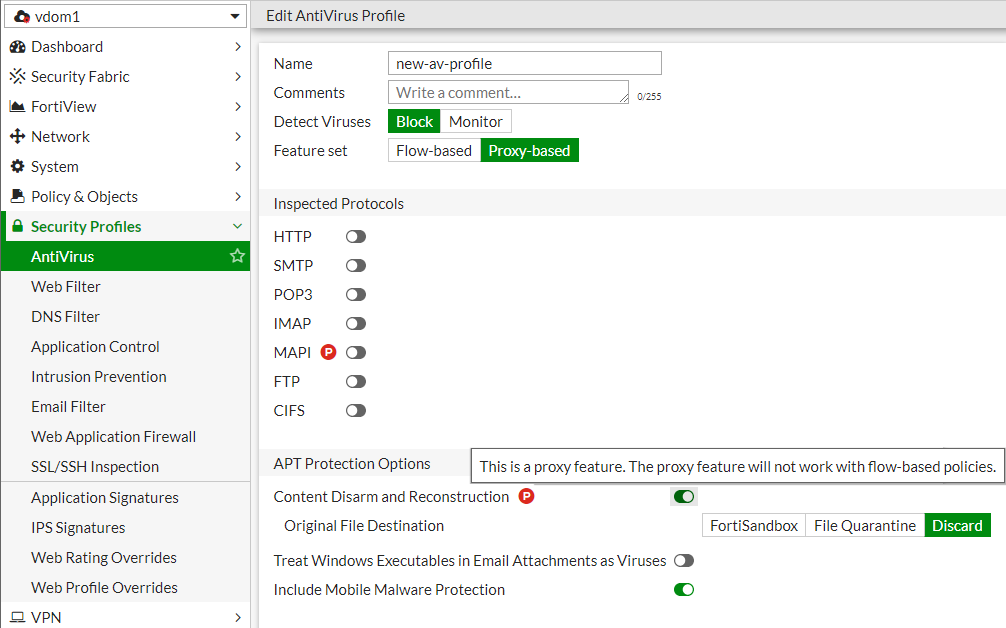
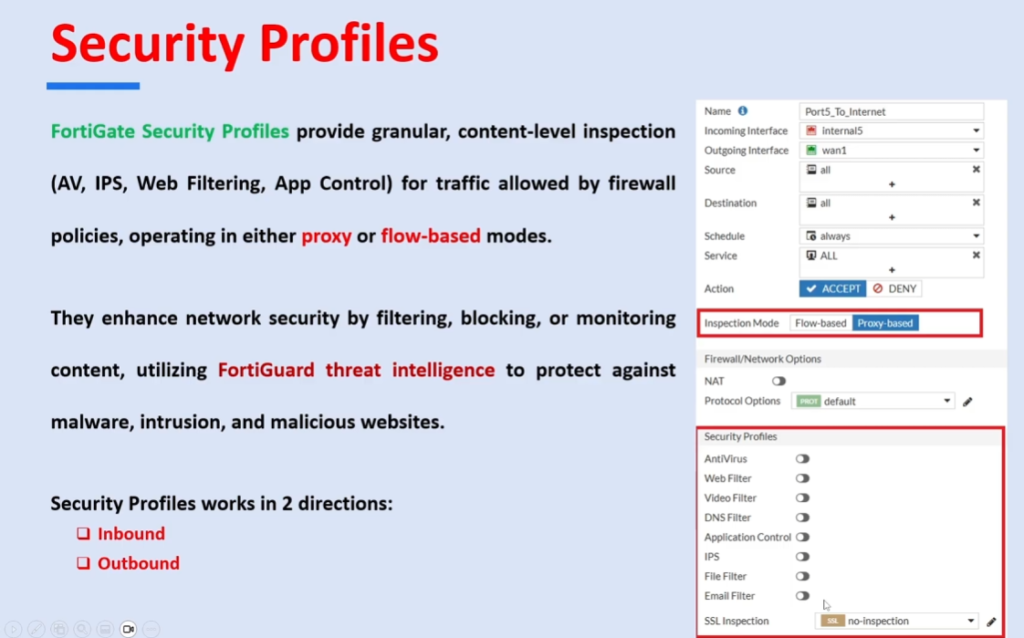
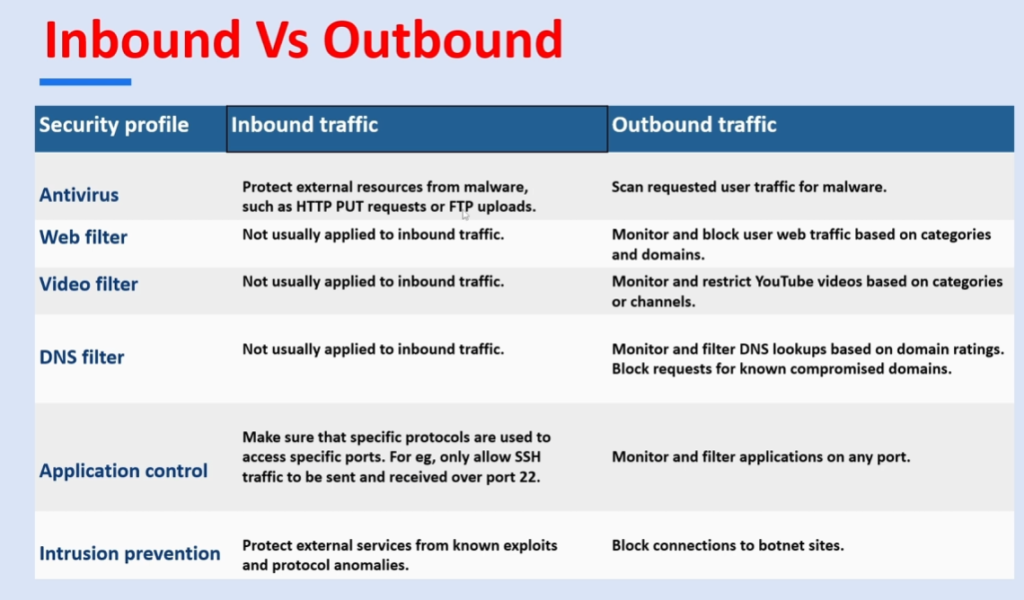
A FortiGate Antivirus Profile is a security feature used in Fortinet Firewalls to detect and Block Viruses, Malware, and other Harmful Content from network traffic. It is applied to Firewall Policies so that all data passing through the firewall can be inspected for threats.
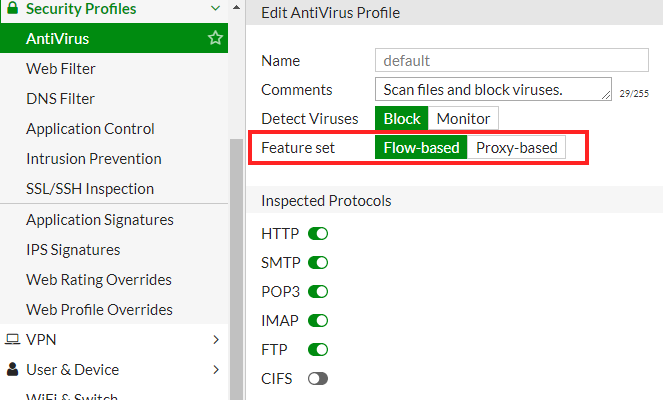
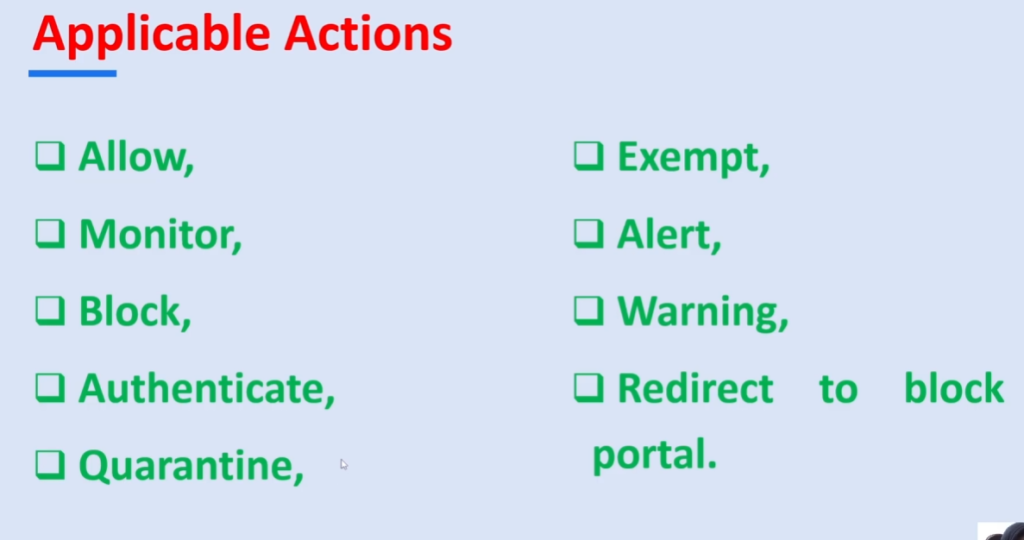
The Antivirus Profile works by scanning different types of traffic such as Web Browsing (HTTP/HTTPS), Email (SMTP, POP3, IMAP), and File Transfers (FTP). When a User Downloads or Uploads a File, the FortiGate firewall checks the content using Virus Signatures and advanced detection methods. If any malicious file is found, the system blocks or quarantines it.
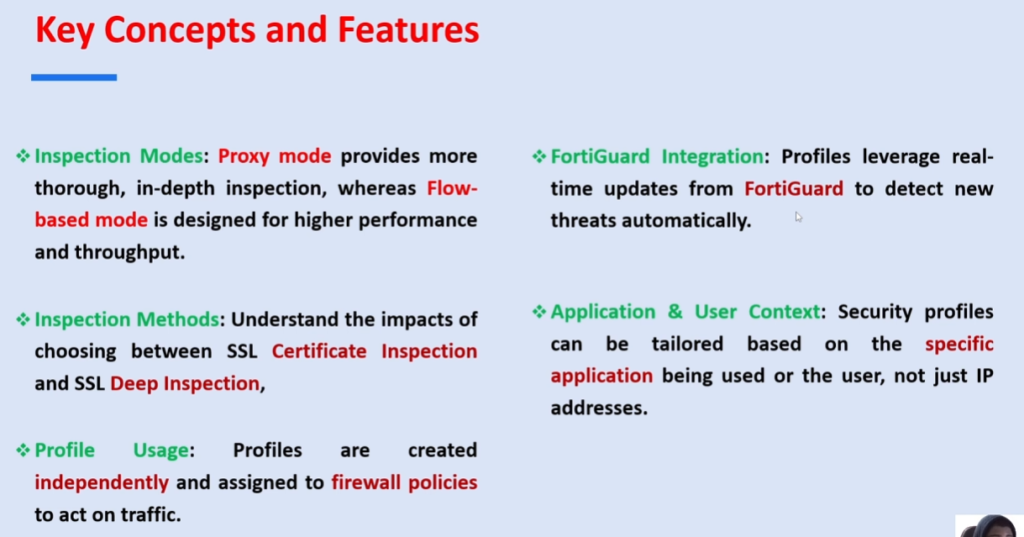
This Profile Provides Real-Time Protection, meaning it continuously monitors incoming and outgoing Traffic. It also receives regular updates from Fortinet to stay protected against new and emerging threats. This helps organizations maintain strong security against modern Cyberattacks.
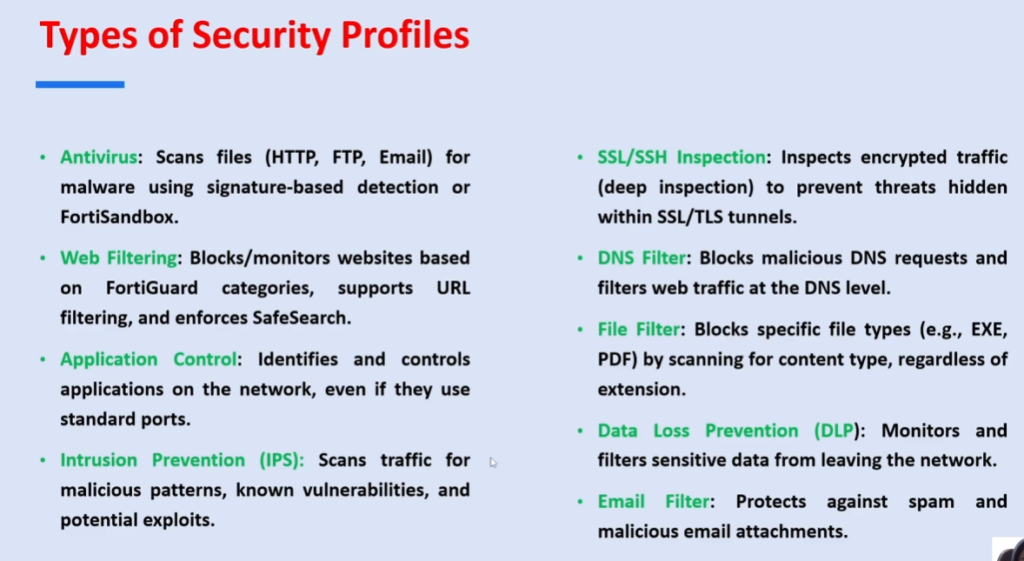
FortiGate Antivirus Profile is very important in enterprise environments because it prevents malware from entering the network, protects sensitive data, and reduces the risk of cyber threats spreading between systems. It is commonly used along with other security profiles like web filtering and intrusion prevention for complete protection.
In simple terms, a FortiGate Antivirus Profile acts like a Security Guard that checks all files and data passing through the firewall and blocks anything dangerous before it can harm the network.
Why It is Important FortiGate Antivirus Profile
The FortiGate Antivirus Profile is important because it provides a critical layer of protection against malware and cyber threats entering or leaving a network. In modern environments, users constantly download files, browse websites, and exchange emails—each of which can carry hidden viruses. The antivirus profile ensures that all this traffic is scanned in real time, reducing the risk of infection.
Another key reason is that it helps prevent the spread of malware inside the network. If one infected file enters a system, it can quickly spread to other devices. By detecting and blocking threats at the firewall level, the antivirus profile stops attacks before they can impact multiple systems.
It is also important for Protecting Sensitive Data. In organizations like banks or companies, data such as customer information, passwords, and financial records must remain secure. The antivirus profile helps prevent data breaches caused by malicious software.
The feature stays effective because of regular updates from Fortinet, which include new virus signatures and threat intelligence. This ensures protection against both known and newly emerging threats.
Finally, it plays a major role in Overall Network Security Strategy. When combined with other firewall features like web filtering and intrusion prevention, it creates a strong, multi-layered defense system that keeps the network safe and reliable.
Features of FortiGate Antivirus Profile
The FortiGate Antivirus Profile is a security feature of Fortinet firewalls that provides advanced protection against viruses, malware, and other threats in network traffic.
One of the main features is Real-Time Scanning, where all incoming and outgoing traffic is continuously checked for malicious content. This ensures that threats are detected immediately before they can enter or leave the network.
Another important feature is Multi-Protocol Inspection. It scans different types of traffic such as HTTP, HTTPS (with SSL inspection), FTP, SMTP, POP3, and IMAP. This helps protect web browsing, email communication, and file transfers.
The antivirus profile also provides Signature-Based Detection and Heuristic Analysis. Signature-based detection identifies known viruses using a database, while heuristic analysis detects new or unknown threats by analyzing behavior patterns.
A key feature is Automatic Virus Definition Updates, which are regularly provided by Fortinet. This ensures the firewall stays protected against the latest malware and cyberattacks without manual intervention.
It also includes quarantine and blocking capabilities, where infected files are either blocked or isolated so they cannot harm the system or spread within the network.
Another feature is deep integration with other security services, such as web filtering and intrusion prevention systems (IPS), which together provide layered network security.
Finally, it supports logging and reporting, allowing administrators to monitor detected threats, analyze security events, and improve network protection policies.
What is FortiGate Signature
In Fortinet (FortiGate), a Signature is a predefined pattern or rule used to detect known security threats such as viruses, malware, hacking attempts, and malicious websites. It acts like a digital fingerprint of a known attack, helping the firewall identify and stop harmful activity by comparing network traffic with its signature database.
A signature works by Analyzing incoming or outgoing data passing through the FortiGate Firewall. When traffic such as a File Download, Web Request, or Network Packet enters the system, FortiGate checks it against the FortiGuard Signature Database, which contains Millions of Known Threat Patterns. If the traffic matches a signature, FortiGate immediately takes action based on the configured security policy.
For example, in antivirus protection, if a user downloads a file that matches a known virus signature like a Trojan, FortiGate will Block or quarantine the file and may also alert the administrator. Similarly, in IPS (Intrusion Prevention System), if a hacker tries an attack such as SQL injection, the IPS signature detects the malicious pattern and blocks the connection instantly before it reaches the server.
In simple terms, Fortinet signatures act like a security guard’s watchlist. Any traffic matching a known bad pattern is automatically detected and stopped, while safe traffic is allowed to pass. These signatures are continuously updated by FortiGuard Labs to protect against new and emerging threats.
Advantages of Antivirus Security
🔐 1. Strong Protection Against Malware:
Antivirus security provides deep protection against different types of harmful software such as viruses, worms, trojans, ransomware, and spyware. It continuously scans files, applications, and network traffic to detect malicious code before it can execute and damage the system. This helps in keeping both personal computers and company networks safe from cyber attacks.
🌐 2. Network-Level Security Protection:
In a company environment, antivirus systems work at the network level to prevent malware from spreading between connected devices. When one system is infected, antivirus solutions help isolate and block the threat so that it does not move across servers, workstations, or shared drives, ensuring the entire organization remains protected.
📧 3. Email and Attachment Safety:
Antivirus security plays a very important role in protecting email communication by scanning all incoming and outgoing emails. Any attachment or link that contains malicious code is detected and blocked before the user can open it. This reduces risks from phishing attacks, infected PDFs, and harmful executable files sent through email.
⚡ 4. Real-Time Continuous Monitoring:
Modern antivirus systems provide real-time protection, meaning they continuously monitor system activity, file downloads, and network traffic. As soon as any suspicious activity is detected, the antivirus immediately takes action by blocking or isolating the threat. This instant response prevents malware from executing or spreading inside the system.
🧠 5. Early Threat Detection Using Smart Technology:
Antivirus software uses signature-based detection as well as cloud-based intelligence to identify both known and new threats. This allows the system to detect even recently developed malware variants by comparing behavior patterns and threat databases, helping organizations stay protected against evolving cyber threats.
🏢 6. Protection of Business Data and Systems:
For companies, antivirus security ensures that sensitive business data such as customer records, financial information, and internal documents remain safe. It prevents unauthorized access, corruption, or deletion of critical files caused by malware attacks, which helps maintain business continuity and trust.
📊 7. Detailed Logging and Security Reporting:
Antivirus systems maintain detailed logs of all detected threats, blocked files, and security incidents. These logs help IT administrators analyze attack patterns, understand vulnerabilities, and improve overall security policies. Reports can also be used for auditing and compliance purposes in organizations.
🚫 8. Prevents System Damage and Performance Issues:
Malware often causes system slowdowns, crashes, or complete system failure. Antivirus security prevents such issues by stopping malicious programs before they can consume system resources or modify important system files. This helps in maintaining stable and smooth performance of computers and servers.
💰 9. Reduces Financial Loss and Recovery Cost:
Cyber attacks can cause major financial losses due to data theft, downtime, and system recovery efforts. Antivirus protection helps reduce these risks by preventing infections at an early stage, thereby saving companies from expensive recovery processes, legal issues, and productivity loss.
Advantages of Antivirus Security Firewall:
- Protection Against Malware
- Detects and removes viruses, worms, trojans, ransomware, and spyware before they can harm systems.
- Helps keep company data safe from malicious software.
- Blocks Unauthorized Access
- A firewall monitors incoming and outgoing network traffic.
- Prevents hackers and unauthorized users from accessing company networks.
- Real-Time Threat Detection
- Continuously scans files, emails, downloads, and network traffic.
- Identifies threats as soon as they appear.
- Data Security
- Protects sensitive business information such as customer records, financial data, and employee details.
- Reduces the risk of data breaches.
- Prevents Network Attacks
- Stops attacks such as port scanning, denial-of-service (DoS), and intrusion attempts.
- Helps maintain network stability and availability.
Example in a Company Network:
A company uses a firewall and antivirus solution such as Fortinet. The firewall blocks unauthorized access attempts from the internet, while the antivirus scans employee computers and email attachments for malware. Together, they protect the company’s network, data, and business operations from cyber threats.
Example of a company network using FortiGate Antivirus Profile
🏢 1. Company Overview:
A medium-sized software company uses network security devices from Fortinet to protect its office network. The company has around 300 employees working in departments like development, HR, finance, and marketing. All employees use the internet daily for emails, file sharing, cloud applications, and web browsing.
🌐 2. Network Structure:
The company network is divided into different segments such as office LAN, server network, guest WiFi, and data center zone. All internet traffic enters and exits through a FortiGate firewall. This firewall controls security policies, including Antivirus Scanning, Web Filtering, and intrusion prevention.
🔐 3. Antivirus Profile Setup:
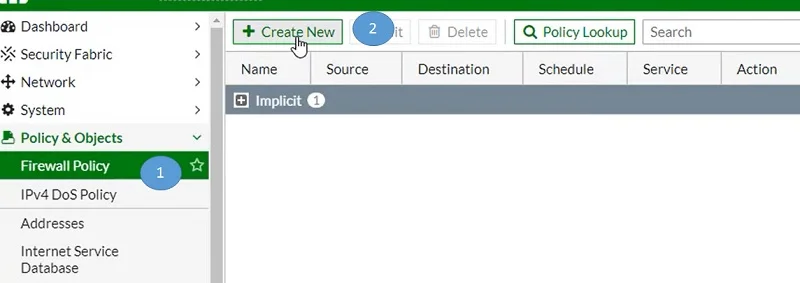
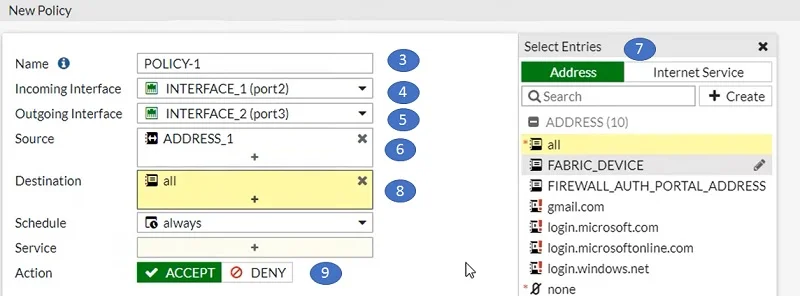
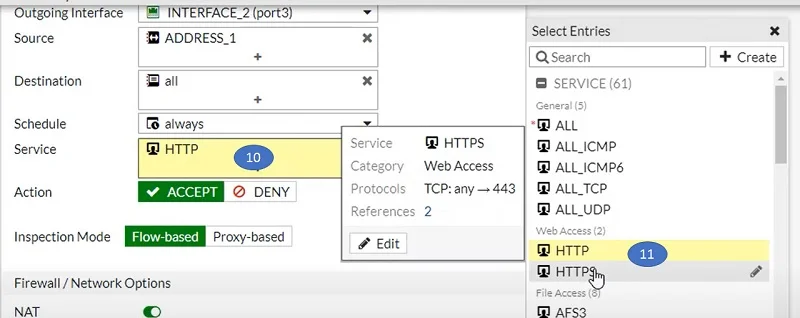
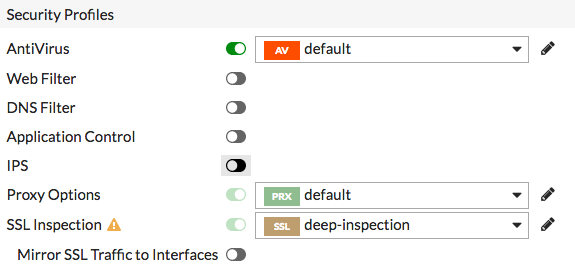
The network administrator creates an Antivirus Profile named “CORP-AV” and attaches it to firewall policies. This profile is configured to scan HTTP, HTTPS, FTP, SMTP, IMAP, and POP3 traffic. It uses FortiGuard antivirus database to detect latest viruses, ransomware, trojans, and spyware.
💻 4. Employee Internet Usage Example:
An employee from the marketing department downloads a software tool from the internet. As soon as the file enters the network, the FortiGate firewall intercepts the traffic. Before the file reaches the employee’s laptop, the antivirus engine scans it in real time.
⚠️ 5. Threat Detection Process:
During scanning, the antivirus engine detects that the downloaded file contains a Hidden Trojan Virus. The FortiGate system immediately identifies it using signature-based detection and cloud-based threat intelligence.
🚫 6. Action Taken by Firewall:
Because of the Antivirus Profile settings, the firewall blocks the file instantly. The user receives a “file blocked due to malware” message. At the same time, the system logs the event, and the security administrator gets an alert about the blocked threat.
📧 7. Email Security Example:
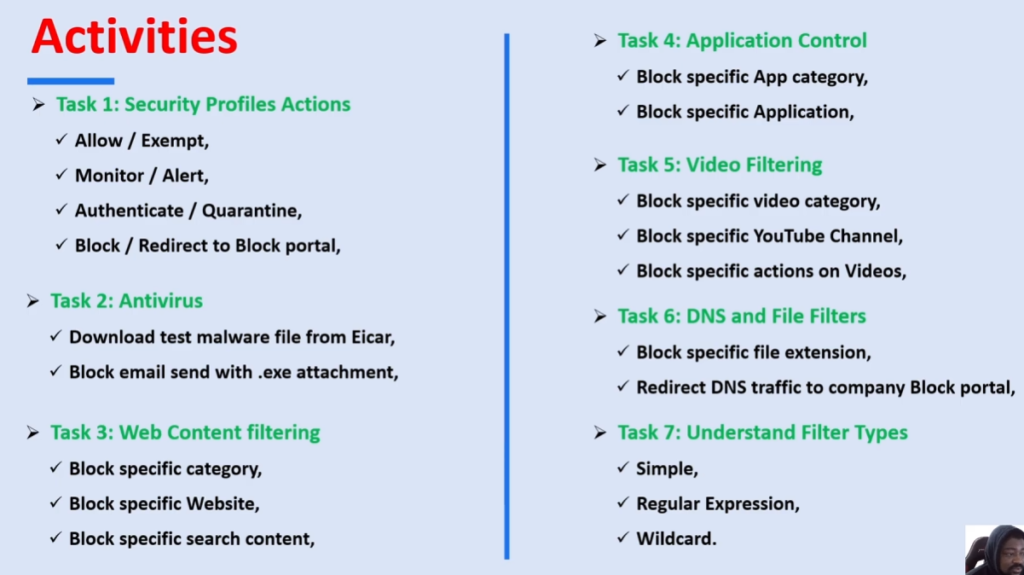
In another case, an employee receives an email with a PDF attachment. The FortiGate firewall scans the email traffic before it reaches the inbox. If the PDF contains ransomware or malicious scripts, it is quarantined or deleted automatically.
🖥️ 8. Server and Internal Protection:
The company also applies a lighter antivirus profile on internal server traffic to avoid performance issues. Even internal file transfers are monitored to prevent accidental spread of infected files between departments.
🏢 9. Guest Network Protection:
The guest WiFi network is restricted and also monitored using a basic antivirus profile. This ensures that visitors cannot introduce malware into the internal company network through internet access.
📊 10. Monitoring and Logs:
All antivirus events are recorded in FortiGate logs. The IT team reviews daily reports to check how many threats were blocked, which users triggered alerts, and what type of malware was detected.
🧠 11. Final Outcome:
Because of this setup, the company maintains a strong security posture. Malware is blocked before it enters devices, data breaches are prevented, and the IT team can manage threats centrally using the FortiGate firewall system.
Simple Meaning:
In simple words, a FortiGate Antivirus Profile acts like a security guard that checks every file and email entering the company and stops anything harmful before it reaches users.
FortiGate Slide