
Hub & Switch
What is HUB
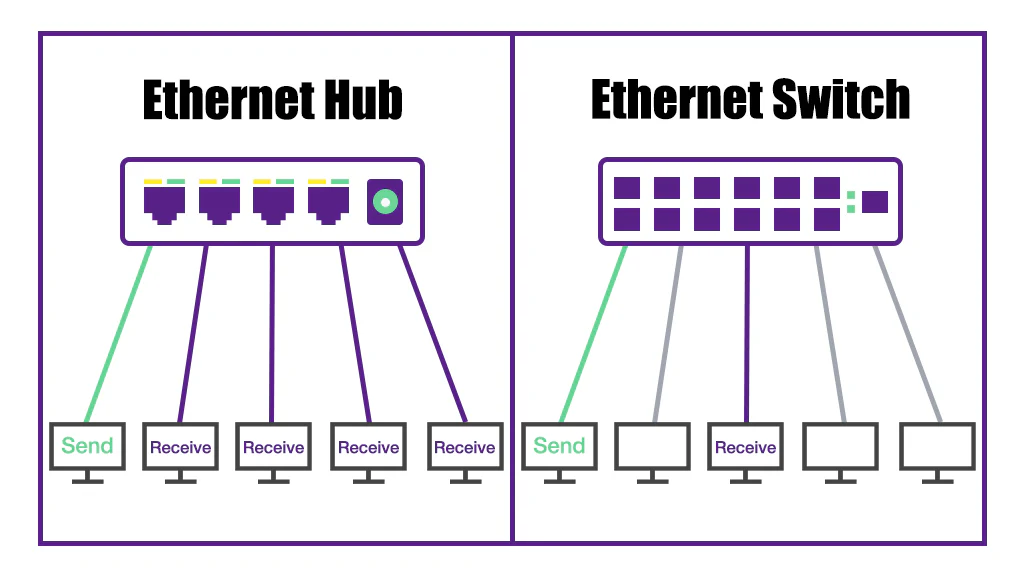
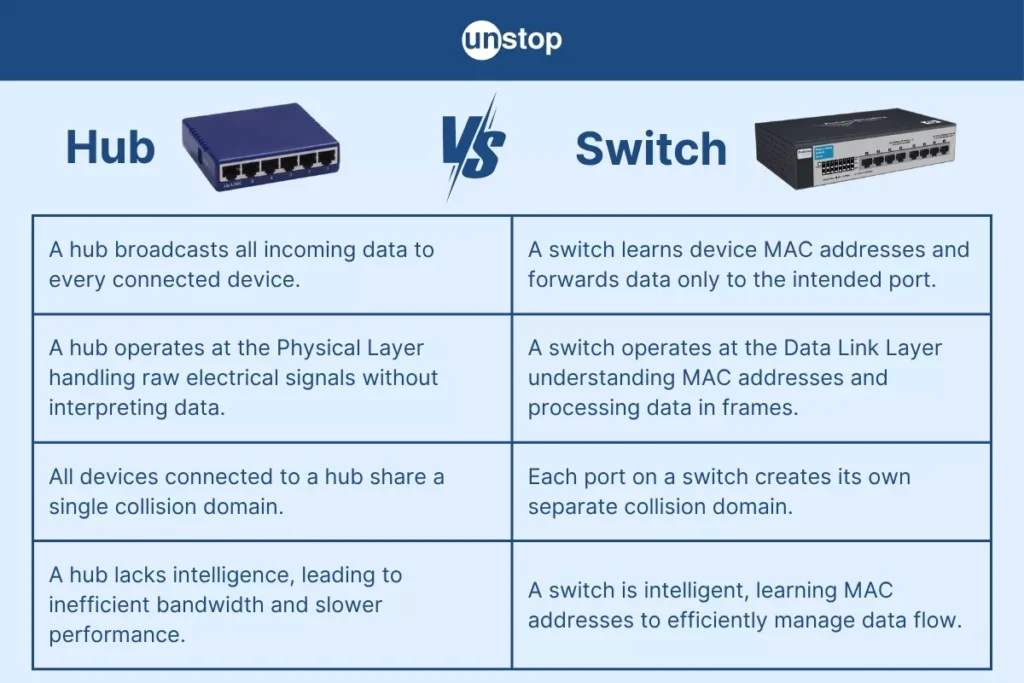
A hub is a basic networking device used to connect multiple computers or devices in a local area network (LAN). It works at the Physical Layer (Layer 1) of the OSI model and simply receives data from one device and broadcasts it to all other connected devices, without checking the destination.
How Hub Works
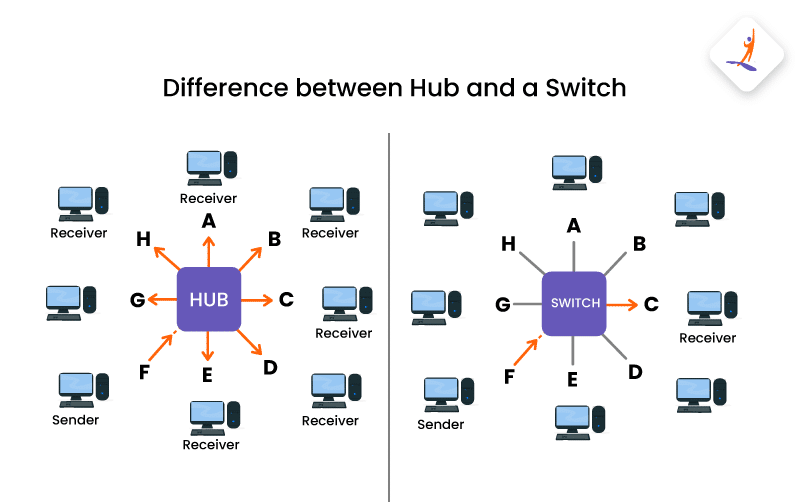
When one computer sends data to the hub, the hub does not know where the data should go. So, it sends (broadcasts) that data to all devices connected to it. Only the correct device accepts the data, while others ignore it.
Key Features of Hub
- Works on Layer 1 (Physical Layer)
- No intelligence (does not filter or learn addresses)
- Uses broadcast communication
- Creates a single collision domain
- Low cost and simple device
- Slower and less efficient compared to switch
Example
In a small office, if 5 computers are connected using a hub and one computer sends data, the hub will send that data to all 5 computers. This can cause network collisions and slow performance.
Types of Hub
Passive Hub
A passive hub is the simplest type of hub. It only acts as a connection point for multiple devices in a network and does not modify, amplify, or clean the signal. When a device sends data, the passive hub simply forwards that signal to all connected devices without any processing. Because it does not boost the signal, the network distance is limited and performance can degrade over longer cables.
Example: In a very small office or lab setup, a passive hub may connect a few computers, but if the signal becomes weak, the hub cannot improve it.
Active Hub
An active hub is more advanced than a passive hub because it can regenerate and amplify signals before forwarding them. This helps maintain signal strength and allows communication over longer distances. It works like a repeater, ensuring that data reaches all devices clearly without much loss.
Example: In a medium-sized office, an active hub can connect computers placed far apart by boosting the signal so that communication remains stable.
Intelligent Hub (Smart Hub)
An intelligent hub (also called a smart hub) is the most advanced type of hub. It includes basic management and monitoring features such as traffic analysis, error detection, and sometimes remote configuration. Network administrators can use it to check performance and troubleshoot problems. However, it still broadcasts data like a normal hub and is less efficient than a switch.
Example: In an organization, an intelligent hub can help the network administrator monitor which port is causing issues, but it cannot control traffic like a switch.
Types of Hub
| Type | Description |
|---|---|
| Passive Hub | A passive hub simply connects devices and passes signals without any amplification or processing. It does not improve signal strength. |
| Active Hub | An active hub can amplify (boost) the signal before sending it to other devices. It helps in extending network distance. |
| Intelligent Hub (Smart Hub) | An advanced hub that has some management features like monitoring traffic, detecting faults, and basic configuration options. |
Difference Between Hub and Switch
A hub is a basic networking device that works at the Physical Layer (Layer 1) of the OSI model. It does not have any intelligence to identify the destination device. Whenever it receives data from one device, it simply broadcasts that data to all connected devices. This leads to unnecessary traffic and increases the chances of collisions, making the network slow and inefficient.
A switch, on the other hand, is an advanced networking device that works at the Data Link Layer (Layer 2). It is intelligent and uses MAC addresses to identify the correct destination device. Instead of broadcasting data to all devices, a switch sends data only to the intended device. This reduces network traffic and improves performance significantly.
In terms of performance, a hub is slower because all devices share the same bandwidth and collision domain. In contrast, a switch provides better speed and efficiency by creating separate collision domains for each port, allowing multiple devices to communicate simultaneously without interference.
For example, in a small office network, if multiple computers are connected using a hub, data sent by one computer will reach all others, causing congestion. But if a switch is used, the data will go only to the specific computer it is intended for, resulting in faster and more reliable communication.
In short:
- Hub = Broadcast to all (slow, less efficient)
- Switch = Send to specific device (fast, efficient)
Hub vs Switch
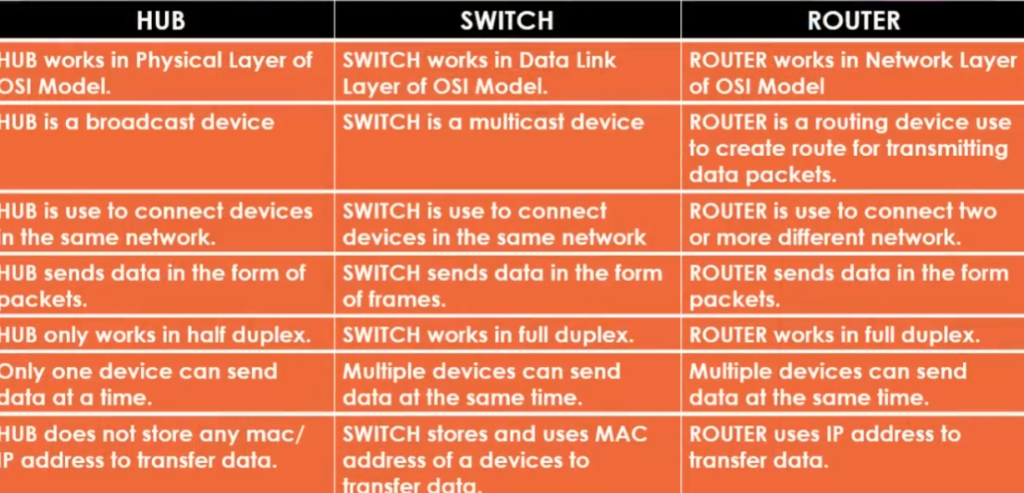
| Feature | Hub | Switch |
|---|---|---|
| Definition | Basic device that connects multiple devices and broadcasts data | Intelligent device that connects devices and forwards data to specific destination |
| OSI Layer | Layer 1 (Physical Layer) | Layer 2 (Data Link Layer) |
| Data Transmission | Broadcast to all devices | Sends to specific device |
| Address Used | No address (no intelligence) | Uses MAC address |
| Speed | Slow | Fast |
| Collision Domain | Single collision domain | Separate collision domain per port |
| Bandwidth | Shared among all devices | Dedicated bandwidth per device |
| Efficiency | Low | High |
| Security | Less secure | More secure |
| Cost | Cheaper | Costlier than hub |
Hub
A hub, as the name suggests, is a connection point for various computers. It creates a network based on Ethernet. There are variations based on USB and Firewire too.
This device does not manage the traffic intelligently. It broadcast the data to all of the connected computers. Because of the way it works, more bandwidth is used and occasionally packet collisions occur.
Advantages of using a Hub
Low Cost
Budget-Friendly: Hubs are generally more budget-friendly than switches. This can be advantageous for temporary setups or when networking needs are minimal, making them an economical choice for small or short-term projects.
Reduced Total Cost of Ownership: Lower initial cost means that the total cost of ownership (TCO) is generally less for hubs, assuming the lack of features is not a hindrance to the network’s purpose.
Ease of Setup
Plug-and-Play: Hubs usually require minimal setup. In most cases, you simply plug your devices into the hub, and you’re good to go.
No Configuration Needed: Unlike switches, hubs do not require any configuration, making them easier to deploy for those who may not be technologically savvy.
Disadvantages of using a Hub
No Traffic Management
Bandwidth Sharing: All devices connected to the hub have to share the bandwidth, which can be problematic when you have multiple devices transmitting data simultaneously. This is particularly limiting for applications that require high data throughput.
Collisions: The lack of traffic management means that data collisions are more likely to occur, making hubs less reliable for transmitting data effectively.
Limited Security
Data Vulnerability: Because all data packets are broadcasted to every port, it’s easier for malicious actors to sniff data. This is particularly problematic if sensitive information is being transmitted.
No Access Control: Hubs do not have features to restrict access to connected devices. This makes network management and security more challenging.
Reduced Performance
Limited Scalability: Due to inefficiency in handling network traffic, hubs are not suitable for networks that may need to scale. As more devices are added, performance degrades significantly.
Latency: Because each packet is sent to all ports, it takes more time for the correct packet to reach its destination, leading to latency issues.
Switch
The switch is a smart network device. In contrast to the hub, it reviews the packets of data and directs them just to the right one. It does that by remembering the MAC addresses of the connected gadgets. The switch can support different common network types like 802.11, Ethernet, Fibre and more. It is newer in comparison with the hub, and it is more common in the modern offices.
Advantages of using a Switch
Efficient Traffic Management
Dedicated Bandwidth: Unlike hubs, switches provide dedicated bandwidth to each connected device, allowing for smoother data transmission.
Smart Data Packet Handling: Switches can understand the data packets they receive and send them only to intended devices, reducing the likelihood of data collision.
Enhanced Security
Secure Data Transmission: By sending packets only to intended recipients, switches make it more difficult for unauthorized users to intercept data.
Access Control: Managed switches allow network administrators to set up Access Control Lists (ACLs), providing an extra layer of security.
Better Performance
High Throughput: With better traffic management, switches can handle a larger amount of data traffic without sacrificing speed.
Scalability: Switches are more suited for growing networks, providing stable performance even as more devices are added.
Disadvantages of using a Switch
Cost
Higher Initial Cost: The upfront cost of a switch is generally higher than that of a hub.
Total Cost of Ownership: The advanced features may require ongoing maintenance, increasing the total cost over time.
Complexity
Configuration Required: Switches usually need to be configured, which might require specialized knowledge or expertise.
Compatibility Issues: Advanced features like VLANs or Quality of Service (QoS) settings can sometimes cause compatibility issues with older hardware or software.
Hub
Hub and Switch are two of the most commonly used networking devices. These two terms are often used interchangeably. Therefore, understanding the difference between Switch and Hub is very important.
Let’s start with what networking devices are? Networking devices are physical devices that allow hardware on a computer network to communicate and interact with one another. For example, Repeater, Bridge, Hub, Switch, NIC, Routers, Gateway, etc.
What Is a Hub?
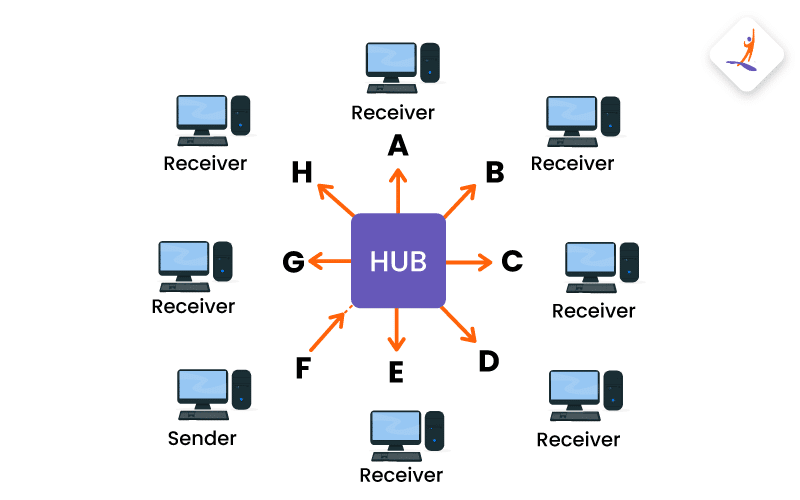
A hub is a device that connects multiple computers and devices together, and is also known as a repeater or concentrator. A Hub is operated on the Physical layer of the OSI model. A Hub serves as the centre to local area network (LAN). All the devices connected to the hub are under the same subnet.
The Hub receives data packets from connected devices and broadcasts them to all other connected devices, regardless of the intended recipient, creating an efficient system for sharing data between users.
Let’s say you have a desktop, a laptop, and a smart TV and you want to connect them to the internet. In that case, you can use a Hub, plug the hub into the router and then connect your devices (desktop, laptop and TV) to the hub. Now, all the devices can access the internet as the hub broadcasts the data to all the connected devices. Another example of a hub is a USB hub used to connect multiple USB devices to your system.
Types of Hub
There are three different types of Hub:
- Active Hub: Here are the characteristics of an Active Hub:
- An active hub has its own power supply.
- It can be used as an extension for two or more nodes.
- It can serve as a repeater and a wiring hub at the same time.
- It may improve, clean up, and relay the signal in addition to the network.
- Passive Hub: Here are the characteristics of a Passive Hub:
- A passive hub cannot be utilized to increase the separation between nodes.
- The power source for this specific Hub comes from active hubs, while the wiring comes from nodes.
- It relays the signals without being cleaned or amplified.
- Intelligent Hub: Here are the characteristics of an Intelligent Hub.
- It can perform tasks of both active and passive Hubs.
- It can be used for some other tasks like bridging and routing
- An Intelligent Hub can increase the speed and effectiveness of the total network thus making the performance of the whole network fast and efficient.
- An Intelligent Hub is expensive than the other two types
What Is a Switch?
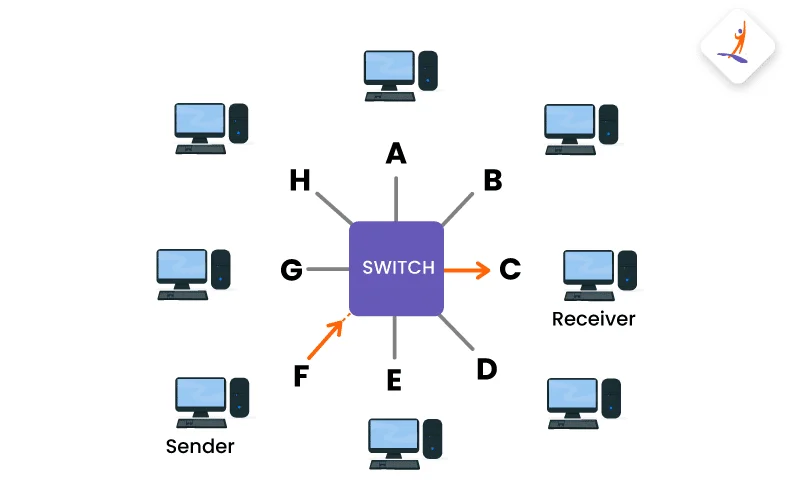
A switch is a networking device that connects multiple devices on a single computer network. A switch is operated on the Data Link Layer of the OSI model. It is used to establish or terminate a connection on the basis of the need. In layman’s terms you can use a switch to either open or close a connection. When the switch is opened, a signal or power can pass through the connection. The flow is stopped, and the circuit connection is broken when the switch is closed.
Let’s say in your office there are multiple departments (sales, finance, HR) and you want to connect to the office network so that you can access and share files, and can use network printers across the network securely. You can do this by connecting the switch to the router and then, can connect departments devices to the switch. Switch will manage the data traffic and will direct only to the devices that need it.
Types of Switch
There are four types of switch:
- Manageable Switch: A manageable switch has a console port and an IP address that can be assigned and configured.
- Unmanageable Switch: An unmanageable switch cannot be configured as there is no console port. Hence, we will not be able to assign an IP address.
- LAN Switch: The LAN switch is mostly used to connect devices in an organization’s internal LAN (Local Area Network). This switch is used for allocating bandwidth so that data packets do not overlap in a network.
- PoE Switch: PoE switch is used in PoE (Power over Ethernet) Gigabit Ethernet. A PoE switch delivers greater flexibility and simplifies the cabling connections.
| Aspects | Hub | Switch |
|---|---|---|
| Definition | Hub is an electronic device that helps us to connect multiple network devices so we can exchange data. | The switch is an advanced version of the Hub which sends the message to a device that needs or requests it. |
| Layer | Physical Layer | Data Link Layer |
| Speed | 10 Mbps | 10/100 Mbps, 1 Gbps |
| Data Transmission | Electrical Signal or Bits | Frame (L2 Switch), Frame and Packet (L3 Switch) |
| Ports | 4/12 ports | 24/48 ports |
| Functionality | The functionality of a Hub is to connect various computers to a single network. | The functionality of a switch is to connect multiple devices and manage ports and VLAN security settings. |
| Addresses | MAC addresses | MAC addresses |
| Transmission Type | Hubs always perform frame flooding, it may be unicast, multicast, and broadcast. | Firstly they broadcast, then unicast and multicast. |
| Connectivity | LAN | LAN |
| Device Type | Passive Device (without software) | Active Device (with software), Networking device |
| Transmission Mode | Half duplex | Half/ Full duplex |
| Broadcast Domain | One broadcast domain | One broadcast domain (unless VLAN is implemented) |
| Necessary for Internet Connection? | No | No |
| Device Category | Non Intelligent Device | Intelligent Device |
| Manufacture | Oracle, Cisco, and Sun system | D-link and Cisco |
| Spanning Tree | No Spanning tree | Many spanning tree |
| Collision | During the setup collisions occur in hubs | In a Duplex switch, no collision occurs. |
| Usages | Rarely used nowadays | Widely used |
| Repeater Functionality | It can function as a repeater | It cannot function as a repeater |
| Table | It can’t learn and store the MAC address | Special memory used in the switch called CAM table, which is managed by specialized hardware chips called ASIC (Application Specific integrated chips) |
| Hackable | Difficult to hack | Easy to hack |