LSA in OSPF
A router’s Link-State Database stores LSAs that are received (LSDB). The Shortest Path First (SPF) algorithm is used by OSPF to determine the optimum routes for each network once the LSDBs between routers are in sync. It is crucial to realize that LSAs are route-related data sent inside Link State Update (LSU) packets.
Therefore, it is essential for any network engineer to comprehend how LSAs are kept within an LSU. Let’s dig deep into OSPF LSA types, but before that, we must have a basic understanding of Link State Advertisement (LSA).
What is LSA in OSPF?
LSA stands for “Link State Advertisement” in OSPF. In OSPF Protocol, routers exchange information about the network topology by sharing LSAs. LSAs are packets containing details about the router’s interfaces, neighboring routers, and network links.
Each router in an OSPF network generates LSAs and floods them to all other routers within the same OSPF area. LSAs allow routers to build a synchronized view of the network, calculate shortest paths, and maintain routing tables for efficient packet forwarding.
Importance of OSPF LSAs
In OSPF, routers need to constantly share information in order to maintain an updated view of the network. LSAs are the packets that contain information about the state and connections of each router. This data allows OSPF routers to create a detailed and accurate network topology.
Without LSAs, OSPF will not be able to have the necessary data to operate effectively.
OSPF LSA Types
Here is a quick overview of OSPF LSA types that we will be discussing further:
| LSA Type | Name |
| LSA Type 1 | OSPF Router LSA |
| LSA Type 2 | OSPF Network LSA |
| LSA Type 3 | OSPF Summary LSA |
| LSA Type 4 | OSPF ASBR Summary LSA |
| LSA Type 5 | OSPF ASBR External LSA |
| LSA Type 6 | OSPF Group Membership LSA |
| LSA Type 7 | OSPF Not So Stubby Area (NSSA) External LSA |
| LSA Type 8 | OSPF External Attributes LSA (OSPFv2) / Link Local LSA (OSPFv3) |
| LSA Type 9 | OSPF Link Scope Opaque (OSPFv2) / Intra Area Prefix LSA (OSPFv3) |
| LSA Type 10 | OSPF Area Scope Opaque LSA |
| LSA Type 11 | OSPF AS (Autonomous System) Scope Opaque LSA |
Understanding these OSPF LSA types is key to mastering OSPF. By knowing how each LSA functions, network engineers can optimize routing performance, reduce overhead, and improve network scalability. Let’s discuss each OSPF LSA type one by one.
1. OSPF Router LSA
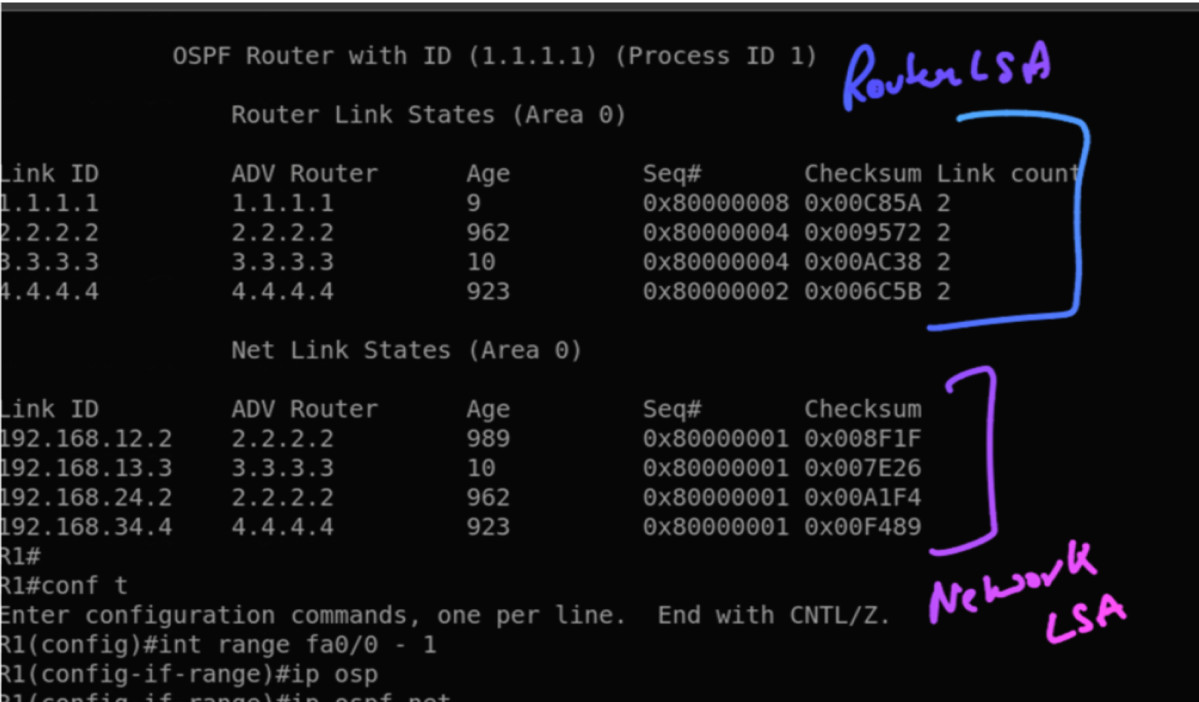
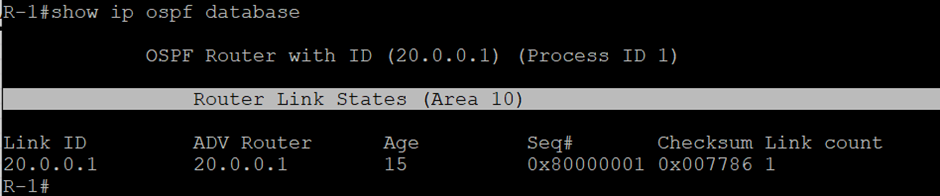
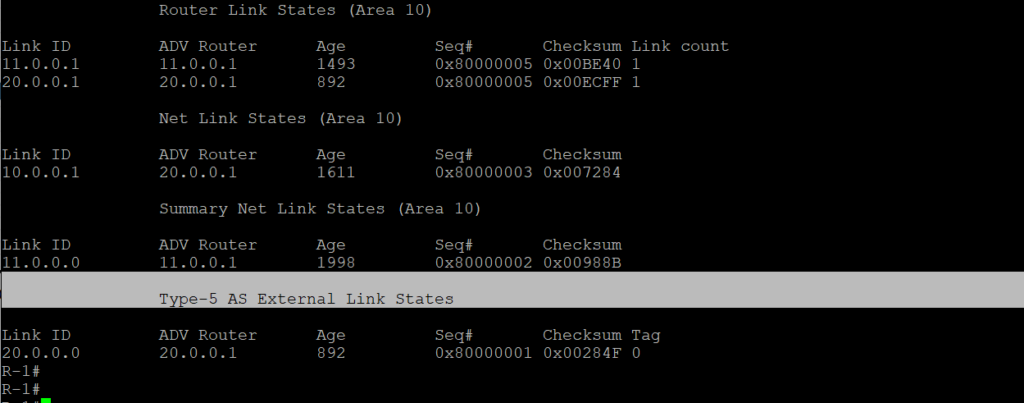
IRs generate these types of LSA. They carry the information of all directly connected routes, and it always stays within the area. You will find the router-id of the originating router in the link-state id field. Once routing is done on the OSPF router, it generates the Type-1 LSA; you can use this command to verify the LSA.
And you’ll get an LSA Type-1 like this in the database table of OSPF.
SHOW IP OSPF DATABASE
2. Network LSA
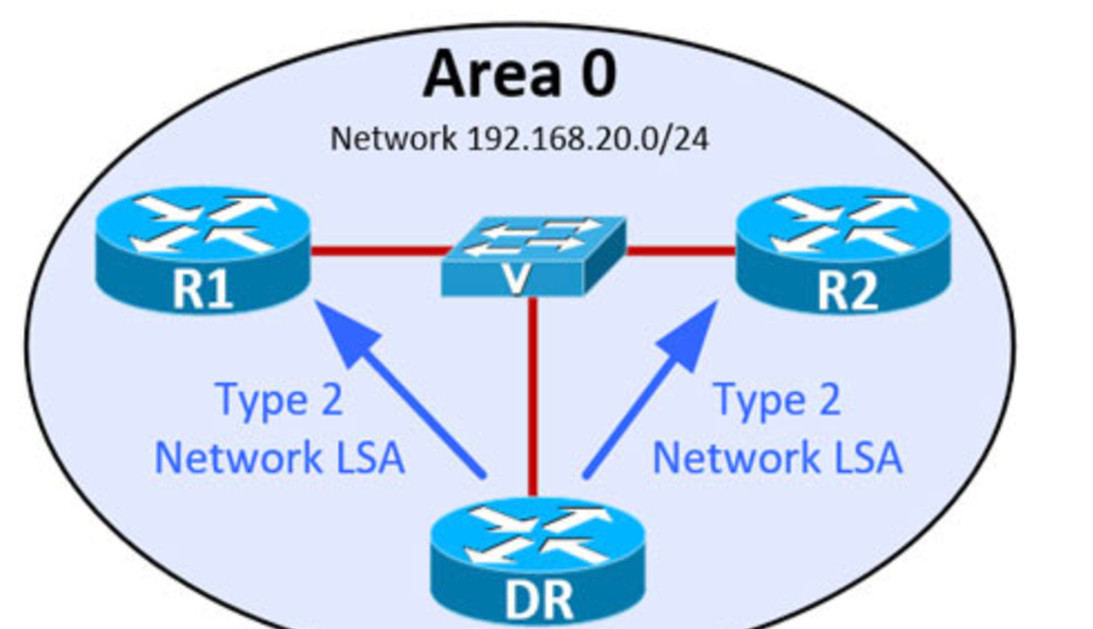
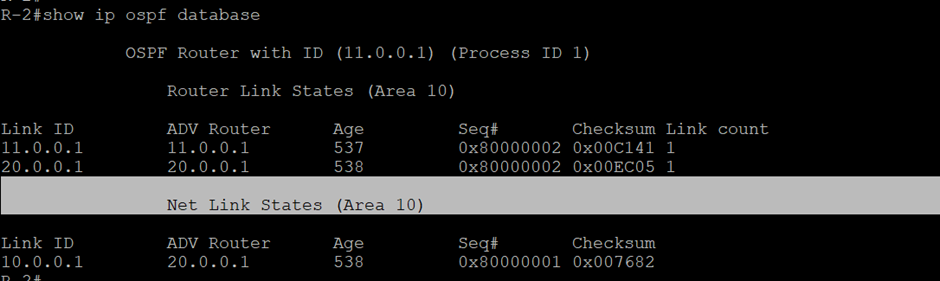
The DR generates it on a multi-access network segment and always stays within the area when the neighborship is formed between two routers. Same you can verify in the database table of OSPF.
Summary LSA
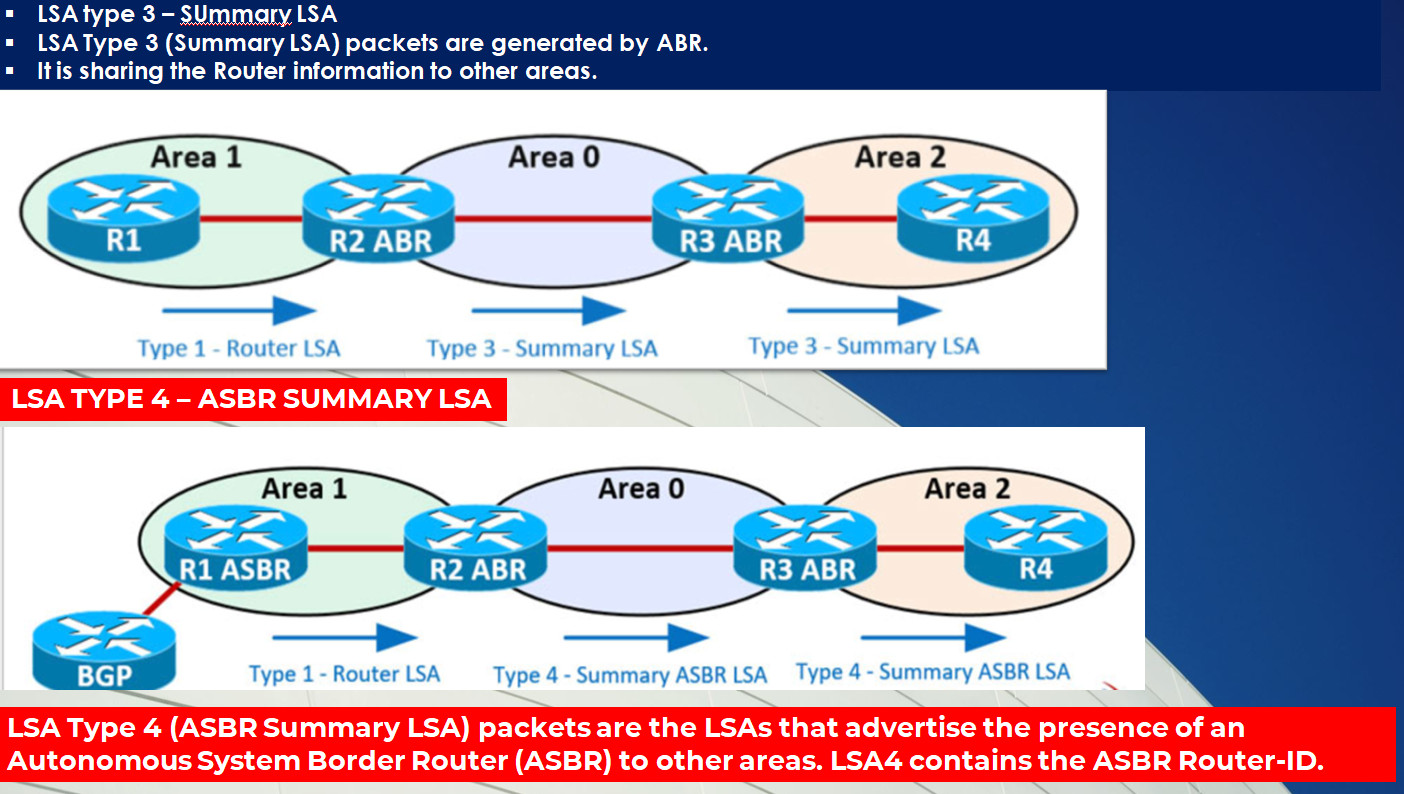
Using a summary prefix, the ABRs produce it into all other areas in order to summarize the area to which it is directly connected and to promote inter-area router information to other areas to which it is connected.
Summary LSAs are further classified into 2 types:
- Type 3 LSA
- Type 4 LSA
3. Summary LSA
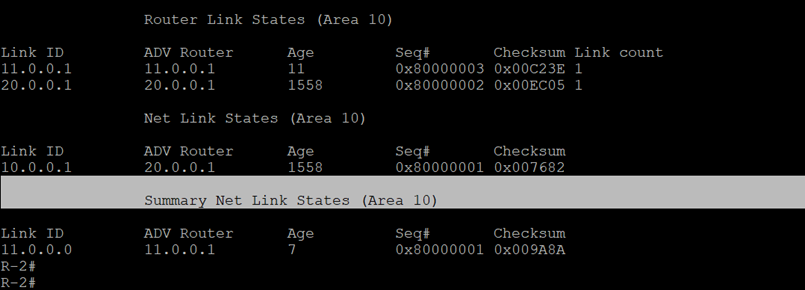
Routes to destinations in other areas within the OSPF network, i.e., inter-area destinations (O-IA). Basically, when multi-areas in OSPF are configured then, only this LSA type is generated in OSPF.
4. ASBR Summary LSA
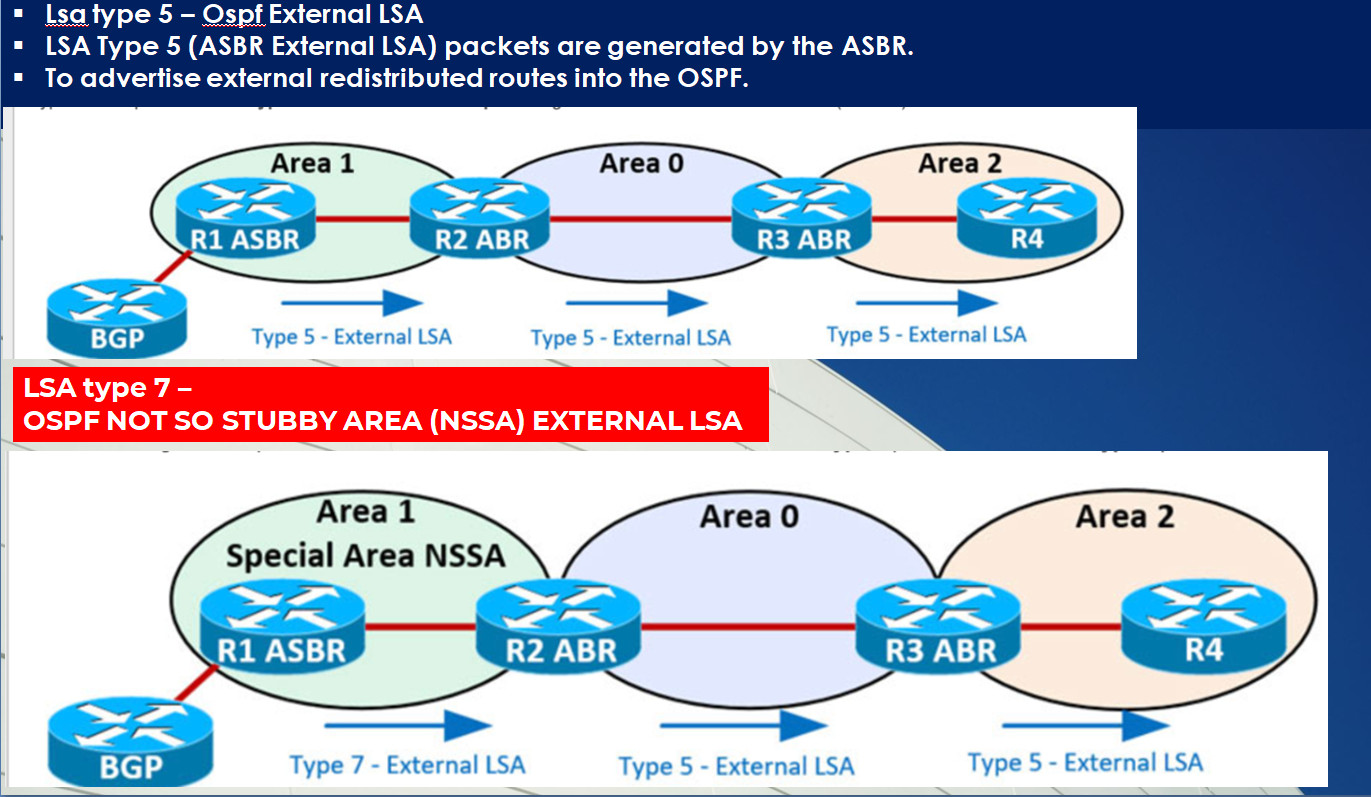
LSA Type 5 (ASBR External LSA) packets are created by the ASBR in order to advertise externally redistributed routes into the OSPF’s AS. They describe the routes to the destinations external to the OSPF network. These LSAs are forwarded to all the connected and redistributed areas.
5. AS External LSA
The ASBR generates LSA Type 5 (ASBR External LSA) packets to advertise external redistributed routes into the OSPF’s AS. They describe the routes to the destinations external to the OSPF network. These LSAs are forwarded to all the connected and redistributed areas.
6. Multicast OSPF LSA
Not supported and not used by OSPF. Cisco iOS doesn’t support this LSA type. They use (PIM) Protocol independent Multicast.
7. NSSA LSA
It is produced by an ASBR inside an NSSA to characterize routes that have been redistributed there. As LSA 7 exits the NSSA, it is converted into LSA 5.
NSSA area routers will be type 7 LSAs, but for other areas (other than NSSA), ABRs will convert them into type 5, which are easily understandable and acceptable in these areas.
LSA Types | Advertising Router | Contents of LSA |
Type – I (Router LSA) | OSPF router | Topology and routing info. |
Type – II (Net LSA) | DR | Topology and routing info. |
Type – III (Summary LSA) | ABR | Inter-area routing information |
Type – IV (ASBR Sum. LSA) | ABR | ASBR’s router-ID |
Type – V (AS External LSA) | ASBR | AS External routing information |
Type – VI (Multicast LSA) | – | – |
Type – VII (NSSA-LSA) | ASBR | External routing information |
8. External attributes LSA
LSA Type 8 carries information about external routes, including their destination network addresses, path costs, and external route tags. When an OSPF router receives routing information from an external routing protocol, such as BGP (Border Gateway Protocol), it generates an LSA Type 5 called External LSA.
The remaining 3 LSA types are opaque. We have also mentioned some information about them.
9. OSPF Link Scope Opaque (OSPFv2)
OSPF LSA Type 9, also known as OSPF Link Scope Opaque, is used in OSPFv2 to carry non-standardized or proprietary information within the OSPF domain. LSA Type 9 enables OSPF routers to exchange opaque data, allowing for custom extensions and additional functionality beyond the standard OSPF protocol.
10. OSPF Area Scope Opaque LSA
OSPF LSA Type 10, known as OSPF Area Scope Opaque LSA, is used to carry opaque data specific to a particular OSPF area, enabling the transmission of custom information within that specific area.
11. OSPF AS (Autonomous System) Scope Opaque LSA
OSPF LSA Type 11, referred to as OSPF AS (Autonomous System) Scope Opaque LSA, is utilized to transmit opaque data throughout the entire OSPF Autonomous System, allowing the exchange of custom information across the entire OSPF domain.
These are the various OSPF LSA types.
Comparison of Different LSA Types in OSPF
LSA Type | Generated By | Flooding Scope | Purpose |
Type 1 (Router) | Every Router | Intra-area | Advertises router links |
Type 2 (Network) | Designated Router (DR) | Intra-area | Represents multi-access networks |
Type 3 (Summary) | ABR | Intra-area | Summarizes networks across areas |
Type 4 (ASBR Summary) | ABR | Intra-area | Informs routers about ASBR location |
Type 5 (External) | ASBR | Entire OSPF domain | Advertises external routes |
Type 6 (Multicast) | MOSPF Router | Entire OSPF domain | Used for multicast routing |
Type 7 (NSSA External) | ASBR in NSSA | NSSA only | Similar to Type 5 but for NSSAs |
Type 8 (Link LSA – OSPFv3) | Every Router | Link-local | Advertises IPv6 link-local addresses |
Type 9, 10, 11 (Opaque LSAs) | Various Routers | Varies | Used for traffic engineering |
Functions of LSAs in OSPF
To create multiple paths throughout the network, OSPF uses LSA exchanges in the following activities:
- Discovering neighbors
- Electing a DR and BDR
- Establishing adjacencies and synchronizing databases
LSAs are the building blocks of the OSPF LSDB. Individually, LSAs act as database records, and when combined, they describe the entire topology of an OSPF area. There are several types of OSPF network LSAs, but not all are in use.
OSPF LSA Header
LINK STATE ADVERTISEMENT (LSA) PACKET STRUCTURE (WITHIN A LINK STATE UPDATE – LSU)
All the data required to exchange network information inside an OSPF network is contained in the header of each LSA packet. This graphic will allow us to understand what data is contained in an LSA packet.
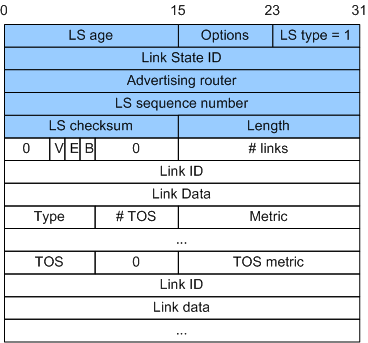
The 20-byte LSA header section contains the following fields:
- LS Age: The number of seconds that have passed since the LSA was created (in seconds), indicating when the first LSA id was created and when it will be promoted.
- Options: Indicates the OSPF features like tables.
- LS Type: Defines the LSA types, like where which LSA is being used.
- Link State ID: Identifies the network link between OSPF routers; mostly, we got to know about the IP Identification used by the OSPF process.
- Advertising Router: It displays the origin router’s ID through which we can identify which process of OSPF is running on which router.
- LS Sequence Number: A unique numeral to filter out outdated and redundant LS on each LSA packet.
- LS Checksum: A specific digit supplied to LS for comparison and error detection.
- Length: Represents LSA packet length, which means the actual size of that LSA is whichever the LSA is being generated.
Advantages of OSPF LSAs
Some of the benefits of OSPF LSAs:
- Efficient Network Convergence: LSA enables quick detection and communication of network changes, helping in faster convergence.
- Scalable Network Design: LSAs help OSPF in efficiently manage complex network structures, making it highly scalable for large networks.
- OSPF LSAs help manage routing information effectively.
- Flexibility for different topologies.
- Support for traffic engineering.
Disadvantages of OSPF LSAs
LSAs in OSPF offer a range of benefits, but they also introduce complexities that require careful management, etc. Here are some other disadvantages:
- Complex Configuration and Management.
- High resource requirement.
- In larger networks, there are chances of LSA overload.
- Some LSA types have very limited usage.
Frequently Asked Questions
Q1. What is a LSA in OSPF?
LSAs, or Link State Advertisements, are multicast messages exchanged among routers within the OSPF domain. Internal routers utilize them to notify the DR/BDR routers about any modifications or updates.
Q2. What are the LSA types in OSPF?
There are 11 LSA types which are – Router LSA, Network LSA, Summary LSA, Summary ASBR LSA, Autonomous system external LSA, Multicast OSPF LSA, Not-so-stubby area LSA, External attribute LSA, and 3 Opaque LSA Types.
Q3. What is Type 3 LSA in OSPF?
Type 3 LSA in OSPF (Open Shortest Path First) is known as the Network Summary LSA. It is responsible for advertising summarized network information to routers within the same OSPF area, enabling efficient routing and reducing the size of the routing tables.
Q4. What is OSPF Type 4 LSA?
OSPF LSA Type 4, OSPF ASBR Summary LSA, is used to advertise the summary information of an Autonomous System Boundary Router (ASBR) within an OSPF area. It provides a summarized view of the ASBR’s external routes, enabling efficient routing decisions within the OSPF domain.
OSPF (Open Shortest Path First) uses LSA (Link-State Advertisements)

OSPF (Open Shortest Path First) uses LSA (Link-State Advertisements) to share routing information between routers. Each LSA type has a specific purpose. Below is a paragraph-wise explanation with examples for all major OSPF LSA types.
1. Type 1 LSA – Router LSA
Type 1 LSA is generated by every OSPF router and describes the state of its directly connected links (interfaces). It includes information such as IP addresses, subnet masks, link types, and cost. This LSA is only flooded within the same area and does not cross area boundaries.
👉 Example:
If Router R1 is connected to two networks (192.168.1.0/24 and 10.0.0.0/30), it will generate a Type 1 LSA describing both links. Other routers in the same area use this information to build the topology database.
2. Type 2 LSA – Network LSA
Type 2 LSA is generated by the Designated Router (DR) in multi-access networks (like Ethernet). It describes all routers connected to that network segment. This helps reduce LSA flooding by centralizing information.
👉 Example:
In a LAN with R1, R2, and R3, if R1 is elected as DR, it creates a Type 2 LSA listing R1, R2, and R3 as connected routers.
3. Type 3 LSA – Summary LSA
Type 3 LSA is generated by Area Border Routers (ABRs). It summarizes and advertises networks from one area to another. This helps in reducing routing table size and improves scalability.
👉 Example:
If Area 1 has network 192.168.1.0/24, the ABR will advertise this network into Area 0 using a Type 3 LSA.
4. Type 4 LSA – ASBR Summary LSA
Type 4 LSA is also generated by ABRs. It advertises the location (reachability) of an ASBR (Autonomous System Boundary Router) to other areas. It tells routers how to reach the ASBR.
👉 Example:
If an ASBR is in Area 1, the ABR will send a Type 4 LSA into Area 0 to inform routers how to reach that ASBR.
5. Type 5 LSA – External LSA
Type 5 LSA is generated by ASBRs and is used to advertise external routes (routes learned from outside OSPF, like static or RIP routes). These LSAs are flooded throughout the OSPF domain (except stub areas).
👉 Example:
If a router redistributes a static route 8.8.8.0/24 into OSPF, it will generate a Type 5 LSA so all routers know about this external network.
6. Type 6 LSA – Multicast LSA (MOSPF)
Type 6 LSA is used for multicast OSPF (MOSPF), which is rarely used in modern networks. It carries multicast group membership information.
👉 Example:
If multicast routing is enabled, routers use Type 6 LSA to share multicast group details.
7. Type 7 LSA – NSSA External LSA
Type 7 LSA is used in NSSA (Not-So-Stubby Area). It is similar to Type 5 but only exists inside NSSA. The ABR later converts it into Type 5 when sending to other areas.
👉 Example:
If an NSSA router redistributes a route (e.g., 172.16.0.0/16), it generates Type 7 LSA, which ABR converts to Type 5 for other areas.
8. Type 8 LSA – External Attributes LSA
Type 8 LSA is used in OSPF extensions (like BGP integration) to carry additional attributes for external routes. It is not commonly used.
👉 Example:
Used when advanced routing attributes need to be shared along with external routes.
9. Type 9 LSA – Opaque LSA (Link-local scope)
Type 9 LSA is used for carrying additional information within a single link. It is mainly used for advanced features like traffic engineering.
👉 Example:
Used in MPLS Traffic Engineering to share link-specific details.
10. Type 10 LSA – Opaque LSA (Area scope)
Type 10 LSA is similar to Type 9 but is flooded within an entire area instead of a single link.
👉 Example:
Used for area-wide traffic engineering information.
11. Type 11 LSA – Opaque LSA (AS scope)
Type 11 LSA is flooded throughout the entire OSPF autonomous system. It is used for carrying global information.
👉 Example:
Used for sharing global MPLS or advanced routing data across all areas.
Summary Table
| LSA Type | Name | Generated By | Scope |
|---|---|---|---|
| 1 | Router LSA | Router | Area |
| 2 | Network LSA | DR | Area |
| 3 | Summary LSA | ABR | Between Areas |
| 4 | ASBR Summary LSA | ABR | Between Areas |
| 5 | External LSA | ASBR | Whole OSPF |
| 6 | Multicast LSA | Router | Rare use |
| 7 | NSSA External LSA | NSSA ASBR | NSSA Area |
| 8 | External Attributes | Advanced use | Rare |
| 9 | Opaque (Link) | Router | Link |
| 10 | Opaque (Area) | Router | Area |
| 11 | Opaque (AS) | Router | Whole AS |
LSA (Link-State Advertisements)
Understanding OSPF LSA types is necessary to master the OSPF routing protocol. In an OSPF routing domain, each node creates at least one type of LSA, which is the router LSA. A router may produce more LSAs depending on its functions (DR, BDR, ABR, or ASBR). The set of LSAs within an OSPF area constitutes the area’s link-state database, and it is consistent on all the area’s routers.
What is LSA in OSPF?
In an OSPF AS, a link statement advertisement (LSA) is a data format routers use to describe the links connected to them, OSPF adjacent neighbors, internal and external subnets, and ASBRs. Different OSPF LSA types are used by routers within an OSPF domain to build up the graph of the network for the sake of producing the SPF tree.
Each node in an OSPF autonomous system creates one or more LSAs based on its configuration and shares them with its adjacent neighbors. In addition, the router will also flood the latest version of any received LSA to its neighbors, except the sender and including the router that originated the LSA. This is if it is not the sender.
How Many OSPF LSA Types Do Exist?
There are 11 LSA types in OSPF, and each LSA type is handled differently, with the combined set of all received and sent LSAs establishing the router’s link state database (LSDB). Cisco, Juniper, and Huawei are implementing the following ten OSPF LSA types on their routers, whereas RFC 2328’s specification for OSPFv2 defines only five LSA types:
- show ip ospf database asbr-summary
- LSA Type 1 (Router LSA)
- LSA Type 2 (Network LSA)
- LSA Type 3 (Summary LSA)
- LSA Type 4 (ASBR Summary LSA)
- LSA Type 5 (Autonomous System LSA)
- LSA Type 7 (NSSA external LSA)
- LSA Type 8 (External-Attributes LSA)
- LSA Type 9 (Link-local opaque LSA)
- LSA Type 10 (Area-local opaque LSA)
- LSA Type 11 (Autonomous System opaque LSA))
LSA – Link state advertisments.
- An OSPF link-state advertisement (LSA) contains the link state and link metric to a neighboring router.
- Received LSAs are stored in a local database called the link-state database (LSDB);the LSDB advertises the link-state information to neighboring routers exactly as the original advertising router advertised it.
- All OSPF routers in the same area maintain a synchronized identical copy of the LSDB for that area.
- The LSDB provides the topology of the network, providing the router a complete map of the network.

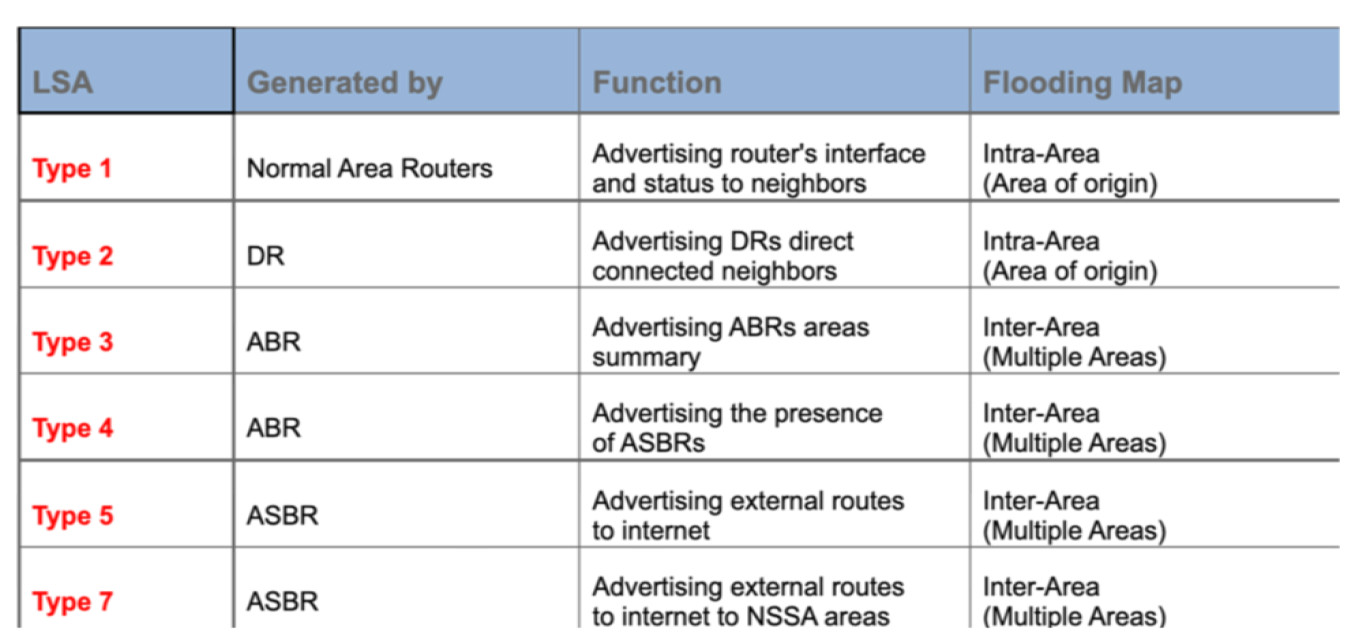
The OSPF LSA contains a complete list of networks advertised from that router. OSPF uses six LSA types for IPv4 routing:
- Type 1, router – LSAs that advertise network prefixes within an area
- Type 2, network – LSAs that indicate the routers attached to broadcast segment within an area
- Type 3, summary – LSAs that advertise network prefixes that originate from a different area
- Type 4, ASBR summary – LSA used to locate the ASBR from a different area
- Type 5, AS external – LSA that advertises network prefixes that were redistributed into OSPF
- Type 7, NSSA external – LSA for external network prefixes that were redistributed in a local NSSA area
LSA Type 1 – Router LSA
LSA Type 1 (Router LSA) packets are sent between routers within the same area.
LSA Type 1 Packets exchanged between OSPF routers within the same area.

LSA TYPE 2 – NETWORK LSA
LSA Type 2 (Network LSA) packets are generated by the Designated Router (DR) to describe all routers connected to its segment directly.
LSA Type 2 packets are flooded between neighbors in the same area of origin and remain within that area.
LSA Type 2 Packets exchanged between OSPF DR and neighbor routers