
OSPF Default Route
What is a Default Route
When a router receives an IP packet, it matches the destination IP address against its routing table. If the destination IP address matches an entry, the router forwards the traffic to the next hop. What happens if the router cannot match the destination IP address to any entry in the routing table – the router silently discards the packet.
Routers typically have a routing entry for every subnet within the organization. However, a router within the enterprise network typically does not have an entry for every possible IPv4 address on the Internet. There are approximately 3,723,362,304 publicly routable IPv4 addresses out there on the Internet. So, to be able to match and forward packets destined to every possible public Internet IP address, the router is configured with a default route (0.0.0.0/0) that matches every possible IP address. If a packet’s destination IP address does not match any specific entry in the routing table, it matches the default route and is forwarded to the default next-hop.
Let’s go through the example shown in the diagram below.
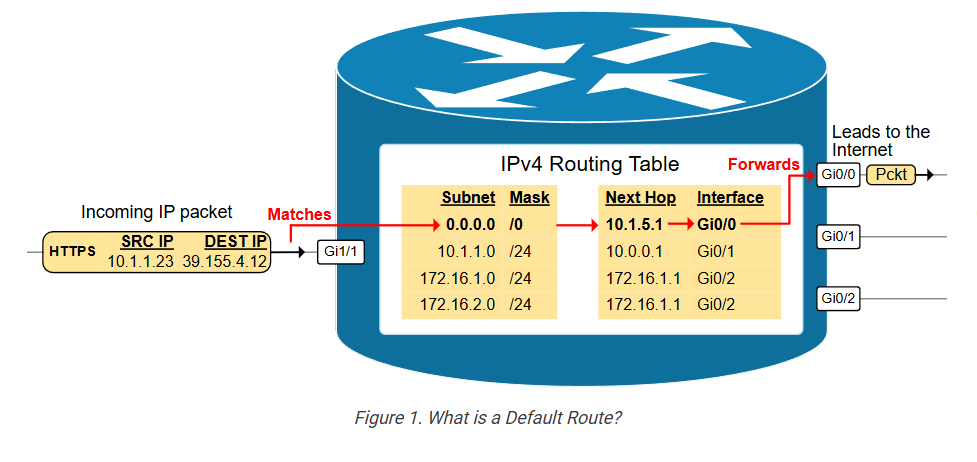
The router receives a packet destined to 39.155.4.12. This IPv4 address does not match any routing table entries, so it is matched against the default route 0.0.0.0/0 and forwarded to the next hop 10.1.5.1 out of interface GigabitEthrenet0/0. The default route is a catch-all entry.
In a typical small or medium-sized enterprise network, the default route often points to the ISP’s gateway router. In larger networks, it typically directs the traffic towards central firewalls or other security devices for inspection and then out to the Internet.
Why does the network need a default route?
Let’s look at the example shown in the diagram below. On one side, end hosts connect to local routers participating in an OSPF Area 0. On the other side, we have router R1 that connects to an Internet Service Provider (ISP) that provides connectivity to the Internet. R1 has a default route pointing to the ISP’s next-hop IP address. We must ensure that end hosts can access the Internet.
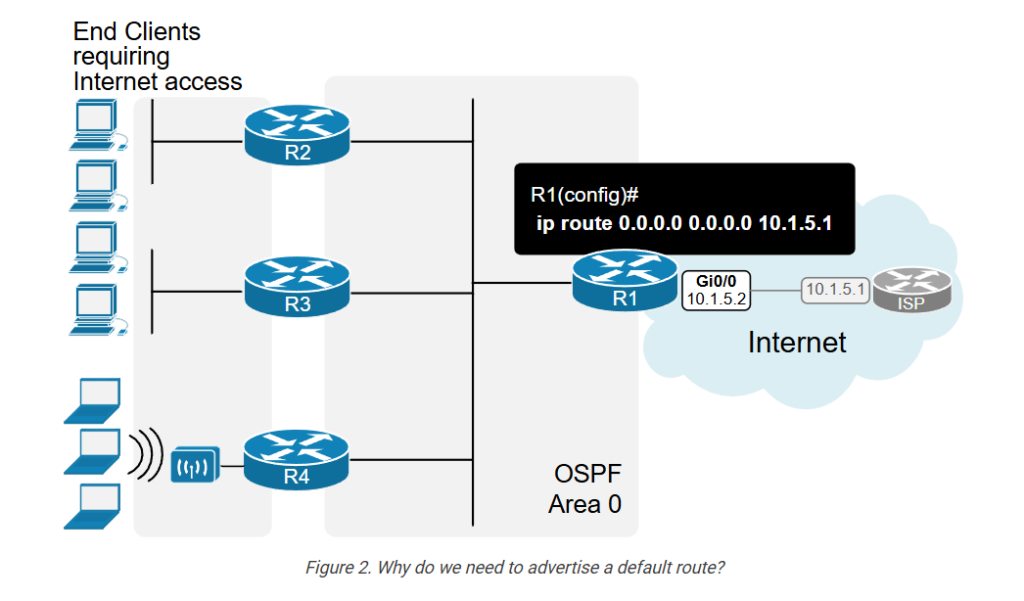
As of this moment, end hosts cannot access the Internet. When an end host sends a packet destined for the Internet, the local router does not have an entry in the routing table for the destination IP address and discards the packet.
Originating Default Route into OSPF
To provide Internet access to the OSPF network, a router that connects to the Internet must originate a default route into the OSPF domain. This is accomplished using the default-information originate command.
Lab Initial State
Let’s quickly go through the lab’s initial state. We have R1 connecting to the Internet Service Provider (ISP). R1 has a static route 0.0.0.0/0 that points to the ISP via interface Eth0/1, as shown in the diagram below.
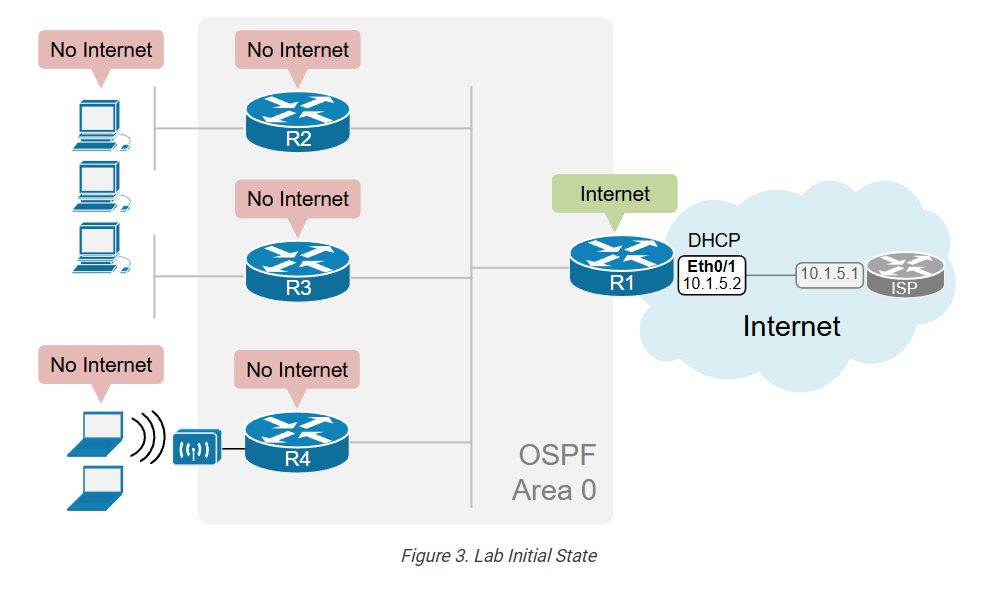
Let’s verify that R1 has a default (0.0.0.0/0) and has access to the Internet.
					R1# sh ip route static
Codes: L - local, C - connected, S - static, R - RIP, M - mobile, B - BGP
       D - EIGRP, EX - EIGRP external, O - OSPF, IA - OSPF inter area
       N1 - OSPF NSSA external type 1, N2 - OSPF NSSA external type 2
       E1 - OSPF external type 1, E2 - OSPF external type 2, m - OMP
       n - NAT, Ni - NAT inside, No - NAT outside, Nd - NAT DIA
       i - IS-IS, su - IS-IS summary, L1 - IS-IS level-1, L2 - IS-IS level-2
       ia - IS-IS inter area, * - candidate default, U - per-user static route
       H - NHRP, G - NHRP registered, g - NHRP registration summary
       o - ODR, P - periodic downloaded static route, l - LISP
       a - application route
       + - replicated route, % - next hop override, p - overrides from PfR
       & - replicated local route overrides by connected
Gateway of last resort is 10.1.5.1 to network 0.0.0.0
S*    0.0.0.0/0 [254/0] via 10.1.5.1
You can see in the routing table that R1 indeed has a default route, and you can see below that it can ping Google’s IP address (hence, there is Internet access).
					R1# ping google.com
Type escape sequence to abort.
Sending 5, 100-byte ICMP Echos to 142.250.187.174, timeout is 2 seconds:
!!!!!
Success rate is 100 percent (5/5), round-trip min/avg/max = 1/1/2 ms
Now, let’s verify that the other routers don’t have an entry in the routing table for 0.0.0.0/0. If we check the routing table of R2, we can see that the “Gateway of last resort is not set.”
					R2# sh ip route ospf
Codes: L - local, C - connected, S - static, R - RIP, M - mobile, B - BGP
       D - EIGRP, EX - EIGRP external, O - OSPF, IA - OSPF inter area
       N1 - OSPF NSSA external type 1, N2 - OSPF NSSA external type 2
       E1 - OSPF external type 1, E2 - OSPF external type 2, m - OMP
       n - NAT, Ni - NAT inside, No - NAT outside, Nd - NAT DIA
       i - IS-IS, su - IS-IS summary, L1 - IS-IS level-1, L2 - IS-IS level-2
       ia - IS-IS inter area, * - candidate default, U - per-user static route
       H - NHRP, G - NHRP registered, g - NHRP registration summary
       o - ODR, P - periodic downloaded static route, l - LISP
       a - application route
       + - replicated route, % - next hop override, p - overrides from PfR
       & - replicated local route overrides by connected
Gateway of last resort is not set
      10.0.0.0/8 is variably subnetted, 6 subnets, 2 masks
O        10.3.0.0/24 [110/11] via 10.1.1.3, 00:01:13, Ethernet0/0
O        10.4.0.0/24 [110/11] via 10.1.1.4, 00:01:00, Ethernet0/0
Also, we can see that R2 cannot resolve Google’s IP address and cannot ping Google’s DNS server. Hence, no Internet access.
					R2# ping google.com
% Unrecognized host or address, or protocol not running.
R2# ping 8.8.8.8
Type escape sequence to abort.
Sending 5, 100-byte ICMP Echos to 8.8.8.8, timeout is 2 seconds:
.....
Success rate is 0 percent (0/5)
Now, let’s see how we can advertise a default route into the network so that all routers are able to access the Internet.
OSPF Default-Information Originate
First, remember that even if an OSPF router has a default route (0.0.0.0/0), it does not, by default, advertise it into the OSPF domain. For example, R1 has a static default toward the ISP but does not advertise it to the other routers – R2, R3, and R4.
For the OSPF router to advertise the default route into the network, a network administrator must explicitly configure the default-information originate command under the routing process, as shown in the diagram below.
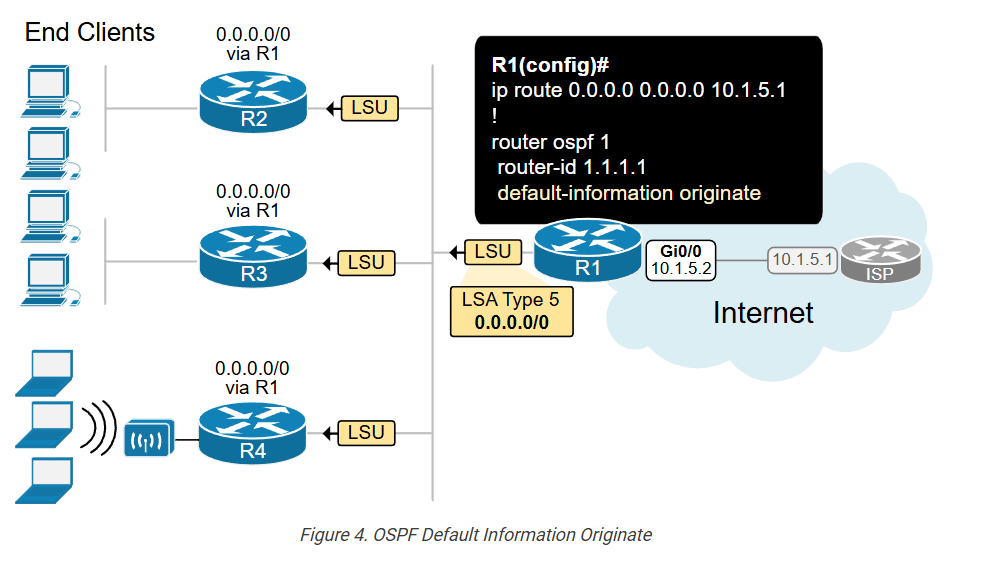
When the default-information originate command is configured, the router immediately sends a Type 5 LSA advertising that it provides connectivity to network 0.0.0.0 mask 0.0.0.0. Simply put, R1 tells other routers – “If you don’t have a more specific route to a destination IP address, send the packet to me.” When sending a Type 5 LSA, R1 becomes an ASBR (Autonomous System Boundary Router). ASBR is a router that connects an OSPF autonomous system (AS) to other external networks. In our example, R1 connects to the Internet Service Provider. Hence, R1 connects to an external network.
We will discuss the different types of LSAs and router roles further in the course. However, for now just remember that Type 5 is “AS External LSA”, used to advertise external routes, including default routes.
Let’s verify that the other routers receive the Type 5 LSA. We can check this by looking at the LSDB database of R2, for example, using the following command. Notice that the advertising router is 1.1.1.1 (R1), the link ID is 0.0.0.0, and the network mask is /0 (hence 0.0.0.0/0).
					R2# sh ip ospf database external
            OSPF Router with ID (2.2.2.2) (Process ID 1)
                Type-5 AS External Link States
  LS age: 9
  Options: (No TOS-capability, DC, Upward)
  LS Type: AS External Link
  Link State ID: 0.0.0.0 (External Network Number )
  Advertising Router: 1.1.1.1
  LS Seq Number: 80000007
  Checksum: 0x1197
  Length: 36
  Network Mask: /0
        Metric Type: 2 (Larger than any link state path)
        MTID: 0
        Metric: 1
        Forward Address: 0.0.0.0
        External Route Tag: 1
Now, if we check the routing table of R2, we see that it has a default route that points to router R1.
					R2# sh ip route ospf
Codes: L - local, C - connected, S - static, R - RIP, M - mobile, B - BGP
       D - EIGRP, EX - EIGRP external, O - OSPF, IA - OSPF inter area
       N1 - OSPF NSSA external type 1, N2 - OSPF NSSA external type 2
       E1 - OSPF external type 1, E2 - OSPF external type 2, m - OMP
       n - NAT, Ni - NAT inside, No - NAT outside, Nd - NAT DIA
       i - IS-IS, su - IS-IS summary, L1 - IS-IS level-1, L2 - IS-IS level-2
       ia - IS-IS inter area, * - candidate default, U - per-user static route
       H - NHRP, G - NHRP registered, g - NHRP registration summary
       o - ODR, P - periodic downloaded static route, l - LISP
       a - application route
       + - replicated route, % - next hop override, p - overrides from PfR
       & - replicated local route overrides by connected
Gateway of last resort is 10.1.1.1 to network 0.0.0.0
O*E2  0.0.0.0/0 [110/1] via 10.1.1.1, 03:20:32, Ethernet0/0
      10.0.0.0/8 is variably subnetted, 6 subnets, 2 masks
O        10.3.0.0/24 [110/11] via 10.1.1.3, 03:22:53, Ethernet0/0
O        10.4.0.0/24 [110/11] via 10.1.1.4, 03:22:53, Ethernet0/0
And the ultimate test is to verify that R2 has a connection to the Internet by pinging Google.
					R2# ping google.com
Type escape sequence to abort.
Sending 5, 100-byte ICMP Echos to 142.250.187.174, timeout is 2 seconds:
!!!!!
Success rate is 100 percent (5/5), round-trip min/avg/max = 2/2/3 ms
What happens when R1 loses connection to the ISP?
Now, let’s quickly see what happens when R1’s connection to the ISP goes down. The following diagram shows the two steps that R1 takes when the connectivity to the Internet Service Provider goes down.
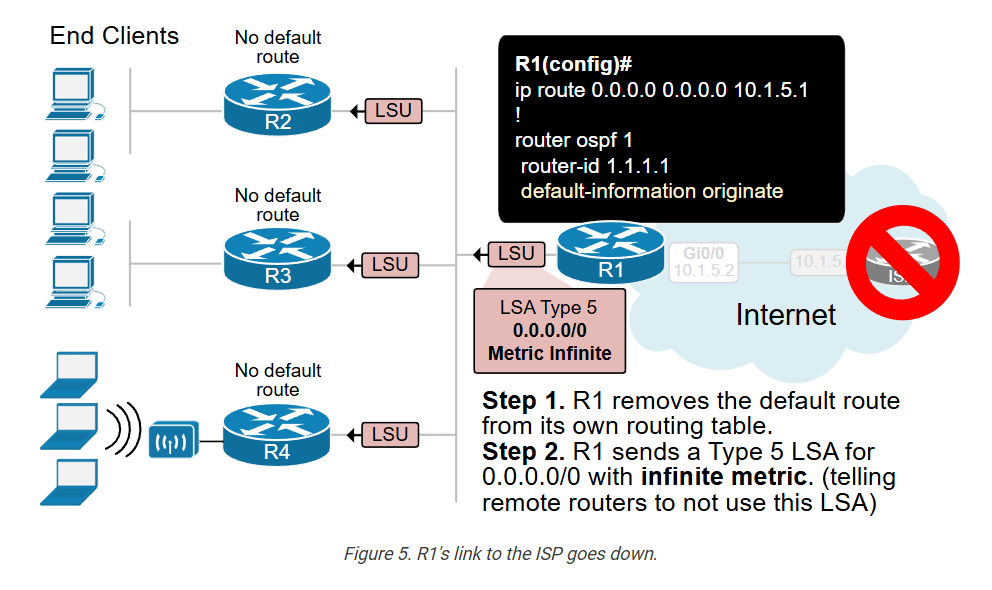
- First, the router removes the default route from its own routing table.
- Then, it sends out an LSA update to the remote router. The update is a Type 5 LSA for 0.0.0.0 with the metric value set to infinity (16,777,215). This tells remote routers to not use this LSA.
- Subsequently, the remote routers remove the 0.0.0.0/0 entries from their routing tables.
However, this behavior can be changed using a keyword argument “always” in the default-information originate command.
Default-Information Originate Always
Using the default-information originate command makes the ASBR router (in our case, R1) advertise a default conditionally.
- If it has a default on its own, it advertises the 0.0.0.0/0 in the network.
- If it doesn’t have a default on its own, it doesn’t advertise the 0.0.0.0 route into the network.
In some scenarios, this conditional advertisement may not be beneficial. That’s why the protocol has an additional keyword, “always,” which makes the originating unconditional. Using the default-information originate always command makes the ASBR advertise a default route into the OSPF domain regardless of whether there is an existing default in its routing table. The advertisement is unconditional.
There are two common scenarios when you want to do this:
- Routing stability.
- Pulling traffic to a centralized point of the network.
Let’s discuss each one of them.
Scenario 1: Routing stability
Imagine that R1 is the only router that connects to the Internet Service Provider. R1 originates a default into the network, and 100+ remote routers use R1 as the next hop to the Internet, as shown in the following diagram.
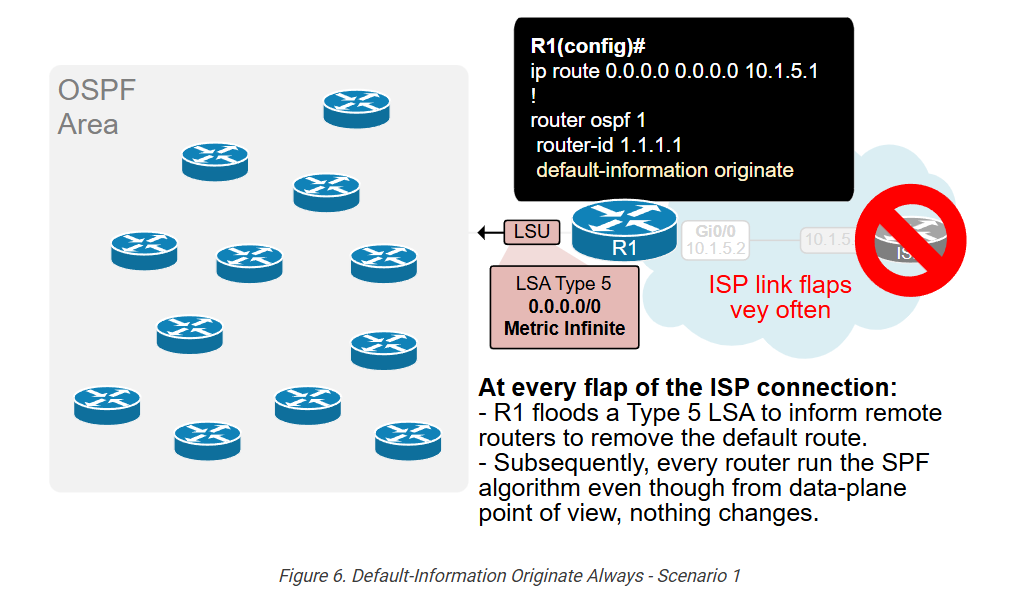
When you use the default-information originate command without the always keyword, the entire area of 100+ routers must run the SPF algorithm every time the link to the ISP flaps. The diagram explains why. If the ISP link is unstable and often flaps, routing instabilities in the entire area may occur. If the ISP link starts flapping very aggressively, it may even bring down the entire area. Especially back in the old days when routers had one very slow CPU and a few MB of RAM. (have in mind the routing protocol is 30+ years old)
So, in short, you don’t want to be in one fault domain with the ISP. You want problems in the ISP network to not affect your internal network by any means. That’s why in such scenarios, it may be beneficial to use the always keyword under the default-information originate command.
Using the always keyword, as shown below, ensures that the ASBR originates a default route into the OSPF domain regardless of whether there is an existing default route in the router’s routing table. The advertisement is unconditional.
					router ospf 1
 router-id 1.1.1.1
 network 10.0.0.0 0.255.255.255 area 0
 default-information originate always
If you think from a data plane perspective, R1 is the only router that provides connectivity to the Internet. It doesn’t change anything from data-plane perspective if R1 has or doesn’t has a default route in its routing table. In such scenarios, the “always” keyword doesn’t affect the data-plane but makes the control-plane more stable.
Scenario 2: Pulling the traffic to a centralized point
Another common scenario when the [+always] keyword is used is a large organization with many branches connected via OSPF. The data center’s Internet Edge has redundant connections to the Internet via multiple ISPs and Colocation providers. It has BGP peering with the ISPs and has the entire Internet routing table.
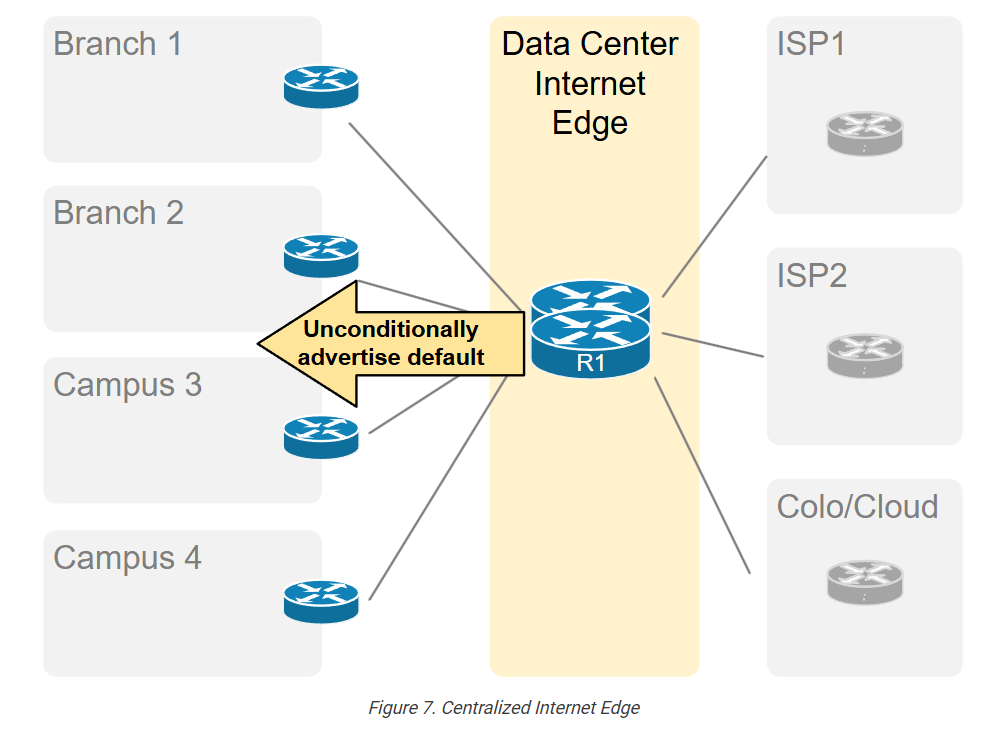
In such use cases, the Internet edge devices unconditionally originate a default route in the OSPF domain. This ensures that branches always have a default route pointing to the data center, regardless of the actual routing status at the DC. The Internet Edge will always have an available route out to the Internet.
Other Examples
Other common examples when using the [+always] keyword is beneficial include:
- Service Provider PE-CE – Provider Edge router uses the always keyword to ensure the edge router always has a default route to reach upstream provider.
- Test Environments – Lab environments where routers must always have a default route for testing purposes, regardless of the actual routing configuration.
Caveats
Remember that you must be careful when using the always keyword. Without proper planning and design, the unconditional advertisement of a default route can potentially lead to routing loops and traffic blackholes.
Default Route
What is Default Route (Paragraph-wise Explanation)
A default route is a special route in networking that is used when a router does not know the exact destination network of a packet. Instead of dropping the packet, the router sends it to a predefined next-hop router, which usually leads toward the internet or another larger network.
OSPF Default Information
What is OSPF Default Information Originate
In OSPF, the command “default-information originate” is used to advertise a default route (0.0.0.0/0) into the OSPF network. This means one router tells all other OSPF routers:
👉 “If you don’t know where to send traffic, send it to me.”
Why Default Route is Needed
In real networks, not every router needs full internet routing information. Instead, they can use a default route to forward unknown traffic to a specific router (usually connected to the internet or ISP).
Using default-information originate helps:
- Simplify routing tables
- Reduce memory and CPU usage
- Provide a gateway toward external networks (like Internet)