Port Security
What is Port Security
Introduction
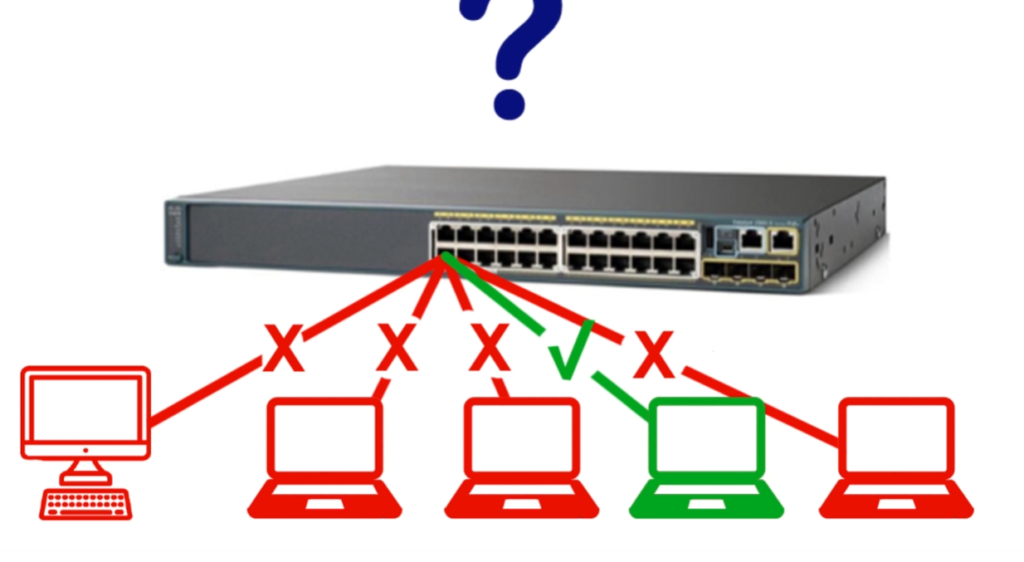
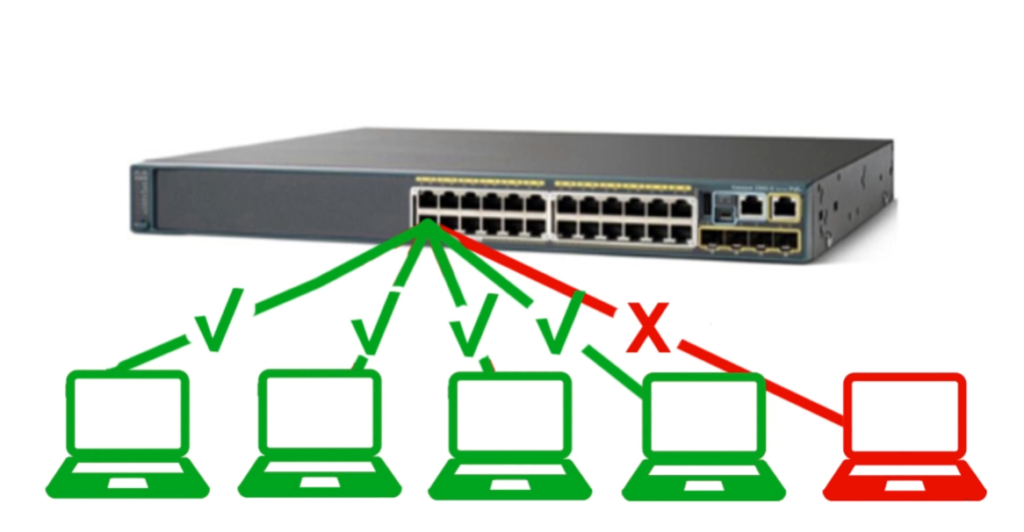
With port security, network administrators can limit which devices can connect to which ports on a router or switch. It can stop unauthorized devices from accessing your network and compromise its safety and functionality. As a component of the CCNA course, Port Security is a subject of particular importance.
In this blog, we will discuss the basic meaning of port security and how it works with the help of the topology.
What is Port Security in Networking?
Port security is based on the concept of MAC address filtering. The MAC address is a unique identifier assigned to each network interface card (NIC) by the manufacturer. It allows the network administrator to specify which MAC addresses can access a particular port and how many devices can connect to that port at a time.
Port security can be configured in two modes: static and dynamic.
In static mode, the network administrator manually enters the MAC addresses of the authorized devices for each port.
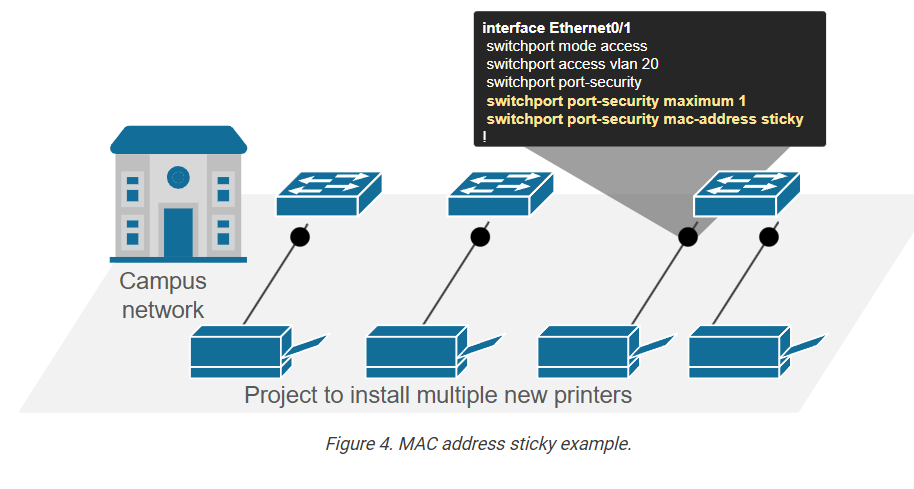
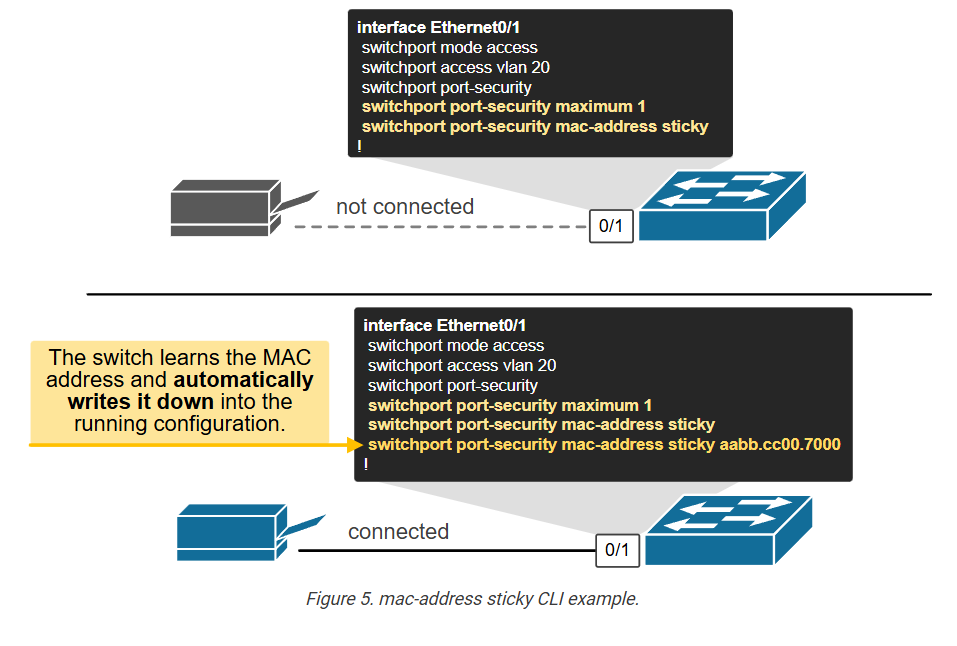
In dynamic mode, we use the keyword “sticky” with the command to ensure that the MAC will be attached dynamically to the specific port on which you are configuring it. Still, here the very first frame received on configured port security interface will automatically attach the MAC Address in the frame. The network administrator can limit how many MAC addresses can be learned per port.
How does Port Security Works
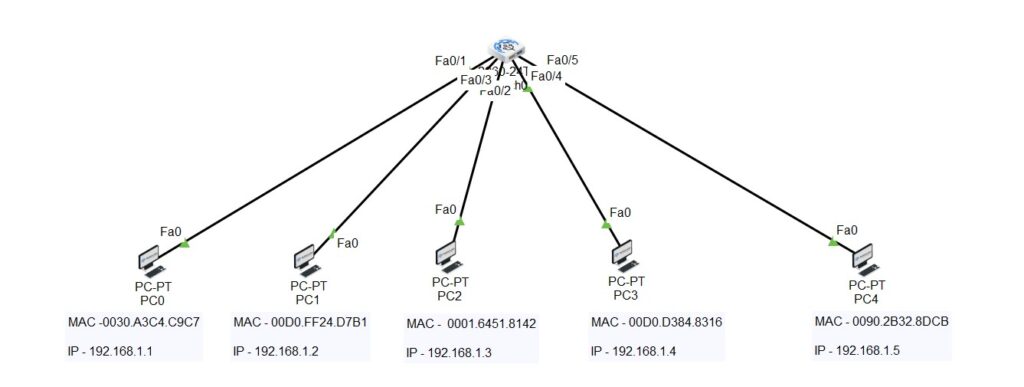
As we know about the switch, it’s a layer 2 device that stores the MAC Address of connected clients, and to verify this – we have a lab ready, have a look at the topology given below.
We got one switch and five clients connected to this switch, and all the clients’ MAC Addresses are also mentioned on the topology.
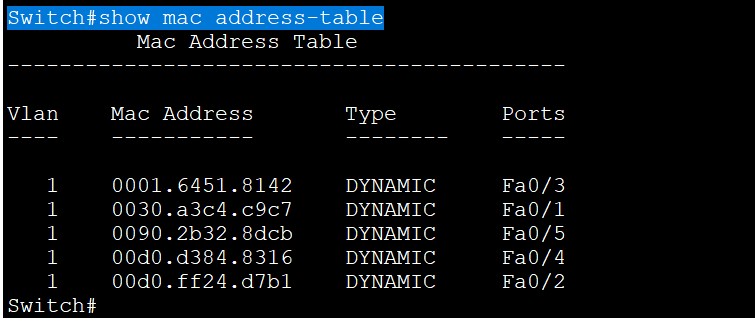
Let’s see the output of the MAC table inside the switch using the command –
Switch#show mac address-table
If you want to see how many total Mac Addresses your switch can store inside the CAM Table so, there is a command to verify that as well i.e.
Switch#show mac address-table count
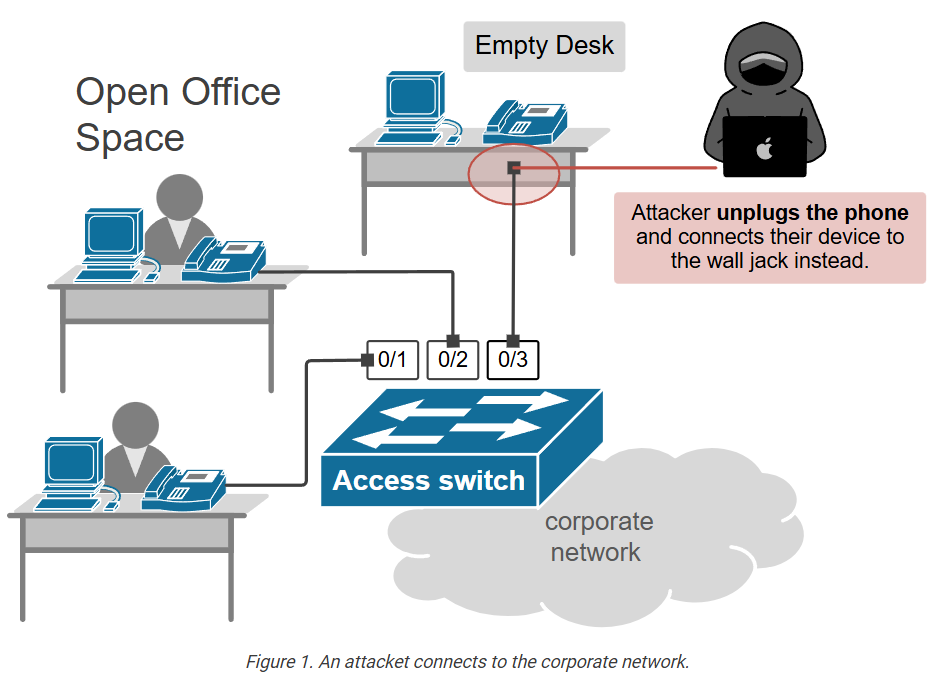
By default, we know all interfaces on Cisco switches are turned on. That means that an attacker can connect to your network through another available port and potentially threaten your network. If you know which devices will be connected to which ports, you can use the Cisco security feature called port security.
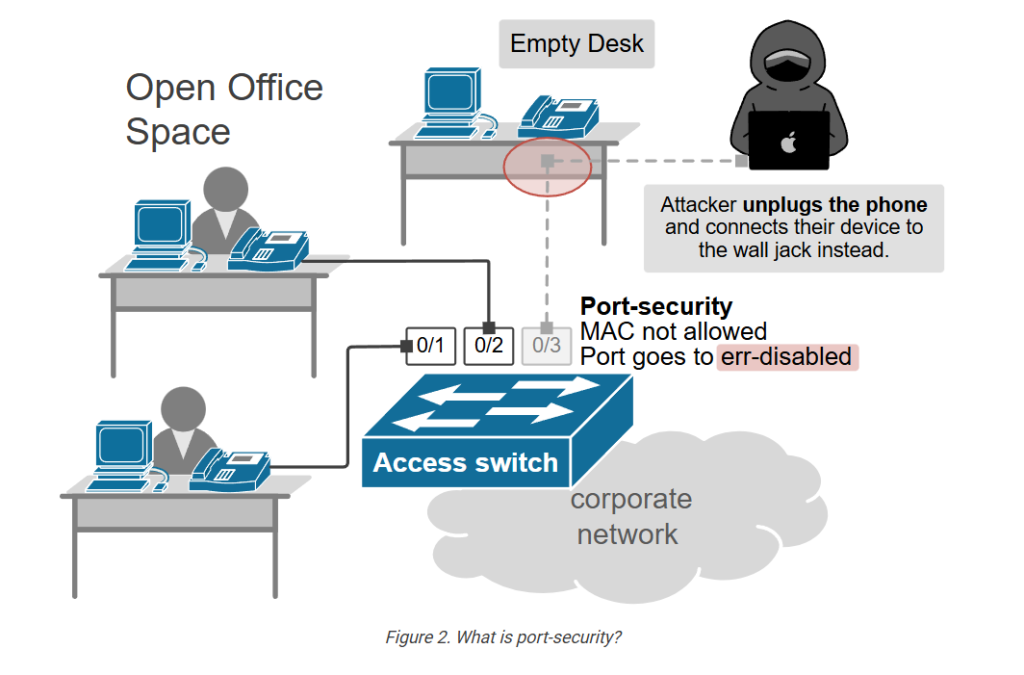
By using port security, a network admin can reserve a specific MAC address with the interface, which can prevent an attacker from connecting his device. This is how you can restrict access to an interface so only authorized devices can use it. If an unauthorized device is connected, you can decide what action the switch will take, for example, discard the traffic or shut down the port and put the port in an err-disable state.
It adds an additional layer of security to the switching network.
Let’s take a scenario to understand the concept of port security in more detail –
Let’s say if an attacker is sitting inside your LAN, and he got access to your switch with any port that is not in use. There are many operating systems in the market, like Kali Linux; using this kind of OS, the attacker can send many fake MAC entries to the switch, and when the switch will receive the fake frames with fake MAC Addresses. The switch will store the MAC entry inside the CAM table.
Suppose your switch has total address space available in the CAM Table of 100 MAC Entries. Using the fake frames, the attacker fills the MAC Table, and in this kind of scenario, when the MAC table is completely filled, the switch starts acting like a HUB. Whenever a frame is received on the switch, the switch will broadcast in the network, allowing the attacker to capture the traffic, and the attacker can see what’s going on inside the network.
So, this is what we call a MAC Table overflow attack and preventing these types of attacks in Port Security.
Port Security allows you to limit the MAC-Address on the interface. So basically, by using it, you can assign a number of MAC addresses, and you can fix on port with static MAC entry.
Role of Port Security in Networking
Port security can provide several benefits for network security and performance, such as:
- Preventing the ability of unauthorized devices to access protected network information and resources.
- Keeping malicious software and viruses out of the network by blocking access from unapproved devices.
- Preventing unauthorized devices from consuming bandwidth or causing congestion on the network.
- Preventing spoofing and impersonation by unauthorized network devices.
- The elimination of network loops and broadcast storms caused by malicious devices.
It assists network administration and troubleshooting by showing which devices are connected to which ports and detecting any topological changes or anomalies.
Key Features of Port Security
Here are some features of Port Security in Networking:
- MAC Address Control: It can be used to control various devices using MAC Addresses.
- Device Limitation: It lets you set a limit on the number of devices that can connect to a port.
- Violation Action: Port security can itself respond to security violations in three ways: Protect, Restrict, and Shutdown.
Port Security Violation Types
Port security violation types are the actions that trigger a response when a device tries to connect to a switch port that is configured with port security. It has three violation parameters.
- Shutdown
- Protect
- Restrict
Let’s understand each port security violation in detail.
Shutdown
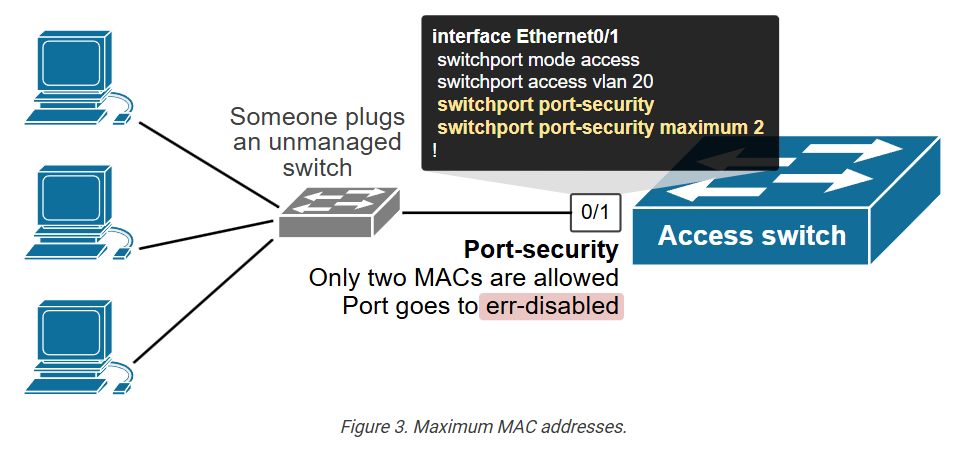
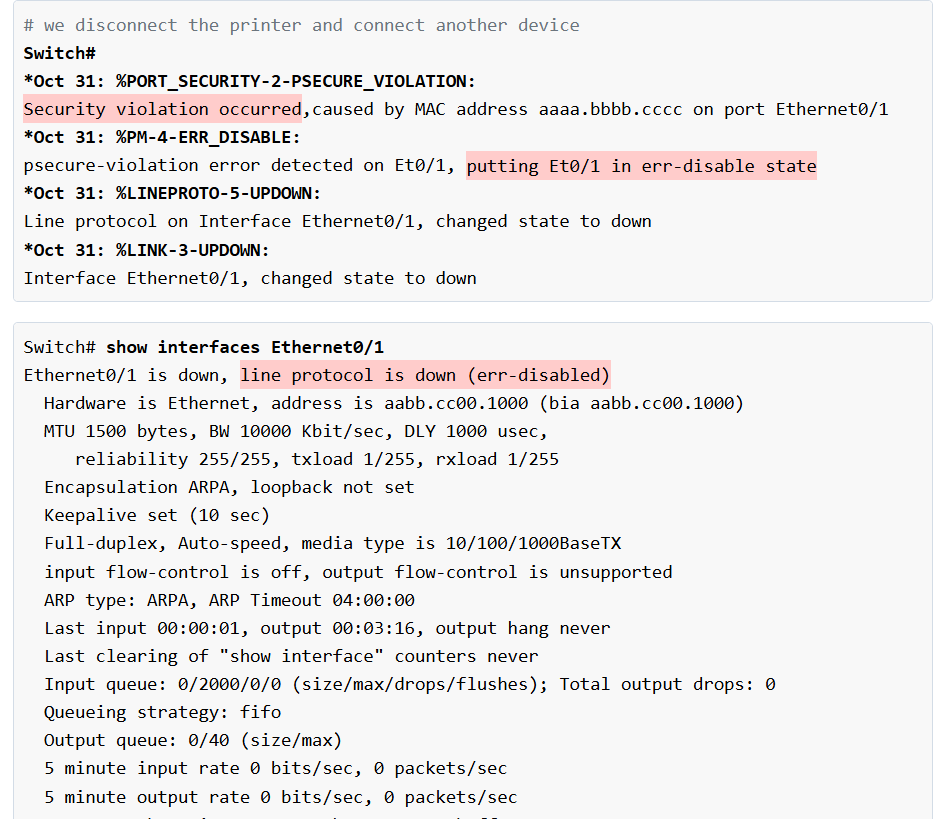
When any unauthorized device tries to connect to the port which is configured with port security shutdown violation, the port immediately goes into an err-disable state. This shutdown violation is also the default violation mode.
To configure shutdown – Let’s go on the switch CLI and run the following commands.
Switch>enable
Switch#configure terminal
Switch(config)#interface fa0/1
Switch(config-if)#switchport mode access
Switch(config-if)#switchport port-security
Switch(config-if)#switchport port-security mac-address 0030.A3C4.C9C7
(By this command we have statically assigned the MAC Address to interface fa0/1 with shutdown violation)
Switch(config-if)#switchport port-security violation shutdown
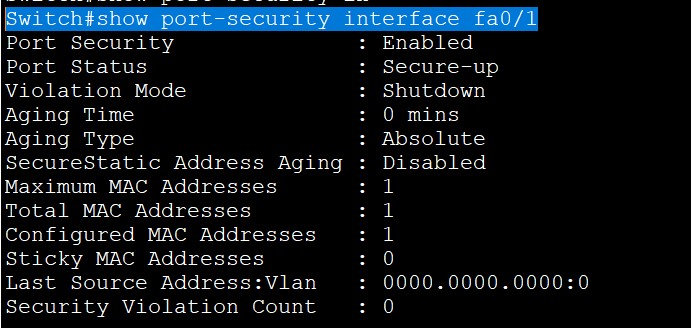
Now to verify the output of port security on interface fa0/1,
Run the following command –
Switch#show port-security interface fa0/1
Now, on this interface, if the attacker tries to access the port will automatically go into the err-disable state which means shutdown and to turn the port you have to manually select the interface shutdown and then run the command no shut down.
FastEthernet0/1 is down, line protocol is down (err-disabled)
Protect
The port is allowed to stay up. As this port reaches its MAC add limit, it stops learning MAC Address. Although packets from violations dropped, no record of violation is kept.
When it comes to the violation parameter, which is protected, so here, when the attacker tries to connect with any interface configured with protect violation, the port will stay up. Still, the attacker won’t be able to communicate inside the LAN. The switch will stop learning the MAC and will drop the frame.
To configure port-security protect use the following commands –
Switch>enable
Switch#configure terminal
Switch(config)#interface fa0/2
Switch(config-if)#switchport mode access
Switch(config-if)#switchport port-security
Switch(config-if)#switchport port-security mac-address sticky
By this keyword sticky we have done the automatic assignment of the MAC Address to interface fa0/2 which means that after assigning this command the user who’ll first send the frame to interface fa0/2. The MAC of the user who’ll first send the frame will stick to interface fa0/2
Switch(config-if)#switchport port-security violation protect
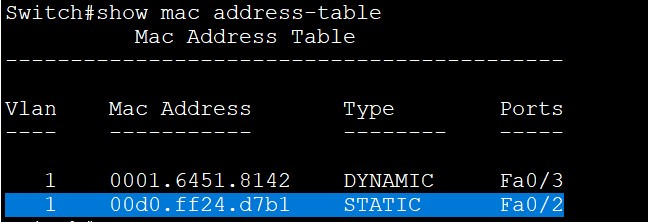
Verify the MAC entries as well –
The last violation parameter for port security is restrict, which is mostly used.
Restrict
It’s more similar to protect like the switchport configured with restrict will also won’t go in the err-disable state, but it’ll just drop the frame. The port is allowed to stay up, but one feature in restrict is that it keeps the count of the number of violating packets and can send SNMP trap and syslog message as an alert of violation.
To configure restrict –
Switch>enable
Switch#configure terminal
Switch(config)#interface range fa0/3-4
Switch(config-if)#switchport mode access
Switch(config-if)#switchport port-security
Switch(config-if)#switchport port-security mac-address sticky
By this keyword sticky we have done the automatic assignment of the MAC Address to interface fa0/2 which means that after assigning this command the user who’ll first send the frame to interface fa0/2. The MAC of the user who’ll first send the frame will stick to interface fa0/2
Switch(config-if)#switchport port-security violation restrict
To verify –
Now as per these configurations, when you will see the MAC entries. You’ll find that –
Fa0/1 to Fa0/4 Will have static entries which show that only these MAC addresses are allowed for these specific interfaces configured by port-security no other user is allowed to connect on these interfaces if in case any attacker or other user from LAN tries to access using these port-security configured interfaces according to the violation parameters the action will be taken.
Real-World Applications of Port Security
- Port Security finds its applications in corporate networks to protect sensitive data by restricting access to only authorized employees.
- Educational Institutions use it to prevent unauthorized devices from connecting to the campus network.
- It is also used in Data Centers to make sure that only approved servers and devices are part of the sensitive infrastructure.
Benefits of Port Security
Some of the benefits of port security are:
- Network Protection: Blocks unauthorized devices from connecting to switches and stops MAC address flooding attacks instantly.
- Access Control Management: Controls which devices can use specific ports and sets the maximum number of MAC addresses per port.
- Threat Detection and Response: Instantly sends alerts for violations and captures all network connection attempts for security review.
- Compliance and Auditing: Adheres to regulatory security standards and provides a detailed audit trail of inspections.
- Operational Efficiency: Eliminates manual network monitoring and automates security policy enforcement.
- Cost Reduction: Saves on IT support expenses by improving control and reducing the time spent troubleshooting network problems.
Limitations of Port Security
Despite its benefits, port security also has some limitations. These are:
- Management Complexity: Requires extensive configuration planning and increases administrative overhead for IT teams.
- Scalability Challenges: Becomes difficult to manage in large networks and requires significant resources for enterprise deployments.
- False Positive Alerts: Generates unnecessary security alerts from legitimate device changes and normal network operations.
- Limited Protection Scope: Secures only physical switch ports, leaving wireless and remote access threats unaddressed.
- Performance Impact: Can slow down network traffic processing and add latency to connection establishment.
- Vendor Dependencies: Different switch manufacturers use varying implementation methods and compatibility standards.
Future of Port Security in Networking
Networking is evolving, and so are threats to your network; port security must adapt to these changes. Network administrators face new threats daily as hackers try to plug into switch ports without permission. This creates serious risks.
Future port security will use intelligent automation. AI and machine learning will instantly detect unusual devices. Zero-trust models will verify every connection.
Dynamic port management is highly used to enhance port security. Switches will adjust security rules automatically. Identity-based access will replace static configurations, and microsegmentation will better isolate threats.
Cloud-based monitoring will provide real-time alerts. Behavioral analysis will catch insider threats. In the future, we will also see quantum encryption protecting ports.
These advances will make networks safer. IT teams will respond to incidents faster. Organizations will reduce security breaches significantly. Port security will become proactive rather than reactive.
Port Security in Computer Network
Attackers’ task is comparatively very easy when they can enter the network they want to attack. Ethernet LANs are very much vulnerable to attack as the switch ports are open to use by default. Various attacks such as Dos attack at layer 2, address spoofing can take place. If the administrator has control over the network then obviously the network is safe. To take total control over the switch ports, the user can use a feature called port-security. If somehow prevent an unauthorized user to use these ports, then the security will increase up to a great extent at layer 2.
Users can secure a port in two steps:
- Limiting the number of MAC addresses to a single switch port, i.e if more than the limit, Mac addresses are learned from a single port then appropriate action will be taken.
- If unauthorized access is observed, the traffic should be discarded by using any of the options, or more appropriately, the user should generate a log message so that unauthorized access can be easily observed.
Port security –
Switches learn MAC addresses when the frame is forwarded through a switch port. By using port security, users can limit the number of MAC addresses that can be learned to a port, set static MAC addresses, and set penalties for that port if it is used by an unauthorized user. Users can either use restrict, shut down or protect port-security commands.
Let’s discuss these violation modes:
- protect – This mode drops the packets with unknown source mac addresses until you remove enough secure mac addresses to drop below the maximum value.
- restrict – This mode performs the same function as protecting, i.e drops packets until enough secure mac addresses are removed to drop below the maximum value. In addition to this, it will generate a log message, increment the counter value, and will also send an SNMP trap.
- shut down – This mode is mostly preferred as compared to other modes as it shut down the port immediately if unauthorized access is done. It will also generate a log, increment counter value, and send an SNMP trap. This port will remain in a shutdown state until the administrator will perform the “no shutdown” command.
- Sticky – This is not a violation mode. By using the sticky command, the user provides static Mac address security without typing the absolute Mac address. For example, if user provides a maximum limit of 2 then the first 2 Mac addresses learned on that port will be placed in the running configuration. After the 2nd learned Mac address, if the 3rd user wants to access then the appropriate action will be taken according to the violation mode applied
Why Need Port Security in Company Network,
Without Port Security Problem in Company Network
In a company network, port security is needed to protect the network from unauthorized devices and internal attacks. When port security is enabled on a switch (for example on devices running Cisco IOS), the administrator can limit which MAC addresses are allowed to connect to each switch port. This ensures that only approved computers or devices can access the company network. It also helps control how many devices can connect to a port, which improves overall network security and management.
Without port security, several problems can occur in a company network. Any person could plug a laptop or unauthorized device into an open switch port and gain access to internal resources such as files, printers, or servers. Attackers may also perform MAC flooding attacks, which can overload the switch’s MAC address table and allow them to capture network traffic. Additionally, employees might connect personal devices that introduce malware or cause network misuse. Because of these risks, companies use port security to prevent unauthorized access, protect sensitive data, and maintain stable network performance.
Frequently Asked Questions
Q1. Why is port security important?
Due to the open nature of the switch ports in Ethernet LANs, several assaults, such as layer-2 DoS attacks and address spoofing, are possible. Port security is an effective means of securing a network by preventing unauthorized devices from forwarding packets. You may limit the number of MAC addresses, configure static MAC addresses, and penalize unauthorized users with the help of port security.
Q2. What layer is port security?
Port security is a Layer 2 security feature that may be implemented on each port of a switch. Its purpose is to filter incoming frames based on the media access control (MAC) addresses of the devices that are connected to the switch.
Q3. What are the 3 types of port security?
There are mainly 3 types of port security violations. These are:
- Shutdown
- Protect
- Restrict
When the switch’s port security violation feature is on, each port may be set to use one of three violation modes, each defining the actions to be taken in the event of a security violation.
Q4. What are the methods of port security?
Mainly there are two methods of port security. These are:
- Static
- Dynamic
One can use the above two methods individually or can be used concurrently.