
Types of Cyber Attacks
Table of Contents



What Is A Cyber Attack?
A cyber attack refers to an action designed to target a computer or any element of a computerized information system to change, destroy, or steal data, as well as exploit or harm a network. Cyber Attacks have been on the rise, in sync with the digitization of business that has become more and more popular in recent years.
Ransomware Attack:
A company’s employee receives a Phishing Email containing a Malicious Attachment. After opening the file, ransomware infects the network and encrypts all company data. The attackers then demand Money in exchange for the Decryption Key.
Example: The WannaCry ransomware attack affected hundreds of thousands of computers worldwide, disrupting hospitals, businesses, and government organizations.

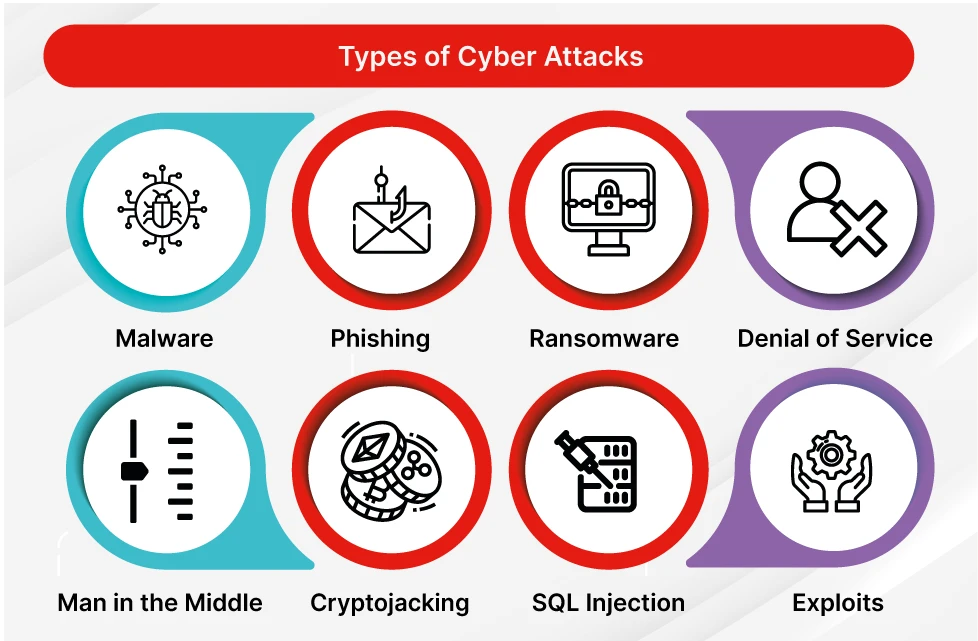
Types of Cyber Attacks
- Phishing Attack – Fake emails, messages, or websites used to steal usernames, passwords, and sensitive information.
- Ransomware Attack – Encrypts files and demands payment to restore access.
- Malware Attack – Malicious software such as viruses, worms, trojans, and spyware that infect systems.
- DDoS Attack (Distributed Denial of Service) – Floods a server or website with traffic, causing service disruption.
- Brute Force Attack – Repeatedly attempts different passwords until the correct one is found.
- Man-in-the-Middle (MITM) Attack – Intercepts communication between two parties to steal or alter data.
- SQL Injection Attack – Injects malicious SQL commands into a website to access or modify database information.
- Cross-Site Scripting (XSS) – Injects malicious scripts into web pages viewed by other users.
- Zero-Day Attack – Exploits a software vulnerability before a security patch is available.
- Password Attack – Targets weak, reused, or stolen passwords to gain unauthorized access.
- Insider Threat Attack – Security risks caused by employees, contractors, or trusted users.
- DNS Spoofing – Redirects users to fake websites by manipulating DNS records.
- Session Hijacking – Takes control of a user’s active session to gain unauthorized access.
- Botnet Attack – Uses a network of infected devices to perform large-scale attacks.
- Supply Chain Attack – Compromises trusted software, hardware, or vendors to infect target organizations.
- Business Email Compromise (BEC) – Impersonates executives or vendors to trick employees into sending money or data.
- Credential Stuffing – Uses stolen usernames and passwords from previous breaches to access accounts.
- Social Engineering Attack – Manipulates people into revealing confidential information or performing risky actions.
What is a DoS Attack?
A DoS (Denial of Service) Attack is a cyberattack that attempts to make a server, website, application, or network unavailable to legitimate users by overwhelming it with excessive traffic or requests.
The attacker sends a large number of requests to the target system, consuming its resources such as CPU, memory, bandwidth, or connections. As a result, genuine users cannot access the service, or the service becomes extremely slow.
Real-World Example:
Imagine a company’s website can normally handle 1,000 Visitors at a time. An attacker sends 100,000 Fake Requests per minute to the website. The server becomes overloaded and stops responding to legitimate customers, causing downtime and business disruption.
Simple Definition:
A DoS attack is like Hundreds of Fake callers continuously calling a company’s phone line so that real customers cannot get through. The goal is to disrupt service and prevent legitimate users from accessing the system.
What is a DDoS Attack?
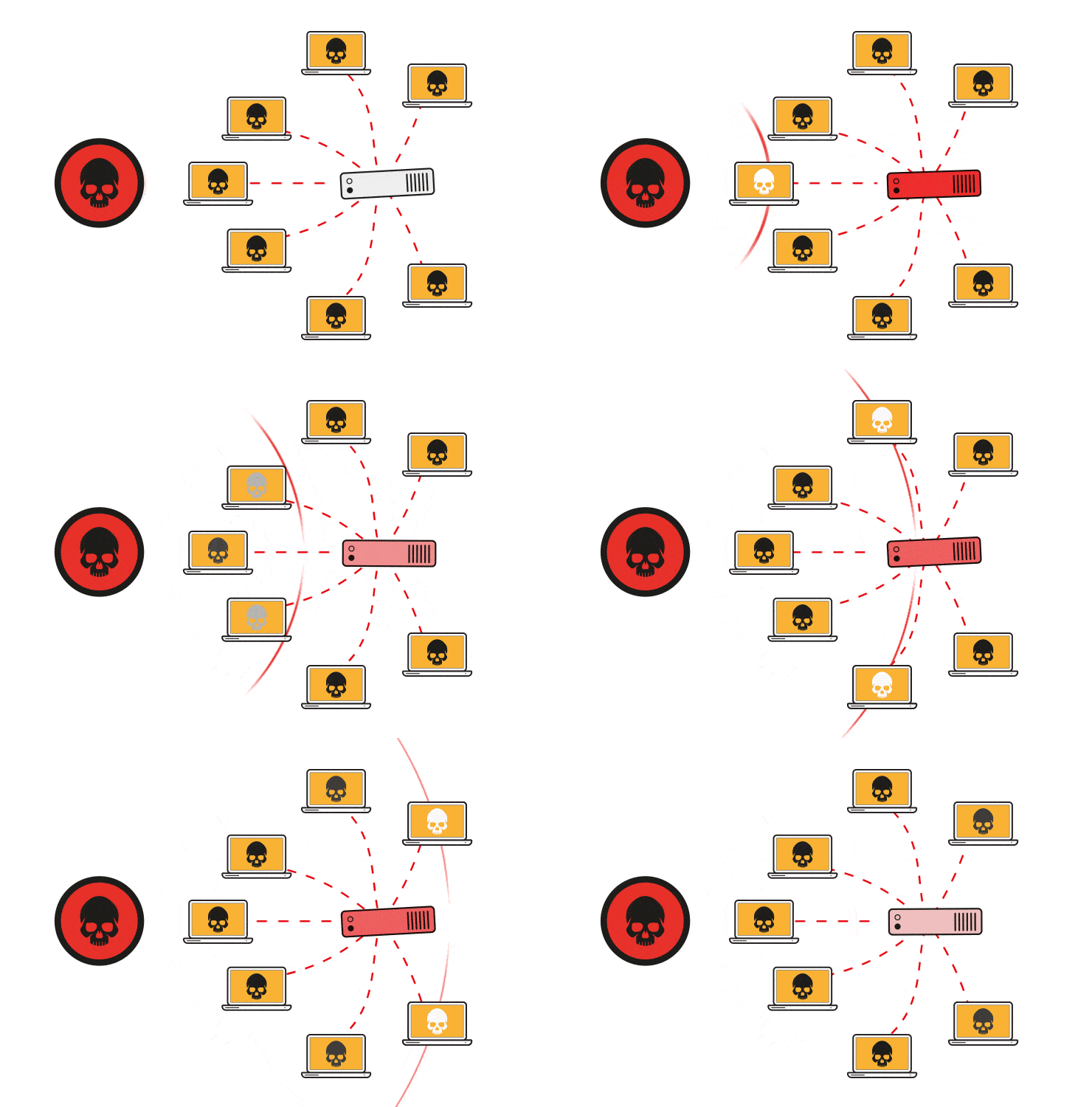
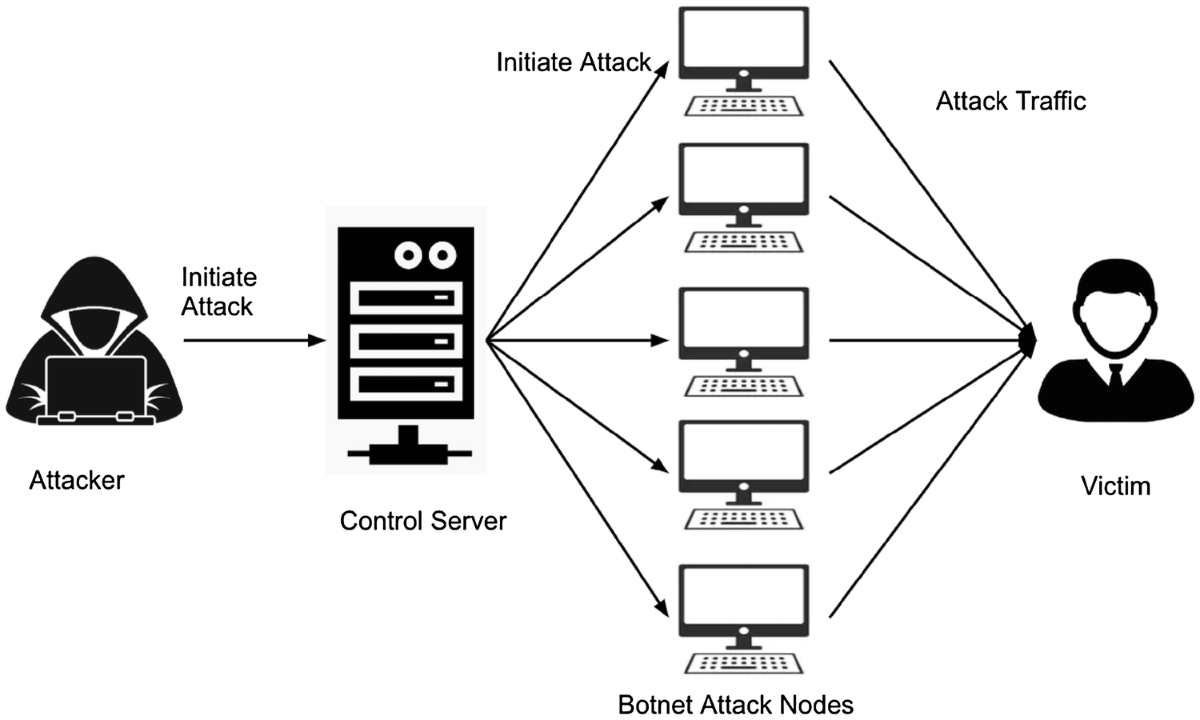
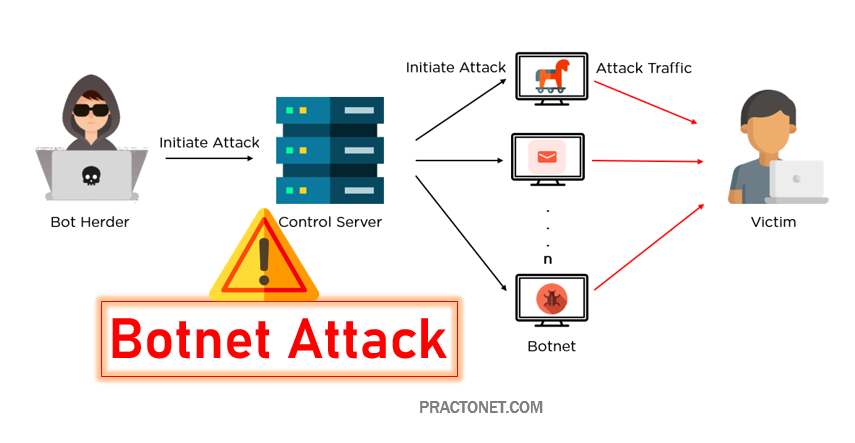
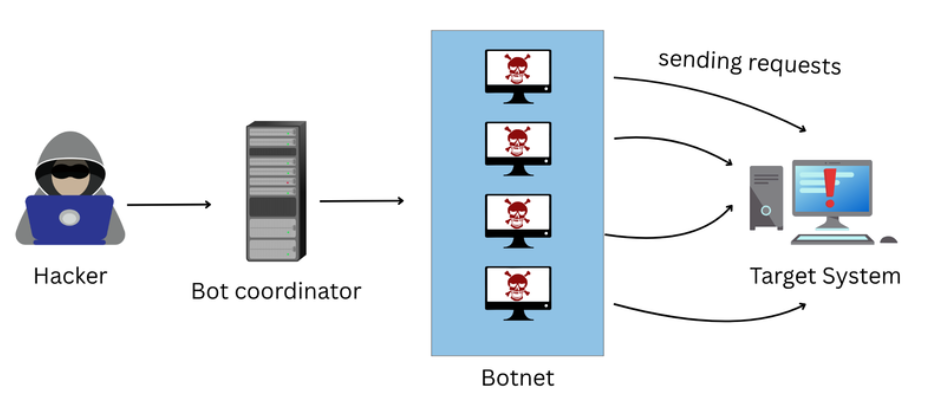
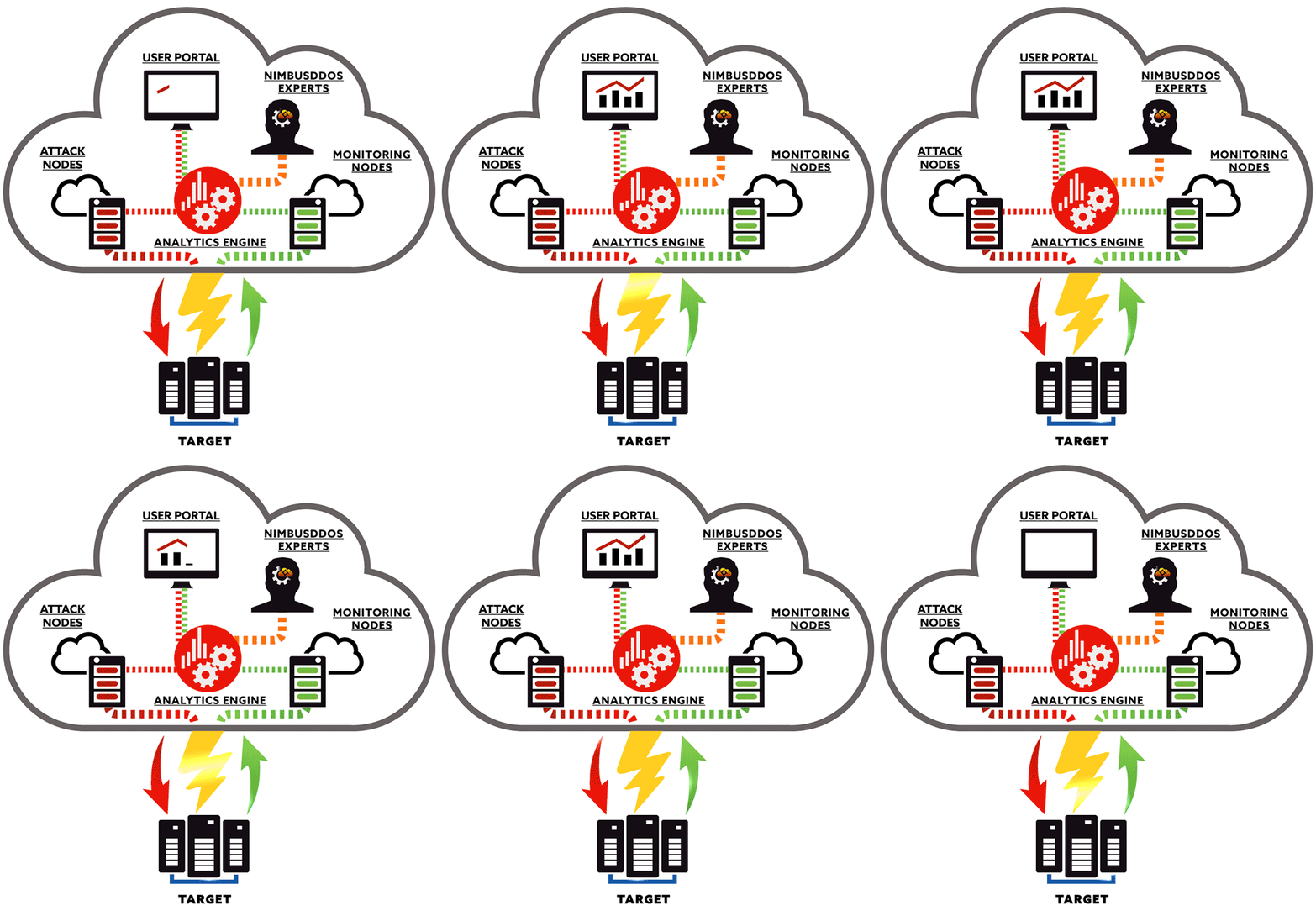
A DDoS (Distributed Denial of Service) Attack is a cyberattack in which multiple compromised computers, servers, or IoT devices are used to flood a target website, server, application, or network with massive amounts of traffic. The goal is to exhaust system resources and make the service unavailable to legitimate users.
Unlike a DoS attack, which comes from a single source, a DDoS attack originates from thousands or even millions of devices, making it much more powerful and difficult to stop.
How It Works:
Attackers first infect Many Devices with Malware and create a Botnet. They then command all infected devices to send requests to the target simultaneously. The overwhelming traffic overloads the server, causing slow performance, service disruption, or complete downtime.
Real-World Example:
An e-commerce website normally receives 5,000 visitors per hour. During a DDoS attack, thousands of compromised computers send millions of fake requests every minute. The server becomes overloaded and genuine customers can no longer access the website, resulting in lost sales and business disruption.
Simple Definition:
A DDoS attack is like Thousands of Fake customers entering a shop at the same time, preventing real customers from entering and receiving service. The objective is to overwhelm the target and make it unavailable to legitimate users
Effects of a DDoS Attack:
- Website and Service Downtime – A DDoS attack can overwhelm servers with massive amounts of traffic, causing websites, applications, and online services to become slow or completely unavailable. Customers are unable to access the services they need, leading to business disruption.
- Financial Losses – When business-critical systems are offline, organizations may lose sales, transactions, and revenue. For e-commerce companies, even a few hours of downtime can result in significant financial losses and missed business opportunities.
- Reduced Employee Productivity – Employees may be unable to access internal applications, email systems, cloud services, or business resources during an attack. This can interrupt daily operations and reduce overall productivity across the organization.
- Damage to Business Reputation – Customers expect online services to be available at all times. Frequent outages or poor performance caused by DDoS attacks can reduce customer trust and negatively impact a company’s reputation and brand image.
- Increased IT and Recovery Costs – Organizations often need additional resources, security services, and technical support to identify, mitigate, and recover from DDoS attacks. This can increase operational and cybersecurity expenses.
- Network Performance Degradation – Even if services remain online, excessive malicious traffic can consume available bandwidth and network resources, causing slow application performance and poor user experience for legitimate users.
- Potential Security Distraction – Attackers sometimes use DDoS attacks as a distraction while attempting other malicious activities, such as data breaches, malware infections, or unauthorized access to systems. Security teams may become focused on the DDoS attack while other threats go unnoticed.
- Customer Dissatisfaction and Loss of Trust – When users cannot access websites, applications, or online services, they may switch to competitors. Repeated service interruptions can result in long-term customer dissatisfaction and loss of confidence in the organization.
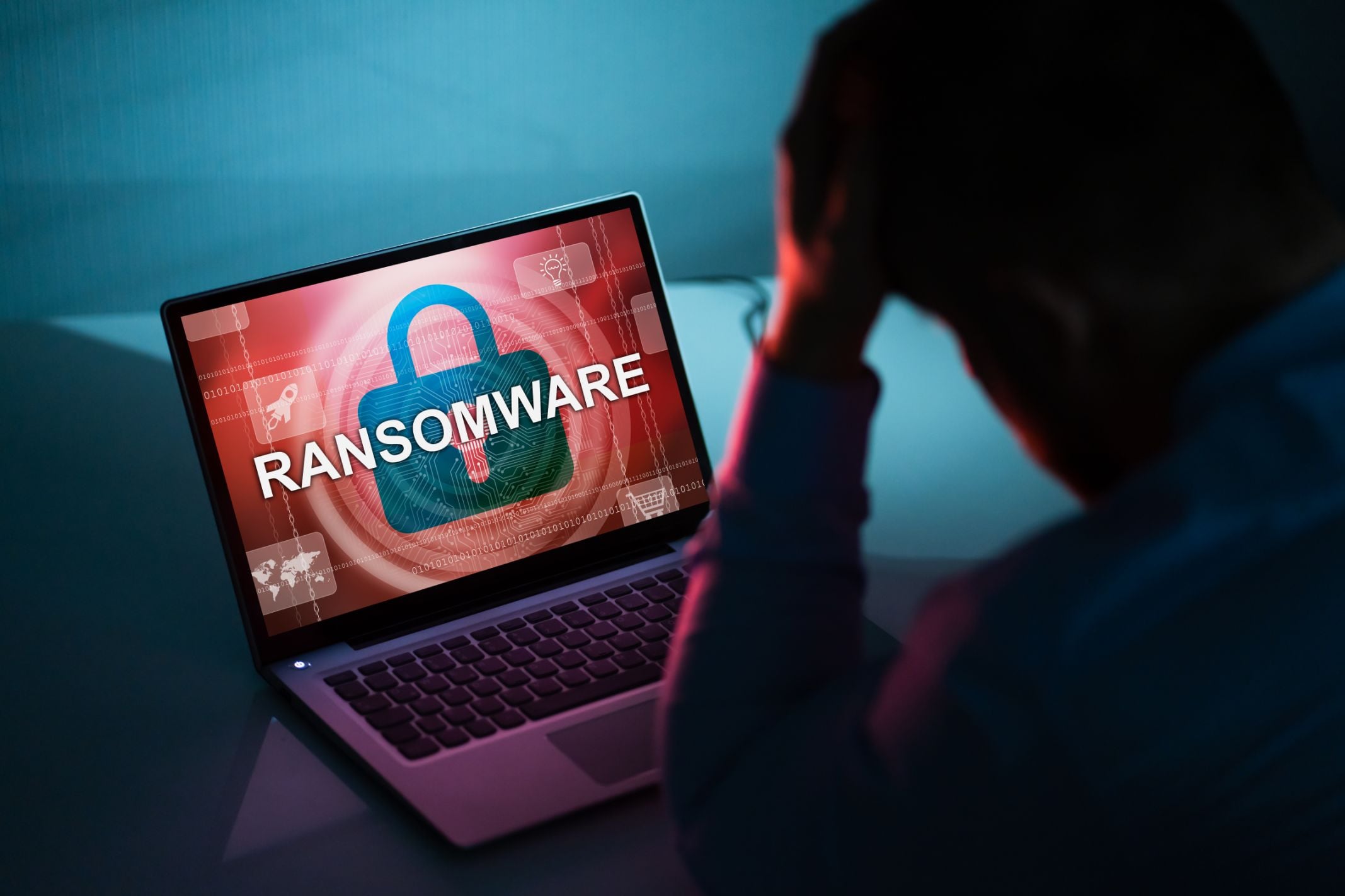
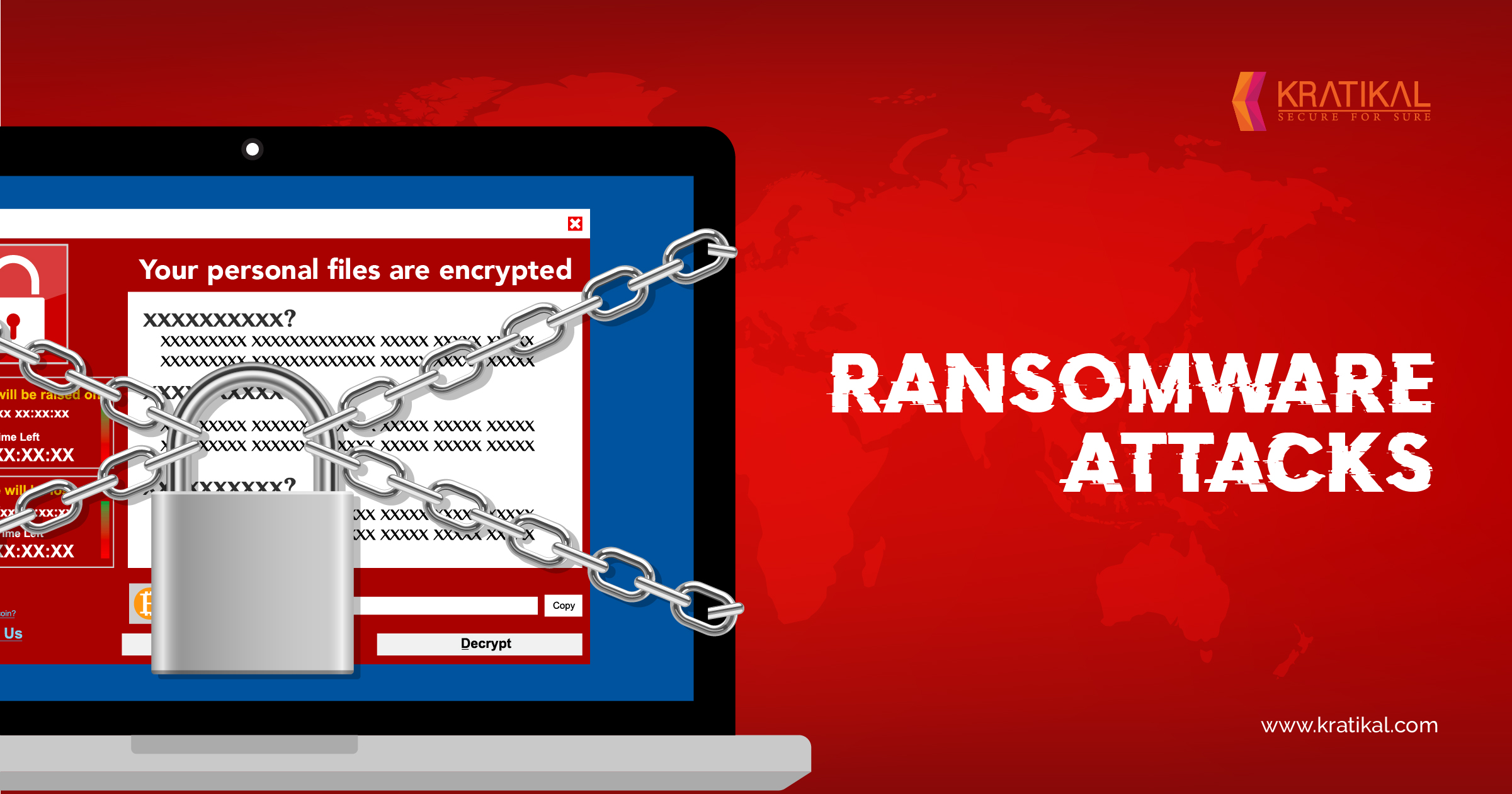
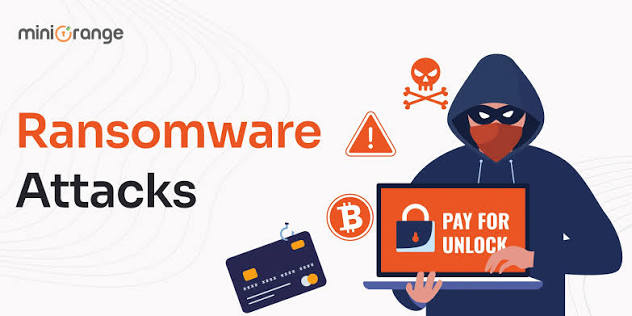
What is a Ransomware Attack?
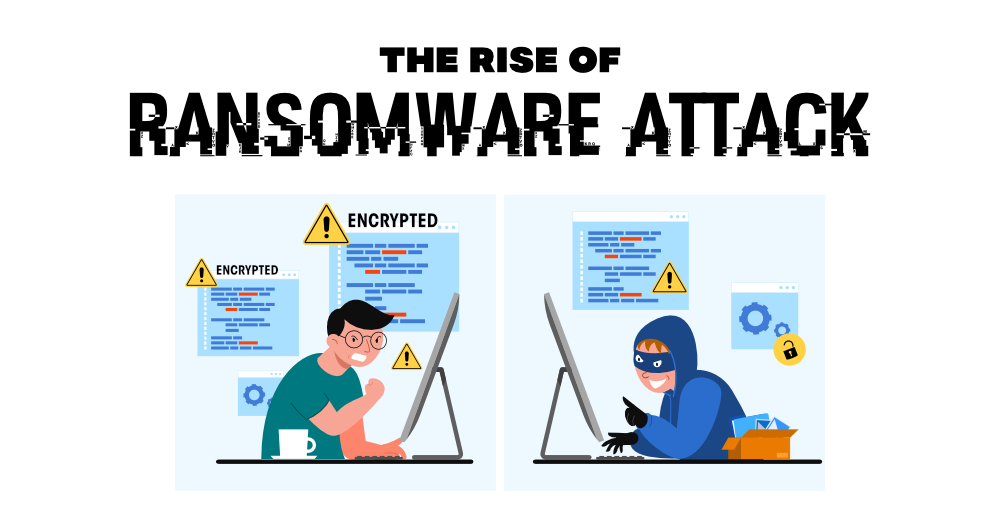
A Ransomware Attack is a type of cyberattack in which Malicious Software (Ransomware) encrypts a Victim’s Files, Servers, or Entire Network, making the data inaccessible. The attacker then demands a ransom payment, usually in cryptocurrency, in exchange for providing the decryption key needed to restore access to the data.
How It Works
Typically, ransomware enters a network through phishing emails, malicious attachments, infected websites, software vulnerabilities, or compromised remote access services. Once inside, it spreads across systems, encrypts important files, and displays a ransom note demanding payment.
Real-World Example:
An employee receives an email that appears to be an invoice from a trusted supplier. After opening the attachment, ransomware is installed on the computer. Within minutes, company documents, databases, and shared files become encrypted. Employees can no longer access their data, and the attacker demands payment to unlock the files.
Simple Definition:
A ransomware attack is like a thief putting a lock on all your important files and demanding money for the key. Until the files are recovered from backups or decrypted, the organization may be unable to use its data or systems.
Effects of a Ransomware Attack:
- Loss of Access to Critical Data – Ransomware encrypts important files, databases, and business documents, preventing employees from accessing the information required for daily operations. This can bring critical business processes to a complete standstill.
- Business Operational Disruption – Organizations may be unable to process orders, serve customers, access applications, or perform essential tasks. In severe cases, entire departments or business operations may be forced to stop until systems are restored.
- Significant Financial Losses – Companies can experience substantial financial damage due to downtime, lost productivity, recovery expenses, incident response costs, and potential ransom payments. Revenue-generating activities may also be interrupted for days or weeks.
- Data Loss and Corruption – If proper backups are not available, encrypted files may become permanently inaccessible. Some ransomware variants can also corrupt or delete data, making recovery even more difficult.
- Reputational Damage – Customers, partners, and stakeholders may lose confidence in an organization that experiences a ransomware attack. Public disclosure of an incident can negatively affect the company’s reputation and brand image.
- Customer Service Interruptions – Online services, support systems, and business applications may become unavailable during an attack, resulting in delayed customer service and dissatisfaction among clients.
- Sensitive Data Exposure – Modern ransomware attacks often involve data theft before encryption. Attackers may threaten to publish confidential business information, customer records, financial data, or intellectual property if the ransom is not paid.
- Legal and Regulatory Consequences – Organizations may face regulatory investigations, compliance violations, or legal action if customer or sensitive information is compromised during the attack.
- Increased IT and Recovery Costs – Recovering from a ransomware attack often requires cybersecurity experts, forensic investigations, system rebuilding, backup restoration, and additional security investments, leading to significant recovery expenses.
- Reduced Employee Productivity – Employees may lose access to business systems, files, and communication tools, making it difficult to perform their jobs and causing widespread productivity losses across the organization.
- Network and System Downtime – Servers, workstations, databases, and applications may remain unavailable for extended periods while recovery efforts are underway, affecting both internal operations and customer-facing services.
- Long-Term Security Improvements and Costs – Following a ransomware attack, organizations often need to implement stronger security controls, employee training programs, backup solutions, and monitoring systems, resulting in additional long-term cybersecurity expenditures.

What is a Man-in-the-Middle (MITM) Attack?
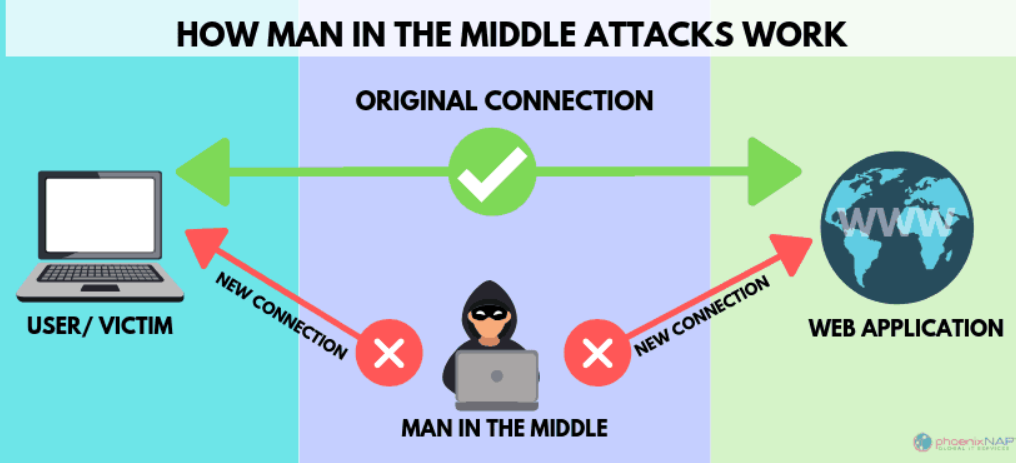
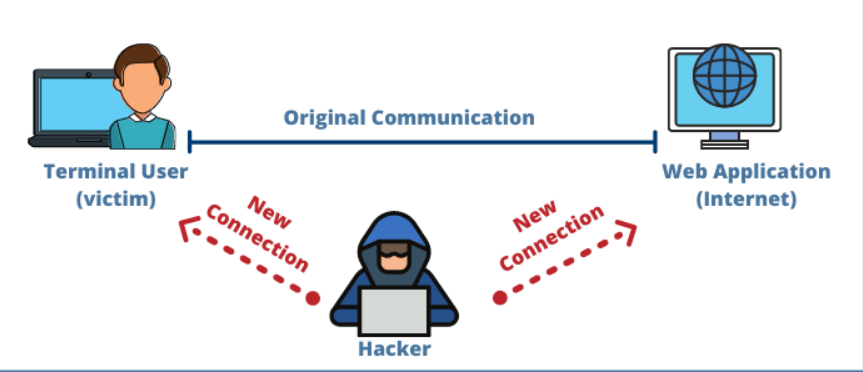
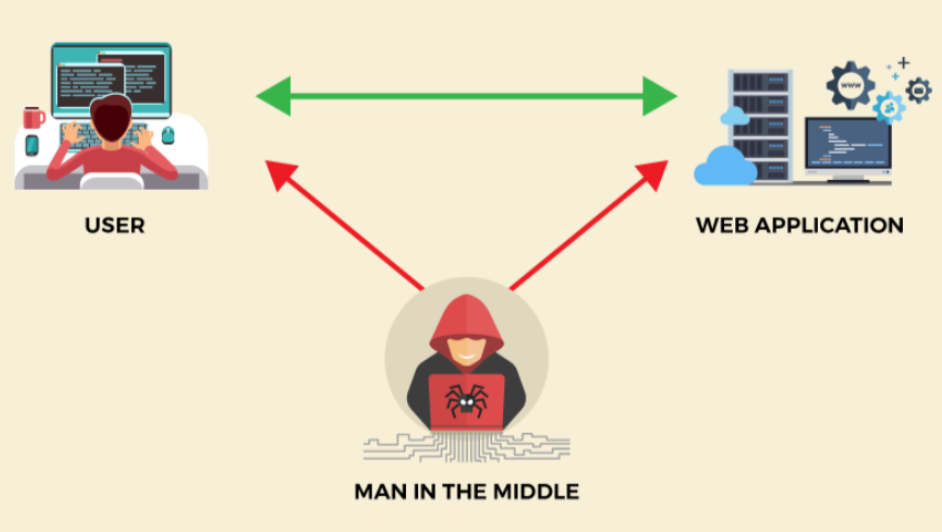
A Man-in-the-Middle (MITM) Attack is a cyberattack where an attacker secretly intercepts and potentially alters the communication between two parties without their knowledge. The attacker positions themselves between the user and the intended destination, allowing them to eavesdrop on, steal, or modify sensitive information being exchanged.
How It Works
In a MITM attack, the victim believes they are communicating directly with a legitimate website, application, or service. However, the attacker intercepts the traffic, captures the data, and then forwards it to the intended destination. This allows the attacker to monitor or manipulate the communication while remaining unnoticed.
Real-World Example:
A user connects to a free public Wi-Fi network at a café. An attacker on the same network intercepts the user’s internet traffic. When the user logs into an online banking website, the attacker captures usernames, passwords, and other sensitive information being transmitted over the network.
Simple Definition:
A MITM attack is like a thief secretly standing between two people having a conversation, listening to everything they say and even changing parts of the message before it reaches the other person.
What is a Phishing Attack?
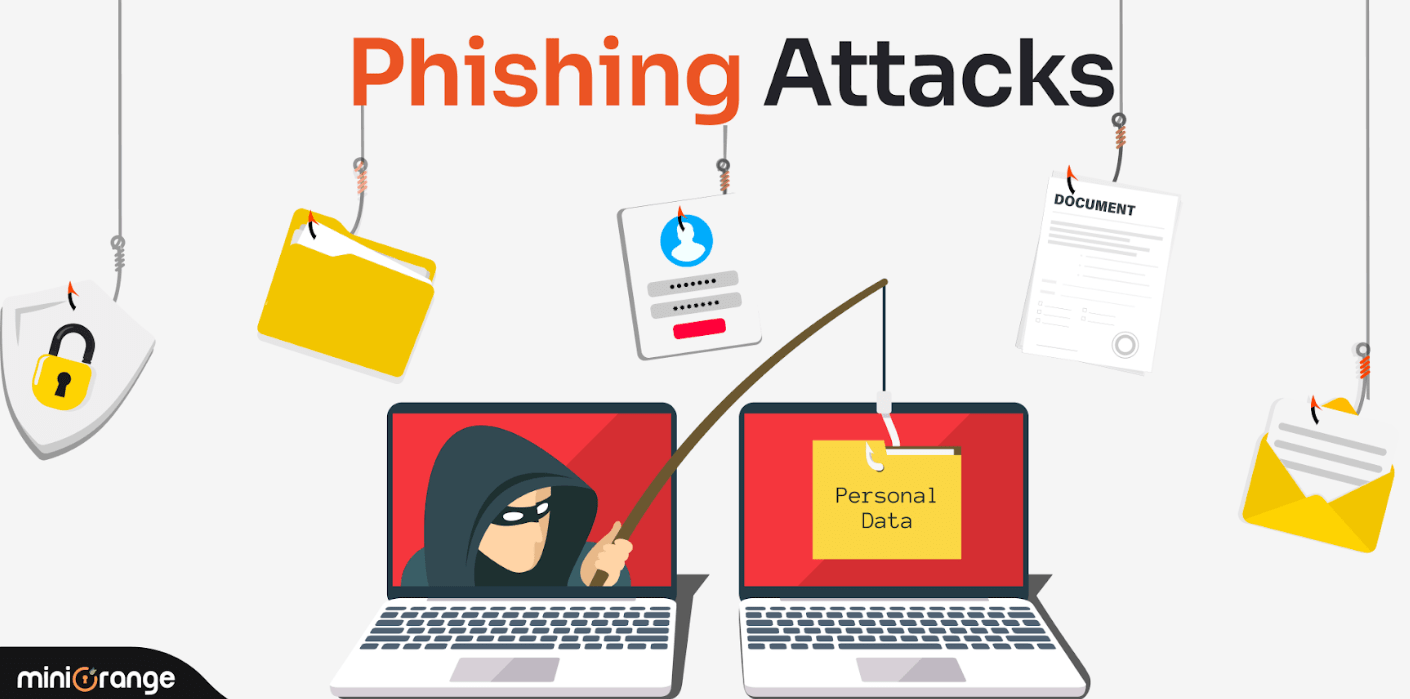
A Phishing Attack is a type of cyberattack in which attackers impersonate a trusted person, company, or organization to trick users into revealing sensitive information such as usernames, passwords, credit card details, bank information, or other confidential data.
Phishing attacks are commonly delivered through emails, text messages, social media messages, or fake websites that appear legitimate. The goal is to deceive victims into clicking malicious links, downloading infected attachments, or providing sensitive information.
How It Works
The attacker sends a fake message that appears to come from a trusted source, such as a bank, IT department, or popular online service. The message often creates a sense of urgency, asking the victim to verify an account, reset a password, or review an important document. When the victim clicks the link or opens the attachment, their information may be stolen or malware may be installed on their device.
Real-World Example:
An employee receives an email that appears to be from the company’s IT department stating that their email account will be suspended unless they verify their password immediately. The email contains a link to a fake login page that looks identical to the real one. After entering their credentials, the employee unknowingly sends their username and password directly to the attacker.

What is DNS Spoofing?
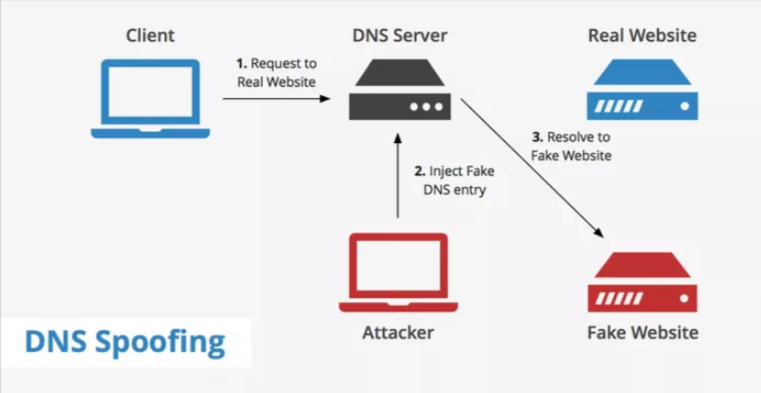
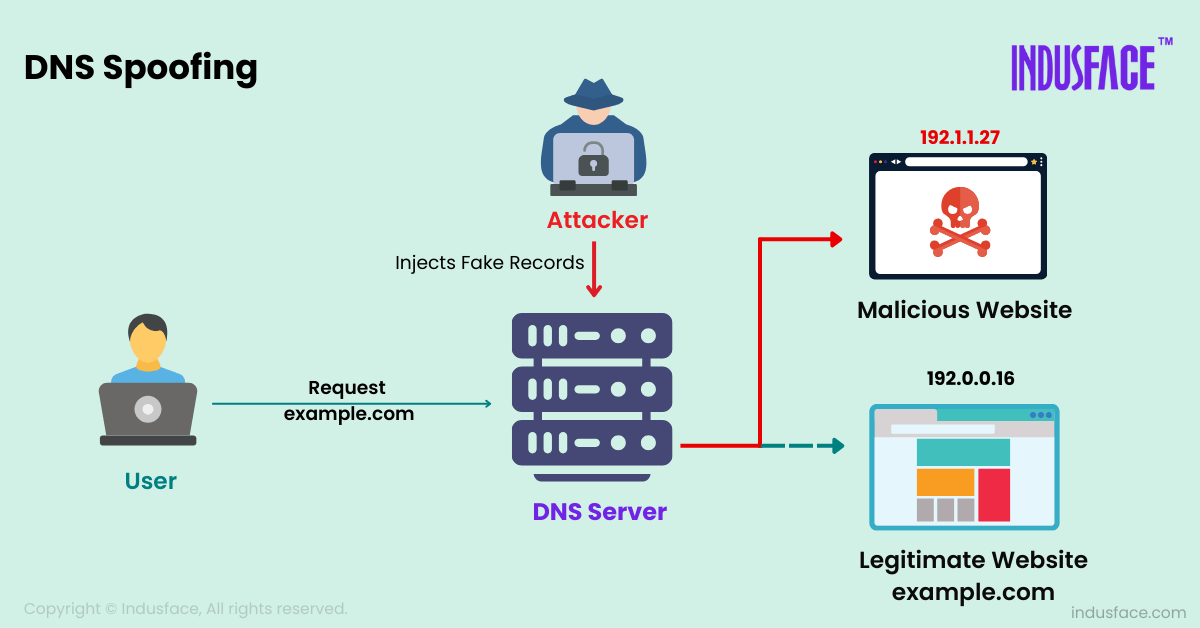
DNS Spoofing (DNS Cache Poisoning) is a cyberattack in which an attacker manipulates DNS records to redirect users from a legitimate website to a fake or malicious website without their knowledge.
DNS (Domain Name System) translates domain names such as google.com into IP addresses. In a DNS spoofing attack, the attacker provides a false IP address, causing users to visit a fraudulent website even though they entered the correct domain name.
How It Works
When a user types a website address into a browser, the device sends a DNS request to find the website’s IP address. An attacker intercepts or poisons the DNS response and returns a fake IP address. The user is then redirected to a malicious website controlled by the attacker.
Real-World Example:
A user types their bank’s website address into a browser. Due to DNS spoofing, the DNS server returns the attacker’s IP address instead of the bank’s legitimate IP address. The user sees a fake banking website that looks identical to the real one and enters their login credentials. The attacker captures the username and password.
Simple Definition:
DNS Spoofing is like changing the address on a map so that people trying to visit a legitimate business are secretly directed to a fake location controlled by a criminal.
What is a Brute Force Attack?
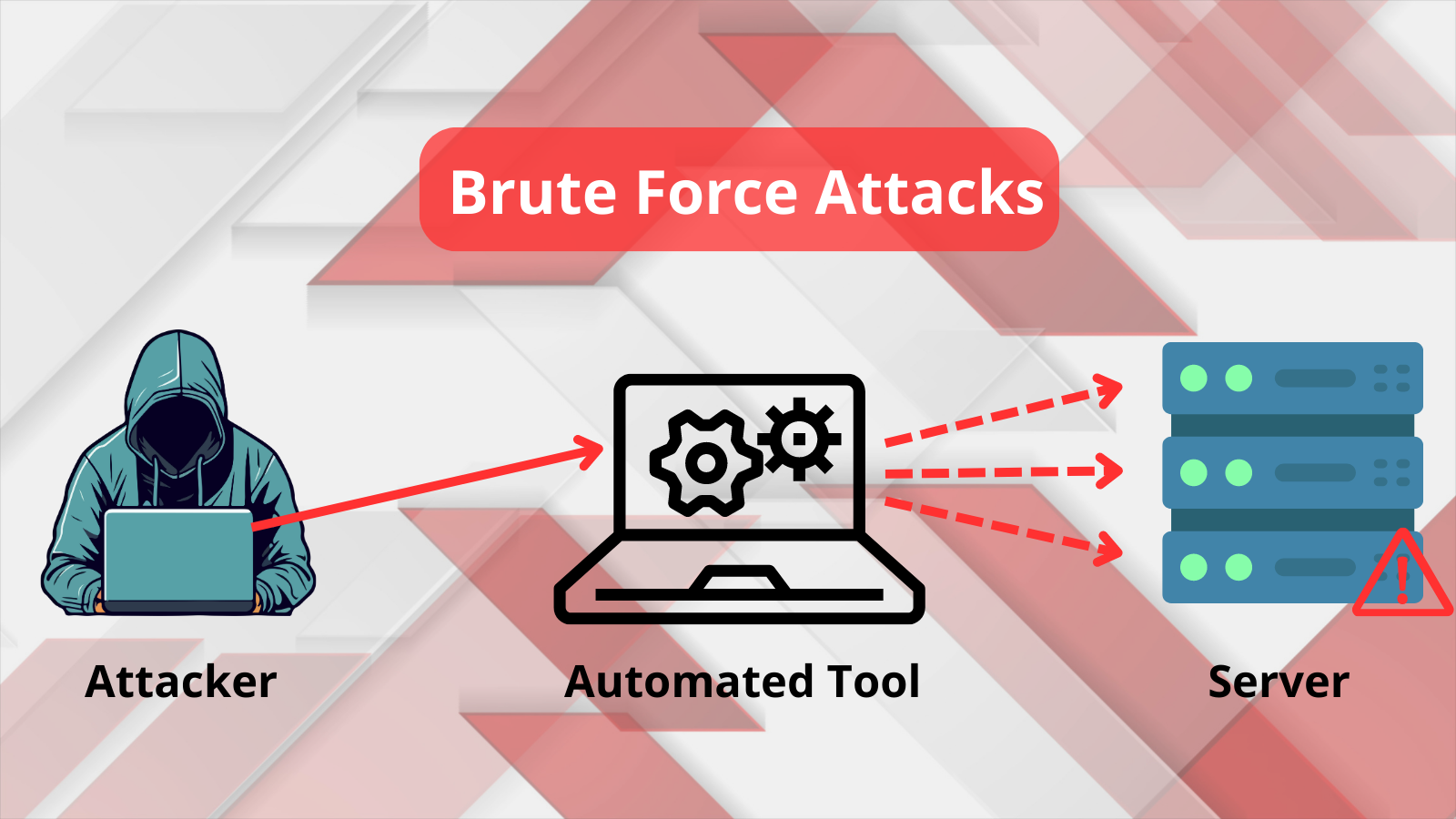
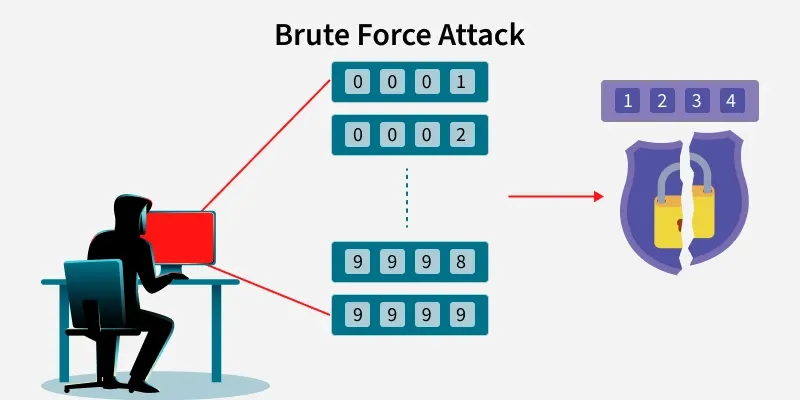
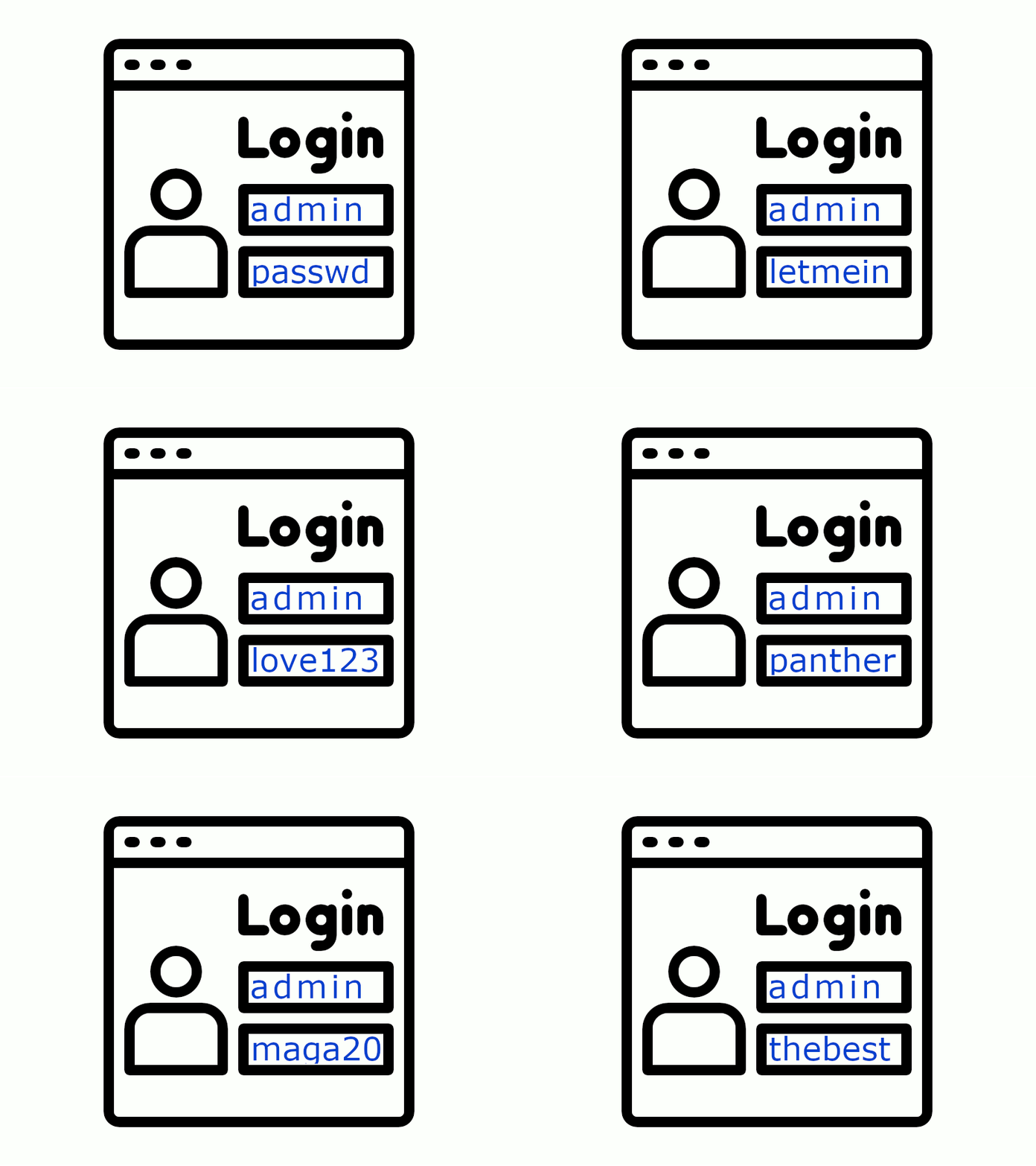
A Brute Force Attack is a cyberattack in which an attacker repeatedly tries different usernames, passwords, or encryption keys until the correct one is found. The attacker uses automated tools and scripts to test thousands or even millions of password combinations in a short period of time.
The goal of a brute force attack is to gain unauthorized access to user accounts, applications, servers, or network devices by guessing login credentials.
How It Works
The attacker targets a Login Page, VPN Portal, Email Account, or Server and continuously submits different password combinations. If the password is weak, common, or easily predictable, the attacker may eventually discover the correct credentials and gain access.
Real-World Example:
A company has a VPN portal accessible from the internet. An attacker uses an automated tool to try thousands of passwords against an employee’s account. If the employee uses a weak password such as Password123 or Admin123, the attacker may successfully log in and gain unauthorized access to the corporate network.
Simple Definition:
A Brute Force Attack is like a thief trying thousands of different keys on a door until one finally opens the lock. The attacker keeps guessing passwords until the correct one is found.
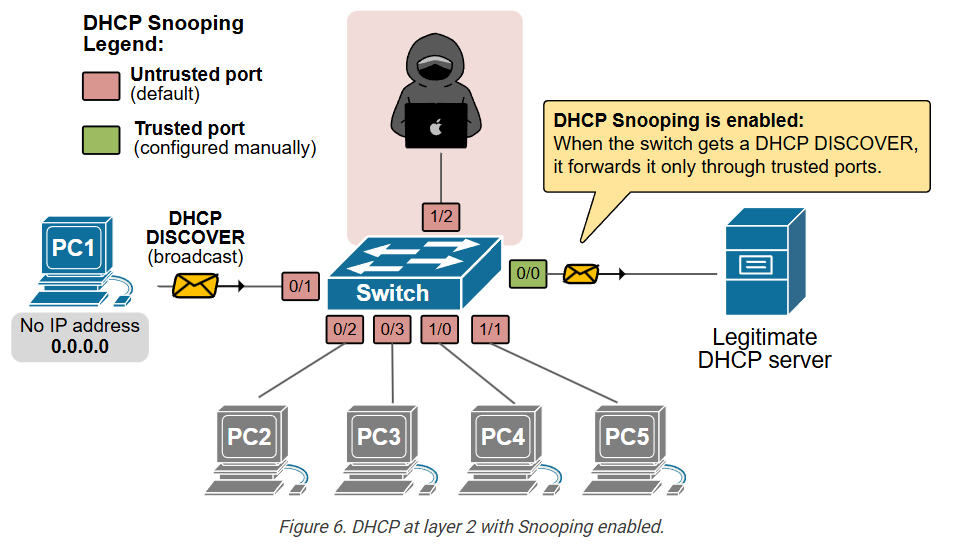
What is DHCP Spoofing?
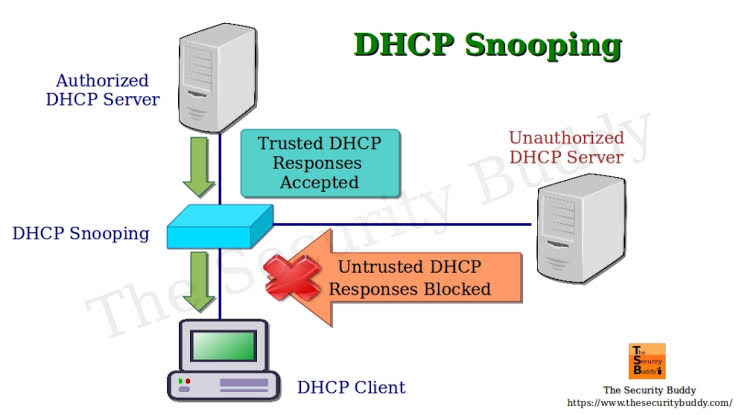
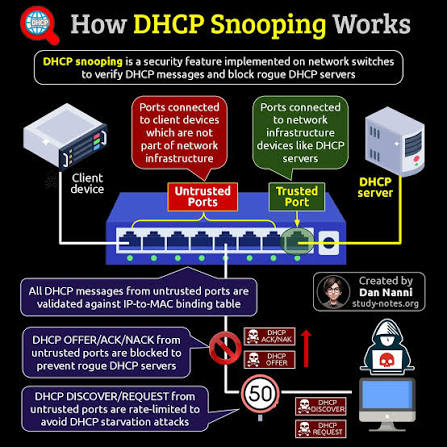
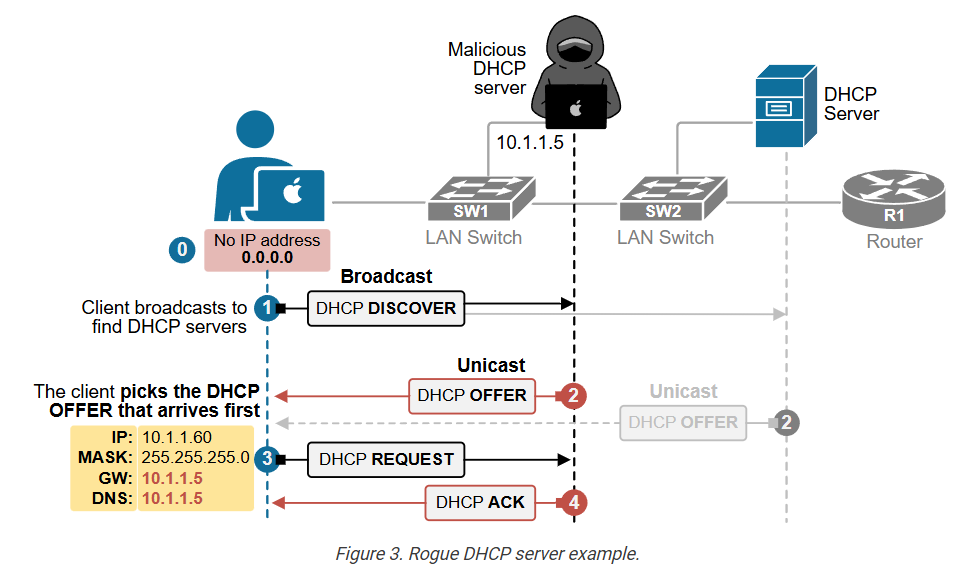
DHCP Spoofing is a network attack in which an attacker introduces a rogue (fake) DHCP server into a network. This fake DHCP server responds to DHCP requests from users faster than the legitimate DHCP server and provides incorrect network settings.
As a result, users may unknowingly receive malicious IP configuration information, allowing the attacker to intercept, monitor, or manipulate network traffic.
How It Works
When a device connects to a network, it requests an IP address from a DHCP server. In a DHCP spoofing attack, the rogue DHCP server responds first and assigns:
- A fake default gateway
- A malicious DNS server
- Incorrect network settings
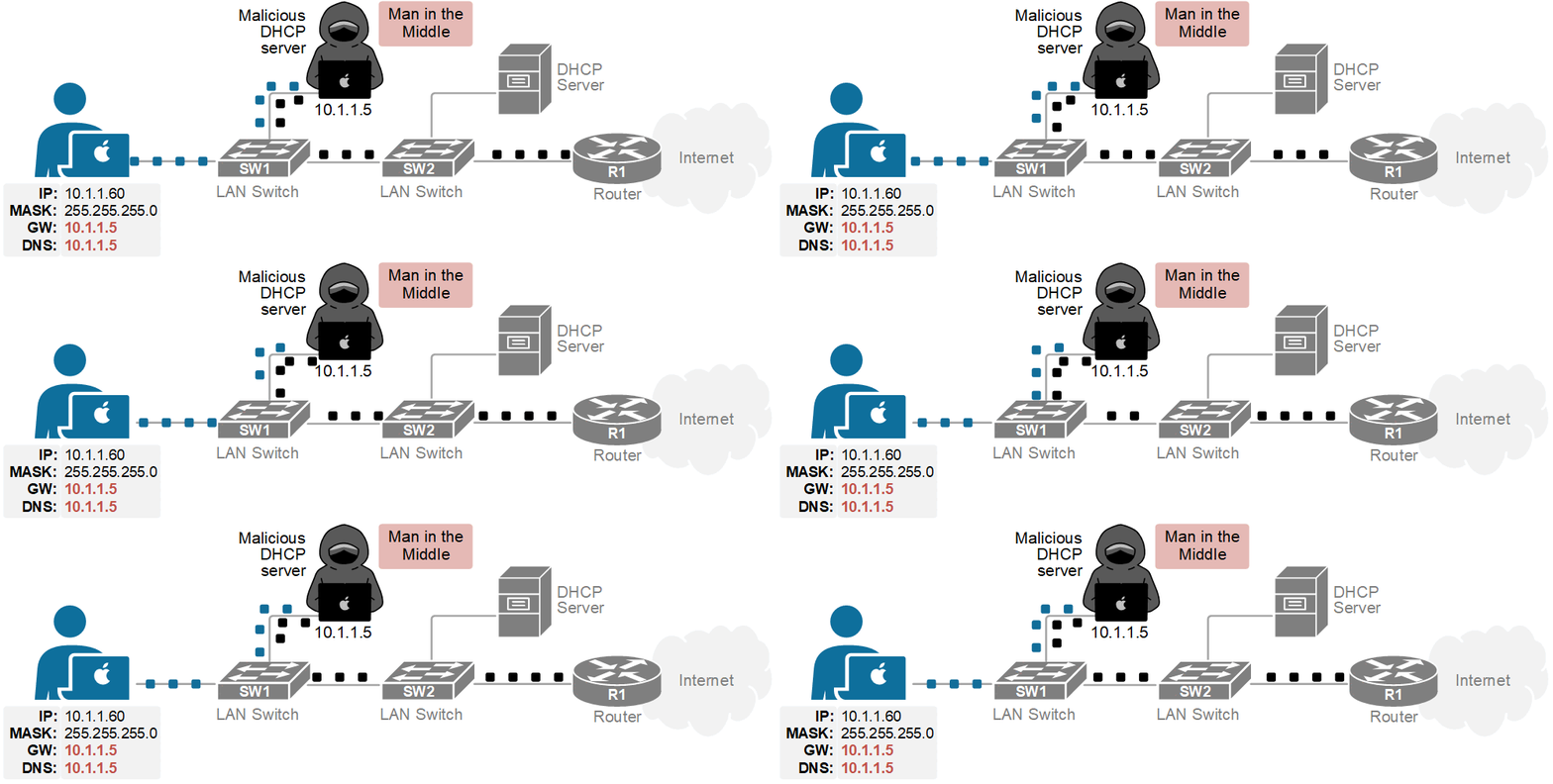
The victim’s traffic is then routed through the attacker’s device.
Real-World Example:
In a company office, an attacker connects a laptop running a rogue DHCP server to the network. Employees who connect to the network receive IP addresses from the attacker’s DHCP server instead of the legitimate one. The attacker sets their device as the default gateway and can now monitor user activity, capture login credentials, or redirect users to malicious websites.
What is an Insider Threat?
An Insider Threat is a security risk that comes from people inside an organization, such as employees, contractors, vendors, or business partners who have authorized access to company systems, networks, or data. These individuals may intentionally or unintentionally cause security incidents that lead to data breaches, financial losses, or operational disruption.
Unlike external hackers, insider threats already have legitimate access to organizational resources, making them more difficult to detect and prevent.
Types of Insider Threats
- Malicious Insider – An employee intentionally steals, leaks, or damages company data.
- Negligent Insider – An employee accidentally causes a security incident by making mistakes or ignoring security policies.
- Compromised Insider – An employee’s account is hijacked by an attacker and used to access company systems.
Real-World Example:
A company employee has access to the customer database. Before leaving the organization, the employee copies thousands of customer records onto a USB drive and shares them with a competitor. This results in a data breach and financial damage to the company.
Another example is an employee who accidentally clicks on a phishing email and enters their login credentials. Attackers then use the compromised account to gain access to sensitive business information.

What is SQL Injection?
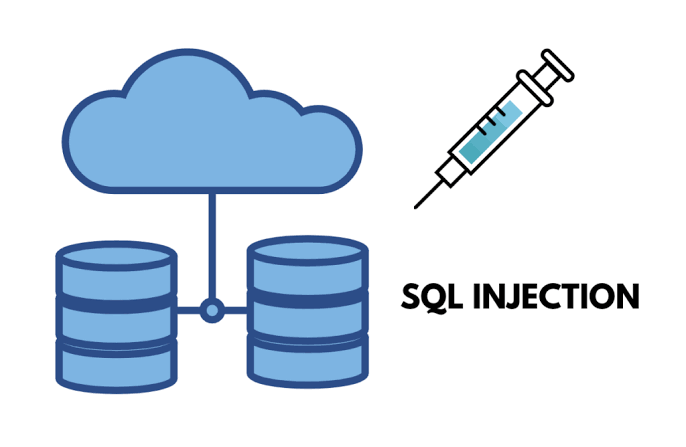
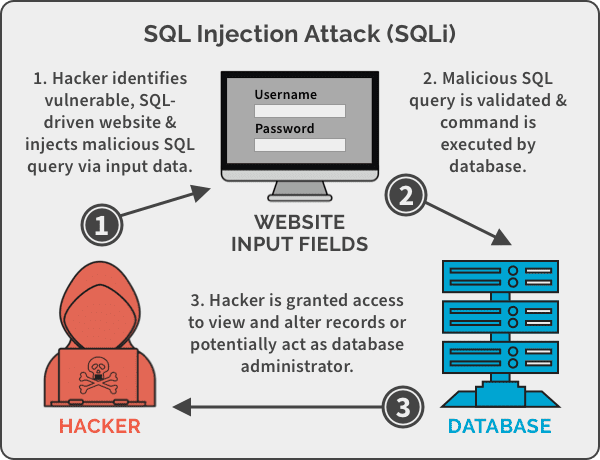
SQL Injection (SQLi) is a web application attack where an attacker inserts malicious SQL commands into a website’s input fields, such as login forms, search boxes, or URL parameters, to manipulate the application’s database.
The goal of an SQL Injection attack is to access, modify, delete, or steal sensitive data stored in the database without authorization.
How It Works
When a website does not properly validate user input, an attacker can enter malicious SQL code instead of normal data. The application then executes the attacker’s SQL commands on the database, potentially exposing confidential information.
Real-World Example:
A company’s website has a login page that is vulnerable to SQL Injection. An attacker enters specially crafted input into the username field. Due to poor input validation, the database processes the malicious query and grants unauthorized access to the application.
What is Session Hijacking?
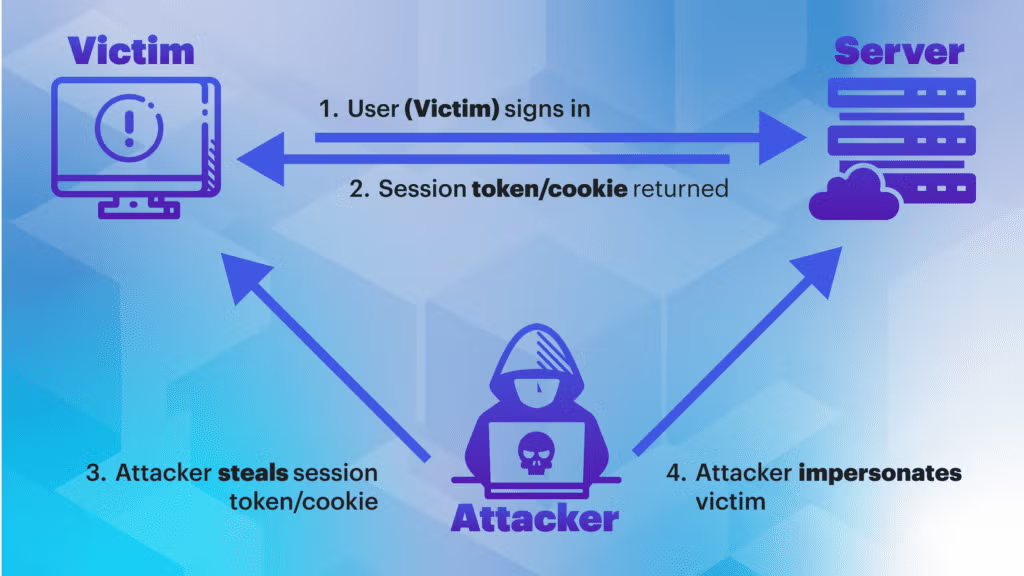
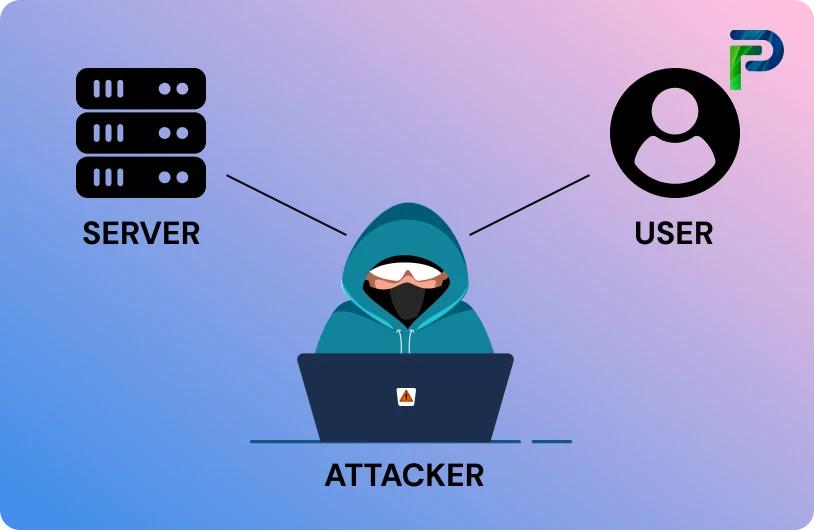
Session Hijacking is a cyberattack in which an attacker steals or takes control of a user’s active session with a website, application, or online service. Once the attacker obtains the session ID or session token, they can impersonate the user without needing to know the user’s username or password.
A session token is a unique identifier that a website uses to keep a user logged in after authentication. If an attacker steals this token, they can gain unauthorized access to the victim’s account.
How It Works
After a user logs into a website, the server creates a session and assigns a session ID. An attacker may steal this session ID through unsecured Wi-Fi networks, malware, cross-site scripting (XSS), or other methods. The attacker then uses the stolen session token to access the victim’s account as if they were the legitimate user.
Real-World Example:
A user logs into an online banking website while connected to an unsecured public Wi-Fi network. An attacker intercepts the network traffic and steals the user’s session cookie. Using the stolen session token, the attacker gains access to the banking session without needing the user’s password.
What is a Trojan Horse?
A Trojan Horse (Trojan) is a type of malware that disguises itself as a legitimate or useful program to trick users into installing it. Once installed, the Trojan performs malicious actions in the background, such as stealing data, providing unauthorized access to attackers, downloading additional malware, or spying on user activities.
The name comes from the ancient Trojan War story, where a seemingly harmless wooden horse was used to secretly infiltrate a city.
How It Works
Attackers distribute Trojans through:
- Fake software downloads
- Email attachments
- Cracked or pirated software
- Malicious websites
- Fake updates
The victim believes they are installing a legitimate application, but the hidden malware is installed at the same time.
Real-World Example:
An employee downloads a free PDF converter from an untrusted website. The software appears to work normally, but it secretly installs a Trojan on the computer. The Trojan then creates a backdoor, allowing attackers to remotely access the system and steal sensitive company information.
Effects of a Trojan Horse Attack:
- Unauthorized remote access to systems
- Theft of usernames and passwords
- Banking and financial fraud
Simple Definition:
A Trojan Horse is like a gift box that appears harmless from the outside but secretly contains a criminal hiding inside. Once opened, the attacker gains access to the victim’s system and can perform malicious activities without the user’s knowledge.


Top 20 Most Common Types Of Cybersecurity Attacks:
1. DoS and DDoS attacks:
A denial-of-service (DoS) attack is designed to overwhelm the resources of a system to the point where it is unable to reply to legitimate service requests. A distributed denial-of-service (DDoS) attack is similar in that it also seeks to drain the resources of a system. A DDoS attack is initiated by a vast array of malware-infected host machines controlled by the attacker. These are referred to as “denial of service” attacks because the victim site is unable to provide service to those who want to access it.
With a DoS attack, the target site gets flooded with illegitimate requests. Because the site has to respond to each request, its resources get consumed by all the responses. This makes it impossible for the site to serve users as it normally does and often results in a complete shutdown of the site.
DoS and DDoS attacks are different from other types of cyber attacks that enable the hacker to either obtain access to a system or increase the access they currently have. With these types of attacks, the attacker directly benefits from their efforts. With DoS and DDoS network attacks, on the other hand, the objective is simply to interrupt the effectiveness of the target’s service. If the attacker is hired by a business competitor, they may benefit financially from their efforts.
A DoS attack can also be used to create vulnerability for another type of attack. With a successful DoS or DDoS attack, the system often has to come offline, which can leave it vulnerable to other types of attacks. One common way to prevent DoS attacks is to use a firewall that detects whether requests sent to your site are legitimate. Imposter requests can then be discarded, allowing normal traffic to flow without interruption. An example of a major internet attack of this kind occurred in February 2020 to Amazon Web Services (AWS).
2. MITM Attacks:
Man-in-the-middle (MITM) types of cyber attacks refer to breaches in cybersecurity that make it possible for an attacker to eavesdrop on the data sent back and forth between two people, networks, or computers. It is called a “man in the middle” attack because the attacker positions themselves in the “middle” or between the two parties trying to communicate. In effect, the attacker is spying on the interaction between the two parties.
In a MITM attack, the two parties involved feel like they are communicating as they normally do. What they do not know is that the person actually sending the message illicitly modifies or accesses the message before it reaches its destination. Some ways to protect yourself and your organization from MITM attacks is by using strong encryption on access points or to use a virtual private network (VPN).
3. Phishing Attacks:
A phishing attack occurs when a malicious actor sends emails that seem to be coming from trusted, legitimate sources in an attempt to grab sensitive information from the target. Phishing attacks combine social engineering and technology and are so-called because the attacker is, in effect, “fishing” for access to a forbidden area by using the “bait” of a seemingly trustworthy sender.
To execute the attack, the bad actor may send a link that brings you to a website that then fools you into downloading malware such as viruses, or giving the attacker your private information. In many cases, the target may not realize they have been compromised, which allows the attacker to go after others in the same organization without anyone suspecting malicious activity.
You can prevent phishing attacks from achieving their objectives by thinking carefully about the kinds of emails you open and the links you click on. Pay close attention to email headers, and do not click on anything that looks suspicious. Check the parameters for “Reply-to” and “Return-path.” They need to connect to the same domain presented in the email.
4. Whale-Phishing Attacks:
A whale-phishing attack is so-named because it goes after the “big fish” or whales of an organization, which typically include those in the C-suite or others in charge of the organization. These individuals are likely to possess information that can be valuable to attackers, such as proprietary information about the business or its operations.
If a targeted “whale” downloads ransomware, they are more likely to pay the ransom to prevent news of the successful attack from getting out and damaging their reputation or that of the organization. Whale-phishing attacks can be prevented by taking the same kinds of precautions to avoid phishing attacks, such as carefully examining emails and the attachments and links that come with them, keeping an eye out for suspicious destinations or parameters.
5. Spear-Phishing Attacks:
Spear phishing refers to a specific type of targeted phishing attack. The attacker takes the time to research their intended targets and then write messages the target is likely to find personally relevant. These types of attacks are aptly called “spear” phishing because of the way the attacker hones in on one specific target. The message will seem legitimate, which is why it can be difficult to spot a spear-phishing attack.
Often, a spear-phishing attack uses email spoofing, where the information inside the “From” portion of the email is faked, making it look like the email is coming from a different sender. This can be someone the target trusts, like an individual within their social network, a close friend, or a business partner. Attackers may also use website cloning to make the communication seem legitimate. With website cloning, the attacker copies a legitimate website to lull the victim into a sense of comfort. The target, thinking the website is real, then feels comfortable entering their private information.
Similar to regular phishing attacks, spear-phishing-attacks can be prevented by carefully checking the details in all fields of an email and making sure users do not click on any link whose destination cannot be verified as legitimate..
6. Ransomware:
With Ransomware, the victim’s system is held hostage until they agree to pay a ransom to the attacker. After the payment has been sent, the attacker then provides instructions regarding how the target can regain control of their computer. The name “ransomware” is appropriate because the malware demands a ransom from the victim.
In a ransomware attack, the target downloads ransomware, either from a website or from within an email attachment. The malware is written to exploit vulnerabilities that have not been addressed by either the system’s manufacturer or the IT team. The ransomware then encrypts the target’s workstation. At times, ransomware can be used to attack multiple parties by denying access to either several computers or a central server essential to business operations.
Affecting multiple computers is often accomplished by not initiating systems captivation until days or even weeks after the malware’s initial penetration. The malware can send AUTORUN files that go from one system to another via the internal network or Universal Serial Bus (USB) drives that connect to multiple computers. Then, when the attacker initiates the encryption, it works on all the infected systems simultaneously.
In some cases, ransomware authors design the code to evade traditional antivirus software. It is therefore important for users to remain vigilant regarding which sites they visit and which links they click. You can also prevent many ransomware attacks by using a next-generation firewall (NGFW) that can perform deep data packet inspections using artificial intelligence (AI) that looks for the characteristics of ransomware.
7. Password Attacks:
Passwords are the access verification tool of choice for most people, so figuring out a target’s password is an attractive proposition for a hacker. This can be done using a few different methods. Often, people keep copies of their passwords on pieces of paper or sticky notes around or on their desks. An attacker can either find the password themselves or pay someone on the inside to get it for them.
An attacker may also try to intercept network transmissions to grab passwords not encrypted by the network. They can also use social engineering, which convinces the target to input their password to solve a seemingly “important” problem. In other cases, the attacker can simply guess the user’s password, particularly if they use a default password or one that is easy to remember such as “1234567.”
Attackers also often use brute-force methods to guess passwords. A brute-force password hack uses basic information about the individual or their job title to try to guess their password. For example, their name, birthdate, anniversary, or other personal but easy-to-discover details can be used in different combinations to decipher their password. Information that users put on social media can also be leveraged in a brute-force password hack. What the individual does for fun, specific hobbies, names of pets, or names of children are sometimes used to form passwords, making them relatively easy to guess for brute-force attackers.
A hacker can also use a dictionary attack to ascertain a user’s password. A dictionary attack is a technique that uses common words and phrases, such as those listed in a dictionary, to try and guess the target’s password.
One effective method of preventing brute-force and dictionary password attacks is to set up a lock-out policy. This locks out access to devices, websites, or applications automatically after a certain number of failed attempts. With a lock-out policy, the attacker only has a few tries before they get banned from access. If you have a lockout policy in place already and discover that your account has been locked out because of too many login attempts, it is wise to change your password.
If an attacker systematically uses a brute-force or dictionary attack to guess your password, they may take note of the passwords that did not work. For example, if your password is your last name followed by your year of birth and the hacker tries putting your birth year before your last name on the final attempt, they may get it right on the next try.
8. SQL injection Attacks:
Structured Query Language (SQL) injection is a common method of taking advantage of websites that depend on databases to serve their users. Clients are computers that get information from servers, and an SQL attack uses an SQL query sent from the client to a database on the server. The command is inserted, or “injected”, into a data plane in place of something else that normally goes there, such as a password or login. The server that holds the database then runs the command and the system is penetrated.
If an SQL injection succeeds, several things can happen, including the release of sensitive data or the modification or deletion of important data. Also, an attacker can execute administrator operations like a shutdown command, which can interrupt the function of the database.
To shield yourself from an SQL injection attack, take advantage of the least-privileged model. With least-privileged architecture, only those who absolutely need to access key databases are allowed in. Even if a user has power or influence within the organization, they may not be allowed to access specific areas of the network if their job does not depend on it.
For example, the CEO can be kept from accessing areas of the network even if they have the right to know what is inside. Applying a least-privileged policy can prevent not just bad actors from accessing sensitive areas but also those who mean well but accidentally leave their login credentials vulnerable to attackers or leave their workstations running while away from their computers.
9. URL interpretation:
With URL interpretation, attackers alter and fabricate certain URL addresses and use them to gain access to the target’s personal and professional data. This kind of attack is also referred to as URL poisoning. The name “URL interpretation” comes from the fact that the attacker knows the order in which a web-page’s URL information needs to be entered. The attacker then “interprets” this syntax, using it to figure out how to get into areas they do not have access to.
To execute a URL interpretation attack, a hacker may guess URLs they can use to gain administrator privileges to a site or to access the site’s back end to get into a user’s account. Once they get to the page they want, they can manipulate the site itself or gain access to sensitive information about the people who use it.
For example, if a hacker attempts to get into the admin section of a site called GetYourKnowledgeOn.com, they may type in http://getyourknowledgeon.com/admin, and this will bring them to an admin login page. In some cases, the admin username and password may be the default “admin” and “admin” or very easy to guess. An attacker may also have already figured out the admin’s password or narrowed it down to a few possibilities. The attacker then tries each one, gains access, and can manipulate, steal, or delete data at will.
To prevent URL interpretation attacks from succeeding, use secure authentication methods for any sensitive areas of your site. This may necessitate multi-factor authentication (MFA) or secure passwords consisting of seemingly random characters.
10. DNS Spoofing:
With Domain Name System (DNS) spoofing, a hacker alters DNS records to send traffic to a fake or “spoofed” website. Once on the fraudulent site, the victim may enter sensitive information that can be used or sold by the hacker. The hacker may also construct a poor-quality site with derogatory or inflammatory content to make a competitor company look bad.
In a DNS spoofing attack, the attacker takes advantage of the fact that the user thinks the site they are visiting is legitimate. This gives the attacker the ability to commit crimes in the name of an innocent company, at least from the perspective of the visitor.
To prevent DNS spoofing, make sure your DNS servers are kept up-to-date. Attackers aim to exploit vulnerabilities in DNS servers, and the most recent software versions often contain fixes that close known vulnerabilities.
11. Session Hijacking:
Session hijacking is one of multiple types of MITM attacks. The attacker takes over a session between a client and the server. The computer being used in the attack substitutes its Internet Protocol (IP) address for that of the client computer, and the server continues the session without suspecting it is communicating with the attacker instead of the client. This kind of attack is effective because the server uses the client’s IP address to verify its identity. If the attacker’s IP address is inserted partway through the session, the server may not suspect a breach because it is already engaged in a trusted connection.
To prevent session hijacking, use a VPN to access business-critical servers. This way, all communication is encrypted, and an attacker cannot gain access to the secure tunnel created by the VPN.
12. Brute Force Attacks:
A brute-force attack gets its name from the “brutish” or simple methodology employed by the attack. The attacker simply tries to guess the login credentials of someone with access to the target system. Once they get it right, they are in.
While this may sound time-consuming and difficult, attackers often use bots to crack the credentials. The attacker provides the bot with a list of credentials that they think may give them access to the secure area. The bot then tries each one while the attacker sits back and waits. Once the correct credentials have been entered, the criminal gains access.
To prevent brute-force attacks, have lock-out policies in place as part of your authorization security architecture. After a certain number of attempts, the user attempting to enter the credentials gets locked out. This typically involves “freezing” the account so even if someone else tries from a different device with a different IP address, they cannot bypass the lockout.
It is also wise to use random passwords without regular words, dates, or sequences of numbers in them. This is effective because, for example, even if an attacker uses software to try to guess a 10-digit password, it will take many years of non-stop attempts to get it right.
13. Web Attacks:
Web attacks refer to threats that target vulnerabilities in web-based applications. Every time you enter information into a web application, you are initiating a command that generates a response. For example, if you are sending money to someone using an online banking application, the data you enter instructs the application to go into your account, take money out, and send it to someone else’s account. Attackers work within the frameworks of these kinds of requests and use them to their advantage.
Some common web attacks include SQL injection and cross-site scripting (XSS), which will be discussed later in this article. Hackers also use cross-site request forgery (CSRF) attacks and parameter tampering. In a CSRF attack, the victim is fooled into performing an action that benefits the attacker. For example, they may click on something that launches a script designed to change the login credentials to access a web application. The hacker, armed with the new login credentials, can then log in as if they are the legitimate user.
Parameter tampering involves adjusting the parameters that programmers implement as security measures designed to protect specific operations. The operation’s execution depends on what is entered in the parameter. The attacker simply changes the parameters, and this allows them to bypass the security measures that depended on those parameters.
To avoid web attacks, inspect your web applications to check for—and fix—vulnerabilities. One way to patch up vulnerabilities without impacting the performance of the web application is to use anti-CSRF tokens. A token is exchanged between the user’s browser and the web application. Before a command is executed, the token’s validity is checked. If it checks out, the command goes through—if not, it is blocked. You can also use SameSite flags, which only allow requests from the same site to be processed, rendering any site built by the attacker powerless.
14. Insider threats:
Sometimes, the most dangerous actors come from within an organization. People within a company’s own doors pose a special danger because they typically have access to a variety of systems, and in some cases, admin privileges that enable them to make critical changes to the system or its security policies.
In addition, people within the organization often have an in-depth understanding of its cybersecurity architecture, as well as how the business reacts to threats. This knowledge can be used to gain access to restricted areas, make changes to security settings, or deduce the best possible time to conduct an attack.
One of the best ways to prevent insider threats in organizations is to limit employees’ access to sensitive systems to only those who need them to perform their duties. Also, for the select few who need access, use MFA, which will require them to use at least one thing they know in conjunction with a physical item they have to gain access to a sensitive system. For example, the user may have to enter a password and insert a USB device. In other configurations, an access number is generated on a handheld device that the user has to log in to. The user can only access the secure area if both the password and the number are correct.
While MFA may not prevent all attacks on its own, it makes it easier to ascertain who is behind an attack—or an attempted one—particularly because only relatively few people are granted access to sensitive areas in the first place. As a result, this limited access strategy can work as a deterrent. Cybercriminals within your organization will know it is easy to pinpoint who the perpetrator is because of the relatively small pool of potential suspects.
15. Trojan Horses:
A Trojan horse attack uses a malicious program that is hidden inside a seemingly legitimate one. When the user executes the presumably innocent program, the malware inside the Trojan can be used to open a backdoor into the system through which hackers can penetrate the computer or network. This threat gets its name from the story of the Greek soldiers who hid inside a horse to infiltrate the city of Troy and win the war. Once the “gift” was accepted and brought within the gates of Troy, the Greek soldiers jumped out and attacked. In a similar way, an unsuspecting user may welcome an innocent-looking application into their system only to usher in a hidden threat.
To prevent Trojan attacks, users should be instructed not to download or install anything unless its source can be verified. Also, NGFWs can be used to examine data packets for potential threats of Trojans.
16. Drive-By Attacks:
In a drive-by attack, a hacker embeds malicious code into an insecure website. When a user visits the site, the script is automatically executed on their computer, infecting it. The designation “drive by” comes from the fact that the victim only has to “drive by” the site by visiting it to get infected. There is no need to click on anything on the site or enter any information.
To protect against drive-by attacks, users should make sure they are running the most recent software on all their computers, including applications like Adobe Acrobat and Flash, which may be used while browsing the internet. Also, you can use web-filtering software, which can detect if a site is unsafe before a user visits it.
17. XSS attacks
With XSS, or cross-site scripting, the attacker transmits malicious scripts using clickable content that gets sent to the target’s browser. When the victim clicks on the content, the script is executed. Because the user has already logged into a web application’s session, what they enter is seen as legitimate by the web application. However, the script executed has been altered by the attacker, resulting in an unintended action being taken by the “user.”
For example, an XSS attack may change the parameters of a transfer request sent through an online banking application. In the falsified request, the intended recipient of the transferred money has their name replaced with that of the attacker. The attacker may also change the amount being transferred, giving themselves even more money than the target initially intended to send.
One of the most straightforward ways of preventing XSS attacks is to use a whitelist of allowable entities. This way, anything other than approved entries will not be accepted by the web application. You can also use a technique called sanitizing, which examines the data being entered, checking to see if it contains anything that can be harmful.
18. Eavesdropping Attacks:
Eavesdropping attacks involve the bad actor intercepting traffic as it is sent through the network. In this way, an attacker can collect usernames, passwords, and other confidential information like credit cards. Eavesdropping can be active or passive.
With active eavesdropping, the hacker inserts a piece of software within the network traffic path to collect information that the hacker analyzes for useful data. Passive eavesdropping attacks are different in that the hacker “listens in,” or eavesdrops, on the transmissions, looking for useful data they can steal.
Both active and passive eavesdropping are types of MITM attacks. One of the best ways of preventing them is by encrypting your data, which prevents it from being used by a hacker, regardless of whether they use active or passive eavesdropping.
19. Birthday attack:
In a birthday attack, an attacker abuses a security feature: hash algorithms, which are used to verify the authenticity of messages. The hash algorithm is a digital signature, and the receiver of the message checks it before accepting the message as authentic. If a hacker can create a hash that is identical to what the sender has appended to their message, the hacker can simply replace the sender’s message with their own. The receiving device will accept it because it has the right hash.
The name “birthday attack” refers to the birthday paradox, which is based on the fact that in a room of 23 people, there is more than a 50% chance that two of them have the same birthday. Hence, while people think their birthdays, like hashes, are unique, they are not as unique as many think.
To prevent birthday attacks, use longer hashes for verification. With each extra digit added to the hash, the odds of creating a matching one decrease significantly.
20. Malware Attack:
Malware is a general term for malicious software, hence the “mal” at the start of the word. Malware infects a computer and changes how it functions, destroys data, or spies on the user or network traffic as it passes through. Malware can either spread from one device to another or remain in place, only impacting its host device.
Several of the attack methods described above can involve forms of malware, including MITM attacks, phishing, ransomware, SQL injection, Trojan horses, drive-by attacks, and XSS attacks.
In a malware attack, the software has to be installed on the target device. This requires an action on the part of the user. Therefore, in addition to using firewalls that can detect malware, users should be educated regarding which types of software to avoid, the kinds of links they should verify before clicking, and the emails and attachments they should not engage with.
How to Protect Against Hacker Attacks
Protecting against Hacker Attacks requires a combination of security technologies, strong policies, and user awareness. Organizations and individuals should implement multiple layers of security to reduce the risk of unauthorized access, malware infections, data breaches, and other cyber threats.
One of the most important security measures is using strong and unique passwords combined with Multi-Factor Authentication (MFA). This helps prevent attackers from gaining access to accounts even if passwords are compromised. Systems, applications, and operating systems should also be kept up to date with the latest security patches to eliminate known vulnerabilities that hackers commonly exploit.
Organizations should deploy security solutions such as firewalls, antivirus software, endpoint protection, intrusion prevention systems (IPS), and web filtering to monitor and block malicious activity. Employees should be trained to recognize phishing emails, suspicious links, and social engineering attempts, as human error is one of the most common causes of security incidents.
Regular data backups are also essential because they allow businesses to recover quickly from ransomware attacks, hardware failures, or accidental data loss. In addition, secure remote access technologies such as VPNs should be used when connecting to corporate resources over the internet or public Wi-Fi networks.
By combining strong authentication, security technologies, regular updates, employee awareness training, and proactive monitoring, organizations can significantly reduce their exposure to cyber threats and improve their overall cybersecurity posture.
Real Example: Protection Against a Hacker Attack
Consider a company with 100 employees that uses email, file servers, and cloud applications for daily business operations. One day, an attacker sends a phishing email to an employee pretending to be the company’s IT department. The email contains a malicious link designed to steal login credentials.
When the employee clicks the link, the company’s email security gateway identifies the message as suspicious and warns the user. Even if the attacker somehow obtains the employee’s password, Multi-Factor Authentication (MFA) prevents unauthorized access because the attacker does not have the second authentication factor. At the same time, the company’s firewall and Intrusion Prevention System (IPS) monitor network traffic and block any suspicious connection attempts from the attacker’s systems.
Later, the attacker tries to install malware on a company computer. However, the organization’s endpoint protection and antivirus software detect the malicious file and quarantine it before it can execute. Because the company regularly backs up its data and keeps systems updated, the attack fails to cause significant damage.
This example demonstrates how multiple security controls—including firewalls, MFA, antivirus software, email security, and employee awareness training—work together to protect an organization from hacker attacks and minimize the risk of a successful cyber incident.