
Cisco HSRP Protocol
Introduction?
Redundancy is a crucial component of every modern network. In this digital era, staying without a network for even a short time is hard. You should include some redundancy if you don’t want your firm to cease operating. All of your devices will stop communicating with the outside world if the default gateway fails since they all point to it. That’s where HSRP comes into action, but what is HSRP in networking? The Hot Standby Router Protocol (HSRP) enables a backup router to take control of the default gateway.
What is HSRP in Networking?
HSRP in Networking or Hot Standby Router Protocol is a Cisco proprietary redundancy protocol for default gateway configuration in a network and fault tolerance. In order to maintain network connection even when one of the routers fails, HSRP enables several routers to cooperate and provide a single virtual router to the linked hosts.
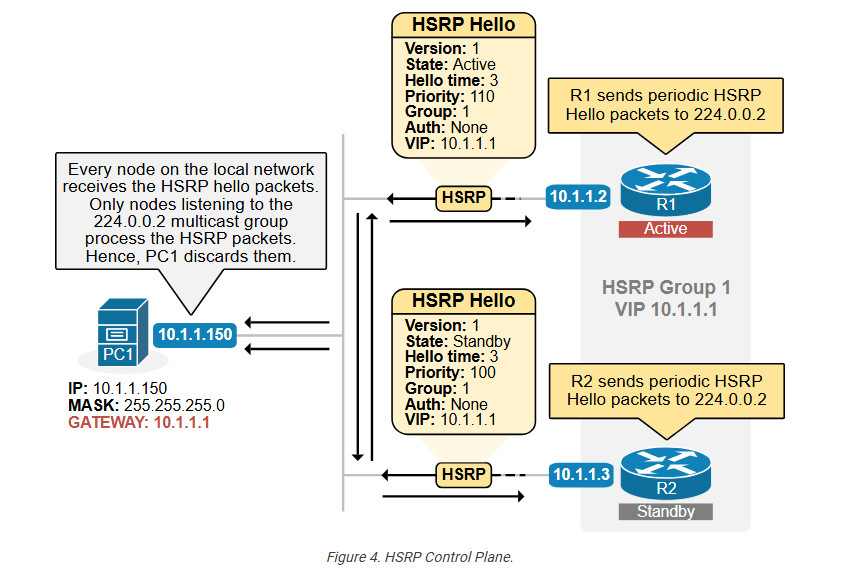
In an HSRP, routers in a group speak to one another via User Datagram Protocol (UDP) port 1985 using the multicast address 224.0.0.2. One router is chosen to serve as the group’s “active” router, which is in charge of forwarding traffic, and another is chosen to serve as the group’s “standby” or “backup” router, which assumes control in the event that the active router fails.
History of HSRP?
HSRP stands for Hot Standby Router Protocol, a Cisco proprietary protocol that provides redundancy and load balancing for network routers. HSRP was first introduced in 1998, described in RFC 2281, and has been updated several times since then. The main updates are:
- HSRP version 2, released in 2001, which supports IPv6 and longer group names.
- HSRP for IPv6, released in 2006, allows HSRP to run over IPv6 networks without requiring IPv4 compatibility.
As per the requirements, new patch update or enhancements has been made for better functioning.
Before getting into the workings of Hot Standby Router Protocol, let’s first understand why HSRP is required.
Why Need HSRP Protocol in Organization?
HSRP (Hot Standby Router Protocol) is needed in an organization to ensure continuous network availability, protect business operations from downtime, and eliminate the default gateway as a single point of failure.
In an organization, employees, servers, applications, email systems, cloud services, VoIP, and security devices all depend on reliable network connectivity. Normally, all systems use a single router as their default gateway. If that router fails due to hardware issues, software crashes, maintenance, power failure, or link problems, the entire organization can lose access to internal systems and the internet, causing work stoppage, financial loss, and productivity impact.
HSRP allows an organization to deploy multiple routers that act as one virtual gateway. Users and devices are configured with a single virtual IP address, while behind the scenes one router operates as the Active router and another as the Standby router. If the Active router fails, the Standby router automatically takes over within seconds, without any manual intervention or reconfiguration on user devices.
By using HSRP, organizations achieve high availability, fast failover, and business continuity, ensuring critical services remain accessible even during failures or maintenance. This improves network reliability, supports 24/7 operations, meets service-level agreements (SLAs), and reduces operational risk, making HSRP an essential protocol for enterprise and mission-critical network environments.
How HSRP Works?
Multiple routers are configured in an HSRP group,Virtual IP address,Virtual MAC address One router becomes Active,Another becomes Standby,Hosts use the virtual IP as their default gateway If the Active router fails, the Standby router automatically takes over.
HSRP Router Roles?
Each HSRP group has:
1. Active Router
- Forwards traffic sent to the virtual IP
- Owns the virtual MAC address
2. Standby Router
- Takes over if the active router fails
3. Other Routers (Listen)
Monitor HSRP messages but do not forward traffic
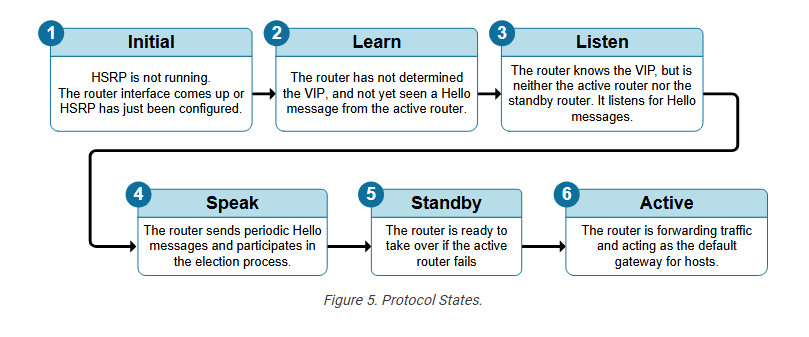
HSRP States – Proper Explanation?
Initial State
HSRP is not running The router has not received any HSRP hello packets,Occurs when:Interface is down HSRP is not configured,This is the starting state.
Learn State
Router does not know the virtual IP address,Learns the virtual IP from received hello messages,Router is not yet participating in elections,The router is learning HSRP information.
Listen State
Router knows the virtual IP address,Listens for HSRP hello packets,Does not send hello messages,Not Active or Standby,Router is aware but not elected.
Speak State
Router sends hello packets,Participates in Active/Standby election,Still not Active or Standby,Router is now actively competing.
Standby State
Router is elected as backup router,Monitors the Active router,Ready to take over if Active fails,Only one Standby router per group,This is the immediate replacement router.
Active State
Router is elected as Active router,Forwards traffic for the virtual IP,Responds to ARP requests,Sends hello packets,This router is the live default gateway.
HSRP Priority & Election?
Priority range: 0–255,Default priority: 100,Higher priority becomes Active,If priorities are equal, highest IP address wins
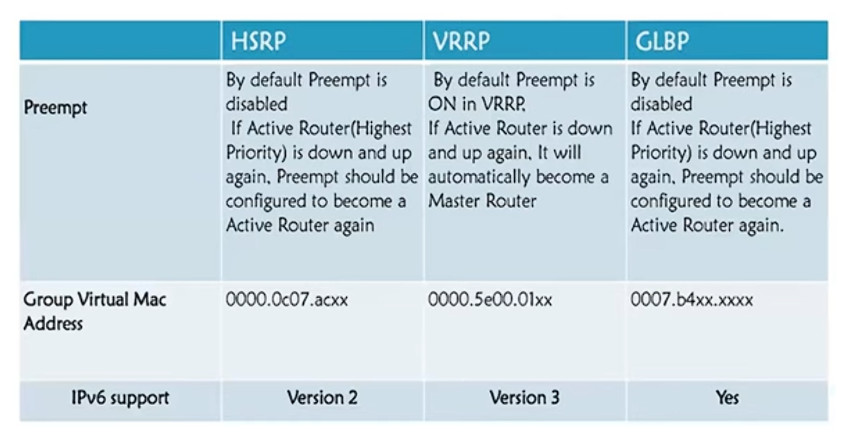
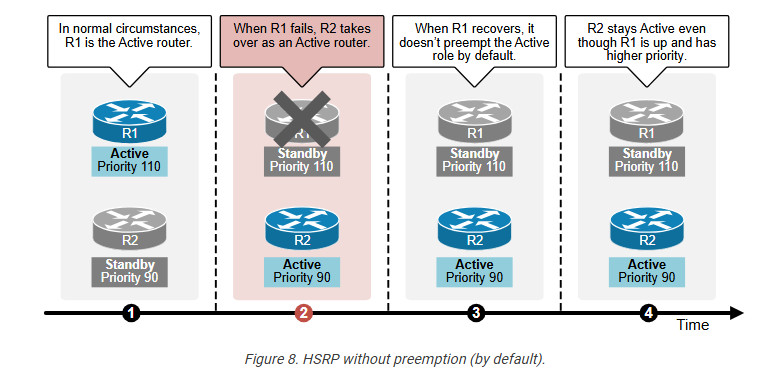
Preemption :- Preempt allows a higher-priority router to take back Active role after recovery
Virtual MAC Address?
HSRP uses a virtual MAC address so hosts don’t need to relearn ARP.
Format:- 0000.0C07.ACXX,XX = HSRP group number (hex)
HSRP Tracking – Explanation (Clear & Proper)
HSRP Tracking is a feature that allows HSRP to monitor the status of an interface or object and dynamically adjust router priority so that the most suitable router becomes the Active router.
Why HSRP Tracking Is Needed?
Normally, HSRP only checks whether the HSRP-enabled interface is up or down.
But in real networks, a router’s uplink (WAN/ISP link) may fail while the LAN interface is still up.
Without tracking?
- Router stays Active
- But has no path to outside network
- Traffic gets dropped
HSRP tracking solves this problem.
How HSRP Tracking Works?
- HSRP tracks an interface or object
- If the tracked item fails, the router’s HSRP priority is reduced
- If priority becomes lower than another router
- Router loses Active role :- Another router becomes Active
This ensures traffic always uses a working path.
What Can Be Tracked?
Interface tracking (most common)
Object tracking (IP SLA, routes, etc.)
Interface Tracking (Most Used)?
Tracks the status of a physical interface (e.g., WAN link).
Example:
- Router A priority: 110 (Active)
- Router B priority: 100 (Standby)
- Router A tracks WAN interface
- WAN fails → priority decreases by 20
- New priority = 90
- Router B becomes Active
Advantages of Hot Standby Router Protocol
Here are the main advantages –
- Redundancy – Using an active and a standby router inside an HSRP group, HSRP enables the establishment of redundant gateway configurations. The standby router takes over in the event of an active router failure, providing no downtime for the network.
- High Availability – A router is always available to forward traffic for the connected hosts, thanks to HSRP. By doing this, network uptime is increased, and end users’ connection is maintained.
- Seamless Failover – In the event of a breakdown, HSRP offers a smooth switch from the active router to the backup router. This maintains a steady network environment by reducing packet loss and interruption to the linked hosts.
Disadvantages of Hot Standby Router Protocol
Although HSRP provides advantages, there are a number of disadvantages to take into account:
- Proprietary protocol – Since HSRP is a Cisco-specific protocol, only Cisco-branded hardware may use it. In a network setting with several vendors, this may restrict interoperability.
- Scalability – Large or sophisticated networks are not intended for HSRP. It is appropriate for small and medium-sized networks, but bigger settings with many routers and subnets could not scale effectively.
- Active/standby model – One router serves as the active router in HSRP, while another serves as the backup router. The backup router is inactive until a failure occurs, which implies that only one router actively sends traffic. This might lead to the underutilization of the backup router and the wasteful use of resources.
Frequently Asked Questions
Q1. Why HSRP is used in networking?
HSRP is a Cisco proprietary protocol that enables two or more routers to work together to offer a network with redundancy and load balancing.
Q2. What is HSRP and VRRP?
HSRP, or Hot Standby Router Protocol, is a Cisco proprietary, which means it is suitable for Cisco devices, whereas VRRP, or Virtual Router Redundancy Protocol, is an open standard protocol that is suitable for a variety of vendors.
Q3. Is HSRP a layer 2 or 3 network?
HSRP is a layer 3, i.e., network layer protocol.
Q4. Is HSRP and VRRP the same?
HSRP and VRRP are both protocols that provide redundancy for routers in a network. HSRP is specially developed for Cisco devices, whereas VRRP supports various vendors.








Basic Configuration of HSRP
					R1

interface Ethernet0/1
description LAN Interface of Active Router
ip address 192.168.1.1 255.255.255.0
standby 1 ip 192.168.1.254 <—- Create HSRP Group 1 and assign Virtual IP
standby 1 priority 101 <—- Assign priority above 100 to make this the primary router
standby 1 preempt <—- Makes router active if it has higher priority


R2

interface Ethernet0/1
description LAN Interface of Standby Router
ip address 192.168.1.2 255.255.255.0
standby 1 ip 192.168.1.254 <—- Create HSRP Group 1 and assign Virtual IP
standby 1 preempt <—- Makes router active if it has higher priority


