
Ether-Channel Technology
What is Ether-Channel
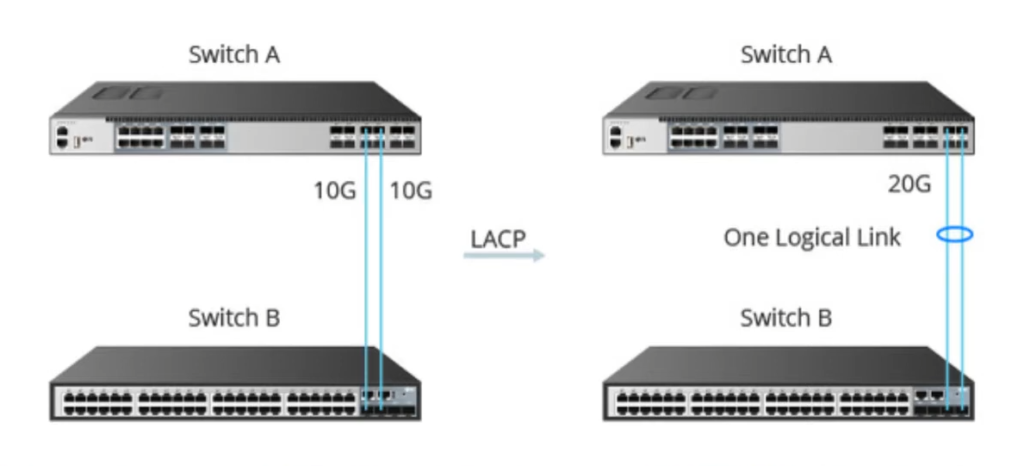
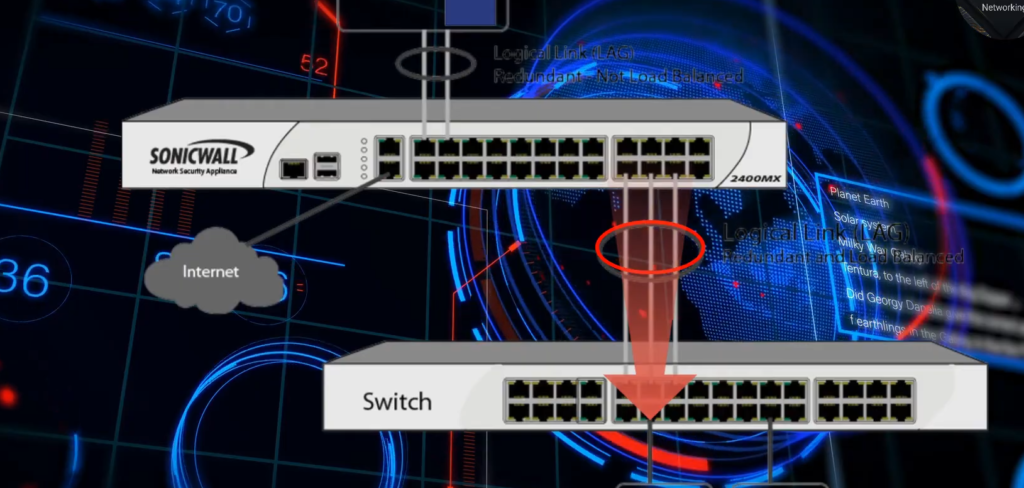
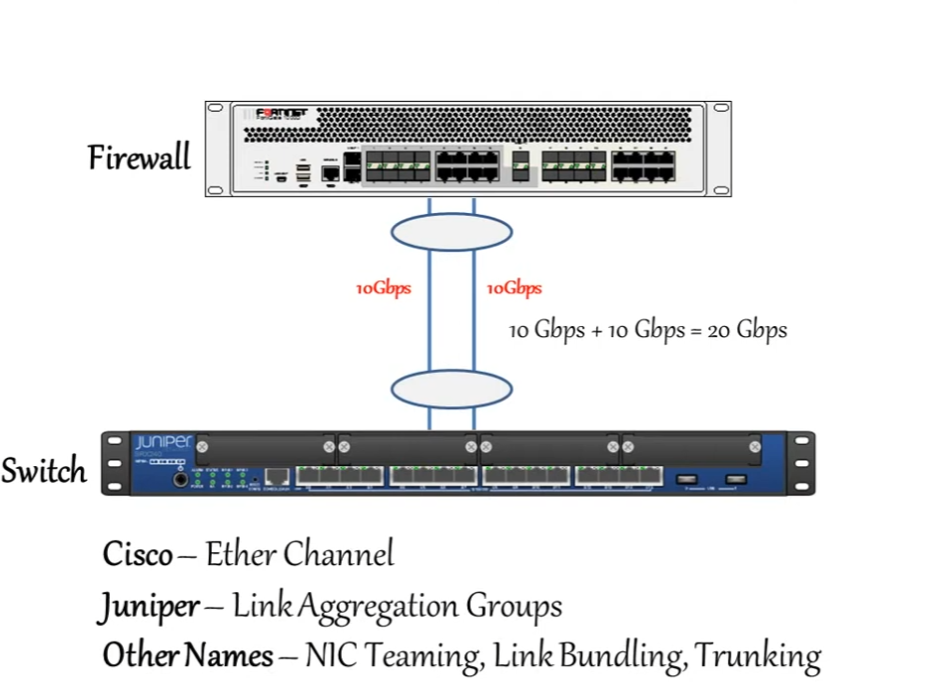
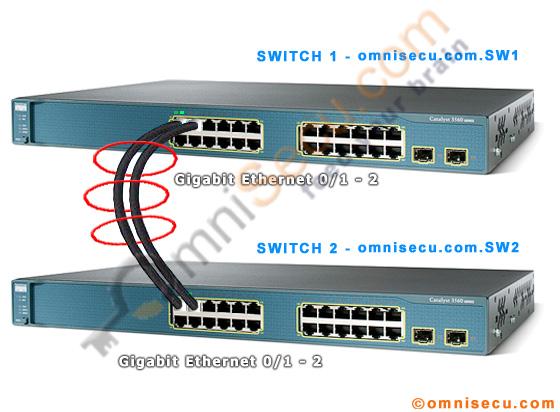
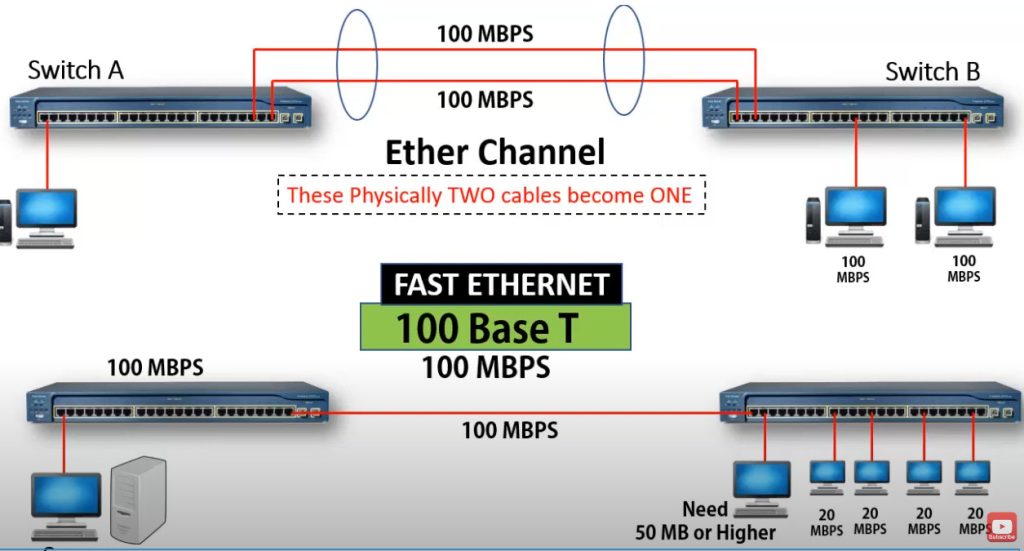
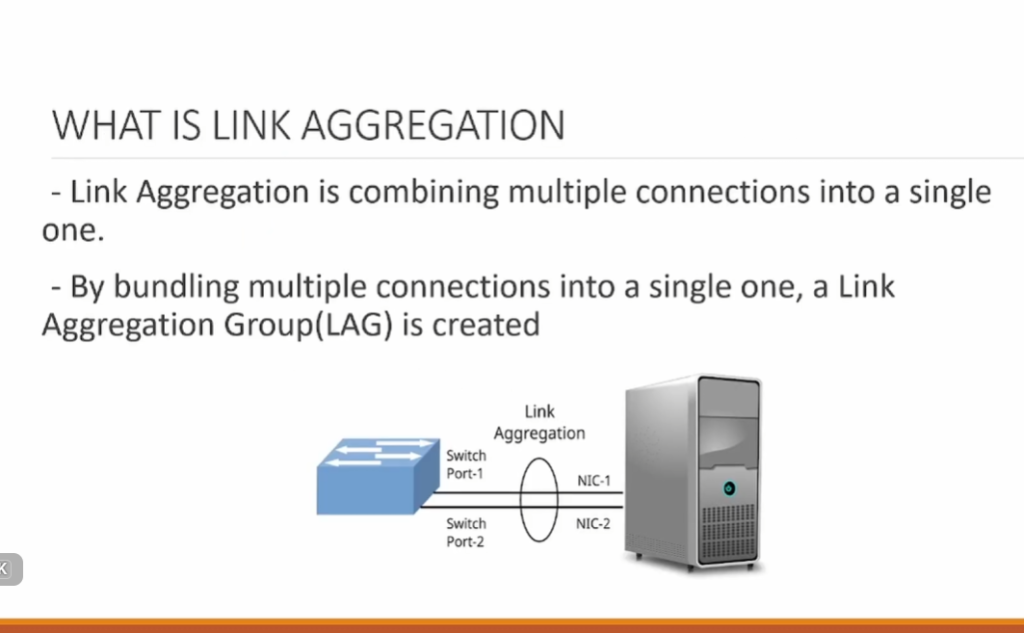
- EtherChannel is a networking technology that combines multiple physical Ethernet links into one single logical link between two network devices such as switches, routers, or servers. Instead of using only one cable for communication, EtherChannel bundles two or more cables together so they act as one high-bandwidth and fault-tolerant connection. This increases overall network speed and also provides redundancy—if one physical link fails, traffic automatically continues through the remaining links without interrupting network communication.
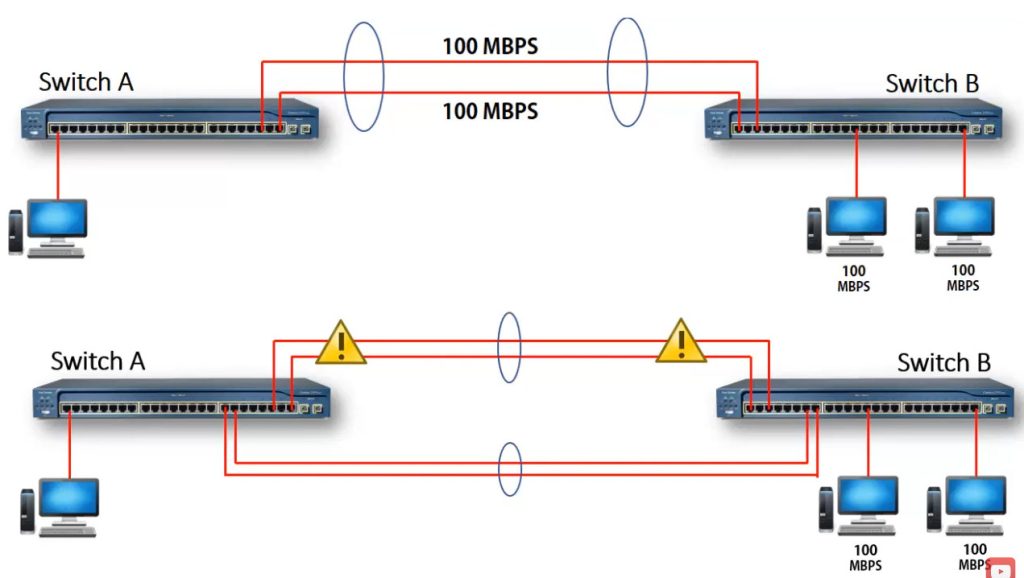
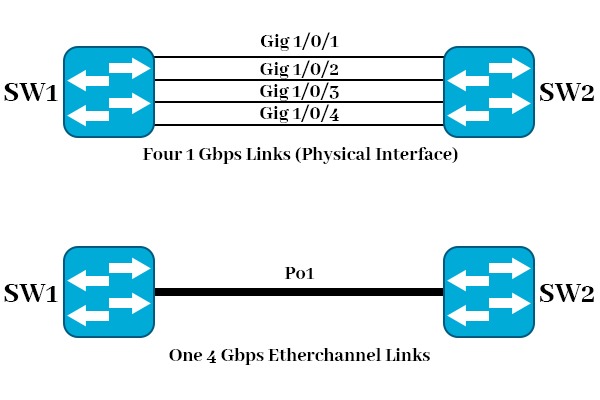
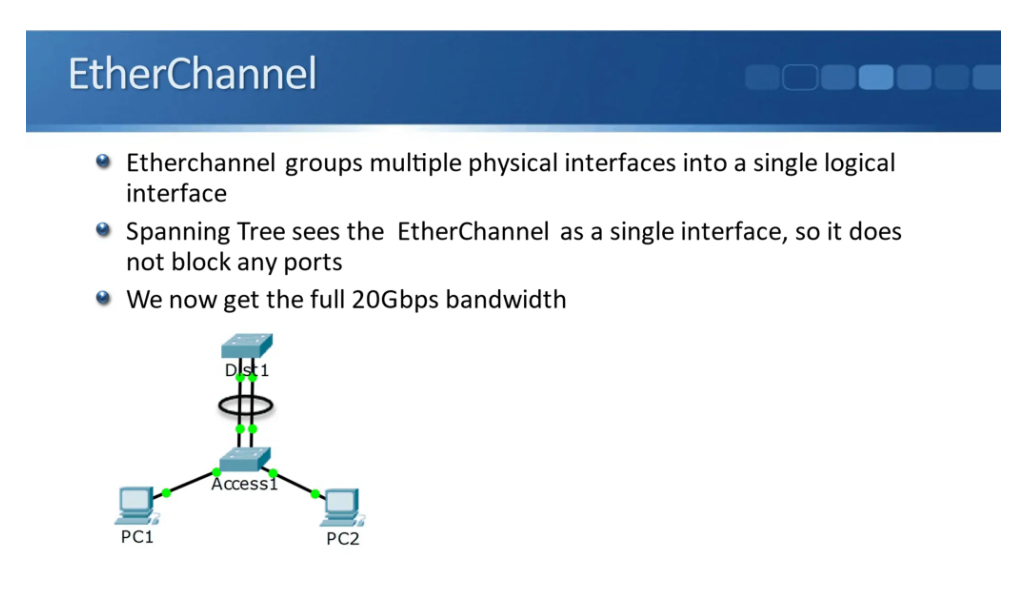
- EtherChannel improves bandwidth and performance by load-balancing traffic across all member links. For example, if four 1-Gbps links are bundled, the total logical bandwidth becomes up to 4 Gbps. It also works well with Spanning Tree Protocol (STP) because STP treats the EtherChannel as a single link, preventing loop issues while still allowing full use of all bundled connections. Without EtherChannel, STP would block extra links, wasting bandwidth.
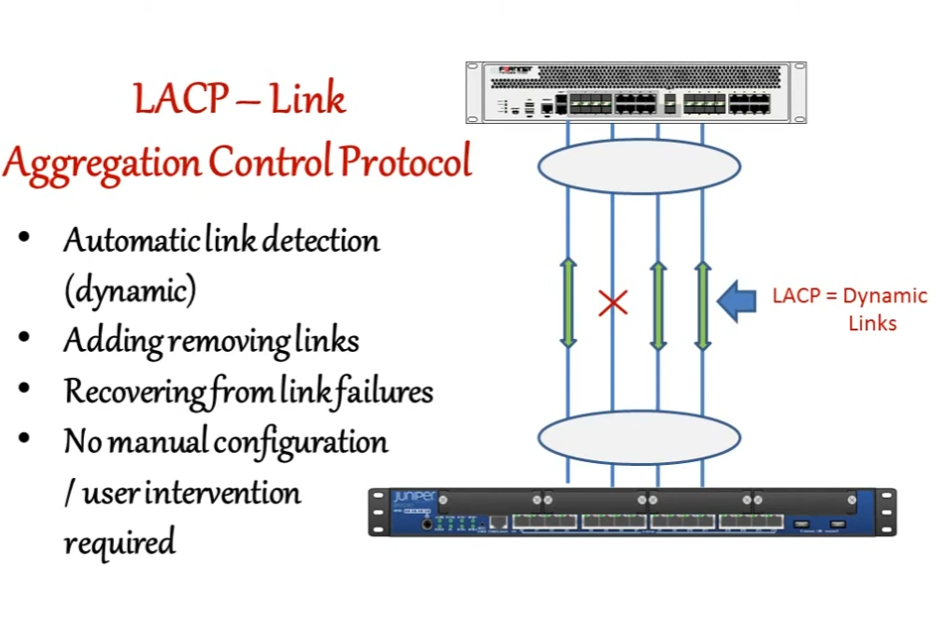
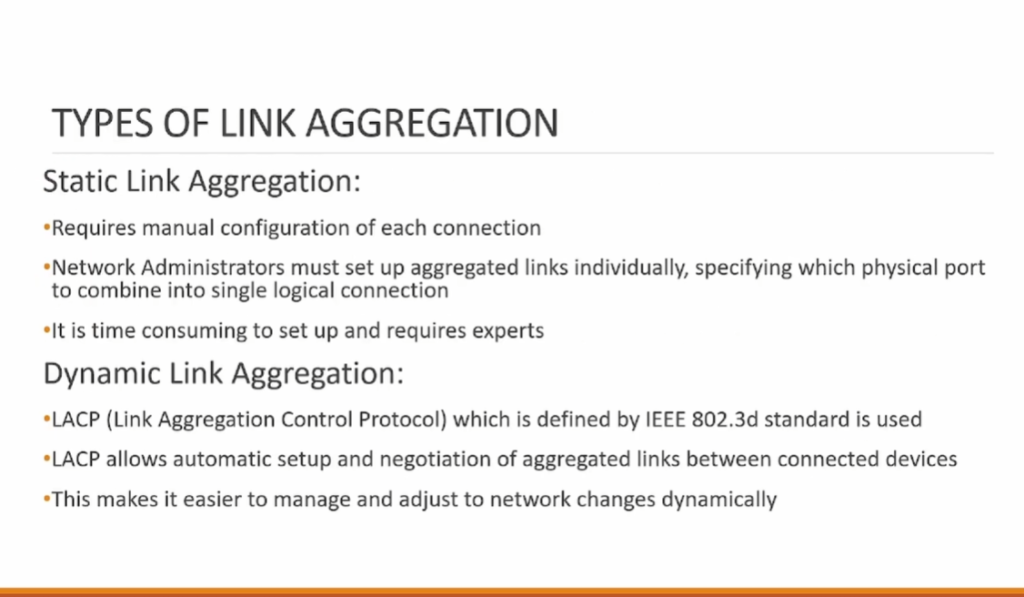
- There are different methods to form EtherChannel. The most common are LACP (Link Aggregation Control Protocol), which is an open IEEE standard, and PAgP (Port Aggregation Protocol), which is Cisco-proprietary. There is also a manual mode called “on”, where links are forced into a channel without negotiation. All ports in an EtherChannel must have the same configuration (speed, duplex, VLAN settings, and trunk/access mode) to work properly.
- EtherChannel is mainly used in company and data-center networks to connect switches, connect switches to routers, or connect servers that need high availability and high bandwidth. In summary, EtherChannel provides higher speed, redundancy, efficient use of links, and better network stability, making it an important technology in modern enterprise networks.

What is Port-Channel
Definition
PortChannel is a logical interface created by combining multiple physical switch ports into one single logical link. It is commonly made using EtherChannel technology.
How It Works
Normally, each switch port works separately. In PortChannel, two or more physical ports are grouped together, and the switch treats them as one interface. Data traffic flows through all member links as one logical connection.
Increase Bandwidth
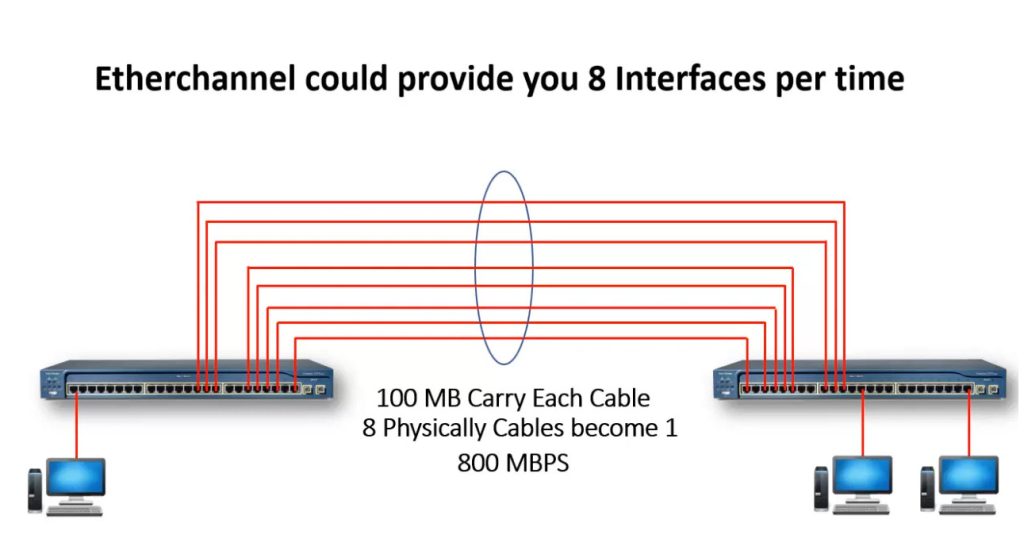
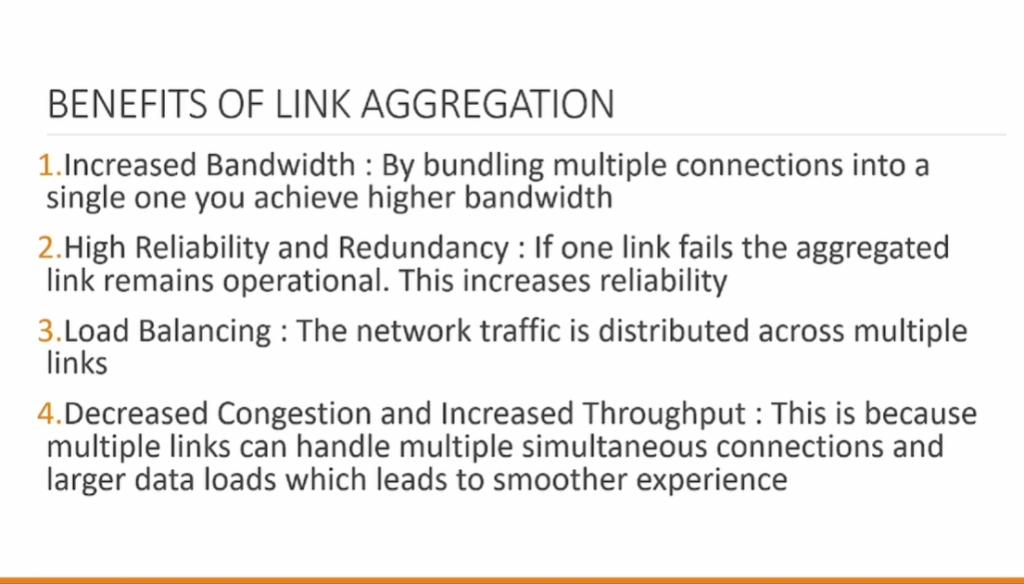
PortChannel increases network speed by combining bandwidth from multiple links. For example, if four 1 Gbps ports are grouped, the logical link can provide up to 4 Gbps total bandwidth.
Provide Redundancy
If one physical cable fails, the remaining links in the PortChannel continue working. This keeps the network connection active and improves reliability.
Load Balancing
Traffic is distributed across member links, which reduces congestion and improves performance between switches or between switch and server.
Works with STP
Without PortChannel, Spanning Tree Protocol may block extra links to prevent loops. With PortChannel, STP sees all grouped links as one logical connection, so all links can be used.
Configuration
Network engineers create a PortChannel by grouping switch interfaces into one channel group. This logical interface gets a number such as PortChannel1, PortChannel2, or PortChannel4.
Example
A company connects two core switches with four cables. Instead of using four separate links, they create one PortChannel. Now all cables work together as one high-speed logical connection.
Simple Meaning
PortChannel = Multiple physical switch ports combined into one logical port for higher speed, backup, and better network performance.
Difference Between PortChannel and EtherChannel
| Feature | PortChannel | EtherChannel |
|---|---|---|
| Meaning | Logical interface created after bundling ports | Technology used to bundle multiple links |
| Type | Interface | Link aggregation method |
| Work | Acts as one single logical port | Combines physical ports together |
| Configuration | Created as PortChannel1, PortChannel2, etc. | Configured using protocols/modes |
| Purpose | Carry traffic as one logical link | Make multiple links work as one |
EtherChannel
EtherChannel is the technology/process that combines multiple physical switch links into one logical connection. It increases bandwidth and provides redundancy.
PortChannel
PortChannel is the logical interface name created after EtherChannel is configured. The switch uses this interface like one port.
Example
Two switches are connected with 4 cables.
- EtherChannel = Technology used to combine 4 cables
- PortChannel1 = Logical interface created after combining
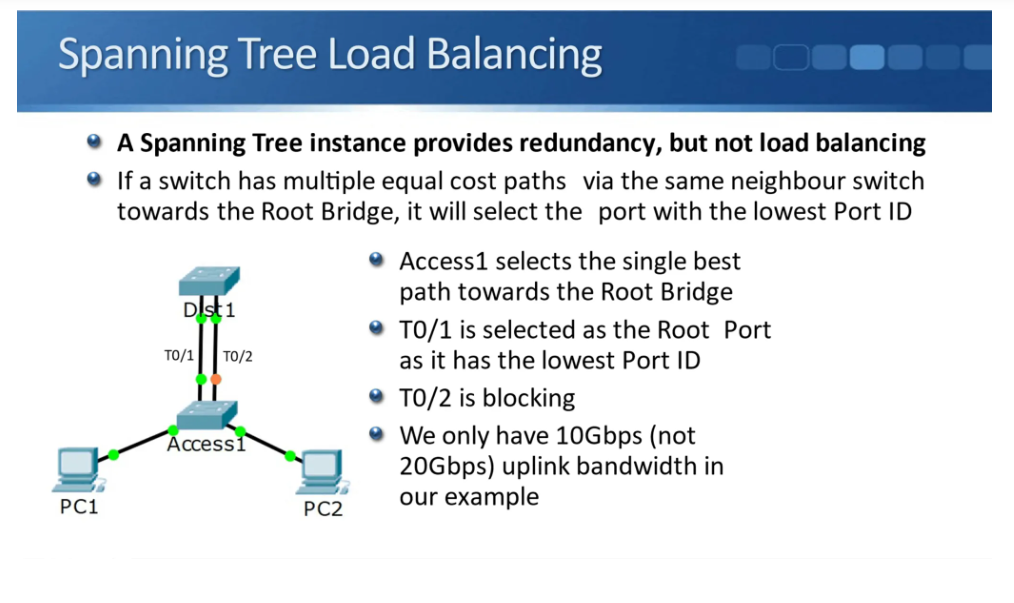
In a company network, two switches are connected using 4 physical Ethernet cables. If those cables work separately, some links may remain unused because Spanning Tree Protocol can block extra links to prevent loops.
The network engineer configures EtherChannel to combine all 4 cables into one logical connection. After configuration, the switch creates a logical interface called PortChannel1.
Now all 4 cables work together as one high-speed link, bandwidth increases, traffic is balanced, and if one cable fails, the remaining links continue working.
Simple meaning:
EtherChannel is the technology used to combine links, and PortChannel is the logical interface created from that combination.
Difference Between Layer 2 EtherChannel and Layer 3 EtherChannel
Difference Between Layer 2 EtherChannel and Layer 3 EtherChannel
| Feature | Layer 2 EtherChannel | Layer 3 EtherChannel |
|---|---|---|
| Works At | Data Link Layer (Layer 2) | Network Layer (Layer 3) |
| Uses | MAC Address | IP Address |
| Port Type | Switchport | Routed Port (no switchport) |
| Supports VLAN | Yes | No VLAN trunking |
| IP Address | No IP on physical channel | IP address configured |
| Main Use | Switch-to-switch connection | Routing between devices |
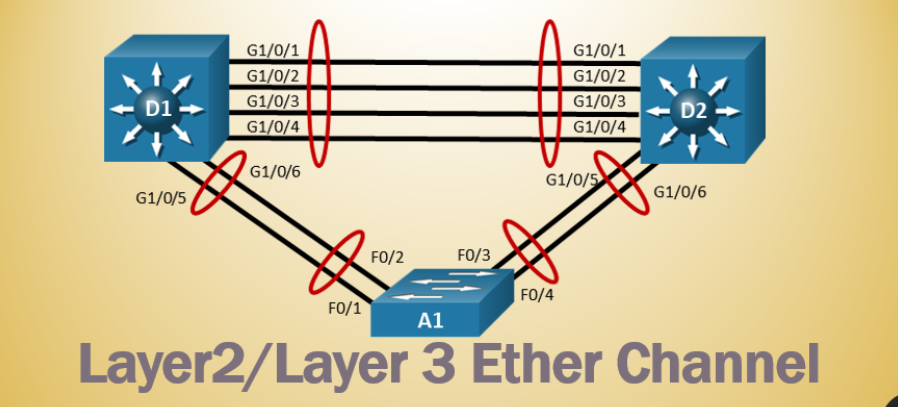
Layer 2 EtherChannel
Layer 2 EtherChannel is used like a normal switch port. It can work as Access Port or Trunk Port and carry VLAN traffic between switches. It mainly forwards frames using MAC addresses.
Example:
Two switches connected with 4 cables carrying VLAN 10, VLAN 20, VLAN 30 traffic.
Layer 3 EtherChannel
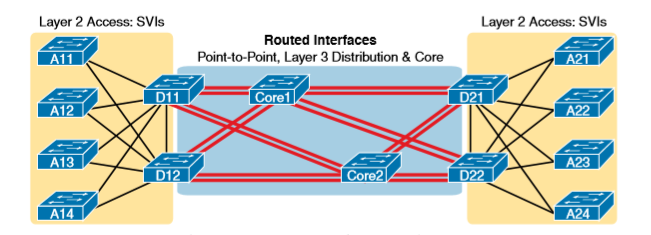
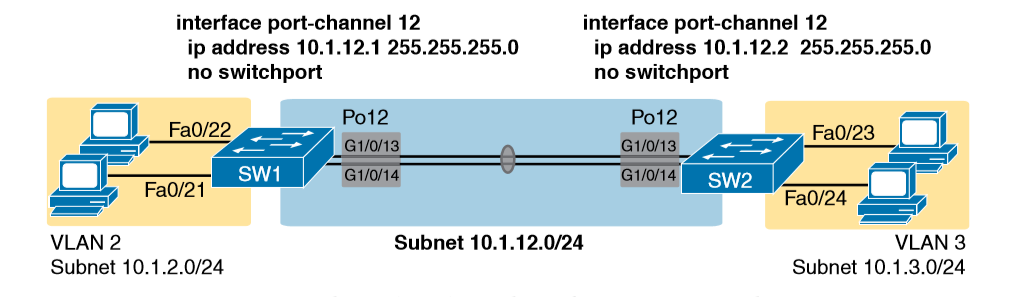
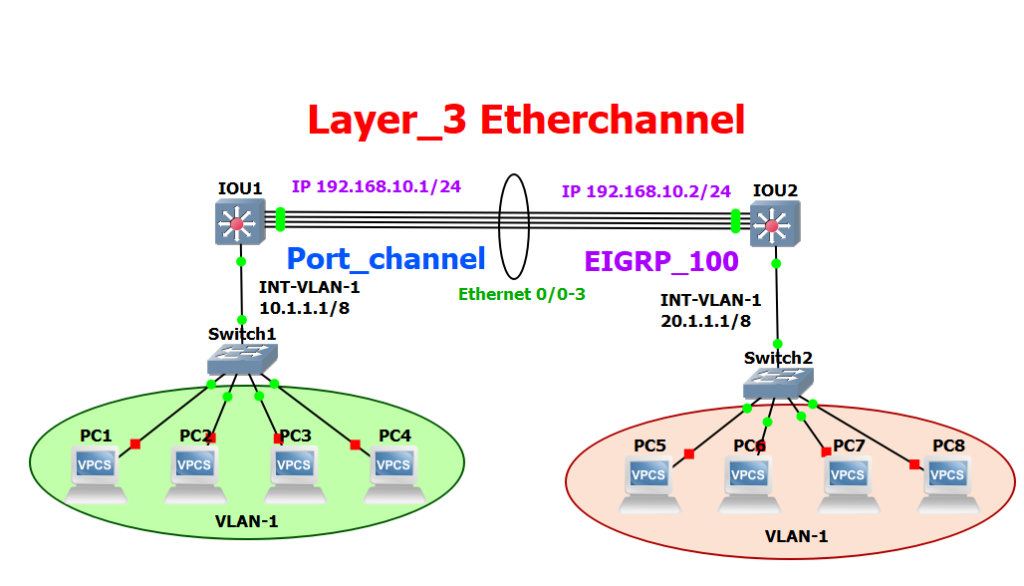
Layer 3 EtherChannel works like a router interface. It is configured as a routed port using no switchport command and gets an IP address. It forwards packets using IP routing.
Example:
Core Switch connected to Router with 4 cables bundled into one EtherChannel and assigned IP 10.1.1.1/30.
Why Need Ether-Channel
Increase Bandwidth
In a network, one Ethernet cable may not provide enough speed for large traffic. EtherChannel combines multiple physical links into one logical link, which increases total bandwidth. This helps data move faster between switches.
Provide Redundancy
If one cable in the EtherChannel fails, the other links continue carrying traffic. This keeps the network running and improves reliability.
Prevent Link Blocking
When multiple links connect two switches, Spanning Tree Protocol normally blocks extra links to prevent loops. With EtherChannel, all links are grouped as one logical connection, so STP sees them as a single link and does not block them.
Load Balancing
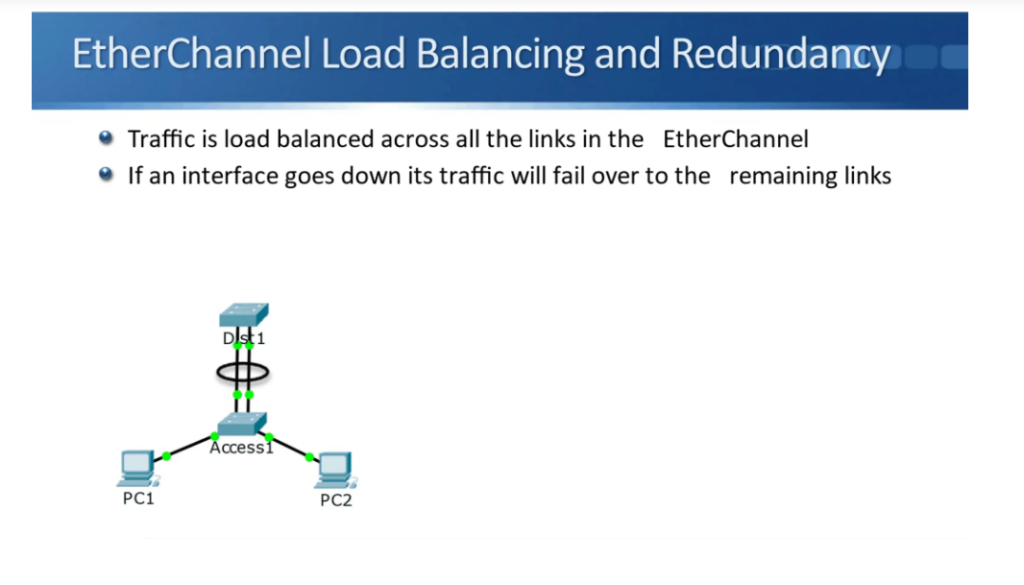
EtherChannel distributes network traffic across multiple physical links. This reduces congestion on one cable and improves overall network performance.
Better Resource Utilization
Without EtherChannel, some links may stay unused because STP blocks them. With EtherChannel, all grouped links are active and used efficiently.
Network Stability
EtherChannel provides a stable connection between switches. It reduces chances of link failure affecting the whole network and improves communication between devices.
Example
Suppose two company switches are connected with four 1 Gbps cables. Without EtherChannel, STP may block three links and only one link works. With EtherChannel, all four links work together as one 4 Gbps logical connection.4 links × 1 Gbps = 4 Gbps logical link.
Real Example of EtherChannel
- A company has a server room with one Core Switch and one Distribution Switch. Many users, servers, and applications send heavy traffic every day.
- The network team connects the two switches using 4 separate 1 Gbps cables. Without EtherChannel, Spanning Tree Protocol may block 3 cables to avoid loops, so only 1 cable (1 Gbps) carries all traffic. During busy hours, this link becomes congested and network speed becomes slow.
- Then the team configures EtherChannel on those 4 cables. Now all 4 links work together as one logical link (4 Gbps). Traffic is shared across all links, speed increases, and congestion is reduced.
- If one cable fails, the remaining 3 links continue working, so the network stays online without major interruption.
Simple company example:
- Before EtherChannel → 1 active link = 1 Gbps
- After EtherChannel → 4 active links = 4 Gbps
- One cable fails → still 3 Gbps available
This is why large offices, data centers, and enterprise networks use EtherChannel between switches.
EtherChannel Slide
Ether-Channel Protocol
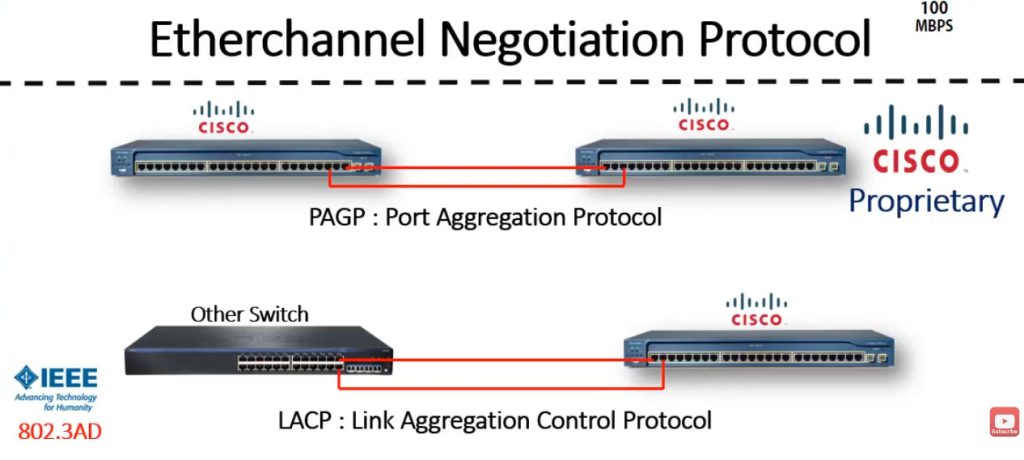
EtherChannel uses specific protocol types to form and manage the bundled links between network devices. The main EtherChannel protocol types are:
LACP (Link Aggregation Control Protocol)
This is an open standard protocol defined by IEEE 802.3ad (now part of 802.1AX). It allows switches and devices from different vendors to form an EtherChannel automatically. LACP checks link compatibility and helps prevent configuration errors. It is the most commonly used and recommended protocol.PAgP (Port Aggregation Protocol)
This is a Cisco-proprietary protocol used only on Cisco devices. It negotiates EtherChannel links between Cisco switches and ensures that the ports on both sides have matching configurations.Static (On Mode)
This is not a negotiation protocol but a manual configuration mode. In this mode, ports are forced into an EtherChannel without any protocol checking. It can cause network loops if misconfigured, so it is not recommended unless you are sure of the setup.
Summary:
- LACP – Standard, multi-vendor, safest and most popular
- PAgP – Cisco only
- On (Static) – No protocol, manual bundling

					Cisco Protocol PAGP
...................

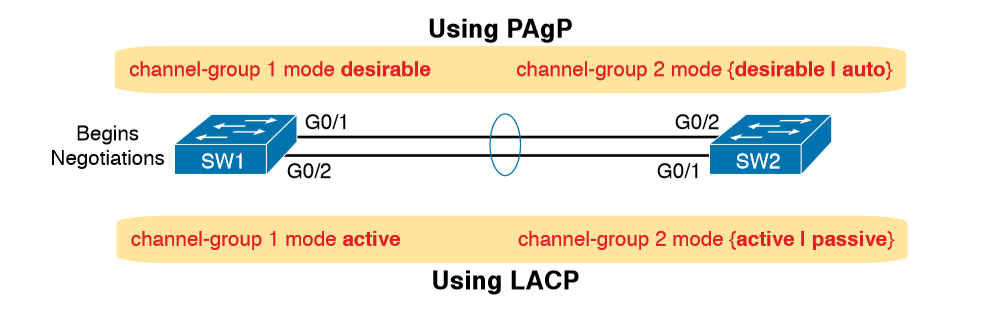
Switch 1 Configuration

config t
int range fa0/1-2
channel-group 1 mode desirable


Switch 2 Configuration

config t
int range fa0/1-2
channel-group 1 mode auto


Checking Etherchannel Details Commnd

show etherchannel
show etherchannel summary
show interface etherchannel


IEE Protocol LACP
.................

Switch 1 Configuration

config t
int range fa0/1-2
channel-group 1 mode active


Switch 2 Configuration

config t
int range fa0/1-2
channel-group 1 mode passive


show etherchannel
show etherchannel summary
show interface etherchannel


Notes- Maximum 8 Port Bandil For Etherchannel);
Real-World Applications of EtherChannel
EtherChannel has numerous real life applications in enterprise, data centers, and cloud computing technologies to enhance network efficiency, flexibility, and reliability.
1. Data centers and enterprise networks
- EtherChannel is useful for the high-speed backbone connections within the core, distribution and access layers of enterprise networks.
- EtherChannel is also used for load balancing and redundancy of server-to-switch connections.
2. Service provider networks
- ISPs use EtherChannel to bundle multiple links between a router and switch, increasing bandwidth available to customers.
- Provides an improved WAN connection by combining multiple circuits into a single logical circuit.
3. Cloud computing environments
- In cloud data centers, EtherChannel is used to connect virtualized environments with physical switches.
- Offers seamless failover and uninterrupted service for cloud applications.
Frequently Asked Questions
Q1. What are the 3 types of EtherChannel?
Three types of EtherChannel in networking are:
- PAgP: It is a Cisco-proprietary protocol.
- LACP: IEEE Standard Protocol.
- Manual: It is manually configured on each switch.
Q2. What do you mean by EtherChannel?
EtherChannel is a link aggregation technology that is mainly used to link more than one physical port link into a single logical link.
Q3. What is port channel vs EtherChannel?
A port channel is a logical interface that represents a group of physical links aggregated together. EtherChannel in networking is a Cisco term for link aggregation technology that bundles multiple links into one logical link.
Q4. Why is LACP used?
LACP is used to combine multiple physical links into one logical link for higher bandwidth and redundancy.
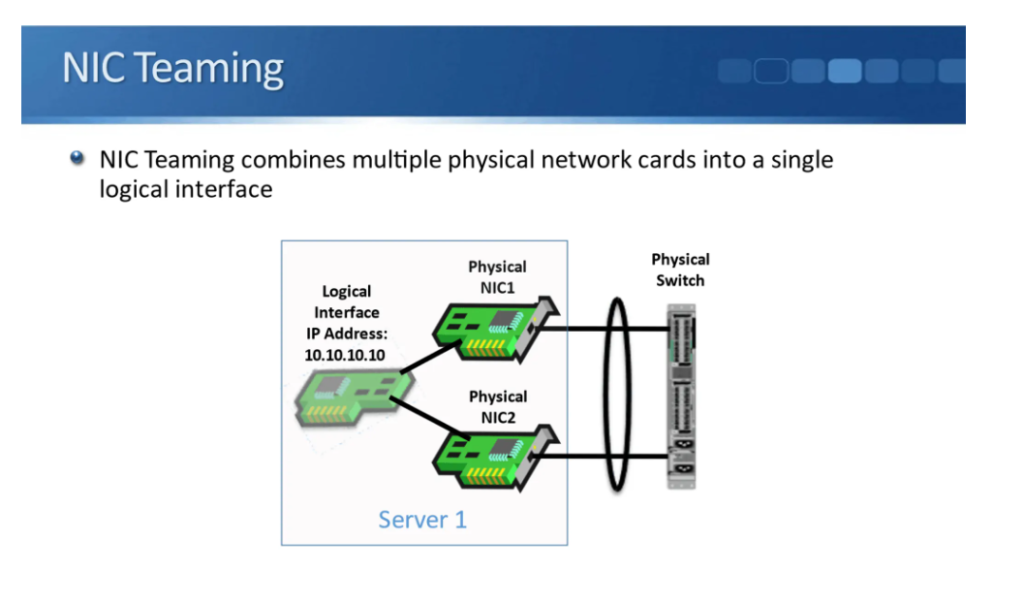
What is NIC Teaming
1. Definition
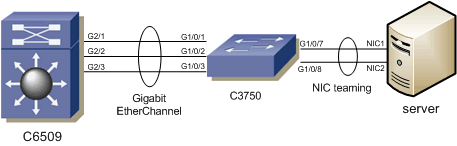
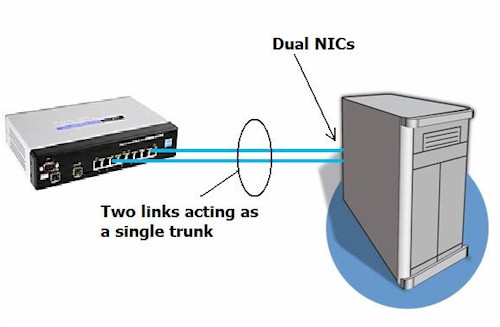
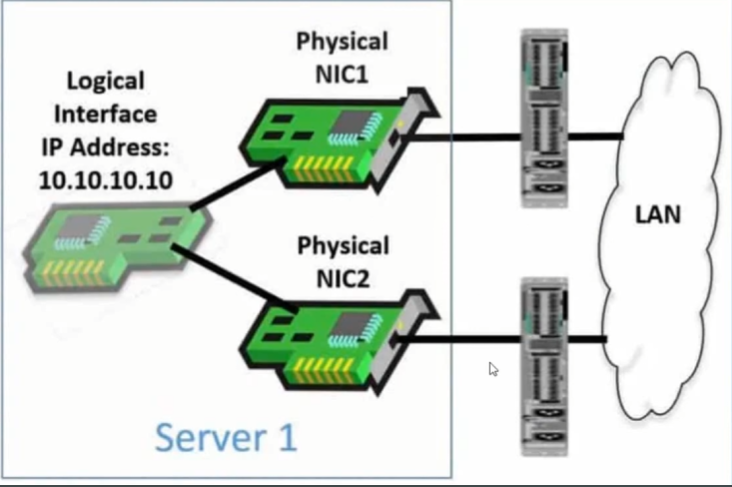
NIC Teaming is a networking feature in which two or more Network Interface Cards (NICs) are combined into one logical network adapter. Although multiple physical ports are connected, the operating system treats them as a single network connection.
2. Purpose of NIC Teaming
The main purpose of NIC Teaming is to improve network reliability, performance, and availability. It helps reduce downtime and ensures the network connection remains active even if one link fails.
3. Redundancy / Failover
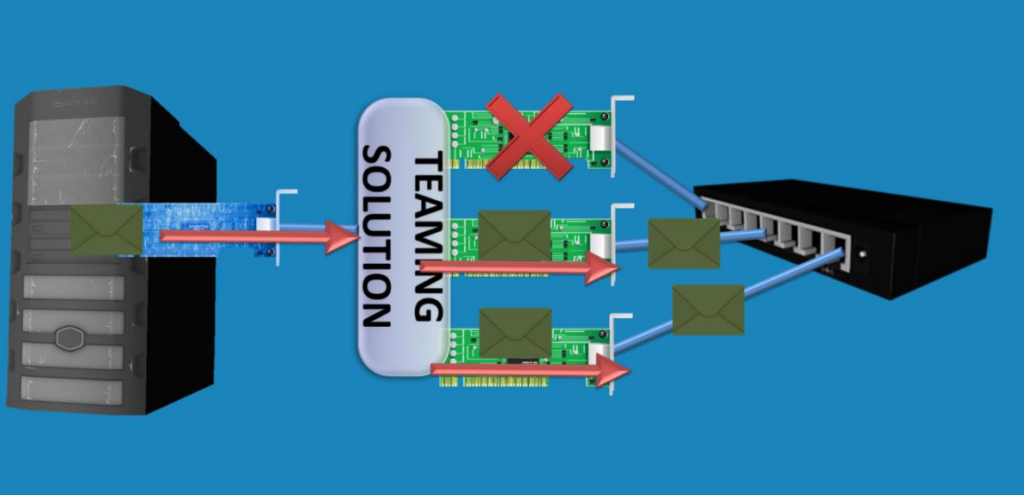
One major benefit of NIC Teaming is redundancy. If one NIC card, cable, or switch port stops working, another NIC in the team automatically takes over. This is called failover, and it keeps the server online without network interruption.
4. Increased Bandwidth
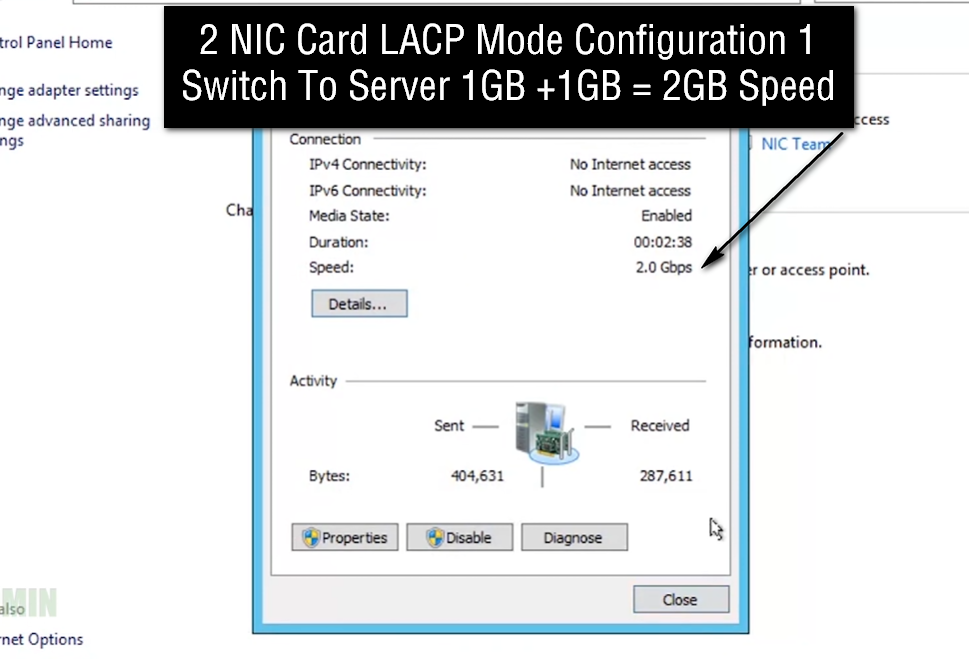
NIC Teaming can also improve bandwidth by using multiple NIC ports together. For example, if two 1 Gbps NICs are teamed, the server may handle more total traffic than a single NIC, depending on the teaming mode.
5. Load Balancing
NIC Teaming supports load balancing, which means network traffic is distributed across multiple NIC ports. Instead of one port carrying all traffic, the load is shared, improving performance and preventing one link from becoming overloaded.
6. Logical Network Adapter
When NIC Teaming is configured, the operating system creates one virtual adapter from multiple physical NICs. The server usually uses one IP address for the team, making network management easier.
7. Teaming Modes
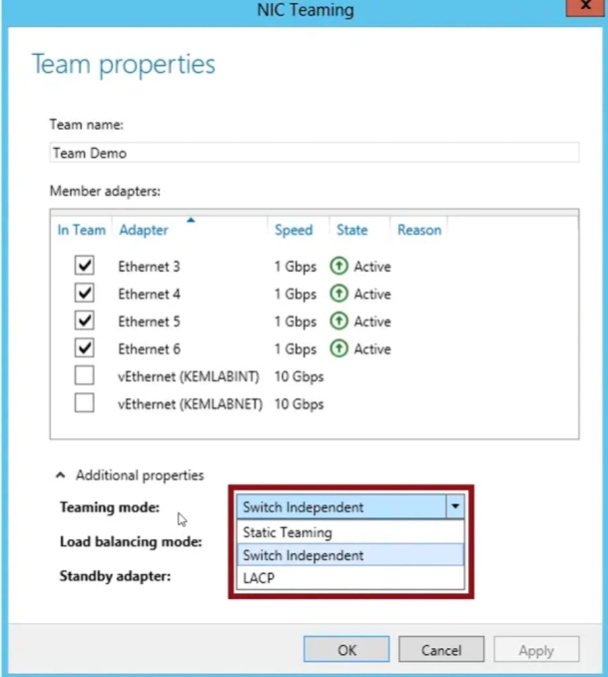
NIC Teaming can work in different modes such as Active/Standby, Active/Active, LACP (802.3ad), and Switch Independent mode. Each mode provides different ways to handle traffic, redundancy, and switch connectivity.
8. Example
Suppose a company server has two NIC ports. One is connected to Switch 1, and another is connected to Switch 2. Both are teamed. If one switch or cable fails, the second NIC continues carrying traffic automatically, so users do not lose access to the server.
9. Where It Is Used
NIC Teaming is commonly used in servers, virtualization hosts, enterprise networks, cloud environments, and data centers, where high network uptime is important.
10. Summary
NIC Teaming = Combining multiple NIC ports into one logical connection for redundancy, higher bandwidth, load balancing, and better network availability.
Types of NIC Teaming
1. Active / Standby Teaming
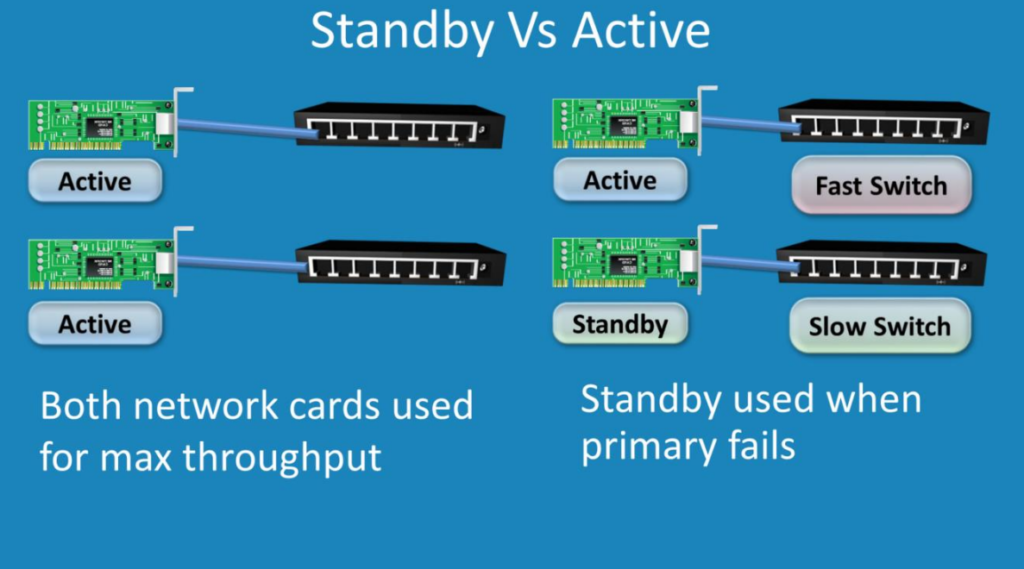
In Active / Standby mode, one NIC remains active and handles all network traffic, while the second NIC stays in standby (backup) mode. If the active NIC fails because of cable failure, port failure, or switch issue, the standby NIC automatically becomes active. This mode mainly provides redundancy and failover, but it does not increase bandwidth.
Example:
NIC1 = Working
NIC2 = Backup
If NIC1 fails → NIC2 takes over automatically.
2. Active / Active Teaming
In Active / Active mode, all teamed NICs work at the same time. Network traffic is shared between multiple NIC ports. This provides higher bandwidth, load balancing, and backup. If one NIC fails, other NICs continue working.
Example:
NIC1 = Carrying traffic
NIC2 = Carrying traffic
If NIC1 fails → NIC2 continues traffic.
3. Switch Independent Teaming
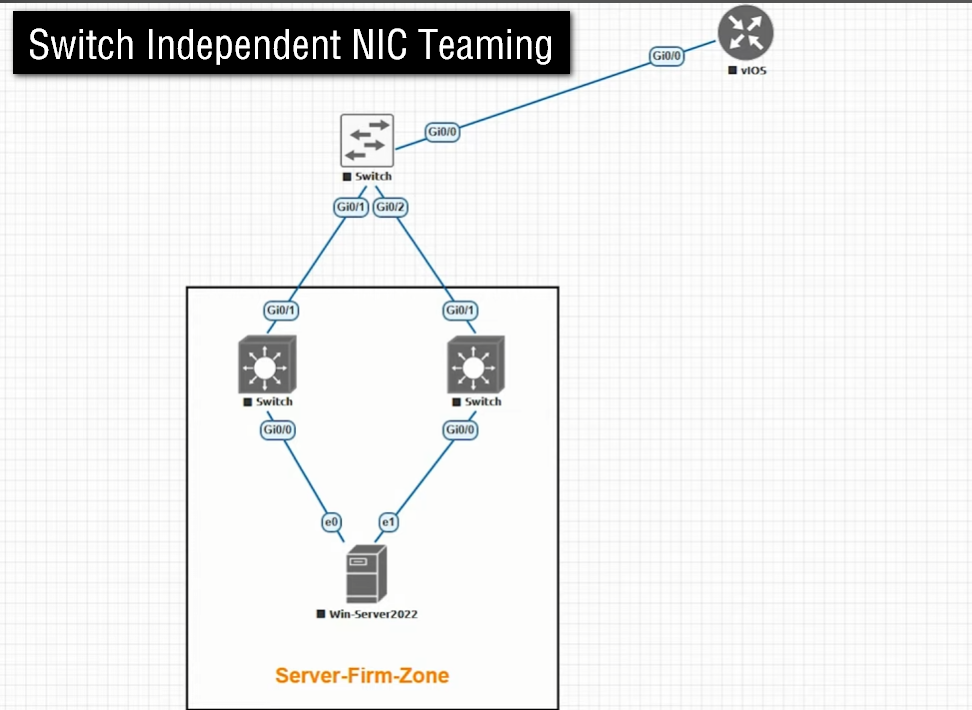
In Switch Independent mode, teamed NICs can connect to different switches, and the switches do not need special configuration. The operating system manages the teaming. This gives easy setup, high availability, and switch-level redundancy.
Example:
NIC1 → Switch A
NIC2 → Switch B
If Switch A fails → NIC2 still works through Switch B.
4. Static Teaming (Manual Teaming)
In Static Teaming, the switch ports are manually configured to form one logical link. No automatic negotiation happens between server and switch. Both server and switch must be configured correctly. This provides higher bandwidth and redundancy, but setup is manual.
Example:
Administrator manually groups 2 switch ports + 2 server NICs into one team.
5. LACP Teaming (802.3ad)
LACP (Link Aggregation Control Protocol) is a dynamic teaming method based on IEEE 802.3ad / 802.1AX standard. Server and switch automatically negotiate and create the team. It provides load balancing, higher bandwidth, and failover. It is widely used in enterprise networks.
Example:
Two 1 Gbps NICs using LACP = logical aggregated connection (traffic shared dynamically).
6. Load Balancing Teaming
This type focuses mainly on distributing traffic across multiple NICs. It prevents one NIC from becoming overloaded while others remain idle. This improves performance in busy networks.
Example:
User traffic shared between NIC1 and NIC2 evenly.
Summary Chart
| Type | Backup | Speed Increase | Load Balancing | Switch Support |
|---|---|---|---|---|
| Active / Standby | Yes | No | No | Not required |
| Active / Active | Yes | Yes | Yes | Sometimes |
| Switch Independent | Yes | Limited | Yes | Not required |
| Static Teaming | Yes | Yes | Yes | Manual config |
| LACP | Yes | Yes | Yes | Required |
| Load Balancing | Yes | Yes | Main feature | Depends |
Real-World Applications of EtherChannel
EtherChannel has numerous real life applications in enterprise, data centers, and cloud computing technologies to enhance network efficiency, flexibility, and reliability.
1. Data centers and enterprise networks
- EtherChannel is useful for the high-speed backbone connections within the core, distribution and access layers of enterprise networks.
- EtherChannel is also used for load balancing and redundancy of server-to-switch connections.
2. Service provider networks
- ISPs use EtherChannel to bundle multiple links between a router and switch, increasing bandwidth available to customers.
- Provides an improved WAN connection by combining multiple circuits into a single logical circuit.
3. Cloud computing environments
- In cloud data centers, EtherChannel is used to connect virtualized environments with physical switches.
- Offers seamless failover and uninterrupted service for cloud applications.
Frequently Asked Questions
Q1. What are the 3 types of EtherChannel?
Three types of EtherChannel in networking are:
- PAgP: It is a Cisco-proprietary protocol.
- LACP: IEEE Standard Protocol.
- Manual: It is manually configured on each switch.
Q2. What do you mean by EtherChannel?
EtherChannel is a link aggregation technology that is mainly used to link more than one physical port link into a single logical link.
Q3. What is port channel vs EtherChannel?
A port channel is a logical interface that represents a group of physical links aggregated together. EtherChannel in networking is a Cisco term for link aggregation technology that bundles multiple links into one logical link.
Q4. Why is LACP used?
LACP is used to combine multiple physical links into one logical link for higher bandwidth and redundancy.
Ether-Channel Interview Questions
Here are common EtherChannel Interview Questions and Answers (Q&A) that are frequently asked in networking interviews (CCNA / Network Engineer level):
Basic EtherChannel Q&A
1. What is EtherChannel?
EtherChannel is a technology that combines multiple physical Ethernet links into one logical link to increase bandwidth and provide redundancy between network devices.
2. Why is EtherChannel used?
To increase bandwidth, provide link redundancy, prevent STP from blocking links, and improve network performance.
3. How many ports can be bundled in EtherChannel?
Up to 8 active links can be bundled into one EtherChannel group.
4. Which protocols are used in EtherChannel?
- LACP (Link Aggregation Control Protocol)
- PAgP (Port Aggregation Protocol – Cisco proprietary)
- On mode (static, no protocol)
5. What is LACP?
LACP is an IEEE standard protocol (802.3ad / 802.1AX) used to dynamically form EtherChannel between devices.
6. What is PAgP?
PAgP is a Cisco-proprietary protocol that negotiates EtherChannel between Cisco switches.
7. Difference between LACP and PAgP?
LACP is an open standard; PAgP works only on Cisco devices.
8. What is load balancing in EtherChannel?
Traffic is distributed across multiple links based on MAC address, IP address, or port number.
9. What happens if one link fails in EtherChannel?
Traffic continues on remaining links without network downtime.
10. Does STP block EtherChannel links?
No. STP treats EtherChannel as a single logical link.
Configuration & Technical Q&A
11. What conditions must match for EtherChannel?
All ports must have the same:
- Speed and duplex
- VLAN configuration
- Trunk or access mode
- Native VLAN
- Allowed VLANs
12. What is “on” mode in EtherChannel?
Manual mode where ports are forced into EtherChannel without negotiation.
13. Which is the safest EtherChannel mode?
LACP because it prevents misconfiguration.
14. Can EtherChannel work between different vendors?
Yes, if LACP is used.
15. Can EtherChannel be used on access ports?
Yes, EtherChannel can be configured on access ports and trunk ports.
16. What is a Port-Channel?
The logical interface created after EtherChannel configuration.
17. What happens if VLANs don’t match on both sides?
EtherChannel will fail and ports may go into suspended state.
18. Is EtherChannel a Layer 2 or Layer 3 technology?
It can be both Layer 2 and Layer 3.
19. What command shows EtherChannel status?
show etherchannel summary
20. What is the advantage of EtherChannel over single link?
Higher bandwidth, redundancy, and better link utilization.
Scenario-Based Q&A
21. If one cable is removed from EtherChannel, will traffic stop?
No, traffic continues on remaining links.
22. Why STP is not blocking EtherChannel links?
Because STP sees EtherChannel as one logical link.
23. What happens if “on” mode is misconfigured?
It can cause network loops and broadcast storms.
24. Where is EtherChannel commonly used?
Between core-distribution switches, switch-to-switch links, and server connections.
25. Which load-balancing method is best?
Depends on traffic type (MAC-based or IP-based hashing).