
Paloalto Network
What is a Palo Alto Networks?
Palo Alto Networks was founded in 2005 with the goal of addressing the limitations of traditional firewalls and creating a new generation of network security. The company was founded by Nir Zuk, who played a key role in developing its next-generation firewall technology.
Key Milestones
- 2005 – Company Founded
Palo Alto Networks was incorporated in 2005 in the United States. Its initial focus was on developing a new approach to network security beyond traditional port- and protocol-based firewalls. - 2007 – First Firewall Released
The company released its first commercial firewall, the PA-4000 Series, along with its first Threat Prevention subscription service. - 2011 – Major Product Expansion
Palo Alto introduced the PA-5000 Series, along with technologies such as GlobalProtect. WildFire was also introduced in 2011 for analyzing suspicious and unknown files. - 2012 – Stock Market IPO
Palo Alto Networks completed its Initial Public Offering (IPO) on July 19, 2012, becoming a publicly traded company. - 2014 – Cyber Threat Collaboration
Palo Alto Networks became involved in the Cyber Threat Alliance, working with other cybersecurity organizations to improve threat intelligence sharing. - 2017–2018 – Security Platform Expansion
Palo Alto expanded beyond traditional firewall capabilities into endpoint protection, cloud security and threat intelligence, developing a broader security platform. - 2020s – Cloud, Zero Trust & AI Security
The company expanded its cybersecurity portfolio to protect networks, cloud environments, users and endpoints, increasingly incorporating AI and automation into its security platforms. - 2025 – Nir Zuk Retirement
Founder and longtime CTO Nir Zuk retired in August 2025 after more than 20 years with the company. Lee Klarich succeeded him as CTO.
What is a Palo Alto Networks?
Palo Alto Networks was founded in 2005 by Israeli-American Nir Zuk, a former engineer from Check Point and NetScreen Technologies, and was the principal developer of the first stateful inspection firewall and the first intrusion prevention system. When asked why he started Palo Alto Networks, Zuk cited his objective of solving a problem enterprises were facing with existing network security solutions: the inability to safely enable employees to use modern applications, which entailed developing a firewall that could identify and provide fine-grained control of applications.
Palo Alto Networks is a leading cybersecurity company known for its innovative approach to network security. Here’s a concise history of the company, covering its founding, major developments, and current status:
Founding and Early Years (2005–2010)
2005: Palo Alto Networks was founded by Nir Zuk, a former engineer at Check Point and Netscreen. He aimed to address limitations in traditional firewalls by creating a new kind of security appliance.
2007: The company released its first product, the PA-4000 series, featuring App-ID, a technology that identifies applications regardless of port or protocol—introducing what would later be called a Next-Generation Firewall (NGFW).
2009: It introduced PAN-OS, its proprietary operating system for firewall management.
Growth and IPO (2010–2012)
2010: Palo Alto Networks gained significant traction in the enterprise market, especially for its ability to protect against modern, application-layer threats.
2012: The company went public with an IPO on the New York Stock Exchange under the ticker symbol PANW. The IPO raised over $260 million, one of the largest in cybersecurity history at that time.
Expansion of Products and Acquisitions (2013–2019)
Key Product Expansions:
- WildFire (malware prevention)
- Traps (endpoint protection)
- GlobalProtect (secure remote access)
- Cortex (AI/ML-based security operations platform)
Notable Acquisitions:
- Cyvera (2014) – endpoint protection (formed the basis of Traps)
- LightCyber (2017) – behavioral analytics
- Demisto (2019) – security orchestration, automation, and response (SOAR)
- Twistlock & PureSec (2019) – cloud security (container and serverless)
- Zingbox (2019) – IoT security
Shift to Cloud and AI (2020–Present)
Cloud Strategy: Palo Alto strengthened its Prisma Cloud platform, offering comprehensive security for hybrid and multi-cloud environments.
Cortex XDR/XSOAR: The company integrated AI and automation for threat detection and response.
Zero Trust: Expanded solutions for Zero Trust architecture, aligning with modern enterprise security needs.
Current Status (as of 2025)
- CEO: Nikesh Arora (joined in 2018; formerly of Google and SoftBank)
- Market Position: One of the “Big Three” cybersecurity vendors (along with Fortinet and Check Point).
- Employees: Over 14,000 globally.
- Customers: Tens of thousands worldwide, including many in Fortune 500.
- Stock: Traded on NYSE as PANW, part of the NASDAQ-100 and S&P 500 indexes.
Key Innovations & Differentiators
- Pioneered Next-Generation Firewall (NGFW)
- Strong cloud-native security offerings
- Integrated AI/ML-based threat detection
- Broad platform unifying network, cloud, and endpoint security


Palo Alto Firewall Features
- Next-Generation Firewall (NGFW) – Palo Alto provides advanced network security by inspecting traffic at the application level. It protects the network from unauthorized access, malware, exploits and other cyber threats.
- App-ID – App-ID identifies applications running on the network, even when they use non-standard ports. Administrators can create policies to allow, block or control specific applications.
- User-ID – User-ID allows security policies to be created based on individual users or Active Directory groups instead of only IP addresses. This provides better control over employee Internet and application access.
- Content-ID – Provides control over the content flowing through the network, including websites, files, applications and other data. It works with security technologies such as URL Filtering, File Blocking,
- URL Filtering – URL Filtering controls users’ access to websites based on categories. Administrators can block malicious, adult, gambling, social media or other unwanted websites according to company policy.
- File Blocking – Controls file types passing through the firewall. Administrators can block or allow files such as EXE, ZIP, PDF, DOC and other file types.
- Threat Prevention – Threat Prevention protects the network against vulnerabilities, exploits, malware, spyware and other advanced attacks. It continuously inspects network traffic and blocks detected threats.
- WildFire – WildFire provides cloud-based malware analysis. Suspicious or unknown files can be analyzed to identify new and previously unknown malware and protect the network from advanced threats.
- SSL/TLS Decryption – Palo Alto can inspect encrypted HTTPS traffic by decrypting and analyzing it. This helps detect threats that may otherwise remain hidden inside encrypted connections.
- VPN – Palo Alto supports secure Site-to-Site and remote-access VPN connections. It can securely connect branch offices, data centers and remote users over the Internet.
- GlobalProtect – GlobalProtect provides secure remote access for employees working from outside the office. It can enforce corporate security policies even when users are connecting from remote locations.
- High Availability (HA) – Palo Alto supports firewall redundancy using HA configurations. If the primary firewall fails, the secondary firewall can take over to minimize network downtime.
- Routing & NAT – Palo Alto supports static and dynamic routing technologies such as OSPF and BGP, along with NAT. This allows it to integrate with enterprise networks, multiple ISPs and data-center environments.
- Panorama Management – Panorama provides centralized management for multiple Palo Alto firewalls. Administrators can manage policies, configurations, logs and monitoring from a single platform.
- Logging & Reporting – Palo Alto provides detailed visibility into network traffic, applications, users, websites and security threats. These logs help administrators monitor the network and investigate security incidents.
- QoS & Bandwidth Control – Quality of Service allows administrators to control bandwidth and prioritize important applications. This helps ensure that critical business applications receive sufficient network resources.
- Zero Trust Security – Palo Alto supports a Zero Trust approach by evaluating users, devices, applications and security policies before allowing access to protected resources.
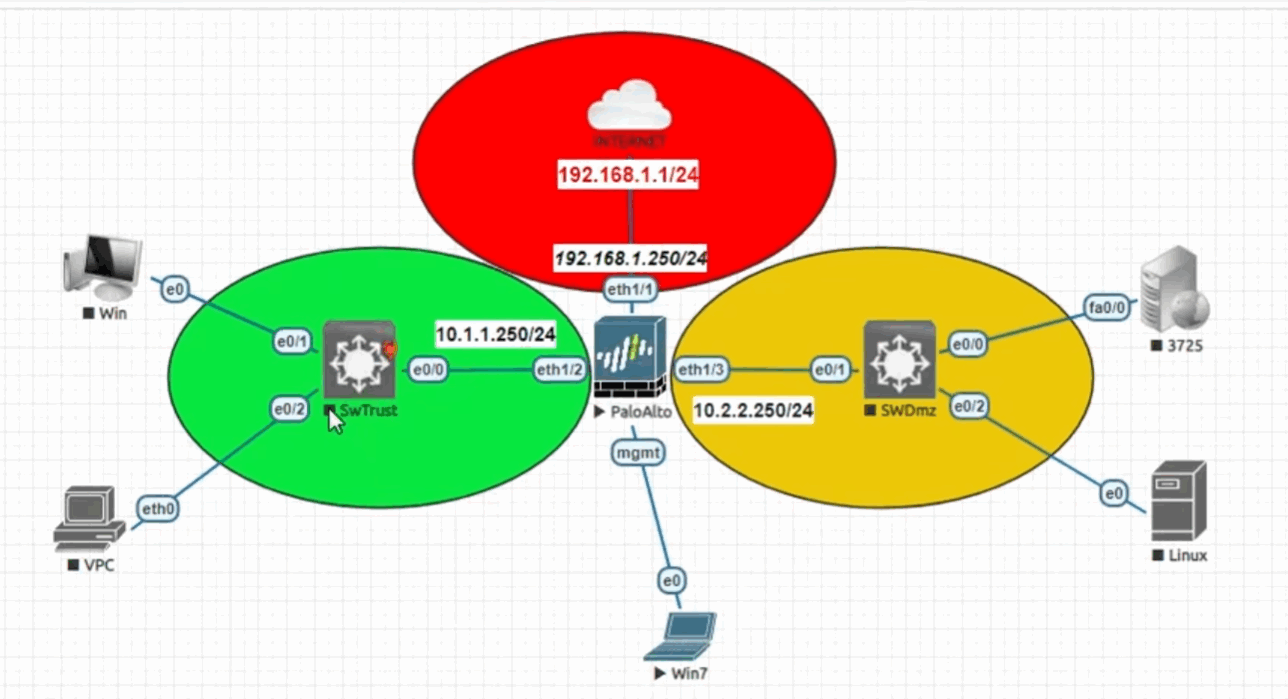
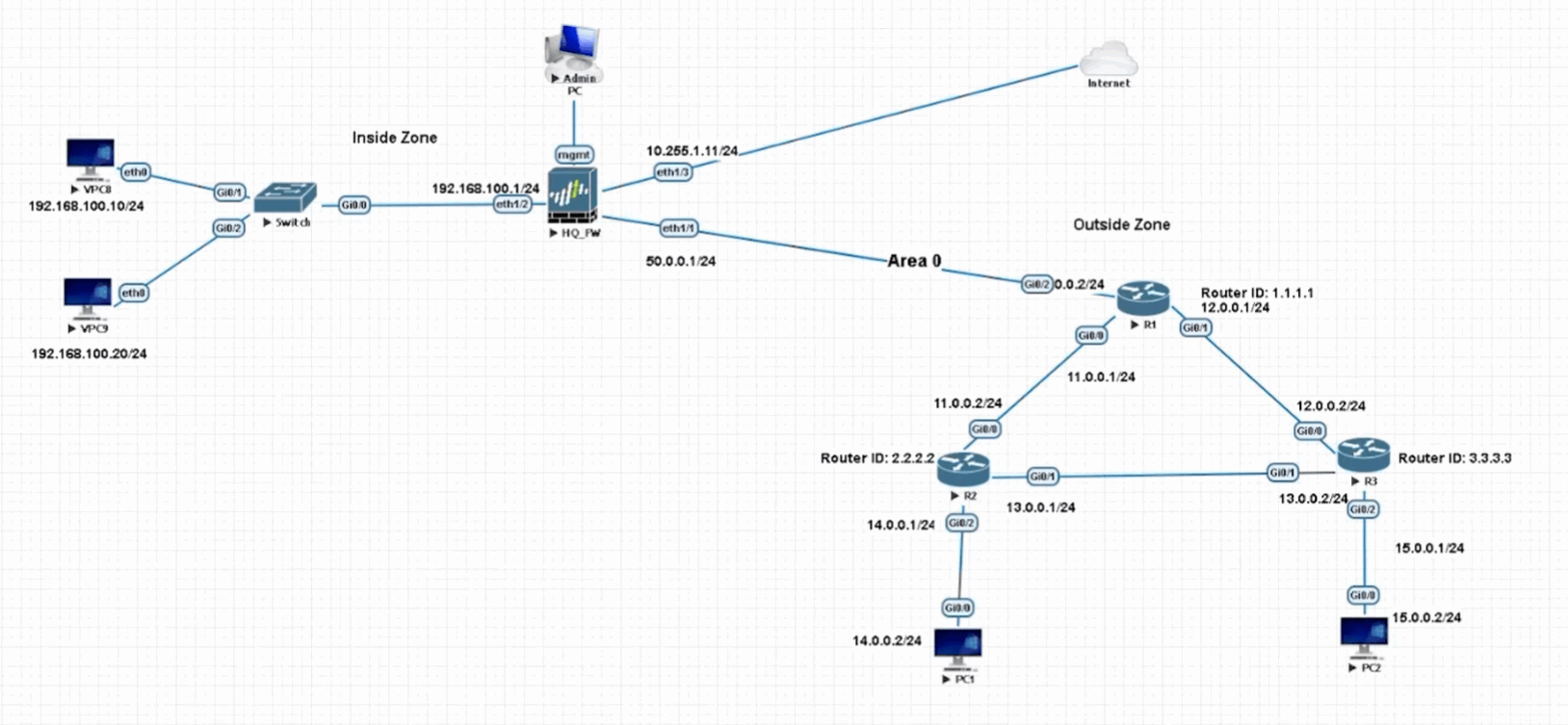
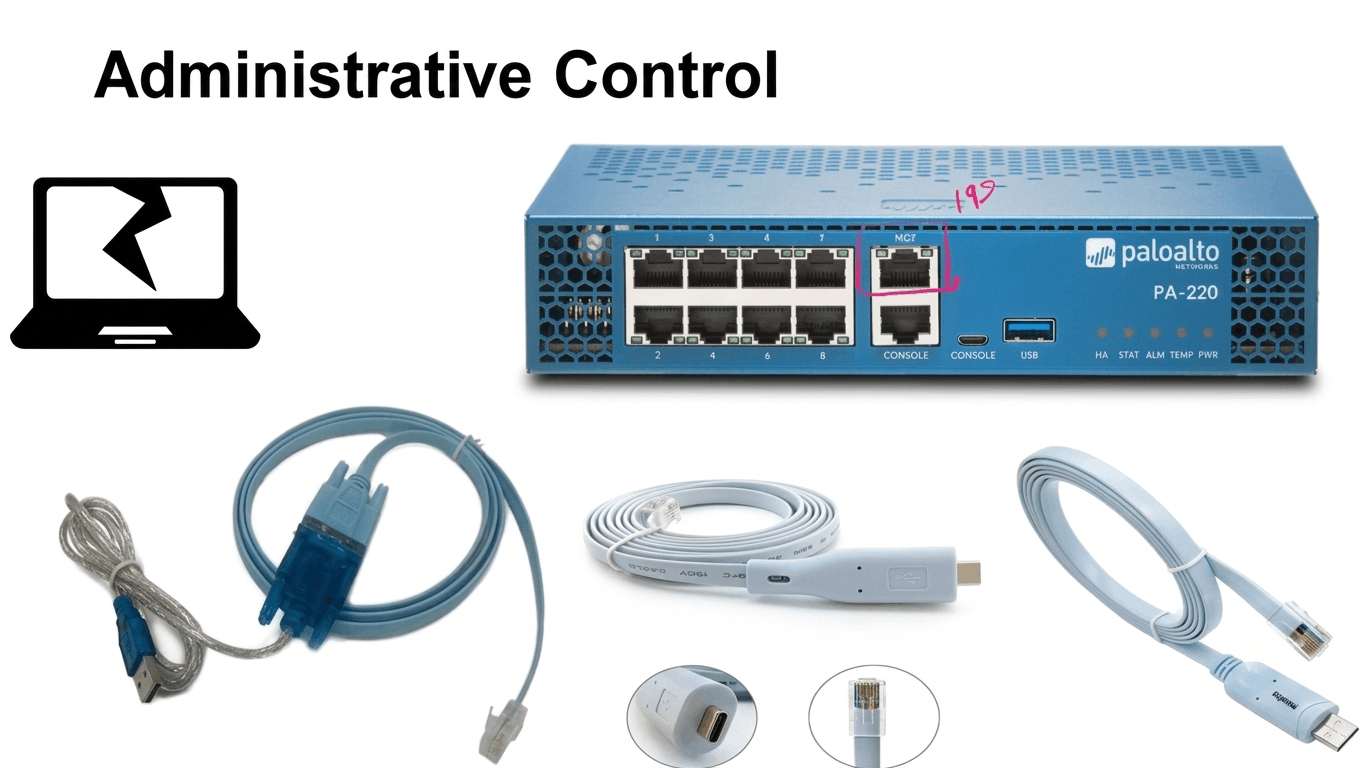
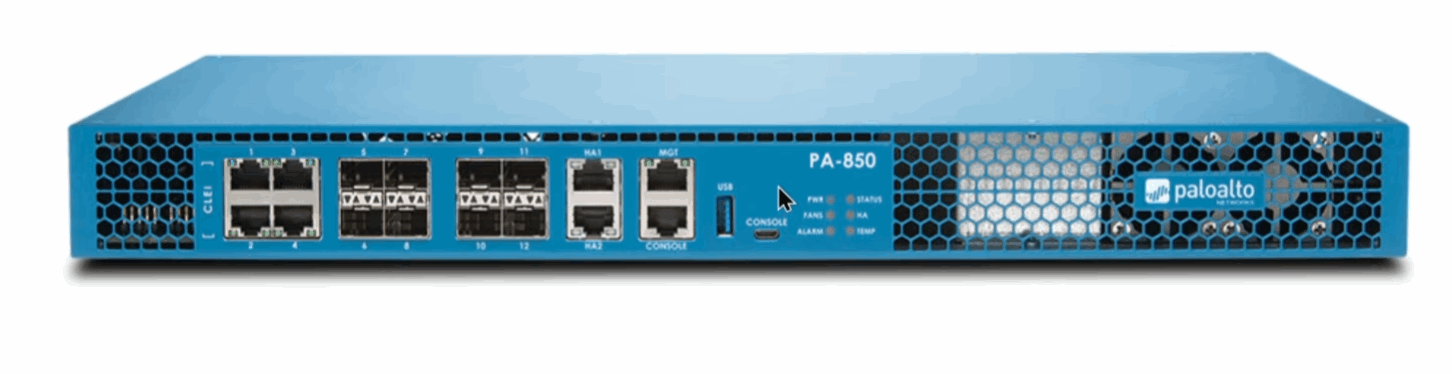
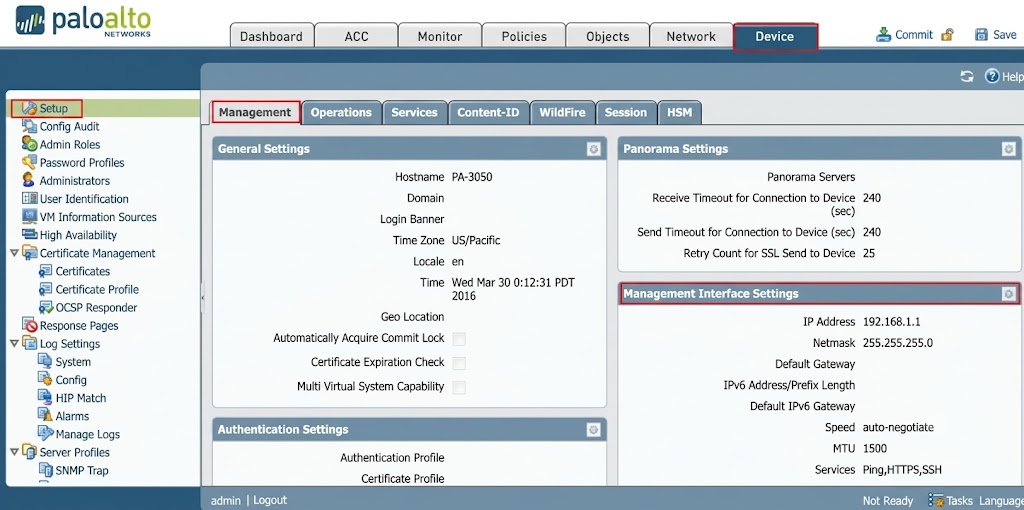
Main Palo Alto GUI sections
Top Menu:
- Dashboard
- ACC
- Monitor
- Policies
- Objects
- Network
- Device
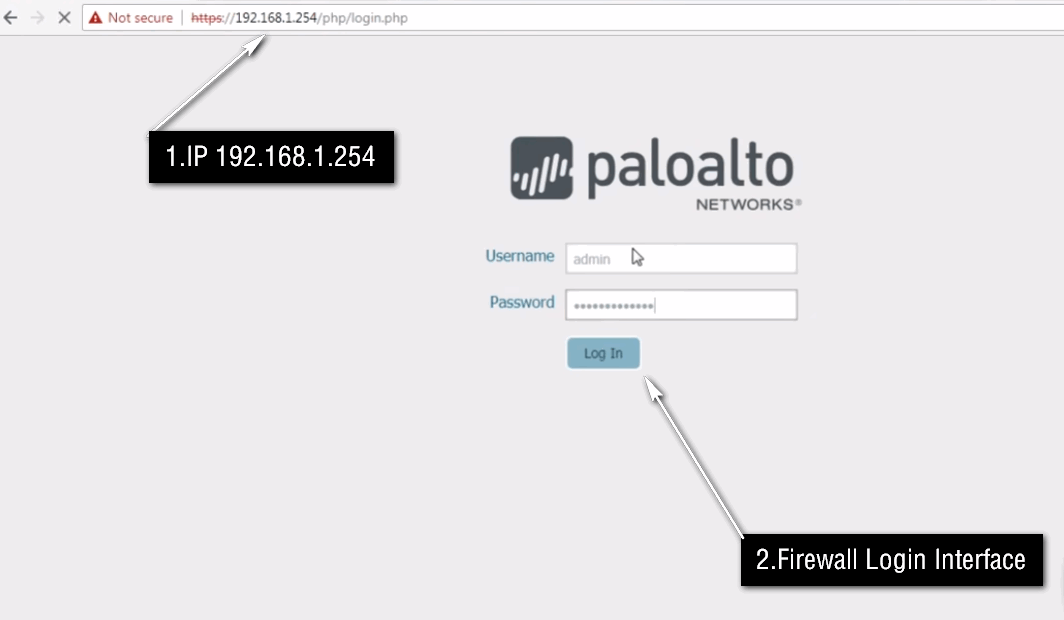
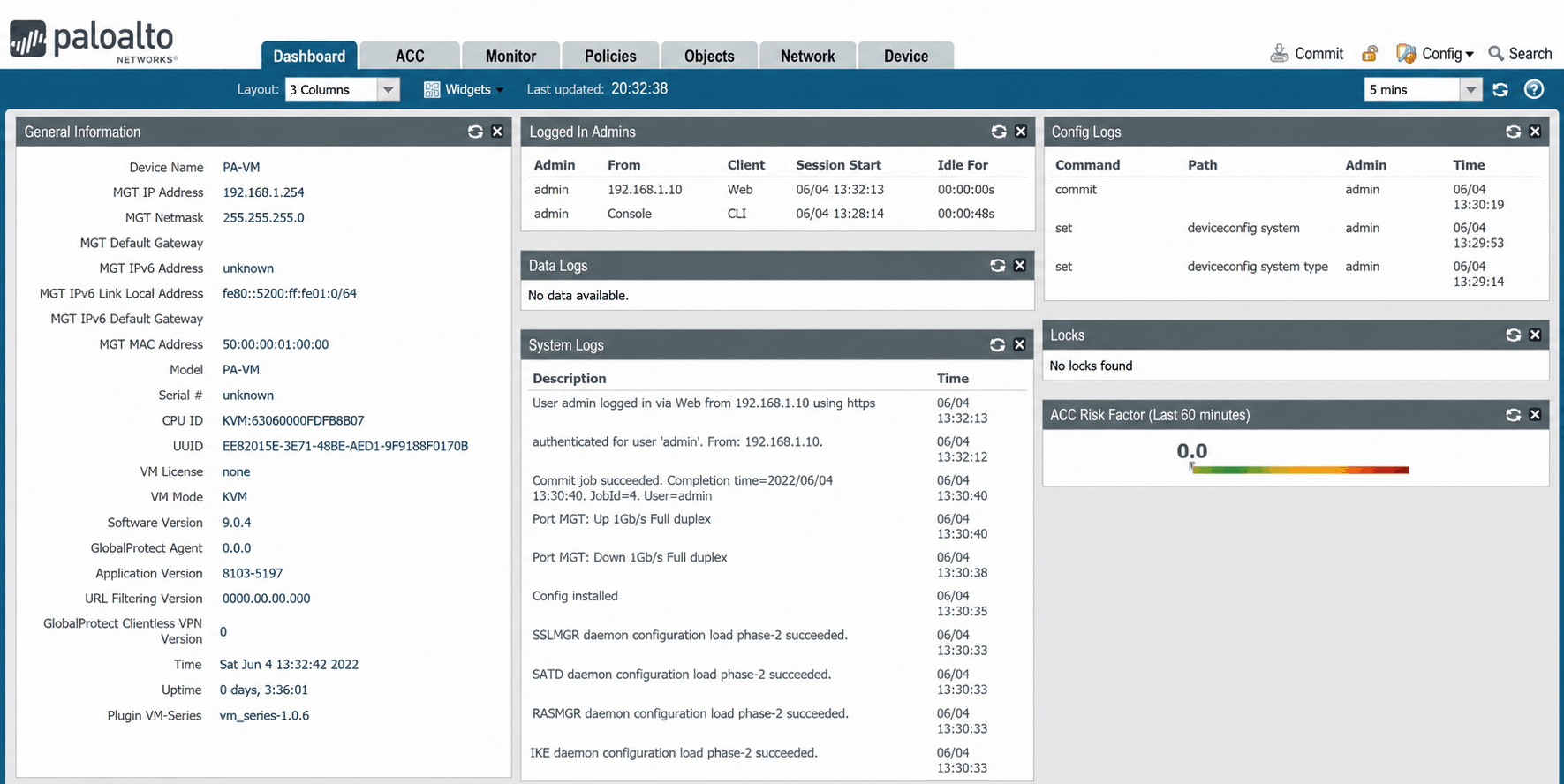
Policies
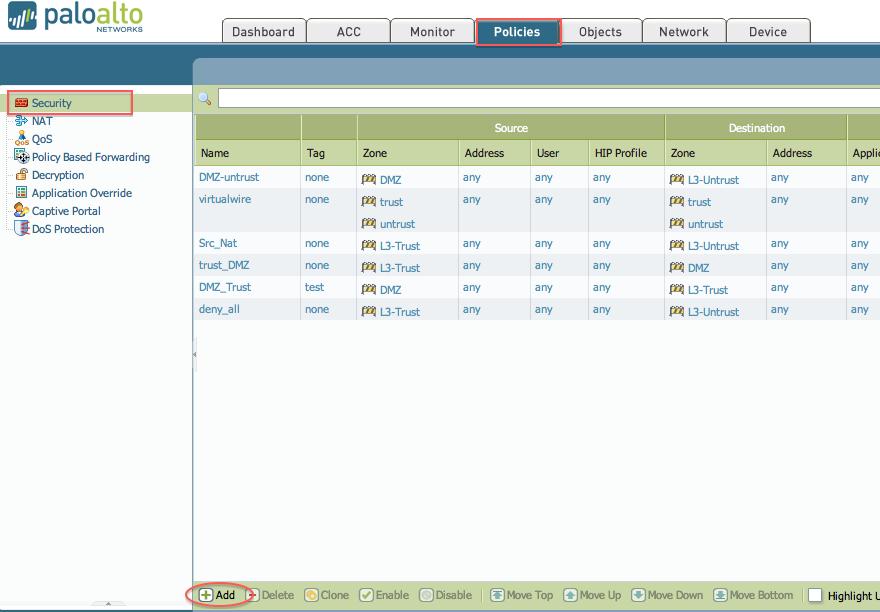
Under Policies, you can see/manage:
- Security – Allow/deny traffic based on zones, IP, user, application and service.
- NAT – Source NAT, Destination NAT and port translation.
- QoS – Bandwidth control and traffic prioritization.
- Policy Based Forwarding (PBF) – Selects a specific path/interface for traffic.
- Decryption – Controls SSL/TLS traffic inspection.
- Application Override – Controls specific application identification behavior.
- Authentication – User authentication policies.
- DoS Protection – Protects against denial-of-service attacks.
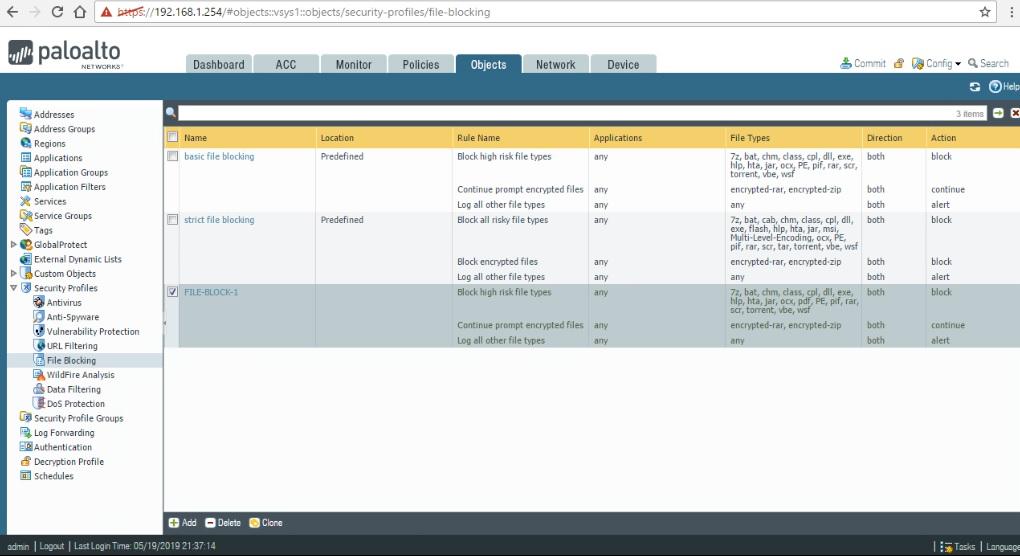
Objects → Security Profiles
This is where the important Security Profiles are Configured:
- Antivirus
- Anti-Spyware
- Vulnerability Protection
- URL Filtering
- File Blocking
- Data Filtering
- WildFire Analysis
- DoS Protection
- Zone Protection
- DNS Security
Objects → Other Objects
- Addresses
- Address Groups
- Regions
- Applications
- Application Groups
- Application Filters
- Services
- Service Groups
- Tags
- Security Profile Groups
- Log Forwarding
- Decryption Profiles
Network
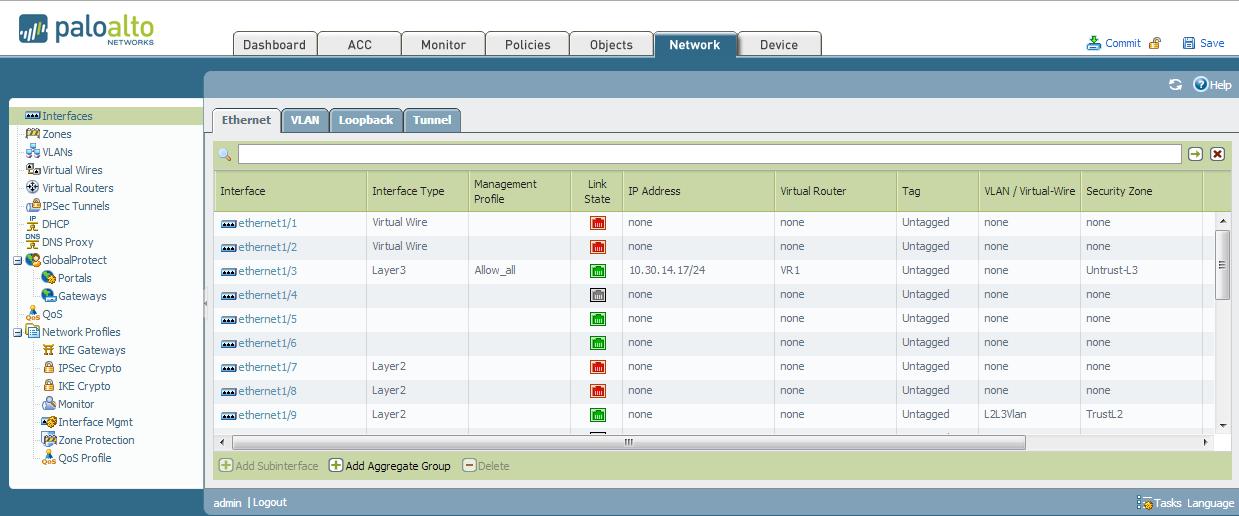
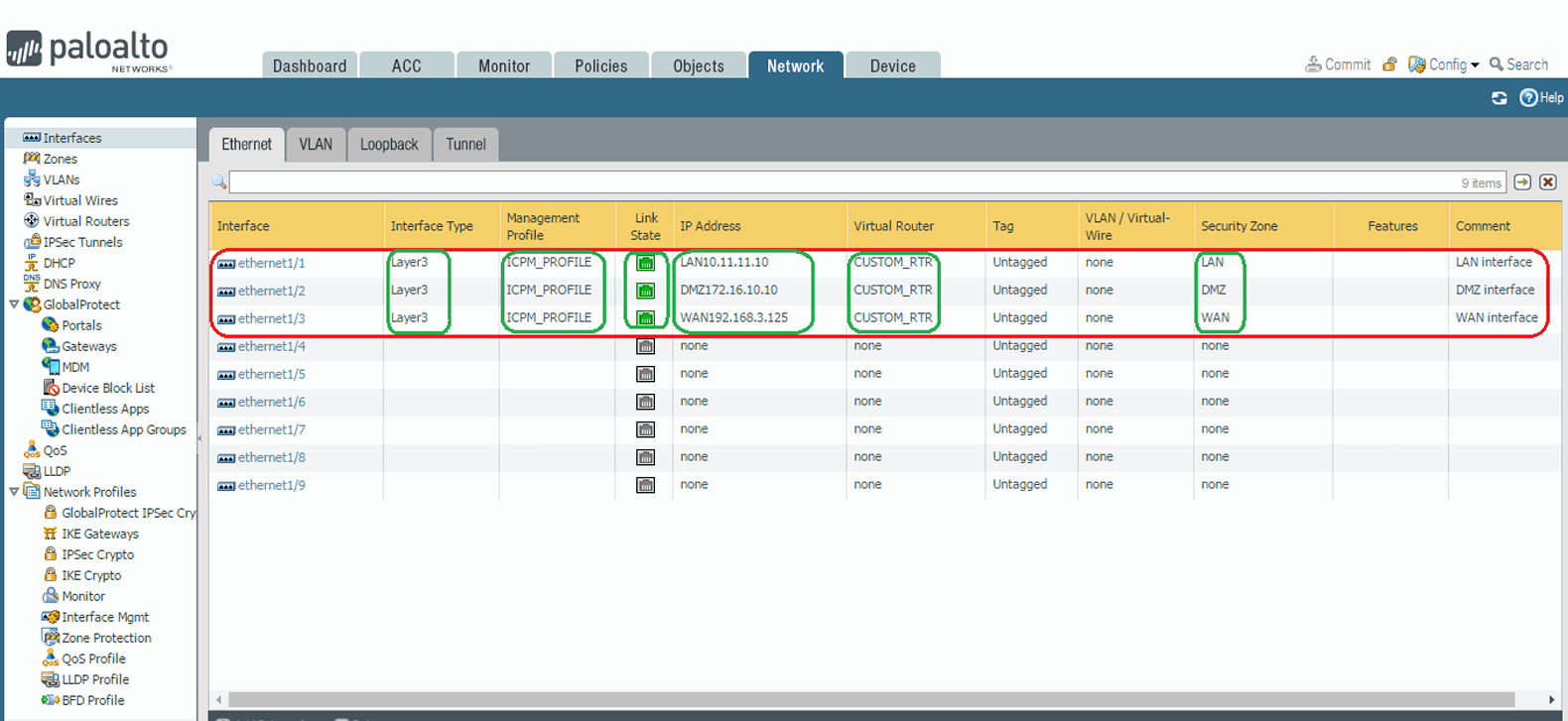
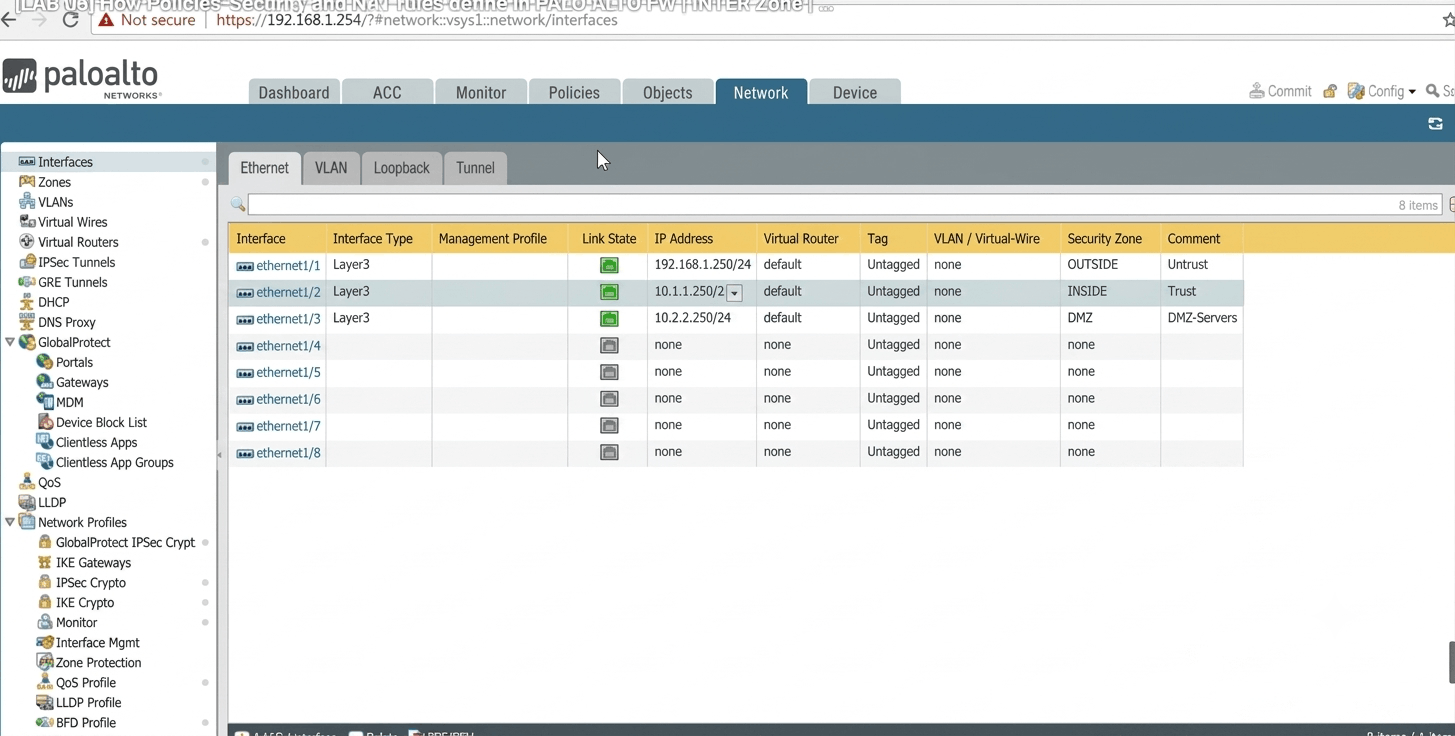
- Interfaces
- Zones
- Virtual Wires
- Virtual Routers
- IPsec Tunnels
- GRE Tunnels
- DHCP
- DNS Proxy
- GlobalProtect
- QoS
- Network Profiles
Device
- Setup
- High Availability
- Administrators
- Authentication
- User Identification
- Certificate Management
- Server Profiles
- Log Settings
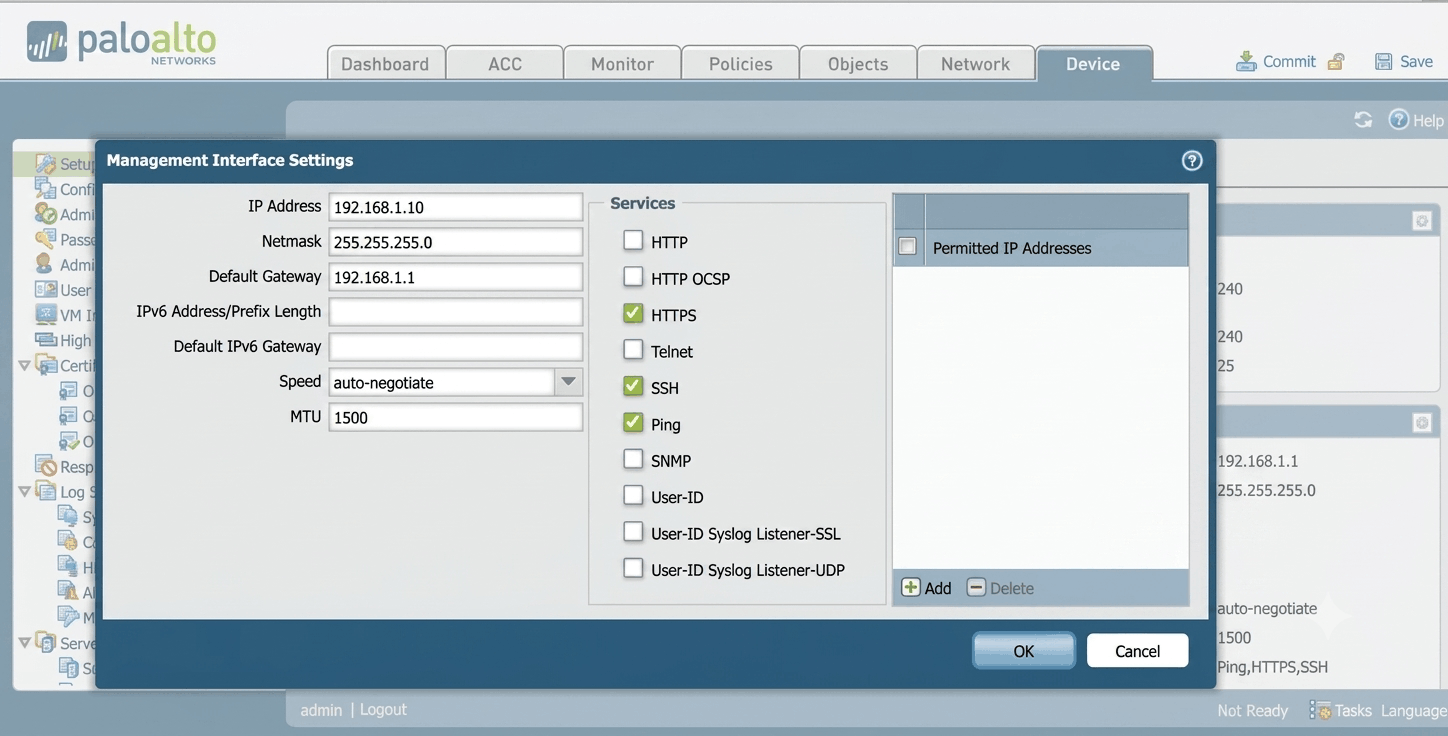
- Management settings
The exact menu names can vary somewhat by PAN-OS version and platform, but the core structure is represented in Palo Alto’s current documentation and GUI.
Why is Palo Alto Considered Better Than Other Firewalls
Yes, Palo Alto is often considered a best-in-class Next-Generation Firewall (NGFW), but it is important to understand that it is not automatically the best firewall for every network. FortiGate, Check Point, Sophos, and SonicWall are also powerful firewall platforms.
The main strength of Palo Alto is not that it has features that other firewalls completely lack. Many competing firewalls also provide Application Control, User Control, URL Filtering, SSL Inspection, IPS, Antivirus, File Blocking, VPN, and SD-WAN.
Palo Alto’s advantage is mainly in how these technologies are integrated, how deeply applications and traffic are identified, the level of visibility, and the overall security-policy architecture.
1. Next-Generation Firewall (NGFW)
Palo Alto is a full-featured NGFW that goes beyond traditional IP-and-port-based firewalling. It can identify applications, users, content, and threats and use this information to make security decisions.
2. App-ID
App-ID identifies applications based on their traffic behavior rather than relying only on TCP/UDP ports. Administrators can create policies for specific applications such as YouTube, Microsoft Teams, Facebook, RDP, SSH, and business applications.
3. User-ID
User-ID connects network traffic with users and groups, typically through Active Directory or other identity sources. This allows administrators to create policies based on users instead of relying only on IP addresses.
4. Content-ID
Content-ID is Palo Alto’s content inspection framework. It combines technologies such as URL Filtering, File Blocking, Antivirus, Anti-Spyware, Vulnerability Protection, and Data Filtering to control and inspect network content.
5. Security Policy
Palo Alto provides highly granular security policies. A policy can use source zone, destination zone, user, application, service, URL category, and security profiles together to determine whether traffic should be allowed or blocked.
6. URL Filtering
URL Filtering controls access to websites based on URL categories. Administrators can block malicious websites, phishing sites, adult content, gambling, social media, streaming, or other categories according to organizational requirements.
7. File Blocking
File Blocking controls the transfer of specific file types through the firewall. Administrators can create policies to block or allow file types such as executable files, archives, documents, and other potentially risky files.
8. Data Filtering
Data Filtering helps detect and control sensitive information leaving or moving through the network. It can be used to help protect confidential business information and prevent unauthorized data transfers.
9. Antivirus
The Antivirus security profile detects and blocks known malware and malicious files passing through the network. It provides an additional security layer against common malware threats.
10. Anti-Spyware
Anti-Spyware protects the network from spyware and malicious command-and-control activity. It can identify suspicious communications between compromised systems and external attackers.
11. Vulnerability Protection
Vulnerability Protection detects and blocks attempts to exploit known vulnerabilities in servers, applications, operating systems, and network devices.
12. Threat Prevention
Threat Prevention combines multiple security technologies to protect against malware, exploits, vulnerabilities, spyware, and other network threats.
13. WildFire
WildFire provides cloud-based analysis of suspicious and unknown files. It helps identify previously unknown malware and advanced threats that may not be detected by traditional signature-based protection.
14. SSL/TLS Decryption
Palo Alto can decrypt and inspect encrypted HTTPS traffic. This is important because attackers can hide malicious content inside encrypted connections. After inspection, the traffic can be allowed or blocked according to security policy.
15. Application Visibility
Palo Alto provides detailed visibility into applications running across the network. Administrators can determine which applications are being used, by whom, how much traffic they generate, and whether they present security risks.
16. User-Based Security
Security policies can be applied to individual users or Active Directory groups. For example, the administrator can allow one department to access an application while restricting another department.
17. NAT
Palo Alto supports Source NAT, Destination NAT, Static NAT, Dynamic NAT, and Port Address Translation. NAT can be used for Internet access, publishing internal servers, and controlling traffic between different networks.
18. Routing
Palo Alto supports static and dynamic routing technologies such as OSPF and BGP. It can therefore operate as an important routing/security point in enterprise, data-center, and Internet-edge networks.
19. Policy-Based Forwarding (PBF)
PBF allows administrators to select a specific path for traffic based on defined conditions. For example, traffic from a particular department or application can be sent through a specific ISP.
20. VPN
Palo Alto supports secure Site-to-Site VPN and remote-access VPN connectivity. IPsec VPN can securely connect branch offices, data centers, and other locations over the Internet.
21. GlobalProtect
GlobalProtect provides secure remote access for users working outside the corporate network. Security policies can continue to be applied to remote users while they access company resources.
22. High Availability (HA)
Palo Alto supports High Availability configurations to provide firewall redundancy. If one firewall fails, the secondary firewall can take over, helping maintain network availability.
23. QoS
Quality of Service allows administrators to control bandwidth and prioritize important applications. Critical business applications can receive higher priority than non-business traffic.
24. Panorama
Panorama is Palo Alto’s centralized management platform. It allows administrators to manage multiple Palo Alto firewalls from a central location, including policies, configurations, monitoring, and logs.
25. Logging and Monitoring
Palo Alto provides detailed logs for traffic, applications, users, threats, URLs, files, and system events. These logs help administrators troubleshoot problems and investigate security incidents.
26. ACC – Application Command Center
ACC provides a graphical overview of network activity. Administrators can quickly view applications, users, threats, URLs, traffic volume, and other security information from a centralized dashboard.
27. Zero Trust Security
Palo Alto supports Zero Trust principles by evaluating users, devices, applications, and security policies before granting access. The concept is based on verifying access rather than automatically trusting internal users.
28. SD-WAN
Palo Alto provides SD-WAN capabilities for intelligent WAN traffic management. It can select network paths based on application requirements and link performance.
29. Data Center Security
High-end Palo Alto PA-Series models are designed for large enterprise and data-center environments. They provide high throughput, large session capacity, advanced security inspection, and multiple high-speed interfaces.
30. Enterprise Scalability
Palo Alto offers different hardware families, from small branch firewalls to high-end data-center platforms. This allows organizations to select a firewall based on bandwidth, sessions, SSL inspection, security processing, and scalability requirements.
31. Centralized Security Architecture
One of Palo Alto’s major strengths is the integration of multiple security functions into a common policy architecture. Application identification, user identification, content inspection, URL filtering, file control, and threat prevention can work together.
32. Detailed Security Visibility
Palo Alto provides visibility beyond basic source and destination IP addresses. Administrators can investigate who is accessing what, which application is being used, what content is transferred, and whether the traffic contains threats.
33. Why Palo Alto Is Considered Premium
Palo Alto is considered a premium enterprise NGFW because of its combination of:
App-ID + User-ID + Content-ID + Threat Prevention + WildFire + SSL Decryption + Security Profiles + Detailed Visibility + Centralized Management
However, FortiGate, Check Point, Sophos, and SonicWall also provide many of these capabilities. Palo Alto’s main advantage is the way these technologies are integrated into its security-policy and application-aware architecture, rather than simply having more features.
What is Gartner
Gartner is an independent technology research and advisory company. It researches enterprise technologies such as cybersecurity, networking, cloud, data centers, AI and software.
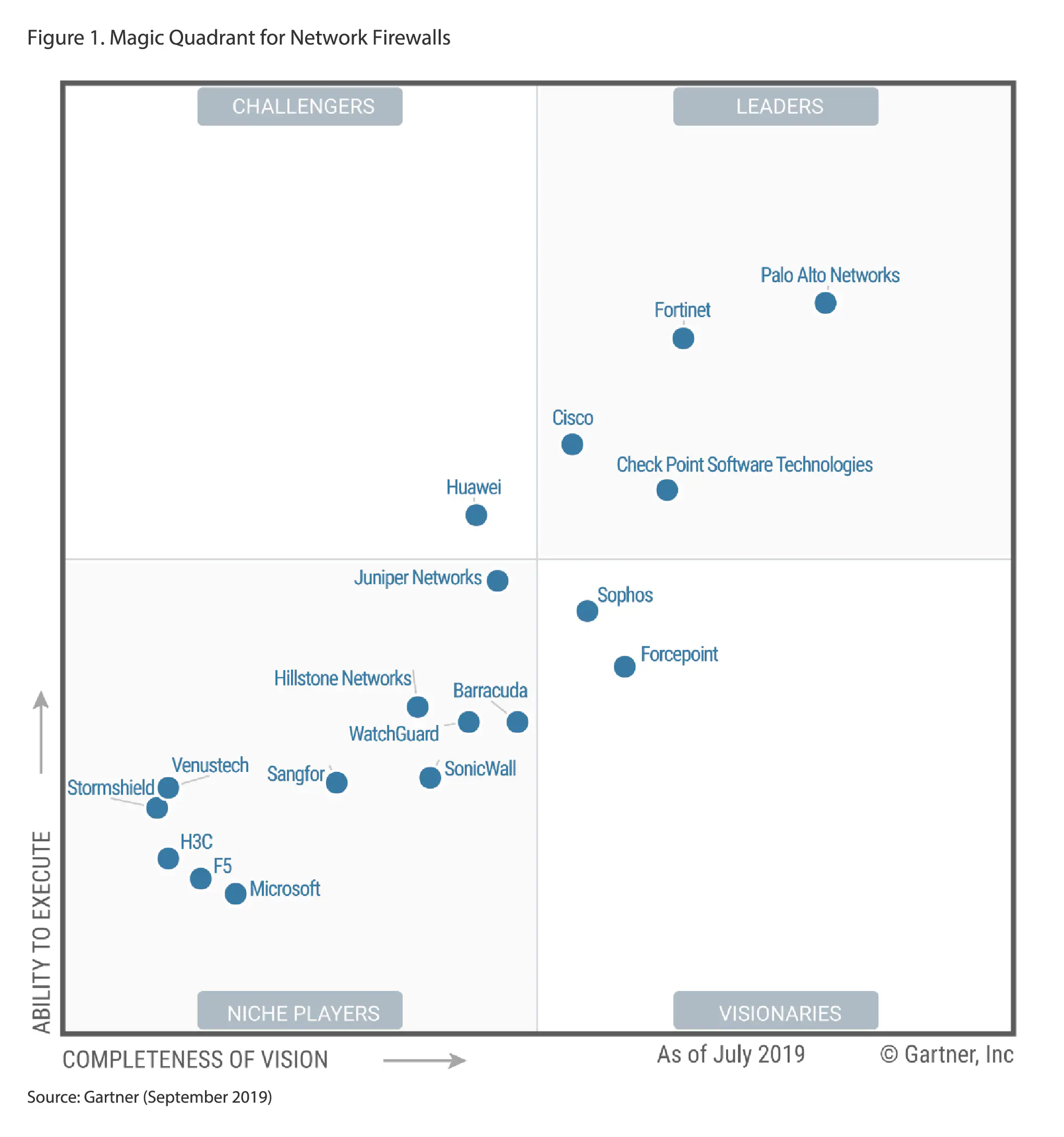
One of Gartner’s best-known research products is the Gartner Magic Quadrant. It evaluates technology vendors using two major dimensions:
- Ability to Execute – how effectively a vendor delivers and supports its products.
- Completeness of Vision – how strong and forward-looking the vendor’s technology strategy and product vision are.
What is the Gartner Magic Quadrant?
The Magic Quadrant is a graphical way of comparing vendors in a specific technology market.
The four categories are:
- Leaders – strong execution and strong vision
- Challengers – strong execution but comparatively less complete vision
- Visionaries – strong vision but comparatively less execution
- Niche Players – focused capabilities or a narrower market position
So, when someone says “Palo Alto is a Gartner Leader,” it means Gartner’s research placed Palo Alto in the Leader quadrant for that particular market and report.
It does not mean Gartner officially says Palo Alto is the best product for every customer. Gartner itself states that its research should not be interpreted as an endorsement or as advice to select only the highest-rated vendor.
Palo Alto and Gartner
Palo Alto Networks has had a long history of strong Gartner recognition in the network-firewall market. Palo Alto currently states that it has been a Leader in Gartner’s Magic Quadrant for Network Firewalls for 11 consecutive years.
This is significant because Gartner evaluates multiple major firewall vendors in the market, including vendors such as Fortinet, Check Point, Sophos and SonicWall in relevant Gartner research.
2025 Gartner Hybrid Mesh Firewall
In the 2025 Gartner Magic Quadrant for Hybrid Mesh Firewall, Palo Alto Networks was named a Leader. The report was published on August 25, 2025.
For example, FortiGate may be a better choice for one organization because of price/performance and integrated networking, while Palo Alto may be preferred by another organization because of its enterprise security architecture, application visibility, policy control and broader security platform.
So the correct statement is:
“Palo Alto Networks is consistently recognized as a Leader in Gartner’s network-firewall research, demonstrating a strong position in enterprise network security—but Gartner’s ranking should be considered alongside the organization’s specific technical and business requirements.”
2025 Gartner Firewall Leaders
- Fortinet — Leader; positioned highest for Ability to Execute.
- Palo Alto Networks — Leader; positioned furthest for Completeness of Vision, according to Palo Alto’s announcement.
- Check Point — Leader for both execution and vision.
What is a PA Model in Palo Alto?
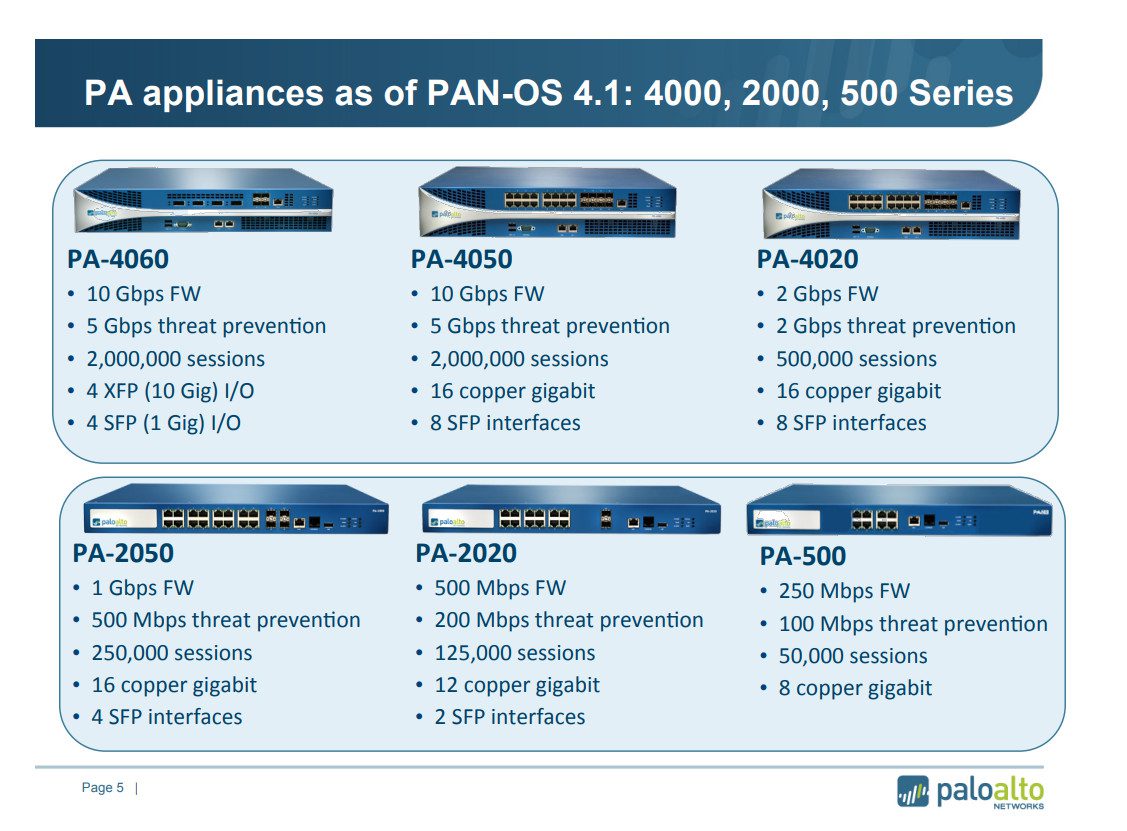
PA means Palo Alto Networks firewall appliance model/series. The number after PA- identifies the hardware model and its approximate performance/capacity class.
For example:
- PA-410 → Small branch firewall
- PA-440 → Small/medium office
- PA-460 → Larger branch deployment
- PA-1410 → Large branch/campus
- PA-3410 → Enterprise firewall
- PA-3440 → Higher-performance enterprise
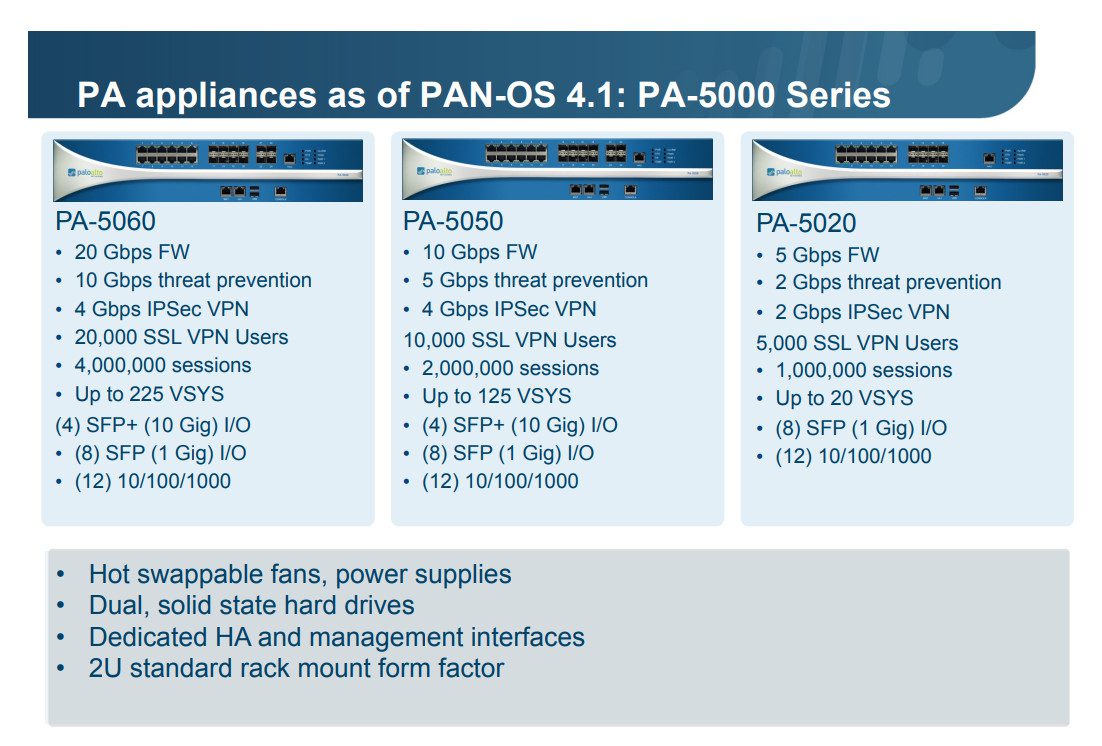
- PA-5410 → Data-center firewall
- PA-5450 → High-end data center
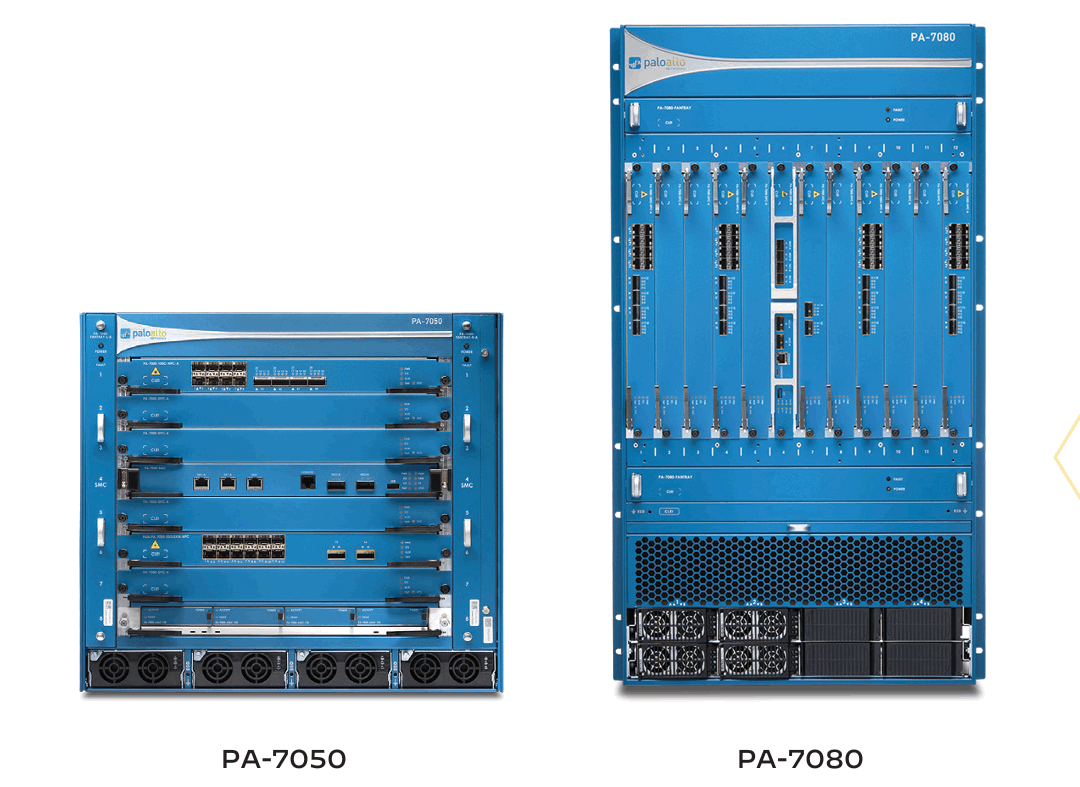
- PA-7050 / PA-7080 → Modular, very high-performance platforms
- PA-7500 → Hyperscale/high-end platform
Palo Alto PA Series Hardware
1. PA-400 Series
Models: PA-410, PA-415, PA-415-5G, PA-440, PA-445, PA-450, PA-455, PA-460.
Use: Designed for small offices, branch offices, retail locations, and distributed enterprise environments. It provides full next-generation firewall security in a compact form factor.
2. PA-500 Series
Models: PA-501, PA-505, PA-510, PA-520, PA-540, PA-545, PA-550, PA-555, PA-560.
Use: Suitable for branch offices and small-to-medium business environments. It provides application control, threat prevention, URL filtering, VPN, and other NGFW features.
3. PA-1400 Series
Models: PA-1410, PA-1420.
Use: Designed for large branch offices, campus networks, and medium-sized enterprise deployments. It provides higher performance and connectivity compared with entry-level PA-Series firewalls.
4. PA-3400 Series
Models: PA-3410, PA-3420, PA-3430, PA-3440.
Use: Designed for enterprise Internet gateways, campus networks, and high-performance security deployments. It is suitable for organizations requiring higher throughput and advanced security inspection.
5. PA-5400 Series
Models: PA-5410, PA-5420, PA-5430, PA-5440, PA-5445.
Use: Designed for data centers, high-speed Internet gateways, and service-provider environments. It provides high-performance security inspection for large volumes of traffic.
6. PA-5500 Series
Models: PA-5540, PA-5550, PA-5560, PA-5570, PA-5580.
Use: Designed for large enterprise networks, data centers, Internet edge deployments, and service-provider environments where very high performance is required.
7. PA-7000 Series
Models: PA-7050, PA-7080.
Use: A modular, high-end firewall platform designed for very large data centers, service providers, and high-volume network environments. It can be expanded according to performance and interface requirements.
8. PA-7500 Series
Use: A high-end, highly scalable platform designed for hyperscale data centers, large Internet gateways, and service-provider environments. It is built to handle extremely high traffic volumes and advanced security inspection.
Simple PA-Series Selection
PA-400 → Small Office / Branch
PA-500 → Branch / Small Enterprise
PA-1400 → Large Branch / Campus
PA-3400 → Enterprise / Internet Edge
PA-5400 → Data Center
PA-5500 → Large Data Center / Service Provider
PA-7000 → Very Large Data Center
PA-7500 → Hyperscale / High-End Data Center
Important: The correct model should be selected based on Internet bandwidth, Threat Prevention throughput, SSL Decryption throughput, concurrent sessions, VPN users, number of users, and HA requirements—not simply by user count.
Palo Alto Firewall User Capacity
- PA-410 – Suitable for approximately 50–100 users. Best for small offices and basic branch connectivity.
- PA-440 – Suitable for approximately 100–300 users. Good for small and medium-sized offices.
- PA-450 – Suitable for approximately 200–500 users. Designed for medium branch offices with higher traffic requirements.
- PA-460 – Suitable for approximately 300–700 users. Suitable for larger branches and small enterprise networks.
- PA-1410 – Suitable for approximately 500–1,000 users. Designed for large branch offices and campus environments.
- PA-1420 – Suitable for approximately 700–1,500 users. Suitable for medium enterprise and campus deployments.
- PA-3410 – Suitable for approximately 1,000–2,000 users. Designed for enterprise Internet-edge deployments.
- PA-3420 – Suitable for approximately 1,500–3,000 users. Suitable for higher-traffic enterprise environments.
- PA-3430 – Suitable for approximately 2,000–4,000 users. Designed for large enterprise networks.
- PA-3440 – Suitable for approximately 3,000–5,000+ users. Suitable for large enterprise and data-center environments.
- PA-5410 – Suitable for approximately 3,000–6,000 users. Designed for high-performance data-center deployments.
- PA-5420 – Suitable for approximately 5,000–10,000 users. Suitable for large enterprise and data-center networks.
- PA-5430 – Suitable for approximately 7,000–15,000 users. Designed for high-traffic data-center environments.
- PA-5440 – Suitable for approximately 10,000–20,000+ users. Suitable for large data centers and service providers.
- PA-5450 – Suitable for approximately 15,000–30,000+ users. Designed for high-end data-center and service-provider environments.
- PA-7000 Series – Suitable for 20,000–100,000+ users, depending on configuration and traffic. Designed for very large data centers and service providers.
- PA-7500 Series – Suitable for 50,000–100,000+ users or more, depending on traffic and configuration. Designed for hyperscale data centers and very large service-provider environments.
Note: These are practical sizing estimates, not official maximum user limits. Actual capacity depends on Internet bandwidth, SSL Decryption, Threat Prevention, applications, concurrent sessions and VPN usage.
Palo Alto Networks Certification
What is Palo Alto Firewall Program?
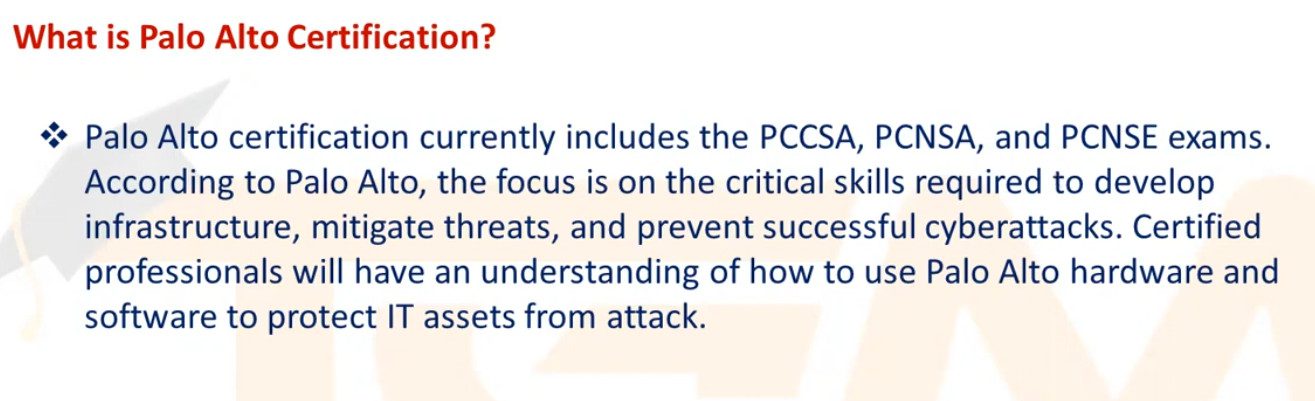
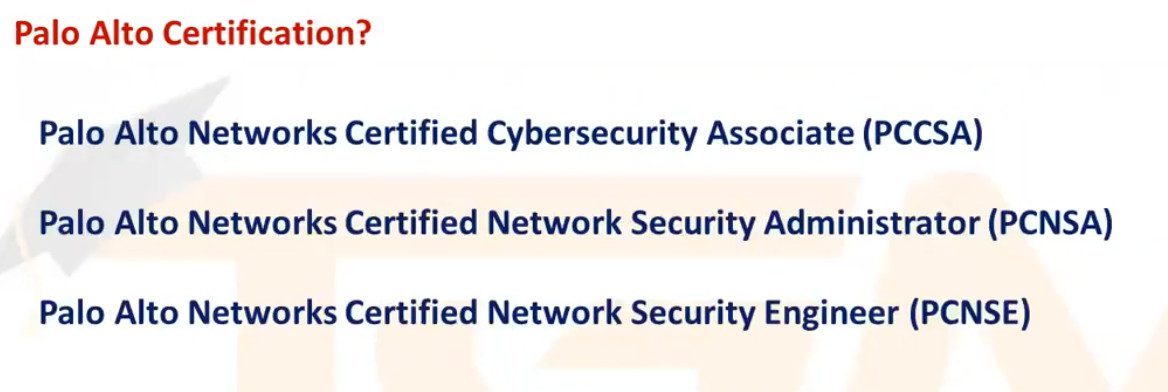
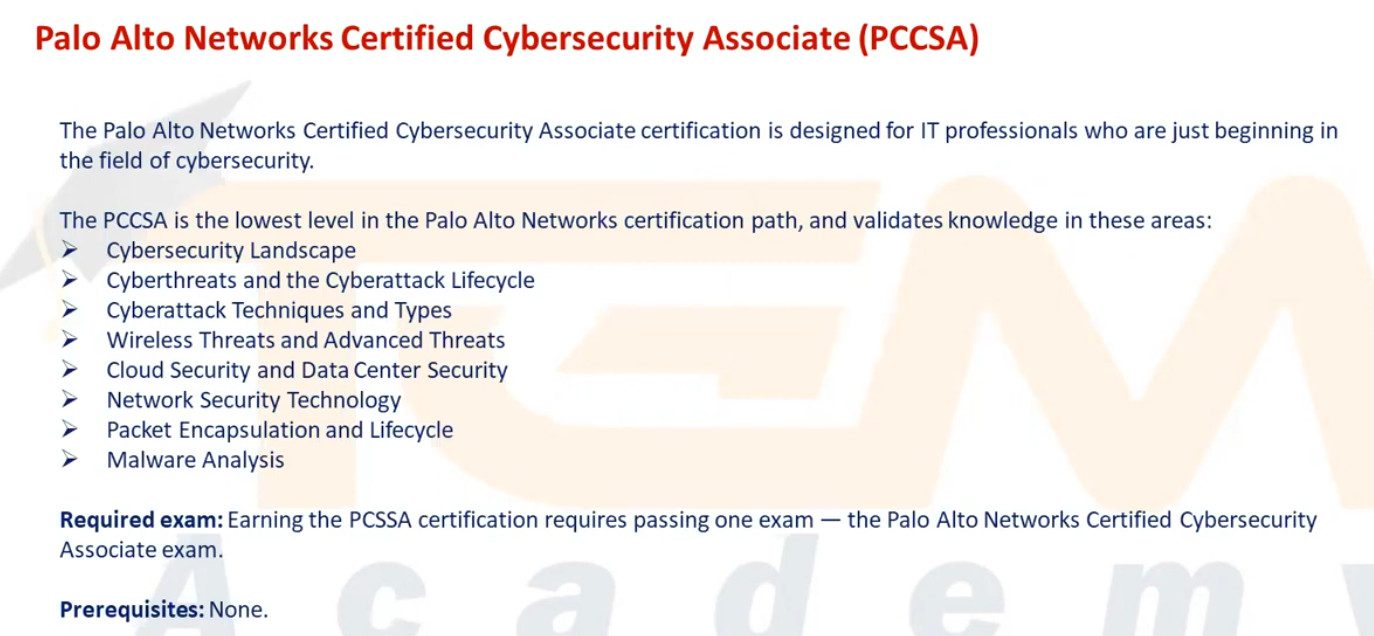
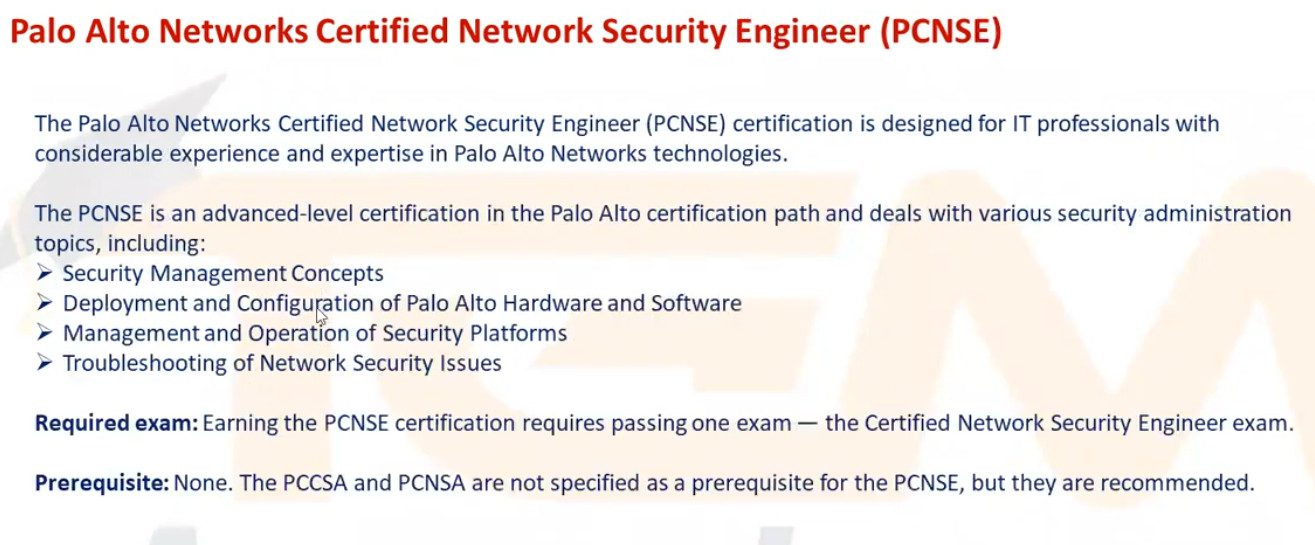
Palo Alto Networks provide a cybersecurity intensive globally-renowned certification called the Palo Alto Networks Certified Network Security Engineer (PCNSE) that validates a pupil’s knowledge and skills related to network security over the internet. The Palo Alto course provides a candidate with the skills to design, integrate and deploy Palo Alto products.
What are the exam details of the Palo Alto certification in IT?
The exam details of the Palo Alto certification in IT are as follows-
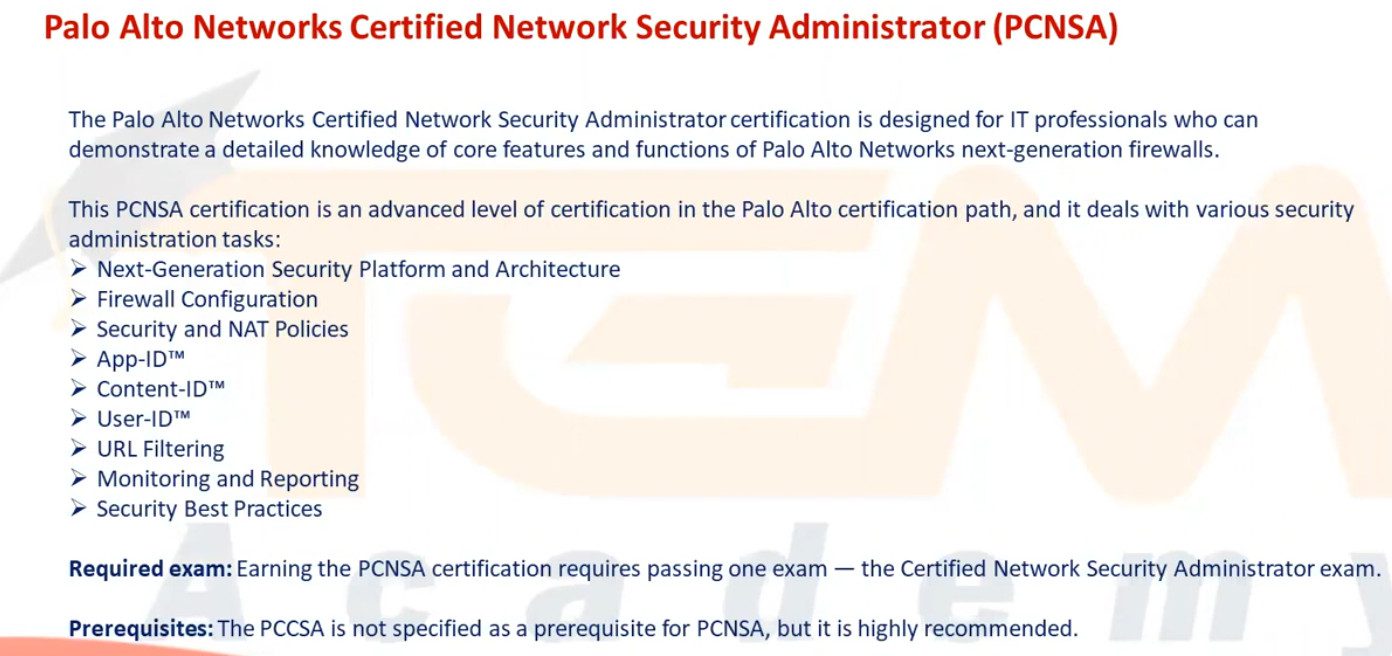
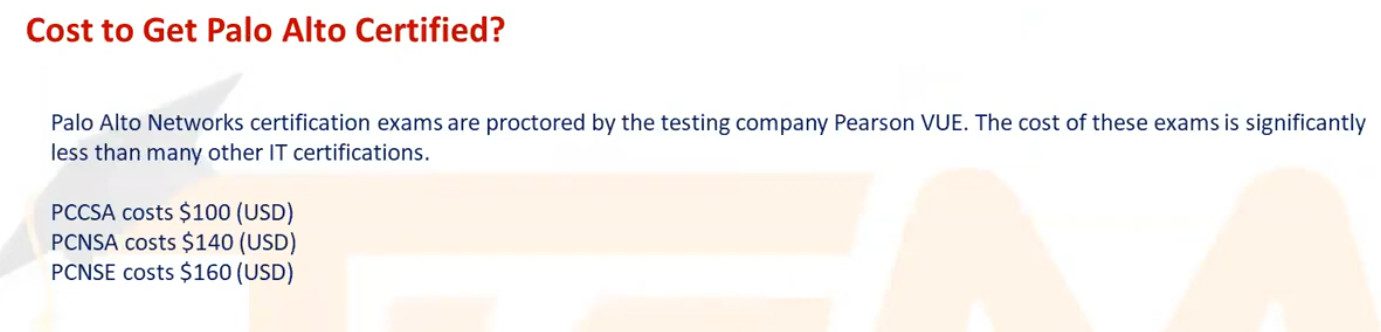
PCNSE Exam Code: PCNSE PAN-OS 10
Exam Level: Associate
Exam Cost: USD 175
Exam Duration: 80 Minutes
Exam Format: Multiple Choice Questions & Multiple Response
Total Questions: 75 Questions
Passing Score: Variable (70-80 / 100 Approx.)PCNSA Exam Code: PCNSA PAN-OS 10
Exam Level: Associate
Exam Cost: USD 155
Exam Duration: 80 Minutes
Exam Format: Multiple Choice Questions & Multiple Response
Total Questions: 50-60 Questions
Passing Score: Variable (70-80 / 100 Approx.)
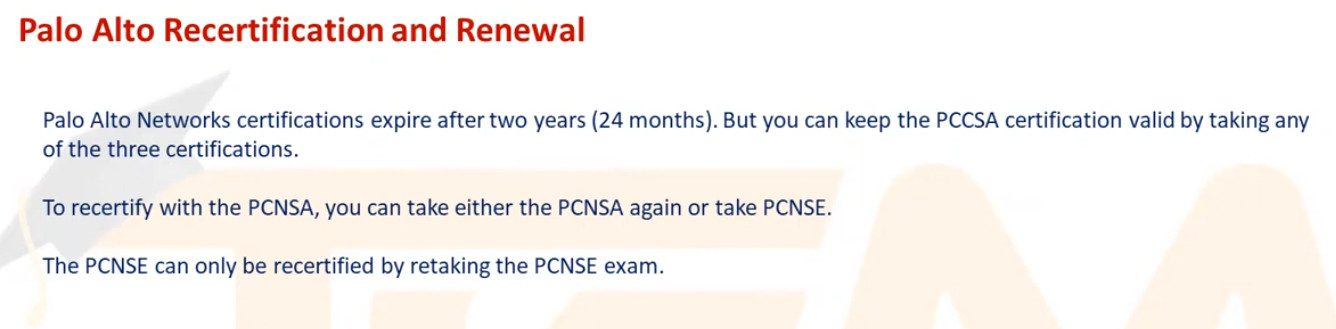

Palo Alto Networks Certification Changes in 2025
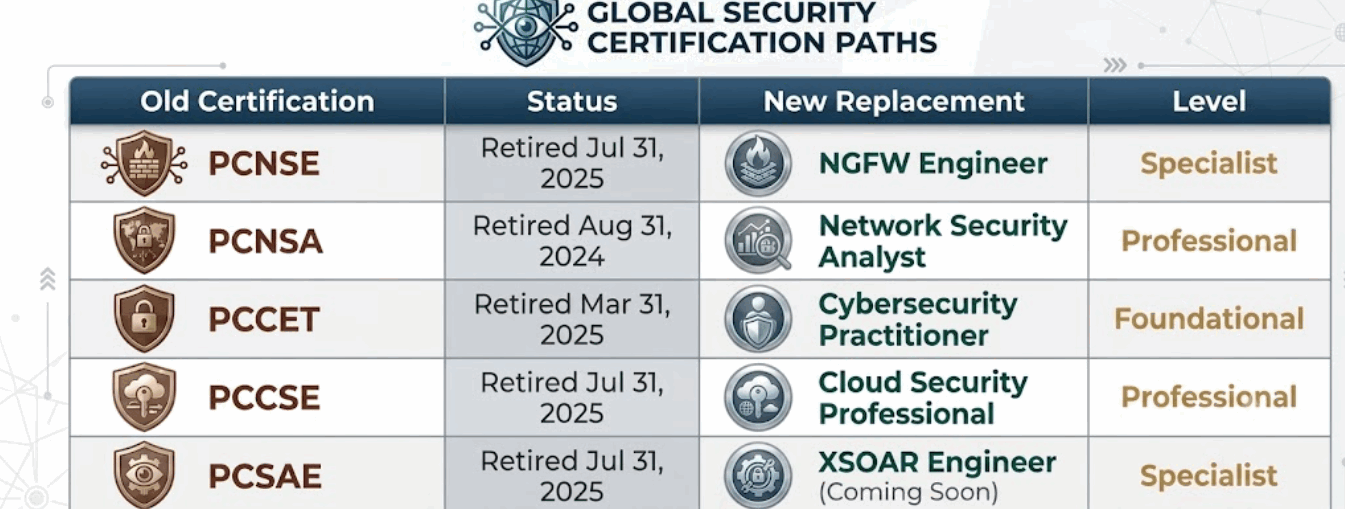
Palo Alto Networks changed its certification program in 2025 from an older Product-Focused Model to a more Role-Based and Job-Skill-Focused Model. The idea is to validate what a person can actually do in a cybersecurity role, rather than only testing knowledge of a particular Palo Alto product.
If you are starting Palo Alto Certification now in 2026, I would not start with PCNSA or PCNSE preparation, because those exams have been Retired.
- Palo Alto changed its certification program in 2025.
The company moved from the older product-focused certification system to a role-based certification framework that focuses more on practical, job-ready skills. - PCNSA was retired.
The Palo Alto Networks Certified Network Security Administrator (PCNSA) exam was retired on January 31, 2025. - PCNSE was retired.
The Palo Alto Networks Certified Network Security Engineer (PCNSE) exam was retired on July 31, 2025. Existing PCNSE certifications remain valid for two years from the date they were earned. - New role-based certifications were introduced.
Palo Alto introduced certifications designed around specific cybersecurity roles instead of simply validating knowledge of a particular product. - Next-Generation Firewall Engineer
This certification is specifically focused on deploying, operating, administering, and creating policies for Palo Alto Networks Next-Generation Firewalls. It is highly relevant for people pursuing a Palo Alto Firewall Engineer career. - Network Security Professional
The previous Network Security Generalist certification was renamed Network Security Professional on May 30, 2025. This certification focuses on broader network-security skills. - No Direct PCNSE Replacement
Palo Alto states that there is no one-to-one replacement for PCNSE because the new certification framework is based on job roles and practical skills rather than the old product-focused approach. - Main Goal of the New System
The new certification program is designed to demonstrate that a professional has practical skills needed for real-world cybersecurity jobs, rather than only theoretical product knowledge.
1. PCNSA – Palo Alto Networks Certified Network Security Administrator
PCNSA was the traditional administrator-level Palo Alto certification.
It focused mainly on operating and administering Palo Alto Networks firewalls, including:
- PAN-OS
- Security Policies
- NAT
- App-ID
- User-ID
- Security Profiles
- URL Filtering
- Firewall administration
The PCNSA exam was Retired in 2025 as Palo Alto moved to its new Role-Based Certification Structure.
2. PCNSE – Palo Alto Networks Certified Network Security Engineer
PCNSE was the well-known Palo Alto firewall engineer certification.
It was aimed at engineers working with Palo Alto firewalls and covered areas such as:
- Firewall deployment
- PAN-OS configuration
- Security Policies
- NAT
- Routing
- App-ID
- User-ID
- Security Profiles
- VPN
- GlobalProtect
- Panorama
- Troubleshooting
The PCNSE exam Retired on July 31, 2025. Existing certifications remain valid for two years from the date they were earned.
3. Why Did Palo Alto Change the Certification System?
The important change is:
Old System:
Learn Palo Alto Product → Pass Product-Based Exam
New System:
Learn Job Role → Develop Practical Skills → Pass Role-Based Certification
Palo Alto explained that the older certifications were heavily focused on product knowledge, while the new framework focuses more on Job-Ready Skills.
4. Network Security Professional
The Network Security Professional certification is part of the new Professional-level structure.
It provides broader knowledge of Palo Alto’s network-security technologies, including areas such as:
- Next-Generation Firewall
- Prisma Access
- Prisma SD-WAN
- Network security concepts
- Palo Alto security technologies
The previous Network Security Generalist name was changed to Network Security Professional on May 30, 2025.
5. Next-Generation Firewall Engineer
This is particularly important if your goal is to become a Palo Alto Firewall Engineer.
Palo Alto introduced the Next-Generation Firewall Engineer Certification in January 2025. It validates skills in:
- Deploying NGFWs
- Operating firewalls
- Administering firewalls
- Creating security policies
- Managing NGFW environments
- Practical network-security operations
Palo Alto specifically describes the certification as validating knowledge and skills for deploying, operating, administering, and creating policies for next-generation firewalls.
For your Learning Goal:
Network Security Professional
↓
Next-Generation Firewall Engineer
↓
Advanced Firewall Engineering
6. Is Next-Generation Firewall Engineer the Direct Replacement for PCNSE?
No — not exactly.
Palo Alto states that there is no direct one-to-one replacement for PCNSE because the new certifications are based on job roles rather than simply replacing an old product-focused exam.
However, for someone whose main goal is Palo Alto NGFW engineering, the Next-Generation Firewall Engineer is one of the most relevant current certifications.
Palo Alto’s community guidance also notes that the combination of Network Security Analyst + Next-Generation Firewall Engineer covers much of the skill area that was associated with the old PCNSE.
7. New Certification Structure
Palo Alto’s new framework is organized around different skill levels and roles.
Foundation Level
Designed for people who are new to cybersecurity.
Examples include:
- Cybersecurity Apprentice
- Cybersecurity Practitioner
These focus on building fundamental cybersecurity knowledge.
Professional Level
Designed for professionals who need broader knowledge of Palo Alto Networks technologies.
Examples include:
- Network Security Professional
- Security Operations Professional
- Cloud Security Professional
The Cloud Security Professional certification focuses on cloud-security skills and the Cortex Cloud platform.
Specialist Level
Designed for people who want to specialize in a particular technology or job role.
Examples include:
- Next-Generation Firewall Engineer
- XSIAM Engineer
- Other specialist certifications in Palo Alto’s ecosystem
The NGFW Engineer is particularly relevant for firewall engineers.
What is a Firewall Engineer?
A Firewall Engineer is an IT professional who is responsible for Configuring, Managing, Monitoring, and Troubleshooting Firewalls to Protect an organization’s network from Unauthorized Access and Cyber Threats.
Example
Suppose a Company Has:
Internet → Palo Alto Firewall → Core Switch → 500 Employee PCs + Servers
The Firewall Engineer may:
- Allow Employees to Access the Internet.
- Block Unauthorized Websites.
- Allow only specific users to access servers.
- Configure NAT for Internet access.
- Create VPN connections between branches.
- Configure Security Policies.
- Monitor Threats and suspicious traffic.
- Troubleshoot when an application or website is not working.
In simple words:
A Firewall Engineer controls who can access what, from where, and under which conditions, while protecting the company’s network from security threats.
Why Learn a Firewall Course?
1. Network Security
A firewall is one of the most important security devices in a network. Learning firewall technology helps you protect users, servers, applications, and network infrastructure from unauthorized access and cyber threats.
2. High Demand in the IT Industry
Almost every medium and large organization requires firewall and network-security professionals. Firewall skills can create opportunities in IT Companies, Enterprises, Data Centers, ISPs, Banks, and Managed Security Service Providers.
3. Career Growth
Firewall knowledge can help you move from traditional networking into cybersecurity.
Network Engineer → Firewall Engineer → Network Security Engineer → Senior Security Engineer → Security Architect
4. Practical Enterprise Skills
A Firewall Course teaches real-world technologies used in enterprise networks, including:
- Security Policies
- NAT
- Routing
- VPN
- Application Control
- URL Filtering
- IPS
- Antivirus
- SSL/TLS Inspection
- User-Based Security
5. Learn Palo Alto and Other NGFWs
Once you understand firewall fundamentals, you can work with major platforms such as:
- Palo Alto Networks
- FortiGate
- Check Point
- Sophos
- SonicWall
The basic security concepts are transferable between different firewall vendors.
6. Understand Security Policies
You learn how to control network traffic based on:
Source → Destination → User → Application → Service → Security Profile → Action
This is one of the most important skills for a firewall engineer.
7. Learn NAT
NAT is essential when connecting internal networks to the Internet or publishing internal servers.
You can learn:
- Source NAT
- Destination NAT
- Static NAT
- Dynamic NAT
- Port Translation
8. Learn VPN
Firewalls are widely used to provide secure connections between offices and remote users.
You can learn:
- Site-to-Site IPsec VPN
- Remote Access VPN
- SSL VPN
- GlobalProtect
- VPN troubleshooting
9. Learn Application Security
Modern NGFWs can identify and control applications rather than relying only on port numbers.
For example:
Allow Microsoft Teams
Block unauthorized applications
Allow RDP only for authorized users
10. Learn Web and Content Security
Firewall courses teach how to control Internet content using technologies such as:
- URL Filtering
- File Blocking
- Antivirus
- Anti-Spyware
- Vulnerability Protection
- Data Filtering
11. Learn SSL/TLS Inspection
A large amount of modern Internet traffic is encrypted with HTTPS. Learning SSL/TLS inspection helps you understand how firewalls can inspect encrypted traffic and detect hidden threats.
12. Learn Firewall Troubleshooting
Firewall engineers must be able to identify why traffic is failing.
You Learn to Troubleshoot:
Policy → NAT → Routing → Application → DNS → VPN → SSL Inspection → Security Profile
This is a very valuable practical skill.
13. Learn Enterprise Network Design
Firewall training helps you understand architectures such as:
Internet → Firewall → DMZ → Core Switch → User VLANs → Server VLANs
You also learn concepts such as network segmentation, DMZ, HA, dual ISP, and secure inter-VLAN communication.
14. Improve Your Job Opportunities
Firewall knowledge can help you apply for positions such as:
- Firewall Engineer
- Palo Alto Firewall Engineer
- Network Security Engineer
- Network Security Administrator
- Security Operations Engineer
- Firewall Support Engineer
- Senior Network Security Engineer
15. Certification Opportunities
Firewall knowledge can support professional certifications from vendors such as Palo Alto Networks, Fortinet, Check Point, and other security vendors.
For Palo Alto, the current role-based certification path includes Network Security Professional and Next-Generation Firewall Engineer.
16. Future-Proof Networking Skills
Networking is increasingly connected with cybersecurity, cloud, SD-WAN, Zero Trust, and SASE. Firewall knowledge provides a strong foundation for moving into these advanced technologies.
18. Overall Benefit
A firewall course helps you develop practical network-security skills, improve your troubleshooting ability, qualify for security-focused jobs, and build a career path from Network Engineer to Network Security Engineer or Security Architect.
Palo Alto Next-Generation Firewall Engineer Syllabus
Firewall & Networking Fundamentals
- What is Firewall?
- Traditional Firewall vs NGFW
- Palo Alto Firewall overview
- TCP/IP basics
- OSI Model
- IP Address & Subnetting
- TCP/UDP
- Ports & Protocols
- Routing basics
- NAT basics
- DNS & DHCP
Initial / Basic Configuration
- Management IP configuration
- Login & administrator account
- Hostname
- DNS configuration
- NTP
- Time Zone
- Management services
- Commit configuration
- Save configuration
- Backup configuration
Virtual Router & Routing
- Virtual Router
- Static Route
- Default Route
- Next Hop
- Routing Table
- Administrative Distance
- ECMP
- Dynamic Routing introduction
- OSPF
- BGP
NAT
- What is NAT?
- Source NAT
- Destination NAT
- Static NAT
- Dynamic IP NAT
- PAT
- Port Forwarding
- DNAT for Server
- NAT troubleshooting
User Identification
- User-ID
- IP-to-User mapping
- Active Directory integration
- LDAP
- Group mapping
- User-based security policy
Antivirus & Threat Prevention
- Antivirus Profile
- Anti-Spyware
- Vulnerability Protection
- WildFire
- Security Profiles
- Security Profile Groups
- Threat logs
Content & Data Security
- File Blocking
- Data Filtering
- WildFire Analysis
- DLP concepts
- Malware detection
GlobalProtect
- What is GlobalProtect?
- Portal
- Gateway
- Client configuration
- Authentication
- User-based VPN
- Remote-access VPN
- Troubleshooting
Panorama
- What is Panorama?
- Panorama architecture
- Firewall onboarding
- Device Groups
- Templates
- Template Stacks
- Shared Policy
- Centralized management
- Commit & Push
Advanced Networking
- VLAN
- Inter-VLAN routing
- PBF (Policy Based Forwarding)
- QoS
- Multicast
- DHCP Relay
- DNS Proxy
- Virtual Wire deployment
- Multiple ISP
- Load balancing concepts
Licensing & Updates
- PAN-OS upgrade
- Dynamic Updates
- Antivirus updates
- Applications & Threats updates
- URL Filtering updates
- License management
- Support portal
Palo Alto Introduction
- Palo Alto Networks overview
- PAN-OS
- Firewall architecture
- Management Plane & Data Plane
- Palo Alto Firewall models
- VM-Series overview
- Physical vs VM Firewall
Palo Alto Firewall Modes
- Layer 3 Mode
- Layer 2 Mode
- Virtual Wire Mode
- TAP Mode
- When to use each mode
Interfaces & Zones
- Ethernet Interface
- Management Interface
- Loopback Interface
- VLAN Interface
- Interface types
- Security Zone
- Trust Zone
- Untrust Zone
- DMZ Zone
- Intra-Zone
- Inter-Zone
Security Policy
- What is Security Policy?
- Source Zone
- Destination Zone
- Source Address
- Destination Address
- Application
- Service
- Action
- Allow / Deny
- Rule order
- Logging
- Policy troubleshooting
Application Control
- App-ID
- Application identification
- Application groups
- Application filtering
- Custom applications
- Application dependency
URL Filtering
- URL Filtering
- URL categories
- Allow / Block websites
- Custom URL Category
- Safe Search
- URL filtering profiles
- Website monitoring
SSL/TLS Inspection
- SSL Forward Proxy
- SSL Inbound Inspection
- Certificate configuration
- Decryption policy
- Certificate deployment
- Troubleshooting SSL inspection
VPN
- Site-to-Site IPsec VPN
- IKE
- IPsec
- IKE Gateway
- IPsec Tunnel
- Tunnel Interface
- Route-based VPN
- GlobalProtect
High Availability
- HA overview
- Active/Passive HA
- HA1
- HA2
- HA3
- Configuration synchronization
- Failover
- HA troubleshooting
Monitoring & Troubleshooting
- Traffic Monitor
- Threat Monitor
- URL logs
- System logs
- Configuration logs
- ACC
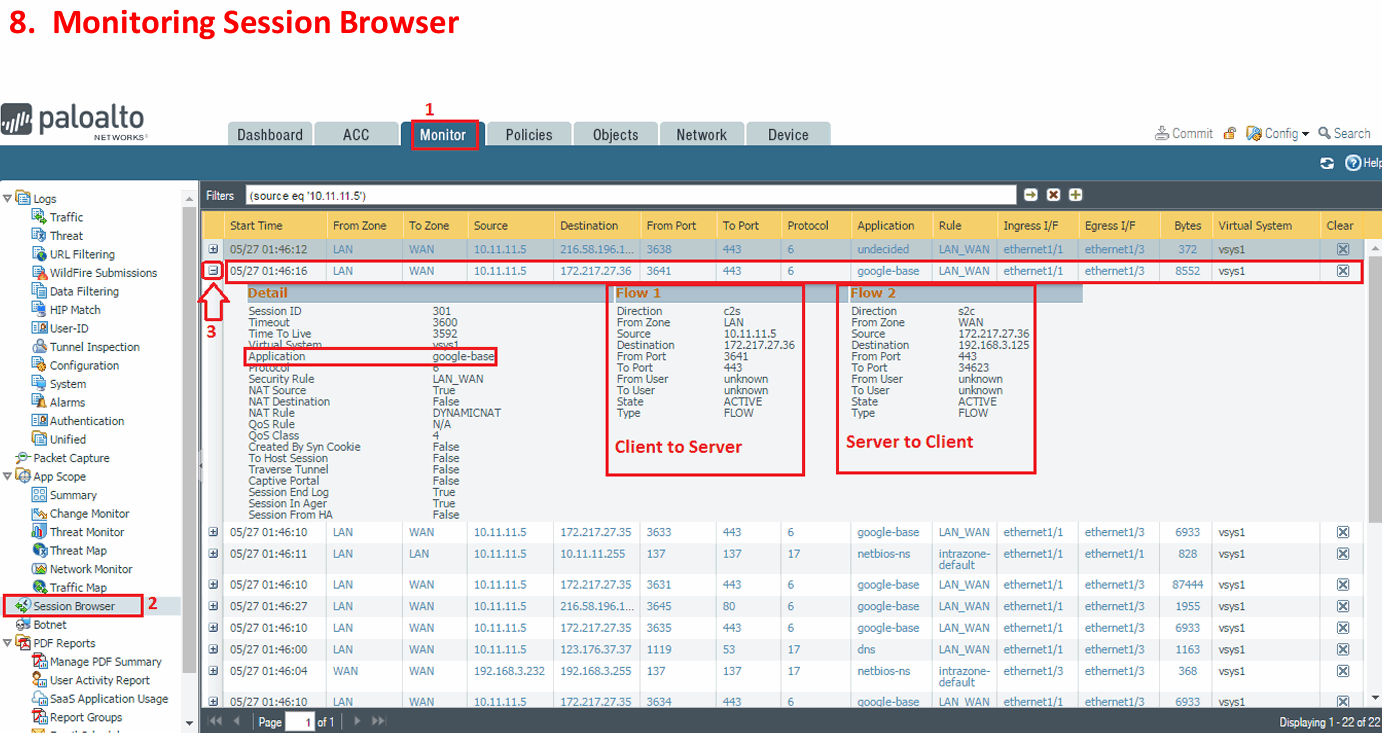
- Session monitoring
- Packet capture
- CLI troubleshooting
- Ping / Traceroute
- Session troubleshooting
Advanced Networking
- Security Profile Groups
- Custom signatures
- External Dynamic Lists
- IP blocking
- DNS Security
- Advanced URL Filtering
- WildFire
- Zero Trust concepts
Firewall Architecture & Planning
- Palo Alto NGFW architecture
- PAN-OS fundamentals
- Firewall deployment models
- Layer 2 / Layer 3 deployment
- Virtual Wire
- Security Zones
- Interface architecture
- Network design and planning
- High Availability concepts
Initial Firewall Configuration
- Management interface
- Administrator accounts
- Device configuration
- Interfaces
- Zones
- Virtual Routers
- DNS/NTP
- Licensing and updates
- Basic system configuration
Security Policies
- Security policy creation
- Source and destination zones
- Source and destination addresses
- Applications
- Services and service groups
- Users and user groups
- URL categories
- Security Profiles
- Security Profile Groups
- Policy ordering
- Policy troubleshooting
User-ID
- Active Directory integration
- User mapping
- Group mapping
- User-based security policies
- User-ID agents
- Authentication sources
- Troubleshooting User-ID
URL Filtering
- URL categories
- Allow/block policies
- Custom URL categories
- URL filtering profiles
- Safe Search
- Website access control
- URL filtering troubleshooting
NAT
- Source NAT
- Destination NAT
- Static NAT
- Dynamic IP/Port NAT
- Destination Port Translation
- NAT rule matching
- NAT troubleshooting
SSL/TLS Decryption
- SSL Forward Proxy
- SSL Inbound Inspection
- Decryption policies
- Decryption profiles
- Certificate configuration
- Certificate management
- Troubleshooting encrypted traffic
WildFire
- WildFire architecture
- File submission
- Malware analysis
- WildFire verdicts
- WildFire profiles
- Integration with security policies
GlobalProtect
- GlobalProtect architecture
- Portal
- Gateway
- Authentication
- Security policies
- Remote-user access
- HIP checks
- GlobalProtect troubleshooting
App-ID
- Application identification
- Application-based policies
- Application groups
- Application filters
- Custom applications
- Application dependencies
- Identifying applications using non-standard ports
Content-ID & Security Profiles
- Antivirus
- Anti-Spyware
- Vulnerability Protection
- URL Filtering
- File Blocking
- Data Filtering
- WildFire Analysis
- Security Profile Groups
- Profile configuration and policy attachment
File Blocking
- File type control
- Allow/block file types
- Download/upload control
- File-blocking profiles
- WildFire integration
- Monitoring blocked files
Routing
- Static routes
- Virtual Router
- Default route
- OSPF
- BGP
- ECMP
- Policy-Based Forwarding
- Route troubleshooting
Threat Prevention
- Malware protection
- Exploit protection
- Vulnerability protection
- Anti-Spyware
- Command-and-control protection
- Threat logs
- Security Profile configuration
VPN
- IPsec VPN
- Site-to-Site VPN
- IKE
- IPsec Crypto Profiles
- Tunnel interfaces
- VPN routing
- VPN monitoring
- VPN troubleshooting
High Availability
- Active/Passive HA
- HA configuration
- HA links
- Session synchronization
- Configuration synchronization
- Failover
- HA troubleshooting
Panorama
Panorama is Palo Alto Networks’ Centralized Management Platform for managing multiple Palo Alto firewalls from a single location.
Instead of logging in to each firewall separately, an administrator can use Panorama to manage policies, configurations, logs, and monitoring centrally.
1. Centralized Firewall Management
Panorama allows you to manage multiple Palo Alto firewalls from one interface.
For example:
Panorama
↓
Firewall 1 – Head Office
Firewall 2 – Branch 1
Firewall 3 – Branch 2
Firewall 4 – Data Center
Panorama
- Panorama architecture
- Device Groups
- Templates
- Shared Policies
- Centralized management
- Configuration management
- Centralized logging
- Policy deployment
Troubleshooting
- Traffic troubleshooting
- Security policy troubleshooting
- NAT troubleshooting
- Routing troubleshooting
- Application identification troubleshooting
- User-ID troubleshooting
- VPN troubleshooting
- SSL Decryption troubleshooting
- Log-based troubleshooting
- Packet capture
- Session investigation
Logging & Monitoring
- Traffic logs
- Threat logs
- URL logs
- WildFire logs
- System logs
- Configuration logs
- ACC
- Monitor tab
- Log filtering
- Security event investigation
Integration & Operations
The certification also covers the engineer’s ability to integrate the NGFW with other tools and manage deployed environments, rather than focusing only on initial configuration.
Palo Alto’s current Learning Center provides the official NGFW Engineer learning material; Palo Alto’s community team directs candidates there for the study material.
Job Roles After Completing a Palo Alto Firewall Course
1. Palo Alto Firewall Engineer
Responsible for deploying, configuring, maintaining, and troubleshooting Palo Alto Networks firewalls.
2. Network Security Engineer
Designs and manages network security infrastructure, including firewalls, VPNs, security policies, and network segmentation.
3. Firewall Engineer
Focuses specifically on firewall configuration and security operations.
Responsibilities:
- Create firewall policies
- Configure NAT
- Configure VPN
- Monitor traffic
- Troubleshoot connectivity
- Analyze security logs
4. Network Security Administrator
Handles the day-to-day administration of security devices.
Responsibilities:
- Firewall monitoring
- User access management
- Security policy changes
- Backup and configuration management
- Log monitoring
- Troubleshooting
5. Network Engineer – Security
Combines traditional networking with firewall security.
Responsibilities:
- Routing and switching
- VLAN configuration
- OSPF/BGP
- Firewall integration
- Internet connectivity
- VPN
- Network troubleshooting
This is a very good role if you already have networking knowledge.
6. Security Operations Engineer
Works in a security operations environment and monitors network security events.
Responsibilities:
- Monitor threats
- Analyze firewall logs
- Investigate suspicious traffic
- Respond to security incidents
- Work with SIEM/SOC tools
7. Network Security Analyst
Focuses more on analyzing security events rather than designing the entire network.
Responsibilities:
- Analyze traffic and threat logs
- Investigate suspicious users/IPs
- Identify malicious applications
- Review URL and malware events
- Support incident response
8. Firewall Support Engineer
Provides technical support for firewall-related problems.
Typical issues:
- Internet not working
- NAT problems
- VPN not connecting
- Application blocked
- Routing problems
- Security policy issues
- SSL decryption problems
This role is common in IT service providers, system integrators, and managed security service providers (MSSPs).
9. Senior Network Security Engineer
After gaining several years of experience, you can move into a senior role.
Responsibilities:
- Enterprise firewall deployment
- HA architecture
- Panorama
- Multiple ISP design
- VPN architecture
- Security segmentation
- SSL inspection
- Advanced troubleshooting
- Security policy design
10. Network Security Architect
This is a Higher-Level design role.
The architect designs the complete security infrastructure for large organizations.
Responsibilities:
- Enterprise security architecture
- Data-center security
- Firewall placement
- DMZ design
- HA design
- Multi-site security
- Zero Trust architecture
- Cloud security
- Disaster recovery
Certification: The current Next-Generation Firewall Engineer certification is particularly relevant to the Palo Alto firewall-engineering career path.
Palo Alto Firewall Engineer Salary in India
Current salary data varies significantly by experience, city, company, certification, and hands-on experience. Recent Glassdoor data for Palo Alto Firewall Engineer roles in India shows a ₹4–10 Lakh/year base-pay range, with an average base around ₹10 Lakh/year; reported total-pay examples vary considerably.
- Fresher / 0–1 Year
₹3 – ₹6 LPA
Roles: Junior Firewall Engineer, Network Support Engineer, SOC/Firewall Analyst. - 1–3 Years Experience
₹5 – ₹10 LPA
Roles: Firewall Engineer, Network Security Engineer, Palo Alto Support Engineer. - 3–5 Years Experience
₹7 – ₹13 LPA
Roles: Network Security Engineer, Palo Alto Firewall Engineer, Security Operations Engineer. - 5–8 Years Experience
₹10 – ₹18+ LPA
Roles: Senior Network Security Engineer, Senior Firewall Engineer, Palo Alto SME. - 8+ Years Experience
₹15 – ₹25+ LPA
Roles: Lead Security Engineer, Network Security Lead, Security Consultant. - Security Architect Level
₹20 – ₹40+ LPA can be possible depending on experience, company, location, and technical expertise. - Skills That Increase Salary
- Palo Alto NGFW
- FortiGate
- Panorama
- App-ID / User-ID
- NAT
- VPN / GlobalProtect
- SSL/TLS Decryption
- HA
- OSPF / BGP
- Troubleshooting
- Cloud Security
- SASE / Prisma Access
- Certification Advantage
A relevant Palo Alto certification such as Next-Generation Firewall Engineer can strengthen your profile, but Hands-on Experience is more important than certification alone. - Important Point
Salary depends on Experience, location, company, Networking Knowledge, Palo Alto Hands-on Experience, certification, and interview performance. These figures are broad market ranges, not guaranteed salaries.
Paloalto Firewall Model Datasheet
What is Palo Alto VM?
Palo Alto VM, commonly called Palo Alto VM-Series, is a virtual Next-Generation Firewall (NGFW) from Palo Alto Networks.
Instead of using a physical Palo Alto firewall appliance, the firewall runs as a Virtual Machine (VM) on a server, virtualization platform, or cloud.
Where can it run?
Palo Alto VM-Series can run on platforms such as:
- VMware ESXi
- KVM
- Microsoft Azure
- AWS
- Google Cloud
- Other supported cloud/virtual environments
Why use Palo Alto VM?
The biggest advantage is that you don’t need to purchase a physical Palo Alto firewall. You can run the firewall on your existing server infrastructure or cloud platform.
Palo Alto VM-Series Models
Palo Alto VM-Series does not have physical models like PA-410, PA-440, PA-850, etc. Instead, VM-Series performance is mainly determined by the VM-Series software/license, allocated vCPU, memory, and platform.
Main VM-Series Options
- VM-50
- Entry-level VM firewall
- Suitable for labs and small environments
- Lower throughput/capacity
- VM-100
- Small/medium virtual deployment
- Suitable for branch and smaller enterprise environments
- VM-300
- Medium enterprise workloads
- Higher traffic capacity than VM-100
- VM-500
- Larger enterprise environments
- Higher performance and session capacity
- VM-700
- High-performance virtual firewall
- Designed for large enterprise/data-center workloads
Important: Palo Alto has changed VM-Series licensing and model offerings over time, so the exact currently purchasable models and performance limits depend on the PAN-OS/licensing generation and deployment platform.
For a Learning Lab, VM-Series is generally much more practical than buying a physical PA firewall.